

Il software CRM per il settore bancario offre agli istituti finanziari un punto centrale per gestire i dati dei clienti, la cronologia delle transazioni, le preferenze di comunicazione e i dettagli delle relazioni. Con queste informazioni, i gruppi di lavoro possono comprendere meglio le esigenze dei clienti, gestire le interazioni e offrire servizi finanziari più pertinenti.
Scegliere la piattaforma giusta può essere difficile, vista la disponibilità di così tante opzioni CRM per il settore bancario. Basandomi sulla mia esperienza nella valutazione dei software per le operazioni di ricavo, ho testato e confrontato diverse piattaforme leader in base alle loro funzionalità, alla facilità d'uso e all'idoneità per i flussi di lavoro bancari.
Questa guida illustra le mie conclusioni e recensioni per facilitare il confronto tra le opzioni e trovare il software CRM per il settore bancario più adatto alle tue esigenze.
Perché fidarsi dei nostri consigli sui software
6,700+
Reviews
20
Industry experts
16+
Evaluation factors
14
Years
Le nostre recensioni riflettono il nostro giudizio indipendente, non un discorso di vendita. Scopri come manteniamo la trasparenza.
Per questa guida, abbiamo valutato gli strumenti attraverso test pratici e ricerche indipendenti, assegnando un punteggio agli strumenti in base ai nostri criteri di selezione.
Le nostre recensioni riflettono il nostro giudizio editoriale umano, non un discorso di vendita.
Tabella comparativa dei software CRM per il settore bancario
Utilizza questa tabella comparativa per esaminare i dettagli dei prezzi delle mie migliori selezioni di software CRM per il settore bancario.
| Tool | Best For | Trial Info | Price | ||
|---|---|---|---|---|---|
| 1 | Ideale per flussi di lavoro personalizzabili | Prova gratuita di 15 giorni | A partire da $23/utente/mese (con fatturazione annuale) | Website | |
| 2 | Ideale per le visualizzazioni della pipeline di vendita | Prova gratuita di 14 giorni | A partire da $65/utente/mese (con fatturazione annuale) | Website | |
| 3 | Ideale per gli strumenti di produttività delle vendite | Prova gratuita di 14 giorni | A partire da $19/utente/mese (con fatturazione annuale) | Website | |
| 4 | Ideale per l'erogazione dei prestiti e la gestione dei mutuatari | Demo gratuita disponibile | Prezzi su richiesta | Website | |
| 5 | Ideale per vendite, marketing e assistenza integrati | È disponibile una prova gratuita di 15 giorni | A partire da $12/utente/mese (con fatturazione annuale) | Website | |
| 6 | Ideale per la valutazione dei lead basata sull'IA | Prova gratuita di 21 giorni | A partire da $9/utente/mese (con fatturazione annuale) | Website | |
| 7 | Het beste voor intranet en interne communicatie | Gratis proefperiode beschikbaar | Prijzen op aanvraag | Website | |
| 8 | Ideale per ottenere una visione finanziaria unificata dei clienti | Consulenza gratuita disponibile | Prezzi su richiesta | Website | |
| 9 | Ideale per la gestione della forza vendita sul campo | Demo gratuita disponibile | Prezzi su richiesta | Website | |
| 10 | Ideale per l'automazione agentica | Demo gratuita disponibile | A partire da $40/utente/mese (con fatturazione annuale) | Website |


Recensioni dei migliori software CRM per il settore bancario
Di seguito sono riportati i miei riepiloghi dettagliati dei migliori software CRM per il settore bancario presenti nella mia selezione. Le mie recensioni esaminano approfonditamente le funzionalità principali, i pro e i contro, le integrazioni e i casi d’uso ideali di ogni strumento, per aiutarti a trovare quello più adatto.
 Ideale per flussi di lavoro personalizzabili
- Prova gratuita di 15 giorni
- A partire da $23/utente/mese (con fatturazione annuale)
Visit WebsiteCustomer Rating:4.7/5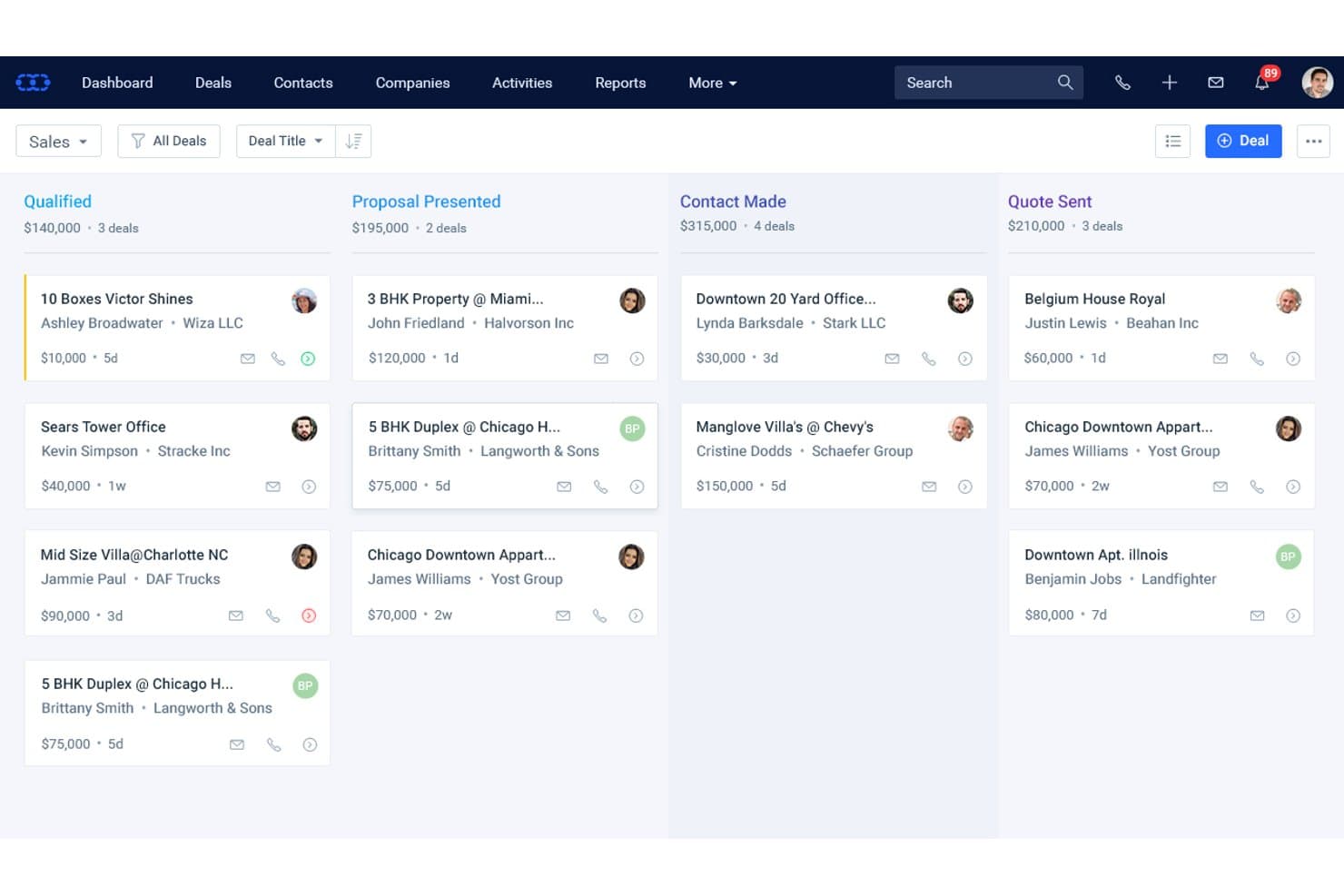
Salesmate CRM organizza le opportunità bancarie nelle fasi della pipeline in base al valore e al contatto. Salesmate CRM è un CRM commerciale generico che offre pipeline personalizzabili, chiamate e SMS integrati, informazioni sui contatti assistite dall'IA e automazione dei flussi di lavoro senza codice tramite il suo motore Smart Flows.
Per chi è più adatto Salesmate CRM?
Salesmate è una buona scelta per i team più piccoli di servizi finanziari che desiderano creare flussi di vendita personalizzati senza affidarsi a uno sviluppatore o a una piattaforma bancaria progettata appositamente.
Perché ho scelto Salesmate CRM
Ho scelto Salesmate CRM come una delle soluzioni migliori perché il suo motore Smart Flows consente ai team più piccoli di servizi finanziari di creare esattamente i flussi di lavoro per i clienti di cui hanno bisogno, senza scrivere una sola riga di codice. Apprezzo il fatto che sia possibile attivare automazioni in più passaggi a partire da praticamente qualsiasi evento del CRM, come il cambio di fase di un'opportunità o l'apertura di un'e-mail, per poi concatenare automaticamente attività di follow-up, creazione di attività e contatti tramite SMS. Abbinando questa funzione a pipeline configurabili illimitate, è possibile mappare da zero flussi separati per diverse linee di prodotti.
Funzionalità principali di Salesmate CRM
- Informazioni sui contatti con Sandy AI: Sandy AI analizza la cronologia delle comunicazioni e i dati sul coinvolgimento per fornire consigli sulla migliore azione successiva per ogni contatto.
- VoIP e SMS integrati: Gli strumenti nativi per chiamate e messaggi consentono al team di registrare, salvare e monitorare ogni interazione con i clienti direttamente nel CRM.
- Moduli personalizzati: Disponibili con il piano Business e i piani superiori, i moduli personalizzati consentono di creare strutture di dati specifiche per il settore bancario, come registri dei prestiti o relazioni di tesoreria.
- Monitoraggio dell'attribuzione dei ricavi: Collega i ricavi a campagne, flussi di lavoro e interazioni con i clienti specifici, consentendo di vedere quali attività stanno realmente generando risultati.
Integrazioni di Salesmate CRM
Salesmate CRM offre circa 40 integrazioni native, tra cui Microsoft 365, Google Workspace, DocuSign, Clearbit, QuickBooks Online e Xero. Fornisce inoltre un'API REST, webhook e Zapier per connessioni personalizzate, ma non offre integrazioni native con i sistemi bancari centrali.
Pros and Cons
Pros:
- Motore di automazione dei flussi di lavoro altamente personalizzabile
- Pipeline illimitate per diverse funzioni bancarie
- Chiamate, messaggi e informazioni basate sull'IA integrati
Cons:
- Nessun modello di dati o flusso di lavoro bancario nativo
- I registri di controllo sono disponibili solo con il piano Enterprise
Learn more about Salesmate CRM: Ideale per le visualizzazioni della pipeline di vendita
- Prova gratuita di 14 giorni
- A partire da $65/utente/mese (con fatturazione annuale)
Visit WebsiteCustomer Rating:4.6/5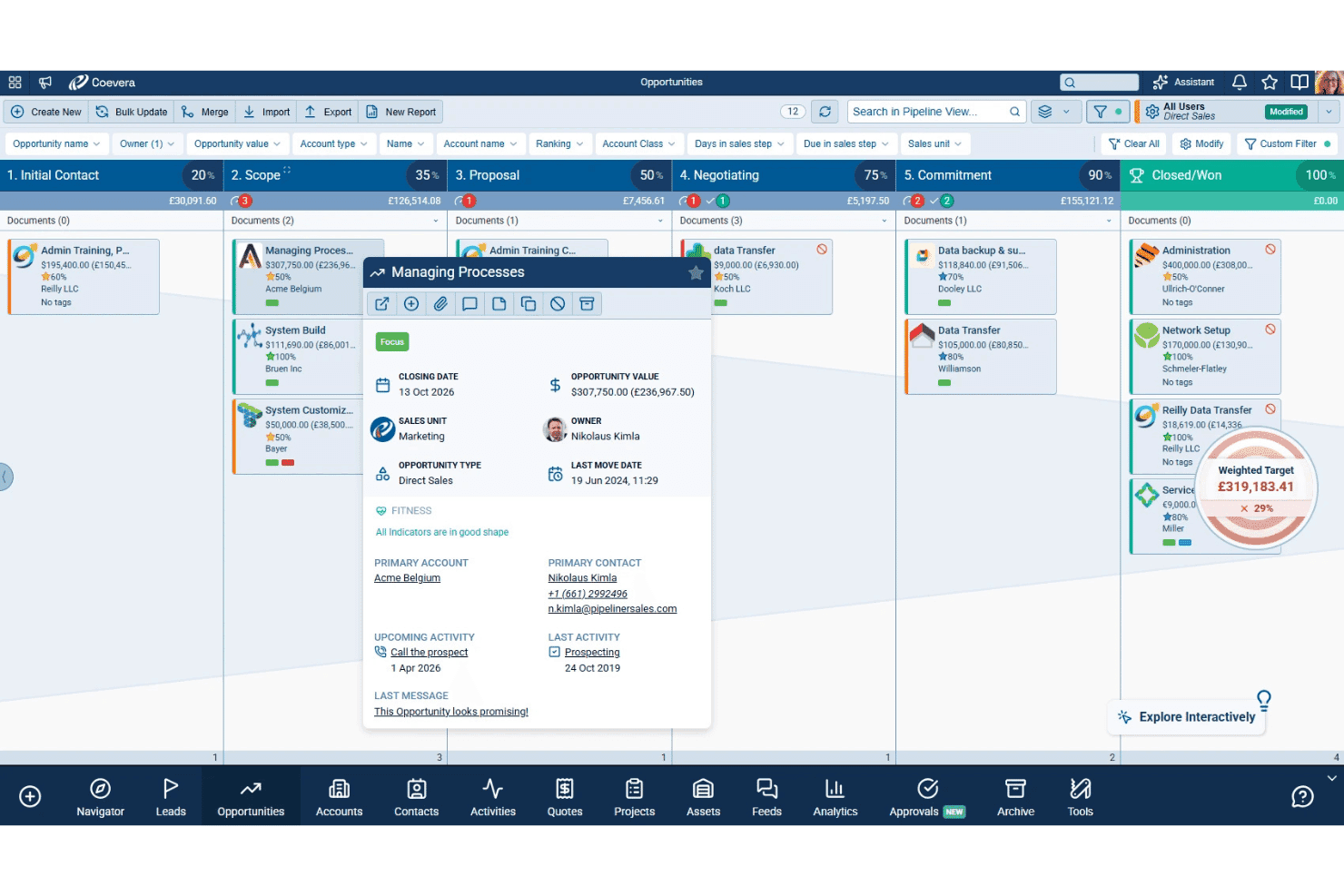
Coevera combina pipeline di vendita visive, strumenti di AI, gestione dei clienti chiave e flussi di lavoro senza codice. Coevera (precedentemente Pipeliner CRM) è una piattaforma CRM basata sulla gestione visiva delle pipeline, che offre diversi tipi di visualizzazione delle trattative, strumenti di vendita basati sull'AI, funzionalità per la gestione dei clienti chiave e l'automazione dei flussi di lavoro senza codice.
Per chi è più adatto Coevera?
Coevera è adatto ai team del settore bancario commerciale e ai gestori delle relazioni che necessitano di uno strumento visivo e intuitivo per le pipeline e non richiedono integrazioni native predefinite con i sistemi bancari centrali.
Perché ho scelto Coevera
Ho scelto Coevera come una delle soluzioni migliori perché il suo motore per le pipeline visive è realmente diverso da qualsiasi altra soluzione nel settore CRM. È possibile passare al volo dalle visualizzazioni Kanban, a bolle, a grafico e a mappa, con un indicatore dinamico degli obiettivi sovrapposto direttamente alla pipeline, così il team bancario commerciale può vedere le prestazioni in tempo reale senza dover eseguire un report separato. La mappatura delle relazioni di Voyager AI crea inoltre automaticamente organigrammi e identifica i contatti mancanti all'interno di un account, un aspetto importante quando si gestiscono reti complesse di parti interessate nell'ambito di un'operazione di finanziamento commerciale.
Funzionalità principali di Coevera
- Strumento per l'automazione dei flussi di lavoro: uno strumento di automazione senza codice con funzionalità di trascinamento che consente di creare flussi di lavoro basati su trigger per l'assegnazione di attività, le notifiche e le connessioni ad app esterne senza il supporto degli sviluppatori.
- Previsioni predittive: previsioni dei ricavi basate sull'AI che valutano il rischio delle trattative e analizzano la copertura della pipeline per supportare proiezioni dei ricavi più accurate.
- Analisi degli spazi inutilizzati: una sovrapposizione a matrice degli account che mette in relazione il catalogo prodotti esistente con gli account attuali per far emergere opportunità di vendita aggiuntiva ed espansione.
- Alimentatore BI: uno strumento integrato per l'esportazione dei dati che invia i dati CRM a Tableau o Power BI con un ciclo di aggiornamento giornaliero per report e analisi esterni.
Integrazioni di Coevera
Coevera offre integrazioni native con Microsoft 365, Google Workspace, Tableau, Power BI, SharePoint, OneDrive, Dropbox, PandaDoc e RingCentral. I piani Business e superiori includono un'API REST; Coevera supporta inoltre webhook e Zapier.
Pros and Cons
Pros:
- Le visualizzazioni visive della pipeline semplificano il monitoraggio delle trattative
- Mappatura delle relazioni basata sull'AI per account complessi
- Automazione dei flussi di lavoro senza codice per i processi di vendita
Cons:
- Nessuna pipeline di prodotti bancari predefinita
- Mancano modelli di conformità e dati specifici per il settore bancario
Learn more about Coevera (formerly Pipeliner CRM): Ideale per gli strumenti di produttività delle vendite
- Prova gratuita di 14 giorni
- A partire da $19/utente/mese (con fatturazione annuale)
Visit WebsiteCustomer Rating:4.4/5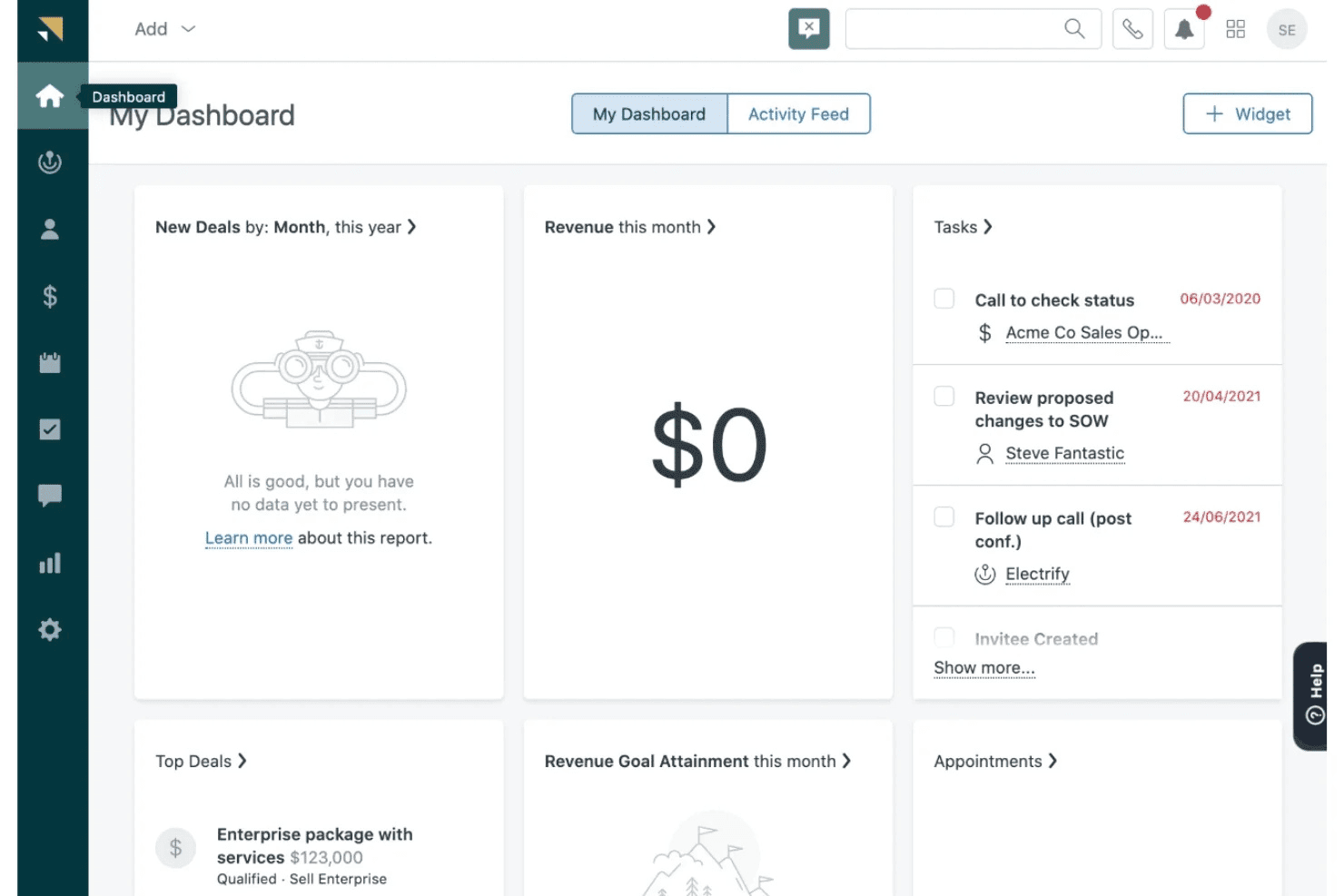
Zendesk Sell centralizza contatti, trattative, monitoraggio della pipeline, coinvolgimento nelle vendite e report sulle attività. Zendesk Sell è un CRM per le vendite che centralizza la gestione dei contatti e delle trattative, il monitoraggio della pipeline, il coinvolgimento nelle vendite e i report sulle attività in un'unica piattaforma.
Per chi è più adatto Zendesk Sell?
Zendesk Sell è adatto ai piccoli team di vendita nei servizi finanziari che utilizzano già Zendesk Support e desiderano una visione condivisa dei clienti tra vendite e assistenza senza una curva di apprendimento ripida.
Perché ho scelto Zendesk Sell
Ho incluso Zendesk Sell tra le mie scelte migliori perché i suoi strumenti per la produttività delle vendite offrono ai team bancari a contatto con i clienti un vantaggio concreto nella gestione del volume quotidiano di contatti. Il compositore automatico esegue automaticamente le chiamate negli elenchi, registrandone gli esiti direttamente nelle schede dei contatti, mentre il riproduttore di attività riunisce le azioni ripetitive di ricontatto in un'unica schermata, così gli addetti alle vendite non perdono tempo passando da un contesto all'altro. Le sequenze di e-mail di massa inviate ai segmenti degli elenchi intelligenti consentono ai team dei servizi bancari al dettaglio di svolgere attività di contatto mirate verso gruppi di potenziali clienti filtrati senza interventi manuali.
Funzionalità principali di Zendesk Sell
- Elenchi intelligenti: Visualizzazioni in tempo reale e filtrabili di potenziali clienti e trattative che consentono di segmentare i contatti in base a criteri personalizzati e di agire immediatamente su gruppi mirati.
- Attivatori delle vendite: Automazione basata su regole che avvia attività di ricontatto, notifiche o aggiornamenti dei campi quando le trattative o i contatti soddisfano condizioni definite.
- Attribuzione di punteggi a potenziali clienti e trattative basata sull'intelligenza artificiale: Disponibile con il piano Professional e superiori, questa funzionalità classifica i potenziali clienti e le trattative aperte in base alla probabilità di conversione, utilizzando dati sulle prestazioni storiche.
- Database integrato per la ricerca di potenziali clienti: Accesso a oltre 44M di record aziendali e oltre 350M di profili di potenziali clienti direttamente nel CRM per creare elenchi di contatti mirati.
Integrazioni di Zendesk Sell
Zendesk Sell offre integrazioni native con Zendesk Support, Google Workspace, Microsoft 365 e WhatsApp, oltre a 85 app del marketplace. Fornisce un'API aperta per connessioni personalizzate con i sistemi bancari centrali e supporta Zapier.
Pros and Cons
Pros:
- Tempi di implementazione brevi per i team di vendita
- Database integrato per la ricerca di potenziali clienti aziendali incluso
- L'app mobile consente la gestione delle relazioni sul campo
Cons:
- Nessun modello di pipeline per prodotti bancari disponibile
- Annunciata la dismissione ufficiale del prodotto per il 2027
Learn more about Zendesk Sell: Ideale per l'erogazione dei prestiti e la gestione dei mutuatari
- Demo gratuita disponibile
- Prezzi su richiesta
Visit WebsiteCustomer Rating:4.4/5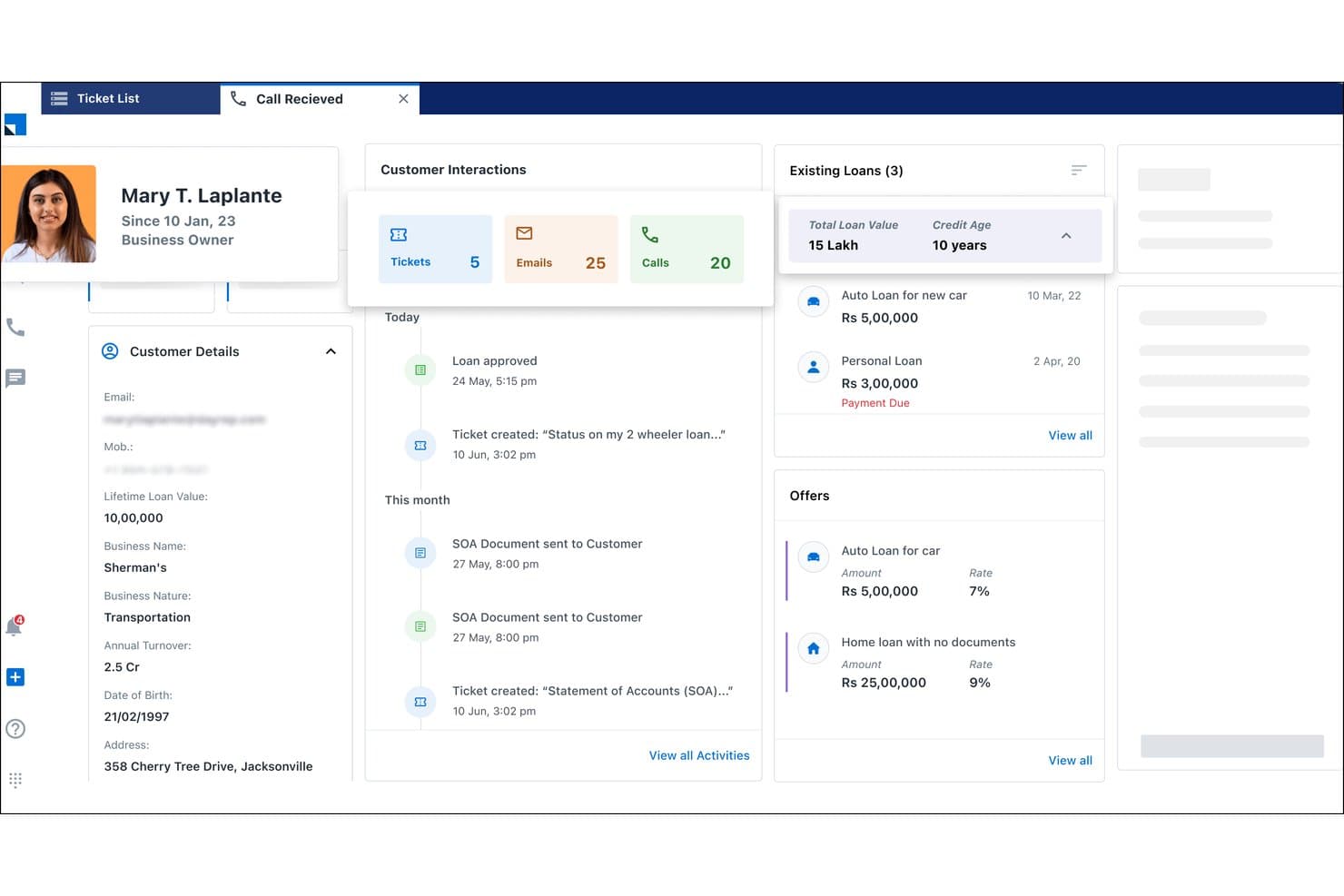
LeadSquared mostra i prestiti, le offerte e la cronologia dei clienti in un'unica visualizzazione. LeadSquared è una piattaforma CRM focalizzata sul settore BFSI, basata sull'automazione della gestione dei contatti, sui flussi di lavoro per l'erogazione dei prestiti, sull'acquisizione digitale dei mutuatari e sulle operazioni di vendita nel settore bancario al dettaglio.
Per chi è più adatto LeadSquared?
LeadSquared è particolarmente adatto ai team del settore bancario al dettaglio e dei prestiti che devono gestire grandi volumi di richieste di prestito, automatizzare l'acquisizione dei mutuatari e monitorare le attività di vendita sul campo all'interno di ampie reti di agenti.
Perché ho scelto LeadSquared
Ho scelto LeadSquared come una delle soluzioni migliori perché i suoi flussi di lavoro per l'erogazione dei prestiti e la gestione dei mutuatari sono molto più approfonditi rispetto a una tipica pipeline CRM. Sono particolarmente colpito dalla distribuzione automatizzata dei contatti, che indirizza in tempo reale le richieste di prestito in arrivo agli agenti in base al tipo di prestito, alla disponibilità e alla posizione. Il punteggio dei mutuatari basato sul comportamento e i portali digitali per l'acquisizione, dove i richiedenti caricano i documenti, monitorano lo stato della richiesta e verificano la propria identità tramite eKYC, rendono la piattaforma realmente progettata per le operazioni di prestito al dettaglio ad alto volume.
Funzionalità principali di LeadSquared
- CRM mobile con delimitazione geografica: I responsabili delle relazioni possono registrare le attività sul campo solo quando si trovano fisicamente presso la sede di un cliente, con supporto per la registrazione e l'uscita automatiche e la modalità offline.
- Modulo CRM per la gestione degli incassi: Tiene traccia dei debitori insolventi, assegna la priorità ai casi di recupero crediti e segmenta i mutuatari in base al livello di rischio per supportare i team bancari addetti agli incassi.
- Automazione della vendita incrociata basata sul comportamento: Individua le opportunità di vendita incrociata a partire dai dati sulle attività dei clienti e indirizza offerte mirate tramite e-mail, SMS o code del centro contatti.
- Controlli degli accessi basati sui ruoli: Modelli di autorizzazione configurabili limitano l'accesso ai dati in base al ruolo, supportando i requisiti di governance dei team di vendita e operativi del settore bancario.
Integrazioni di LeadSquared
LeadSquared offre oltre 162 integrazioni dal mercato online, tra cui Ameyo, WhatsApp, Google Ads, Acuity Scheduling e Airtel Enterprise Messaging Manager. Si connette a CBS, LOS/LMS, sistemi di gestione interna e sistemi di trading tramite API aperte, sebbene non siano documentati connettori per FIS, Fiserv e Jack Henry.
Pros and Cons
Pros:
- Funzionalità avanzate per l'acquisizione dei mutuatari e l'eKYC
- Il CRM mobile supporta le operazioni sul campo con delimitazione geografica
- Instradamento automatizzato dei contatti in base al comportamento del mutuatario
Cons:
- Non dispone di integrazioni native con i principali sistemi bancari centrali degli Stati Uniti
- Non dispone di gerarchie per la gestione commerciale e patrimoniale
Learn more about LeadSquared: Ideale per vendite, marketing e assistenza integrati
- È disponibile una prova gratuita di 15 giorni
- A partire da $12/utente/mese (con fatturazione annuale)
Visit WebsiteCustomer Rating:4.3/5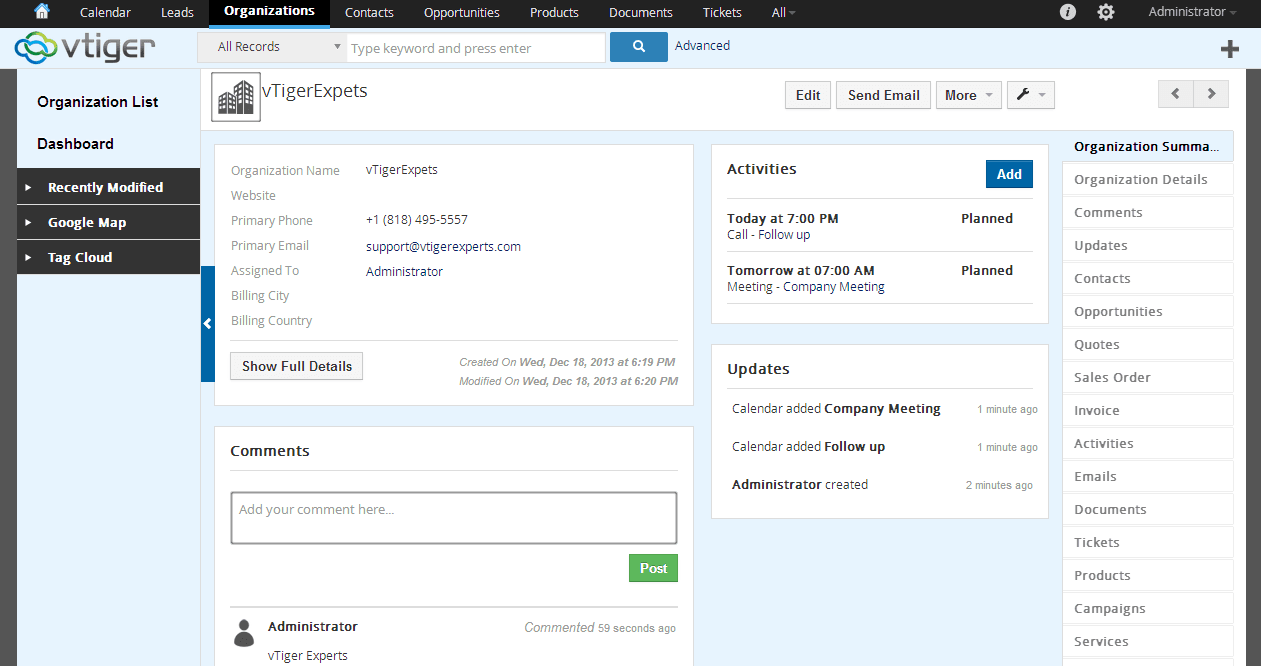
Vtiger è un CRM cloud per le PMI che migliora la collaborazione nelle vendite e nell'assistenza. Vtiger è una piattaforma CRM completa che combina la gestione della pipeline di vendita, l'automazione del marketing e gli strumenti di assistenza clienti in un'interfaccia unificata.
Per chi è più adatto Vtiger?
Vtiger è una soluzione particolarmente adatta alle società finanziarie di piccole dimensioni e alle banche locali che desiderano strumenti per vendite, marketing e assistenza in un'unica piattaforma conveniente, senza dover gestire più fornitori.
Perché ho scelto Vtiger
Ho scelto Vtiger come una delle migliori soluzioni perché riunisce le pipeline di vendita, le campagne di marketing e i casi di assistenza clienti in un'unica piattaforma, una combinazione che le società finanziarie di piccole dimensioni raramente ottengono senza integrare diversi strumenti. Mi piace il modo in cui la dashboard One View mostra in un unico punto la cronologia completa delle interazioni di un cliente attraverso tutte e tre le funzioni. Il Progettista dei processi mi permette inoltre di creare flussi di lavoro basati su trigger per attività come le sequenze di promemoria KYC e i promemoria per i rinnovi, senza scrivere codice.
Funzionalità principali di Vtiger
- Valutazione delle trattative con Calculus AI: assegna un punteggio alle trattative aperte utilizzando segnali relativi a idoneità, coinvolgimento e sentiment, per aiutare a stabilire quali opportunità richiedono attenzione.
- Progettista dei processi: un generatore visivo di flussi di lavoro basato su trigger che automatizza l'assegnazione delle attività, le catene di approvazione e le sequenze di follow-up senza scrivere codice.
- Gestione di più pipeline: supporta un numero illimitato di pipeline di vendita configurate in modo indipendente, consentendo al team di monitorare separatamente diverse linee di prodotto o segmenti di clientela.
- Portale clienti: un portale self-service personalizzato con il marchio aziendale in cui i clienti possono inviare richieste, accedere ai documenti e monitorare lo stato dei casi senza contattare direttamente il team.
Integrazioni di Vtiger
Vtiger offre integrazioni native con QuickBooks, Xero, Tally, Google Suite, Microsoft Office 365, Zoom, Microsoft Teams, Stripe e Mailchimp, ma non dispone di connettori documentati per FIS, Fiserv, Jack Henry o Temenos. Supporta connessioni personalizzate tramite la sua API REST e VTAP, oltre a Zapier.
Pros and Cons
Pros:
- CRM completo per vendite, marketing e assistenza
- Potente automazione dei flussi di lavoro e progettista dei processi
- Intelligenza artificiale integrata per la valutazione delle trattative e le previsioni
Cons:
- Nessun modulo di conformità bancaria progettato specificamente
- Nessuna integrazione nativa con i sistemi bancari centrali
Learn more about Vtiger: Ideale per la valutazione dei lead basata sull'IA
- Prova gratuita di 21 giorni
- A partire da $9/utente/mese (con fatturazione annuale)
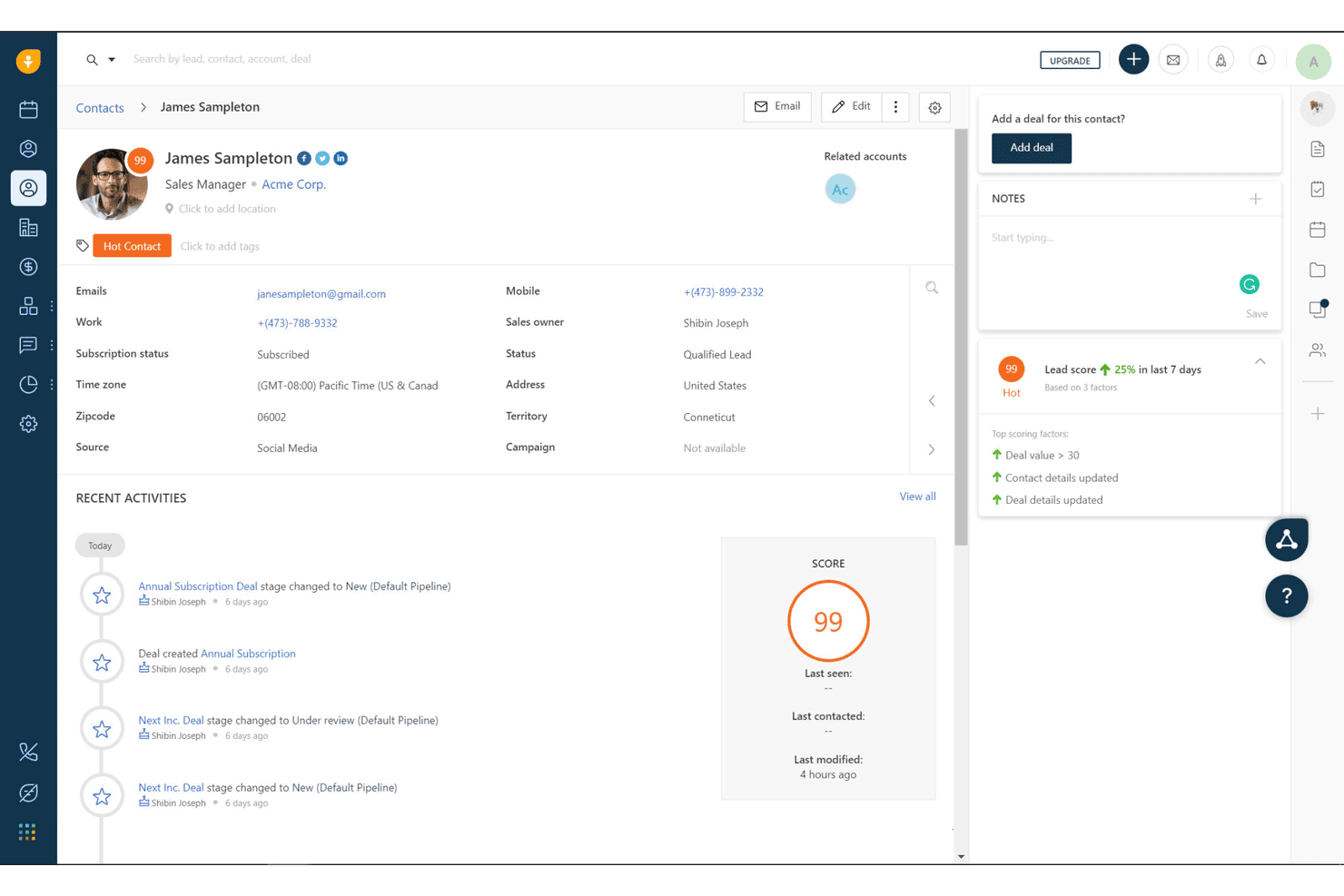
Freshworks CRM monitora i punteggi dei lead e l'attività dei contatti per i clienti bancari. Freshworks CRM è un CRM per le vendite di uso generale che combina la valutazione dei lead basata sull'IA, pipeline configurabili, comunicazione omnicanale e automazione dei flussi di lavoro per i team di vendita del settore bancario.
Per chi è più adatto Freshworks CRM?
Freshworks CRM è particolarmente adatto a banche locali e cooperative di credito che necessitano di dare priorità ai lead basandosi sull'IA senza sostenere i costi o la complessità delle piattaforme bancarie aziendali.
Perché ho scelto Freshworks CRM
Ho incluso Freshworks CRM tra le mie scelte migliori perché la valutazione dei contatti di Freddy AI è uno degli strumenti più pratici per dare priorità ai lead che abbia visto a questo livello di prezzo. Assegna a ogni contatto un punteggio da 0 a 99 in base a segnali reali di coinvolgimento, come aperture delle e-mail, attività telefoniche e comportamento sul web, così i consulenti bancari sanno esattamente chi chiamare per primo. Freddy segnala inoltre le trattative come 'A rischio' o 'Probabile chiusura', aiutando i team bancari al dettaglio ad agire prima che le opportunità si raffreddino.
Funzionalità principali di Freshworks CRM
- Più pipeline configurabili: Crea pipeline separate per prestiti, depositi o prodotti di gestione patrimoniale, ciascuna con fasi personalizzate e visualizzazioni Kanban o tabellari.
- Compositore omnicanale integrato: Effettua e registra le chiamate direttamente nel CRM con registrazione delle chiamate, invio di messaggi vocali e tracciamento automatico delle attività nei profili dei clienti.
- Automazione dei flussi di lavoro basata su regole: Configura regole di attivazione 'se-allora' con un massimo di 10 condizioni per automatizzare l'assegnazione delle attività, gli avvisi via e-mail e i suggerimenti di vendita incrociata in base all'attività del cliente.
- Certificazioni di sicurezza SOC 2 Tipo II e ISO 27001: Accedi a autorizzazioni basate sui ruoli, registri di controllo e un ambiente di prova per soddisfare i requisiti di base in materia di sicurezza e governance delle istituzioni finanziarie.
Integrazioni di Freshworks CRM
Freshworks CRM offre integrazioni native con Google Workspace, Microsoft 365, Slack, Zoom, DocuSign, QuickBooks e Xero. Supporta API REST, webhook, integrazioni dal mercato delle app e Zapier, ma non dispone di connettori nativi per le principali piattaforme bancarie centrali.
Pros and Cons
Pros:
- La valutazione dei lead di Freddy AI mette in evidenza i clienti con maggiore intenzione d'acquisto
- Flussi di lavoro per la vendita incrociata semplici e personalizzazione delle pipeline
- Attivazione rapida con un supporto IT minimo necessario
Cons:
- Nessuna integrazione nativa con i sistemi bancari centrali
- Nessun flusso di lavoro KYC o AML integrato
Learn more about Freshworks CRM: Het beste voor intranet en interne communicatie
- Gratis proefperiode beschikbaar
- Prijzen op aanvraag
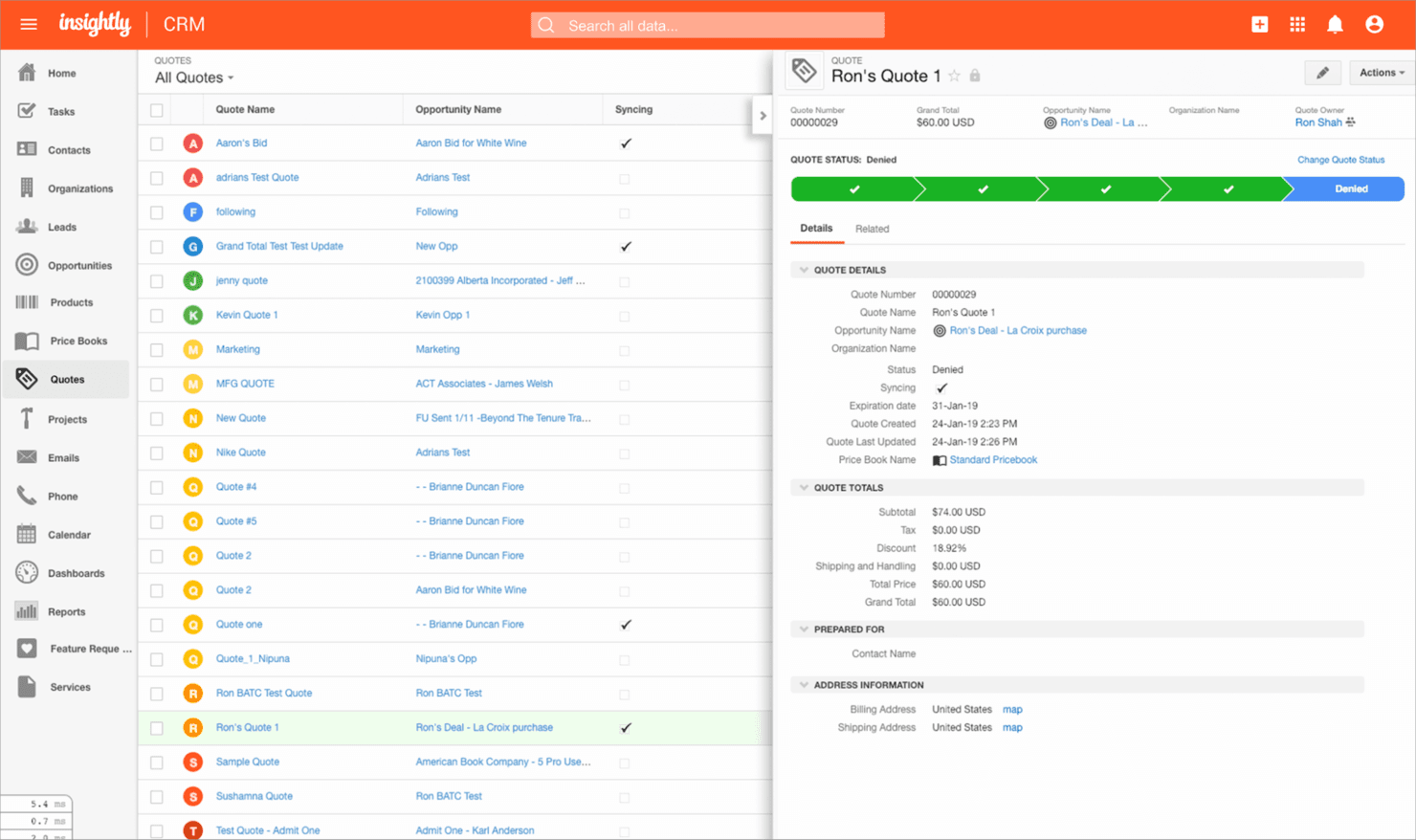
Happeo is een samenwerkingstool voor verspreid werkende teams die intranetfunctionaliteit combineert met communicatie- en productiviteitsfuncties. Happeo verdient zijn plek omdat het een speciaal intranet en een werkruimte voor interne communicatie samenbrengt, iets waar verspreid werkende teams die een verbonden cultuur opbouwen vaak moeite mee hebben. De kanaalfunctie zorgt ervoor dat nieuws, HR-updates en beleidsregels gemakkelijk te vinden zijn, en ik vind het prettig hoe Happeo integreert met Google Workspace, zodat aankondigingen en discussies nooit verloren gaan in e-mailthreads.
Als je een digitaal hoofdkantoor nodig hebt waarin communicatie met context centraal staat (vooral over verschillende tijdzones heen), is Happeo de oplossing waar ik steeds op terugkom.
Beste voor Happeo
- Verspreid werkende teams die gecentraliseerde interne communicatie nodig hebben
- Organisaties die Google Workspace als hun primaire platform gebruiken
Niet geschikt voor Happeo
- Teams die geavanceerde functies voor taak- of projectbeheer nodig hebben
- Bedrijven die niet hebben geïnvesteerd in de productiviteitssuite van Google
Wat Happeo onderscheidt
Happeo creëert ruimte voor interne communicatie en bronnen door een intranet te combineren met kanalen in sociale stijl, die aansluiten bij de manier waarop verspreid werkende teams doorgaans praten in Slack of Teams, maar met meer context. In tegenstelling tot Slack, waar belangrijke aankondigingen ondergesneeuwd raken, verwacht Happeo dat je gestructureerde ruimtes gebruikt voor bedrijfsnieuws en blijvend beschikbare bronnen.
Het werkt goed wanneer je iedereen op één lijn probeert te houden zonder ruis van e-mail of chat—bijvoorbeeld door aankondigingen en bronnen op een centrale plek te bewaren in plaats van ze drie scrolls diep in Slack te laten verdwijnen.
Compromissen bij Happeo
Happeo optimaliseert voor gecentraliseerde communicatie en kennis, maar je mist ingebouwde functies voor taakopvolging of projectwerkstromen. Daardoor heb je nog steeds aanvullende systemen nodig voor daadwerkelijk werkbeheer.
Pros and Cons
Pros:
- Gebruiksvriendelijke interface
- Uitgebreide zoekfunctionaliteit
- Effectieve interne communicatie
Cons:
- Vereist training voor volledig gebruik
- Beperkte aanpassingsmogelijkheden
Learn more about Insightly: Ideale per ottenere una visione finanziaria unificata dei clienti
- Consulenza gratuita disponibile
- Prezzi su richiesta
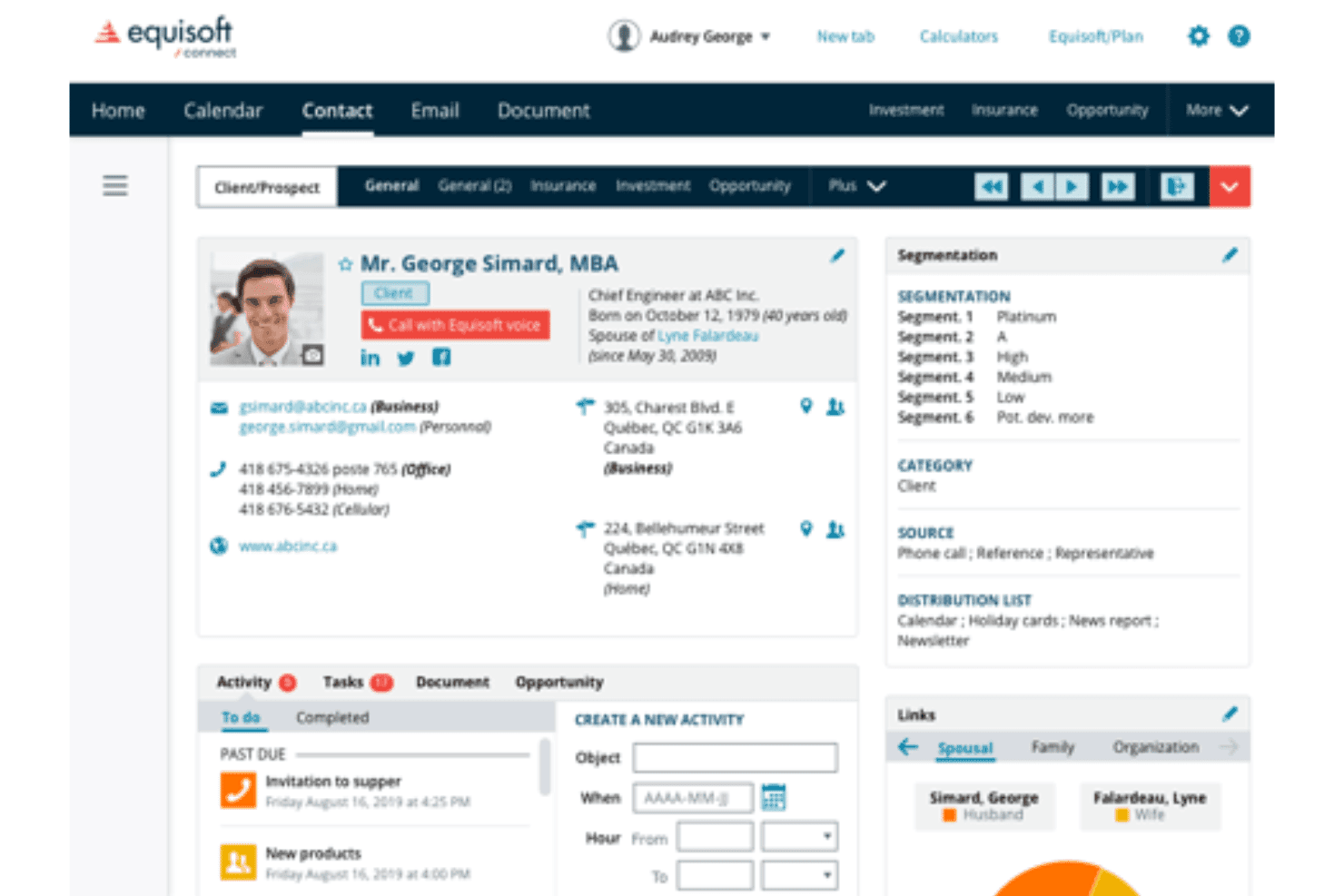
Equisoft centralizza le comunicazioni dei clienti relative ad assicurazioni, investimenti e consulenti. Equisoft è un CRM per consulenti finanziari che centralizza le polizze assicurative dei clienti, i portafogli di investimento e la cronologia delle comunicazioni, collegandosi a oltre 80 fonti di dati di compagnie assicurative e MGA.
Per chi è più indicato Equisoft?
Equisoft è particolarmente adatto ai consulenti finanziari indipendenti e ai professionisti della gestione patrimoniale che necessitano di un'unica piattaforma per gestire polizze assicurative, conti di investimento e comunicazioni con i clienti.
Perché ho scelto Equisoft
Ho scelto Equisoft come una delle soluzioni migliori perché riunisce automaticamente in un'unica vista cliente le polizze assicurative, i portafogli di investimento e la cronologia delle comunicazioni, attingendo dati aggiornati da oltre 80 connessioni con compagnie assicurative e MGA. Apprezzo il fatto che i consulenti ottengano un quadro finanziario completo per ogni cliente senza dover inserire manualmente i dati, un aspetto importante quando si individuano lacune nella copertura o opportunità di vendita aggiuntiva nell'intero portafoglio di un nucleo familiare.
Funzionalità principali di Equisoft
- Tracciamento automatizzato per le verifiche di conformità: Equisoft registra con data e ora e archivia ogni interazione con il cliente — chiamate, e-mail e dati patrimoniali — così la documentazione è sempre pronta per le verifiche senza registrazioni manuali.
- Applicazione nativa per dispositivi mobili: I consulenti possono accedere a tutti i dati del CRM, gestire le schede dei clienti e monitorare le attività di vendita direttamente da un dispositivo mobile.
- Archiviazione illimitata dei documenti: I documenti dei clienti, i moduli precompilati e la documentazione del settore vengono archiviati e organizzati all'interno della piattaforma, eliminando la necessità di accedere ai portali esterni delle compagnie assicurative.
- Indicatori di vendita aggiuntiva basati sull'intelligenza artificiale: I modelli di apprendimento automatico analizzano i dati dei clienti per individuare opportunità di vendita aggiuntiva e vendita incrociata, segnalando il potenziale di crescita direttamente nel flusso di lavoro del consulente.
Integrazioni di Equisoft
Equisoft/connect offre oltre 80 integrazioni documentate con compagnie assicurative canadesi, MGA e intermediari di investimento, tra cui Manulife, Sun Life Financial, Canada Life, RBC Insurance, Investia Financial e Richardson Wealth. Si collega inoltre a Equisoft/centralize, VirtGate, Microsoft 365, Gmail, DocuSign e Mailchimp, ma non dispone di integrazioni documentate con FIS, Fiserv, Jack Henry o Temenos.
Pros and Cons
Pros:
- Consolida i dati dei clienti relativi ad assicurazioni e investimenti
- Monitoraggio automatizzato della conformità alle normative per i consulenti
- L'intelligenza artificiale individua opportunità di vendita aggiuntiva nel settore assicurativo
Cons:
- Nessun supporto per i flussi di lavoro dei prodotti bancari
- Mancano integrazioni e analisi per le funzionalità bancarie principali
Learn more about Equisoft: 9Ideale per la gestione della forza vendita sul campo
Vymo
- Demo gratuita disponibile
- Prezzi su richiesta
Visit WebsiteCustomer Rating:5/5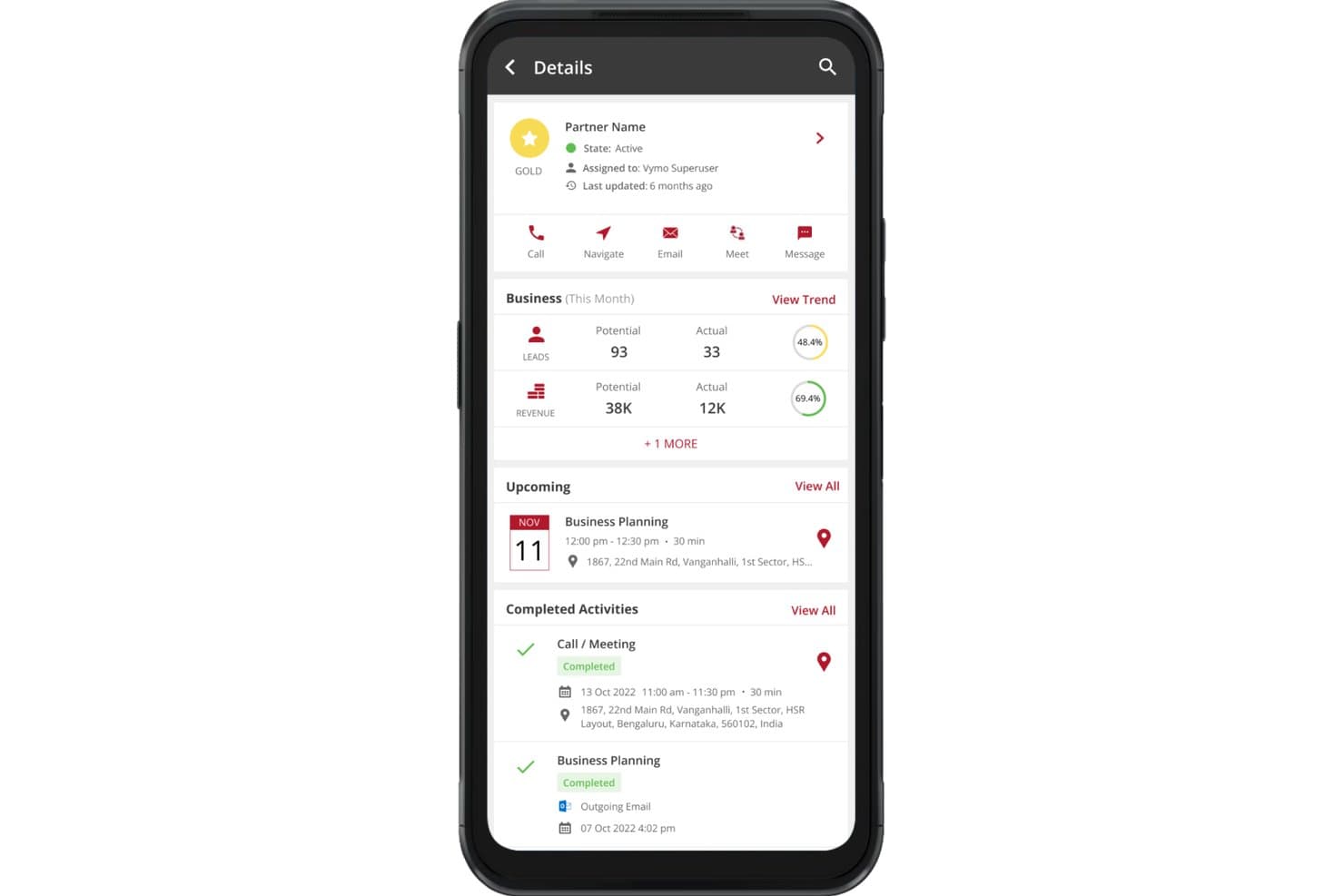
Vymo mostra le attività dei partner, i potenziali clienti e i ricavi in un'unica vista mobile. Vymo è un CRM progettato innanzitutto per dispositivi mobili, pensato per i team sul campo del settore bancario e dei servizi finanziari, che combina l'acquisizione passiva delle attività, raccomandazioni basate sull'IA per la prossima azione migliore, gestione dei lead, monitoraggio della pipeline e flussi di lavoro per la conformità.
Per chi è più indicato Vymo?
Vymo è particolarmente adatto ai team del settore bancario al dettaglio e commerciale che si affidano fortemente a responsabili delle relazioni sul campo per acquisire clienti e incrementare le attività di vendita.
Perché ho scelto Vymo
Ho scelto Vymo come una delle soluzioni migliori perché nessun altro strumento di questo elenco gestisce la forza vendita sul campo allo stesso modo. La sua acquisizione passiva delle attività registra automaticamente chiamate, riunioni e check-in senza che i responsabili delle relazioni debbano mai compilare un modulo, mantenendo accurati i dati CRM anche all'interno di team distribuiti di grandi dimensioni. Sono inoltre colpito dal suo motore basato sull'IA per la prossima azione migliore, che analizza il comportamento dei migliori performer per guidare in tempo reale ogni responsabile delle relazioni sul campo.
Funzionalità principali di Vymo
- Vista a 360° del conto: Consolida i dati dei clienti, la cronologia delle interazioni, le gerarchie organizzative e la mappatura dei responsabili delle relazioni di più filiali in un'unica scheda cliente.
- Assegnazione dei potenziali clienti basata sull'IA: Assegna automaticamente i potenziali clienti ai responsabili delle relazioni in base al carico di lavoro, alle competenze e ai dati sulle prestazioni passate.
- Strumenti per i flussi di lavoro di conformità: Flussi di lavoro KYC integrati, monitoraggio AML, registri di controllo e controlli degli accessi basati sui ruoli con mascheramento delle informazioni personali identificabili (PII).
- Modulo per il recupero crediti: Tiene traccia, assegna priorità e gestisce le attività di recupero crediti direttamente all'interno della piattaforma.
Integrazioni di Vymo
Vymo indica integrazioni con Salesforce, Microsoft Dynamics 365, Zoho CRM, Oracle CRM, SAP CRM e Zendesk, oltre a connessioni generiche con CBS, LOS e LMS. Offre un'API per le integrazioni personalizzate; i connettori specifici per FIS, Fiserv, Jack Henry e Temenos non sono documentati.
Pros and Cons
Pros:
- Design progettato innanzitutto per i team di vendita sul campo
- L'acquisizione passiva delle attività migliora l'adozione del CRM
- L'IA suggerisce le prossime azioni migliori ai venditori
Cons:
- Nessun connettore nativo per le piattaforme bancarie centrali
- Non dispone di strumenti di analisi della redditività delle relazioni
Learn more about Vymo: Ideale per l'automazione agentica
- Demo gratuita disponibile
- A partire da $40/utente/mese (con fatturazione annuale)
Visit WebsiteCustomer Rating:4.7/5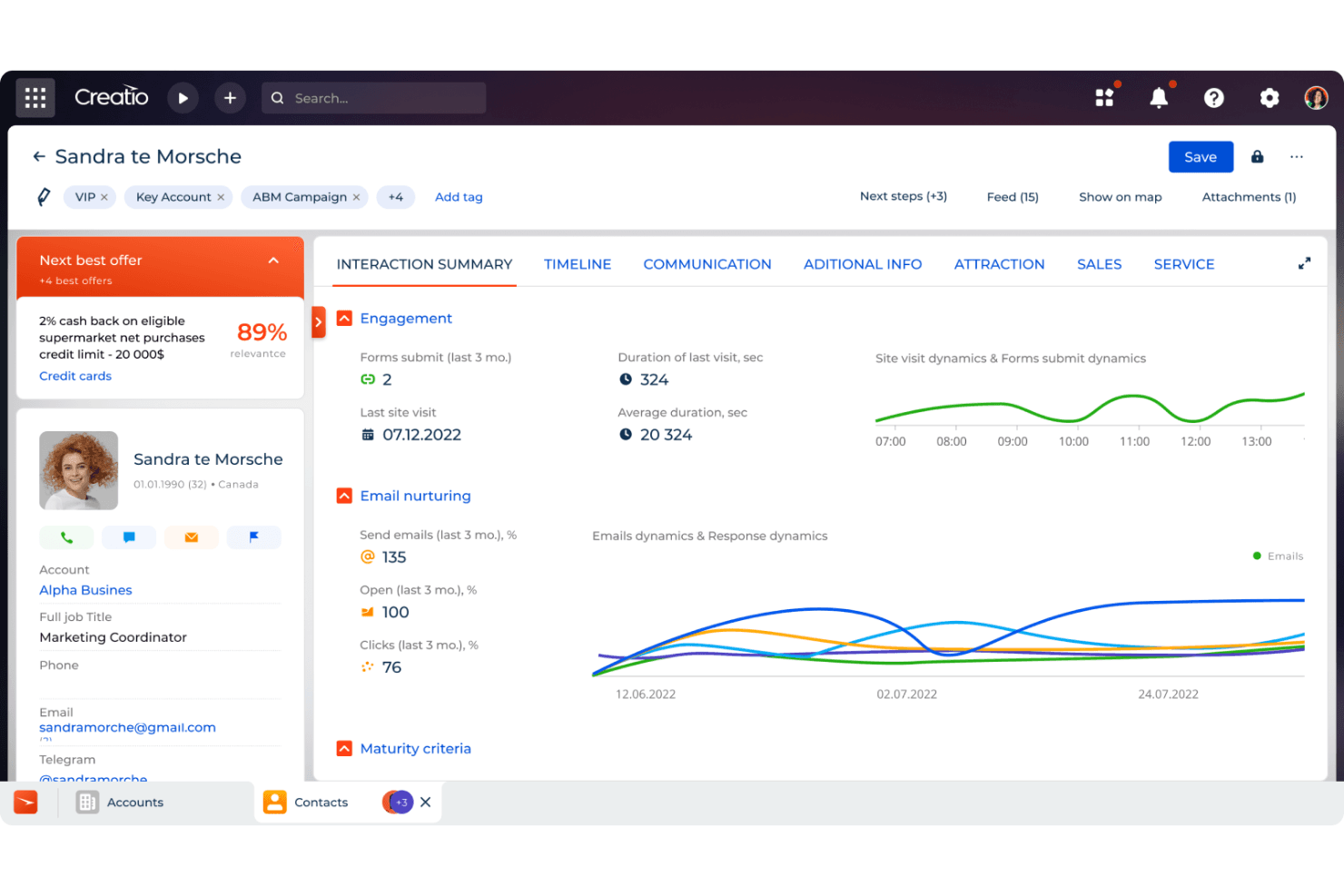
Il cruscotto clienti a 360 gradi di CRM Creatio offre una panoramica completa delle interazioni e della cronologia dei clienti. Creatio CRM è una piattaforma CRM per i servizi finanziari, basata sull'automazione dei flussi di lavoro senza codice, su raccomandazioni per la migliore offerta successiva basate sull'intelligenza artificiale, sulla gestione delle pipeline multi-LOB e su strumenti nativi per la conformità KYC/AML destinati ai team bancari al dettaglio e commerciali.
Per chi è più adatto Creatio CRM?
Creatio CRM è una soluzione particolarmente adatta alle banche locali e regionali che desiderano automatizzare flussi di lavoro complessi e sensibili alla conformità senza dover ricorrere agli sviluppatori per apportare modifiche.
Perché ho scelto Creatio CRM
Creatio CRM si è guadagnato un posto nella mia lista ristretta perché è basato sull'intelligenza artificiale agentica in un modo raro tra i CRM bancari. Sono rimasto particolarmente colpito dall'Agente di fidelizzazione, che rileva autonomamente il rischio di abbandono e attiva comunicazioni personalizzate prima che il rapporto si deteriori, e dal motore delle Migliori offerte successive, che presenta raccomandazioni di prodotti basate sull'apprendimento automatico con punteggi di probabilità di vendita direttamente nel flusso di lavoro del consulente bancario. I team non tecnici possono inoltre configurare e aggiornare questi processi senza toccare il codice.
Funzionalità principali di Creatio CRM
- Profili di nuclei familiari ed entità giuridiche: Schede finanziarie unificate che raccolgono gerarchie di conti, strutture proprietarie e relazioni tra membri per i clienti del settore bancario al dettaglio e commerciale.
- Motore di flussi di lavoro BPM senza codice: Un generatore di processi con funzionalità di trascinamento che consente al personale bancario non tecnico di configurare flussi di acquisizione clienti, fasi di concessione dei prestiti e instradamento per la conformità senza il supporto degli sviluppatori.
- Modulo per le previsioni di vendita: Proiezioni dei ricavi basate sulla pipeline, con monitoraggio dei risultati rispetto al piano per collaboratori alle vendite, segmenti di clienti e settori verticali.
- Integrazione con ComplyTrack: Un componente aggiuntivo del marketplace che verifica i clienti rispetto agli elenchi di sanzioni e PEP di OFAC, UE, ONU, Dow Jones e LexisNexis, con punteggi di rischio configurabili e tracciati di audit.
Integrazioni di Creatio CRM
Creatio CRM offre integrazioni del marketplace tramite Solutions Metrix per Jack Henry Symitar e Fiserv, oltre a ComplyTrack tramite Creatio Marketplace. Le sue API REST OData e i webhook supportano integrazioni personalizzate; non è documentato alcun connettore FIS nativo.
Pros and Cons
Pros:
- L'intelligenza artificiale agentica alimenta flussi di lavoro proattivi per la fidelizzazione
- Il BPM senza codice si adatta ai cambiamenti della conformità bancaria
- La gestione dei programmi di referral è pensata per le banche
Cons:
- Le funzionalità AML avanzate richiedono un componente aggiuntivo a pagamento
- Gli strumenti di reporting sono meno intuitivi rispetto a quelli della concorrenza
Learn more about Creatio CRM:
Altri software CRM per il settore bancario
Ecco alcune ulteriori opzioni di soluzioni CRM per il settore bancario che non sono entrate nella mia selezione, ma che vale comunque la pena esaminare.
Come Valuto il Software CRM per Banche
Scompongo la mia valutazione in criteri di base—come le integrazioni con i sistemi bancari principali e i workflow di conformità—e fattori distintivi che separano le soluzioni più adatte dalle altre.
Funzionalità Core (Requisiti Fondamentali per Questa Lista)
Quando seleziono gli strumenti per la mia lista, valuto ciascuno su una scala da 0 (non offre la funzionalità) a 5 (eccelle in quest'area) per ogni funzionalità core elencata qui sotto. Successivamente, calcolo il punteggio totale dello strumento in percentuale. Ogni strumento deve raggiungere un punteggio minimo totale del 55% per essere preso in considerazione.
- Profili Clienti Unificati: Verifico se il CRM può collegare contatti individuali a nuclei familiari, entità e gerarchie di conto tra divisioni retail, commerciali e wealth.
- Gestione Pipeline Specifica per il Settore Bancario: Ogni strumento dovrebbe supportare pipeline su misura per prodotti bancari come prestiti, depositi e servizi di tesoreria—non solo fasi generiche di trattativa.
- Integrazioni con i Sistemi Bancari Core: Cerco connettori preconfigurati per piattaforme come FIS, Fiserv, Jack Henry o Temenos in modo che i dati delle relazioni fluiscano senza importazioni manuali.
- Workflow di Conformità e Regolamentazione: Qui sono importanti campi KYC/AML integrati, registri di controllo e accessi basati sui ruoli—specialmente per i team che gestiscono l'onboarding su più linee di prodotto.
- Analytics su Ricavi e Redditività: Valuto se la piattaforma genera report sulla redditività a livello di relazione e sulla quota di portafoglio, non solo sulle metriche standard di vittoria/perdita.
- Workflow di Referral e Cross-Selling: Il CRM dovrebbe instradare i referral tra le linee di business con tracciamento e attribuzione, così un banker commerciale può passare un potenziale cliente wealth con tutto il contesto necessario.
Una volta che ho una lista di strumenti che soddisfano i criteri, considero cosa distingue ciascuna piattaforma dalle altre.
Fattori Distintivi (Cosa Distingue i Fornitori)
Ecco come confronto e paragono i diversi fornitori:
Funzionalità Distintive
Gli strumenti di pricing per la gestione della relazione rappresentano un vero elemento distintivo—cerco piattaforme che permettano ai banker di simulare tassi di prestito e azzeramenti delle commissioni in base al valore totale della relazione prima di strutturare un accordo. Contano anche i suggerimenti AI-driven di next-best-action, soprattutto quando evidenziano opportunità di cross-selling in base alla combinazione di prodotti già utilizzati dal cliente. L’automazione dei report delle chiamate è un’altra funzionalità che valuto con attenzione, poiché i relationship manager che possono registrare le note degli incontri tramite riconoscimento vocale su mobile passano molto meno tempo nell’inserimento dati tra una visita e l’altra.
Oltre le Funzionalità
Pongo molta attenzione all’aspetto regolamentare e di sicurezza—certificazioni come SOC 2 Tipo II e le opzioni di residenza dei dati dicono molto sul fatto che un fornitore sia nato per il settore bancario o si sia solo adattato a esso. Anche i tempi di implementazione sono importanti, poiché le integrazioni con i core bancari possono allungare i tempi di avviamento di mesi se non sono disponibili modelli dati predefiniti e acceleratori specifici per il settore. Valuto inoltre la compatibilità con la dimensione dell’istituto, poiché un CRM progettato per banche locali con poche filiali spesso non è adatto per un’istituzione regionale che gestisce più linee di business.
Come scegliere un software CRM per il settore bancario
Quando confronti i software CRM per il settore bancario, la scelta più adatta dipende dalle esigenze relative ai dati dei clienti, dai requisiti di conformità, dall'offerta di prodotti e dai sistemi bancari già esistenti.
| Se la tua priorità è… | Cerca… |
|---|---|
| Se la tua priorità è…Creare profili completi dei clienti | Cerca…Dati unificati dei clienti che includano conti, interazioni, prodotti e cronologia delle relazioni |
| Se la tua priorità è…Collegare i sistemi bancari esistenti | Cerca…Connettori nativi o API per piattaforme bancarie centrali, prestiti, gestione patrimoniale e pagamenti |
| Se la tua priorità è…Gestire i processi normativi | Cerca…KYC, AML, monitoraggio dei consensi, registri di controllo e flussi di lavoro di conformità configurabili |
| Se la tua priorità è…Aumentare le opportunità di vendita incrociata | Cerca…Raccomandazioni di prodotti, informazioni sulle relazioni e strumenti per la migliore azione successiva |
| Se la tua priorità è…Gestire la comunicazione con i clienti | Cerca…Email, telefono, SMS e messaggistica sicura all'interno dei dati dei clienti |
| Se la tua priorità è…Supportare relazioni bancarie complesse | Cerca…Mappatura delle relazioni tra nuclei familiari, aziende, beneficiari e parti correlate |
Come valutare la tua selezione
- Consolidamento dei dati del cliente di prova: chiedi ai fornitori di dimostrare come i dati relativi al conto, alle interazioni, ai prodotti e alla relazione appaiono all'interno di un unico profilo cliente.
- Verifica della connettività con il sistema bancario centrale: richiedi una dimostrazione dal vivo utilizzando la tua piattaforma bancaria centrale o un ambiente di prova comparabile.
- Esamina i flussi di lavoro per la conformità: verifica come il CRM gestisce le verifiche KYC, gli avvisi AML, i registri dei consensi e le cronologie delle verifiche.
- Valuta l'intelligence sulle relazioni: chiedi al fornitore di dimostrare le raccomandazioni sui prodotti, il monitoraggio delle segnalazioni e la mappatura delle relazioni utilizzando scenari realistici relativi ai clienti.
- Verifica le autorizzazioni e i controlli sui dati: conferma che l'accesso possa essere limitato in base a filiale, reparto, ruolo, tipo di conto o relazione con il cliente.
Che cos'è il software CRM bancario?
Il software CRM bancario è una piattaforma di gestione delle relazioni con i clienti progettata per banche e istituti finanziari. Centralizza i profili dei clienti, le relazioni tra i conti, la cronologia delle comunicazioni, le opportunità di vendita e le attività di assistenza.
Queste piattaforme offrono ai team bancari una visione più chiara di ogni relazione con il cliente. Possono inoltre supportare l'acquisizione dei clienti, i processi di conformità, le segnalazioni, le raccomandazioni sui prodotti e la comunicazione continuativa con i clienti.
Funzionalità del software CRM bancario
Quando selezioni un software CRM bancario, presta attenzione alle seguenti funzionalità chiave:
- Profili cliente unificati: combinano informazioni di contatto, prodotti finanziari, cronologia delle comunicazioni, relazioni tra i conti e attività di assistenza all'interno di un'unica scheda.
- Mappatura delle relazioni: collega i clienti a nuclei familiari, aziende, beneficiari, consulenti, conti e altre parti correlate.
- Connettività con i sistemi bancari: scambia dati con piattaforme bancarie centrali, sistemi di gestione dei prestiti, piattaforme patrimoniali, sistemi di pagamento e altre applicazioni finanziarie.
- Flussi di lavoro KYC e AML: supporta la verifica dell'identità, la raccolta dei documenti, le verifiche dei clienti, le valutazioni del rischio e i processi relativi alla conformità.
- Acquisizione dei clienti: gestisce richieste, documenti obbligatori, approvazioni, firme e attività di acquisizione dal primo contatto fino all'attivazione del conto.
- Gestione del flusso di vendita: monitora potenziali clienti, segnalazioni, opportunità, richieste di prodotti e attività di sviluppo delle relazioni.
- Vendite incrociate e raccomandazioni sui prodotti: individua i prodotti bancari pertinenti in base ai conti esistenti, ai profili dei clienti, alle attività e ai dati sulle relazioni.
- Comunicazione omnicanale: registra email, telefonate, SMS, riunioni e altre interazioni all'interno del profilo del cliente corrispondente.
- Gestione delle attività e dei flussi di lavoro: assegna attività successive, approvazioni, verifiche e attività di assistenza ai clienti sulla base di processi bancari predefiniti.
- Report e cruscotti: monitorano l'attività dei clienti, le segnalazioni, le prestazioni del flusso di vendita, l'adozione dei prodotti, il valore delle relazioni e l'attività dei dipendenti.
Funzionalità comuni dell'AI
Oltre alle funzionalità standard del software CRM bancario, molte piattaforme stanno aggiungendo capacità di AI come:
- Raccomandazioni sulla migliore azione successiva: analizzano l'attività del cliente, i prodotti esistenti e i dati sulle relazioni per suggerire azioni successive pertinenti.
- Modelli di raccomandazione dei prodotti: individuano i prodotti bancari che possono corrispondere al profilo finanziario del cliente, ai conti esistenti o alle attività recenti.
- Riepiloghi delle interazioni con i clienti: generano riepiloghi concisi di email, chiamate, riunioni e interazioni precedenti all'interno della scheda del cliente.
- Classificazione di potenziali clienti e opportunità: valuta i potenziali clienti e quelli esistenti in base al coinvolgimento, al comportamento, ai dati dei conti e ai modelli di conversione.
- Analisi del sentiment dei clienti: esamina i modelli di comunicazione per individuare insoddisfazione, cambiamenti nel coinvolgimento o possibili problemi relativi all'assistenza.
- Informazioni sulle relazioni: individua i collegamenti tra clienti, conti, nuclei familiari, aziende e altre relazioni finanziarie associate.
Vantaggi del software CRM bancario
L'implementazione di un software CRM bancario può offrire diversi vantaggi ai team bancari:
- Visibilità completa del cliente: I record centralizzati consentono ai dipendenti di accedere alle relazioni con i clienti, alla cronologia delle comunicazioni, alle preferenze e alle attività di assistenza precedenti.
- Consigli sui prodotti più pertinenti: I dati sulle relazioni e le informazioni sui clienti possono far emergere opportunità appropriate per proporre ulteriori prodotti bancari.
- Comunicazione coerente con i clienti: I record condivisi delle interazioni riducono le domande ripetute e forniscono ai dipendenti il contesto necessario prima di contattare i clienti.
- Monitoraggio della conformità più efficace: I record KYC, le cronologie delle approvazioni, i dati sui consensi e le tracce di audit creano una documentazione più chiara per le verifiche normative.
- Onboarding dei clienti più rapido: Gli strumenti per la gestione dei flussi di lavoro coordinano la raccolta dei documenti, i controlli dell'identità, le approvazioni e le attività di apertura dei conti.
- Gestione delle relazioni più efficace: La mappatura dei nuclei familiari e delle relazioni offre ai team un contesto più ampio sulle complesse relazioni bancarie personali e commerciali.
- Maggiore visibilità sulle vendite: I pannelli della pipeline mostrano segnalazioni, opportunità, richieste e attività relative ai prodotti tra team e filiali.
Costi e prezzi dei software CRM bancari
Il prezzo dei software CRM bancari varia considerevolmente perché le dimensioni dell'implementazione, i record dei clienti, i requisiti di sicurezza, la personalizzazione e i collegamenti ai sistemi bancari influiscono sul costo totale.
Tabella di confronto dei piani per i software CRM bancari
| Tipo di piano | Prezzo medio | Funzionalità comuni |
|---|---|---|
| Tipo di pianoPiano gratuito | Prezzo medio$0/user/ month | Funzionalità comuniGestione di base dei contatti, spazio di archiviazione limitato, integrazione e-mail e reportistica di base. |
| Tipo di pianoPiano personale | Prezzo medio$10-$20/ user/month | Funzionalità comuniGestione avanzata dei contatti, pannelli personalizzati, monitoraggio delle e-mail e automazione di base. |
| Tipo di pianoPiano aziendale | Prezzo medio$30-$60/ user/month | Funzionalità comuniAutomazione dei flussi di lavoro, analisi avanzate, integrazioni di terze parti e assistenza clienti potenziata. |
| Tipo di pianoPiano per grandi imprese | Prezzo medio$100-$300/ user/month | Funzionalità comuniSoluzioni personalizzabili, responsabile account dedicato, funzionalità di sicurezza avanzate e analisi complete. |
Domande frequenti sui software CRM bancari
Ecco alcune risposte alle domande comuni sui software CRM bancari:
Quanto è sicuro il software CRM bancario per l'archiviazione dei dati sensibili dei clienti?
Il software CRM bancario include generalmente crittografia, controlli degli accessi basati sui ruoli, registri di audit, autenticazione a più fattori e monitoraggio della sicurezza. Prima di scegliere una piattaforma, gli acquirenti dovrebbero inoltre esaminare le certificazioni pertinenti, le opzioni di localizzazione dei dati e le politiche di sicurezza del fornitore.
Il software CRM bancario supporta i flussi di lavoro KYC, AML e di altra natura legati alla conformità?
Molte piattaforme CRM bancarie supportano KYC, AML, verifica dell’identità, raccolta dei documenti, flussi di lavoro per le approvazioni e tracce di audit. Il livello di approfondimento di queste funzionalità varia, quindi gli acquirenti dovrebbero verificare quali processi di conformità sono integrati e quali richiedono strumenti aggiuntivi.
Il software CRM bancario può gestire relazioni complesse tra clienti e nuclei familiari?
Sì. Molte piattaforme possono collegare persone, nuclei familiari, aziende, beneficiari, consulenti e conti correlati. La mappatura delle relazioni offre una visione più chiara dei collegamenti tra clienti e relazioni finanziarie.
Quanto è personalizzabile il software CRM bancario per diversi processi bancari?
La personalizzazione può includere campi, flussi di lavoro, fasi di approvazione, pannelli, pipeline, autorizzazioni e reportistica. Le banche con processi complessi dovrebbero cercare strumenti configurabili che non richiedano un ampio sviluppo per le modifiche di routine.
Il software CRM bancario può supportare la vendita incrociata e i consigli sui prodotti?
Sì. Alcune piattaforme analizzano i profili dei clienti, i prodotti esistenti, l’attività delle transazioni e la cronologia delle relazioni per individuare opportunità pertinenti di vendita incrociata. I sistemi più avanzati possono utilizzare l’IA per suggerire le azioni successive più appropriate o prodotti finanziari idonei.
Quanto bene si adatta il software CRM bancario a più filiali e team?
Molte piattaforme CRM bancarie supportano più filiali, dipartimenti, ruoli e database di grandi dimensioni contenenti i dati dei clienti. Gli acquirenti dovrebbero valutare i controlli delle autorizzazioni, la reportistica tra le varie sedi, la coerenza dei flussi di lavoro e le prestazioni del sistema con l’aumento del numero di utenti e dei volumi di dati.