

CallPage Bewertung 2026: Vorteile, Nachteile, Funktionen und Preise
Ich habe CallPage getestet, um herauszufinden, wie seine Anruftracking-Tools Unternehmen dabei helfen, Leads zu gewinnen, Anruferaktivitäten zu überwachen und Verkaufsgespräche zu verbessern. Hier erfahren Sie, wo es überzeugt, wo es Schwächen zeigt und ob es die richtige Anrufverfolgungssoftware für Ihr Team ist.

Wir bewerten Tools unabhängig, und Provisionen helfen, unsere Tests zu finanzieren. Sehen Sie unsere transparente Richtlinie, unsere Methodik oder schlagen Sie ein Tool vor.
CallPage is a call tracking software built around callback automation. It lets website visitors request an instant call from your team, typically within 28 seconds. I'd consider it when your team is losing website leads and needs a proactive way to connect with high-intent visitors. Compared to CallRail, CallPage is the stronger pick when callback conversion matters as much as call attribution.
CallPage Evaluation Summary

4.7/5
- From $31/month (billed annnually)
- 14-day free trial
Warum Sie unseren Software-Empfehlungen vertrauen können
6,700+
Reviews
20
Industry experts
16+
Evaluation factors
14
Years
Unsere Bewertungen spiegeln unser unabhängiges Urteilsvermögen wider – keine Verkaufsstrategie. Erfahren Sie, wie wir transparent bleiben.
Für diesen Leitfaden haben wir Tools mithilfe von praktischen Tests und unabhängiger Recherche bewertet und dabei unsere Bewertungskriterien angewendet.
Unsere Bewertungen spiegeln unser menschliches redaktionelles Urteilsvermögen wider, keine Verkaufsstrategie.
CallPage Overview
When judging CallPage, I find its live call tracking, callback automation, and user-friendly setup stack up well against most options. Pricing feels fair given the real-time analytics and straightforward onboarding. If having quick integrations and responsive support matter most in your selection, CallPage stands out.
I do think some advanced integrations are less flexible than others, but for sales teams wanting actionable insights without complexity, CallPage is an easy pick. You’ll get the most value if you want instant lead capture and visible rep performance, especially in fast-paced B2B sales environments.
Pros
- Real-time callback triggers increase lead engagement rates
- Call routing options help distribute inbound leads efficiently
- Tracking dashboard surfaces clear rep performance metrics
Cons
- Limited options for custom reporting beyond predefined templates
- No built-in SMS or text tracking features available
- Some users report lag on high-volume call days
Is CallPage Right For Your Needs?
Who Would be a Good Fit for CallPage?
CallPage is a strong fit for sales-driven teams that need to capture leads in real time and track every call from website visits. Companies with inside sales, agencies handling high-volume campaigns, and B2C businesses will benefit from its simple setup and rapid callback options. It’s well suited to organizations that want actionable analytics, quick implementation, and responsive support for accelerating lead response.
- Real Estate AgenciesReal estate teams can instantly engage online prospects through immediate callback, helping convert web leads when interest peaks.
- Automotive DealershipsSales departments can use CallPage’s routing and tracking features to ensure no test-drive or inquiry opportunity is missed.
- Small E-commerce StoresSmaller online retailers can enable fast customer callbacks, building trust and handling purchase questions before shoppers abandon carts.
- SaaS Trial TeamsSaaS businesses can capture inbound demo requests quickly and route them to available sales specialists for timely follow-up.
- Marketing AgenciesAgencies running campaigns for clients can showcase call conversion impact using CallPage’s analytics and dashboard tools.
- Inside Sales TeamsTeams focused on qualifying and closing web leads will see value in CallPage’s real-time lead alerts and call management.
Who Would be a Bad Fit for CallPage?
CallPage isn’t the best fit if your team needs deep phone system customization, handles complex inbound call routing scenarios, or requires advanced call scripting. It isn’t built for companies that depend on SMS, text-based engagement, or heavy outbound calling workflows. Organizations with enterprise-scale telephony demands or highly specialized requirements will likely need a more customizable call center solution.
- Large Call CentersContact centers needing detailed IVR, advanced call scripting, or multi-channel routing will find CallPage’s features too limited.
- Enterprise IT SupportIT helpdesks that rely on deep system integrations and custom telephony workflows won’t get the flexibility required.
- Healthcare ProvidersMedical practices needing HIPAA-compliant call systems and secure patient communication should seek industry-specialized solutions.
- Multilingual Support CentersTeams requiring complex, multi-language interactive voice response setup won’t have the customization tools needed in CallPage.
- Outbound Sales TeamsSales teams making high volumes of outbound cold calls will miss automated dialer or SMS outreach features.
- Field Service OrganizationsCompanies coordinating on-site teams by phone may need task scheduling and dispatching integrations beyond CallPage’s scope.
Wie wir Tools testen & bewerten
Wir haben Jahre damit verbracht, unser System zur Softwarebewertung und -prüfung aufzubauen, zu verfeinern und kontinuierlich zu verbessern. Der Bewertungsmaßstab ist darauf ausgelegt, die Feinheiten der Software-Auswahl und die Effektivität eines Tools abzubilden, wobei der Fokus auf entscheidende Aspekte des Auswahlprozesses gelegt wird. Nachfolgend können Sie genau sehen, wie unser Test- und Bewertungssystem anhand von sieben Kriterien funktioniert. Dadurch sind wir in der Lage, eine objektive Einschätzung der Software auf Basis von Kernfunktionalität, besonderen Merkmalen, Benutzerfreundlichkeit, Onboarding, Kundensupport, Integrationen, Kundenbewertungen und Preis-Leistungs-Verhältnis zu geben.
Kernfunktionalität (25% der Gesamtnote)
Unser Bewertungsprozess beginnt immer mit der Kernfunktionalität eines Tools. Verfügt es über die grundlegenden Funktionen und Merkmale, die ein Nutzer erwarten würde? Sind einige dieser Kernfunktionen nur in teureren Tarifen verfügbar? Grundsätzlich erwarten wir, dass ein Tool mit den Grundfunktionen seiner Wettbewerber mithalten kann.
Besondere Merkmale (25% der Gesamtnote)
Im nächsten Schritt bewerten wir außergewöhnliche Zusatzfunktionen, die über den üblichen Funktionsumfang hinausgehen. Eine hohe Bewertung spiegelt spezialisierte oder einzigartige Eigenschaften wider, welche das Produkt schneller, effizienter oder für den Nutzer wertvoller machen. Wir bewerten außerdem, wie einfach sich andere typische Tools zur Erweiterung der Funktionalität und des Nutzens integrieren lassen. Lösungen mit zahlreichen nativen Integrationen, Drittanbieter-Anbindungen und API-Zugängen für eigene Anpassungen schneiden am besten ab.
Benutzerfreundlichkeit (10% der Gesamtnote)
Wir berücksichtigen, wie schnell und einfach sich Aufgaben mit der Kernfunktionalität durch das Tool erledigen lassen. Hoch bewertete Software ist gut gestaltet, intuitiv bedienbar, bietet mobile Apps, Vorlagen und gestaltet sogar komplexe Aufgaben einfach.
Onboarding (10% der Gesamtnote)
Uns ist wichtig, wie schnell Teams eine neue Plattform übernehmen, daher bewerten wir, wie leicht ein Tool ohne umfangreiche Schulungen erlernbar und nutzbar ist. Wir betrachten, wie schnell Teammitglieder ohne Vorerfahrung loslegen können. Hoch bewertete Lösungen zeichnen sich dadurch aus, dass nur wenig oder keine Unterstützung notwendig ist.
Kundensupport (10% der Gesamtnote)
Wir prüfen, wie schnell und einfach es ist, Unterstützung per Telefon, Live-Chat oder Wissensdatenbank zu erhalten. Anbieter, die Echtzeit-Support bieten, erzielen die besten Noten, während Chatbots am schlechtesten abschneiden.
Kundenbewertungen (10% der Gesamtnote)
Zusätzlich zu unseren eigenen Tests berücksichtigen wir den Net Promoter Score von aktuellen und früheren Kunden. Wir prüfen, ob Nutzer das Tool für die Kernfunktionalitäten erneut wählen würden. Eine hohe Softwarebewertung spiegelt einen hohen Weiterempfehlungswert aktueller oder früherer Kunden wider.
Preis-Leistungs-Verhältnis (10% der Gesamtnote)
Abschließend bewerten wir unter Berücksichtigung aller Kriterien den durchschnittlichen Preis für Einstiegs-Tarife im Verhältnis zu den Kernfunktionen und dem Wert der übrigen Kriterien. Software, die mehr Leistung für weniger Geld bietet, erzielt eine höhere Bewertung.
Core Features
Callback Widget
Automatically prompts website visitors to schedule a phone call in seconds. This boosts immediate lead conversion right from your site.
Call Tracking Analytics
Tracks and records details of every inbound and outbound call. Users can quickly see performance data, lead sources, and conversion rates.
Call Routing
Distributes incoming leads to the most available or best-suited rep. You can configure routing rules by geography, time, or skill set.
Call Recording
Records all calls for quality assurance and training. Managers can review conversations for feedback or compliance checks.
Real-Time Notifications
Alerts your team the instant a lead requests a call or interacts with the widget. This ensures your sales reps respond right when prospects are most engaged.
Lead Management Panel
Lets you view, filter, and organize calls and leads in one dashboard. You streamline follow-ups by tracking responses and outcomes in real time.
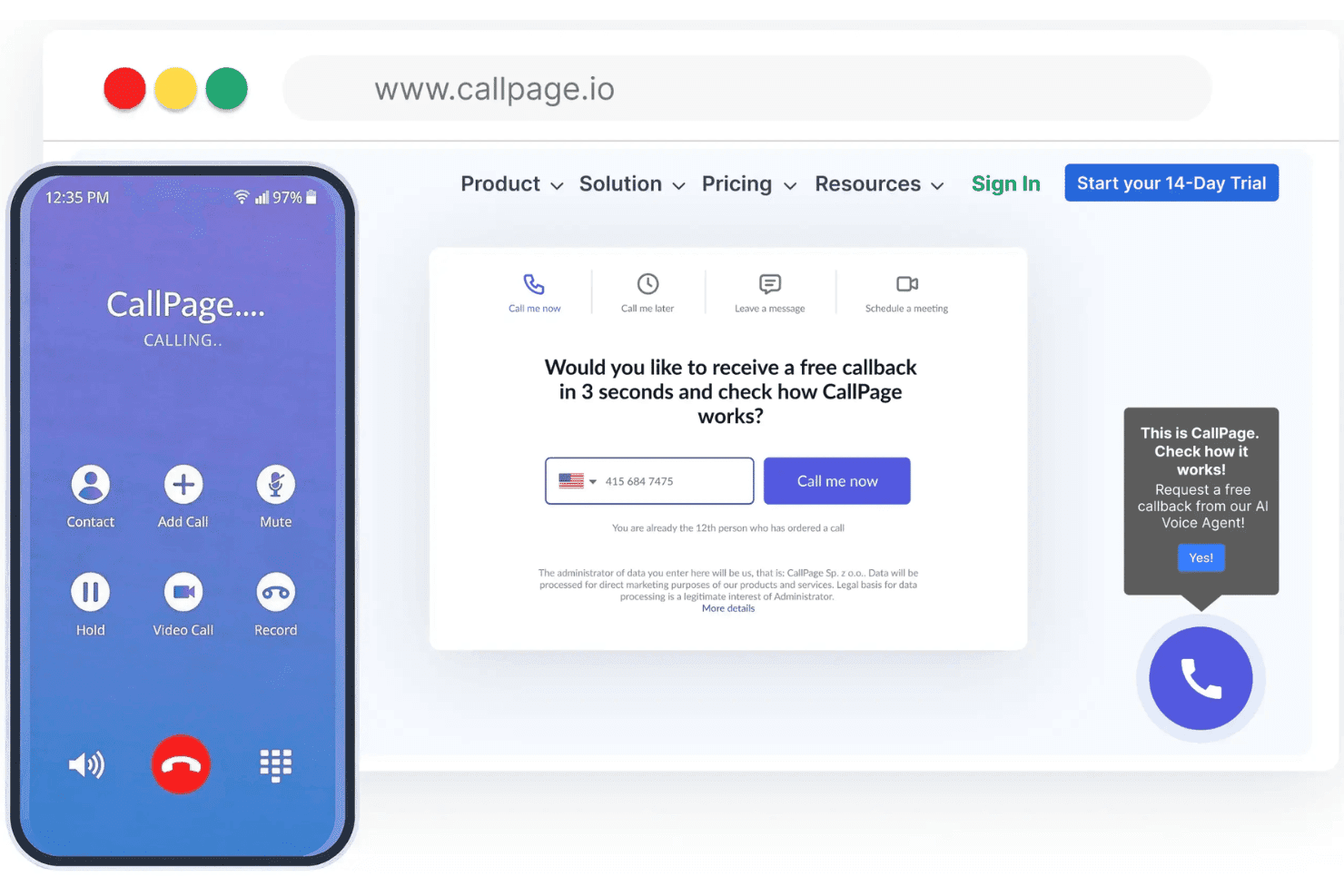
Ease of Use
I think CallPage stands out for its intuitive dashboard, quick setup, and simple call tracking workflows, making it easy for new users to get started. The visual widget editor and real-time analytics provide clear value without unnecessary clutter, and most users report a smooth onboarding experience thanks to clear in-app guidance.

Integrations
CallPage integrates with HubSpot, Google Analytics, Salesforce, Pipedrive, Zoho CRM, Slack, Bitrix24, LiveChat, Facebook, and Zapier, among others.
CallPage also offers a public API and supports third-party connections via Zapier.

CallPage Specs
- A/B Testing: No
- API: Yes
- Audience Targeting: Yes
- Calendar Management: Yes
- Call Disposition: Yes
- Call Recording: Yes
- Call Tracking: Yes
- Click-to-Dial: Yes
- Contact Management: Yes
- Contact Sharing: No
- Customer Management: No
- Dashboard: Yes
- Data Export: No
- Data Import: No
- Data Visualization: Yes
- Email Integration: No
- External Integrations: Yes
- Forecasting: No
- Google Apps Integration: Yes
- Inventory Tracking: No
- Lead Management: Yes
- Lead Scoring: Yes
- Marketing Automation: No
- Multi-User: Yes
- Notifications: Yes
- Referral Tracking: No
- Sales Motivator: No
- Scheduling: Yes
- Social-Media Integration: No
- Softphone: No
- Third-Party Plugins/Add-Ons: No
- Travel Management: No


