

10 Best Sales Email Automation Software Reviewed In 2026

Best Sales Email Automation Software Shortlist


Sales email automation software is a valuable asset for any company. With the right software, teams can significantly increase efficiency and productivity, and boost sales. But finding the right sales email automation software can be a challenge, especially with so many options available.
Using my experience with revenue operations software, I tested and compared several of the top sales email automation software available. From there, I compiled my results into in-depth reviews to help you find the best software for your unique needs. I’m confident that you’ll discover your next sales email automation software in the list below.
Why Trust Our Software Reviews
We’ve been testing and reviewing revenue operations software since 2022. As revenue operations experts ourselves, we know how critical and difficult it is to make the right decision when selecting software. We invest in deep research to help our audience make better software purchasing decisions.
We’ve tested more than 2,000 tools for different Revenue Operations use cases and written over 1,000 comprehensive software reviews. Learn how we stay transparent & our software review methodology.
Best Sales Email Automation Software Summary
| Tool | Best For | Trial Info | Price | ||
|---|---|---|---|---|---|
| 1 | Best for drag-and-drop automations | Free plan available | From $12/month | Website | |
| 2 | Best for native webinar engagement | 14-day free trial + free demo available | From $15.58/month (billed annually) | Website | |
| 3 | Best for email and SMS marketing | 14-day free trial + free demo available | From $20/month | Website | |
| 4 | Best for fully automated lead routing | Free trial available | From $47/month | Website | |
| 5 | Best for multichannel prospecting | 14-day free trial available | From $55/user/month (billed annually) | Website | |
| 6 | Best for data-driven customer engagement | Free plan + free demo available | From $20/month | Website | |
| 7 | Best for CRM-aligned workflows | Free plan + free demo available | From $7/user/month (billed annually) | Website | |
| 8 | Best for personalized loyalty programs | Free plan + free demo available | From $8.08/month (billed annually) | Website | |
| 9 | Best for time-saving marketing automation | 14-day free trial + free demo available | From $15/month (billed annually) | Website | |
| 10 | Best for no-code email automation | Free demo available | From $40/month (5 users) | Website |
-

Pipedrive CRM
Visit WebsiteThis is an aggregated rating for this tool including ratings from Crozdesk users and ratings from other sites.4.5 -
Creatio CRM
Visit WebsiteThis is an aggregated rating for this tool including ratings from Crozdesk users and ratings from other sites.4.7 -
monday CRM
Visit WebsiteThis is an aggregated rating for this tool including ratings from Crozdesk users and ratings from other sites.4.6




Best Sales Email Automation Software Reviews
Below are my detailed summaries of the best sales email automation software that made it onto my shortlist. My reviews offer a detailed look at the key features, pros & cons, integrations, and ideal use cases of each tool to help you find the best one for you.
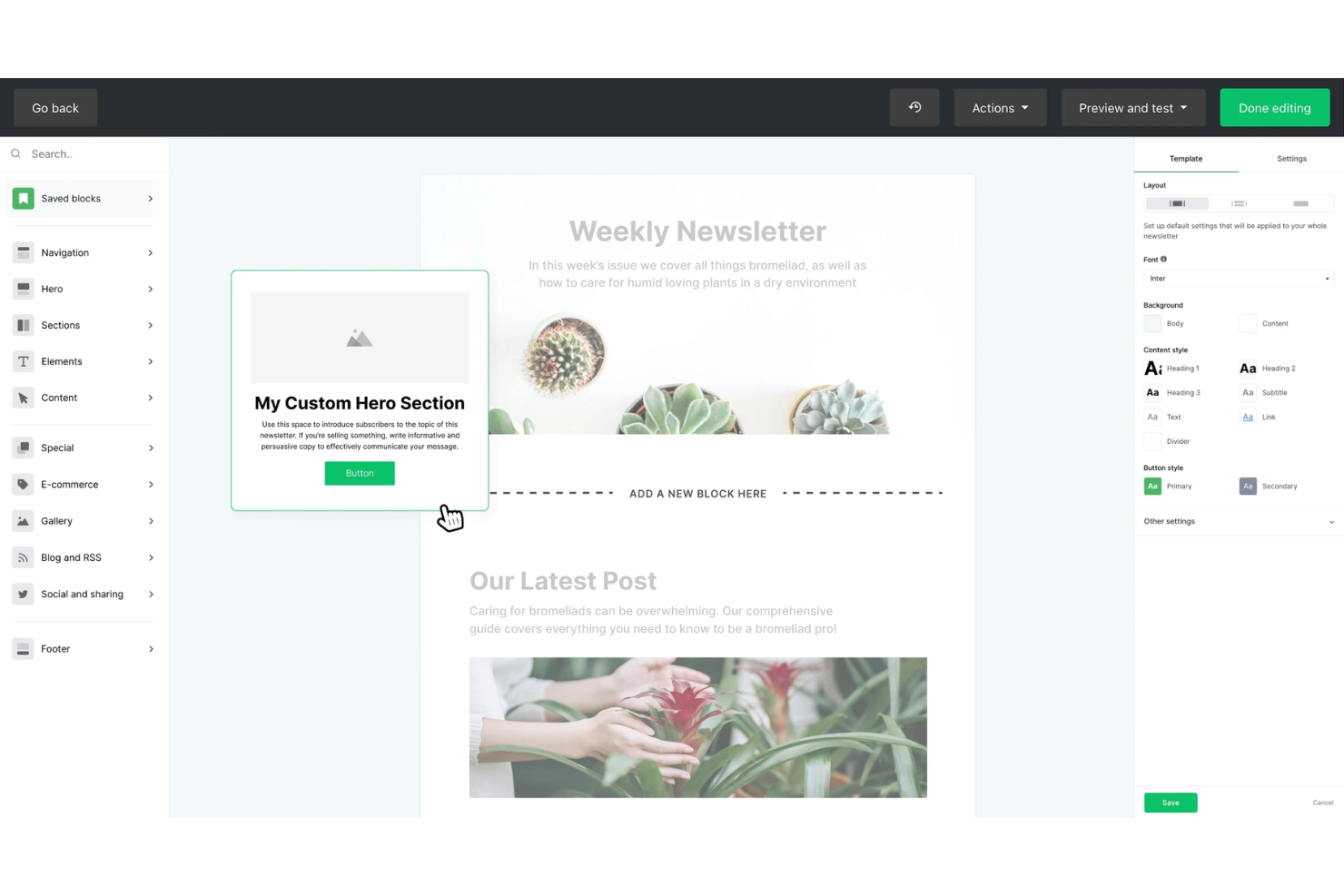
MailerLite is an email marketing automation platform with a visual workflow builder, trigger-based sequences, A/B testing, pre-built automation templates, and subscriber segmentation tools.
Who Is MailerLite Best For?
MailerLite is a natural fit for small businesses and solo operators who need to build and automate email workflows without relying on a developer.
Why I Picked MailerLite
MailerLite earns its spot on my shortlist because its drag-and-drop workflow builder makes building multi-step email sequences genuinely visual, with conditional branches, time delays, and action-based triggers all placed on a shared canvas. I also use the pre-built automation templates to spin up sequences like welcome series or post-demo follow-ups without building from scratch. Being able to see the full flow at once makes it much easier to catch logic gaps before the sequence goes live.
MailerLite Key Features
- Subscriber segmentation: Group contacts by engagement level, custom fields, or past campaign activity to target specific audiences.
- A/B split testing: Test two versions of a subject line or email body to identify which drives higher open or click rates.
- Click maps: See exactly which links inside an email are getting clicked to refine content placement in future sends.
- Campaign performance reporting: Track open rates, click rates, and unsubscribes across all active campaigns from a single dashboard.
MailerLite Integrations
MailerLite integrates with over 100 apps, including native integrations with Shopify, WooCommerce, Stripe, WordPress, Squarespace, Wix, BigCommerce, Canva, Facebook Audiences, and PrestaShop.
Pros and Cons
Pros:
- Time zone delivery and auto UTM tagging
- Free plan includes A/B testing
- Offers visual workflow builder
Cons:
- Reporting lacks depth
- No built-in CRM for sales pipelines
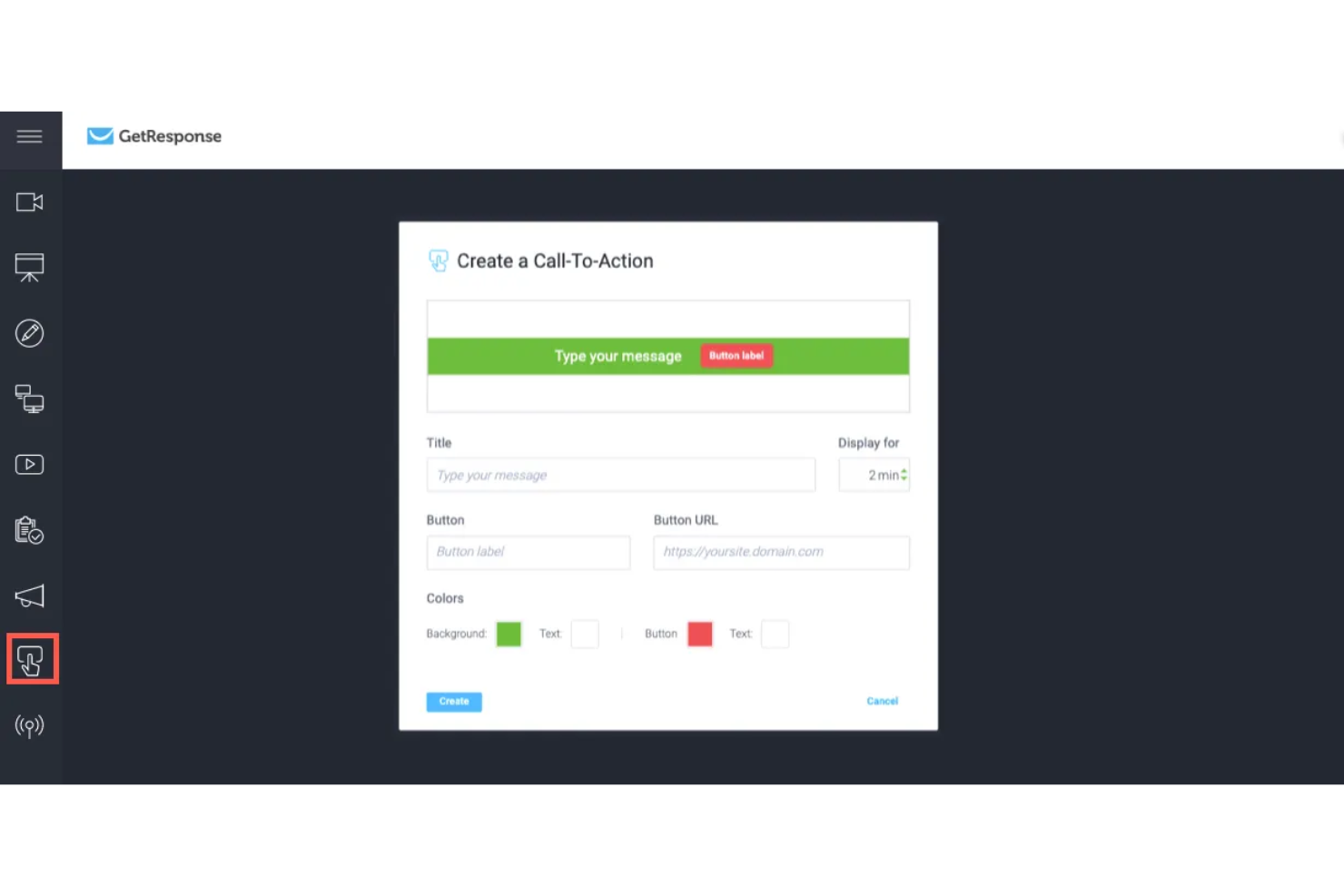
GetResponse is an email marketing and automation platform that combines email campaign building, list segmentation, marketing automation workflows, landing pages, and built-in webinar hosting in a single tool.
Who Is GetResponse Best For?
GetResponse is a strong fit for small to mid-sized marketing teams that run email campaigns alongside webinars, lead generation, or online course delivery.
Why I Picked GetResponse
GetResponse earns its spot on my shortlist because it's the only major email marketing platform that hosts webinars natively. That means my team can build the full funnel, registration page, automated reminder emails, live webinar, and post-event follow-up sequences, inside one platform with no Zapier connections. What I find most useful is the attendance-based segmentation: GetResponse automatically splits attendees into segments (attended, registered but no-showed, left early) and fires different email sequences to each group based on that behavior.
GetResponse Key Features
- Visual automation builder: Design multi-step email workflows triggered by user actions like clicks, purchases, or form submissions.
- A/B testing: Test subject lines, email content, and send times across campaign variants to identify top performers.
- Conversion funnel builder: Build lead generation funnels that connect landing pages, opt-in forms, and email sequences in one flow.
- AI email generator: Draft email copy and subject lines using a built-in AI writing tool directly inside the campaign editor.
GetResponse Integrations
GetResponse offers 170+ integrations through its integrations directory, including native connections with Shopify, WooCommerce, Salesforce, HubSpot, Pipedrive, Google Analytics, WordPress, PayPal, and Facebook.
Pros and Cons
Pros:
- Pairs landing pages with sequences
- Mails at each contact's peak
- Built-in webinar hosting
Cons:
- Duplicate contacts get billed twice
- Starter plan caps at one automation workflow


Mailchimp is a marketing automation tool for small businesses to manage their email marketing, social media marketing, and other digital marketing efforts. It allows users to create marketing campaigns, manage customer lists, and track performance through analytics.
Why I picked Mailchimp: Mailchimp offers a wide array of customizable templates and a user-friendly interface that makes it easy for your team to design email campaigns. The platform’s audience management tools help you efficiently segment and target your customers. Its marketing automation features enable you to set up workflows that save time and increase engagement. Moreover, Mailchimp provides detailed analytics that helps you understand the effectiveness of your campaigns.
Standout features & integrations:
Features include customizable email templates, audience segmentation, notifications, marketing automation, social media management, and detailed analytics. You can design and send campaigns easily, manage your audience efficiently, and track your campaign's performance right from the dashboard.
Integrations include Shopify, WooCommerce, WordPress, Salesforce, HubSpot, Zapier, Slack, Google Analytics, QuickBooks, and Stripe.
Pros and Cons
Pros:
- Automated A/B testing
- Real-time campaign analytics
- AI-powered content optimization
Cons:
- Occasional deliverability issues
- Limited automation features

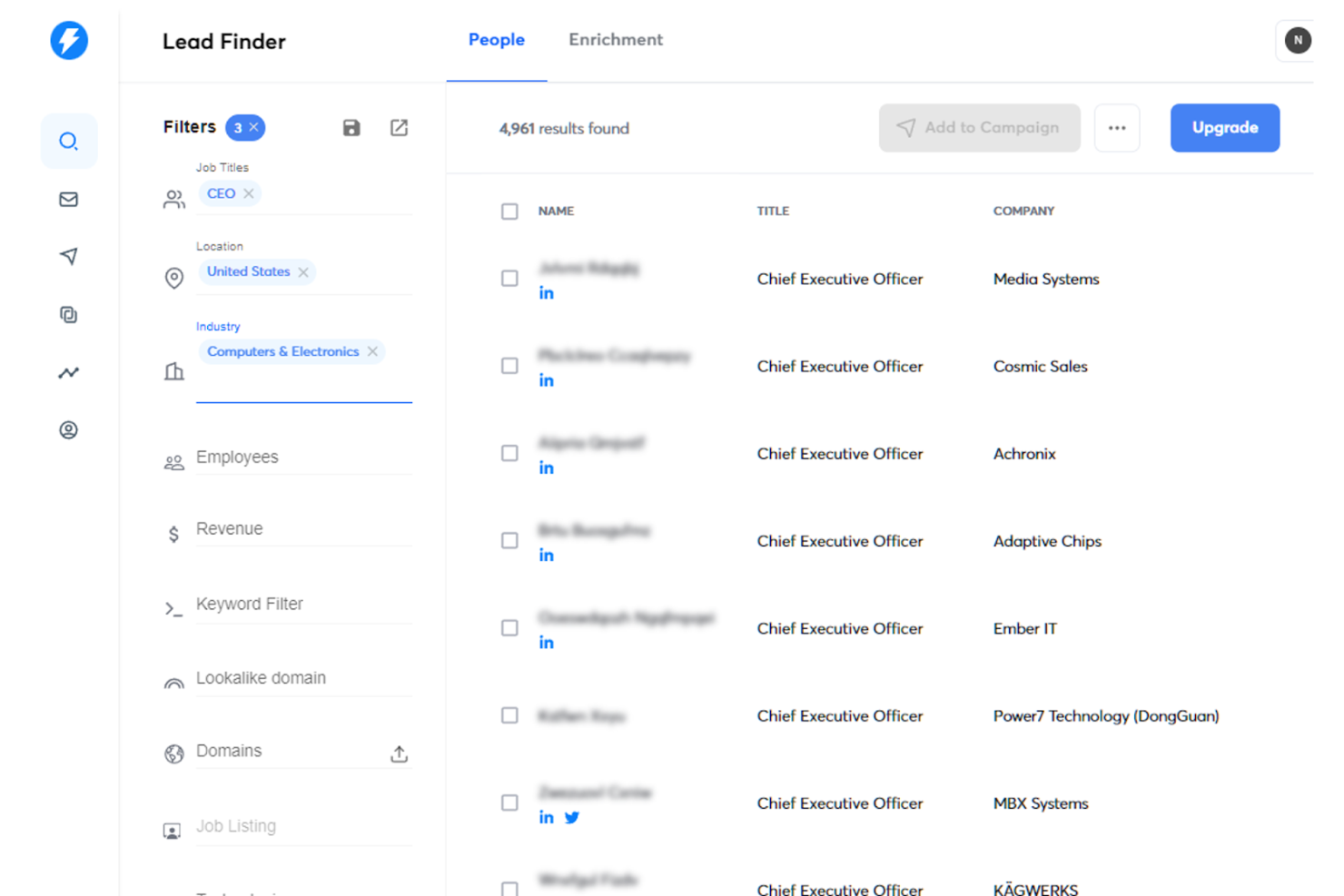
Instantly.ai is a cold email outreach platform built for high-volume sending, with inbox rotation across unlimited sending accounts, AI-driven sequence building, and a built-in CRM for managing leads and replies.
Who Is Instantly.ai Best For?
Instantly.ai is a strong fit for outbound lead generation agencies and growth teams that run cold email at high volume across multiple client accounts or sending domains.
Why I Picked Instantly.ai
I picked Instantly.ai as one of the best because its Automations feature handles lead routing without any manual intervention. When a lead replies, visits your pricing page, or books a meeting, Instantly automatically routes them, updates their CRM stage, and triggers the right follow-up campaign based on that signal. My team uses the trigger-based workflow builder to fire specific sequences based on real buying intent, not just static time delays, which is something most cold email tools can't do natively.
Instantly.ai Key Features
- Email warm-up: Gradually increases sending volume on new accounts to build domain reputation before launching campaigns.
- Unibox: Centralizes all replies from every connected inbox into a single view for managing responses at scale.
- AI email writer: Generates and personalizes outreach copy directly inside the sequence builder using AI.
- B2B lead finder: Searches and exports verified prospect contact data from a built-in database without leaving the platform.
Instantly.ai Integrations
Instantly.ai offers 50+ integrations through its marketplace, including native connections with HubSpot, Salesforce, and Pipedrive, as well as Slack, Clay, Trigify, and RB2B.
Pros and Cons
Pros:
- Triggers behavior-based follow-ups
- AI books meetings automatically
- Unlimited sending accounts
Cons:
- A/B testing limited to two variants
- Add-on pricing climbs fast at scale

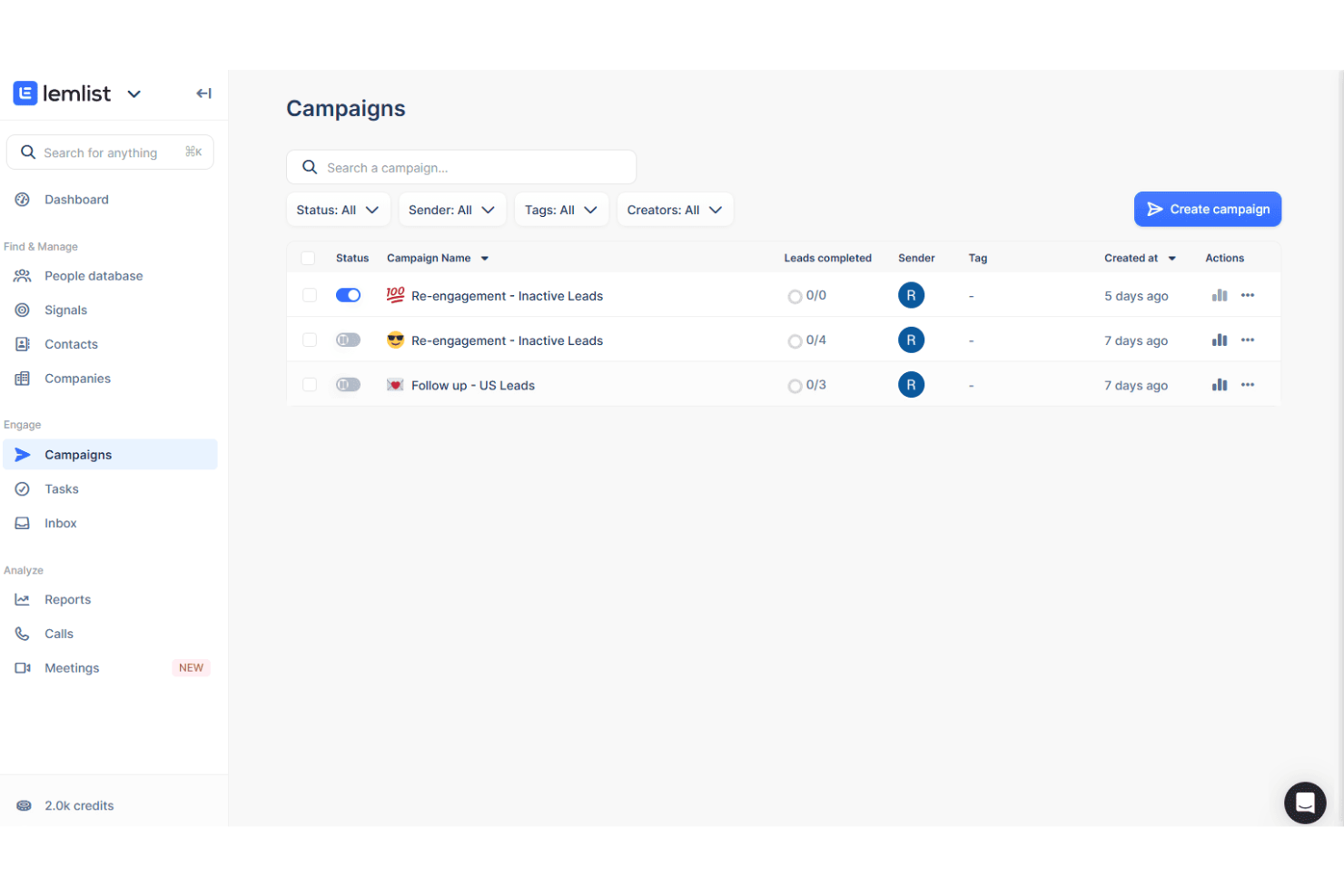
lemlist is a sales engagement platform that combines cold email automation, LinkedIn outreach, and phone calling into multichannel prospecting sequences with built-in lead generation and personalization tools.
Who Is lemlist Best For?
lemlist is a strong fit for B2B sales reps and SDR teams that run outbound prospecting across email, LinkedIn, and phone from a single platform.
Why I Picked lemlist
lemlist earns its spot on my shortlist because it lets me build prospecting sequences that combine cold email, LinkedIn connection requests, and call steps in a single workflow. I particularly like the LinkedIn automation steps, where I can trigger a profile visit, a connection request, and a direct message as part of the same sequence without switching tools. The image personalization feature also lets me embed a prospect's name or company logo directly into email visuals, which my team uses to lift reply rates on cold outreach.
lemlist Key Features
- Email warm-up: Automatically warm up sending accounts through lemwarm to protect deliverability before launching cold outreach campaigns.
- Lead database: Search and import verified B2B contacts directly from lemlist's built-in lead finder without leaving the platform.
- Inbox rotation: Distribute outgoing emails across multiple sender accounts to reduce spam risk on high-volume sequences.
- A/B testing: Test multiple versions of email steps within a sequence to identify which copy drives the most replies.
lemlist Integrations
lemlist offers native integrations with HubSpot, Salesforce, Pipedrive, Attio, Zoho CRM, Aircall, Slack, Google Sheets, and Clay, among others.
Pros and Cons
Pros:
- LinkedIn automation runs inside email sequences
- Custom images embedded in emails
- Built-in email warm-up
Cons:
- Lacks attribution analytics
- Credits deplete quickly at scale

Klaviyo is a marketing automation platform for email marketing, SMS, and customer data management. Its primary user base includes businesses looking to enhance digital marketing efforts through personalized customer interactions.
Why I picked Klaviyo: Klaviyo excels in segmentation and automated flows, which precisely target your audience. With its advanced reporting tools, you can track the performance of your marketing campaigns in real time. The platform supports over 350 integrations, making connecting with other tools you already use easy. Additionally, Klaviyo provides resources for onboarding and professional support, so your team can hit the ground running.
Standout features & integrations:
Features include advanced segmentation, automated flows, and reporting tools. Klaviyo also offers resources for onboarding and professional support.
Integrations include Shopify, WooCommerce, BigCommerce, Magento, Salesforce, Stripe, Zendesk, Eventbrite, Facebook, and Google Ads.
Pros and Cons
Pros:
- Custom predictive models
- Real-time revenue insights
- Advanced client lifecycle tracking
Cons:
- Limited non-retail support
- Basic CRM features
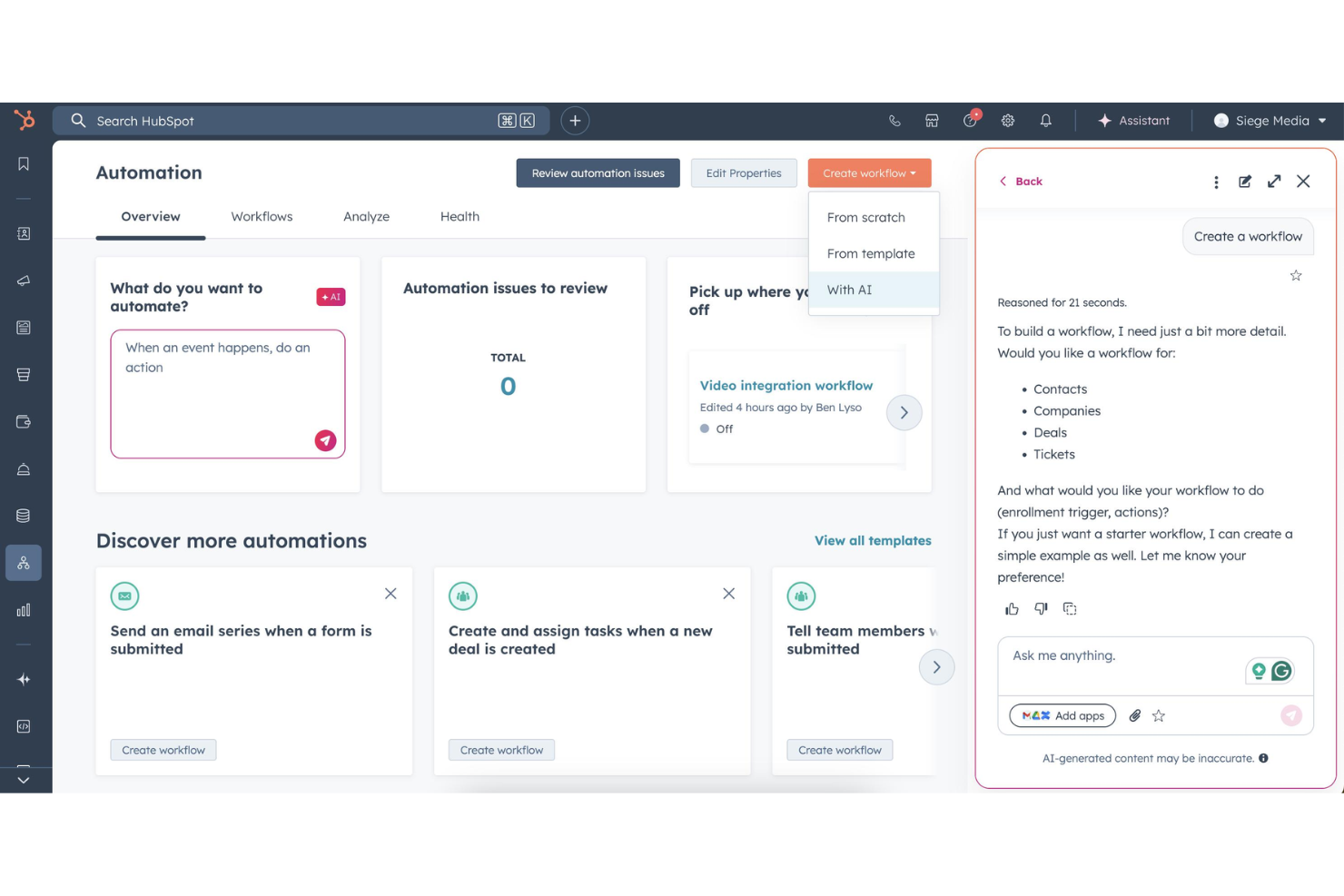
HubSpot's Sales Hub is a sales automation platform that lets your team build timed email sequences, automate lead rotation, run A/B tests on outreach, and trigger workflow actions directly from its native CRM.
Who Is HubSpot Best For?
HubSpot Sales Hub is a strong fit for mid-market B2B sales teams that need email automation tightly connected to their CRM data.
Why I Picked HubSpot
I've included HubSpot in my top picks because its email sequences and CRM data work as one unified system, not two tools you have to sync. What I really like is how sequences can auto-enroll contacts based on intent signals pulled directly from the CRM, so reps aren't manually triaging who to follow up with. I also use the deal outcome reports tied to A/B-tested sequences to see which email variants actually generate revenue, not just opens.
HubSpot Key Features
- Email sequence enrollment from Gmail or Outlook: Enroll contacts directly from your Gmail or Outlook inbox without switching to a separate tool.
- Workflow-triggered task creation: Set up workflows to automatically create tasks and alert reps when a contact takes meaningful action.
- Predictive lead scoring: Automatically score and prioritize leads based on behavioral patterns to surface the accounts most likely to close.
- AI email writer: Generate and edit sales email copy using HubSpot's built-in AI writing tool directly within the platform.
HubSpot Integrations
HubSpot offers 1,500+ marketplace integrations, including tools like Salesforce, Gmail, Google Workspace, Outlook, Microsoft 365, Slack, LinkedIn Sales Navigator, Zoom, and Stripe. It also connects with Zapier and provides an API for custom integrations.
Pros and Cons
Pros:
- Built-in A/B testing on sequences
- Email and CRM share one database
- Sequences auto-adapt based on engagement
Cons:
- Advanced automation requires upgrade
- Starter plan caps email sends at 2,000/month

Brevo is an email marketing automation tool that provides tools for email marketing, SMS, WhatsApp, and automation to improve customer engagement. It features a sales automation platform, multi-channel customer service, a customer data platform, and a messaging API for scalable communication.
Why I picked Brevo: Brevo offers advanced segmentation, enabling businesses to tailor campaigns based on customer behaviors, preferences, and past interactions. Its automation tools allow the creation of dynamic, personalized communication flows, ensuring targeted and engaging loyalty campaigns that strengthen customer relationships. Additionally, the platform supports up to 300 free emails per day with no required credit card.
Standout features & integrations:
Features include email marketing, SMS marketing, marketing automation, CRM integration, advanced segmentation, A/B testing, landing page builder, transactional emails, real-time reporting, contact management, multichannel campaigns, and personalized content.
Integrations include Shopify, WooCommerce, Magento, WordPress, Salesforce, HubSpot, Pipedrive, Zoho CRM, PrestaShop, and Drupal.
Pros and Cons
Pros:
- Ready-made workflows
- Advanced segmentation
- High deliverability rate
Cons:
- Limited transactional reporting
- Complex automation setup


ActiveCampaign is an all-in-one marketing automation software designed for businesses across various industries, including ecommerce, healthcare, and education. It enhances customer experiences through email marketing, CRM tools, audience segmentation, and dynamic content personalization.
Why I picked ActiveCampaign: ActiveCampaign excels in time-saving marketing automation due to its robust automation workflows that streamline tasks like email segmentation, lead generation scoring, and personalized customer journeys. Its easy-to-use drag-and-drop automation builder allows businesses to automate repetitive tasks efficiently, reducing manual efforts while improving customer engagement.
Standout features & integrations:
Features include customizable email templates, multi-channel outreach (email, SMS, ads), sales process automation, and CRM tools. The platform supports omnichannel marketing, making it easier for you and your team to engage with customers.
Integrations include Shopify, WooCommerce, WordPress, Salesforce, Facebook, Slack, Zapier, Google Analytics, Zendesk, and Mailchimp.
Pros and Cons
Pros:
- Audience segmentation
- Custom lead scoring
- Adaptive dynamic content
Cons:
- Limited native integrations
- No SMS A/B testing

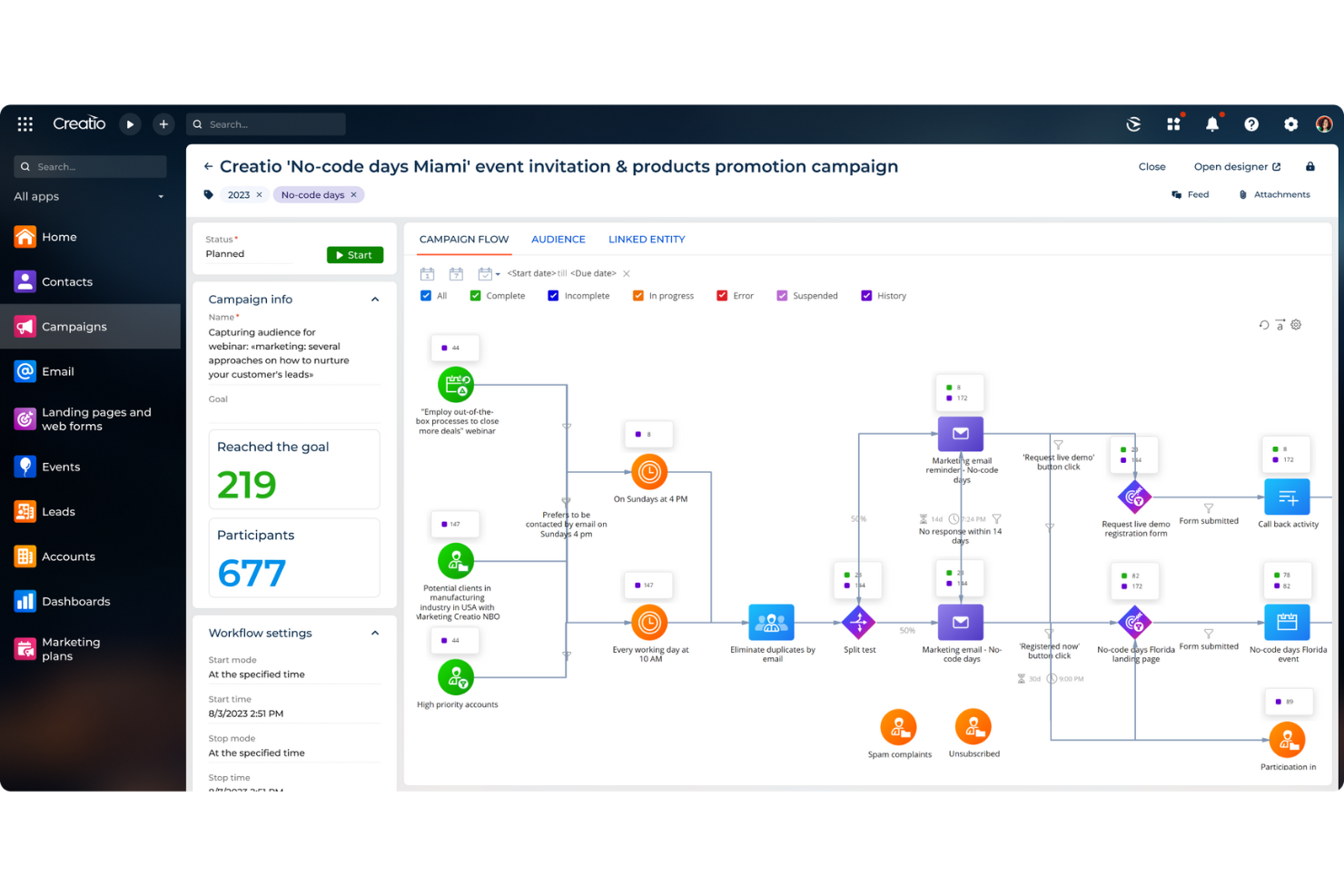
CRM Creatio is a no-code platform designed to automate customer relationship management processes, covering marketing, sales, and service activities.
Why I picked CRM Creatio: You can build custom automated email workflows without needing to write code, helping your team stay connected with prospects and clients more efficiently. Features like the visual workflow designer allow you to create complex email sequences with simple drag-and-drop actions, so your team can quickly set up campaigns that nurture leads and engage customers at every stage. Additionally, CRM Creatio's built-in analytics provide real-time insights into email performance, helping you fine-tune your approach based on actionable data.
Standout features & integrations:
Features include 360-degree customer views, lead management, pipeline management, customizable workflows, invoicing, reporting and analytics, collaboration tools, customer management, case management, project management, automation, and a unified data source.
Integrations include Accelo, Act!, ActiveCampaign, Acumatica, Adobe Analytics, Asana, Microsoft Exchange, Excel, Mailchimp, HubSpot Marketing Hub, Google Calendar, and Tableau.
Pros and Cons
Pros:
- A scalable solution
- No-code platform
- Extensive customization options
Cons:
- Data migration may be complex
- Customization can be time-consuming
New Product Updates from Creatio CRM

Creatio CRM Expands AI Across Marketing and Collaboration
Creatio CRM introduces AI-assisted landing page generation, template-based email generation, RAG-enabled knowledge governance, a Microsoft Teams personal tab, and AI meeting summaries. These updates help teams create content faster and streamline AI-powered workflows. For more information, visit Creatio’s official site.
 .
.Other Sales Email Automation Software
Here are some additional sales email automation software options that didn’t make it onto my shortlist, but are still worth checking out:
- Omnisend
For ecommerce focus
- Reply
For automated reply detection
- Constant Contact
For automated event follow-ups
- Zoho Campaigns
For integrated email marketing
- Bloomreach
For AI-driven ecommerce personalization
- Pipedrive
For visual sales pipeline management
- Apollo.io
For data-backed prospecting
- Adobe Marketo Engage
For complex lead nurturing
- Salesforce Marketing Cloud Account Engagement (Pardot)
For automated prospect segmentation


Sales Email Automation Software Selection Criteria
When selecting the best sales email automation software to include in this list, I considered common buyer needs and pain points like deliverability rates and automation complexity. I also used the following framework to keep my evaluation structured and fair:
Core Functionality (25% of total weighting score)
To be considered for inclusion in this list, each solution had to fulfill these common use cases:
- Automate email campaigns
- Personalize email content
- Track email performance
- Segment email lists
- Schedule email sends
Additional Standout Features (25% of total weighting score)
To help further narrow down the competition, I also looked for unique features, such as:
- Behavior-based automation
- Advanced analytics
- Customizable templates
- A/B testing capabilities
- Integration with CRM systems
Usability (10% of total weighting score)
To get a sense of the usability of each system, I considered the following:
- Intuitive interface
- Ease of navigation
- Drag-and-drop editor
- User-friendly dashboard
- Accessibility of support resources
Onboarding (10% of total weighting score)
To evaluate the onboarding experience for each platform, I considered the following:
- Availability of training videos
- Pre-built templates
- Interactive product tours
- Chatbot assistance
- Webinars and live demos
Customer Support (10% of total weighting score)
To assess each software provider’s customer support services, I considered the following:
- 24/7 support availability
- Multiple support channels (chat, email, phone)
- Comprehensive knowledge base
- Community forums
- Dedicated account managers
Value For Money (10% of total weighting score)
To evaluate the value for money of each platform, I considered the following:
- Competitive pricing
- Free trial availability
- Pricing tiers to suit different needs
- Inclusion of essential features in lower tiers
- Cost transparency
Customer Reviews (10% of total weighting score)
To get a sense of overall customer satisfaction, I considered the following when reading customer reviews:
- User satisfaction ratings
- Feedback on customer support
- Ease of use ratings
- Performance reliability
- Recommendations and word-of-mouth
How to Choose Sales Email Automation Software
It’s easy to get bogged down in long feature lists and complex pricing structures. To help you stay focused as you work through your unique software selection process, here’s a checklist of factors to keep in mind:
| Factor | What to Consider |
| Scalability | Will the software grow with your business needs? |
| Integrations | Does it integrate with your existing tools? |
| Customizability | Can the software be tailored to your processes? |
| Ease of Use | Is the software user-friendly for your team? |
| Budget | Does the software fit within your budget? |
| Security Safeguards | Are there strict security measures in place? |
Trends In Sales Email Automation Software
In my research, I sourced countless product updates, press releases, and release logs from different sales email automation software vendors. Here are some of the emerging trends I’m keeping an eye on:
- AI-Driven Personalization: AI is being leveraged to create highly personalized email content based on user behavior and preferences. Tools use AI to tailor email content dynamically, ensuring each recipient gets a unique message that resonates with their interests.
- Interactive Emails: Embedding interactive elements such as surveys, polls, and videos directly in emails is becoming popular. Some vendors are incorporating these features to increase engagement rates and gather real-time feedback from recipients.
- Predictive Analytics: Sales email automation platforms are integrating predictive analytics to forecast customer behavior and optimize email campaigns. This feature suggests the best times to send emails and the type of content that will perform best.
- Behavior-Triggered Emails: Automating email sequences based on specific user actions, such as browsing history or past purchases, is gaining traction. Some tools highlight the effectiveness of browser abandonment and abandoned cart emails in re-engaging potential customers and recovering lost sales.
- Hyper-Segmentation: Advanced segmentation techniques are being used to create more targeted email lists, helping teams close deals. Platforms are enhancing their segmentation capabilities, allowing marketers to divide their audience into smaller, more precise groups based on numerous criteria, leading to higher engagement and conversion rates.
What Is Sales Email Automation Software?
Sales email automation software automates the process of sending sales-related emails, helping sales teams save time and improve their efficiency. Sales professionals, such as sales representatives and account managers, use these to manage and nurture leads. These tools help automate repetitive tasks, allowing them to focus on more strategic activities.
Features like automated follow-ups, personalized email templates, and integration with CRM systems help manage large volumes of emails, stay organized, and track email performance. They provide significant value by enhancing productivity and ensuring consistent communication with prospects and customers.
Features of Sales Email Automation Software
When selecting sales email automation software, keep an eye out for the following key features:
- Email Scheduling: Allows users to schedule emails to be sent at optimal times, ensuring messages reach recipients when they are most likely to engage.
- Personalization: Enables the customization of emails with recipient-specific details such as names and company information, increasing engagement and response rates.
- A/B Testing: Provides the ability to test different email versions to determine which performs better, helping refine email strategies for better outcomes.
- Analytics and Reporting: Offers detailed insights into email performance metrics such as open rates, click-through rates, and conversions, aiding in data-driven decision-making.
- CRM Integration: Smoothly connects with customer relationship management systems to ensure email campaigns are aligned with sales and customer data.
- Drip Campaigns: Automates sending of a series of emails over time based on user actions or predetermined schedules, nurturing leads through the sales funnel.
- Lead Scoring: Assigns scores to leads based on their interactions with emails, helping prioritize follow-ups and focus on high-potential prospects.
- Template Library: Provides a collection of pre-designed email templates that can be customized, saving time and ensuring professional-looking emails.
- Autoresponders: Automatically sends predefined replies to incoming emails, ensuring timely responses and maintaining engagement with leads.
- Behavioral Triggers: Initiates email actions based on recipient behavior such as opening an email or clicking a link, ensuring timely and relevant follow-ups.
Benefits of Sales Email Automation Software
Implementing sales email automation software provides several benefits for your team and your business. Here are a few you can look forward to:
- Time Savings: Automates repetitive tasks like sending follow-ups, allowing your team to focus on more strategic activities.
- Consistent Communication: Ensures timely and regular communication with leads and customers through scheduled emails.
- Personalization: Uses customer data to send tailored messages, increasing engagement and response rates.
- Lead Nurturing: Automatically sends relevant content to leads based on their behavior, helping move them through the sales funnel.
- Performance Tracking: Provides analytics on email campaigns, helping you understand what works and where to improve.
- Scalability: Handles large volumes of emails effortlessly, supporting business growth without additional resources.
- Improved Accuracy: Reduces human errors in email sending, ensuring professional and error-free communication.
Costs & Pricing of Sales Email Automation Software
Selecting sales email automation software requires an understanding of the various pricing models and plans available. Costs vary based on features, team size, add-ons, and more. The table below summarizes common plans, their average prices, and typical features included in sales email automation software solutions:
Plan Comparison Table for Sales Email Automation Software
| Plan Type | Average Price | Common Features |
| Free Plan | $0 | Basic email templates, limited email sends, basic reporting, and limited automation rules. |
| Personal Plan | $9-$20/user/month | Advanced email templates, higher email sends, basic segmentation, and basic A/B testing. |
| Business Plan | $25-$50/user/month | Custom email templates, unlimited email sends, advanced segmentation, and detailed analytics. |
| Enterprise Plan | $100+/user/month | Personalized support, dedicated IP, advanced integrations, team collaboration features, and custom reporting. |
Sales Email Automation Software FAQs
Here are some answers to common questions about sales email automation software:
How much time does email automation save?
Email automation can save a significant amount of time. For instance, dealing with FAQ requests manually might take around 25 minutes, whereas automation can reduce this to about 5 minutes. Multi-stakeholder coordination which usually takes 40 minutes can be brought down to 10-15 minutes with automation.
How do I optimize email automation?
To optimize email automation, personalize your subject lines and make the most of your preheader. Create valuable content for your audience and include eye-catching images in your emails. Use clear and action-oriented CTAs and optimize the send time of your emails.
If you’re uncertain about data quality, use an email verification software to weed out incorrect contact information before you start emailing people.
What is the difference between email automation and autoresponder?
An autoresponder is a set of automated emails triggered by a specific event, like a customer subscribing to a newsletter. Automation, on the other hand, refers to any automated task, like sending out weekly emails to customers or updating a customer’s account information.
How can I measure the success of my email automation campaigns?
Measure the success of your email automation campaigns by tracking key metrics such as open rates, click-through rates, and conversion rates. Additionally, monitor metrics like bounce rates and unsubscribe rates to understand how your audience is engaging with your content. Regularly analyzing these metrics can help you make necessary adjustments to improve performance.
What’s Next?
Want to take your RevOps game to the next level? Subscribe to The CRO Club newsletter.