

10 Best Presales Software Reviewed For 2026

10 Best Presales Software Shortlist


With so many different presales software available, figuring out which is right for you is tough. You know you want to help your presales teams prepare for and manage customer engagements effectively but need to figure out which tool is best. I've got you! In this post I'll help make your choice easy, sharing my personal experiences using dozens of different presales tools with various teams and prospects, with my picks of the best presales software.
Why Trust Our Software Reviews
We’ve been testing and reviewing RevOps software since 2022. As RevOps leaders ourselves, we know how critical and difficult it is to make the right decision when selecting software.
We invest in deep research to help our audience make better software purchasing decisions. We’ve tested more than 2,000 tools for different RevOps use cases and written over 1,000 comprehensive software reviews. Learn how we stay transparent & our software review methodology.
Best Presales Software Summary
This comparison chart summarizes pricing details for my top presales software selections to help you find the best one for your budget and business needs.
| Tool | Best For | Trial Info | Price | ||
|---|---|---|---|---|---|
| 1 | Best for customizable digital sales rooms | Free plan + free demo available | From $350/month (billed annually) | Website | |
| 2 | Best for turning customer interactions into strategic insights | Free demo available | Pricing upon request | Website | |
| 3 | Best for qualifying, routing, and scheduling leads from anywhere | Free demo available | From $1250/month (billed annually) | Website | |
| 4 | Best for building seller knowledge and encouraging winning behaviors | Free demo available | Pricing upon request | Website | |
| 5 | Best for integrating tech, data, and logistics on a global scale | Free demo available | Pricing upon request | Website | |
| 6 | Best for taking a user-first approach to software adoption | Free demo available | Pricing upon request | Website | |
| 7 | Best for guiding, coaching, and training reps on winning sales behaviors | Free demo available | Pricing upon request | Website | |
| 8 | Best for tracking demo insights directly in your CRM | Free demo available | From $750/month (billed annually) | Website | |
| 9 | Best for project planning with playbooks and onboarding programs | Free demo available | Pricing upon request | Website | |
| 10 | Best for building product demos in just 10 minutes | Free plan available | From $50/user/month | Website |
-

Pipedrive CRM
Visit WebsiteThis is an aggregated rating for this tool including ratings from Crozdesk users and ratings from other sites.4.5 -
Creatio CRM
Visit WebsiteThis is an aggregated rating for this tool including ratings from Crozdesk users and ratings from other sites.4.7 -
monday CRM
Visit WebsiteThis is an aggregated rating for this tool including ratings from Crozdesk users and ratings from other sites.4.6





Best Presales Software Review
Below are my detailed summaries of the best presales software that made it onto my shortlist. My reviews offer a detailed look at the key features, pros & cons, integrations, and ideal use cases of each tool to help you find the best one for you.

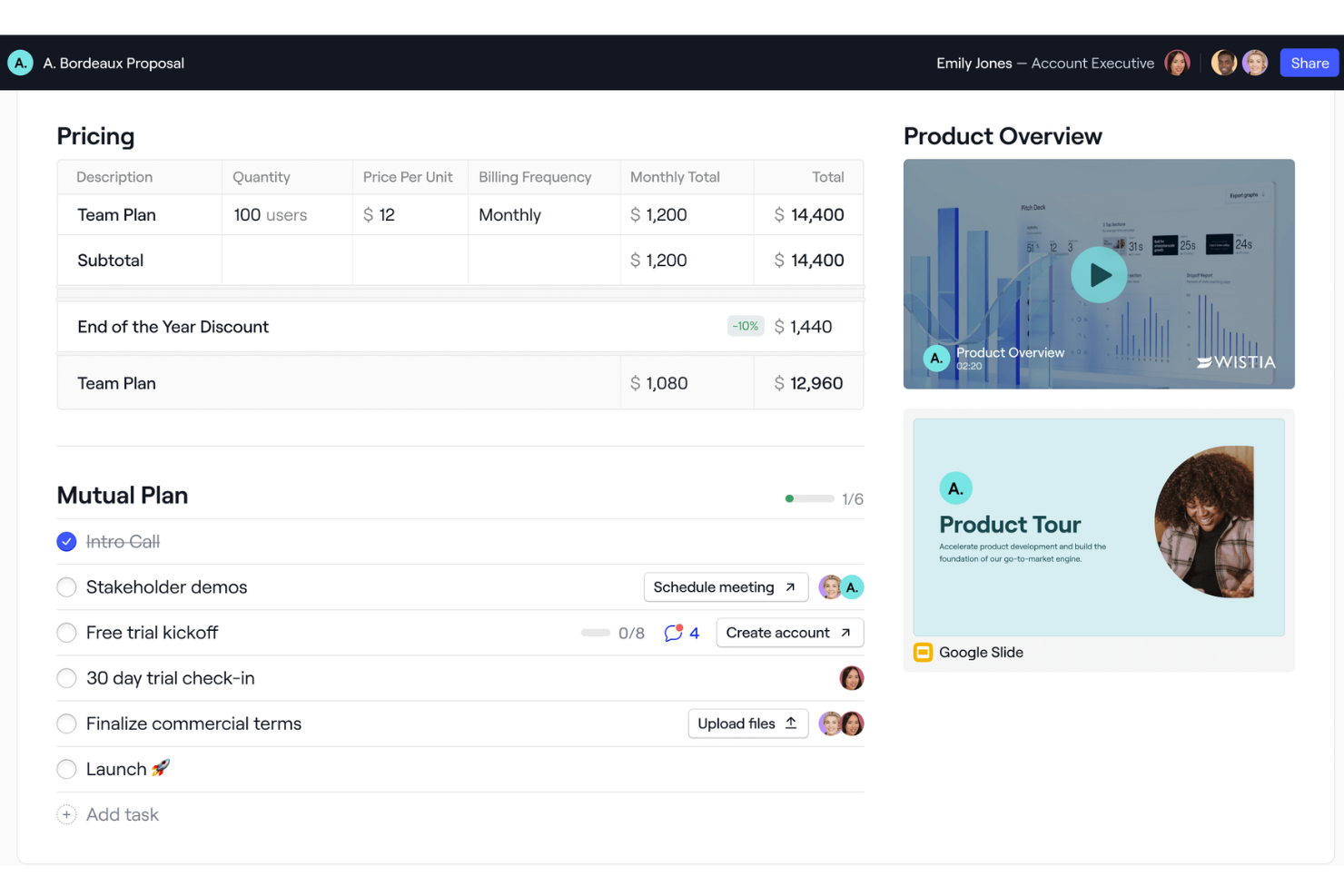
Dock is a B2B sales and customer onboarding software that centralizes client interactions within a branded workspace, aiming to enhance collaboration and improve the buyer experience.
Why I picked Dock: I picked Dock for its digital sales rooms, which are customizable workspaces that facilitate collaboration between your sales teams and prospects. These workspaces centralize all necessary information, making it accessible in one place. This not only improves your team's alignment but also enhances the buyer's experience, which is particularly beneficial for managing complex sales processes and ensuring that all stakeholders are on the same page.
Standout features include buying signals, dynamic action plans, a flexible workspace editor, custom branding, pricing and order forms, secure sharing, digital signature collection, and customizable templates.
Integrations include Airtable, Pandadoc, Typeform, HubSpot, Salesforce, Slack, and Zoom.
Pros and Cons
Pros:
- Templates for standardizing processes
- Mutual action plans
- Analytics for customer engagement
Cons:
- Salesforce integration only available for higher tiers
- Learning curve for new users wanting to maximize the features

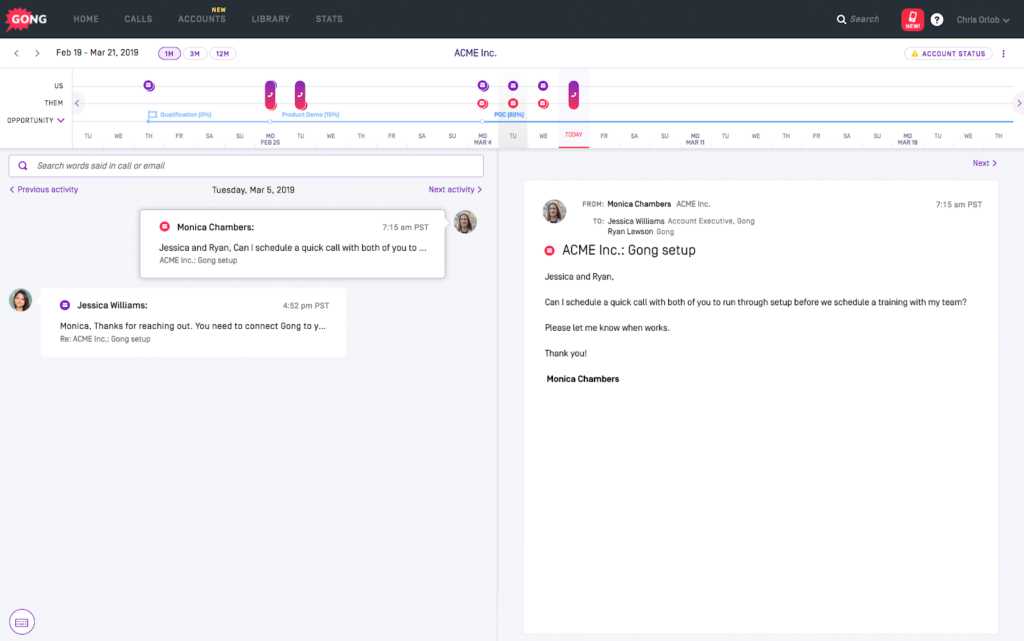
Gong is a revenue intelligence platform that strives to provide you with a deep and accurate understanding of every customer interaction. With the data to make better business decisions, you can improve efficiency, customer experiences, and product design. Gong uses proprietary AI technology to analyze customer interactions for more successful outcomes.
Why I picked Gong: The reason this platform stood out to me was its collaborative forecasting, which uses AI and data-backed pipeline inspection. You don’t have to rely on sales rep notes to get alerts about new risks to a deal, so you can respond faster with solutions to upcoming issues. Gong will tell you exactly what the issue is so you can deal with it in the right way.
Gong Standout Features and Integrations
Standout features include Gong Insights to enrich critical reports, Gong AI to customize automation and guidance, and forecasting tools to catch unseen risks to deals.
Integrations include Gainsight, Highspot, HubSpot, LinkedIn Sales Navigator, Outreach, Salesforce, Slack, Vidyard, Workato, and Zoom.
Pricing One-Liner: Pricing available upon request
Free Trial One-Liner: Free demo is available
PROS
Easy to use the platform
Very accurate voice transcription
Intuitive to navigate dashboard and tools
CONS
Takes notes in third person
Limited digital training materials

Best for qualifying, routing, and scheduling leads from anywhere
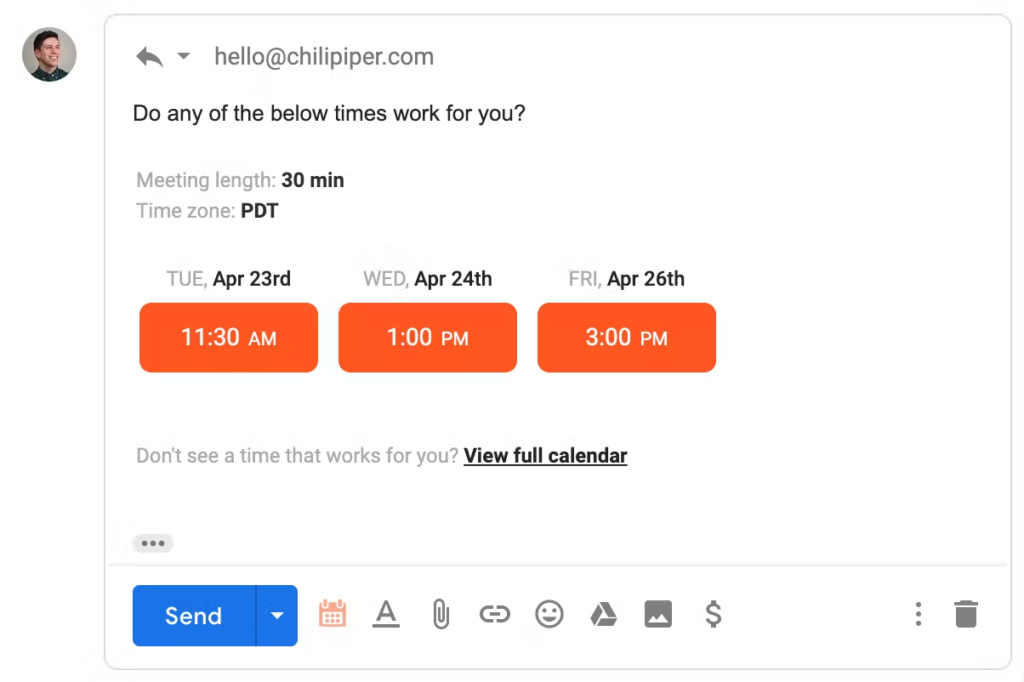
Built to be a meeting lifecycle automation platform, Chili Piper helps your revenue operations team connect with potential customers faster through automated qualifying, routing, and scheduling that integrates and syncs directly with your CRM, campaigns, G2 page, web form, or cold calls.
Why I picked Chili Piper: This tool was an essential addition to my list because of a feature called Handoff. With Handoff, sales teams with SDRs and AEs can connect buyers with reps right away — whether you need to use location and company size rules-based routing or you simply want to ensure fairness through round-robin routing.
Chili Piper Standout Features and Integrations
Standout features include Concierge, which allows sales reps to qualify leads directly from your web form, and Instant Booker to schedule one-click meetings with prospects.
Integrations include Act-On, Candu, Chameleon, Drift, G2, HubSpot, LeadPages, Marketo, Microsoft Teams, and Salesforce.
Pricing One-Liner: From $22.50/user/month
Free Trial One-Liner: Free demo available
PROS
Easy to set up and use
Intuitive navigation and learning process
Responsive customer service team
CONS
Integrations can be complex to set up
Some issues with time zone scheduling

Best for building seller knowledge and encouraging winning behaviors
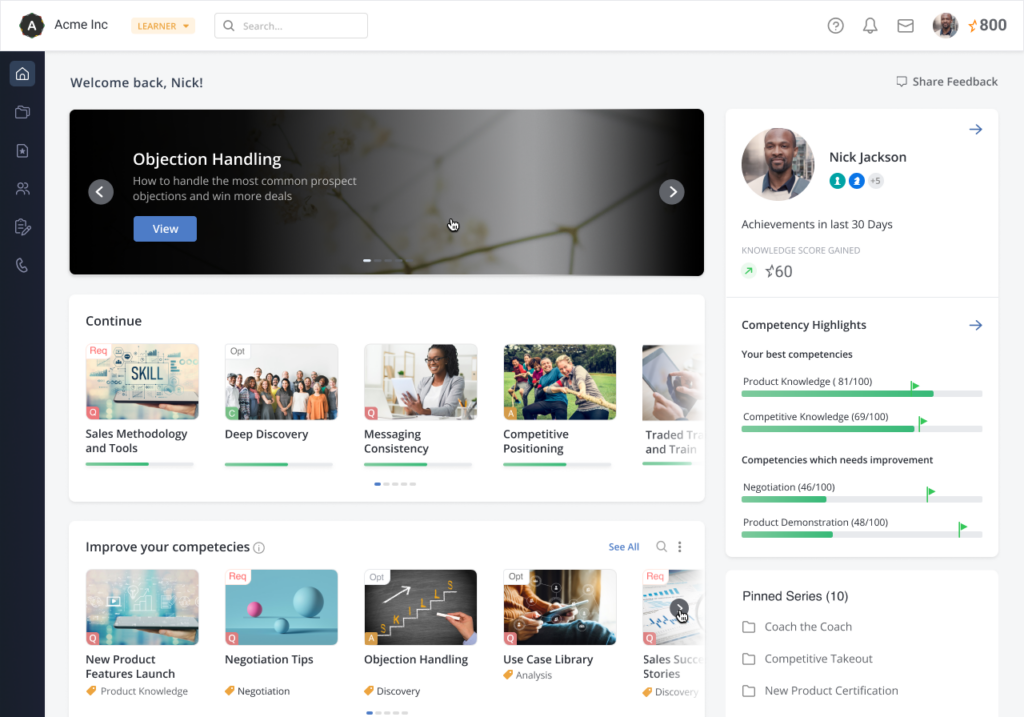
This sales enablement platform is built to help sales managers and reps track everything they need to know about products and services with key learning skills, coaching, and career updates. Ensure sales readiness when you integrate with other online training tools to develop a comprehensive training platform that standardizes product knowledge.
Why I picked MindTickle: This tool looks like a very useful presales software option because you can measure the impact of individualized training through mapping to revenue to see outcomes. Understand which specific skills are driving the results you want and apply them across your entire organization.
MindTickle Standout Features and Integrations
Standout features include AI-driven skills reinforcement and practice exercises and seller-centric enablement programs that are personalized to each sales rep.
Integrations include Aircall, Cognota, Go1, IBM Cloud, Mediafly, Okta, Salesforce, SAML, Seismic, and Veeva.
Pricing One-Liner: Pricing available upon request
Free Trial One-Liner: Free demo is available
PROS
Consistent updates and product improvement
Offers out-of-the-box modules and templates
Easy user interface design
CONS
Analytics and reporting is a little basic
No heat map data visualization

Sendoso
Best for integrating tech, data, and logistics on a global scale
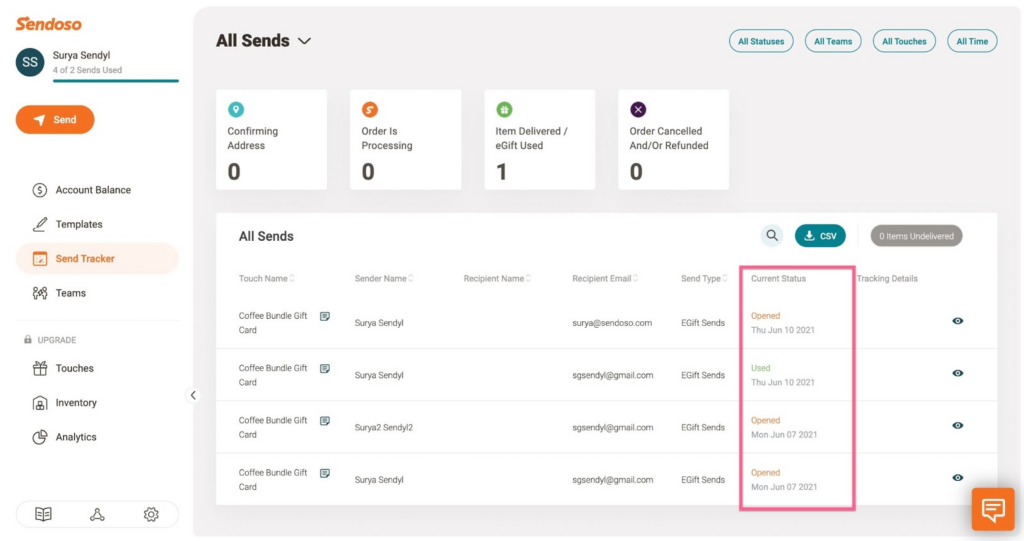
With direct email automation, worldwide fulfillment and inventory management, seamless integrations, and intelligent analytics, Sendoso is designed to enable any organization to streamline account-based marketing and enhance the customer experience from one unified platform.
Why I picked Sendoso: This presales platform made my list because it offers intelligent sending that targets key people and accounts with personalized direct messages that address their needs. Whether you’re choosing a gift yourself or asking the experts at Sendoso to do it for you, this platform delivers a unique way to connect with buyers.
Sendoso Standout Features and Integrations
Standout features include worldwide logistics to store and manage inventory and a globally curated marketplace that allows you to send physical gifts, branded merchandise, e-gifts, virtual experiences, or philanthropy.
Integrations include 6Sense, Accelerate Media, ActiveCampaign, Base.ai, Bombara, Calendly, Enboarder, Groove, HubSpot, and Microsoft Azure.
Pricing One-Liner: Pricing available upon request
Free Trial One-Liner: Free demo available
PROS
Very user friendly platform
Amazing customer support team
Easy to navigate the platform
CONS
Onboarding can be a little challenging
No editing an order after submission
Visit WebsiteOpens new window
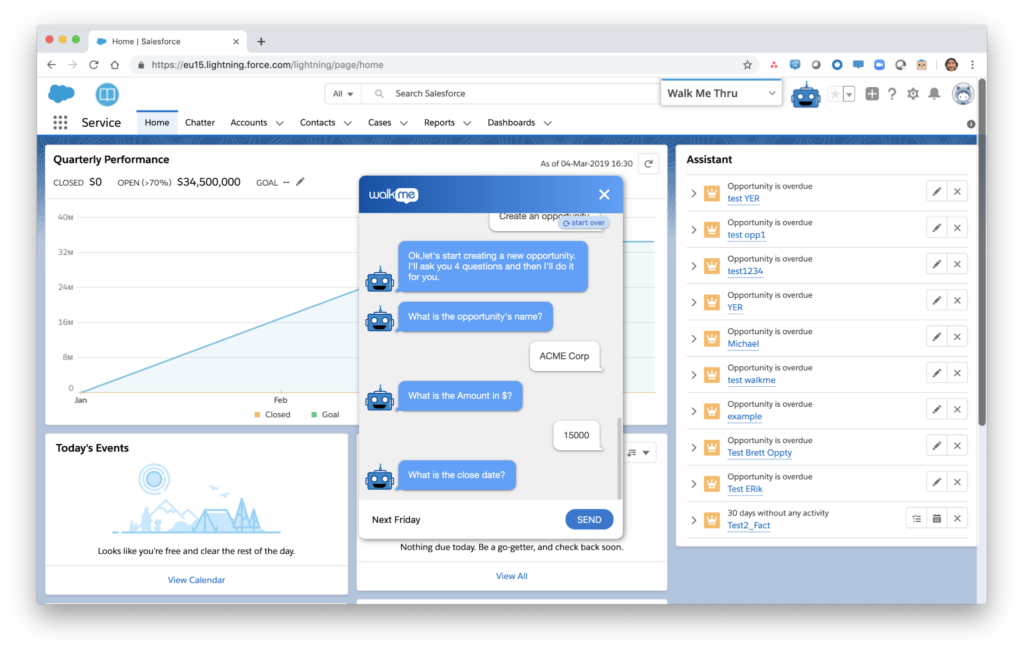
Walkme is a digital adoption platform (DAP) that sits on your tech stack to provide you with visibility into your team’s software usage at every level. With this platform, you get a people-first experience that strives to ensure a frictionless experience across every app and workflow to improve adoption, reduce risk, and enhance employee engagement.
Why I picked Walkme: The feature that stood out to me the most here is the Change Management tool. With Change Management, you can create and implement a digital adoption plan for new software with guides, reminders, and encouragement to ensure your team is using new software.
Walkme Standout Features and Integrations
Standout features include Walkme AI for AI-driven recommendations and auto-generated user experiences, as well as cross-system automation to drive product adoption.
Integrations include AlayaCare, Google Analytics, Intercom, LiveAgent, Okta, Olark, Salesforce, Segment, Slack, and Zendesk Suite.
Pricing One-Liner: Pricing available upon request
Free Trial One-Liner: Free demo available
PROS
No need to be tech savvy
Encourages a DIY mentality
User interface is easy to use
CONS
Not as scalable for user customizations
Some glitches that require refreshing

Highspot
Best for guiding, coaching, and training reps on winning sales behaviors
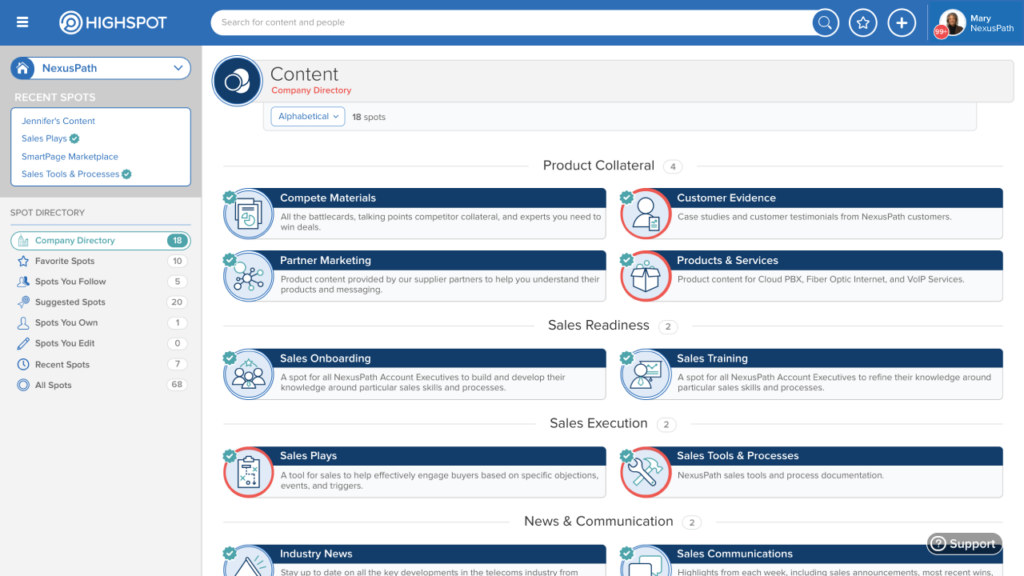
As a sales enablement-focused platform, HighSpot targets high adoption rates through simplified navigation and useful tools. With this platform, you can combine content management, training and coaching, customer engagement, actionable analytics, and contextual guidance into one to help go-to-market teams deliver a more unified buying experience.
Why I picked HighSpot: What caught my eye about this platform was its focus on training and guiding reps. HighSpot offers training tools that are fully embedded into your workflow to ensure in-context training that helps your sales team respond to customers more appropriately. HighSpot also delivers guidance that suggests what your reps should say, do, or show next to close deals.
HighSpot Standout Features and Integrations
Standout features include sales content management that organizes and updates your resource libraries in real time and sales training that bridges the gap between sales strategy and execution.
Integrations include Alfresco, BlueJeans, Gong, Google, Klue, Microsoft, Salesforce, SalesLoft, Slack, and Turtl. HighSpot offers over 80 native integrations.
Pricing One-Liner: Pricing available upon request
Free Trial One-Liner: Free demo available
PROS
Intuitive user interface and navigation
Easy to learn how to use
Integrates easily with the most popular apps
CONS
Implementation can be arduous
Pricing is a bit on the higher side
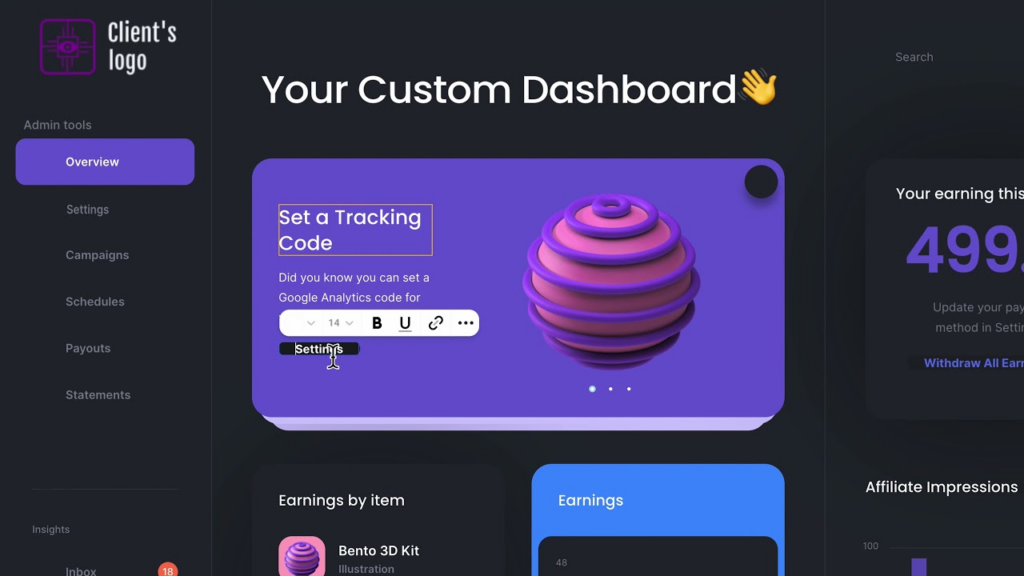
As a sales experience platform designed for B2B presales professionals, Walnut is here to help you create custom, interactive product demos on demand. You can easily scale demo creation with personalization for each prospect that collects insights to ensure you’re reoptimizing your sales cycle periodically to resolve product gaps.
Why I picked Walnut: The main reason this platform caught my eye is because it offers you demo insights directly in your CRM. You can integrate with the most popular CRM solutions to learn how prospects are using your demos, leveraging that data to address client pain points, find new opportunities, and shorten your sales cycle.
Walnut Standout Features and Integrations
Standout features include on-site demos so prospective customers can try the product without scheduling a call and interactive onboarding demo creation that walks leads through your product.
Integrations include Gmail, HighSpot, HubSpot, OpenAI, Salesforce, and Slack.
Pricing One-Liner: Pricing available upon request
Free Trial One-Liner: Free demo available
PROS
It’s easy to navigate the platform
Doesn’t require any coding
Customizable platform options
CONS
Could use a few more tutorials
Lacks some API support

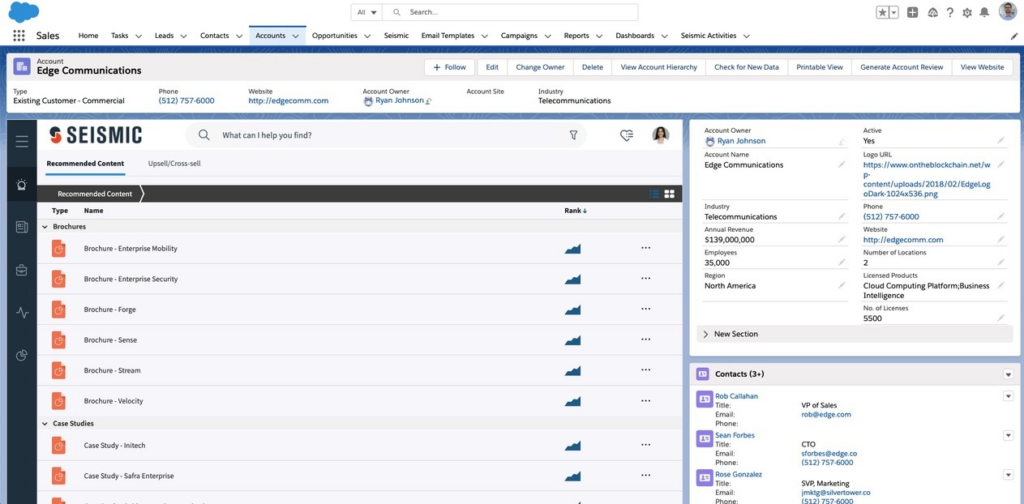
As a global leader in sales enablement, Seismic offers a variety of tools to help your business engage with customers and close more deals. Seismic offers robust presales tools through its Strategy & Planning product, which focuses on creating a purpose-built planning, reporting, and auditing hub for your team.
Why I picked Seismic: This tool caught my eye because it offers intelligent content auditing to help you decide which content to keep, update, or archive based on performance data and analytics. See which playbooks, scripts, and communications work best and streamline your content workflows to ensure best practices throughout your entire organization.
Seismic Standout Features and Integrations
Standout features include planning impact reporting for actionable insights into how time and effort are impacting your revenue and capacity planning to triage new requests with burndown charts and timelines.
Integrations include Box, Dropbox Business, Gmail, Google Drive, Jira, Microsoft 365, Microsoft SharePoint, OneDrive, Slack, and WordPress.
Pricing One-Liner: Pricing available upon request
Free Trial One-Liner: Free demo is available
PROS
Easy to understand the data
Platform is very user friendly
Provides a single source of truth
CONS
Limited sharing of digital salesrooms
Does require some admin and upkeep

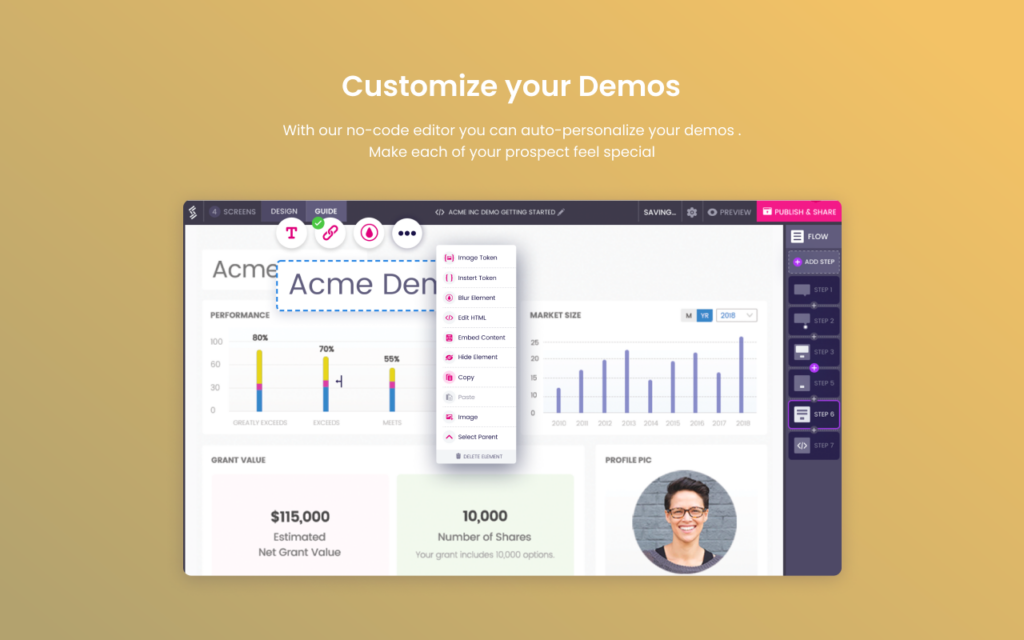
As a cloud-based demo platform, Storylane focuses on helping businesses of all sizes optimize sales enablement through customized product demonstrations. With personalized, automated demo creation, you can create a demo, edit without any coding required, include interactive guides, publish your content, or share it via a link.
Why I picked Storylane: The reason this platform caught my attention was due to how easy their demo building tool was to use. Their editor requires no coding and allows you to click directly into the content to edit text, blur sensitive data, embed images, change graphs, and add charts.
Storylane Standout Features and Integrations
Standout features include demo engagement tracking that allows you to clone successes and an AI demo builder assistant that can improve and translate guides into 25 languages.
Integrations include Google Analytics, HubSpot, Intercom, Marketo Engage, Microsoft Dynamics, Pardot, Salesforce, Segment, Slack, and Zapier.
Pricing One-Liner: From $50/user/month
Free Trial One-Liner: Free plan available
PROS
Very easy to use
Focuses on streamlining demo creation
Has a free plan option
CONS
HTML editing can be a little tricky
Some technical bugs and glitches
Other Presales Software
Here are some additional presales software options that didn’t make it onto my shortlist, but are still worth checking out:
- Homerun
For solutions that address SE, SC, and SA needs
- CloudShare
For combining all the tools you need to create high-impact virtual environments
- Vivun
For AI-powered presales activities
- Creatio CRM
For 360-degree customer insights
- Docusign
For legally binding eSignature support and document storage on a global scale
- UserGuiding
For user onboarding with custom walkthrough creation using a no-code builder
- Demodesk
For helping revenue teams automate product demos with scheduling and sharing tools
- PandaDoc
For creating and managing proposals, quotes, and contracts with over 750 free templates
- GTM Buddy
For transforming sales enablement through content intelligence that optimizes content discovery
- Navattic
For designing and creating interactive product demos and sales pitches with a no-code flow builder
- HyperComply
For sharing compliance information and automating security questionnaires
- Toplyne
For predicting trends in customer behavior and upcoming changes in your industry


How I Evaluate Presales Software
I split my evaluation into what a tool must do—like enabling SEs to spin up live demos and auto-respond to RFPs—and what separates the best options from the rest.
Core Functionality (Table Stakes For This List)
When I'm selecting tools for my list, I rank each one on a scale from 0 (does not offer the functionality) to 5 (excels in this area) for each core functionality listed below. Then, I calculate the tool's total score into a percentage. Each tool needs to achieve a minimum total score of 65% to be considered for inclusion.
- Demo Creation & Automation: I evaluate whether the platform lets SEs build interactive, personalized demos—think branching walkthroughs tailored to a prospect's industry—rather than relying on static recordings.
- Presales Activity Tracking: Each tool should capture SE activities like POC engagements, technical wins, and resource hours so presales leaders can report on pipeline influence.
- RFP & Questionnaire Response: I look for a searchable knowledge base paired with response workflows, where past answers auto-populate into new RFPs and route SME reviews without email chains.
- Discovery & Scoping Workflows: Structured discovery matters—I check whether the tool supports qualification frameworks, scoping templates, and outputs that feed directly into proposals or SOWs.
- CRM Integration: Bidirectional sync with platforms like Salesforce or HubSpot is what I look for, including custom field mapping so presales data lives alongside opportunity records.
- Collaboration & Handoff Tools: The tool should support structured handoffs between AEs, SEs, and post-sales teams with shared templates, task ownership, and stakeholder context that travels with the deal.
Once I have a list of tools that meet this criteria, I consider what sets each platform apart.
Differentiating Factors (What Sets Vendors Apart)
Here's how I compare and contrast different vendors:
Standout Features
Demo analytics is a major differentiator—I look for tools that show how prospects interact with a demo, like which features they revisit or skip, so SEs can adjust follow-ups accordingly. Capacity and workload management also matters when you're running a team across dozens of active deals; request intake queues and resource allocation views help presales leaders balance coverage. Buyer-facing digital rooms round this out by giving champions a single place to share demos, technical docs, and next steps with their buying committee.
Beyond Features
Integration depth is one of the first things I check—presales tools need to sync with your CRM, conversation intelligence platforms like Gong, and sales engagement tools to keep data flowing across the GTM stack. Revenue attribution matters just as much; I evaluate whether a platform can tie SE activities to closed-won revenue so presales leaders can quantify their team's impact during forecast reviews. I also consider scalability, especially how licensing and multi-region support fit teams ranging from a handful of SEs to global presales orgs.
How to Choose Presales Software
It’s easy to get bogged down in long feature lists and complex pricing structures. To help you stay focused as you work through your unique software selection process, here’s a checklist of factors to keep in mind:
| Factor | What to Consider |
|---|---|
| Scalability | Will the software grow with your team? Consider future needs and if the tool can handle increased data and users without performance issues. |
| Integrations | Does it connect with your current systems? Check compatibility with CRM, ERP, and other tools you use daily. |
| Customizability | Can you tailor it to fit your processes? Look for options to modify workflows, fields, and reports to suit your team's unique needs. |
| Ease of use | Is it user-friendly for your team? A steep learning curve can slow adoption. Test the interface and seek feedback from potential users. |
| Implementation and onboarding | How smooth is the transition? Evaluate the time and resources needed for setup, including training materials and support offered by the vendor. |
| Cost | Does it fit your budget? Compare pricing plans, including any hidden fees, and weigh against the benefits to ensure it’s a worthwhile investment. |
| Security safeguards | Are your data and privacy protected? Verify compliance with industry standards and check for features like encryption and user access controls. |
| Support availability | Is help available when you need it? Consider support hours, response times, and the availability of resources like FAQs, guides, and community forums. |
What Is Presales Software?
Presales software is a business tool that supports the early stages of the sales cycle, including activities like lead qualification, solution development, and proposal creation. It equips presales teams with functionalities for managing potential leads, automating proposal generation, and configuring products or services to meet client needs.
Features
When selecting presales software, keep an eye out for the following key features:
- Quote management: Automates the creation and management of quotes, saving time and reducing errors.
- Proposal generation: Streamlines the process of creating professional proposals, improving consistency and efficiency.
- CRM integration: Ensures seamless data flow between your CRM and presales tools, enhancing customer relationship management.
- Analytics and reporting: Provides insights into sales activities and performance, helping teams make data-driven decisions.
- Customization options: Allows you to tailor workflows and templates to fit your team's specific needs and processes.
- User-friendly interface: Offers an intuitive design that reduces the learning curve and boosts user adoption.
- Mobile access: Enables team members to access tools and information on-the-go, increasing flexibility and productivity.
- Security features: Protects sensitive data with encryption and access controls, ensuring compliance with industry standards.
- Training and support resources: Provides guides, tutorials, and customer support to assist with onboarding and ongoing use.
- Scalability: Accommodates growth by handling increased data and user demands without compromising performance.
Benefits
Implementing presales software provides several benefits for your team and your business. Here are a few you can look forward to:
- Improved efficiency: Automating quote and proposal generation saves time and reduces manual errors.
- Better customer insights: Analytics and reporting features offer valuable data that help tailor sales strategies to customer needs.
- Enhanced collaboration: CRM integration ensures that all team members have access to up-to-date customer information, promoting teamwork.
- Increased flexibility: Mobile access allows your team to work from anywhere, keeping productivity high.
- Stronger data security: Security features protect sensitive information, ensuring compliance and peace of mind.
- Scalability support: The ability to grow with your business ensures you won't outgrow your software as your team expands.
Costs & Pricing
Selecting presales software requires an understanding of the various pricing models and plans available. Costs vary based on features, team size, add-ons, and more. The table below summarizes common plans, their average prices, and typical features included in presales software solutions:
Plan Comparison Table for Presales Software
| Plan Type | Average Price | Common Features |
|---|---|---|
| Free Plan | $0 | Basic quoting, limited CRM integration, and minimal support. |
| Personal Plan | $10-$30/user/month | Enhanced proposal generation, basic analytics, and email support. |
| Business Plan | $40-$70/user/month | Advanced CRM integration, mobile access, and priority customer support. |
| Enterprise Plan | $80-$150/user/month | Full feature set, custom reporting, dedicated account manager, and API access. |
Presales Software FAQs
Here are some answers to common questions about presales software:
Can presales software integrate with my existing CRM?
Yes, many presales software solutions offer CRM integration. This allows you to sync data between systems, keeping your customer information up-to-date and accessible in one place. Check the compatibility of your CRM with the presales tool you’re considering to ensure seamless data exchange.
How secure is presales software?
Most presales software solutions prioritize security by offering features like data encryption and user access controls. Always verify that the software complies with industry standards and regulations to protect your sensitive information. You can usually find security details on the vendor’s website or by contacting their support team.
What is the difference between presales and sales software?
Presales software focuses on activities before a deal is closed, like generating quotes and proposals, while sales software manages customer relationships and sales processes after a lead is secured. Use presales tools to streamline initial customer interactions and sales tools to nurture those leads into long-term relationships.
Why are analytics and engagement tracking important in presales software?
Analytics in presales software show how buyers interact with demos, proposals, and shared content. These insights help your team spot active prospects, understand interest levels, and adjust your follow-up strategy effectively.
What’s Next:
If you're in the process of researching presales software, connect with a SoftwareSelect advisor for free recommendations.
You fill out a form and have a quick chat where they get into the specifics of your needs. Then you'll get a shortlist of software to review. They'll even support you through the entire buying process, including price negotiations.