

10 Best Go-To-Market Tools in 2026

Best Go-To-Market Tools Shortlist


Go-to-market tools are software platforms that help you plan, launch, and optimize products or services across your sales, marketing, and customer success teams. If you're searching for go-to-market tools, you're likely trying to break down silos, get clearer pipeline visibility, and bring consistency to the way your revenue teams operate.
Using the right tools means better data, tighter workflows, and stronger alignment from lead to close. In this guide, you'll find my top picks for go-to-market platforms that help you unify your systems, improve team performance, and drive more predictable revenue.
Why Trust Our Software Recommendations
Our reviews reflect our independent judgment—not a sales pitch. Learn how we stay transparent.
For this guide, we evaluated tools using hands-on testing and independent research, scoring tools using our selection criteria.
Our reviews reflect our human editorial judgment, not a sales pitch.
Best Go-To-Market Tools Summary
This comparison chart summarizes pricing details for my go-to-market tools to help you find the best one for your budget and business needs.
| Tool | Best For | Trial Info | Price | ||
|---|---|---|---|---|---|
| 1 | Best for compliant global lead data | Free demo available | Pricing upon request | Website | |
| 2 | Best for guided sales workflow automation | Not available | Pricing upon request | Website | |
| 3 | Best for predictive lead prioritization | Free plan available | Pricing upon request | Website | |
| 4 | Best for leveraging professional network insights | Free trial available | From $119.99/user/month | Website | |
| 5 | Best for multichannel engagement sequences | Free demo available | Pricing upon request | Website | |
| 6 | Best for marketing and sales suite integration | Free plan available | From $20/user/month | Website | |
| 7 | Best for B2B contact database accuracy | Free trial available | Pricing upon request | Website | |
| 8 | Best for account-based marketing insights | Free demo available | Pricing upon request | Website | |
| 9 | Best for enterprise sales pipeline management | 30-day free trial | From $25/user/month | Website | |
| 10 | Best for all-in-one sales prospecting workflows | 14-day free trial + free plan available | From $49/user/month (billed annually) | Website |
Best Go-To-Market Tools Reviews
Below are my detailed summaries of the best go-to-market tools that made it onto my shortlist. My reviews offer a detailed look at the features, integrations, and best use cases of each platform to help you find the best one for you.

Cognism
Best for compliant global lead data
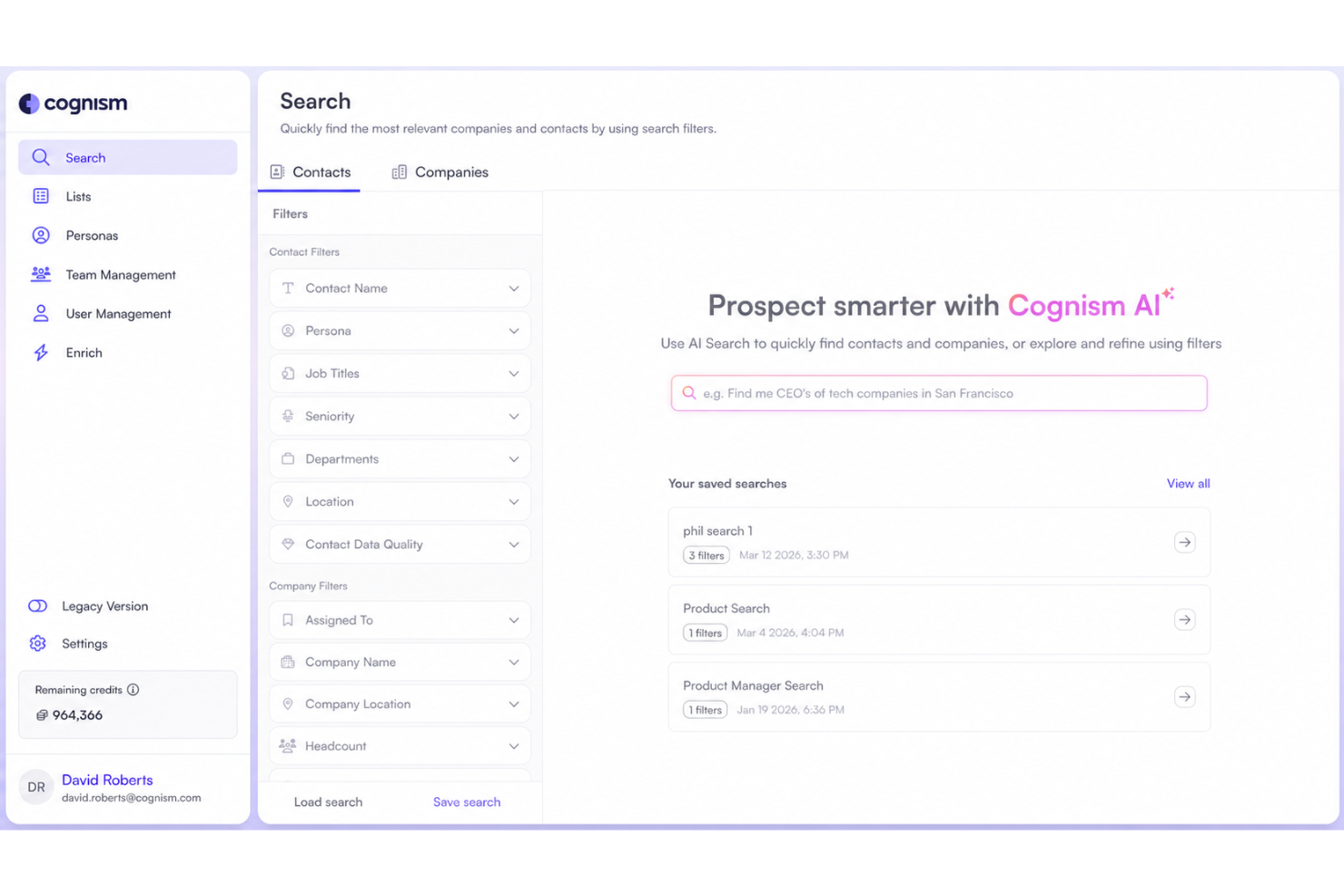
Cognism is a B2B contact data platform that combines phone-verified mobile numbers, firmographic data, and intent signals to help sales and marketing teams identify and reach decision-makers across global markets.
Who Is Cognism Best For?
Cognism is a strong fit for B2B sales and marketing teams in EMEA and North America that need data they can trust for outbound prospecting and compliance.
Why I Picked Cognism
I picked Cognism as one of the best because its compliance-first approach to B2B data is genuinely rare at this scale. Where most data providers treat compliance as an afterthought, Cognism builds it in through extensive Do-Not-Call list coverage across Europe and GDPR/CCPA-aligned sourcing.
I also like that decision-maker data refreshes every 30 days, so you're not calling stale contacts. The phone-verified mobile numbers are another standout, delivering up to 3x higher connect rates compared to unverified data.
Cognism Key Features
- Buyer intent signals: Surfaces account-level buying signals so reps know which prospects are actively in-market.
- Browser extension: Works directly over LinkedIn and company websites to surface contact data and signals without leaving the page.
- AI search and research tool: Lets reps search, prep, and identify prospects faster using natural language queries.
- CRM enrichment: Automatically updates and maintains CRM records with fresh contact and firmographic data.
Cognism Integrations
Cognism offers native integrations with Salesforce, HubSpot, Pipedrive, Bullhorn, Microsoft Dynamics 365, Salesloft, and Outreach. It also connects with Zapier and provides an API for custom integrations.
Pros and Cons
Pros:
- Strong European and EMEA contact coverage
- Diamond Data delivers phone-verified mobile numbers
- GDPR and Do-Not-Call list screening built in
Cons:
- U.S. mid-market data coverage lags behind competitors
- No built-in outbound sequencing or email automation

Best for guided sales workflow automation
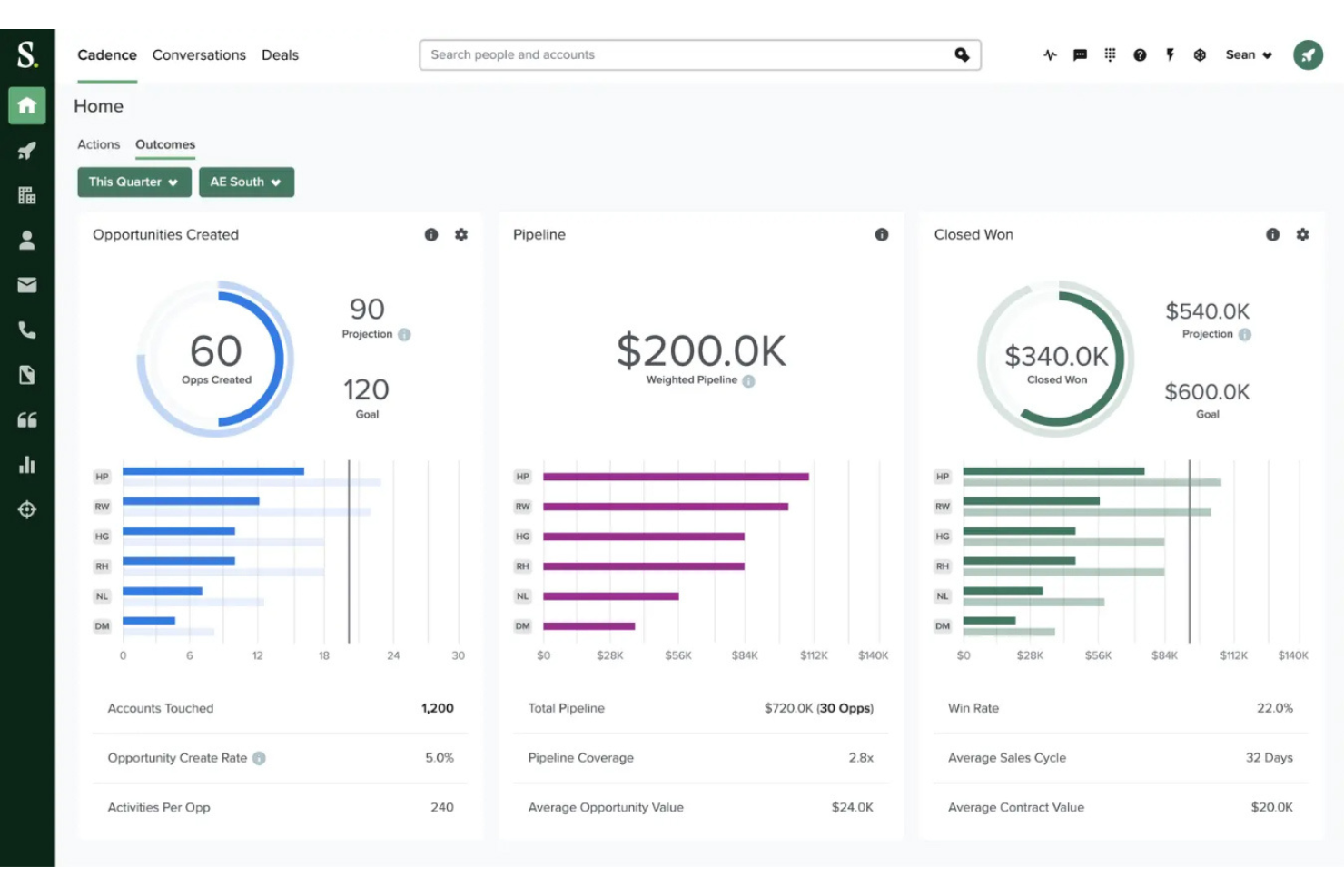
Salesloft is a revenue orchestration platform that unifies sales engagement, deal management, conversation intelligence, AI-driven forecasting, and buyer signal routing across the full sales cycle.
Who Is Salesloft Best For?
Salesloft is a strong fit for mid-market and enterprise sales teams that need structured, repeatable workflows with built-in coaching and signal-based prioritization.
Why I Picked Salesloft
Salesloft earns its spot on my shortlist because of Rhythm, its AI-driven workflow engine that turns buyer signals into a prioritized daily action queue for every rep. Instead of reps deciding what to do next, Rhythm does it for them, routing tasks based on intent scores, website activity, and deal stage. I also like Plays, which auto-trigger seller actions like meeting prep or follow-up emails when specific signals fire, keeping the sales process consistent without manual intervention.
Salesloft Key Features
- Cadences: Builds multi-step, multichannel outreach sequences across email, phone, and social.
- Conversation intelligence: Records, transcribes, and scores sales calls with AI-generated coaching cues.
- Deal management: Surfaces deal health indicators and flags stalled opportunities across the pipeline.
- Forecast management: Lets managers review, adjust, and compare rep-submitted forecasts against AI predictions.
Salesloft Integrations
Salesloft offers 180+ partners through its marketplace, including native integrations with Salesforce, HubSpot, Microsoft Dynamics 365, LinkedIn Sales Navigator, Gong, Slack, Drift, Chili Piper, and more. It also connects with Zapier and provides an API for custom integrations.
Pros and Cons
Pros:
- Conversation intelligence includes call coaching cues
- CRM syncs logs activities automatically in Salesforce
- Cadence builder handles multichannel outreach at scale
Cons:
- No built-in prospecting database for contact sourcing
- Strict annual contracts complicate cancellation
6sense
Best for predictive lead prioritization
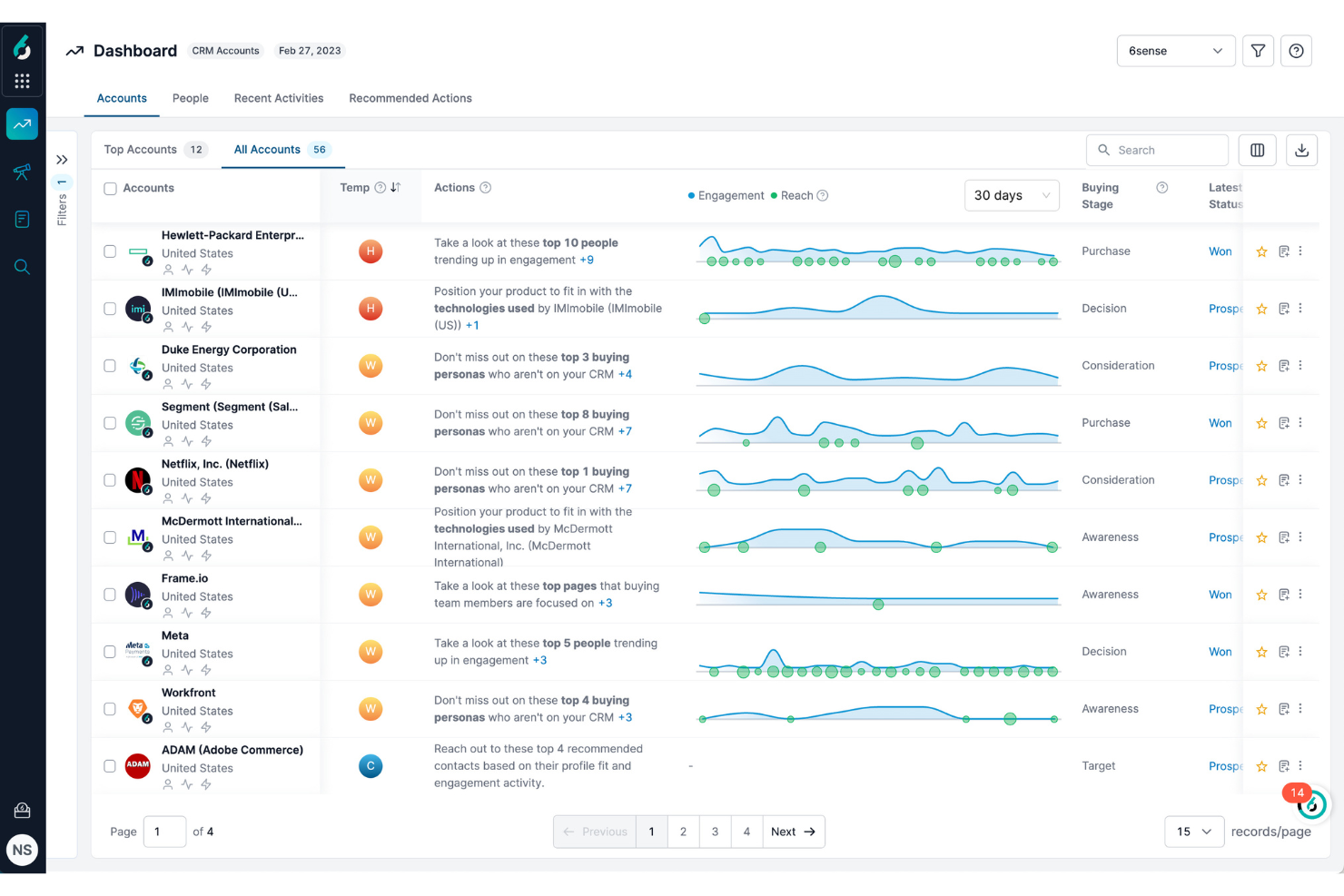
An AI-driven account engagement platform, 6sense combines predictive analytics, buyer intent data, and account-based marketing orchestration to help revenue teams identify and engage in-market accounts.
Who Is 6sense Best For?
6sense is a strong fit for enterprise B2B revenue teams where sales and marketing need to align on which accounts to pursue based on buying stage signals.
Why I Picked 6sense
6sense earns its spot on my shortlist because its predictive lead prioritization goes deeper than basic lead scoring. The Revenue AI model pulls in anonymous buying signals from across the web and maps accounts to specific buying stages, so I know which accounts are actually in-market before they ever fill out a form.
I also like the account reach feature, which lets my team trigger targeted ad campaigns directly against those prioritized accounts without waiting on marketing to build a separate list.
6sense Key Features
- Psychographic segmentation: Groups target accounts by behavioral patterns and interests to sharpen audience targeting.
- Conversational email: AI-generated email sequences that personalize outreach based on an account's current buying stage.
- Pipeline intelligence: Tracks deal health and progression across open opportunities using engagement and intent data.
- Dark funnel visibility: Surfaces anonymous research activity from accounts that haven't yet engaged with your website or ads.
6sense Integrations
6sense offers native integrations across CRM, marketing automation, sales engagement, and advertising categories, including Salesforce, Microsoft Dynamics, HubSpot, Marketo, Eloqua, Outreach, Salesloft, Gong, Slack, LinkedIn Ads, and more.
Pros and Cons
Pros:
- Multi-channel campaign orchestration built in
- AI-powered buying stage predictions per account
- Surfaces anonymous account-level buying signals
Cons:
- Contact data accuracy often falls short
- Requires dedicated admin for full setup

Best for leveraging professional network insights
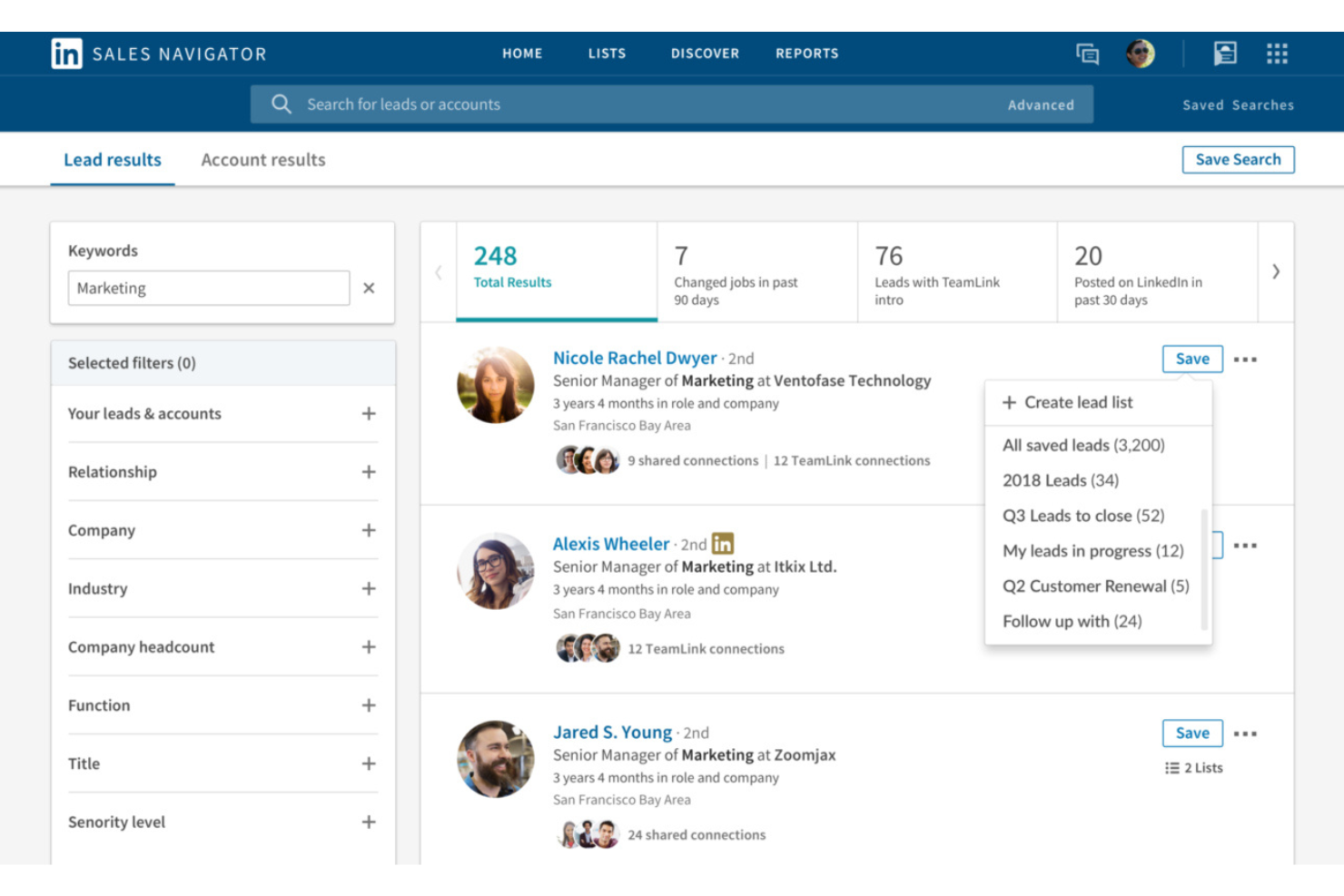
Built on LinkedIn's professional network, Sales Navigator is a sales prospecting tool that combines advanced lead and account search, real-time buyer intent signals, and CRM-connected contact tracking.
Who Is LinkedIn Sales Navigator Best For?
Sales Navigator is a strong fit for B2B sales reps and account executives who rely on relationship-driven prospecting to reach decision-makers at mid-market and enterprise accounts.
Why I Picked LinkedIn Sales Navigator
LinkedIn Sales Navigator earns its spot on my shortlist because no other prospecting tool gives you the same depth of professional network data. I rely on its Advanced Search filters to build hyper-targeted lead lists by seniority, department, and company headcount, then use the real-time job change alerts to time my outreach.
The TeamLink feature is especially useful, showing which prospects my colleagues are already connected to so I can request a warm introduction instead of a cold approach.
LinkedIn Sales Navigator Key Features
- InMail messaging: Send direct messages to any LinkedIn member, even outside your network, without needing their contact information.
- Account IQ: Surfaces AI-generated summaries of target accounts, including company news, growth signals, and key stakeholder activity.
- Smart Links: Package sales content into a trackable link that shows you who opened it and how long they engaged with each asset.
- Lead recommendations: Suggests new prospects based on your saved leads, search history, and account preferences.
LinkedIn Sales Navigator Integrations
LinkedIn Sales Navigator integrates with 20+ SNAP (Sales Navigator Application Platform) partners, including Salesforce, HubSpot, Microsoft Dynamics 365, Oracle Sales, SAP Sales Cloud, Zoho CRM, SugarCRM, Power BI, Freshworks, Gong, Outreach, Salesloft, and Tableau.
Pros and Cons
Pros:
- TeamLink reveals mutual connections across teams
- Job change alerts improve outreach timing
- Buyer intent signals surface active prospects
Cons:
- No built-in contact emails or phones
- No built-in outreach automation tools

Outreach
Best for multichannel engagement sequences
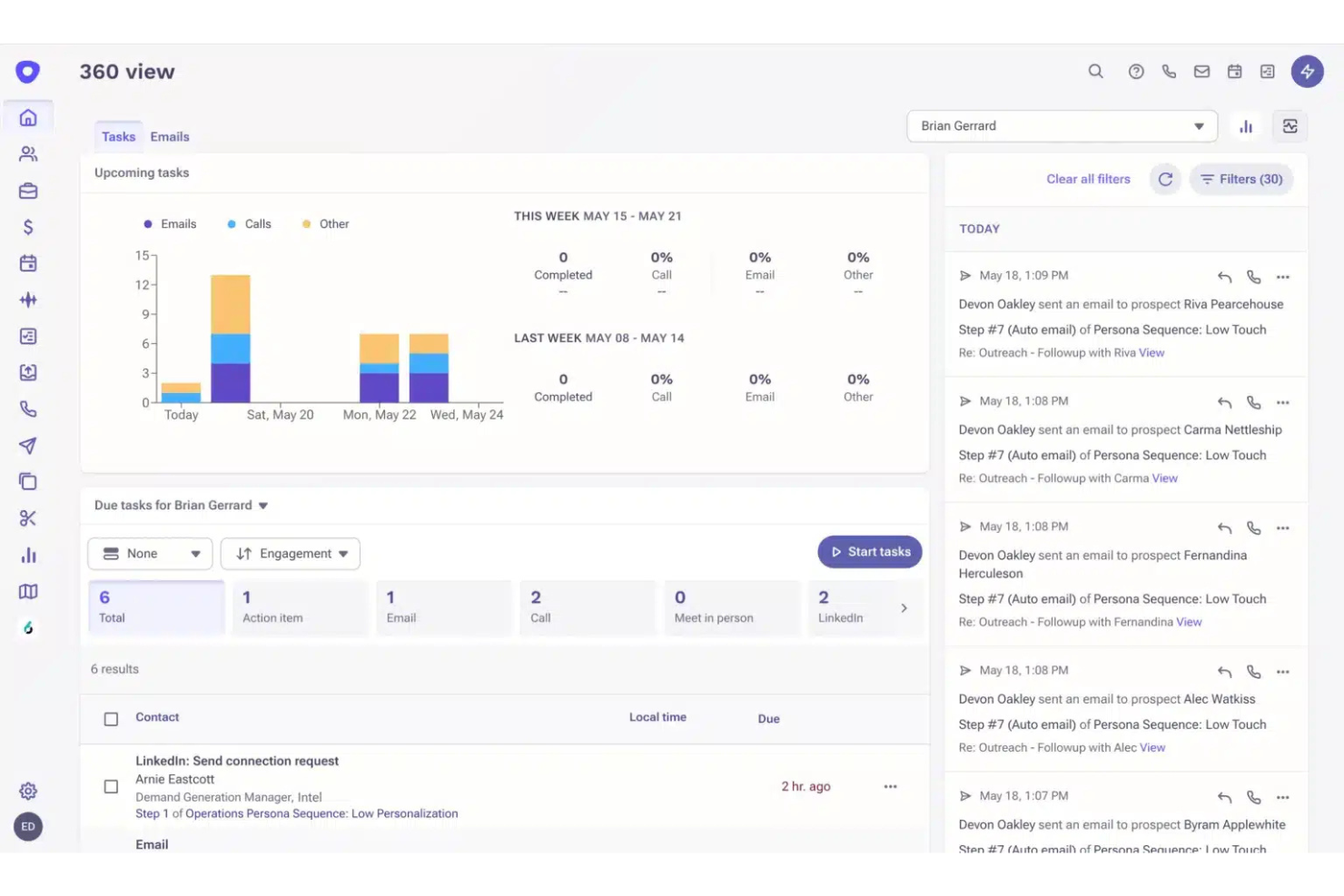
A sales execution platform built for enterprise go-to-market teams, Outreach combines multichannel sales engagement, deal management, mutual action plans, and AI-driven forecasting in one system.
Who Is Outreach Best For?
Outreach is a strong fit for enterprise sales teams that run high-volume, structured outbound motions across multiple channels and need coaching and forecasting built in.
Why I Picked Outreach
I've included Outreach in my top picks because its sequence builder handles email, phone, LinkedIn, and SMS steps in a single coordinated workflow, which keeps my reps from manually tracking which channel to use next.
I particularly like the A/B testing built directly into sequences, so I can test subject lines or call scripts against real performance data. The AI step suggestions also surface timing and channel recommendations based on buyer engagement patterns.
Outreach Key Features
- Deal management: Tracks deal health, activity gaps, and stage progression across your entire pipeline in one view.
- Conversation intelligence: Records and transcribes calls, then flags key moments like objections, competitors, and next steps.
- Revenue forecasting: Lets managers submit, adjust, and compare forecasts using AI-assisted predictions alongside rep-submitted numbers.
- Mutual success plans: Creates shared deal workspaces where reps and buyers can align on timelines, stakeholders, and next steps.
Outreach Integrations
Outreach offers native integrations through its marketplace with tools like Salesforce, HubSpot, Microsoft Dynamics 365, Gmail, Outlook, Highspot, and Demandbase. It also connects with Zapier and provides a REST API for custom integrations.
Pros and Cons
Pros:
- Granular rep activity dashboards track team output
- AI-assisted sentiment analysis scores prospect replies
- Sequence analytics show step-level conversion data
Cons:
- Implementation and onboarding take several weeks
- LinkedIn steps are manual task reminders only
HubSpot
Best for marketing and sales suite integration
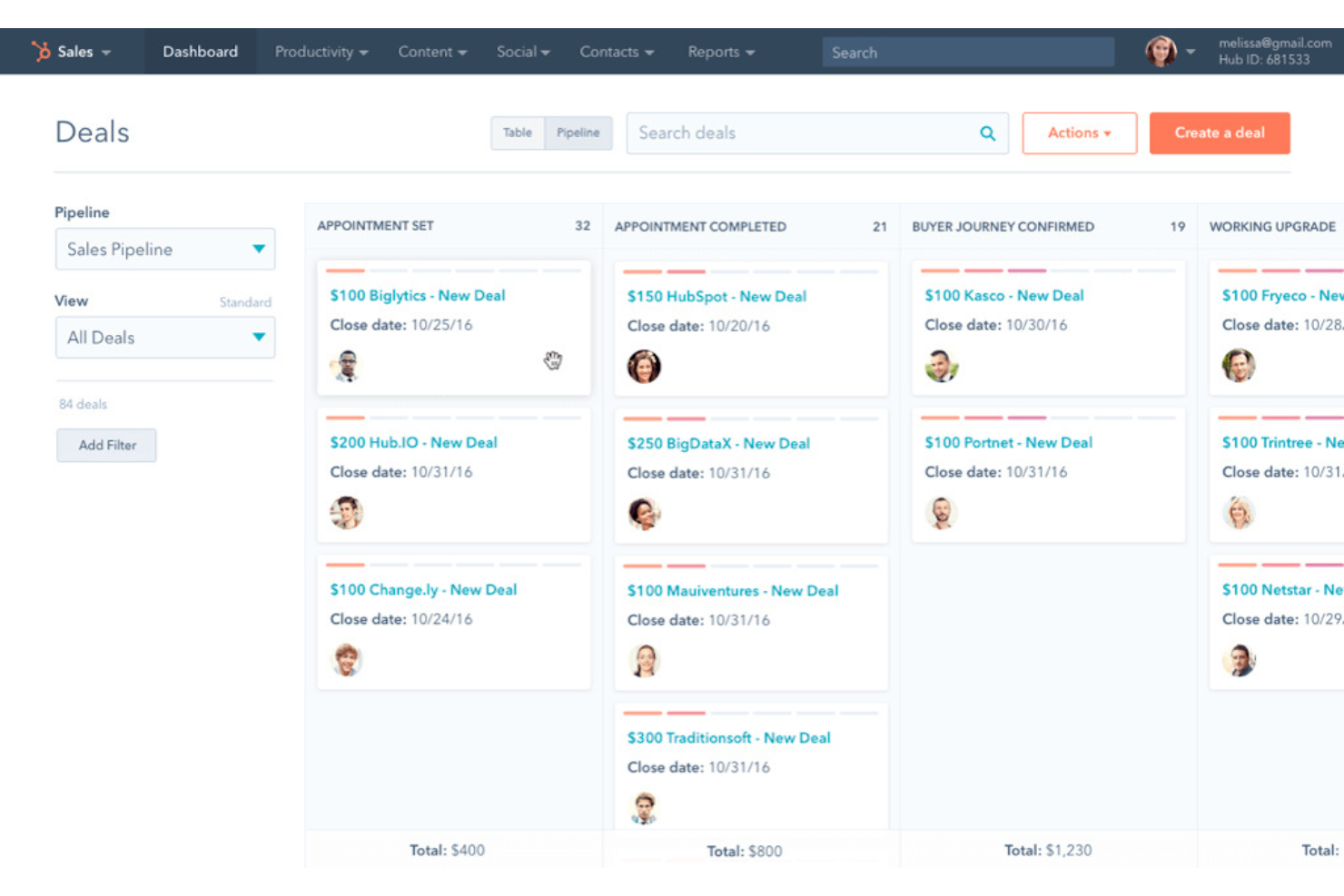
HubSpot is a CRM platform that unifies marketing automation, sales pipeline management, content tools, and customer service into a single connected suite.
Who Is HubSpot Best For?
HubSpot is a strong fit for small to mid-sized go-to-market teams that want marketing, sales, and service functions running from a single platform.
Why I Picked HubSpot
I picked HubSpot as one of the best because of how tightly its Marketing Hub and Sales Hub share a single contact database. When a lead engages with a campaign, that activity instantly surfaces in the sales rep's contact timeline, so no context gets lost between handoff.
I also like that lifecycle stage management and lead scoring are built into the same system, which means marketing and sales are always working from the same qualification criteria.
HubSpot Key Features
- Email automation workflows: Build multi-step email sequences triggered by contact behavior, form submissions, or lifecycle stage changes.
- Deal pipeline management: Track opportunities across fully customizable pipeline stages with drag-and-drop deal cards and automated task creation.
- Meeting scheduling tool: Embed a booking link that syncs with a rep's calendar and logs meetings directly to the contact record.
- Custom reporting dashboards: Build cross-object reports that pull data across contacts, deals, and campaigns into a single view.
HubSpot Integrations
HubSpot's App Marketplace offers 1,500+ integrations, including go-to-market tools like Salesforce, Slack, Google Workspace, Microsoft 365, LinkedIn Ads, Mailchimp, Zoom, Shopify, WordPress, and Stripe. It also connects with Zapier, and an API is available for custom integrations
Pros and Cons
Pros:
- Drag-and-drop workflow builder spans multiple channels
- Built-in prospect tracking identifies anonymous site visitors
- Marketing-to-sales lead handoff includes full campaign context
Cons:
- Workflow automation restrictive for complex processes
- Advanced features locked behind higher-tier plans

ZoomInfo
Best for B2B contact database accuracy
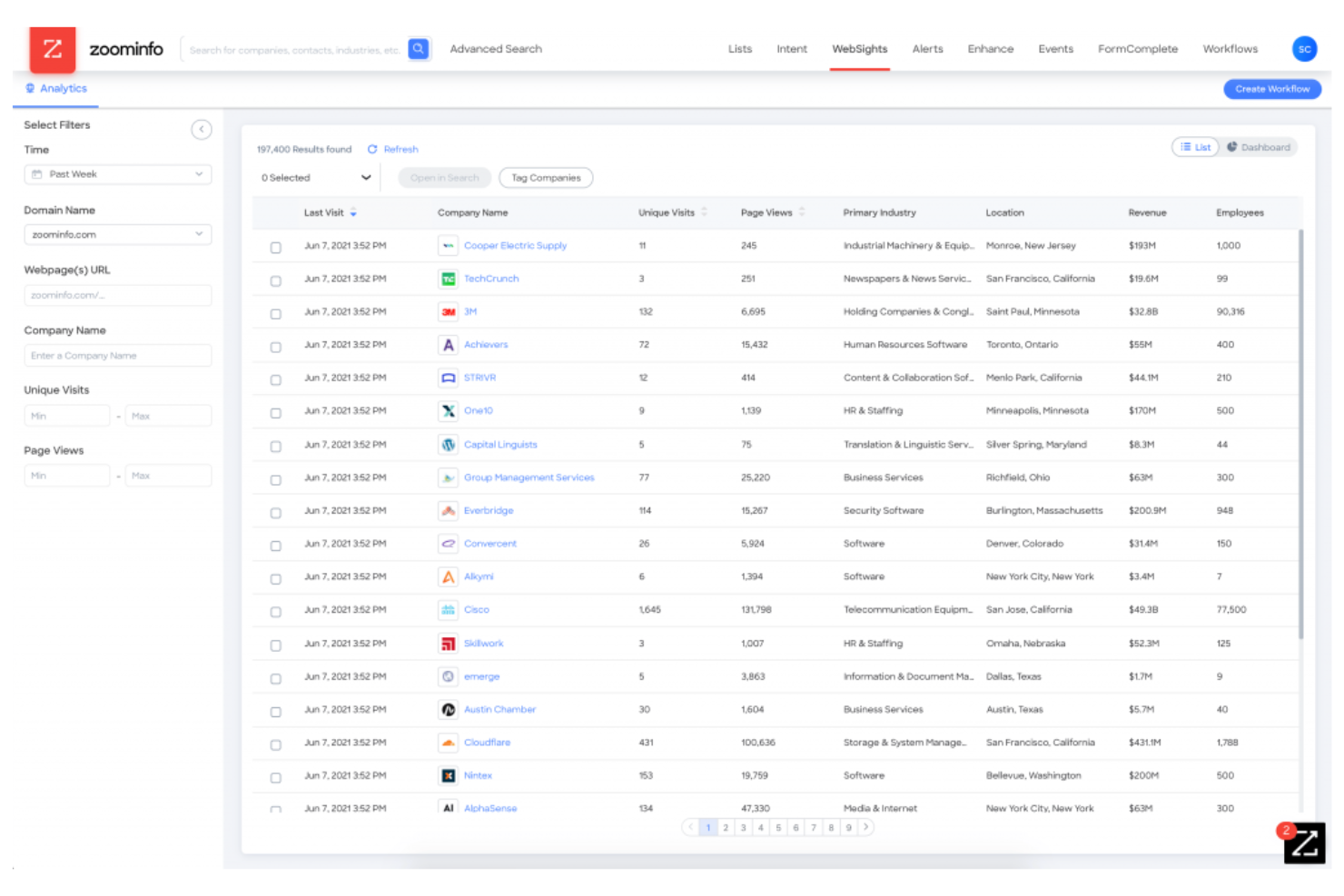
ZoomInfo is an AI-powered go-to-market platform built on a B2B contact and company database, combining buyer intent signals, sales automation, and workflow orchestration for sales, marketing, and RevOps teams.
Who Is ZoomInfo Best For?
ZoomInfo is a strong fit for mid-market and enterprise B2B sales and marketing teams that rely on high-volume prospecting and accurate contact data.
Why I Picked ZoomInfo
I picked ZoomInfo because its B2B contact database is genuinely one of the most accurate on the market, and that matters a lot when your team is building outreach lists at scale. What I find especially useful is the combination of verified contact data with real-time buyer intent signals, so I'm not just getting a name and email, I'm getting context on who's actually in-market.
The CRM enrichment feature keeps records clean automatically, which means my team isn't chasing down bad data mid-cycle.
ZoomInfo Key Features
- Conversation intelligence: Records, transcribes, and analyzes sales calls to surface deal-critical insights and coaching opportunities.
- Website visitor tracking: Identifies anonymous companies visiting your website and routes them into your prospecting workflow.
- Sales engagement sequences: Automates multichannel outreach across email, phone, and LinkedIn directly within the platform.
- Technographic data: Reveals the technology stacks companies use, helping you target accounts based on existing tool adoption.
ZoomInfo Integrations
ZoomInfo offers a large set of native integrations through its marketplace, including Salesforce, HubSpot, Microsoft Dynamics 365, Marketo, Eloqua, Outreach, Salesloft, Slack, Pipedrive, and Gong.
Pros and Cons
Pros:
- Built-in buyer intent signal tracking
- Advanced firmographic and technographic search filters
- Massive B2B contact and company database
Cons:
- Less suited for targeting small businesses
- Weaker contact coverage outside North America

Best for account-based marketing insights
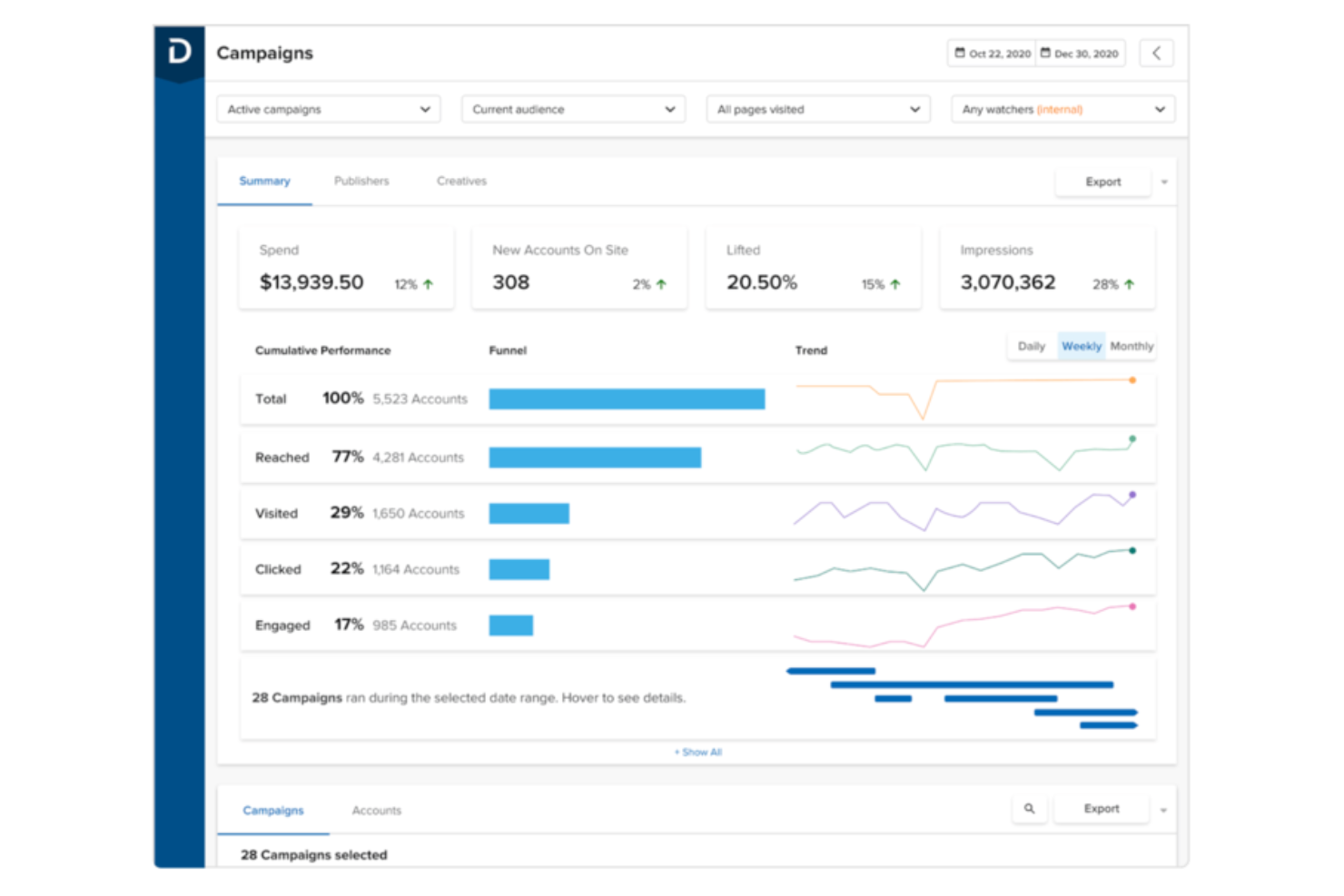
Demandbase is a B2B go-to-market platform that unifies account intelligence, advertising, web personalization, and sales insights into a single system for revenue teams targeting specific accounts.
Who Is Demandbase Best For?
Demandbase is a strong fit for enterprise B2B marketing and sales teams running account-based programs across long, complex buying cycles.
Why I Picked Demandbase
I picked Demandbase as one of the best because its account-based marketing insights go well beyond surface-level intent data. I particularly like the buying group mapping feature, which identifies all the decision-makers within a target account and tracks engagement across each of them, not just the lead who clicked a form.
Combined with its account journey analytics, my team can see exactly which stage each account is in and which programs are actually moving the needle on the pipeline.
Demandbase Key Features
- Account identification: Matches anonymous web traffic to known company accounts in real time.
- Targeted advertising: Serves display ads directly to specific accounts across the web and social channels.
- Website personalization: Dynamically adjusts homepage messaging and content based on the visiting account.
- Predictive scoring: Scores accounts by combining fit, intent, and engagement signals to rank pipeline readiness.
Demandbase Integrations
Demandbase offers 56 integrations through its marketplace, spanning CRM, marketing automation, sales engagement, advertising, intent data, and analytics categories. Native integrations include Salesforce, Microsoft Dynamics 365, HubSpot, Marketo, Eloqua, Outreach, Salesloft, Gong, Slack, LinkedIn, and Google Analytics. An API is available for custom integrations.
Pros and Cons
Pros:
- Dedicated customer success managers score highly
- Built-in B2B DSP outpaces competitor ad tools
- Intent data blends first and third-party signals
Cons:
- Steep platform learning curve initially
- Onboarding takes two to three months minimum
Best for enterprise sales pipeline management
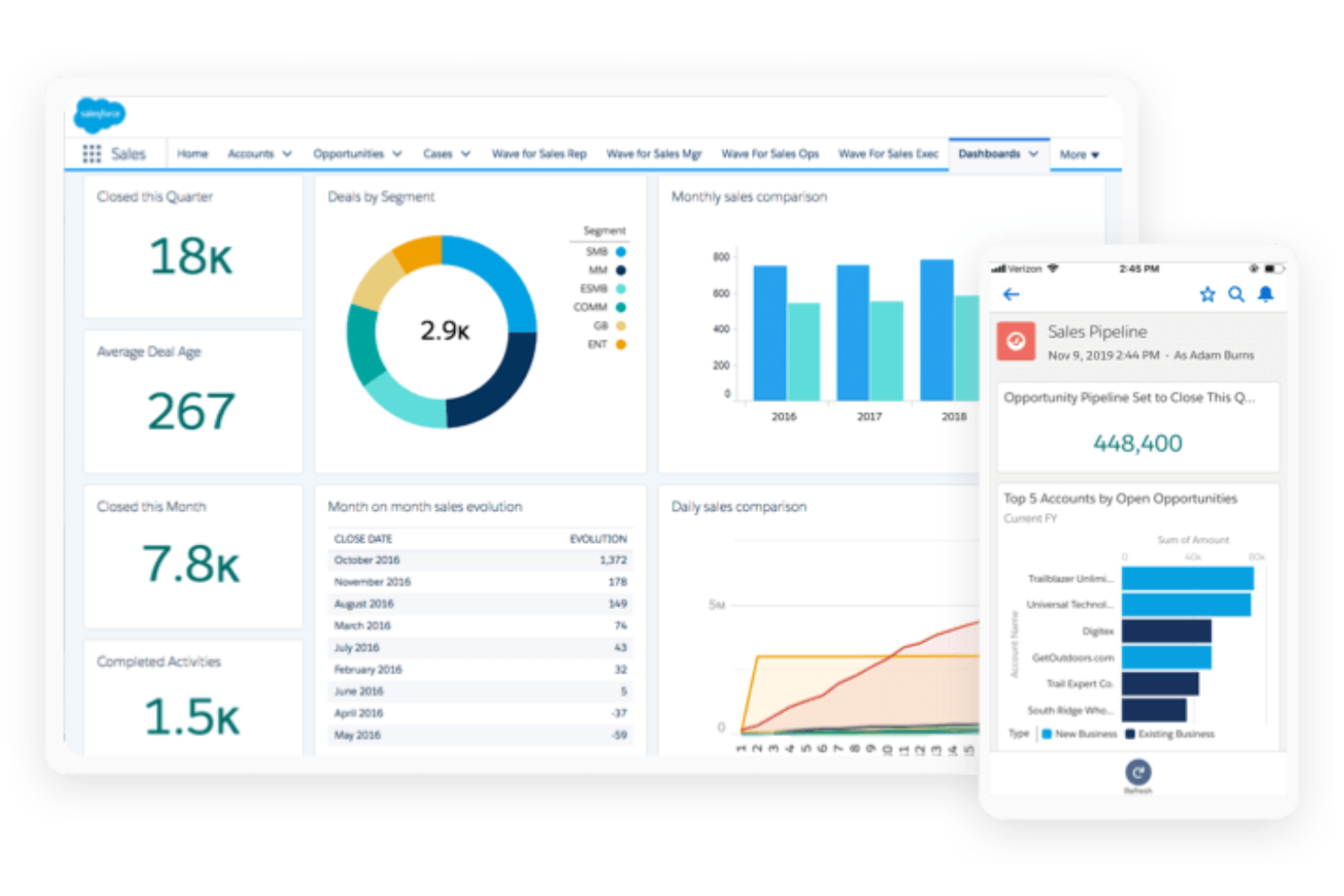
Salesforce is a CRM platform built around sales pipeline management, account tracking, AI-driven forecasting, and go-to-market workflow automation across sales, marketing, and customer success teams.
Who Is Salesforce Best For?
Salesforce is a natural fit for enterprise sales organizations that need deep pipeline visibility, multi-team coordination, and customizable workflows at scale.
Why I Picked Salesforce
Salesforce earns its spot on my shortlist because of how deeply it handles complex, multi-stakeholder pipeline scenarios. I particularly like the Pipeline Inspection view, which surfaces deal health scores, forecast categories, and recent activity changes in a single glance. Einstein AI layers predictive opportunity scoring on top of that, so I can prioritize the right deals without relying on gut feel.
Salesforce Key Features
- Collaborative forecasting: Roll up revenue forecasts by rep, team, or territory with adjustable forecast categories at each level.
- Sales engagement: Build and manage outreach cadences with auto-surfaced tasks, call scripts, and email templates tied directly to CRM records.
- Flow automation builder: A drag-and-drop tool for automating record updates, approval routing, and sales process triggers without writing code.
- Territory management: Assign accounts and opportunities to reps using rules based on geography, industry, or account attributes.
Salesforce Integrations
Salesforce's AgentExchange marketplace (formerly AppExchange) offers thousands of apps and integrations, including go-to-market tools like Slack, Google Workspace, HubSpot, Adobe Marketo Engage, LinkedIn Sales Navigator, Outreach, Salesloft, DocuSign, Zoom, and Gong.
Pros and Cons
Pros:
- Largest app marketplace among CRM platforms
- Einstein AI scores leads and forecasts outcomes
- Highly customizable dashboards and reporting views
Cons:
- Custom implementations often exceed expected timelines
- Simple tasks require too many clicks

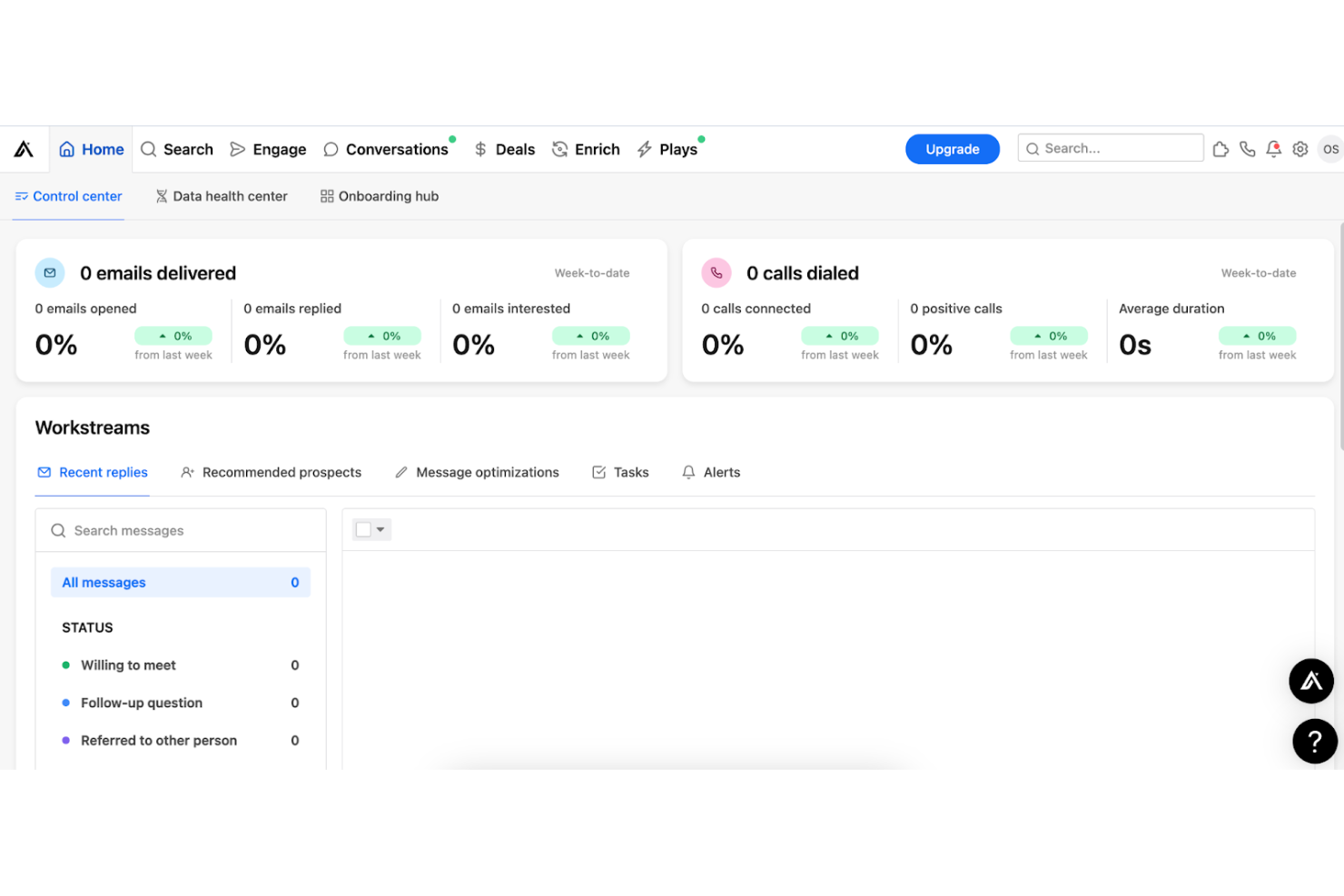
Apollo.io is a B2B go-to-market platform that combines a contact and company database, outbound and inbound sales engagement, workflow automation, deal management, and conversation intelligence in a single system.
Who Is Apollo.io Best For?
Apollo.io is a natural fit for sales development and outbound-focused teams at SMBs and mid-market companies that need prospecting, sequencing, and pipeline management in one place.
Why I Picked Apollo.io
Apollo.io earns its spot on my shortlist because it keeps the entire prospecting workflow inside one platform, from finding contacts to booking meetings. I particularly like the B2B database search, where I can filter by over 65 attributes including job change signals and technographic data, then push those contacts directly into a sequence without ever leaving the tool.
The built-in dialer and email sequencing mean my team isn't stitching together three separate tools just to run a cold outbound campaign.
Apollo.io Key Features
- AI-powered lead scoring: Scores and prioritizes leads based on engagement signals, firmographic fit, and behavioral data.
- Deal management: Tracks open opportunities, stages, and activity history directly within the platform's pipeline view.
- Conversation intelligence: Records, transcribes, and analyzes sales calls to surface talking points and next steps.
- Website visitor tracking: Identifies companies visiting your site and routes them into prospecting workflows automatically.
Apollo.io Integrations
Apollo.io offers native integrations with Salesforce, HubSpot, Outreach, Salesloft, Pipedrive, Zoho, Microsoft Dynamics, Marketo, Greenhouse, SendGrid, Mailgun, Slack, Vidyard, and Outlook. It also connects with Zapier and provides an API for custom integrations.
Pros and Cons
Pros:
- Job change alerts flag champion movement signals
- Parallel dialer multiplies outbound call volume
- Persona filters target niche prospect segments fast
Cons:
- Contact data outside the US gaps widen
- Export credit limits bottleneck data portability
Other Go-To-Market Tools
Here are some additional go-to-market tools that didn’t make it onto my shortlist, but are still worth checking out:
- Clay
For customizable workflow automation
- Amplemarket
For automated outbound campaigns
- Leadfeeder
For identifying website visitor companies
- Clearbit
For company enrichment for web leads
- Bombora
For intent data based on content consumption
- RollWorks
For account targeting personalization
- Clari
For revenue pipeline health forecasting
- Dealfront
For EU-based sales prospect insights
- UserGems
For tracking buyer job changes
- Common Room
For analyzing buyer signals in communities


How I Evaluate Go-to-Market Tools
A RevOps team needs one platform to handle everything from account data and intent signals to outreach sequencing and pipeline reporting. I split my evaluation into baseline requirements every tool must meet and the differentiators that separate strong options from the rest.
Core Functionality (Table Stakes for This List)
When I'm selecting tools for my list, I rank each one on a scale from 0 (does not offer the functionality) to 5 (excels in this area) for each core functionality listed below. I then calculate the tool's total score into a percentage, using 75% as a benchmark to help assess its overall fit for the list.
- Account & contact data: I evaluate the depth of firmographic, technographic, and contact-level records, including whether the platform auto-enriches accounts with verified emails, direct dials, and org chart data as you build target lists.
- Buyer intent signals: Strong tools combine first-party engagement data with third-party intent sources so your team can prioritize accounts showing real buying behavior, not just website visits.
- Multichannel outreach orchestration: I look for coordinated sequencing across email, phone, and LinkedIn at minimum, with the ability to build team-level plays that branch based on prospect responses or engagement.
- CRM & GTM stack integration: Bi-directional sync with Salesforce and HubSpot is baseline. I check whether activity data, custom fields, and lead stages flow cleanly between the platform, your MAP, and other sales tools without manual CSV work.
- Lead routing & workflow automation: I evaluate how the platform handles scoring, segmentation, and assignment. The best options support territory-aware routing and SLA tracking so reps get the right leads fast and managers can spot bottlenecks.
- Pipeline & revenue analytics: Reporting should cover pipeline generation, funnel conversion, and campaign attribution in dashboards your ops team can customize without relying on a separate BI tool.
Once I have a list of tools that meet the criteria, I consider what sets each platform apart.
Differentiating Factors (What Sets Vendors Apart)
Here's how I compare and contrast different vendors:
Standout Features
I look for conversation intelligence that goes beyond basic call recording. The best tools tie AI-generated deal risk scores and coaching insights directly into pipeline forecasts, so RevOps can flag stalled deals before they slip. Buying committee mapping is another separator—I check whether a platform auto-builds org charts and surfaces all decision-makers, since reps targeting a single contact in enterprise deals routinely lose to competitors who engage the full committee. I also evaluate territory and quota planning tools, because RevOps teams that can model capacity and assign accounts inside the same platform they use for execution avoid the spreadsheet chaos that comes with managing those workflows separately.
Beyond Features
I evaluate data accuracy and global coverage closely because bounce rates and stale contacts kill outbound campaigns fast. I also check each vendor's pricing model for hidden costs—credit caps on enrichment or gated intent modules can push total cost well past the listed seat price, especially when you're consolidating point solutions. Integration depth matters just as much: I look for bi-directional sync with CRMs, MAPs, and data warehouses like Snowflake, since RevOps teams building composable stacks need open APIs and field-level sync controls to keep CRM governance intact.
How to Choose Go-To-Market Tools
It’s easy to get bogged down in long feature lists and complex pricing structures. To help you stay focused as you work through your unique software selection process, here’s a checklist of factors to keep in mind:
| Factor | What to Consider |
|---|---|
| Scalability | Can the tool handle your data and user growth as you expand go-to-market initiatives? Will pricing, performance, or limits create barriers as you scale campaigns or add new teams? |
| Integrations | Does the tool natively connect with your CRM, data platforms, messaging, and workflow tools? Are there limits or extra costs for integration? Can it work with your core stack? |
| Customizability | How much can you adapt workflows, fields, and campaigns to fit your sales motion or business process? Are advanced customization and permissions available? |
| Ease of use | Will reps, managers, and operations easily adopt the tool? Does it require heavy training to get value, and is it easy for non-technical users to manage once deployed? |
| Implementation and onboarding | What’s the expected onboarding timeline? Does the vendor support data migration, integration setup, and initial training? Are resources or expertise needed internally? |
| Cost | What’s the total cost of ownership (TCO), including licenses, onboarding, integration, maintenance, and user tiers? Are there hidden fees for data usage or support? |
| Security safeguards | Does the tool meet your data protection requirements? Does it offer SSO, data residency options, and compliance certifications like SOC 2 or GDPR as needed? |
| Support availability | How quickly and reliably can you get help? Are live chat, phone, and knowledge base resources available during your business hours? |
What are Go-To-Market Tools?
Go-to-market tools are software platforms that help revenue teams orchestrate and execute outbound prospecting, multichannel campaigns, lead enrichment, account targeting, and pipeline analysis. These tools bring together data, workflow automation, and analytics so sales, marketing, and customer success teams can coordinate efforts and track results across the entire revenue funnel.
Features
When selecting go-to-market tools, keep an eye out for the following key features:
- Contact enrichment: Automatically fills in missing or incomplete lead and account data using external databases, making outreach more accurate and targeted.
- Account segmentation: Groups prospects by firmographic, demographic, or behavioral characteristics so you can prioritize and customize campaigns for specific audiences.
- Multichannel sequencing: Coordinates outreach across channels like email, phone, LinkedIn, social media, and SMS, letting you run unified campaigns from a single platform.
- Engagement tracking: Monitors prospect interactions such as opens, replies, clicks, and calls to help teams spot interest signals and optimize timing.
- Sales pipeline visibility: Offers dynamic dashboards and reports to keep teams informed about outreach stages, conversion rates, and deal progress.
- CRM integration: Syncs lead and activity data directly with your CRM, reducing manual data entry and ensuring central record-keeping.
- Buyer intent detection: Surfaces signals like web visits, content downloads, or offline actions that show when prospects are in-market for your solution.
- Workflow automation: Automates repetitive processes, such as follow-ups or lead assignments, to boost efficiency and consistency in go-to-market execution.
Common AI Features
Beyond the standard go-to-market tools features listed above, many of these solutions are incorporating AI with features like:
- Automated prospect scoring: Uses machine learning to analyze large data sets and prioritize leads most likely to engage or convert, helping reps focus on high-value opportunities.
- AI-driven email personalization: Generates customized subject lines and messaging based on prospect data and previous engagement patterns to increase open and reply rates.
- Conversation intelligence: Transcribes and analyzes sales calls or emails to surface patterns, objections, and actionable insights for coaching and optimizing messaging.
- Intent signal detection: Continuously scans digital footprints and external data sources to identify buying signals and alert teams when prospects are actively researching relevant topics.
- Optimal send time prediction: Predicts when individual prospects are most likely to open and respond to outreach, adjusting campaign timing automatically for higher engagement.
Benefits
Implementing go-to-market tools to power your overall go-to-market strategy provides several benefits for your team and your business. Here are a few you can look forward to:
- Improved sales targeting: Advanced segmentation and lead enrichment help you focus efforts on the right prospects.
- Stronger multichannel engagement: Built-in sequencing and channel management keep your outreach consistent and coordinated across platforms.
- Faster campaign execution: Automation of repetitive tasks lets your team launch campaigns and follow-ups efficiently.
- Clear pipeline visibility: Real-time dashboards and analytics show engagement, conversion, and performance at every stage.
- Better CRM alignment: Native integrations sync activities, contacts, and results with your CRM, reducing manual data entry.
- Informed decision-making: AI-powered insights and reporting surfaces trends and opportunities for strategic adjustments.
- Scalable processes: Flexible workflows and automation grow with your team as business, outreach, and GTM strategy needs expand.
Costs and Pricing
Selecting these corporate GTM tools requires an understanding of the various pricing models and plans available. Costs vary based on features, team size, add-ons, and more. The table below summarizes common plans, their average prices, and typical features included in go-to-market tools solutions:
Plan Comparison Table for Go-To-Market Tools
| Plan Type | Average Price | Common Features |
|---|---|---|
| Free Plan | $0 | Access to basic campaigns, limited contact enrichment, basic reporting, core integrations, and support only via email. |
| Personal Plan | $20-$50/user/month | Single-user access, lead enrichment, multichannel outreach, limited automation, and basic CRM sync. |
| Business Plan | $50-$120/user/month | Team collaboration features, advanced segmentation, reporting dashboards, workflow automation, and priority support. |
| Enterprise Plan | $120-$300/user/month | Custom integrations, dedicated onboarding, enterprise-grade security, SLAs, advanced analytics, and full API access. |
Go-To-Market Tools FAQs
Here are some answers to common questions about go-to-market tools:
How do go-to-market tools help align sales, marketing, and customer success?
Go-to-market tools centralize campaign data, enable shared workflows, and create a single view of the customer journey. This visibility helps teams coordinate outreach, reduce handoff friction, and consistently report on pipeline and outcomes together.
Can I customize go-to-market tools to match our team’s sales process?
Yes, most go-to-market tools let you customize stages, fields, segmentation rules, and automation to match specific sales motions. Look for solutions with flexible workflow builders and integration options to ensure your process isn’t forced to fit generic templates.
What should I do to protect sensitive data when using go-to-market tools?
Choose tools with security safeguards like SSO, role-based access, and compliance certifications such as SOC 2 or GDPR. It’s also a good idea to clarify where your data is stored and review how long vendors retain prospect information.
How long does implementation typically take for go-to-market tools?
Most teams can implement go-to-market tools in a few days to a few weeks. Factors affecting timelines include data migration, integration setup, user training, and how closely your processes match the tool’s best practices.
Do go-to-market tools require ongoing technical support?
While many tools are user-friendly, ongoing technical support may be needed for integration updates, workflow changes, or troubleshooting. Prioritize vendors with strong documentation and responsive customer support, especially if your tech stack is complex.