

Le 10 migliori alternative a Salesforce da prendere in considerazione nel 2026

10 Elenco delle migliori alternative a Salesforce


Con così tante alternative diverse a Salesforce disponibili, capire quale sia quella giusta per te è difficile. Sai di volere un'alternativa a Salesforce che ti aiuti a ottimizzare i processi aziendali, migliorare le relazioni con i clienti e favorire la crescita delle vendite, ma devi capire quale strumento sia il migliore. Ci penso io! In questo articolo ti aiuterò a rendere semplice la tua scelta, condividendo le mie esperienze personali nell'utilizzo di decine di alternative diverse a Salesforce con vari team e progetti, oltre alle mie scelte tra le migliori alternative a Salesforce.
Perché fidarsi dei nostri consigli sui software
Le nostre recensioni riflettono il nostro giudizio indipendente, non un discorso di vendita. Scopri come manteniamo la trasparenza.
Per questa guida, abbiamo valutato gli strumenti attraverso test pratici e ricerche indipendenti, assegnando un punteggio agli strumenti in base ai nostri criteri di selezione.
Le nostre recensioni riflettono il nostro giudizio editoriale umano, non un discorso di vendita.
Tabella di confronto delle alternative a Salesforce
| Tool | Best For | Trial Info | Price | ||
|---|---|---|---|---|---|
| 1 | Ideale per organizzare i dati dei potenziali clienti | Prova gratuita di 30 giorni | Da $29/utente/mese (fatturato annualmente) | Website | |
| 2 | Ideale per strumenti di vendita personalizzabili senza codice | Dimostrazione gratuita disponibile | A partire da $40/mese (5 utenti) | Website | |
| 3 | Ideale per pipeline e flussi di lavoro CRM flessibili | Prova gratuita di 14 giorni | Da $29/utente/mese (fatturazione annuale) | Website | |
| 4 | Ideale per l'automazione delle vendite personalizzabile | Versione di prova gratuita disponibile | Da $12/utente/mese (fatturazione annuale) | Website | |
| 5 | Ideale per l'organizzazione del team e per un'adozione rapida del CRM | Prova gratuita di 14 giorni + piano gratuito disponibile | A partire da $18/utente/mese (fatturato annualmente) | Website | |
| 6 | Ideale per l'intelligenza predittiva | Prova gratuita di 15 giorni | Da $20/utente/mese | Website | |
| 7 | Ideale per la collaborazione nelle grandi organizzazioni | Demo gratuita disponibile | Da $65/utente/mese | Website | |
| 8 | Ideale per la gestione dei progetti | Piano gratuito disponibile | Da $9/utente/mese | Website | |
| 9 | Ideale per principianti | Not available | Da $65/utente/mese | Website | |
| 10 | Ideale per la gestione visuale delle pipeline | Demo gratuita + prova gratuita di 14 giorni disponibile | Da $14/utente/mese (fatturato annualmente) | Website |


Recensioni delle migliori alternative a Salesforce
Ho documentato qui sotto la mia ricerca e raccolto alcune delle migliori piattaforme da prendere in considerazione quando inizi a migrare verso un nuovo CRM (o a configurarlo).
Sebbene sia impossibile esaminare ogni singolo CRM disponibile, ho cercato di concentrarmi sulle principali alternative a Salesforce, in grado di soddisfare le esigenze di quasi ogni azienda e caso d’uso.

Ideale per organizzare i dati dei potenziali clienti

Salesflare ha un'interfaccia semplice che mette in evidenza gli elementi più importanti di un CRM: aziende, contatti, opportunità e approfondimenti. A differenza di Salesforce, Salesflare è un software che si può comprendere rapidamente dopo il primo accesso, iniziando subito a personalizzarlo e adattarlo alle proprie esigenze.
Perché ho scelto Salesflare: Salesflare mi ha permesso di comprendere facilmente i dati dei miei potenziali clienti. Mi è piaciuto il modo in cui Salesflare memorizza le informazioni dei prospect con modelli di “Wish Lists” individuali dove puoi aggiungere note su ciascun potenziale cliente.
Inoltre, è interessante che la piattaforma offra la possibilità di individuare l’email aziendale di qualsiasi prospect, anche se si dispone solo del nome e dell’azienda. È un CRM meno conosciuto, ma comunque utile per le piccole imprese che vogliono aggiungere più organizzazione e sistemi ai loro processi di vendita.
Funzionalità principali e integrazioni di Salesflare:
Le funzionalità principali includono registrazione automatica delle chiamate, strumento per trovare email aziendali, “wish lists” per i prospect, inserimento dati automatizzato e app mobile.
Le integrazioni includono ActiveCampaign, Asana, Calendy, Drift, HubSpot, Intercom, LinkedIn, Mailchimp, Pipedrive, Quickbooks e Zapier.
Pros and Cons
Pros:
- Interfaccia semplice per principianti
- Offre solo le funzionalità base necessarie
- Prezzi semplici e prevedibili
Cons:
- Necessita di un aggiornamento visivo e tecnologico
- Richiede crediti email per l’invio delle email

Ideale per strumenti di vendita personalizzabili senza codice
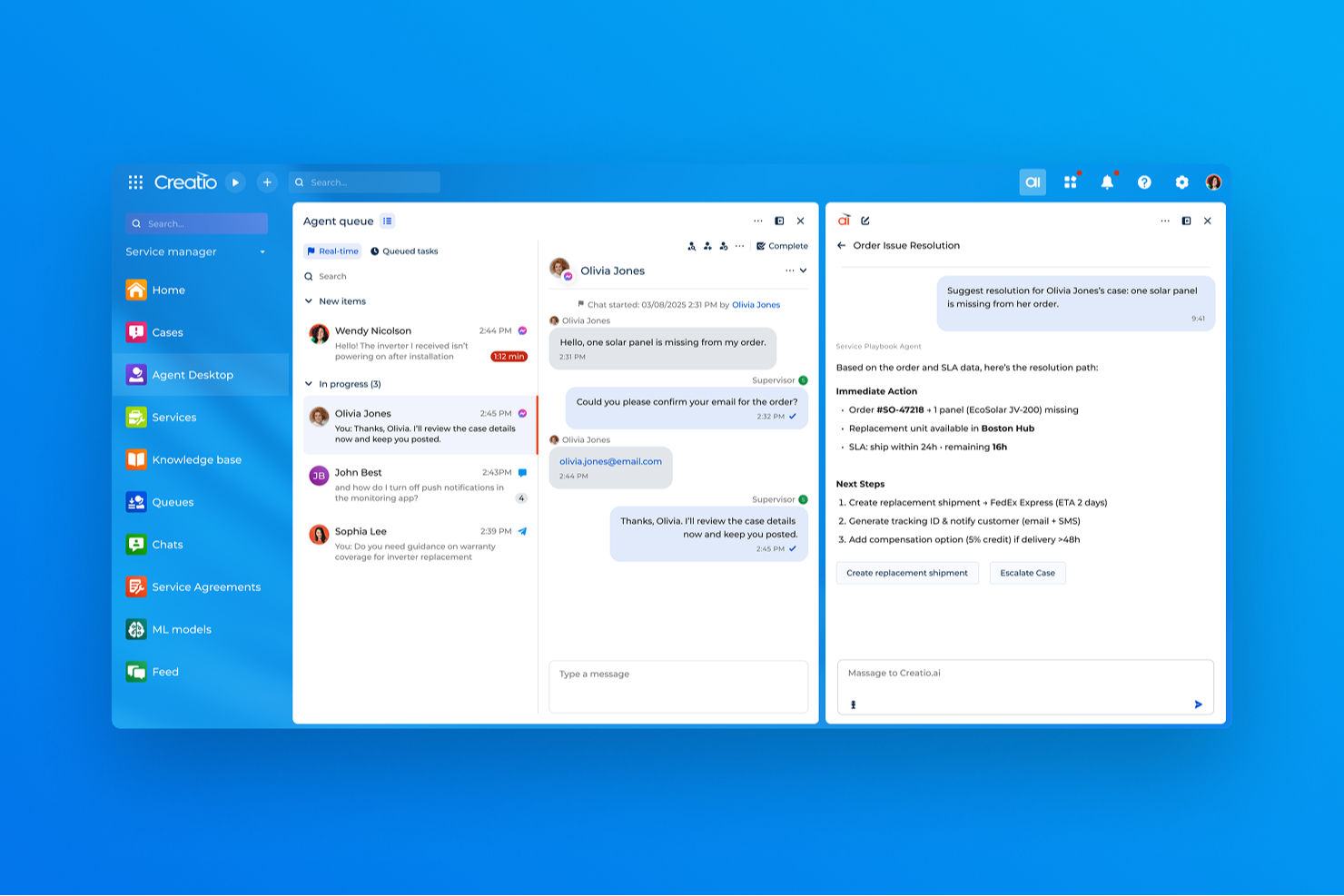
CRM Creatio è una piattaforma CRM e di automazione dei flussi di lavoro basata sull'intelligenza artificiale progettata per organizzazioni di medie e grandi dimensioni. Combina la gestione delle relazioni con i clienti, lo sviluppo di applicazioni senza codice, l'automazione dei processi e funzionalità di intelligenza artificiale in un'unica piattaforma.
Perché ho scelto CRM Creatio: Uno dei principali punti di forza di Creatio è il suo framework di personalizzazione no-code, che consente alle organizzazioni di modificare i flussi di lavoro CRM, le strutture dati e i processi aziendali senza il bisogno di un ampio coinvolgimento degli sviluppatori. La piattaforma offre inoltre sviluppo di applicazioni assistito dall'intelligenza artificiale, automazione dei flussi di lavoro, strumenti di gestione dei clienti e analisi per supportare le operazioni di vendita, marketing e servizio clienti.
Funzionalità e integrazioni di spicco di CRM Creatio:
Le funzionalità includono dashboard personalizzabili, analisi in tempo reale, sviluppo di app assistito dall’IA, gestione di contatti e account, previsioni di vendita, gestione delle attività e gestione delle performance.
Le integrazioni includono Accelo, Act!, ActiveCampaign, Acumatica, Adobe Analytics, Asana, Microsoft Exchange, Excel, Mailchimp, HubSpot Marketing Hub, Google Calendar e Tableau.
Pros and Cons
Pros:
- Buone capacità di automazione dei flussi di lavoro
- Dashboard altamente personalizzabili
- Piattaforma no-code
Cons:
- Curva di apprendimento per i nuovi utenti
- La personalizzazione può richiedere tempo

Attio
Ideale per pipeline e flussi di lavoro CRM flessibili

Attio è uno strumento di customer relationship management potenziato dall'intelligenza artificiale, progettato per offrire un'esperienza CRM altamente personalizzabile e flessibile, adattata alle esigenze specifiche delle aziende. Fornisce potenti modelli e blocchi ultra-personalizzabili per creare flussi di lavoro ideali, dati arricchiti, attributi personalizzati e integrazioni per aiutare le aziende a crescere.
Perché ho scelto Attio: Attio permette alle aziende di personalizzare ogni aspetto del loro CRM per adattarsi ai propri flussi di lavoro e processi unici. Questa flessibilità è particolarmente vantaggiosa per startup e aziende in rapida crescita che necessitano di un sistema CRM in grado di evolvere e scalare insieme alle loro esigenze in cambiamento. I pipeline personalizzabili di Attio, i dati arricchiti e il sistema dinamico di reportistica consentono alle aziende di creare un CRM che sia in linea con le loro necessità operative.
Inoltre, la piattaforma è progettata per facilitare il lavoro di squadra, con funzionalità come notifiche in tempo reale, assegnazione dei compiti, commenti in-linea sulle schede e un feed attività chiaro che traccia cambiamenti e contributi dei membri del team. Le capacità di automazione di Attio semplificano anche numerosi aspetti del processo di vendita, dalla registrazione dati all'innesco di flussi di lavoro complessi in base alle interazioni con i clienti, al lead score o ad altri criteri.
Funzionalità e integrazioni principali di Attio:
Funzionalità includono la funzione di ricerca guidata dall'IA che offre agli utenti insight e informazioni preziose tramite l'analisi dei dati, migliorando la capacità decisionale. Il sistema di reportistica dinamico permette agli utenti di manipolare i dati in diversi modi, fornendo insight utili per la pianificazione strategica. Inoltre, la funzione di aggiornamento automatico dei contatti mantiene le informazioni sempre complete e aggiornate.
Integrazioni disponibili includono Airtable, Asana, Google Calendar, Google Drive, Google Sheets, HubSpot, Intercom e Jira.
Pros and Cons
Pros:
- Pipeline completamente personalizzabili
- Funzionalità di collaborazione in tempo reale
- Ottime capacità di arricchimento dati
Cons:
- Potrebbero essere offerte funzionalità di reportistica più avanzate
- L'app mobile manca di alcune funzionalità
New Product Updates from Attio

Attio Improves Ask Attio With Suggested Actions and Consistent Chat
Attio adds suggested next actions, example prompts, a consistent chat panel, aligned shortcuts, and a minimize option to Ask Attio. These updates make the AI assistant easier to use across different pages. For more information, visit Attio’s official site.
 .
.
Ideale per l'automazione delle vendite personalizzabile
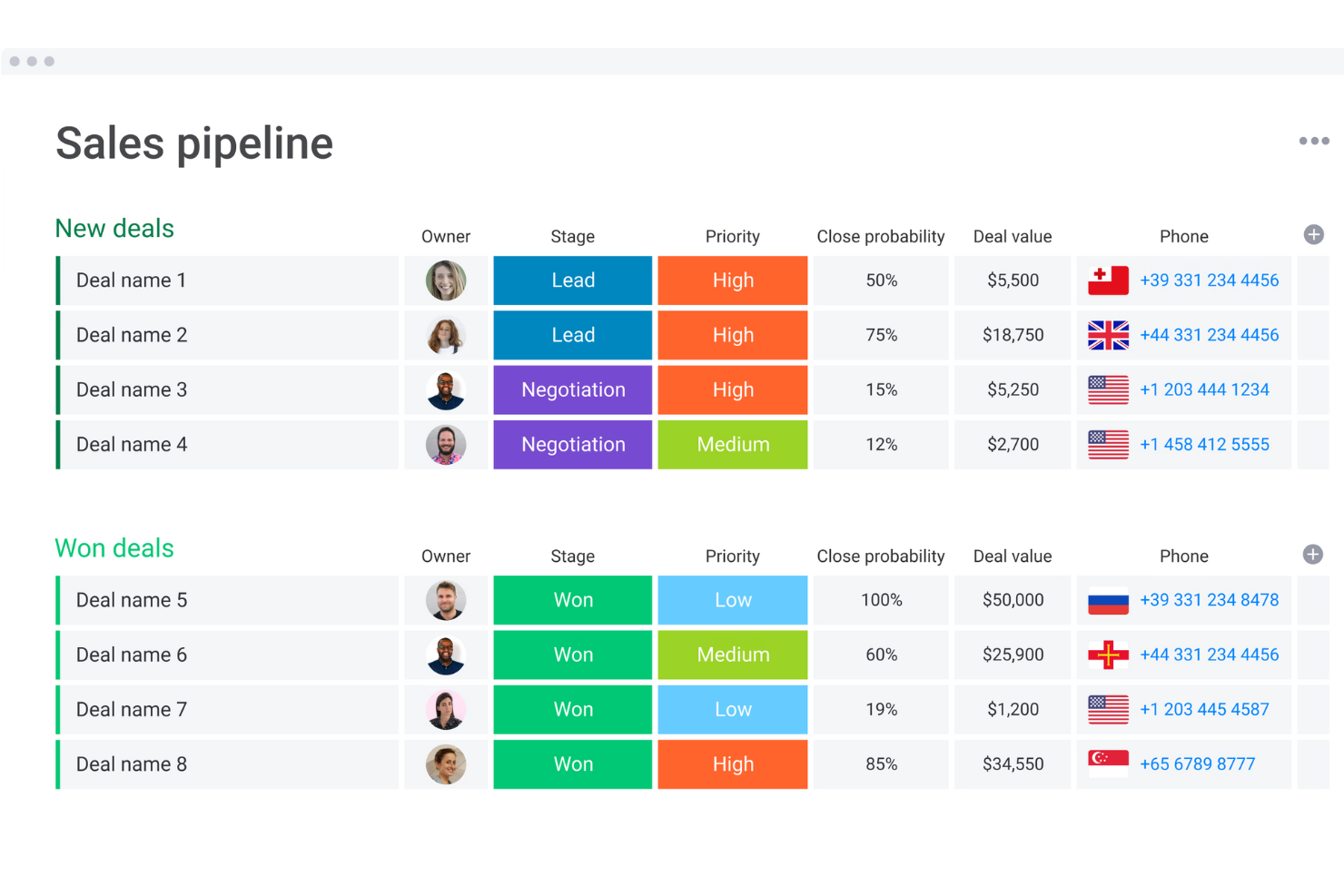
Monday sales CRM è uno strumento completamente personalizzabile che consente agli utenti di automatizzare i processi di vendita, centralizzare la comunicazione con i clienti e ottenere visibilità sulla pipeline di vendita. Offre funzionalità quali personalizzazione flessibile e intuitiva, integrazione delle email, automazioni e dashboard personalizzabili, rendendolo la scelta migliore per l'automazione delle vendite su misura.
Perché ho scelto Monday sales CRM: Come alternativa a Salesforce, monday.com si distingue per la sua interfaccia facile da usare e la straordinaria personalizzazione, risultando accessibile a team di ogni dimensione e livello tecnico. Eccelle nel semplificare processi di vendita complessi in flussi di lavoro gestibili, che possono essere adattati alle esigenze specifiche dell’azienda, garantendo un’integrazione perfetta. Le capacità di automazione integrate della piattaforma gestiscono in modo efficiente le attività ripetitive, aumentando la produttività e consentendo ai team di vendita di concentrarsi maggiormente sull’interazione con i clienti e sulla chiusura delle trattative.
Le funzionalità collaborative promuovono trasparenza e lavoro di squadra, non solo all’interno dei reparti vendita ma in tutta l’organizzazione, favorendo un approccio unificato alla gestione della relazione con i clienti. Inoltre, monday.com offre prezzi competitivi, proponendo una soluzione conveniente senza compromettere funzionalità o scalabilità, rappresentando così una scelta utile e adattabile per le aziende che desiderano ottimizzare le proprie operazioni di vendita.
Caratteristiche salienti e integrazioni di Monday sales CRM:
Le funzionalità includono una flessibilità eccezionale nella personalizzazione dei flussi di lavoro. A differenza di molti concorrenti che offrono modelli rigidi, Monday.com permette agli utenti di adattare pipeline di vendita, dashboard e reportistica ai propri processi e necessità aziendali. Questo livello di personalizzazione garantisce ai team la possibilità di adattare la piattaforma al proprio ciclo di vendita unico, invece di dover adeguare i propri processi al software.
Le integrazioni includono app per la gestione dei progetti come Slack, Google Drive, Gmail, Google Calendar, Jira, GitHub, Trello, Dropbox, Typeform e molte altre, accessibili tramite un piano a pagamento con Zapier.
Pros and Cons
Pros:
- Flussi di lavoro e dashboard altamente personalizzabili
- Nota per la sua interfaccia intuitiva e visivamente accattivante
- Favorisce la collaborazione tra reparti
- Strumenti di automazione integrati
Cons:
- L’ampia gamma di funzionalità può risultare impegnativa per i nuovi utenti
- Sales CRM non prevede un piano gratuito
New Product Updates from monday CRM

monday CRM Adds Meta Conversions API Integration
monday CRM now lets you connect Meta Conversions API and sync lead status back to Meta, improving targeting and conversions via a new Meta integration automation recipe. For more information, visit monday CRM's official site.
Capsule
Ideale per l'organizzazione del team e per un'adozione rapida del CRM
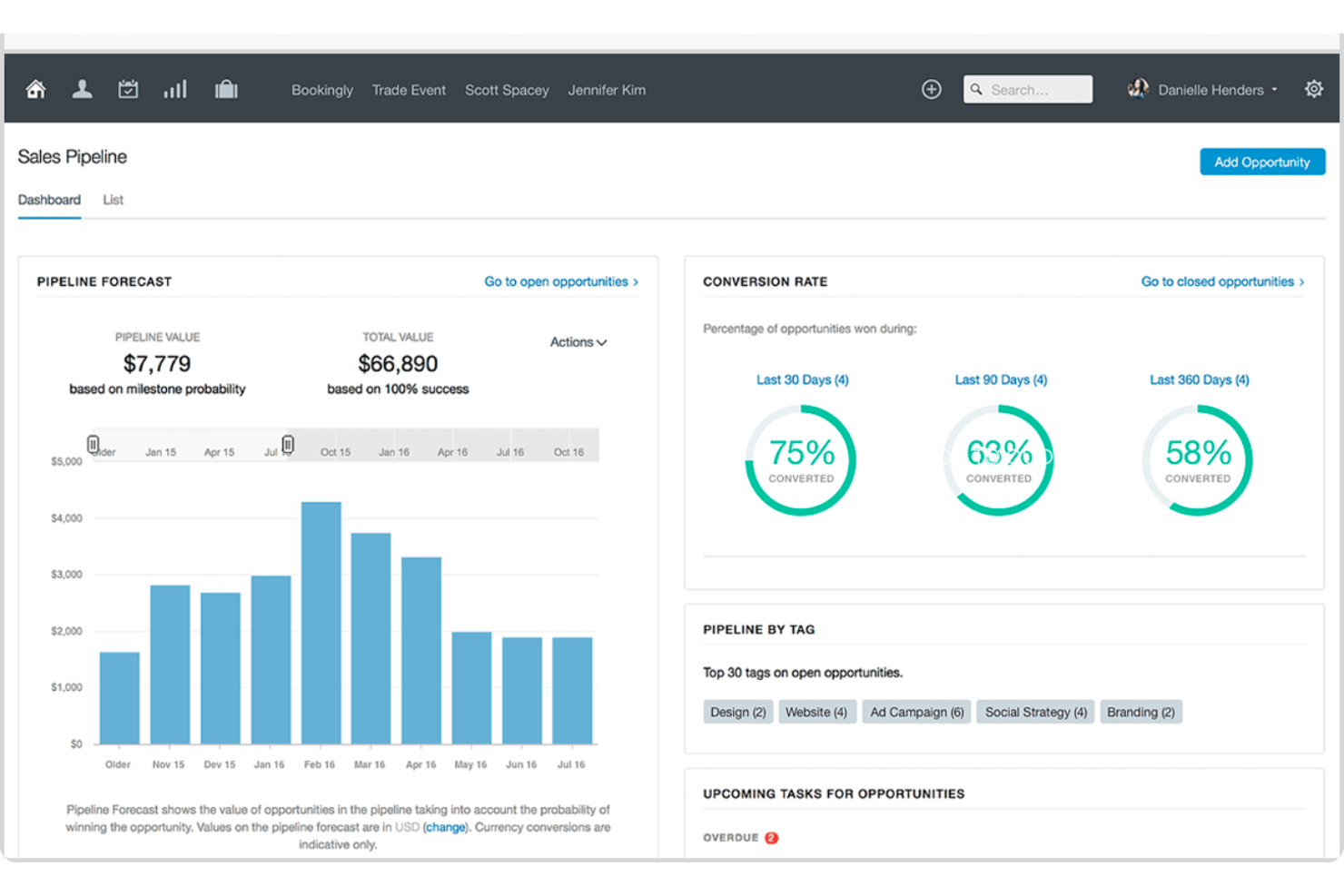
Capsule CRM offre un'interfaccia intuitiva e soluzioni di gestione dei clienti semplificate, pensate per le piccole e medie imprese, facilitando la costruzione di relazioni, la gestione delle vendite e l'automazione dei flussi di lavoro con facilità.
Perché ho scelto Capsule CRM: Come alternativa a Salesforce, Capsule CRM si distingue per offrire una soluzione CRM più accessibile ed economica, con un'attenzione particolare alla semplicità e all'usabilità senza rinunciare alle funzionalità fondamentali di un CRM. Presenta una configurazione semplice, un'interfaccia facile da utilizzare e una gestione efficiente delle relazioni con i clienti e dei pipeline di vendita, diventando così un'opzione interessante per le aziende che cercano un'alternativa a sistemi più complessi.
A differenza di molti concorrenti, Capsule CRM pone grande attenzione alla collaborazione di squadra all'interno dell'ambiente CRM. Permette la creazione di attività, liste di cose da fare e assegnazione di progetti direttamente dalla piattaforma, facilitando una comunicazione e coordinamento fluidi tra i membri del team. Questo approccio integrato elimina la necessità di strumenti separati per la gestione dei progetti e assicura che tutte le attività legate ai clienti siano centralizzate in un unico luogo. Questa caratteristica è particolarmente utile per le piccole e medie imprese (PMI) che necessitano di un approccio più coeso e integrato per gestire le interazioni con i clienti e le attività interne.
Funzionalità e integrazioni distintive di Capsule CRM
Le funzionalità includono una visualizzazione altamente intuitiva e visiva in stile Kanban del pipeline di vendita. Ciò consente agli utenti di trascinare facilmente le trattative tra le varie fasi, offrendo una panoramica chiara e in tempo reale dell'andamento delle vendite. Questa funzionalità è particolarmente vantaggiosa per coloro che apprendono meglio visivamente e per i team che adottano un approccio agile e semplificato alla gestione delle vendite. La vista Kanban non è solo un aspetto estetico; rende il processo di vendita più intuitivo e gestibile, un approccio sfumato che molti concorrenti non hanno ancora totalmente adottato.
Le integrazioni includono Google Workspace (Gmail, Docs, Calendar), Microsoft Office 365, Mailchimp, Xero, QuickBooks, Slack, FreshBooks, e molto altro tramite Zapier.
Pros and Cons
Pros:
- Intuitivo e facile da usare
- Gestione integrata delle attività e del calendario
- Invia e ricevi email direttamente in Capsule CRM
Cons:
- Non è possibile trascinare e rilasciare tag o campi di dati
- Si potrebbero integrare ulteriori strumenti di digital marketing
New Product Updates from Capsule

Capsule Adds AI Meeting Prep for External Calls
Capsule introduced AI Meeting Prep with relationship summaries, color-coded signals, and CRM context for upcoming external calls. This helps users review key contact details and prepare for meetings without searching through records manually. For more information, visit Capsule’s official site.
 .
.
Zoho CRM
Ideale per l'intelligenza predittiva
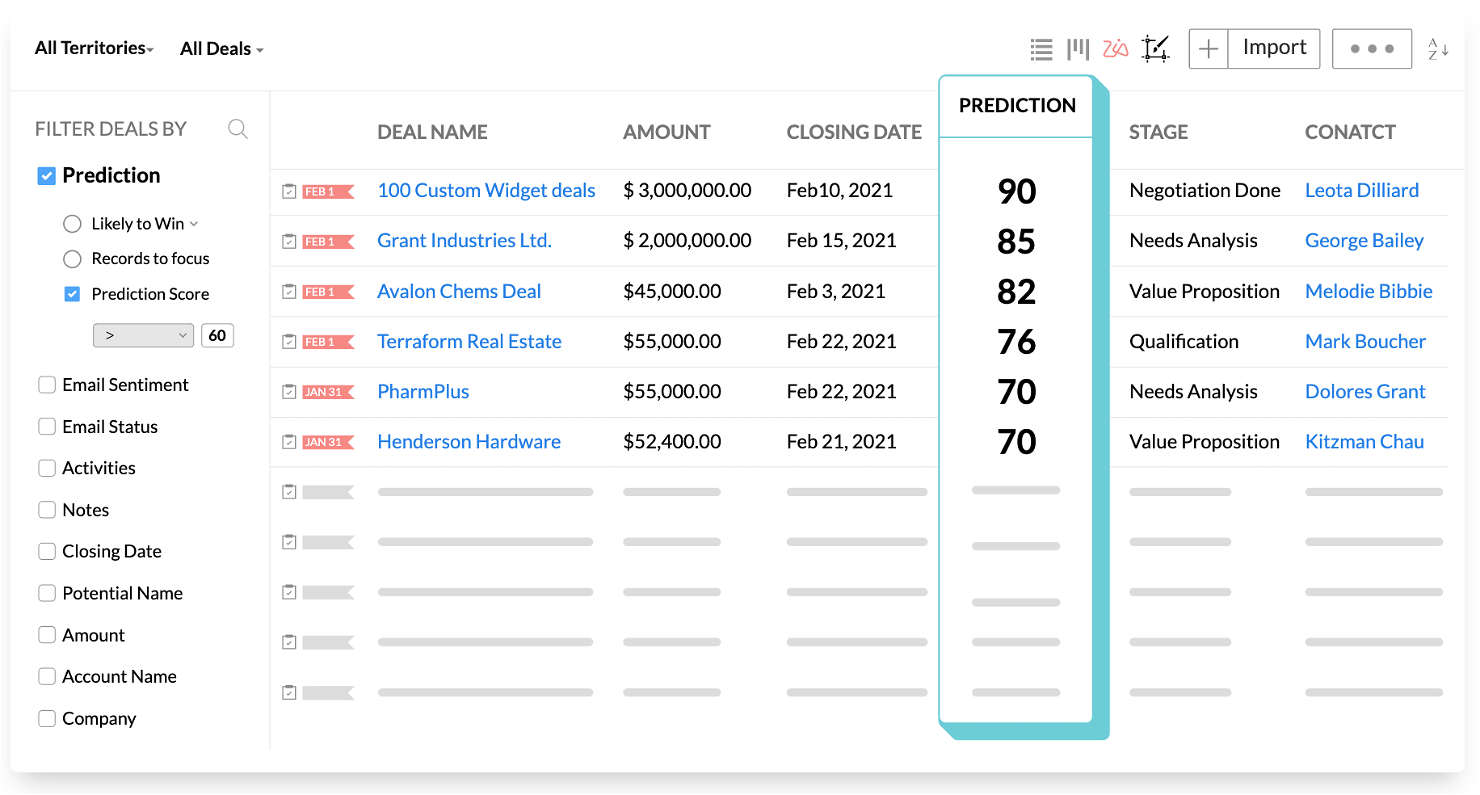
Zoho è un CRM che ti aiuterà a comprendere meglio i tuoi clienti — e le azioni che potrebbero intraprendere in seguito. La piattaforma è più personalizzabile di Salesforce e più conveniente sia rispetto a Salesforce che a HubSpot, rendendola un'opzione valida da considerare per la tua azienda.
Perché ho scelto Zoho: Ho scelto Zoho perché l'ho trovato un CRM accessibile per aziende di tutte le dimensioni che offre comunque una vasta gamma di funzionalità. Una delle caratteristiche chiave di Zoho è l'intelligenza predittiva, che ti aiuterà a comprendere le metriche e a prendere decisioni sui potenziali clienti che probabilmente convertiranno.
Inoltre, mi ha colpito l'attenzione che Zoho pone sulla sicurezza. Zoho ha un'intera pagina sul proprio sito dedicata alle pratiche di sicurezza implementate. Prendono sul serio il guadagnare la fiducia dei loro clienti e mettono in evidenza una varietà di protezioni, tra cui registrazione degli accessi, rilevamento delle intrusioni e vari data center per proteggere i dati degli utenti.
Funzionalità e integrazioni distintive di Zoho:
Le funzionalità distintive includono costruttore di processi di vendita, PathFinder per la scoperta del percorso cliente, portali clienti per decisioni self-service, controllo degli accessi basato sui ruoli e gamification per i team di vendita. La cosa che ho apprezzato di più di questi strumenti è che tutto è costruito attorno a un algoritmo di intelligenza predittiva che aiuta a intercettare i lead nel momento giusto.
Le integrazioni includono Google Apps, Microsoft Outlook, Mailchimp, SurveyMonkey, DocuSign, Xero, Zoom, Slack, Salesforce, Constant Contact, Facebook e altri ancora.
Pros and Cons
Pros:
- Piani economici per principianti e aziende in fase iniziale
- Forte attenzione alla sicurezza
- App mobile che rende facile l'accesso
Cons:
- Difficile da scalare se l'azienda cresce rapidamente
- Risorse limitate per formazione e aiuto
- I report non sono personalizzabili come su altre piattaforme
New Product Updates from Zoho CRM

Zoho CRM Adds Reusable Canvas Templates for Forms
Zoho CRM now supports Canvas templates in the Forms view, so you can design a form layout once and reuse it across records for a consistent, faster experience. For more information, visit Zoho CRM's official site.
 .
.
Ideale per la collaborazione nelle grandi organizzazioni
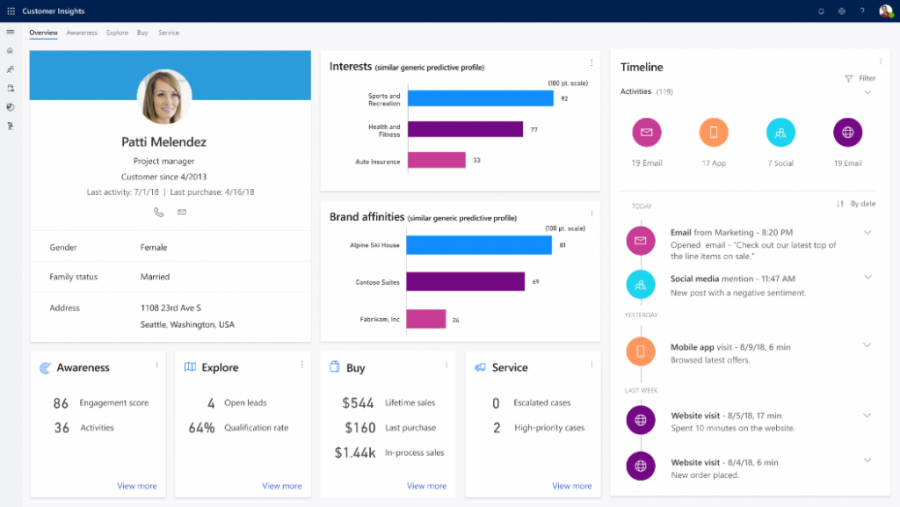
Microsoft Dynamics 365 è un CRM che può essere utilizzato sia dai team di vendita che da quelli di marketing per 'ottenere una maggiore visibilità sulle esigenze dei clienti'. Questo lo rende l'opzione perfetta per la collaborazione tra reparti nelle grandi organizzazioni.
Perché ho scelto Microsoft Dynamics 365: Ho scelto Microsoft Dynamics 365 perché è un CRM comunemente utilizzato da grandi aziende e imprese. Per le organizzazioni che sono distribuite su più sedi e con reparti ampi e numerosi, questa è un'ottima soluzione.
Consente di mantenere i team di marketing e vendita strettamente allineati e di integrarsi direttamente con le aziende che già utilizzano Outlook o altri prodotti Microsoft. La loro offerta si concentra su collaborazione, approfondimenti guidati dall'IA e coaching e risultati in tempo reale. Questo perché i dati possono essere rapidamente analizzati, messi in evidenza e poi condivisi tramite un altro prodotto Microsoft (Outlook o Teams).
Funzionalità e integrazioni principali di Microsoft Dynamics 365:
Le funzionalità principali includono approfondimenti sul comportamento degli acquirenti basati sull'intelligenza artificiale, creazione e hosting di una knowledge base, dashboard di analisi in tempo reale e gestione dei territori per grandi team. E, per me, le integrazioni di comunicazione in tempo reale con Microsoft Outlook e Microsoft Teams rendono questo strumento facile da integrare nel flusso di lavoro delle aziende che già utilizzano l'ecosistema Microsoft.
Le integrazioni includono Adobe Sign, ClickDimensions, DocuSign, Excel, LinkedIn, Microsoft Power BI, Microsoft Teams, Office 365, Outlook, Skype, Zendesk, Zoho e altro ancora.
Pros and Cons
Pros:
- Integrazione con prodotti Microsoft
- Intuizioni guidate dall'IA di facile utilizzo
- Le integrazioni integrate facilitano la collaborazione
Cons:
- Le funzionalità complesse rendono difficili le attività semplici
- Richiede un po' di curva di apprendimento

ClickUp
Ideale per la gestione dei progetti

Molte organizzazioni utilizzano ClickUp per la gestione dei progetti, i calendari editoriali e progetti collaborativi. Ora puoi usarlo anche come CRM. Poiché la piattaforma potrebbe già essere impiegata da diversi dipartimenti della tua organizzazione, ClickUp è un valido concorrente come alternativa a Salesforce.
Perché ho scelto ClickUp: ClickUp non viene sempre considerato un vero CRM, ma se hai bisogno di una dashboard CRM di base che memorizzi i tuoi potenziali clienti e li tenga tracciati — ClickUp potrebbe fare al caso tuo.
Con ClickUp, puoi automatizzare i tuoi processi di vendita, monitorare i potenziali clienti con una visualizzazione Lista/Bacheca/Tabella e vedere report in tempo reale.
Caratteristiche principali e integrazioni di ClickUp:
Le caratteristiche principali includono molteplici visualizzazioni di dashboard, aggiornamenti automatici del team, visualizzazione degli account, analisi in tempo reale, stati dei lead attivati automaticamente e assegnazione automatica dei lead.
Le integrazioni includono Adobe Creative Cloud, Airtable, Asana, Box, Calendly, Evernote, Google Drive, HubSpot, Jira, Microsoft Teams, monday.com, Slack, Trello e Zoom.
Pros and Cons
Pros:
- Può essere utilizzato anche per altri scopi oltre al CRM
- Interfaccia semplice per visualizzare facilmente la pipeline di vendita
- Le automazioni di base possono farti risparmiare tempo
Cons:
- Funzionalità di email e comunicazione limitate
- Nessuna analisi basata su AI
- Manca la funzionalità di scoring dei lead
New Product Updates from ClickUp
ClickUp Adds Meetings Hub, Super Agent Templates, and ZoomInfo Integration
ClickUp adds a searchable Meetings Hub, new ways to clone and template Super Agents, and a ZoomInfo integration through the App Center. These updates improve meeting retrieval, agent reuse, and access to sales intelligence. For more information, visit ClickUp’s official site.

Coevera
Ideale per principianti
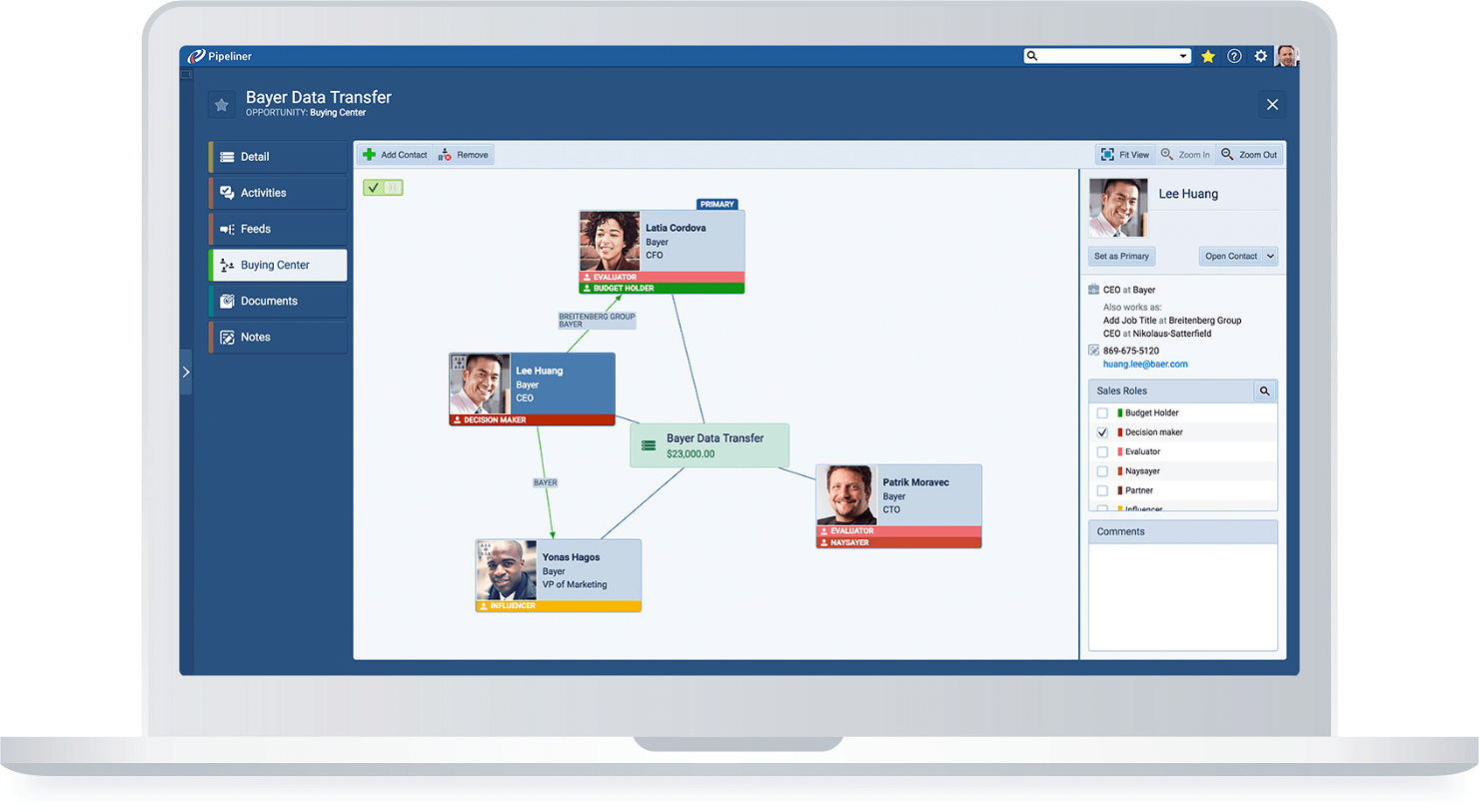
Pipeliner è un CRM dotato di una varietà di funzionalità che anche i principianti possono utilizzare per potenziare le proprie attività di vendita. Sebbene manchi di un’estetica particolarmente curata, i menu di navigazione semplificata ti permettono di ottenere ciò che ti serve in pochi clic.
Perché ho scelto Pipeliner: Ho scelto Pipeliner per la sua facilità di apprendimento. Pipeliner fa affidamento su elementi visivi per mostrare come i potenziali clienti si muovono all'interno del processo di vendita. Questo aiuta a comprendere dove i prospect si bloccano e offre una visione dall’alto della pipeline e dell’intero processo.
Segmentare i potenziali clienti è semplice grazie alla funzione di segmentazione mirata dinamica di Pipeliner. Puoi utilizzare diversi parametri di targeting per creare un segmento basato su comportamento, dati geografici e psicografici.
Caratteristiche principali e integrazioni di Pipeliner:
Le caratteristiche principali includono una pipeline di vendita visiva, app mobile, segmentazione dinamica, gamification per i team di vendita, trigger e workflow personalizzabili e visibilità su tutta l’attività commerciale e la pipeline. Anche se potrebbe non essere lo strumento migliore per i dipartimenti di vendita enterprise, lo considero una soluzione eccellente per le organizzazioni in crescita che vogliono formalizzare i propri processi di vendita.
Le integrazioni includono DocuSign, Google Apps, HubSpot, MailChimp, Microsoft Office 365, Quickbooks, Salesforce, Slack e Zapier
Pros and Cons
Pros:
- Molti elementi visivi e grafici per un CRM
- Segmentazione avanzata facilmente realizzabile
Cons:
- Non appare moderno come altri CRM
- Risulta un po' meccanico e instabile

Ideale per la gestione visuale delle pipeline
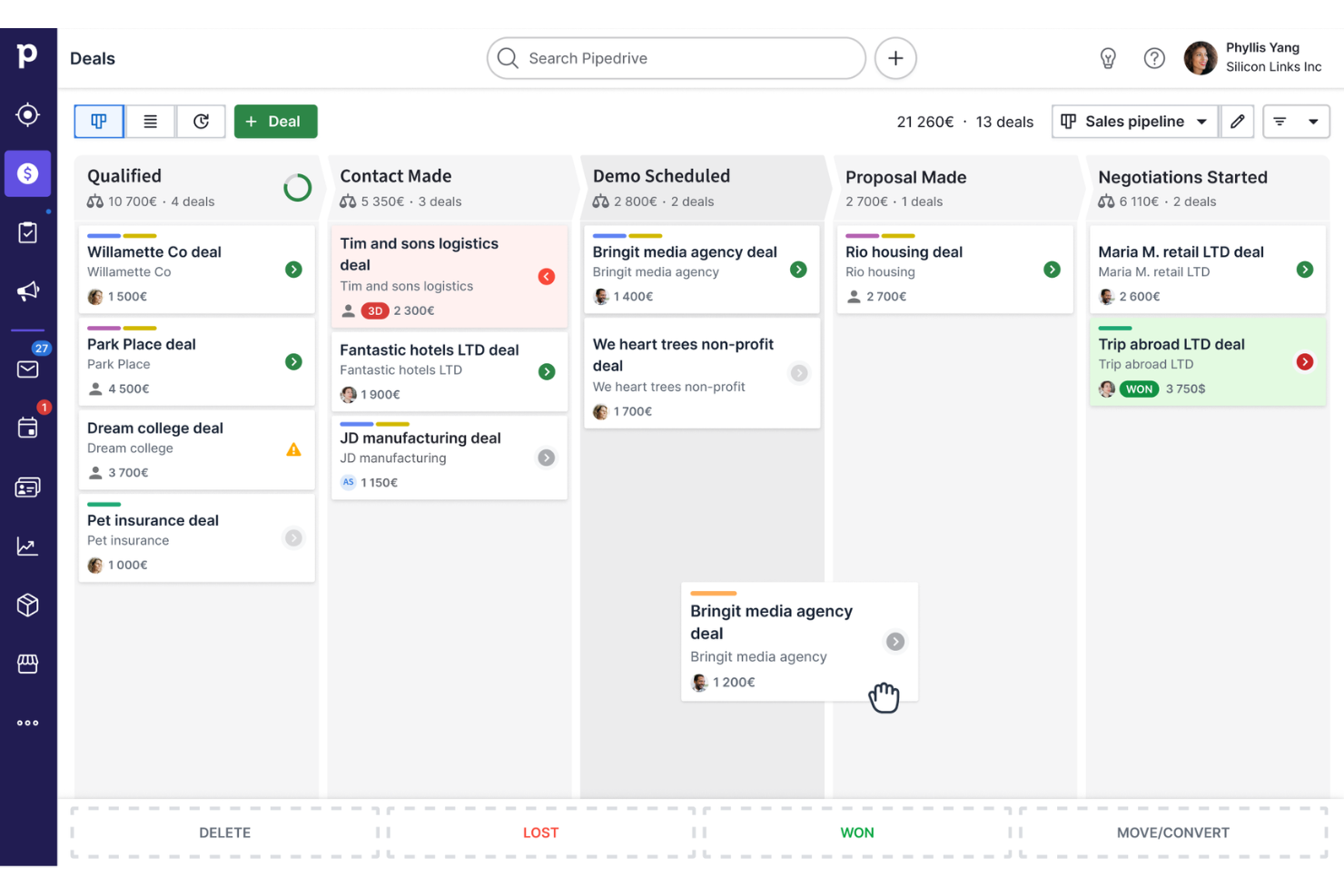
Pipedrive è un software CRM progettato per aiutare i team di vendita a rimanere organizzati e monitorare le trattative dall'inizio alla fine. È basato su una pipeline visuale, che permette di vedere esattamente a colpo d'occhio in che fase si trova ogni trattativa. Con Pipedrive, puoi gestire i contatti, programmare attività e automatizzare alcune delle attività più ripetitive legate alle vendite.
Perché ho scelto Pipedrive: Le pipeline visuali e personalizzabili di Pipedrive ti permettono di adattare il processo di vendita alle esigenze specifiche della tua azienda. Sebbene anche Salesforce offra personalizzazione, Pipedrive offre un modo più semplice per modificare le pipeline senza bisogno di competenze tecniche. Un'altra funzione unica è l'assistente alle vendite AI, che fornisce consigli e suggerimenti personalizzati in base ai tuoi dati di vendita.
La funzione integrata di automazione dei flussi di lavoro in Pipedrive consente di creare trigger che fanno risparmiare tempo su compiti manuali, come l'invio di email di follow-up o l'aggiornamento automatico delle fasi delle trattative. Per quanto riguarda i report, gli strumenti di Pipedrive sono pensati per offrire rapidamente informazioni utili, rendendo più facile per i team monitorare le prestazioni senza perdersi in infinite opzioni di personalizzazione.
Caratteristiche principali e integrazioni di Pipedrive:
Caratteristiche includono previsioni di vendita, automazione del marketing via email, chatbot, strumenti di generazione lead, pipeline di vendita personalizzabili, promemoria attività, gestione del calendario, permessi per il team, sincronizzazione dei contatti, accesso CRM da mobile, tracciamento delle chiamate e gestione delle trattative.
Integrazioni includono Surfe, Apollo.io, Microsoft Teams, Slack, Mailchimp, Google Meet, PandaDoc, DocuSign, QuickBooks, Stripe, Asana, Trello, OneClick e CloudTalk.
Pros and Cons
Pros:
- Pipeline drag-and-drop
- Fasi di vendita personalizzabili
- Automazione delle attività ripetitive
Cons:
- Mancano automazioni di marketing oltre l'email
- L'accesso alle funzioni avanzate può comportare costi aggiuntivi
Altre alternative a Salesforce
Sul mercato esistono molti altri CRM che non sono rientrati nella top 10, ma che possono comunque rivelarsi strumenti preziosi. Vale la pena dare un’occhiata alle seguenti alternative a Salesforce per verificare se soddisfano le tue esigenze:
- Zendesk Sell
Ideale per organizzazioni orientate al servizio
- Freshsales
Ideale per la gestione automatizzata dei contatti
- SugarAI
Ideale per organizzazioni di vendita complesse


Recensioni correlate
Se non hai ancora trovato ciò che cerchi, dai un'occhiata a questi strumenti che abbiamo testato e valutato.
- Software CRM
- Software per le vendite
- Software per la gestione dei lead
- Software di business intelligence
- Software per la gestione dei contratti
- Sistema di gestione dei ricavi
Come valuto le alternative a Salesforce
Divido la mia valutazione in due livelli: le funzionalità CRM di base di cui un team RevOps ha bisogno per tracciare la pipeline e prevedere i ricavi, e i fattori distintivi che determinano se una piattaforma si adatta davvero.
Funzionalità di base (requisiti minimi per questa lista)
Quando seleziono gli strumenti per la mia lista, valuto ciascuno su una scala da 0 (non offre la funzionalità) a 5 (eccelle in questo ambito) per ogni funzionalità di base elencata qui sotto. Poi, calcolo il punteggio totale dello strumento e lo converto in percentuale. Ogni strumento deve ottenere un punteggio totale minimo del 75% per essere preso in considerazione.
- Gestione contatti & account: Verifico se contatti, account e opportunità sono collegati con una cronologia completa delle attività, e non isolati in elenchi separati senza contesto di relazione.
- Tracciamento pipeline & opportunità: Ogni strumento dovrebbe permetterti di costruire più pipeline con fasi personalizzate, così le tue attività inbound e outbound non sono costrette in un'unica visualizzazione.
- Automazione dei flussi di lavoro di vendita: Valuto se la piattaforma può assegnare automaticamente i lead per territorio, attivare task di follow-up al cambio di fase e gestire sequenze multi-step.
- Reportistica & previsioni: I dashboard devono supportare metriche personalizzate come pipeline ponderata per rappresentante o segmento, non solo grafici predefiniti non modificabili.
- Integrazioni native & di terze parti: Guardo quanto bene il CRM si collega a strumenti come HubSpot Marketing Hub, Marketo, Intercom o Stripe tramite connettori nativi e open API.
- Oggetti personalizzati & modelli dati: Il tuo team RevOps dovrebbe poter creare oggetti e campi personalizzati che riflettano il processo di revenue senza bisogno di sviluppatori.
Una volta identificati gli strumenti che soddisfano questi criteri, considero ciò che differenzia davvero ogni piattaforma.
Fattori di differenziazione (cosa distingue i fornitori)
Ecco come confronto e metto a confronto i diversi fornitori:
Funzionalità di spicco
La valutazione delle opportunità alimentata dall’AI è un importante fattore distintivo. Verifico se una piattaforma può segnalare le trattative a rischio e suggerire le prossime azioni senza ricorrere a strumenti di terze parti. Funzionalità di revenue intelligence come la registrazione automatica delle chiamate e la cattura delle attività sono anch'esse importanti, perché riducono il carico di inserimento dati che scoraggia l’adozione del CRM. Oltre alle analisi, valuto se il CRM include sequenze native di sales engagement. Quando i rappresentanti possono gestire contatti multicanale direttamente dalla vista pipeline, si elimina uno strumento separato e si mantengono tutte le attività in un unico posto.
Oltre alle funzionalità
Il costo totale di possesso è uno dei primi aspetti che valuto. Molte alternative a Salesforce includono automazione e reportistica già nel piano base, mentre Salesforce le riserva solo come add-on. Anche il time-to-value conta molto. Guardo se un team RevOps può implementare la piattaforma autonomamente in poche settimane, senza dover affidarsi a consulenti certificati. L’idoneità rispetto al segmento è un altro fattore. Un team vendita di 15 persone e un’azienda enterprise di 500 rappresentanti hanno esigenze molto diverse, quindi considero se la piattaforma può scalare per rispondere al reale stadio di crescita dell’acquirente.
Perché cercare un'alternativa a Salesforce?
Salesforce è un rinomato software di gestione delle relazioni con i clienti (CRM) che offre un'ampia gamma di strumenti per la gestione delle vendite, il servizio clienti, l'automazione del marketing e l'analisi dei dati. La sua suite completa è progettata per soddisfare un'ampia gamma di esigenze aziendali, facilitando la gestione delle interazioni con i clienti e ottimizzando diversi processi aziendali. Tuttavia, nonostante le sue numerose funzionalità, alcuni utenti potrebbero cercare alternative a Salesforce. Ciò potrebbe dipendere da fattori come il prezzo, che potrebbe essere proibitivo per le piccole aziende o le startup. Inoltre, la complessità e l'ampiezza delle funzionalità di Salesforce possono risultare opprimenti per alcuni utenti, in particolare per quelli con esigenze più semplici o competenze tecniche limitate. L'approccio universale di Salesforce potrebbe non essere in linea con i requisiti specifici di alcune aziende, soprattutto di quelle che cercano funzionalità più specifiche per il proprio settore.
Il software alternativo a Salesforce può presentare diversi vantaggi. Molte alternative offrono soluzioni più convenienti con piani tariffari flessibili, rendendole accessibili a una gamma più ampia di aziende, soprattutto quelle più piccole o appena avviate. Queste alternative offrono spesso un'esperienza più intuitiva, con un'interfaccia più semplice e funzionalità più immediate, ideali per le aziende che danno priorità alla facilità d'uso e a un'implementazione rapida. La personalizzazione è un altro vantaggio significativo, poiché alcune alternative a Salesforce sono più adattabili alle esigenze specifiche e ai flussi di lavoro di diversi settori, offrendo soluzioni su misura che si allineano meglio a determinati modelli aziendali. Inoltre, le piattaforme CRM più piccole o più specializzate possono offrire un'assistenza clienti più personalizzata, garantendo alle aziende un supporto dedicato e adeguato alle loro sfide specifiche. Questi vantaggi rendono le alternative a Salesforce un'opzione interessante per le aziende alla ricerca di soluzioni CRM più in linea con il proprio budget, i requisiti di complessità e le esigenze aziendali specifiche.
Come scegliere le alternative a Salesforce
Con così tante alternative a Salesforce disponibili, può essere difficile decidere quale strumento sia più adatto alle proprie esigenze.
Durante la selezione preliminare, la fase di prova e la scelta delle alternative a Salesforce, considera quanto segue:
- Quale problema stai cercando di risolvere - Inizia identificando la lacuna nelle funzionalità di Salesforce che stai cercando di colmare, per chiarire quali caratteristiche e funzionalità lo strumento debba offrire.
- Chi dovrà utilizzarlo - Per valutare costi e requisiti, considera chi utilizzerà il software e di quante licenze avrai bisogno. Dovrai valutare se l'accesso sarà necessario solo ai responsabili delle operazioni relative ai ricavi o all'intera organizzazione. Una volta chiarito questo aspetto, vale la pena considerare se stai dando priorità alla facilità d'uso per tutti oppure alla velocità per gli utenti esperti dell'alternativa a Salesforce.
- Con quali altri strumenti deve funzionare - Chiarisci quali strumenti stai sostituendo, quali manterrai e con quali dovrai effettuare l'integrazione, ad esempio software di contabilità, CRM o risorse umane. Dovrai decidere se gli strumenti dovranno integrarsi tra loro oppure se puoi sostituire più strumenti con un'unica alternativa a Salesforce consolidata.
- Quali risultati sono importanti - Considera il risultato che il software deve produrre per essere considerato un successo. Rifletti sulle capacità che vuoi acquisire o sugli aspetti che vuoi migliorare e su come misurerai il successo. Ad esempio, un risultato potrebbe essere la possibilità di ottenere una maggiore visibilità sulle prestazioni. Potresti confrontare le funzionalità delle alternative a Salesforce fino allo sfinimento, ma se non stai pensando ai risultati che vuoi ottenere, potresti sprecare molto tempo prezioso.
- Come funzionerebbe all'interno della tua organizzazione - Considera la scelta del software insieme ai tuoi flussi di lavoro e alla metodologia di erogazione. Valuta cosa funziona bene e quali aree stanno causando problemi che devono essere affrontati. Ricorda che ogni azienda è diversa: non dare per scontato che uno strumento funzionerà nella tua organizzazione solo perché è popolare.
Tendenze nelle alternative a Salesforce
Le alternative a Salesforce stanno innovando in modo deciso per conquistare la propria quota di mercato, offrendo funzionalità uniche, affrontando problematiche specifiche e fornendo valore alle aziende alla ricerca di funzionalità CRM oltre a quelle offerte da Salesforce. Ecco una panoramica delle tendenze attuali basata sui recenti aggiornamenti software, sui comunicati stampa e sui registri delle versioni:
Tendenze emergenti nelle alternative a Salesforce:
- Maggiore attenzione all'intelligenza artificiale e all'apprendimento automatico:
- Molte alternative a Salesforce integrano l'intelligenza artificiale per offrire analisi predittive, automazione intelligente e capacità decisionali avanzate, in linea con l'esigenza delle aziende di sfruttare i dati per ottenere un vantaggio strategico.
- Capacità di integrazione avanzate:
- Con la crescente esigenza di strumenti aziendali interconnessi, le alternative a Salesforce stanno ampliando i propri ecosistemi di integrazione, facilitando flussi di lavoro fluidi tra diverse applicazioni e piattaforme.
Funzionalità nuove e insolite:
- Integrazione della blockchain:
- Alcune alternative a Salesforce stanno esplorando la tecnologia blockchain per offrire una gestione dei dati trasparente, sicura e decentralizzata, un approccio innovativo nell'ambito dei CRM.
- Connettività IoT:
- Integrando i dati IoT nei sistemi CRM, queste alternative consentono alle aziende di sfruttare i dati in tempo reale provenienti dai dispositivi connessi, migliorando la conoscenza dei clienti e l'efficienza operativa.
Funzionalità più richieste:
- Analisi e report completi:
- Le aziende cercano strumenti avanzati di analisi e reportistica all'interno dei loro CRM per ottenere informazioni più approfondite sulle pipeline di vendita, sui comportamenti dei clienti e sulle tendenze del mercato.
- Accessibilità da dispositivi mobili:
- Man mano che le forze lavoro diventano più mobili, continua a crescere la domanda di solide applicazioni CRM per dispositivi mobili, che consentano ai team di vendita di accedere alle informazioni essenziali e svolgere le attività ovunque si trovino.
Funzionalità in calo:
- Personalizzazione eccessivamente complessa:
- Si sta abbandonando la personalizzazione eccessivamente complessa, che richiede un significativo coinvolgimento del reparto IT, poiché le aziende preferiscono opzioni di personalizzazione più semplici e intuitive.
- Sistemi isolati:
- Le soluzioni CRM autonome che non si integrano bene con gli altri sistemi aziendali stanno diventando meno popolari, poiché le aziende cercano ecosistemi software più integrati e completi.
Le alternative a Salesforce offrono alle aziende le informazioni, l'efficienza e la flessibilità necessarie per eccellere nella gestione delle operazioni sui ricavi. Nel valutare queste alternative, concentrati su come le loro capacità in evoluzione si allineano alle tue esigenze strategiche, assicurandoti che la soluzione scelta generi valore e supporti gli obiettivi aziendali.
Funzionalità delle alternative a Salesforce
Quando cerchi alternative a Salesforce per gestire le operazioni sui ricavi, è fondamentale individuare funzionalità in linea con le esigenze della tua azienda, che migliorino l'efficienza del team e offrano informazioni utili a promuovere i processi di vendita. Ogni sistema CRM dispone di un proprio insieme di funzionalità, ma alcune caratteristiche chiave sono essenziali per supportare efficacemente le operazioni sui ricavi. Ecco le funzionalità più importanti da cercare:
- Gestione completa dei contatti: Centralizza tutte le informazioni sui clienti.
- Consente di avere una visione unificata delle interazioni con i clienti, migliorando la gestione delle relazioni e la personalizzazione delle attività di vendita.
- Solida gestione della pipeline di vendita: Visualizza le fasi del processo di vendita.
- Aiuta i team a monitorare i progressi, individuare i colli di bottiglia e concentrarsi sulle trattative con maggiori probabilità di chiusura, influendo direttamente sui ricavi.
- Analisi e report dettagliati: Fornisce informazioni utili all'azione.
- Offre indicazioni basate sui dati per le decisioni strategiche, contribuendo a ottimizzare le strategie di vendita e i risultati in termini di ricavi.
- Gestione efficace dei contatti potenziali: Semplifica l'acquisizione e la coltivazione dei contatti potenziali.
- Garantisce che i potenziali clienti vengano coinvolti in modo efficiente e accompagnati lungo il percorso di vendita, aumentando i tassi di conversione.
- Monitoraggio di attività e compiti: Organizza le attività di ricontatto e le responsabilità.
- Mantiene i team di vendita responsabili e garantisce azioni tempestive sulle opportunità, contribuendo alla generazione di ricavi.
- Integrazione e monitoraggio delle email: Centralizza le comunicazioni.
- Consente un'interazione fluida con potenziali clienti e clienti, mantenendo un registro di tutte le comunicazioni per consultazioni future.
- Personalizzazione e scalabilità: Si adatta alla crescita e ai cambiamenti dell'azienda.
- Garantisce che il CRM possa evolversi insieme all'azienda, supportando nuovi processi e team di vendita in espansione senza perdere efficacia.
- Interfaccia intuitiva: Favorisce l'adozione e riduce i tempi di formazione.
- Un'interfaccia semplice e intuitiva garantisce che i membri del team possano utilizzare il CRM in modo efficiente e sfruttarne appieno il potenziale.
- Accesso da dispositivi mobili: Facilita l'utilizzo ovunque ci si trovi.
- Offre ai team di vendita la possibilità di accedere alle informazioni essenziali e svolgere attività da qualsiasi luogo, migliorando produttività e reattività.
- Funzionalità di integrazione: Si collega ad altri strumenti aziendali.
- Consente un flusso di lavoro più efficiente integrandosi con diverse applicazioni, garantendo la coerenza dei dati e riducendo l'inserimento manuale delle informazioni.
Nella selezione di un'alternativa a Salesforce per la gestione delle operazioni relative ai ricavi, concentrati sulle soluzioni che offrono queste funzionalità essenziali per supportare in modo completo i tuoi processi di vendita. Queste funzionalità non solo facilitano un processo decisionale più strategico e consapevole, ma migliorano anche l'efficienza e l'efficacia quotidiana dei tuoi team di vendita, favorendo in definitiva risultati migliori in termini di ricavi.
Vantaggi delle alternative a Salesforce
Esplorare le alternative a Salesforce può offrire vantaggi distinti, soprattutto alle aziende con esigenze specifiche o vincoli di budget. Queste alternative spesso forniscono funzionalità CRM essenziali adattate ai diversi requisiti di settore, alle dimensioni aziendali o alle preferenze specifiche degli utenti, migliorando l'efficienza e l'efficacia complessive delle operazioni relative ai ricavi. Ecco cinque vantaggi principali da considerare nella valutazione delle alternative a Salesforce:
- Convenienza economica: Riduce le spese operative.
- Scegliendo una soluzione CRM più conveniente, le aziende possono destinare le proprie risorse ad altre aree, ottimizzando gli investimenti complessivi e riducendo i costi.
- Personalizzazione e flessibilità: Si adatta alle esigenze aziendali specifiche.
- Le alternative a Salesforce offrono spesso una maggiore flessibilità nella personalizzazione, consentendo alle aziende di adattare il CRM ai propri processi e flussi di lavoro specifici e migliorando l'efficienza operativa.
- Esperienza utente semplificata: Facilita l'utilizzo.
- Le alternative possono offrire interfacce più intuitive e funzionalità semplificate, riducendo la curva di apprendimento e aumentando i tassi di adozione da parte degli utenti.
- Funzionalità specializzate: Soddisfa i requisiti specifici del settore.
- Alcune alternative a Salesforce si concentrano su determinati settori o dimensioni aziendali, offrendo funzionalità specializzate più pertinenti e vantaggiose per questi specifici destinatari.
- Assistenza clienti personalizzata: Offre un supporto dedicato.
- I fornitori CRM più piccoli possono talvolta offrire un'assistenza più personalizzata, garantendo agli utenti un aiuto tempestivo ed efficace e massimizzando il valore del software per l'organizzazione.
Costi e prezzi delle alternative a Salesforce
Esplorare le alternative a Salesforce offre un'ampia gamma di soluzioni CRM adatte a esigenze e budget aziendali diversi. Queste alternative presentano spesso strutture tariffarie e piani differenti, ciascuno progettato per adattarsi a organizzazioni di varie dimensioni, settori e livelli di complessità operativa. Ecco una panoramica generale delle opzioni di piano e dei relativi prezzi tipici delle alternative a Salesforce:
Tabella comparativa dei piani delle alternative a Salesforce
| Tipo di piano | Prezzo medio | Funzionalità comunemente incluse |
|---|---|---|
| Base | $0 - $25/ utente/mese | Gestione dei contatti, monitoraggio delle attività, reportistica di base, gestione dei potenziali clienti |
| Intermedio | $25 - $65/ utente/mese | Previsioni di vendita, report personalizzati, integrazioni avanzate, funzionalità di automazione |
| Avanzato | $65+/ utente/mese | Funzionalità di intelligenza artificiale, analisi avanzate, maggiore personalizzazione, assistenza premium |
| Opzione gratuita | $0 | Contatti limitati, funzionalità di base, assistenza della comunità |
Quando valuti le alternative a Salesforce, considera le esigenze specifiche della tua azienda, la portata delle tue operazioni e il potenziale di crescita. È fondamentale scegliere un piano in linea con i requisiti attuali, che offra al contempo spazio per l'espansione. Assicurati che il CRM scelto non rientri soltanto nel tuo budget, ma fornisca anche le funzionalità necessarie per gestire efficacemente le operazioni relative ai ricavi della tua azienda.
Domande frequenti sulle alternative a Salesforce
Stai ancora valutando le alternative a Salesforce? Ecco alcune delle domande più frequenti che le persone si pongono prima di effettuare il passaggio.