

Bu kadar çok farklı satış raporlama yazılımı varken, hangisinin sizin için doğru olduğunu belirlemek zor olabilir. Satış performansınızı anlamak, hedeflere yönelik ilerlemeyi takip etmek ve daha verimli bir şekilde bilinçli kararlar almak istediğinizi biliyorsunuz; ancak hangi aracın en iyi olduğunu belirlemeniz gerekiyor. Yardımcı olabilirim! Bu yazıda, farklı ekipler ve projelerle onlarca farklı satış raporlama aracı kullanma konusundaki kişisel deneyimlerimi paylaşarak en iyi satış raporlama yazılımları arasından seçim yapmanızı kolaylaştıracağım.
Why Trust Our Software Recommendations
6,700+
Reviews
20
Industry experts
16+
Evaluation factors
14
Years
Our reviews reflect our independent judgment—not a sales pitch. Learn how we stay transparent.
For this guide, we evaluated tools using hands-on testing and independent research, scoring tools using our selection criteria.
Our reviews reflect our human editorial judgment, not a sales pitch.
Satış Raporlama Yazılımları Karşılaştırma Tablosu
Aşağıdaki tabloda, en iyi satış raporlama yazılımı seçimlerim için fiyatlandırma ayrıntıları karşılaştırılmaktadır.
Sorted by: Default
| Tool | Starting Price | Website | |
|---|---|---|---|
Best for outbound sales teams tracking rep performance | 4.5 out of 5 | $49/user/month Free plan + 14-day trial + demo available | Book Demo |
Best for customizable sales tracking | 4.6 out of 5 | $12/user/month 14-day free trial + free demo available | Book Demo |
Best for customizable sales forecasting | 4.6 out of 5 | Pricing upon request Free demo available | Website |
Best for pipeline management | 4.3 out of 5 | $7/user/month Free plan available | Website |
Best all-in-one, sales-focused platform | 4.4 out of 5 | $19/month Free demo available | Website |
Best for smarter, data-driven business decision-making | 4.4 out of 5 | Pricing upon request Free trial + free demo available | Website |
Best for creating custom dashboards with data from multiple sources | 4.5 out of 5 | $71/month Free plan + 14-day free trial + free demo available | Website |
Best no-coding platform that empowers your entire team | 4.4 out of 5 | Pricing upon request Free demo available | Website |
Best for AI-based sales forecasting | 4.6 out of 5 | $249/month 30-day free trial | Website |
Best for reducing costs while increasing productivity | Not rated | $25/user/month Free plan + 30-day free trial available | Website |


En İyi Satış Raporlama Yazılımları İncelemeleri
Bu satış raporlama yazılımı araçlarının her birinin nasıl öne çıktığını merak ediyor musunuz? Ne yaptıklarını en iyi şekilde görmek ve iş modelinize uyup uymadıklarını öğrenmek için aşağıdaki genel bakışlara göz atın.
 Best for outbound sales teams tracking rep performance
- Free plan + 14-day trial + demo available
- From $49/user/month (billed annually)
Visit WebsiteCustomer Rating:4.5/5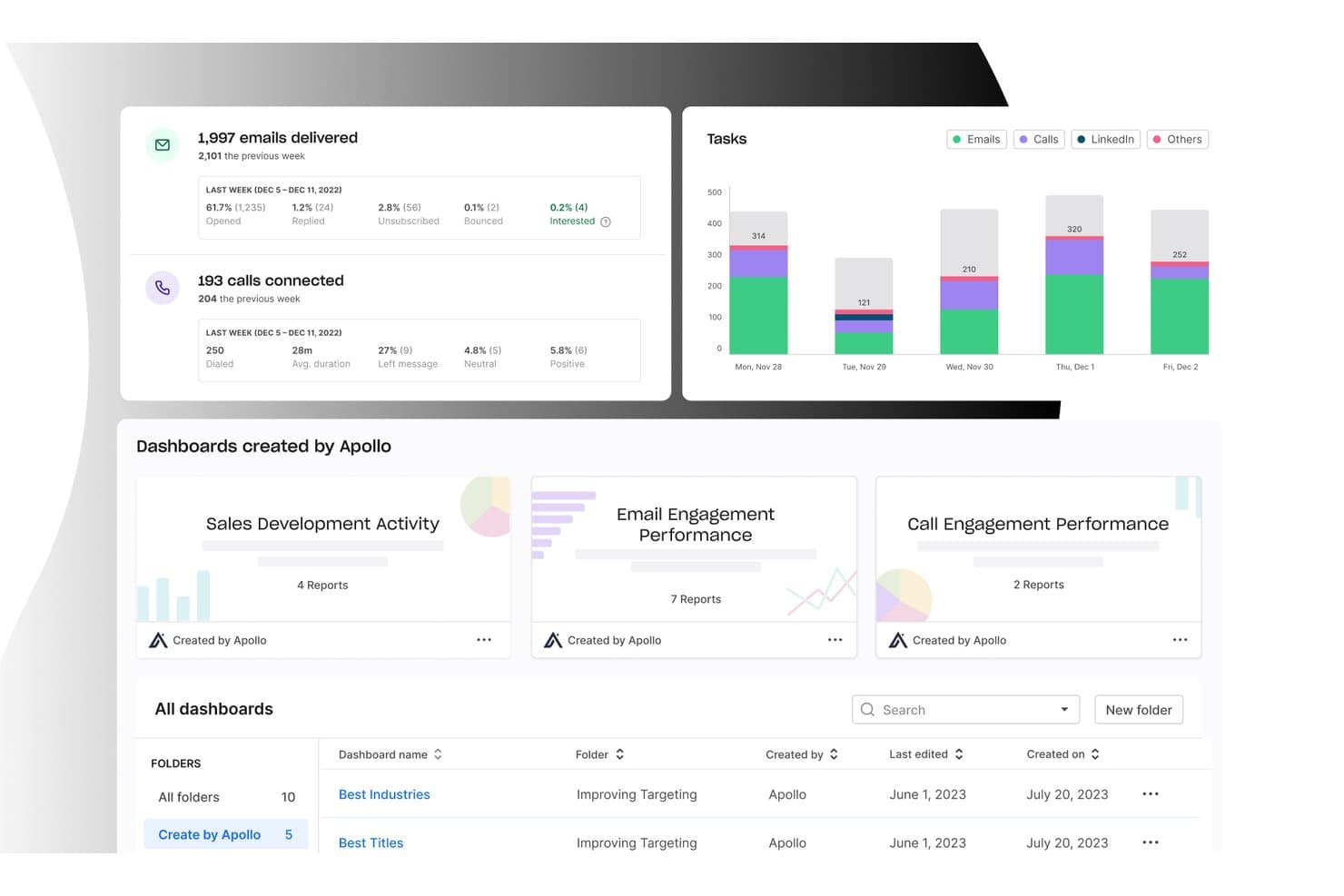
Apollo.io centralizes sales reporting across email, calls, and dashboards. Apollo.io is a sales intelligence and engagement platform that combines prospecting, outreach, and analytics, with built-in dashboards covering deal pipeline, rep activity, call and email performance, and quota tracking.
Who Is Apollo.io Best For?
Apollo.io suits outbound sales teams that want rep performance tracking, coaching, and pipeline analytics built into the same platform they use for prospecting and outreach.
Why I Picked Apollo.io
I've included Apollo.io in my top picks because its rep performance tracking is genuinely built into the same platform your team uses to prospect and run outreach, so the data is never disconnected from the activity driving it. I love that you can set quota attainment goals tied directly to deal stages, then track actual vs. target progress at the individual rep level with native leaderboards and call coaching scorecards. The conversation intelligence layer lets managers score recorded calls, build training playlists, and even join live calls in coach mode.
Apollo.io Key Features
- Pre-built outbound dashboards: Apollo includes ready-made dashboards covering email funnels, call dispositions, deliverability metrics, and deal pipeline without any setup required.
- CRM data sync: Apollo connects bi-directionally with Salesforce, HubSpot, Pipedrive, Zoho, and Microsoft Dynamics, keeping deal and activity data consistent across your stack.
- Deal stage forecasting: Each deal stage can be assigned a probability and forecast category, powering weighted pipeline and forecast revenue reports at the team level.
- AI Assistant for analytics: The built-in AI Assistant lets you ask plain-language performance questions and generates visual reports and custom dashboards from your data.
Apollo.io Integrations
Apollo.io offers native integrations with Salesforce, HubSpot, Pipedrive, Zoho, and Microsoft Dynamics. It also supports a REST API, Snowflake workflow connections, and Zapier for custom reporting workflows.
Pros and Cons
Pros:
- Adds call coaching to rep reporting
- Connects outbound activity with pipeline outcomes
- Tracks quota attainment against actual performance
Cons:
- Forecasting lacks scenario modeling and machine learning
- Scheduled stakeholder report delivery remains undocumented
Learn more about Apollo.io: Best for customizable sales tracking
- 14-day free trial + free demo available
- From $12/user/month (billed annually)
Visit WebsiteCustomer Rating:4.6/5
Monday Sales CRM is known for its visually intuitive interface, especially when it comes to managing sales pipelines. Monday sales CRM is a fully customizable tool designed to manage sales pipelines and client communications effectively. It stands out with its ability to tailor deal stages, integrate with email, and provide extensive automation options, alongside customizable dashboards that offer a clear overview of sales activities. This adaptability and user-friendly interface make it a strong candidate for businesses seeking a tailored approach to enhance their sales tracking capabilities.
Unlike many traditional CRMs, Monday Sales CRM integrated elements of project management directly into the platform. This meant that in addition to managing customer relationships and sales processes, teams could also handle project tracking, task assignments, and deadline management within the same system. This integration was particularly beneficial for teams that needed to closely align sales activities with project milestones or deliverables.
Monday sales CRM offers extensive customization capabilities and comprehensive data visualization, which are essential for tailoring the software to specific sales processes. What distinguishes it is the low-code/no-code platform that empowers users to automate processes and gain deep insights through live reports and analytics.
monday sales CRM Standout Features & Integrations
Features include lead and contact management, customizable pipelines, sales automation, performance tracking, integration with various tools, advanced reporting and analytics, email tracking and synchronization, task and project management, mobile app support, and customizable templates and forms.
Integrations include Slack, Google Drive, Gmail, Google Calendar, Jira, GitHub, Trello, Dropbox, Typeform and many more, accessible through a paid plan with Zapier.
Pros and Cons
Pros:
- Advanced reporting and analytics
- Robust integration capabilities
- High customizability & automation-friendly
Cons:
- Slight learning curve
- Limited native email marketing features
 Best for customizable sales forecasting
- Free demo available
- Pricing upon request
Visit WebsiteCustomer Rating:4.6/5
Phocas offers real-time reporting of different sales metrics, eliminating the need for manual spreadsheets. Phocas is a sales reporting software that provides businesses with real-time data and insights to analyze and track their sales performance. It offers customizable reporting and dashboard features, allowing users to access and visualize their sales data, identify trends and opportunities, and monitor progress toward targets.
The platform offers a variety of reports and analytics tools to help businesses make data-driven decisions, including access to financial statements, budgets, rebates, sales performance reports, customer activity reports, product sales reports, sales trend analysis, territory performance reports, margin analysis, and CRM data.
Another standout feature of Phocas is its advanced forecasting and predictive analytics tools. These features enable sales teams to create accurate and customizable sales forecasts, helping businesses anticipate market changes and adjust strategies proactively.
Phocas Standout Features and Integrations
Features include automated reporting, pre-built templates, scenario analysis, custom reporting, KPI visualization, customizable dashboards, permission-based access, and detailed drill-down capabilities.
Integrations include Acumatica, Accolent, Datafile, Enapps, Epicor, IFS, Jonas Metals Software, Kerridge, Khaos Control, MAM Software, Merlin, Microsoft, MYOB, Netsuite, Oracle, QAD, Retail Express, Sage, SAP, Sympac, SYSPRO, Xero, and more.
Pros and Cons
Pros:
- Real-time analytics
- Strong data modeling features
- Customizable reporting dashboards for tailored visibility
Cons:
- Can be challenging to learn how to customize the software
- Amount of data can be overwhelming for users
Learn more about Phocas: Best for pipeline management
- Free plan available
- From $7/user/month (billed annually)
Visit WebsiteCustomer Rating:4.3/5
Bigin by Zoho CRM provides a scalable and efficient solution for small teams managing sales processes. Bigin by Zoho CRM is designed for small businesses looking to improve their sales processes. It offers features that enhance sales reporting and streamline workflows, making it a solid choice if you're aiming to boost your sales efficiency.
I picked Bigin by Zoho CRM due to its pipeline management feature, which lets you track deals and sales activities at every stage, giving you a clear view of your sales process. The automation feature is also a standout, as it helps your team focus on closing deals by taking care of repetitive tasks, ensuring nothing falls through the cracks.
Another reason Bigin is a great pick is its analytics capabilities. The platform provides detailed insights into sales performance, allowing you to make informed decisions. With dashboards offering a visual representation of sales data, you can easily monitor key metrics like closed deals and revenue, which is crucial for any sales reporting tool.
Bigin by Zoho CRM Standout Features & Integrations
Features include customer management, which helps you maintain detailed records of customer interactions and preferences. Multichannel communication lets you engage with clients through various platforms, ensuring you never miss an opportunity. Lastly, team collaboration tools enable your team to work together seamlessly, enhancing productivity and communication across departments.
Integrations include Zoho Mail, Zoho Desk, Zapier, Google Workspace, Microsoft 365, Mailchimp, Calendar, Slack, Zoom, and Docusign.
Pros and Cons
Pros:
- Simple to set up for immediate use
- Allows easy tracking of multiple pipelines
- Offers custom forms for data collection
Cons:
- Limited flexibility in custom report creation
- Lacks mapping features for routing contacts
Learn more about Bigin by Zoho CRM: Best all-in-one, sales-focused platform
- Free demo available
- From $19/month
Visit WebsiteCustomer Rating:4.4/5
Zendesk can maximize your productivity with modern CRM software. One of the Zendesk suites of products, Zendesk Sell is a sales-oriented platform that drives rep adoption, provides actionable sales leads, and ensures automation of data capture. With features like data visualization, opportunity management, and internal goal setting and tracking, managers and salespeople can maximize and accelerate revenue growth.
Zendesk Sell has mobile apps that are designed to help salespeople get more actionable work done without wasting time on manual data entry and note-taking. Intelligent features like smart auto-dialer and email sentiment analysis ensure everyone is paying more attention to detail to deliver a highly personalized sales experience.
Everyone from agents to sales leaders can benefit from prescriptive insights, individualized coaching, and personalized plans to improve sales performance. Scale your sales and grow your business more efficiently with steady revenue growth supported by the entire Zendesk suite.
Zendesk Sell Standout Features and Integrations
Features include goal management, data synchronization, collaboration tools, call recording, content delivery, email tracking, internal chat integration, lead nurturing and segmentation, prospecting tools, and template management.
Integrations include Slack, Trello, DropBox for Business, MailChimp, Rippling, HubSpot CRM and Marketing Hub, Zapier, LiveChat, Meta for Business, and Social Media.
Pros and Cons
Pros:
- Comprehensive reporting tools
- Best mobile app
- Simple program with easy integrations
Cons:
- Steep learning curve
- Sync with Google applications can be clunky
Learn more about Zendesk Sell: Best for smarter, data-driven business decision-making
- Free trial + free demo available
- Pricing upon request
Visit WebsiteCustomer Rating:4.4/5
Looker helps you make decisions with comprehensive data through integrated insights and modern BI. With its intuitive approach to data exploration, Looker is an effective, web-based platform that enhances your sales process through analytics, reporting, and modern BI. Now powered by Google, you’ll be able to use Looker to check real-time data analysis, embedded visualizations, and cross-platform insights all in one place.
One of the best features of Looker is data discovery, which allows you to create mini applications with even more power and efficiency through a flexible language called LookML. You’ll be able to simplify the development of custom tools to enhance SQL capabilities and optimize performance for faster query execution.
Looker is great for large, medium, and small businesses that need access to the right data quickly. It’s designed to fit the way you work and integrate seamlessly with third-party systems and custom data applications.
Looker Standout Features and Integrations
Features include custom data builds, ad hoc analysis, behavioral analytics, data cleansing, goal setting and tracking, marketing reports, mixed methods research, radial mapping, real-time analytics, site search tracking, visual analytics, and widgets.
Integrations include Microsoft Excel, Slack, DropBox Business, Mailchimp, Salesforce, Asana, Rippling, HubSpot, Stripe, and QuickBooks.
Pros and Cons
Pros:
- Flexible customization options
- Intuitive interface
- Best support chat
Cons:
- Limited filters for data metrics
- Big data sets can cause a lag
Learn more about Looker: Best for creating custom dashboards with data from multiple sources
- Free plan + 14-day free trial + free demo available
- From $71/month (billed annually)
Visit WebsiteCustomer Rating:4.5/5
Available integrations on DataBox for custom dashboards. As a cloud-based analytics tool with many integrations, DataBox allows you to pull information from all your other tools to view on one dashboard. This system has one-click integrations from a whole range of other cloud-based services and APIs for simple data import and custom integrations.
Customize your view with the drag-and-drop editor to see sales performance, activity, and forecasting. You can even change your data visualizations for live previews of conversion rates, custom reports, and more in real-time. Use the advanced settings for every metric to modify currencies, chart formats, and time intervals without needing to code!
The DataBox system was designed for CEOs, analysts, and marketers who want a simplified way to build dashboards that deliver daily scorecards to sales managers, sales reps, and other agents within the company. Share data, quotas, trends, and passcodes with teammates through secure channels instantly.
DataBox Standout Features and Integrations
Features include API, access panel control, behavior tracking, budgeting/forecasting, cohort analysis, customer experience management, data extraction and mapping, in-app events tracking, KPI monitoring, revenue tracking, and real-time reporting.
Integrations include HubSpot, Salesforce, Pipedrive, CallRail, Intercom, Eventbrite, Drift, Copper, Cop, and Paypal.
Pros and Cons
Pros:
- Responsive design across all devices
- Dashboard snapshots simplify complex data
- Easy to implement without being tech-savvy
Cons:
- A little buggy with new features
- Lack of integration with Zendesk
Learn more about Databox: 8Best no-coding platform that empowers your entire team
Grow
- Free demo available
- Pricing upon request
Visit WebsiteCustomer Rating:4.4/5
Grow offers more data for less work with a no-coding required software. If you’re looking for a simplified high-tech solution to sales tracking, Grow offers you what you need with a no-code, full-stack BI. Their platform is all about helping every person in your company make better data-driven decisions through a blend of data warehousing, visualization, and ETL — all available on one intuitive platform.
One of the best features that illustrate how Grow can enhance your sales reporting software is their data import and storage management. You can bring together all the business-critical data that’s most current and relevant without third-party warehousing. You assign appropriate access and permissions so the right people can connect to the raw data to gain new insights.
Learning how to use data is critical to taking advantage of emerging opportunities. With Grow, small and medium-sized businesses can integrate all their sources into one hub and spot trends more quickly. Grow can even calculate and manipulate the data you feed it to show you things you might not spot on your own.
Grow Standout Features and Integrations
Features include databases, CRM, ad platforms, social media, accounting and financials, marketing analytics, data imports, non-SQL transformations, permissions controls, custom views, and dynamic dashboards.
Integrations include Google Analytics, G Suite, PostgreSQL, Social Media, Stripe, HubSpot, Quickbooks Online, Salesforce, MySQL, and Paypal.
Pros and Cons
Pros:
- Automated calculations and formulas to enhance data insights
- Great customer service
- Low barrier for entry
Cons:
- Doesn’t offer as much customization
Learn more about Grow: Best for AI-based sales forecasting
- 30-day free trial
- From $249/month (billed annually)
Visit WebsiteCustomer Rating:4.6/5
Forecastio's reporting feature offers insights that cover various aspects of the sales process, including people, processes, and pipelines. Forecastio is a sales performance management tool designed for HubSpot users, providing AI-based insights and analytics to enhance sales performance. It offers features such as sales planning automation, advanced sales forecasting, and real-time performance tracking.
The platform stands out as a sales reporting software with advanced sales forecasting capabilities. By leveraging AI, Forecastio can predict future sales outcomes by analyzing historical data and identifying trends to help businesses make data-driven decisions, optimize their sales strategies, and allocate resources more effectively.
It also provides real-time monitoring of sales metrics, helping teams to quickly identify and address bottlenecks in their sales pipeline. The platform's goal-setting features further enable teams to set realistic and attainable targets, improving overall performance and win rates.
Forecastio Standout Features and Integrations
Features include sales planning automation, what-if scenarios, planning templates, AI-based sales performance insights, sales capacity management, sales pipeline monitoring, and sales quota assessment.
Integrations include HubSpot, allowing users to combine HubSpot's CRM capabilities with Forecastio's advanced sales forecasting and performance management features.
Pros and Cons
Pros:
- Real-time sales insights
- Automated sales planning features
- Good forescasting capabilities
Cons:
- Limited integration options
- Dashboard could be more customizable
Learn more about Forecastio: Best for reducing costs while increasing productivity
- Free plan + 30-day free trial available
- From $25/user/month

Salesforce Sales Cloud helps you max out your efficiency. While Salesforce offers a lot of tools for every aspect of your business, they have a sales-focused platform that highlights Customer Relationship Management. Powered by AI, you can maximize your efficiency when it comes to the automation of data input, customer intelligence, and predictive strategy.
One of the coolest features of the Sales Cloud is Opportunity Management — a feature that highlights the most important data in your system to provide critical information in tandem with your customer activity timeline. With all this info, you’ll be able to see all the activities associated with a deal and get notifications when it’s time for the next step.
The Sales Cloud platform is ideal for businesses at a variety of stages, including those who are just starting or those looking to aggressively expand. I recommend this sales reporting software for medium and small businesses that want to minimize expenses while focusing on improving customer relations and reaching sales goals.
Sales Cloud Standout Features and Integrations
Features include sales automation, opportunity management, forecast management, process automation, responsive design for mobile CRM, account and contact management, lead management, sales metrics reports, dashboards, and custom layouts.
Integrations include Google Tools, Slack, Trello, WordPress, MailChimp, SurveyMonkey, Asana, Jira, EverNote Teams, Rippling, Zapier, and Toggl Track.
Pros and Cons
Pros:
- Stable, reliable, scalable platform
- Unmatched price for value
- Comprehensive onboarding and tracking
Cons:
- Complex site mapping and navigation
- Can be slow and clunky
Learn more about Salesforce Sales Cloud:
Diğer Satış Raporlama Yazılımları
En iyi satış raporlama yazılımları listesine giremeyen birkaç seçenek daha şunlardır:
- 11Agile CRMBest for all-in-one automation of sales, marketing, and customer service
- 12CoefficientBest for real-time data integration
- 13Creatio AI CRMBest for end-to-end funnel reporting
- 14PipedriveBest for streamlined sales pipeline management
- 15SPOTIOBest for team management and collaboration with more accurate sales data
- 16CopperThis project management tool is for creative, out-of-the-box teams who are hunting for more opportunities and advantages
- 17IntercomBest for comprehensive client data for a personal touch
- 18SalesflareSell more with less work through an automated CRM that tracks customer data automatically
- 19InsightSquaredBest for understanding pipeline trends
- 20EngageBayAn all-in-one marketing and sales solution that helps small and medium-sized businesses better engage leads and make sales
İlgili Satış Raporlama Yazılımı İncelemeleri
Burada hâlâ aradığınızı bulamadıysanız, test edip değerlendirdiğimiz ve satış raporlama yazılımıyla yakından ilgili olan bu araçlara göz atın.
- CRM Yazılımı
- Satış Yazılımı
- Potansiyel Müşteri Yönetimi Yazılımı
- İş Zekâsı Yazılımı
- Sözleşme Yönetimi Yazılımı
- Gelir Yönetimi Sistemi
How I Evaluate Sales Reporting Software
I split my evaluation into baseline criteria every tool must hit—like CRM sync and pipeline dashboards—and differentiators that tell you whether it's the right fit for your revenue team.
Core Functionality (Table Stakes For This List)
When I'm selecting tools for my list, I rank each one on a scale from 0 (does not offer the functionality) to 5 (excels in this area) for each core functionality listed below. Then, I calculate the tool's total score into a percentage. Each tool needs to achieve a minimum total score of 65% to be considered for inclusion.
- Pre-Built Sales Dashboards: I check whether the tool ships with ready-made dashboards for pipeline, win rate, and revenue metrics so teams aren't building from scratch on day one.
- CRM Data Integration: Native CRM connectors matter here—I look for real-time sync with platforms like Salesforce, HubSpot, or Dynamics 365 without relying on third-party middleware.
- Custom Report Builder: Each tool should let you build reports with flexible filters, dimensions, and metrics without writing SQL or waiting on a data team to pull numbers.
- Sales Forecasting & Pipeline Analytics: I evaluate how well the tool projects revenue from pipeline data—weighted forecasts, deal risk flags, and stage-based conversion analysis all factor in.
- Automated Report Scheduling & Sharing: The ability to schedule weekly pipeline snapshots or quota updates via email, Slack, or Teams saves RevOps from becoming a manual reporting service.
- Rep & Team Performance Tracking: I look for individual and team-level views of quota attainment, activity metrics, and leaderboard comparisons that managers actually use in coaching sessions.
Once I have a list of tools that meet this criteria, I consider what sets each platform apart.
Differentiating Factors (What Sets Vendors Apart)
Here's how I compare and contrast different vendors:
Standout Features
AI-powered insights are a big differentiator—I look for tools that flag anomalies like a sudden drop in deal velocity or a spike in slipped close dates without manual digging. Revenue attribution modeling is another area I evaluate closely, especially for RevOps teams that need to connect closed-won revenue back to specific campaigns or channels. Goal and quota management built into the reporting layer also matters. When reps and managers can track pacing against targets in the same place they review pipeline, it cuts down on spreadsheet sprawl.
Beyond Features
Tech stack compatibility is one of the first things I evaluate. A sales reporting tool that connects to your data warehouse, marketing automation platform, and sales engagement tools creates a single source of truth—without it, RevOps teams end up stitching together exports. Implementation speed also matters. I check whether a tool offers pre-built data models that get you to a working dashboard in days, not months. Data governance rounds out my evaluation: role-based access and row-level security are essential when territory managers should only see their own numbers.
Satış Raporlama Yazılımı Nasıl Seçilir?
Bu kadar çok farklı satış raporlama yazılımı çözümü mevcutken, hangi aracın ihtiyaçlarınıza en uygun olacağı konusunda karar vermek zor olabilir.
Satış raporlama yazılımlarını kısa listeye alırken, denerken ve seçerken aşağıdakileri göz önünde bulundurun:
- Hangi sorunu çözmeye çalışıyorsunuz - Aracın sağlaması gereken özellikleri ve işlevleri netleştirmek için öncelikle doldurmaya çalıştığınız satış raporlama yazılımı özellik boşluğunu belirleyin.
- Kimlerin kullanması gerekecek - Maliyeti ve gereksinimleri değerlendirmek için yazılımı kimlerin kullanacağını ve kaç lisansa ihtiyaç duyacağınızı göz önünde bulundurun. Erişime yalnızca gelir operasyonu liderlerinin mi yoksa tüm kuruluşun mu ihtiyaç duyacağını değerlendirmeniz gerekecek. Bu netleştiğinde, satış raporlama yazılımının tüm kullanıcılar için kullanım kolaylığını mı yoksa uzman kullanıcılar için hızı mı önceliklendirdiğinizi düşünmeye değer.
- Hangi diğer araçlarla birlikte çalışması gerekiyor - Hangi araçları değiştirdiğinizi, hangi araçların kullanılmaya devam edeceğini ve muhasebe, CRM veya satış veritabanı yazılımı gibi hangi araçlarla entegre olmanız gerektiğini netleştirin. Araçların birbiriyle entegre olması gerekip gerekmediğine veya birden fazla aracı tek bir birleşik satış raporlama yazılımıyla değiştirip değiştiremeyeceğinize karar vermeniz gerekecek.
- Hangi sonuçlar önemli - Başarılı kabul edilebilmesi için yazılımın sağlaması gereken sonucu değerlendirin. Hangi yeteneği kazanmak veya neyi geliştirmek istediğinizi ve başarıyı nasıl ölçeceğinizi düşünün. Örneğin sonuçlardan biri, performans hakkında daha fazla görünürlük elde etme becerisi olabilir. Satış raporlama yazılımı özelliklerini gözünüz kararana kadar karşılaştırabilirsiniz; ancak elde etmek istediğiniz sonuçları düşünmüyorsanız değerli zamanınızın büyük bir kısmını boşa harcıyor olabilirsiniz.
- Kuruluşunuz içinde nasıl çalışacağı - Yazılım seçimini iş akışlarınız ve sunum metodolojinizle birlikte değerlendirin. Nelerin iyi çalıştığını ve ele alınması gereken sorunlara yol açan alanları inceleyin. Her işletmenin farklı olduğunu unutmayın — bir aracın popüler olması, kuruluşunuzda işe yarayacağı anlamına gelmez.
2026 İçin Satış Raporlama Yazılımındaki Trendler
Satış raporlama yazılımının gelişimi, daha veri odaklı, çevik ve kişiselleştirilmiş gelir yönetimi stratejilerine yönelik daha geniş kapsamlı bir değişimi yansıtıyor. Kuruluşlar satış operasyonlarında esnekliğe, doğruluğa ve eyleme dönüştürülebilir içgörülere giderek daha fazla öncelik verirken, satış raporlama araçlarındaki en son gelişmeler yenilikçi özellikler ve geliştirilmiş işlevlerle bu talepleri karşılamayı amaçlıyor.
Gelişmiş analitiklerin entegrasyonundan yapay zekâ (AI) ve makine öğreniminin (ML) benimsenmesine kadar satış raporlama yazılımı, işletmelerin satış verilerine ve performans analizine yaklaşımını dönüştürmenin ön saflarında yer alıyor. Aşağıda, satış raporlama yazılımının geleceğini şekillendiren ve her biri gelir operasyonu liderlerinin değişen ihtiyaçlarına yanıt veren temel trendler yer alıyor.
Gelişmiş Analitikler ve Yapay Zekâ Entegrasyonu
- Yapay Zekâ Destekli Tahmin: Satış raporlama araçları, daha doğru ve dinamik satış tahminleri sağlamak için yapay zekâyı giderek daha fazla bünyesine katıyor; böylece işletmelerin pazar değişikliklerini öngörmesine ve stratejilerini proaktif biçimde ayarlamasına olanak tanıyor.
- Kanıt: Geçmiş satış verilerini ve pazar trendlerini analiz ederek gelecekteki satış performansını daha yüksek doğrulukla tahmin eden yapay zekâ algoritmalarını içeren yeni sürümler.
- Otomatik İçgörüler: İçgörü oluşturma sürecinin otomatikleştirilmesi ve satış verilerindeki fırsatları, riskleri ve anormallikleri vurgulamak için yapay zekânın kullanılması, manuel analizi azaltır ve karar alma sürecini hızlandırır.
- Kanıt: Satış metriklerindeki önemli değişiklikleri otomatik olarak tespit eden ve kullanıcıları olası sorunlar veya fırsatlar hakkında uyaran özellikleri kullanıma sunan yazılım güncellemeleri.
Entegrasyon ve İş Birliği
- Sorunsuz CRM Entegrasyonu: CRM sistemleriyle daha sıkı entegrasyon, satış raporlama araçlarının müşteri etkileşimleri ve satış faaliyetlerine ilişkin kapsamlı bir görünüm sunmasını sağlar.
- Kanıt: Satış raporlama yazılımı ile CRM platformları arasında gerçek zamanlı veri senkronizasyonu sağlayan yeni entegrasyonlar ve API'ler.
- İş Birliğine Yönelik Özellikler: Geliştirilmiş iş birliği yetenekleri, ekiplerin içgörüleri, raporları ve panoları daha verimli biçimde paylaşmasına olanak tanıyarak satış yönetimine daha iş birlikçi bir yaklaşım kazandırır.
- Kanıt: Yazılım içinde gerçek zamanlı iş birliğini, paylaşılan rapor kitaplıklarını ve yorum işlevlerini destekleyen özelliklerin kullanıma sunulması.
Gelişmekte Olan Özellikler
- Öngörücü Satış Etkinleştirme: Geleneksel raporlamanın ötesinde, yeni işlevler arasında veri analizine dayalı olarak satış temsilcileri için sonraki en iyi eylemleri öneren öngörücü satış etkinleştirme yer alır.
- Kanıt: Potansiyel müşterilerle gerçekleştirilecek belirli takip eylemlerini, kişiselleştirilmiş mesaj önerilerini ve iletişim için en uygun zamanlamayı önermek üzere ML'den yararlanan özellikler.
- Gerçek Zamanlı Veri İşleme: Satış verilerini gerçek zamanlı olarak işleyip raporlama ve satış performansı ile operasyonel metrikler hakkında dakikası dakikasına güncel içgörüler sağlama yeteneği.
- Kanıt: Yazılımın verileri gerçek zamanlı olarak aktarma ve analiz etme yeteneğini geliştiren, satış trendleri ile performans göstergelerine anında görünürlük sağlayan güncellemeler.
Satış raporlama yazılımı gelişmeye devam ederken yapay zekâ destekli analizlere, kişiselleştirmeye, sorunsuz entegrasyona ve iş birliğine dayalı işlevlere verilen önem, kuruluşları karmaşık satış ortamlarında etkili biçimde yol almaları için ihtiyaç duydukları araçlarla güçlendirmeye yönelik daha geniş bir eğilimi yansıtır. Gelir operasyonları liderleri için bu eğilimlerle uyumlu bir yazılım seçmek, daha derin içgörülerin ortaya çıkarılması, satış verimliliğinin artırılması ve sürdürülebilir gelir büyümesinin sağlanması açısından kritik öneme sahiptir.
Satış Raporlama Yazılımı Nedir?
Satış raporlama yazılımı, işletmeler tarafından satış verilerini toplamak, analiz etmek ve sunmak için kullanılan bir araçtır. Çeşitli kaynaklardan satış bilgilerini toplama ve bunları raporlar ile panolar hâlinde düzenleme sürecini otomatikleştirir. Yazılım genellikle veri görselleştirme, performans takibi, trend analizi ve özelleştirilebilir raporlama özelliklerini içerir; bunların tümü satış verilerinin analizini basitleştirmeyi amaçlar.
Satış raporlama yazılımının faydaları arasında satış performansı ve trendleri hakkında daha kapsamlı içgörüler sunarak stratejik karar alma sürecine yardımcı olması yer alır. Veri toplama ve rapor oluşturmayı otomatikleştirerek zaman kazandırır; böylece satış ekipleri idari görevler yerine satışa daha fazla odaklanabilir. Yazılım, satış stratejilerini geliştirmek, ekip performansını verimli biçimde takip etmek ve doğru tahminler yapmak için veriye dayalı içgörüler sunar. Genel olarak işletmelerin satış süreçlerini optimize etmesine ve satış büyümesini destekleyecek bilinçli kararlar almasına yardımcı olur.
Satış Raporlama Yazılımının Özellikleri
Gelir operasyonlarını etkili biçimde yönetmek için doğru satış raporlama yazılımını seçmek kritik öneme sahiptir. İdeal yazılım yalnızca satış faaliyetlerine ilişkin kapsamlı bir genel bakış sunmakla kalmamalı, aynı zamanda stratejik kararları yönlendirebilecek derin içgörüler de sağlamalıdır. Gelir operasyonlarınızın ihtiyaçlarını karşılamasını sağlamak için satış raporlama yazılımında aranması gereken en önemli özellikler şunlardır:
- Özelleştirilebilir Panolar: Kullanıcıların satış verilerini görüntüleme biçimlerini kişiselleştirmelerine olanak tanır. Özelleştirilebilir panolar, işletmeniz için en önemli metriklere odaklanmanızı sağlayarak temel bilgilere hızlı erişim sunar.
- Gerçek Zamanlı Raporlama: Satış performansına ilişkin dakikası dakikasına güncel veriler sunar. Gerçek zamanlı raporlama, hızla değişen pazar koşullarına ve satış dinamiklerine yanıt olarak zamanında kararlar almak için hayati önem taşır.
- Satış Tahmini: Gelecekteki satış trendlerini tahmin etmek için geçmiş verilerden yararlanır. Doğru tahmin, planlama ve kaynak tahsisi açısından kritik önem taşır; pazar taleplerini öngörmenize ve stratejileri buna göre ayarlamanıza yardımcı olur.
- Performans Metrikleri ve KPI Takibi: Temel satış göstergelerini zaman içinde takip eder. Performans metriklerini ve KPI'ları izlemek, satış stratejilerinin etkinliğini değerlendirmek ve iyileştirme alanlarını belirlemek için gereklidir.
- Satış Hattı Yönetimi: Satış hattı hakkında görünürlük sağlar. Satış hattındaki çeşitli anlaşmaların durumunu anlamak, çabaların önceliklendirilmesine ve gelirin daha doğru tahmin edilmesine yardımcı olur.
- Veri Görselleştirme Araçları: Verileri anlaşılması kolay çizelgelere ve grafiklere dönüştürür. Etkili veri görselleştirme, karmaşık veri kümelerini anlamaya yardımcı olarak trendlerin ve aykırı değerlerin belirlenmesini kolaylaştırır.
- Entegrasyon Yetenekleri: CRM ve diğer iş sistemlerine sorunsuz biçimde bağlanır. Entegrasyon, satış raporlama yazılımının mevcut araçlarla uyum içinde çalışmasını sağlayarak müşteri etkileşimleri ile satış verilerinin birleşik bir görünümünü sunar.
- İş Birliği Özellikleri: Raporların ekipler içinde paylaşılmasını ve tartışılmasını sağlar. İş birliği özellikleri, ekip çalışmalarını uyumlu hâle getirmek ve veriye dayalı tartışmaları kolaylaştırmak için önemlidir.
- Mobil Erişilebilirlik: Satış raporlarına mobil cihazlardan erişilmesini sağlar. Mobil erişilebilirlik, satış ekiplerinin nerede olurlarsa olsunlar bilgi sahibi olmalarını ve karar almalarını güvence altına alır.
- Özel Rapor Oluşturma: Kullanıcıların belirli ihtiyaçlara göre uyarlanmış raporlar oluşturmasına olanak tanır. Özel raporlar oluşturabilme yeteneği, satış verilerinin belirli yönlerinin derinlemesine incelenmesini sağlayarak benzersiz analitik gereksinimleri karşılar.
Bu özelliklerle donatılmış bir satış raporlama yazılımını seçmek, gelir operasyonlarının yönetimini önemli ölçüde geliştirebilir. Uygulanabilir içgörüler sunan, veri analizini kolaylaştıran ve stratejik planlamayı destekleyen doğru satış raporlama aracı, satış verimliliğini ve gelir büyümesini artırmada paha biçilmez bir varlık hâline gelir.
Satış Raporlama Yazılımının Faydaları
Satış raporlama yazılımı, satış süreçlerini kolaylaştırmayı ve gelir operasyonlarını geliştirmeyi amaçlayan kullanıcılar ve kuruluşlar için önemli bir varlık olarak öne çıkar. Bu yazılım, karar alma süreçlerini iyileştirmekten satış verimliliğini artırmaya kadar pek çok fayda sunar. Aşağıda, satış raporlama yazılımının kullanıcılar ve kuruluşlara sağladığı değeri vurgulayan beş temel fayda yer almaktadır.
- Gelişmiş Karar Alma: Satış verileri ve eğilimleri hakkında kapsamlı içgörüler sağlar. Satış faaliyetlerinin ayrıntılı analizini sunan bu yazılım, işletmelerin bilinçli stratejik kararlar almasına olanak tanır; bu da daha etkili satış stratejilerine ve gelişmiş finansal performansa yol açar.
- Artan Satış Verimliliği: Veri toplama ve rapor oluşturma işlemlerini otomatikleştirir. Satış ekipleri idari görevlere daha az, potansiyel müşterilerle etkileşim kurmak ve anlaşmaları sonuçlandırmak gibi doğrudan satışa katkıda bulunan faaliyetlere daha fazla zaman ayırabilir.
- Gelişmiş Satış Görünürlüğü: Satış metriklerine ve performans göstergelerine gerçek zamanlı erişim sunar. Bu görünürlük, yöneticilerin sorunları ve fırsatları hızla belirlemesine, stratejileri zamanında ayarlamasına ve satış hedeflerine ulaşılmasını sağlamasına olanak tanır.
- Veriye Dayalı Satış Tahminleri: Gelecekteki performansı tahmin etmek için geçmiş satış verilerinden yararlanır. Doğru tahminler, işletmelerin büyümeyi planlamasına, envanteri daha verimli yönetmesine ve kaynakları en çok ihtiyaç duyulan yerlere tahsis etmesine yardımcı olarak sonuçta gelir optimizasyonunu destekler.
- Kolaylaştırılmış İş Birliği: Ekip üyeleri arasında raporların ve içgörülerin paylaşılmasını kolaylaştırır. Satış verilerini ilgili tüm paydaşların kolayca erişebileceği hâle getiren satış raporlama yazılımı, iş birliğini teşvik eder, ekip çalışmalarını uyumlu hâle getirir ve kuruluş içinde veriye dayalı bir kültür oluşturur.
Satış Raporlama Yazılımı Maliyetleri ve Fiyatlandırması
Doğru satış raporlama yazılımını seçmek, satış stratejilerini ve genel gelir operasyonlarını geliştirmek isteyen işletmeler için büyük önem taşır. Her biri özellikler, ölçeklenebilirlik ve maliyet açısından farklılık gösteren çok sayıda seçenek bulunduğundan, farklı plan seçeneklerini anlamak bilinçli bir karar vermenin anahtarıdır. Satış raporlama yazılımı genellikle küçük girişimlerden büyük işletmelere kadar farklı büyüklükteki ve ihtiyaçlardaki işletmelere uyum sağlamak için çeşitli kademeler hâlinde sunulur. Aşağıda, satış raporlama yazılımı için yaygın plan seçeneklerinin ve fiyatlandırmalarının basitleştirilmiş bir dökümü yer almaktadır.
Satış Raporlama Yazılımı İçin Plan Karşılaştırma Tablosu
| Plan Türü | Ortalama Fiyat | Dahil Edilen Yaygın Özellikler |
|---|---|---|
| Plan TürüTemel | Ortalama Fiyat$10 - $25 kullanıcı başına/ay | Dahil Edilen Yaygın Özellikler- Standart satış raporları - Temel gösterge paneli işlevleri - Veri dışa aktarma seçenekleri - E-posta desteği |
| Plan TürüProfesyonel | Ortalama Fiyat$50 - $100 kullanıcı başına/ay | Dahil Edilen Yaygın Özellikler- Gelişmiş analizler - Özel rapor oluşturma olanakları - CRM entegrasyonu - Telefon ve e-posta desteği |
| Plan TürüKurumsal | Ortalama Fiyat$150+ kullanıcı başına/ay | Dahil Edilen Yaygın Özellikler- Eksiksiz analiz araçları paketi - Öngörücü tahmin - Özel entegrasyonlar için API erişimi - Özel müşteri yöneticisi ve destek |
| Plan TürüÜcretsiz seçenek | Ortalama Fiyat$0 | Dahil Edilen Yaygın Özellikler- Sınırlı raporlama özellikleri - Temel gösterge panelleri - Topluluk desteği |
Bir satış raporlama yazılımı planı seçerken hem mevcut ihtiyaçlarınızı hem de gelecekteki büyümenizi göz önünde bulundurun. Yalnızca mevcut bütçenize uygun olmakla kalmayıp işletmeniz büyüdükçe ve satış raporlama gereksinimleriniz daha karmaşık hâle geldikçe ölçeklenme esnekliği de sunan bir planı tercih edin.
Satış Raporlama Yazılımı Sık Sorulan Sorular
Ekibiniz satış raporlama yazılımı kullanmayı düşünüyorsa, kaydolmadan önce muhtemelen birkaç sorunuz vardır. Satış raporlama yazılımı hakkında sık sorulan bazı sorulara göz atalım:
Alternatif Satış İstihbaratı ve Analitik Yazılımı İncelemeleri
Göz önünde bulundurmak isteyebileceğiniz diğer bazı yazılım seçenekleri.