

10 Best Sales Territory Design Software In 2026

10 Best Sales Territory Design Software Shortlist


With so many different sales territory design software available, figuring out which is right for you is tough. You know you want to ensure fair and strategic distribution of sales territories but need to figure out which tool is best. I've got you! In this post I'll help make your choice easy, sharing my personal experiences using dozens of different sales territory design tools with various teams and territories, with my picks of the best sales territory design software.
Why Trust Our Software Reviews
We’ve been testing and reviewing RevOps software since 2022. As RevOps leaders ourselves, we know how critical and difficult it is to make the right decision when selecting software.
We invest in deep research to help our audience make better software purchasing decisions. We’ve tested more than 2,000 tools for different RevOps use cases and written over 1,000 comprehensive software reviews. Learn how we stay transparent & our software review methodology.
Best Sales Territory Design Software Summary
This comparison chart summarizes pricing details for my top sales territory design software selections to help you find the best one for your budget and business needs.
| Tool | Best For | Trial Info | Price | ||
|---|---|---|---|---|---|
| 1 | Best for automated territory balancing | Free demo available | Pricing upon request | Website | |
| 2 | Best for transforming your data into custom Google maps | 10-day free trial available | From $250 for a 45-day pass | Website | |
| 3 | Best route planner for field sales | Free demo + 14-day free trial available | From $58/user/month (billed annually) | Website | |
| 4 | Best for pre-built templates for a variety of use cases | Free demo available | From $9.95/user/month (billed annually) | Website | |
| 5 | Best for built-in mapping capabilities with location intelligence | 30-day free trial + free demo available | Pricing upon request | Website | |
| 6 | Best for creating maps based on state, county, and postal code boundaries | Free plan available | Custom pricing available | Website | |
| 7 | Best for understanding how geography affects your organization | Free trial + free demo available | From $695/year | Website | |
| 8 | Best for optimizing territories to unlock unseen sales potential | Free trial available | From $1,495/user/year | Website | |
| 9 | Best for mapping your Salesforce data | 15-day free trial available | From $70/month | Website | |
| 10 | Best for automated route planning to maximize customer visits | 30-day free trial | From $89.95/user/month (billed quarterly) | Website |
-

Pipedrive CRM
Visit WebsiteThis rating combines scores from multiple user review sites to reflect overall customer sentiment about the product.4.5 -
Creatio CRM
Visit WebsiteThis rating combines scores from multiple user review sites to reflect overall customer sentiment about the product.4.7 -
monday CRM
Visit WebsiteThis rating combines scores from multiple user review sites to reflect overall customer sentiment about the product.4.6





Best Sales Territory Design Software Review
Below are my detailed summaries of the best sales territory design software that made it onto my shortlist. My reviews offer a detailed look at the key features, pros & cons, integrations, and ideal use cases of each tool to help you find the best one for you.

Xactly
Best for automated territory balancing
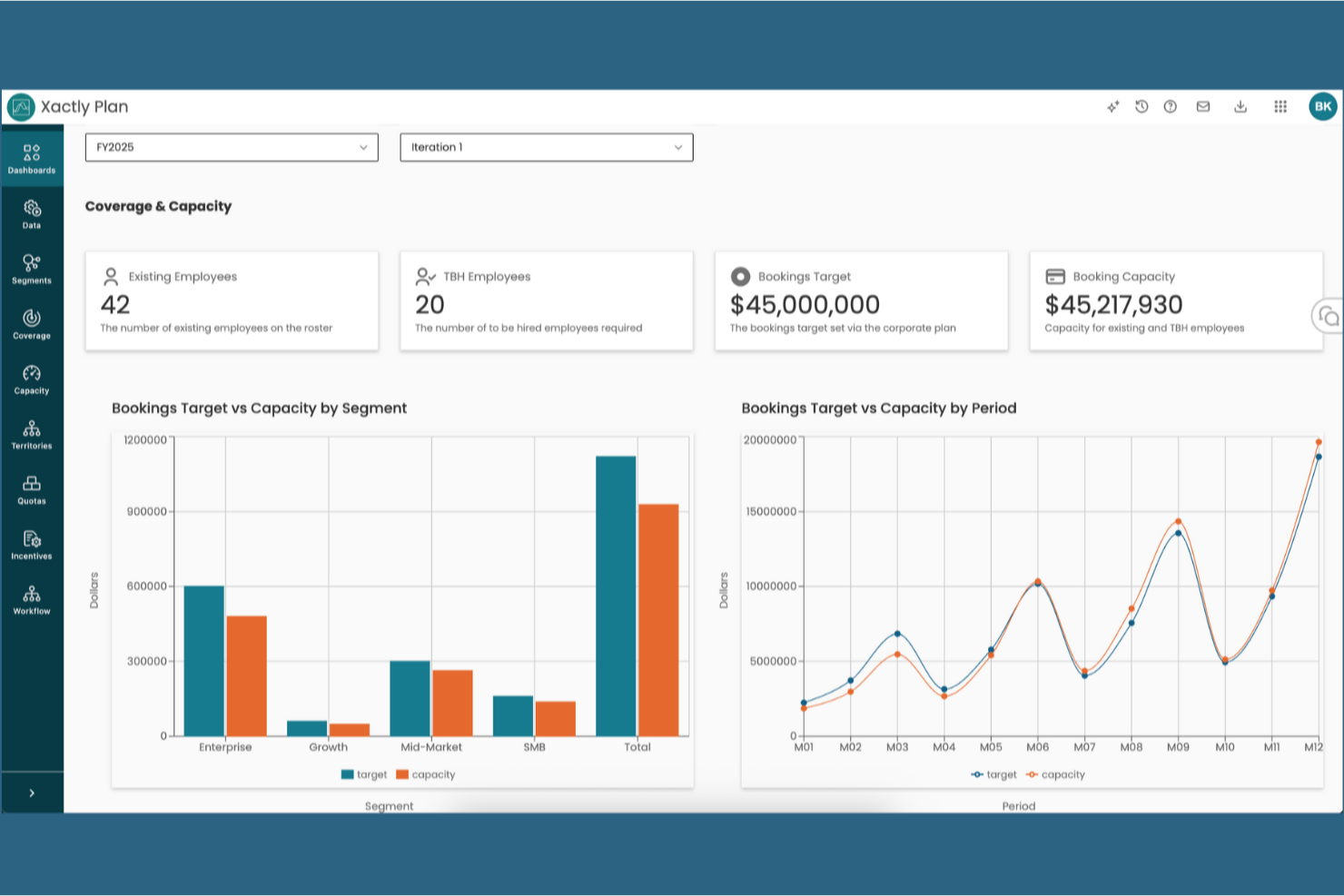
Xactly is a sales performance platform that combines map-based territory design, AI-powered balancing optimization, quota and capacity planning, and scenario modeling to support end-to-end sales coverage decisions.
Who Is Xactly Best For?
Xactly is a strong fit for enterprise sales planning and RevOps teams managing large, complex rep structures where territory design, quota allocation, and compensation all need to stay in sync.
Why I Picked Xactly
I picked Xactly as one of the best because its AI-powered Optimizer inside AlignStar balances territories across multiple variables (TAM, workload, travel efficiency) simultaneously, then grades each alignment against your objectives with an automated report card. What I really like is how territory design connects directly into quota allocation and capacity planning within the same platform. You're not exporting a map and rebuilding the numbers somewhere else.
Xactly Key Features
- Interactive territory mapping: Build and adjust territories using a real-time, map-based interface with layers for accounts, reps, and metrics.
- Automated account assignment rules: Create dynamic, multi-attribute rules to segment and assign accounts across territories with conflict management.
- What-if scenario modeling: Compare multiple territory and quota plans side by side, tracking projected revenue and headcount impact as you go.
- Bi-directional CRM and ERP integrations: Connects to Salesforce, Microsoft, HubSpot, and ERP systems for data syncing and alignment across platforms.
Xactly Integrations
Xactly offers native integrations with Salesforce, ServiceNow, Workday, and SAP. An API is available for custom integrations.
Pros and Cons
Pros:
- Scenario modeling with real-time impact scoring
- Links territory design directly to quota planning
- AI-driven optimization across multiple territory variables
Cons:
- Overkill for smaller or simpler sales teams
- Heavy implementation often requires vendor support
New Product Updates from Xactly
Xactly and ServiceNow Connect CRM Workflows to Revenue Performance
Xactly has partnered with ServiceNow to connect Xactly’s Intelligent Revenue Platform with ServiceNow CRM, embedding revenue performance intelligence into CRM workflows and surfacing commission and quota impacts in CPQ and Sales CRM. For more information, visit Xactly's official site.
 .
.
Maptive
Best for transforming your data into custom Google maps

Maptive is a unique territory optimization tool that allows you to create insightful custom maps from your business’s geolocation data sets. With a series of mapping tools you can use to enhance your Google Maps foundation, you can experiment with sale density maps, heat maps, store locators, and territory maps that ensure you can optimize sales performance.
Why I picked Maptive: This tool caught my eye because it’s specifically designed to work with Google tools. You have Google Street View, Google Geographic Search, and Google Places Search, all available directly on the platform. You can leverage Google’s comprehensive information to get an on-the-ground understanding of any location.
Maptive Standout Features and Integrations
Standout features include turn-by-turn navigation in-app when you link it to your mobile device and custom markers and images that you can upload yourself.
Integrations include Google Maps. CRM integrations coming soon.
Pros and Cons
Pros:
- Great customer service team
- Incredibly user friendly
- Very fast for geocoding addresses
Cons:
- Some loading delays can slow your workflow
- Pricing can be a little high

Best route planner for field sales

As a field sales management software, Badger Maps is designed to help businesses manage representative routes, explore new opportunities, collect new data, and follow up on previous visits. This territory mapping tool has a mobile app, as well as a built-in mapping tool that can help you create sales routes, estimate arrival times, and streamline every drive.
Why I picked Badger Maps: I added this tool to my list because it prioritizes route planning to help you cut down on prep and drive time. Badger Maps reports that salespeople who use this software drive as much as 20% less and spend only 10 minutes prepping per day.
Badger Maps Standout Features and Integrations
Standout features include customized data visualization set up for you by the Badger Maps specialists and personalized onboarding and training to speed up implementation and adoption.
Integrations include HubSpot, Insightly, Microsoft Dynamics, NetSuite, RESTAPI, Salesforce, Zapier, and Zoho CRM.
Pros and Cons
Pros:
- Robust customer support team
- Super user-friendly interface
- Native mobile app for iPhones and Android
Cons:
- Requires internet connection to operate
- No free or affordable option for small businesses

Best for pre-built templates for a variety of use cases

Unlike some other solutions on my list, SmartDraw is more about designing and drawing diagrams than territory management. As a design tool, it can be incredibly useful for mapping with its alternative features, like wireframes, mockups, templates, diagrams, and pre-built charts. SmartDraw automates a lot of the design process to ensure you can add, move, and delete shapes more easily.
Why I picked SmartDraw: I like this tool because it provides a single-use solution to sales territory design. If you’re not looking for advanced features and in-depth analytics, SmartDraw is the tool for you. It offers simple, custom, automated map and territory design that addresses your unique needs.
SmartDraw Standout Features and Integrations
Standout features include editable map templates from every region and an intelligent formatting engine to automatically adjust shapes and positions.
Integrations include AWS, box, Confluence, Dropbox, Google, Jira, Microsoft Azure, Microsoft Teams, and Trello.
Pros and Cons
Pros:
- Affordable pricing for all businesses
- Intuitive navigation
- Easy to learn
Cons:
- Templates have preloaded data that must be cleared
- Limited reporting and analytics


Since Yellowfin is primarily a Business Intelligence platform, it offers data exploration, dashboards, and self-service BI experience in addition to mapping and territory planning capabilities. With advanced visualization features, this solution offers you a no-coding interface that simplifies analytics to better support your sales operations.
Why I picked Yellowfin: Even though it’s a BI platform, this solution caught my eye because you do get location intelligence functionality that merges traditional and spatial business analytics to improve your decision-making. Use Yellowfin’s built-in mapping tools or Google Maps API to design maps based on demographic data, real-time business data, and other essential metrics.
Yellowfin Standout Features and Integrations
Standout features include native mobile apps that ensure analytics and mapping accessibility and guided NLQ to help you answer difficult questions about your sales process.
Integrations include Dynamics 365, GitHub, Google Analytics 360, Google Sheets, Instagram, Meta for Business, Salesforce Sales Cloud, Tableau, Xero, and Zendesk Suite.
Pros and Cons
Pros:
- Has effective online training tools
- Specifically designed for self-service
- Simple interface for non-technical users
Cons:
- Online accessibility only, no cloud-based options
- Some customizations will require coding


Mapline is a web-based intelligence and sales mapping design software that’s meant to help organizations of any size upload customer and company data for visualization. You can also use this platform to manage scheduling, routine, and dispatch operations from a single hub, as well as get analytics and insights from reporting tools.
Why I picked Mapline: I like this platform because it helps you organize your territories using whatever metrics make sense to you. Whether you need to create a design based on government boundaries, like counties, states, and postal codes, or input your own data to get custom shapes and segmentation, Mapline offers the flexibility and customization you want.
Mapline Standout Features and Integrations
Standout features include map creation by importing data from spreadsheets and heat mapping to see the concentration of your data.
Integrations include an API solution that provides the tools for custom integration.
Pros and Cons
Pros:
- Customer support team provides plenty of guidance
- Tons of customization options for territory design
- Add-ons that help you link maps and spreadsheets
Cons:
- Customer support through email only
- Inaccuracy in some regions


As a GIS and mapping software, Maptitude strives to offer a cost-effective solution for optimizing your sales territories, site locations, and vehicle routes, as well as analyze, visualize, and present the most critical data about your profits, workflow, and resource allocation. Discover geographic patterns that make a big difference to your decision-making.
Why I picked Maptitude: This tool seems incredibly useful to me due to its spatial mapping feature. With this feature, you can estimate the population of any given area to design custom territories that identify and address over and under-served areas, determine ideal trade areas, and find valuable sites for physical stores based on the geography of the location.
Maptitude Standout Features and Integrations
Standout features include map creation using data from your choice of source, including Excel, SQL Server, or Access, and online sharing with maps embedded into your website.
Integrations include Access, Google Maps, Microsoft Access, Microsoft Excel, and TransCAD.
Pros and Cons
Pros:
- Friendly and supportive customer service
- Affordable options for small businesses
- User-friendly design and navigation
Cons:
- Can be slow to upload large data sets
- Advanced features are a little complicated to learn


This cloud-based territory mapping software uses location technology to deliver geographic solutions to international organizations. eSpatial specializes in territory alignment, routing, data visualization, target marketing, prospecting, and gap analysis. Your team also gets dynamic visual insights at street, zip code, country, and coordinate levels.
Why I picked eSpatial: This tool made my list because of its territory management features. Whether you design geographic or account-based territories, eSpatial can warn you where there are pockets of underperforming areas, high employee turnover, areas that aren’t meeting expectations, and high mileage expenses.
eSpatial Standout Features and Integrations
Standout features include template creation for maps that display only what you want to see and radius maps that provide data points for relevant information to help with territory planning.
Integrations include Salesforce.
Pros and Cons
Pros:
- Intuitive tools and navigation
- Very easy to use
- Appealing user interface
Cons:
- Adding multiple map elements is time-consuming
- Very expensive pricing at the lowest tier


A web-based platform from Ascent Cloud, Geopointe is designed to help you schedule routes and trips, redesign and align territory maps, and create unique marketing campaigns based on demographic data in a variety of geographic areas. This platform can also help your sales reps fill in meeting cancellations and log notes to keep your central hub up-to-date.
Why I picked Geopointe: This tool made my list because it offers several territory design-specific features for Salesforce data, including a Shapes Editor and Automated Assignments. The Shape Editor shows how territory adjustments impact business operations, while Automated Assignments distribute leads and territory assignments based on your rules to ensure fairness.
Geopointe Standout Features and Integrations
Standout features include route optimization and trip planning to save on drive time and resources, as well as geographic search and analysis for location-specific insights.
Integrations include Salesforce Sales Cloud and Territory Planner.
Pros and Cons
Pros:
- Range of price points for any business size
- User-friendly interface design
- Knowledgeable customer support team
Cons:
- Navigation isn’t very intuitive
- May take up too much storage


This cloud-based sales route planning software is made to help your sales team plan and optimize sales routes from home base or on the road. Use this tool to reduce mileage and emissions, increase sales rep productivity through automated scheduling suggestions based on previous customer interactions, and enjoy route calculations that take holidays, business hours, and customer preferences into account.
Why I picked Portatour: What made me add this platform to my list was the automatic route planner app. Once you’ve designed your territories and added in customer requests, you can use the Portatour app to automatically schedule routes in just a few seconds based on current conditions.
Portatour Standout Features and Integrations
Standout features include configurable customer assignments and restrictions and lead management to record and store customer data.
Integrations include Microsoft Dynamics, Microsoft Excel, Salesforce, and Veeva. Portatour also offers API data exchange PowerShell scripts for custom integrations.
Pros and Cons
Pros:
- Easy to learn how to use
- Mobile accessibility for field teams
- Automation-first approach to speed up operations
Cons:
- Cost prohibitive for small businesses
- A little complicated to set up
Other Sales Territory Design Software
Here are some additional sales territory design software options that didn’t make it onto my shortlist, but are still worth checking out:
- AlignMix
For click-to-edit map design drawing
- GeoMetrx
For aggregating census-based, location-specific data
- SPOTIO
For multi-channel communication and multi-device support
- MapBusinessOnline
For having access to up-to-date base maps and current street data
- Seismic
For building content profiles for outside and field sales roles that address their specific needs
- BatchGeo
For transferring your mapping data from spreadsheets to maps in just three steps
- Varicent
For making data-driven decisions with access to data visualizations, reports, and analytics
- ZeeMaps
For creating and publishing interactive maps that you can embed in websites
- Callproof
Sales territory design software with an attached CRM for your outside sales team
- EasyTerritory
Territory design software for pairing with Microsoft Dynamics 365 and Power BI


How I Evaluate Sales Territory Design Software
I split my evaluation into two layers: the baseline capabilities a tool must have—like geo-mapping, rule-based assignment, and scenario modeling—and the differentiators that separate the best options.
Core Functionality (Table Stakes For This List)
When I'm selecting tools for my list, I rank each one on a scale from 0 (does not offer the functionality) to 5 (excels in this area) for each core functionality listed below. Then, I calculate the tool's total score into a percentage. Each tool needs to achieve a minimum total score of 65% to be considered for inclusion.
- Territory Mapping & Visualization: I look for interactive geo-maps where you can layer in accounts, reps, and revenue data to spot coverage gaps or overlaps across regions at a glance.
- Account & Rep Assignment Rules: The rule engine should handle multi-attribute logic like industry, company size, and named accounts so you're not manually sorting spreadsheets every planning cycle.
- Balancing & Optimization Engine: I evaluate whether the tool can balance territories across multiple variables like TAM, deal count, and workload rather than just splitting accounts evenly by count.
- Scenario Modeling & Planning: I check for side-by-side what-if comparisons so you can model changes like adding a new rep in a region and see the downstream impact before committing.
- CRM & Data Integration: Syncing with your CRM is foundational. I look at whether the tool supports bi-directional sync with platforms like Salesforce, HubSpot, or Microsoft Dynamics.
- Quota & Capacity Alignment: Territory plans should connect to quota and headcount inputs. I evaluate whether the tool links coverage ratios and capacity data to the territories it produces.
Once I have a list of tools that meet this criteria, I consider what sets each platform apart.
Differentiating Factors (What Sets Vendors Apart)
Here's how I compare and contrast different vendors:
Standout Features
I pay close attention to AI-powered recommendations—tools that suggest optimal account groupings or flag imbalanced territories save hours of manual analysis. Change impact analytics matter just as much, especially when you need to show leadership exactly how a mid-year realignment affects pipeline coverage and quota distribution. I also evaluate collaborative planning workflows, since territory design rarely happens in a vacuum. Strong options let RevOps, sales managers, and finance weigh in through structured approval chains rather than endless email threads.
Beyond Features
Ecosystem fit is a big one—I check whether a tool connects to your existing planning stack, like quota management or compensation platforms, since territory design feeds directly into both. Implementation speed also matters. Some tools require weeks of professional services, while others let a RevOps team build their first plan within days. I also evaluate pricing transparency, looking at whether core optimization and integration capabilities are included or gated behind higher tiers.
How to Choose Sales Territory Design Software
It’s easy to get bogged down in long feature lists and complex pricing structures. To help you stay focused as you work through your unique software selection process, here’s a checklist of factors to keep in mind:
| Factor | What to Consider |
|---|---|
| Scalability | Will the software grow with your team? Consider future growth and whether the tool can handle increased data and users without hitting limits or slowing down. |
| Integrations | Does it connect with your current systems like CRM or ERP? Check for compatibility to avoid manual data entry and ensure seamless data flow across platforms. |
| Customizability | Can you tailor the tool to fit your unique processes? Look for flexible options to customize reports, dashboards, and workflow settings to match your needs. |
| Ease of use | Is the interface intuitive for your team? Evaluate how quickly users can learn and adapt to the software without extensive training or support. |
| Implementation and onboarding | How quickly can you get up and running? Assess the time and resources needed for setup, including any required training or data migration efforts. |
| Cost | Can you afford the software now and in the long run? Compare pricing structures, hidden fees, and value for money across different vendors. |
| Security safeguards | Is your data protected? Ensure the software complies with security standards and offers features like encryption and access controls to protect sensitive data. |
What Is Sales Territory Design Software?
Sales territory design software is a tool used by businesses to allocate and manage sales territories. It combines geographic mapping and data analysis to organize territories based on factors such as customer demographics, market potential, and geographic location. The software integrates sales and customer data to create optimized, balanced sales territories and provides tools for performance analysis and real-time updates.
Features
When selecting sales territory design software, keep an eye out for the following key features:
- Territory mapping: Allows you to create and adjust territories visually, ensuring balanced coverage and efficient resource allocation.
- Data visualization: Offers graphical representations of sales data, helping teams identify trends and make informed decisions.
- Performance tracking: Monitors sales metrics and team performance, providing insights into areas needing improvement.
- CRM integration: Connects with existing CRM systems, ensuring a seamless flow of information and reducing manual data entry.
- Customizable reporting: Enables you to generate tailored reports to meet specific business needs and track key performance indicators.
- AI-driven insights: Utilizes artificial intelligence to provide predictive analytics and strategic recommendations for territory adjustments.
- Mobile app access: Provides on-the-go access to territory data, allowing sales teams to stay informed and responsive while in the field.
- Real-time collaboration: Facilitates team collaboration by allowing multiple users to access and edit territory data simultaneously.
- Automated territory adjustments: Adjusts territories automatically based on predefined criteria, saving time and maintaining balance.
- Security safeguards: Protects sensitive business data through encryption and access controls, ensuring compliance with security standards.
Benefits
Implementing sales territory design software provides several benefits for your team and your business. Here are a few you can look forward to:
- Improved coverage: Ensures all territories are evenly covered, maximizing sales opportunities and reducing overlap.
- Increased efficiency: Automates territory adjustments and data entry, freeing up time for your sales team to focus on selling.
- Better decision-making: Provides data visualization and AI-driven insights, helping you make informed strategic decisions.
- Enhanced collaboration: Enables real-time collaboration, keeping your team aligned and informed across territories.
- Optimized resource allocation: Uses performance tracking to allocate resources where they're needed most, boosting productivity.
- Greater flexibility: Offers customizable reporting and mobile access, allowing your team to adapt quickly to changing needs.
- Secure data management: Protects sensitive information with security safeguards, ensuring compliance and peace of mind.
Costs & Pricing
Selecting sales territory design software requires an understanding of the various pricing models and plans available. Costs vary based on features, team size, add-ons, and more. The table below summarizes common plans, their average prices, and typical features included in sales territory design software solutions:
Plan Comparison Table for Sales Territory Design Software
| Plan Type | Average Price | Common Features |
|---|---|---|
| Free Plan | $0 | Basic mapping, limited data visualization, and essential reporting. |
| Personal Plan | $10-$30/user/month | Enhanced mapping, CRM integration, and customizable reports. |
| Business Plan | $40-$70/user/month | Advanced analytics, mobile app access, and real-time collaboration. |
| Enterprise Plan | $80-$150/user/month | AI-driven insights, automated territory adjustments, and dedicated support. |
Sales Territory Design Software FAQs
Here are some answers to common questions about sales territory design software:
How do you design a sales territory?
If you’re interested in designing a sales territory to optimize team performance and maximize revenue, take a look at this step-by-step guide to get you started:
- Assess your current operations to better understand your customer base, performance, market potential, and sales resources.
- Define your objectives and sales criteria to better align them to ensure geography, account size, and customer type fit into how you plan to increase sales or reduce costs.
- Use manual mapping or design software to create and test your sales territories based on your initial criteria and goals.
- Implement your design and monitor performance to measure the impact of your new territory design.
- Edit and modify territories and metrics as needed until you’re achieving your goals.
How do I know if my business needs sales territory design software?
If your sales team struggles with unbalanced workloads or missed opportunities, you might need sales territory design software. This tool helps organize territories efficiently, ensuring fair distribution of leads and resources. For example, if reps frequently overlap or miss potential clients, it’s a sign to consider this software.
How secure is sales territory design software?
Most sales territory design software offers strong security features like encryption and access controls. However, you should verify that the software complies with industry standards and regulations. Ask vendors about their security measures and read reviews to ensure your data remains protected.
How does territory mapping work in the software?
It lets you draw or auto-generate territories on a map using location, revenue, or account data. You can then adjust borders and instantly see changes in workload or coverage.
Should the software include automation features?
Yes. Automated balancing, assignment rules, and data refreshes save time and reduce human error. They’re essential for large or frequently changing sales teams.
How do reporting features support sales planning?
They track territory performance over time—helping you spot growth areas, adjust rep loads, and justify changes to leadership.
What’s Next:
If you're in the process of researching sales territory design software, connect with a SoftwareSelect advisor for free recommendations.
You fill out a form and have a quick chat where they get into the specifics of your needs. Then you'll get a shortlist of software to review. They'll even support you through the entire buying process, including price negotiations.