

10 Best Outbound Call Tracking Software In 2026

10 Best Outbound Call Tracking Software Shortlist


With so many different outbound call tracking software available, figuring out which is right for you is tough. You know you want to measure the effectiveness of your call-based sales and marketing strategies but need to figure out which tool is best. I've got you! In this post I'll help make your choice easy, sharing my personal experiences using dozens of different outbound call tracking tools with various teams and accounts, with my picks of the best outbound call tracking software.
Table of Contents
- Best Software Shortlist
- Why Trust Us
- Compare Specs
- Reviews
- Other Outbound Call Tracking Software
- Related Outbound Call Tracking Software Reviews
- Selection Criteria
- How To Choose
- Trends In Outbound Call Tracking Software
- What Is Outbound Call Tracking Software?
- Features
- Benefits
- Costs and Pricing
- FAQs
Why Trust Our Software Reviews
We’ve been testing and reviewing RevOps software since 2022. As RevOps leaders ourselves, we know how critical and difficult it is to make the right decision when selecting software.
We invest in deep research to help our audience make better software purchasing decisions. We’ve tested more than 2,000 tools for different RevOps use cases and written over 1,000 comprehensive software reviews. Learn how we stay transparent & our software review methodology.
| Tool | Best For | Trial Info | Price | ||
|---|---|---|---|---|---|
| 1 | Best with customizable call routing rules | Free demo available | Pricing upon request | Website | |
| 2 | Best for AI predictive dialing efficiency | Free demo available | From $15/user/month (billed annually) | Website | |
| 3 | Best for built-in analytics that help optimize performance | 14-day free trial | From $19/user/month (billed annually) | Website | |
| 4 | Best for sharing call recordings with colleagues | Free 14-day trial + free demo available | From $89/user/month (billed annually) | Website | |
| 5 | Best for cadences that build and nurture pipelines | Free demo available | Pricing upon request | Website | |
| 6 | Best for using artificial intelligence to monitor call quality | Free trial + free demo available | From $20/user/month (billed annually) | Website | |
| 7 | Best for managing outbound calls with transfers and forwarding | 14-day free trial + free demo available | From $35/user/month (billed annually) | Website | |
| 8 | Best for internal collaboration and communication | Free trial available | From $17/user/month | Website | |
| 9 | Best for coaching sales reps through conversation AI | Free trial available | Pricing upon request | Website | |
| 10 | Best for IVR auto-attendant that supports contact centers | 7-day free trial | From $35/month | Website |
-

Pipedrive CRM
Visit WebsiteThis is an aggregated rating for this tool including ratings from Crozdesk users and ratings from other sites.4.5 -
Creatio CRM
Visit WebsiteThis is an aggregated rating for this tool including ratings from Crozdesk users and ratings from other sites.4.7 -
monday CRM
Visit WebsiteThis is an aggregated rating for this tool including ratings from Crozdesk users and ratings from other sites.4.6





Best Outbound Call Tracking Software Reviews
If you’re ready to get into the nitty gritty of these outbound call tools, keep reading to find summaries of each platform, a few of their standout features, and the reason each tool stood out to me. I’ve also included information on pricing and trial offers, as well as a couple of pros and cons that may inform your final decision.
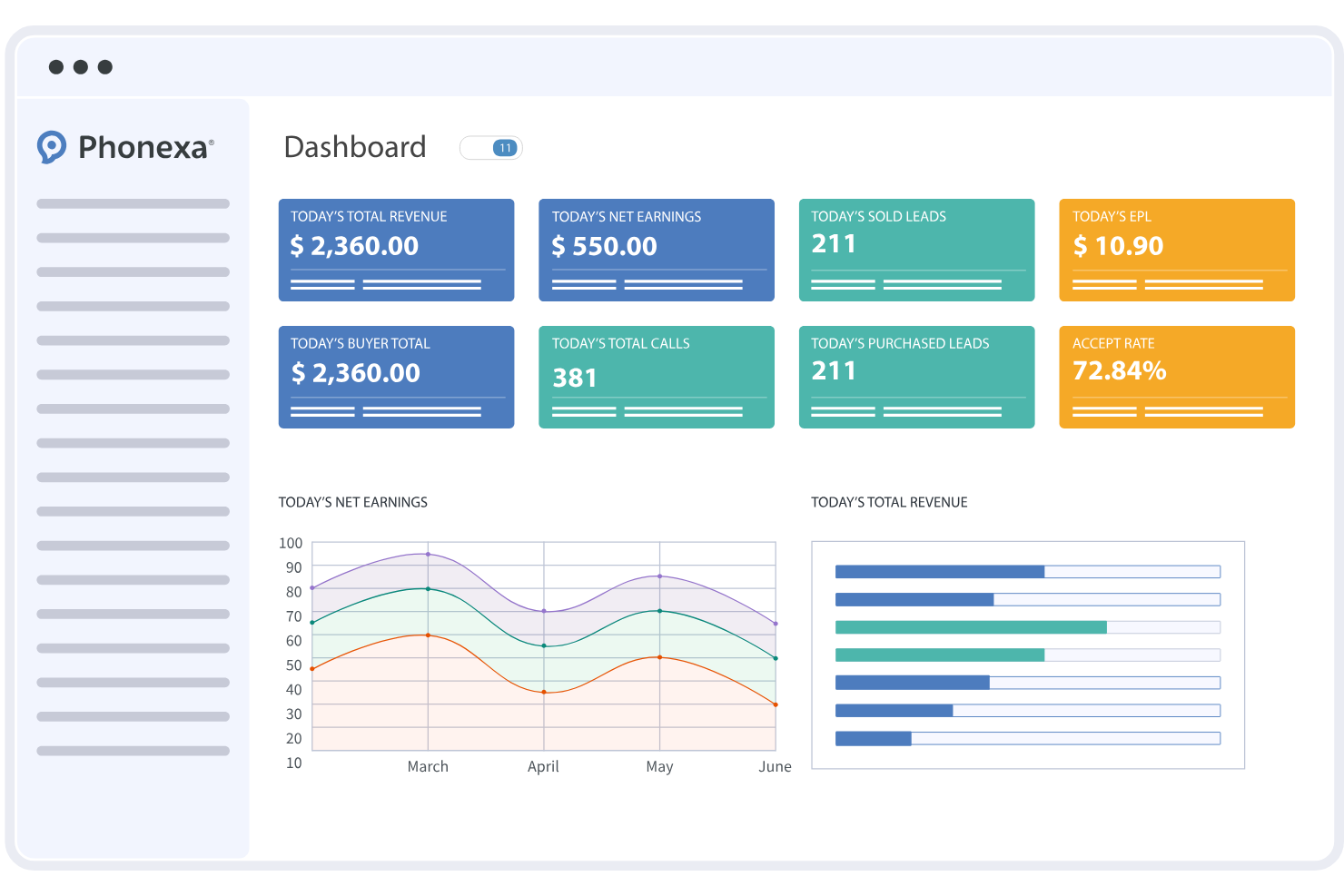
Phonexa is a call tracking and lead distribution platform built around pay-per-call and pay-per-lead campaign management, with tools for IVR, call routing, ping tree distribution, and real-time analytics.
Who Is Phonexa Best For?
Phonexa is a strong fit for performance marketing agencies and affiliate networks that manage high-volume inbound and outbound call campaigns across multiple publishers and buyers.
Why I Picked Phonexa
I picked Phonexa as one of the best because its call routing engine goes well beyond simple time-of-day or round-robin logic. You can configure rules based on geography, buyer availability, bid value, and volume caps simultaneously. I especially like the ping tree setup, where calls are evaluated in real time against buyer criteria before being transferred. The Traffic Flow tool lets you see exactly where a buyer sits in the ranking order, so you can adjust routing priority based on actual performance data.
Phonexa Key Features
- Call recording: Automatically records calls and stores them for playback, review, and compliance auditing across campaigns.
- IVR builder: Create multi-level interactive voice response menus to pre-qualify callers before connecting them to buyers or agents.
- Real-time reporting dashboard: Monitor live call volume, conversion rates, and campaign performance across all active call channels.
- Dynamic number insertion (DNI): Assign unique tracking numbers to specific campaigns, sources, or ads to attribute calls accurately.
Pros and Cons
Pros:
- Detailed call recording and playback features
- Customizable call routing with advanced logic
- Real-time analytics for outbound call campaigns
Cons:
- Some features require additional setup time
- No free-forever plan available


Squaretalk is an AI-powered contact center platform built for outbound sales teams, combining a predictive dialer, call tracking, real-time monitoring, and AI-driven conversation analytics across voice, SMS, and WhatsApp.
Who Is Squaretalk Best For?
Squaretalk is a good fit for outbound sales teams and call centers that run high-volume dialing campaigns and need AI-driven tools to manage agent workload.
Why I Picked Squaretalk
I picked Squaretalk as one of the best because its AI-driven predictive dialer goes beyond simply auto-dialing. It uses algorithms to predict agent availability in real time, so calls connect the moment an agent is free. Paired with answering machine detection, agents skip voicemails entirely and land only on live conversations. I also like the caller ID match feature, which displays a local number based on the lead's location across 150+ countries, directly lifting answer rates on outbound campaigns.
Squaretalk Key Features
- Real-time dashboards: Monitor live campaign performance with over 80 exportable metrics, including call outcomes, agent activity, and connection rates.
- Live call monitoring: Supervisors can listen in on active calls, whisper coaching tips to agents, or barge into calls when needed.
- AI conversation analytics: Automatically transcribes calls, generates summaries, and runs sentiment analysis across outbound interactions.
- Smart redial strategies: Configure custom redial rules with disposition timers to re-engage unanswered leads based on call outcome.
Pros and Cons
Pros:
- Easy agent scheduling and performance tracking
- Real-time call analytics
- Intelligent skill-based routing
Cons:
- Limited reporting customization
- Smart predictive dialing unavailable on lower-tier plan
New Product Updates from Squaretalk
Squaretalk Partners With CoinGate for Crypto Payments
Squaretalk has partnered with CoinGate to enhance crypto compliance for regulated markets. The partnership helps businesses support secure digital payments while improving compliance and financial management workflows. For more information, visit Squaretalk's official site.
 .
.

CloudTalk is a cloud-based call center platform built for outbound sales teams, combining automated dialers, AI conversation intelligence, real-time analytics, call recording, and CRM integrations to manage and track every outbound interaction.
Who Is CloudTalk Best For?
CloudTalk is a strong fit for outbound sales teams and call centers at mid-sized companies that need automated dialing, call tracking, and performance visibility across their reps.
Why I Picked CloudTalk
CloudTalk earns its spot as one of the best on my shortlist because its analytics go beyond basic call counts. The real-time dashboards surface live KPIs like agent occupancy, wait times, and abandonment rates as calls happen. Pair that with AI Conversation Intelligence, and I can track sentiment trends and pull keyword mentions across calls without manually reviewing recordings. That combination makes it genuinely useful for identifying where outbound performance breaks down.
CloudTalk Key Features
- Power dialer: Automatically dials the next number in your queue the moment a call ends, keeping reps focused on conversations instead of manual dialing.
- Call recording: Records every outbound call automatically, giving managers a full archive to review for coaching and compliance purposes.
- Voicemail drop: Lets reps leave pre-recorded voicemails with one click instead of recording a new message each time a call goes unanswered.
- International numbers: Provides local numbers in 160+ countries so outbound calls display a recognizable local caller ID, improving answer rates.
Pros and Cons
Pros:
- Simple to set up and onboard
- Accessibility on any device
- An easy-to-use interface
Cons:
- Sequence code to turn recordings on and off
- Setting up IVR can be a little complicated


Reply is a multichannel sales outreach platform that combines email sequencing, LinkedIn automation, and built-in calling into a single outbound sales workflow.
Who Is Reply Best For?
Reply is a good fit for outbound sales teams at B2B companies that run high-volume prospecting campaigns across multiple channels.
Why I Picked Reply
I've included Reply in my top picks because it lets you record, store, and share calls directly within the platform—so sales managers can review rep conversations without a separate tool. I like that cloud calls is built as a team-based feature, where call tasks generated by sequences belong to one team member and can be shared with multiple reps to handle workload based on contact ownership. You can make international calls as well as record, store, and share phone conversations, all from the same place you're running your outbound sequences.
Reply Key Features
- Click-to-call dialer: Make outbound calls directly from your browser using Reply's Chrome extension without switching to a separate phone tool.
- Call scripts: Access pre-built scripts during live calls to keep reps on message throughout conversations.
- Sequence-triggered calls: Automatically prompt a call task when a contact opens an email, so reps reach out at the right moment.
- Local presence dialing: Display a local caller ID to match the prospect's area code and improve answer rates.
Pros and Cons
Pros:
- Great live chat customer support
- Intuitive user experience
- Easy to navigate the structure
Cons:
- Limited communication tracking log
- Room for development in LinkedIn campaigns


Salesloft is a revenue orchestration platform that combines a built-in dialer, cadence automation, conversation intelligence, and call analytics to give outbound sales teams full visibility into every call, touchpoint, and pipeline stage.
Who Is Salesloft Best For?
Salesloft is well-suited for mid-market and enterprise B2B sales teams that run high-volume outbound calling as part of a structured, multi-touch sales process.
Why I Picked Salesloft
Salesloft is a top pick because its cadence engine is the standout feature for outbound call tracking. Call steps sit natively inside multi-touch cadences, so a phone call isn't a standalone event—it's part of a structured sequence that includes emails, LinkedIn touches, and voicemail drops. I love that you can sort call steps by time zone, account tier, or engagement level, which means reps are always calling the right person at the right moment. The cadence analytics also track pipeline generated per sequence, so you can tie call activity directly to revenue outcomes.
Salesloft Key Features
- Built-in dialer: Click-to-call dialing directly from the platform without switching to a separate phone tool.
- Call recording: Calls are automatically recorded and stored against contact records for coaching and review.
- Conversation intelligence: AI transcription flags keywords, objections, and competitor mentions across recorded calls.
- Call disposition tracking: Log call outcomes using custom disposition labels to keep activity data accurate across your team.
Pros and Cons
Pros:
- Provides online lessons to learn the platform
- Tons of integration options
- Interface is very easy to use
Cons:
- Some issues with the Pinned Notes feature
- Challenging learning curve

Best for using artificial intelligence to monitor call quality

MightyCall is a cloud-based call center platform built for small and mid-sized sales teams, with auto dialers, live call monitoring, AI-powered call summaries, outbound campaign tracking, and real-time analytics.
Who Is MightyCall Best For?
MightyCall is a strong fit for small to mid-sized sales teams that run outbound calling campaigns and need built-in dialer tools alongside call tracking and monitoring.
Why I Picked MightyCall
MightyCall earns its spot on my shortlist because of how it uses AI to take the manual work out of call quality monitoring. I love that AI Call Summaries automatically generate structured notes after every outbound call, capturing key details and action items without a supervisor having to replay recordings. Pair that with live call monitoring tools like call listening, whisper coaching, and call intercept, and you've got a tight feedback loop between supervisors and reps that's genuinely hard to replicate with basic call tracking tools.
MightyCall Key Features
- Auto dialer modes: Run outbound campaigns using predictive, progressive, or preview dialing modes to control how calls are distributed to agents.
- Local presence dialing: Display a local area code when making outbound calls to increase the likelihood that prospects will answer.
- Dialer campaign reports: Track outbound campaign performance with metrics like total call attempts, connection rate, and call-to-connect ratio.
- AI answering machine detection: Automatically identify voicemails during outbound campaigns so agents can skip them and move to the next call.
Pros and Cons
Pros:
- Simple and intuitive navigation
- User interface is easy to understand
- Simple to customize call workflows
Cons:
- Many add-ons cost extra
- Admin user interface could use work


Close is a sales CRM with a built-in dialer, power and predictive dialing, call recording, AI-generated call transcripts and summaries, voicemail drop, and call routing tools—all designed around outbound sales calling workflows.
Who Is Close Best For?
Close is a strong fit for small to mid-sized inside sales teams that run high-volume outbound calling as their primary revenue channel.
Why I Picked Close
Close earns its spot on my shortlist because call transfers and forwarding are built directly into the CRM, not bolted on through a third-party integration. I like that my team can transfer a live call to any user, group number, or external number mid-conversation without dropping out of the platform. Call forwarding lets reps redirect incoming calls to a personal cell, so coverage gaps don't mean missed opportunities. Every transferred or forwarded call still logs automatically under the right contact record.
Close Key Features
- Power dialer: Automatically queues the next call in a list so reps move through leads without manual redialing between calls.
- Predictive dialer: Dials multiple leads at once and connects reps only when someone picks up, reducing idle time.
- Voicemail drop: Lets reps leave a pre-recorded voicemail with one click instead of recording a new message each time.
- AI call summaries: Automatically generates transcripts and summaries for recorded calls and saves them to the contact record.
Pros and Cons
Pros:
- Great customer support team
- Very user friendly interface
- Flexible and responsive configuration
Cons:
- Some features, like Smart Views, can be tough to understand
- Has a little bit of a learning curve

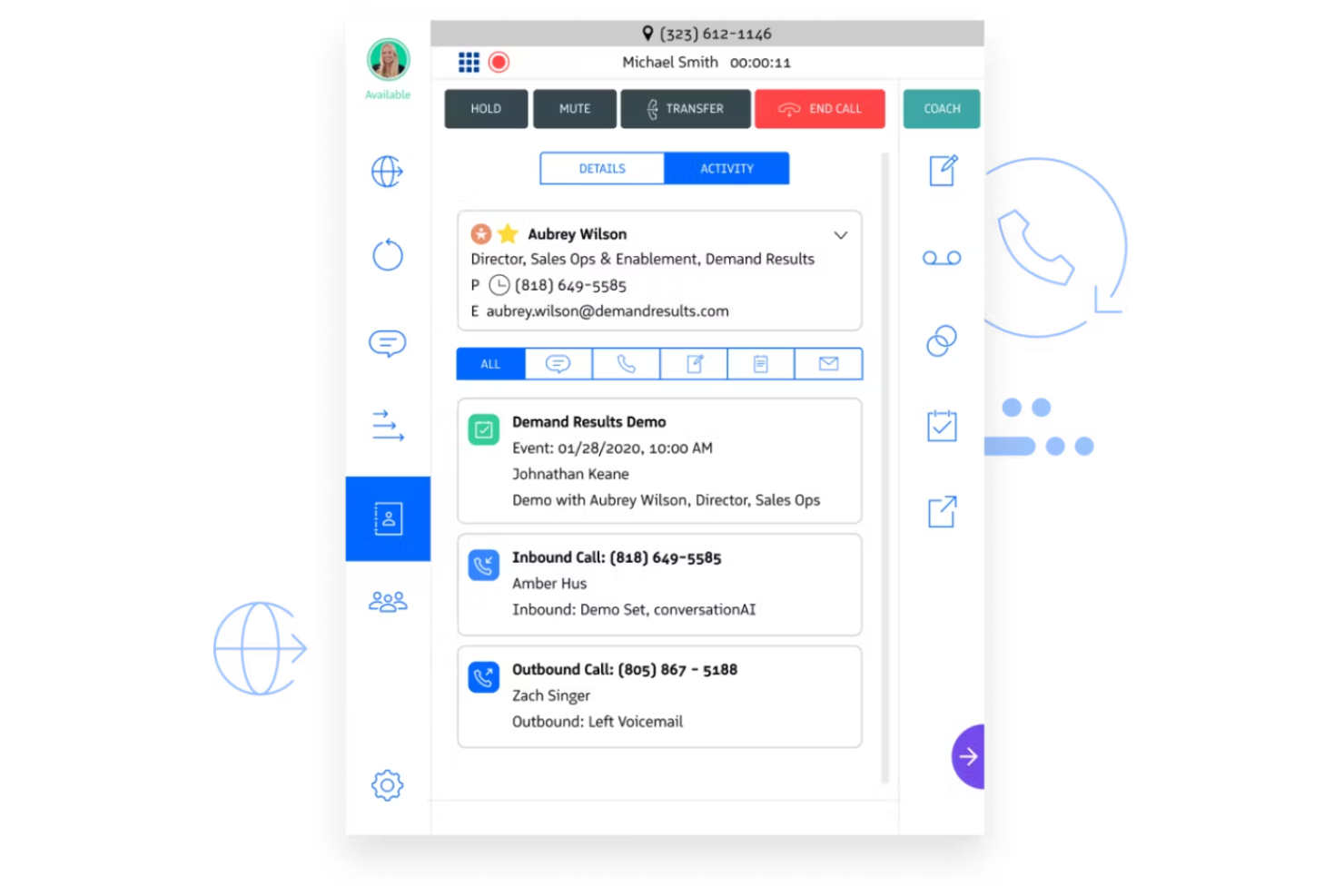
OpenPhone is a business phone system with outbound calling, call recording, AI-powered call summaries and tagging, analytics, and CRM syncing that gives sales teams a shared workspace for managing customer conversations.
Who Is OpenPhone Best For?
OpenPhone is a good fit for small to mid-sized sales teams that need a shared phone system with built-in collaboration tools and CRM connectivity.
Why I Picked OpenPhone
I've included OpenPhone in my top picks because its internal collaboration features go deeper than what most business phone systems offer. I like that teammates can leave internal threads directly on a conversation, tag each other, and see presence awareness — so when my team reviews an outbound call, everyone has full context without a separate Slack thread. The shared numbers feature also means multiple reps can work from the same line without losing call history or stepping on each other's responses.
OpenPhone Key Features
- AI call summaries: Automatically generates a written summary after each call so your team can review outbound conversations without replaying recordings.
- Call recording: Records outbound calls and stores them in the conversation thread for review, coaching, or compliance purposes.
- Analytics dashboard: Tracks call volume, missed calls, and teammate activity so you can monitor outbound calling patterns across your team.
- Custom caller ID: Lets you assign a specific phone number to display when making outbound calls, giving reps control over how they appear to prospects.
Pros and Cons
Pros:
- Accessible on phones and tablets
- Clean and streamlined user interface
- One of the most affordable options on my list
Cons:
- Android app is a little buggy
- Requires a stable internet connection

Revenue.io is a Salesforce-native sales platform that combines outbound dialing, call tracking, call recording, conversation intelligence, and real-time AI coaching into one system.
Who Is Revenue.io Best For?
Revenue.io is a strong fit for B2B sales teams running high-volume outbound programs inside Salesforce who need call tracking tied directly to pipeline data.
Why I Picked Revenue.io
I've included Revenue.io in my top picks because of how it handles rep coaching during live outbound calls, not just after them. Moments™ fires real-time prompts mid-conversation when a rep misses a talk track, faces a known objection, or needs a compliance reminder. AI call scorecards run after every call, so managers don't have to manually review recordings to find coaching gaps. That combination of in-call guidance and post-call scoring is what sets Revenue.io apart from tools that only do one or the other.
Revenue.io Key Features
- Local presence dialing: Automatically displays a local area code that matches the prospect's location to increase outbound answer rates.
- Voicemail drop: Lets reps leave a pre-recorded voicemail in one click without waiting through the full recording.
- Automatic call logging: Every call is captured and synced to Salesforce in real time with no manual data entry required.
- Call analytics dashboard: Tracks outbound call volume, connect rates, and outcomes across individual reps and teams.
Pros and Cons
Pros:
- Very user friendly and intuitive
- Extremely easy to configure and customize
- Pricing is routinely lower than the market average
Cons:
- Limited customization options for canned reports
- RingDNA dashboard could use some work
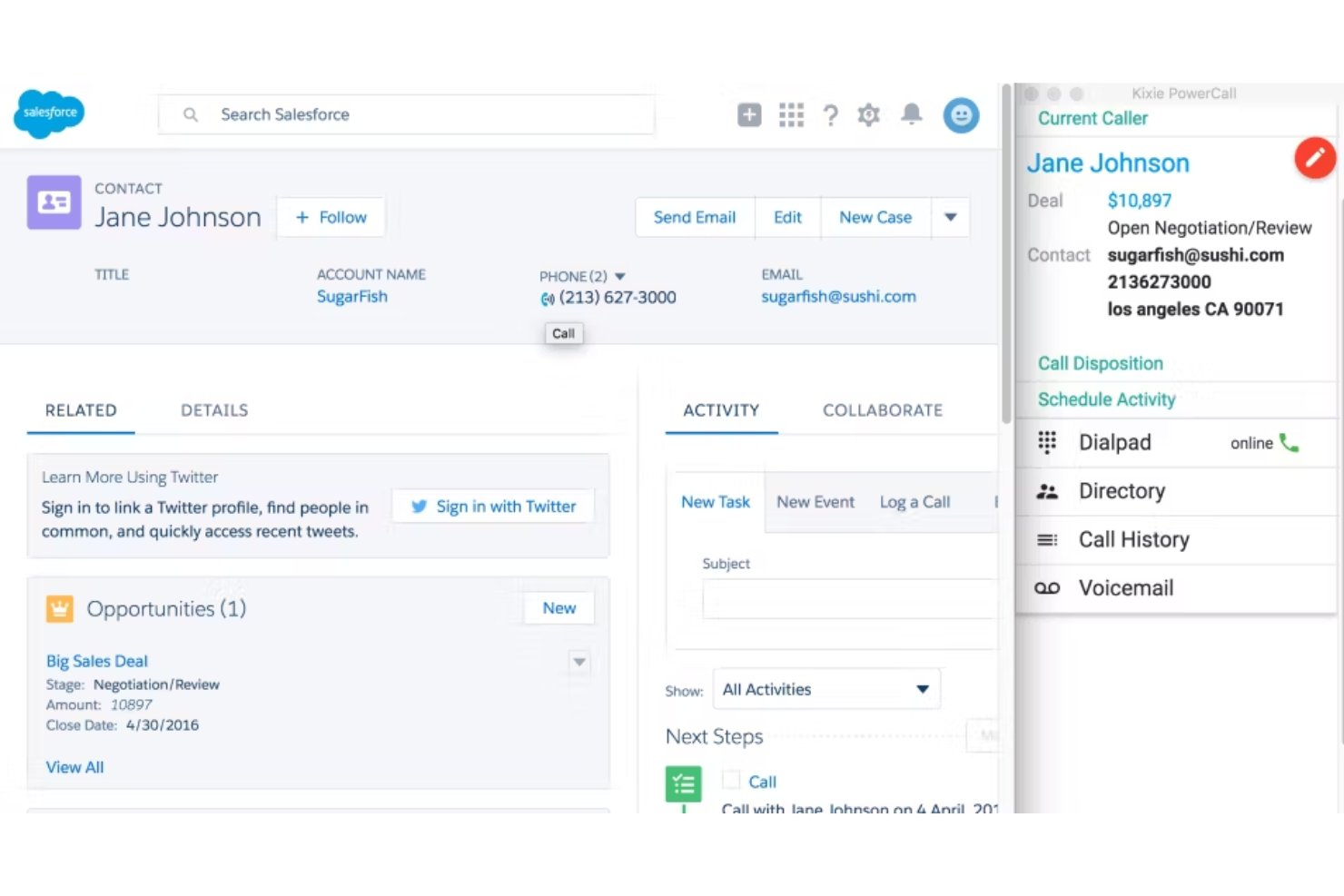
Kixie PowerCall & SMS is a sales engagement platform that combines power dialing, outbound call tracking, SMS, and AI-powered call analytics with automatic CRM logging for sales teams.
Who Is Kixie PowerCall & SMS Best For?
Kixie PowerCall & SMS is a strong fit for outbound sales teams and contact centers that need multi-line dialing, call tracking, and CRM-connected reporting in a single platform.
Why I Picked Kixie PowerCall & SMS
I picked Kixie PowerCall & SMS as one of the best because its IVR auto-attendant is specifically built for contact center-scale call routing. Custom IVR recordings let callers self-navigate to the right department, and you can layer ring groups and inbound call queues on top—so agents only handle calls they're equipped to take. I also like that the auto-callback feature kicks in when a caller requests a callback from the queue, keeping the experience clean without requiring manual follow-up from agents.
Kixie PowerCall & SMS Key Features
- Multi-line power dialer: Dial up to 10 lines simultaneously, automatically connecting agents only when a contact picks up.
- ConnectionBoost local presence: Matches your outbound caller ID to the area code of the contact you're calling to improve answer rates.
- Voicemail drop: Lets agents leave a pre-recorded voicemail with one click instead of waiting through the beep on each unanswered call.
- AI call summaries: Automatically generates post-call summaries with keyword tracking and sentiment analysis, synced directly to the CRM contact record.
Pros and Cons
Pros:
- Pricing to suit all business sizes
- Tons of integration options
- Easy to use for non-tech users
Cons:
- Can’t trigger automated SMS and calls from your CRM
- Support is only available via chat
Other Outbound Call Tracking Software
No list of mine is ever complete without a few other options that didn’t quite make the cut. While these aren’t the outbound call tracking solutions that caught my attention, they still might be the right fit for you. Check out what makes them stand out:
- VanillaSoft
For increasing visibility into every lead
- Orum
For an AI-powered outbound dialer
- Flashinfo
For parallel dialing to improve productivity
- Aircall
As a conference call solution for internal and external communication
- PhoneBurner
Outbound call tracking software with a power dialer that makes 60-80 contacts per hour
- Groove
Complete revenue platform that partners with Clari to deliver all the tools you need to consolidate sales processes
- Freshsales
As a CRM that also supports outbound dialing, call recording, and call tracking
- HubSpot Sales Hub
For encouraging adoption among your sales team with an easy-to-use suite of tools
- ZoomInfo SalesOS
For B2B sales prospecting that helps you manage contact and company data
- Dialpad AI Voice
For AI-powered customer engagement with AI virtual agents and AI-enabled sales outreach


Related Outbound Call Tracking Software Reviews
If you still haven't found what you're looking for here, check out these tools closely related to outbound call tracking software that we've tested and evaluated.
- CRM Software
- Sales Software
- Lead Management Software
- Business Intelligence Software
- Contract Management Software
- Revenue Management System
Selection Criteria For Outbound Call Tracking Software
Selecting the right outbound call tracking software is critical for enhancing revenue operations, and I've developed a specific set of criteria based on thorough personal testing and research of these tools. This ensures the software not only meets basic operational needs but also addresses complex business challenges.
Core Outbound Call Tracking Software Functionality: 25% of total weighting score
To be considered for inclusion on my list of the best outbound call tracking software, the solution had to support the ability to fulfill common use cases:
- Efficient lead management
- Enhanced sales agent productivity
- Improved lead conversion rates
- Effective compliance tracking
- Detailed performance analytics
Additional Standout Features: 25% of total weighting score
- Advanced AI capabilities to analyze call sentiment and success
- Integration with newer digital communication platforms like social media
- Enhanced data visualization tools for deeper insight into call data
- Customizable interfaces tailored to specific business processes
Usability: 10% of total weighting score
- Simple and intuitive user interfaces
- Minimal learning curve to ensure quick user adoption
- Responsive design for access across multiple devices
Onboarding: 10% of total weighting score
- Comprehensive onboarding sessions including training videos and live webinars
- Interactive tutorials and user guides within the software
- Dedicated support for initial setup and customization
Customer Support: 10% of total weighting score
- 24/7 live support availability
- Multiple channels for support including chat, email, and phone
- Proactive customer service with regular follow-ups
Value For Money: 10% of total weighting score
- Transparent pricing models without hidden fees
- Flexible pricing that scales with business size and usage
- Good cost-to-feature ratio compared to competitors
Customer Reviews: 10% of total weighting score
- Strong user testimonials that highlight reliability and effectiveness
- High ratings for customer service and ease of use
- Positive feedback on software stability and performance
This evaluation framework ensures that the chosen software maximally aligns with strategic business objectives, addressing specific needs and pain points in revenue operations management.
How To Choose Outbound Call Tracking Software
With so many different outbound call tracking software solutions available, it can be challenging to make decisions on what tool is going to be the best fit for your needs.
As you're shortlisting, trialing, and selecting outbound call tracking software, consider the following:
- What problem are you trying to solve - Start by identifying the outbound call tracking software feature gap you're trying to fill to clarify the features and functionality the tool needs to provide.
- Who will need to use it - To evaluate cost and requirements, consider who'll be using the software and how many licenses you'll need. You'll need to evaluate if it'll just be the revenue operation leaders or the whole organization that will require access. When that's clear, it's worth considering if you're prioritizing ease of use for all or speed for your outbound call tracking software power users.
- What other tools it needs to work with - Clarify what tools you're replacing, what tools are staying, and the tools you'll need to integrate with, such as accounting, CRM, or HR software. You'll need to decide if the tools will need to integrate together or if you can replace multiple tools with one consolidated outbound call tracking software.
- What outcomes are important - Consider the result that the software needs to deliver to be considered a success. Consider what capability you want to gain or what you want to improve, and how you will be measuring success. For example, an outcome could be the ability to get greater visibility into performance. You could compare outbound call tracking software features until you’re blue in the face but if you aren’t thinking about the outcomes you want to drive, you could be wasting a lot of valuable time.
- How it would work within your organization - Consider the software selection alongside your workflows and delivery methodology. Evaluate what's working well and the areas that are causing issues that need to be addressed. Remember every business is different — don’t assume that because a tool is popular that it'll work in your organization.
Trends In Outbound Call Tracking Software For 2026
The rapid evolution of outbound call tracking software demonstrates a clear trend towards more integrated, intelligent, and user-centric solutions. Here's what the latest product updates, press releases, and release logs indicate about current trends:
Evolving Features
- Increased Integration with Marketing Platforms: There is a growing emphasis on seamless integration with digital marketing tools, enhancing the synergy between marketing campaigns and call tracking efforts.
- Advanced Analytics and Reporting: Enhanced analytical capabilities for deeper insights into call data and customer interactions are becoming more sophisticated, providing actionable intelligence to drive sales strategies.
Novel and Unusual Functionality
- Artificial Intelligence (AI) Enhancements: The integration of AI to analyze call sentiment and caller intent in real-time, offering novel ways to enhance customer interaction and improve conversion rates.
- Predictive Analytics: Tools are increasingly incorporating predictive models to forecast call outcomes and optimize calling schedules based on data-driven predictions.
Most Important and In-Demand Features
- Real-Time Data Access: Immediate access to data is crucial for dynamic decision-making and has become a staple in demand among revenue leaders.
- Compliance Management: As regulations tighten, features that ensure compliance with global standards are critically important to avoid legal repercussions.
Declining Features
- Manual Call Logging: Automation and AI have reduced the need for manual interventions, making traditional call logging less relevant.
These trends highlight a shift towards more integrated, predictive, and compliance-focused features in outbound call tracking software, addressing the evolving needs of revenue operation leaders who require tools that not only track but also intelligently analyze and optimize communications for enhanced business outcomes.
What Is Outbound Call Tracking Software?
Outbound call tracking software is a tool used by businesses to manage and analyze outbound calls, primarily in sales and customer service sectors. It records and monitors various aspects of calls, such as duration, frequency, and outcomes, providing data on call performance. The software often includes features like call recording, real-time monitoring, analytics, and integration with customer relationship management (CRM) systems.
The benefits of outbound call tracking software include the ability to develop more effective call strategies based on detailed analysis and insights from call data. It improves customer engagement by providing information on customer responses and preferences. For sales teams, it boosts efficiency by analyzing call outcomes and conversion rates, and helps in quality control and training through call recording. Additionally, the integration with CRM systems enhances lead management, making the software a valuable tool for optimizing sales and customer service activities.
Features Of Outbound Call Tracking Software
Outbound call tracking software is essential for managing and optimizing revenue operations effectively. Here’s what to look for:
- Real-Time Analytics: Provides immediate insights into call performance.
- Essential for adjusting strategies swiftly to improve outcomes.
- CRM Integration: Syncs with customer relationship management systems.
- Crucial for seamless data flow and maintaining comprehensive customer records.
- Automated Call Logging: Records details of every call automatically.
- Saves time and improves accuracy in reporting.
- Call Recording: Captures audio of calls for compliance and training.
- Enables review and quality control of customer interactions.
- Lead Scoring: Evaluates call interactions to prioritize follow-up.
- Helps focus efforts on leads most likely to convert.
- Predictive Dialing: Automatically dials numbers based on algorithms.
- Increases efficiency by reducing wait times between calls.
- Customizable Dashboards: Tailors information displays to user needs.
- Provides relevant data at a glance to drive decisions.
- Multi-Channel Integration: Manages calls across various platforms.
- Aligns communication strategies across all customer touchpoints.
- VoIP Support: Utilizes internet protocol for calls.
- Reduces costs and enhances call quality.
These features collectively ensure that a business can track, analyze, and enhance their outbound calling efforts, driving better results in revenue operations. Choosing call tracking software that aligns with these capabilities can significantly boost efficiency and effectiveness.
Benefits Of Outbound Call Tracking Software
Outbound call tracking software is an important tool for businesses aiming to optimize their revenue operations. Here are five primary benefits:
- Enhanced Customer Insights: Provides detailed analytics on customer interactions.
- Enables businesses to understand customer needs better and refine their communication strategies.
- Increased Sales Efficiency: Automates and monitors outbound calling activities.
- Streamlines operations and increases productivity by focusing on high-potential leads.
- Improved Lead Management: Tracks the effectiveness of different sales strategies.
- Helps in identifying successful tactics and reallocating resources to maximize ROI.
- Compliance Assurance: Ensures calls adhere to legal standards.
- Reduces the risk of penalties and enhances customer trust by maintaining compliance.
- Scalability: Adapts to varying business sizes and needs.
- Facilitates growth by providing flexible solutions that can expand with the business.
Costs & Pricing For Outbound Call Tracking Software
When exploring outbound call tracking software, the choice of plan can significantly impact your business's efficiency and growth. Understanding the different options available is crucial to ensuring you choose the right fit for your needs.
| Plan Type | Average Price | Common Features |
|---|---|---|
| Basic | $10 - $25 per user/month | Call recording, basic reporting, CRM integration |
| Professional | $25 - $50 per user/month | Enhanced analytics, custom reports, advanced integrations |
| Enterprise | Custom pricing | Full API access, dedicated support, custom features |
| Free | $0 | Limited call tracking, basic analytics |
Each plan offers different benefits, and selecting the right one depends on your business size, growth expectations, and specific needs. Opt for a plan that aligns with your strategic goals and provides the tools necessary for effective revenue operations management.
Outbound Call Tracking Software Frequently Asked Questions
If you still need more information about this software before deciding whether to add it to your tech stack, explore my answers to some of the most common questions.
Who uses outbound call tracking software?
Unlike inbound call support teams, outbound calling is mainly used to engage with leads and prospects. The departments most likely to benefit from this software include:
Sales: Whether they’re tracking down leads or searching historical conversations for key information about why a sale was successful, sales teams will enjoy a variety of benefits from outbound call tracking software.
Call centers: Telemarketers and helpdesk call centers need to make use of quick dialer systems and call routing queues that can help them more quickly follow up with a long list of customers that may need a call back.
How do I manage outbound calls?
Improving your outbound call strategy is a great way to make more calls, close more deals, and enhance the customer journey. Here are a few tips for managing your outbound calls:
- Set realistic goals and KPIs, including average call times, conversion rate, and first call resolution.
- Create a high-quality call list with qualified and verified prospects that match your ideal buyer persona.
- Train your contact center reps on best practices for customer interactions to ensure the best calls.
- Analyze calls and compare them to your goals to optimize agent performance through concrete examples.
Can outbound call tracking software integrate with marketing automation tools?
Yes, outbound call tracking software typically integrates with marketing automation tools. This integration allows for the synchronization of data across platforms, enabling marketers to track, analyze, and nurture leads more effectively by combining call data with other marketing channels for comprehensive campaign analysis.
Does outbound call tracking software support voicemail integration?
Many outbound call tracking software options include voicemail integration, allowing messages to be recorded, stored, and accessed within the software. This feature helps in capturing every lead opportunity, even when calls are missed, and aids in follow-up efforts to ensure no potential customer interaction is lost.
Can outbound call tracking software track call outcomes?
Outbound call tracking software is designed to track call outcomes, including the duration of the call, the result (e.g., sale, no sale, follow-up needed), and customer feedback. This data is crucial for assessing the effectiveness of call strategies and training needs to improve sales team performance.
Are there options for customizing call scripts?
Yes, many outbound call tracking platforms offer options to customize call scripts. This allows businesses to tailor conversations to better meet the needs of different customer segments, ensuring that the communication is as effective and engaging as possible.
Additional Revenue Operations Software
If you’re looking for other call tools to support your customer service and sales calls, here are my top recommendations:
- Cold Calling Tools
- Auto Dialer Software
- Conversation Intelligence Software
- Sales Tracking Software
- Sales Coaching Software
- Free Lead Management Software
What’s Next:
If you're in the process of researching outbound call tracking software, connect with a SoftwareSelect advisor for free recommendations.
You fill out a form and have a quick chat where they get into the specifics of your needs. Then you'll get a shortlist of software to review. They'll even support you through the entire buying process, including price negotiations.