

Capturing leads is crucial for growing your business, but finding the right software can be a challenge. Don't worry I've done the hard work for you, reviewing 20 of the best lead capture tools for 2026. Whether you're trying to improve your conversion rates or streamline your existing process, this guide will help you make an informed choice.
Why Trust Our Software Recommendations
6,700+
Reviews
20
Industry experts
16+
Evaluation factors
14
Years
Our reviews reflect our independent judgment—not a sales pitch. Learn how we stay transparent.
For this guide, we evaluated tools using hands-on testing and independent research, scoring tools using our selection criteria.
Our reviews reflect our human editorial judgment, not a sales pitch.
| Tool | Best For | Trial Info | Price | ||
|---|---|---|---|---|---|
| 1 | Best with multi-source real-time data enrichment | Free plan + 14-day free trial + free demo available | From $49/user/month (billed annually) | Website | |
| 2 | Best for automating lead discovery | 30-day free trial + free demo available | From $29/user/month (billed annually) | Website | |
| 3 | Best for AI-powered chat engagement | Free plan available; 7-day free trial | From $24.17/month (billed annually) | Website | |
| 4 | Best for connecting with website visitors via phone calls | 14-day free trial | From $31/month (billed annnually) | Website | |
| 5 | Best for small businesses | 7-day free trial available | From $62/month | Website | |
| 6 | Best for building out contact list from scratch | Free plan available | From $27/month (billed annually) | Website | |
| 7 | Best for scaling up outreach efforts | Free plan available | From $37.45/month (billed annually) | Website | |
| 8 | Best for businesses with an online store | Free plan available | From $39/month | Website | |
| 9 | Best for businesses who need video chat | Free plan available | From $24/month | Website | |
| 10 | Best for no-code chatbot | Free plan available | From $39/month | Website |


Best Lead Capture Software Reviews
Let me give you a quick rundown of each lead capture software. We’ll talk about the best situations to use them in, their best features, and some of the good and not-so-good aspects. Plus, I’ve thrown in some screenshots so you can get a feel for how they look and work.
 Best with multi-source real-time data enrichment
- Free plan + 14-day free trial + free demo available
- From $49/user/month (billed annually)
Visit WebsiteCustomer Rating:4.5/5This rating combines scores from multiple user review sites to reflect overall customer sentiment about the product.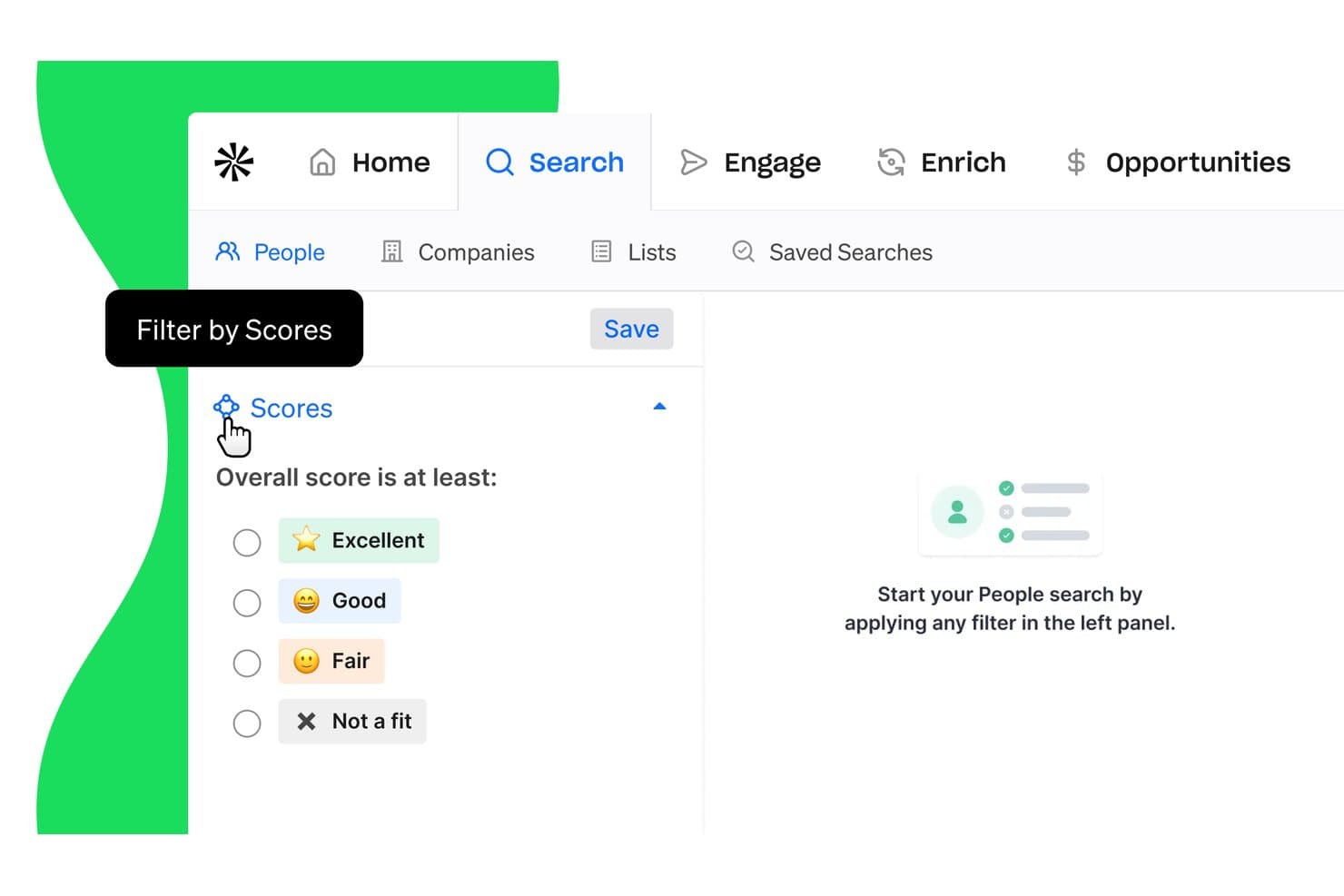
Apollo.io offers a 'Filter by Scores' feature that lets users narrow People search results by overall lead score categories: Excellent, Good, Fair, or Not a fit. Apollo.io is a B2B sales intelligence and lead capture platform that combines a 210M+ contact database, multi-source data enrichment, inbound lead routing, lead scoring, and CRM integration in one place.
Who Is Apollo.io Best For?
Apollo.io suits sales development and revenue operations teams at B2B companies that want to consolidate prospecting, enrichment, and lead routing into a single platform.
Why I Picked Apollo.io
Apollo.io earns its spot on my shortlist because of how it handles enrichment at the point of capture. I love that its waterfall enrichment runs each lead through a configurable sequence of providers (ContactOut, Datagma, Dropcontact) until a verified result is returned. Apollo also fires job-change triggers automatically, so when a contact moves companies, the record updates before it ever reaches a rep.
Apollo.io Key Features
- Website visitor identification: Identifies anonymous companies and contacts visiting your site, separate from form submitters.
- Inbound lead router: Automatically routes captured leads to the correct reps via rule-based workflows.
- Meeting scheduler: Lets qualified leads instantly book meetings with your sales team after capture.
- Chrome extension for LinkedIn: Pulls and syncs contact data directly from LinkedIn to your database in real time.
Apollo.io Integrations
Apollo.io offers native integrations with Salesforce, HubSpot, Marketo, Outreach, SalesLoft, and SendGrid. An API is available for custom integrations.
Pros and Cons
Pros:
- Built-in lead scoring and routing in one platform
- Job-change signals update lead records automatically
- Waterfall enrichment across multiple verified data providers
Cons:
- Contact database depth thinner for non-tech industries
- Data accuracy varies outside North American markets
Learn more about Apollo.io: Best for automating lead discovery
- 30-day free trial + free demo available
- From $29/user/month (billed annually)
Visit WebsiteCustomer Rating:4.7/5This rating combines scores from multiple user review sites to reflect overall customer sentiment about the product.
Salesflare’s pipeline view displays deal stages with revenue tracking and expected goals. Salesflare is a Customer Relationship Management (CRM) platform built for small and medium-sized B2B businesses. It helps you find, capture, and manage leads while cutting down on manual data entry.
Why I picked Salesflare:
I chose Salesflare because of its ability to automate lead discovery and follow-ups. The lead finder tool helps you search for new prospects by industry, role, or geography, while the email finder makes it simple to reach out directly. I also like how its automated email sequences ensure that prospects receive consistent and timely follow-ups, freeing you from repetitive tasks.
Standout Features and Integrations:
Standout features include visual pipelines that give you a clear view of leads as they move through the sales cycle, relationship intelligence to reveal your team’s connections with customers, and data enrichment that fills in customer records automatically.
Integrations include QuickBooks Online, Slack, Typeform, Facebook Lead Ads, Better Proposals, Emailable, Google Sheets, Bit Integrations, viaSocket, and Bubble.
Pros and Cons
Pros:
- Data enrichment to keep records updated
- Visual pipelines for clear deal tracking
- Automated lead finder and email discovery
Cons:
- Mobile app could be more robust
- Limited reporting capabilities compared to advanced CRMs
Learn more about Salesflare: Best for AI-powered chat engagement
- Free plan available; 7-day free trial
- From $24.17/month (billed annually)
Visit WebsiteCustomer Rating:4.7/5This rating combines scores from multiple user review sites to reflect overall customer sentiment about the product.
Tidio’s chatbot interface helps capture and qualify leads automatically through AI-powered conversations. Tidio is an AI-powered customer service and live chat platform that doubles as a powerful lead capture solution. It allows businesses to engage website visitors instantly through chatbots, automated responses, and real-time support, ensuring that no potential lead slips away. The platform’s combination of automation and personalization helps turn casual browsers into qualified prospects.
Why I picked Tidio: I picked Tidio because it makes it easy to capture leads through smart, real-time interactions. Its AI chatbot can answer visitor questions automatically, collect contact details, and even guide users toward relevant products or services, all while you focus on other tasks. I also like that it tracks visitor behavior, allowing you to personalize chats and messages based on user actions. This makes your outreach feel natural, not forced, and helps convert more website visitors into leads.
Standout features and integrations:
Standout features include real-time chat support for immediate visitor engagement, AI-driven automated responses to collect key information, and behavioral tracking for personalized communication. Tidio’s multichannel inbox helps you manage conversations from platforms like Facebook, Instagram, and WhatsApp in one place.
Integrations include Shopify, WordPress, Squarespace, WIX, Adobe Commerce, WooCommerce, Google Analytics, Mailchimp, and Salesforce.
Pros and Cons
Pros:
- Personalized interactions boost conversions
- Supports multiple communication channels
- AI chatbots engage visitors automatically
Cons:
- Pricing may rise with scale
- AI accuracy can vary by use
Learn more about Tidio: Best for connecting with website visitors via phone calls
- 14-day free trial
- From $31/month (billed annnually)
Visit WebsiteCustomer Rating:4.7/5This rating combines scores from multiple user review sites to reflect overall customer sentiment about the product.
CallPage helps customers connect directly with your sales team via phone calls. CallPage connects website visitors with your sales team through immediate phone calls, leading to better communication.
The software gets my pick for its rapid response capabilities, which can get your sales people into selling mode with a hot lead in a matter of seconds.
Why I picked CallPage: I chose CallPageas it can facilitate real-time phone connections between businesses and their website visitors. By providing a way for visitors to request a callback, CallPage allows businesses to establish a personal connection and address their prospects' needs in a timely and efficient manner.
Standout Features and Integrations:
Standout features include its easy-to-implement callback widget, customizable callback forms, and advanced call routing and scheduling capabilities. CallPage's call recording functionality allows you to review and analyze your interactions, ensuring a continuous improvement process.
Integrations include Wordpress, Salesforce, Google Tag Manager, Shopify, Pipedrive, Slack, and Hubspot.
Pros and Cons
Pros:
- Customizable callback forms and advanced call routing capabilities
- Real-time phone connections with website visitors in as little as 10 seconds
Cons:
- Lead history disappears after 3 to 12 months
- Integrations are limited depending on which tier you are on
Learn more about CallPage: Best for small businesses
- 7-day free trial available
- From $62/month
Visit WebsiteCustomer Rating:4.7/5This rating combines scores from multiple user review sites to reflect overall customer sentiment about the product.
Sleeknote sends helpful pop-ups to customers to capture email addresses. Sleeknote sends pop-ups to your website visitors which can be used to start a conversation with them or capture their email address.
For small businesses in particular, website pop-ups can be a quick and personal way to capture customer information by offering them a one-time discount.
Why I picked Sleeknote: I chose Sleeknote for its expertise in creating visually appealing and highly effective website pop-ups. The platform offers an intuitive interface and user-friendly features that make designing customized pop-ups a breeze, even for those with no prior design experience.
Standout Features and Integrations:
Sleeknote's standout features include its easy-to-use pop-up builder, an extensive library of customizable templates, and advanced targeting and triggering options. Sleeknote's responsive design ensures that your pop-ups look and function flawlessly on any device, providing a consistent user experience.
Integrations include Klaviyo, Hubspot, Mailchimp, ActiveCampaign, Salesforce, Teamwork CRM, and over 270+ other tools.
Pros and Cons
Pros:
- Pop-ups take minutes to create and activate on your website
- Advanced targeting and triggering features for improved lead capture
- Sleeknote provides detailed case studies to help guide new users
Cons:
- No free plan available, only a 7-day free trial
- Pricing may be less competitive than other software in this field
Learn more about Sleeknote: Best for building out contact list from scratch
- Free plan available
- From $27/month (billed annually)
Visit WebsiteCustomer Rating:4.3/5This rating combines scores from multiple user review sites to reflect overall customer sentiment about the product.
RocketReach is a better option for finding contact information for small businesses with a smaller budget. Finding contact information can be a costly expense, but RocketReach is a more affordable option, making it a good choice for startups or sales teams without a significant budget.
Why I picked RocketReach: I chose RocketReach for its ability to simplify the process of building a comprehensive contact list. With access to a vast database of accurate contact information, RocketReach ensures that your outreach efforts are targeted and effective.
Standout Features and Integrations:
Standout features include its database of verified contact information and search and filtering options. RocketReach's API also allows for easy integration with your existing sales tools, streamlining your workflow.
Integrations include
Pros and Cons
Pros:
- Simple interface that provides information quickly
- Database provides information lime phone number, email address, company name, net worth, and more
Cons:
- Usage limits may apply, depending on the chosen plan
- Some contact information may be outdated
Learn more about RocketReach: Best for scaling up outreach efforts
- Free plan available
- From $37.45/month (billed annually)
Visit WebsiteCustomer Rating:4.2/5This rating combines scores from multiple user review sites to reflect overall customer sentiment about the product.
Lusha helps you find up-to-date contact information about your customers. With this tool you can find contact information to build out your businesses outreach and start reaching new potential customers.
Every business needs a plan for reaching customers, and Lusha does the hard work for you by finding the most up-to-date contact information.
Why I picked Lusha: I chose Lusha for its ability to enhance outreach efforts with its extensive database of accurate contact information. By ensuring you're connecting with the right people, Lusha empowers your sales and marketing teams to work more efficiently and close deals faster.
Standout Features and Integrations:
Lusha's standout features include its comprehensive database of verified contact information. The platform's data enrichment capabilities help you gather essential insights on your prospects, enabling you to personalize and tailor your outreach strategies for maximum impact. Lusha's API also allows for easy integration with your existing sales tools, streamlining your workflow.
Integrations include CRM and email tools like Salesforce, HubSpot, Zoho CRM, Microsoft Dynamics, Gmail, and Outlook.
Pros and Cons
Pros:
- Compliant with GDPR, CCPA, SOC2, and ISO 27701
- Advanced search filters and data enrichment capabilities
- Expansive database of over 100 million contacts with accurate information
Cons:
- Usage limits may apply, depending on the chosen plan
- Some unreliable data listed on the platform
Learn more about Lusha:

Optimonk welcomes customers and initiates conversations to capture their email address. OptiMonk is designed to interact with customers the moment they land on your website. It can welcome them, offer a discount, or initiate a conversation to capture their email address.
The main goal is to prevent customers from leaving your website without making a lasting impression. OptiMonk ensures you never miss a chance to connect with potential leads.
Why I picked OptiMonk: OptiMonk caught my attention due to its unique and personalized approach to motivating customers to subscribe to your email list. It employs engaging pop-ups that create a sense of connection with visitors, making them more likely to sign up. Additionally, OptiMonk's targeted messaging appeals to various customer segments by addressing their specific needs or interests.
OptiMonk Standout Features and Integrations:
Standout features include OptiMonk's ability to tailor messages based on demographic information, such as the visitor's country, new or returning customer status, and the referring domain. The software is mobile-friendly, ensuring you capture leads from every possible source.
Integrations include Shopify, WooCommerce, BigCommerce, and other popular online storefront. OptiMonk also natively integrates with tools like WordPress, SquareSpace, Google Analytics, ActiveCampaign, ConvertKit, and HubSpot.
Pros and Cons
Pros:
- Access to range of templates to get started quickly
- Provides help to website visitors without the need for customer service agents
- Helps to stop cart abandonment and boost sales.
Cons:
- Limited free plan features might not be enough for some users
- May require some time to set up and customize messaging for optimal results
Learn more about OptiMonk:

VideoAsk can help you create personalized video conversations to make unique marketing efforts VideoAsk is a platform that helps businesses to interact with customers through personalized video conversations.
Video is a more personal form of communication with 96% of marketers believing it to be an important part of the strategy.
Why I picked VideoAsk: I selected VideoAsk for its unique approach to lead capture through the use of cloud-based video chats. The platform's intuitive interface and user-friendly features make it easy for businesses to incorporate video chats into their lead generation strategies.
Standout Features and Integrations:
VideoAsk's standout features include its easy-to-use video chat builder, customizable video templates, and seamless integration with popular CRM and email marketing platforms. The platform also offers advanced analytics and reporting capabilities, enabling you to track and optimize your video chat performance.
Integrations include Typeform, Calendly, Hubspot, Stripe, Google Sheets, Salesforce, Zendesk and many more.
Pros and Cons
Pros:
- Integrates with calendar tools to automate sales booking
- Support staff on hand to provide real-time feedback
- Easy-to-use video chat builder and customizable templates
Cons:
- Some users report inaccuracies in the automated closed captions
- Video upload size may be too restrictive in some use cases
Learn more about Videoask:

LandBot is a chatbot builder that helps you create engaging chatbots for customers to experience. Here is a no-code chatbot builder that allows businesses to create interactive and engaging chatbot experiences on their websites.
Chatbots can be used to prompt users to sign up to an email list, providing a simple method of collecting leads.
Why I picked LandBot: I selected LandBot because chatbots are more or less expected on modern websites. The software makes chatbot creation and deployment simple by using a no-code approach. This makes it accessible to businesses of all sizes, even those without in-house technical resources.
Standout Features and Integrations:
Standout features include its easy-to-use chatbot builder, a wide range of customization options, and advanced targeting and segmentation capabilities.LandBot's chatbots should work across devices without issue, providing a consistent user experience.
Integrations include Hubspot, Airtable, Wordpress, Stripe, Mailchimp, Calendly, Shopify, Carrd, and DialogFlow.
Pros and Cons
Pros:
- Templates can be used to speed up chatbot creation
- No technical knowledge required to get started with LandBot
Cons:
- Restrictions placed on the number of chats the chatbot can do
- Some integrations are locked behind higher tiers
Learn more about LandBot:
Other Lead Capture Software
I collected a few more platforms that may be worth considering below. They may not have been in my top 10, but these tools are still worth checking out.
- 11StovaBest for businesses who present at trade shows
- 12WaalexyBest for generating leads on LinkedIn
- 13ZoomInfo SalesOSBest for teams to find accurate contact information
- 14JotformBest for its drag-and-drop lead capture form
- 15monday.comBest for combining leads and sales pipeline in one place
- 16EngageBayBest all-in-one CRM
- 17TypeformBest for non-technical users
- 18PipedriveBest for tracking conversion rate
- 19WhatConvertsBest for marketing agencies
- 20OnpipelineBest for beginners
- 21ShortStackBest for interactive lead capture
- 22CrankWheelBest for easy collaboration with customer
- 23Lead ScrapeBest for finding B2B leads
Related Lead Capture Software Reviews
If you still haven't found what you're looking for here, check out these tools closely related to lead capture software that we've tested and evaluated.
- CRM Software
- Sales Software
- Lead Management Software
- Business Intelligence Software
- Contract Management Software
- Revenue Management System
How I Evaluate Lead Capture Software
I split my evaluation into two layers: the baseline must-haves like CRM sync, routing logic, and form capture, and the differentiators that separate good tools from the right tool.
Core Functionality (Table Stakes For This List)
When I'm selecting tools for my list, I rank each one on a scale from 0 (does not offer the functionality) to 5 (excels in this area) for each core functionality listed below. Then, I calculate the tool's total score into a percentage. Each tool needs to achieve a minimum total score of 65% to be considered for inclusion.
- Lead Capture Mechanisms: I check whether a tool offers multiple capture types—forms, landing pages, pop-ups, chat widgets—and how much control you get over field logic and design.
- Data Enrichment: Each tool gets evaluated on whether it auto-appends firmographic and contact data at the point of capture, since clean records shouldn't depend on manual research.
- CRM & MAP Integration: I look for native, bidirectional sync with platforms like Salesforce, HubSpot, and Marketo, including custom field mapping and real-time record push.
- Lead Routing & Assignment: Good routing means more than round-robin. I evaluate whether a tool supports territory rules, account matching, and rep-capacity logic.
- Lead Qualification & Scoring: I consider how each platform lets you define scoring models—demographic, behavioral, or both—so reps aren't chasing unqualified form fills.
- Duplicate Detection & Deduplication: Fuzzy matching matters here. I look at whether the tool catches near-duplicates across fields and offers automated merge workflows.
Once I have a list of tools that meet this criteria, I consider what sets each platform apart.
Differentiating Factors (What Sets Vendors Apart)
Here's how I compare and contrast different vendors:
Standout Features
Visitor identification is a big one. Tools that de-anonymize website traffic give your sales team leads they'd otherwise never see—no form fill required. I also look at whether a platform offers embedded meeting scheduling, since letting a qualified lead book time with the right rep immediately after capture cuts days off the follow-up cycle. Intent and signal data adds another layer, helping RevOps teams prioritize leads actively researching solutions over those casually browsing.
Beyond Features
Data compliance is something I always check, especially consent management built into capture forms. If your forms don't handle GDPR or CCPA consent properly, you're creating legal risk at the top of the funnel. I also evaluate how pricing scales—some tools charge per enrichment credit or lead volume, which can get expensive fast as inbound grows. Tech stack depth matters too. A tool might integrate with Salesforce, but I look at whether it supports custom objects, real-time sync, and field-level mapping that RevOps teams actually need.
How To Choose Lead Capture Software
With so many different lead capture software solutions available, it can be challenging to make decisions on what tool is going to be the best fit for your needs.
As you're shortlisting, trialing, and selecting lead capture software, consider the following:
- What problem are you trying to solve - Start by identifying the lead capture software feature gap you're trying to fill to clarify the features and functionality the tool needs to provide.
- Who will need to use it - To evaluate cost and requirements, consider who'll be using the software and how many licenses you'll need. You'll need to evaluate if it'll just be the revenue operation leaders or the whole organization that will require access. When that's clear, it's worth considering if you're prioritizing ease of use for all or speed for your lead capture software power users.
- What other tools it needs to work with - Clarify what tools you're replacing, what tools are staying, and the tools you'll need to integrate with, such as accounting, CRM, or HR software. You'll need to decide if the tools will need to integrate together or if you can replace multiple tools with one consolidated lead capture software.
- What outcomes are important - Consider the result that the software needs to deliver to be considered a success. Consider what capability you want to gain or what you want to improve, and how you will be measuring success. For example, an outcome could be the ability to get greater visibility into performance. You could compare lead capture software features until you’re blue in the face but if you aren’t thinking about the outcomes you want to drive, you could be wasting a lot of valuable time.
- How it would work within your organization - Consider the software selection alongside your workflows and delivery methodology. Evaluate what's working well and the areas that are causing issues that need to be addressed. Remember every business is different — don’t assume that because a tool is popular that it'll work in your organization.
Trends In Lead Capture Software
When it comes to lead capture software, the game is changing fast. Here are five emerging trends that are transforming how SaaS businesses attract, engage, and convert leads—helping you stay ahead of the competition and boost your pipeline.
1. AI and Machine Learning: The Smart Assistants You Always Wanted
Gone are the days when you had to sift through leads manually. Lead capture tools now come with AI and machine learning baked in. These technologies do the heavy lifting—like predicting which ones are worth your time and automatically scoring leads based on behavior. It’s like having an assistant that’s always a step ahead.
Bonus? AI gets smarter over time, making your lead-gen process faster and more precise.
2. Personalization That Feels Like Magic
Nobody likes generic outreach. Today’s lead capture software makes personalization easy by using detailed segmentation.
Picture this: instead of a “Hey there!” email, your leads get something like, “Hi [Name], we noticed you were checking out [specific feature].” It’s all about making interactions feel tailored without doing the manual work.
Personalized touches drive engagement and conversions, so you’re not just capturing leads—you’re connecting with them.
3. Supercharged Lead Routing
You know how frustrating it is when a hot lead just sits in limbo? Modern tools now have supercharged lead routing that ensures every lead lands with the right salesperson, pronto.
No more back-and-forth emails or wasted time. Whether it's based on geography, company size, or deal potential, these systems make sure nothing slips through the cracks.
4. All Channels, One Dashboard
People aren’t just filling out forms on your website anymore—they’re DMing you on Instagram, clicking on your LinkedIn ads, or chatting via WhatsApp. The latest lead capture tools pull in all those interactions into one place (most likely your CRM software).
This gives you a full view of the lead’s journey, so you can follow up with context, whether they came through email, social, or a chatbot.
5. Data That Speaks Volumes
Sales analytics has leveled up big time. New lead capture software doesn’t just give you numbers; it shows you insights—like which campaigns brought in the highest-quality leads or what behaviors signal a lead is ready to buy.
With this kind of data at your fingertips, you can double down on what works and scrap what doesn’t. It’s like having a crystal ball for your sales pipeline.
These trends aren’t just hype—they’re game-changers for scaling SaaS businesses. Implementing tools that align with these shifts isn’t just about staying competitive; it’s about future-proofing your lead-gen strategy.
What Is Lead Capture Software?
Lead capture software is a digital tool used by businesses to collect information about potential customers, or leads, from various sources such as websites, social media, and marketing campaigns. It automates the process of gathering and organizing lead data, including contact details and other relevant information, for sales and marketing purposes.
The benefits of lead capture software include streamlined lead generation and improved efficiency in managing potential customer data. It saves time by automating the data entry process and ensures that valuable lead information is accurately captured and stored. This software aids in enhancing the quality of leads and provides valuable insights for targeted marketing strategies. By efficiently organizing lead information, it assists sales teams in following up more effectively, ultimately leading to increased conversion rates and business growth.
Features Of Lead Capture Software
Lead capture software streamlines the process of gathering and processing potential customer information, ensuring that no valuable lead slips through the cracks. Here, I outline the most critical features to look for in lead capture software that can significantly influence the efficiency and success of your revenue operations.
- Real-Time Data Capture: Captures information from leads instantly as interactions occur. This feature is crucial for maintaining an up-to-date database, allowing immediate follow-up actions that can significantly increase conversion rates.
- Advanced Form Builders: Enables the creation of customized forms that can be integrated seamlessly into websites and landing pages. Customizable forms are vital for capturing the specific information needed to qualify leads effectively.
- Multi-Channel Integration: Supports capturing leads from various channels, including social media, email, and web. This integration ensures that all potential touchpoints are utilized, maximizing the lead generation opportunities.
- Automated Workflow Management: Automates the flow of data from lead capture to other systems like CRM or email marketing tools. Efficient workflows reduce manual entry and ensure that leads are nurtured promptly and appropriately.
- Lead Segmentation: Automatically categorizes leads based on predefined criteria such as demographics, behavior, or engagement level. Segmentation helps tailor marketing efforts to the specific needs and potentials of different lead groups, enhancing targeting strategies.
- CRM Integration: Seamlessly connects with customer relationship management systems. This is essential for ensuring that lead data is directly fed into the CRM, keeping sales teams updated with the latest information and activities.
- Compliance Tools: Includes features that help manage data privacy and compliance with regulations such as GDPR. Compliance is increasingly important in managing customer data and protecting the organization from legal issues.
- Analytics and Reporting: Provides insights into the effectiveness of lead capture campaigns and strategies. Analytics are key to measuring performance, understanding lead behavior, and refining tactics for better results.
- A/B Testing: Offers the ability to test different forms and landing pages to see what converts best. A/B testing is a powerful tool for continually improving lead capture strategies and increasing conversion rates.
- Responsive Design: Ensures forms and landing pages are mobile-friendly and adaptable to different screen sizes. As mobile traffic increases, having responsive designs is critical to capture leads effectively across all devices.
Choosing lead capture software equipped with these features will significantly enhance your ability to manage leads efficiently, streamline your marketing and sales processes, and ultimately drive revenue growth. By focusing on these capabilities, you can ensure a robust and effective approach to lead generation and management that aligns with your business goals.
Benefits Of Lead Capture Software
By efficiently capturing and managing lead data, lead capture software offer a variety of benefits that can significantly improve business operations and marketing effectiveness. Here are five primary advantages of using lead capture software:
- Enhanced Data Accuracy: Automatically captures and stores lead information directly into your systems. This reduces human error and ensures that data is consistently accurate and reliable, which is crucial for effective follow-up and relationship building.
- Improved Lead Quality: Utilizes advanced algorithms to score and qualify leads based on their engagement and likelihood to convert. By focusing on higher-quality leads, businesses can allocate their resources more effectively and increase conversion rates.
- Increased Efficiency: Automates the process of collecting lead information and integrating it with other business systems like CRM and marketing automation platforms. This saves time and allows teams to focus on more strategic tasks that directly contribute to revenue generation.
- Better Reporting and Insights: Provides detailed analytics and reporting capabilities that offer insights into the effectiveness of marketing campaigns and lead generation efforts. This data is vital for making informed decisions and continuously improving strategies.
- Scalability: Easily scales to handle increasing amounts of leads and data as the business grows. This scalability ensures that the lead capture system can support the organization’s growth without needing frequent upgrades or replacements.
Costs & Pricing For Lead Capture Software
Choosing the right lead capture software involves understanding the various pricing and feature options available to suit different business needs. These tools typically come in several plan options, each designed to cater to different sizes of businesses from startups to large enterprises. Below, I've detailed typical plan structures and what to expect from each, helping new software buyers make informed decisions.
Plan Comparison Table For Lead Capture Software
| Plan Type | Average Price | Common Features Included | Best For |
|---|---|---|---|
| Plan TypeStarter | Average Price$10-25/user/month | Common Features IncludedBasic form builders, email integration, basic reporting | Best ForSmall businesses and startups |
| Plan TypeProfessional | Average Price$50-100/user/month | Common Features IncludedCRM integration, advanced analytics, automation features | Best ForGrowing businesses and mid-sized companies |
| Plan TypeEnterprise | Average Price$200-500+/user/month | Common Features IncludedCustom integrations, API access, premium support, advanced security | Best ForLarge enterprises with complex needs |
| Plan TypeFree | Average Price$0 | Common Features IncludedLimited form options, basic analytics, community support | Best ForIndividuals or small teams on a budget |
When choosing a plan, it's important to consider not only the current needs of your business but also potential growth. Opt for a plan that offers the flexibility to scale up as your lead management and capture requirements grow. This approach ensures you invest in a solution that supports both current and future needs efficiently.
Lead Capture Software Frequently Asked Questions
Additional Lead Software Reviews
Here are some other software reviews for you to consider if you are looking for other lead management tools.
- Lead Scoring Software
- Lead Generation Software
- Lead Routing Software
- Sales Leads Software
- Lead Mining Software
- Lead Retrieval Software
- Lead Intelligence Software
What’s Next:
If you're in the process of researching lead capture software, connect with a SoftwareSelect advisor for free recommendations.
You fill out a form and have a quick chat where they get into the specifics of your needs. Then you'll get a shortlist of software to review. They'll even support you through the entire buying process, including price negotiations.