
14 Best Cloud-Based Quoting Software Reviewed in 2026

Best Cloud-Based Quoting Software Shortlist
Here’s my shortlist of the best cloud-based quoting software:


In revenue operations, the pressure to quickly deliver accurate quotes is real. You need tools that make quoting efficient, not a headache.
As someone who reviews software independently, I understand the challenges you face. Cloud-based quoting software can save your team time and reduce errors.
In my experience, finding the right solution is key. I’ve evaluated multiple options to help you choose the best fit for your needs.
In this article, you’ll find unbiased reviews of top cloud-based quoting software. I’ll cover features, benefits, and what makes each one stand out. Your team deserves a tool that eases your workload. Let's find the right one together.
Why Trust Our Software Reviews
Best Cloud-Based Quoting Software Summary
This comparison chart summarizes pricing details for my top cloud-based quoting software selections to help you find the best one for your budget and business needs.
| Tool | Best For | Trial Info | Price | ||
|---|---|---|---|---|---|
| 1 | Best for automation | Free demo available | From $149/month (billed annually) | Website | |
| 2 | Best for integration options | Free trial + free demo available | From $45.83/month (billed annually) | Website | |
| 3 | Best for document creation | 14-day free trial + free plan + free demo available | From $19/user/month (billed annually) | Website | |
| 4 | Best for freelancers | Free plan + free demo available | From $155/month (billed annually) | Website | |
| 5 | Best for business management | 14-day free trial + free demo available | From $19.90/user/month (billed annually) | Website | |
| 6 | Best for contract management | 14-day free trial + free plan + free demo available | From $17/user/month (billed annually) | Website | |
| 7 | Best for ease of use | 21-day free trial available | From $28/month | Website | |
| 8 | Best for creative agencies | 14-day free trial available | From $29/month | Website | |
| 9 | Best for complex configurations | Free demo available | Pricing upon request | Website | |
| 10 | Best for IT channel partners | Free demo available | From $66/user/month (billed annually) | Website |
-

Prisync
Visit WebsiteThis is an aggregated rating for this tool including ratings from Crozdesk users and ratings from other sites.4.7 -
Expedite Commerce
Visit Website -
QuickBooks Online
Visit WebsiteThis is an aggregated rating for this tool including ratings from Crozdesk users and ratings from other sites.4





Best Cloud-Based Quoting Software Review
Below are my detailed summaries of the best quoting software that made it onto my shortlist. My reviews offer a detailed look at the key features, pros and cons, integrations, and ideal use cases of each tool to help you find the best one for you.
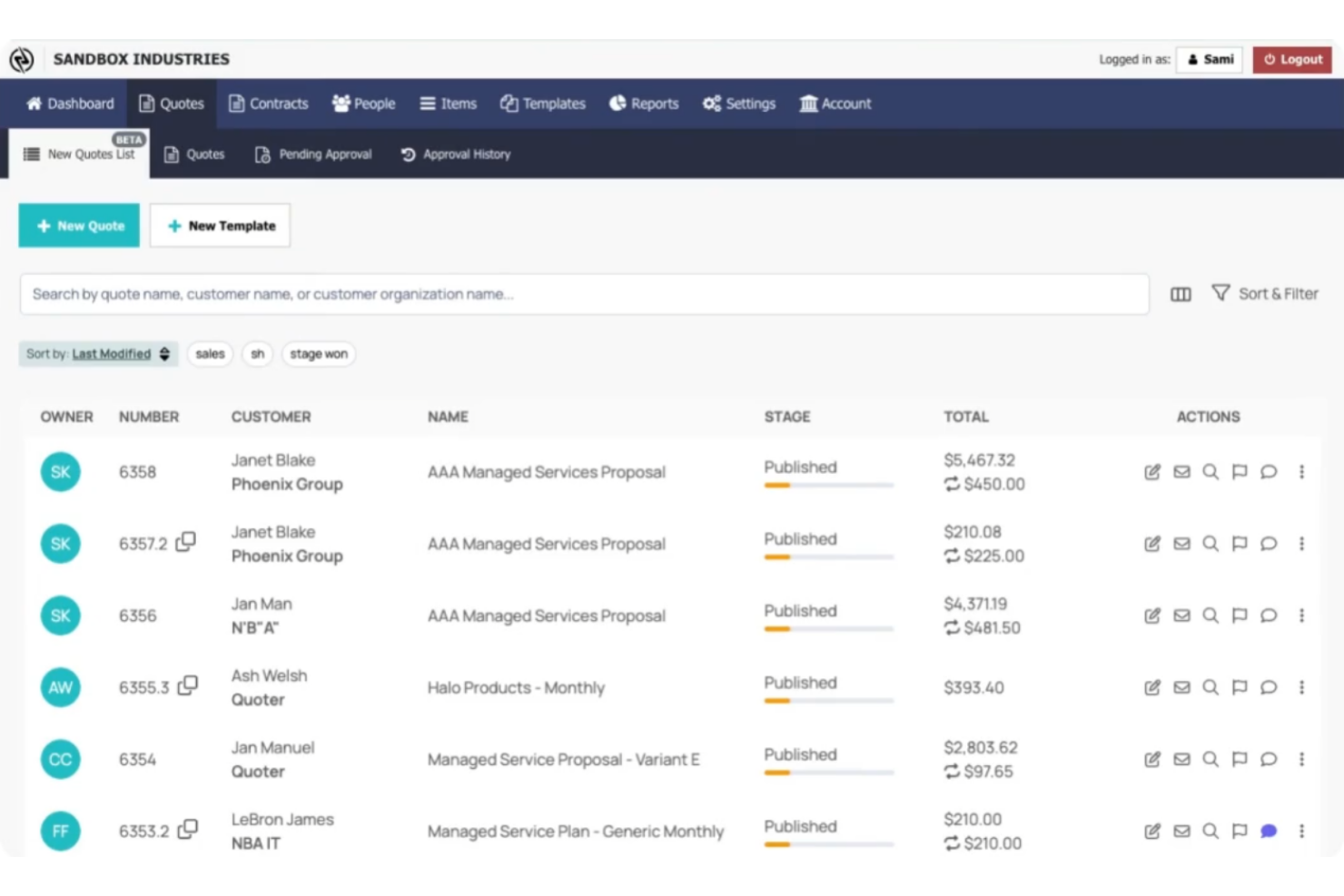
Quoter is a cloud-based quoting software designed for businesses looking to automate their quoting processes. It serves a wide range of industries, helping teams generate accurate and professional quotes quickly.
Why I picked Quoter: This tool is perfect for businesses focused on automation with its auto-generated quotes and optimized approval workflows. PSA and CRM integrations let your team automatically populate customer and product details when creating quotes. Infinite line item configurations standardize complex pricing structures,, and team notifications give you oversight of employees actions.
Standout features and integrations:
Features include a template library that simplifies quote creation, real-time tracking that keeps you informed on quote status, and notifications that remind you to follow up with customers.
Integrations include Salesforce, QuickBooks, HubSpot, Xero, Zoho CRM, Pipedrive, Stripe, PayPal, and more.
Pros and Cons
Pros:
- Automated follow-up reminders
- Optimized approval workflows
- Integrates with popular CRM platforms
Cons:
- Requires some technical setup
- Limited customization options

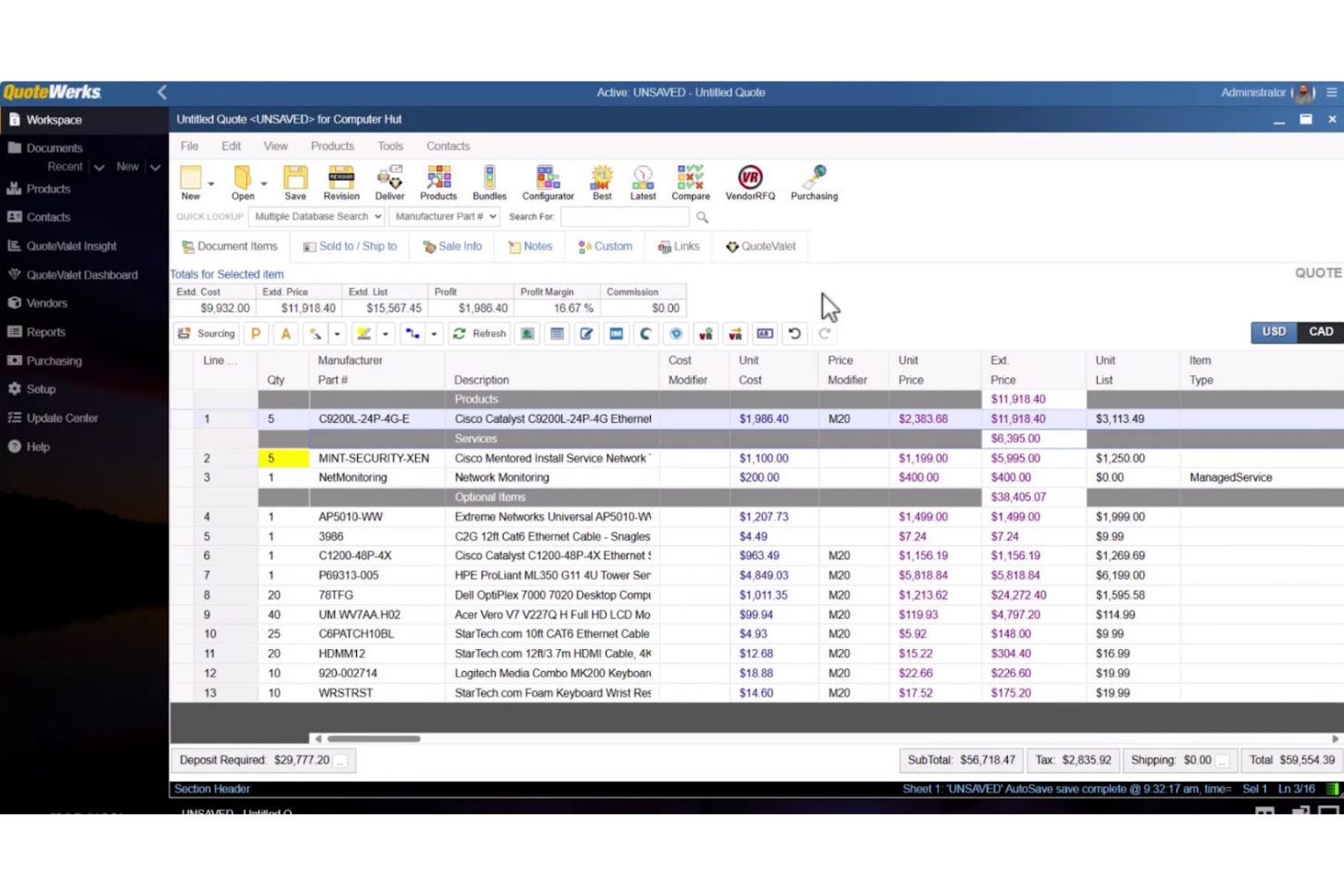
QuoteWerks is a quoting software solution designed for businesses that require extensive integration capabilities. It caters to a broad user base, facilitating the creation and management of quotes while connecting with other business tools.
Why I picked QuoteWerks: This tool excels in integration options, allowing your team to connect with various CRM and accounting software. Its advanced configuration capabilities support complex pricing and product bundling. QuoteWerks offers electronic signing and acceptance, reducing the need for paperwork. The centralized quote storage ensures that your team can easily search for and find what they need.
Standout features and integrations:
Features include branded quotes and proposals, flexible quoting tools that allow customization, and real-time quoting that helps you respond quickly to customer inquiries.
Integrations include Salesforce, Microsoft Dynamics, QuickBooks, Zoho CRM, HubSpot, SugarCRM, Autotask, ConnectWise PSA, Act!, Kaseya BMS, and more.
Pros and Cons
Pros:
- Flexible quoting processes
- Supports complex pricing structures
- Extensive integration options
Cons:
- Limited mobile functionality
- Requires technical knowledge
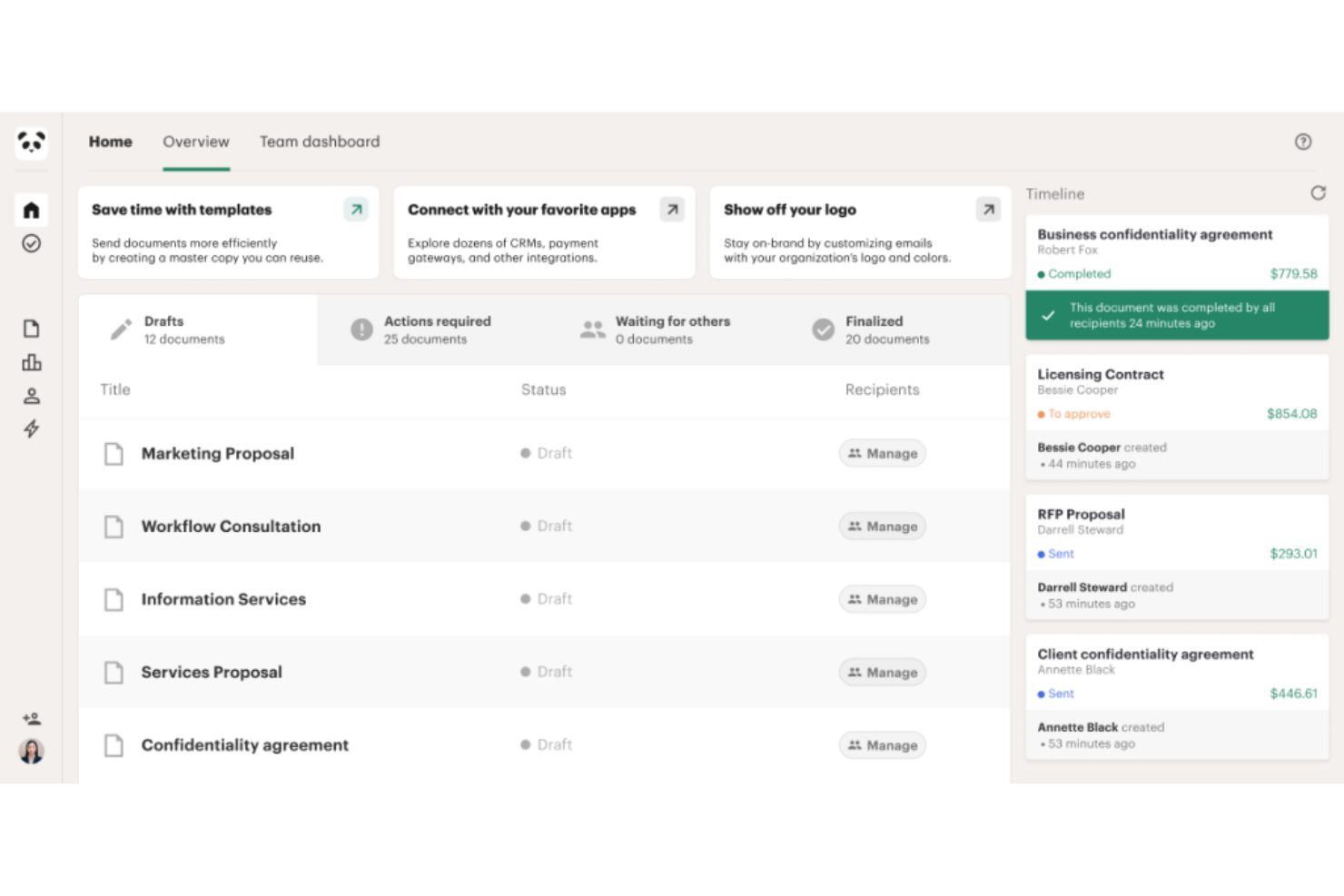
PandaDoc is a document automation software designed for businesses that need efficient document management and creation. It serves a wide range of industries, helping teams create, send, and track documents like quotes, proposals, and contracts.
Why I picked PandaDoc: This tool excels in document creation with its extensive template library and intuitive editor. Your team can collaborate on documents in real time, enhancing teamwork and communication. PandaDoc's analytics provide insights into document engagement, helping you understand client interactions. Its embeddable API feature automates processes and speeds up workflows.
Standout features and integrations:
Features include an extensive template library that simplifies document creation, real-time redlining, comments, and approvals that improve team productivity, and an e-signature feature that makes signing documents easy.
Integrations include Salesforce, HubSpot, Zoho CRM, Pipedrive, Stripe, PayPal, QuickBooks, Microsoft Dynamics CRM, Google Docs, Dropbox, and more.
Pros and Cons
Pros:
- Provides document engagement insights
- Real-time document collaboration
- Extensive template library
Cons:
- Customization can feel rigid
- Could be complex for new users

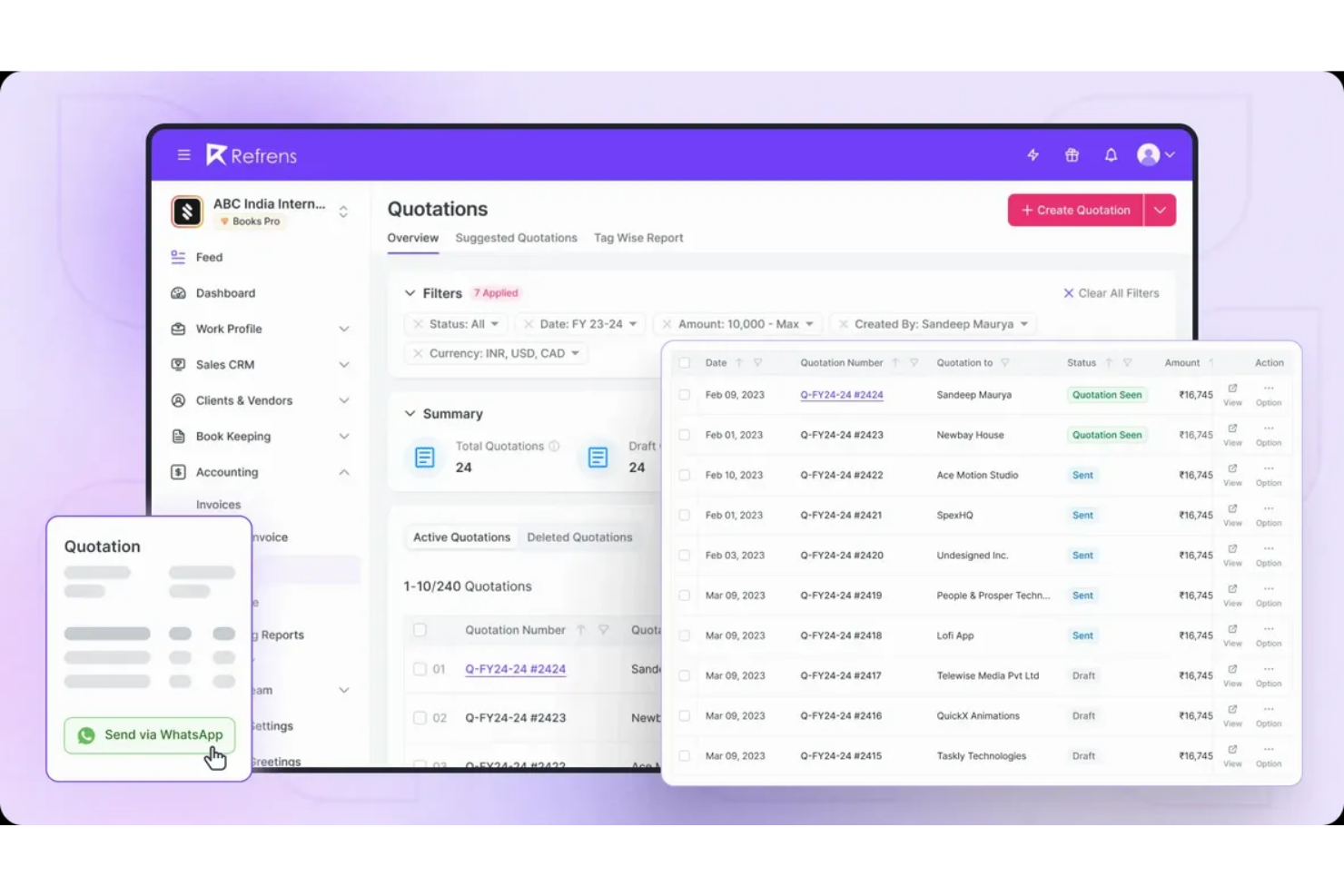
Refrens is an invoicing and billing software tailored for freelancers and small businesses. It facilitates the creation of professional invoices, quotes, and purchase orders, making it ideal for independent professionals.
Why I picked Refrens: This tool is perfect for freelancers with its simple invoicing and quote generation features. The platform supports multiple currencies, which is beneficial for freelancers working with international clients. The AI agent provides real-time insights into your business finances. Refrens also offers a user-friendly delivery challan generator to simplify delivery documentation.
Standout features and integrations:
Features include simple invoicing that makes billing easy, expense tracking to help you stay organized, and a marketplace feature that connects you with potential clients.
Integrations include QuickBooks, Zoho Books, Tally, Razorpay, PayPal, Stripe, Instamojo, Google Sheets, Slack, WhatsApp, and more.
Pros and Cons
Pros:
- Easy expense tracking
- Marketplace to find clients
- Supports multiple currencies
Cons:
- Can feel slow at times
- Limited customization for invoices and reports

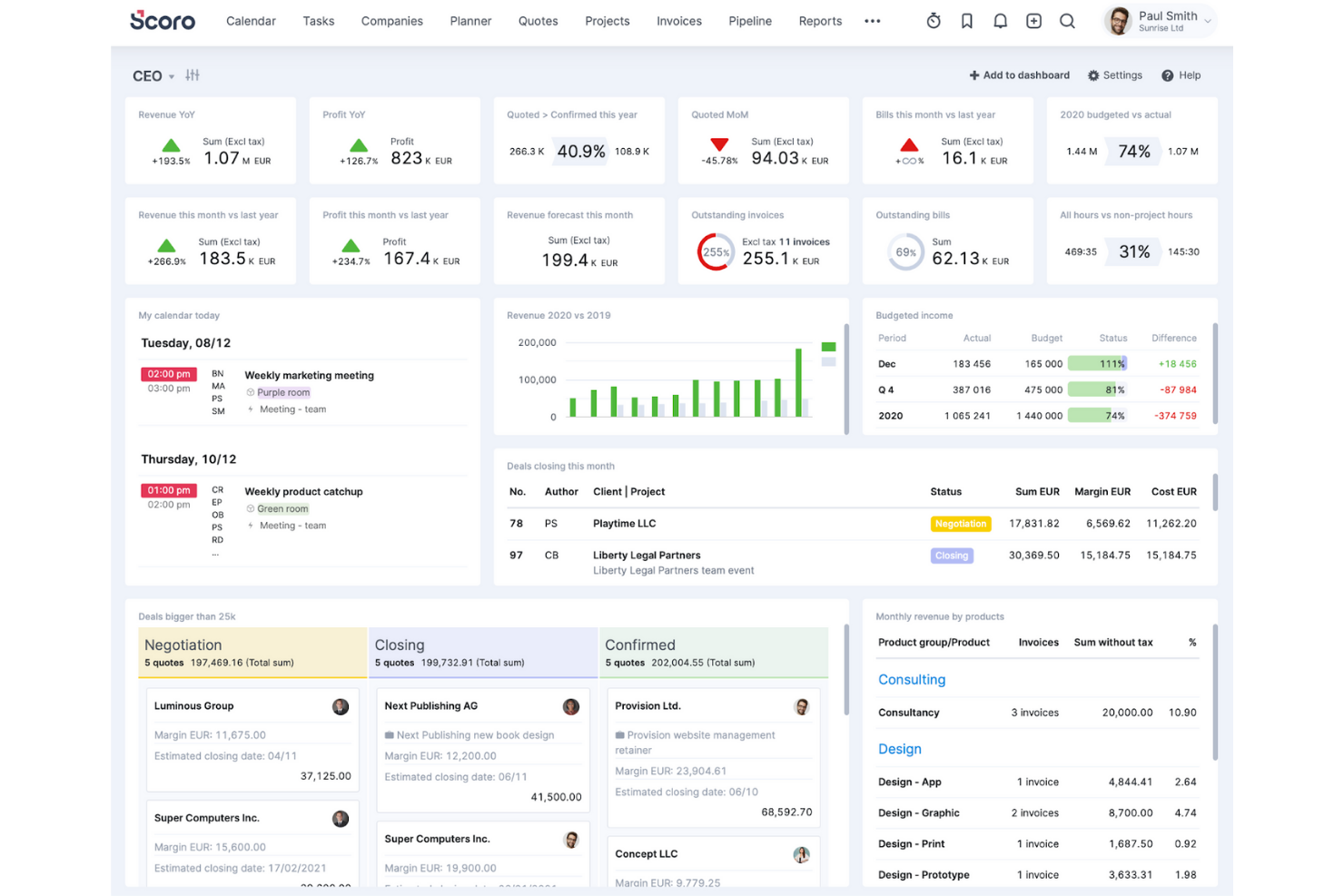
Scoro is a business management software designed for small to medium-sized businesses looking to integrate project management, quoting, and billing into one platform. It optimizes operations by combining various business functions, making it ideal for teams aiming to boost productivity.
Why I picked Scoro: This tool integrates multiple business management features, providing an all-in-one solution for your team. You can manage break down deliverables by role and effort, providing insight into costs and margins. Scoro's reporting tools track business performance at role, service, and project levels, helping you make informed decisions.
Standout features and integrations:
Features include customizable dashboards that let you tailor the platform to your needs, budget tracking, and profitability forecasting that offer insights into business performance, and frictionless project and billing management that simplifies workflows.
Integrations include Xero, QuickBooks, Zapier, Asana, Slack, Google Calendar, Dropbox, Mailchimp, Stripe, and more.
Pros and Cons
Pros:
- Centralized quote‑to‑project workflow
- Customizable dashboards
- Integrates multiple business functions
Cons:
- No built-in client communication tool
- Can take time to ramp up


Oneflow is a digital contract management platform designed for businesses that need efficient contract handling. It caters to teams looking to digitize their contract workflows and improve collaboration.
Why I picked Oneflow: This tool excels in contract management with its dynamic contract creation and editing features. Your team can collaborate in real time, making contract adjustments easier. The AI-powered features review your contracts, providing a risk and compliance analysis. Custom user permissions give you complete control over your team.
Standout features and integrations:
Features include dynamic contract creation that allows real-time editing, secure storage that ensures compliance, and analytics that provide insights into contract performance.
Integrations include Salesforce, Microsoft Dynamics 365, HubSpot, Pipedrive, Zapier, Slack, Google Workspace, Microsoft Power Automate, Upsales, and more.
Pros and Cons
Pros:
- Compliance with legal standards
- Secure contract storage
- Real-time collaboration features
Cons:
- Complexity in advanced features
- Not ideal for small teams

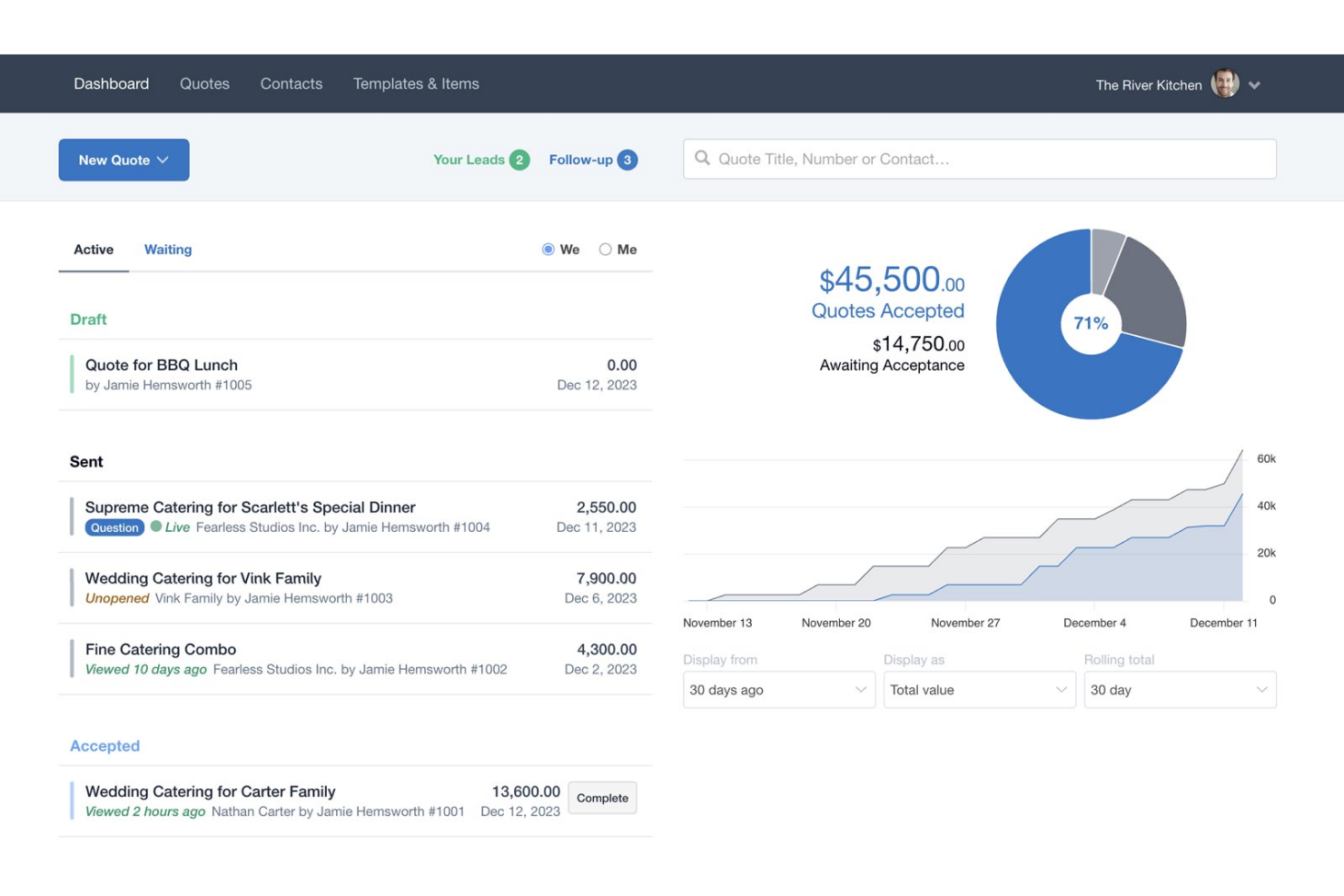
Quotient is a cloud-based quoting software tailored for small to medium-sized businesses. It simplifies the process of creating, sending, and managing quotes, making it ideal for teams that value efficiency.
Why I picked Quotient: This tool offers ease of use with its intuitive interface that requires minimal training. The drag-and-drop editor allows your team to customize quotes quickly. Real-time notifications keep you updated on client interactions, supporting communication. Quotient's clean layout and straightforward navigation make it a favorite for businesses needing quick adoption.
Standout features and integrations:
Features include customizable quote templates that speed up your workflow, detailed analytics that provide insights into performance, and a built-in acceptance feature that lets clients approve quotes online.
Integrations include Xero, QuickBooks Online, Zapier, Mailchimp, Capsule, Insightly, Highrise, Webhooks API, and more.
Pros and Cons
Pros:
- Real-time interaction alerts
- Simple quote customization
- Quick setup process
Cons:
- May lack industry-specific tools
- Limited advanced features

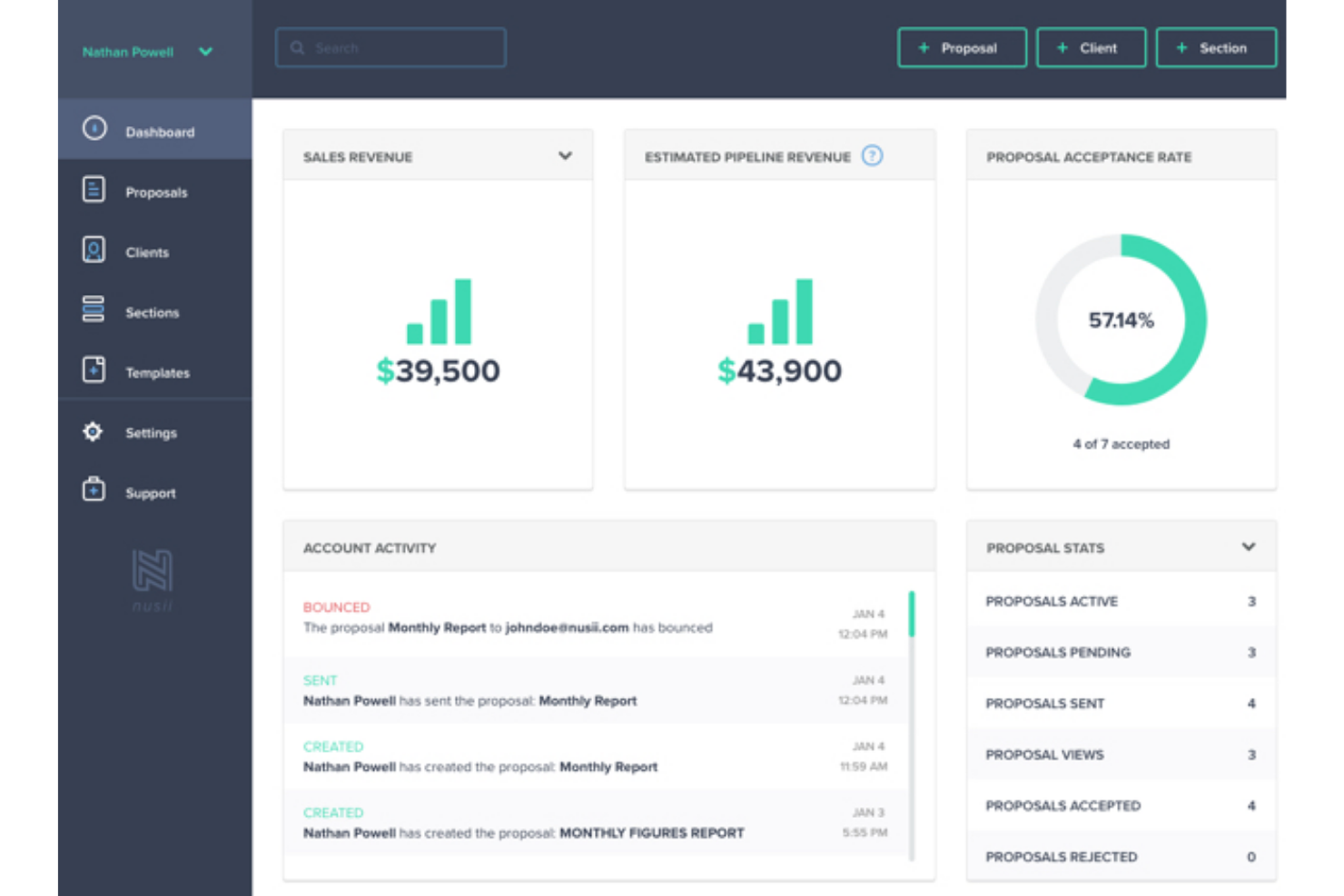
Nusii is a proposal software designed for creative agencies to craft and manage professional proposals with ease. It helps simplify the proposal process, making it ideal for teams focused on design and creative projects.
Why I picked Nusii: This tool is tailored for creative agencies, allowing you to create customizable templates that match your brand's aesthetics. The custom domain and email address mean clients will never know you're using an online service. It offers a simple editor that makes it easy for your team to create visually appealing documents. The ability to save and insert reusable content at the click of a button improves your team's efficiency.
Standout features and integrations:
Features include an easy-to-use editor that allows you to create eye-catching proposals, proposal tracking that alerts you when clients view your documents, and built-in analytics that offer insights into your proposal success.
Integrations include Zapier, QuickBooks, Trello, Basecamp, Slack, HubSpot, Pipedrive, Stripe, and more.
Pros and Cons
Pros:
- Simple and intuitive editor
- Transparent proposal tracking
- Tailored for creative agencies
Cons:
- Not ideal for large teams
- Basic reporting tools

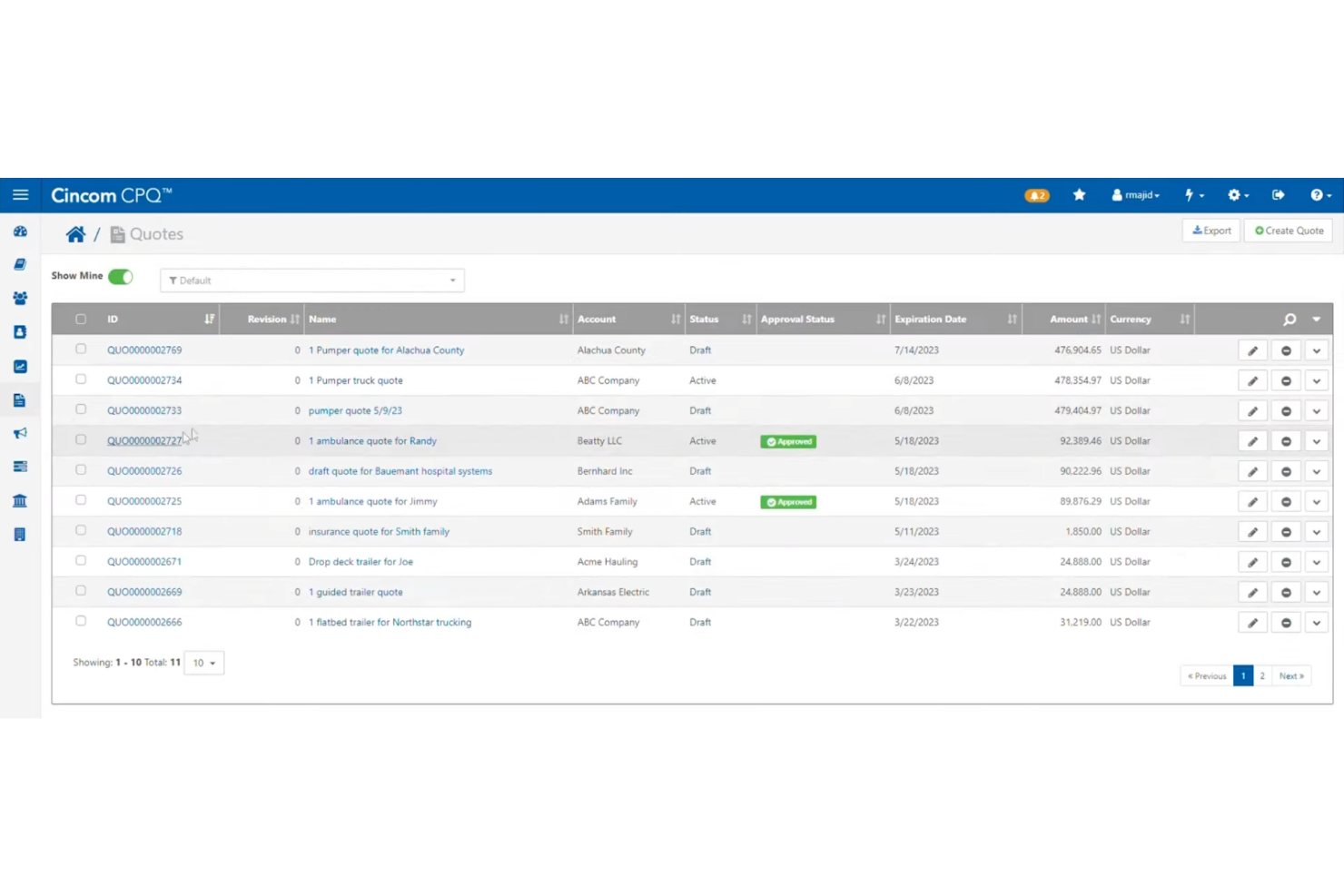
Cincom CPQ is a solution designed for businesses dealing with complex product configurations. It primarily serves manufacturers and distributors by streamlining the configuration and quoting process.
Why I picked Cincom CPQ: This tool is ideal for handling complex configurations with its advanced rules engine and guided selling capabilities. Your team members can configure products to meet specific customer needs thanks to its intuitive interface. The platform's analytics provide insights into sales performance, helping you optimize your quoting process.
Standout features and integrations:
Features include a tailorable user interface that improves functionality, routine task automation to reduce busywork, and dynamic pricing that ensures accurate quotes.
Integrations include Salesforce, Microsoft Dynamics 365, SAP, Oracle, SugarCRM, Sage, and more.
Pros and Cons
Pros:
- Intuitive interface for configuration
- Advanced rules engine
- Multi-currency & global support
Cons:
- Lacks personalization options in the sales portal
- Limited web browser support

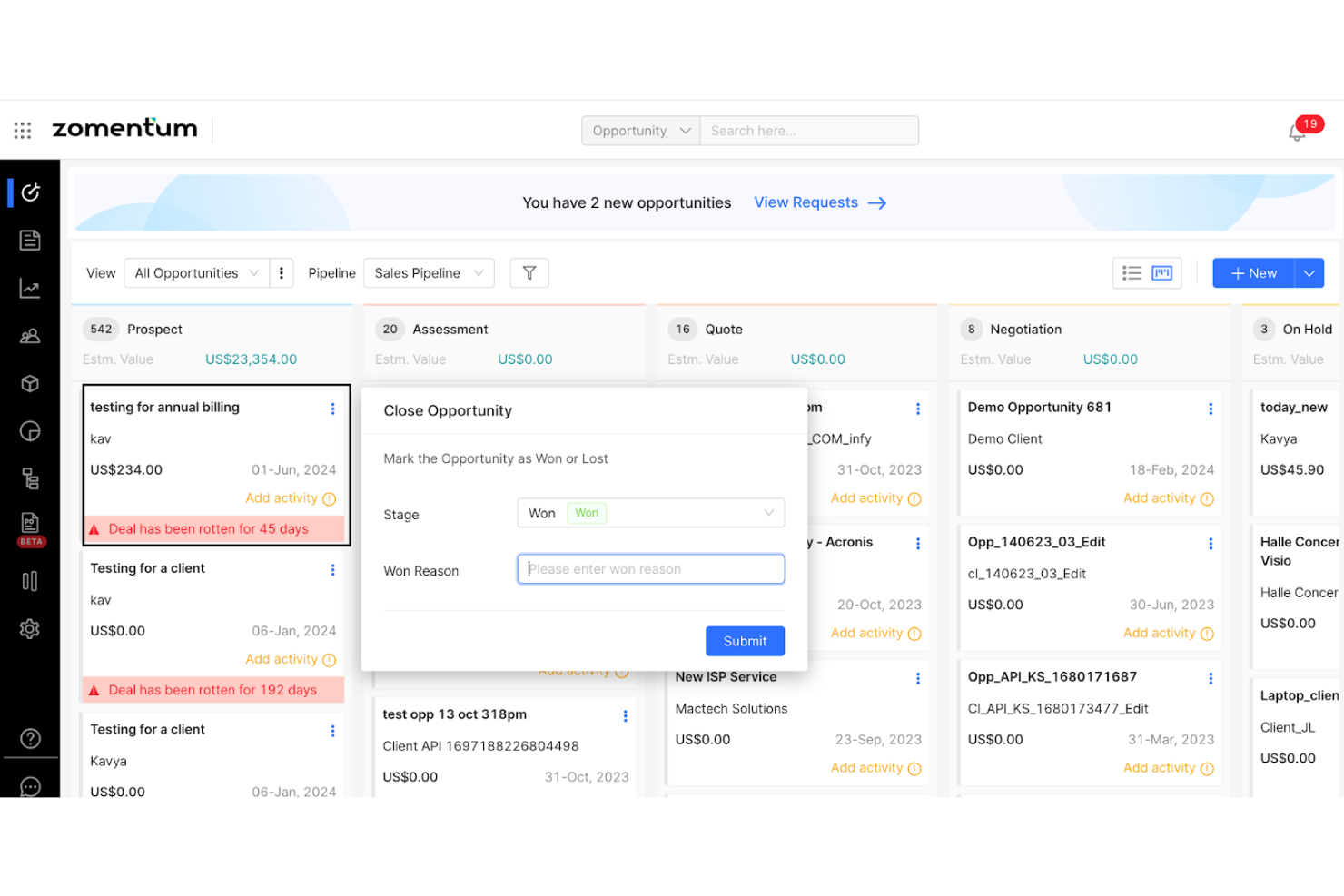
Zomentum is a sales acceleration platform tailored for IT channel partners, helping them manage sales processes and close deals faster. It is designed to simplify quoting, proposals, and sales management, catering specifically to the needs of IT service providers.
Why I picked Zomentum: This tool is ideal for IT channel partners with its deal management and sales pipeline features. The AI editor, drag-and-drop features, and live distributor feeds allow your sales reps to easily create quotes and proposals, enhancing your sales efficiency. The platform's analytics provide insights into sales performance, helping you make data-driven decisions. Zomentum's automated workflows ensure you stay on top of renewals and follow-ups.
Standout features and integrations:
Features include a deal management system that makes sales processes frictionless, ready-to-use templates that enhance efficiency, and client engagement tools that help maintain strong relationships.
Integrations include ConnectWise, Autotask, HubSpot, Salesforce, QuickBooks, Xero, Kaseya, and more.
Pros and Cons
Pros:
- Strong client engagement tools
- Holistic deal management
- Built-in e-signatures & payments
Cons:
- Pricey for small teams
- May require extensive setup
Other Cloud-Based Quoting Software
Here are some additional cloud-based quoting software options that didn’t make it onto my shortlist but are still worth checking out:
- QuoteCloud
For small teams
- Kaseya Quote Manager
For MSPs
- Salesforce Revenue Cloud
For large enterprises
- Conga CPQ
For contract lifecycle management


Cloud-Based Quoting Software Selection Criteria
When selecting the best cloud-based quoting software to include in this list, I considered common buyer needs and pain points such as integration capabilities and ease of use. I also used the following framework to keep my evaluation structured and fair:
Core Functionality (25% of total score)
To be considered for inclusion in this list, each solution had to fulfill these common use cases:
- Create and send quotes
- Track quote status
- Customize quote templates
- Support e-signatures
- Manage client data
Additional Standout Features (25% of total score)
To help further narrow down the competition, I also looked for unique features, such as:
- Automated follow-ups
- Real-time collaboration
- Dynamic pricing models
- AI-driven insights
- Multi-currency support
Usability (10% of total score)
To get a sense of the usability of each system, I considered the following:
- Intuitive interface design
- Easy navigation
- Minimal learning curve
- Clear instructions and labels
- Responsive design for mobile use
Onboarding (10% of total score)
To evaluate the onboarding experience for each platform, I considered the following:
- Availability of training videos
- Interactive product tours
- Access to templates
- Webinars and workshops
- Chatbot assistance
Customer Support (10% of total score)
To assess each software provider’s customer support services, I considered the following:
- 24/7 availability
- Multichannel support options
- Fast response times
- Knowledgeable support staff
- Access to help documentation
Value for Money (10% of total score)
To evaluate the value for money of each platform, I considered the following:
- Competitive pricing
- Flexible pricing plans
- Cost vs. features offered
- Discounts for longer commitments
- Transparent pricing structure
Customer Reviews (10% of total score)
To get a sense of overall customer satisfaction, I considered the following when reading customer reviews:
- Positive feedback on key features
- Consistent performance praise
- Constructive feedback on improvements
- Frequent mention of reliable support
- Overall satisfaction ratings
How To Choose Cloud-Based Quoting Software
It’s easy to get bogged down in long feature lists and complex pricing structures. To help you stay focused as you work through your unique software selection process, here’s a checklist of factors to keep in mind:
| Factor | What to Consider |
|---|---|
| Scalability | Will the software grow with your business? Look for flexible plans and the ability to handle more users and data as you expand. |
| Integrations | Does it connect with your existing tools like CRM, ERP, or accounting software? Check for native integrations or API capabilities. |
| Customizability | Can you tailor the software to fit your workflows? Consider how much you can adjust templates and processes to suit your team's needs. |
| Ease of use | Is the interface intuitive and straightforward? Ensure your team can learn it quickly without extensive training. |
| Implementation and onboarding | How quickly can you get up and running? Look for vendor support during setup and resources like tutorials and training sessions. |
| Cost | Does the pricing fit your budget? Consider all costs, including hidden fees or charges for additional features. |
| Security safeguards | How does the software protect your data? Ensure it complies with security standards and offers features like encryption and access controls. |
What Is Cloud-Based Quoting Software?
Cloud-based quoting software is a digital tool that helps businesses create and manage quotes efficiently online. Sales professionals, account managers, and finance teams generally use these tools to save time and reduce errors. Automated quote generation, customizable templates, and real-time tracking help with creating accurate and professional quotes quickly. Overall, these tools increase efficiency and improve client interactions.
Features of Cloud-Based Quoting Software
When selecting cloud-based quoting software, keep an eye out for the following key features:
- Automated quote generation: Automatically create quotes based on predefined templates, saving time and reducing manual errors.
- Customizable templates: Tailor quote templates to match your brand and meet specific client needs, enhancing professionalism.
- Real-time tracking: Monitor the status of quotes instantly, helping you follow up promptly with clients.
- E-signatures: Allow clients to sign quotes digitally, speeding up the approval process and reducing paperwork.
- Dynamic pricing models: Adjust pricing dynamically based on real-time data, ensuring accurate and competitive quotes.
- Integration capabilities: Connect with existing tools such as CRM and accounting software to synchronize workflows and data entry.
- Multi-currency support: Handle international transactions by quoting in multiple currencies, expanding your business reach.
- Guided selling capabilities: Assist sales teams in configuring products and services, ensuring accurate and consistent quotes.
- Reporting and analytics: Gain insights into quote performance and sales trends, helping you make informed business decisions.
- Security safeguards: Protect sensitive client and business data with encryption and access controls, ensuring compliance and trust.
Benefits of Cloud-Based Quoting Software
Implementing cloud-based quoting software provides several benefits for your team and your business. Here are a few you can look forward to:
- Increased efficiency: Automating quote creation and approval speeds up the sales process and reduces manual tasks.
- Improved accuracy: Customizable templates and dynamic pricing ensure quotes are accurate and reflect real-time data.
- Enhanced collaboration: Real-time tracking and e-signatures allow teams and clients to work together effectively, improving communication.
- Better decision-making: Analytics and reporting provide insights into sales trends, helping you make informed business decisions.
- Scalability: Integration capabilities allow your system to grow with your business, accommodating more users and data.
- Cost savings: Reducing errors and manual work saves time and money, allowing your team to focus on revenue-generating activities.
Costs and Pricing of Cloud-Based Quoting Software
Selecting cloud-based quoting software requires an understanding of the various pricing models and plans available. Costs vary based on features, team size, add-ons, and more. The table below summarizes common plans, their average prices, and typical features included in cloud-based quoting software solutions:
Plan Comparison Table for Cloud-Based Quoting Software
| Plan Type | Average Price | Common Features |
|---|---|---|
| Free Plan | $0 | Basic quote creation, limited templates, and email support. |
| Personal Plan | $17-$66/user/month | Customizable templates, basic integrations, and e-signature capabilities. |
| Business Plan | $50-$200/user/month | Advanced analytics, multi-currency support, and improved customer support. |
| Enterprise Plan | $100-$300/user/month | Full customization, API access, priority support, and unlimited integrations. |
Cloud-Based Quoting Software FAQs
Here are some answers to common questions about cloud-based quoting software:
How secure is cloud-based quoting software?
Cloud-based quoting software is generally secure. Most providers implement strong security measures such as encryption, access controls, and regular security audits. When choosing a solution, check for compliance with industry standards, including GDPR and ISO 27001. It’s crucial for your team to follow best practices, such as using strong passwords and enabling two-factor authentication, to maintain security.
How can cloud-based quoting software improve my sales team’s efficiency?
Cloud-based quoting software optimizes quote creation, automates pricing rules, and reduces manual errors. You’ll see faster quote turnaround, more accurate proposals, and better collaboration between sales, finance, and operations departments. This lets your team close deals quicker and spend less time on administrative tasks.
Can I use cloud-based quoting software offline?
No, cloud-based quoting software typically requires an internet connection. These tools are designed to be accessed online to ensure real-time data updates and collaboration. If offline access is important for your team, consider solutions that offer downloadable reports or integrations with apps that can work offline.
What’s the return on investment (ROI) from switching to cloud-based quoting software?
Companies often see quicker sales cycles, higher quote accuracy, and increased deal win rates. You’ll gain more visibility into the quoting process, which helps you better forecast revenues and identify bottlenecks. Many users report full ROI within the first year.
What kind of support can I expect from vendors?
Most vendors offer support through multiple channels, including email, chat, and phone. Some provide 24/7 support, while others may have limited hours. It’s important to check if the vendor offers resources such as knowledge bases, tutorials, or community forums to help you resolve issues independently. Prioritize vendors with responsive and knowledgeable support teams.
How do I migrate my data to cloud-based quoting software?
Migrating data to cloud-based quoting software involves exporting your existing data and importing it into the new system. Many vendors offer migration tools or assistance to support this process. Before starting, ensure your data is clean and well-organized. It’s beneficial to back up your data and run tests to verify accuracy post-migration.
What’s Next:
If you're in the process of researching cloud-based quoting software, connect with a SoftwareSelect advisor for free recommendations.
You fill out a form and have a quick chat where they get into the specifics of your needs. Then you'll get a shortlist of software to review. They'll even support you through the entire buying process, including price negotiations.