
14 Best Advertising Sales Management Software Reviewed in 2026

Best Advertising Sales Management Software Shortlist
Here’s my shortlist of the best advertising sales management software:


Navigating the world of advertising sales can be tough. You're juggling multiple campaigns, managing client expectations, and trying to hit revenue targets. It's no wonder things can get overwhelming.
That's where advertising sales management software comes in. It helps you keep track of your sales process, manage client relationships, and boost your team's efficiency. In my experience, finding the right tool can make a world of difference.
In this article, I'll share my top picks for the best solutions on the market. I'll walk you through their features and highlight what sets each one apart. My goal is to help you find the perfect fit for your team's needs.
Why Trust Our Software Reviews
Best Advertising Sales Management Software Summary
This comparison chart summarizes pricing details for my top advertising sales management software to help you find the best one for your budget and business needs.
| Tool | Best For | Trial Info | Price | ||
|---|---|---|---|---|---|
| 1 | Best for sales automation | Free 15-day trial + free demo available | From $23/user/month | Website | |
| 2 | Best for Gmail integration | 14-day free trial available | From $49/user/month (billed annually) | Website | |
| 3 | Best for affiliate marketers | Free trial + free demo available | From $1,490/year | Website | |
| 4 | Best for magazine ad sales and production | Free demo available | Pricing upon request | Website | |
| 5 | Best for media ad sales on Salesforce | Free demo available | Pricing upon request | Website | |
| 6 | Best for publishers | Free demo available | Pricing upon request | Website | |
| 7 | Best for campaign tracking | Free demo available | Pricing upon request | Website | |
| 8 | Best for AI-powered CRM insights | Free plan available | From $25/user/month (billed annually) | Website | |
| 9 | Best for global ad sales | Free demo available | Pricing upon request | Website | |
| 10 | Best for customizability | Free plan + 15-day free trial available | $14/user/month (billed annually) | Website |
-

Prisync
Visit WebsiteThis is an aggregated rating for this tool including ratings from Crozdesk users and ratings from other sites.4.7 -
Expedite Commerce
Visit Website -
QuickBooks Online
Visit WebsiteThis is an aggregated rating for this tool including ratings from Crozdesk users and ratings from other sites.4





Best Advertising Sales Management Software Review
Below are my detailed summaries of the best advertising sales management software that made it onto my shortlist. My reviews offer a detailed look at the key features, pros and cons, integrations, and ideal use cases of each tool to help you find the best one for you.


Salesmate is a CRM and sales automation tool designed for small to medium-sized businesses, helping teams manage leads, automate sales processes, and improve customer relationships. It offers tools to improve communication, track sales activities, and increase productivity.
Why I picked Salesmate: Salesmate excels in sales automation, helping teams automate repetitive tasks. It provides a visual sales pipeline that allows you to track deals and manage your sales process efficiently. The lead scoring feature helps you prioritize high-value prospects. With its built-in calling and email capabilities, your team can maintain consistent communication with clients.
Standout features and integrations:
Features include goal tracking, which helps you set and monitor sales targets. The reporting and analytics tools provide insights into team performance and sales trends. You can also customize workflows to align with your specific sales strategy.
Integrations include Google Workspace, Zapier, Mailchimp, Slack, QuickBooks, HubSpot, Shopify, Microsoft Calendar, and more.
Pros and cons
Pros:
- Customizable workflows
- Visual sales pipeline
- Effective sales automation tools
Cons:
- Limited mobile app functionality
- Limited built-in integrations
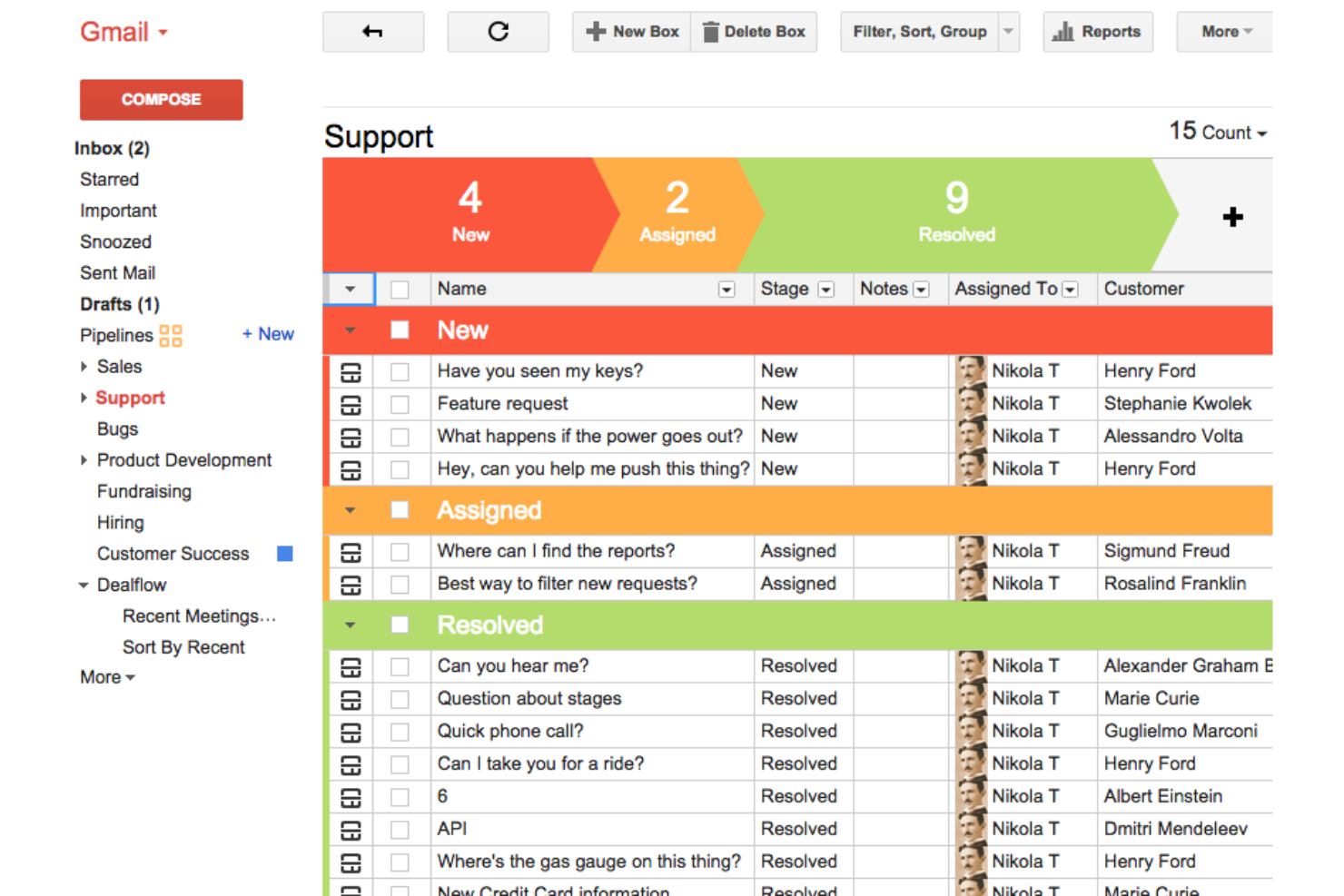
Streak is a CRM platform that integrates directly with Gmail, designed for businesses and professionals who manage customer relationships and sales directly from their inbox. It provides tools for tracking emails, managing pipelines, and collaborating with team members, all within Gmail.
Why I picked Streak: Streak is perfect for users who work primarily in their inbox and want CRM capabilities without leaving Gmail. It offers pipeline management inside email, letting you track deals and client interactions efficiently. You can customize workflows to match your sales process. The email tracking feature provides insights into open rates and engagement, helping you refine your communication strategy.
Standout features and integrations:
Features include mail merge, which allows you to send personalized bulk emails directly from Gmail. The task management feature helps you organize follow-ups and daily activities. You can also create snippets for frequently used email templates to save time and maintain consistency.
Integrations include Google Calendar, Slack, Zapier, Mailchimp, Trello, Dropbox, Google Drive, LinkedIn, Asana, HubSpot, and more.
Pros and cons
Pros:
- Effective email tracking
- Customizable sales pipelines
- Direct Gmail integration
Cons:
- Not ideal for complex CRM needs
- Limited to Gmail users


RedTrack is a performance tracking and analytics platform designed for affiliate marketers and media buyers. It helps users monitor, analyze, and optimize their online marketing campaigns to improve ROI.
Why I picked RedTrack: RedTrack provides affiliate marketers with detailed campaign performance insights using real-time analytics. Its click fraud detection helps protect your ad spend. With cross-channel tracking, you can view performance across all your marketing efforts in one place. The platform's customizable reporting lets you tailor insights to your specific needs.
Standout features and integrations:
Features include real-time data reporting that provides instant campaign insights. The conversion tracking feature allows you to monitor and optimize your sales funnel. You can also automate alerts to notify your team of key performance changes.
Integrations include Meta Ads, Google Ads, TikTok Ads, Taboola, Outbrain, Microsoft Advertising, Snapchat Ads, Voluum, ClickBank, and more.
Pros and cons
Pros:
- Supports cross-channel tracking
- Real-time analytics for campaigns
- Detects click fraud effectively
Cons:
- Steep learning curve for non-technical users
- Advanced integrations and tracking configurations may require ongoing optimization

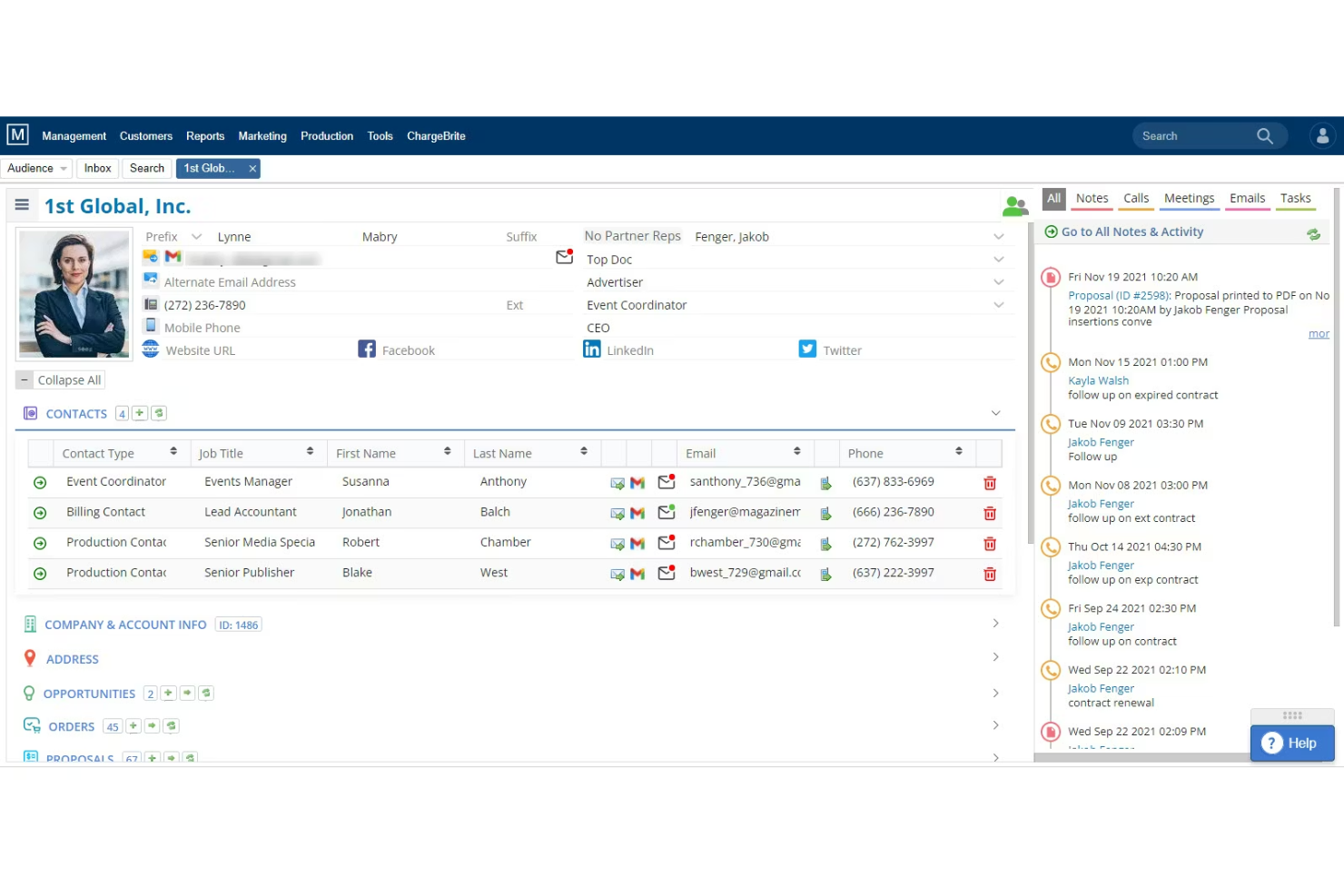
The Magazine Manager is a CRM software specifically designed for magazine publishers, helping them manage ad sales, oversee production, and support audience development. It's popular among media companies for its advertising, billing, and workflow management capabilities.
Why I picked The Magazine Manager: This platform gives media companies a centralized system for managing ad sales and production. Its specialized CRM focuses on ad sales, making it ideal for publishers, and its production tools make it easy to track jobs. With integrated billing and accounting functions, your team can manage invoicing and contracts with ease.
Standout features and integrations:
Features include digital pagination for creating online publication layouts. The mobile app provides on-the-go functionality, supporting your team wherever they are. Audience development tools help convert website traffic into valuable leads.
Integrations include QuickBooks, Mailchimp, Adobe InDesign, Google Ad Manager, Microsoft Outlook Calendar, and more.
Pros and cons
Pros:
- Strong reporting capabilities
- Minimizes errors and duplicate work
- Tailored for magazine publishers
Cons:
- Mobile app functionality may be more limited
- Limited to magazines and publishing

ADvendio is an advertising management solution built on the Salesforce platform, designed for publishers and media companies. It unifies ad sales, order management, and billing processes within the Salesforce ecosystem.
Why I picked ADvendio: It integrates perfectly with Salesforce, making it a top choice for businesses already using Salesforce CRM. The tool offers advanced ad booking and complex media sales capabilities. With its extensive reporting tools, your team can track performance and refine sales strategies. ADvendio simplifies order management, aligning it with the Salesforce environment for a cohesive workflow.
Standout features and integrations:
Features include media campaign management that lets you oversee and adjust advertising activity in real time. The billing and invoicing system is tightly connected to sales data for accurate revenue tracking. ADvendio's self-service portal empowers clients to manage their own orders and view reports.
Integrations include Salesforce, Google Ad Manager, FreeWheel, Google Ads, SAP, Microsoft Dynamics 365, Slack, and more.
Pros and cons
Pros:
- Supports complex ad booking
- Detailed financial tracking
- Built on the Salesforce platform
Cons:
- Limited out-of-the-box reporting options
- Requires Salesforce knowledge


Lineup Systems' Adpoint is an advertising sales management solution designed for publishers, providing tools to manage ad sales, bookings, and billing. It serves media companies that want to modernize their advertising operations and improve sales efficiency.
Why I picked Lineup Systems (Adpoint): Adpoint caters specifically to publishers needing an all-inclusive ad sales solution. It offers a unified platform to manage orders, track sales, and automate billing processes. With its real-time reporting, your team can access critical sales data and make informed decisions. Adpoint's ability to integrate with existing systems makes it versatile for various publishing environments.
Standout features and integrations:
Features include a customizable dashboard that offers a clear view of sales activities and performance. The automated billing system expedites invoicing and payment collection. You can also manage multi-channel campaigns efficiently, providing consistent messaging across platforms.
Integrations include Salesforce, Google Ad Manager, HubSpot, SAP, Tableau, and more.
Pros and cons
Pros:
- Supports multi-channel campaigns
- Complete order management
- Tailored for the publishing industry
Cons:
- Requires industry-specific knowledge
- Can be complex to implement

Ad Orbit is an advertising sales management software tailored for publishers and media companies. It combines CRM, sales, order management, billing, and reporting into a single platform. It supports businesses by managing ad revenue operations and ad campaign workflows.
Why I picked Ad Orbit: Ad Orbit excels in campaign tracking with its real-time data integration and automated workflows. It offers a built-in advertiser portal that simplifies communication and asset management. The unified reporting feature provides insights that help optimize ad strategies. Ad Orbit's focus on scalability and ease of use makes it ideal for modern media operations.
Standout features and integrations:
Features include product and inventory management that helps you track media formats and prevent overbooking. Proposal and workflow automation reduce manual processes and accelerate order fulfillment. Dedicated support and regular updates improve user experience and keep the software aligned with industry needs.
Integrations include Google Ads, Salesforce, Adobe InDesign, HubSpot, Mailchimp, Office 365, Slack, QuickBooks, WordPress, Dropbox, and more.
Pros and cons
Pros:
- Thorough support and training
- Real-time data integration
- Strong campaign tracking capabilities
Cons:
- May need customization for unique workflows
- Onboarding can take 2 to 6 months

Salesforce is a complete CRM platform designed for large enterprises, offering a suite of tools for sales, customer service, and marketing automation. It helps businesses manage customer relationships, track sales, and improve team collaboration.
Why I picked Salesforce: Salesforce works well for large organizations needing extensive customization and scaling. It offers advanced analytics and reporting that give you insights into sales performance. The platform uses digital labor to handle routine tasks, saving your team's time. With its sturdy ecosystem, Salesforce supports a wide range of business functions, making it versatile for various industries.
Standout features and integrations:
Features include customizable dashboards that provide real-time insights into sales metrics. The platform's AI-driven analytics offer predictive insights to guide decision-making. You can also mechanize repetitive tasks, freeing up your team to focus on strategic activities.
Integrations include Slack, Mailchimp, QuickBooks, Docusign, LinkedIn, HubSpot, Microsoft Outlook, Dropbox, Google Workspace, Zendesk, and more.
Pros and cons
Pros:
- Extensive community support and resources
- Scales with your business growth
- Highly customizable for various needs
Cons:
- Higher cost for advanced features
- Customization and integrations may require technical expertise


Placements.io is an omnichannel management platform tailored for digital advertising, primarily catering to ad sellers and buyers. It offers tools for inventory management, automated ad trafficking, and campaign optimization.
Why I picked Placements.io: Placements.io excels in global ad sales with its extensive integration capabilities and automation features. The platform allows you to manage ad inventory efficiently, focusing on global reach. Its automated ad trafficking simplifies complex ad operations, making it ideal for international campaigns. The reporting analytics provide insights that help refine global ad strategies.
Standout features and integrations:
Features include a dedicated storefront that acts as a white-label ad sales portal. The intelligent platform offers AI-driven insights to support decision-making. It also provides compliance governance for adherence to industry standards.
Integrations include Salesforce, Google Analytics, Facebook, X Ads, Microsoft Dynamics 365, Oracle, SAP, and more.
Pros and cons
Pros:
- Simplifies ad trafficking
- Efficient inventory management
- Supports global ad operations
Cons:
- Integration setup may require IT support
- Global ad trafficking and automation tools may require training

Zoho CRM is a customer relationship management platform designed for businesses of all sizes, offering tools to manage sales, marketing, and customer support. It is widely used by teams looking to improve customer interactions and drive sales growth through customizable workflows.
Why I picked Zoho CRM: It offers extensive customizability, allowing you to tailor the platform to your specific business needs. Its drag-and-drop interface makes it easy to create customized modules and fields. Advanced analytics provide in-depth insights into sales performance and customer behavior. Built-in automation handles repetitive tasks, letting you focus on strategic goals.
Standout features and integrations:
Features include lead management to help you capture and nurture prospects. The reporting and forecasting tools offer visibility into future sales trends. You can also use the social media integration to engage with customers across various platforms.
Integrations include Google Workspace, Microsoft Office 365, Mailchimp, Slack, QuickBooks, Shopify, LinkedIn, Zapier, Dropbox, Zoho Desk, and more.
Pros and cons
Pros:
- Supports lead management
- Advanced sales analytics
- Highly customizable workflows and modules
Cons:
- User interface and navigation may feel less intuitive than competitors
- Initial setup and customization can be complex
Other Advertising Sales Management Software
Here are some additional advertising sales management software options that didn’t make it onto my shortlist but are still worth checking out:
- monday.com
For project management
- Nutshell
For small sales teams
- Freshmarketer
For multi-channel campaigns


Advertising Sales Management Software Selection Criteria
When selecting the best advertising sales management software to include in this list, I considered common buyer needs and pain points such as managing complex ad inventories and optimizing ad revenue. I also used the following framework to keep my evaluation structured and fair:
Core Functionality (25% of total score)
To be considered for inclusion in this list, each solution had to fulfill these common use cases:
- Manage ad inventory
- Track ad sales
- Automate billing processes
- Generate sales reports
- Facilitate client communication
Additional Standout Features (25% of total score)
To help further narrow down the competition, I also looked for unique features, such as:
- Customizable dashboards
- Cross-platform ad tracking
- Advanced analytics tools
- Automated ad trafficking
- Client self-service portals
Usability (10% of total score)
To get a sense of the usability of each system, I considered the following:
- Intuitive interface design
- Easy navigation
- Minimal learning curve
- Customizable workflows
- Responsive design for mobile use
Onboarding (10% of total score)
To evaluate the onboarding experience for each platform, I considered the following:
- Availability of training videos
- Interactive product tours
- Access to templates
- Webinars for new users
- Chatbots for immediate assistance
Customer Support (10% of total score)
To assess each software provider’s customer support services, I considered the following:
- 24/7 support availability
- Response time for inquiries
- Availability of live chat
- Extensive help center
- Dedicated account managers
Value For Money (10% of total score)
To evaluate the value for money of each platform, I considered the following:
- Competitive pricing
- Features offered at each price tier
- Flexibility of pricing plans
- Cost versus benefits analysis
- Discounts for annual subscriptions
Customer Reviews (10% of total score)
To get a sense of overall customer satisfaction, I considered the following when reading customer reviews:
- Overall satisfaction ratings
- Commonly reported issues
- Feedback on customer support
- User recommendations
- Frequency of updates and improvements
How To Choose Advertising Sales Management Software
It’s easy to get bogged down in long feature lists and complex pricing structures. To help you stay focused as you work through your unique software selection process, here’s a checklist of factors to keep in mind:
| Factor | What to Consider |
|---|---|
| Scalability | Will the software grow with your business? Check if it can handle increased ad volume and users without performance issues. Look for flexible pricing plans. |
| Integrations | Does it connect with your existing tools? Verify it integrates with your CRM, billing systems, and ad networks to avoid data silos and manual work. |
| Customizability | Can you tailor it to fit your workflows? Look for customizable dashboards and fields that match your team's processes and business needs. |
| Ease of Use | Is it user-friendly for your team? Test the interface for intuitiveness and simplicity to reduce training time and boost adoption. |
| Implementation and Onboarding | How long will it take to get up and running? Consider the time and resources needed for setup, data migration, and training. Look for supportive onboarding resources. |
| Cost | Is it within your budget? Compare pricing tiers and features offered. Consider the total cost of ownership, including hidden fees and future upgrades. |
| Security Safeguards | How does it protect your data? Look for encryption, access controls, and compliance with data protection regulations to secure sensitive information. |
What Is Advertising Sales Management Software?
Advertising sales management software is a tool that helps businesses manage and optimize their ad sales processes. Media sales professionals, account managers, and ad operations teams commonly use these tools to track sales, manage client relationships, and maximize revenue. Features such as ad inventory management, automated billing, and sales reporting help with efficiency and data-driven decision-making. Overall, these tools improve productivity and revenue potential for sales teams.
Features
When selecting advertising sales management software, keep an eye out for the following key features:
- Ad inventory management: Helps you track and optimize available ad space across channels.
- Automated billing: Reduces manual invoicing work and errors.
- Sales reporting: Provides actionable insights into pipeline health and revenue performance.
- Customer relationship management: Organizes customer data and communications to build and maintain stronger relationships.
- Customizable dashboards: Allow teams to view metrics and reports that matter most to their role.
- Cross-platform tracking: Supports end-to-end visibility across digital and traditional inventory.
- Lead management: Helps sales reps capture, segment, and nurture prospects.
- Email campaigns: Support follow-ups, renewals, and sales outreach.
- Task automation: Cuts down repetitive work so teams can focus on closing deals.
- Permissions and security safeguards: Protects sensitive data with encryption and role-based access.
- Integration capabilities: Connects with your existing tech stack to reduce data silos.
Benefits
Implementing advertising sales management software provides several benefits for your team and your business. Here are a few you can look forward to:
- Increased efficiency: Automation of repetitive tasks, such as billing and reporting, frees up time for your team to focus on important initiatives.
- Better decision-making: Detailed sales reporting and customer data allow for informed planning.
- Improved customer experience: Organized communication supports long-term relationships.
- Better revenue potential: Optimized ad inventory and segmentation reveal new opportunities.
- Flexible workflows: Customizable dashboards and modules adapt to different sales roles.
- Cross-channel management: Teams maintain a unified view of campaigns and inventory.
- Data security: Permissions and safeguards help maintain compliance with industry regulations.
Costs & Pricing
Selecting advertising sales management software requires an understanding of the various pricing models and plans available. Costs vary based on features, team size, add-ons, and more. The table below summarizes common plans, their average prices, and typical features included in advertising sales management software solutions:
Plan Comparison Table for Advertising Sales Management Software
| Plan Type | Average Price | Common Features |
|---|---|---|
| Free Plan | $0 | Basic ad tracking, limited reporting, and standard support. |
| Personal Plan | $10-$30/user/month | Improved tracking, basic CRM features, email support, and customizable dashboards. |
| Business Plan | $40-$70/user/month | Advanced analytics, task automation tools, segmentation, multi-channel tracking, and priority support. |
| Enterprise Plan | $100+/user/month | Full customization, dedicated account manager, API access, and advanced security features. |
Advertising Sales Management Software FAQs
Here are some answers to common questions about advertising sales management software:
How do I know if the software can handle both digital and traditional ad inventory?
You should check whether the SaaS platform offers converged media planning or cross-channel inventory tracking, meaning it supports ad placements across print, digital, broadcast, and more. Many tools provide a unified view of all available inventory. If your team works across different formats, confirm that the inventory and campaign workflows cover each one.
Can I manage contracts and billing through this software?
Many advertising sales tools include contract management and billing features that let you create quotes, set pricing, approve deals, and manage invoices in one place. Some platforms also support credit card payments or integrate with payment processors, helping teams close deals faster and reduce billing delays.
What if my ad campaigns need frequent adjustments after launch?
Most platforms let you update campaign details after launch. You can adjust placements, pricing, or inventory based on performance or client needs. This flexibility helps sales reps respond quickly and keeps deals moving without the need to rebuild campaigns from scratch.
How flexible is pricing and quoting for complex ad packages?
Many tools include pricing engines that support different rate models for size, placement, channel, timing, and more. Some systems use machine learning to analyze past deals and inventory performance, making it easier to build accurate, competitive packages for clients.
Will the software help me forecast revenue and track sales performance across my ad inventory?
Yes, these tools often provide reporting dashboards that show revenue forecasts, pipeline status, and inventory performance. This helps your team understand which opportunities are most likely to close and where to focus sales efforts.
What should I consider when evaluating different advertising sales tools for my team?
Think about how your team currently sells ads and where the gaps are. Consider whether the SaaS solution fits your workflow and inventory types, integrates with tools you already use, and supports the full customer journey. Testing demos or trials can help you see how well it matches your day-to-day needs.
What’s Next:
If you're in the process of researching advertising sales management software, connect with a SoftwareSelect advisor for free recommendations.
You fill out a form and have a quick chat where they get into the specifics of your needs. Then you'll get a shortlist of software to review. They'll even support you through the entire buying process, including price negotiations.