

Com tantas alternativas diferentes ao Salesforce disponíveis, é difícil perceber qual é a mais adequada para si. Sabe que pretende uma alternativa ao Salesforce que ajude a simplificar os processos empresariais, a melhorar as relações com os clientes e a impulsionar o crescimento das vendas, mas precisa de descobrir qual é a melhor ferramenta. Estou aqui para ajudar! Nesta publicação, vou facilitar a sua escolha, partilhando as minhas experiências pessoais com dezenas de alternativas diferentes ao Salesforce, utilizadas por várias equipas e em diversos projetos, bem como as minhas escolhas das melhores alternativas ao Salesforce.
Why Trust Our Software Recommendations
6,700+
Reviews
20
Industry experts
16+
Evaluation factors
14
Years
Our reviews reflect our independent judgment—not a sales pitch. Learn how we stay transparent.
For this guide, we evaluated tools using hands-on testing and independent research, scoring tools using our selection criteria.
Our reviews reflect our human editorial judgment, not a sales pitch.
Tabela comparativa de alternativas ao Salesforce
| Tool | Best For | Trial Info | Price | ||
|---|---|---|---|---|---|
| 1 | Best for organizing prospect data | 30-day free trial + free demo available | From $39/user/month | Website | |
| 2 | Best for Al-native CRM customization | Not available | From $40/user/month | Website | |
| 3 | Best for flexible CRM workflows and pipelines | Free plan + 14-day trial + demo available | From $44/user/month | Website | |
| 4 | Best for customizable sales automation | 14-day free trial + free demo available | From $12/user/month (billed annually) | Website | |
| 5 | Best for team organization and quick CRM adoption | Free plan + 14-day trial available | From $22/user/month | Website | |
| 6 | Best for predictive intelligence | Free plan + 15-day free trial+ free demo available | From $14/user/month (billed annually) | Website | |
| 7 | Best for collaboration in large organizations | 30-day free trial available | From $8/user/month (billed annually) | Website | |
| 8 | Best for beginners | 14-day free trial | From $100/user/month | Website | |
| 9 | Best for visual pipeline management | 14-day free trial | From $14/user/month (billed annually) | Website | |
| 10 | Best for service-driven organizations | Free demo available | From $19/month | Website |


Análises das melhores alternativas ao Salesforce
Documentei abaixo a minha pesquisa e compilei algumas das melhores plataformas a considerar quando começar a migrar para um novo CRM (ou a configurar um).
Embora fosse impossível abranger todos os CRM disponíveis, tentei concentrar-me nas principais alternativas ao Salesforce, capazes de responder às necessidades de praticamente qualquer empresa e caso de utilização.
 Best for organizing prospect data
- 30-day free trial + free demo available
- From $39/user/month
Visit WebsiteCustomer Rating:4.7/5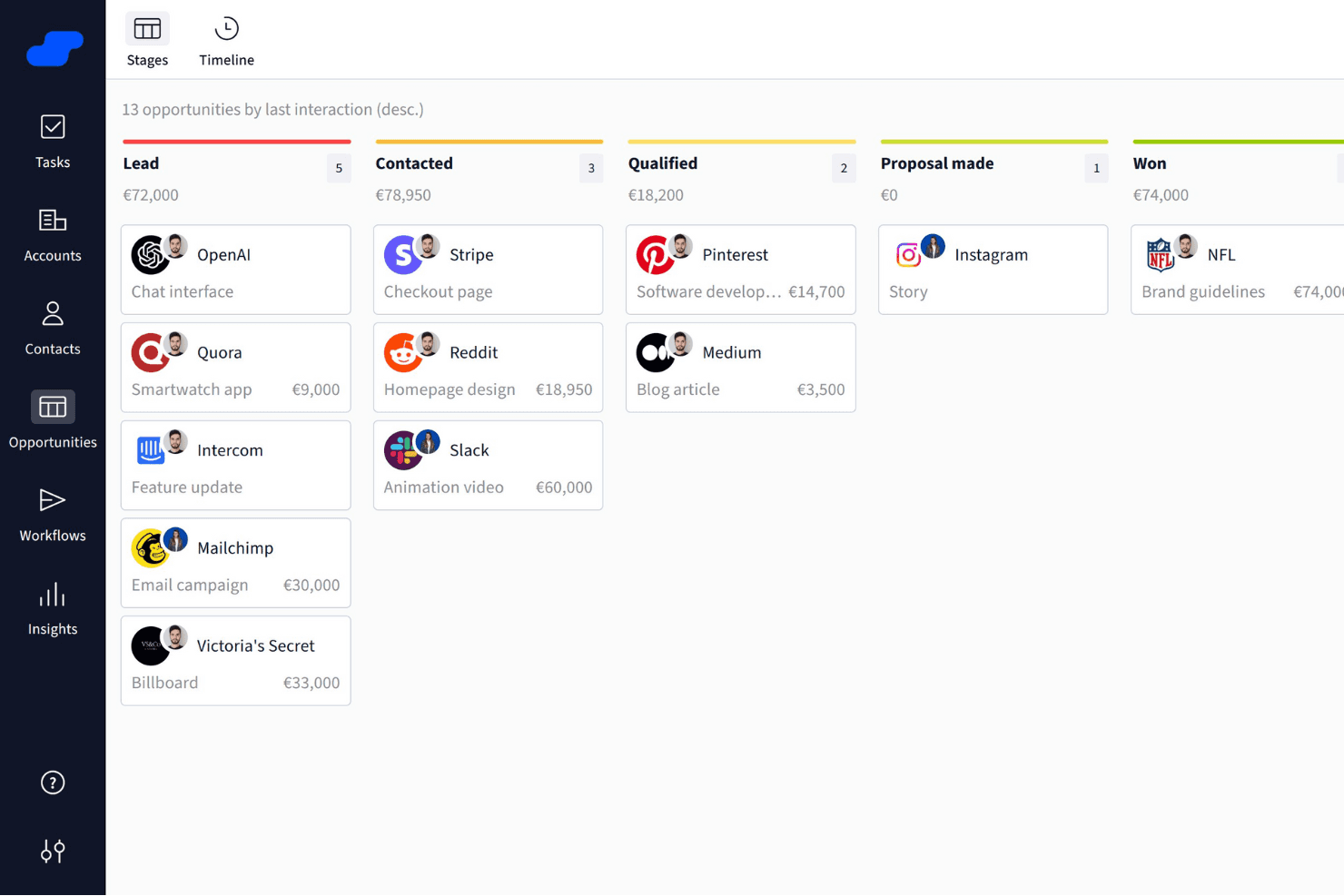
Salesflare organizes sales opportunities into visual pipeline stages. Salesflare is a B2B CRM that automatically captures contact and activity data from your email and calendar, and organizes it across visual pipelines, customizable fields, and AI-assisted follow-up tools.
Who Is Salesflare Best For?
Salesflare is a strong fit for small B2B sales teams that want a CRM to organize prospect data without spending time on manual data entry or admin setup.
Why I Picked Salesflare
I picked Salesflare as one of the best because of how it handles prospect data organization without demanding manual input from your team. It automatically pulls contact details from email signatures and captures activity from your inbox and calendar, so account records stay current without anyone having to update them. I especially like the relationship intelligence feature, which shows who on your team already has a connection at a target account and how strong that relationship is.
Salesflare Key Features
- Email and calendar data capture: Salesflare automatically pulls contact details, emails, and meetings from your connected inbox and calendar into CRM records.
- Multi-step email sequences: You can build automated, personalized follow-up email flows that continue until a contact replies or meets a configured exit condition.
- Lead scoring: Salesflare scores leads based on live interaction patterns and triggers notifications when the timing looks right to reach out.
- Custom fields for accounts, contacts, and opportunities: You can create fields across multiple types—dropdown, date, linked records, tags, and more—to structure your data the way your team works.
Salesflare Integrations
Salesflare offers native integrations with LinkedIn, Gmail, Outlook, Google Calendar, Microsoft 365, Zoho Mail, and Microsoft Exchange. Its directory lists 11,304 apps across native and Make connections, and it provides a REST API plus Zapier.
Pros and Cons
Pros:
- Flexible pipelines support distinct sales motions
- Relationship maps reveal warm account connections
- Automatic capture reduces stale prospect records
Cons:
- CRM migration needs manual spreadsheet cleanup
- Reporting depth trails broader CRM suites
Learn more about Salesflare: Best for Al-native CRM customization
- Not available
- From $40/user/month
Visit WebsiteCustomer Rating:4.7/5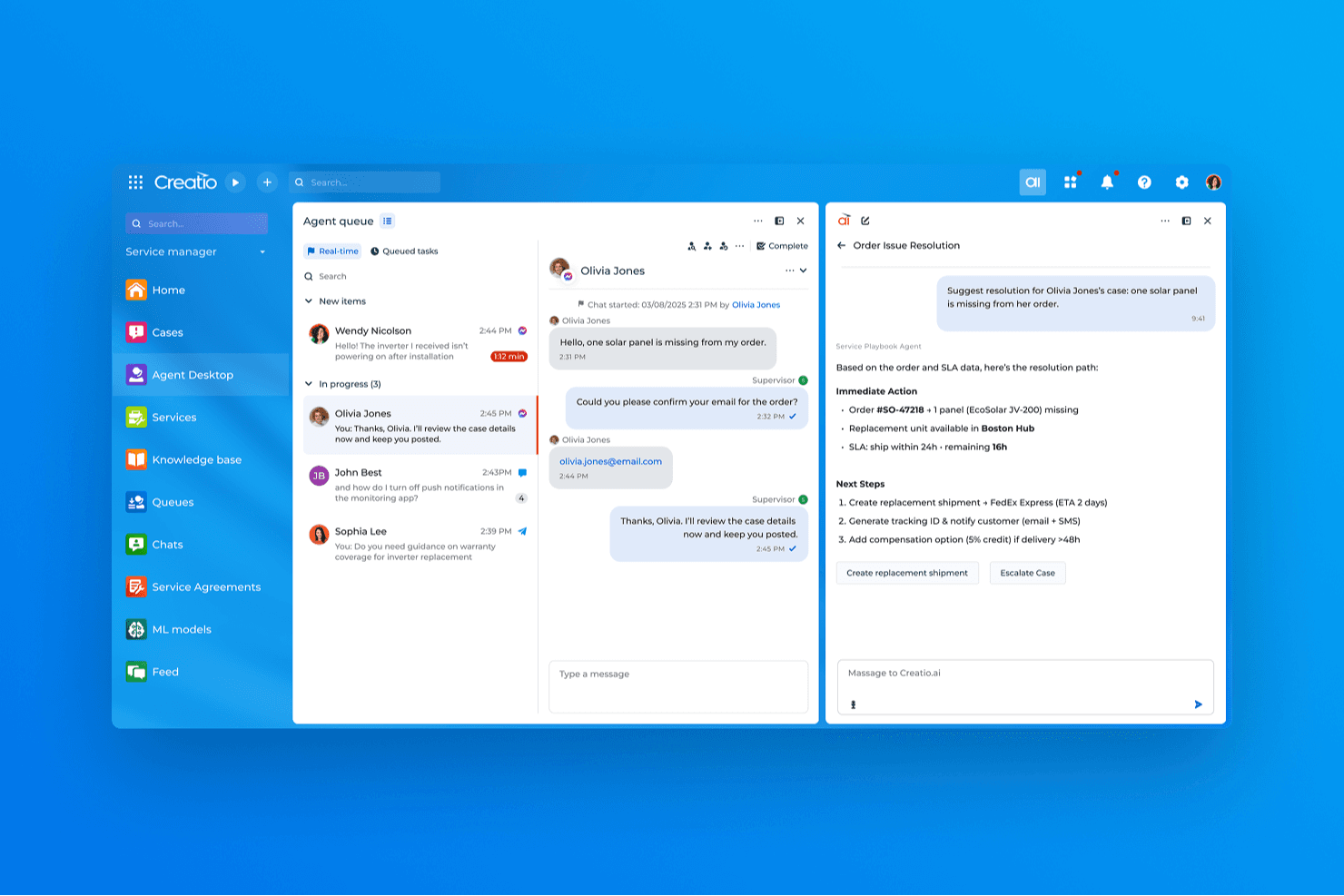
Creatio CRM uses AI to suggest real-time resolutions for customer service cases. Creatio AI CRM is an AI CRM and workflow automation platform that covers sales, marketing, and service with tools for lead and opportunity management, process design, customizable pipelines, and a unified customer data view.
Who Is Creatio AI CRM Best For?
Creatio AI CRM is a strong fit for small and midsize businesses that want to build and adapt their own CRM workflows without leaning on developers for every change.
Why I Picked Creatio AI CRM
I picked Creatio AI CRM as one of the best because its AI coding agents and no-code designers let you build and modify CRM workflows, pipeline stages, and automation rules without filing a ticket to your dev team. I especially like the BPMN-based process builder: you can set up multi-step sequences that trigger on record changes, schedules, or system signals, then adjust them as your sales motion evolves. The Freedom UI tools let you reshape objects, fields, and page layouts just as quickly.
Creatio AI CRM Key Features
- Unified customer data view: Displays real-time customer interactions across products and channels in a single record.
- BPMN-enabled process designer: Lets you build multi-step automated processes triggered by record changes, schedules, or system signals without writing code.
- AI agent builder: Provides prebuilt CRM agents and no-code tools to create custom agents that automate tasks like account research and quote generation.
- Marketplace add-ons: Offers 400+ connectors and templates—including Zapier, PandaDoc, and Power BI—to extend platform functionality.
Creatio AI CRM Integrations
Creatio AI CRM offers native integrations with Google Calendar and Microsoft Exchange, plus 400+ Marketplace applications and add-ons, including Microsoft Power BI Desktop, PandaDoc, Apollo.io, and Zapier. Its REST, OData, SOAP, OAuth, and web-service APIs support custom integrations.
Pros and Cons
Pros:
- Al-native, no-code workflows adapt as sales processes change
- Shared customer records unite sales, marketing, and service
- BPMN automations connect sales and service steps
Cons:
- No dedicated Salesforce migration path is documented
- Feature breadth can overwhelm new users
Learn more about Creatio AI CRM: Best for flexible CRM workflows and pipelines
- Free plan + 14-day trial + demo available
- From $44/user/month
Visit WebsiteCustomer Rating:4.5/5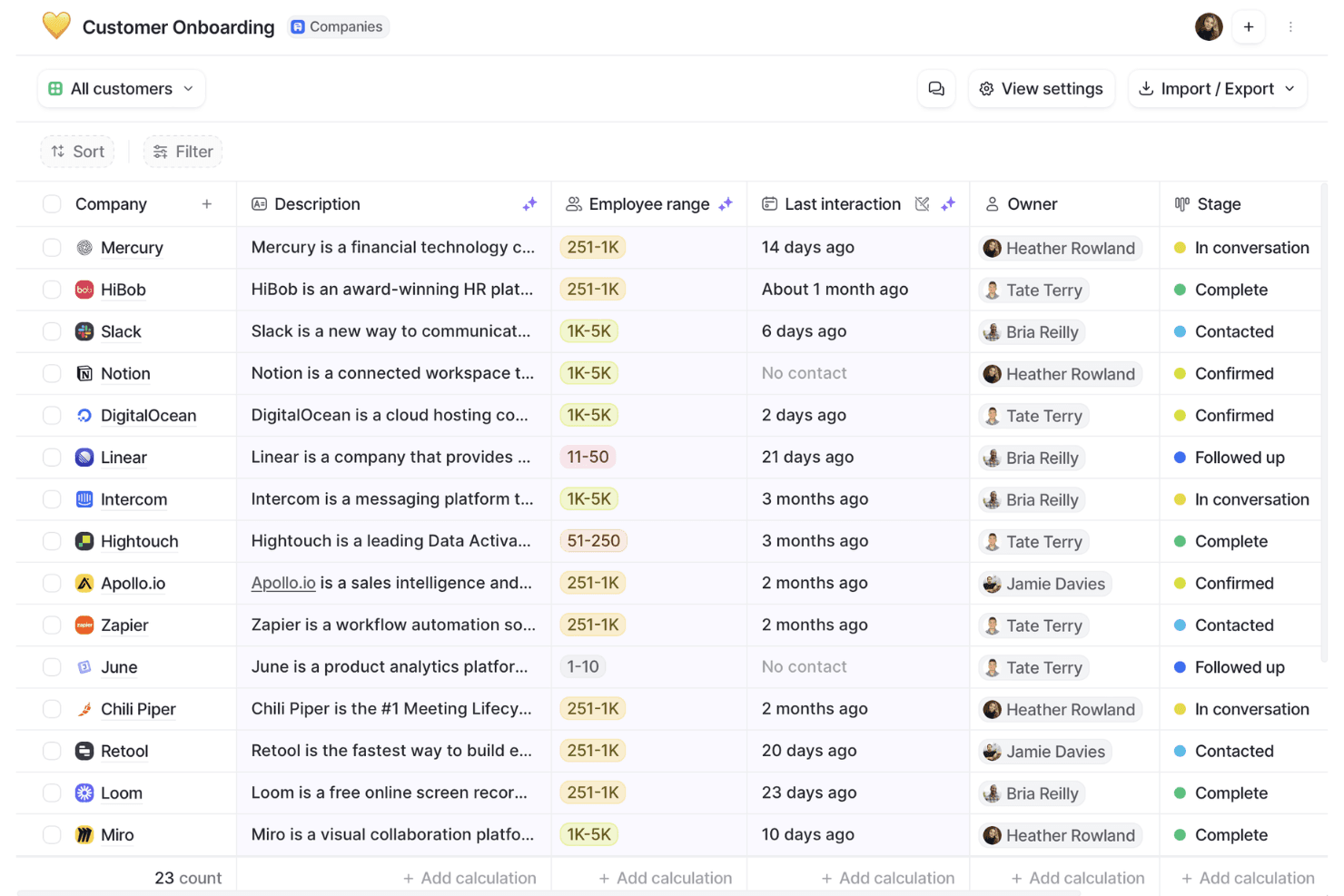
Attio organizes customer onboarding pipelines with stages and owner tracking. Attio is a CRM platform built around a flexible, object-based data model that supports contact management, deal pipelines, workflow automation, email and calendar sync, and reporting.
Who Is Attio Best For?
Attio is a strong fit for early-stage and scaling B2B teams—particularly founders, sales ops managers, and CRM admins—who want to build a CRM around their own data model rather than conform to a rigid, out-of-the-box structure.
Why I Picked Attio
I picked Attio as one of the best because its object-based data model genuinely changes how you build a CRM, letting you define custom objects, relationships, and attributes around your actual business rather than forcing your process into a preset structure. I love that you can link People, Companies, and Deals to custom objects with one-to-many or many-to-many relationships, then build multi-step, branching workflows that trigger across those records automatically.
Attio Key Features
- Ask Attio: A natural-language AI interface that lets you search, summarize, and take actions across your CRM records directly from the workspace.
- Call Intelligence: Automatically records, transcribes, and summarizes calls, then attaches the results to the relevant CRM records.
- Communication intelligence: Surfaces relationship data derived from synced email and calendar activity, including first and last interactions and connection strength scores.
- CSV import with field mapping: Lets you map, preview, and validate data before importing records, with real-time progress tracking and error visibility.
Attio Integrations
Attio offers native integrations with Gmail, Outlook, Google Calendar, Slack, Mailchimp, Segment, Stripe, Google Sheets, Notion, and Typeform. It also supports marketplace integrations, Zapier, REST API, webhooks, an App SDK, MCP, and SQL queries for custom connectivity.
Pros and Cons
Pros:
- Reviewers praise clear pipeline tracking
- Branching workflows reduce routine deal upkeep
- Custom objects fit nonstandard sales processes
Cons:
- Custom data models require upfront design
- Forecasting and cross-object reporting remain limited
Learn more about Attio: Best for customizable sales automation
- 14-day free trial + free demo available
- From $12/user/month (billed annually)
Visit WebsiteCustomer Rating:4.6/5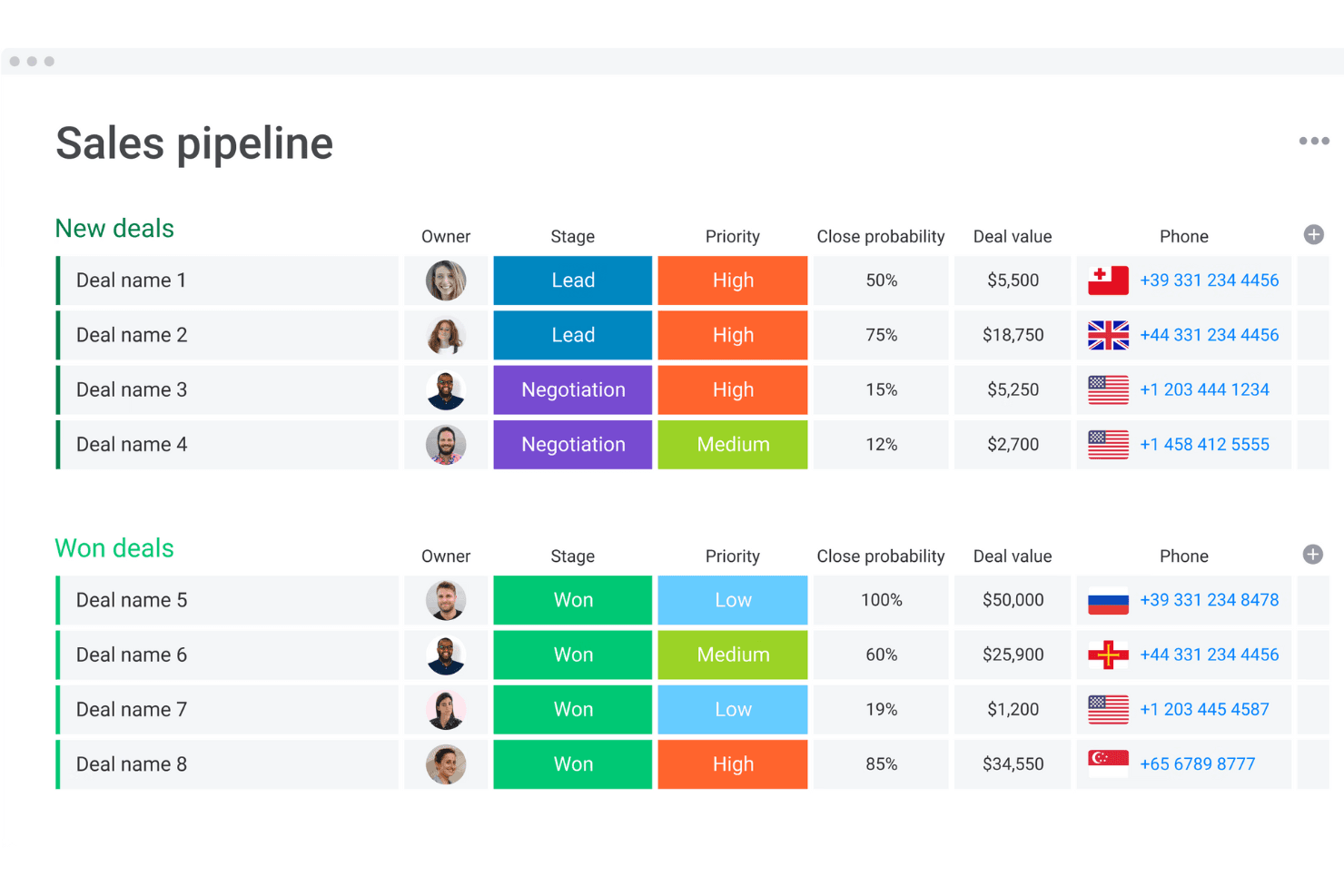
monday CRM organizes deals by stage, priority, and value in one view. monday CRM is a no-code sales CRM built on monday.com's work management platform that combines pipeline management, workflow automation, AI-powered deal insights, and built-in communication tracking across the full sales cycle.
Who Is monday CRM Best For?
monday CRM is a strong fit for small to mid-sized sales teams that want to build and automate their sales processes without waiting on developers or dedicated admins.
Why I Picked monday CRM
I picked monday CRM as one of the best because its no-code workflow builder lets sales teams build and automate complex, multi-branch sales processes without touching a line of code. I love that the Pipeline Health Agent actively analyzes stage distribution, deal velocity, and pipeline gaps, then drafts rep nudges for manager review. That kind of built-in automation intelligence is what makes it a credible Salesforce alternative for teams that want customizable sales motion without the admin overhead.
monday CRM Key Features
- Lead sourcing agent: An AI agent that finds, enriches, and scores leads against your target profile on a daily basis.
- Smart Call: A mobile CRM feature that records, transcribes, and summarizes customer calls, then logs them directly to the deal record.
- Quotes and invoices: Generate quotes, send invoices, and collect signatures directly from within a deal record.
- AI Notetaker: Joins Zoom, Microsoft Teams, or Google Meet calls to transcribe meetings, identify speakers, and generate action items synced to contact timelines.
monday CRM Integrations
monday CRM lists 200+ integrations, including Salesforce, Slack, Microsoft Teams, Zoom, Gmail, LinkedIn, Meta Ads, QuickBooks, Stripe, and DocuSign. It also offers a GraphQL API, SDK, and open API for custom connections.
Pros and Cons
Pros:
- Shared dashboards improve pipeline visibility
- Automated reminders reduce manual follow-up
- Custom pipelines adapt to distinct sales motions
Cons:
- Flexible setup can overwhelm smaller teams
- Forecasting depth trails enterprise CRM systems
 Best for team organization and quick CRM adoption
- Free plan + 14-day trial available
- From $22/user/month
Visit WebsiteCustomer Rating:4.7/5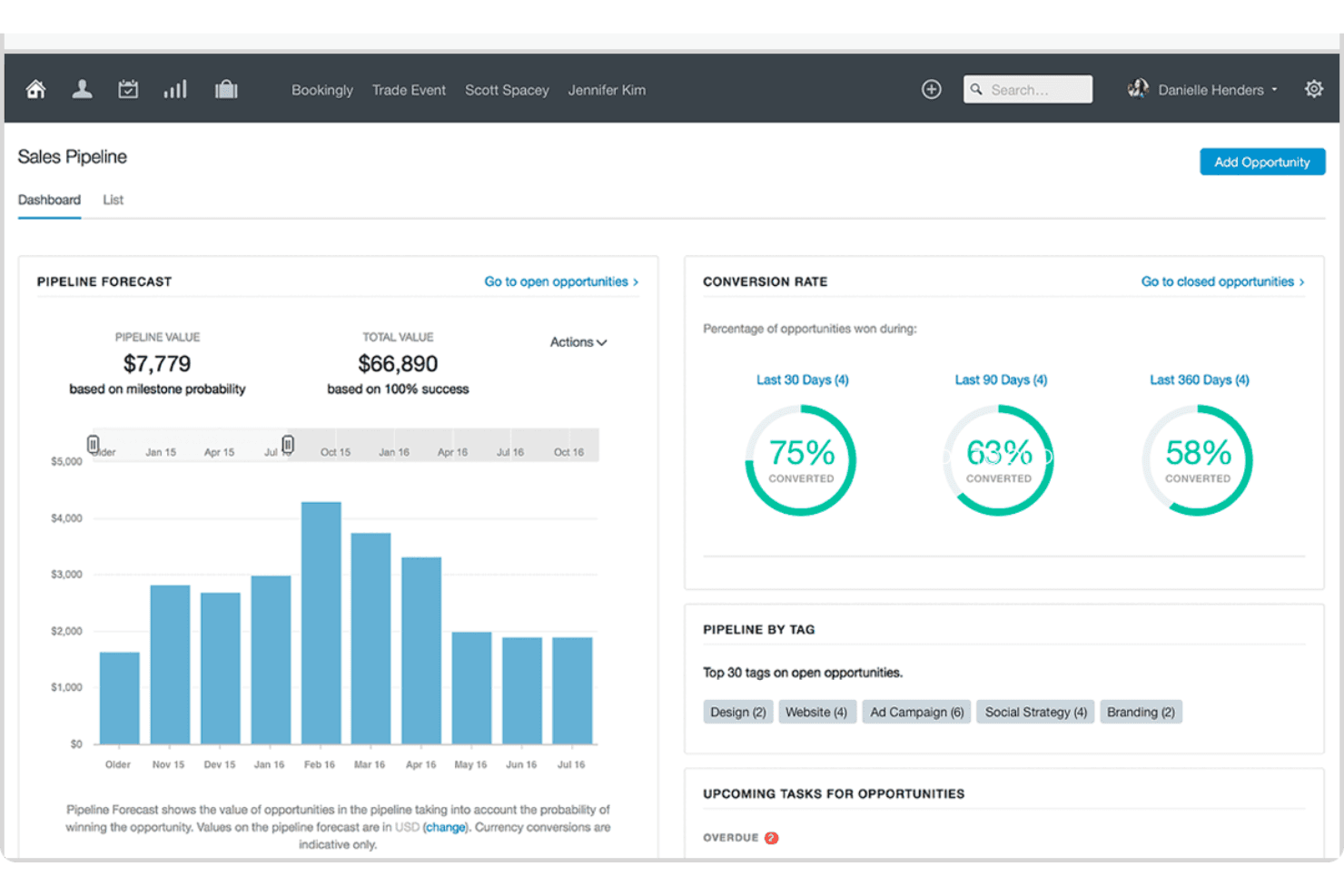
Capsule visualizes sales pipeline forecasts and conversion rates in one dashboard. Capsule CRM is a contact and pipeline management platform that brings together sales opportunities, contact records, task tracking, project management, and email tools in a single, lightweight CRM.
Who Is Capsule Best For?
Capsule is a strong fit for small business owners and growing teams who want a clean, low-friction CRM they can start using without a lengthy setup or dedicated admin.
Why I Picked Capsule
I've included Capsule in my top picks because it's the CRM I'd hand to a team that needs to get up and running fast, without a drawn-out configuration project. Its Tracks feature lets you build reusable, sequential task lists for repeatable processes like onboarding or handoffs, so deals move forward without anyone manually managing the queue. The AI Pipeline Generator can scaffold an entire pipeline from a plain-language description of your sales process, which means setup that used to take days takes minutes.
Capsule Key Features
- Workflow automation: Trigger actions automatically when an opportunity hits a milestone or changes status, including assigning team members, sending emails, or creating linked projects.
- Multiple sales pipelines: Set up separate pipelines for different products, markets, or sales processes, each with its own configurable stages.
- Contact DataTags: Apply tags that prompt for related custom-field values, letting your team capture structured context on contacts without free-text guesswork.
- Reporting dashboards: Access prebuilt dashboards for pipeline, conversion, tasks, and projects, with filters for user, team, tag, and custom fields.
Capsule Integrations
Capsule lists 100+ marketplace integrations on its homepage and 60+ in its pricing FAQ, including Gmail, Google Calendar, Microsoft Outlook, Mailchimp, Transpond, Xero, QuickBooks Online, and Zapier. It also offers a REST API and REST Hooks for custom integrations.
Pros and Cons
Pros:
- Contacts, deals, tasks, and projects stay connected
- Import previews help catch mapping errors
- Quick adoption without extensive training
Cons:
- No custom objects or record types
- Dashboard analysis offers limited drill-down
Learn more about Capsule: Best for predictive intelligence
- Free plan + 15-day free trial+ free demo available
- From $14/user/month (billed annually)
Visit WebsiteCustomer Rating:4.2/5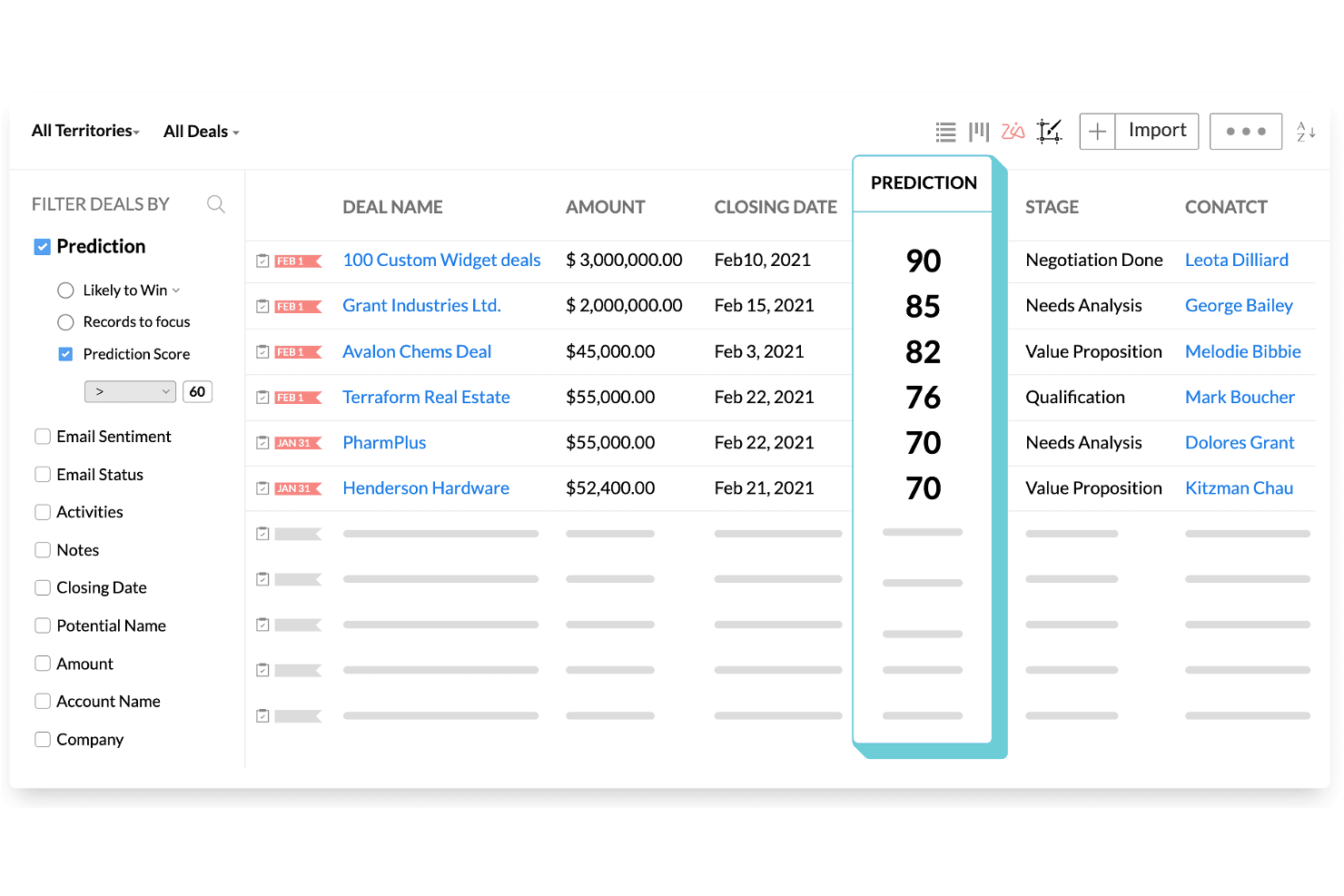
Zoho CRM ranks deals by AI prediction scores to prioritize sales efforts. Zoho CRM is a sales and marketing platform that combines pipeline management, workflow automation, AI-powered forecasting via its Zia engine, built-in CPQ, and multi-channel customer engagement across email, phone, social, SMS, and WhatsApp.
Who Is Zoho CRM Best For?
Zoho CRM is a strong fit for sales operations managers and small-to-midsize teams that need AI-driven forecasting and pipeline visibility without Salesforce's price tag.
Why I Picked Zoho CRM
I've included Zoho CRM in my top picks because its Zia AI engine does something I haven't seen matched at this price point: it actively forecasts revenue, flags anomalies in pipeline targets, and scores individual deals by close likelihood so you can act before a quarter slips. I also like that Zia surfaces the optimal time and channel to contact each prospect, cutting the guesswork out of outreach cadences. For teams migrating off Salesforce, the dedicated migration wizard maps CSV exports directly to Zoho modules and fields, with a post-import accuracy check built in.
Zoho CRM Key Features
- Blueprint process management: Define structured, step-by-step sales processes that guide reps through required actions before moving a deal to the next stage.
- Multi-channel customer engagement: Reach contacts through email, phone, SMS, WhatsApp, and social media from a single platform without switching tools.
- Canvas no-code layout editor: Redesign CRM module layouts, pages, and fields visually without writing any code.
- Territory management: Organize accounts and deals by geographic or business-defined territories to align sales coverage across teams.
Zoho CRM Integrations
Zoho CRM lists 1,100+ ready-to-use app integrations, including Gmail, Outlook, Slack, Zoom, Microsoft Teams, Google Ads, and QuickBooks. Its REST API supports custom integrations.
Pros and Cons
Pros:
- Blueprint standardizes stage-by-stage sales execution
- Salesforce migration includes field mapping and validation
- Zia forecasts revenue and flags pipeline anomalies
Cons:
- Advanced workflows require careful administrator configuration
- Interface menus can overwhelm new users
 Best for collaboration in large organizations
- 30-day free trial available
- From $8/user/month (billed annually)
Visit WebsiteCustomer Rating:4.6/5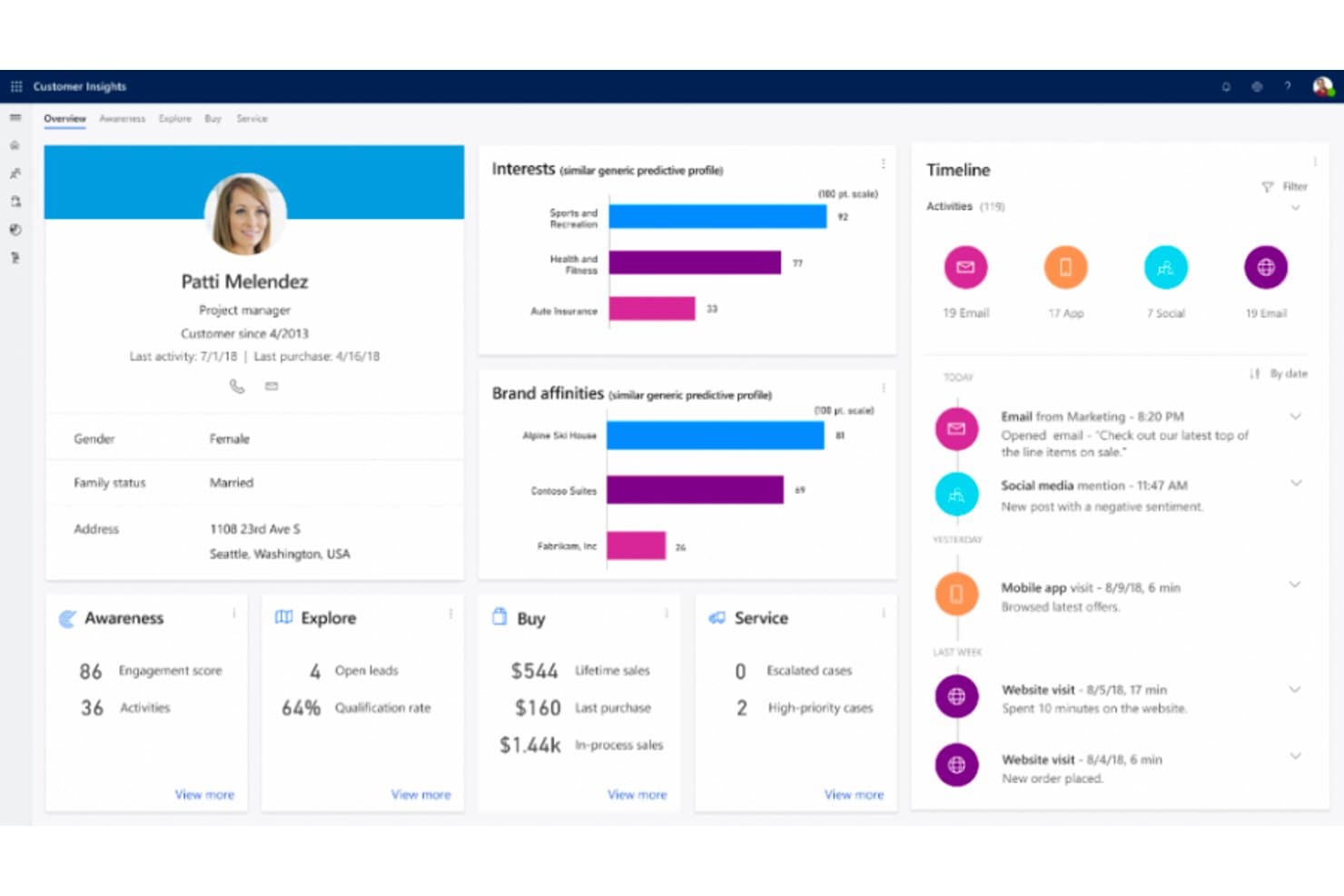
Microsoft Dynamics 365 unifies customer data into a single 360-degree profile view. Microsoft Dynamics 365 Sales is a CRM platform built by Microsoft that covers lead and opportunity management, sales process automation, forecasting, AI-powered deal insights, and conversation intelligence, with deep native integration across the Microsoft 365 ecosystem.
Who Is Microsoft Dynamics 365 Best For?
Dynamics 365 Sales is a strong fit for large organizations already running on Microsoft 365, where deep native integration across Teams, Outlook, and Power BI drives real collaboration across sales teams.
Why I Picked Microsoft Dynamics 365
Microsoft Dynamics 365 Sales earns its spot on my shortlist because large sales organizations running on Microsoft 365 get a level of native collaboration that's genuinely hard to replicate elsewhere. I'm talking about shared deal rooms in Teams, Copilot-generated opportunity summaries surfaced directly in Outlook, and conversation intelligence that flags competitor mentions and coaching moments from recorded calls. The Sales Qualification Agent can autonomously research and prioritize incoming leads, which takes real volume off your team's plate.
Microsoft Dynamics 365 Key Features
- Predictive lead scoring: AI models trained on historical outcomes rank and prioritize incoming leads so sellers focus on the highest-value opportunities first.
- Assignment rules with round-robin routing: Automatically distributes new leads and opportunities to sellers, teams, or queues based on configurable conditions.
- Quote-to-invoice transaction management: Tracks deals from draft quote through accepted order to issued invoice, with data carried forward from the opportunity record.
- Power BI analytics integration: Connects Dynamics 365 Sales data to Power BI for advanced reporting and custom dashboard creation beyond the native reporting layer.
Microsoft Dynamics 365 Integrations
Microsoft Dynamics 365 offers native integrations across the Microsoft ecosystem, including Microsoft 365, Outlook, Teams, and Power BI. It also supports marketplace integrations such as DocuSign for Dynamics and custom connections through the Dataverse Web API.
Pros and Cons
Pros:
- Opportunity-to-invoice tracking preserves deal context
- Automated lead routing reduces manual triage
- Forecasts connect pipeline activity to revenue
Cons:
- File-based migration lacks Salesforce-specific tooling
- Advanced configuration can require technical help
Learn more about Microsoft Dynamics 365:
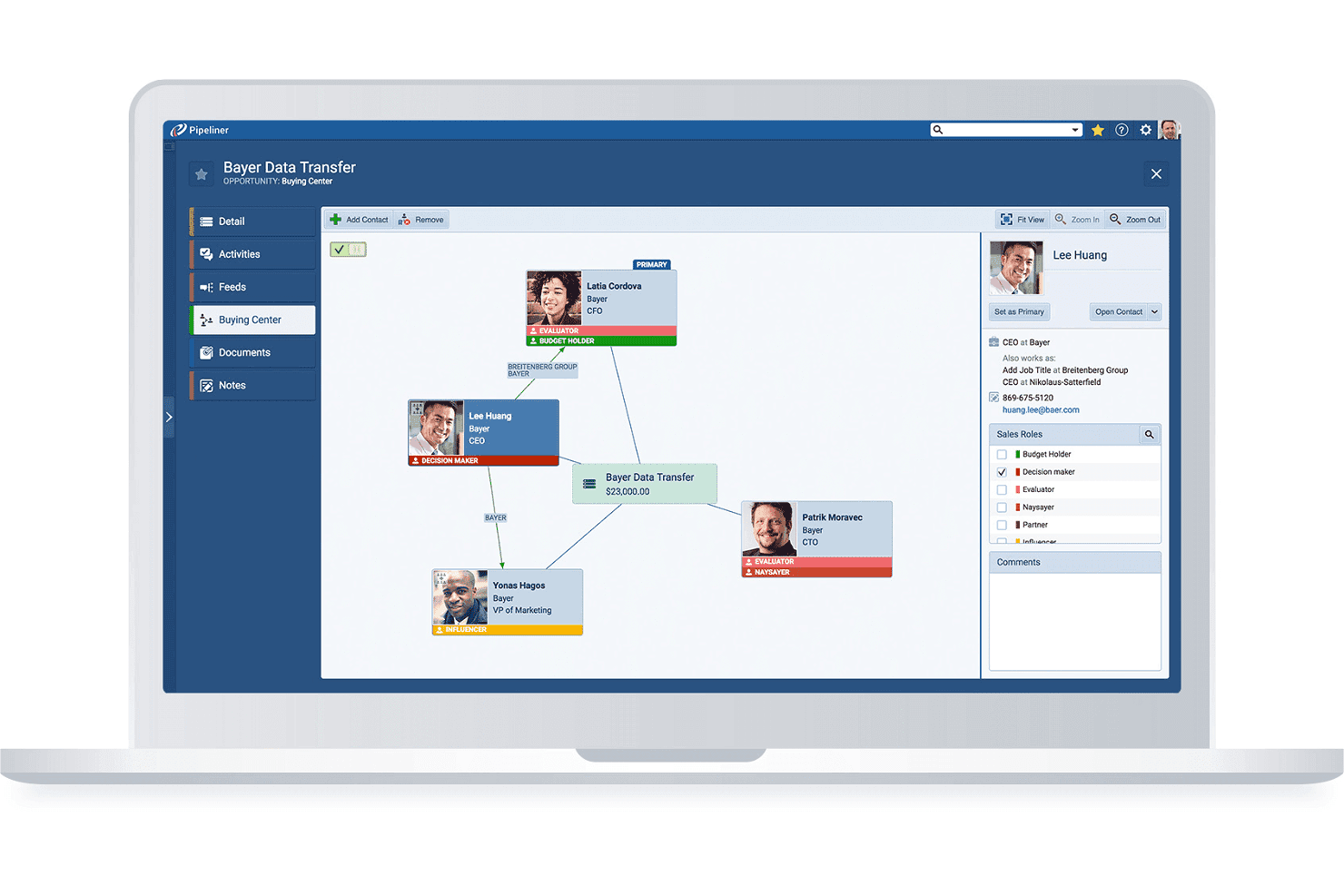
Pipeliner maps stakeholder roles and relationships within a deal's buying center. Coevera is a visual-pipeline B2B CRM that combines deal and account management, no-code workflow automation, AI-assisted sales insights, and a 200+ app integration marketplace.
Who Is Coevera Best For?
Coevera suits B2B sales teams moving away from Salesforce who want a visually intuitive CRM they can configure and manage without relying on developers or dedicated admins.
Why I Picked Coevera
Coevera earns its spot on my shortlist because it's genuinely one of the least intimidating CRMs to pick up if you're switching away from Salesforce for the first time. I love how the visual pipeline lets you drag opportunities through custom stages and flip between Kanban, bubble, chart, and map views without touching a single setting file. The no-code Automatizer builder means you can set up conditional, multi-step workflows, like auto-assigning follow-up tasks when a deal hits a specific stage, without writing a line of code or calling a developer.
Coevera Key Features
- Voyager AI sales intelligence: Get AI-generated opportunity summaries, call summaries, and email drafts directly within your CRM records.
- Import2 migration app: Migrate data from Salesforce, Microsoft Dynamics, Zoho, and other CRMs point-and-click, without building CSV files.
- Account relationship mapping: Visualize org charts, buying-center structures, and multi-stakeholder relationships across enterprise accounts.
- Automatizer workflow builder: Create multi-step, conditional automations using a visual trigger-and-action interface that requires no coding.
Coevera Integrations
Coevera lists 232 marketplace apps, with native integrations including Microsoft 365, Google Workspace, HubSpot, Zoom, and Power BI. It supports REST, GraphQL, webhooks, and MCP APIs for custom integrations.
Pros and Cons
Pros:
- Built-in reports surface pipeline movement
- Configurable fields match distinct sales workflows
- Visual pipelines clarify deal progress
Cons:
- Annual contracts limit seat reductions and refunds
- Small teams report costly, difficult implementations
Learn more about Coevera: Best for visual pipeline management
- 14-day free trial
- From $14/user/month (billed annually)
Visit WebsiteCustomer Rating:4.5/5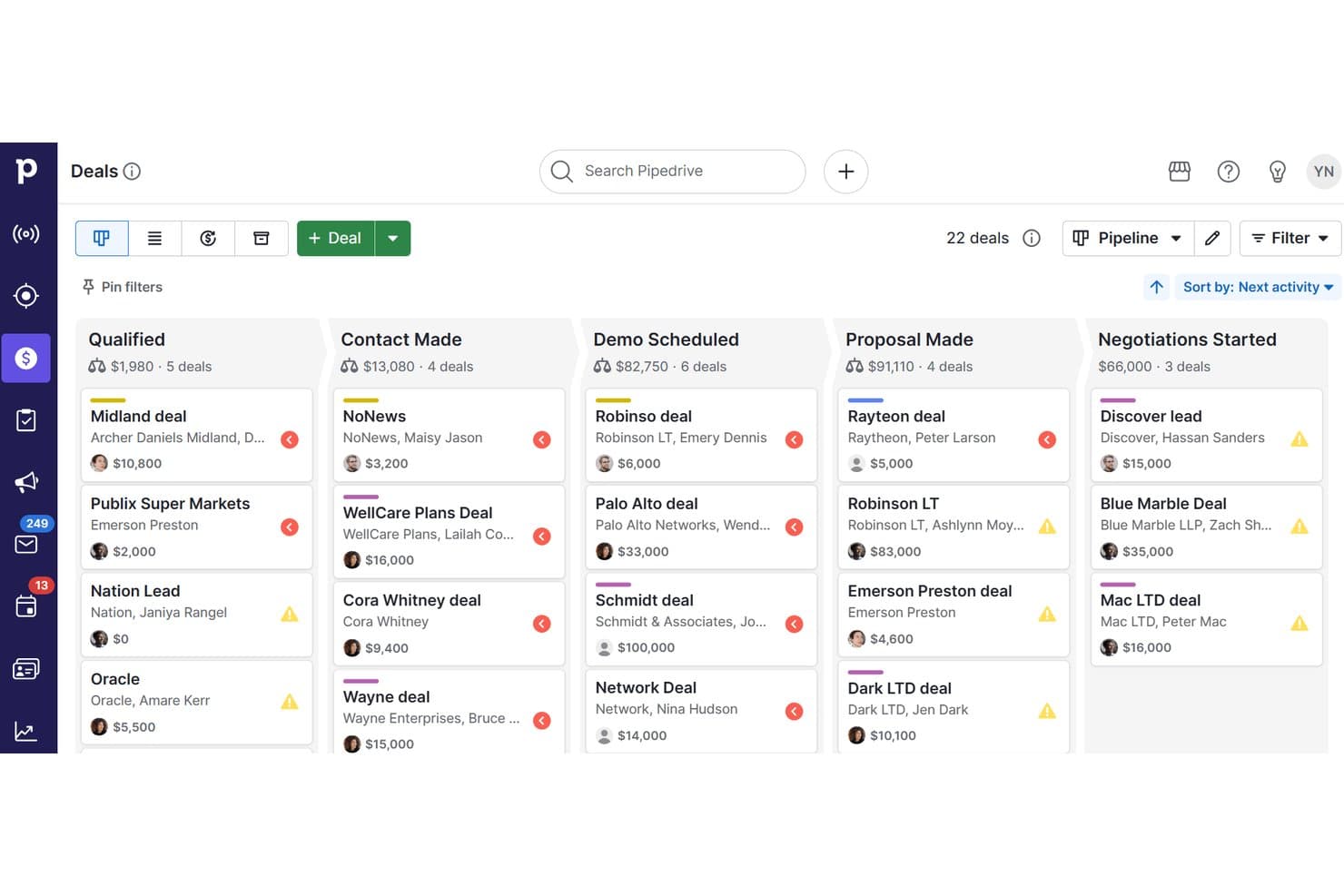
Pipedrive CRM organizes deals across pipeline stages visually. Pipedrive CRM is a sales-focused CRM platform that combines visual pipeline management, contact and lead tracking, workflow automation, email sync, campaign tools, and AI-powered reporting in one system.
Who Is Pipedrive CRM Best For?
Pipedrive CRM is a strong fit for small to mid-sized sales teams that want a visual, intuitive way to manage deals without the complexity of enterprise CRM platforms.
Why I Picked Pipedrive CRM
I picked Pipedrive CRM as one of the best because its visual pipeline management genuinely simplifies how sales teams track deals without the configuration overhead Salesforce demands. I love how colored deal cards flag at-risk opportunities before they go cold, and how pipeline stages can be customized per team without any technical expertise. Pipedrive's Nova AI also adds pre-call briefs and meeting transcripts across all plans, so reps stay prepared without switching tools.
Pipedrive CRM Key Features
- Nova meeting intelligence: Generates pre-call briefs from deal history, records and transcribes calls, and prepares CRM-ready recaps across all plans.
- Email nurturing sequences: Builds automated, personalized email and follow-up sequences to move leads through the pipeline without manual effort.
- Import2 CRM migration: Migrates data from Salesforce, HubSpot, Zoho CRM, Microsoft Dynamics and other systems, with field mapping, deduplication and history transfer.
- Workflow trigger-action automation: Configures event-based triggers and actions to automate repetitive tasks like contact updates, follow-up creation and email sending.
Pipedrive CRM Integrations
Pipedrive CRM offers native integrations with Microsoft Teams, Google Meet, WhatsApp Business, QuickBooks, DocuSign, and Gmail, plus marketplace integrations with PandaDoc, JustCall, Surfe, and Zapier. Its open API and webhooks support custom integrations.
Pros and Cons
Pros:
- Salesforce migration includes field mapping and history
- Automated reminders reduce missed follow-ups
- Visual deal cards flag at-risk opportunities
Cons:
- Shared ownership and territory workflows remain limited
- Reporting dashboards constrain detailed analysis
Learn more about Pipedrive CRM: Best for service-driven organizations
- Free demo available
- From $19/month
Visit WebsiteCustomer Rating:4.4/5
Zendesk Sell is the CRM of the popular service-based platform, Zendesk. Zendesk is known mostly for its customer service platform. However, Zendesk Sell is a unique CRM that can also be useful if you’re looking to link your sales and service offering more closely together.
Why I picked Zendesk Sell: Zendesk Sell’s interface reminds me of the familiarity of Slack. It uses excess white space to project an organized, clean view. With your menu on the left side, you can navigate through different views, making it easy to find what you’re looking for without getting overwhelmed.
Plus, since it is a Zendesk product, support seems like it was built at the forefront of the product. You can track multiple ways you interact with your customers: email, phone, chat, and social media.
Zendesk Sell Standout Features and Integrations:
Standout features include team collaboration, trigger automation, omnichannel tracking, call logging, rich deal insights, AI-powered lead prioritization, enhanced customer support (phone, email, and chat), and bot tracking. I’ve worked with Zendesk tools a lot over the years, and it was great seeing the same level of attention to user experience and support in this tool.
Integrations include ActiveCampaign, Dropbox, Google Drive, Mailchimp, Salesforce, Slack, Stripe, and Zapier.
Pros and Cons
Pros:
- Great customer support
- Tracking across multiple channels
- Collaboration and service at the focus
Cons:
- Doesn’t scale efficiently with your business
- Customization lacking compared to other platforms
- Limited email features
Learn more about Zendesk Sell:
Outras alternativas ao Salesforce
Existem muitos outros CRM no mercado que não entraram no top 10, mas que podem continuar a ser ferramentas valiosas. Vale a pena analisar as seguintes alternativas ao Salesforce para verificar se correspondem às suas necessidades:
Análises relacionadas
Se ainda não encontrou aqui o que procura, consulte estas ferramentas que testámos e avaliámos.
- Software de CRM
- Software de vendas
- Software de gestão de potenciais clientes
- Software de inteligência empresarial
- Software de gestão de contratos
- Sistema de gestão de receitas
How I Evaluate Salesforce Alternatives
I split my evaluation into two layers: the baseline CRM capabilities a RevOps team needs to track pipeline and forecast revenue, and the differentiators that determine whether a platform truly fits.
Core Functionality (Table Stakes For This List)
When I'm selecting tools for my list, I rank each one on a scale from 0 (does not offer the functionality) to 5 (excels in this area) for each core functionality listed below. Then, I calculate the tool's total score into a percentage. Each tool needs to achieve a minimum total score of 75% to be considered for inclusion.
- Contact & Account Management: I check whether contacts, accounts, and deals are linked with full activity history, not siloed in separate lists with no relationship context.
- Pipeline & Opportunity Tracking: Each tool should let you build multiple pipelines with custom stages, so your inbound and outbound motions aren't forced into one view.
- Sales Workflow Automation: I evaluate whether the platform can auto-route leads by territory, trigger follow-up tasks on stage changes, and run multi-step sequences.
- Reporting & Forecasting: Dashboards need to support custom metrics like weighted pipeline by rep or segment, not just pre-built charts you can't modify.
- Native & Third-Party Integrations: I look at how well the CRM connects with tools like HubSpot Marketing Hub, Marketo, Intercom, or Stripe via native connectors and open API.
- Custom Objects & Data Models: Your RevOps team should be able to create custom objects and fields that mirror your revenue process without developer support.
Once I have a list of tools that meet this criteria, I consider what sets each platform apart.
Differentiating Factors (What Sets Vendors Apart)
Here's how I compare and contrast different vendors:
Standout Features
AI-powered deal scoring is a big differentiator. I look at whether a platform can flag at-risk deals and suggest next steps without relying on a third-party tool. Revenue intelligence features like automatic call logging and activity capture also matter, since they reduce the data entry burden that tanks CRM adoption. Beyond insights, I evaluate whether the CRM includes native sales engagement sequences. When reps can run multi-channel outreach directly from the pipeline view, you cut out a standalone tool and keep all activity data in one place.
Beyond Features
Total cost of ownership is one of the first things I evaluate. Many Salesforce alternatives include automation and reporting at their base tier, while Salesforce gates them behind add-ons. Time to value matters just as much. I look at whether a RevOps team can self-implement the platform in weeks rather than months, without hiring certified consultants. Segment fit also plays a role. A 15-person sales team and a 500-rep enterprise org have very different needs, so I consider whether the platform scales to match the buyer's actual stage of growth.
Por que motivo procurar uma alternativa ao Salesforce?
O Salesforce é um conhecido software de gestão de relações com clientes (CRM) que disponibiliza um conjunto diversificado de ferramentas para a gestão de vendas, o serviço de apoio ao cliente, a automatização de marketing e a análise de dados. O seu conjunto abrangente de soluções foi concebido para responder a uma ampla variedade de necessidades empresariais, facilitando a gestão das interações com os clientes e simplificando vários processos empresariais. No entanto, apesar das suas capacidades extensas, alguns utilizadores podem procurar alternativas ao Salesforce. Isto pode dever-se a fatores como o preço, que pode ser proibitivo para empresas mais pequenas ou empresas em fase de arranque. Além disso, a complexidade e a amplitude das funcionalidades do Salesforce podem ser avassaladoras para alguns utilizadores, sobretudo para aqueles com necessidades mais simples ou conhecimentos técnicos limitados. A abordagem única do Salesforce pode não estar alinhada com os requisitos específicos de determinadas empresas, especialmente das que procuram funcionalidades mais direcionadas para o seu setor.
O software alternativo ao Salesforce pode apresentar várias vantagens. Muitas alternativas oferecem soluções mais económicas, com planos de preços flexíveis, tornando-as acessíveis a um leque mais vasto de empresas, especialmente as de menor dimensão ou as que estão a iniciar atividade. Estas alternativas proporcionam frequentemente uma experiência mais intuitiva, com uma interface mais simples e funcionalidades mais diretas, ideais para empresas que dão prioridade à facilidade de utilização e a uma implementação rápida. A personalização é outra vantagem significativa, uma vez que algumas alternativas ao Salesforce são mais adaptáveis às necessidades e aos fluxos de trabalho específicos de diferentes setores, oferecendo soluções personalizadas que se alinham melhor com determinados modelos de negócio. Além disso, as plataformas CRM mais pequenas ou mais especializadas podem oferecer um apoio ao cliente mais personalizado, garantindo que as empresas recebem assistência dedicada e adaptada aos seus desafios específicos. Estes benefícios tornam as alternativas ao Salesforce uma opção atrativa para as empresas que procuram soluções CRM mais adequadas ao seu orçamento, aos requisitos de complexidade e às necessidades específicas do negócio.
Como escolher alternativas ao Salesforce
Com tantas alternativas diferentes ao Salesforce disponíveis, pode ser difícil decidir qual será a ferramenta mais adequada às suas necessidades.
Ao criar uma lista restrita, testar e selecionar alternativas ao Salesforce, tenha em consideração o seguinte:
- Que problema está a tentar resolver - Comece por identificar a lacuna funcional do Salesforce que está a tentar colmatar, para esclarecer as funcionalidades e capacidades que a ferramenta deve disponibilizar.
- Quem precisará de a utilizar - Para avaliar os custos e os requisitos, considere quem irá utilizar o software e de quantas licenças irá necessitar. Terá de avaliar se apenas os responsáveis pelas operações de receita ou toda a organização precisarão de acesso. Quando isso estiver claro, vale a pena considerar se está a dar prioridade à facilidade de utilização para todos ou à rapidez para os utilizadores avançados da alternativa ao Salesforce.
- Com que outras ferramentas precisa de funcionar - Esclareça que ferramentas está a substituir, que ferramentas irá manter e com que ferramentas precisará de integrar, como software de contabilidade, CRM ou recursos humanos. Terá de decidir se as ferramentas precisarão de ser integradas entre si ou se poderá substituir várias ferramentas por uma única alternativa consolidada ao Salesforce.
- Que resultados são importantes - Considere o resultado que o software precisa de proporcionar para ser considerado bem-sucedido. Pense na capacidade que pretende obter ou no que quer melhorar, e na forma como irá medir o sucesso. Por exemplo, um resultado poderá ser a capacidade de obter maior visibilidade sobre o desempenho. Poderia comparar as funcionalidades das alternativas ao Salesforce até à exaustão, mas, se não estiver a pensar nos resultados que pretende alcançar, poderá estar a desperdiçar muito tempo valioso.
- Como funcionaria na sua organização - Considere a seleção do software em conjunto com os seus fluxos de trabalho e a sua metodologia de prestação. Avalie o que está a funcionar bem e as áreas que estão a causar problemas e precisam de ser resolvidas. Lembre-se de que cada empresa é diferente — não parta do princípio de que, por uma ferramenta ser popular, irá funcionar na sua organização.
Tendências nas alternativas ao Salesforce
As alternativas ao Salesforce estão a inovar de forma agressiva para conquistar a sua quota de mercado, oferecendo funcionalidades únicas, respondendo a problemas específicos e proporcionando valor às empresas que procuram capacidades de CRM para além das oferecidas pelo Salesforce. Eis uma visão geral das tendências atuais, com base em atualizações recentes de software, comunicados de imprensa e registos de versões:
Tendências emergentes nas alternativas ao Salesforce:
- Maior ênfase na IA e na aprendizagem automática:
- Muitas alternativas ao Salesforce estão a integrar IA para disponibilizar análises preditivas, automatização inteligente e capacidades reforçadas de tomada de decisões, respondendo à necessidade das empresas de tirar partido dos dados para obter uma vantagem estratégica.
- Capacidades de integração melhoradas:
- Com a crescente necessidade de ferramentas empresariais interligadas, as alternativas ao Salesforce estão a expandir os seus ecossistemas de integração, facilitando fluxos de trabalho contínuos entre várias aplicações e plataformas.
Funcionalidades inovadoras e invulgares:
- Integração de cadeias de blocos:
- Algumas alternativas ao Salesforce estão a explorar a tecnologia de cadeias de blocos para oferecer uma gestão de dados transparente, segura e descentralizada, uma abordagem inovadora no espaço dos CRM.
- Conectividade da IoT:
- Ao integrarem dados da IoT nos sistemas CRM, estas alternativas permitem às empresas tirar partido de dados em tempo real provenientes de dispositivos ligados, melhorando os conhecimentos sobre os clientes e a eficiência operacional.
Funcionalidades mais procuradas:
- Análise e elaboração de relatórios abrangentes:
- As empresas procuram ferramentas avançadas de análise e elaboração de relatórios nos seus CRM para obter informações mais aprofundadas sobre os seus processos de vendas, o comportamento dos clientes e as tendências do mercado.
- Acessibilidade móvel:
- À medida que as forças de trabalho se tornam mais móveis, a procura por aplicações móveis de CRM robustas continua a aumentar, permitindo que as equipas de vendas acedam a informações essenciais e executem tarefas em qualquer lugar.
Funcionalidades em declínio:
- Personalização excessivamente complexa:
- Está a verificar-se um afastamento das opções de personalização excessivamente complexas que exigem um envolvimento significativo das equipas de TI, uma vez que as empresas preferem uma personalização mais simples e fácil de utilizar.
- Sistemas isolados:
- As soluções de CRM autónomas que não se integram bem com outros sistemas empresariais estão a tornar-se menos populares, à medida que as empresas procuram ecossistemas de software mais integrados e abrangentes.
As alternativas ao Salesforce permitem que as empresas obtenham as informações, a eficiência e a flexibilidade de que necessitam para se destacarem na gestão das suas operações de geração de receita. Ao considerar estas alternativas, concentre-se na forma como as suas capacidades em evolução se alinham com as suas necessidades estratégicas, garantindo que a solução escolhida gera valor e apoia os objetivos da sua empresa.
Funcionalidades das alternativas ao Salesforce
Ao procurar alternativas ao Salesforce para gerir operações de geração de receita, é fundamental identificar funcionalidades que estejam alinhadas com as necessidades da sua empresa, melhorem a eficiência da sua equipa e ofereçam informações para impulsionar os seus processos de vendas. Cada sistema de CRM inclui o seu próprio conjunto de funcionalidades, mas algumas funcionalidades essenciais são fundamentais para apoiar eficazmente as operações de geração de receita. Eis as funcionalidades mais importantes a procurar:
- Gestão abrangente de contactos: Centraliza todas as informações dos clientes.
- Permite uma visão unificada das interações com os clientes, melhorando a gestão das relações e a personalização dos esforços de vendas.
- Gestão robusta do processo de vendas: Apresenta visualmente as etapas do processo de vendas.
- Ajuda as equipas a acompanhar o progresso, identificar obstáculos e concentrar-se nos negócios com maior probabilidade de serem concluídos, influenciando diretamente a receita.
- Análise e elaboração de relatórios detalhados: Fornece informações úteis.
- Disponibiliza orientações baseadas em dados para decisões estratégicas, ajudando a otimizar as estratégias de vendas e os resultados de receita.
- Gestão eficaz de potenciais clientes: Simplifica a captação e o acompanhamento dos potenciais clientes.
- Garante que os potenciais clientes são envolvidos de forma eficiente e avançam no funil de vendas, aumentando as taxas de conversão.
- Acompanhamento de tarefas e atividades: Organiza os acompanhamentos e as responsabilidades.
- Mantém as equipas de vendas responsáveis e garante ações atempadas sobre as oportunidades, contribuindo para a geração de receita.
- Integração e acompanhamento de e-mails: Centraliza a comunicação.
- Permite uma interação simples com potenciais clientes e clientes, mantendo simultaneamente um registo de todas as comunicações para consulta futura.
- Personalização e escalabilidade: Adapta-se ao crescimento e às mudanças da empresa.
- Garante que o CRM pode evoluir juntamente com a sua empresa, apoiando novos processos e equipas de vendas em expansão sem perder eficácia.
- Interface fácil de utilizar: Promove a adoção e reduz o tempo de formação.
- Uma interface simples e intuitiva garante que os membros da equipa conseguem utilizar o CRM de forma eficiente e tirar o máximo partido das suas capacidades.
- Acesso móvel: Facilita a utilização em qualquer lugar.
- Permite que as equipas de vendas acedam a informações essenciais e executem tarefas a partir de qualquer lugar, melhorando a produtividade e a capacidade de resposta.
- Capacidades de integração: Liga-se a outras ferramentas empresariais.
- Permite um fluxo de trabalho mais simplificado através da integração com várias aplicações, garantindo a consistência dos dados e reduzindo a introdução manual de dados.
Ao selecionar uma alternativa ao Salesforce para gerir as operações de receita, concentre-se em soluções que ofereçam estas funcionalidades essenciais para apoiar de forma abrangente os seus processos de vendas. Estas funcionalidades não só facilitam uma tomada de decisões mais estratégica e informada, como também melhoram a eficiência e a eficácia quotidianas das suas equipas de vendas, impulsionando, em última análise, melhores resultados de receita.
Vantagens das alternativas ao Salesforce
Explorar alternativas ao Salesforce pode oferecer vantagens distintas, especialmente para empresas com necessidades específicas ou restrições orçamentais. Estas alternativas disponibilizam frequentemente funcionalidades essenciais de CRM adaptadas a diferentes requisitos do setor, dimensões empresariais ou preferências específicas dos utilizadores, melhorando a eficiência e a eficácia globais das operações de receita. Eis cinco vantagens principais de considerar alternativas ao Salesforce:
- Relação custo-benefício: Reduz as despesas operacionais.
- Ao escolher uma solução de CRM mais acessível, as empresas podem alocar os seus recursos a outras áreas, otimizando o investimento global e reduzindo os custos.
- Personalização e flexibilidade: Adapta-se às necessidades específicas da empresa.
- As alternativas ao Salesforce oferecem frequentemente maior flexibilidade de personalização, permitindo às empresas adaptar o CRM aos seus processos e fluxos de trabalho exclusivos, melhorando a eficiência operacional.
- Experiência de utilização simplificada: Facilita a utilização.
- As alternativas podem disponibilizar interfaces mais intuitivas e funcionalidades simplificadas, reduzindo a curva de aprendizagem e aumentando as taxas de adoção pelos utilizadores.
- Funcionalidades específicas: Responde a requisitos específicos do setor.
- Algumas alternativas ao Salesforce concentram-se em setores ou dimensões empresariais específicos, disponibilizando funcionalidades especializadas mais relevantes e benéficas para esses públicos.
- Suporte personalizado ao cliente: Oferece assistência dedicada.
- Os fornecedores de CRM mais pequenos podem, por vezes, disponibilizar um suporte mais personalizado, garantindo que os utilizadores recebem ajuda atempada e eficaz, maximizando o valor do software para a organização.
Custos e preços das alternativas ao Salesforce
Explorar alternativas ao Salesforce disponibiliza uma variedade de soluções de CRM adequadas a diferentes necessidades e orçamentos empresariais. Estas alternativas apresentam frequentemente estruturas de preços e planos diversificados, cada um concebido para se adequar a diferentes dimensões organizacionais, setores e níveis de complexidade operacional. Eis uma visão geral das opções de planos e dos respetivos preços habitualmente praticados nas alternativas ao Salesforce:
Tabela de comparação de planos das alternativas ao Salesforce
| Tipo de plano | Preço médio | Funcionalidades normalmente incluídas |
|---|---|---|
| Tipo de planoBásico | Preço médio$0 - $25/ utilizador/mês | Funcionalidades normalmente incluídasGestão de contactos, acompanhamento de tarefas, relatórios básicos, gestão de leads |
| Tipo de planoIntermédio | Preço médio$25 - $65/ utilizador/mês | Funcionalidades normalmente incluídasPrevisão de vendas, relatórios personalizados, integrações avançadas, funcionalidades de automatização |
| Tipo de planoAvançado | Preço médio$65+/ utilizador/mês | Funcionalidades normalmente incluídasCapacidades de IA, análises avançadas, maior personalização, suporte premium |
| Tipo de planoOpção gratuita | Preço médio$0 | Funcionalidades normalmente incluídasContactos limitados, funcionalidades básicas, suporte da comunidade |
Ao avaliar alternativas ao Salesforce, considere as necessidades específicas da sua empresa, a dimensão das suas operações e o potencial de crescimento. É fundamental optar por um plano que corresponda aos seus requisitos atuais e ofereça margem para expansão. Certifique-se de que o CRM escolhido não só se enquadra no seu orçamento, como também disponibiliza as funcionalidades necessárias para impulsionar eficazmente as operações de receita da sua empresa.
Perguntas frequentes sobre as alternativas ao Salesforce
Ainda está a pensar nas alternativas ao Salesforce? Eis algumas das perguntas mais comuns que as pessoas colocam antes de fazer a mudança.