

I 10 migliori strumenti per il lancio sul mercato nel 2026

Elenco dei migliori strumenti per l'ingresso sul mercato


Gli strumenti per l'ingresso sul mercato sono piattaforme software che ti aiutano a pianificare, lanciare e ottimizzare prodotti o servizi tra le squadre di vendita, promozione e assistenza clienti. Se stai cercando strumenti per l'ingresso sul mercato, probabilmente vuoi abbattere i silos, ottenere una visibilità più chiara sul flusso di opportunità e rendere più coerente il modo in cui operano le tue squadre responsabili dei ricavi.
Utilizzare gli strumenti giusti significa disporre di dati migliori, flussi di lavoro più efficienti e un maggiore allineamento dal contatto qualificato alla chiusura. In questa guida troverai la mia selezione delle migliori piattaforme per l'ingresso sul mercato, che ti aiutano a unificare i sistemi, migliorare le prestazioni della squadra e generare ricavi più prevedibili.
Perché fidarsi dei nostri consigli sui software
Le nostre recensioni riflettono il nostro giudizio indipendente, non un discorso di vendita. Scopri come manteniamo la trasparenza.
Per questa guida, abbiamo valutato gli strumenti attraverso test pratici e ricerche indipendenti, assegnando un punteggio agli strumenti in base ai nostri criteri di selezione.
Le nostre recensioni riflettono il nostro giudizio editoriale umano, non un discorso di vendita.
Riepilogo dei migliori strumenti per l'ingresso sul mercato
Questo grafico comparativo riassume i dettagli dei prezzi dei miei strumenti per l’ingresso sul mercato, per aiutarti a trovare quello più adatto al tuo budget e alle esigenze della tua azienda.
| Tool | Best For | Trial Info | Price | ||
|---|---|---|---|---|---|
| 1 | Ideale per dati di lead globali conformi | Demo gratuita disponibile | Prezzi su richiesta | Website | |
| 2 | Ideale per l'automazione guidata dei flussi di lavoro di vendita | Demo gratuita disponibile | Prezzo su richiesta | Website | |
| 3 | Ideale per la prioritizzazione predittiva dei lead | Demo gratuita disponibile | Prezzi su richiesta | Website | |
| 4 | Ideale per sfruttare gli insight della rete professionale | Prova gratuita disponibile | Da $119.99/utente/mese | Website | |
| 5 | Ideale per sequenze di engagement multicanale | Demo gratuita disponibile | Prezzo su richiesta | Website | |
| 6 | Ideale per automazione dei flussi di lavoro personalizzabili | Piano gratuito + prova gratuita disponibile | Da $167/mese (fatturazione annuale) | Website | |
| 7 | Ideale per campagne outbound automatizzate | Prova gratuita di 14 giorni + demo gratuita disponibile | A partire da $600/mese (fatturazione annuale) | Website | |
| 8 | Ideale per identificare le aziende che visitano il sito web | Prova gratuita di 14 giorni + piano gratuito disponibile | A partire da $99/mese (fatturazione annuale) | Website | |
| 9 | Ideale per dati sulle intenzioni basati sul consumo di contenuti | Demo gratuita disponibile | Prezzo su richiesta | Website | |
| 10 | Ideale per la personalizzazione del targeting degli account | Prezzo su richiesta | Website |
Recensioni dei migliori strumenti per l'ingresso sul mercato
Di seguito trovi i miei riepiloghi dettagliati dei migliori strumenti per l’ingresso sul mercato inclusi nella mia selezione. Le mie recensioni offrono un’analisi approfondita delle funzionalità, delle integrazioni e dei migliori casi d’uso di ogni piattaforma, per aiutarti a trovare quella più adatta a te.

Cognism
Ideale per dati di lead globali conformi
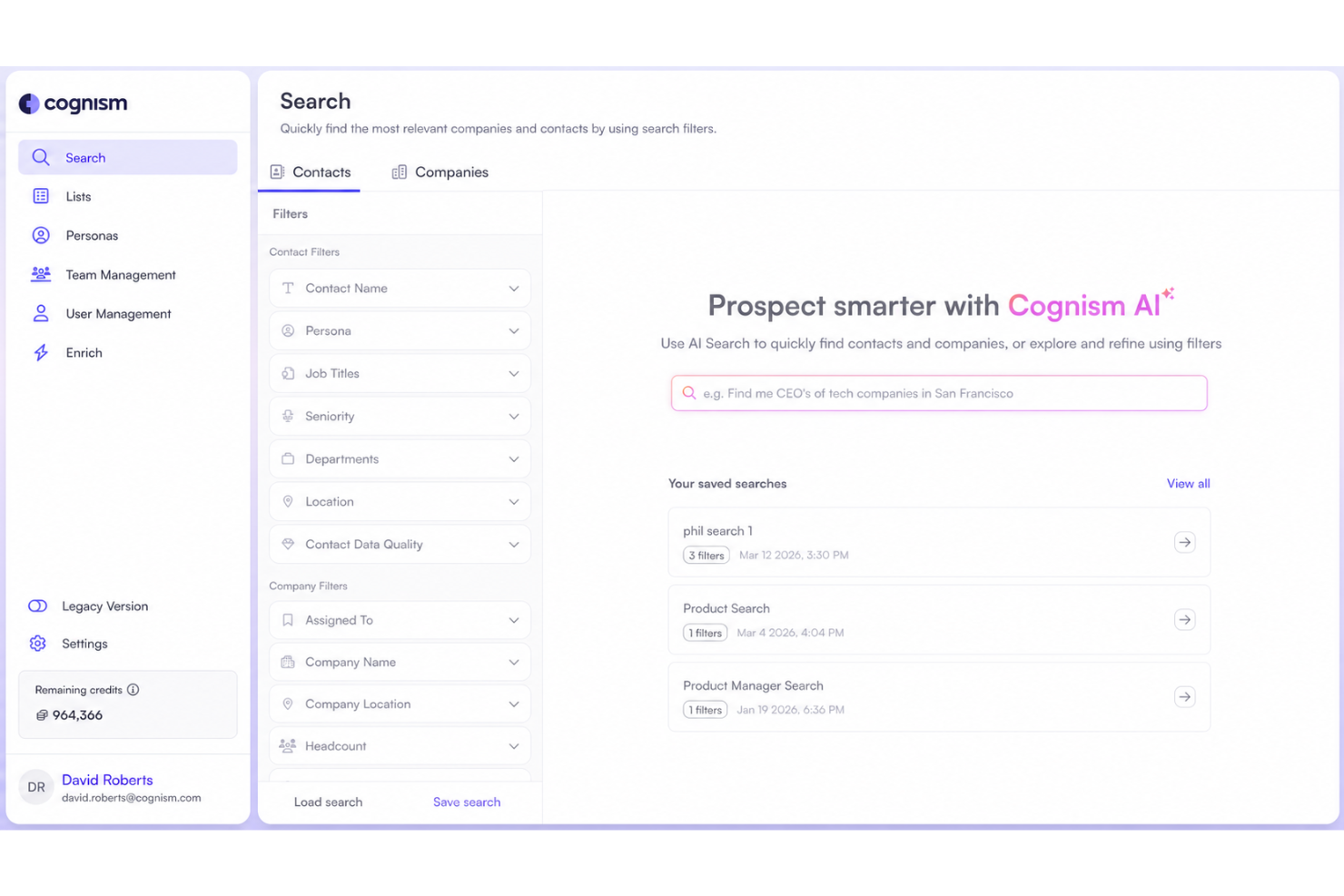
Cognism è una piattaforma di dati di contatto B2B che combina numeri di cellulare verificati telefonicamente, dati firmografici e segnali di intento per aiutare i team di vendita e marketing a identificare e raggiungere i decisori nei mercati globali.
Per chi è più adatto Cognism?
Cognism è particolarmente indicato per i team di vendita e marketing B2B in EMEA e Nord America che necessitano di dati affidabili per attività di prospezione outbound e conformità.
Perché ho scelto Cognism
Ho scelto Cognism come uno dei migliori perché il suo approccio incentrato sulla conformità ai dati B2B è realmente raro a questo livello. Mentre la maggior parte dei fornitori di dati considera la conformità un ripensamento, Cognism la integra grazie a un’ampia copertura delle liste Do-Not-Call in tutta Europa e a un approvvigionamento allineato a GDPR/CCPA.
Mi piace anche che i dati sui decisori vengano aggiornati ogni 30 giorni, così non si rischia di contattare referenti non più attivi. I numeri di cellulare verificati telefonicamente rappresentano un altro punto di forza, offrendo tassi di connessione fino a 3 volte superiori rispetto ai dati non verificati.
Funzionalità principali di Cognism
- Segnali di intento d’acquisto: Fornisce segnali a livello di account in modo che i commerciali sappiano quali potenziali clienti sono attivi nel mercato.
- Estensione browser: Funziona direttamente su LinkedIn e sui siti web aziendali per mostrare dati di contatto e segnali senza lasciare la pagina.
- Strumento AI per ricerca e analisi: Permette ai commerciali di cercare, preparare e identificare potenziali clienti più rapidamente usando query in linguaggio naturale.
- Arricchimento CRM: Aggiorna e mantiene automaticamente i record del CRM con dati di contatto e firmografici aggiornati.
Integrazioni di Cognism
Cognism offre integrazioni native con Salesforce, HubSpot, Pipedrive, Bullhorn, Microsoft Dynamics 365, Salesloft e Outreach. Si connette anche con Zapier e fornisce un’API per integrazioni personalizzate.
Pros and Cons
Pros:
- Screening GDPR e liste Do-Not-Call integrati
- Diamond Data offre numeri di cellulare verificati telefonicamente
- Ottima copertura di contatti in Europa ed EMEA
Cons:
- Nessun sistema integrato di sequenza outbound o automazione email
- La copertura dei dati del mid-market USA è inferiore ai concorrenti

Ideale per l'automazione guidata dei flussi di lavoro di vendita
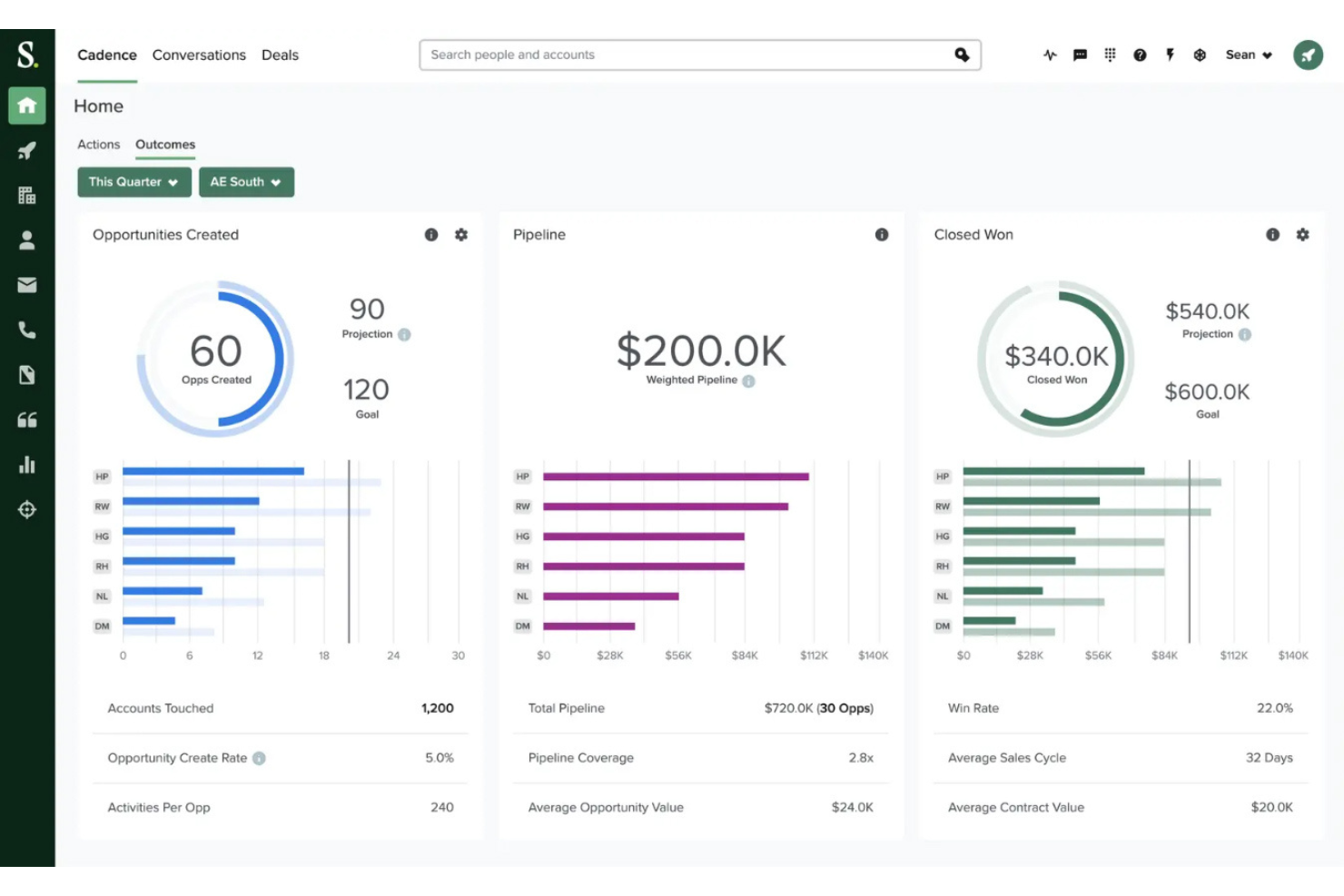
Salesloft è una piattaforma di orchestrazione dei ricavi che unifica l'engagement delle vendite, la gestione delle trattative, l'intelligenza delle conversazioni, la previsione guidata dall'IA e l'instradamento dei segnali degli acquirenti lungo l'intero ciclo di vendita.
Per chi è più adatto Salesloft?
Salesloft è particolarmente indicato per i team di vendita di medie e grandi imprese che necessitano di flussi di lavoro strutturati e ripetibili, con coaching integrato e prioritizzazione basata su segnali.
Perché ho scelto Salesloft
Salesloft si guadagna un posto nella mia shortlist grazie a Rhythm, il suo motore di workflow basato su IA che trasforma i segnali degli acquirenti in una lista di azioni prioritarie giornaliere per ogni venditore. Invece di lasciare ai commerciali la scelta della prossima attività, Rhythm lo fa per loro, assegnando i compiti in base ai punteggi di intento, all'attività sul sito web e allo stadio della trattativa. Apprezzo anche Plays, che attiva automaticamente azioni come la preparazione alle riunioni o l'invio di email di follow-up al verificarsi di determinati segnali, mantenendo il processo di vendita coerente senza intervento manuale.
Caratteristiche principali di Salesloft
- Cadence: Crea sequenze di contatto multistep e multicanale tra email, telefono e social.
- Intelligenza delle conversazioni: Registra, trascrive e valuta le chiamate di vendita con suggerimenti di coaching generati dall’IA.
- Gestione delle trattative: Evidenzia indicatori di salute delle trattative e segnala opportunità bloccate in pipeline.
- Gestione delle previsioni: Permette ai manager di revisionare, regolare e confrontare le previsioni inviate dai venditori con quelle elaborate dall’IA.
Integrazioni di Salesloft
Salesloft offre oltre 180 partner tramite il suo marketplace, inclusa l'integrazione nativa con Salesforce, HubSpot, Microsoft Dynamics 365, LinkedIn Sales Navigator, Gong, Slack, Drift, Chili Piper e altri. Si collega anche con Zapier e offre un'API per integrazioni personalizzate.
Pros and Cons
Pros:
- Il costruttore di cadences gestisce la comunicazione multicanale su larga scala
- La sincronizzazione CRM registra automaticamente le attività in Salesforce
- L’intelligenza delle conversazioni include suggerimenti di coaching per le chiamate
Cons:
- Contratti annuali rigidi complicano la cancellazione
- Nessun database integrato per il reperimento dei contatti

6sense
Ideale per la prioritizzazione predittiva dei lead
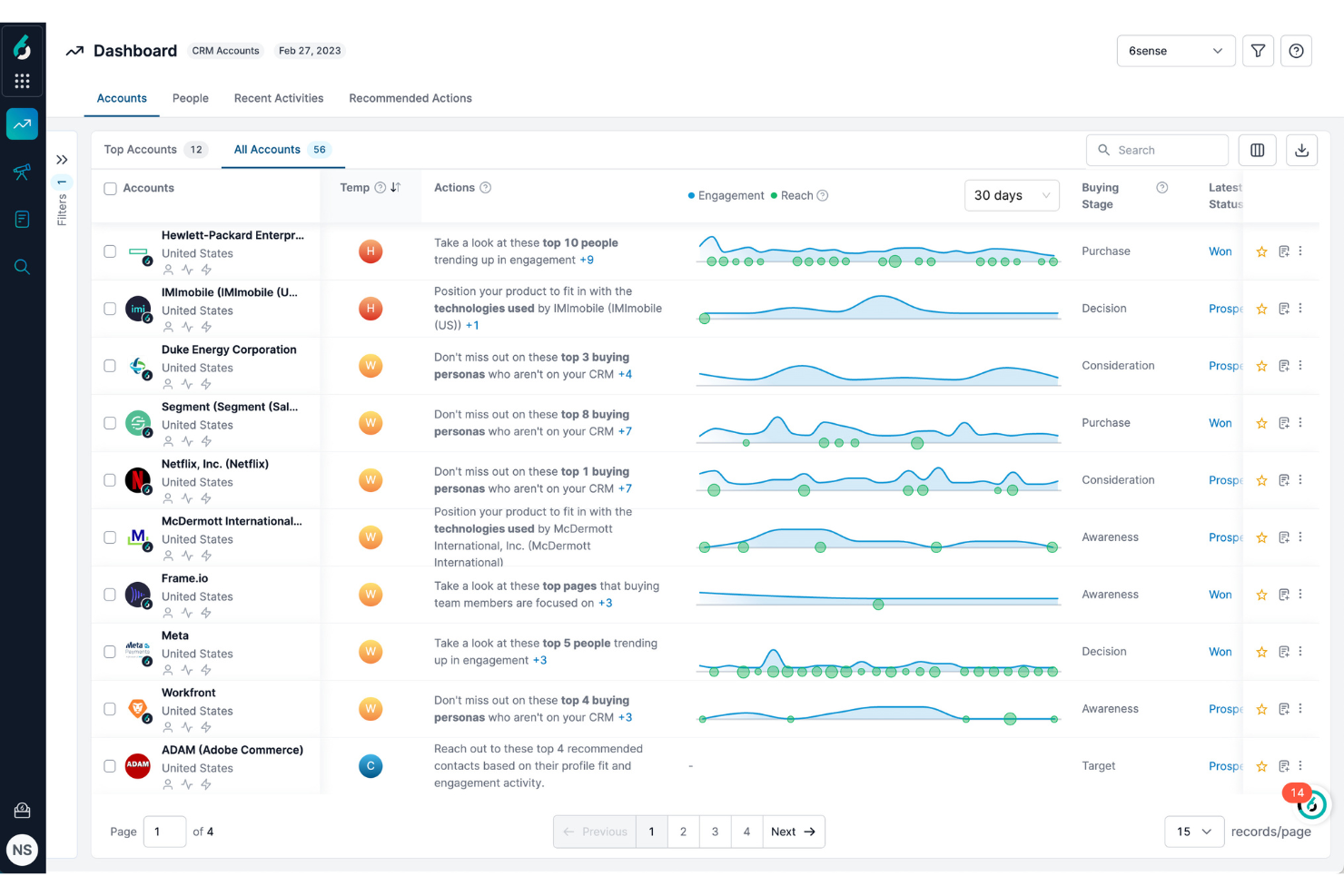
Una piattaforma di engagement basata sull'intelligenza artificiale, 6sense combina analisi predittive, dati sull'intenzione d'acquisto e orchestrazione di marketing basato sugli account per aiutare i team di vendita a identificare e coinvolgere i clienti potenziali già sul mercato.
Per chi è ideale 6sense?
6sense è particolarmente adatta ai team aziendali B2B che necessitano di un allineamento tra vendite e marketing su quali account perseguire, in base ai segnali di fase d'acquisto.
Perché ho scelto 6sense
6sense merita il suo posto nella mia shortlist perché la sua prioritizzazione predittiva dei lead va più a fondo rispetto alla semplice valutazione dei lead. Il modello Revenue AI cattura segnali di acquisto anonimi provenienti da tutto il web e mappa gli account sulle fasi specifiche del percorso di acquisto, così posso sapere quali account sono realmente sul mercato prima ancora che compilino un modulo.
Mi piace anche la funzione di reach sugli account, che permette al mio team di attivare campagne pubblicitarie mirate direttamente su quegli account prioritari senza dover attendere che il marketing costruisca un elenco separato.
Funzionalità principali di 6sense
- Segmentazione psicografica: Raggruppa gli account target in base a comportamenti e interessi per migliorare la precisione del target.
- Email conversazionali: Sequenze email generate dall'intelligenza artificiale che personalizzano l'approccio in base alla fase attuale d'acquisto dell'account.
- Intelligenza sulla pipeline: Traccia lo stato e l'avanzamento delle trattative aperte sfruttando i dati di engagement e intenzione.
- Visibilità sul dark funnel: Evidenzia le attività di ricerca anonime da parte di account che ancora non hanno interagito con il tuo sito o con le tue pubblicità.
Integrazioni di 6sense
6sense offre integrazioni native tra CRM, automazione del marketing, strumenti di sales engagement e pubblicità, tra cui Salesforce, Microsoft Dynamics, HubSpot, Marketo, Eloqua, Outreach, Salesloft, Gong, Slack, LinkedIn Ads e molti altri.
Pros and Cons
Pros:
- Rileva segnali anonimi di acquisto a livello di account
- Previsioni sulle fasi di acquisto per account basate su IA
- Orchestrazione di campagne multi-canale integrata
Cons:
- Richiede un amministratore dedicato per una configurazione completa
- La precisione dei dati di contatto risulta spesso insufficiente

Ideale per sfruttare gli insight della rete professionale
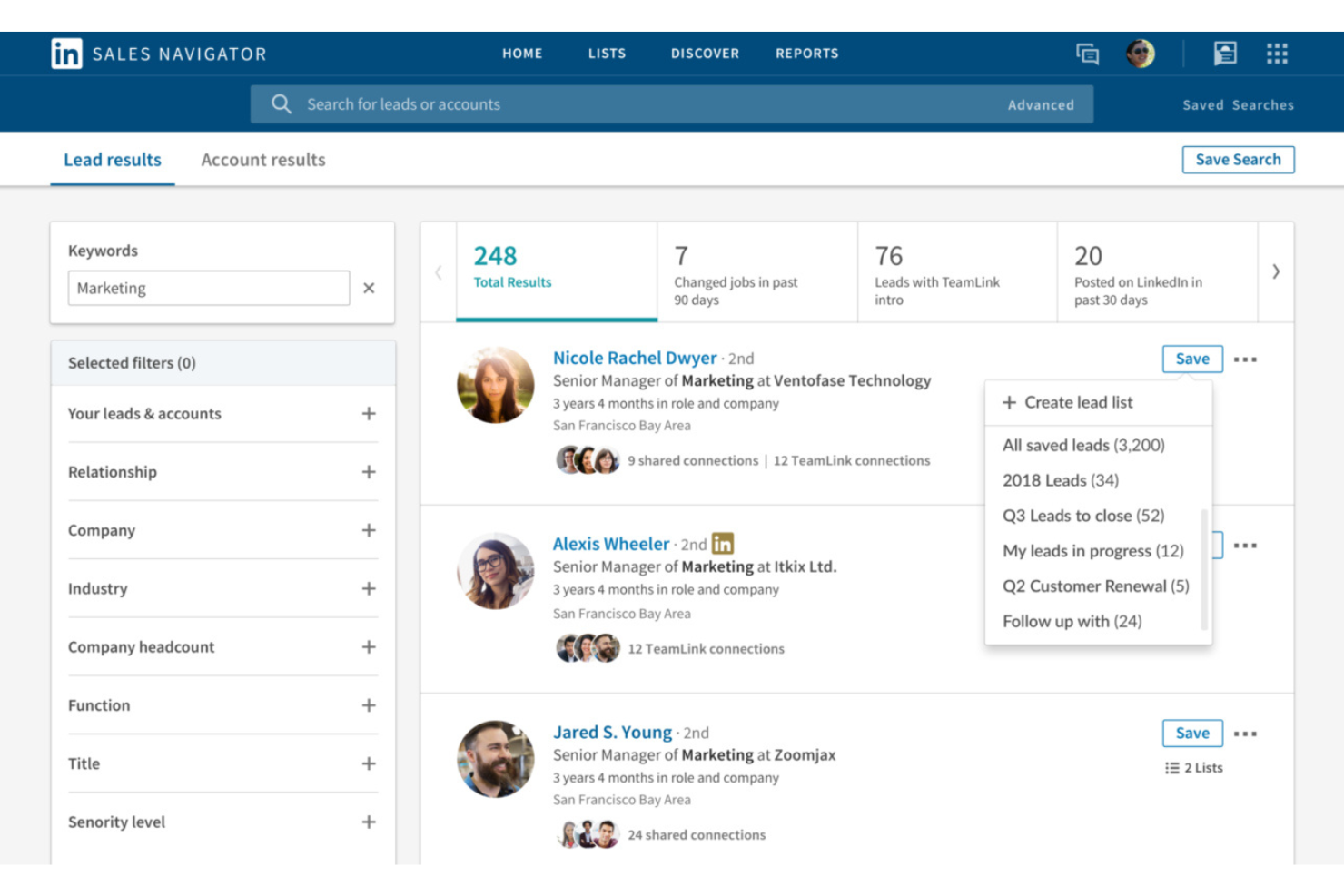
Basato sulla rete professionale di LinkedIn, Sales Navigator è uno strumento di ricerca di potenziali clienti che combina ricerca avanzata di lead e account, segnali in tempo reale sull'intento d'acquisto e tracciamento dei contatti connessi al CRM.
Per chi è consigliato LinkedIn Sales Navigator?
Sales Navigator è ideale per i rappresentanti di vendita B2B e account executive che si basano su un'attività di ricerca di potenziali clienti fondata sulle relazioni per raggiungere i decisori in aziende di medie e grandi dimensioni.
Perché ho scelto LinkedIn Sales Navigator
LinkedIn Sales Navigator merita un posto nella mia shortlist perché nessun altro strumento di prospecting offre una tale profondità di dati della rete professionale. Faccio affidamento sui suoi filtri di ricerca avanzata per creare liste di lead altamente mirate in base a livello di anzianità, reparto e numero di dipendenti dell'azienda; poi utilizzo gli avvisi di cambio lavoro in tempo reale per programmare il mio contatto in modo tempestivo.
La funzionalità TeamLink è particolarmente utile, in quanto mostra a quali potenziali clienti i miei colleghi sono già collegati, così posso chiedere un'introduzione calda invece di un approccio freddo.
Caratteristiche principali di LinkedIn Sales Navigator
- Messaggistica InMail: Invia messaggi diretti a qualsiasi membro di LinkedIn, anche esterno alla tua rete, senza bisogno delle sue informazioni di contatto.
- Account IQ: Presenta riepiloghi generati dall'IA sugli account target, comprese notizie sull'azienda, segnali di crescita e attività dei principali decision maker.
- Smart Links: Raccogli i contenuti di vendita in un link tracciabile che mostra chi lo ha aperto e quanto tempo ha interagito con ogni risorsa.
- Raccomandazioni di lead: Suggerisce nuovi potenziali clienti sulla base dei tuoi lead salvati, della cronologia delle ricerche e delle preferenze sugli account.
Integrazioni di LinkedIn Sales Navigator
LinkedIn Sales Navigator si integra con oltre 20 partner SNAP (Sales Navigator Application Platform), tra cui Salesforce, HubSpot, Microsoft Dynamics 365, Oracle Sales, SAP Sales Cloud, Zoho CRM, SugarCRM, Power BI, Freshworks, Gong, Outreach, Salesloft e Tableau.
Pros and Cons
Pros:
- I segnali di intento d'acquisto evidenziano i potenziali clienti attivi
- Gli avvisi di cambio lavoro migliorano il tempismo dei contatti
- TeamLink rivela connessioni reciproche tra i team
Cons:
- Nessuno strumento integrato di automazione dell'outreach
- Nessuna email o numero di telefono integrato dei contatti

Outreach
Ideale per sequenze di engagement multicanale
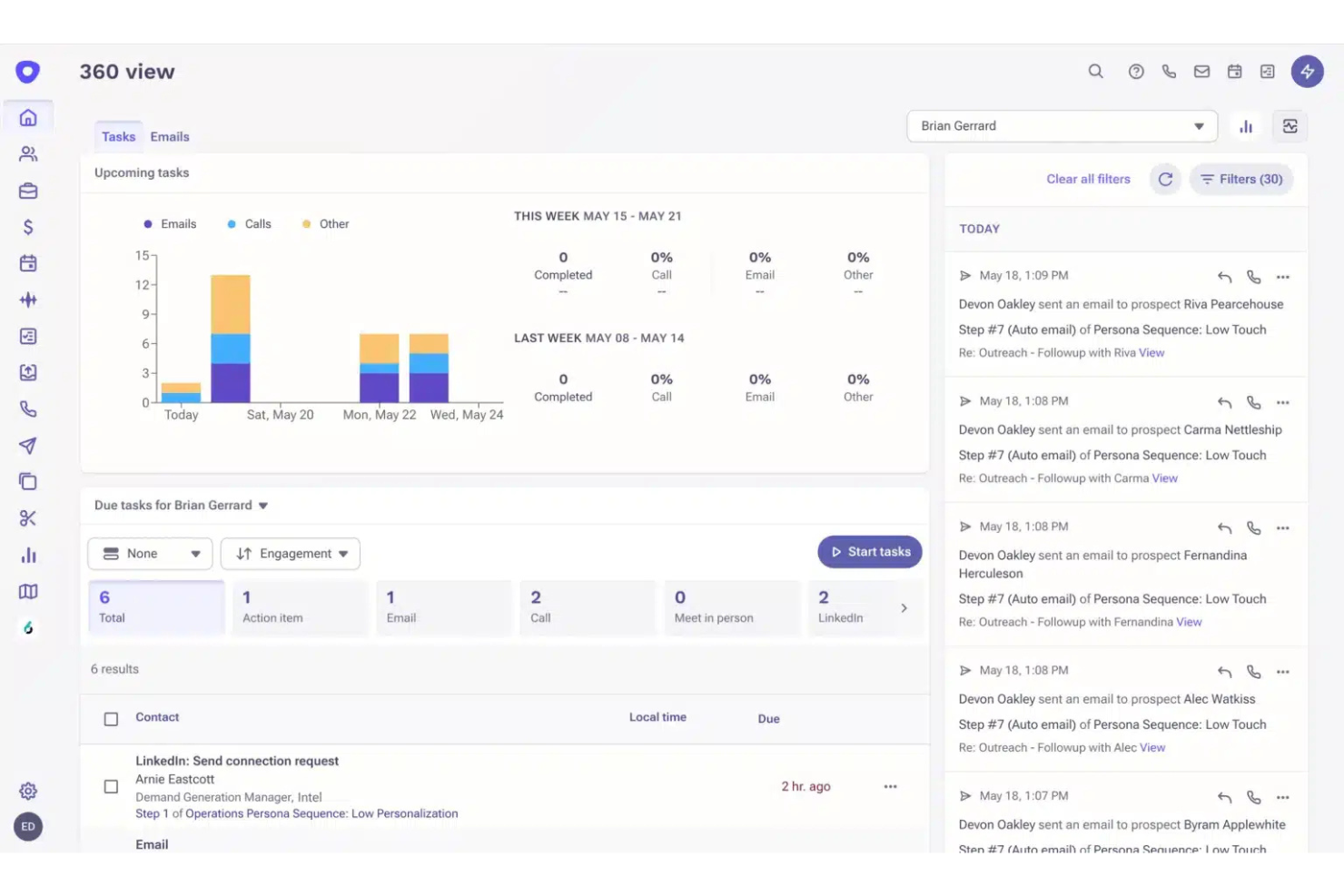
Una piattaforma di sales execution creata per i team enterprise go-to-market, Outreach combina l'engagement multicanale, la gestione delle trattative, i piani d'azione condivisi e la previsione guidata dall'intelligenza artificiale in un unico sistema.
Per chi è ideale Outreach?
Outreach è particolarmente adatto ai team di vendita enterprise che operano con volumi elevati e campagne outbound strutturate su più canali e hanno bisogno di coaching e previsioni integrati.
Perché ho scelto Outreach
Ho incluso Outreach tra le mie scelte principali perché il suo sequence builder gestisce email, telefono, LinkedIn e SMS in un unico workflow coordinato, impedendo ai miei commerciali di dover tracciare manualmente quale canale utilizzare in seguito.
Apprezzo particolarmente l'A/B testing integrato nelle sequenze, così posso testare oggetto delle email o script delle chiamate misurandoli su dati reali di performance. Anche i suggerimenti AI relativi agli step propongono tempistiche e canali basati sui pattern di ingaggio dei clienti.
Caratteristiche principali di Outreach
- Gestione delle trattative: Monitora lo stato delle trattative, le lacune di attività e l'avanzamento delle fasi su tutto il tuo pipeline in un'unica vista.
- Conversation intelligence: Registra e trascrive le chiamate, evidenziando momenti chiave come obiezioni, competitor e prossime azioni.
- Previsioni di fatturato: Consente ai manager di inserire, modificare e confrontare le previsioni utilizzando stime supportate da AI affiancate ai numeri riportati dai commerciali.
- Piani di successo condivisi: Crea workspace condivisi sulle trattative dove commerciali e clienti possono allinearsi su tempistiche, stakeholder e step successivi.
Integrazioni di Outreach
Outreach offre integrazioni native tramite il suo marketplace con strumenti come Salesforce, HubSpot, Microsoft Dynamics 365, Gmail, Outlook, Highspot e Demandbase. Si collega anche con Zapier e fornisce una REST API per integrazioni personalizzate.
Pros and Cons
Pros:
- L’analisi delle sequenze mostra dati di conversione per ciascuno step
- L’analisi del sentiment assistita dall’AI valuta le risposte dei potenziali clienti
- Dashboard dettagliate tracciano l’attività dei commerciali e la produttività del team
Cons:
- Le azioni su LinkedIn sono solo promemoria di attività manuali
- L’implementazione e l’onboarding richiedono diverse settimane

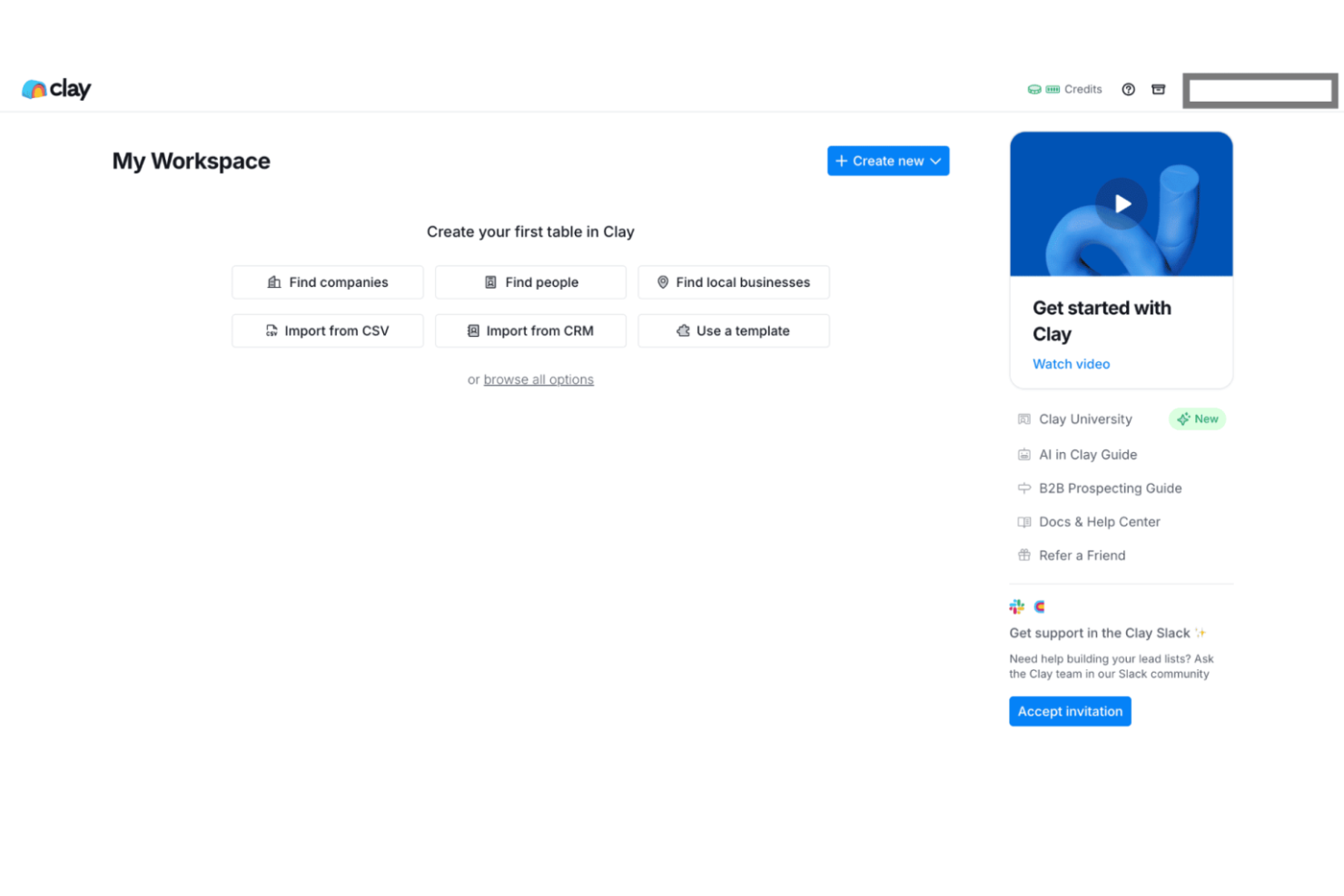
Clay è una piattaforma di arricchimento dati e automazione dei flussi di lavoro per i team GTM che attinge da oltre 150 fornitori di dati per aiutarti a creare elenchi di lead, arricchire i record del CRM, valutare account e attivare comunicazioni automatiche.
Per chi è più adatto Clay?
Clay è particolarmente adatto ai team di crescita e GTM di startup e scale-up B2B che hanno bisogno di creare e arricchire elenchi di potenziali clienti senza dover contare su un team dati dedicato.
Perché ho scelto Clay
Ho incluso Clay tra le mie migliori scelte perché il generatore di tabelle no-code mi permette di costruire flussi di lavoro GTM multi-step che la maggior parte dei team avrebbe bisogno di uno sviluppatore per realizzare. Mi piace che ogni colonna in una tabella Clay possa essere una singola azione di arricchimento, un prompt AI o uno step di logica condizionale, così posso progettare flussi che corrispondono esattamente a come il mio team qualifica e indirizza i lead.
Il generatore di messaggi AI inoltre recupera dati di arricchimento live nel testo personalizzato durante il flusso, così le comunicazioni sono già adattate a ciascun account.
Caratteristiche principali di Clay
- A cascata fornitori di dati: Interroga oltre 150 fonti dati in una sequenza definita in modo che ogni record venga arricchito automaticamente dalla fonte migliore disponibile.
- Sincronizzazione CRM: Invia i record arricchiti e i campi aggiornati direttamente a HubSpot o Salesforce senza esportazioni manuali o mapping dei dati.
- Web scraper: Estrai dati da qualsiasi pagina web pubblica e inseriscili in una tabella Clay come colonna di arricchimento live.
- Ricerca di persone e aziende: Crea da zero elenchi di potenziali clienti usando filtri come titolo professionale, settore, numero di dipendenti e fase di finanziamento tra i database collegati a Clay.
Integrazioni di Clay
Clay offre oltre 100 integrazioni native tra CRM, strumenti di outreach, data warehouse e fornitori di arricchimento, inclusi Salesforce, HubSpot, Outreach, Salesloft, Snowflake, Pipedrive, Slack, Google Sheets, Airtable e Marketo. Si integra anche con Zapier e la sua integrazione HTTP API permette di inviare o recuperare dati da qualsiasi strumento o database tramite endpoint API.
Pros and Cons
Pros:
- L’arricchimento a cascata interroga oltre 150 fonti
- Claygent recupera contesto da pagine web in tempo reale
- Il builder in stile foglio di calcolo non richiede codice
Cons:
- Il consumo di crediti aumenta su elenchi numerosi
- I flussi complessi spesso richiedono strumenti aggiuntivi

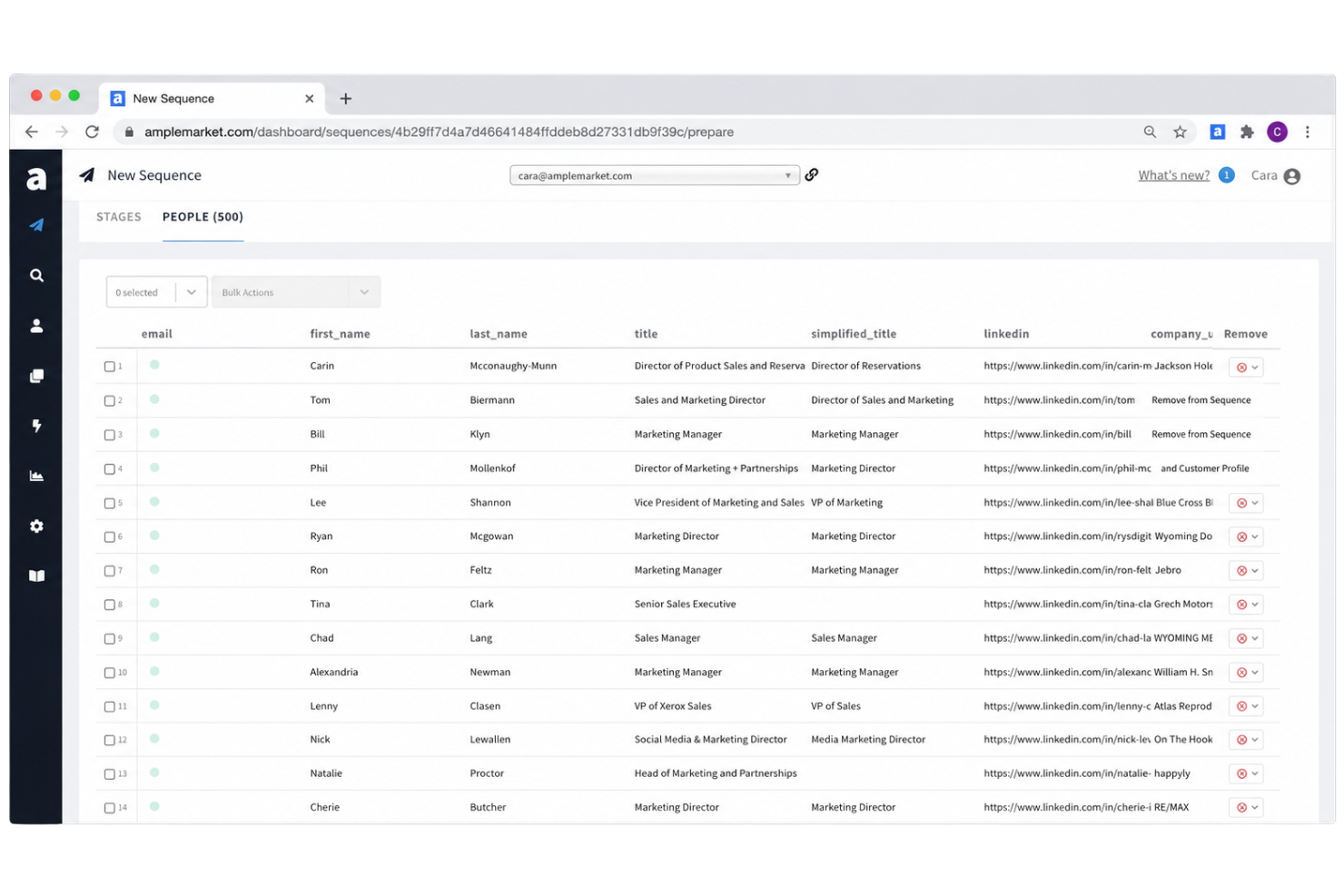
Amplemarket è una piattaforma di sales engagement che combina la scoperta dei potenziali clienti, l’arricchimento dei lead, la creazione di sequenze multicanale e l’esecuzione outbound assistita dall’IA in un unico strumento.
Per chi è ideale Amplemarket?
Amplemarket è adatto a team di vendita B2B di medie e grandi dimensioni che gestiscono campagne outbound ad alto volume e necessitano di targeting basato su segnali integrato nel loro flusso di lavoro di outreach.
Perché ho scelto Amplemarket
Amplemarket merita un posto nella mia shortlist perché le sue capacità di automazione delle campagne vanno oltre la semplice sequenziazione. Utilizzo la funzione di A/B testing per eseguire varianti dei messaggi all’interno delle sequenze attive, il che significa che posso ottimizzare i testi senza interrompere l’attività di outreach.
Anche la funzionalità di clonazione vocale per i passaggi su LinkedIn è qualcosa che raramente vedo negli strumenti outbound, permettendomi di inviare note vocali personalizzate dall’IA su larga scala senza registrarle manualmente una ad una.
Funzionalità principali di Amplemarket
- Costruttore di sequenze multicanale: Crea sequenze di outreach che combinano step via email, LinkedIn, telefono e SMS in un unico flusso automatizzato.
- Arricchimento dei contatti: Aggiungi email verificate e numeri diretti alle schede dei potenziali clienti utilizzando le fonti dati integrate in Amplemarket.
- Analisi delle sequenze: Monitora i tassi di apertura, risposta e conversione suddivisi per sequenza, fase e mittente.
- Sincronizzazione CRM: Sincronizza automaticamente l’attività dei potenziali clienti e lo stato delle sequenze su Salesforce o HubSpot tramite sincronizzazione bidirezionale.
Integrazioni Amplemarket
Amplemarket offre oltre 28 integrazioni native in nove categorie, tra cui Salesforce, HubSpot, CloudTalk, Nooks, Orum, Salesfinity, Trellus, SendSpark, ChatGPT e Claude. Si collega con Zapier e Clay e dispone di una REST API con webhook per integrazioni personalizzate.
Pros and Cons
Pros:
- Sostituisce diversi strumenti outbound in uno solo
- Monitoraggio integrato della deliverability e della salute del dominio
- Duo Copilot rileva segnali di acquisto in tempo reale
Cons:
- I dati di contatto possono essere obsoleti
- Solo contratti annuali, nessuna fatturazione mensile
Ideale per identificare le aziende che visitano il sito web


Bombora
Ideale per dati sulle intenzioni basati sul consumo di contenuti

Altri strumenti per l'ingresso sul mercato
Ecco alcuni strumenti aggiuntivi per l’ingresso sul mercato che non sono stati inclusi nella mia selezione, ma che vale comunque la pena prendere in considerazione:
- Clari
Ideale per la previsione della salute del flusso di fatturato
- Dealfront
Ideale per approfondimenti sulle prospettive di vendita con sede nell'UE
- UserGems
Ideale per monitorare i cambi di lavoro degli acquirenti
- Common Room
Ideale per analizzare i segnali d'acquisto nelle community


Come valuto gli strumenti per l'ingresso sul mercato
Un team RevOps ha bisogno di un'unica piattaforma in grado di gestire tutto, dai dati sugli account e dai segnali di intent alle sequenze di contatto e ai report sul flusso delle opportunità. Divido la mia valutazione in requisiti di base che ogni strumento deve soddisfare e fattori distintivi che separano le opzioni più solide dal resto.
Funzionalità principali (requisiti fondamentali per questo elenco)
Quando seleziono gli strumenti da inserire nel mio elenco, assegno a ciascuno un punteggio su una scala da 0 (non offre la funzionalità) a 5 (eccelle in quest'area) per ogni funzionalità principale elencata di seguito. Calcolo quindi il punteggio totale dello strumento come percentuale, utilizzando il 75% come riferimento per valutarne l'idoneità complessiva per l'elenco.
- Dati su account e contatti: valuto la profondità dei dati firmografici, tecnografici e a livello di contatto, verificando anche se la piattaforma arricchisce automaticamente gli account con indirizzi di posta elettronica verificati, numeri diretti e dati sull'organigramma mentre si creano gli elenchi di target.
- Segnali di intent degli acquirenti: gli strumenti più solidi combinano i dati di coinvolgimento proprietari con fonti di intent di terze parti, così il team può dare priorità agli account che mostrano un comportamento d'acquisto reale, non solo visite al sito web.
- Orchestrazione del contatto multicanale: cerco sequenze coordinate almeno tra posta elettronica, telefono e LinkedIn, con la possibilità di creare flussi a livello di team che seguano percorsi diversi in base alle risposte o al coinvolgimento dei potenziali clienti.
- Integrazione con CRM e stack GTM: la sincronizzazione bidirezionale con Salesforce e HubSpot è un requisito di base. Verifico che i dati sulle attività, i campi personalizzati e le fasi dei potenziali clienti fluiscano correttamente tra la piattaforma, il vostro MAP e gli altri strumenti di vendita, senza dover ricorrere manualmente a file CSV.
- Instradamento dei potenziali clienti e automazione dei flussi di lavoro: valuto come la piattaforma gestisce il punteggio, la segmentazione e l'assegnazione. Le opzioni migliori supportano l'instradamento basato sul territorio e il monitoraggio degli SLA, così i rappresentanti ricevono rapidamente i potenziali clienti giusti e i manager possono individuare i colli di bottiglia.
- Analisi del flusso delle opportunità e dei ricavi: i report dovrebbero coprire la generazione delle opportunità, la conversione dell'imbuto e l'attribuzione delle campagne in pannelli di controllo che il team operativo possa personalizzare senza dipendere da uno strumento BI separato.
Dopo aver creato un elenco di strumenti che soddisfano i criteri, valuto ciò che distingue ciascuna piattaforma.
Fattori distintivi (ciò che differenzia i fornitori)
Ecco come confronto i diversi fornitori:
Funzionalità di spicco
Cerco strumenti di intelligence delle conversazioni che vadano oltre la semplice registrazione delle chiamate. Gli strumenti migliori collegano direttamente i punteggi di rischio delle trattative generati dall'AI e le indicazioni per la formazione alle previsioni del flusso delle opportunità, così il team RevOps può segnalare le trattative in stallo prima che si blocchino. La mappatura del comitato d'acquisto è un altro elemento distintivo: verifico se una piattaforma crea automaticamente gli organigrammi e mette in evidenza tutti i responsabili delle decisioni, poiché i rappresentanti che si rivolgono a un singolo contatto nelle trattative aziendali perdono regolarmente a favore dei concorrenti che coinvolgono l'intero comitato. Valuto anche gli strumenti di pianificazione dei territori e delle quote, perché i team RevOps in grado di modellare la capacità e assegnare gli account all'interno della stessa piattaforma che usano per l'esecuzione evitano il caos dei fogli di calcolo che deriva dalla gestione separata di questi flussi di lavoro.
Oltre le funzionalità
Valuto attentamente l'accuratezza dei dati e la copertura globale, perché i tassi di rimbalzo e i contatti obsoleti compromettono rapidamente le campagne in uscita. Verifico anche il modello di prezzo di ciascun fornitore per individuare i costi nascosti: i limiti di crediti per l'arricchimento o i moduli di intent soggetti a restrizioni possono far aumentare il costo totale ben oltre il prezzo indicato per licenza, soprattutto quando si consolidano soluzioni puntuali. La profondità dell'integrazione è altrettanto importante: cerco la sincronizzazione bidirezionale con CRM, MAP e archivi di dati come Snowflake, poiché i team RevOps che realizzano ecosistemi componibili hanno bisogno di API aperte e di controlli di sincronizzazione a livello di campo per mantenere intatta la governance del CRM.
Come scegliere gli strumenti per l'ingresso sul mercato
È facile perdersi in lunghi elenchi di funzionalità e strutture tariffarie complesse. Per aiutarti a mantenere la concentrazione mentre affronti il tuo processo di selezione del software, ecco una lista di controllo dei fattori da tenere presenti:
| Fattore | Cosa considerare |
|---|---|
| Scalabilità | Lo strumento è in grado di gestire la crescita dei tuoi dati e degli utenti man mano che espandi le iniziative per l'ingresso sul mercato? I prezzi, le prestazioni o i limiti creeranno ostacoli quando aumenterai il numero di campagne o aggiungerai nuove squadre? |
| Integrazioni | Lo strumento si connette nativamente al tuo CRM, alle piattaforme dati, agli strumenti di messaggistica e ai flussi di lavoro? Esistono limiti o costi aggiuntivi per l'integrazione? Può funzionare con il tuo principale insieme di strumenti? |
| Personalizzazione | Quanto puoi adattare flussi di lavoro, campi e campagne al tuo processo di vendita o ai tuoi processi aziendali? Sono disponibili opzioni avanzate di personalizzazione e autorizzazioni? |
| Facilità d'uso | I rappresentanti, i responsabili e il personale operativo adotteranno facilmente lo strumento? Richiede una formazione approfondita per ottenere risultati e, una volta implementato, è facile da gestire per gli utenti non tecnici? |
| Implementazione e inserimento | Quali sono i tempi previsti per l'inserimento? Il fornitore supporta la migrazione dei dati, la configurazione delle integrazioni e la formazione iniziale? Sono necessarie risorse o competenze interne? |
| Costo | Qual è il costo totale di proprietà (TCO), incluse licenze, inserimento, integrazione, manutenzione e fasce di utenti? Sono previsti costi nascosti per l'utilizzo dei dati o l'assistenza? |
| Misure di sicurezza | Lo strumento soddisfa i tuoi requisiti di protezione dei dati? Offre SSO, opzioni di localizzazione dei dati e certificazioni di conformità come SOC 2 o GDPR, quando necessarie? |
| Disponibilità dell'assistenza | Con quale rapidità e affidabilità puoi ricevere aiuto? Durante il tuo orario lavorativo sono disponibili chat dal vivo, assistenza telefonica e risorse della base di conoscenze? |
Cosa sono gli strumenti per l'ingresso sul mercato?
Gli strumenti per l'ingresso sul mercato sono piattaforme software che aiutano i team responsabili dei ricavi a coordinare ed eseguire la ricerca proattiva di potenziali clienti, le campagne multicanale, l'arricchimento dei potenziali clienti, il targeting degli account e l'analisi della pipeline. Questi strumenti riuniscono dati, automazione dei flussi di lavoro e analisi, così che i team di vendita, marketing e successo dei clienti possano coordinare le attività e monitorare i risultati lungo l'intero funnel dei ricavi.
Funzionalità
Quando selezioni gli strumenti per l'ingresso sul mercato, presta attenzione alle seguenti funzionalità principali:
- Arricchimento dei contatti: Compila automaticamente i dati mancanti o incompleti dei potenziali clienti e degli account utilizzando database esterni, rendendo le attività di contatto più accurate e mirate.
- Segmentazione degli account: Raggruppa i potenziali clienti in base a caratteristiche firmografiche, demografiche o comportamentali, consentendo di dare priorità e personalizzare le campagne per destinatari specifici.
- Sequenze multicanale: Coordina le attività di contatto su canali come e-mail, telefono, LinkedIn, social media e SMS, permettendo di gestire campagne unificate da un'unica piattaforma.
- Monitoraggio del coinvolgimento: Monitora le interazioni dei potenziali clienti, come aperture, risposte, clic e chiamate, per aiutare i team a individuare i segnali di interesse e ottimizzare i tempi.
- Visibilità sulla pipeline di vendita: Offre pannelli di controllo e report dinamici per mantenere i team informati sulle fasi delle attività di contatto, sui tassi di conversione e sull'avanzamento delle trattative.
- Integrazione con il CRM: Sincronizza i dati dei potenziali clienti e delle attività direttamente con il CRM, riducendo l'inserimento manuale dei dati e garantendo la gestione centralizzata dei record.
- Rilevamento dell'intenzione di acquisto: Fa emergere segnali come visite al sito web, download di contenuti o azioni offline che indicano quando i potenziali clienti stanno cercando attivamente una soluzione come la tua.
- Automazione dei flussi di lavoro: Automatizza i processi ripetitivi, come i ricontatti o l'assegnazione dei potenziali clienti, per aumentare l'efficienza e la coerenza dell'esecuzione delle attività di ingresso sul mercato.
Funzionalità comuni dell'IA
Oltre alle funzionalità standard degli strumenti per l'ingresso sul mercato elencate sopra, molte di queste soluzioni stanno integrando l'IA con funzionalità come:
- Valutazione automatizzata dei potenziali clienti: Utilizza l'apprendimento automatico per analizzare grandi quantità di dati e dare priorità ai potenziali clienti con maggiori probabilità di interagire o convertirsi, aiutando i rappresentanti a concentrarsi sulle opportunità di maggior valore.
- Personalizzazione delle e-mail basata sull'IA: Genera oggetti e messaggi personalizzati sulla base dei dati dei potenziali clienti e dei precedenti modelli di coinvolgimento, per aumentare i tassi di apertura e risposta.
- Intelligenza conversazionale: Trascrive e analizza le chiamate di vendita o le e-mail per far emergere modelli, obiezioni e informazioni utili per la formazione e l'ottimizzazione dei messaggi.
- Rilevamento dei segnali di intenzione: Analizza continuamente le tracce digitali e le fonti di dati esterne per identificare i segnali di acquisto e avvisare i team quando i potenziali clienti stanno cercando attivamente informazioni su argomenti pertinenti.
- Previsione dell'orario ottimale di invio: Prevede quando i singoli potenziali clienti hanno maggiori probabilità di aprire e rispondere alle attività di contatto, regolando automaticamente i tempi delle campagne per ottenere un coinvolgimento maggiore.
Vantaggi
L'implementazione di strumenti per l'ingresso sul mercato a supporto della strategia complessiva di ingresso sul mercato offre diversi vantaggi al tuo team e alla tua azienda. Ecco alcuni dei risultati che puoi aspettarti:
- Selezione mirata dei clienti per le vendite migliorata: La segmentazione avanzata e l'arricchimento dei potenziali clienti aiutano a concentrare le attività sui potenziali clienti giusti.
- Maggiore coinvolgimento multicanale: Le sequenze integrate e la gestione dei canali mantengono le attività di contatto coerenti e coordinate tra le piattaforme.
- Esecuzione più rapida delle campagne: L'automazione delle attività ripetitive consente al tuo team di lanciare campagne e ricontatti in modo efficiente.
- Visibilità chiara sulla pipeline: I pannelli di controllo e le analisi in tempo reale mostrano il coinvolgimento, le conversioni e le prestazioni in ogni fase.
- Maggiore allineamento con il CRM: Le integrazioni native sincronizzano attività, contatti e risultati con il CRM, riducendo l'inserimento manuale dei dati.
- Processo decisionale più informato: Le informazioni e i report basati sull'IA fanno emergere tendenze e opportunità per apportare modifiche strategiche.
- Processi scalabili: Flussi di lavoro flessibili e automazione crescono insieme al tuo team, con l'espansione delle esigenze aziendali, delle attività di contatto e della strategia GTM.
Costi e prezzi
La selezione di questi strumenti GTM aziendali richiede la comprensione dei diversi modelli e piani tariffari disponibili. I costi variano in base alle funzionalità, alle dimensioni del team, agli elementi aggiuntivi e ad altri fattori. La tabella seguente riassume i piani comuni, i relativi prezzi medi e le funzionalità normalmente incluse nelle soluzioni di strumenti per l'ingresso sul mercato:
Tabella comparativa dei piani per gli strumenti di ingresso sul mercato
| Tipo di piano | Prezzo medio | Funzionalità comuni |
|---|---|---|
| Piano gratuito | $0 | Accesso a campagne di base, arricchimento dei contatti limitato, reportistica di base, integrazioni principali e assistenza solo via e-mail. |
| Piano personale | $20-$50/utente/mese | Accesso per un singolo utente, arricchimento dei lead, attività di contatto multicanale, automazione limitata e sincronizzazione CRM di base. |
| Piano aziendale | $50-$120/utente/mese | Funzionalità per la collaborazione tra team, segmentazione avanzata, dashboard di reportistica, automazione dei flussi di lavoro e assistenza prioritaria. |
| Piano aziendale avanzato | $120-$300/utente/mese | Integrazioni personalizzate, avvio dedicato, sicurezza di livello aziendale, SLA, analisi avanzate e accesso completo all'API. |
Domande frequenti sugli strumenti per l'ingresso sul mercato
Ecco alcune risposte alle domande frequenti sugli strumenti per l’ingresso sul mercato:
In che modo gli strumenti per l'ingresso sul mercato aiutano ad allineare vendite, marketing e successo del cliente?
Gli strumenti per l’ingresso sul mercato centralizzano i dati delle campagne, consentono di utilizzare flussi di lavoro condivisi e creano una visione unica del percorso del cliente. Questa visibilità aiuta i team a coordinare le attività di contatto, ridurre gli attriti nei passaggi di consegne e creare report coerenti su pipeline e risultati.
Posso personalizzare gli strumenti per l'ingresso sul mercato in base al processo di vendita del nostro team?
Sì, la maggior parte degli strumenti per l’ingresso sul mercato consente di personalizzare fasi, campi, regole di segmentazione e automazioni in base a specifici processi di vendita. Cerca soluzioni con strumenti flessibili per la creazione di flussi di lavoro e opzioni di integrazione, così da non dover adattare il tuo processo a modelli generici.
Cosa devo fare per proteggere i dati sensibili quando utilizzo strumenti per l'ingresso sul mercato?
Scegli strumenti dotati di misure di sicurezza come SSO, accesso basato sui ruoli e certificazioni di conformità come SOC 2 o GDPR. È inoltre consigliabile verificare dove vengono archiviati i dati e per quanto tempo i fornitori conservano le informazioni sui potenziali clienti.
Quanto tempo richiede generalmente l'implementazione degli strumenti per l'ingresso sul mercato?
La maggior parte dei team può implementare gli strumenti per l’ingresso sul mercato in un periodo compreso tra pochi giorni e poche settimane. Tra i fattori che incidono sulle tempistiche rientrano la migrazione dei dati, la configurazione delle integrazioni, la formazione degli utenti e il livello di corrispondenza tra i processi aziendali e le migliori pratiche dello strumento.
Gli strumenti per l'ingresso sul mercato richiedono assistenza tecnica continuativa?
Sebbene molti strumenti siano facili da usare, potrebbe essere necessaria un’assistenza tecnica continuativa per gli aggiornamenti delle integrazioni, le modifiche ai flussi di lavoro o la risoluzione dei problemi. Dai priorità ai fornitori con una documentazione completa e un’assistenza clienti reattiva, soprattutto se il tuo insieme di tecnologie è complesso.