

Le 10 migliori alternative a Intercom nel 2026

Elenco delle migliori alternative a Intercom


Le migliori alternative a Intercom combinano messaggistica multicanale, funzionalità CRM e automazione per aiutare il tuo team a gestire le relazioni con i clienti e le campagne di marketing in un unico posto. Se stai cercando alternative a Intercom, probabilmente cerchi un software CRM di marketing che offra una maggiore facilità d'uso, sia più conveniente o si adatti meglio al flusso di lavoro del tuo team.
Con così tante opzioni disponibili, è difficile sapere quali piattaforme offrano davvero dati unificati sui clienti, gestione delle campagne e integrazioni. Questa guida ti aiuterà a confrontare le principali alternative a Intercom, così potrai trovare quella più adatta ai tuoi obiettivi di marketing e coinvolgimento dei clienti.
Che cos'è Intercom?
Intercom è una piattaforma CRM di marketing che combina chat dal vivo, messaggistica e gestione dei dati dei clienti per aiutare le aziende a coinvolgere, assistere e convertire i visitatori del sito web. È progettata per i team che desiderano gestire le conversazioni con i clienti, automatizzare le attività di contatto e monitorare il coinvolgimento su più canali. Intercom è apprezzato per i suoi widget di chat personalizzabili, gli strumenti di automazione e i vari componenti aggiuntivi che si collegano ad altre piattaforme di marketing e vendita.
Tabella di confronto delle alternative a Intercom
Questa tabella di confronto riassume i dettagli sui prezzi delle migliori alternative a Intercom che ho selezionato:
| Tool | Best For | Trial Info | Price | ||
|---|---|---|---|---|---|
| 1 | Ideale per widget di chat personalizzabili | Versione di prova gratuita disponibile | Da $12/utente/mese (fatturazione annuale) | Website | |
| 2 | Ideale per la gestione del supporto multibrand | Prova gratuita disponibile | Da $29/utente/mese (fatturazione annuale) | Website | |
| 3 | Ideale per la collaborazione nella casella di posta condivisa | Prova gratuita di 14 giorni + demo gratuita + piano gratuito disponibile | Da $45/workspace/mese | Website | |
| 4 | Ideale per l'integrazione con piattaforme di e-commerce | Prova gratuita di 7 giorni + demo gratuita disponibile | Da $10/mese | Website | |
| 5 | Ideale per timeline cliente unificate | Demo gratuita disponibile | Prezzo su richiesta | Website | |
| 6 | Ideale con workflow di automazione integrati | Prova gratuita di 14 giorni + piano gratuito + demo gratuita disponibile | Da $20/mese/postazione | Website | |
| 7 | Ideale per il supporto clienti basato su Slack | Demo gratuita disponibile | Da $59/sedile/mese (fatturazione annuale) | Website | |
| 8 | Ideale per una vista contestuale del supporto clienti | Demo gratuita disponibile | Da $1/ticket risolto | Website | |
| 9 | Ideale per la personalizzazione open-source | Prova gratuita di 15 giorni + piano gratuito disponibile | A partire da $19/agente/mese (fatturato annualmente) | Website | |
| 10 | Ideale per la gestione dei ticket multicanale | Prova gratuita di 30 giorni + demo gratuita disponibile | Da $15/mese (fatturato annualmente) | Website |
Perché fidarsi dei nostri consigli sui software
Le nostre recensioni riflettono il nostro giudizio indipendente, non un discorso di vendita. Scopri come manteniamo la trasparenza.
Per questa guida, abbiamo valutato gli strumenti attraverso test pratici e ricerche indipendenti, assegnando un punteggio agli strumenti in base ai nostri criteri di selezione.
Le nostre recensioni riflettono il nostro giudizio editoriale umano, non un discorso di vendita.
Recensioni delle migliori alternative a Intercom
Di seguito trovi i miei riepiloghi dettagliati delle migliori alternative a Intercom incluse nel mio elenco. Le mie recensioni offrono un’analisi approfondita delle funzionalità, delle integrazioni e dei casi d’uso più adatti di ciascuna piattaforma, per aiutarti a trovare quella migliore per te.

Ideale per widget di chat personalizzabili
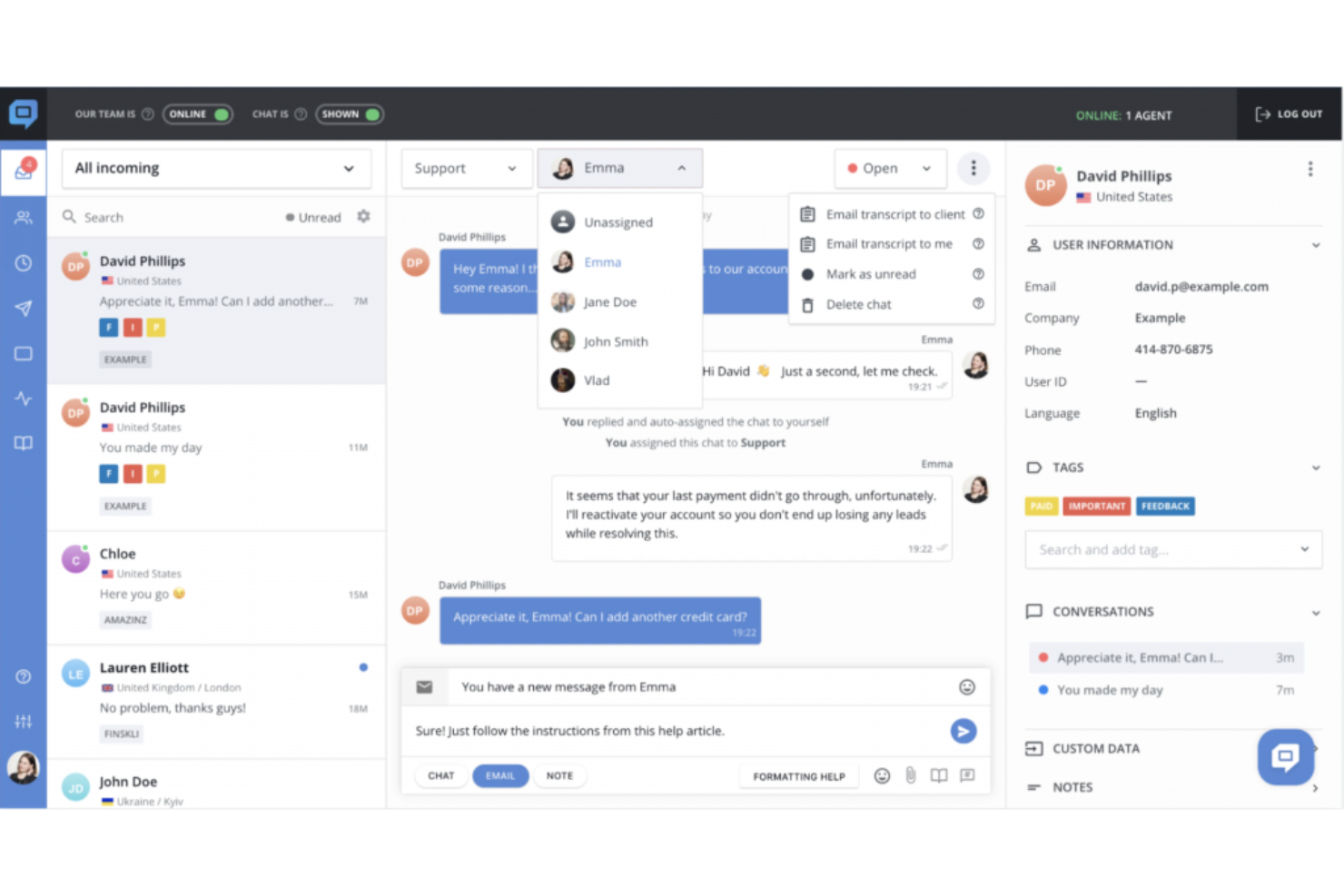
HelpCrunch è un software di help desk pensato per i team che desiderano gestire chat, email e base di conoscenza da un'unica piattaforma. È particolarmente adatto per aziende SaaS e imprese di e-commerce che cercano di personalizzare il coinvolgimento del cliente e semplificare i flussi di lavoro dell'assistenza.
Per chi è ideale HelpCrunch?
Team di assistenza clienti e marketing presso startup SaaS e aziende e-commerce che desiderano opzioni flessibili per i widget di chat.
Perché HelpCrunch è una valida alternativa a Intercom
Ho scelto HelpCrunch soprattutto per quanto controllo offre sul widget di chat. Puoi personalizzare colori, stili dei pulsanti e collegamenti ai canali messenger per adattarli al tuo marchio, senza scrivere codice. Apprezzo anche il fatto che il widget supporti una base di conoscenza integrata, così i clienti possono cercare risposte direttamente nella chat prima ancora di avviare una conversazione. In pratica, ciò significa che il mio team gestisce meno domande ripetitive, mantenendo al contempo l’esperienza coerente con il marchio. Per i team che passano da Intercom, la sola flessibilità del widget rende HelpCrunch degno di un’attenta valutazione.
Funzionalità principali di HelpCrunch
- Campagne email automatizzate: Invia sequenze di email attivate dai comportamenti degli utenti sulla base delle azioni svolte nel tuo prodotto o sul tuo sito web.
- Popup per siti web: Crea e pubblica popup mirati con trigger di exit-intent, moduli di acquisizione lead e animazioni personalizzate utilizzando un editor senza codice.
- Posta in arrivo condivisa multicanale: Gestisci le conversazioni da email, social media e messenger in un’unica casella di posta di team con regole di assegnazione e instradamento.
- Costruttore di chatbot senza codice: Crea flussi chatbot multi-step per la qualificazione dei lead, risposte alle FAQ e instradamento delle conversazioni su diversi canali.
Integrazioni di HelpCrunch
Le integrazioni includono Instagram, WhatsApp, Telegram, Viber, Discord, una REST API per integrazioni personalizzate e webhook.
Pros and Cons
Pros:
- Include strumenti email marketing nativi
- Base di conoscenza integrata nel widget
- Popup illimitati nei piani a pagamento
Cons:
- Nessun tour in-app o flussi di onboarding
- Il costruttore di chatbot non dispone di funzionalità AI avanzate

Re:amaze
Ideale per la gestione del supporto multibrand
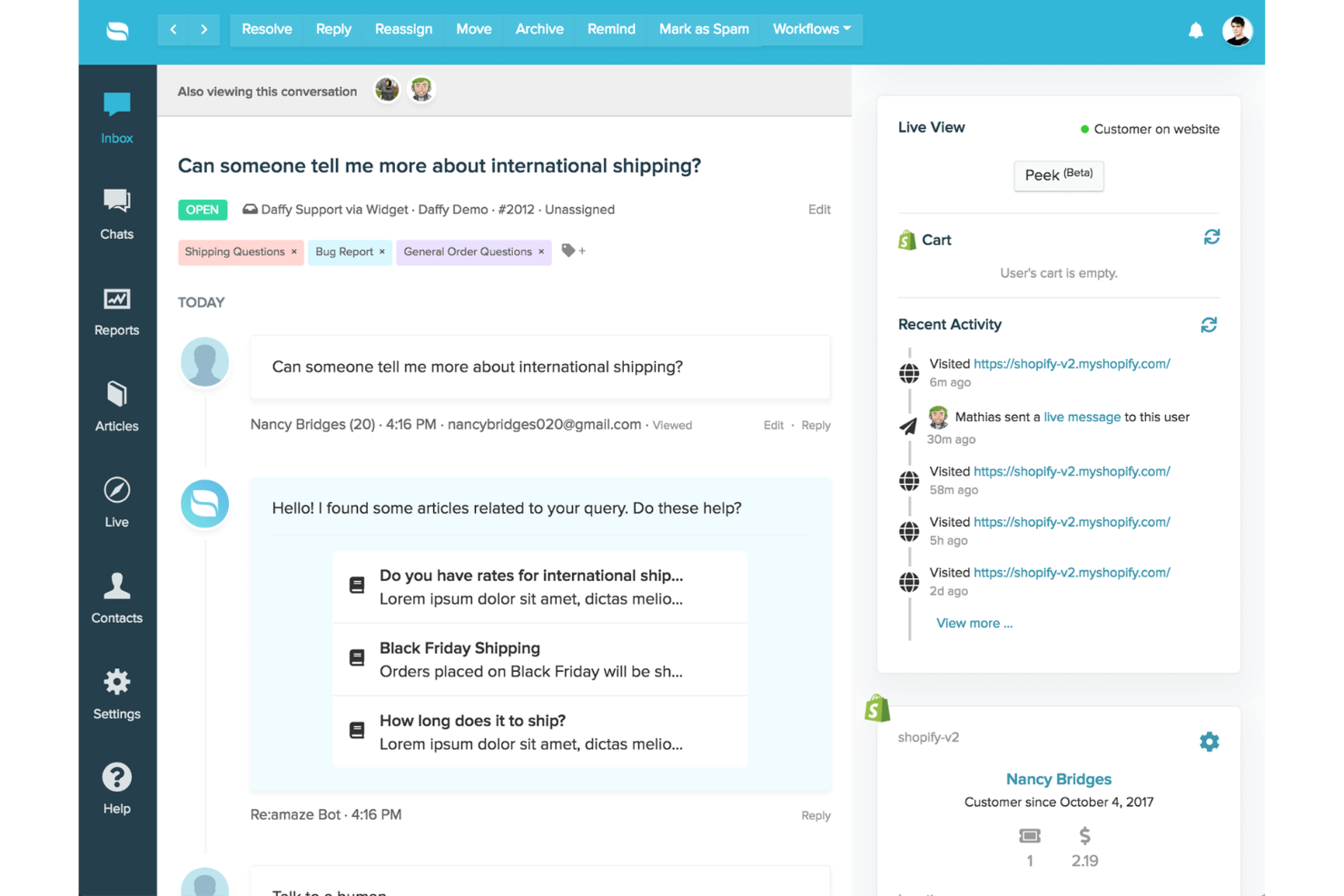
Re:amaze è una piattaforma di messaggistica clienti e helpdesk progettata per le aziende che devono gestire conversazioni su più canali e brand. Se cerchi un CRM per il marketing che riunisca live chat, email, social e SMS in un'unica dashboard, Re:amaze merita attenzione.
Per chi è ideale Re:amaze?
Team di supporto e marketing che gestiscono conversazioni con clienti su più brand o vetrine.
Perché Re:amaze è una valida alternativa a Intercom
Ho scelto Re:amaze soprattutto per la gestione delle operazioni multibrand da un unico account. Ogni brand ha la propria configurazione del widget di chat, i propri canali email e social, il sito delle FAQ e il setup del chatbot—senza sovrapposizioni tra i brand. Apprezzo che i permessi di ruolo possano essere impostati per singolo brand, così posso dare accesso agli agenti solo ai brand che supportano, senza visibilità incrociata. Per i team che gestiscono più vetrine o identità aziendali, questo livello di separazione in una singola dashboard è qualcosa che Intercom non offre nativamente allo stesso prezzo.
Funzionalità chiave di Re:amaze
- Avvisi: Invia messaggi automatici, attivati da trigger, ai visitatori del sito per avviare proattivamente delle conversazioni.
- Peek co-browsing: Visualizza lo schermo di un cliente in tempo reale per identificare e risolvere i problemi senza cambiare strumento.
- Orari d'ufficio: Imposta orari di squadra e turni individuali per gestire la disponibilità alle risposte.
- Sondaggi di soddisfazione: Invia automaticamente sondaggi qualitativi e quantitativi dopo le conversazioni per misurare la performance del team.
Integrazioni di Re:amaze
Le integrazioni includono Shopify, Slack, Stripe, Facebook Messenger, Instagram, WhatsApp Business, Pipedrive, WooCommerce, Klaviyo e Google Analytics.
Pros and Cons
Pros:
- Caselle di posta multibrand mantengono separazione totale tra i brand
- Co-browsing in tempo reale per risolvere i problemi più rapidamente
- Messaggistica proattiva con trigger personalizzabili
Cons:
- Reportistica carente di analisi avanzate ed esportazioni
- Strumenti CRM e di vendita limitati nella versione base
Crisp
Ideale per la collaborazione nella casella di posta condivisa
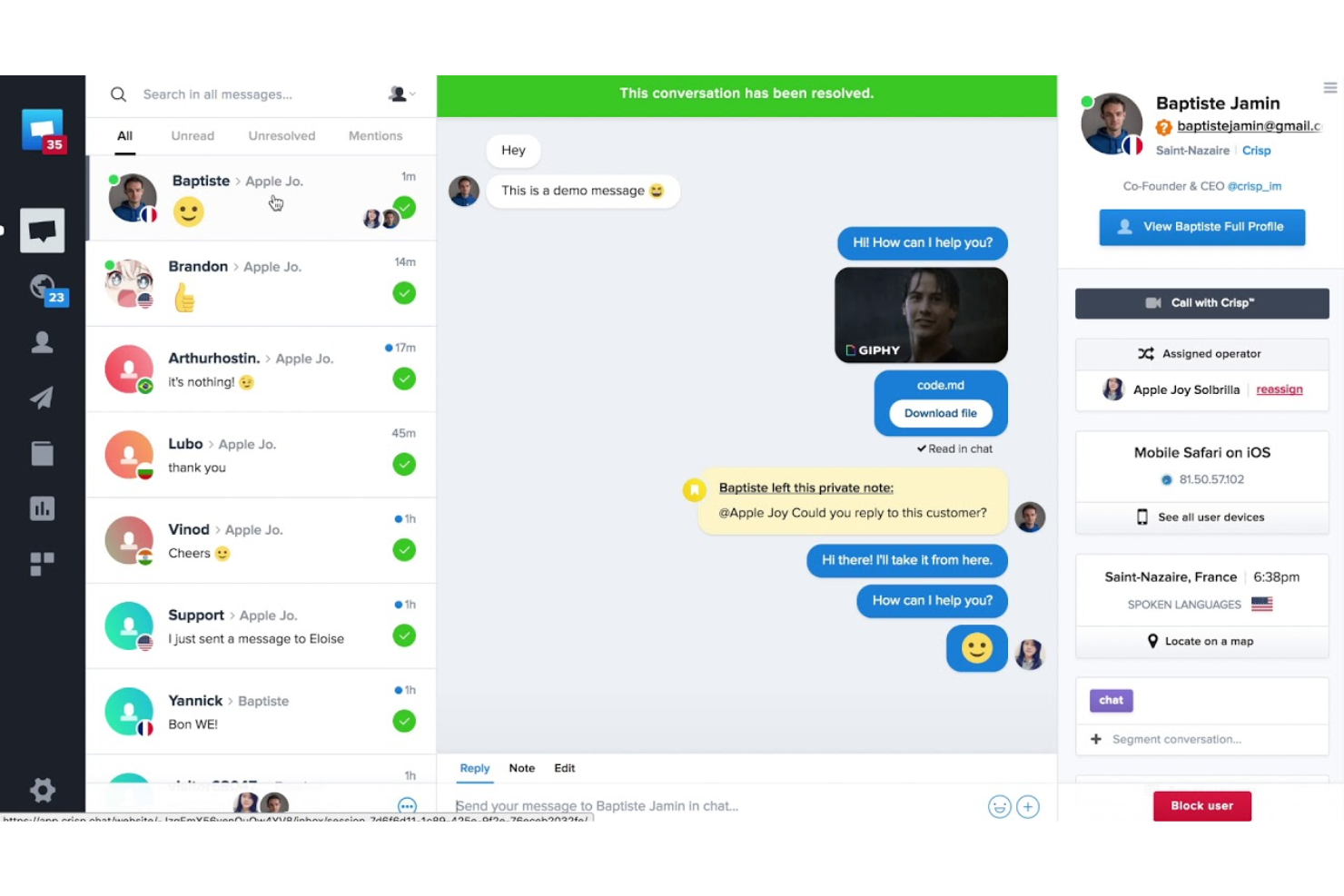
Crisp è una piattaforma di messaggistica clienti multicanale progettata per i team che desiderano centralizzare le conversazioni attraverso chat, email e canali social. Se stai cercando un CRM di marketing che riunisca vendite, assistenza e automazione in un unico posto, Crisp è pensato per migliorare la collaborazione del tuo team e rispondere più rapidamente.
A chi è più adatto Crisp?
Team di piccole e medie dimensioni che hanno bisogno di gestire le conversazioni con i clienti in modo collaborativo su più canali.
Perché Crisp è una valida alternativa a Intercom
Ho scelto Crisp per i suoi strumenti di collaborazione nella casella di posta condivisa, che vanno oltre il semplice instradamento dei messaggi. La funzione di rilevamento delle collisioni mostra al mio team in tempo reale quando un collega sta già scrivendo una risposta, così non inviamo mai risposte duplicate allo stesso cliente. Mi affido anche alle note private all'interno delle conversazioni, che consentono al mio team di condividere contesto e strategie senza che il cliente lo veda mai. Per i team che passano da Intercom e hanno bisogno di un coordinamento interno più stretto su chat, email e social, queste due funzionalità da sole fanno davvero la differenza nella gestione delle transizioni e delle escalation.
Caratteristiche principali di Crisp
- Costruttore di campagne multicanale: Crea e invia sequenze automatizzate su email, WhatsApp e chat utilizzando un editor drag-and-drop senza codice.
- Chatbot AI con training LLM personalizzato: Allena un chatbot sulla tua knowledge base, contenuti del sito web, conversazioni passate e file caricati per automatizzare le risposte.
- Segmentazione e filtraggio dei contatti: Crea segmenti di clienti mirati utilizzando filtri personalizzati basati su comportamento, dati del profilo ed eventi del ciclo di vita.
- Sondaggi CSAT: Raccogli punteggi di soddisfazione dei clienti direttamente nelle conversazioni chat o su altri canali dopo la chiusura dell'interazione.
Integrazioni di Crisp
Le integrazioni includono Slack, HubSpot, Salesforce, Shopify, WordPress, Jira, Pipedrive, Mailchimp, Instagram e WhatsApp.
Pros and Cons
Pros:
- Casella di posta condivisa che supporta chat, email e social
- Rilevamento in tempo reale delle collisioni di risposta
- Chatbot AI integrato con training personalizzato
Cons:
- Funzionalità AI limitate nei piani inferiori
- Strumenti di marketing per sequenze e broadcast limitati

Gorgias
Ideale per l'integrazione con piattaforme di e-commerce
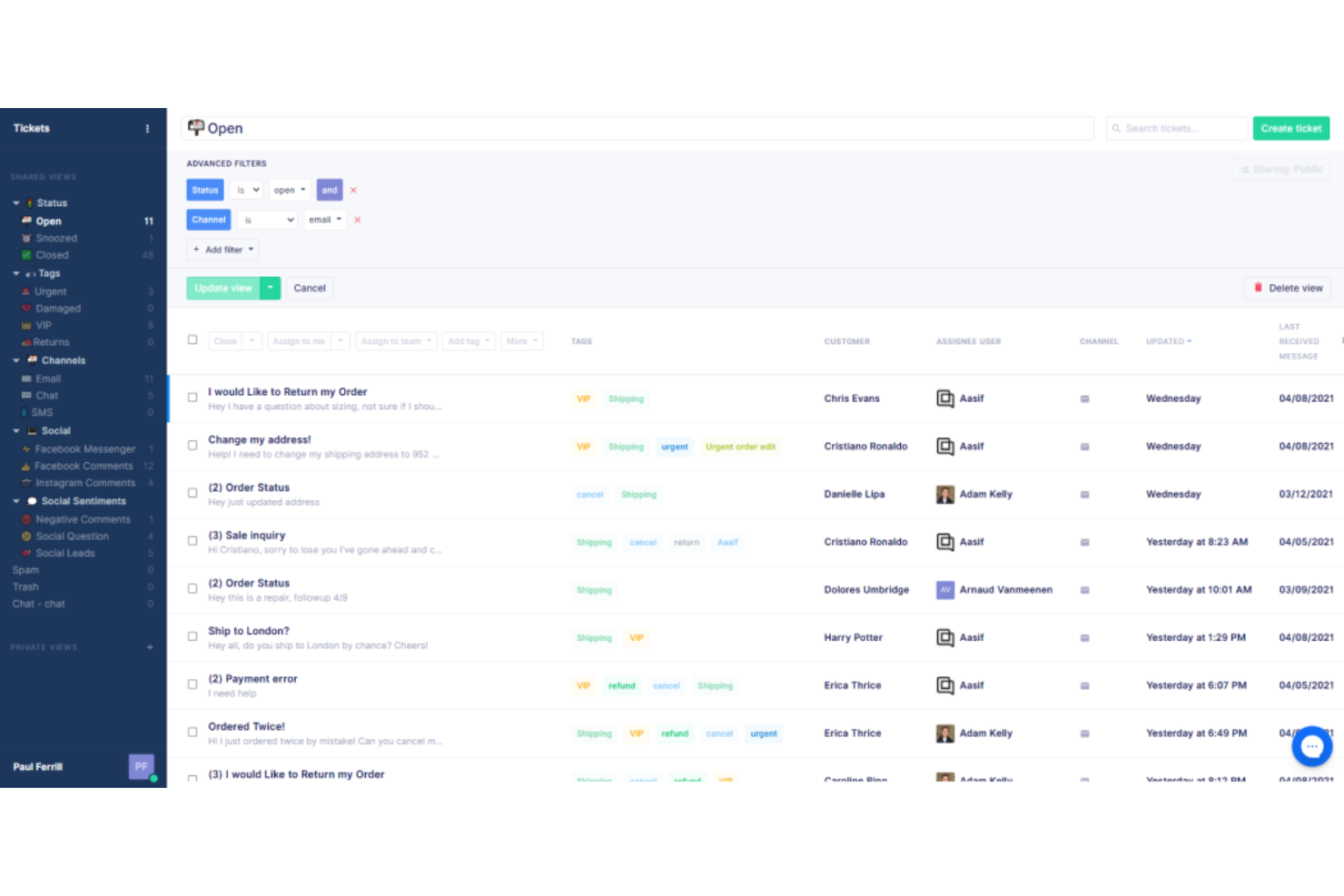
Gorgias è una piattaforma di assistenza clienti pensata per i marchi di e-commerce che desiderano gestire supporto, vendite e coinvolgimento da un unico luogo. Se gestisci un negozio su Shopify, Magento o BigCommerce, Gorgias aiuta il tuo team a trasformare i ticket di supporto in opportunità di guadagno.
Per chi è Gorgias?
Team di supporto e-commerce che gestiscono volumi elevati di ticket su negozi Shopify, Magento o BigCommerce.
Perché Gorgias è una buona alternativa a Intercom
Ho scelto Gorgias in particolare per la profondità dell'integrazione con piattaforme e-commerce come Shopify, Magento e BigCommerce. Dall'interno di un singolo ticket, il mio team può visualizzare la cronologia degli ordini, modificare ordini, applicare sconti e attivare rimborsi, senza mai cambiare scheda. Apprezzo la funzionalità AI Agent, che gestisce automaticamente fino al 60% delle richieste di supporto utilizzando i dati del negozio per fornire risposte accurate e in linea con il brand. Per i team che lavorano tutto il giorno su Shopify, quel livello di gestione nativa degli ordini direttamente dall'helpdesk è qualcosa che Intercom semplicemente non offre di default.
Funzionalità principali di Gorgias
- Macro: crea risposte preimpostate che compilano automaticamente i dati dei clienti, applicano etichette e attivano aggiornamenti sugli ordini tramite strumenti collegati.
- Regole: imposta flussi di lavoro automatici per taggare i ticket, rispondere alle recensioni o seguire i clienti in base a condizioni definite.
- AutoQA: utilizza l'IA per valutare ogni interazione degli agenti e offrire ai manager una panoramica in tempo reale della qualità delle conversazioni.
- Voice of Customer: aggrega conversazioni customer experience e recensioni per individuare tendenze e intuizioni a livello di prodotto, fino alla singola SKU.
Integrazioni di Gorgias
Le integrazioni includono Shopify, Magento, BigCommerce, Facebook, Instagram, Klaviyo, Postscript, Aircall, Recharge e Okendo.
Pros and Cons
Pros:
- Azioni sugli ordini direttamente nei ticket di supporto
- AI Agent automatizza le richieste comuni
- Gestione di social media e SMS da un'unica casella di posta
Cons:
- Meno opzioni di automazione del flusso di lavoro
- Funzionalità CRM e pipeline di vendita limitate

Kustomer
Ideale per timeline cliente unificate
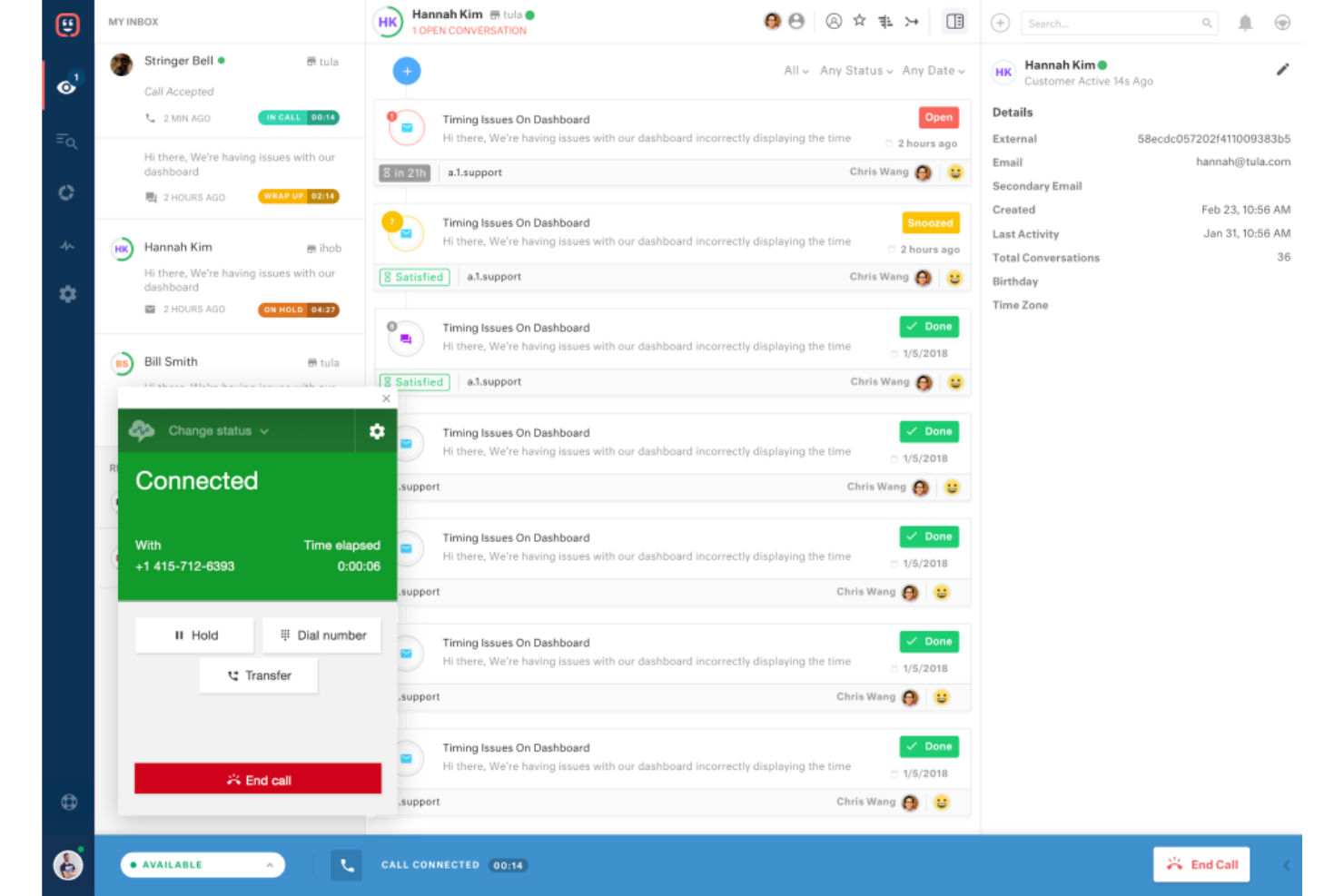
Kustomer è un software di assistenza clienti progettato per i team che desiderano una visione completa di ogni interazione con il cliente su tutti i canali. Se hai bisogno di unificare le conversazioni di supporto, vendite e marketing in una sola timeline, Kustomer aiuta il tuo team a offrire un servizio più personalizzato ed efficiente.
Per chi è Kustomer?
Team di supporto e operativi in aziende di medie e grandi dimensioni che necessitano di una visione unificata delle interazioni con i clienti.
Perché Kustomer è una valida alternativa a Intercom
Ho scelto Kustomer perché la sua funzione di timeline offre al mio team una visione unica e cronologica di ogni interazione con il cliente—email, chat, SMS, cronologia degli acquisti e altro—tutto in un unico posto. Quando un cliente ci contatta, posso vedere tutta la sua cronologia senza dover cercare tra strumenti o schede diverse. Apprezzo anche gli oggetti e gli attributi personalizzati di Kustomer, che permettono al mio team di tracciare dati specifici per la nostra azienda, come lo stato dell'abbonamento o i dettagli degli ordini, direttamente sul profilo cliente. In pratica, significa che gli operatori possono avere conversazioni più informate e personalizzate senza mai uscire dalla piattaforma.
Funzionalità chiave di Kustomer
- Costruttore di agenti AI: Uno strumento low-code per creare team di agenti AI in grado di gestire richieste dei clienti, elaborare rimborsi, aggiornare abbonamenti e cancellare ordini senza intervento umano.
- Gestione conversazioni omnicanale: Raccoglie tutte le interazioni con il cliente tramite voce, email, chat, SMS e social in un unico thread continuo, così gli operatori non perdono mai il contesto durante il cambio canale.
- Costruttore di automazioni per workflow: Un costruttore no-code che combina regole aziendali e logica guidata dall'intelligenza artificiale per automatizzare l'instradamento, le escalation, e i workflow di servizio multi-step.
- Risposta Vocale Interattiva (IVR): Una funzionalità integrata per il canale voce con registrazione delle chiamate, trascrizione, riepiloghi AI delle chiamate e possibilità di trasferimento, per gestire chiamate di supporto complesse.
Integrazioni di Kustomer
Le integrazioni includono Shopify, TikTok Shop, Narvar, Attentive, Corso, Loris, parcelLab, Scorebuddy, AfterShip e Guru.
Pros and Cons
Pros:
- La timeline unificata mostra tutte le interazioni con il cliente
- Gli oggetti personalizzati supportano dati aziendali unici
- Il costruttore di workflow è altamente flessibile
Cons:
- Nessuna automazione di marketing outbound integrata
- Integrazioni predefinite limitate con strumenti di e-commerce

Ideale con workflow di automazione integrati
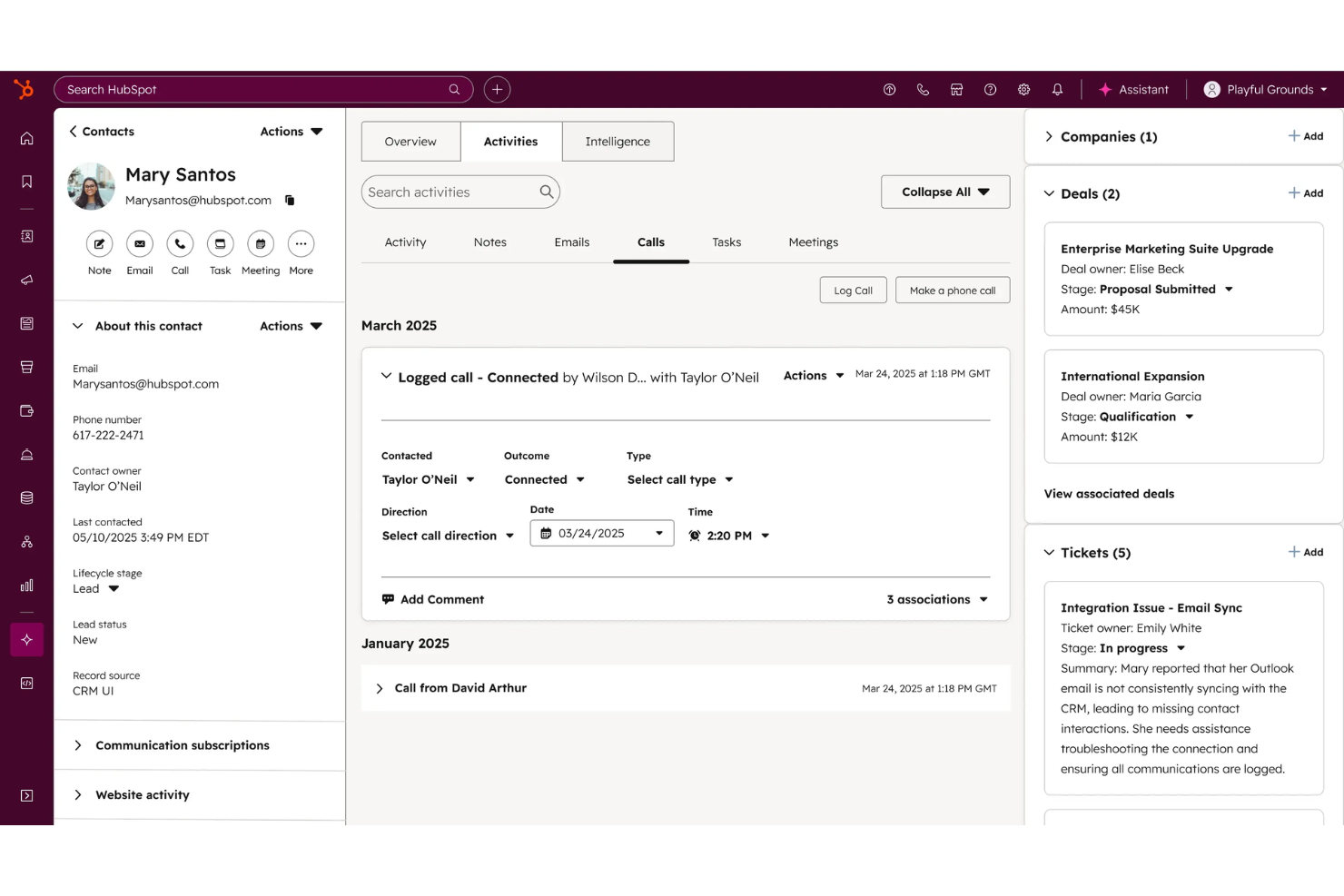
HubSpot Service Hub è una piattaforma di assistenza clienti progettata per le aziende che desiderano collegare supporto, vendite e marketing in un unico luogo. Se hai bisogno di un CRM che riunisca strumenti per ticketing, knowledge base e feedback dei clienti, questa è un'ottima scelta per team in crescita.
Per chi è HubSpot Service Hub?
Team di assistenza clienti e operativi in aziende in espansione che vogliono unificare i dati di servizio e CRM.
Perché HubSpot Service Hub è una valida alternativa a Intercom
Ho scelto HubSpot Service Hub perché i suoi workflow di automazione collegano direttamente i ticket di supporto ai dati CRM, così il mio team può avviare attività di follow-up, escalation o aggiornamenti sulle trattative senza dover cambiare strumento. Mi piace in particolare l'automazione delle pipeline dei ticket, che mi permette di impostare regole per spostare i ticket tra le fasi in base alle azioni dei clienti o dei consulenti. In pratica, significa che il mio team può gestire workflow di assistenza complessi—come l'assegnazione automatica dei ticket per tipologia di problema e la notifica ai responsabili di account—senza scrivere una sola riga di codice. Per i team che già utilizzano il CRM di HubSpot, la connessione nativa tra dati di servizio e di vendita è qualcosa che non ho trovato altrove.
Funzionalità principali di HubSpot Service Hub
- Workspace per il successo clienti: Uno spazio dedicato alla gestione degli health score dei clienti, portafoglio clienti e priorità delle attività degli operatori.
- Gestione del feedback: Sondaggi personalizzabili NPS, CSAT e feedback dei clienti integrati direttamente nella piattaforma.
- Intelligenza conversazionale: Analisi delle chiamate basata sull’IA che fornisce insight da ogni interazione con il cliente.
- Knowledge base: Uno strumento self-service che permette ai clienti di trovare risposte senza contattare il supporto.
Integrazioni di HubSpot Service Hub
Le integrazioni includono Gmail, Google Calendar, Outlook, Slack, Zoom, Microsoft Teams, WordPress, SurveyMonkey, Meta Ads e Google Sheets.
Pros and Cons
Pros:
- La knowledge base integrata favorisce il self-service
- Il ticketing è collegato direttamente ai record CRM
- Strumenti di feedback clienti completamente integrati
Cons:
- Nessuna messaggistica in-app per l’onboarding dei clienti
- Personalizzazione limitata del widget di chat

Pylon
Ideale per il supporto clienti basato su Slack
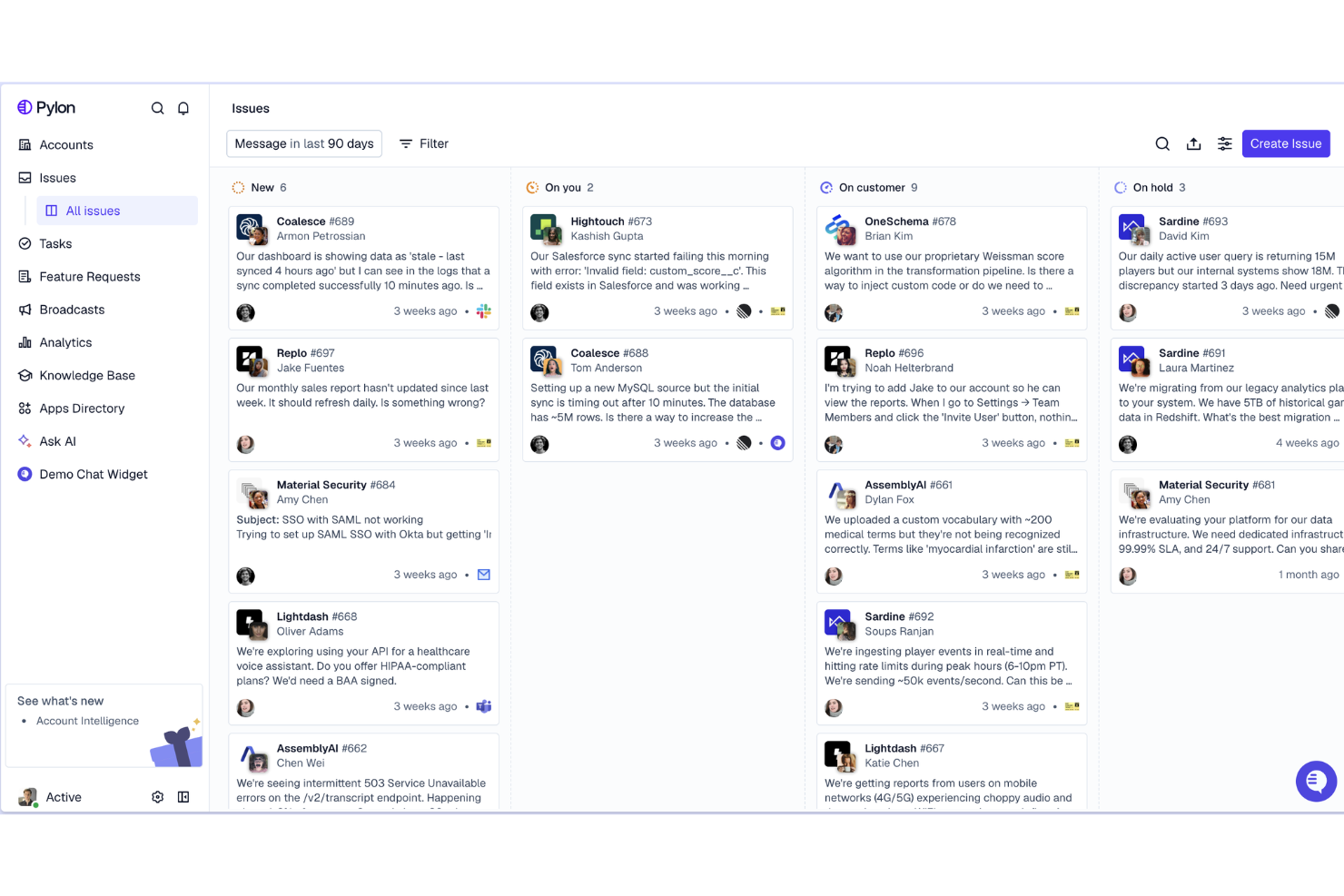
Pylon è una piattaforma di supporto clienti progettata per i team che gestiscono le conversazioni con i clienti direttamente in Slack. Se la tua azienda si affida a Slack per la comunicazione interna o con i clienti, Pylon ti aiuta a tracciare, assegnare priorità e risolvere le richieste di supporto senza mai uscire dal tuo workspace.
Per chi è più indicato Pylon?
Team di supporto e customer success in aziende SaaS che utilizzano Slack come principale canale di comunicazione con i clienti.
Perché Pylon è una valida alternativa a Intercom
Ho scelto Pylon proprio per come gestisce i canali Slack Connect come superficie di supporto nativa. Il mio team può tracciare e rispondere alle conversazioni con i clienti che avvengono all'interno di canali Slack condivisi senza dover essere effettivamente presenti nel canale stesso—Pylon raccoglie automaticamente quei thread in una casella di posta unificata. Inoltre, apprezzo la funzione Runbooks, che mi permette di definire flussi di lavoro di risoluzione passo passo che gli agenti AI seguono quando gestiscono i ticket, affinché le risposte siano coerenti anche senza l'intervento umano. Per i team SaaS B2B i cui clienti enterprise si aspettano un supporto su Slack, questa combinazione tra tracciamento dei canali e risoluzione guidata dall'AI è qualcosa che Intercom non può replicare nativamente.
Caratteristiche principali di Pylon
- Posta in arrivo omnicanale: Gestisci conversazioni da Slack, Microsoft Teams, Discord, email e chat in-app in una sola coda.
- Intelligenza sugli account: Raccogli dati su supporto, customer success e vendite in una vista unificata dell'account per identificare clienti a rischio o pronti all'up-sell.
- Rilevamento lacune nella conoscenza tramite AI: L'AI raggruppa temi ricorrenti e li confronta con la tua knowledge base per evidenziare articoli mancanti.
- Portale clienti: Offri ai clienti uno spazio dedicato per inviare e tracciare ticket tramite un modulo brandizzato al di fuori di Slack.
Integrazioni di Pylon
Le integrazioni includono Slack, Microsoft Teams, Discord e API per integrazioni personalizzate.
Pros and Cons
Pros:
- Supporto nativo ai canali Slack Connect
- Runbook AI per la gestione automatica dei ticket
- Contesto cliente a livello di account in ogni ticket
Cons:
- Nessun widget di live chat per web o mobile
- Meno integrazioni rispetto a Intercom
Kayako
Ideale per una vista contestuale del supporto clienti
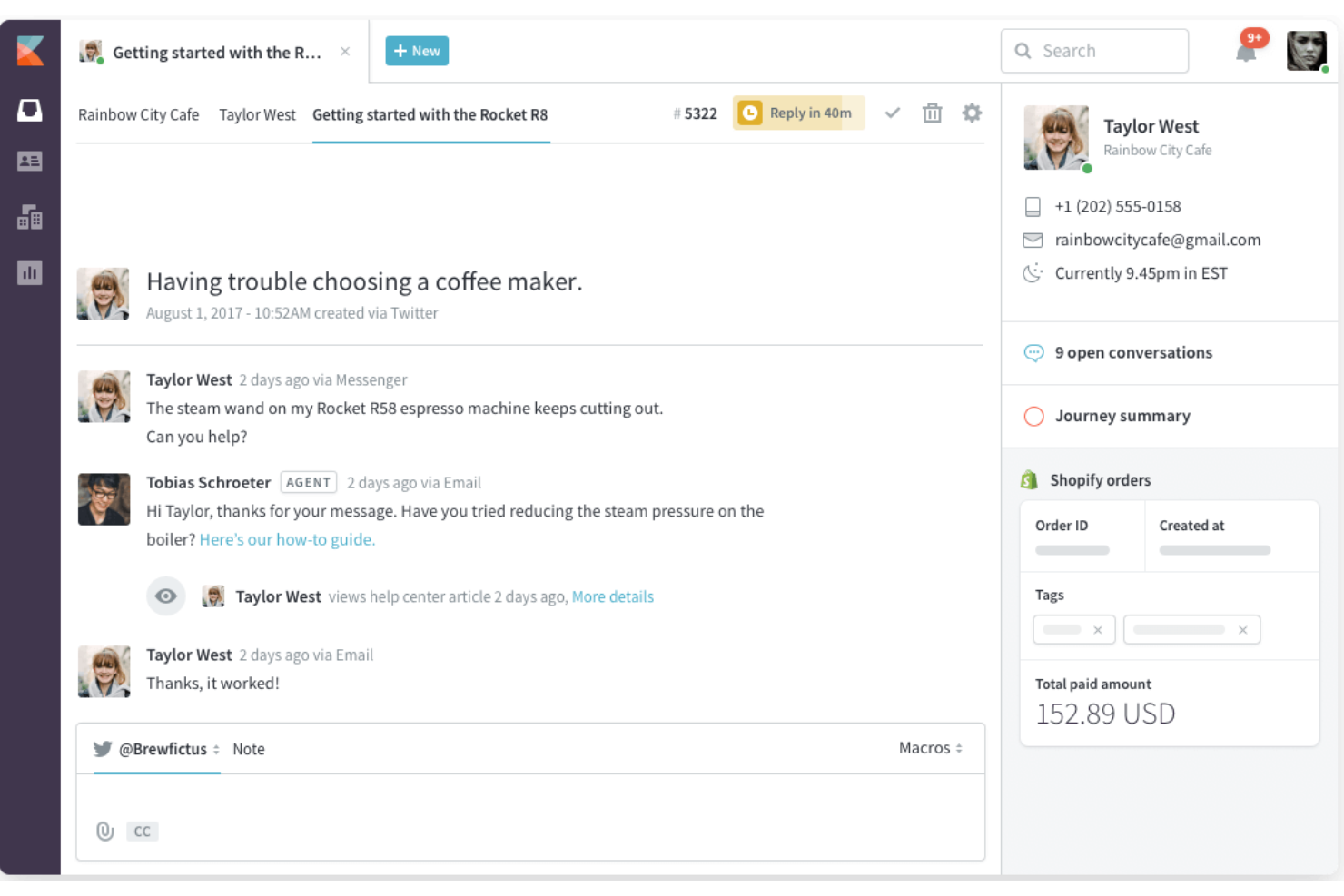
Kayako è una piattaforma di supporto omnicanale per l’assistenza clienti, progettata per i team che desiderano visualizzare l’intero percorso del cliente in un unico posto. Se stai cercando un CRM di marketing che aiuti gli agenti di supporto a offrire risposte più personalizzate mostrando interazioni passate e contesto, Kayako merita attenzione.
Per chi è più indicato Kayako?
I team di supporto presso aziende SaaS che necessitano di una visione unificata delle interazioni con i clienti.
Perché Kayako è una valida alternativa a Intercom
Ho scelto Kayako per la sua funzionalità SingleView, che mostra l’intera cronologia delle interazioni di un cliente—ogni conversazione, acquisto e visita alle pagine—accanto al ticket attivo. Questo contesto evita che il mio team debba chiedere ai clienti di ripetersi. Apprezzo anche la timeline del percorso di conversazione, che mostra precisamente come il cliente ha attraversato i diversi touchpoint prima di arrivare al supporto. Per i team che passano da Intercom e desiderano un contesto cliente più ricco in ogni interazione di supporto, Kayako offre questo senza richiedere configurazioni aggiuntive.
Funzionalità principali di Kayako
- Smistamento ticket tramite AI: Classifica e assegna automaticamente i ticket in base alle competenze degli agenti, al carico di lavoro e alle preferenze linguistiche.
- Costruttore di automazioni: Un flow builder visuale che genera regole di automazione da descrizioni in linguaggio naturale e consente di testarle sui dati storici.
- Portale self-service AI: Un centro assistenza con ricerca semantica, widget intelligenti e chatbot AI che risolvono domande comuni senza l’intervento degli agenti.
- Previsioni di abbandono e upsell: L’AI segnala account a rischio e opportunità di espansione direttamente nell’area di lavoro dell’agente.
Integrazioni Kayako
Le integrazioni includono Salesforce, Slack, Shopify, Magento, Jira, HubSpot, Mailchimp, Zapier, Trello e Google Analytics.
Pros and Cons
Pros:
- SingleView mostra istantaneamente la completa cronologia cliente
- Live chat e supporto email integrati
- Monitoraggio SLA e reportistica per la conformità
Cons:
- Richiede SQL per report avanzati
- Configurazione manuale per i promemoria di follow-up

Chatwoot è una piattaforma open-source per il coinvolgimento dei clienti, progettata per i team che desiderano il pieno controllo sui propri flussi di lavoro e sui dati dell'assistenza. Se hai bisogno di un CRM di marketing che puoi ospitare autonomamente, personalizzare ed estendere per adattarlo a processi aziendali unici, Chatwoot è un'opzione valida.
Per chi è più adatto Chatwoot?
Team con sviluppatori interni che desiderano personalizzare e ospitare autonomamente la propria piattaforma per il coinvolgimento dei clienti.
Perché Chatwoot è una buona alternativa a Intercom
Ho scelto Chatwoot proprio perché è open-source e può essere ospitato autonomamente, il che significa che il mio team possiede i dati e può modificare il codice sorgente per adattarlo esattamente ai nostri flussi di lavoro, cosa che Intercom semplicemente non consente. Apprezzo la funzione degli attributi personalizzati, che mi permette di aggiungere campi ai profili dei contatti collegati direttamente al nostro modello di dati interno, senza dover ricorrere a soluzioni alternative. Anche il supporto per l'API REST e i webhook mi consente di integrare Chatwoot nel nostro stack esistente senza essere vincolato a un elenco di integrazioni predefinito. Per i team con requisiti di conformità o esigenze specifiche di residenza dei dati, è difficile trovare un livello di controllo simile in un'alternativa commerciale.
Funzionalità principali di Chatwoot
- Rilevamento delle collisioni: segnala quando più operatori stanno visualizzando o rispondendo alla stessa conversazione, per evitare risposte duplicate.
- Segmenti di contatti: filtra e raggruppa i contatti utilizzando criteri personalizzati per attività di contatto mirate o per la reportistica.
- Campagne: invia messaggi proattivi in uscita ai visitatori del sito web o ai contatti in base a trigger definiti.
- Rapporti CSAT: raccoglie e monitora i punteggi di soddisfazione dei clienti associati alle singole conversazioni e agli operatori.
Integrazioni di Chatwoot
Le integrazioni includono Slack, WhatsApp Business API, Facebook Messenger, messaggi diretti di Instagram, Telegram, LINE, TikTok, Google Translate, Dialogflow e Linear.
Pros and Cons
Pros:
- Completamente open-source con opzione di hosting autonomo
- Agenti illimitati nella versione ospitata autonomamente
- Comunità di sviluppatori attiva per il supporto
Cons:
- Meno strumenti di automazione integrati rispetto a Intercom
- Nessuna base di conoscenza o centro assistenza nativo

LiveAgent
Ideale per la gestione dei ticket multicanale
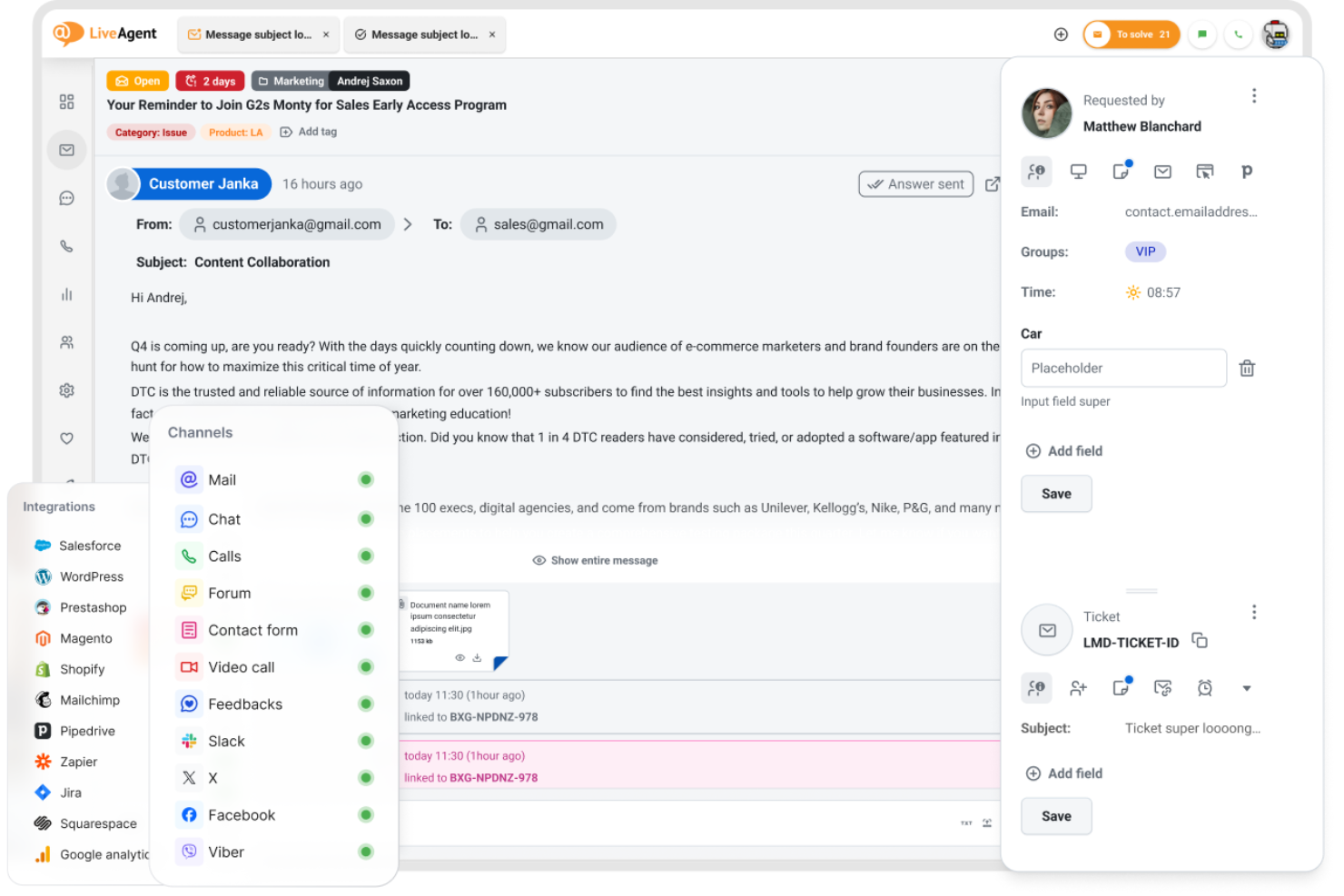
LiveAgent offre un supporto multicanale, riunendo email, chat, social e assistenza telefonica in una singola dashboard, ideale per i team che devono gestire grandi volumi di conversazioni con i clienti. Se cerchi un CRM di marketing che dia priorità alla rapida risoluzione dei ticket e alla comunicazione omnicanale, questa piattaforma merita sicuramente attenzione.
Per chi è ideale LiveAgent?
Team di supporto clienti di aziende di medie dimensioni che hanno bisogno di gestire ticket su più canali.
Perché LiveAgent è una valida alternativa a Intercom
Ho scelto LiveAgent proprio per la sua gestione integrata dei ticket su tutti i canali senza dover passare da uno strumento all'altro. Il flusso ibrido dei ticket è ciò che lo distingue: ogni conversazione, sia che inizi come chat dal vivo, email o messaggio social, viene trasformata in un ticket e monitorata in un unico posto. Apprezzo anche la funzione di distribuzione automatica dei ticket, che assegna i ticket agli agenti secondo le regole che imposti, evitando che rimangano non assegnati nei periodi di maggiore affluenza. Per i team che migrano da Intercom e cercano un controllo più rigoroso dei flussi di ticket e della conformità agli SLA, LiveAgent offre la struttura giusta per migliorare l'esperienza dei clienti.
Funzionalità principali di LiveAgent
- Monitoraggio conformità SLA: Monitora e genera report sul rispetto degli SLA e sulle scadenze mancate dei ticket, con log esportabili.
- Risposte predefinite (macro): Crea e archivia risposte pre-scritte da inviare alle domande più frequenti su qualsiasi canale.
- IVR (risposta vocale interattiva): Crea menu personalizzati per l'instradamento delle chiamate in entrata verso il reparto o l'agente corretto.
- Gamification per agenti: Motiva i team di supporto con livelli, badge e classifiche collegati alla risoluzione dei ticket.
Integrazioni di LiveAgent
Le integrazioni includono Slack, Shopify, Mailchimp, Facebook, Twitter, WhatsApp, Viber, Jira, Magento e Salesforce.
Pros and Cons
Pros:
- Call center integrato con opzioni IVR
- La gamification degli agenti aumenta il coinvolgimento del team
- Risposte predefinite per risposte più rapide ai ticket
Cons:
- Interfaccia datata rispetto a Intercom
- Funzionalità limitate di chatbot e automazione
Altre alternative a Intercom
Ecco alcune alternative aggiuntive a Intercom che non sono entrate nel mio elenco, ma che vale comunque la pena valutare:
- Tidio
Il migliore con chat dal vivo potenziata da IA
- Freshdesk
Ideale per le conversazioni omnicanale con i clienti
- Jira Service Management
Ideale per collegare il supporto con i team di sviluppo


Come Valuto le Alternative a Intercom
Analizzo due livelli: il livello base che qualsiasi sostituto di Intercom deve raggiungere—chat dal vivo, bot AI, sincronizzazione CRM, instradamento lead—e i fattori di differenziazione come attribuzione e profondità dello stack RevOps.
Funzionalità di Base (Requisiti Indispensabili per Questa Lista)
Quando seleziono gli strumenti per la mia lista, li valuto ciascuno su una scala da 0 (non offre la funzionalità) a 5 (eccelle in quest'area) per ogni funzionalità di base elencata qui sotto. Poi calcolo il punteggio totale dello strumento in percentuale. Ciascun tool deve raggiungere un punteggio minimo totale del 65% per essere preso in considerazione.
- Live Chat & Messaggistica: Valuto se uno strumento supporta chat web in tempo reale, messaggistica in-app e canali aggiuntivi come email e social—così il tuo team può coinvolgere i prospect ovunque inizi la conversazione.
- AI Chatbot & Automazione: Le migliori alternative permettono di creare bot AI che qualificano i lead con domande personalizzate, risolvono problemi comuni e attivano il passaggio all’operatore—non si limitano a risposte preconfezionate.
- Integrazioni con CRM & Strumenti di Revenue: Controllo la sincronizzazione nativa con CRM come Salesforce e HubSpot, valutando sia la profondità di mappatura dei campi che la possibilità che i dati delle conversazioni confluiscano nelle schede opportunità senza inserimenti manuali.
- Instradamento Lead & Qualificazione: Gli strumenti validi indirizzano le conversazioni in base alla proprietà dell’account, al punteggio lead o a regole territoriali—così un prospect enterprise qualificato raggiunge subito il giusto AE invece di rimanere in coda generalista.
- Posta Condivisa del Team & Ticketing: Guardo quanto bene i team vendite, supporto e customer success possono collaborare in una sola casella con assegnazione ticket, SLA, tagging e note interne, per evitare passaggi persi.
- Reportistica & Analisi delle Conversazioni: Le dashboard devono andare oltre tempi di risposta e volumi mostrando tassi di conversione, influenza sulla pipeline e performance dei rep in relazione all’attività di messaggistica.
Una volta che ho una lista di strumenti che soddisfano questi criteri, considero ciò che distingue ogni piattaforma.
Fattori Differenzianti (Cosa Rende un Fornitore Unico)
Ecco come confronto i diversi fornitori:
Funzionalità Distintive
I report sull’attribuzione delle entrate sono un grande fattore di distinzione—cerco piattaforme che colleghino i punti di contatto della messaggistica alla generazione di pipeline e ai deal chiusi, non solo metriche sui ticket. Anche l’identificazione dei visitatori account-based è importante perché permette al team di personalizzare la chat non appena un account target visita il sito. Valuto anche l’automazione di meeting e calendario; gli strumenti che permettono ai lead qualificati di prenotare direttamente con il giusto commerciale dalla chat eliminano i rimbalzi che fanno calare i tassi di conversione.
Oltre le Funzionalità
Anche il modello di prezzo qui conta molto—alcuni fornitori fanno pagare per utente, altri per conversazione o volume contatti, e la scelta errata può far esplodere il budget man mano che il team GTM cresce. Valuto anche il livello di integrazione dello strumento nello stack tecnologico delle revenue, in particolare con piattaforme di orchestrazione come Outreach, Salesloft e Gong. Considero inoltre la rapidità di implementazione; migrare storici di conversazione, flussi di lavoro e configurazioni bot da Intercom può richiedere settimane se il fornitore non offre un supporto dedicato alla migrazione.
Perché cercare un'alternativa a Intercom?
Sebbene Intercom sia una buona scelta come software CRM di marketing, ci sono diversi motivi per cui alcuni utenti cercano soluzioni alternative. Potresti cercare un'alternativa a Intercom perché…
- Hai bisogno di prezzi più convenienti per i team in crescita
- Desideri una personalizzazione più approfondita dei widget di chat e delle caselle di posta
- Hai bisogno di funzionalità più avanzate per la collaborazione tramite casella di posta condivisa
- Hai bisogno di una migliore integrazione con il tuo stack tecnologico esistente
- Desideri opzioni di fatturazione più trasparenti o flessibili
Se ti riconosci in una di queste situazioni, sei nel posto giusto. Il mio elenco include diverse opzioni di software CRM di marketing e soluzioni per l'assistenza clienti più adatte ai team che affrontano queste difficoltà con Intercom e cercano soluzioni alternative.
Funzionalità principali di Intercom
Ecco alcune delle funzionalità principali di Intercom, che ti aiuteranno a mettere a confronto ciò che offrono le soluzioni alternative:
- Chat dal vivo: il widget di chat dal vivo di Intercom ti consente di interagire con i visitatori e i clienti del sito web in tempo reale, rispondere alle domande e indirizzare le conversazioni ai membri del team appropriati.
- Messaggistica automatizzata: configura messaggi mirati e basati sul comportamento che si attivano automaticamente per guidare gli utenti durante l’onboarding, coltivare i lead o fornire assistenza nei momenti chiave.
- Posta in arrivo condivisa: gestisci tutte le conversazioni con i clienti provenienti da email, chat e canali social in un’unica posta in arrivo collaborativa, facilitando l’assegnazione, l’applicazione di tag e la risoluzione dei problemi da parte dei team.
- Bot personalizzati: crea e distribuisci chatbot in grado di rispondere alle domande frequenti, qualificare i lead e raccogliere informazioni prima di inoltrare la conversazione a un agente umano.
- Tour del prodotto: crea guide interattive passo passo che illustrano agli utenti le funzionalità e i flussi di lavoro del tuo prodotto direttamente all’interno della tua app.
- Centro assistenza: pubblica e organizza articoli, FAQ e documentazione per l’autoassistenza, così i clienti possono trovare le risposte senza contattare il supporto.
- Piattaforma per i dati dei clienti: archivia e segmenta i dati dei clienti, monitora il comportamento degli utenti e personalizza le comunicazioni in base all’attività in tempo reale e alle informazioni del profilo.
- Integrazioni con le app: collega Intercom a strumenti come Salesforce, HubSpot, Slack e Shopify per sincronizzare i dati e automatizzare i flussi di lavoro nel tuo ecosistema.
- Report e analisi: accedi a dashboard e report che monitorano il volume delle conversazioni, i tempi di risposta, la soddisfazione dei clienti e le prestazioni del team.
- SDK per dispositivi mobili: integra le funzionalità di chat e messaggistica di Intercom direttamente nelle tue app mobili per offrire assistenza e coinvolgimento su iOS e Android.