

I 10 migliori software CRM per consulenti finanziari nel 2026

Elenco dei migliori software CRM per consulenti finanziari


Il software CRM per consulenti finanziari è una risorsa preziosa per qualsiasi azienda. Con il software giusto, i team possono gestire meglio le relazioni con i clienti e migliorare l'efficienza dei flussi di lavoro. Tuttavia, trovare il software CRM giusto per consulenti finanziari può essere difficile, soprattutto considerando le numerose opzioni disponibili.
Basandomi sulla mia esperienza con i software di gestione aziendale, ho testato e confrontato diversi tra i migliori software CRM disponibili per consulenti finanziari. Successivamente, ho raccolto i risultati in recensioni approfondite per aiutarti a trovare il software migliore per le tue esigenze specifiche. Sono certo che nell'elenco qui sotto troverai il tuo prossimo software CRM per consulenti finanziari.
Perché Fidarsi delle Nostre Recensioni Software
Testiamo e recensiamo software RevOps dal 2022. In quanto leader RevOps, sappiamo quanto sia fondamentale (e difficile) scegliere il software giusto. Investiamo in ricerche approfondite per aiutare il nostro pubblico a prendere decisioni più consapevoli nell’acquisto di software. Abbiamo testato oltre 2.000 strumenti per diversi casi d’uso RevOps e abbiamo scritto più di 1.000 recensioni dettagliate.Scopri come manteniamo la trasparenza & la nostra metodologia di valutazione dei software.
Riepilogo dei migliori software CRM per consulenti finanziari
| Tool | Best For | Trial Info | Price | ||
|---|---|---|---|---|---|
| 1 | Ideale per promemoria automatici dei clienti | Prova gratuita di 30 giorni disponibile | Da $39/utente/mese (fatturazione annuale) | Website | |
| 2 | Ideale per pipeline di vendita semplici | Piano gratuito + prova gratuita di 21 giorni disponibile | Da $9/utente/mese (fatturato annualmente) | Website | |
| 3 | Ideale per integrare portali clienti | Consulenza gratuita disponibile | A partire da $74/mese | Website | |
| 4 | Ideale per piccole società finanziarie | Demo gratuita disponibile | Da $65/utente/mese (minimo 3 utenti) | Website | |
| 5 | Ideale per le funzionalità di collaborazione del team | Prova gratuita di 30 giorni | Da $45/utente/mese | Website | |
| 6 | Ideale per la pianificazione finanziaria all-in-one | Demo gratuita disponibile | Prezzi su richiesta | Website | |
| 7 | Ideale per il monitoraggio della conformità | Demo gratuita disponibile | Prezzo su richiesta | Website | |
| 8 | Ideale per l'integrazione assicurativa | Demo gratuita disponibile | Prezzo su richiesta | Website | |
| 9 | Ideale per utenti Salesforce | Demo gratuita disponibile | Da $80/utente/mese | Website | |
| 10 | Ideale per una visione a 360 gradi del cliente | Demo gratuita disponibile | Da $40/mese (5 utenti) | Website |

Recensioni dei migliori software CRM per consulenti finanziari
Di seguito trovi i miei riepiloghi dettagliati dei migliori software CRM per consulenti finanziari inclusi nel mio elenco ristretto. Le mie recensioni offrono un’analisi approfondita delle funzionalità principali, dei pro e dei contro, delle integrazioni e dei casi d’uso ideali di ogni strumento, per aiutarti a trovare quello più adatto a te.

Ideale per promemoria automatici dei clienti
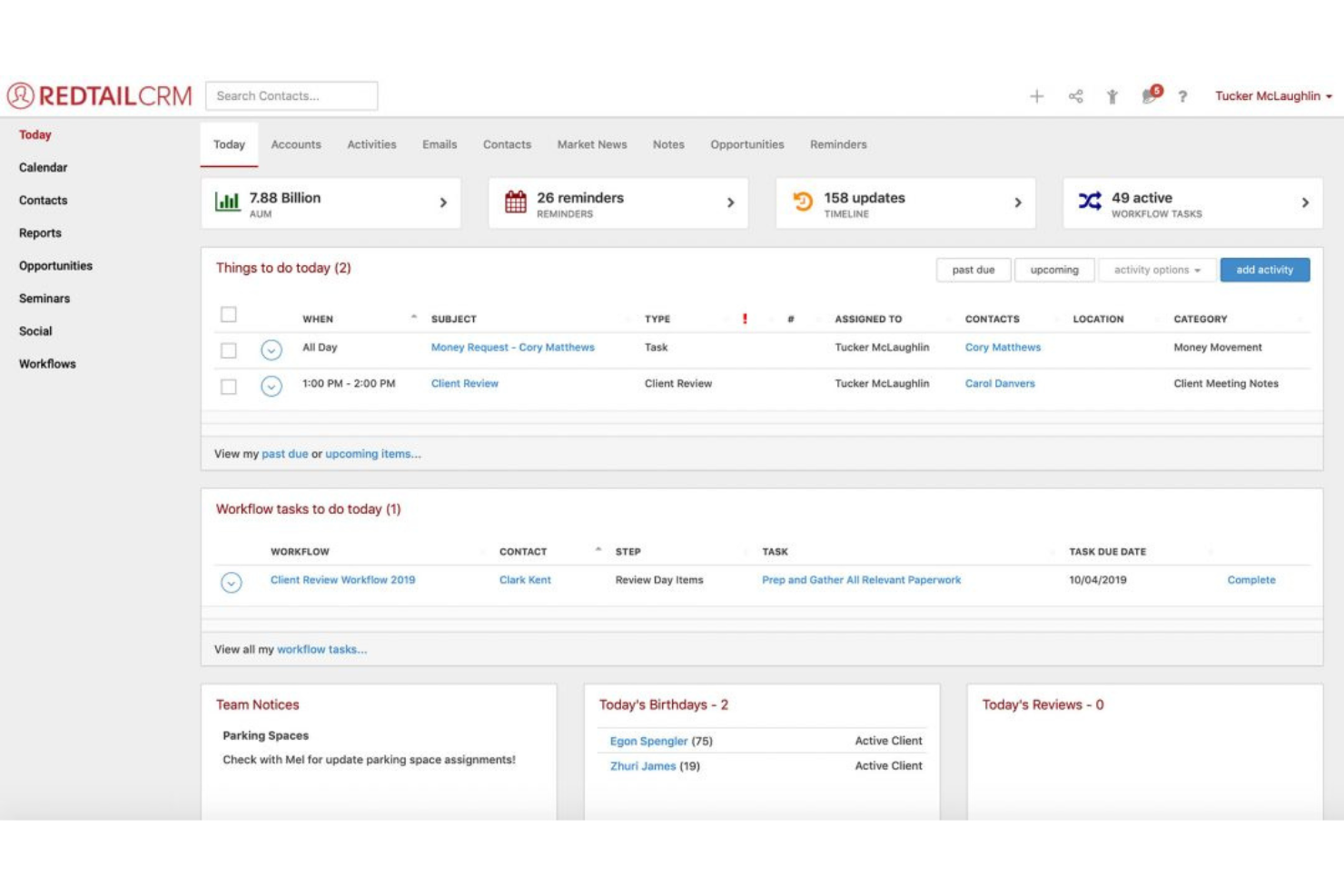
Redtail CRM è una soluzione basata su cloud progettata per aiutare i professionisti finanziari a gestire le relazioni con i clienti e le operazioni quotidiane. Offre strumenti per organizzare i dati dei clienti, monitorare le attività e gestire le comunicazioni in un unico hub centrale. La piattaforma è pensata per rendere più efficiente la gestione dei clienti da parte dei team.
Perché ho scelto Redtail CRM:
Redtail offre promemoria automatici integrati che assicurano di non perdere mai interazioni importanti con i clienti. Puoi impostare promemoria per attività, appuntamenti e follow-up, aiutandoti a rimanere organizzato. L'automazione dei flussi di lavoro del software aiuta anche a monitorare i punti di contatto con i clienti, riducendo la necessità di controllo manuale. Le funzionalità di gestione delle attività di Redtail aiutano il tuo team a tenere sotto controllo le cose da fare con il minimo sforzo, rendendolo un'opzione solida per le aziende che necessitano di supporto automatizzato.
Caratteristiche principali & integrazioni:
Le caratteristiche includono promemoria automatici, gestione delle attività e automazione dei flussi di lavoro. Puoi impostare promemoria per follow-up e riunioni con i clienti, garantendo che il tuo team rimanga sempre aggiornato. La piattaforma aiuta inoltre a organizzare in modo efficiente i dati dei clienti, riducendo la necessità di supervisione manuale delle attività.
Le integrazioni includono Riskalyze, Morningstar, Albridge, MoneyGuidePro, Orion, Wealthbox, Salesforce, Black Diamond, Laser App ed eMoney.
Pros and Cons
Pros:
- Potenti funzionalità di automazione delle attività
- Scalabile per aziende in crescita
- Flussi di lavoro personalizzabili per i team
Cons:
- Opzioni limitate di personalizzazione dei report
- Curva di apprendimento complessa per i nuovi utenti

Freshsales è una soluzione CRM progettata per aiutare le aziende a gestire le relazioni con i clienti e i processi di vendita. Offre strumenti per il monitoraggio dei lead, la gestione delle trattative e l'automazione dei flussi di lavoro, rendendolo ideale per i team che desiderano semplificare la gestione del proprio pipeline di vendita.
Perché ho scelto Freshsales:
Freshsales propone un approccio diretto alla gestione delle pipeline di vendita, permettendo al tuo team di monitorare i lead e concludere trattative con facilità. La visualizzazione drag-and-drop del pipeline ti aiuta a visualizzare il processo di vendita a colpo d'occhio. Gli strumenti di gestione delle trattative sono semplici da configurare, così il tuo team può organizzare e dare priorità ai lead rapidamente. Freshsales include anche funzionalità di automazione dei flussi di lavoro, riducendo la necessità di solleciti manuali e la gestione delle attività.
Caratteristiche principali e integrazioni:
Caratteristiche includono gestione delle trattative, lead scoring e automazione dei flussi di lavoro. Un'interfaccia drag-and-drop ti permette di visualizzare facilmente la pipeline di vendita, aiutando il tuo team a monitorare i progressi. La piattaforma consente inoltre di automatizzare attività come l'invio di email di follow-up e l'assegnazione dei lead.
Le integrazioni includono Google Workspace, Microsoft 365, QuickBooks, Slack, Mailchimp, Docusign, Zoom, Twilio, Stripe e Shopify.
Pros and Cons
Pros:
- Processo di onboarding rapido e semplice
- Personalizzazione semplice delle pipeline di vendita
- Forte automazione per attività ripetitive
Cons:
- Opzioni di reportistica avanzata limitate
- Flussi di lavoro complessi richiedono configurazione tecnica

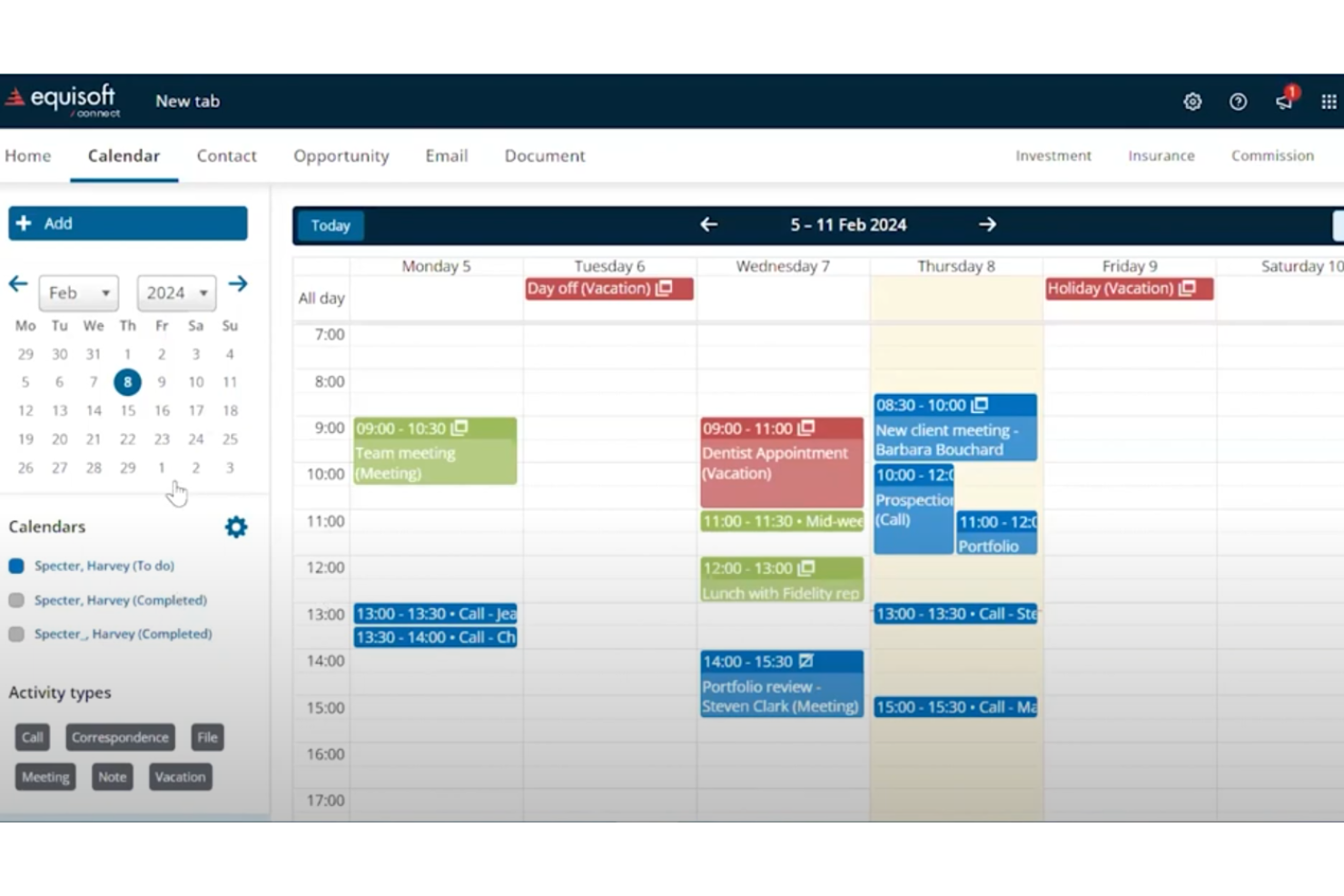
Equisoft (precedentemente Grendal CRM) è una soluzione software progettata per aiutare i professionisti finanziari a gestire in modo efficiente i clienti e i processi aziendali. Offre strumenti per la gestione dei dati dei clienti, della documentazione e della reportistica, rendendolo una scelta pratica per le aziende che desiderano rimanere organizzate e conformi alle normative.
Perché ho scelto Equisoft:
Equisoft integra portali clienti, consentendo ai clienti di accedere direttamente alle proprie informazioni finanziarie. Puoi condividere facilmente e in modo sicuro report, file e altri documenti, riducendo la necessità di comunicazioni ripetute. La piattaforma offre anche flussi di lavoro personalizzabili, permettendo una gestione più efficace delle attività.
Funzionalità principali e integrazioni:
Le funzionalità includono accesso al portale clienti, flussi di lavoro personalizzabili e gestione documentale. Il portale consente di condividere report e file con i clienti in modo sicuro, e la piattaforma supporta anche le firme elettroniche per semplificare l'approvazione dei documenti.
Le integrazioni includono Albridge, Morningstar, Redtail, TD Ameritrade, Pershing, Fidelity, Riskalyze, Microsoft Outlook e Laserfiche.
Pros and Cons
Pros:
- Accesso al portale clienti personalizzabile
- Scalabile per aziende in crescita
- Funzionalità avanzate di gestione documentale
Cons:
- Curva di apprendimento iniziale ripida
- Funzionalità mobile limitate

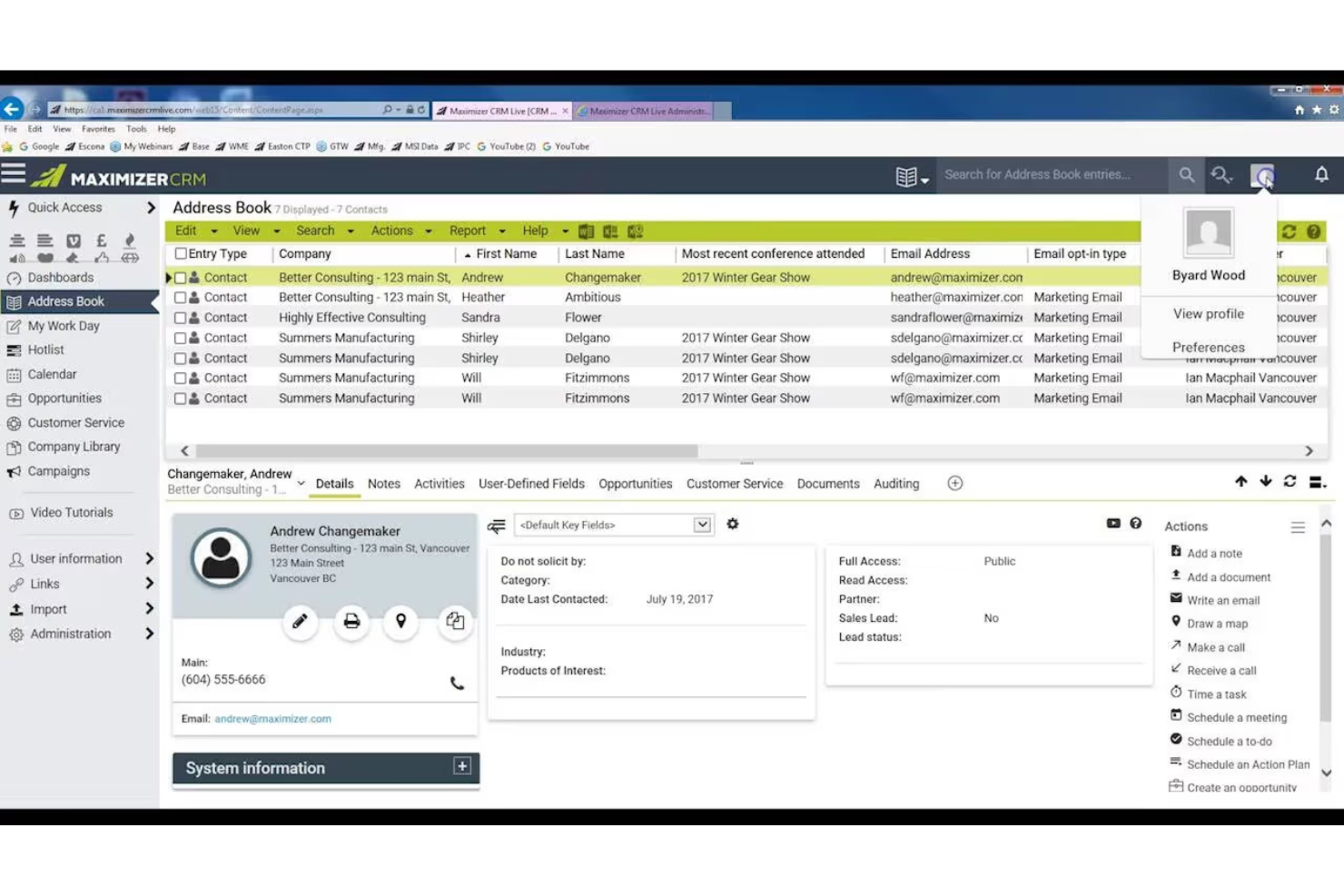
Maximizer CRM è una soluzione di gestione aziendale che offre strumenti per gestire le relazioni con i clienti e monitorare le prestazioni aziendali. È progettato per i professionisti che gestiscono dati dei clienti, vendite e reportistica in un'unica piattaforma. Il software è ideale per le aziende che necessitano di strumenti flessibili per gestire le operazioni quotidiane.
Perché ho scelto Maximizer CRM:
Maximizer CRM offre opzioni di implementazione flessibili, rendendolo accessibile per le piccole aziende che necessitano di soluzioni on-premise o basate su cloud. È possibile personalizzare il software per adattarlo al flusso di lavoro del tuo team, facilitando così le operazioni.
La piattaforma include funzionalità come il monitoraggio delle opportunità, campagne email e report sulle prestazioni che sono facilmente adattabili per realtà di dimensioni ridotte. Maximizer offre anche strumenti di gestione dati, così il tuo team può gestire le informazioni dei clienti in modo efficiente senza essere sopraffatto da funzionalità eccessive.
Funzionalità principali & integrazioni:
Le funzionalità includono monitoraggio delle opportunità, report sulle prestazioni e dashboard personalizzabili. Per restare in contatto con i clienti, puoi creare e gestire facilmente campagne email. Il sistema offre anche opzioni di implementazione flessibili, consentendoti di scegliere tra soluzioni on-premise o basate su cloud.
Le integrazioni includono Microsoft Outlook, QuickBooks, Google Workspace, Microsoft 365, Zapier, Mailchimp, Constant Contact, Shopify e Office 365.
Pros and Cons
Pros:
- Opzioni di implementazione scalabili
- Monitoraggio delle opportunità flessibile
- Capacità di gestione dei dati avanzata
Cons:
- Funzionalità mobile limitate
- Non ideale per grandi aziende


Wealthbox CRM è una piattaforma basata su cloud progettata per i professionisti finanziari per gestire le relazioni con i clienti e le operazioni quotidiane. Offre strumenti per monitorare le interazioni con i clienti, gestire le attività e semplificare i flussi di lavoro, facilitando l'organizzazione e l'efficienza dei team.
Perché ho scelto Wealthbox CRM:
Wealthbox CRM include funzionalità di collaborazione che consentono ai team di condividere aggiornamenti, note e attività con facilità. Il tuo team può comunicare all'interno della piattaforma e assegnare attività per assicurarsi che tutti rimangano allineati.
Include anche una funzione di timeline, dove tutte le attività e interazioni sono visibili a ogni membro del team. Questo lo rende ideale per le aziende che necessitano di un approccio più collaborativo nella gestione delle relazioni con i clienti e delle comunicazioni interne.
Caratteristiche distintive e integrazioni:
Le funzionalità includono strumenti per la collaborazione del team, gestione delle attività, e una visualizzazione timeline per tracciare le interazioni con i clienti. Puoi assegnare compiti ai membri del team e condividere note per mantenere tutti aggiornati sulle novità dei clienti. La funzione timeline della piattaforma offre al tuo team una visibilità completa su tutte le attività dei clienti.
Le integrazioni includono AdvicePay, Apple Calendar, Altruist, Asana, AssetBook, AWeber, Axos, Betterment, Blueleaf e Black Diamond.
Pros and Cons
Pros:
- Ottimo per la collaborazione di squadra
- Processo di onboarding rapido
- Richiede una conoscenza tecnica minima
Cons:
- Personalizzazione limitata dei flussi di lavoro
- Manca di funzionalità avanzate di reportistica

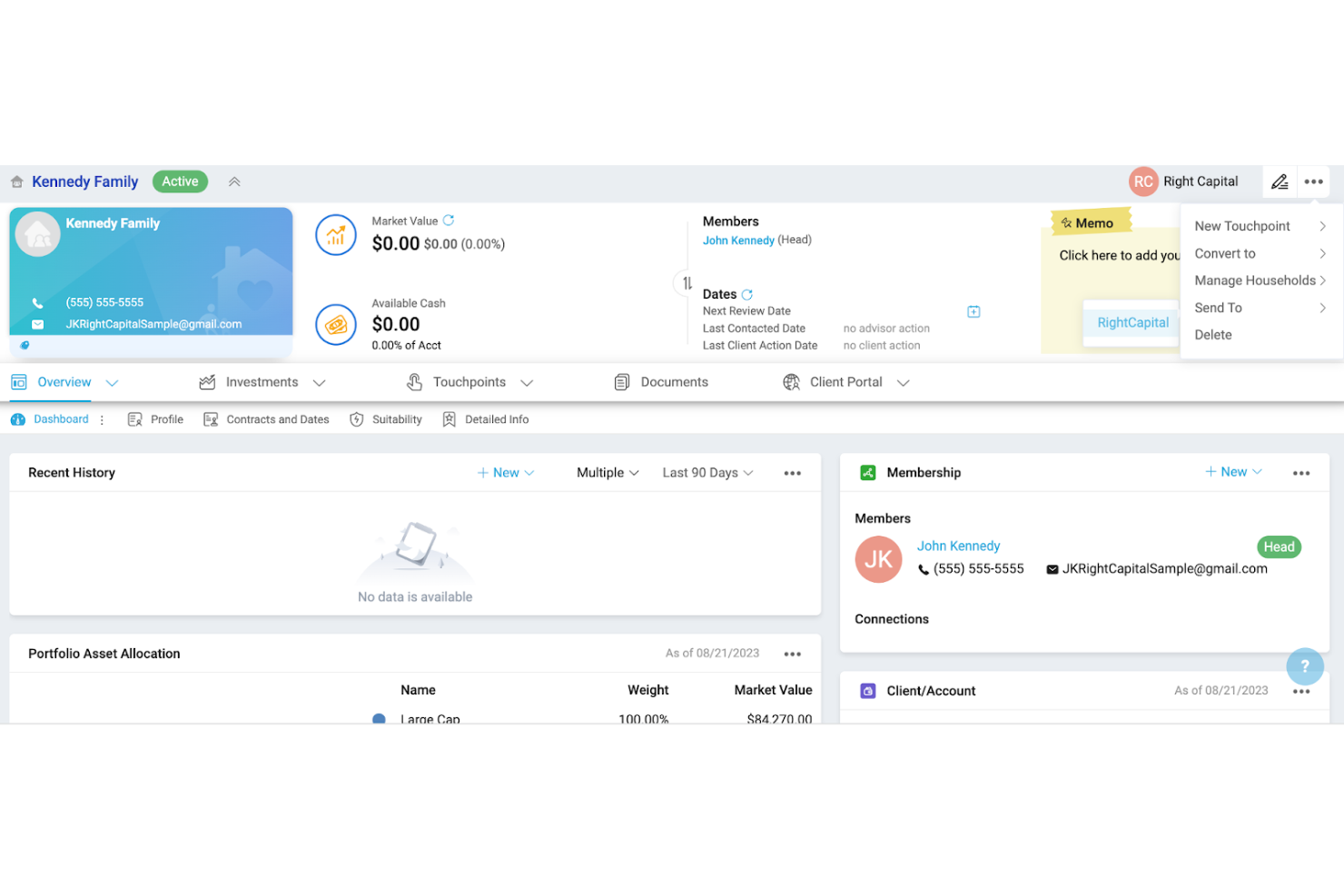
Advyzon è una piattaforma basata su cloud progettata per semplificare le operazioni aziendali dei professionisti finanziari. Offre strumenti per la gestione dei portafogli, la reportistica delle performance e la pianificazione finanziaria. Questa soluzione aiuta gli utenti a consolidare molte attività in un unico sistema intuitivo.
Perché ho scelto Advyzon:
Advyzon fornisce una piattaforma all-in-one che combina la gestione dei portafogli, la reportistica dei clienti e l'archiviazione dei documenti in un unico luogo. Puoi creare piani finanziari dettagliati ed eseguire report sulle performance senza dover utilizzare diversi sistemi. I dashboard personalizzabili ti permettono di adattare la piattaforma alle esigenze della tua azienda. Il sistema include anche strumenti di fatturazione, semplificando il monitoraggio e la gestione dei pagamenti dei clienti.
Caratteristiche e integrazioni principali:
Le funzionalità includono reportistica delle performance personalizzabile, accesso al portale clienti e strumenti di fatturazione. All'interno della stessa piattaforma, puoi gestire i portafogli dei clienti e generare piani finanziari dettagliati. Il sistema di archiviazione dei documenti ti aiuta a mantenere tutto organizzato e facilmente accessibile.
Le integrazioni includono Morningstar, Riskalyze, Orion, TD Ameritrade, Fidelity, Redtail, Black Diamond, eMoney, Schwab e MoneyGuidePro.
Pros and Cons
Pros:
- Solido sistema di archiviazione dei documenti
- Strumenti efficienti di fatturazione e gestione delle fatture
- Scalabile per aziende in crescita
Cons:
- Lungo processo di onboarding
- Funzionalità limitate dell'app mobile

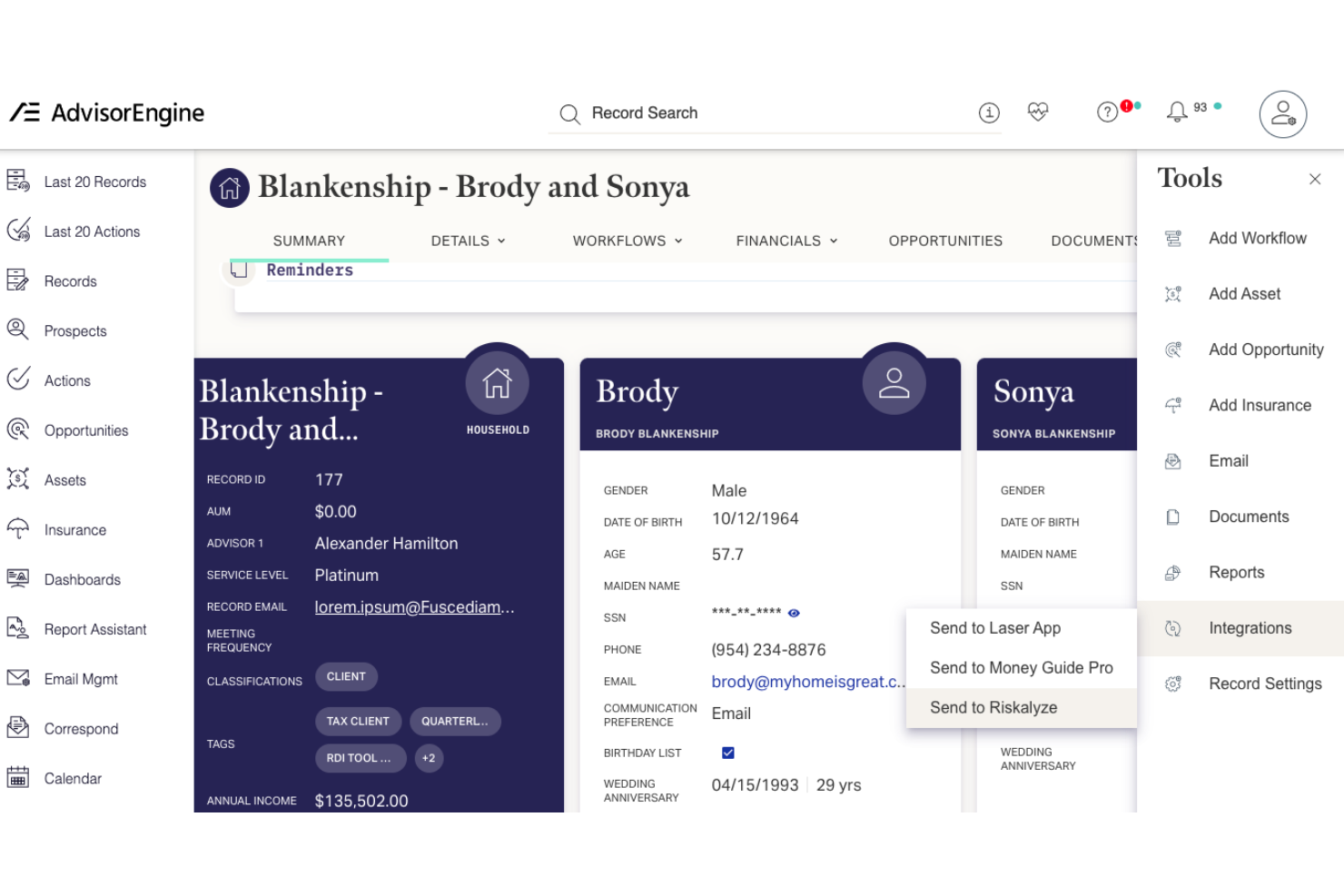
AdvisorEngine CRM è una soluzione CRM progettata per i professionisti finanziari. Offre strumenti per gestire le relazioni con i clienti e le operazioni quotidiane. Aiuta le società nella comunicazione con i clienti, nell'automazione dei flussi di lavoro e nella gestione dei documenti, assicurando che i processi essenziali siano monitorati e organizzati in modo efficiente.
Perché ho scelto AdvisorEngine CRM:
AdvisorEngine CRM è ideale per le società che necessitano di solide funzionalità di monitoraggio della conformità. Fornisce strumenti integrati per documentare e gestire tutte le interazioni con i clienti, aiutandoti a rimanere pronto per eventuali verifiche. Puoi automatizzare i flussi di lavoro per garantire che le attività legate alla conformità vengano completate puntualmente. Il sistema di gestione documentale della piattaforma supporta la conformità archiviando e organizzando in modo sicuro i file dei clienti.
Funzionalità e integrazioni principali:
Le funzionalità includono flussi di lavoro automatizzati, monitoraggio della conformità e gestione dei documenti. Puoi tracciare tutte le interazioni con i clienti e assicurarti che il tuo team rispetti i requisiti normativi. Il sistema ti aiuta anche a organizzare e archiviare in modo sicuro i file dei clienti per un facile recupero.
Le integrazioni includono Schwab, Fidelity, TD Ameritrade, Pershing, Riskalyze, MoneyGuidePro, eMoney, Morningstar e Orion.
Pros and Cons
Pros:
- Strumenti avanzati per il monitoraggio della conformità
- Flussi di lavoro personalizzabili per i processi
- Scalabile per aziende di medie dimensioni
Cons:
- Curva di apprendimento inizialmente ripida
- Richiede tempo per una personalizzazione completa

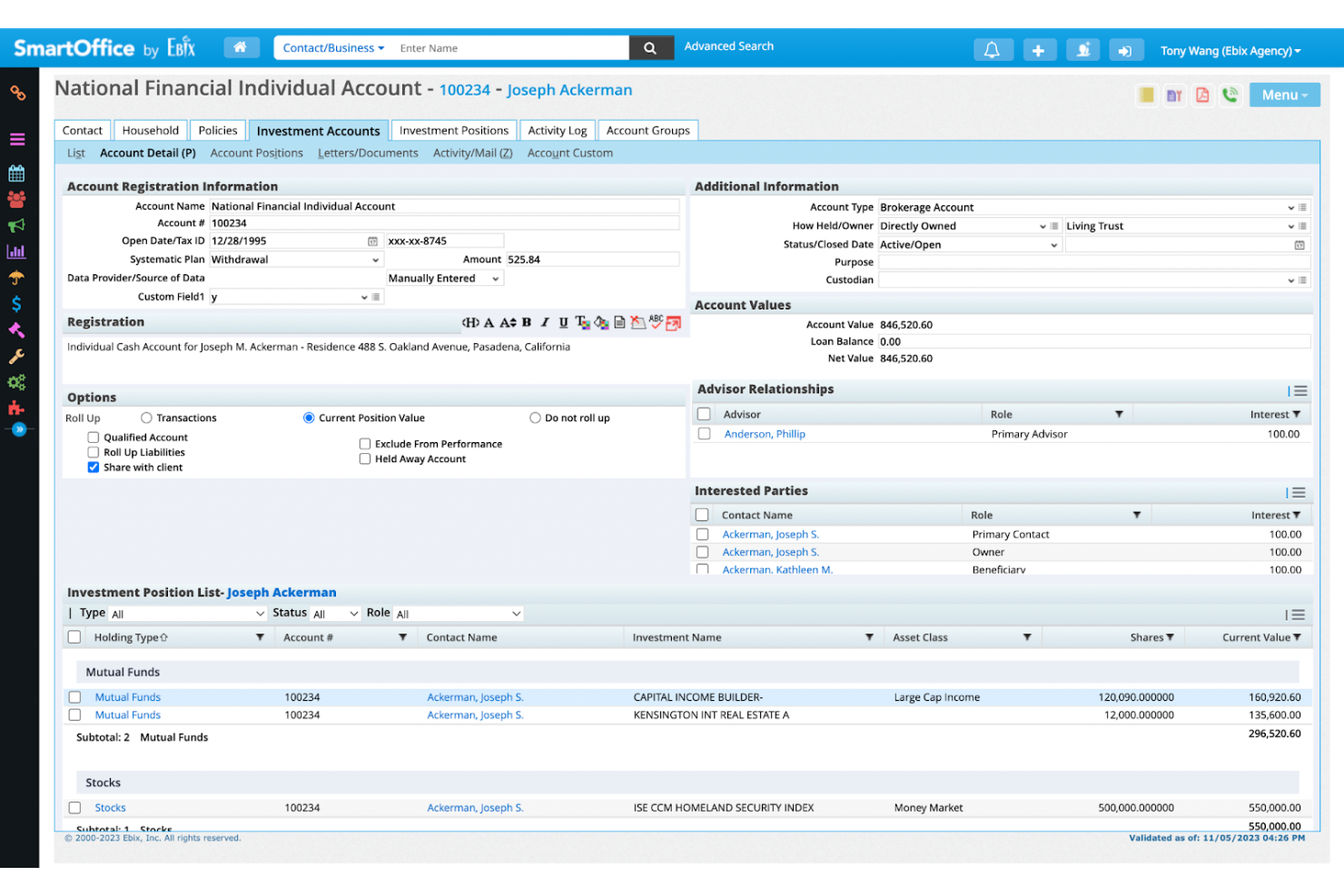
SmartOffice è uno strumento di gestione aziendale progettato per i professionisti finanziari. Aiuta gli utenti a gestire le informazioni dei clienti, monitorare le vendite e gestire le attività assicurative, tutto in un unico posto. Questa soluzione è pensata per semplificare le operazioni quotidiane e garantire una migliore organizzazione.
Perché ho scelto SmartOffice:
SmartOffice è pensato per i professionisti che si occupano sia di esigenze finanziarie che assicurative. Puoi gestire le polizze assicurative insieme ai portafogli dei clienti, rendendo facile avere tutto in un unico sistema. Il software include funzionalità come il monitoraggio delle polizze, la gestione delle vendite e i promemoria delle attività automatizzati. I suoi strumenti focalizzati sull’assicurazione ti permettono di generare rapidamente report e restare conforme agli standard del settore.
Funzionalità e integrazioni distintive:
Le funzionalità includono il monitoraggio delle polizze per la gestione assicurativa, promemoria automatizzati delle attività e monitoraggio delle vendite. È possibile generare report dettagliati per aiutarti a restare conforme alle normative di settore. Il software consente inoltre di gestire dati finanziari e assicurativi in un unico sistema centralizzato.
Le integrazioni includono Laser App, DTCC, SunGard, Albridge, Wealthscape, Redtail, Morningstar, SmartOffice Pro e Salesforce.
Pros and Cons
Pros:
- Flussi di lavoro altamente personalizzabili
- Scalabile per aziende di grandi dimensioni
- Funzioni di automazione delle attività efficienti
Cons:
- Processo di configurazione complesso
- Design dell'interfaccia utente obsoleto


XLR8 CRM è una soluzione costruita sulla piattaforma Salesforce, pensata per soddisfare le esigenze dei professionisti finanziari. Fornisce strumenti per la gestione delle relazioni con i clienti, il monitoraggio dei processi aziendali e la semplificazione delle attività di conformità. Questo sistema è progettato per funzionare all'interno dell'ecosistema Salesforce, offrendo ai consulenti finanziari un'esperienza integrata.
Perché ho scelto XLR8 CRM:
XLR8 CRM è ideale per i team che già utilizzano Salesforce, offrendo un'integrazione fluida e flussi di lavoro familiari. Puoi sfruttare le funzionalità di Salesforce utilizzando gli strumenti su misura di XLR8 per la gestione dei clienti finanziari. Il software supporta il monitoraggio della conformità, la gestione dei dati dei clienti e i flussi di lavoro automatizzati per mantenere il tuo team organizzato.
Funzionalità e integrazioni principali:
Le funzionalità includono il monitoraggio della conformità, flussi di lavoro personalizzabili e gestione dei dati dei clienti. Puoi automatizzare compiti e processi per assicurarti che il tuo team rispetti le scadenze fondamentali. La piattaforma offre inoltre strumenti di reportistica flessibili per aiutarti ad analizzare efficacemente le prestazioni aziendali.
Le integrazioni includono Salesforce, Riskalyze, Laser App, MoneyGuidePro, eMoney, Orion, Albridge, Morningstar e TD Ameritrade.
Pros and Cons
Pros:
- Basato sulla nota piattaforma Salesforce
- Flussi di lavoro personalizzabili per società finanziarie
- Potenti strumenti di monitoraggio della conformità
Cons:
- Funzionalità mobile limitata
- Processo di implementazione complesso

Creatio CRM
Ideale per una visione a 360 gradi del cliente
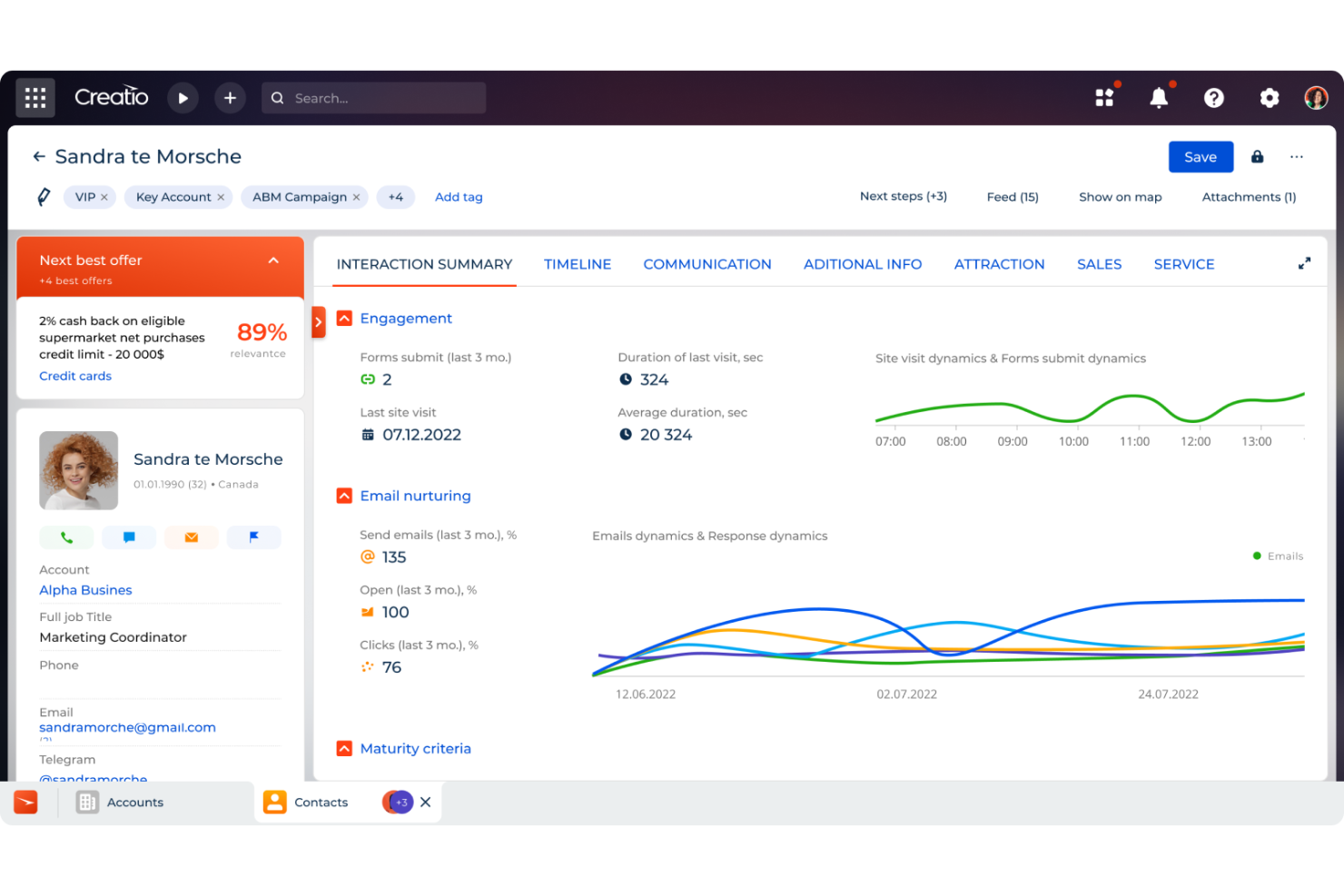
CRM Creatio è una piattaforma no-code progettata per automatizzare i flussi di lavoro e i processi di gestione delle relazioni con i clienti (CRM). Offre soluzioni su misura per vari settori, tra cui i servizi finanziari, per aiutare le aziende a gestire le interazioni con i clienti e ottimizzare le operazioni.
Perché ho scelto CRM Creatio:
Ho scelto CRM Creatio perché fornisce una visione a 360 gradi di ogni cliente. Questa funzionalità consolida tutte le informazioni del cliente, inclusi i profili finanziari, la cronologia delle comunicazioni e le richieste di servizio, in un'unica interfaccia. Questa prospettiva olistica consente di comprendere meglio le esigenze dei clienti e di offrire consulenza finanziaria personalizzata. Apprezzo anche le sue avanzate capacità di gestione dei lead, che permettono di acquisire, distribuire e coltivare automaticamente i lead.
Funzionalità principali e integrazioni:
Le funzionalità includono strumenti di comunicazione omnicanale che ti permettono di interagire con i clienti attraverso i loro canali preferiti, garantendo un coinvolgimento coerente e tempestivo. La piattaforma offre anche la gestione dei prodotti finanziari, permettendo di gestire in modo efficiente vari servizi e prodotti finanziari su misura per le esigenze dei clienti. Inoltre, CRM Creatio fornisce strumenti di analisi e reportistica che consentono di prendere decisioni basate sui dati e migliorare costantemente i servizi.
Le integrazioni includono Accelo, Act!, ActiveCampaign, Acumatica, Adobe Analytics, Asana, Microsoft Exchange, Excel, Mailchimp, HubSpot Marketing Hub, Google Calendar e Tableau.
Pros and Cons
Pros:
- Ampie opzioni di personalizzazione
- Piattaforma no-code
- Supporta la crescita delle aziende
Cons:
- La personalizzazione può richiedere tempo
- La migrazione dei dati può essere complessa
New Product Updates from Creatio CRM

Creatio CRM Expands AI Across Marketing and Collaboration
Creatio CRM introduces AI-assisted landing page generation, template-based email generation, RAG-enabled knowledge governance, a Microsoft Teams personal tab, and AI meeting summaries. These updates help teams create content faster and streamline AI-powered workflows. For more information, visit Creatio’s official site.
Altri software CRM per consulenti finanziari
Ecco alcune opzioni aggiuntive di software CRM che non sono state incluse nel mio elenco ristretto, ma che vale comunque la pena prendere in considerazione.


Come Valuto i Software CRM per Consulenti Finanziari
Suddivido la mia valutazione tra i criteri di base che uno strumento deve soddisfare e i fattori che differenziano un CRM progettato per consulenti da uno generico.
Funzionalità di Base (Requisiti Essenziali per Questa Lista)
Quando seleziono gli strumenti per la mia lista, valuto ciascuno su una scala da 0 (non offre la funzionalità) a 5 (eccelle in quest'area) per ogni funzionalità essenziale elencata di seguito. Successivamente, converto il punteggio totale dello strumento in percentuale. Ogni strumento deve ottenere un punteggio minimo totale del 65% per essere preso in considerazione.
- Gestione di Clienti e Nuclei Familiari: Verifico se è possibile raggruppare i contatti in nuclei familiari, collegare trust ed entità, e consolidare i valori dei conti tra i vari membri della famiglia nel modo in cui i consulenti organizzano i portafogli.
- Integrazione dei Dati Finanziari: Ogni strumento viene valutato in base a come si collega con i depositari come Schwab e Fidelity, oltre che con piattaforme di pianificazione e portafoglio come eMoney, Orion e MoneyGuidePro.
- Conformità e Tracciamento delle Attività: Cerco funzionalità di archiviazione delle comunicazioni, registrazione delle attività e conservazione dei registri che siano in linea con i requisiti SEC e FINRA per la conservazione dei libri e dei registri.
- Automazione dei Flussi di Lavoro del Consulente: I flussi di lavoro preimpostati per processi tipici dei consulenti—come onboarding di nuovi clienti, monitoraggio RMD, pianificazione delle revisioni annuali—sono più importanti rispetto all'automazione dei compiti generici.
- Monitoraggio di AUM e Pipeline: Il pipeline dovrebbe riflettere il modo in cui i consulenti misurano effettivamente la crescita, tracciando i potenziali clienti per patrimonio stimato e fonte di referenza piuttosto che per semplici fasi di trattativa.
- Gestione Sicura dei Documenti: Valuto se la piattaforma supporta l'archiviazione criptata, l'accesso basato sui ruoli e i flussi di lavoro per la firma elettronica nella gestione di documenti sensibili come richieste di apertura conto e moduli di trasferimento.
Una volta che ho una lista di strumenti che soddisfano i criteri, considero ciò che distingue ogni piattaforma dalle altre.
Fattori Differenzianti (Cosa Distingue i Fornitori)
Ecco come confronto e metto a confronto i diversi fornitori:
Funzionalità Distintive
Un portale clienti personalizzato offre ai consulenti un canale sicuro e self-service dove i clienti possono accedere a documenti e piani senza doversi scambiare email. Valuto anche se il CRM offre automazione del marketing conforme, visto che i consulenti necessitano di campagne drip pre-approvate segmentate per eventi di vita o fascia di AUM. Importanti sono anche i cruscotti di reportistica personalizzata: cerco KPI specifici per consulenti come crescita dell'AUM, tasso di fidelizzazione dei clienti e wallet share invece che semplici metriche di vendita generiche.
Oltre le Funzionalità
La dimensione dello studio e l'adeguatezza al modello di business influenzano notevolmente la mia valutazione. Un consulente RIA singolo ha esigenze molto diverse rispetto a un broker-dealer in più uffici, quindi verifico se la piattaforma supporta la struttura di licenze e la gerarchia di team adeguate. Anche il supporto alla migrazione dei dati è importante—passare da strumenti legacy come Redtail o Junxure significa che i consulenti necessitano di specialisti onboarding dedicati che comprendano i modelli dati della gestione patrimoniale. Considero anche quanto bene ogni CRM sia in grado di scalare con la crescita dello studio, così che i team non debbano cambiare piattaforma quando aggiungono consulenti o aprono nuove sedi.
Come scegliere il software CRM per consulenti finanziari
È facile perdersi in lunghi elenchi di funzionalità e strutture tariffarie complesse. Ecco una lista di fattori da ricordare, che ti aiuterà a rimanere concentrato mentre affronti il tuo processo di scelta del software.
| Fattore | Cosa considerare |
| Scalabilità | Questo software crescerà insieme alla tua azienda man mano che si espande? |
| Integrazioni | Si integra con gli strumenti che il tuo team utilizza già? |
| Personalizzazione | Puoi adattare il software ai processi della tua azienda? |
| Facilità d'uso | L'interfaccia è intuitiva per il tuo team? |
| Budget | Il prezzo rientra nel piano finanziario della tua azienda? |
| Misure di sicurezza | Il software soddisfa i requisiti di sicurezza dei tuoi dati? |
| Opzioni di assistenza | A quale tipo di assistenza clienti avrai accesso? |
| Conformità normativa | È conforme alle normative pertinenti al tuo settore? |
Tendenze nel software CRM per consulenti finanziari
Nel corso della mia ricerca, ho raccolto innumerevoli aggiornamenti dei prodotti, comunicati stampa e registri delle versioni di diversi fornitori di software CRM per consulenti finanziari. Ecco alcune delle tendenze emergenti che sto tenendo d'occhio.
- Analisi basate sull'IA: sempre più piattaforme utilizzano l'IA per fornire informazioni utili sul comportamento e sul coinvolgimento dei clienti. Questo aiuta i consulenti a prevedere le esigenze dei clienti e a personalizzare i propri servizi, migliorando le relazioni con i clienti. Ad esempio, strumenti come Zoho CRM offrono ora la valutazione dei potenziali clienti basata sull'IA.
- Strumenti per i clienti autonomi: i fornitori stanno aggiungendo portali autonomi in cui i clienti possono accedere ai propri dati finanziari, caricare documenti e gestire direttamente i propri account. Questo riduce le attività amministrative dei consulenti e offre ai clienti maggiore praticità.
- Monitoraggio avanzato della conformità: i CRM stanno potenziando le proprie funzionalità di conformità in risposta ai crescenti requisiti normativi. Strumenti come AdvisorEngine CRM si concentrano sui controlli automatizzati di conformità e sui registri di controllo, rendendo più semplice per i consulenti mantenere la conformità con il minimo sforzo.
- Visualizzazione avanzata dei dati: un numero sempre maggiore di CRM integra cruscotti personalizzabili con strumenti avanzati di visualizzazione dei dati per aiutare i consulenti ad analizzare rapidamente le tendenze e le prestazioni dei portafogli. Questa tendenza aiuta le aziende a prendere decisioni più informate a colpo d'occhio.
- Integrazione con i consulenti robotizzati: alcuni CRM stanno iniziando a integrarsi con i servizi di consulenza automatizzata, consentendo ai consulenti di gestire portafogli di investimento sia umani sia automatizzati all'interno della stessa piattaforma. Questa combinazione aggiunge versatilità per le aziende che desiderano offrire servizi finanziari ibridi.
Che cos'è il software CRM per consulenti finanziari?
Il software CRM per consulenti finanziari è uno strumento che aiuta a gestire le relazioni con i clienti, tenere traccia delle comunicazioni e organizzare i dati finanziari. I consulenti finanziari, i gestori patrimoniali e i pianificatori utilizzano questi strumenti per mantenere l'organizzazione, garantire la conformità e offrire servizi personalizzati ai clienti.
Funzionalità come la gestione dei dati dei clienti, i promemoria automatizzati e il monitoraggio della conformità aiutano a mantenere solide relazioni con i clienti e a soddisfare i requisiti normativi. Nel complesso, questi strumenti semplificano le attività quotidiane e consentono ai consulenti di concentrarsi maggiormente sul coinvolgimento dei clienti e sulla crescita.
Funzionalità del software CRM per consulenti finanziari
Quando scegli il miglior CRM per consulenti finanziari, presta attenzione alle seguenti funzionalità CRM fondamentali.
- Gestione dei clienti: organizza i dati dei clienti in un unico luogo, semplificando il monitoraggio delle interazioni e dei dettagli finanziari.
- Promemoria automatizzati: aiuta a garantire che non vengano mai dimenticati ricontatti, riunioni e attività importanti.
- Monitoraggio della conformità: mantiene i consulenti in linea con le normative del settore automatizzando le attività di conformità necessarie.
- Gestione dei documenti: archivia e organizza in modo sicuro i documenti importanti dei clienti per facilitarne l'accesso e la condivisione.
- Flussi di lavoro personalizzabili: consente di adattare i flussi di lavoro alle esigenze specifiche della propria società di consulenza.
- Rapporti sulle prestazioni: genera rapporti sui portafogli dei clienti, sulle metriche aziendali e sulle conversioni, fornendo informazioni sulle prestazioni finanziarie.
- Marketing tramite e-mail e monitoraggio delle comunicazioni: registra tutte le comunicazioni con i clienti in un unico luogo, facilitando il mantenimento di un coinvolgimento costante dei clienti.
- Integrazione della pianificazione finanziaria: si collega agli strumenti di pianificazione finanziaria per semplificare la consulenza e la gestione dei portafogli.
- Gestione delle attività: assegna e monitora le attività dei membri del team per garantire che tutto proceda secondo i tempi previsti.
Vantaggi del software CRM per consulenti finanziari
L'implementazione di un sistema CRM per il settore dei servizi finanziari offre vantaggi al team e all'azienda. Eccone alcuni di cui potrai usufruire.
- Migliori relazioni con i clienti: tiene traccia di tutte le interazioni con i clienti, aiutandoti a offrire un servizio personalizzato.
- Maggiore efficienza: automatizza le attività di routine come promemoria e ricontatti, facendo risparmiare tempo al team.
- Conformità migliorata: monitora le attività di conformità per garantire il rispetto delle normative del settore.
- Dati centralizzati: conserva tutte le informazioni sui clienti in un unico luogo, semplificandone la gestione e l'accesso.
- Maggiore collaborazione del team: aiuta ad assegnare le attività e a monitorare i progressi, garantendo che tutti siano sempre aggiornati.
- Processo decisionale più solido: fornisce rapporti sulle prestazioni e informazioni utili per prendere decisioni aziendali informate.
- Maggiore fidelizzazione dei clienti: garantisce una comunicazione costante, che porta a una maggiore soddisfazione e fidelizzazione dei clienti.
Costi e prezzi del software CRM per consulenti finanziari
La scelta di un software di gestione delle relazioni con i clienti per consulenti finanziari richiede la comprensione dei diversi modelli e piani tariffari disponibili. I costi variano in base alle funzionalità, alle dimensioni del team, ai componenti aggiuntivi e ad altri fattori. La tabella seguente riassume i piani standard, i prezzi medi e le funzionalità tipicamente incluse nelle soluzioni software CRM per consulenti finanziari.
Tabella comparativa dei piani per il software CRM per consulenti finanziari
| Tipo di piano | Prezzo medio | Funzionalità comuni |
| Piano gratuito | $0/user/ mese | Gestione di base dei contatti, monitoraggio delle e-mail e reportistica limitata. |
| Piano personale | $10-$25/ user/mese | Gestione delle attività, monitoraggio delle e-mail, pannelli di controllo personalizzabili e automazione di base. |
| Piano aziendale | $30-$60/ user/mese | Automazione dei flussi di lavoro, reportistica avanzata, monitoraggio della conformità e integrazioni. |
| Piano per grandi aziende | $70-$150/ user/mese | Flussi di lavoro personalizzati, sicurezza avanzata, supporto dedicato e personalizzazione completa. |
Domande frequenti sul software CRM per consulenti finanziari
Ecco alcune risposte alle domande più comuni sul software CRM per consulenti finanziari.
Quanto sono sicuri i dati dei clienti nel software CRM per consulenti finanziari?
Il software CRM per consulenti finanziari include generalmente solide misure di sicurezza, come la crittografia e l’autenticazione degli utenti, per proteggere i dati sensibili dei clienti. Molti sistemi sono progettati per rispettare le normative di settore, come il GDPR e le linee guida della SEC. È importante verificare le funzionalità di sicurezza di ogni piattaforma e assicurarsi che soddisfino le esigenze di conformità della propria azienda.
Il software CRM può integrarsi con gli strumenti di pianificazione finanziaria?
Sì, molte piattaforme CRM per consulenti finanziari si integrano con gli strumenti di pianificazione finanziaria, semplificando la gestione dei portafogli dei clienti e l’offerta di consulenza personalizzata. Queste integrazioni aiutano a ottimizzare i flussi di lavoro sincronizzando i dati tra il CRM e il software di pianificazione finanziaria. Assicurati di verificare la compatibilità della piattaforma con gli strumenti già utilizzati dalla tua azienda.
Qual è il tempo di implementazione tipico del software CRM?
Il tempo di implementazione varia in base alla complessità del CRM e alle dimensioni del team. Per i team più piccoli, la configurazione potrebbe richiedere solo pochi giorni, mentre le organizzazioni più grandi con maggiori esigenze di personalizzazione potrebbero aver bisogno di diverse settimane. La maggior parte dei fornitori offre supporto durante l’avvio per facilitare la migrazione dei dati e la formazione.
Posso personalizzare i flussi di lavoro nel software CRM per consulenti finanziari?
Sì, la maggior parte delle piattaforme CRM offre flussi di lavoro personalizzabili, adattati ai processi specifici delle aziende di consulenza finanziaria. Puoi automatizzare attività come i ricontatti con i clienti, la pianificazione degli appuntamenti e i controlli di conformità. Le opzioni di personalizzazione variano, quindi è importante scegliere una piattaforma in linea con le esigenze operative della tua azienda.
Il software CRM è scalabile con la crescita della mia azienda?
La maggior parte delle soluzioni CRM per consulenti finanziari è progettata per crescere insieme alla tua attività. In genere puoi aggiungere utenti, aggiornare le funzionalità e modificare i flussi di lavoro con l’espansione della tua azienda. Verifica che la piattaforma offra piani tariffari flessibili in grado di adattarsi alla crescita della tua azienda nel tempo.
Qual è il prossimo passo?
Vuoi portare le tue attività di RevOps a un livello superiore?
Iscriviti alla newsletter di The CRO Club per ricevere consigli di esperti, recensioni di software e altre risorse che ti aiuteranno a garantire una crescita prevedibile su larga scala.