

Mevcut çok sayıda farklı Salesforce alternatifi arasından hangisinin sizin için doğru olduğunu belirlemek zor olabilir. İş süreçlerini kolaylaştırmanıza, müşteri ilişkilerini geliştirmenize ve satış büyümesini artırmanıza yardımcı olacak bir Salesforce alternatifi istediğinizi biliyorsunuz; ancak hangi aracın en iyi olduğunu belirlemeniz gerekiyor. Yardımcı olabilirim! Bu yazıda, çeşitli ekipler ve projelerle düzinelerce farklı Salesforce alternatifini kullanma konusundaki kişisel deneyimlerimi paylaşarak ve en iyi Salesforce alternatifleri seçimlerimi sunarak karar vermenizi kolaylaştıracağım.
Why Trust Our Software Recommendations
6,700+
Reviews
20
Industry experts
16+
Evaluation factors
14
Years
Our reviews reflect our independent judgment—not a sales pitch. Learn how we stay transparent.
For this guide, we evaluated tools using hands-on testing and independent research, scoring tools using our selection criteria.
Our reviews reflect our human editorial judgment, not a sales pitch.
Salesforce Alternatifleri Karşılaştırma Tablosu
Sorted by: Default
| Tool | Starting Price | Website | |
|---|---|---|---|
Best for organizing prospect data | 4.7 out of 5 | $39/user/month 30-day free trial + free demo available | Website |
Best for Al-native CRM customization | 4.7 out of 5 | $40/user/month Not available | Book Demo |
Best for flexible CRM workflows and pipelines | 4.5 out of 5 | $44/user/month Free plan + 14-day trial + demo available | Website |
Best for customizable sales automation | 4.6 out of 5 | $12/user/month 14-day free trial + free demo available | Book Demo |
Best for team organization and quick CRM adoption | 4.7 out of 5 | $22/user/month Free plan + 14-day free trial available | Website |
Best for predictive intelligence | 4.2 out of 5 | $14/user/month Free plan + 15-day free trial+ free demo available | Website |
Best for collaboration in large organizations | 4.6 out of 5 | $8/user/month 30-day free trial available | Website |
Best for beginners | 4.6 out of 5 | $100/user/month 14-day free trial | Website |
Best for visual pipeline management | 4.5 out of 5 | $14/user/month 14-day free trial | Website |
Best for service-driven organizations | 4.4 out of 5 | $19/month Free demo available | Website |


En İyi Salesforce Alternatifi İncelemeleri
Yeni bir CRM’e geçiş yapmaya (veya yeni bir CRM kurmaya) başlarken değerlendirebileceğiniz en iyi platformlardan bazılarını derledim ve araştırmalarımı aşağıda belgeledim.
Mevcut her CRM’i ele almak imkânsız olsa da neredeyse her işletmenin ve kullanım senaryosunun ihtiyaçlarını karşılayabilecek temel Salesforce alternatiflerine odaklanmaya çalıştım.
 Best for organizing prospect data
- 30-day free trial + free demo available
- From $39/user/month
Visit WebsiteCustomer Rating:4.7/5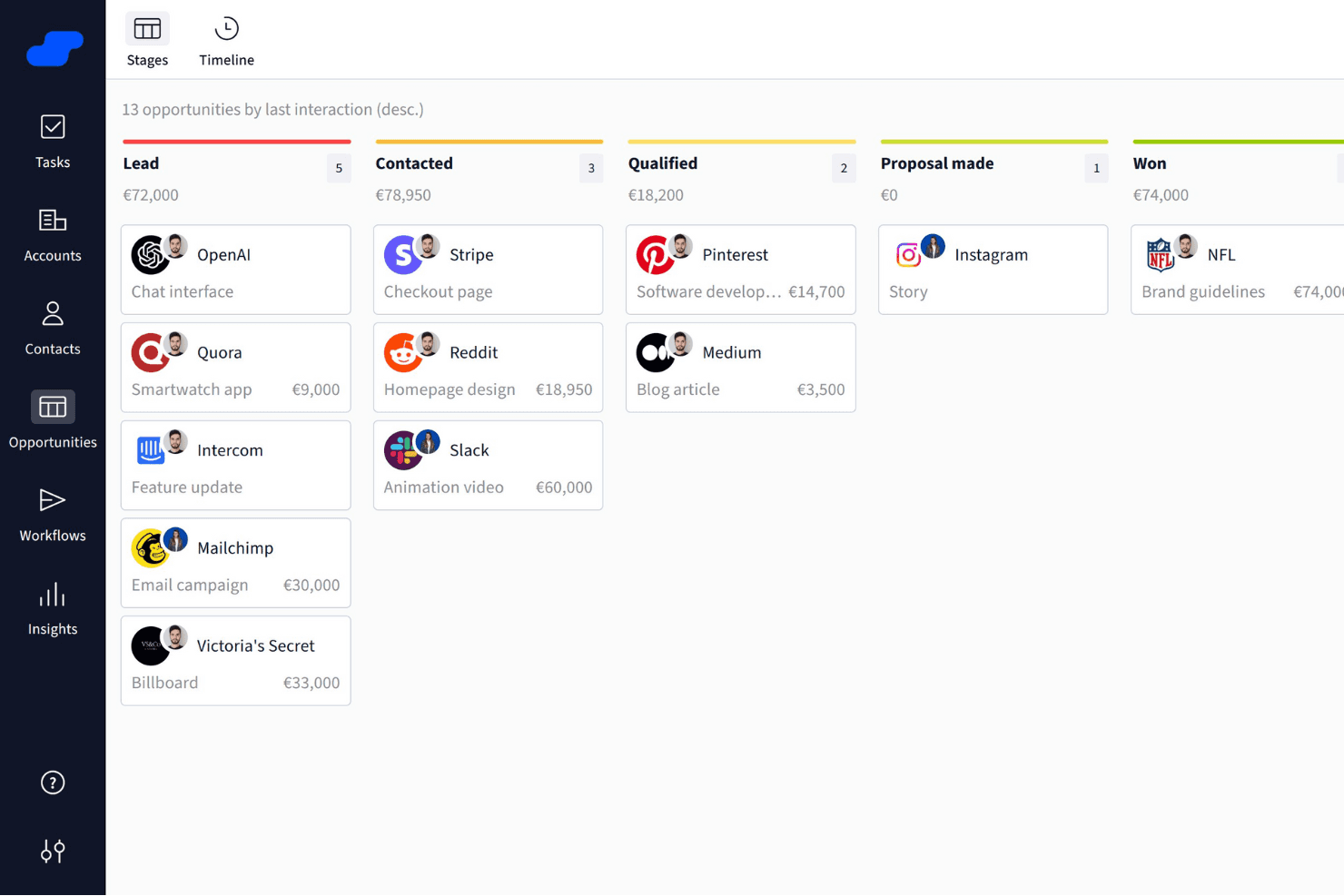
Salesflare organizes sales opportunities into visual pipeline stages. Salesflare is a B2B CRM that automatically captures contact and activity data from your email and calendar, and organizes it across visual pipelines, customizable fields, and AI-assisted follow-up tools.
Who Is Salesflare Best For?
Salesflare is a strong fit for small B2B sales teams that want a CRM to organize prospect data without spending time on manual data entry or admin setup.
Why I Picked Salesflare
I picked Salesflare as one of the best because of how it handles prospect data organization without demanding manual input from your team. It automatically pulls contact details from email signatures and captures activity from your inbox and calendar, so account records stay current without anyone having to update them. I especially like the relationship intelligence feature, which shows who on your team already has a connection at a target account and how strong that relationship is.
Salesflare Key Features
- Email and calendar data capture: Salesflare automatically pulls contact details, emails, and meetings from your connected inbox and calendar into CRM records.
- Multi-step email sequences: You can build automated, personalized follow-up email flows that continue until a contact replies or meets a configured exit condition.
- Lead scoring: Salesflare scores leads based on live interaction patterns and triggers notifications when the timing looks right to reach out.
- Custom fields for accounts, contacts, and opportunities: You can create fields across multiple types—dropdown, date, linked records, tags, and more—to structure your data the way your team works.
Salesflare Integrations
Salesflare offers native integrations with LinkedIn, Gmail, Outlook, Google Calendar, Microsoft 365, Zoho Mail, and Microsoft Exchange. Its directory lists 11,304 apps across native and Make connections, and it provides a REST API plus Zapier.
Pros and Cons
Pros:
- Flexible pipelines support distinct sales motions
- Relationship maps reveal warm account connections
- Automatic capture reduces stale prospect records
Cons:
- CRM migration needs manual spreadsheet cleanup
- Reporting depth trails broader CRM suites
Learn more about Salesflare: Best for Al-native CRM customization
- Not available
- From $40/user/month
Visit WebsiteCustomer Rating:4.7/5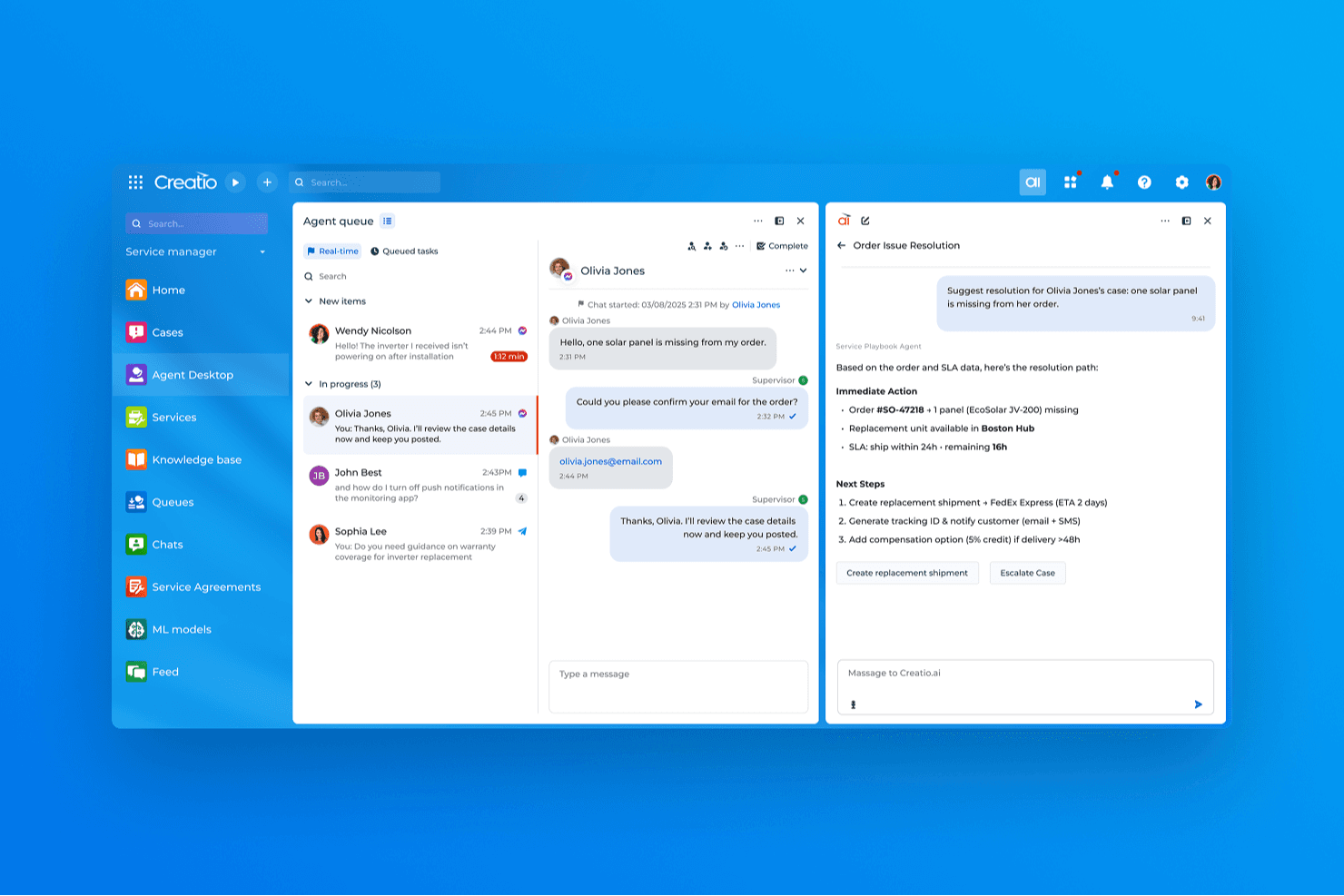
Creatio CRM uses AI to suggest real-time resolutions for customer service cases. Creatio AI CRM is an AI CRM and workflow automation platform that covers sales, marketing, and service with tools for lead and opportunity management, process design, customizable pipelines, and a unified customer data view.
Who Is Creatio AI CRM Best For?
Creatio AI CRM is a strong fit for small and midsize businesses that want to build and adapt their own CRM workflows without leaning on developers for every change.
Why I Picked Creatio AI CRM
I picked Creatio AI CRM as one of the best because its AI coding agents and no-code designers let you build and modify CRM workflows, pipeline stages, and automation rules without filing a ticket to your dev team. I especially like the BPMN-based process builder: you can set up multi-step sequences that trigger on record changes, schedules, or system signals, then adjust them as your sales motion evolves. The Freedom UI tools let you reshape objects, fields, and page layouts just as quickly.
Creatio AI CRM Key Features
- Unified customer data view: Displays real-time customer interactions across products and channels in a single record.
- BPMN-enabled process designer: Lets you build multi-step automated processes triggered by record changes, schedules, or system signals without writing code.
- AI agent builder: Provides prebuilt CRM agents and no-code tools to create custom agents that automate tasks like account research and quote generation.
- Marketplace add-ons: Offers 400+ connectors and templates—including Zapier, PandaDoc, and Power BI—to extend platform functionality.
Creatio AI CRM Integrations
Creatio AI CRM offers native integrations with Google Calendar and Microsoft Exchange, plus 400+ Marketplace applications and add-ons, including Microsoft Power BI Desktop, PandaDoc, Apollo.io, and Zapier. Its REST, OData, SOAP, OAuth, and web-service APIs support custom integrations.
Pros and Cons
Pros:
- Al-native, no-code workflows adapt as sales processes change
- Shared customer records unite sales, marketing, and service
- BPMN automations connect sales and service steps
Cons:
- No dedicated Salesforce migration path is documented
- Feature breadth can overwhelm new users
Learn more about Creatio AI CRM: Best for flexible CRM workflows and pipelines
- Free plan + 14-day trial + demo available
- From $44/user/month
Visit WebsiteCustomer Rating:4.5/5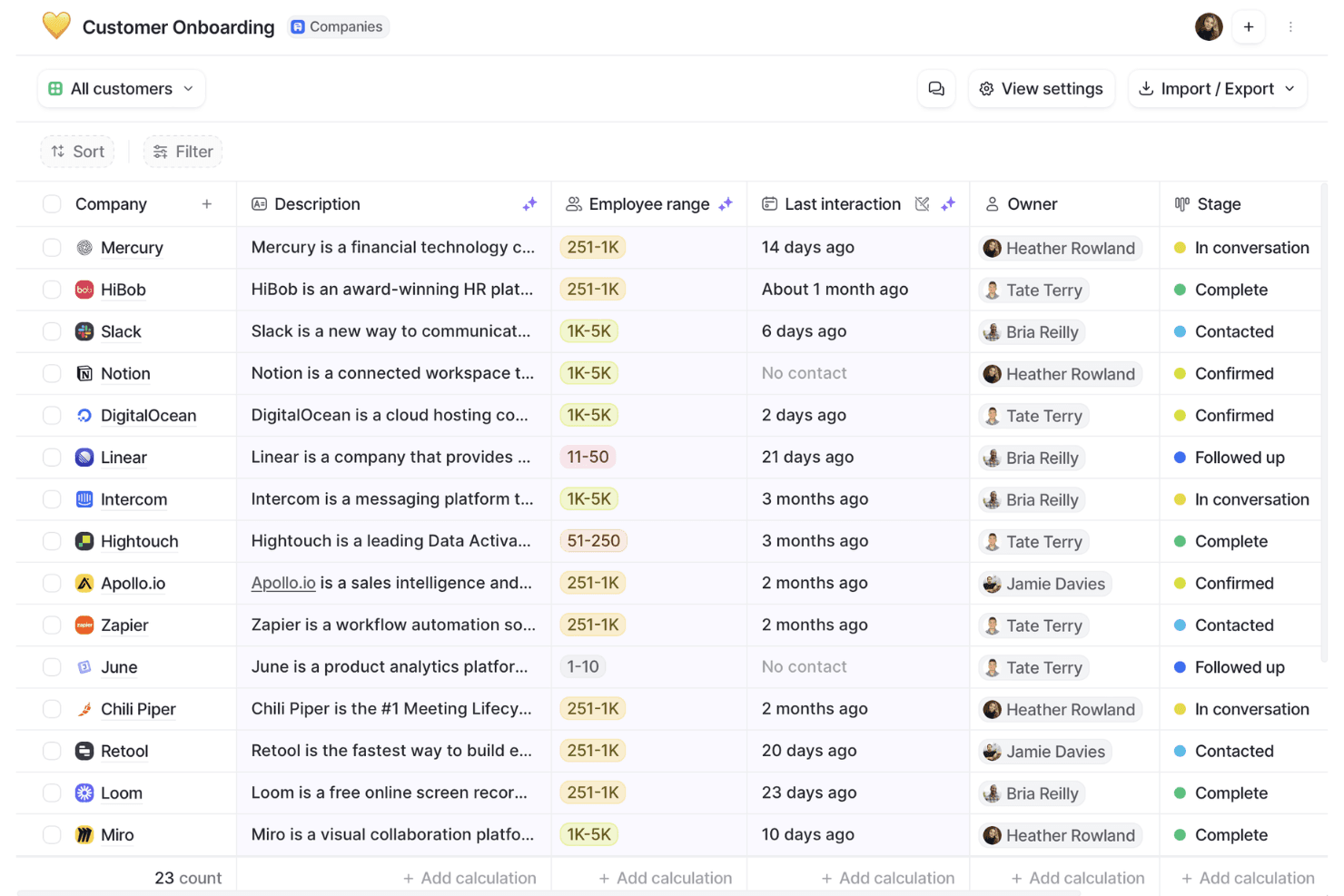
Attio organizes customer onboarding pipelines with stages and owner tracking. Attio is a CRM platform built around a flexible, object-based data model that supports contact management, deal pipelines, workflow automation, email and calendar sync, and reporting.
Who Is Attio Best For?
Attio is a strong fit for early-stage and scaling B2B teams—particularly founders, sales ops managers, and CRM admins—who want to build a CRM around their own data model rather than conform to a rigid, out-of-the-box structure.
Why I Picked Attio
I picked Attio as one of the best because its object-based data model genuinely changes how you build a CRM, letting you define custom objects, relationships, and attributes around your actual business rather than forcing your process into a preset structure. I love that you can link People, Companies, and Deals to custom objects with one-to-many or many-to-many relationships, then build multi-step, branching workflows that trigger across those records automatically.
Attio Key Features
- Ask Attio: A natural-language AI interface that lets you search, summarize, and take actions across your CRM records directly from the workspace.
- Call Intelligence: Automatically records, transcribes, and summarizes calls, then attaches the results to the relevant CRM records.
- Communication intelligence: Surfaces relationship data derived from synced email and calendar activity, including first and last interactions and connection strength scores.
- CSV import with field mapping: Lets you map, preview, and validate data before importing records, with real-time progress tracking and error visibility.
Attio Integrations
Attio offers native integrations with Gmail, Outlook, Google Calendar, Slack, Mailchimp, Segment, Stripe, Google Sheets, Notion, and Typeform. It also supports marketplace integrations, Zapier, REST API, webhooks, an App SDK, MCP, and SQL queries for custom connectivity.
Pros and Cons
Pros:
- Reviewers praise clear pipeline tracking
- Branching workflows reduce routine deal upkeep
- Custom objects fit nonstandard sales processes
Cons:
- Custom data models require upfront design
- Forecasting and cross-object reporting remain limited
Learn more about Attio: Best for customizable sales automation
- 14-day free trial + free demo available
- From $12/user/month (billed annually)
Visit WebsiteCustomer Rating:4.6/5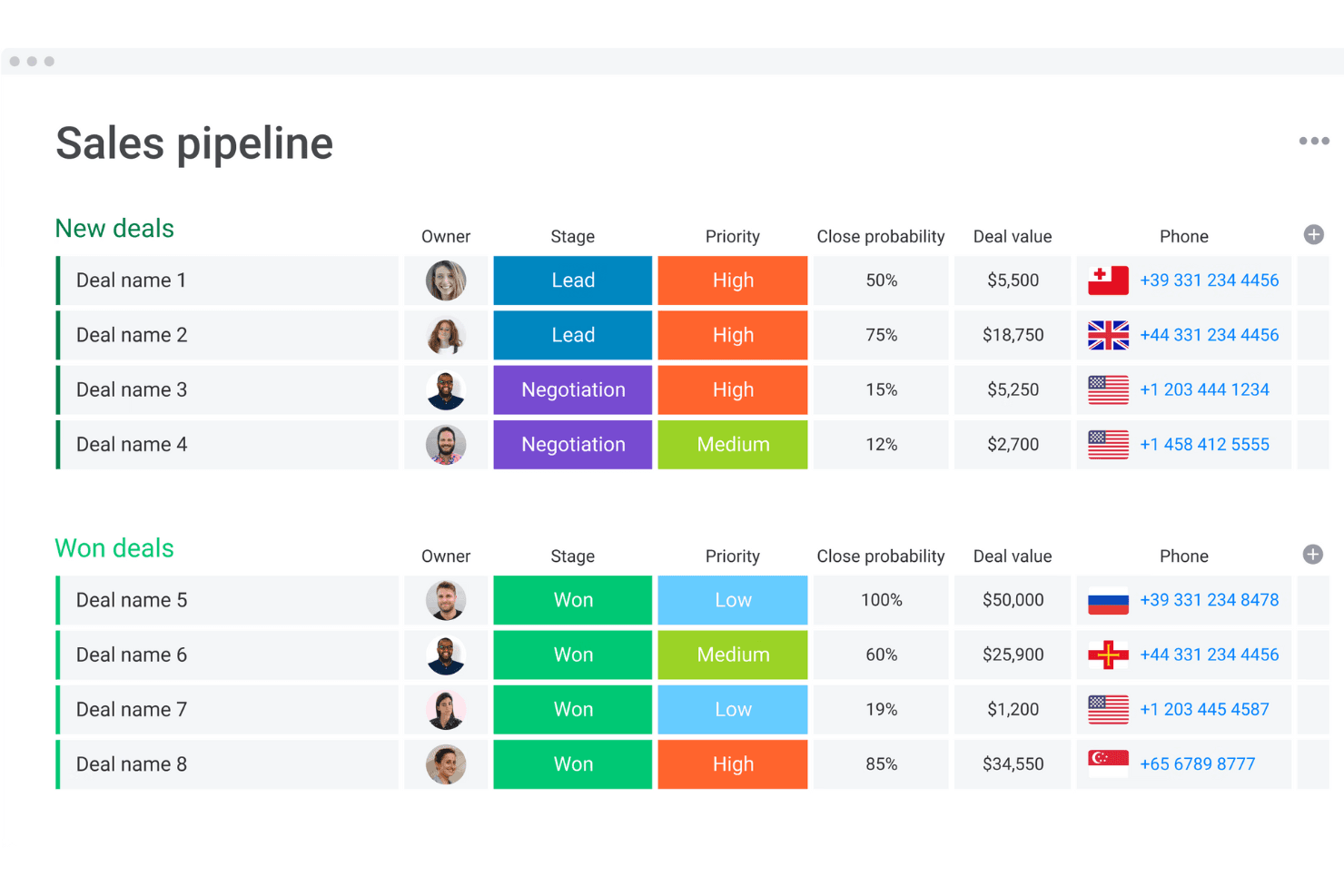
monday CRM organizes deals by stage, priority, and value in one view. monday CRM is a no-code sales CRM built on monday.com's work management platform that combines pipeline management, workflow automation, AI-powered deal insights, and built-in communication tracking across the full sales cycle.
Who Is monday CRM Best For?
monday CRM is a strong fit for small to mid-sized sales teams that want to build and automate their sales processes without waiting on developers or dedicated admins.
Why I Picked monday CRM
I picked monday CRM as one of the best because its no-code workflow builder lets sales teams build and automate complex, multi-branch sales processes without touching a line of code. I love that the Pipeline Health Agent actively analyzes stage distribution, deal velocity, and pipeline gaps, then drafts rep nudges for manager review. That kind of built-in automation intelligence is what makes it a credible Salesforce alternative for teams that want customizable sales motion without the admin overhead.
monday CRM Key Features
- Lead sourcing agent: An AI agent that finds, enriches, and scores leads against your target profile on a daily basis.
- Smart Call: A mobile CRM feature that records, transcribes, and summarizes customer calls, then logs them directly to the deal record.
- Quotes and invoices: Generate quotes, send invoices, and collect signatures directly from within a deal record.
- AI Notetaker: Joins Zoom, Microsoft Teams, or Google Meet calls to transcribe meetings, identify speakers, and generate action items synced to contact timelines.
monday CRM Integrations
monday CRM lists 200+ integrations, including Salesforce, Slack, Microsoft Teams, Zoom, Gmail, LinkedIn, Meta Ads, QuickBooks, Stripe, and DocuSign. It also offers a GraphQL API, SDK, and open API for custom connections.
Pros and Cons
Pros:
- Shared dashboards improve pipeline visibility
- Automated reminders reduce manual follow-up
- Custom pipelines adapt to distinct sales motions
Cons:
- Flexible setup can overwhelm smaller teams
- Forecasting depth trails enterprise CRM systems
 Best for team organization and quick CRM adoption
- Free plan + 14-day free trial available
- From $22/user/month
Visit WebsiteCustomer Rating:4.7/5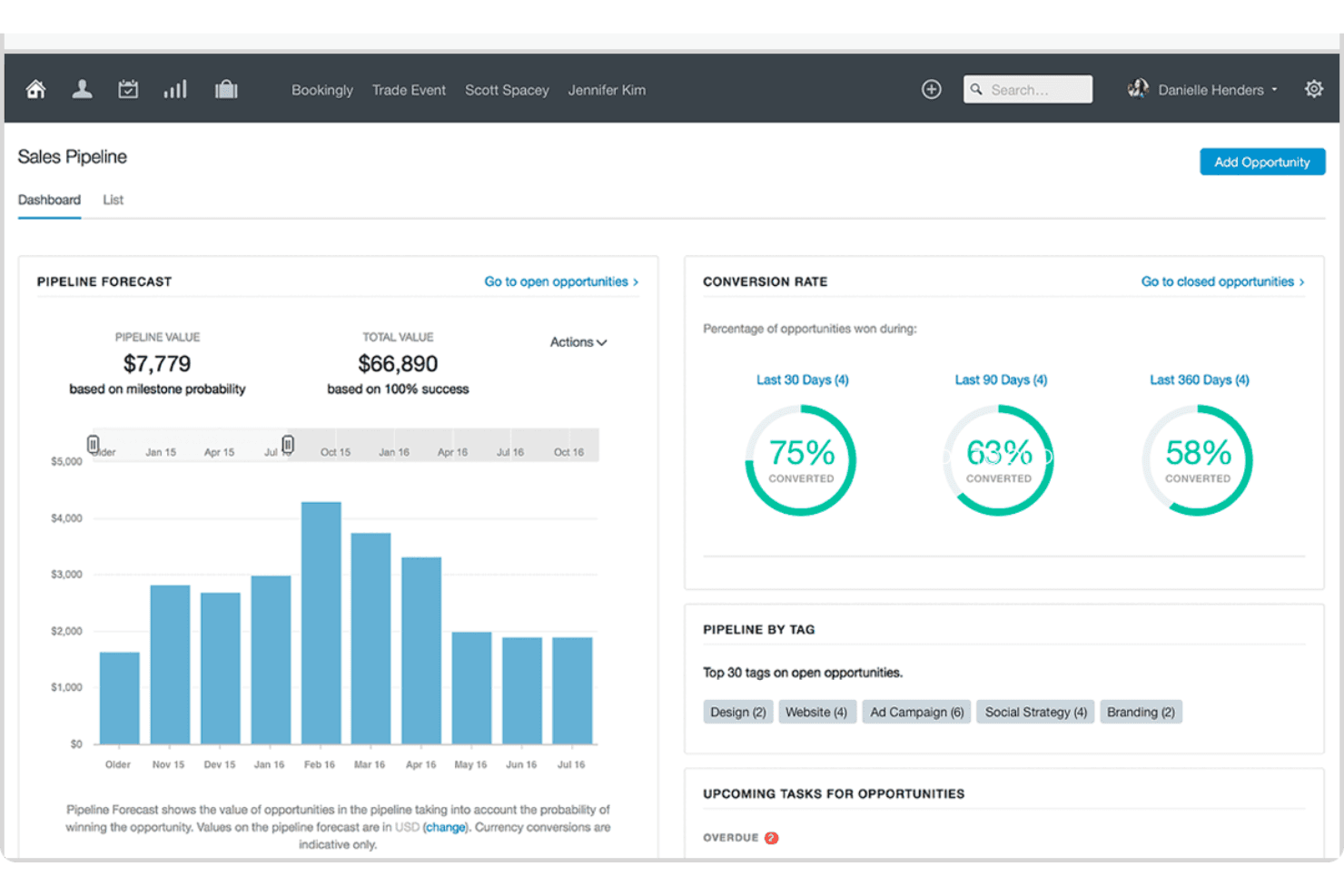
Capsule visualizes sales pipeline forecasts and conversion rates in one dashboard. Capsule CRM is a contact and pipeline management platform that brings together sales opportunities, contact records, task tracking, project management, and email tools in a single, lightweight CRM.
Who Is Capsule Best For?
Capsule is a strong fit for small business owners and growing teams who want a clean, low-friction CRM they can start using without a lengthy setup or dedicated admin.
Why I Picked Capsule
I've included Capsule in my top picks because it's the CRM I'd hand to a team that needs to get up and running fast, without a drawn-out configuration project. Its Tracks feature lets you build reusable, sequential task lists for repeatable processes like onboarding or handoffs, so deals move forward without anyone manually managing the queue. The AI Pipeline Generator can scaffold an entire pipeline from a plain-language description of your sales process, which means setup that used to take days takes minutes.
Capsule Key Features
- Workflow automation: Trigger actions automatically when an opportunity hits a milestone or changes status, including assigning team members, sending emails, or creating linked projects.
- Multiple sales pipelines: Set up separate pipelines for different products, markets, or sales processes, each with its own configurable stages.
- Contact DataTags: Apply tags that prompt for related custom-field values, letting your team capture structured context on contacts without free-text guesswork.
- Reporting dashboards: Access prebuilt dashboards for pipeline, conversion, tasks, and projects, with filters for user, team, tag, and custom fields.
Capsule Integrations
Capsule lists 100+ marketplace integrations on its homepage and 60+ in its pricing FAQ, including Gmail, Google Calendar, Microsoft Outlook, Mailchimp, Transpond, Xero, QuickBooks Online, and Zapier. It also offers a REST API and REST Hooks for custom integrations.
Pros and Cons
Pros:
- Contacts, deals, tasks, and projects stay connected
- Import previews help catch mapping errors
- Quick adoption without extensive training
Cons:
- No custom objects or record types
- Dashboard analysis offers limited drill-down
Learn more about Capsule: Best for predictive intelligence
- Free plan + 15-day free trial+ free demo available
- From $14/user/month (billed annually)
Visit WebsiteCustomer Rating:4.2/5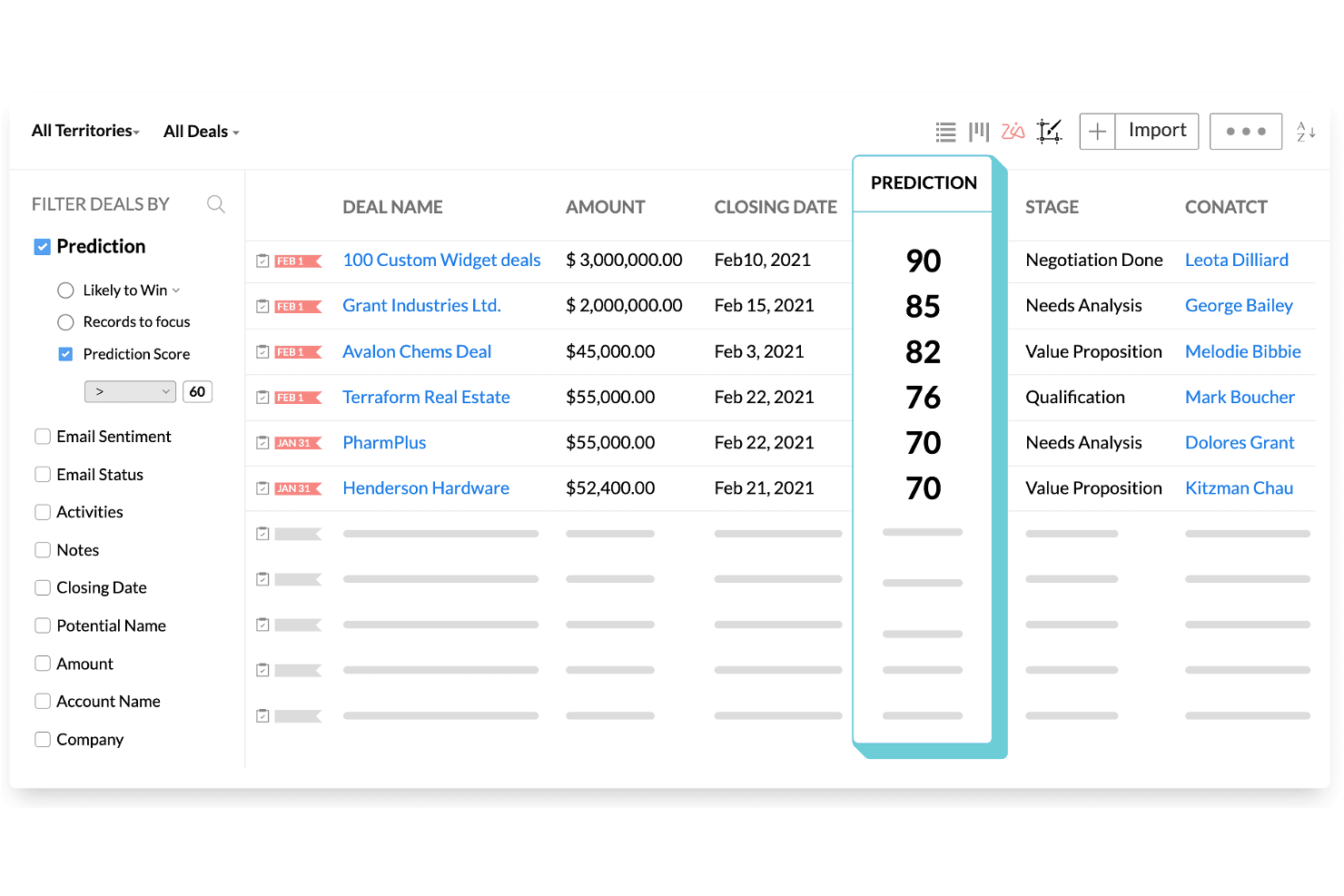
Zoho CRM ranks deals by AI prediction scores to prioritize sales efforts. Zoho CRM is a sales and marketing platform that combines pipeline management, workflow automation, AI-powered forecasting via its Zia engine, built-in CPQ, and multi-channel customer engagement across email, phone, social, SMS, and WhatsApp.
Who Is Zoho CRM Best For?
Zoho CRM is a strong fit for sales operations managers and small-to-midsize teams that need AI-driven forecasting and pipeline visibility without Salesforce's price tag.
Why I Picked Zoho CRM
I've included Zoho CRM in my top picks because its Zia AI engine does something I haven't seen matched at this price point: it actively forecasts revenue, flags anomalies in pipeline targets, and scores individual deals by close likelihood so you can act before a quarter slips. I also like that Zia surfaces the optimal time and channel to contact each prospect, cutting the guesswork out of outreach cadences. For teams migrating off Salesforce, the dedicated migration wizard maps CSV exports directly to Zoho modules and fields, with a post-import accuracy check built in.
Zoho CRM Key Features
- Blueprint process management: Define structured, step-by-step sales processes that guide reps through required actions before moving a deal to the next stage.
- Multi-channel customer engagement: Reach contacts through email, phone, SMS, WhatsApp, and social media from a single platform without switching tools.
- Canvas no-code layout editor: Redesign CRM module layouts, pages, and fields visually without writing any code.
- Territory management: Organize accounts and deals by geographic or business-defined territories to align sales coverage across teams.
Zoho CRM Integrations
Zoho CRM lists 1,100+ ready-to-use app integrations, including Gmail, Outlook, Slack, Zoom, Microsoft Teams, Google Ads, and QuickBooks. Its REST API supports custom integrations.
Pros and Cons
Pros:
- Blueprint standardizes stage-by-stage sales execution
- Salesforce migration includes field mapping and validation
- Zia forecasts revenue and flags pipeline anomalies
Cons:
- Advanced workflows require careful administrator configuration
- Interface menus can overwhelm new users
 Best for collaboration in large organizations
- 30-day free trial available
- From $8/user/month (billed annually)
Visit WebsiteCustomer Rating:4.6/5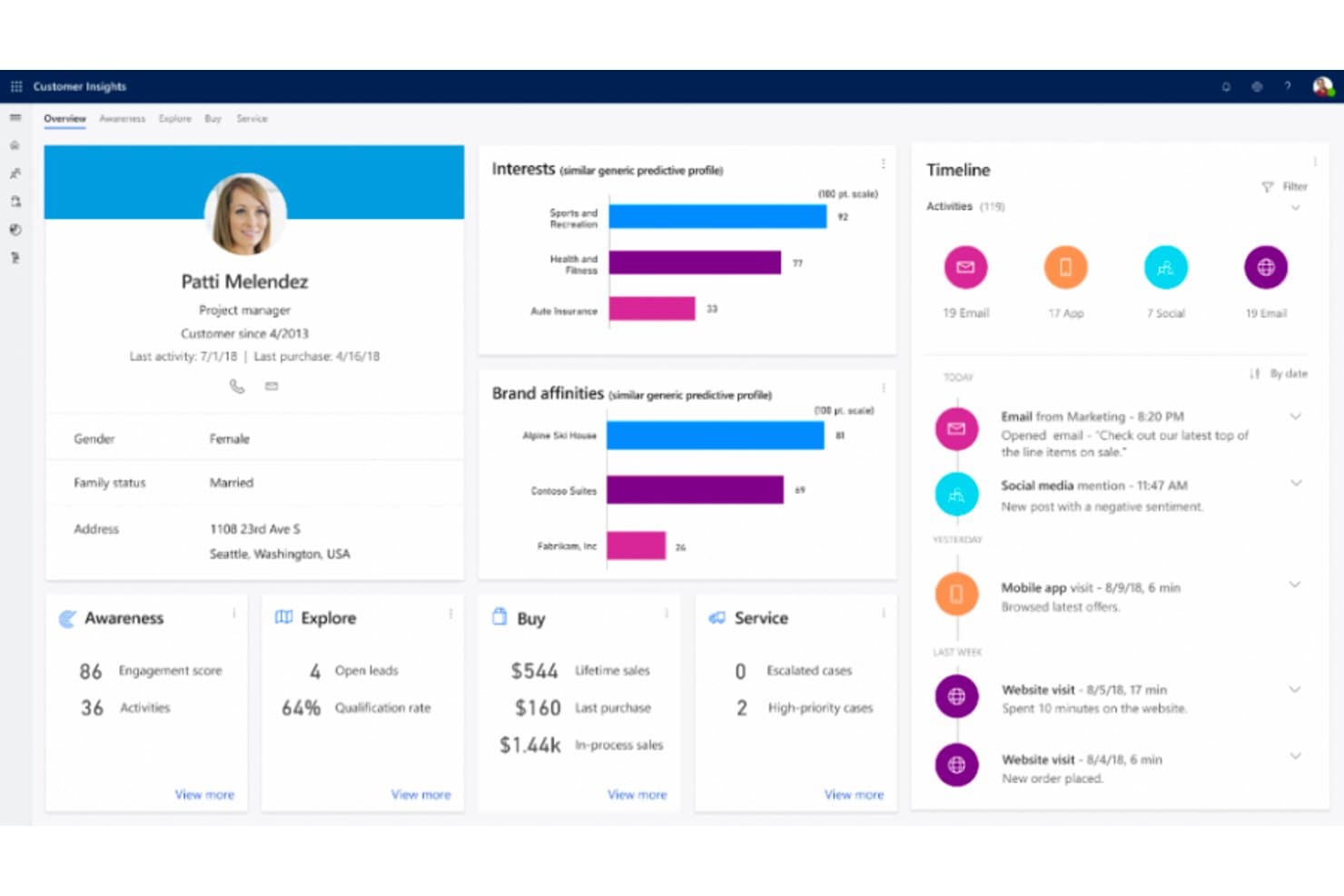
Microsoft Dynamics 365 unifies customer data into a single 360-degree profile view. Microsoft Dynamics 365 Sales is a CRM platform built by Microsoft that covers lead and opportunity management, sales process automation, forecasting, AI-powered deal insights, and conversation intelligence, with deep native integration across the Microsoft 365 ecosystem.
Who Is Microsoft Dynamics 365 Best For?
Dynamics 365 Sales is a strong fit for large organizations already running on Microsoft 365, where deep native integration across Teams, Outlook, and Power BI drives real collaboration across sales teams.
Why I Picked Microsoft Dynamics 365
Microsoft Dynamics 365 Sales earns its spot on my shortlist because large sales organizations running on Microsoft 365 get a level of native collaboration that's genuinely hard to replicate elsewhere. I'm talking about shared deal rooms in Teams, Copilot-generated opportunity summaries surfaced directly in Outlook, and conversation intelligence that flags competitor mentions and coaching moments from recorded calls. The Sales Qualification Agent can autonomously research and prioritize incoming leads, which takes real volume off your team's plate.
Microsoft Dynamics 365 Key Features
- Predictive lead scoring: AI models trained on historical outcomes rank and prioritize incoming leads so sellers focus on the highest-value opportunities first.
- Assignment rules with round-robin routing: Automatically distributes new leads and opportunities to sellers, teams, or queues based on configurable conditions.
- Quote-to-invoice transaction management: Tracks deals from draft quote through accepted order to issued invoice, with data carried forward from the opportunity record.
- Power BI analytics integration: Connects Dynamics 365 Sales data to Power BI for advanced reporting and custom dashboard creation beyond the native reporting layer.
Microsoft Dynamics 365 Integrations
Microsoft Dynamics 365 offers native integrations across the Microsoft ecosystem, including Microsoft 365, Outlook, Teams, and Power BI. It also supports marketplace integrations such as DocuSign for Dynamics and custom connections through the Dataverse Web API.
Pros and Cons
Pros:
- Opportunity-to-invoice tracking preserves deal context
- Automated lead routing reduces manual triage
- Forecasts connect pipeline activity to revenue
Cons:
- File-based migration lacks Salesforce-specific tooling
- Advanced configuration can require technical help
Learn more about Microsoft Dynamics 365:
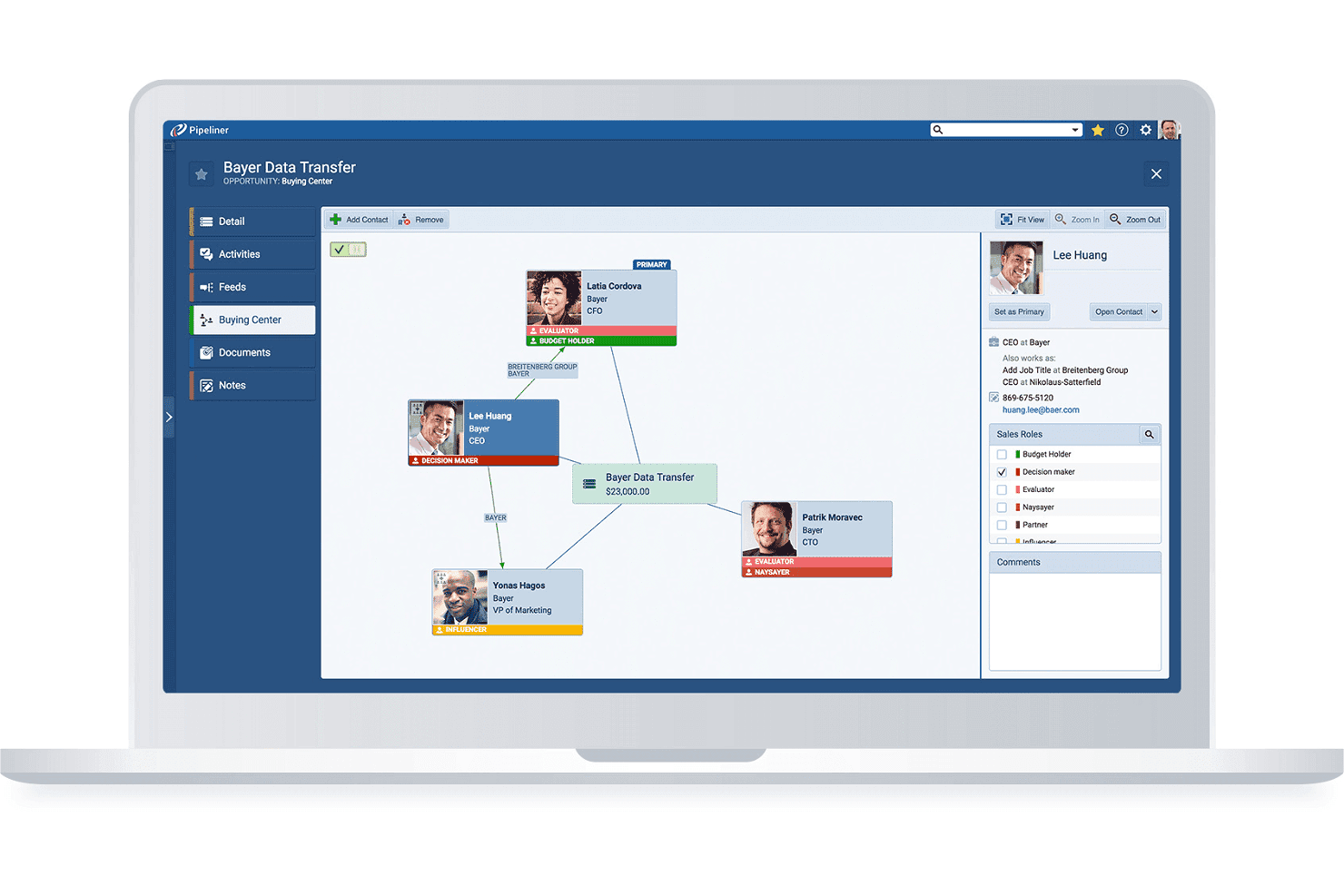
Pipeliner maps stakeholder roles and relationships within a deal's buying center. Coevera is a visual-pipeline B2B CRM that combines deal and account management, no-code workflow automation, AI-assisted sales insights, and a 200+ app integration marketplace.
Who Is Coevera Best For?
Coevera suits B2B sales teams moving away from Salesforce who want a visually intuitive CRM they can configure and manage without relying on developers or dedicated admins.
Why I Picked Coevera
Coevera earns its spot on my shortlist because it's genuinely one of the least intimidating CRMs to pick up if you're switching away from Salesforce for the first time. I love how the visual pipeline lets you drag opportunities through custom stages and flip between Kanban, bubble, chart, and map views without touching a single setting file. The no-code Automatizer builder means you can set up conditional, multi-step workflows, like auto-assigning follow-up tasks when a deal hits a specific stage, without writing a line of code or calling a developer.
Coevera Key Features
- Voyager AI sales intelligence: Get AI-generated opportunity summaries, call summaries, and email drafts directly within your CRM records.
- Import2 migration app: Migrate data from Salesforce, Microsoft Dynamics, Zoho, and other CRMs point-and-click, without building CSV files.
- Account relationship mapping: Visualize org charts, buying-center structures, and multi-stakeholder relationships across enterprise accounts.
- Automatizer workflow builder: Create multi-step, conditional automations using a visual trigger-and-action interface that requires no coding.
Coevera Integrations
Coevera lists 232 marketplace apps, with native integrations including Microsoft 365, Google Workspace, HubSpot, Zoom, and Power BI. It supports REST, GraphQL, webhooks, and MCP APIs for custom integrations.
Pros and Cons
Pros:
- Built-in reports surface pipeline movement
- Configurable fields match distinct sales workflows
- Visual pipelines clarify deal progress
Cons:
- Annual contracts limit seat reductions and refunds
- Small teams report costly, difficult implementations
Learn more about Coevera: Best for visual pipeline management
- 14-day free trial
- From $14/user/month (billed annually)
Visit WebsiteCustomer Rating:4.5/5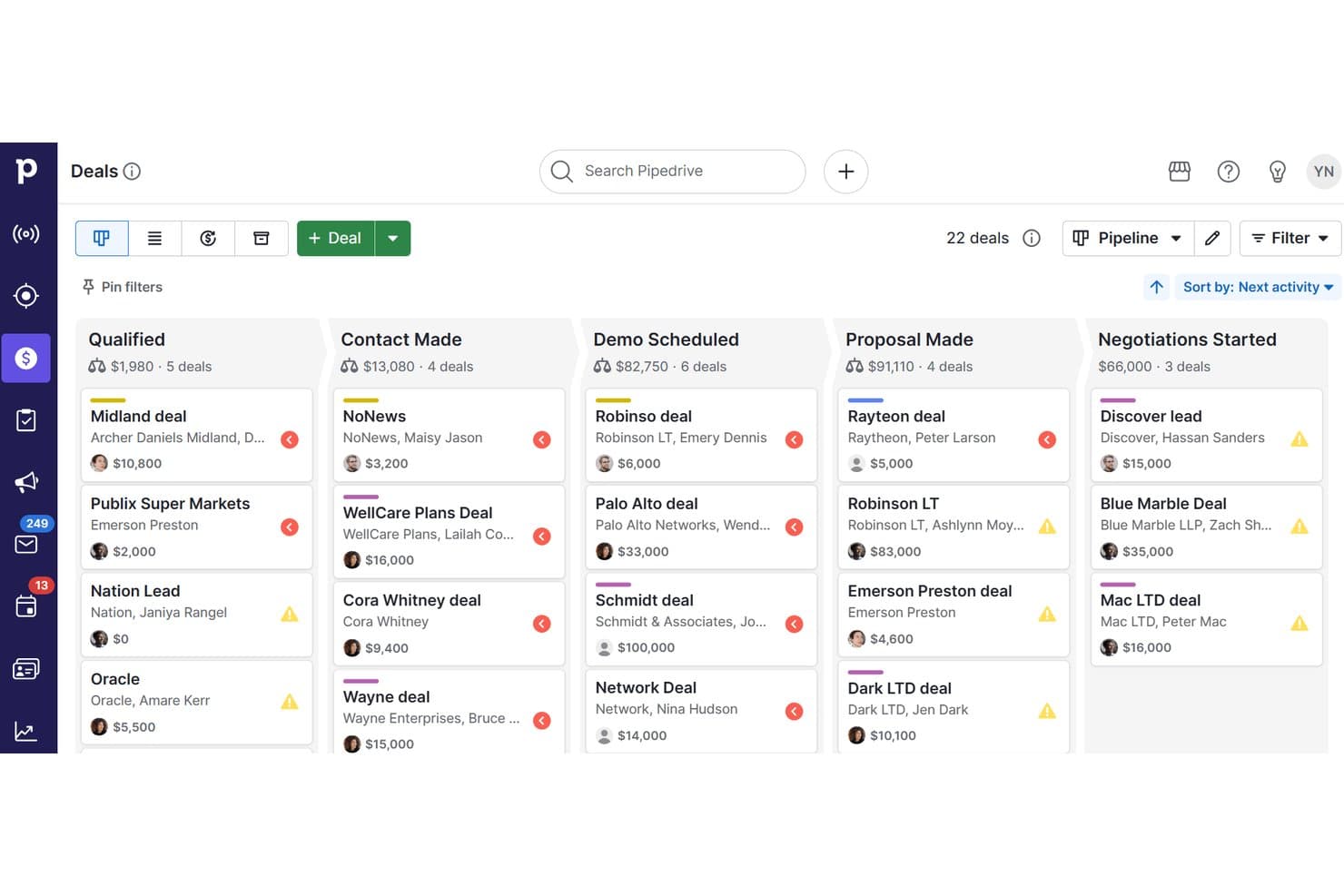
Pipedrive CRM organizes deals across pipeline stages visually. Pipedrive CRM is a sales-focused CRM platform that combines visual pipeline management, contact and lead tracking, workflow automation, email sync, campaign tools, and AI-powered reporting in one system.
Who Is Pipedrive CRM Best For?
Pipedrive CRM is a strong fit for small to mid-sized sales teams that want a visual, intuitive way to manage deals without the complexity of enterprise CRM platforms.
Why I Picked Pipedrive CRM
I picked Pipedrive CRM as one of the best because its visual pipeline management genuinely simplifies how sales teams track deals without the configuration overhead Salesforce demands. I love how colored deal cards flag at-risk opportunities before they go cold, and how pipeline stages can be customized per team without any technical expertise. Pipedrive's Nova AI also adds pre-call briefs and meeting transcripts across all plans, so reps stay prepared without switching tools.
Pipedrive CRM Key Features
- Nova meeting intelligence: Generates pre-call briefs from deal history, records and transcribes calls, and prepares CRM-ready recaps across all plans.
- Email nurturing sequences: Builds automated, personalized email and follow-up sequences to move leads through the pipeline without manual effort.
- Import2 CRM migration: Migrates data from Salesforce, HubSpot, Zoho CRM, Microsoft Dynamics and other systems, with field mapping, deduplication and history transfer.
- Workflow trigger-action automation: Configures event-based triggers and actions to automate repetitive tasks like contact updates, follow-up creation and email sending.
Pipedrive CRM Integrations
Pipedrive CRM offers native integrations with Microsoft Teams, Google Meet, WhatsApp Business, QuickBooks, DocuSign, and Gmail, plus marketplace integrations with PandaDoc, JustCall, Surfe, and Zapier. Its open API and webhooks support custom integrations.
Pros and Cons
Pros:
- Salesforce migration includes field mapping and history
- Automated reminders reduce missed follow-ups
- Visual deal cards flag at-risk opportunities
Cons:
- Shared ownership and territory workflows remain limited
- Reporting dashboards constrain detailed analysis
Learn more about Pipedrive CRM: Best for service-driven organizations
- Free demo available
- From $19/month
Visit WebsiteCustomer Rating:4.4/5
Zendesk Sell is the CRM of the popular service-based platform, Zendesk. Zendesk is known mostly for its customer service platform. However, Zendesk Sell is a unique CRM that can also be useful if you’re looking to link your sales and service offering more closely together.
Why I picked Zendesk Sell: Zendesk Sell’s interface reminds me of the familiarity of Slack. It uses excess white space to project an organized, clean view. With your menu on the left side, you can navigate through different views, making it easy to find what you’re looking for without getting overwhelmed.
Plus, since it is a Zendesk product, support seems like it was built at the forefront of the product. You can track multiple ways you interact with your customers: email, phone, chat, and social media.
Zendesk Sell Standout Features and Integrations:
Standout features include team collaboration, trigger automation, omnichannel tracking, call logging, rich deal insights, AI-powered lead prioritization, enhanced customer support (phone, email, and chat), and bot tracking. I’ve worked with Zendesk tools a lot over the years, and it was great seeing the same level of attention to user experience and support in this tool.
Integrations include ActiveCampaign, Dropbox, Google Drive, Mailchimp, Salesforce, Slack, Stripe, and Zapier.
Pros and Cons
Pros:
- Great customer support
- Tracking across multiple channels
- Collaboration and service at the focus
Cons:
- Doesn’t scale efficiently with your business
- Customization lacking compared to other platforms
- Limited email features
Learn more about Zendesk Sell:
Diğer Salesforce Alternatifleri
Piyasada ilk 10’a giremeyen, ancak yine de değerli araçlar olabilecek çok daha fazla CRM bulunuyor. Aşağıdaki Salesforce alternatiflerini ihtiyaçlarınıza uygun olup olmadıklarını görmek için incelemeye değer:
İlgili İncelemeler
Burada aradığınızı hâlâ bulamadıysanız test edip değerlendirdiğimiz şu araçlara göz atın.
- CRM Yazılımı
- Satış Yazılımı
- Potansiyel Müşteri Yönetimi Yazılımı
- İş Zekâsı Yazılımı
- Sözleşme Yönetimi Yazılımı
- Gelir Yönetimi Sistemi
How I Evaluate Salesforce Alternatives
I split my evaluation into two layers: the baseline CRM capabilities a RevOps team needs to track pipeline and forecast revenue, and the differentiators that determine whether a platform truly fits.
Core Functionality (Table Stakes For This List)
When I'm selecting tools for my list, I rank each one on a scale from 0 (does not offer the functionality) to 5 (excels in this area) for each core functionality listed below. Then, I calculate the tool's total score into a percentage. Each tool needs to achieve a minimum total score of 75% to be considered for inclusion.
- Contact & Account Management: I check whether contacts, accounts, and deals are linked with full activity history, not siloed in separate lists with no relationship context.
- Pipeline & Opportunity Tracking: Each tool should let you build multiple pipelines with custom stages, so your inbound and outbound motions aren't forced into one view.
- Sales Workflow Automation: I evaluate whether the platform can auto-route leads by territory, trigger follow-up tasks on stage changes, and run multi-step sequences.
- Reporting & Forecasting: Dashboards need to support custom metrics like weighted pipeline by rep or segment, not just pre-built charts you can't modify.
- Native & Third-Party Integrations: I look at how well the CRM connects with tools like HubSpot Marketing Hub, Marketo, Intercom, or Stripe via native connectors and open API.
- Custom Objects & Data Models: Your RevOps team should be able to create custom objects and fields that mirror your revenue process without developer support.
Once I have a list of tools that meet this criteria, I consider what sets each platform apart.
Differentiating Factors (What Sets Vendors Apart)
Here's how I compare and contrast different vendors:
Standout Features
AI-powered deal scoring is a big differentiator. I look at whether a platform can flag at-risk deals and suggest next steps without relying on a third-party tool. Revenue intelligence features like automatic call logging and activity capture also matter, since they reduce the data entry burden that tanks CRM adoption. Beyond insights, I evaluate whether the CRM includes native sales engagement sequences. When reps can run multi-channel outreach directly from the pipeline view, you cut out a standalone tool and keep all activity data in one place.
Beyond Features
Total cost of ownership is one of the first things I evaluate. Many Salesforce alternatives include automation and reporting at their base tier, while Salesforce gates them behind add-ons. Time to value matters just as much. I look at whether a RevOps team can self-implement the platform in weeks rather than months, without hiring certified consultants. Segment fit also plays a role. A 15-person sales team and a 500-rep enterprise org have very different needs, so I consider whether the platform scales to match the buyer's actual stage of growth.
Neden Bir Salesforce Alternatifi Aramalısınız?
Salesforce; satış yönetimi, müşteri hizmetleri, pazarlama otomasyonu ve analiz için çeşitli araçlar sunan, tanınmış bir müşteri ilişkileri yönetimi (CRM) yazılımıdır. Kapsamlı paketi, çok çeşitli işletme ihtiyaçlarını karşılamak, müşteri etkileşimlerini yönetmeyi ve çeşitli iş süreçlerini kolaylaştırmayı sağlamak üzere tasarlanmıştır. Bununla birlikte, kapsamlı yeteneklerine rağmen bazı kullanıcılar Salesforce'a alternatif arayabilir. Bunun nedeni, küçük işletmeler veya yeni girişimler için karşılanması zor olabilecek fiyatlandırması gibi faktörler olabilir. Ayrıca Salesforce özelliklerinin karmaşıklığı ve kapsamı, özellikle daha basit ihtiyaçları veya sınırlı teknik uzmanlığı olan bazı kullanıcılar için bunaltıcı olabilir. Salesforce'un herkese uyan tek yaklaşımı, özellikle sektöre özgü işlevler arayanlar olmak üzere belirli işletmelerin özel gereksinimleriyle örtüşmeyebilir.
Salesforce'a alternatif yazılımlar çeşitli avantajlar sunabilir. Birçok alternatif, esnek fiyatlandırma planlarıyla daha uygun maliyetli çözümler sunarak daha geniş bir işletme yelpazesi, özellikle de küçük işletmeler veya yeni faaliyete başlayanlar için erişilebilir hâle gelir. Bu alternatifler genellikle daha basit bir arayüz ve daha anlaşılır işlevlerle daha kullanıcı dostu bir deneyim sunar; bu da kullanım kolaylığına ve hızlı uygulamaya öncelik veren işletmeler için idealdir. Özelleştirme de bir diğer önemli avantajdır; bazı Salesforce alternatifleri farklı sektörlerin kendine özgü ihtiyaçlarına ve iş akışlarına daha kolay uyarlanabilir ve belirli iş modelleriyle daha iyi örtüşen çözümler sunar. Ayrıca daha küçük veya daha niş CRM platformları, işletmelerin kendilerine özgü zorluklarına göre uyarlanmış özel yardım almasını sağlayarak daha kişiselleştirilmiş müşteri desteği sunabilir. Bu avantajlar, Salesforce alternatiflerini bütçeleriyle, karmaşıklık gereksinimleriyle ve belirli iş ihtiyaçlarıyla daha yakından örtüşen CRM çözümleri arayan şirketler için cazip bir seçenek hâline getirir.
Salesforce Alternatifleri Nasıl Seçilir?
Bu kadar çok farklı Salesforce alternatifi bulunduğundan, hangi aracın ihtiyaçlarınıza en uygun olacağına karar vermek zor olabilir.
Salesforce alternatiflerini kısa listenize alırken, denerken ve seçerken aşağıdakileri göz önünde bulundurun:
- Hangi sorunu çözmeye çalışıyorsunuz - Aracın sunması gereken özellikleri ve işlevleri netleştirmek için öncelikle doldurmaya çalıştığınız Salesforce özellik açığını belirleyin.
- Aracı kimlerin kullanması gerekecek - Maliyeti ve gereksinimleri değerlendirmek için yazılımı kimlerin kullanacağını ve kaç lisansa ihtiyaç duyacağınızı göz önünde bulundurun. Erişime yalnızca gelir operasyonları liderlerinin mi yoksa tüm kuruluşun mu ihtiyaç duyacağını değerlendirmeniz gerekir. Bu netleştiğinde, herkes için kullanım kolaylığına mı yoksa Salesforce alternatifini ileri düzeyde kullananlar için hıza mı öncelik verdiğinizi düşünmeye değer.
- Hangi diğer araçlarla birlikte çalışması gerekiyor - Hangi araçları değiştirdiğinizi, hangi araçları kullanmaya devam edeceğinizi ve muhasebe, CRM veya İK yazılımı gibi hangi araçlarla entegrasyon kurmanız gerektiğini netleştirin. Araçların birbiriyle entegre olması gerekip gerekmediğine veya birden fazla aracı tek bir bütünleşik Salesforce alternatifiyle değiştirip değiştiremeyeceğinize karar vermeniz gerekir.
- Hangi sonuçlar önemli - Başarılı sayılabilmesi için yazılımın sunması gereken sonucu göz önünde bulundurun. Hangi yeteneği kazanmak veya neyi iyileştirmek istediğinizi ve başarıyı nasıl ölçeceğinizi değerlendirin. Örneğin, sonuçlardan biri performans hakkında daha fazla görünürlük elde etme becerisi olabilir. İstediğiniz sonuçları göz önünde bulundurmuyorsanız, Salesforce alternatifi özelliklerini sonu gelmeyecek şekilde karşılaştırabilirsiniz; ancak bu durumda değerli zamanınızın büyük bir kısmını boşa harcayabilirsiniz.
- Kuruluşunuz içinde nasıl çalışacağı - Yazılım seçimini iş akışlarınız ve uygulama yönteminizle birlikte değerlendirin. Nelerin iyi çalıştığını ve ele alınması gereken sorunlara yol açan alanları inceleyin. Her işletmenin farklı olduğunu unutmayın — bir aracın popüler olması, kuruluşunuzda da işe yarayacağı anlamına gelmez.
Salesforce Alternatiflerindeki Eğilimler
Salesforce alternatifleri, benzersiz işlevler sunarak, belirli sorunlu noktaları ele alarak ve Salesforce'un sunduklarının ötesinde CRM yetenekleri arayan işletmelere değer sağlayarak pazardan pay almak için yoğun bir şekilde yenilik yapıyor. Güncel yazılım güncellemelerine, basın bültenlerine ve sürüm günlüklerine dayanan mevcut eğilimlere genel bakış aşağıda yer alıyor:
Salesforce Alternatiflerinde Ortaya Çıkan Eğilimler:
- Yapay Zekâ ve Makine Öğrenimine Artan Vurgu:
- Birçok Salesforce alternatifi, işletmelerin stratejik avantaj elde etmek için verilerden yararlanma ihtiyacı doğrultusunda tahmine dayalı analiz, akıllı otomasyon ve gelişmiş karar alma yetenekleri sunmak için yapay zekâyı entegre ediyor.
- Gelişmiş Entegrasyon Yetenekleri:
- Birbirine bağlı iş araçlarına duyulan ihtiyacın artmasıyla Salesforce alternatifleri, entegrasyon ekosistemlerini genişleterek çeşitli uygulamalar ve platformlar arasında kesintisiz iş akışlarını kolaylaştırıyor.
Yeni ve Alışılmadık İşlevler:
- Blok zinciri Entegrasyonu:
- Bazı Salesforce alternatifleri, CRM alanında yeni bir yaklaşım olarak şeffaf, güvenli ve merkeziyetsiz veri yönetimi sunmak için blok zinciri teknolojisini araştırıyor.
- IoT Bağlantısı:
- Bu alternatifler, IoT verilerini CRM sistemlerine entegre ederek işletmelerin bağlı cihazlardan gelen gerçek zamanlı verilerden yararlanmasını, müşteri içgörülerini ve operasyonel verimliliği artırmasını sağlıyor.
En Çok Talep Gören Özellikler:
- Kapsamlı Analiz ve Raporlama:
- İşletmeler, satış süreçleri, müşteri davranışları ve pazar eğilimleri hakkında daha derin içgörüler elde etmek için CRM'lerinde gelişmiş analiz ve raporlama araçları arıyor.
- Mobil Erişilebilirlik:
- İş gücü daha mobil hâle geldikçe, güçlü mobil CRM uygulamalarına olan talep artmaya devam ediyor. Bu uygulamalar, satış ekiplerinin önemli bilgilere erişmesine ve hareket hâlindeyken görevlerini yerine getirmesine olanak tanıyor.
Gerileyen Özellikler:
- Aşırı Karmaşık Özelleştirme:
- İşletmeler daha basit ve kullanıcı dostu özelleştirmeleri tercih ettiğinden, yoğun BT desteği gerektiren aşırı karmaşık özelleştirme seçeneklerinden uzaklaşma görülüyor.
- Yalıtılmış Sistemler:
- Diğer işletme sistemleriyle iyi bir şekilde entegre olmayan bağımsız CRM çözümleri, işletmeler daha entegre ve bütünsel yazılım ekosistemleri aradığından, popülerliğini kaybediyor.
Salesforce alternatifleri, işletmelere gelir operasyonlarını yönetmede başarılı olmaları için ihtiyaç duydukları içgörüleri, verimliliği ve esnekliği sunar. Bu alternatifleri değerlendirirken, gelişen yeteneklerinin stratejik ihtiyaçlarınızla ne ölçüde örtüştüğüne odaklanın; böylece seçtiğiniz çözümün değer yaratmasını ve işletme hedeflerinizi desteklemesini sağlayabilirsiniz.
Salesforce Alternatiflerinin Özellikleri
Gelir operasyonlarını yönetmek için Salesforce alternatifleri ararken işletmenizin ihtiyaçlarıyla uyumlu, ekibinizin verimliliğini artıran ve satış süreçlerinizi geliştirecek içgörüler sunan özellikleri belirlemek çok önemlidir. Her CRM sistemi kendi işlev setiyle birlikte gelir, ancak bazı temel özellikler gelir operasyonlarını etkili bir şekilde desteklemek için gereklidir. Aranması gereken en önemli özellikler şunlardır:
- Kapsamlı Kişi Yönetimi: Tüm müşteri bilgilerini merkezileştirir.
- Müşteri etkileşimlerinin birleşik bir görünümünü sunarak ilişki yönetimini ve satış çalışmalarının kişiselleştirilmesini geliştirir.
- Güçlü Satış Süreci Yönetimi: Satış sürecinin aşamalarını görselleştirir.
- Ekiplerin ilerlemeyi izlemesine, darboğazları belirlemesine ve kapanma olasılığı en yüksek anlaşmalara odaklanmasına yardımcı olarak geliri doğrudan etkiler.
- Ayrıntılı Analiz ve Raporlama: Eyleme geçirilebilir içgörüler sunar.
- Stratejik kararlar için veriye dayalı rehberlik sağlayarak satış stratejilerinin ve gelir sonuçlarının optimize edilmesine yardımcı olur.
- Etkili Potansiyel Müşteri Yönetimi: Potansiyel müşteri yakalama ve geliştirme süreçlerini kolaylaştırır.
- Potansiyel müşterilerle etkili bir şekilde iletişim kurulmasını ve satış hunisinde ilerletilmelerini sağlayarak dönüşüm oranlarını artırır.
- Görev ve Etkinlik Takibi: Takip işlemlerini ve sorumlulukları düzenler.
- Satış ekiplerinin sorumluluklarını yerine getirmesini sağlar ve fırsatlar için zamanında aksiyon alınmasını güvence altına alarak gelir yaratılmasına katkıda bulunur.
- E-posta Entegrasyonu ve Takibi: İletişimi merkezileştirir.
- Potansiyel ve mevcut müşterilerle kesintisiz etkileşim kurulmasını sağlarken, gelecekte başvurmak üzere tüm iletişimlerin kaydını tutar.
- Özelleştirme ve Ölçeklenebilirlik: İşletmenin büyümesine ve değişimlerine uyum sağlar.
- CRM'nin işletmenizle birlikte gelişebilmesini, yeni süreçleri ve büyüyen satış ekiplerinin etkinliğini kaybetmeden desteklemesini sağlar.
- Kullanıcı Dostu Arayüz: Benimsenmeyi teşvik eder ve eğitim süresini azaltır.
- Basit ve sezgisel bir arayüz, ekip üyelerinin CRM'den tam anlamıyla ve verimli bir şekilde yararlanabilmesini sağlar.
- Mobil Erişim: Hareket hâlindeyken kullanımı kolaylaştırır.
- Satış ekiplerine her yerden önemli bilgilere erişme ve görevleri yerine getirme olanağı sunarak üretkenliği ve hızlı yanıt verme becerisini artırır.
- Entegrasyon Yetenekleri: Diğer işletme araçlarına bağlanır.
- Çeşitli uygulamalarla entegre olarak daha düzenli bir iş akışı sağlar; veri tutarlılığını güvence altına alır ve manuel veri girişini azaltır.
Gelir operasyonlarını yönetmek için bir Salesforce alternatifi seçerken, satış süreçlerinizi kapsamlı bir şekilde destekleyecek bu kritik özellikleri sunan çözümlere odaklanın. Bu işlevler yalnızca daha stratejik ve bilinçli karar almayı kolaylaştırmakla kalmaz, aynı zamanda satış ekiplerinizin günlük verimliliğini ve etkinliğini artırarak sonuçta daha iyi gelir sonuçları elde edilmesini sağlar.
Salesforce Alternatiflerinin Faydaları
Salesforce alternatiflerini değerlendirmek, özellikle kendine özgü ihtiyaçları veya bütçe kısıtlamaları olan işletmelere belirgin avantajlar sağlayabilir. Bu alternatifler genellikle farklı sektör gereksinimlerine, işletme büyüklüklerine veya belirli kullanıcı tercihlerine göre uyarlanmış temel CRM işlevleri sunarak gelir operasyonlarının genel verimliliğini ve etkinliğini artırır. Salesforce alternatiflerini değerlendirmenin başlıca beş faydası şunlardır:
- Maliyet Etkinliği: Operasyonel giderleri azaltır.
- Daha uygun fiyatlı bir CRM çözümü seçen işletmeler, kaynaklarını diğer alanlara ayırabilir; böylece genel yatırımı optimize eder ve maliyetleri düşürür.
- Özelleştirme ve Esneklik: Belirli işletme ihtiyaçlarına uyarlanır.
- Salesforce alternatifleri genellikle özelleştirmede daha fazla esneklik sunar ve işletmelerin CRM sistemini kendilerine özgü süreçlere ve iş akışlarına uyarlamasına olanak tanıyarak operasyonel verimliliği artırır.
- Sadeleştirilmiş Kullanıcı Deneyimi: Kullanım kolaylığını artırır.
- Alternatifler daha sezgisel arayüzler ve basitleştirilmiş işlevler sunabilir; bu da öğrenme süresini kısaltır ve kullanıcı benimseme oranlarını artırır.
- Uzmanlaşmış Özellikler: Belirli sektör gereksinimlerini karşılar.
- Bazı Salesforce alternatifleri belirli sektörlere veya işletme büyüklüklerine odaklanarak, bu özel kitleler için daha alakalı ve faydalı olan uzmanlaşmış özellikler sunar.
- Kişiselleştirilmiş Müşteri Desteği: Özel yardım sunar.
- Daha küçük CRM sağlayıcıları bazen daha kişiselleştirilmiş destek sunabilir; böylece kullanıcıların zamanında ve etkili yardım alması sağlanır ve yazılımın kuruluş için değeri en üst düzeye çıkarılır.
Salesforce Alternatifleri için Maliyetler ve Fiyatlandırma
Salesforce alternatiflerini değerlendirmek, farklı işletme ihtiyaçlarına ve bütçelere hitap eden çeşitli CRM çözümleri sunar. Bu alternatifler genellikle farklı kuruluş büyüklüklerine, sektörlere ve operasyonel karmaşıklıklara uyacak şekilde tasarlanmış çeşitli fiyatlandırma yapıları ve planlar sunar. Salesforce alternatifleri için tipik plan seçeneklerine ve fiyatlandırmalarına genel bir bakış aşağıda verilmiştir:
Salesforce Alternatifleri için Plan Karşılaştırma Tablosu
| Plan Türü | Ortalama Fiyat | Dahil Olan Yaygın Özellikler |
|---|---|---|
| Plan TürüTemel | Ortalama Fiyat$0 - $25/ kullanıcı/ay | Dahil Olan Yaygın ÖzelliklerKişi yönetimi, görev takibi, temel raporlama, potansiyel müşteri yönetimi |
| Plan TürüOrta Düzey | Ortalama Fiyat$25 - $65/ kullanıcı/ay | Dahil Olan Yaygın ÖzelliklerSatış tahmini, özel raporlar, gelişmiş entegrasyonlar, otomasyon özellikleri |
| Plan TürüGelişmiş | Ortalama Fiyat$65+/ kullanıcı/ay | Dahil Olan Yaygın ÖzelliklerYapay zekâ yetenekleri, gelişmiş analizler, artırılmış özelleştirme, öncelikli destek |
| Plan TürüÜcretsiz Seçenek | Ortalama Fiyat$0 | Dahil Olan Yaygın ÖzelliklerSınırlı kişi sayısı, temel özellikler, topluluk desteği |
Salesforce alternatiflerini değerlendirirken işletmenizin özel ihtiyaçlarını, operasyonlarınızın ölçeğini ve büyüme potansiyelini göz önünde bulundurun. Mevcut gereksinimlerinizle uyumlu olurken genişleme olanağı da sunan bir planı seçmek çok önemlidir. Seçtiğiniz CRM sisteminin yalnızca bütçenize uygun olduğundan değil, aynı zamanda işletmenizin gelir operasyonlarını etkili bir şekilde geliştirmek için gerekli özellikleri sağladığından emin olun.
Salesforce Alternatifleri Hakkında Sıkça Sorulan Sorular
Hâlâ Salesforce alternatiflerini mi düşünüyorsunuz? İşte geçiş yapmadan önce insanların sorduğu yaygın sorulardan bazıları.