

Bu kadar çok CRM yazılımı çözümü mevcutken, kurumsal düzeydeki ihtiyaçlar için hangisinin en iyi olduğunu belirlemek zor olabilir. Müşteri hizmetleri ve teknik destek ekipleriniz genelinde müşteri iletişimlerini düzenlemeye, otomatikleştirmeye ve senkronize etmeye yardımcı olacak bir CRM sistemi istediğinizi biliyorsunuz, ancak hangi seçeneğin en iyi olduğunu belirlemeniz gerekiyor. Bu makalede, kişisel müşteri hizmetleri deneyimime dayanarak müşteri etkileşimlerinizi büyük ölçekte yönetmek için en iyi kurumsal CRM yazılımı hakkındaki görüşlerimi paylaşarak seçiminizi kolaylaştırmanıza yardımcı olacağım.
Why Trust Our Software Recommendations
6,700+
Reviews
20
Industry experts
16+
Evaluation factors
14
Years
Our reviews reflect our independent judgment—not a sales pitch. Learn how we stay transparent.
For this guide, we evaluated tools using hands-on testing and independent research, scoring tools using our selection criteria.
Our reviews reflect our human editorial judgment, not a sales pitch.
Kurumsal CRM Yazılımı Karşılaştırma Tablosu
En iyi kurumsal CRM yazılımı seçimlerimin fiyatlandırma ayrıntılarını bu karşılaştırma tablosunda özetledim:
Sorted by: Default
| Tool | Starting Price | Website | |
|---|---|---|---|
Best for customizable sales automation | 4.6 out of 5 | $12/user/month 14-day free trial + free demo available | Book Demo |
Best for autonomous AI agent workflows | 4.7 out of 5 | $40/user/month Not available | Book Demo |
Best customizable solutions for enterprises | 4.2 out of 5 | $25/user/month 30-day free trial | Website |
Best for B2B sales | 4.7 out of 5 | $39/user/month 30-day free trial + free demo available | Website |
Best for scaling process automation | 4.2 out of 5 | $14/user/month Free plan + 15-day free trial+ free demo available | Website |
Best for teams using Microsoft products | 4.6 out of 5 | $8/user/month 30-day free trial available | Website |
Best for Gmail users | 4.6 out of 5 | $24/user/month 14-day free trial available | Website |
Best for automated lead scoring | 4.5 out of 5 | $14/user/month 14-day free trial | Website |
Best for Zendesk users | 4.4 out of 5 | $19/month Free demo available | Website |
Best for finance teams | 3.6 out of 5 | $45/user/month Free trial available | Website |


En İyi Kurumsal CRM Yazılımı İncelemeleri
10 farklı kurumsal CRM yazılımını inceledim. Bu makalede, onları özel kılan özellikler öne çıkarılacak ve kuruluşunuz için hangisinin en iyi olduğuna karar vermenize yardımcı olunacak.
 Best for customizable sales automation
- 14-day free trial + free demo available
- From $12/user/month (billed annually)
Visit WebsiteCustomer Rating:4.6/5
Monday Sales CRM allows users to automate repetitive tasks and workflows without the need for coding. Monday Sales CRM is a customizable platform that centralizes client communication and automates sales processes.
Why I picked Monday Sales CRM: Monday Sales CRM aims to boost productivity and manage the sales pipeline effectively by providing a full picture of every deal with customizable dashboards. The platform also provides extensive automations, comprehensive data visualization, and operates on a low-code/no-code basis, making it accessible for users with varying technical skills.
Monday Sales CRM Standout Features and Integrations:
Standout features include centralized contact management, branded quote creation, sales forecasting, email sync and tracking, advanced HTML editing, email templates, lead capturing, and seamless data organization.
Integrations include Outlook, Google Drive, Trello, and Slack.
Pros and Cons
Pros:
- Efficient project and client management
- Provides 24/7 customer support
- Offers unlimited boards
Cons:
- Occasional glitches on large boards
- Lacks video onboarding tutorials
 Best for autonomous AI agent workflows
- Not available
- From $40/user/month
Visit WebsiteCustomer Rating:4.7/5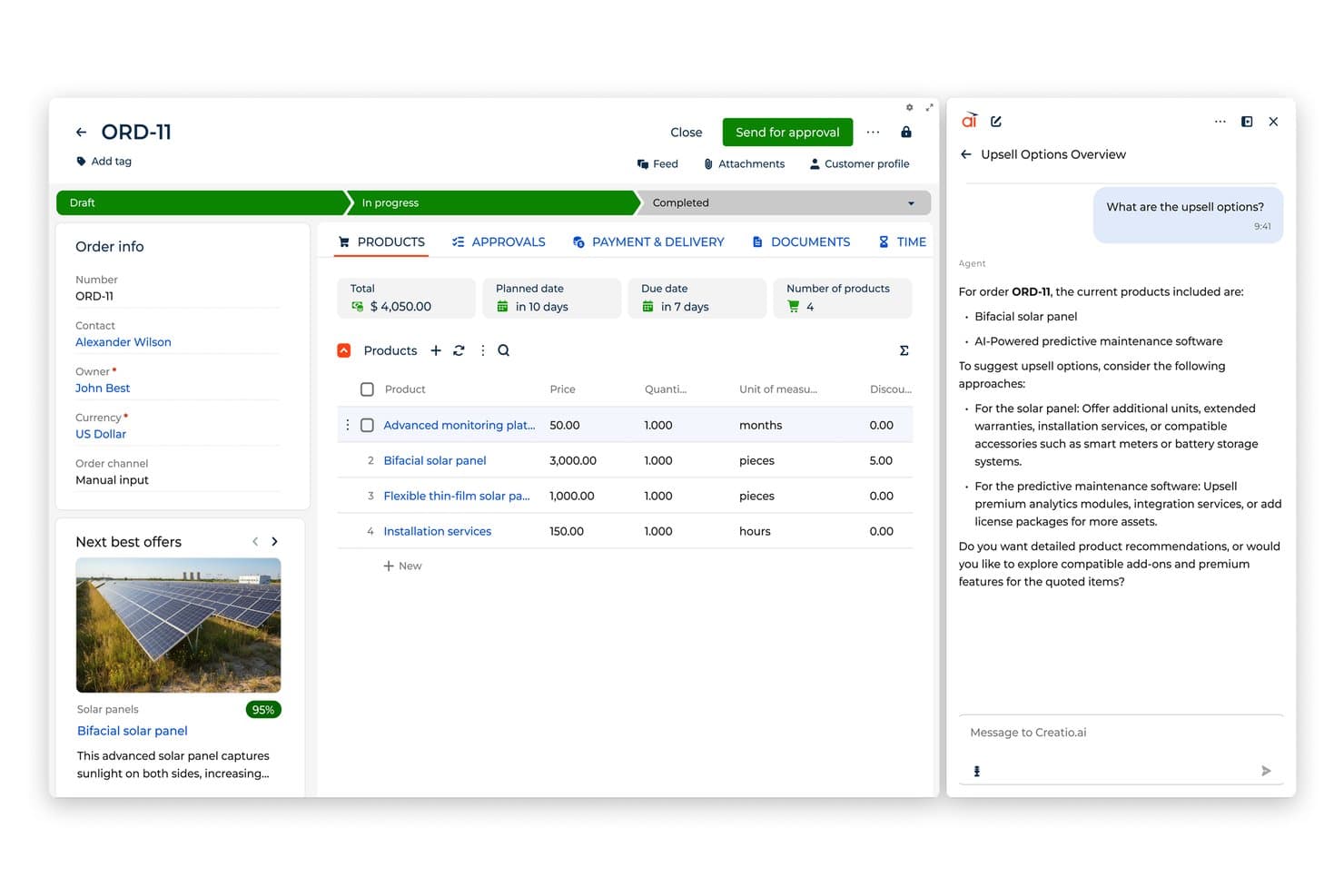
Creatio AI suggests upsell options and next best offers within orders. Creatio AI CRM is an AI CRM and workflow platform where people and AI agents work together with no limits. It lets enterprise teams run sales, marketing, and service workflows in a unified workspace.
Why I picked Creatio: I chose Creatio because it combines AI-native development, no-code tools, and autonomous AI agents. Enterprise teams can customize workflows, build custom apps, and deploy AI agents via natural language with no developers needed. It provides flexibility through composable architecture, and scales without extra costs.
Creatio Standout Features and Integrations:
Standout features include an AI-native, no-code development environment with AI coding agents and visual process designers that allow teams to quickly build custom apps and automate workflows. Pre-built workflows across 20 verticals accelerate time to value.
Integrations include Microsoft Office, Mailchimp, Gmail, HubSpot, Tableau, Twitter, Meta, Brandwatch, Robly, and Influ2. Custom integrations are available via the Creatio API.
Pros and Cons
Pros:
- Rapid customization and application development
- AI agents run autonomously 24/7
- Dedicated support managers for enterprise accounts
Cons:
- Highly complex requirements can occasionally hit the boundaries of no-code capabilities
- Documentation is not as extensive as it is with other CRM options
Learn more about Creatio AI CRM: Best customizable solutions for enterprises
- 30-day free trial
- From $25/user/month
Visit WebsiteCustomer Rating:4.2/5
Here is a visualization dashboard demonstrating financial and lead information with Salesforce. Salesforce is an older CRM, but it’s still incredibly reliable. Its tenure makes it a good fit for enterprises with a midsize workforce looking to grow and scale.
Why I picked Salesforce: I chose Salesforce because of its reputation in the CRM market and its ability to scale with midsize enterprises as they grow. Its powerful features, extensive customization options, and a long list of integrations make it an ideal choice for organizations looking to optimize their CRM strategy.
Salesforce Standout Features and Integrations:
Standout features include tools designed to address specific aspects of an enterprise's CRM strategy. The Sales Cloud is instrumental in managing leads, opportunities, and customer accounts, while the Service Cloud enables efficient customer service and support.
Integrations include LinkedIn, DocuSign, FedEx, ZoomInfo, Slack, Mailchimp, Zoom, box.com, PayPal, Marketo and over 4,000 other tools through the Salesforce AppExchange. Its API can also be used to create custom integrations.
Pros and Cons
Pros:
- Powerful AI-driven insights for data-driven decision-making
- Extensive integration options with a wide range of tools and platforms
- Highly customizable and scalable to meet the unique needs of midsize enterprises
Cons:
- Customization and advanced features may come at an additional cost
- Can be complex and may require dedicated resources for implementation and management
Learn more about Salesforce CRM: Best for B2B sales
- 30-day free trial + free demo available
- From $39/user/month
Visit WebsiteCustomer Rating:4.7/5
Salesflare's workflow automation streamlines email outreach with timed sequences, performance tracking, and smart triggers based on contact behavior. Salesflare is a CRM tailored for small and medium-sized B2B businesses. It focuses on automating tasks and providing insights to help manage customer relationships effectively.
Why I picked Salesflare: I picked Salesfare because of its automated email sequences for B2B sales. This feature allows you to engage with leads and customers through personalized follow-ups, making it easier to maintain relationships without manual effort. The system automatically tracks interactions and provides reminders, ensuring that you never miss an opportunity to connect with your contacts.
Salesflare Standout Features & Integrations:
Standout features include a lead finder, which helps identify potential leads without additional tools, minimizing data management errors. Salesflare's visual sales pipelines also offer a clear overview of your sales process, allowing you to manage leads through a drag-and-drop interface.
Integrations include Google Workspace, Slack, Mailchimp, Shopify, QuickBooks Online, Google Sheets, Google Calendar, Intercom, RingCentral, Stripe, Adapt.io, and Asana.
Pros and Cons
Pros:
- Strong customer support and responsiveness to user feedback
- Customizable to fit various organizational needs
- Provides valuable insights through email workflows and statistics
Cons:
- Limited contract management features
- May lack advanced functionalities compared to larger CRMs
Learn more about Salesflare: Best for scaling process automation
- Free plan + 15-day free trial+ free demo available
- From $14/user/month (billed annually)
Visit WebsiteCustomer Rating:4.2/5
The advanced search feature helps you look for a range of criteria, so you find exactly what you want. Zoho CRM is a powerful CRM platform designed for businesses of all sizes that want to improve sales performance, streamline operations, and deliver seamless multi-channel customer support.
Why I picked Zoho CRM: I chose Zoho CRM because it offers a comprehensive suite of tools that go beyond traditional CRM platforms, including advanced sales force automation, contextual AI insights, and robust integration capabilities. Its combination of no-code solutions, API support, and a rich third-party marketplace makes it easy for businesses to tailor the system to their exact needs — all without heavy development resources. Additionally, Zoho’s support team helps ensure a smooth transition by assisting with data migration from your current system.
Zoho CRM Standout Features and Integrations:
Standout features include Zoho CRM’s sales force automation tools, which help automate marketing and sales operations so your team can focus on closing deals. The platform’s AI-driven insights provide your sales reps with smart recommendations to improve their pitches and guide customers effectively through every stage of the journey.
Zoho CRM also offers a no-code environment, empowering teams to build custom solutions without needing technical expertise. For companies looking to extend the platform even further, Zoho provides an API and a vast third-party marketplace to add extra functionality.
Integrations include popular tools like Mailchimp, Facebook Ads, Slack, QuickBooks, Google Workspace, Microsoft 365, Shopify, and over 800 more apps available through Zoho’s marketplace.
Pros and Cons
Pros:
- Strong sales automation and AI-driven insights
- Integrates smoothly with popular third-party apps
- Highly customizable and scalable for enterprise needs
Cons:
- Customer support can be slow or inconsistent
- Advanced features have a steep learning curve
 Best for teams using Microsoft products
- 30-day free trial available
- From $8/user/month (billed annually)
Visit WebsiteCustomer Rating:4.6/5
The Dynamics 365 dashboard shows where leads have been sourced and which activities are open or have recently been completed. Dynamics 365 is a CRM solution developed by Microsoft, designed to meet the demands of large enterprises with a strong reliance on Microsoft products.
Why I picked Dynamics 365: I chose Dynamics 365 because it's specifically tailored for teams heavily invested in the Microsoft ecosystem, ensuring seamless integration and collaboration across their software suite.
Dynamics 365 Standout Features and Integrations:
Standout features include Relationship Insights, which leverages AI to analyze customer interactions and provide actionable suggestions to enhance customer engagement. Dynamics 365 also offers Field Service capabilities for managing on-site customer service and support.
Integrations include Microsoft Teams, Slack, Asana, Amazon Redshift, Marketo, Adobe Marketing Cloud, PandaDoc, Power BI, RingCentral, LinkedIn and a wide range of other tools. Its API is delivered through Dynamics 365 Business Central for custom integrations.
Pros and Cons
Pros:
- Scalable and customizable to meet the unique needs of large enterprises
- Offers industry-specific modules to cater to the unique needs of various sectors
- Advanced AI capabilities for improved customer understanding and personalization
Cons:
- Less flexible for organizations not heavily invested in the Microsoft ecosystem
- Reliance on Microsoft's ecosystem could limit flexibility when it comes to integrating with non-Microsoft tools and software
Learn more about Microsoft Dynamics 365: Best for Gmail users
- 14-day free trial available
- From $24/user/month (billed annually)
Visit WebsiteCustomer Rating:4.6/5
Here is the NetHunt contact sheet at work within Gmail. NetHunt is a powerful CRM solution specifically designed for organizations that rely heavily on Gmail and the Google Workspace ecosystem.
Why I picked NetHunt: I selected NetHunt due to its deep integration with Gmail and the Google Workspace suite, offering a CRM solution that feels like a natural extension of these widely used tools. This integration allows organizations to manage their customer relationships, track leads, and collaborate on sales projects without leaving their familiar Google environment.
NetHunt Standout Features and Integrations:
Standout features include Gmail integration for managing customer interactions directly within your inbox, customizable sales pipelines for tailored lead tracking, and advanced reporting and analytics tools that provide valuable insights into sales performance.
Integrations include Gmail, Looker, LinkedIn, Intercom, Meta, Slack, Ringostat, Viber, Telegram, and WhatsApp. Developers can also access its API to create integrations.
Pros and Cons
Pros:
- Tutorials and support on hand to make adoption easier
- The basic version of NetHunt includes API access
- Customisable workflows entirely within Gmail with a low learning curve for those familiar with the email platform
Cons:
- The user interface may take some time to get used to for those unfamiliar with the Google Workspace ecosystem
- Organizations that don't rely on Gmail or Google Workspace may not fully benefit from NetHunt's key advantages
Learn more about NetHunt: Best for automated lead scoring
- 14-day free trial
- From $14/user/month (billed annually)
Visit WebsiteCustomer Rating:4.5/5
Pipedrive's drag-and-drop interface lets you manage large volumes of contacts and move them through various sales stages. Pipedrive is a CRM tool built to help businesses manage and close deals. Its visual pipeline feature allows you to track leads and sales activities in a way that's easy for your team to understand and act on. With custom pipelines, stages, and fields, you can tailor Pipedrive to match your unique sales process.
Why I picked Pipedrive: One of the reasons Pipedrive is suitable for enterprise use is its customizable workflow automation. This feature lets your team automate repetitive tasks like sending emails or setting reminders when a deal moves stages. Pipedrive also offers lead scoring, helping your team focus on the most promising leads based on the criteria you set. Additionally, the sales forecasting feature provides insights into future sales performance
Pipedrive Standout Features and Integrations:
Standout features include a reporting dashboard, which gives you real-time insights into your team's performance and your sales pipeline's health. The built-in team management tools also help you set permissions and track your team’s activities, ensuring better coordination. Additionally, the sales assistant, powered by AI, gives proactive tips and recommendations based on your sales data.
Integrations include Surfe, Apollo.io, Microsoft Teams, Slack, Mailchimp, Google Meet, PandaDoc, DocuSign, QuickBooks, Stripe, Asana, Trello, OneClick, and CloudTalk.
Pros and Cons
Pros:
- Drag-and-drop pipelines
- Customizable sales stages
- Automation of repetitive tasks
Cons:
- Accessing advanced features may incur additional costs
- Lacks marketing automation beyond emails
Learn more about Pipedrive CRM:

The Zendesk Sell dashboard here details information such as calls and texts sent and number of appointments with leads. Zendesk Sell is a CRM platform that benefits enterprises that are already using Zendesk's customer support suite.
Why I picked Zendesk Sell: I chose Zendesk Sell due to its integration with the Zendesk customer support ecosystem, offering a unified solution for businesses that are already utilizing Zendesk products.
Zendesk Sell Standout Features and Integrations:
Standout features include a sales pipeline management system, marketing automation tools, and efficient customer service functionality. The platform also provides a range of productivity-enhancing features such as task automation, performance analytics, and mobile accessibility.
Integrations include Mailchimp, Dropbox, HubSpot, Pandadoc, Microsoft 365, Xero, Harvest, and Google Drive which can be integrated natively. Custom integrations can be achieved by connecting with the Sell API.
Pros and Cons
Pros:
- Platform lacks native automation features for marketing
- Integration with the Zendesk customer support suite
Cons:
- Customer service can be unresponsive at times
- As Zendesk Sell is tailored for Zendesk users, it might not be the best fit for organizations that rely heavily on other customer support solutions
Learn more about Zendesk Sell: 10Best for finance teams
Sage CRM
- Free trial available
- From $45/user/month
Visit WebsiteCustomer Rating:3.6/5
The Sage CRM interactive dashboard showing an overview of opportunities. Sage CRM is a CRM platform tailored for large enterprises with a focus on finance teams.
Why I picked Sage CRM: I selected Sage CRM for its strong emphasis on finance teams, providing specialized tools and features that cater to the unique needs of finance departments within large organizations. By offering a CRM solution that integrates with financial systems, Sage CRM enables businesses to make better-informed decisions and drive revenue growth.
Sage CRM Standout Features and Integrations:
Standout features include financial management tools, such as budgeting, forecasting, and expense tracking, which help finance teams gain better control over their operations. Sage CRM's customizable dashboard and reporting tools provide valuable insights into the organization's financial health, enabling better decision-making.
Integrations include Mailchimp, Spotler, Procore, Microsoft Outlook, Infraspeak, Praxedo, WorkPal, Sugar Market, Leadoo, and Swiftcase. It's API is also available to create your own integrations.
Pros and Cons
Pros:
- Mobile app that can be accessed at anytime to keep up-to-date with your customers
- AI can be used to analyze and predict customer behavior helping the business to better target them
- Specialized financial management tools
Cons:
- Support can be slow to respond to queries
- The platform's focus on finance teams may not cater to the needs of organizations requiring more comprehensive CRM features for other departments
Learn more about Sage CRM:
Diğer Kurumsal CRM Yazılımları
En iyi potansiyel müşteri yakalama yazılımları listesine giremeyen birkaç değerli seçenek daha şunlardır:
- 11SAP Sales CloudBest for managing customer sales
- 12ClickUpBest for all-in-one productivity
- 13AttioBest for flexible workflows
- 14FreshsalesBest for AI chatbot assistance
- 15CopperBest for non-technical users
- 16WrikeBest for project planning and tracking features
- 17StreakBest for quick onboarding
- 18NimbleBest value for money
- 19Sugar SellBest for data-driven companies
- 20Kapture CXBest for customer service teams
How I Evaluate Enterprise CRM Software
I split my evaluation into two layers: baseline table stakes like territory management and enterprise SSO, and the differentiators that matter when RevOps is unifying a global revenue stack.
Core Functionality (Table Stakes For This List)
When I'm selecting tools for my list, I rank each one on a scale from 0 (does not offer the functionality) to 5 (excels in this area) for each core functionality listed below. Then, I calculate the tool's total score into a percentage. Each tool needs to achieve a minimum total score of 65% to be considered for inclusion.
- Contact & Account Management: I look for support for parent-child account hierarchies, territory assignments, and custom objects that let RevOps model complex org structures like holding companies with regional subsidiaries.
- Opportunity & Pipeline Management: Each platform should offer customizable deal stages, multi-team deal collaboration, and split-credit attribution so sellers co-owning enterprise deals get proper visibility.
- Sales Forecasting & Analytics: I evaluate whether the CRM includes native forecast roll-ups by team, region, or product line, plus customizable dashboards that RevOps can build without relying on external BI tools.
- Workflow Automation & Process Builder: Visual workflow builders that handle multi-step logic matter here, like auto-routing deals over a certain value to a VP approval queue or triggering renewal tasks in customer success.
- Enterprise Integrations & API: I check for open REST APIs, a mature integration marketplace, and proven connectors to systems like Marketo, NetSuite, or Snowflake that enterprise revenue teams typically run alongside their CRM.
- Enterprise Security & Governance: Role-based access controls, SSO/SAML, field-level security, and audit logging are what I look for, along with compliance certifications like SOC 2 and GDPR-readiness for global deployments.
Once I have a list of tools that meet this criteria, I consider what sets each platform apart.
Differentiating Factors (What Sets Vendors Apart)
Here's how I compare and contrast different vendors:
Standout Features
AI-powered features like predictive deal scoring and next-best-action prompts give RevOps teams a real edge in prioritizing pipeline. I also evaluate whether a CRM offers a revenue intelligence layer that auto-captures rep activity and flags at-risk deals without manual data entry. For enterprise teams, sandbox environments matter just as much—I look for full-copy sandboxes where admins can stage and test workflow changes before pushing them to production across thousands of users.
Beyond Features
Total cost of ownership is a big differentiator—I look at how add-on modules, storage overages, and API call limits stack up over a multi-year contract with hundreds of seats. Implementation complexity also varies widely; some platforms have deep certified partner networks that speed up global rollouts, while others require heavy internal lift. I also evaluate scalability under real enterprise conditions, like handling millions of contact records across multi-currency, multi-language instances without performance issues.
Kurumsal CRM Yazılımı Nasıl Seçilir?
Bu kadar çok farklı kurumsal CRM yazılımı çözümü mevcutken, hangi aracın ihtiyaçlarınıza en uygun olacağına karar vermek zor olabilir.
Kurumsal CRM yazılımı için kısa liste oluştururken, deneme yaparken ve seçim yaparken aşağıdakileri göz önünde bulundurun:
- Hangi sorunu çözmeye çalışıyorsunuz: Aracın sunması gereken özellikleri ve işlevleri netleştirmek için, doldurmaya çalıştığınız kurumsal CRM yazılımı özellik boşluğunu belirleyerek başlayın.
- Kimlerin kullanması gerekecek: Maliyeti ve gereksinimleri değerlendirmek için yazılımı kimlerin kullanacağını ve kaç lisansa ihtiyaç duyacağınızı göz önünde bulundurun. Erişimin yalnızca gelir operasyonları yöneticileri için mi yoksa tüm kuruluş için mi gerekli olduğunu değerlendirmeniz gerekecek. Bu netleştiğinde, herkes için kullanım kolaylığına mı yoksa kurumsal CRM yazılımınızı yoğun kullananlar için hıza mı öncelik verdiğinizi düşünmeye değer.
- Hangi diğer araçlarla birlikte çalışması gerekiyor: Hangi araçları değiştirdiğinizi, hangi araçları kullanmaya devam edeceğinizi ve muhasebe, CRM veya İK yazılımı gibi hangi araçlarla entegrasyon kurmanız gerektiğini netleştirin. Araçların birbiriyle entegre olması gerekip gerekmediğine veya birden fazla aracı tek bir birleşik kurumsal CRM yazılımıyla değiştirip değiştiremeyeceğinize karar vermeniz gerekecek.
- Hangi sonuçlar önemli: Yazılımın başarılı kabul edilebilmesi için sunması gereken sonucu göz önünde bulundurun. Hangi yeteneği kazanmak veya neyi geliştirmek istediğinizi ve başarıyı nasıl ölçeceğinizi düşünün. Örneğin, sonuçlardan biri performans hakkında daha fazla görünürlük elde etme yeteneği olabilir. İstediğiniz sonuçları düşünmeden kurumsal CRM yazılımı özelliklerini durmadan karşılaştırabilirsiniz; ancak elde etmek istediğiniz sonuçları göz önünde bulundurmuyorsanız, çok değerli zamanınızı boşa harcıyor olabilirsiniz.
- Kuruluşunuz içinde nasıl çalışacağı: Yazılım seçimini iş akışlarınız ve teslimat metodolojinizle birlikte değerlendirin. Nelerin iyi çalıştığını ve ele alınması gereken sorunlara yol açan alanları inceleyin. Unutmayın, her işletme farklıdır — bir araç popüler olduğu için kuruluşunuzda da işe yarayacağını varsaymayın.
2026 İçin Kurumsal CRM Yazılımı Trendleri
Daha büyük işletmelere yönelik CRM yazılımlarının, kuruluşların gelir operasyonlarını daha etkili bir şekilde yönetmesini sağlaması; daha derin içgörüler sunması, müşteri etkileşimini geliştirmesi ve büyümeyi desteklemesi gerekir. İşletmeler CRM sistemlerinden daha fazlasını talep ettikçe yazılımlar, yenilikçi işlevler ve entegrasyonlarla bu karmaşık ihtiyaçları karşılayacak şekilde gelişmiştir. Aşağıda, RevOps liderlerinin karşılaştığı değişen ihtiyaçları ve zorlukları yansıtan bu eğilimlere ilişkin kısa bir genel bakış yer almaktadır:
Entegrasyon ve Ekosistemin Genişlemesi:
- CRM platformları, birleşik bir operasyonel görünüm sunmak amacıyla çok çeşitli iş araçları ve sistemleriyle bağlantı kuran kapsamlı entegrasyon olanakları sunmaktadır.
- Kanıtlar, CRM yazılımı ile ERP, iş zekâsı araçları ve pazarlama otomasyonu platformları gibi diğer kurumsal sistemler arasında kesintisiz veri akışı sağlayan, yerel olarak entegre ekosistemlere yönelik eğilimin giderek arttığını göstermektedir.
Yapay Zekâ ve Gelişmiş Analiz:
- Tahmine dayalı analiz, müşteri duygu analizi ve otomatik karar alma için geliştirilmiş yapay zekâ yetenekleri CRM çözümlerinde hızla gelişmekte, daha proaktif ve bilinçli iş stratejilerinin oluşturulmasını sağlamaktadır.
- Makine öğrenimi algoritmalarındaki yeniliklerden yararlanılarak kişiselleştirilmiş müşteri deneyimleri sunulmakta ve veri odaklı içgörülere dayalı olarak pazarlama ve satış çalışmaları optimize edilmektedir.
Mobil ve Uzaktan Erişim:
- Uzaktan çalışma devam ederken CRM sağlayıcıları, satış ekiplerinin ve uzaktan çalışanların konumlarından bağımsız olarak tüm işlevlere ve verilere erişebilmesini sağlamak amacıyla mobil erişim ve yetenekleri geliştirmektedir.
- Buna, hareket hâlindeyken üretkenliği ve müşteri etkileşimini destekleyen güçlü mobil uygulamaların ve özelliklerin geliştirilmesi de dahildir.
Önemini Yitiren Özellikler:
- Temel veri yönetimi ve statik raporlama özellikleri, CRM yazılımı pazarında farklılaştırıcı unsurlar olarak daha az önem taşımakta ve artık temel gereklilikler hâline gelmektedir.
- Entegrasyon yeteneklerinden veya gelişmiş analiz özelliklerinden yoksun bağımsız CRM sistemlerine yönelik talep azalmakta; işletmeler daha bağlantılı ve akıllı çözümler aramaktadır.
Kuruluşlar yalnızca satış ve pazarlama süreçlerini kolaylaştıran değil, aynı zamanda müşteri davranışları ve tercihleri hakkında derin içgörüler sunarak daha stratejik ve etkili gelir operasyonları yönetimine olanak tanıyan çözümler aramaktadır. Bu alan gelişmeye devam ederken, rekabet avantajı elde etmek için CRM yazılımından yararlanmayı amaçlayan işletmelerin bu eğilimleri yakından takip etmesi kritik önem taşıyacaktır.
Kurumsal CRM Yazılımı Nedir?
Kurumsal CRM (Müşteri İlişkileri Yönetimi) yazılımı, büyük kuruluşların müşteriler ve potansiyel müşterilerle olan etkileşimlerini yönetmek için kullandığı kapsamlı bir araçtır. Satış, pazarlama, müşteri hizmetleri ve analiz dâhil olmak üzere müşteri etkileşiminin çeşitli yönlerini tek bir platformda birleştirir. Bu yazılım, büyük ölçekli işletmelerin farklı müşteri tabanlarına sahip çok yönlü ihtiyaçlarını karşılayarak büyük miktarda veriyi ve karmaşık süreçleri yönetir.
Kurumsal CRM yazılımının faydaları arasında, farklı departmanlardaki müşteri etkileşimlerine ilişkin birleşik bir görünüm sunarak müşteri ilişkileri yönetimini geliştirmesi yer alır. İletişimin kolaylaştırılmasına, müşteri hizmetlerinin iyileştirilmesine ve satışların büyümesine katkı sağlar. Yazılım, güçlü analiz ve raporlama araçları sunarak müşteri davranışları ve satış eğilimleri hakkında, bilinçli iş kararları almak için kritik öneme sahip derin içgörüler sağlar. Ayrıca kurumsal CRM, büyük kuruluşların değişen ihtiyaçlarına uyum sağlayarak ve müşteri bilgilerinin ve etkileşimlerinin verimli bir şekilde yönetilmesini güvence altına alarak ölçeklenebilirliği ve esnekliği destekler.
Kurumsal CRM Yazılımının Özellikleri
Gelir operasyonlarını yönetmek için kurumsal CRM yazılımı seçerken kuruluşunuzun stratejik hedefleriyle uyumlu olan, müşteri ilişkilerini geliştiren ve satış ile pazarlama süreçlerini optimize eden özellikleri belirlemek büyük önem taşır. Dikkate alınması gereken en önemli özellikler şunlardır:
- Kapsamlı Müşteri Verileri Yönetimi: Ayrıntılı, düzenli ve merkezi müşteri bilgileri sağlar.
Güçlü bir CRM, e-postalar, sosyal medya, web siteleri ve notlar gibi tüm müşteri temas noktalarını tek bir yerde depolar; böylece daha iyi sonuçlar sağlayan hedefli erişim, segmentasyon ve kişiselleştirilmiş deneyimler sunulabilir. - Potansiyel Müşteri ve Satış Hattı Yönetimi: Satış hunisi boyunca potansiyel müşterileri takip eder ve geliştirir; satış hattının her aşamasını görünür kılar. CRM'ler potansiyel müşterilerin puanlanmasına, ilerlemelerinin yönetilmesine ve en önemli fırsatların belirlenmesine yardımcı olur. Böylece satış temsilcileri en umut vadeden adaylara odaklanır ve onları verimli bir şekilde dönüşüme yönlendirir.
- Satış Otomasyonu: Takip, planlama ve potansiyel müşteri puanlama gibi tekrarlayan satış görevlerini otomatikleştirir. Manuel çalışmayı azaltan satış otomasyonu, üretkenliği artırır, hataları en aza indirir ve anlaşma döngülerini hızlandırır; böylece ekipler daha fazla anlaşma kapatmaya odaklanabilir.
- Gelişmiş Analiz ve Raporlama: Özelleştirilebilir panolar ve raporlar aracılığıyla eyleme dönüştürülebilir içgörüler sunar. CRM'ler web trafiği ve kampanya performansı da dahil olmak üzere çeşitli kaynaklardan veri toplar ve analiz eder; eğilimleri ortaya çıkarır, ekip performansını değerlendirir ve geliri tahmin eder.
- Satış Tahmini: Geçmiş verileri kullanarak gelecekteki geliri ve performansı öngörür. Güçlü tahmin araçlarıyla yöneticiler gerçekçi hedefler belirleyebilir, zorlukları öngörebilir ve büyüme için proaktif planlama yapabilir.
- Pazarlama Otomasyonu Entegrasyonu: Kampanya otomasyonu aracılığıyla pazarlama ve satış çalışmalarını senkronize eder. CRM ile pazarlama araçları arasındaki sorunsuz entegrasyon; potansiyel müşteri geliştirmeyi, kampanya performansının izlenmesini ve birleşik bir müşteri yolculuğunu destekler.
- Mobil Erişilebilirlik: Herhangi bir cihazdan ve her yerden CRM'e tam erişim sağlar. Mobil uygulamalar, satış ekiplerinin ve yöneticilerin ofiste veya dışarıda olmalarından bağımsız olarak bağlantıda kalmasını, anlaşmaları güncellemesini ve potansiyel müşterilere gerçek zamanlı yanıt vermesini sağlar.
- Özelleştirme ve Ölçeklenebilirlik: Gelişen iş süreçlerine ve büyüyen ekiplere uyum sağlar. CRM'ler, şirketinizin ihtiyaçlarıyla birlikte büyüyen alan özelleştirmesini, iş akışı ayarlamalarını ve ölçeklenebilir altyapıyı desteklemelidir.
- İş Birliği Araçları: Gerçek zamanlı ekip iletişimini ve departmanlar arası iş birliğini kolaylaştırır. CRM platformları, ekiplerin notları paylaşmasına, çalışma arkadaşlarını etiketlemesine ve yalnızca e-posta yazışmalarına bağlı kalmadan fırsatlar konusunda uyum içinde olmasına olanak tanımalıdır.
- Müşteri Hizmetleri ve Destek Araçları: Talepleri, sorunları ve müşteri başarısı girişimlerini yönetir. Entegre bir müşteri hizmetleri modülü; elde tutmayı ve sadakati artırmak için zamanında yanıt verilmesini, taleplerin izlenmesini ve memnuniyetin takip edilmesini sağlar.
- Veri Güvenliği ve Uyumluluk: Müşteri bilgilerini korur ve mevzuata uyumu sağlar. Önde gelen CRM'ler, güveni ve güvenliği korumak için şifrelemeye, izin ayarlarına, denetim izlerine ve GDPR ile HIPAA gibi yasalara uyuma öncelik verir.
Kuruluşlar bu temel özelliklere odaklanarak müşteri ilişkilerini geliştirebilir, satış ve pazarlama süreçlerini kolaylaştırabilir ve işletmenin büyümesini sağlayabilir. Unutmayın, doğru CRM çözümü yalnızca mevcut ihtiyaçlarınızı karşılamakla kalmamalı, işletmeniz geliştikçe uyum sağlayabilecek esnekliğe de sahip olmalıdır.
Kurumsal CRM Yazılımının Faydaları
Kurumsal CRM yazılımı, tüm müşteri etkileşimlerini yönetmek için merkezi bir platform görevi görür; süreçleri kolaylaştırır ve stratejik kararları yönlendirmek üzere kritik içgörüler sunar. Müşteri bilgilerini tek bir depoda birleştiren bu sistemler görünürlüğü artırır, verimliliği geliştirir ve kişiselleştirilmiş müşteri deneyimlerini destekler. Aşağıda kurumsal CRM yazılımının kullanıcılara ve kuruluşlara sağladığı beş temel fayda yer almaktadır:
- Merkezi Müşteri Verileri: Müşteri bilgilerinin birleşik bir görünümünü sağlar. Tüm müşteri verilerinin tek bir yerde bulunması ekip iş birliğini güçlendirir ve kuruluş genelindeki müşteri etkileşimlerinin kapsamlı bir şekilde anlaşılmasını sağlar.
- Gelişmiş Müşteri Etkileşimi: Kişiselleştirilmiş müşteri etkileşimleri sağlar. İletişimin müşteri geçmişine ve tercihlerine göre uyarlanması etkileşim oranlarını artırır, sadakati güçlendirir ve nihayetinde gelir artışı sağlar.
- Kolaylaştırılmış Satış Süreçleri: Satış iş akışlarını otomatikleştirir ve optimize eder. Kurumsal CRM yazılımı, rutin görevleri otomatikleştirip satış ekiplerine ayrıntılı müşteri içgörüleri sunarak satış döngüsünü hızlandırır ve verimliliği artırır.
- Bilgiye Dayalı Karar Alma: Gelişmiş analiz ve raporlama sunar. Veriye dayalı içgörüler, kuruluşların stratejik kararlar almasına, pazar eğilimlerini belirlemesine ve gerçek zamanlı bilgilere göre taktiklerini ayarlamasına olanak tanır.
- Ölçeklenebilirlik ve Esneklik: Bir işletmenin büyümesine ve değişen ihtiyaçlarına uyum sağlar. Kurumsal CRM yazılımı kuruluşunuzla birlikte ölçeklenmek üzere tasarlanmıştır ve gelişen iş gereksinimlerinizin sürekli olarak karşılanmasını sağlar.
Kurumsal CRM Yazılımı Maliyetleri ve Fiyatlandırması
Doğru kurumsal CRM yazılımını seçmek, işletmenizin müşterilerle etkileşim kurma, süreçleri kolaylaştırma ve büyümeyi sağlama becerisini önemli ölçüde etkileyebilecek önemli bir karardır. Piyasada, farklı kuruluşların ihtiyaçlarına ve ölçeklerine hitap etmek üzere tasarlanmış çeşitli fiyatlandırma modelleri ve plan seçenekleri bulunmaktadır. Kararınızı yönlendirmenize yardımcı olmak için aşağıda, tipik plan seçenekleri ile bunların ortalama fiyatlandırmalarına ve içerdiği özelliklere ilişkin bir döküm yer almaktadır.
Kurumsal CRM Yazılımı İçin Plan Karşılaştırma Tablosu
| Plan Türü | Ortalama Fiyat Aralığı | Dahil Edilen Yaygın Özellikler |
|---|---|---|
| Plan TürüTemel | Ortalama Fiyat Aralığı$10 - $40 kullanıcı/aylık | Dahil Edilen Yaygın ÖzelliklerKişi yönetimi, potansiyel müşteri takibi, e-posta entegrasyonu, temel raporlama |
| Plan TürüProfesyonel | Ortalama Fiyat Aralığı$40 - $100 kullanıcı/aylık | Dahil Edilen Yaygın ÖzelliklerGelişmiş analizler, pazarlama otomasyonu, özel raporlar, artırılmış veri depolama |
| Plan TürüKurumsal | Ortalama Fiyat Aralığı$100 - $300+ kullanıcı/aylık | Dahil Edilen Yaygın ÖzelliklerÖzelleştirme yetenekleri, gelişmiş entegrasyon seçenekleri, özel destek, geliştirilmiş güvenlik özellikleri |
| Plan TürüÜcretsiz | Ortalama Fiyat Aralığı$0 | Dahil Edilen Yaygın ÖzelliklerTemel CRM işlevlerine erişim, sınırlı kullanıcı sayısı, temel destek (kurumsal ihtiyaçlar için ideal değildir) |
Bir plan seçerken kuruluşunuzun hem mevcut hem de gelecekteki ihtiyaçlarını göz önünde bulundurun ve yazılımın işletmeniz büyüdükçe ölçeklenebilmesini ve uyum sağlayabilmesini sağlayın. Ayrıca maliyeti olası yatırım getirisiyle karşılaştırın; CRM özelliklerinin temel işletme hedeflerini nasıl destekleyebileceğine ve gelir operasyonlarını nasıl iyileştirebileceğine odaklanın.
İlgili Kurumsal CRM Yazılımı İncelemeleri
Aradığınızı burada hâlâ bulamadıysanız, test edip değerlendirdiğimiz ve kurumsal CRM yazılımıyla yakından ilişkili olan şu araçlara göz atın.
- Satış Yazılımı
- Potansiyel Müşteri Yönetimi Yazılımı
- İş Zekâsı Yazılımı
- Sözleşme Yönetimi Yazılımı
- Gelir Yönetim Sistemi
- CPQ Yazılımı
- B2B CRM Yazılımı
Kurumsal CRM Yazılımı Sıkça Sorulan Sorular
\u003cspan style=\u0022font-weight: 400\u0022\u003eCRM kurumsal yazılımı hakkında sahip olabileceğiniz diğer soruların bazı yanıtlarını burada bulabilirsiniz.\u003c/span\u003e
CRM ile ERP arasındaki fark nedir?
\u003cspan style=\u0022font-weight: 400\u0022\u003eMüşteri İlişkileri Yönetimi (CRM) ve Kurumsal Kaynak Planlama (ERP), her ikisi de iş yönetimi yazılımı çözümleridir, ancak bir kuruluş içinde farklı amaçlara hizmet ederler.\u003c/span\u003e\r\n\r\n\u003cspan style=\u0022font-weight: 400\u0022\u003eÖte yandan ERP yazılımı, finans, insan kaynakları ve operasyonlar dahil olmak üzere bir kuruluşun kaynaklarını yönetmek için kapsamlı bir çözümdür.\u003c/span\u003e
Bir CRM hangi entegrasyonları içermelidir?
Bir CRM; e-posta platformlarıyla (ör. Gmail veya Outlook), pazarlama otomasyonu araçlarıyla (ör. Mailchimp), sosyal medya platformlarıyla (ör. LinkedIn), satış ve üretkenlik araçlarıyla (ör. Slack, Google Workspace veya Microsoft 365) ve analiz yazılımlarıyla (ör. Google Analytics) entegre olabilmelidir.
CRM, CMS'den nasıl farklıdır?
\u003cspan style=\u0022font-weight: 400\u0022\u003eCRM yazılımı, müşteri ilişkilerini yönetmeye, potansiyel müşterileri takip etmeye ve satış ile pazarlama çalışmalarını optimize etmeye odaklanır.\u003c/span\u003e\r\n\r\n\u003cspan style=\u0022font-weight: 400\u0022\u003eBuna karşılık içerik yönetim sistemi (CMS), işletmelerin web sitelerinde veya diğer çevrimiçi kanallarda dijital içerik oluşturmasını, yönetmesini ve yayınlamasını sağlayan bir platformdur.\u003c/span\u003e\r\n\r\nTerimler kolayca karıştırılabilir, ancak CMS, \u0022müşteri yönetim sistemi\u0022 anlamına gelmez.
CRM kurumsal yazılımı üçüncü taraf entegrasyonlarını destekler mi?
Evet, CRM kurumsal yazılımı genellikle kapsamlı üçüncü taraf entegrasyonlarını destekler ve işletmelerin e-posta pazarlama platformları, sosyal medya kanalları ve müşteri hizmetleri uygulamaları gibi çeşitli diğer araçlarla bağlantı kurmasına olanak tanır. Bu birlikte çalışabilirlik, CRM’nin işlevselliğini artırır ve daha kapsamlı bir veri toplama ve analiz yaklaşımı sağlar.
CRM kurumsal yazılımı müşteri hizmetlerini nasıl kolaylaştırır?
CRM kurumsal yazılımı; etkileşim geçmişleri ve tercihler dahil olmak üzere ayrıntılı müşteri profilleri sağlayarak müşteri hizmetlerini geliştirir. Bu profiller, hizmet temsilcilerinin kişiselleştirilmiş ve etkili destek sunmasına olanak tanır. Ayrıca birçok CRM, müşteri hizmetleri sürecini daha da kolaylaştıran bilet sistemleri ve canlı sohbet gibi özellikler içerir.
CRM kurumsal yazılımı pazarlama kampanyalarını otomatikleştirebilir mi?
CRM kurumsal yazılımı genellikle kitleleri segmentlere ayırmaktan ve e-postaları planlamaktan etkileşimi takip etmeye ve kampanya performansını ölçmeye kadar pazarlama kampanyalarının çeşitli yönlerini otomatikleştiren özellikler içerir. Bu otomasyon, işletmelerin daha etkili ve verimli pazarlama stratejileri uygulamasına yardımcı olur.