

With so many different proposal management software available, figuring out which is right for you is tough. You know you want to automate and manage the process of creating and submitting business proposals but need to figure out which tool is best. I've got you! In this post I'll help make your choice easy, sharing my personal experiences using dozens of different proposal management tools with various teams and accounts, with my picks of the best proposal management software.
Why Trust Our Software Recommendations
6,700+
Reviews
20
Industry experts
16+
Evaluation factors
14
Years
Our reviews reflect our independent judgment—not a sales pitch. Learn how we stay transparent.
For this guide, we evaluated tools using hands-on testing and independent research, scoring tools using our selection criteria.
Our reviews reflect our human editorial judgment, not a sales pitch.
Proposal Management Software Comparison Table
This comparison table summarizes pricing details for my top proposal management software selections:
| Tool | Best For | Trial Info | Price | ||
|---|---|---|---|---|---|
| 1 | Best for AI-driven proposal drafting | Free demo available | Pricing upon request | Website | |
| 2 | Best for proposal progress tracking | Free demo available | Pricing upon request | Website | |
| 3 | Best for CPQ & CRM integration | Free demo available | From $39/user/month | Website | |
| 4 | Best for AI-driven RFP response automation | 30-day money-back guarantee | From $899/month (billed annually) | Website | |
| 5 | Best for dynamic pricing and bundles | Free demo available | Pricing upon request | Website | |
| 6 | Best for customizable proposal templates | Free trial available | From $8/month (billed annually) | Website | |
| 7 | Best for collaboration | 14-day free trial | From $19/user/month | Website | |
| 8 | Best for turning proposals into signable order forms | Free plan + free demo available | From $350/month (billed annually) | Website | |
| 9 | Best for proposal design | 14-day free trial + free demo available | From $19/user/month (billed annually) | Website | |
| 10 | Best for web-based proposals | 14-day free trial | From $35/user/month (billed annually) | Website |


Best Proposal Management Software Reviews
Here are the brief summaries of each proposal management software available to help you close more deals.
 Best for AI-driven proposal drafting
- Free demo available
- Pricing upon request
Visit WebsiteCustomer Rating:5/5
Inventive AI offers an intuitive interface for generating RFP responses efficiently. Inventive AI is an AI-powered proposal management platform that helps businesses create accurate, compliant, and compelling responses to Requests for Proposals (RFPs), Requests for Information (RFIs), and security questionnaires. It leverages automation and intelligent knowledge management to speed up proposal creation and improve win rates.
Why I Picked Inventive AI: I picked Inventive AI because of its ability to generate automated, compliant first drafts of proposals, saving significant time while allowing teams to focus on crafting persuasive and competitive responses. Its AI agents offer tailored guidance to help clarify requirements, identify competitive advantages, and refine proposal strategy.
I also found its centralized knowledge hub particularly useful. By storing approved responses and historical RFP data in one place, it ensures everyone works with the latest and most accurate information. The built-in collaboration tools make it easier to assign tasks, manage permissions, and keep the entire proposal process aligned.
Inventive AI Standout Features and Integrations
Features include an AI content manager that flags outdated or conflicting content to ensure proposals remain accurate and relevant, an AI agents hub that provides competitive insights and brainstorming assistance, and compliance tracking tools that show the origin of generated responses and identify inconsistencies for improved transparency and accuracy.
Integrations include: Jira, Notion, Confluence, Google Drive, Slack, Salesforce, HubSpot, SharePoint, Microsoft Teams, Trello, Asana, and Monday.com.
Pros and Cons
Pros:
- AI-powered suggestions improve draft quality
- Centralizes RFP knowledge for better team collaboration
- Automates response generation, improving proposal turnaround times
Cons:
- No free trial; demo-only access
- AI effectiveness depends on data quality
Learn more about Inventive AI: Best for proposal progress tracking
- Free demo available
- Pricing upon request
Visit WebsiteCustomer Rating:4.6/5
Add company details, such as logos, colors, and digital assets, to keep proposals on brand. HoneyBook helps businesses understand the status of every proposal they send so they can effectively follow up with potential customers. It enables revenue teams to know every proposal stage so they can confidently move to the next stage of the sales cycle or move on to the next deal.
Why I picked HoneyBook: The platform provides everything you need to create the right proposals and send them to potential customers. But the reason I added HoneyBook to this list is its ability to track your proposals’ progress until they’re accepted or rejected. You can track potential customers throughout your sales cycle and see where they are in your proposal pipeline.
HoneyBook Standout Features and Integrations
Features include ways to collect payments from customers after agreeing to your proposals. HoneyBook can handle payments, so you don’t have to hassle anyone for money. You can simply use the platform’s integrated payment feature and immediately start collecting payments.
Integrations include connections to over 60 third-party platforms to increase productivity, such as Basecamp, ClickUp, Freshbooks, Google Analytics, HubSpot CRM, Mailchimp, Salesforce, Stripe, Twilio, Wrike, and other software options. If you have a paid Zapier account, you can create custom integrations with your current systems.
Pros and Cons
Pros:
- Very low pricing.
- Easy to use.
- Simple navigation.
Cons:
- Not many customization capabilities.
- Only provides simple automation.
Learn more about Loopio: Best for CPQ & CRM integration
- Free demo available
- From $39/user/month
Visit WebsiteCustomer Rating:4.8/5
With iQuoteXpress, users can track the status of proposals, measure sales performance, and generate reports to analyze business activities. iQuoteXpress is a sales proposal automation solution designed to assist businesses in managing their quote and proposal processes.
Why I picked iQuoteXpress: This Configure, Price, Quote (CPQ) tool allows users to configure products or services, set pricing, and generate quotes. This feature supports complex pricing structures and discounting rules, enabling sales teams to create accurate and consistent quotes and proposals.
Moreover, iQuoteXpress can also integrate with Customer Relationship Management (CRM) systems, allowing for the synchronization of data between the CPQ tool and the CRM, facilitating the management of customer interactions and data.
iQuoteXpress Standout Features and Integrations
Features include proposal templates, product and pricing configuration, contact management, proposal tracking, and reporting, and integrations with eCommerce platforms.
Integrations include DocuSign, HubSpot CRM, Zoho CRM, QuickBooks Online Advanced, Zoho Books, and Salesforce Sales Cloud.
Pros and Cons
Pros:
- Allows full customization of proposal documents
- Outstanding customer service
- User-friendly interface
Cons:
- Steep initial learning curve
- Limitations in creating custom configuration tools
Learn more about iQuoteXpress: Best for AI-driven RFP response automation
- 30-day money-back guarantee
- From $899/month (billed annually)
Visit WebsiteCustomer Rating:5/5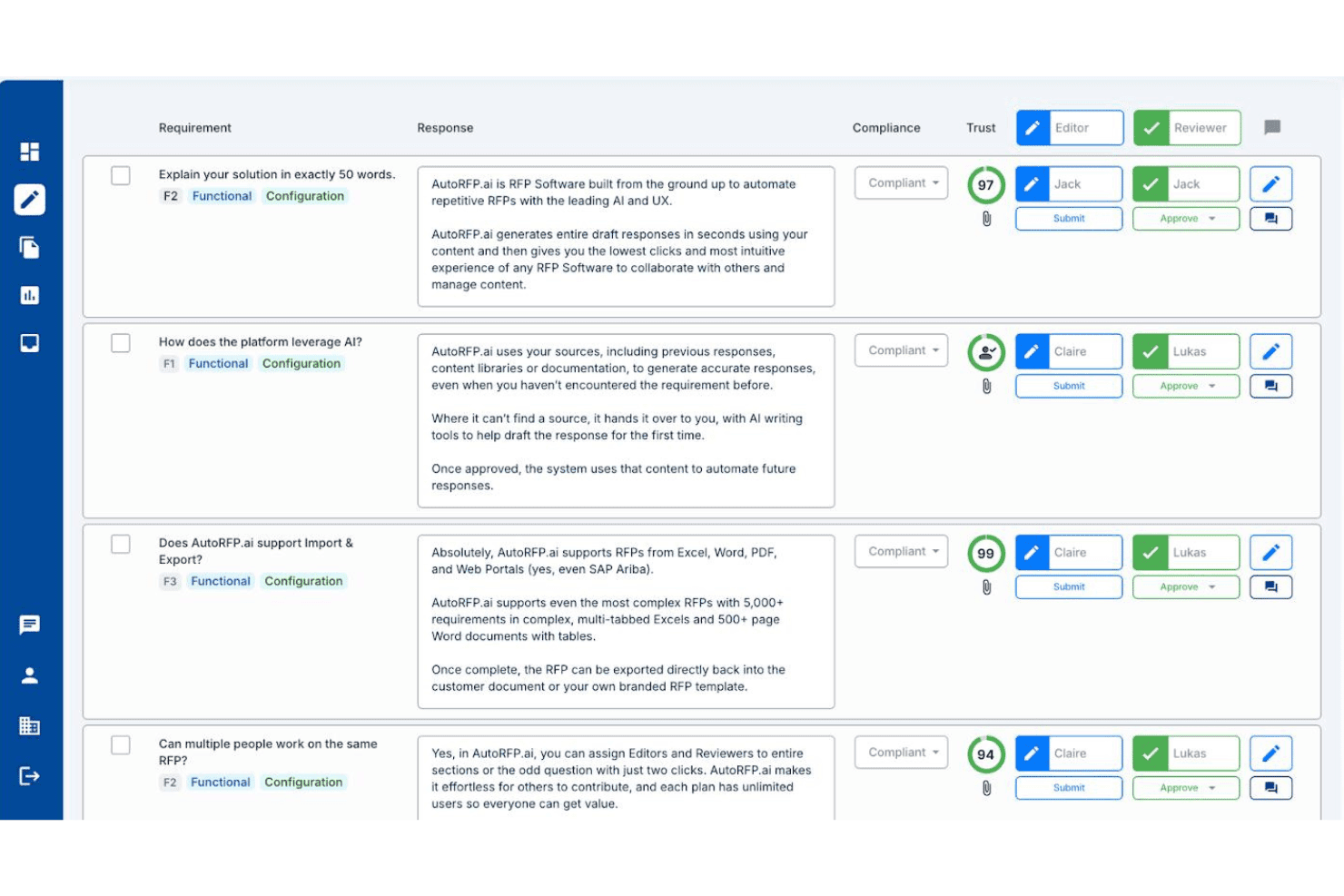
AutoRFP.ai lets teams assign editors and reviewers to RFP responses with AI trust scores. AutoRFP.ai is an AI-native RFP response platform that automates the drafting, review, and submission of RFPs, DDQs, security questionnaires, and tenders using a self-building knowledge base, multi-step approval workflows, and deep CRM and content source integrations.
Who Is AutoRFP.ai Best For?
AutoRFP.ai is built for bid managers and proposal teams handling high volumes of inbound RFPs, DDQs, and security questionnaires who need to cut response time without hiring more staff.
Why I Picked AutoRFP.ai
AutoRFP.ai earns its spot on my shortlist because it's built specifically for AI-driven RFP response automation in a way that generic proposal tools simply aren't. I'm particularly drawn to its self-building knowledge base, which ingests past responses and auto-updates without anyone manually curating a content library. The Trust Scores on every AI-generated draft are what really set it apart: each answer shows a confidence percentage and an exact source citation, so reviewers know precisely what they're approving rather than guessing at AI output.
AutoRFP.ai Key Features
- Self-building knowledge base: Automatically ingests and tags approved responses from 15+ connected sources, including SharePoint, Confluence, and Google Drive, without manual curation.
- Multi-step approval workflows: Routes responses through sequential reviewer and editor assignments by section or question, with a full audit trail on every action.
- Browser extension for procurement portals: Lets users respond directly inside SAP Ariba, Workday Strategic Sourcing, Coupa, and Jaggaer without switching between platforms.
- Go/no-go analysis: Scans incoming RFPs and generates a structured bid/no-bid recommendation automatically before your team commits any time to a response.
AutoRFP.ai Integrations
AutoRFP.ai lists 18+ integrations, including native Salesforce sync and connections to HubSpot, Microsoft Dynamics 365, DealCloud, SharePoint, Confluence, Google Drive, Highspot, Seismic, Slack, and Microsoft Teams. It also offers an open API and webhooks for custom integrations.
Pros and Cons
Pros:
- Unlimited team collaboration on every project
- Produces high-confidence draft responses quickly
- AI auto-builds and updates content library
Cons:
- Not designed for outbound sales proposals
- No built-in pricing or quoting engine
Learn more about AutoRFP.ai: Best for dynamic pricing and bundles
- Free demo available
- Pricing upon request
Visit WebsiteCustomer Rating:4.7/5
DealHub AI lets you manage, track, and update sales proposals from a centralized dashboard. DealHub AI is a cloud-based quote-to-revenue platform that helps sales teams manage the entire deal process—from proposal to signature—in one unified workspace.
Why I picked DealHub AI: It combines proposal generation, pricing logic, approvals, and contract workflows so teams can move faster and stay aligned. With built-in CPQ, reps can create accurate quotes using guided configuration, smart pricing rules, and dynamic bundles—no spreadsheets required. Adaptive pricing and usage-based models are supported out of the box, helping teams respond to change with confidence. Proposal content also stays consistent and compliant thanks to approval workflows and brand controls, making it easy for reps to deliver professional, tailored proposals at scale.
DealHub AI Standout Features and Integrations
Features include contract lifecycle management (CLM), covering everything from contract creation to negotiation and approval. Teams can collaborate in real time using the integrated Digital DealRoom, which centralizes buyer and internal communication, tracks engagement, and keeps deals on course.
Integrations include Salesforce, Microsoft Dynamics 365, HubSpot, Freshworks, DocuSign, Gong, and Slack.
Pros and Cons
Pros:
- Built-in CPQ features
- Accurate pricing through predefined rules
- Digital DealRoom enhances collaboration with customers
Cons:
- Learning curve for new users
- API integration is a paid add-on
Learn more about DealHub AI: Best for customizable proposal templates
- Free trial available
- From $8/month (billed annually)
Visit WebsiteCustomer Rating:4.6/5
SignNow provides an organized document management interface, allowing users to upload, sign, send, and track proposals and contracts efficiently. SignNow is an electronic signature solution that helps businesses sign, send, and manage documents securely on any device. It offers features like document templates, team collaboration, and mobile applications to enhance your document workflows.
Why I picked SignNow: You can create reusable templates for your most-used documents, ensuring consistency and saving time when preparing proposals. Additionally, SignNow allows you to add fillable fields to your documents, such as text boxes, checkboxes, and radio buttons, making it easy for recipients to complete and sign proposals accurately. Another valuable feature is SignNow's team collaboration capabilities. You can create teams within the platform to securely collaborate on documents and templates, ensuring that all team members are on the same page during the proposal creation process.
SignNow Standout Features and Integrations
Features include document editing, bulk sending, signing links, kiosk mode, in-person signing, document history tracking, role-based signing, conditional fields, data validation, attachment requests, custom branding, and audit trails.
Integrations include Microsoft 365, Google Workspace, Salesforce, NetSuite, SharePoint, Dynamics, Gmail, Excel, and Autodesk.
Pros and Cons
Pros:
- Unlimited users on all plans
- Good audit trail and document history features
- Mobile app available
Cons:
- Can be difficult to update documents once uploaded
- May not be ideal for large-scale operations
Learn more about SignNow:

Pre-designed templates include proposals, contracts, quotes, online brochures, and statements of work. Better Proposals helps revenue teams get paid faster and maintain a high-quality product through its collaboration capabilities.
Why I picked Better Proposals: Collaboration is essential when working with proposals, so I added Better Proposals to this article because of its teamwork capabilities. With Better Proposals, you can get the entire team on the same page thanks to its tools that simplify the proposal process. These tools include pipeline visibility that allows everyone to see what the rest of the team is working on at any moment and improve efficiency.
Better Proposals Standout Features and Integrations
Features include tools to help your teams convert more deals and increase the number of paying clients. For example, Better Proposals provides artificial intelligence and automatic recommendations to identify what’s working in your industry.
Integrations include native integrations, such as ActiveCampaign, Asana, Freshsales, HubSpot CRM, Insightly, PayPal, Pipedrive, Salesforce, Stripe, Zoho, and other software options. If you have a paid Zapier account, you can create custom integrations with thousands of apps to automate your processes.
Pros and Cons
Pros:
- Creates professional proposals.
- Excellent customer support.
- Simplifies sales processes.
Cons:
- Can’t print proposals.
- Has some bugs.
Learn more about Better Proposals: 8Best for turning proposals into signable order forms
Dock
- Free plan + free demo available
- From $350/month (billed annually)
Visit WebsiteCustomer Rating:4.9/5
Dock lets you create proposals and price quotes from standardized templates for a more consistent customer-facing experience. Dock is a platform designed to help sales teams improve their processes, from lead capture to onboarding and more. It offers a centralized space for collaboration and client-facing documents, like proposals, quotes, and contracts.
Why I picked Dock: Dock's proposal management system is easy to use with pre-built templates. These templates include everything from proposals and price quotes to order forms, contracts, and other important documents. The platform also helps standardize sales processes by allowing teams to easily turn proposals or quotes into signable order forms. Furthermore, Dock offers order form tracking features that provide insight into document statuses, whether they're viewed, signed, or still require approval.
Dock Standout Features and Integrations
Features include digital sales rooms, customizable client portals, buyer signals, engagement analytics, dynamic action plans for onboarding, custom branding, secure digital signatures, and numerous templates for different sales functions.
Integrations include HubSpot, Salesforce, Slack, Zoom, Airtable, Pandadoc, Typeform, and more.
Pros and Cons
Pros:
- Digital sales rooms with personalized client portals
- Document status visibility
- Many templates to help create consistent experiences
Cons:
- Order form features are an additional add-on
- HubSpot and Salesforce integration limited to higher-tier plans
Learn more about Dock: Best for proposal design
- 14-day free trial + free demo available
- From $19/user/month (billed annually)
Visit WebsiteCustomer Rating:4.6/5
Add different sections to proposals through the drag-and-drop interface. Proposify provides extensive proposal design capabilities that allow revenue teams to customize every part and element of a proposal. The vendor also offers design and training services to help companies create eye-catching designs.
Why I picked Proposify: The platform is a proposal creation software that will help you simplify and enhance the process. Proposify provides an editor that provides hands-on proposal creation capabilities without having you rely on word processing tools. It uses a drag-and-drop interface that allows you to add and edit multiple sections on your proposal.
Proposify Standout Features and Integrations
Features are available from Proposify that will help you throughout the proposal process, including analytics and metrics that provide insights into your documents’ performance that help you better understand your sales process. You can also use the data to optimize sales documents by enhancing future proposals based on formats and layouts that worked for you in the past.
Integrations include native connections to platforms such as Basecamp, Freshbooks, HubSpot, Intercom, Olark, Pipedrive, QuickBooks, Salesforce, Stripe, Zoho, and other software options. You can also use a paid Zapier account to create integrations to third-party applications such as ActiveCampaign, Asana, Copper, Highrise, Mailchimp, Microsoft Teams, monday.com, Salesflare, Slack, Zendesk Sell, and other software options.
Pros and Cons
Pros:
- Customizable templates.
- Provides instant proposal data.
- Clean-looking proposals.
Cons:
- Occasional loading errors.
- Not user-friendly.
Learn more about Proposify: 10Best for web-based proposals
Qwilr
- 14-day free trial
- From $35/user/month (billed annually)
Visit WebsiteCustomer Rating:4.5/5
Create stunning documents from the template library without relying on a programmer. Qwilr modernizes proposal processes by helping teams create interactive, web-based proposals.
Why I picked Qwilr: I went in a different direction when adding Qwilr to this list because the platform doesn’t create amazing PDF proposals. What Qwilr does is design proposals as interactive, mobile-responsive web pages. You can use various elements such as interactive pricing tables, multimedia files, brand colors, and other creative sections that act as one interactive web-based proposal.
Qwilr Standout Features and Integrations
Features include one-click automation that allows you to simplify proposal generation via templates. This will help your teams increase sales process speeds and move deals out the door without the need for creating personalized proposals by hand.
Integrations are available from Qwilr, such as HubSpot, Pipedrive, QuickBooks, Salesforce, Slack, Stripe, and Zoho CRM. You can also use a paid Zapier account to create custom integrations.
Pros and Cons
Pros:
- Easy to use.
- Allows users to easily reuse content.
- Creates consistent proposals.
Cons:
- Interface is clunky.
- API access is only in the highest tier.
Learn more about Qwilr:
Other Proposal Management Software
Here are some other options that I think are worth checking out:
- 11ConcordBest all-in-one proposal lifecycle management tool
- 12QuoteWerksBest for proposal view tracking
- 13OmbudBest for response management
- 14ProposableBest for collecting e-signatures
- 15GuruBest for AI-driven proposal creation
- 16PandaDocBest for proposal templates
- 17ProsperoBest for small businesses
- 18RFPIOBest for proposal content suggestions
- 19HoneyBookBest for automating requests for proposal answers
- 20DocSendBest for securely sharing proposals.
- 21IgnitionBest for billing and payment collection through proposals.
- 22GetAcceptBest for digital sales rooms.
- 23RELAYTOBest for interactive proposals.
- 24QorusDocsBest for fast proposal creation.
- 25FastSpring Interactive QuotesBest for real-time proposal analytics.
- 26Zomentum GrowBest for SaaS companies.
Related Proposal Management Software Reviews
If you still haven't found what you're looking for here, check out these tools closely related to proposal management software that we've tested and evaluated.
- CRM Software
- Sales Software
- Lead Management Software
- Business Intelligence Software
- Contract Management Software
- Revenue Management System
How I Evaluate Proposal Management Software
I split my evaluation into baseline qualifiers—CRM-synced quoting, e-signature, and proposal tracking—and differentiators that reveal which tools are the right fit for RevOps teams.
Core Functionality (Table Stakes For This List)
When I'm selecting tools for my list, I rank each one on a scale from 0 (does not offer the functionality) to 5 (excels in this area) for each core functionality listed below. Then, I calculate the tool's total score into a percentage. Each tool needs to achieve a minimum total score of 65% to be considered for inclusion.
- Template & Content Library: I check whether reps can assemble proposals from pre-approved content blocks and branded templates rather than copying from old docs or starting from scratch every time.
- CRM Integration: Each tool's ability to pull contact, opportunity, and product data directly from CRMs like Salesforce or HubSpot—and sync proposal status back—is a key part of my evaluation.
- E-Signature & Approvals: I look for built-in e-signature alongside internal approval routing, so a deal desk analyst can enforce discount thresholds before a proposal ever reaches the buyer.
- Pricing & Quoting Engine: The tool should let reps configure product bundles, apply tiered pricing, and generate accurate totals inside the proposal without relying on a separate spreadsheet.
- Proposal Analytics & Tracking: I evaluate whether the platform shows section-level engagement data—like which pages a buyer spent the most time on—so sales and RevOps teams can prioritize follow-up.
- Collaboration & Redlining: Multi-user editing, commenting, and version control matter here, especially when legal, finance, and sales all need to weigh in before a proposal goes out.
Once I have a list of tools that meet this criteria, I consider what sets each platform apart.
Differentiating Factors (What Sets Vendors Apart)
Here's how I compare and contrast different vendors:
Standout Features
Conditional content rules are a big differentiator—I look for tools that automatically swap pricing, terms, or sections based on deal attributes like region or product line. Revenue intelligence dashboards also carry weight. When a platform aggregates win rates by template or tracks proposal velocity, RevOps leaders get data they can feed directly into pipeline forecasts. Guided selling workflows round this out by walking reps through structured questionnaires that assemble compliant proposals, reducing errors before deals ever hit the approval queue.
Beyond Features
Tech stack connectivity is one of the first things I evaluate. A proposal tool that syncs with your CPQ, billing, and ERP systems keeps the quote-to-cash workflow intact across teams. Pricing model matters just as much—I check whether per-seat or per-send pricing makes sense for your team's volume and growth trajectory. Security and compliance round out my evaluation. Tools handling sensitive deal data should carry SOC 2 Type II certification and support SSO/SAML, especially when finance and legal stakeholders are reviewing proposals alongside sales.
How To Choose Proposal Management Software
With so many different proposal management software solutions available, it can be challenging to make decisions on what tool is going to be the best fit for your needs.
As you're shortlisting, trialing, and selecting proposal management software, consider the following:
- What problem are you trying to solve - Start by identifying the proposal management software feature gap you're trying to fill to clarify the features and functionality the tool needs to provide.
- Who will need to use it - To evaluate cost and requirements, consider who'll be using the software and how many licenses you'll need. You'll need to evaluate if it'll just be the revenue operation leaders or the whole organization that will require access. When that's clear, it's worth considering if you're prioritizing ease of use for all or speed for your proposal management software power users.
- What other tools it needs to work with - Clarify what tools you're replacing, what tools are staying, and the tools you'll need to integrate with, such as accounting, CRM, or HR software. You'll need to decide if the tools will need to integrate together or if you can replace multiple tools with one consolidated proposal software.
- What outcomes are important - Consider the result that the software needs to deliver to be considered a success. Consider what capability you want to gain or what you want to improve, and how you will be measuring success. For example, an outcome could be the ability to get greater visibility into performance. You could compare proposal management software features until you’re blue in the face but if you aren’t thinking about the outcomes you want to drive, you could be wasting a lot of valuable time.
- How it would work within your organization - Consider the software selection alongside your workflows and delivery methodology. Evaluate what's working well and the areas that are causing issues that need to be addressed. Remember every business is different — don’t assume that because a tool is popular that it'll work in your organization.
Trends In Proposal Management Software For 2026
In analyzing the latest product updates, press releases, and release logs from leading proposal management software tools, we can identify key trends that reflect the evolving landscape of technology in revenue operations management:
- Enhanced Integration Capabilities:
- Increased focus on seamless integration with a broader array of platforms, especially CRM systems, indicating a trend toward a more interconnected tech stack in revenue operations.
- AI-driven Automation and Personalization:
- Significant advancements in AI utilization for automated proposal creation and customization, showing a trend toward more intelligent, responsive systems that adapt to user needs and client data.
- Advanced Analytics and Reporting:
- Enhanced analytical features providing deeper insights into proposal engagement and performance, highlighting a demand for data-driven decision-making tools in revenue operations.
- Interactive and Collaborative Features:
- New functionalities that promote teamwork and client interaction within the proposal process, reflecting the importance of collaboration in crafting compelling proposals.
These trends demonstrate a clear movement towards more integrated, intelligent, and user-centric solutions in proposal management software, catering to the sophisticated needs of today's revenue operation leaders.
What is Proposal Management Software?
Proposal management software is a tool used by businesses to create, manage, and track business proposals. It streamlines the process of proposal creation through features like customizable templates, content libraries, collaboration tools, and tracking analytics. The software facilitates the organization of proposal-related documents and integrates with various business systems for efficient workflow.
The benefits of proposal management software include increased efficiency in creating and submitting proposals. It enhances the quality and consistency of proposals, improving the chances of securing new business. The software allows for better collaboration among team members, ensuring that proposals are comprehensive and well-coordinated. Additionally, it provides valuable insights into how clients interact with proposals, aiding in timely follow-ups and informed decision-making for future proposals.
Features Of Proposal Management Software
Choosing the right proposal management software is vital for streamlining revenue operations. Here are essential features to look for:
- Integration with CRM Systems: Ensures seamless data flow and centralizes customer information, crucial for tailored proposal creation.
- Customizable Templates: Facilitates brand consistency and efficiency, allowing rapid response to opportunities.
- Collaboration Tools: Enables team members to work together effectively, improving proposal quality and speed.
- Workflow Automation: Streamlines the proposal process, reducing manual tasks and speeding up approval cycles.
- Content Library: Provides quick access to approved content, enhancing proposal accuracy and consistency.
- E-signature Capability: Allows for faster deal closure with secure and legal online sign-offs.
- Analytics and Reporting: Offers insights into proposal performance, guiding strategic decisions and optimizations.
- Mobile Access: Ensures team members can work from anywhere, increasing productivity and responsiveness.
- Security Features: Protects sensitive information, maintaining client trust and compliance.
- Scalability: Adapts to business growth, supporting evolving revenue operation needs.
Selecting a platform with these features can significantly enhance your revenue team's efficiency, responsiveness, and success in winning business.
Benefits Of Proposal Management Software
Proposal management software streamlines the creation, delivery, and tracking of proposals, offering significant benefits for users and organizations. Here are five primary benefits that these tools provide, showcasing their value to users and organizations:
- Increased Efficiency: Automates routine tasks, saving time and reducing errors.
- Teams can produce more proposals faster, increasing their chances to win business.
- Enhanced Collaboration: Facilitates teamwork on proposal documents.
- Contributors can easily work together, improving the quality and consistency of proposals.
- Better Tracking: Offers real-time insights into proposal status.
- Users gain visibility into the review process, helping to refine strategies and follow-ups.
- Consistency and Compliance: Ensures all proposals adhere to company branding and legal standards.
- Organizations maintain a professional image and mitigate compliance risks.
- Data-Driven Insights: Provides analytics on proposal performance.
- Leaders can make informed decisions to enhance future proposals and strategies.
Costs & Pricing For Proposal Management Software
When selecting a proposal management software plan, it's important to understand the varying levels of features and pricing to match your organization's needs. Here is a breakdown of common plan options you might encounter:
Plan Comparison Table For Proposal Management Software
| Plan Type | Average Price | Common Features |
|---|---|---|
| Plan TypeBasic | Average Price$15 - $30/user/month | Common FeaturesAccess to templates, basic customization, analytics |
| Plan TypeProfessional | Average Price$50 - $75/user/month | Common FeaturesAdvanced integrations, enhanced collaboration tools, higher template variety |
| Plan TypeEnterprise | Average PriceCustom pricing | Common FeaturesFull feature access, advanced analytics, dedicated support |
| Plan TypeFree | Average Price$0 | Common FeaturesLimited templates, basic features, often with usage caps |
Each plan offers different capabilities tailored to various business sizes and needs. Assessing your organization's requirements will help determine the most cost-effective and beneficial option for enhancing your proposal management processes.
Proposal Management Software Frequently Asked Questions
As you can see, proposal management software can help you close more deals. However, you might have other questions to be certain these tools are right for your organization. Here are some of the common questions people ask when searching for new proposal management tools.
Is there a difference between proposal management software and request for proposal software?
Yes, there is a difference between proposal management software and request for proposal (RFP) software, although the terms are often used interchangeably. Proposal management software is designed to help organizations create, track, and manage outgoing proposals—typically in response to RFPs. RFP software, on the other hand, often focuses on the process of issuing and managing incoming proposals, especially for companies soliciting pitches from qualified people for a particular service or skill. Some platforms combine both functionalities, but it’s useful to understand whether a tool is geared more toward issuers or responders.
Who uses proposal management software?
Anyone who regularly sends proposals or responds to requests for proposals can use proposal management software. This includes every industry, from accounting agencies to user experience (UX) design. Also, sales leadership teams use sales proposal platforms to walk customer success teams through the proposal workflow and deal approval process.
How does proposal management software integrate with sales data?
The best proposal software typically integrates with sales data to provide contextual insights, streamline the proposal process, and ensure the content is aligned with customer interactions and history. This integration allows for more accurate, personalized proposals based on specific sales scenarios and customer needs.
Can proposal management tools support multimedia content?
Yes, many proposal management tools support multimedia content, enabling users to create more engaging and dynamic proposals. This feature allows the inclusion of videos, images, and interactive elements, enhancing the proposal’s effectiveness and appeal.
How does proposal management software manage version control and document history?
Proposal management software often includes robust version control and document history features, allowing teams to track changes, revert to previous versions, and collaborate effectively without losing critical work. This ensures transparency and accuracy throughout the proposal development process.
Additional RevOps Software
Typically, organizations will implement multiple types of software for their teams to use to reach their goals. Here are some other types of RevOps software suggestions: