

10 Best Proposal Software Reviewed For 2026

Best Proposal Software Shortlist


With so many different proposal software available, figuring out which is right for you is tough. You know you want to create and manage proposals more effectively but need to figure out which tool is best. I've got you! In this post I'll help make your choice easy, sharing my personal experiences using dozens of different proposal tools with various teams and projects, with my picks of the best proposal software.
Why Trust Our Software Reviews
We’ve been testing and reviewing RevOps software since 2022. As RevOps leaders ourselves, we know how critical and difficult it is to make the right decision when selecting software.
We invest in deep research to help our audience make better software purchasing decisions. We’ve tested more than 2,000 tools for different RevOps use cases and written over 1,000 comprehensive software reviews. Learn how we stay transparent & our software review methodology.
Best Proposal Software Summary
This comparison chart summarizes pricing details for my top proposal software selections to help you find the best one for your budget and business needs.
| Tool | Best For | Trial Info | Price | ||
|---|---|---|---|---|---|
| 1 | Best for AI-driven proposal accuracy | Free demo available | Pricing upon request | Website | |
| 2 | Best for streamlining the RFP process | Free demo available | Pricing upon request | Website | |
| 3 | Best for CPQ & CRM integration | Free demo available | From $39/user/month | Website | |
| 4 | Best for unified quoting, contracts & billing | Free demo available | Pricing upon request | Website | |
| 5 | Best for secure team collaboration | Free trial available | From $8/month (billed annually) | Website | |
| 6 | Best for AI-native RFP and DDQ response at scale | 30-day free trial | From $899/month (billed annually) | Website | |
| 7 | Best for turning proposals into signable order forms | Free plan + free demo available | From $350/month (billed annually) | Website | |
| 8 | Best for sending proposals more securely | Not available | Website | ||
| 9 | Best for SMBs who need to remove proposal bottlenecks | 14-day free trial + free demo available | From $19/user/month (billed annually) | Website | |
| 10 | Best image and video document library | 14-day free trial available | From $35/user/month (billed annually) | Website |
Best Proposal Software Reviews
Here’s a brief description of each proposal software that showcases each vendor’s best use case, their noteworthy features, and some pros and cons. I’ve also included screenshots to give you a snapshot of their user interface too.

Best for AI-driven proposal accuracy
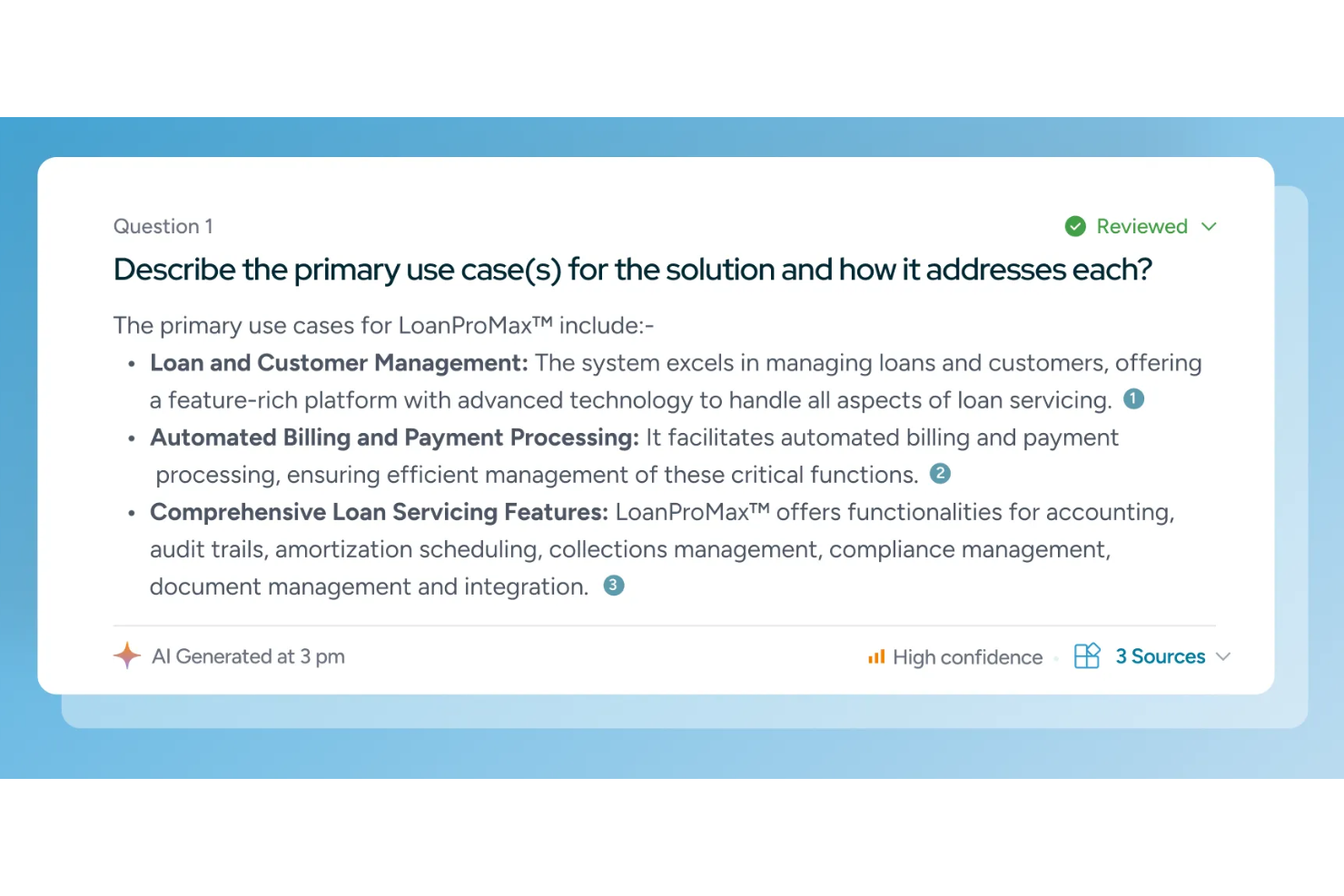
Inventive AI is an AI-powered proposal management platform designed to centralize your team’s knowledge and improve RFP response accuracy. With its built-in knowledge hub and AI content manager, the tool helps you draft, manage, and optimize proposals faster while ensuring the information you present is always up-to-date.
I picked Inventive AI because it takes the complexity out of managing proposals by combining a centralized knowledge hub with AI-driven response generation. By automatically pulling from approved content and integrating with internal data systems, it ensures your team always has access to accurate, relevant information when crafting responses.
Additionally, its AI content manager monitors and updates outdated content, while AI agents assist with research and brainstorming. This makes proposal creation smarter and more efficient, helping teams deliver compliant, high-quality proposals without sacrificing speed or consistency.
Inventive AI Standout Features and Integrations
Features include an AI-powered response generation, real-time collaboration tools, centralized knowledge hub, customizable workflows for proposal creation, AI agents for research and brainstorming, automated conflict detection, and robust security with end-to-end encryption.
Integrations include Jira, Notion, Confluence, Google Drive, Slack, Salesforce, Hubspot, and SharePoint.
Pros and Cons
Pros:
- AI-powered suggestions improve draft quality
- Centralizes RFP knowledge for better team collaboration
- Automates response generation, improving proposal turnaround times
Cons:
- No clear pricing available
- No free trial; demo-only access
Loopio
Best for streamlining the RFP process
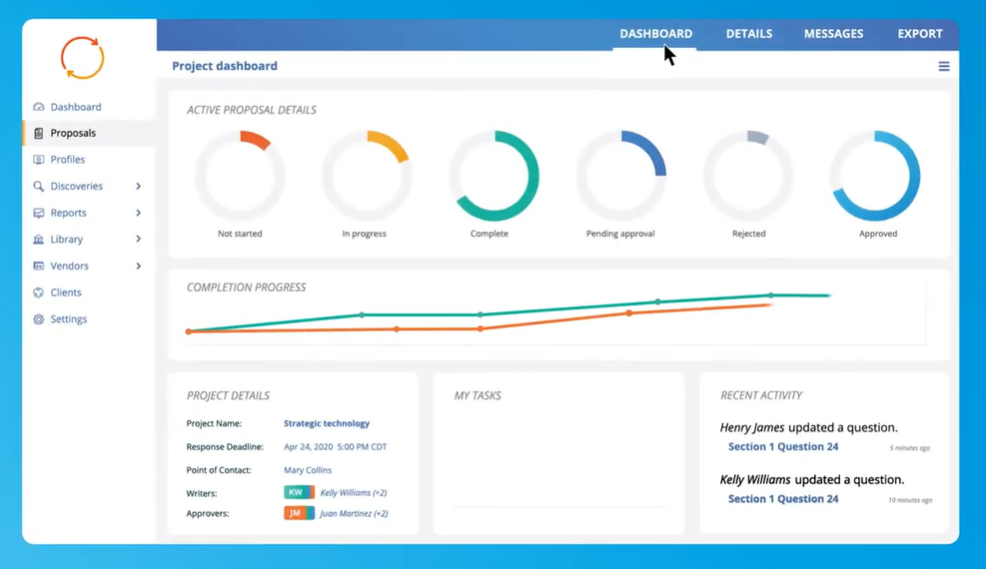
Loopio is an RFP response software that allows organizations to respond to RFIs, security questionnaires, and RFPs more efficiently through automated proposals and intelligent workflows.
Their proposal process empowers salespeople to create better proposals with no design or proofreading needed. With reusable templates, dynamic templates, and a drag-and-drop editor, Loopio’s proposal management software focuses on helping sales move faster.
Loopio supports sales, proposal, and security teams around the world in software, healthcare, and financial industries. They have several plan tiers with varying features and functionality that make choosing a plan for any business size simple.
Loopio Standout Features and Integrations
Features include customizability of variables and fields, custom branding, template creation, rich media, online document creation, and collaborative creation.
Integrations include Box, Dropbox, Google Drive, Microsoft Dynamics 365, Microsoft Teams, Okta, OneDrive, Salesforce, SharePoint, and Slack.
Pros and Cons
Pros:
- Searchable content library
- Intuitive user interface
- Dynamic automated proposals
Cons:
- No live chat function
- Has a bit of a learning curve
Best for CPQ & CRM integration

iQuoteXpress is a CPQ (configure, price, quote) solution designed to automate and improve the quote management process.
iQuoteXpress can integrate with existing Customer Relationship Management (CRM) systems, allowing for a synchronized flow of data between the two platforms. This integration helps ensure that customer data is up-to-date and that quotes are aligned with the sales pipeline. QuoteXpress partners with leading international CRM solutions such as Zoho, Oracle, and Microsoft Dynamics.
iQuoteXpress additionally provides a library of customizable proposal templates that users can tailor to fit their brand and specific needs. These templates can include product information, pricing, images, and terms and conditions. The CPQ (Configure, Price, Quote) tools also allow users to configure products and services, set pricing rules, and generate quotes quickly.
iQuoteXpress Standout Features and Integrations
Features include branded dashboards, customizable proposal templates, a product and pricing configuration engine, eCommerce capabilities, and contact management.
Integrations include DocuSign, Salesforce Sales Cloud, HubSpot CRM, Zoho CRM, QuickBooks Online Advanced, and Zoho Books.
Pros and Cons
Pros:
- Provides post-sale customer service
- Generates high-quality quotes
- User-friendly interface
Cons:
- Limited customization options for configuration tools
- Complicated process for adding vendors and partner logos
Best for unified quoting, contracts & billing

DealHub AI is a CPQ and proposal software designed to unify sales workflows—from quote to close—within one digital workspace.
DealHub AI eliminates the fragmented experience of juggling separate tools for quoting, contracting, approvals, and billing. With DealRoom, you can create, personalize, and share branded proposals in a single space where stakeholders can collaborate, sign, and move deals forward—all in real time. I also liked how the platform keeps everything in sync with your CRM, reducing manual work and making sales handoffs smoother.
DealHub AI Standout Features and Integrations
Features include multi-currency support, real-time buyer engagement tracking through DealStream, product configuration for complex deals, and customizable digital sales rooms. You can also generate sales documents and handle subscription billing without needing additional tools.
Integrations include Salesforce CRM, Microsoft Dynamics 365, HubSpot CRM, Freshworks CRM, DocuSign, Gong, Slack, Optimizely, Google, Comeet, and a native DealHub AI API.
Pros and Cons
Pros:
- Effective integration with ERP, CRM, and PRM systems
- No-code architecture
- Customizable templates and automation features
Cons:
- No photo embedding capabilities
- Navigation has a learning curve
New Product Updates from DealHub AI

DealHub AI Expands Bundle Attribute Automation
DealHub AI introduces Assignment Rules for child proposal attributes and numeric aggregation for bundles. These updates give admins more control over bundle attribute automation and configuration. For more information, visit DealHub’s official site.
 .
.
SignNow
Best for secure team collaboration
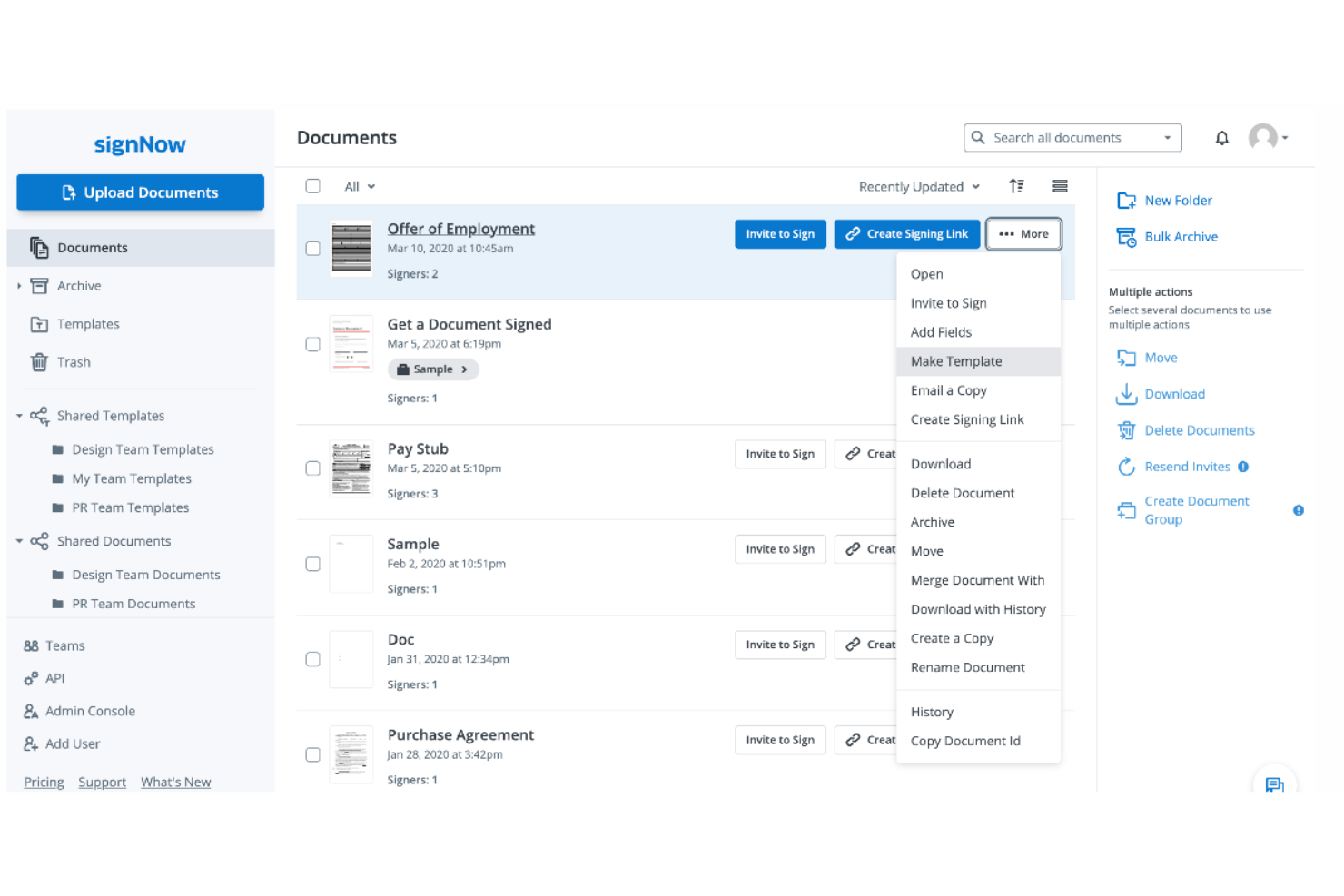
SignNow is an electronic signature platform that provides users with the ability to sign, send, and manage documents digitally, providing a secure and compliant way to handle electronic signatures and document workflows.
SignNow's proposal software is designed to facilitate the electronic signing, sending, tracking, and storage of documents, which can be accessed and used on any device. The platform offers a suite of tools for creating eSignatures, adding fillable fields to documents, and enabling team collaboration. It also ensures security and compliance with industry standards, making it suitable for various business environments.
Additionally, SignNow offers mobile applications for iOS and Android, enabling users to manage document workflows while on the move. The service is aimed at improving the efficiency of document processes, reducing errors, and enhancing collaboration within organizations.
SignNow Standout Features and Integrations
Features include document generation and templates, workflow automation, PDF editing, web forms, contract management, contract negotiation and collaboration, bulk invite, and completion notifications.
Integrations include Salesforce, NetSuite, Google Workspace, Microsoft 365, SharePoint, Dropbox, Magento, Zoho CRM, Slack, MailChimp, and Typeform.
Pros and Cons
Pros:
- Time-saving benefits
- Supports virtual and in-person document signing
- Reliable software
Cons:
- Potential for technical issues or glitches
- Limited customization options
Best for AI-native RFP and DDQ response at scale
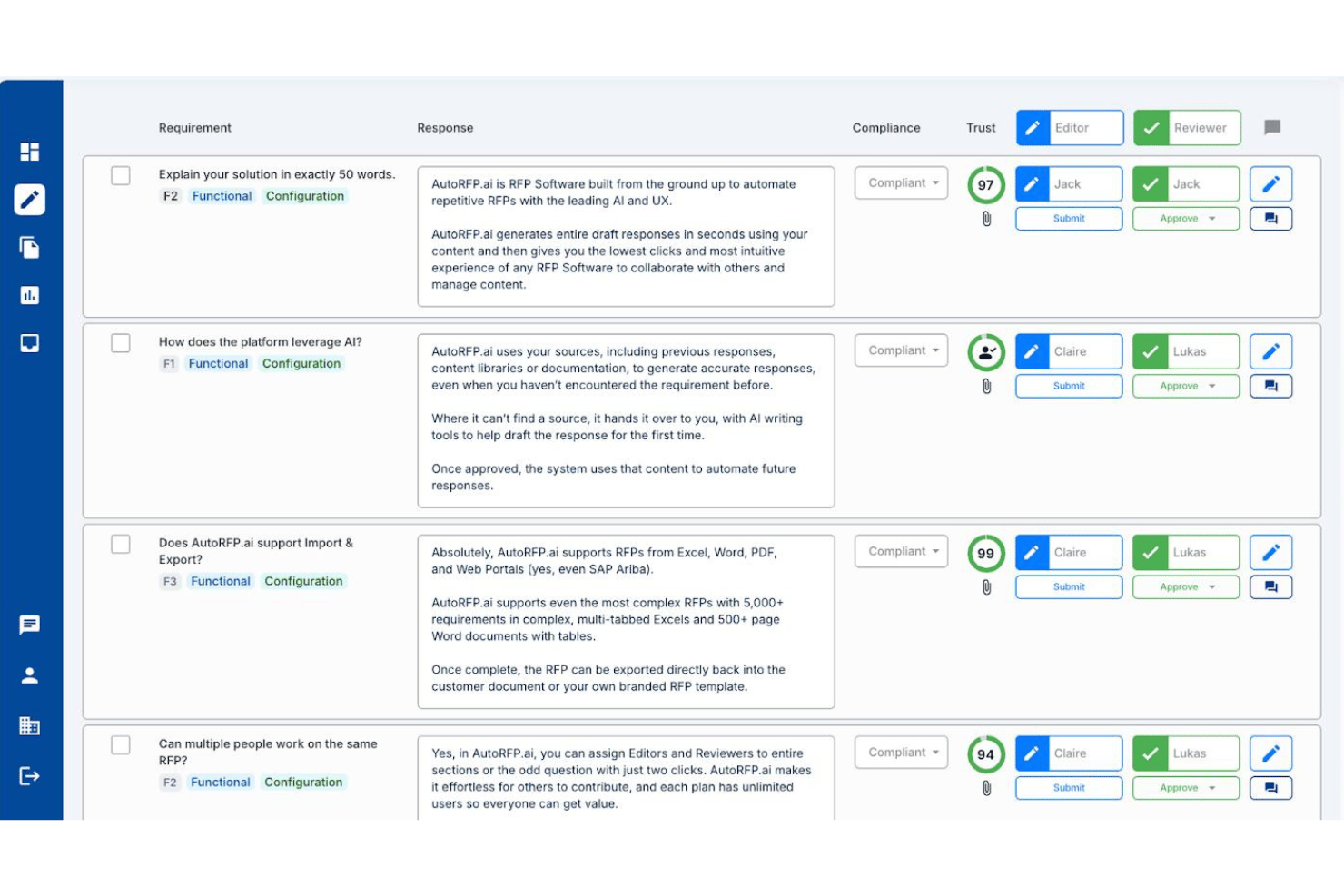
AutoRFP.ai is an AI-native RFP and questionnaire response platform that combines a self-building content library, RAG-based draft generation, and structured review workflows to manage RFP, DDQ, RFI, and security questionnaire responses.
Who Is AutoRFP.ai Best For?
AutoRFP.ai is a strong fit for sales enablement and proposal teams that respond to high volumes of RFPs, DDQs, and security questionnaires and need AI to handle the heavy lifting on first drafts.
Why I Picked AutoRFP.ai
I've included AutoRFP.ai in my top picks because its AI-native architecture handles RFP and DDQ responses at a scale that manual-first tools simply can't match. What sets it apart is a self-building content library that grows from every approved response, so your team isn't spending hours maintaining a knowledge base. Pair that with a Project Agent that autonomously drafts answers using RAG-based generation with source citations and Trust Scores, and teams regularly see 80–90% of AI drafts go out with only minor edits.
AutoRFP.ai Key Features
- Go/No-Go analysis: Reviews incoming RFPs to surface deal-breakers before your team commits time and resources to a response.
- AI document importer: Extracts requirements from Word documents (500+ pages), Excel files (10,000+ requirements across 20+ tabs), and PDFs up to 1,000 pages.
- Portal Agent browser extension: Lets your team complete RFP responses directly inside procurement portals like SAP Ariba, Coupa, and Jaggaer without copy-pasting.
- Multi-language translation: Automatically translates and localizes responses across 50+ languages, including regional variants like US and UK English.
AutoRFP.ai Integrations
AutoRFP.ai offers 18+ integrations, including Salesforce, HubSpot, Microsoft Dynamics 365, SharePoint, Seismic, Slack, Microsoft Teams, and Gong. Its open API and webhooks support custom RevOps workflows.
Pros and Cons
Pros:
- Supports unlimited users on all plans
- AI drafts are cited and scored
- Library self-builds from approved responses
Cons:
- Lacks buyer engagement analytics
- No dynamic pricing or quoting tools

Dock
Best for turning proposals into signable order forms

Dock is a sales and customer onboarding software featuring client-facing spaces that centralize sales documentation, processes, quotes and proposals, and other materials.
I like that Dock helps sales teams nurture customers at all stages of the journey. Its digital sales rooms help engage prospects with content sharing to educate new leads and analytics that provide insight into which prospects are more likely to close on a deal. Additionally, the platform offers customizable quote, proposal, and order forms to help you standardize your processes and provide a more consistent customer experience.
Quotes can be easily turned into signable order forms and the platform also facilitates approval features for custom orders, large deals, and discounts. After a deal closes, this information syncs with your CRM, providing better sales visibility across the organization.
Dock Standout Features and Integrations
Features include mutual success onboarding plans, buying signals, custom branding, a flexible workspace editor, secure sharing and digital signatures, centralized client-facing content management, and a wide range of customizable templates.
Integrations include HubSpot, Salesforce, Slack, Zoom, Airtable, Pandadoc, Typeform, and more.
Pros and Cons
Pros:
- Engagement analytics to target the best leads
- Digital sales room for a unified customer experience
- Wide range of templates for standardizing sales processes
Cons:
- Order forms are priced as an add-on to your existing plan
- HubSpot and Salesforce integration only available on higher-tier plans
DocSend
Best for sending proposals more securely
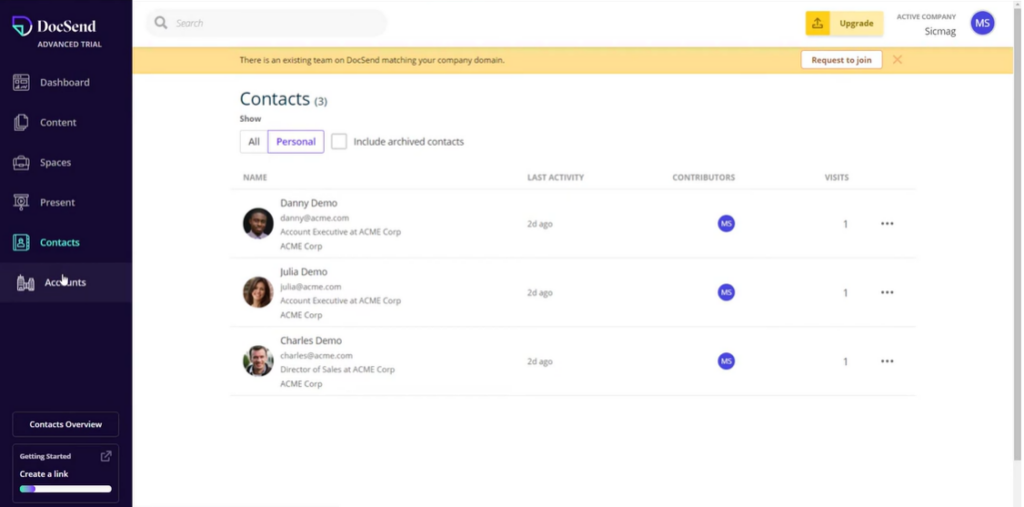
This document sharing platform from DropBox focuses on delivering proposals, contracts, and other sensitive documents more securely with email verification and whitelisting tools. They protect business-critical documents in shared spaces and virtual deal rooms with stringent permissions controls.
Instead of sending documents or attachments in emails, users can share a single link that leads to a shared workspace where all essential data for any particular client or stakeholder is instantly viewable. Users can control access, file downloads, and security with a few clicks to ensure security.
DocSend offers solutions for individuals, as well as SMBs and large organizations.
DocSend Standout Features and Integrations
Features include one-click NDAs, secure sharing, e-signatures, video analytics, document analytics, data rooms, dynamic watermarking, secure client portals, proposal software, engagement tracking, and proposal effectiveness reporting.
Integrations include DropBox, EGNYTE, Gmail, IFTTT, Mailchimp, Salesforce, Salesloft, Outlook, Yesware, and Zapier.
Pros and Cons
Pros:
- Comprehensive security measures
- Makes document tracking simple
- Easy to learn and use
Cons:
- Room for improvement in content management
- Mobile app is a little clunky
Best for SMBs who need to remove proposal bottlenecks
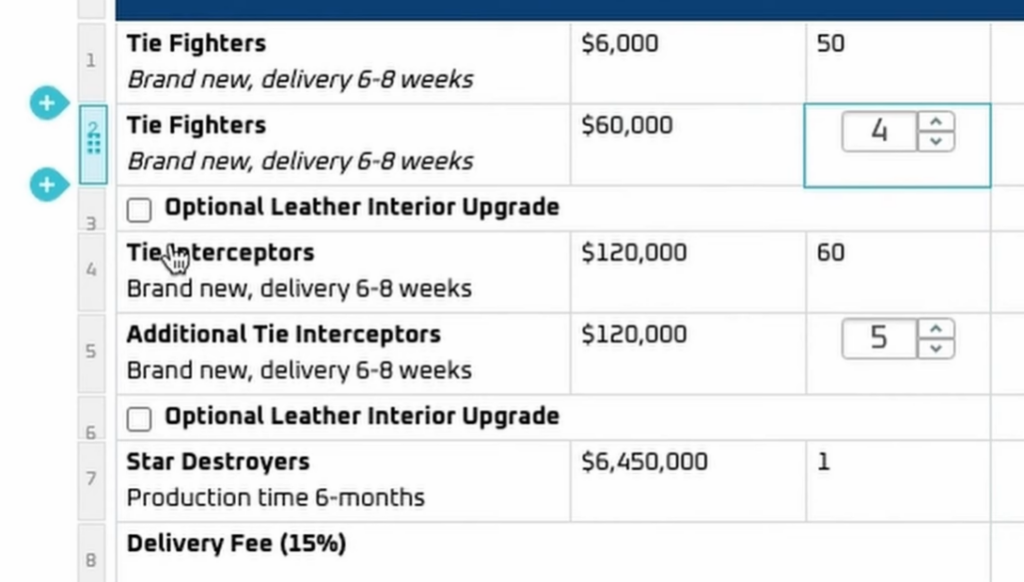
This software solution is a web-based tool that provides more control throughout the sales process with more visibility for sales documents and proposals. Through comprehensive tracking tools and added flexibility for project management, Proposify claims they help users close deals at two times the industry average.
Proposify enhances visibility with several features that allow users to dive into the proposal profile to see all the details of how it’s performing. Users can monitor rep progress from kick-off and edits to internal approvals and sign-off with accountability at every stage. This proposal tool allows users to keep an audit trail to reassure the internal team and the client.
As a proposal document creator and manager for small businesses, Proposify focuses on helping growing teams expand their organization. They offer solutions for sales teams, marketing teams, and operations teams.
Proposify Standout Features and Integrations
Features include content library, unlimited templates, custom domain, online signatures, interactive quoting, notifications, metrics, client input forms, custom fields, payments, and approval workflows.
Integrations include Accelo, Basecamp, Copper, FreshBooks, HubSpot Marketing Hub, Pipedrive, Stripe, Xero, Zapier, and Zoho CRM. Proposify offers native integrations, as well as integrations through Zapier.
Pros and Cons
Pros:
- User-friendly workflow
- Template reusability
- Instant data once proposal is sent
Cons:
- Not accessible for screen readers
- Clunky formatting capabilities
Qwilr
Best image and video document library
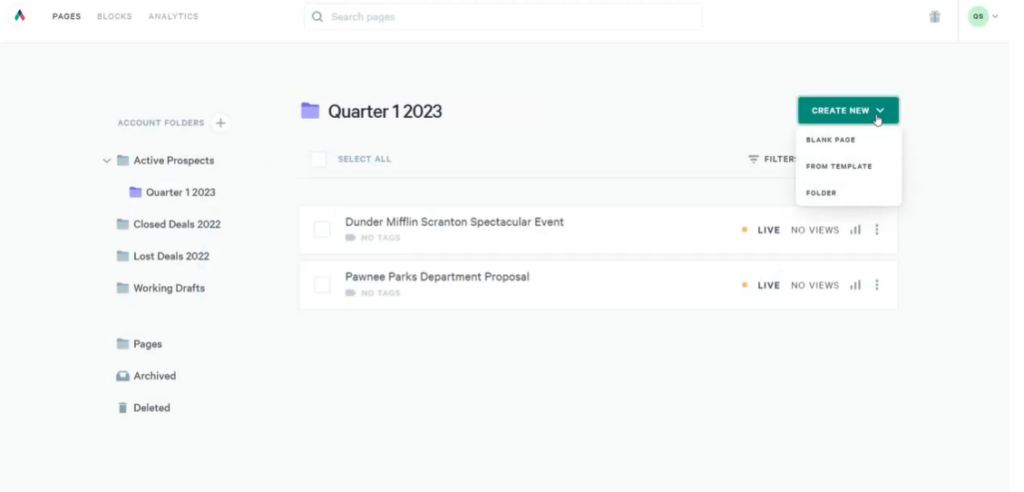
This web-based creation platform strives to provide users with what they need to build proposals, contracts, and presentations with a rich selection of tools, including easy-to-use templates, brand controls, modular building blocks, and access to an Unsplash image library.
Qwilr eliminates the need for PDFs with an extensive page builder that utilizes an existing image and video library, as well as designer-created templates that deliver a sleek, professional look for all documents. With a pre-built base, users can then add their own branded content with a custom subdomain, automatic font and color application, and branded imagery.
Qwilr provides solutions for a variety of roles, including customer success, sales leaders, recruitment, marketing, and sales operations. Their platform offers tiered plans that provide options for small businesses and enterprise organizations alike.
Qwilr Standout Features and Integrations
Features include drag-and-drop editor, Unsplash video and image library, custom branding, reusable blocks, custom embeds, dynamic pricing, e-signatures, collaborative creation, and engagement tracking.
Integrations include FreshBooks, Google Analytics, HubSpot, Pipedrive, Salesforce, Slack, Stripe, QuickBooks, Zapier, and Zoho CRM.
Pros and Cons
Pros:
- Excellent customer support
- Simple user interface
- Great functionality
Cons:
- Limited undo and backtracking during editing
- Internal document opens disrupt analytics
Other Proposal Software
Here are a few more worthwhile options that didn’t make the best proposal software list:
- PandaDoc
Variety of pre-built templates with over 750 options
- GetAccept
For revenue teams that want to win more deals
- RELAYTO
For transforming static content into interactive experiences
- ClientPoint
For business and customer relationship management in separate workspaces
- RevOps
For eliminating manual business procedures through proposal automation
- Ideagen Huddle
Proposal software for data and cyber security needs
- QuoteWerks
CPQ software for creating, editing, and viewing quotes online
- RFP360
Request management platform for full-circle RFP evolution
- XaitPorter
For document automation and collaboration with custom libraries
- Ignition
Sales automation for proposals, engagement letters, and payments
- RFPIO
For storage and integrations that allow easy access and data moderation
- Conga Composer
Auto composer for generating error-free branded documents
- Zomentum Grow
All-in-one sales hub for technology partners


How I Evaluate Proposal Software
I evaluate proposal software in two layers: the baseline a tool must hit—CRM-connected quoting, e-signature, and tracking—and the differentiators that set the best options apart.
Core Functionality (Table Stakes For This List)
When I'm selecting tools for my list, I rank each one on a scale from 0 (does not offer the functionality) to 5 (excels in this area) for each core functionality listed below. Then, I calculate the tool's total score into a percentage. Each tool needs to achieve a minimum total score of 65% to be considered for inclusion.
- Template Library & Content Management: I check whether reps can assemble proposals from pre-approved content blocks, branded sections, and saved assets rather than starting from a blank page every time.
- Dynamic Pricing & Quoting: Pricing tables should let reps configure line items, apply discounts, and adjust quantities—ideally with buyer-facing options like tiered or add-on selections.
- CRM Data Integration: I look for native connections to CRMs like Salesforce or HubSpot that auto-populate contact, account, and deal fields so reps aren't copy-pasting between tabs.
- E-Signature & Approval Routing: The tool should support legally binding e-signatures and internal approval steps, such as routing a discount above a set threshold to a deal desk analyst.
- Proposal Analytics & Tracking: Real-time visibility into buyer engagement matters—I evaluate whether the tool shows opens, section-level views, and forwarding activity to inform follow-up timing.
- Collaborative Editing & Commenting: Teams across sales, legal, and finance often touch the same proposal, so I look for real-time co-editing, @mentions, and version history.
Once I have a list of tools that meet this criteria, I consider what sets each platform apart.
Differentiating Factors (What Sets Vendors Apart)
Here's how I compare and contrast different vendors:
Standout Features
AI-assisted drafting is a big differentiator—I evaluate whether a tool can generate executive summaries or personalized sections using CRM data and past wins. Content performance analytics also matter. Knowing which templates and sections correlate with higher close rates gives RevOps teams data to refine the proposal playbook over time. Conditional content logic is another feature I look for, where sections automatically swap based on deal attributes like industry or contract tier, cutting manual editing for reps.
Beyond Features
Integration depth is one of the first things I evaluate—a proposal tool that syncs bi-directionally with your CRM, CPQ, and billing stack keeps deal data consistent without manual handoffs. Pricing transparency also matters, especially whether a vendor charges per seat, per document, or by volume, since this directly affects how costs scale as your team grows. I also consider implementation timelines. A tool with pre-built templates and guided CRM setup can get a RevOps team live within a single quarter rather than dragging into the next planning cycle.
How To Choose Proposal Software
It’s easy to get bogged down in long feature lists and complex pricing structures. To help you stay focused as you work through your unique software selection process, here’s a checklist of factors to keep in mind:
| Factor | What to Consider |
|---|---|
| Scalability | Can the software grow with your business? Consider if it supports additional users and larger data volumes without a hitch. |
| Integrations | Does it connect with your existing tools, like CRM systems or accounting software? Check for seamless data flow and reduced manual entry. |
| Customizability | Can you tailor the software to your workflows? Look for adjustable templates and configurable settings that fit your team's needs. |
| Ease of Use | Is the interface user-friendly? Ensure team members can navigate it without extensive training or frustration. |
| Implementation and Onboarding | How long will it take to get up and running? Consider the availability of training resources and the complexity of the setup process. |
| Cost | Does the pricing fit your budget? Evaluate total costs, including subscriptions, potential add-ons, and long-term value. |
| Security Safeguards | Does it comply with data protection standards? Ensure it has encryption, regular updates, and access controls to protect sensitive information. |
What Is Proposal Software?
Proposal software is a digital tool that assists in creating, managing, and delivering business proposals. It streamlines the process of proposal development by providing features such as customizable templates, content management, collaboration tools, and tracking analytics.
This software is used extensively in sales and marketing fields to produce professional and persuasive proposals aimed at securing new clients and projects.
The benefits of proposal software include increased efficiency in producing proposals, improved quality and consistency of documents, and enhanced collaboration among team members. It enables the creation of more engaging and visually appealing proposals, which can lead to higher success rates in winning business.
Additionally, the software provides valuable insights into client interactions with the proposal, such as viewing and engagement metrics, helping to tailor follow-up communications and strategies.
Features
Proposal software should not only streamline the proposal creation process but also provide valuable insights into client interactions, enabling your team to optimize strategies and improve conversion rates. Here are the most important features to look for in proposal software:
- Customizable Templates: Allows for quick and professional proposal creation that aligns with your brand identity.
- Content Library: Offers a repository for storing and easily accessing reusable content, images, and branding elements.
- Interactive Pricing Tables: Enables clients to adjust quantities or select options, providing them with interactive and customizable pricing.
- Electronic Signatures: Facilitates the easy and secure signing of proposals, speeding up the decision-making process.
- Analytics and Tracking: Provides insights into how clients interact with the proposal, such as which sections they viewed or how much time they spent on each part.
- CRM Integration: Ensures seamless data exchange between the proposal software and your CRM system, maintaining data consistency and accessibility.
- Collaboration Tools: Enables team members to work together on proposals, providing real-time updates and edits.
- Automated Workflows: Automates follow-ups and reminders related to proposal activities, ensuring timely actions and responses.
- Scalability: Adapts to the growing needs of your business, supporting an increase in proposal volume without a drop in performance.
- Security and Compliance: Protects sensitive information and ensures that your proposal process adheres to industry regulations and standards.
Benefits
By automating and optimizing various aspects of proposal creation and management, proposal software offers significant benefits to users and organizations, enabling them to produce compelling proposals that resonate with potential clients. Here are five primary benefits of implementing proposal software:
- Increased Efficiency: Streamlines the proposal creation process with customizable templates and content libraries.
- Enhanced Professionalism: Produces polished, consistent proposals that align with brand standards.
- Improved Collaboration: Facilitates teamwork with features that allow multiple contributors to work on a proposal simultaneously.
- Data-Driven Insights: Offers analytics to track proposal performance, including view rates, time spent on each section, and approval status.
- Accelerated Sales Cycle: Reduces the time from proposal creation to acceptance with streamlined workflows and electronic signatures.
- Global reach: Expands your business opportunities with multi-language support, allowing you to cater to international clients.
Costs & Pricing
Proposal software varies widely in terms of features, scalability, and pricing, designed to accommodate everything from small businesses to large enterprises. Understanding the different plan options and what they offer is crucial to selecting a software that aligns with your business needs and budget. Here is a breakdown of common plan options for proposal software:
Plan Comparison Table For Proposal Software
| Plan Type | Average Price | Common Features Included |
|---|---|---|
| Basic | $10 - $25 per user/month | Limited templates, basic customization, essential analytics |
| Professional | $25 - $75 per user/month | Expanded template library, advanced customization, CRM integration |
| Enterprise | $75 - $150+ per user/month | Full feature access, advanced analytics, multi-user collaboration, premium support |
| Free | $0 | Extremely limited templates, basic features, often with usage caps |
Proposal Software Frequently Asked Questions
Wondering where to actually start? If you don’t know anything about proposal management software, here are the answers to some frequently asked questions to help you out.
What are the types of proposal software?
Proposal software comes in various types, each designed to cater to different business needs, industries, and stages of the proposal creation and management process. Understanding these types can help organizations choose the right solution to streamline their proposal workflows, enhance collaboration, and improve their win rates. Here are the primary types of proposal software:
- Business Proposal Software: This type is specifically designed for creating and managing business proposals, offering templates, customization options, and integration with CRM systems to streamline the sales process.
- Project Proposal Software: Used by project managers and teams, this software focuses on developing detailed project plans and budgets, often featuring robust project management tools alongside proposal creation functionalities.
- Grant Proposal Software: Aimed at non-profits, researchers, and educational institutions, this type of software helps users create compelling grant applications, providing resources and templates that align with grant-making organizations’ requirements.
- RFP (Request for Proposal) Response Software: This software is tailored for organizations that frequently respond to RFPs, offering features that help standardize responses, manage compliance with RFP requirements, and track submission deadlines.
- Legal Proposal Software: Designed for law firms and legal service providers, this type of software includes specific functionalities for creating legal proposals and contracts, often with added features for compliance and electronic signature collection.
- Marketing Proposal Software: Used by marketing agencies and departments, this software focuses on creating proposals that highlight marketing strategies, campaigns, and expected outcomes, often integrating with marketing tools and platforms.
- Construction Proposal Software: Catering to the construction industry, this software includes features for estimating costs, detailing project scopes, and integrating with construction management systems.
- Government Contract Proposal Software: This specialized software is designed to help businesses comply with government contracting requirements, featuring tools for adhering to regulations, managing certifications, and submitting proposals through designated portals.
By choosing the right type of proposal software, organizations can optimize their proposal development processes, improve collaboration across teams, and increase the chances of winning contracts and securing business opportunities.
Who uses proposal software?
Proposal software is used by a diverse range of professionals and organizations across various industries to streamline the creation, management, and submission of proposals. Here are some of the primary users of proposal software:
- Sales Teams: Sales professionals use proposal software to quickly generate personalized proposals for potential clients, enhancing their efficiency and increasing their chances of closing deals.
- Marketing Agencies: These agencies utilize proposal software to create detailed, customized proposals for their marketing services, outlining strategies, timelines, and expected outcomes to prospective clients.
- Freelancers and Consultants: Independent professionals leverage proposal software to create compelling proposals for their services, showcasing their expertise and defining project scopes and terms.
- Project Managers: In industries like construction, engineering, and IT, project managers use proposal software to detail project objectives, methodologies, timelines, and cost estimates, ensuring clear communication with clients and stakeholders.
- Grant Writers: Nonprofit organizations and academic researchers employ proposal software to craft grant applications, ensuring they meet the specific requirements and guidelines of funding entities.
- Legal Firms: Lawyers and legal consultants use specialized proposal software to create and manage legal proposals and contracts, ensuring accuracy and compliance with legal standards.
- Government Contractors: Businesses that bid on government contracts use proposal software to comply with strict submission requirements, manage documentation, and track proposal statuses.
- Event Planners: These professionals use proposal software to outline event concepts, services, logistics, and costs for potential clients, providing clear and detailed plans to secure business.
- IT Service Providers: IT firms rely on proposal software to outline technical solutions, service packages, and support plans for their clients, ensuring detailed and clear communication of their offerings.
- Architectural Firms: Architects use proposal software to present their design concepts, project timelines, and cost estimates to clients, facilitating clear understanding and agreement on project parameters.
By using proposal software, these users can enhance the clarity, professionalism, and persuasiveness of their proposals, ultimately improving their success rates and operational efficiency.
Why should I use proposal software?
Using proposal software offers a multitude of benefits that streamline your proposal creation process, enhance collaboration, and increase your win rates. Here are key reasons why you should consider incorporating proposal software into your business operations:
- Efficiency: Proposal software significantly speeds up the proposal creation process by providing customizable templates, automated content, and easy access to information. This efficiency allows you to respond to opportunities quickly and allocate more time to other critical sales activities.
- Consistency: Utilizing proposal software ensures that all your proposals maintain consistent branding, formatting, and content quality. This consistency reinforces your professional image and helps build trust with your clients.
- Accuracy: Automated pricing tables, integration with CRM or other data sources, and error-reducing features minimize the chances of mistakes in your proposals. Enhanced accuracy reduces the risk of misunderstandings and helps establish credibility with your clients.
- Tracking and Analytics: Proposal software offers tracking capabilities that provide insights into how prospects engage with your proposals. You can see which sections they spend the most time on, when they open the document, and whether they share it with others, enabling you to tailor your follow-ups and strategies effectively.
- Collaboration: Many proposal software solutions offer collaboration features that allow multiple team members to work on a proposal simultaneously. Real-time updates and version control ensure that everyone is aligned, improving the quality of your proposals and speeding up the approval process.
- Scalability: As your business grows, the volume of proposals you need to manage can increase significantly. Proposal software can scale with your business, supporting an increasing number of users and documents without sacrificing performance.
- Competitive Edge: By streamlining your proposal process and creating more engaging, professional, and data-driven proposals, you can stand out from competitors and increase your chances of winning new business.
- Reduced Administrative Burden: Automating the proposal process reduces the administrative burden on your sales team, allowing them to focus more on selling and less on paperwork.
Proposal software is a powerful tool that can transform your proposal process, making it more efficient, effective, and competitive. By leveraging the right proposal software, you can enhance your ability to win new business and drive revenue growth.
Conclusion
It can be tough to choose the right proposal software for your organization, but when you consider the size, needs, and trajectory of your business, you can use this list to narrow down which tools will work best for you.
If you're in the process of researching proposal software, connect with a SoftwareSelect advisor for free recommendations.
You fill out a form and have a quick chat where they get into the specifics of your needs. Then you'll get a shortlist of software to review. They'll even support you through the entire buying process, including price negotiations.