

10 Best Sales Compensation Software Reviewed In 2026

10 Best Sales Compensation Software Shortlist


Sales compensation software makes it simple to automate commission tracking, manage incentives, and motivate your sales team—all from a single platform. With the right tool, you can streamline payouts, reduce errors, and keep your sales reps focused on hitting their targets.
I’ve tested the top sales compensation software solutions and reviewed them here so you can easily find the best fit for your business.
Why Trust Our Software Reviews
We’ve been testing and reviewing RevOps software since 2022. As RevOps leaders ourselves, we know how critical and difficult it is to make the right decision when selecting software.
We invest in deep research to help our audience make better software purchasing decisions. We’ve tested more than 2,000 tools for different RevOps use cases and written over 1,000 comprehensive software reviews. Learn how we stay transparent & our software review methodology.
Best Sales Compensation Software Summary
This comparison chart summarizes pricing details for my top sales compensation software selections to help you find the best one for your budget and business needs.
| Tool | Best For | Trial Info | Price | ||
|---|---|---|---|---|---|
| 1 | Best for real-time earnings visibility | Free demo available | Pricing upon request | Website | |
| 2 | Best for enterprise-level teams | Free demo available | Pricing upon request | Website | |
| 3 | Best for no-code commission plans | Free demo available | Pricing upon request | Website | |
| 4 | Best with AI-powered commission plan automation | Free plan available | From $31.50/user/month | Website | |
| 5 | Best for quota attainment dashboards | Free demo available | From $30/user/month | Website | |
| 6 | Best user-friendly, AI-adaptive comp software | Free demo available | Pricing upon request | Website | |
| 7 | Best for scalable incentive forecasting | Free demo available | Pricing upon request | Website | |
| 8 | Best for compliance with global regulations | 30-day free trial available | Pricing upon request | Website | |
| 9 | Best for small and mid-sized businesses | Free demo available | From $25/user/month | Website | |
| 10 | Best for large and complex sales teams | Free demo available | Pricing upon request | Website |
-

Pipedrive CRM
Visit WebsiteThis rating combines scores from multiple user review sites to reflect overall customer sentiment about the product.4.5 -
Creatio CRM
Visit WebsiteThis rating combines scores from multiple user review sites to reflect overall customer sentiment about the product.4.7 -
monday CRM
Visit WebsiteThis rating combines scores from multiple user review sites to reflect overall customer sentiment about the product.4.6





Best Sales Compensation Software Reviews
Below are my detailed summaries of the best sales compensation software that made it onto my shortlist. My reviews offer a detailed look at each tool’s key features, pros and cons, integrations, and ideal use cases to help you find the best one for you.

Qobra
Best for real-time earnings visibility
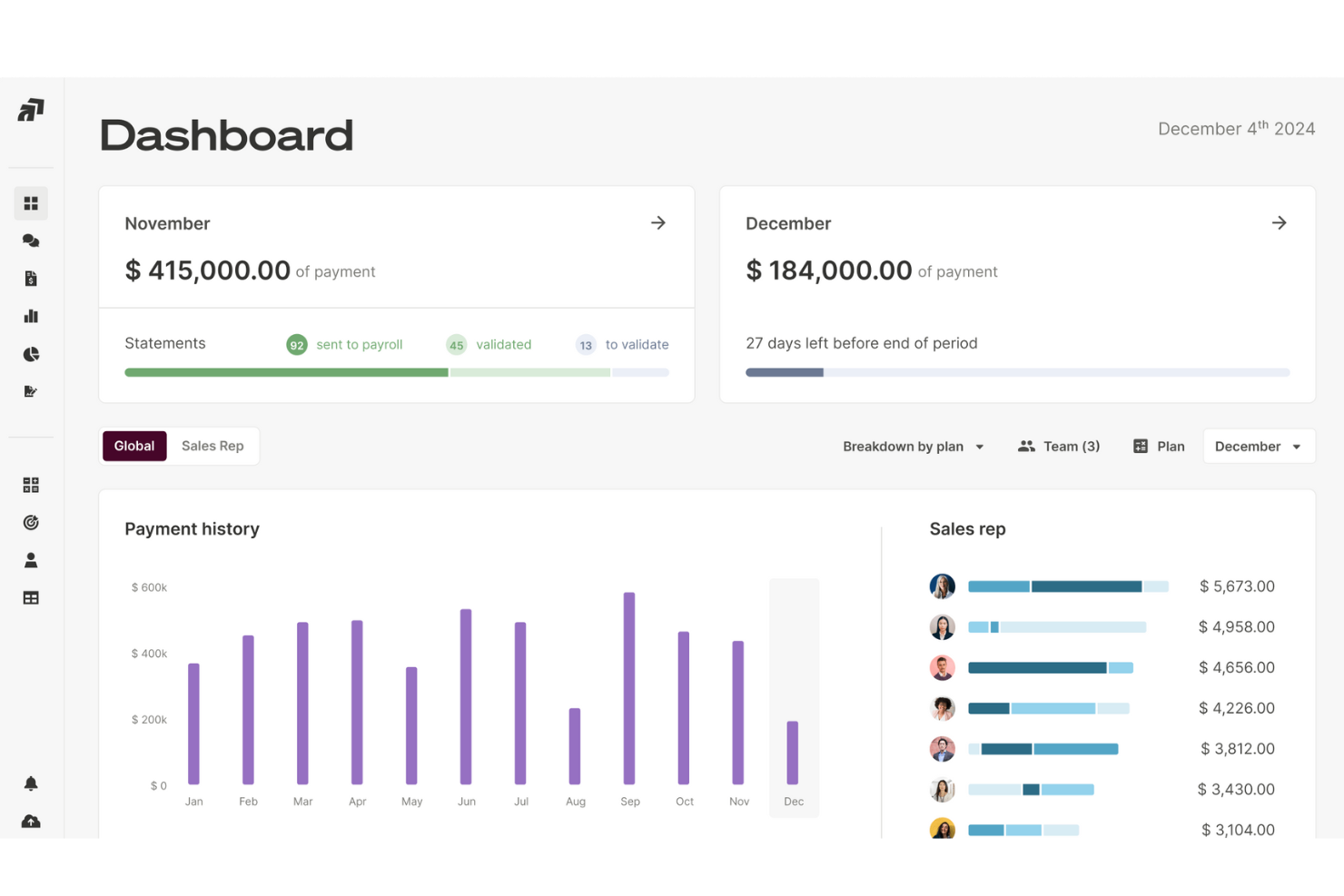
Qobra is a sales compensation platform designed for revenue operations teams and sales leaders who need automated commission calculations, transparent reporting, and flexible plan management to reduce errors and boost trust in incentive programs.
Who Is Qobra Best For?
Qobra is a strong fit for mid-market and enterprise sales teams that need a structured, admin-friendly way to manage and communicate complex commission plans at scale.
Why I Picked Qobra
Qobra is on my shortlist because of how it handles real-time earnings visibility for sales reps. The moment a rep closes a deal in Salesforce, their commission statement updates instantly—no waiting until month-end to know where they stand. I also like the custom sales dashboards, which let reps track their own KPIs and see exactly how each calculation is broken down. Performance notifications push live updates via Slack, so reps stay connected to their earnings even when they're away from their desk.
Qobra Key Features
- No-code plan builder: Design and manage compensation plans using a drag-and-drop interface without technical skills or developer support.
- Plan simulation and sandboxing: Test new compensation plans or changes in an isolated environment before rolling them out to your team.
- Lock and validation workflow: Manage commission approvals through a structured sign-off process involving managers, HR, and finance teams.
- In-app challenges: Create competitive incentives between sales reps directly within the platform to drive performance.
- QobrAI Agents: Use The Architect, The Analyst, and The Sales Coach to instantly build plans, detect calculation anomalies, and push proactive insights to your sales team.
Qobra Integrations
Integrations include Salesforce, HubSpot, Microsoft Dynamics 365, Google BigQuery, Snowflake, Slack, Workday, BambooHR, Google Drive, and an API for custom integrations.
Pros and Cons
Pros:
- Supports complex pay models like accelerators and hybrid bonuses
- Automates manual commission calculation
- Instant visibility into commission breakdowns
Cons:
- Data synchronization or system updates can sometimes lag
- Occasional issues with integration into existing systems

Xactly
Best for enterprise-level teams

Xactly is a sales compensation platform designed for large organizations that need to automate complex commission processes, improve payout accuracy, and gain real-time insights into sales performance.
Who Is Xactly Best For?
Xactly is a strong fit for enterprise sales organizations managing large, distributed sales teams with high-volume, multi-tiered compensation structures.
Why I Picked Xactly
Xactly earns its spot as one of the best on my shortlist because it's built to handle the scale and complexity that enterprise sales organizations deal with. I like that Xactly Incent's calculation engine can process billions of transactions monthly and support tens of thousands of payees—that's not something most tools can claim. I also find the Xactly Design simulation engine particularly useful: you can model "what-if" scenarios across best-case and cost-reducing comp plan variants before anything goes live, which reduces guesswork for plan changes at scale. The platform's 20+ years of proprietary pay and performance benchmarking data gives enterprise comp teams a real edge when designing plans that are both competitive and aligned to business goals.
Xactly Key Features
- Territory and quota management: Define, assign, and adjust sales territories and quotas directly within the platform to keep plans aligned with go-to-market strategy.
- Real-time compensation dashboards: Give sales reps and managers live visibility into earnings, attainment, and payout status without waiting for end-of-period reports.
- Audit trail and compliance tracking: Automatically log every compensation change and calculation to support internal audits and regulatory compliance requirements.
- CRM and ERP data connectors: Pull data directly from connected systems to ensure commission calculations are based on accurate, up-to-date deal and revenue records.
Xactly Integrations
Integrations include Salesforce, Microsoft, Oracle, Workday, ServiceNow, Amazon Web Services, and KPMG.
Pros and Cons
Pros:
- Real-time visibility into commissions improves rep trust and retention.
- Flexible plan configurations that drive strategic sales behavior.
- Reliable for handling the most complex compensation structures at enterprise scale.
Cons:
- Insufficient dispute resolution options.
- Limited customization for reports.
New Product Updates from Xactly
Xactly and ServiceNow Connect CRM Workflows to Revenue Performance
Xactly has partnered with ServiceNow to connect Xactly’s Intelligent Revenue Platform with ServiceNow CRM, embedding revenue performance intelligence into CRM workflows and surfacing commission and quota impacts in CPQ and Sales CRM. For more information, visit Xactly's official site.
 .
.
Best for no-code commission plans

Everstage is a sales compensation platform designed for revenue operations teams and sales leaders who want to automate commission calculations, improve payout transparency, and give reps real-time visibility into their earnings.
Who Is Everstage Best For?
Everstage is a strong fit for mid-market and enterprise sales teams that need a scalable way to manage complex, multi-variable commission structures without relying on engineering or spreadsheets.
Why I Picked Everstage
I chose Everstage for its no-code plan designer, which handles commission structures that would otherwise require developer support or a tangle of spreadsheet formulas. You can build, test, and adjust complex plans—tiered accelerators, split credits, or multi-currency structures—directly in the UI without writing a single line of code. I use the Time Machine feature to model how a proposed plan change would have paid out against historical performance before rolling it out, reducing guesswork in plan design. The conditional logic builder also lets me set up rules for opportunity amount thresholds or renewal splits without involving IT.
Everstage Key Features
- Rep-facing earnings dashboard: Reps can see a real-time breakdown of their commissions, quota attainment, and projected earnings directly within the platform.
- Payout approval workflows: Finance and RevOps teams can review, dispute, and approve commission payouts through a structured sign-off before payments are processed.
- ASC 606 revenue recognition reporting: Everstage generates audit-ready reports aligned with ASC 606 standards to support finance teams during commission accounting and compliance reviews.
- Quota management: Set, assign, and adjust quota targets at the individual or team level, with tracking tied directly to commission plan performance.
Everstage Integrations
Integrations include Salesforce, HubSpot, Microsoft Dynamics CRM, Zoho CRM, Netsuite, Stripe, QuickBooks, Shopify, Bamboo HR, and Slack.
Pros and Cons
Pros:
- Users can access historical data to analyze past performance
- No-code platform allows users to manage plans without technical knowledge
- Real-time commission transparency
Cons:
- Initial setup can be time-consuming
- Occasional delays in data synchronization

Driven is an AI-native sales compensation platform that automates commission calculations, plan design, dispute reviews, and rep performance tracking through an agentic, no-code interface.
Who Is Driven Best For?
Driven is a strong fit for small and mid-market revenue teams using HubSpot or Salesforce that want to move off spreadsheets without a lengthy implementation.
Why I Picked Driven
Driven earns its spot on my shortlist because of how its AI agent handles the full commission lifecycle, not just the calculations. I like that the Performance Agent identifies which rep behaviors are actually driving revenue and pinpoints where a comp plan needs fixing. The Autopilot Reviews feature skims deal comments and resolves disputes automatically, removing the manual back-and-forth between finance and sales.
Driven Key Features
- Plan builder interface: Users can create complex commission plans using a no-code, chat-based builder or Excel-like syntax.
- Native CRM integrations: Direct connections to Salesforce and HubSpot keep deal and commission data synced automatically.
- Rep support agent: Sales reps have 24/7 access to an agent that explains commission details with interactive flowcharts.
- Real-time dashboards: Personalized dashboards provide instant visibility into quota attainment and compensation progress.
Driven Integrations
Driven offers native integrations with Salesforce, HubSpot, and Slack. An API is available for custom integrations.
Pros and Cons
Pros:
- Dispute management with automated reviews
- No-code builder for complex plan design
- Automates commission rules with AI-driven agent
Cons:
- Feature set focused on sales compensation only
- Limited support for highly customized workflows
EasyComp
Best for quota attainment dashboards

EasyComp is a sales compensation platform that automates commission calculations, manages incentive compensation plans, and gives sales reps, finance, and RevOps teams real-time visibility into earnings, quota attainment, and payout details.
Who Is EasyComp Best For?
EasyComp is a good fit for mid-sized B2B sales organizations where RevOps or finance teams manage commission plans across multiple sales roles.
Why I Picked EasyComp
EasyComp earns its spot on my shortlist because of how well its quota attainment dashboards surface real-time performance data for every stakeholder. I like that reps can see exactly where they stand against quota as deals close, while finance and RevOps get a live view of commission expense and attainment trends in the same system. The deal-level commission breakdowns tie directly into attainment tracking, so there's no guesswork about what's driving progress toward quota at any point in the period.
EasyComp Key Features
- Tiered commission calculations: Automatically apply rate changes as reps hit different performance thresholds within a single pay period.
- Clawback management: Configure clawback rules that automatically reverse commissions when deals are canceled or refunded.
- Mid-cycle plan updates: Modify compensation plan terms during an active period without disrupting existing calculations.
- SPIF configuration: Set up short-term incentive programs with separate payout rules layered on top of base commission plans.
EasyComp Integrations
EasyComp integrates with Salesforce, HubSpot, Google Sheets, ERP systems, payroll providers, spreadsheets, and other business tools.
Pros and Cons
Pros:
- Built-in AI copilot for plan questions
- Fast implementation in weeks not months
- Line-by-line commission calculation explainability
Cons:
- Limited third-party review history available
- No direct payroll system integration yet

Visdum
Best user-friendly, AI-adaptive comp software

Visdum is a sales compensation platform for revenue operations teams that automates commission calculations, manages complex plans, and gives sales teams real-time visibility into earnings.
Who Is Visdum Best For?
Visdum is a strong fit for mid-market SaaS companies seeking to replace spreadsheet-based commission tracking and provide their RevOps and finance teams with a dedicated compensation management system.
Why I Picked Visdum
Visdum earns its spot on my shortlist because its AI-Adaptive engine addresses common failure points in comp management. I particularly like the AI Copilot, which simulates real-time payout scenarios so my team can test plan changes before they go live—avoiding errors discovered after commissions are processed. The no-code plan designer lets me build or edit comp plans without involving a developer every time quotas change. Additionally, the AI-guided validation catches calculation errors mid-cycle and flags them instantly, reducing back-and-forth during month-end close.
Visdum Key Features
- SPIFFs and contests: Run short-term incentive programs and sales contests directly within the platform to motivate reps during specific periods.
- Commission dispute management: Sales reps can raise commission queries in a single thread, with automated notifications and a full audit trail for faster resolution.
- Payee dashboard: Gives individual sales reps real-time visibility into their earnings, quota attainment, and a deal-by-deal commission breakdown.
- ASC 606 and IFRS 15 compliance: Automatically builds comp plans that align with revenue recognition standards, reducing manual compliance work for finance teams.
Visdum Integrations
Integrations include Salesforce, Microsoft Dynamics, HubSpot, Sage Intacct, QuickBooks, Oracle NetSuite, Workday, HiBob, ADP, and DocuSign.
Pros and Cons
Pros:
- Intuitive, user-friendly interface paired with an AI Copilot that works as a smart compensation assistant
- Clear visibility into earnings & real-time performance dashboards
- One of the widest ranges of native integrations across CRM, ERP, accounting, and contracting systems
Cons:
- Initial setup can be complex
- Mobile user support limited to higher-tiered plans

Anaplan
Best for scalable incentive forecasting
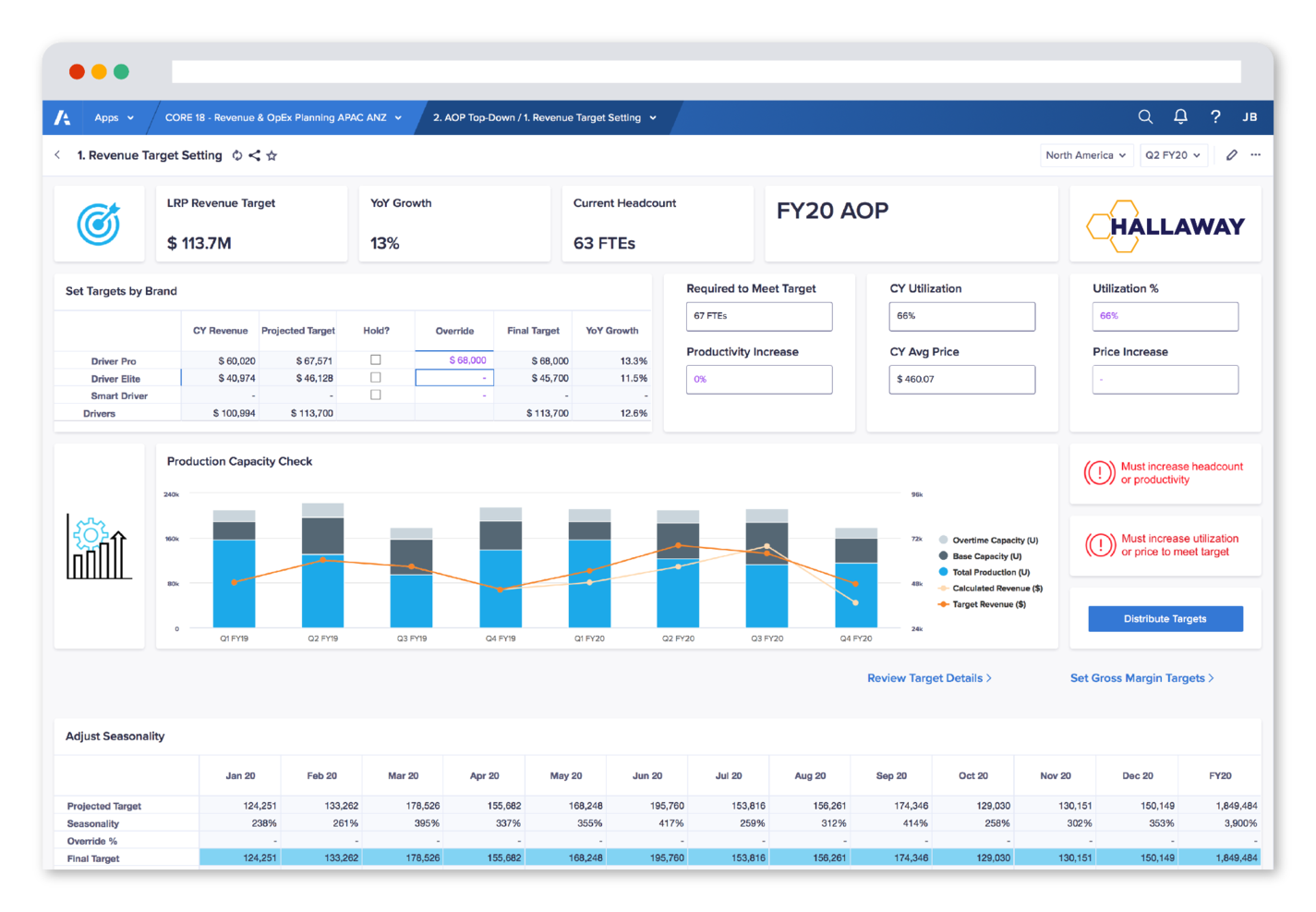
Anaplan is a cloud-based platform for revenue operations teams and enterprises that need to manage complex sales compensation plans, automate incentive calculations, and improve visibility into compensation data across departments.
Who Is Anaplan Best For?
Anaplan is a strong fit for large enterprises and fast-scaling organizations with complex, multi-tiered sales compensation structures that require connected planning across finance, sales, and RevOps teams.
Why I Picked Anaplan
I've included Anaplan in my top picks because I love how it handles incentive compensation at a scale that most tools simply can't match—across hundreds of plans, thousands of payees, and millions of transactions. The attainment modeling dashboard includes built-in "what-if" scenario modeling, so I can run multiple plan versions side by side and forecast compensation expense before committing to a design. I also like that the platform connects incentive planning directly to territory, quota, and GTM capacity data, so when my team models a new comp plan, we're not doing it in isolation from the broader revenue strategy.
Anaplan Key Features
- Sales compensation plan design: Model, compare, and optimize multiple compensation plan designs side by side to align with business goals and motivate different seller roles.
- Automated crediting and commission calculation: Automate the crediting process, calculate commissions, and manage plan deployment across teams and geographies from a single dashboard.
- Rep earnings visibility dashboard: Give individual reps real-time access to their quota progress, attainment percentage, and projected payout through role-specific dashboards.
- ASC 606/IFRS 15 compliance tracking: Track amortization schedules and manage commission accounting in line with ASC 606 and IFRS 15 reporting requirements.
Anaplan Integrations
Integrations include Salesforce, Workday, Microsoft Power BI, Tableau, Snowflake, Google BigQuery, Amazon Redshift, Oracle NetSuite, SAP, and DocuSign.
Pros and Cons
Pros:
- Real-time in-memory calculations
- Supports real-time scenario planning
- Highly scalable data integration
Cons:
- Often requires dedicated admin support
- Limited storage capabilities

Best for compliance with global regulations
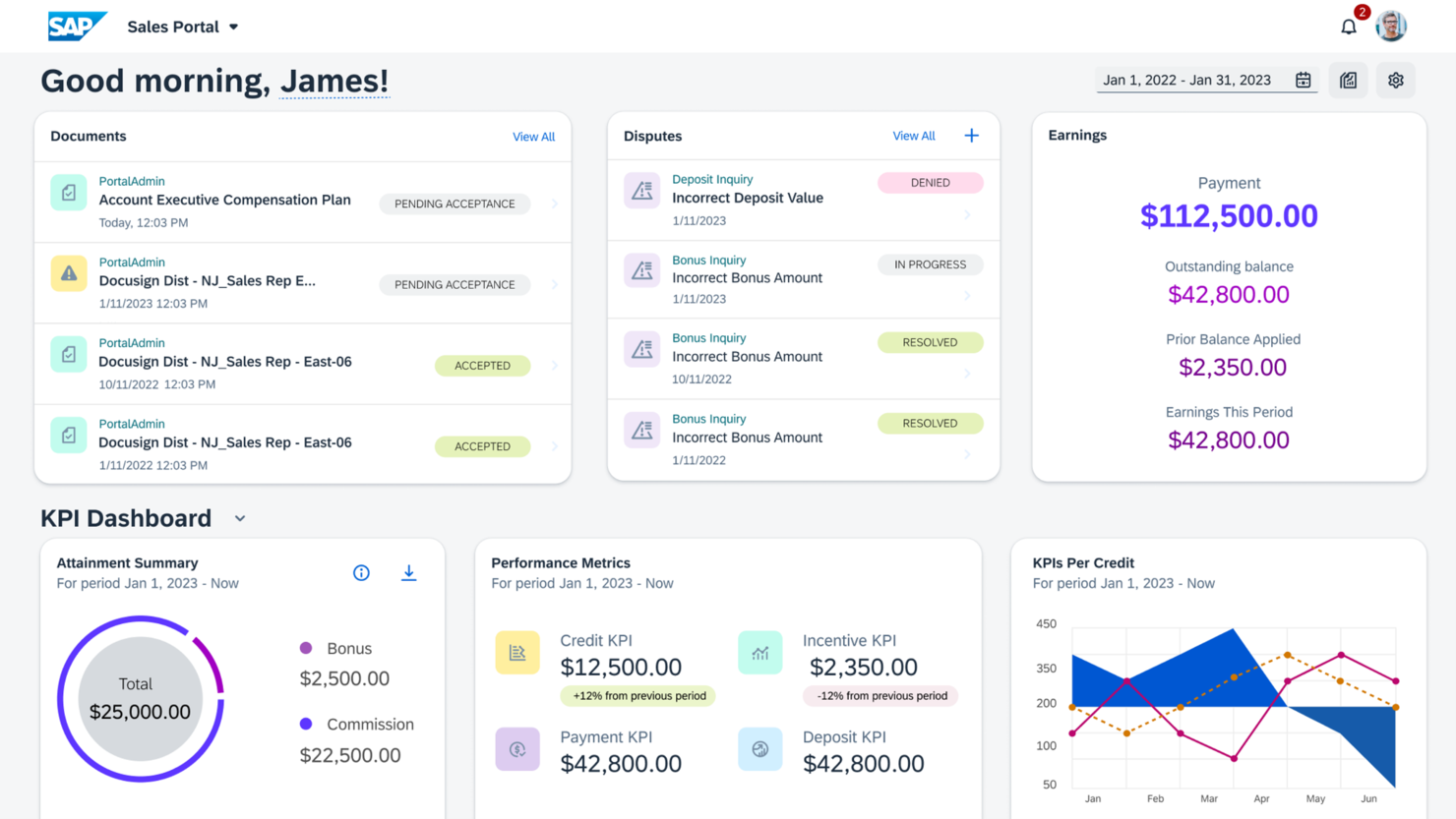
SAP SuccessFactors is a cloud-based platform designed for large enterprises and global organizations that need to manage complex sales compensation, incentive plans, and compliance requirements across multiple regions and teams.
Who Is SAP SuccessFactors Best For?
SAP SuccessFactors is a strong fit for multinational enterprises that need to manage sales compensation across multiple countries with varying regulatory requirements.
Why I Picked SAP SuccessFactors
SAP SuccessFactors earns its spot on my shortlist because it's one of the few sales compensation platforms built to handle the complexity of operating across multiple countries with different regulatory requirements. I like the one-click traceability feature in SAP Incentive Management—when a sales rep in Germany disputes a commission calculation, you can trace every step of the payout logic, which supports audit readiness across jurisdictions. The flexible rules engine is useful for global teams, since you can model country-specific incentive structures without custom coding or IT involvement. The embedded analytics tracks payment accuracy and flags errors before they become disputes.
SAP SuccessFactors Key Features
- Incentive plan document distribution: Automatically routes plan documents to sales reps for review and approval, reducing manual follow-up across large or distributed teams.
- What-if scenario modeling: Lets compensation managers test changes to incentive structures before rolling them out, so you can forecast the cost and impact of plan adjustments.
- Dispute-tracking platform: Provides a dedicated system for logging, routing, and resolving commission disputes, with automated calculation adjustments once a dispute is closed.
- Personalized seller dashboards: Gives individual sales reps real-time visibility into their performance, incentive earnings, and selling recommendations via desktop or mobile app.
SAP SuccessFactors Integrations
Integrations include SAP ERP, SAP S/4HANA, SAP Business Technology Platform, SAP Fieldglass, SAP Concur, Microsoft Azure Active Directory, Microsoft Teams, DocuSign, ADP, and Kronos.
Pros and Cons
Pros:
- Supports large data warehouses
- Workflow integration capabilities
- Flexible compensation rules
Cons:
- Hard to manage large data sets
- Complex reporting setup

Best for small and mid-sized businesses

ElevateHQ is a sales compensation platform for revenue teams that automates commission calculations, provides real-time visibility into performance, and simplifies complex incentive plans without relying on spreadsheets.
Who Is ElevateHQ Best For?
ElevateHQ fits small and mid-sized sales teams that need a structured, automated approach to commission management without the overhead of enterprise-level tools.
Why I Picked ElevateHQ
ElevateHQ earns its spot on my shortlist because it's purpose-built for the scale and budget realities of small and mid-sized sales teams. I like how the plan designer handles complex commission logic—things like custom CRM fields, multi-condition workflows, and deal splits—without requiring a dedicated RevOps engineer to maintain it. The payout reconciliation feature automatically maps deals to actual invoice collections, so commissions reflect what's actually been paid rather than what's just been closed. The built-in dispute workflow lets reps flag specific deals directly in the platform, keeping commission disagreements out of your inbox and resolved faster.
ElevateHQ Key Features
- Real-time commission dashboards: Sales reps and managers can view live earnings, quota attainment, and payout breakdowns without waiting for end-of-month reports.
- Quota management: Set and track individual or team-level quotas directly within the platform, with progress updated as deals move through the pipeline.
- Commission statements: Reps get detailed, shareable statements showing exactly how each commission was calculated, line by line.
- Approval workflows: Route commission payouts through a structured approval process before they're finalized, giving finance teams a clear sign-off trail.
ElevateHQ Integrations
Integrations include HubSpot, Salesforce, Microsoft Teams, Pipedrive, Slack, Chargebee, QuickBooks, SalesLoft, Xero, and NetSuite.
Pros and Cons
Pros:
- Supports complex commission plans
- Accurate commission updates
- Real-time incentive tracking
Cons:
- Occasional errors in commission calculations
- Non-user-friendly interface

Oracle Sales Performance Management helps enterprise sales organizations automate incentive compensation, manage quotas, and gain insights to drive sales performance across complex teams and territories.
Who Is Oracle Sales Performance Management Best For?
Oracle Sales Performance Management is a strong fit for large enterprises with complex, multi-tiered sales structures that need scalable compensation and quota management.
Why I Picked Oracle Sales Performance Management
Oracle Sales Performance Management earns its spot on my shortlist because of how well it handles the scale and complexity that large enterprise sales teams actually deal with. I like that it can manage multi-layered compensation plan structures with direct and overlay sales-credit allocation, plus hierarchical roll-up rules—something most tools simply can't handle at that level. I also use the connected quota management feature to run top-down, waterfall, and bottom-up quota allocation across territories simultaneously, which keeps everything aligned without manual reconciliation. The what-if modeling for compensation plan scenarios is genuinely useful when my team needs to model plan changes before rolling them out across hundreds of reps.
Oracle Sales Performance Management Key Features
- Dispute management and resolution: A built-in dispute management tool lets reps flag compensation discrepancies, which managers can review and resolve directly within the platform.
- Gamification and progress tracking: Sellers can track their performance against goals through individual dashboards that include contest metrics and real-time attainment data.
- AI-generated compensation terms: Generative AI drafts compensation plan terms and conditions based on historical plans, reducing manual work for compensation administrators during plan updates.
- Predictive sales forecasting: Forecasts can be generated from pipeline analytics and historical data using predictive models to produce more accurate sales projections.
Oracle Sales Performance Management Integrations
Integrations include Oracle Sales Cloud, Oracle Eloqua, Oracle ERP Cloud, Oracle HCM Cloud, Oracle Payroll, Oracle Enterprise Performance Management, Oracle Fusion Workforce Compensation, and Oracle Analytics Cloud.
Pros and Cons
Pros:
- Real-time performance tracking
- Customizable reporting tools
- Flexible compensation plans
Cons:
- Slight learning curve for beginners
- Complex implementation process
Other Sales Compensation Software
Here are some additional sales compensation software options that didn’t make it onto my shortlist, but are still worth checking out:
- Joopy
For managing multi-tiered incentives
- Palette
For customizable compensation plans
- Commissionly
For fast setup and implementation
- QuotaPath
For easy sales quota tracking
- Creatio CRM
For low-code customization
- Performio
For audit-ready compensation tracking
- Core Commissions
For automated payouts
- Lattice
For compensation band visualization
- Forma.ai
For AI-driven planning
- HRSoft
For employee engagement
- CaptivateIQ
For finance team alignment
- Varicent
For scalable sales solutions
- Leaptree
For performance analytics
- Everstage
For personalized sales compensation experiences
- Salesforce Spiff
For CRM integration
- NICE Sales Performance Management
For compliance management
- Optymyze Sales Performance Management
For data-driven insights


Related CRM Software Reviews
- CRM Software
- Sales Software
- Lead Management Software
- Business Intelligence Software
- Contract Management Software
- Revenue Management System
- CPQ Software
How I Evaluate Sales Compensation Software
I evaluate sales compensation tools in two layers—core requirements like automated commission calculation and rep-facing dashboards, and differentiators that set the best options apart.
Core Functionality (Table Stakes For This List)
When I'm selecting tools for my list, I rank each one on a scale from 0 (does not offer the functionality) to 5 (excels in this area) for each core functionality listed below. Then, I calculate the tool's total score into a percentage. Each tool needs to achieve a minimum total score of 65% to be considered for inclusion.
- Commission Calculation Automation: I check whether a tool can handle tiered rates, multi-rep splits, accelerators, and clawbacks without requiring manual workarounds in spreadsheets.
- Incentive Plan Design: Building plans for SDRs, AEs, and managers means different rules and quotas, so I look for flexible, self-service plan builders with modeling capabilities.
- Rep-Facing Earnings Visibility: Reps should be able to drill into specific deals and see exactly how their payout was calculated, not just a lump-sum number on a static statement.
- CRM & ERP Data Integration: I evaluate how each tool ingests deal and employee data from systems like Salesforce, HubSpot, NetSuite, or Workday through native connectors or APIs.
- Dispute & Approval Workflows: Commission questions spike at month-end, so I look for structured inquiry flows with audit trails rather than back-and-forth over email or Slack.
- Reporting, Analytics & Compliance: Finance teams need ASC 606-ready outputs and audit trails, so I check for configurable payout reports and compliance documentation features.
Once I have a list of tools that meet the criteria, I consider what sets each platform apart.
Differentiating Factors (What Sets Vendors Apart)
Here's how I compare and contrast different vendors:
Standout Features
Scenario modeling is a big one for me. Before rolling out a new plan mid-year, I want to see projected cost impact and rep earnings across the team. AI-powered insights add another layer, flagging payout anomalies or underperforming plan components that might otherwise go unnoticed until quarter-end. I also look for built-in e-signature workflows, since chasing reps for plan acknowledgment signatures through separate tools adds unnecessary friction to every comp cycle.
Beyond Features
Implementation timelines matter a lot in this space. Comp plans often reset at fiscal year boundaries, so a tool that takes six months to deploy can mean another cycle stuck in spreadsheets. I also evaluate scalability—a platform that works for 50 reps may buckle under multi-entity, multi-currency payout runs as the team grows. Compliance and audit readiness round out my assessment, especially SOC 2 certification and ASC 606 reporting, since finance teams need confidence that payout data will hold up under audit scrutiny.
How to Choose Sales Compensation Software
It’s easy to get bogged down in long feature lists and complex pricing structures. To help you stay focused as you work through your unique software selection process, here’s a checklist of factors to keep in mind:
| Factor | What to Consider |
| Scalability | Will the software grow with your team and company size? |
| Integrations | Does it integrate with your existing tools and platforms? |
| Customizability | Can you tailor the software to fit your specific needs? |
| Ease of Use | Is the software intuitive for your team to learn and use? |
| Budget | Does the pricing align with your company's budget? |
| Security Safeguards | Does it meet your security and compliance requirements? |
| Support | What level of customer support and resources are offered? |
| Reporting | Does the software provide clear and actionable insights? |
Trends in Sales Compensation Software
In my research, I sourced countless product updates, press releases, and release logs from different sales compensation software vendors. Here are some of the emerging trends I’m keeping an eye on:
- AI-Driven Insights: AI is being used to predict sales performance and optimize incentive plans. Consider vendors that offer tools that leverage AI to provide data-driven recommendations for maximizing sales outcomes.
- Dynamic Goal Setting: More software platforms are enabling real-time updates to sales targets based on market conditions. This trend helps teams quickly adapt their strategies.
- Gamification Elements: There’s a growing focus on making sales incentives more engaging through gamified experiences. Tools like SmartWinnr integrate leaderboards, badges, and other game-like features to motivate sales teams.
- Personalized Incentive Plans: Software is moving towards creating individualized compensation plans tailored to each salesperson’s strengths and goals. This feature supports highly customizable commission structures to suit different roles.
- Advanced Data Visualization: Visualization tools are becoming essential for sales leaders to understand performance metrics at a glance. Platforms with this feature may be able to provide in-depth dashboards that visualize sales data clearly and effectively.
What is Sales Compensation Software?
Sales compensation software is a tool that helps you design, automate, and manage commissions for your sales team. People in revenue operations, sales management, and finance use it to handle calculations and payouts, so everyone gets paid accurately and on time. By taking care of the math and record-keeping, it removes guesswork and headaches, making things clearer and saving a ton of manual effort.
Features of Sales Compensation Software
When selecting sales compensation software, keep an eye out for the following key features:
- Automated commission calculations: Ensures accurate and timely payouts without manual errors.
- Customizable incentive plans: Allows businesses to create tailored compensation structures.
- Real-time performance tracking: Provides instant insights into sales reps' progress and earnings.
- Quota management: Helps set and adjust sales targets based on performance.
- Analytics and reporting: Delivers data-driven insights for decision-making.
- Dispute resolution tools: Simplifies handling commission-related disputes quickly.
- Scenario modelling: Tests different compensation strategies before implementing them.
- Gamification elements: Uses leaderboards and badges to motivate sales teams.
- Mobile access: Lets users track and manage sales compensation on the go.
- Integration capabilities: Connects with CRM and other essential business tools.
Benefits of Sales Compensation Software
Implementing sales compensation software provides several benefits for your team and your business. Here are a few you can look forward to:
- Increased accuracy: Automated calculations reduce human errors in payouts.
- Motivated sales teams: Transparent incentives help keep reps engaged and focused.
- Time savings: Organizes the commission process, freeing up administrative time.
- Data-driven insights: Analytics tools provide valuable insights into sales performance.
- Scalable plans: Adapts easily to the changing needs of growing businesses.
- Improved compliance: Ensures payouts meet legal and financial standards.
- Faster dispute resolution: Clear logs and tracking simplify resolving commission disputes.
Costs and Pricing of Sales Compensation Software
Selecting sales compensation software requires an understanding of the various pricing models and plans available. Costs vary based on features, team size, add-ons, and more. The table below summarizes common plans, their average prices, and typical features included in sales compensation software solutions:
Plan Comparison Table for Sales Compensation Software
| Plan Type | Average Price | Common Features |
| Free Plan | $0/user/month | Basic reporting, limited users, email support |
| Personal Plan | $5-$25/user/month | Customizable plans, real-time tracking, analytics |
| Business Plan | $30-$70/user/month | Advanced reporting, multi-tier commissions, integrations |
| Enterprise Plan | $80-$150/user/month | AI-driven insights, quota management, priority customer support |
Sales Compensation Software FAQs
Here are some answers to common questions about sales compensation software:
Should sales support roles like sales operations have a variable pay component?
Yes, incorporating a variable pay component into the salaries of roles like sales operations can be beneficial. Many companies provide variable pay to these roles, often making up 10-20% of their total compensation. This approach aligns their performance with measurable outcomes, such as productivity improvements or revenue growth, which can help drive better results.
How are commissions calculated for salespeople in different regions?
Commissions for salespeople in different regions are often adjusted to reflect fair wages for each area. Factors like market potential and brand strength can influence the target amount, and different regions might have distinct quota/OTE ratios. This ensures that commission structures remain equitable across territories while still aligning with local economic conditions.
What is the typical base salary-to-commission ratio for sales reps?
The base-to-commission ratio typically ranges from 50:50 to 70:30, depending on the complexity of the sales cycle. For more straightforward sales roles, like those in small and medium businesses, a 50:50 ratio is common, whereas more complex roles, such as those in enterprise sales, might use a 70:30 split to emphasize base salary.
What level of customization do sales compensation software platforms offer?
The level of customization varies by vendor. Some tools provide intuitive interfaces that allow users to create complex plans with minimal training, while others require a more hands-on approach or assistance from support teams. Platforms like CaptivateIQ offer a familiar Excel-like environment, making it easier to handle data and incentive rules.
How should I set up a commission structure for usage-based products?
For usage-based products, it’s best to start with a baseline commission that’s guaranteed, regardless of the usage level. You can then set tiers that increase the commission rate as the monthly worth of the deal rises. This approach ensures that sales reps are fairly compensated even as the deal value changes over time.
Why might my commission rate change at the end of the month?
Commission rates might change due to factors like seasonal sales fluctuations, inventory strategies, or specific performance goals. Companies often adjust these rates to motivate sales reps to meet targets, align with revenue goals, or manage expenses. If your rate changes unexpectedly, it’s worth discussing the specifics with your manager or the finance team.
What’s Next:
If you're in the process of researching sales compensation software, connect with a SoftwareSelect advisor for free recommendations.
You fill out a form and have a quick chat where they get into the specifics of your needs. Then you'll get a shortlist of software to review. They'll even support you through the entire buying process, including price negotiations.