
25 Best Pricing Software Reviewed For 2026

20 Best Pricing Software Shortlist
Here's my pick of the 20 best software from the 25 tools reviewed.


Stop struggling with manual pricing and discover a treasure trove of the best pricing software options. This in-depth review analyzes 21 solutions, equipping you with the knowledge to find the ideal software to automate tasks, improve accuracy, and ultimately increase your revenue.
Why Trust Our Pricing Software Reviews?
We’ve been testing and reviewing pricing software since 2022. As revenue operation leaders ourselves, we know how critical and difficult it is to make the right decision when selecting software.
We invest in deep research to help our audience make better software purchasing decisions. We’ve tested more than 2,000 tools for different RevOps use cases and written over 1,000 comprehensive software reviews. Learn how we stay transparent & our pricing software review methodology.
Table of Contents
- Why Trust Our Pricing Software Reviews?
- Related Pricing Software Reviews
- Selection Criteria For Pricing Software
- How To Choose Pricing Software
- Trends In Pricing Software For 2026
- What Is Pricing Software?
- Features Of Pricing Software
- Benefits Of Pricing Software
- Costs and Pricing For Pricing Software
- Additional Revenue Operations Software
- Conclusion
| Tool | Best For | Trial Info | Price | ||
|---|---|---|---|---|---|
| 1 | Best for proactive pricing strategies | Free demo available | Pricing upon request | Website | |
| 2 | Best for physical & omni-channel retail | Demo available upon request | Pricing upon request | Website | |
| 3 | Best for competitor price tracking | Free trial available | From $39.95/month | Website | |
| 4 | Best for handling complex pricing | Free demo available | Pricing upon request | Website | |
| 5 | Best for AI-driven price optimization | Free demo available | Pricing upon request | Website | |
| 6 | Best for competitor price tracking | 14-day free trial | From $99/month | Website | |
| 7 | Best for Amazon sellers | 14-day free trial | Pricing upon request | Website | |
| 8 | Best for retailers | Free demo available | From €399/month | Website | |
| 9 | Best for IT service providers | Free demo available | From $149/month (billed annually) | Website | |
| 10 | Best for ecommerce users | Free demo available | Pricing upon request | Website | |
| 11 | Best on-premise pricing software | Free demo available | Pricing upon request | Website | |
| 12 | Best for digital shelf insights | Free demo available | Contact for pricing | Website | |
| 13 | Best for AI-driven price optimization | Free demo available | Pricing upon request | Website | |
| 14 | Best for improving margin performance | Free demo available | Pricing upon request | Website | |
| 15 | Best for manufacturers and distributors | Free demo + 14-day free trial available | Pricing upon request | Website | |
| 16 | Best for price optimization and management | Free demo available | Pricing upon request | Website | |
| 17 | Best for handling complex product configurations | Free demo available | Pricing upon request | Website | |
| 18 | Best for competition data with actionable analytics | Free forever plan available | From $323/month | Website | |
| 19 | Best for NetSuite CPQ users | Free demo available | From $89/month | Website | |
| 20 | Best for AI-based Amazon pricing | Free demo available | From $299/month | Website |
-

Prisync
Visit WebsiteThis is an aggregated rating for this tool including ratings from Crozdesk users and ratings from other sites.4.7 -
Expedite Commerce
Visit Website -
QuickBooks Online
Visit WebsiteThis is an aggregated rating for this tool including ratings from Crozdesk users and ratings from other sites.4




Best Pricing Software Reviews
Are you ready to discover the best pricing software? Below is a detailed summary of why I chose the software, key features, pricing, and pros and cons. I’ve also included a screenshot of each tool.

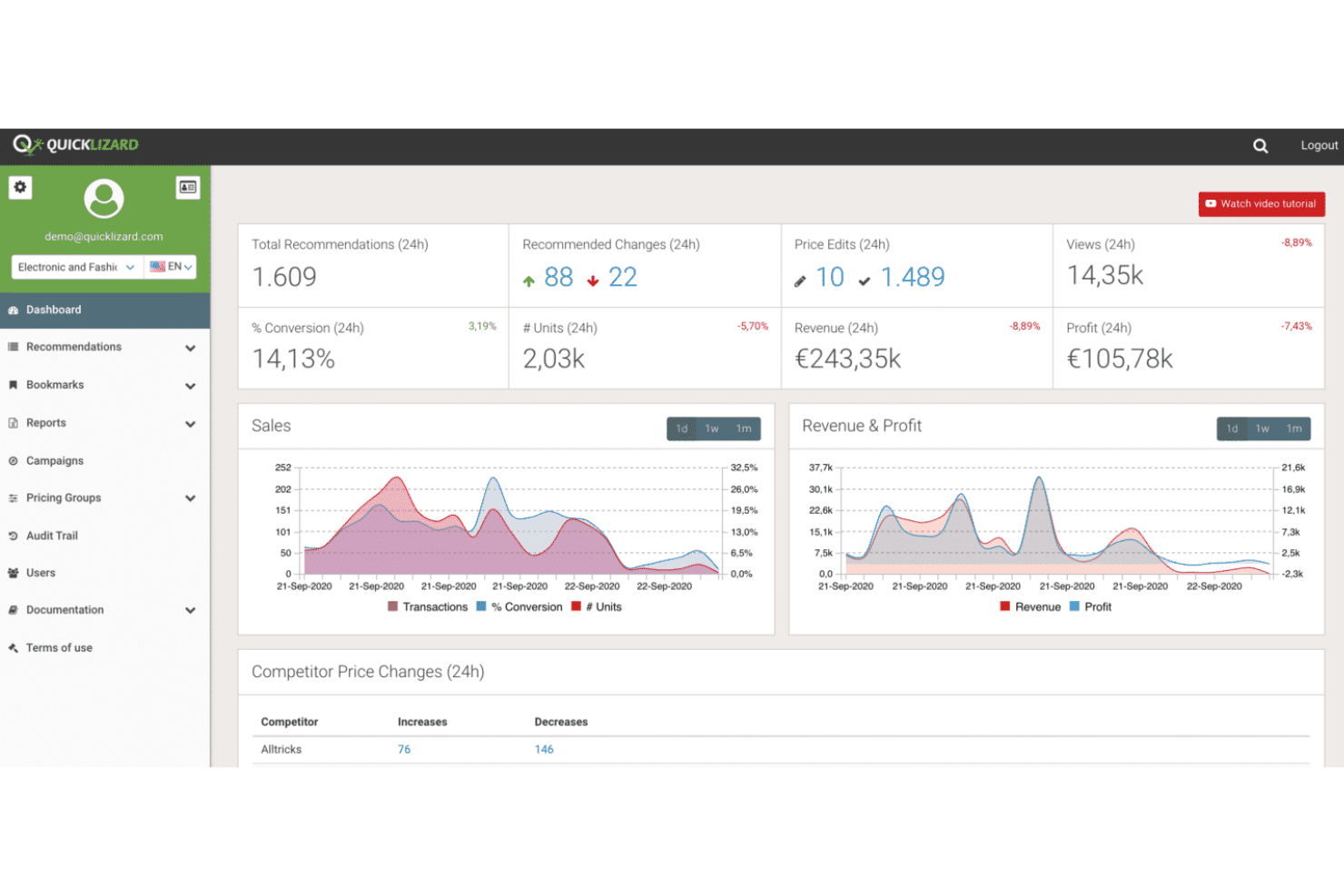
Quicklizard offers dynamic pricing software designed for businesses that want to move beyond reactive price changes. Retailers and ecommerce teams looking to automate pricing decisions based on real-time data and market trends will find its proactive approach especially useful. The platform helps you respond quickly to shifting demand, competitor moves, and inventory changes.
Who Is Quicklizard Best For?
Retailers and ecommerce brands that want proactive, AI-driven pricing strategies that respond to market signals and competitor activity in real time.
Why I Picked Quicklizard
I chose Quicklizard because its proactive pricing strategies set it apart from other pricing software. The platform uses real-time data feeds and advanced algorithms to help you anticipate market shifts and adjust prices before competitors react. I like that it offers automated rule-based pricing and scenario planning, so you can test and implement pricing changes quickly. These features make Quicklizard a strong choice for businesses that want to stay ahead in fast-moving markets.
Quicklizard Key Features
Some other features in Quicklizard that pricing teams may find useful include:
- A/B Price Testing: Run controlled experiments to compare the impact of different pricing strategies on sales and margins.
- Competitor Price Monitoring: Track competitor prices in real time to inform your own pricing decisions.
- Customizable Pricing Rules: Set up detailed pricing rules based on product categories, inventory levels, or customer segments.
- Multi-Channel Price Management: Manage and synchronize pricing across multiple sales channels from a single dashboard.
Quicklizard Integrations
Integrations include Shopify, Adobe Commerce, BigCommerce, and Shopify Plus.
Pros and Cons
Pros:
- In-depth analytics provided
- Allows businesses to adapt to real-time market trends
- Flexible pricing strategies
Cons:
- New users may find the system complex
- The initial setup can be time-consuming


Yieldigo is built for retailers who need to manage pricing across both physical stores and digital channels. The platform appeals to grocery, pharmacy, and specialty retail teams looking to unify pricing strategies and optimize margins in complex, high-volume environments. Its data-driven approach helps you balance competitive pricing with profitability, even when managing thousands of SKUs across multiple locations.
Who Is Yieldigo Best For?
Brick-and-mortar and omnichannel retailers that need AI-powered pricing and markdown optimization tailored to physical store environments.
Why I Picked Yieldigo
What stands out about Yieldigo is its focus on physical and omni-channel retail pricing challenges. The platform supports centralized price management for both brick-and-mortar and online stores, making it easier to maintain consistency across all sales channels. I appreciate its ability to handle complex pricing scenarios, such as regional price variations and promotions, which are common in large retail operations. Yieldigo’s analytics-driven recommendations help you optimize prices for thousands of SKUs while balancing competitiveness and profitability.
Yieldigo Key Features
I also found several other features in Yieldigo that are useful for retail pricing teams:
- Automated Price Suggestions: Generate data-driven price recommendations based on demand, seasonality, and competitor data.
- Promotion Impact Analysis: Assess how different promotions affect sales and margins before launching them.
- Role-Based Access Controls: Assign permissions and access levels to different team members for secure collaboration.
- Batch Price Updates: Apply pricing changes to large groups of products or locations at once.
Yieldigo Integrations
Integrations include Colruyt, Metro, Makro, SuperPharm, Newpharma, Bonami, Ahold, Erocash, Admenta, Lékárna CZ, Delia, Healthspan, and more.
Pros and Cons
Pros:
- Automates repetitive pricing tasks
- Supports pricing strategies tailored to geographic zones
- Provides actionable, performance-based recommendations for promotions
Cons:
- Pricing information is available only upon request
- Limited mobile accessibility

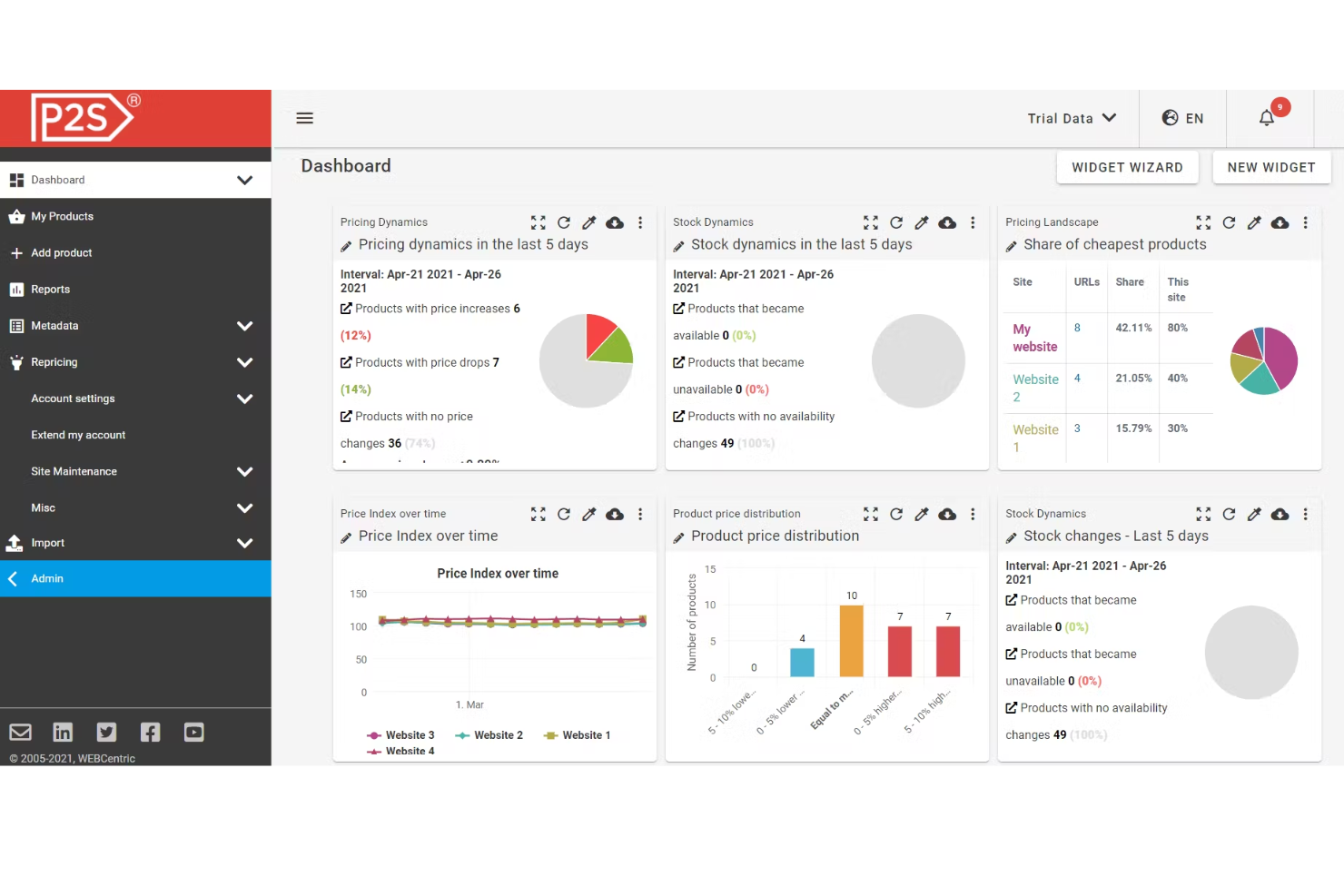
If you need to monitor competitor pricing across multiple channels, Price2Spy is built for that job. The platform is especially useful for ecommerce managers, brands, and distributors who want to track, analyze, and react to market price changes in real time. Its automated price monitoring and reporting help you spot pricing gaps and make informed adjustments faster than manual tracking allows.
Who Is Price2Spy Best For?
Businesses that prioritize detailed competitor price monitoring and want accurate tracking across marketplaces and ecommerce sites.
Why I Picked Price2Spy
For teams focused on competitor price tracking, Price2Spy offers specialized tools that go beyond basic monitoring. The platform lets you automatically track competitor prices across thousands of products and multiple online stores, giving you a clear view of market shifts as they happen. I like that it includes price change alerts and historical price analysis, so you can quickly spot trends and react to competitor moves. These features make Price2Spy a strong choice for businesses that need to stay agile in dynamic, price-sensitive markets.
Price2Spy Key Features
Some other features in Price2Spy that caught my attention include:
- MAP Monitoring: Track minimum advertised price violations across your product catalog.
- Dynamic Pricing Module: Adjust your own prices automatically based on competitor data and custom rules.
- Duplicate Product Detection: Identify and merge duplicate listings to keep your data clean.
- Customizable Dashboards: Build dashboards tailored to your team’s specific reporting and analysis needs.
Price2Spy Integrations
Integrations include Adobe Commerce (Magento), Shopify, BigCommerce, WooCommerce, Shift4Shop, Shopware, Presta Shop, Google Shopping Feed, GA4, and API integrations that support SOAP and REST interfaces.
Pros and Cons
Pros:
- Visual graphs to track price changes
- Monitoring and reporting on market trends
- Real-time alerts for pricing changes
Cons:
- Interface may be confusing for some users
- Some manual checks may be required


When your business needs to manage complex pricing structures, DealHub offers a tailored solution. This platform is designed for sales operations, finance teams, and revenue leaders who handle intricate product catalogs, custom quotes, and approval workflows. DealHub’s configuration and pricing engine helps you automate even the most layered pricing scenarios without sacrificing accuracy or control.
Who Is DealHub Best For?
Sales organizations that need to manage complex pricing structures, bundles, and approvals within a CPQ-driven sales process.
Why I Picked DealHub
For organizations that need to handle complex pricing, DealHub stands out with its advanced configuration and pricing capabilities. The platform supports multi-dimensional pricing models, allowing you to manage volume discounts, bundled offers, and region-specific rates all in one place. I appreciate how DealHub’s guided selling workflows help teams build accurate quotes for even the most intricate deals. These features make it a strong fit for businesses with layered approval processes and highly customized pricing requirements.
DealHub Key Features
Some other features in DealHub that are worth noting include:
- Contract Management: Store, generate, and manage contracts directly within the platform.
- E-signature Integration: Collect legally binding signatures without leaving DealHub.
- DealRoom Collaboration: Centralize deal documents and communication in a shared digital workspace.
- Approval Workflow Automation: Route pricing and discount approvals through customizable workflows.
DealHub Integrations
Integrations include Salesforce, Microsoft Dynamics 365, HubSpot, Freshworks, Slack, Gong, Docusign, and DealHub API.
Pros and Cons
Pros:
- Offers scalability for various company sizes
- Integrates well with third-party applications
- Highly customizable to fit specific business needs
Cons:
- May require additional configuration for complex pricing rules
- Not ideal for businesses without a defined sales process
New Product Updates from DealHub

DealHub Automates Contract Attachments In Deal Won Emails
DealHub now automatically attaches fully signed contracts to Deal Won emails. This update streamlines post-signature communication and ensures stakeholders receive signed documents instantly. For more information, visit DealHub's official site.
 .
.
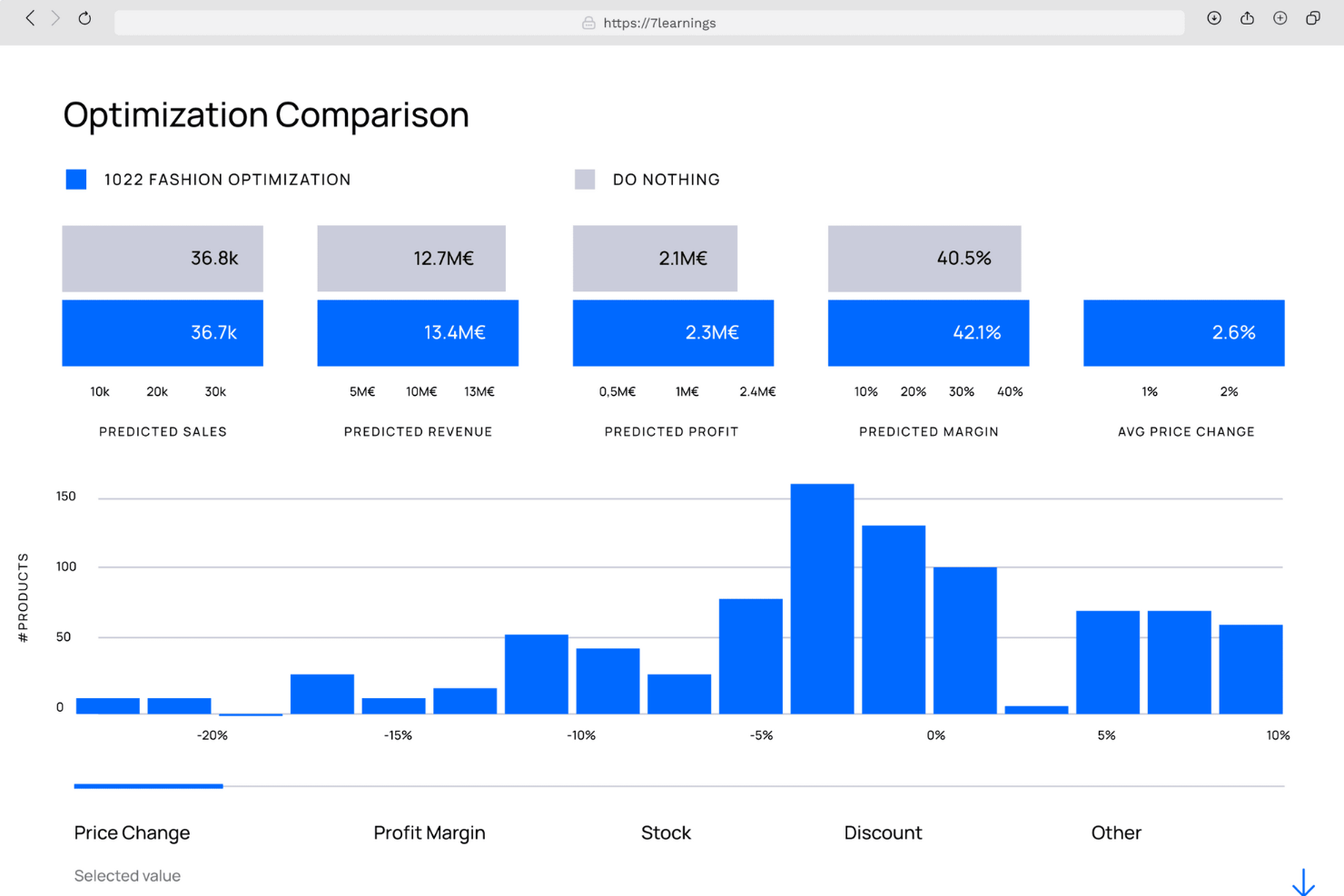
If you’re searching for AI-powered price optimization, 7Learnings brings advanced machine learning to your pricing strategy. Retailers and e-commerce teams use it to predict demand and automate price adjustments based on real-time data. The platform’s focus on scenario planning and revenue forecasting helps you make data-driven pricing decisions with confidence.
Who Is 7Learnings Best For?
Retail and ecommerce companies seeking advanced AI models to optimize pricing based on demand forecasting and elasticity analysis.
Why I Picked 7Learnings
What sets 7Learnings apart is its focus on AI-driven price optimization, which is especially valuable for businesses managing large product catalogs and fluctuating demand. The platform uses machine learning algorithms to predict the impact of price changes on sales and profit, helping you set optimal prices automatically. I like that it offers scenario simulation tools, so you can test different pricing strategies before making changes live. This makes 7Learnings a strong choice for teams that want to move beyond manual pricing and leverage data science for better results.
7Learnings Key Features
Some other features in 7Learnings that caught my attention include:
- Automated Price Updates: Push new prices directly to your sales channels without manual intervention.
- Promotion Optimization: Analyze and optimize promotional pricing strategies for specific campaigns.
- Competitor Price Monitoring: Track competitor pricing data to inform your own pricing decisions.
- API Access: Integrate 7Learnings with your existing systems for seamless data exchange.
7Learnings Integrations
Integrations are available with Amazon, Google, Amazon Ads, Google Shopping, Tradebyte, Shopify, Commercetools, and Plentymarkets.
Pros and Cons
Pros:
- Offers real-time analytics to monitor the impact of price changes
- Automates the pricing process based on predefined business rules or goals
- Ability to forecast demand and optimize pricing based on various factors
Cons:
- Not suitable for small businesses
- Predictions are better in larger data sets

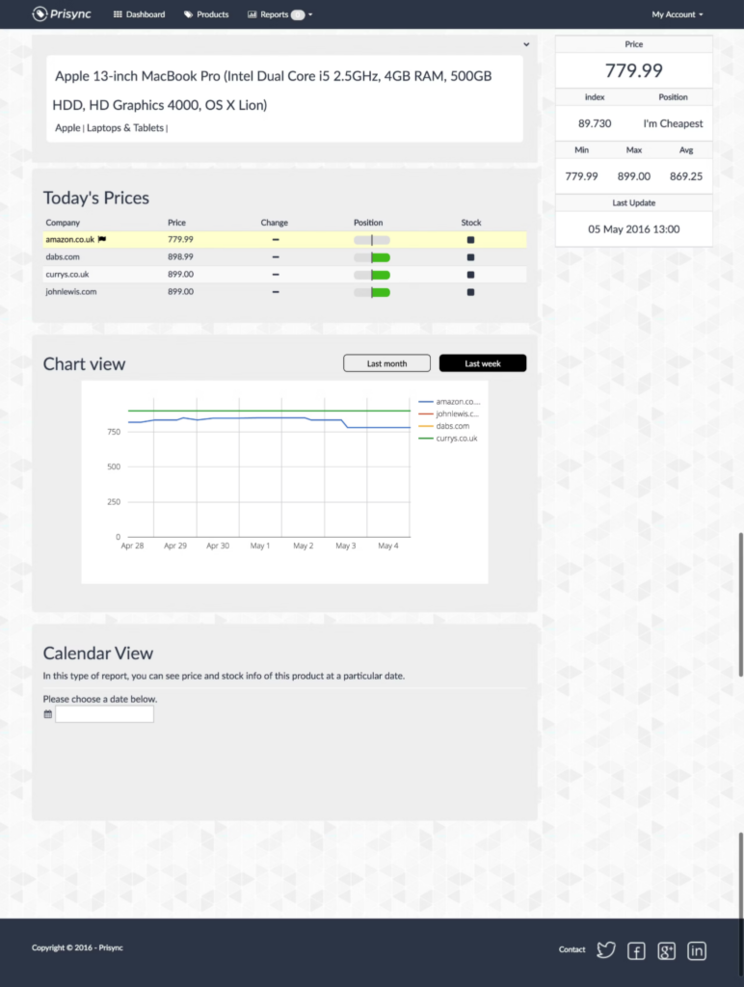
If you’re a retailer focused on competitor monitoring across many SKUs and markets, Prisync offers real-time competitor price & stock tracking combined with alerts and analytics.
Who Is Prisync Best For?
Small to mid-sized ecommerce businesses that want straightforward competitor price tracking with automated alerts and reporting.
Why I Picked Prisync
I selected Prisync because it’s built for ecommerce businesses needing simple, user-friendly competitor monitoring across multiple markets, with price alerts and stock availability tracking. It’s less heavy than some enterprise platforms, making it more accessible. The interface is intuitive, which makes it useful for teams that don’t want heavy configuration overhead.
Prisync Key Features
- Unlimited competitor monitoring: Track competitor prices and stock in real time across many SKUs.
- Custom alerts & notifications: Notify your team when competitor prices change.
- Market insights & reports beyond pricing: Get information about market conditions, not just price.
- User-friendly interface: Designed for ecommerce teams rather than pricing specialists.
Prisync Integrations
Integrations include Shopify, Adobe Commerce, WooCommerce, Gorgias, Omniconvert, ShipBob, Recart, Cartloop, PageFly, and Wishpond.
Pros and Cons
Pros:
- Customizable price alerts and notifications
- Easy to use and maintain
- Provides daily pricing updates
Cons:
- Lacks discount management feature
- Lacks integration with Zapier

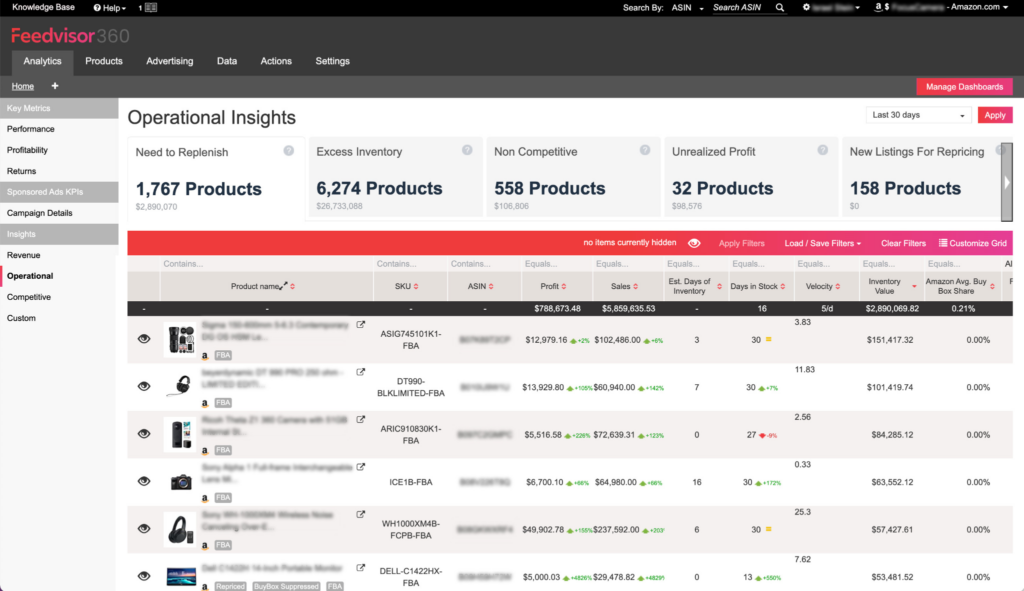
Feedvisor offers Amazon sellers an AI-driven platform for pricing, advertising, and revenue optimization. Brands and large-scale resellers use it to automate pricing decisions and manage ad spend based on real-time marketplace data. Its focus on Amazon-specific algorithms and analytics helps you maximize profit and win the Buy Box in a highly competitive environment.
Who Is Feedvisor Best For?
Amazon sellers and marketplace merchants who need algorithmic repricing and advertising optimization to maximize Buy Box wins and profitability.
Why I Picked Feedvisor
Feedvisor stands out for Amazon sellers who need advanced pricing automation tailored to the complexities of the Amazon marketplace. The platform uses AI-driven repricing algorithms that factor in real-time competitor data, Buy Box dynamics, and inventory levels. I picked Feedvisor because it also combines pricing with advertising optimization, letting you manage both strategies from a single dashboard. This focus on Amazon-specific pricing and ad management makes it a strong choice for brands and resellers aiming to maximize their marketplace performance.
Feedvisor Key Features
Some other features that Feedvisor offers include:
- Profitability Analytics: Track profit margins and costs across your entire Amazon catalog.
- Inventory Intelligence: Monitor stock levels and receive actionable insights for replenishment.
- Automated Campaign Management: Set rules and automate adjustments for Amazon ad campaigns.
- Customizable Dashboards: Build dashboards to visualize key pricing and sales metrics in real time.
Feedvisor Integrations
Integrations include Amazon, Amazon Advertising, eBay, Walmart, and eChannel Hub.
Pros and Cons
Pros:
- Provides detailed market share trajectory analysis
- Provides real-time KPI monitoring
- Helps businesses manage their Amazon marketplace presence
Cons:
- Supports limited ecommerce marketplaces
- Steep learning curve for new users

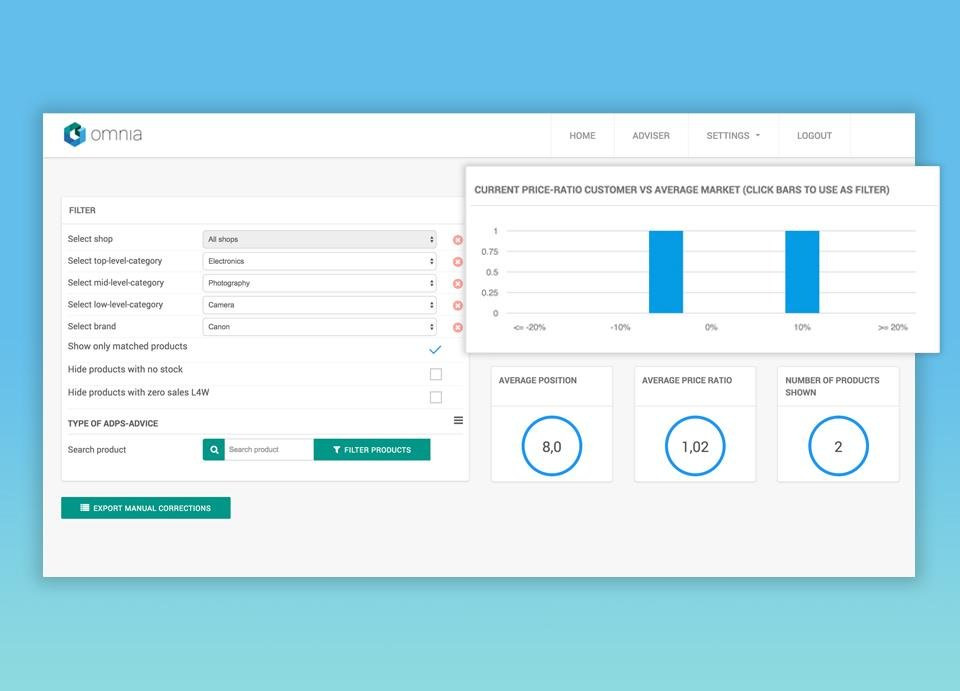
Omnia Retail gives retailers a way to automate and optimize pricing across large product catalogs. The platform is designed for omnichannel and ecommerce businesses that need to react quickly to market changes and competitor moves. Its dynamic pricing engine and rule-based automation help you maintain margin and stay competitive in fast-moving retail environments.
Who Is Omnia Retail Best For?
Retailers looking for dynamic pricing automation across online and in-store channels with a focus on competitive positioning.
Why I Picked Omnia Retail
For retailers managing thousands of SKUs, Omnia Retail offers dynamic pricing tools built specifically for the retail sector. The platform lets you set custom pricing rules that automatically adjust prices based on competitor data, stock levels, and market trends. I picked Omnia Retail because it supports omnichannel strategies, allowing you to coordinate pricing across both online and offline channels. This focus on retail-specific automation and flexibility makes it a strong fit for businesses that need to stay agile in a competitive market.
Omnia Retail Key Features
Some other features that Omnia Retail provides include:
- Price Elasticity Analysis: Measure how changes in price impact demand for each product.
- Competitor Price Monitoring: Track competitor pricing in real time across multiple channels.
- MAP Compliance Monitoring: Automatically check and report on minimum advertised price violations.
- Promotions Management: Schedule and manage promotional pricing campaigns directly within the platform.
Omnia Retail Integrations
Integrations include Google Analytics 360.
Pros and Cons
Pros:
- User-friendly interface
- Automates data collection and price calculations
- Provides detailed pricing insights
Cons:
- Limited customization
- Not ideal for small businesses

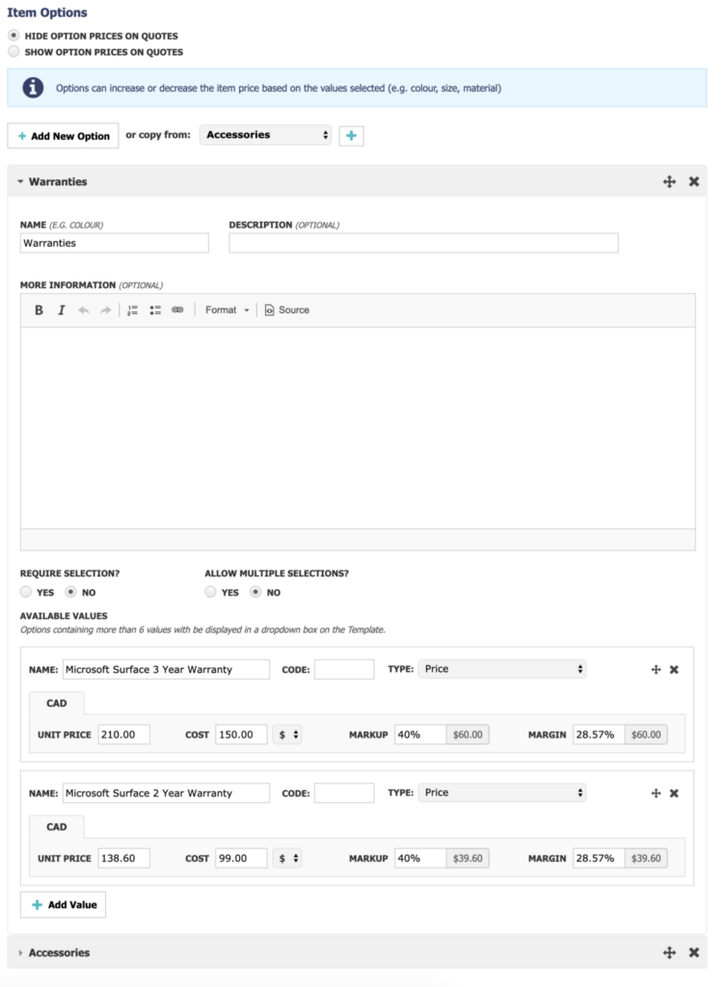
Quoter is built for IT service providers who need to create, send, and manage quotes quickly. The platform streamlines complex quoting workflows, especially for businesses handling recurring services, hardware, and software bundles. Its automation features help reduce manual entry and ensure pricing consistency across your proposals.
Who Is Quoter Best For?
IT service providers and MSPs that need proposal and quote automation tied to product catalogs and pricing workflows.
Why I Picked Quoter
What stands out about Quoter is how it addresses the quoting needs of IT service providers. The platform supports complex pricing structures, including recurring services, hardware, and software bundles, which are common in IT. I picked Quoter because it automates quote generation and approval workflows, helping teams avoid manual errors and speed up sales cycles. Its template-driven approach also ensures that quotes remain consistent and compliant with your business standards.
Quoter Key Features
Some other features that Quoter offers include:
- E-signature Collection: Capture client signatures directly within the quote for faster approvals.
- Automated Follow-ups: Send scheduled reminders to clients about pending quotes.
- Quote Revision History: Track all changes and versions of each quote for audit purposes.
- Custom Quote Branding: Add your company logo, colors, and custom fields to every quote.
Quoter Integrations
Integrations include Datto Autotask, ConnectWise, Syncro, Ingram Micro, Dicker Data, Salesforce, HubSpot, Agile CRM, Highrise CRM, and Pipedrive. You can also get additional integrations through Zapier and Webhooks.
Pros and Cons
Pros:
- Simple and modern interface
- Can handle complex pricing structures
- Customizable templates
Cons:
- Lacks advanced customizations
- Potential learning curve for new users

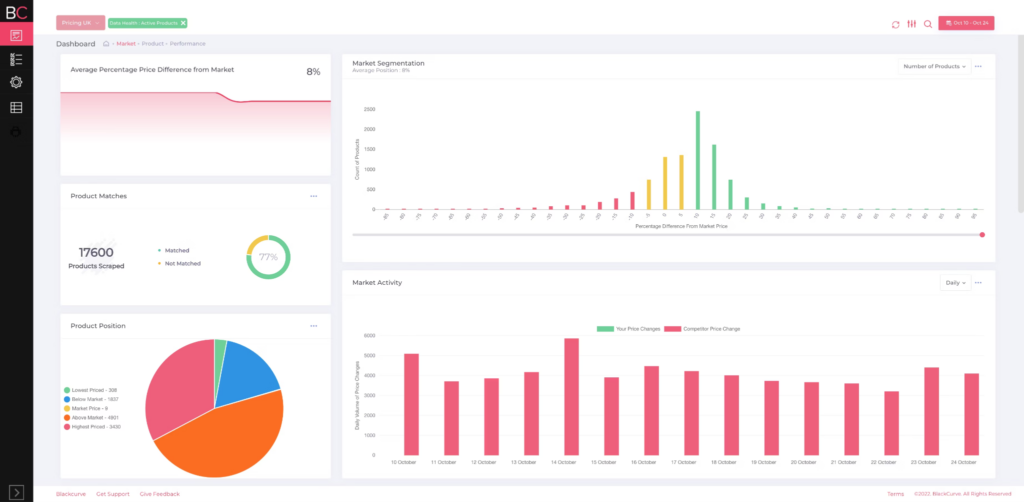
BlackCurve is designed for ecommerce businesses that want to automate and optimize their pricing decisions. The platform uses real-time competitor and market data to help online retailers adjust prices across large product catalogs. Its dynamic pricing engine is especially useful for teams managing frequent price changes and high SKU volumes.
Who Is BlackCurve Best For?
Ecommerce businesses that want data-driven pricing insights without the complexity of enterprise-level pricing suites.
Why I Picked BlackCurve
For ecommerce teams, BlackCurve stands out because it’s built to handle the fast pace and complexity of online retail pricing. The platform’s dynamic pricing engine lets you automatically adjust prices based on real-time competitor and market data, which is essential for staying competitive in ecommerce. I picked BlackCurve because it supports bulk price updates across thousands of SKUs, making it practical for businesses with large product catalogs. Its rules-based automation also helps you set pricing strategies that align with your business goals without constant manual intervention.
BlackCurve Key Features
In addition to its dynamic pricing engine and bulk update capabilities, I also found these features worth noting:
- Competitor Price Tracking: Monitor competitor prices automatically to inform your own pricing decisions.
- Price Optimization Recommendations: Receive AI-driven suggestions for optimal price points based on market trends.
- Custom Pricing Rules: Set up detailed rules to automate pricing changes according to your business logic.
- Performance Analytics Dashboard: Access visual reports that track pricing impact on sales and margins.
BlackCurve Integrations
Integrations include Dropbox Business, Salesforce Sales Cloud, Shopify, WooCommerce, Adobe Commerce, BigCommerce, PrestaShop, SAP Business One, and ChannelAdvisor.
Pros and Cons
Pros:
- Provides valuable data-driven insights
- Automation saves time and effort
- Advanced pricing optimization algorithms
Cons:
- Reliance on accurate and up-to-date data inputs
- Steep learning curve


PROS Smart Price Optimization and Management is designed for large enterprises that require advanced, on-premise pricing control. It is particularly well-suited for manufacturers, distributors, and B2B organizations operating in highly regulated industries or environments with strict data governance policies. For companies that cannot rely on cloud-based pricing tools due to compliance, security, or internal IT mandates, PROS offers a way to apply AI-driven pricing strategies while maintaining full control over sensitive data.
Who is PROS Smart Price Optimization and Management Best For?
Large enterprises that require sophisticated, on-premise pricing optimization integrated into broader revenue management systems.
Why I Picked PROS Smart Price Optimization and Management
What sets PROS apart is its ability to deliver a true on-premise pricing solution for organizations with strict data governance needs. I picked PROS because it allows businesses to deploy advanced price optimization and management tools entirely within their own IT infrastructure. The platform supports AI-driven pricing models and complex rule-based pricing strategies, which are essential for industries with sensitive or highly regulated data. This makes it a strong fit for enterprises that can’t use cloud-based pricing software due to compliance or security requirements.
PROS Smart Price Optimization and Management Key Features
Some other features that make PROS Smart Price Optimization and Management stand out include:
- Scenario Modeling: Test and compare multiple pricing strategies before deployment.
- Guided Selling Tools: Provide sales teams with real-time pricing guidance during quoting.
- Approval Workflow Automation: Set up multi-level approval processes for price changes.
- Integration With ERP Systems: Connect directly to SAP, Oracle, and other major ERP platforms.
PROS Smart Price Optimization and Management Integrations
Integrations include Amadeus, Sabre, Travelport, Navitaire, Datalex, OpenJaw, OAG, ATPCO, IATA, and CellPoint Digital.
Pros and Cons
Pros:
- Suitable for enterprises
- Great risk management tool
- Provides AI-powered quoting
Cons:
- Limited customization options
- Initial setup is complex


Wiser Solutions is designed for brands and retailers that need deep visibility into their digital shelf performance. The platform is especially useful for ecommerce, category, and pricing teams who want to monitor online product placement, pricing, and content across multiple channels. It helps you identify gaps and opportunities in your digital shelf strategy by providing granular, real-time insights that go beyond basic price tracking.
Who Is Wiser Solutions Best For?
Brands and retailers that need digital shelf intelligence, competitor monitoring, and retail analytics across online marketplaces.
Why I Picked Wiser Solutions
What drew me to Wiser Solutions is its focus on digital shelf insights, which is a growing priority for brands and retailers managing online channels. The platform tracks product pricing, availability, and content across a wide range of ecommerce sites, giving you a clear view of how your products are positioned in the market. I picked Wiser because it offers granular visibility into competitor pricing and promotional activity, which is essential for making informed pricing decisions. Its digital shelf analytics help you quickly spot inconsistencies or gaps in your online presence, so you can respond to market changes with confidence.
Wiser Solutions Key Features
In addition to its digital shelf analytics, I also found these features valuable:
- MAP Monitoring: Track minimum advertised price violations across online retailers.
- Dynamic Price Intelligence: Access real-time competitor price data for thousands of SKUs.
- Promotion Tracking: Monitor and analyze promotional campaigns across ecommerce channels.
- Share of Search Reporting: Measure your product visibility in search results on major retail sites.
Wiser Solutions Integrations
Native integrations are not currently listed.
Pros and Cons
Pros:
- Delivers digital shelf and promotions intelligence for online optimization.
- Provides real-time market tracking and automated product matching.
- Offers AI-driven tools for competitive, adaptable pricing.
Cons:
- Pricing information is only available upon request.
- Native integrations are not publicly listed.
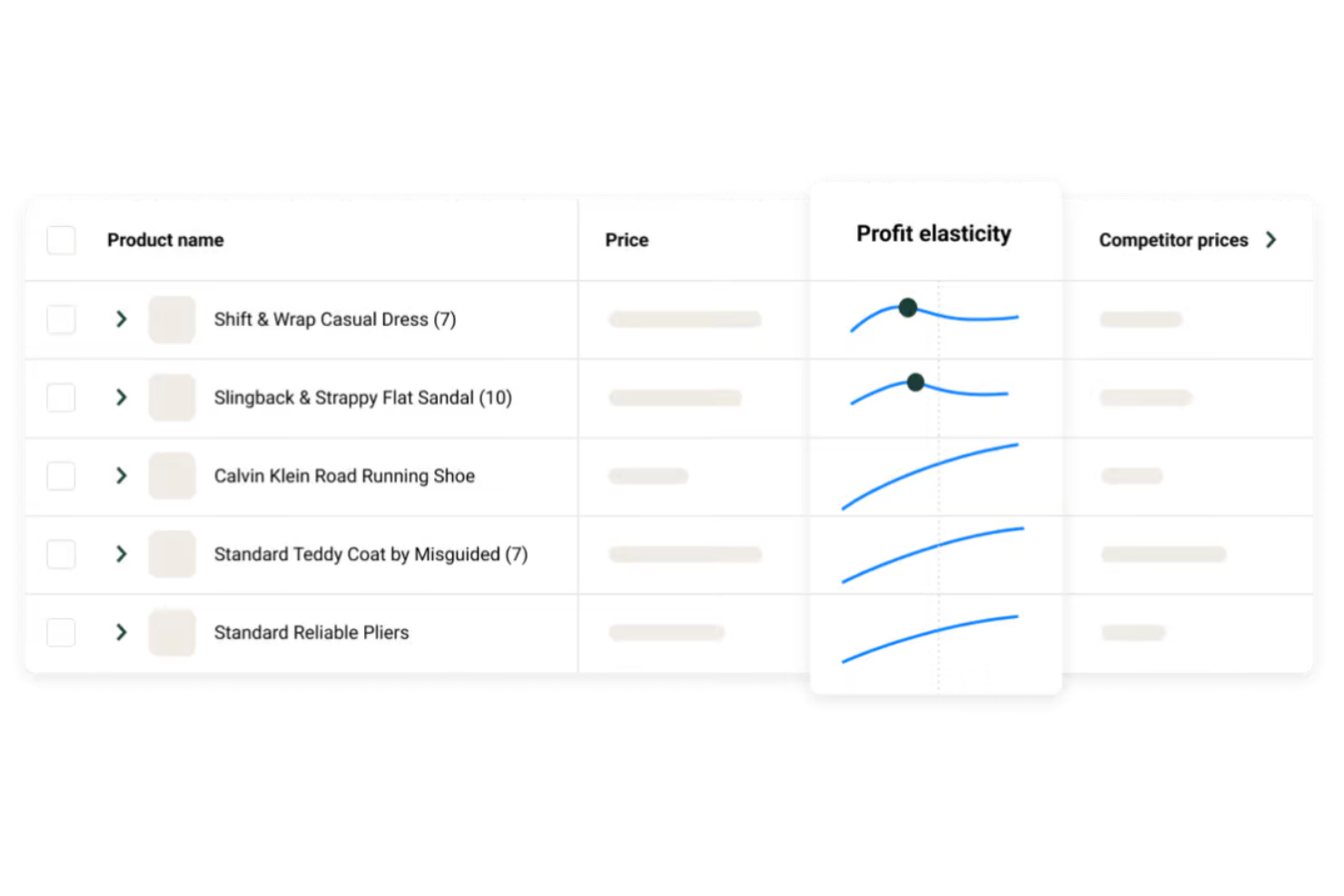
Pricen uses AI to help retailers and brands automate and optimize their pricing strategies. This platform is a strong fit for ecommerce teams and revenue managers who want to leverage machine learning for dynamic price adjustments based on real-time market data. It’s especially useful if you need to react quickly to competitor moves and changing demand signals without manual intervention.
Who Is Pricen Best For?
Retailers looking for AI-powered dynamic pricing tailored to regional markets and competitive landscapes.
Why I Picked Pricen
What stands out about Pricen is its focus on AI-driven price optimization, which is especially valuable for businesses that need to keep pace with fast-changing markets. The platform uses machine learning algorithms to analyze competitor pricing, demand trends, and inventory levels, then automatically recommends or applies optimal prices. I picked Pricen because it enables dynamic pricing rules that adapt in real time, helping you maximize revenue and margin without constant manual updates. Its predictive analytics also give you a forward-looking view of pricing opportunities and risks.
Pricen Key Features
Some other features that caught my attention include:
- Competitor Price Monitoring: Track and compare competitor prices across multiple channels.
- Customizable Pricing Rules: Set specific parameters and constraints for automated pricing decisions.
- Bulk Price Updates: Apply pricing changes to large product catalogs in a single action.
- Performance Dashboards: Visualize pricing impact and key metrics with real-time reporting tools.
Pricen Integrations
Integrations include ERP and CRM systems such as SAP, Oracle NetSuite, and Salesforce, along with flexible APIs for custom data connections.
Pros and Cons
Pros:
- Pricing automation reduces manual errors and frees time for strategic analysis.
- Real-time price execution integrates with ERP and CRM systems for accurate and efficient delivery.
- Pricen’s AI-driven optimization accurately predicts pricing outcomes to maximize revenue and profits.
Cons:
- Implementation costs can be high for smaller businesses with limited budgets.
- The platform’s depth and advanced analytics may create a learning curve for new users.


Zilliant is designed for B2B companies that need to improve margin performance through smarter pricing decisions. The platform appeals to revenue operations teams and pricing managers in manufacturing, distribution, and industrial sectors who deal with complex pricing structures and large product catalogs. Its data-driven approach helps you identify margin leakage and optimize prices at scale.
Who Is Zilliant Best For?
B2B companies focused on improving margin performance through advanced pricing analytics and revenue optimization strategies.
Why I Picked Zilliant
Margin performance is a top concern for many B2B organizations, and Zilliant addresses this challenge with targeted pricing intelligence. The platform uses advanced analytics to uncover margin leakage and recommend price adjustments that protect profitability. I picked Zilliant because it offers segmentation tools that let you tailor pricing strategies by customer, product, or region, which is essential for complex businesses. Its real-time price optimization engine also helps you respond quickly to market changes and cost fluctuations.
Zilliant Key Features
Some other features that make Zilliant stand out include:
- Guided Selling Recommendations: Deliver targeted product and pricing suggestions to sales teams during quoting.
- Deal Management Workflows: Manage price approvals and exception requests with configurable workflows.
- Price List Management: Create, update, and distribute price lists across multiple channels and geographies.
- Revenue Analytics Dashboards: Visualize pricing performance and revenue trends with customizable dashboards.
Zilliant Integrations
Integrations include Salesforce CRM, Oracle, and SAP.
Pros and Cons
Pros:
- Competitive pricing intelligence
- Robust price optimization capabilities
- Advanced analytics and data-driven insights
Cons:
- Support and maintenance may require additional resources
- Learning curve for new users

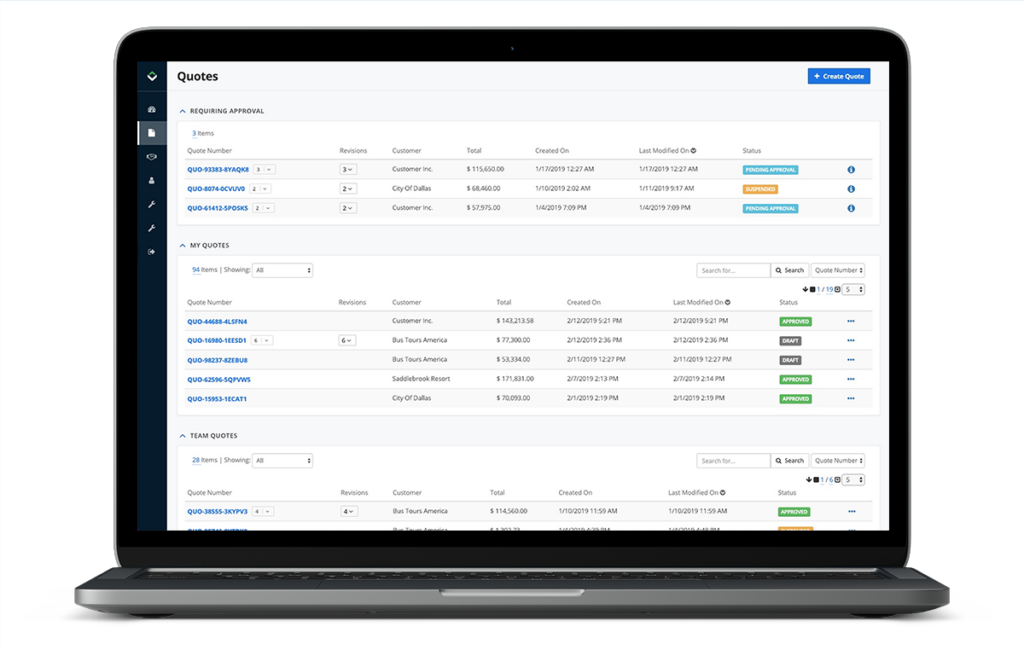
If your business operates in manufacturing or distribution, Vendavo offers pricing software tailored to your industry’s complexity. The platform is built for teams managing large product portfolios, intricate channel relationships, and fluctuating costs. Vendavo stands out for its ability to handle dynamic pricing and contract management at scale, helping you address margin pressure and competitive pricing challenges.
Who Is Vendavo Best For?
Manufacturers and distributors that need enterprise-grade pricing, margin management, and CPQ capabilities for complex product catalogs.
Why I Picked Vendavo
Manufacturers and distributors face unique pricing challenges, and Vendavo is purpose-built to address those needs. The platform offers advanced margin management tools that help you analyze profitability across complex product lines and customer segments. I picked Vendavo because it supports contract pricing and rebate management, which are essential for businesses dealing with negotiated agreements and channel partners. Its price optimization engine also lets you adjust prices dynamically in response to market shifts and cost changes.
Vendavo Key Features
Some other features that make Vendavo valuable for pricing teams include:
- AI-Driven Price Guidance: Generate pricing recommendations using machine learning models trained on your historical data.
- Deal Price Optimization: Analyze and suggest optimal deal prices during the quoting process.
- Customer Segmentation Tools: Group customers by attributes to tailor pricing strategies.
- Profitability Analytics Dashboards: Visualize margin and revenue trends with interactive dashboards.
Vendavo Integrations
Integrations include SAP (ERP), Oracle (ERP), NetSuite (ERP), and Microsoft Dynamics 365, along with other enterprise ERP and CRM systems.
Pros and Cons
Pros:
- Integrates with enterprise systems
- Tailored for manufacturers and distributors
- Advanced analytics and data-driven insights
Cons:
- Limited integrations
- Initial setup and implementation can be time-consuming

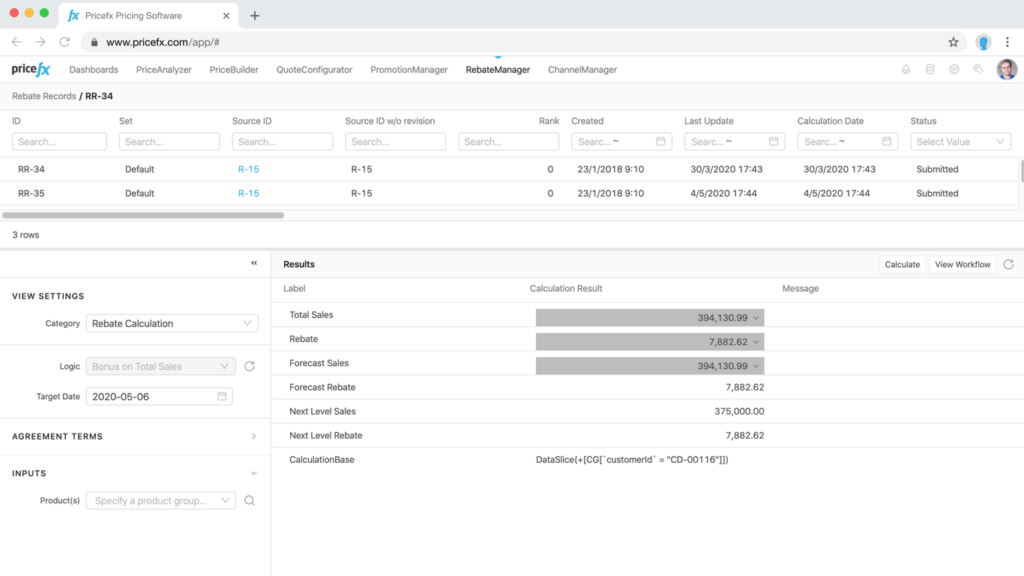
Pricefx is designed for businesses that need advanced price optimization and management across multiple channels and markets. The platform appeals to pricing teams looking for real-time analytics, configurable pricing models, and automation for complex pricing scenarios. Pricefx stands out for its modular approach, letting you tailor features to your specific pricing strategy and business requirements.
Who Is Pricefx Best For?
Mid-sized to enterprise organizations seeking scalable price optimization and management tools with strong configuration flexibility.
Why I Picked Pricefx
When it comes to price optimization and management, Pricefx offers a flexible platform that adapts to a wide range of pricing strategies. The tool provides real-time price calculation and simulation, which helps teams quickly assess the impact of pricing changes before rolling them out. I picked Pricefx because its analytics engine supports dynamic pricing and lets you automate complex pricing rules based on market data. Its modular design also means you can add or remove features as your pricing needs evolve.
Pricefx Key Features
Some other features that make Pricefx a strong choice for pricing teams include:
- Rebate and Bonus Management: Track, calculate, and manage rebates and bonuses for customers and partners.
- Quote Configuration Tools: Build and manage complex quotes with configurable pricing and discounting options.
- Agreement Management: Store, track, and manage customer pricing agreements in one place.
- Data Integration Studio: Connect and synchronize data from multiple sources for unified pricing analysis.
Pricefx Integrations
Integrations include SAP, Salesforce, and FTP servers, and an API is available for custom integrations.
Pros and Cons
Pros:
- CPQ functionality for personalized quotes
- Advanced analytics for data-driven pricing
- Provides centralized price management
Cons:
- Limited integrations
- Lacks transparent pricing
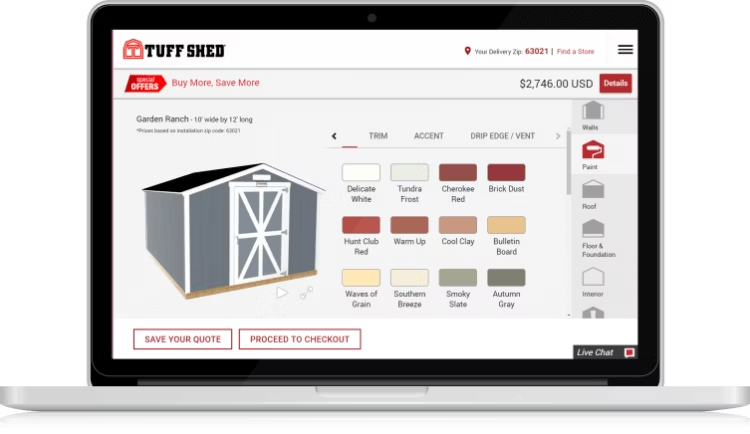
Epicor CPQ is built for manufacturers and distributors that need to manage highly complex product configurations and pricing rules. The platform is especially useful for sales and engineering teams dealing with customizable products, multi-level bills of materials, and intricate quoting requirements. Epicor CPQ stands out for its visual configuration tools and ability to automate pricing logic for even the most complicated product offerings.
Who Is Epicor CPQ Best For?
Manufacturers and sales teams handling highly configurable products that require structured pricing and quoting processes.
Why I Picked Epicor CPQ
For organizations that need to manage intricate product configurations, Epicor CPQ offers specialized tools that go beyond standard pricing software. The platform’s visual product configurator lets teams build and price highly customizable products with layered options and dependencies. I picked Epicor CPQ because it supports advanced rules-based pricing logic, which is essential for businesses with complex quoting requirements. Its ability to generate accurate quotes for multi-level configurations makes it a strong fit for manufacturers and distributors.
Epicor CPQ Key Features
Some other features that make Epicor CPQ valuable for pricing teams include:
- CAD Automation: Automatically generate CAD drawings based on configured product selections.
- Guided Selling Workflows: Lead users through step-by-step product and pricing choices.
- Document Generation: Create branded quotes, proposals, and technical documents directly from the platform.
- Mobile-Responsive Interface: Access configuration and quoting tools from any device.
Epicor CPQ Integrations
Integrations include Salesforce, Shopify, Adobe Commerce, SOLIDWORKS, Salesforce CPQ, Inventor, and Creo.
Pros and Cons
Pros:
- Mobile access for sales teams on the go
- Powerful rules engine for accurate configurations
- Integration with CRM and ERP systems
Cons:
- Requires accurate data inputs for optimal performance
- Steep learning curve

tgndata gives retailers and brands a way to track competitor pricing and product assortment in real time. The platform is designed for pricing analysts and ecommerce teams who need actionable analytics to adjust pricing strategies quickly. With tgndata, you can monitor market changes and respond to competitor moves using automated data feeds and customizable dashboards.
Who Is tgndata Best For?
Retailers and brands that need competitor pricing data combined with actionable analytics for informed pricing decisions.
Why I Picked tgndata
When you need to make pricing decisions based on real-time market intelligence, tgndata stands out for its actionable analytics on competitor data. The platform collects and analyzes competitor prices, stock levels, and product assortments, giving you a clear view of the market landscape. I picked tgndata because it lets you set up automated alerts and custom dashboards, so you can react quickly to pricing changes and trends. These features help pricing teams stay agile and informed in highly competitive markets.
tgndata Key Features
Some other features that make tgndata useful for pricing teams include:
- MAP Monitoring: Track minimum advertised price violations across multiple channels.
- Historical Price Tracking: Access past pricing data to analyze trends over time.
- Product Matching Engine: Automatically match your products to competitor listings for accurate comparisons.
- Customizable Data Exports: Download competitor and market data in various formats for further analysis.
tgndata Integrations
Integrations include Salesforce, Microsoft Dynamics 365, Pricefx, and SAP.
Pros and Cons
Pros:
- Customizable API
- Shows live data of competitor's prices
- Provides in-depth competitor analysis
Cons:
- Can be pricey for smaller businesses
- Potential learning curve when customizing the platform


Verenia is built for businesses using NetSuite that need advanced CPQ and pricing automation. The platform appeals to sales operations and product teams looking to simplify complex quoting, configuration, and pricing workflows inside their ERP. With Verenia, you can manage product rules, pricing logic, and approvals directly within NetSuite, reducing manual steps and errors.
Who Is Verenia Best For?
NetSuite users who want CPQ and pricing tools tightly integrated with their ERP system.
Why I Picked Verenia
For teams that rely on NetSuite and need advanced CPQ capabilities, Verenia offers a purpose-built solution that integrates directly with the ERP. I picked Verenia because it lets you automate complex pricing rules and product configurations without leaving the NetSuite environment. The tool supports guided selling, dynamic pricing, and approval workflows, which are essential for businesses with intricate quoting needs. This focus on native NetSuite functionality makes it a strong fit for organizations looking to centralize and control their pricing processes.
Verenia Key Features
Some other features that make Verenia valuable for pricing teams include:
- Visual Product Configurator: Build and display custom product configurations with real-time visuals.
- Quote Document Generation: Create branded, customizable quote documents directly from the platform.
- Multi-Currency Support: Handle pricing and quoting in multiple currencies for global sales.
- Role-Based Access Controls: Set permissions and access levels for different users within your organization.
Verenia Integrations
Integrations include Intuit QuickBooks, Made2Manage, Infor, SYSPRO, Sage CRM, Oracle, Acumatica, and Macola Software.
Pros and Cons
Pros:
- Supports multiple CAD formats
- Integrates with shopping cart solutions
- Easy to use
Cons:
- New users require training
- Initial setup and integration can be complex

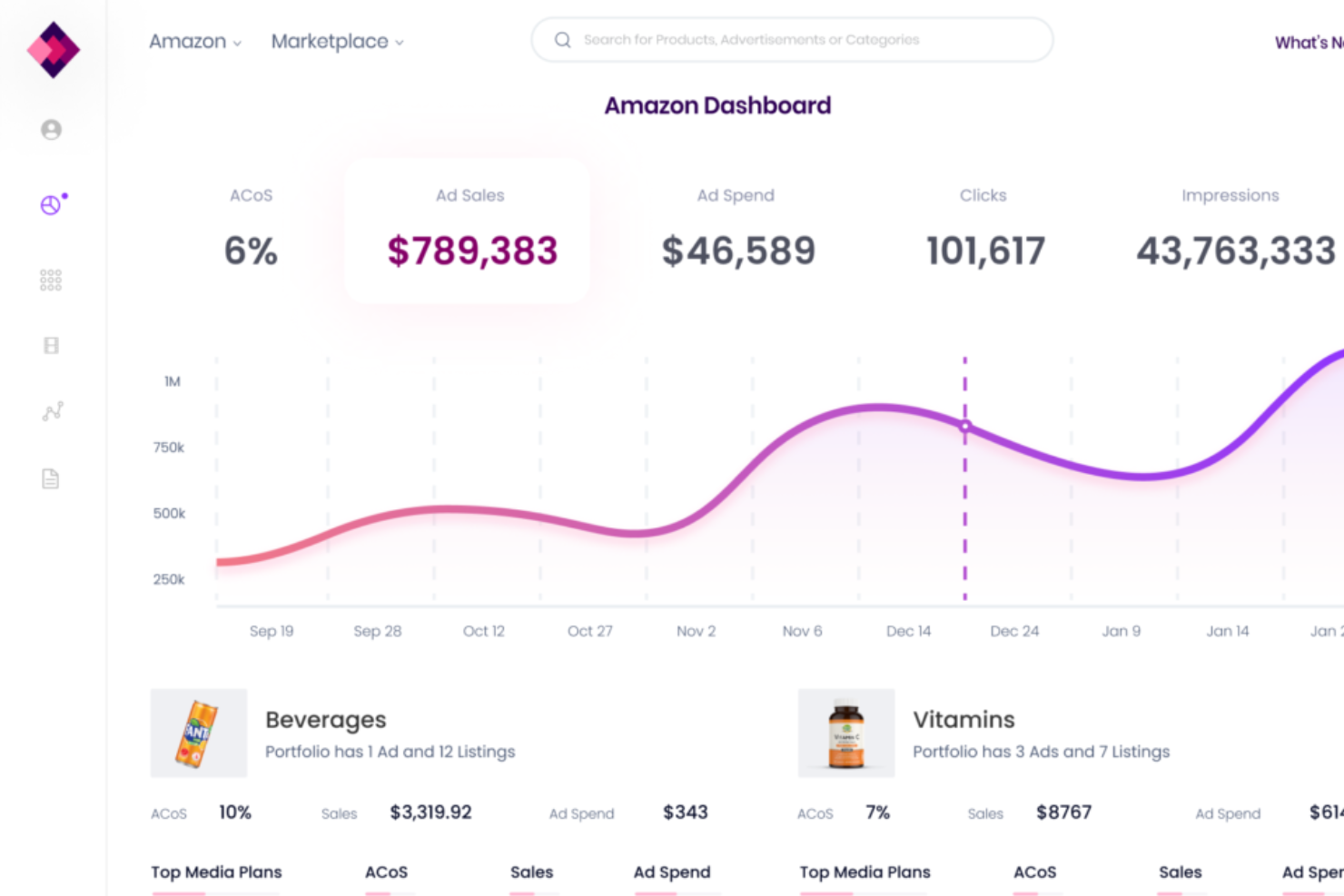
Trellis uses AI to help Amazon sellers automate and optimize their pricing strategies. The platform is designed for ecommerce brands and agencies that want to stay competitive in Amazon’s dynamic marketplace. With Trellis, you can adjust prices in real time based on market trends, competitor activity, and inventory levels.
Who Is Trellis Best For?
Amazon-focused ecommerce brands seeking AI-driven pricing and marketplace optimization tools to improve performance.
Why I Picked Trellis
When it comes to AI-driven pricing for Amazon sellers, Trellis stands out for its specialized automation and optimization capabilities. I picked Trellis because it uses machine learning to analyze real-time market data and automatically adjust prices to help you stay competitive. The platform also offers rule-based pricing controls, so you can set boundaries and strategies that align with your business goals. For anyone managing a large Amazon catalog, these features make Trellis a strong choice for dynamic, data-driven pricing.
Trellis Key Features
Some other features that make Trellis useful for pricing teams include:
- Advertising Automation: Manage and optimize Amazon ad campaigns alongside pricing strategies.
- Inventory-Aware Pricing: Adjust prices based on current inventory levels and stock forecasts.
- Profitability Analytics: Track margins and profitability for each SKU in real time.
- Bulk Product Management: Update and manage pricing rules across large product catalogs at once.
Trellis Integrations
Integrations include Amazon, Walmart, Google Shopping, and Chewy.
Pros and Cons
Pros:
- Free tools available
- Optimization of ad campaigns
- Real-time pricing adjustments
Cons:
- Can be pricey for small businesses
- Potential learning curve for new users
Other Pricing Software
Here are some other pricing tools that didn’t make the list, but are worth checking out:
- Conga
For custom pricing solutions
- Chetu
For competitive intelligence and real-time market data
- Minderest
For analyzing market trends
- TrackStreet
For revenue expansion
- Digital Sales Platform
For real-time pricing updates


Related Pricing Software Reviews
If you still haven't found what you're looking for here, check out these tools closely related to pricing software that we've tested and evaluated.
- CRM Software
- Sales Software
- Lead Management Software
- Business Intelligence Software
- Contract Management Software
- Revenue Management System
Selection Criteria For Pricing Software
When assessing pricing software options, my approach is informed by firsthand experience and thorough research into the functionalities that address core business needs and operational efficiencies. Pricing software plays a pivotal role in strategizing and managing revenue operations, ensuring businesses can adapt to market changes, optimize pricing strategies, and ultimately drive profitability.
Core Pricing Software Functionality: 25% of total weighting score:
To be considered for inclusion on my list of the best pricing software, the solution had to support the ability to fulfill common use cases:
- Automated price optimization based on market trends and internal data analysis.
- Real-time competitive pricing analysis.
- Integration with sales and inventory systems for demand forecasting.
- Customizable pricing strategies for different customer segments.
- Comprehensive revenue and profit margin reporting.
Additional Standout Features: 25% of total weighting score:
- Identification of advanced analytical tools that predict customer behavior and price sensitivity.
- Capabilities for AI-driven pricing recommendations to uncover hidden opportunities.
- Support for global pricing strategies, accommodating multiple currencies and regional variations.
- Implementation of real-time pricing adjustments in response to market dynamics.
- Exploration of value-based pricing frameworks that align price points with perceived customer value.
Usability: 10% of total weighting score:
- Intuitive design that facilitates easy navigation and access to key features without a steep learning curve.
- Clear, concise dashboard presentations that provide actionable insights at a glance.
- Efficiency in processing data and executing tasks, minimizing wait times and operational delays.
- Aesthetic interface design that enhances user engagement and reduces fatigue.
Onboarding: 10% of total weighting score:
- Availability of comprehensive training materials, such as videos and step-by-step guides.
- Interactive product tours that familiarize users with key functionalities promptly.
- Access to template libraries and default settings that accelerate the setup process.
- Provisions for direct support channels during initial setup and deployment phases.
Customer Support: 10% of total weighting score:
- Responsiveness of support teams to inquiries and issues.
- Multiple channels for support, including live chat, email, and phone.
- Quality of troubleshooting resources, such as FAQs and knowledge bases.
- Commitment to customer success with proactive advice and guidance.
Value For Money: 10% of total weighting score:
- Comparative analysis of feature sets against pricing to determine overall value.
- Flexibility of pricing plans to cater to different sizes and types of businesses.
- Consideration of long-term ROI potential, beyond initial costs.
- Transparency in pricing structures, with no hidden fees or costs.
Customer Reviews: 10% of total weighting score:
- Aggregate feedback on user satisfaction and product effectiveness.
- Analysis of recurring themes in reviews to identify strengths and areas for improvement.
- Evaluation of how well pricing software meets the advertised promises.
- Examination of customer testimonials to gauge the reliability and impact of the software.
Effective pricing software should resonate with the specific challenges and aspirations of businesses aiming to refine their pricing strategies and enhance their revenue operations. Through meticulous evaluation of these criteria, businesses can align their investment in pricing software with their strategic objectives, ensuring a tangible impact on their bottom line.
How To Choose Pricing Software
With so many different pricing software available, it can be challenging to make decisions on what tool is going to be the best fit for your needs.
As you're shortlisting, trialing, and selecting pricing software, consider the following:
- What problem are you trying to solve - Start by identifying the pricing software feature gap you're trying to fill to clarify the features and functionality the tool needs to provide.
- Who will need to use it - To evaluate cost and requirements, consider who'll be using the software and how many licenses you'll need. You'll need to evaluate if it'll just be the revenue operation leaders or the whole organization that will require access. When that's clear, it's worth considering if you're prioritizing ease of use for all or speed for your pricing software power users.
- What other tools it needs to work with - Clarify what tools you're replacing, what tools are staying, and the tools you'll need to integrate with, such as accounting, CRM, or HR software. You'll need to decide if the tools will need to integrate together or if you can replace multiple tools with one consolidated pricing software.
- What outcomes are important - Consider the result that the software needs to deliver to be considered a success. Consider what capability you want to gain or what you want to improve, and how you will be measuring success. For example, an outcome could be the ability to get greater visibility into performance. You could compare pricing software features until you’re blue in the face but if you aren’t thinking about the outcomes you want to drive, you could be wasting a lot of valuable time.
- How it would work within your organization - Consider the software selection alongside your workflows and delivery methodology. Evaluate what's working well and the areas that are causing issues that need to be addressed. Remember every business is different — don’t assume that because a tool is popular that it'll work in your organization.
Trends In Pricing Software For 2026
Pricing can be one of the toughest nuts to crack for scaling startups—get it wrong, and you risk leaving money on the table or scaring off potential customers. The good news? Pricing software is evolving fast, giving revenue leaders like you the tools to adapt, experiment, and optimize with confidence.
1. AI-Driven Dynamic Pricing for Real-Time Adjustments
Gone are the days of static price lists. Today’s pricing software leverages AI to dynamically adjust pricing based on real-time factors like demand, competitor movements, or even inventory levels. For scaling startups, this means you can pivot quickly without manually crunching numbers—ideal when you're battling competitors or entering new markets.
Why it matters for you: Real-time pricing helps maximize margins and reduce revenue leakage, even as market conditions change by the hour.
2. Personalized Pricing Models to Improve Customer Acquisition
Modern pricing tools now offer features to create hyper-personalized pricing for specific customer segments. Think custom packages or pricing tailored to industry, company size, or buyer intent.
Why it matters for you: Personalization reduces sticker shock and makes your pricing feel tailor-made, boosting conversion rates and ARR growth.
3. Revenue Optimization Through Pricing Experimentation
Pricing software increasingly incorporates A/B testing capabilities, allowing revenue leaders to test different strategies like tiered pricing or bundling without disrupting existing customer bases. These tools make it easy to pinpoint the sweet spot where conversion meets profitability.
Why it matters for you: Experimentation ensures you're not leaving money on the table and helps you uncover strategies for long-term revenue growth.
4. Integrated Competitive Intelligence for Smarter Decisions
The latest pricing platforms come with baked-in competitive intelligence features, from benchmarking tools to alerts on competitor price changes. This lets you make proactive adjustments to stay competitive while maintaining profitability.
Why it matters for you: With instant visibility into your competitive landscape, you can respond faster and with confidence—essential for staying ahead in scaling markets.
5. Subscription and Usage-Based Pricing Enablement
As subscription and usage-based models dominate SaaS, pricing software is evolving to handle complexities like seat-based pricing, consumption tiers, and overage charges. Tools now automate these workflows, ensuring accurate billing and happy customers.
Why it matters for you: These models create more predictable revenue streams and better align with your customer's needs, all while minimizing manual billing errors.
For scaling startups, pricing software is no longer just about setting the right price—it’s about driving growth and building competitive resilience. By tapping into these trends, you’ll be equipped to move fast, stay adaptable, and outmaneuver the competition.
What Is Pricing Software?
Pricing software is a tool used by businesses to analyze, set, and adjust the prices of their products or services. It incorporates data analysis, market trends, and competitive pricing information to help determine optimal pricing strategies. The software automates the process of price setting and adjustment, making it more responsive to market dynamics.
The benefits of pricing software include improved profitability through strategic pricing decisions based on market data and trends. It allows businesses to react quickly to market changes, maintain competitiveness, and optimize profit margins. The software reduces the manual effort involved in pricing analysis and helps in managing complex pricing scenarios efficiently. This leads to more effective pricing strategies, increased sales, and better financial performance.
Features of Pricing Software
When selecting pricing software, keep an eye out for the following key features:
- Dynamic pricing capabilities: This feature lets you automatically adjust prices in real time based on factors like demand, competitor pricing, and inventory levels. If you sell concert tickets or electronics, for example, you’ll appreciate having your prices update automatically when things get hot.
- Price optimization tools: With these tools, you can experiment with different pricing scenarios and models to see what works best and drives the most revenue. It’s like having a pricing laboratory without blowing up your profit margins.
- Rule-based pricing engine: Set custom rules to automate your pricing strategy—say, offering discounts on bulk orders or adjusting prices for different customer segments. You spend less time tinkering and more time focusing on your customers.
- Integration with sales and ERP systems: Plug your pricing software into your existing sales, inventory, or ERP platforms to keep everything synced. No more double data entry or crossed wires—just smoother operations all around.
- Reporting and analytics dashboard: Track how your prices are performing, spot trends, and make data-driven decisions. These dashboards provide clear visuals and detailed reports, helping you spot new opportunities (or catch things before they get bad).
- Approval workflows: Keep your pricing changes in check by requiring approvals from specific team members. This feature provides oversight so that big price shifts aren’t made accidentally—or by someone with an itchy trigger finger.
- Version control and audit trails: Go back in time to see what prices were, who approved increases, or how discounts evolved over the past quarter. This helps you stay compliant and troubleshoot faster when someone asks, “Hey, why did we drop prices last month?”
- Multi-currency support: If you sell internationally, multi-currency support ensures your pricing stays accurate and consistent in every market. No surprise conversions or missed currency fluctuations that eat into your margins.
Common Pricing Software AI Features
Beyond the standard pricing software features listed above, many of these solutions are incorporating AI with features like:
- Anomaly detection and alerting: AI spots strange pricing patterns or mistakes—like prices that are way too low or discounts applied incorrectly—so you can fix problems before they cost you real money.
- AI-driven price recommendations: This feature analyzes huge amounts of data (like purchase history and competitor prices) to recommend the sweet spot for your prices, so you don’t have to guess.
- Predictive demand forecasting: AI models look at buying patterns and market trends to predict future demand, helping you get ahead and adjust pricing or inventory before crunch time hits.
- Automated competitor price monitoring: AI constantly scans your competitors’ pricing and automatically flags or adjusts your prices to stay competitive, keeping you in the race without constant monitoring.
- Customer segmentation with machine learning: AI analyzes purchasing behaviors to automatically segment your customers into meaningful groups, so you can offer targeted pricing or discounts and boost conversions.
Benefits Of Pricing Software
By automating and optimizing pricing decisions, this software can significantly impact a company's bottom line and operational efficiency. Here are five primary benefits that pricing software offers to users and organizations:
- Enhanced Pricing Strategy: Enables data-driven pricing decisions. Pricing software provides analytics and insights that help businesses set prices optimally, improving profit margins and market competitiveness.
- Increased Operational Efficiency: Automates routine pricing tasks. By reducing the manual effort required for price analysis and adjustments, pricing software allows teams to focus on strategic activities, thus enhancing productivity.
- Improved Revenue Growth: Identifies pricing opportunities and gaps. Through advanced analytics, pricing software can uncover underperforming segments and opportunities for price optimization, driving revenue growth.
- Market Responsiveness: Facilitates quick adjustments to market changes. Pricing software enables organizations to rapidly respond to market dynamics, competitor moves, and cost fluctuations, maintaining market relevance and competitiveness.
- Strategic Decision Support: Offers actionable insights for executive decisions. By providing a comprehensive view of pricing performance and market trends, pricing software supports strategic decision-making processes, aligning pricing strategies with business objectives.
Costs & Pricing For Pricing Software
When exploring pricing software options, it's crucial for software buyers to understand the various plan structures and pricing tiers available. These plans are designed to cater to different sizes and types of businesses, from small startups to large enterprises, ensuring that organizations can find a solution that fits their specific needs and budget constraints. Below is a breakdown of typical plan options and their average pricing, along with common features included in each plan:
Plan Comparison Table For Pricing Software
| Plan Type | Average Price | Common Features Included | Best For |
|---|---|---|---|
| Basic | $10 - $50/month | Access to core pricing tools, basic analytics, limited user accounts, email support | Small Businesses, Startups |
| Professional | $50 - $200/month | Enhanced analytics, more user accounts, integration capabilities, priority email support | Growing Businesses, Mid-Sized Teams |
| Enterprise | $200 - $1000+/month | Advanced analytics, unlimited user accounts, API access, dedicated support, custom integration | Large Businesses, Complex Pricing Needs |
| Free | $0 | Access to a limited set of features, basic analytics, community support | Trial Users, Limited Needs Businesses |
When choosing a pricing plan, buyers should consider not only the monthly or annual cost but also the value each plan offers in relation to their specific business needs. Factors such as the size of the organization, the complexity of its pricing strategies, and the level of support required should all play a role in this decision. It's also important for buyers to assess the scalability of the software, ensuring it can grow alongside their business. Selecting the right plan is about finding the best balance between cost, features, and the potential return on investment.
Pricing Software Frequently Asked Questions
Below are the answers to some questions I get asked most often about pricing software:
How can pricing software improve my business’s revenue and profitability?
Pricing software can make a significant difference in how you optimize revenue. At its core, it helps you move away from guesswork or static pricing models by using data-driven insights to set the right prices. Here’s how it works:
- Revenue Boost: It analyzes market trends, competitor pricing, and customer data to ensure your prices are competitive without leaving money on the table. It helps you find that sweet spot where you maximize both sales and margins.
- Margin Optimization: By understanding where you can raise prices without affecting demand, or where discounting makes sense, it directly improves your profitability.
- Pricing Strategy: Many tools allow for dynamic pricing—meaning you can adjust your pricing in real time based on supply, demand, or other market factors, keeping you agile and maximizing profit.
In short, it makes pricing smarter, more adaptable, and aligned with your revenue goals.
What are the key features to look for in pricing software, including AI and machine learning capabilities?
When choosing pricing software, there are some must-have features that ensure it meets your needs, especially as your business scales:
- AI & Machine Learning: These features allow the software to analyze vast amounts of data and automatically suggest price changes based on patterns in customer behavior, sales trends, and competitor moves. AI-powered tools take into account factors that human analysis might miss.
- Real-Time Analytics: The software should give you insights into how different pricing strategies affect revenue and margins, ideally in real time. This helps you pivot quickly if needed.
- Customization: Look for software that supports different pricing models like subscription-based, usage-based, or tiered pricing. Flexibility is key, especially if you’re expanding product lines or markets.
- Scenario Planning: Some tools allow you to model different pricing strategies before implementing them, so you can see potential outcomes without the risk.
- Integrations: The software should integrate seamlessly with your CRM, ERP, or other sales tools to ensure smooth operations across teams.
How does pricing software integrate with CRM, ERP, and other business systems?
Integration is a big deal because, let’s face it, pricing doesn’t happen in a vacuum. Your sales, marketing, finance, and ops teams all rely on accurate, up-to-date pricing data. Here’s what to look for:
- CRM Integration: This ensures that your sales team always has access to the latest pricing when interacting with customers, helping them close deals faster and more efficiently.
- ERP Integration: Pricing software should link with your ERP to make sure your billing, invoicing, and financial reporting reflect the correct prices in real time. This helps avoid mistakes that can cost you revenue or customer trust.
- API Access: Look for platforms that offer strong API support, making it easier to customize integrations with other key business systems you may already use.
Smooth integration means your pricing remains consistent across all departments, reducing the risk of errors and ensuring that everyone operates from the same playbook.
What are the different pricing models supported, such as dynamic or subscription-based pricing?
Pricing software these days is super flexible, which is crucial if you’re selling a variety of products or services. Here are some common pricing models it can support:
- Dynamic Pricing: This allows prices to change in real time based on factors like demand, competitor pricing, or inventory levels. It’s useful for industries like e-commerce or travel where market conditions fluctuate frequently.
- Subscription-Based Pricing: If you’re running a SaaS business or offering services on a recurring basis, pricing software can manage tiered plans, usage-based models, or flat subscriptions, ensuring consistency and profitability.
- Cost-Plus Pricing: For manufacturers or B2B businesses, pricing software can automate cost-plus pricing by factoring in production costs and desired margins, ensuring that you’re always covering your costs while maintaining profitability.
- Geographic Pricing: If you’re selling in different regions or countries, many tools can adjust pricing based on local economic conditions, tax regulations, or consumer behavior.
This flexibility is key to supporting various business models as you grow.
What is the ROI of investing in pricing software, and how soon can I see results?
The ROI of pricing software can be pretty significant, but it depends on how complex your pricing challenges are and how actively you use the tool. Here’s a breakdown:
- Revenue Growth: By optimizing your pricing strategy, many companies see a quick lift in revenue. Some tools can start showing improvements in just a few months by helping you price more effectively and reduce discounting.
- Margin Improvement: If you’re in a margin-sensitive business, the ability to tweak prices without losing customers can have an immediate effect on your bottom line. Many users report seeing an increase in profitability within the first 6-12 months.
- Operational Efficiency: Pricing software also saves time for your team by automating pricing updates, improving accuracy, and reducing the manual labor involved in pricing decisions. This allows teams to focus on more strategic work.
The key is to choose a solution that aligns well with your business goals and integrates seamlessly into your current processes. That way, you’ll start seeing results sooner rather than later.
Additional Revenue Operations Software
Here are some other tools that will improve your workflow:
Conclusion
In the face of economic uncertainty, the importance of optimizing pricing strategies to maximize product margins cannot be overstated. With efficient and sustainable growth becoming a priority for investors and business owners, leveraging pricing tools has become crucial.
According to McKinsey's research team, 44% of high-growth companies already utilize pricing tools to iterate and refine their pricing strategies. Failing to invest in these tools means missing out on the opportunity to predict pricing outcomes and effectively address customer needs.
Additionally, if you’d like to learn more about revenue optimization, then subscribe to our newsletter.