
28 Best Power Dialer Reviewed in 2026

10 Best Power Dialer Shortlist
Here's my pick of the 10 best software from the 28 tools reviewed.


Running a sales team is tough. You're juggling calls, managing leads, and keeping everyone on the same page. That's where a power dialer can help. It can boost your team's productivity by automating repetitive tasks and helping you focus on what really matters—closing deals.
I've spent years in Revenue Operations, trying and testing different tools. In this article, I'll share my top picks for power dialers, backed by independent research and personal experience. You'll find insights into what each tool offers and how it can fit your needs.
Stick around to discover which power dialer can make a difference for your team.
Why Trust Our Software Reviews
Best Power Dialers Summary
This comparison chart summarizes pricing details for my top power dialer selections to help you find the best one for your budget and business needs.
| Tool | Best For | Trial Info | Price | ||
|---|---|---|---|---|---|
| 1 | Best for real-time call transcriptions | No free trial available | From $45/line (minimum 2 lines) | Website | |
| 2 | Best for automated power dialing | 14-day free trial available | From $25/user/month (billed annually) | Website | |
| 3 | Best for remote teams | Free trial + free demo available | From $140/user/month (billed annually) | Website | |
| 4 | Best for video call integration | Free plan available | From $14.16/user/month (billed annually) | Website | |
| 5 | Best for integration with CRMs | 7-day free trial | Pricing upon request | Website | |
| 6 | Best for scalability | Free demo available | From $15/user/month (billed annually) | Website | |
| 7 | Best for small business teams | 14-day free trial + free demo available | From $15/user/month (billed annually) | Website | |
| 8 | Best for large enterprises | 21-day free trial + free demo available | From $20/user/month (billed annually) | Website | |
| 9 | Best for call center operations | 14-day free trial + free demo available | From $29/user/month (billed annually) | Website | |
| 10 | Best for sales automation | 14-day free trial | From $109/user/month | Website |
-

Prisync
Visit WebsiteThis is an aggregated rating for this tool including ratings from Crozdesk users and ratings from other sites.4.7 -
Expedite Commerce
Visit Website -
QuickBooks Online
Visit WebsiteThis is an aggregated rating for this tool including ratings from Crozdesk users and ratings from other sites.4





Best Power Dialers Reviews
Below are my detailed summaries of the best power dialers that made it onto my shortlist. My reviews offer a detailed look at the key features, pros & cons, integrations, and ideal use cases of each tool to help you find the best one for you.
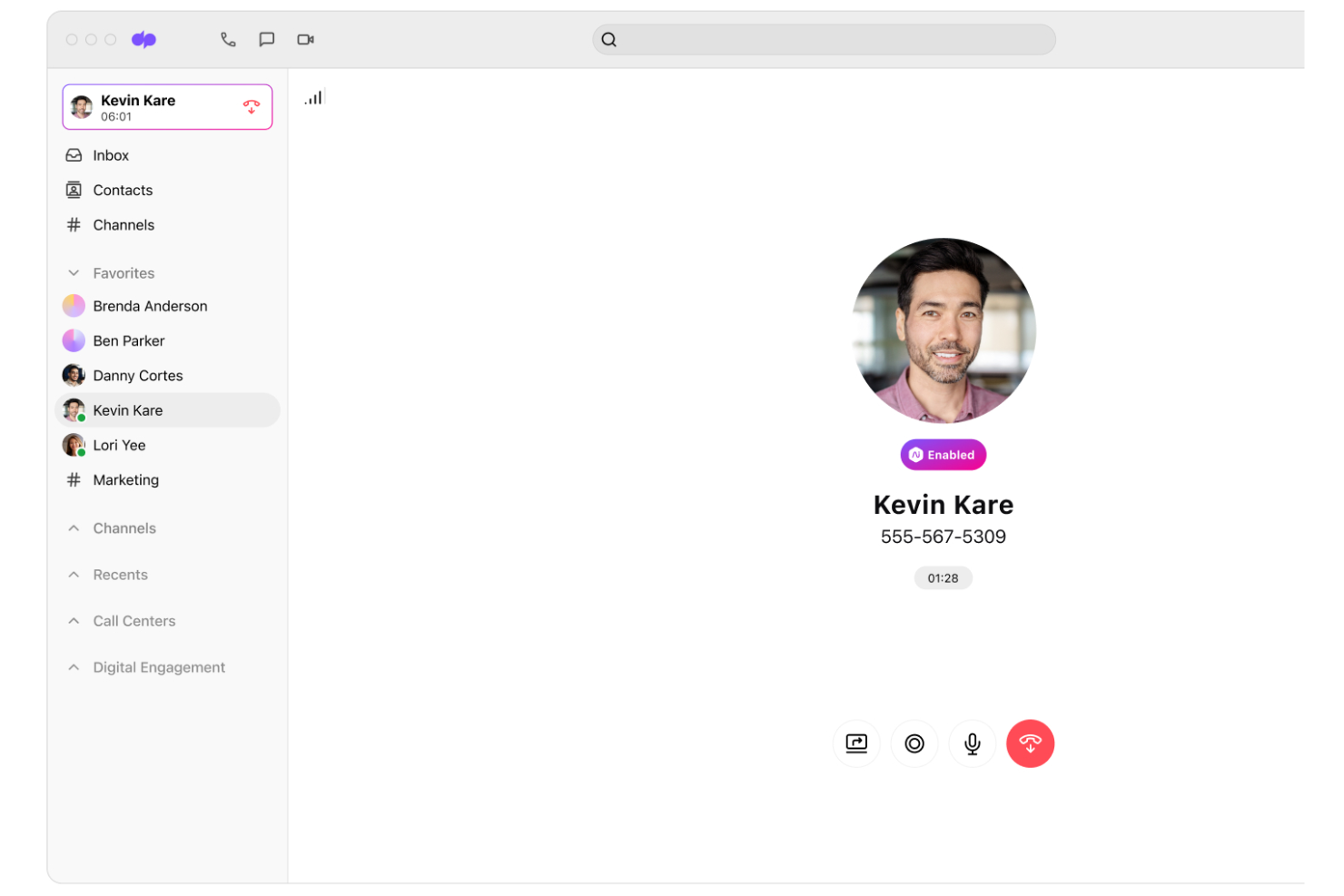
With T-Mobile for Business, you get a combination of high-speed 5G connectivity and AI-powered communication tools designed to support your sales process. It’s a practical option for businesses that want to strengthen outbound calling with real-time transcription and AI-driven insights that help teams stay responsive and informed. Whether you work in sales, customer service, or any role that depends on consistent communication, T-Mobile for Business helps address the ongoing challenge of staying productive and connected while on the move.
Why I Picked T-Mobile for Business
I picked T-Mobile for Business because it combines AI-driven features with the core functionality of a traditional power dialer. The real-time transcription feature helps ensure your team doesn’t miss important details during calls. AI Recaps generate clear summaries and action items after each conversation, which makes follow-ups more efficient. In addition, the live AI coaching tools provide real-time guidance during calls, helping your team navigate complex customer interactions and strengthen overall sales performance.
T-Mobile for Business Key Features
In addition to the standout features mentioned, you will find:
- Unified Communications: Dialpad Connect enables seamless cloud calling and keeps your team productive with AI-driven instant transcription.
- AI-Powered Customer Support: Enhance your customer service capabilities with CRM integrations and sentiment analysis to empower every representative.
- Outbound Sales with AI Coaching: Dialpad Sell offers real-time sales coaching to warm up cold calls with high-definition quality and AI support.
- Automatic Call Distribution: Efficiently manage inbound calls and ensure they are directed to the appropriate agent or department.
T-Mobile for Business Integrations
Integrations include Salesforce, Microsoft Office 365, Google Workspace, Zendesk, Slack, HubSpot, Okta, G Suite, ServiceNow, and API for custom integrations.
Pros and Cons
Pros:
- Built-in CRM and UC integrations
- Live AI coaching during calls
- Real-time AI call transcription
Cons:
- Lack of transparency around pricing
- Coverage weaker in rural areas

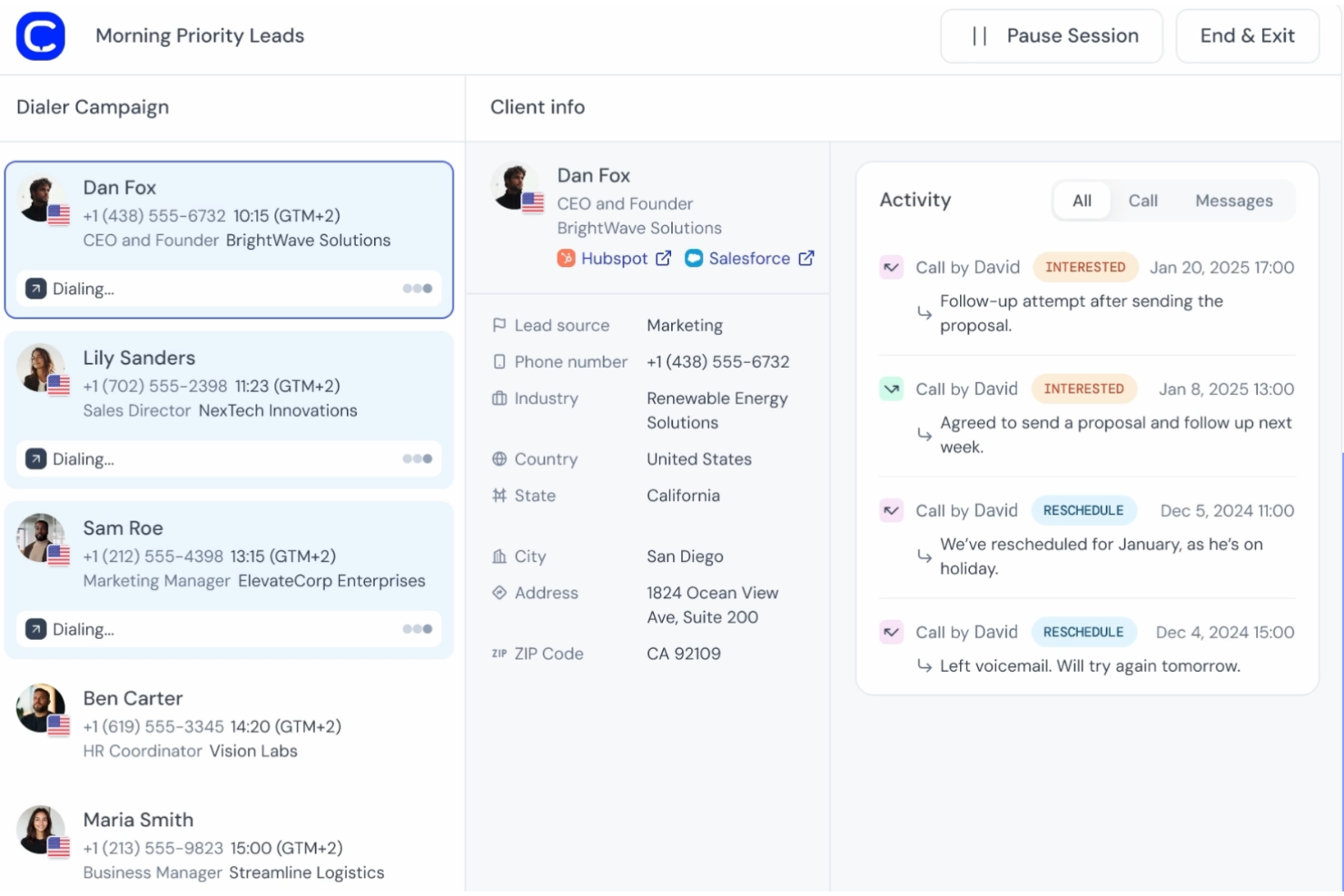
Managing high volumes of outbound calls can be challenging for sales and support teams. CloudTalk offers call center software with a built-in power dialer that automates dialing from contact lists, reducing the need for manual input. This allows teams to spend more time speaking with customers instead of dialing numbers. Whether you're a small business increasing outreach or a larger organization handling steady call traffic, CloudTalk helps organize outbound calling and support daily operations.
Why I Picked CloudTalk
I picked CloudTalk for its power dialer capabilities that truly stand out in the market. The automated power dialing mode is a game-changer, reducing the time your team spends on manual dialing and increasing the time spent on actual conversations. Additionally, its AI-driven call summaries provide valuable insights into each call, helping you refine your strategies and improve overall performance. These features directly address the need for efficiency and actionable intelligence in high-volume calling environments.
CloudTalk Key Features
In addition to its power dialing capabilities, CloudTalk offers :
- Call Queuing: Organizes incoming calls effectively, ensuring no customer is left waiting too long.
- Real-Time Monitoring: Allows you to oversee calls as they happen, providing immediate feedback and support to your team.
- SMS and WhatsApp Messaging: Expands your communication channels, enabling outreach beyond just voice calls.
- Call Recording: Stores calls for future reference, training, and compliance, ensuring that you have access to valuable call data.
CloudTalk Integrations
Integrations include HubSpot, Salesforce, Zendesk, Pipedrive, Zoho CRM, Intercom, Freshdesk, Slack, Microsoft Teams, and Shopify.
Pros and Cons
Pros:
- Fast power dialing improves outbound calling efficiency
- Clear interface reduces time switching between call tasks
- Stable call connections during high outbound call volumes
Cons:
- Reporting features lack deeper performance insights
- Fragmented dashboards complicate call tracking workflows


PhoneBurner is a cloud-based power dialer software designed for sales teams that work remotely. It helps users connect with leads efficiently, offering tools to manage calls and follow-ups.
Why I picked PhoneBurner: The platform is designed to support remote teams with its cloud-based infrastructure. PhoneBurner features a power dialer that automates call processes, helping your team make more calls in less time.
It also includes tools for call tracking and recording, allowing you to monitor performance effectively. The system allows for easy setup and management, making it ideal for teams working from various locations.
Standout features & integrations:
Features include a built-in email marketing tool that allows you to send personalized emails alongside your calls. It offers dynamic sales call scripts that adjust based on call outcomes, helping your team stay on message. The platform provides detailed call analytics to track your sales reps' performance and identify areas for improvement.
Integrations include Zoom, SugarCRM, HubSpot, Zapier, Nimble, Zoho CRM, and Outreach.
Pros and Cons
Pros:
- Provides detailed call analytics
- Includes email marketing tools
- Offers dynamic call scripts
Cons:
- Higher cost compared to simpler dialer tools
- Limited support for inbound call handling

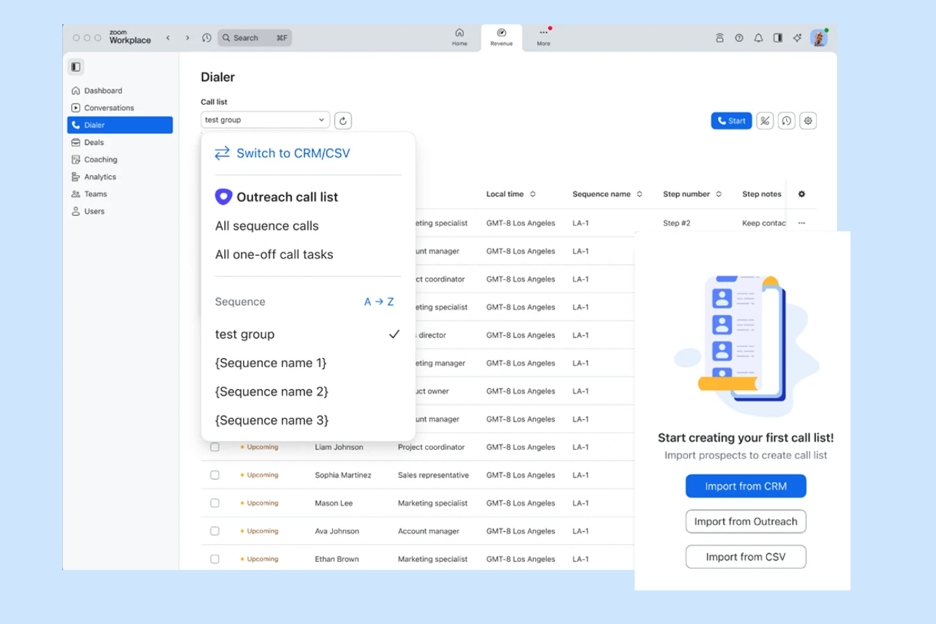
Zoom is a video conferencing platform widely used by businesses to facilitate virtual meetings and webinars. It serves professionals who need reliable video communication tools to connect with clients and teams.
Why I picked Zoom: Zoom, with Zoom Phone and the Auto Dialer, supports power dialing and parallel dialing to help sales teams move quickly through contact lists. It can drop prerecorded voicemails, log calls automatically, and sync data with your CRM, allowing reps to focus on live conversations and follow-ups without extra manual work.
Standout features & integrations:
Features include the ability to record sales calls for tracking and coaching, conduct team meetings to coordinate outreach strategies, and host webinars to engage multiple prospects at once.
Integrations include Slack, Microsoft Teams, Google Workspace, Salesforce, HubSpot, Dropbox, Asana, Trello, Zendesk, and MailCloud.
Pros and Cons
Pros:
- Provides webinar hosting
- Good for small‑team calling and occasional outreach
- Widely used video and calling app
Cons:
- Lacks advanced dialing automation and lead management features
- Not built for high‑volume outbound dialing


Kixie is a sales engagement platform designed for sales teams to enhance their calling efficiency. It integrates with CRM systems to automate call logging and simplify workflows.
Why I picked Kixie: Kixie is ideal for teams looking to boost productivity with CRM integration. It offers automated call logging and real-time analytics, making it easier for your team to track performance.
With features like local presence dialing, it helps increase call answer rates. The tool also provides power dialing capabilities that integrate directly with your existing CRM.
Standout features & integrations:
Features include local presence dialing, which helps increase call answer rates by displaying a local number to the recipient. It also offers call coaching tools that allow managers to listen in and provide guidance during calls. The platform provides real-time analytics to help you monitor team performance and identify areas for improvement.
Integrations include Salesforce, HubSpot, Zoho CRM, Pipedrive, Slack, Microsoft Dynamics, Shopify, Zapier, Copper, and Close.
Pros and Cons
Pros:
- Automates call logging
- Includes call coaching tools
- Offers local presence dialing
Cons:
- Occasional mobile app and UI glitches
- Occasional reliability and weekend support issues

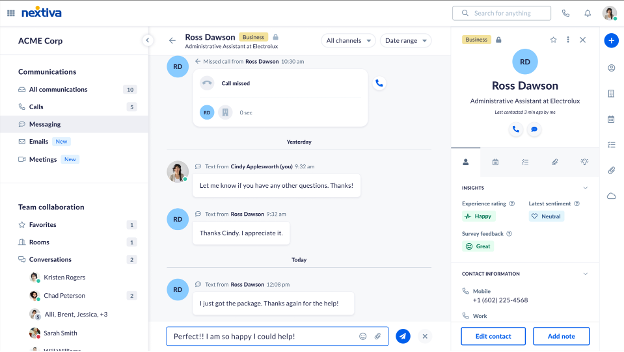
Nextiva is a cloud-based communication platform aimed at businesses that need a scalable solution for their communication needs. It provides voice, video, and collaboration tools to help teams stay connected and productive.
Why I picked Nextiva: Nextiva offers scalable communication solutions that can grow with your business. It supports multiple communication channels, ensuring your team can interact with clients efficiently.
The platform includes advanced call management features like call forwarding and call queuing. Its analytics tools provide insights into your communication performance, helping you optimize your operations.
Standout features & integrations:
Features include call recording, which helps ensure quality and compliance in communications. It provides video conferencing tools, allowing your team to hold virtual meetings easily. The platform also offers team messaging, enhancing collaboration within your organization.
Integrations include Salesforce, Microsoft Dynamics, Google Workspace, HubSpot, Zendesk, Zoho CRM, Outlook, QuickBooks, and Oracle Sales Cloud.
Pros and Cons
Pros:
- Multiple communication channels
- Provides communication analytics
- Advanced call management
Cons:
- Occasional call quality or service glitches
- Costs can add up with scaling and add‑ons

Dialpad is an AI-powered communications platform designed to enhance productivity in customer service and sales. It offers real-time AI tools that help improve customer interactions and deal closures.
Why I picked Dialpad: This tool is tailored for small-business teams, with scalable options that support outbound calls and outbound sales activities. It provides real-time AI insights that help each salesperson understand performance trends and improve conversion rates across various calling efforts, including telemarketing campaigns.
Dialpad’s AI tools are integrated into every VoIP call, offering live transcription, caller ID details, and call summaries. The platform also includes autonomous AI agents that efficiently handle tasks such as refunds and rebookings.
Standout features & integrations:
Features include real-time call transcription, live call summaries, and AI insights that guide your team during calls. It also offers a customizable dashboard to track performance metrics. The platform supports unlimited scalability, ensuring consistent service as your team grows.
Integrations include Salesforce, Microsoft Teams, Google Workspace, Zendesk, HubSpot, Okta, Slack, Zoho CRM, and G Suite.
Pros and Cons
Pros:
- Customizable performance dashboard
- AI insights during calls
- Real-time call transcription
Cons:
- Can be resource-intensive
- Requires a slight learning curve for AI tools


RingCentral is a complete cloud-based communications platform tailored for large enterprises. It facilitates voice, video, and messaging services, enabling efficient communication within big teams.
Why I picked RingCentral: It's designed to handle the complexities of large enterprises with its scalable infrastructure. RingCentral offers a unified communications solution that integrates voice, video, and messaging into one platform.
The tool provides advanced call management features, such as call forwarding and call queues, to handle high call volumes. Its analytics dashboard gives your team insights into communication performance, helping you make data-driven decisions.
Standout features & integrations:
Features include a call recording feature that helps you maintain quality and compliance in your communications. It offers video conferencing capabilities, allowing your team to conduct meetings with ease. The platform also provides team messaging, which enhances collaboration within your organization.
Integrations include Salesforce, Microsoft 365, Google Workspace, Slack, Zendesk, HubSpot, ServiceNow, Okta, Box, and Dropbox.
Pros and Cons
Pros:
- Supports video conferencing
- Real-time analytics dashboard
- Advanced call management
Cons:
- Can be resource-intensive
- Focused mainly on large teams


JustCall is a cloud-based phone system designed for call centers and sales teams to manage their customer interactions efficiently. It offers tools for making and receiving calls, tracking performance, and managing customer relationships.
Why I picked JustCall: JustCall is tailored for call center operations, providing features that enhance communication management. It offers call routing to ensure calls reach the right team member quickly.
The platform includes call monitoring and recording, allowing you to maintain quality and compliance. Its analytics tools give insights into call performance, helping your team make data-driven improvements.
Standout features & integrations:
Features include a built-in SMS tool that lets you send text messages directly from the platform. It offers voicemail transcription, which converts voicemails into text for easier management. The platform also provides a customizable call scheduler to help your team plan and manage calls effectively.
Integrations include Salesforce, HubSpot, Zoho CRM, Pipedrive, Nimble, Slack, and Freshdesk.
Pros and Cons
Pros:
- Built-in SMS tool
- Customizable call scheduler
- Includes voicemail transcription
Cons:
- Focused mainly on call management
- May need technical setup

Ringy is a sales platform designed to help sales teams manage and automate their customer outreach. It is primarily used by sales professionals to boost productivity and simplify communication.
Why I picked Ringy: Ringy automates the sales processes, making it a valuable asset for your team. It offers automation tools for text messaging, allowing you to reach clients effectively.
The system’s power dialer helps your team make calls faster, reducing downtime between connections. Its lead management features ensure that your team stays organized and focused on high-priority leads.
Standout features & integrations:
Features include an automated voicemail drop that saves time by leaving pre-recorded messages. It provides real-time analytics to track your sales performance and identify trends. The platform also offers a customizable dashboard, allowing your team to tailor it to their specific needs.
Integrations include Zapier, Facebook, and Google Workspace.
Pros and Cons
Pros:
- Automated text messaging
- Efficient lead management
- Offers real-time analytics
Cons:
- May struggle with very large call volumes
- Limited advanced features
Other Power Dialers
Here are some additional power dialer options that didn’t make it onto my shortlist, but are still worth checking out:
- PowerDialer AI
For AI-driven insights
- REDX
For lead generation
- Mojo Dialer
For real estate agents
- Aircall
For international calling
- OnePageCRM
For small sales teams
- Nooks AI
For virtual sales floors
- Ringover
For unified communication
- Talkdesk
For AI-driven customer service
- Sprinklr
For social media integration
- DialedIn
For call quality monitoring
- Acefone
For hosted phone systems
- Calley
For beginners
- Bright Pattern
For omnichannel support
- Genesys Cloud CX
For scalable customer experiences
- Aloware
For SMS integration
- Orum
For real-time conversation insights
- Voicent
For customizable workflows
- PowerDialer.org
For simple setup


Power Dialer Selection Criteria
When selecting the best power dialer to include in this list, I considered common buyer needs and pain points like improving call efficiency and managing high call volumes. I also used the following framework to keep my evaluation structured and fair:
Core Functionality (25% of total score)
To be considered for inclusion in this list, each solution had to fulfill these common use cases:
- Automating call processes
- Managing contact lists
- Tracking call metrics
- Scheduling follow-up calls
- Voicemail drop capabilities
Additional Standout Features (25% of total score)
To help further narrow down the competition, I also looked for unique features, such as:
- AI-driven call insights
- Local presence dialing
- Dynamic call scripts
- Multi-line dialing
- Real-time coaching
Usability (10% of total score)
To get a sense of the usability of each system, I considered the following:
- Intuitive interface design
- Customization options
- Ease of navigation
- Minimal learning curve
- Responsive design
Onboarding (10% of total score)
To evaluate the onboarding experience for each platform, I considered the following:
- Availability of training videos
- Interactive product tours
- Access to templates
- Live webinars
- Chatbot assistance
Customer Support (10% of total score)
To assess each software provider’s customer support services, I considered the following:
- 24/7 support availability
- Multi-channel support options
- Response time
- Knowledgeable support staff
- Access to a help center
Value For Money (10% of total score)
To evaluate the value for money of each platform, I considered the following:
- Pricing transparency
- Feature set for the price
- Competitor pricing comparison
- Flexible pricing plans
- Return on investment potential
Customer Reviews (10% of total score)
To get a sense of overall customer satisfaction, I considered the following when reading customer reviews:
- Overall user satisfaction
- Commonly reported issues
- Feature effectiveness
- Ease of use feedback
- Customer service experience
How to Choose Power Dialers
It’s easy to get bogged down in long feature lists and complex pricing structures. To help you stay focused as you work through your unique software selection process, here’s a checklist of factors to keep in mind:
| Factor | What to Consider |
| Scalability | Can the tool grow with your business? Consider user limits and system capabilities to ensure it supports future growth without needing frequent upgrades. |
| Integrations | Does it connect with your existing software? Check for compatibility with CRM systems and other essential tools to avoid workflow disruptions. |
| Customizability | Can you tailor it to fit your processes? Look for options to modify call scripts, dashboards, and reports to match your team's specific needs. |
| Ease of use | Is it intuitive for your team? Consider the learning curve and whether the interface is user-friendly to minimize training time. |
| Implementation and onboarding | How quickly can you get up and running? Look for quick start guides, available support, and the simplicity of setup to avoid lengthy delays. |
| Cost | Does the pricing fit your budget? Evaluate the total cost of ownership, including hidden fees and potential add-ons, to ensure affordability |
| Security safeguards | Is your data protected? Ensure the tool complies with industry standards for data security to protect sensitive information. |
| Support availability | Will you get help when needed? Check for 24/7 support options and the availability of live chat or phone assistance for quick resolution of issues. |
What Is a Power Dialer?
A power dialer is a software tool that automates the process of dialing phone numbers, helping sales teams and call centers reach more leads efficiently. Sales professionals and customer service agents use these tools to increase call productivity and manage high call volumes effectively. Automated dialing, call tracking, and voicemail drop capabilities help with managing calls and improving communication efficiency. Overall, these tools enhance productivity by reducing manual dialing and optimizing call workflows.
Features
When selecting a power dialer, keep an eye out for the following key features:
- Automated dialing: Automatically dials numbers from a list, saving time and increasing call efficiency.
- Call tracking: Monitors call metrics and performance, providing insights to improve communication strategies.
- Voicemail drop: Allows users to leave pre-recorded messages, speeding up the process of reaching out to leads.
- Local presence dialing: Displays a local number to increase the chances of calls being answered.
- Real-time analytics: Provides instant feedback on call activities, helping teams make data-driven decisions.
- Call recording: Records conversations for quality assurance and training purposes.
- Dynamic call scripts: Adjusts scripts based on call outcomes, ensuring consistent messaging.
- Integration capabilities: Connects with CRM and other tools to maintain efficient workflows.
- Call routing: Directs calls to the appropriate team member, improving response times.
- Scalability: Supports business growth by accommodating increased call volumes and additional users.
Benefits
Implementing a power dialer provides several benefits for your team and your business. Here are a few you can look forward to:
- Increased productivity: Automated dialing mode reduces manual work, allowing your team to make more calls in less time.
- Improved lead management: Integration with CRM tools ensures that contact information is organized and easily accessible.
- Enhanced call quality: Features like call recording and real-time analytics help monitor and improve communication strategies.
- Better customer engagement: Local presence dialing increases the likelihood of calls being answered, improving connection rates.
- Time savings: Voicemail drop allows you to leave messages quickly, freeing up time to focus on live calls.
- Informed decision-making: Real-time analytics provide insights into call performance, guiding strategic adjustments.
- Scalability: Supports business growth by accommodating more calls and users as your team expands.
Costs and Pricing
Selecting a power dialer requires an understanding of the various pricing models and plans available. Costs vary based on features, team size, add-ons, and more. The table below summarizes common plans, their average prices, and typical features included in power dialer solutions:
Plan Comparison Table for Power Dialers
| Plan Type | Average Price | Common Features |
| Free Plan | $0 | Basic call management, limited minutes, and essential reporting. |
| Personal Plan | $15-$30/user/month | Automated dialing, call tracking, voicemail drop, and basic analytics. |
| Business Plan | $40-$60/user/month | Local presence dialing, CRM integration, advanced analytics, and call recording. |
| Enterprise Plan | $80-$120/user/month | Customizable dashboards, API access, dedicated support, and advanced security features. |
Power Dialers FAQs
Here are some answers to common questions about power dialers:
What is the difference between a power dialer and a predictive dialer?
A power dialer automatically dials numbers from a list one after another, but waits for a call to end before moving on. A predictive dialer, on the other hand, uses algorithms to dial multiple numbers simultaneously and predicts when agents will be available to take calls. If you’re managing a team, predictive dialers might suit high-volume environments better, while power dialers are great for personalizing interactions and ensuring no leads are missed.
Can I use a power dialer with my existing CRM?
Yes, most power dialers are designed to integrate with popular CRM systems. This integration means you can log calls, update contact records, and manage leads directly from your CRM interface. Before purchasing, check that the power dialer supports your specific CRM to ensure efficient data flow and avoid manual data entry.
Is it legal to use a power dialer?
Yes, but you need to comply with local telecommunication laws and regulations. In the U.S., for instance, you must adhere to the Telephone Consumer Protection Act (TCPA), which regulates automated calls. Always ensure your software has features like call recording consent and do-not-call list management to maintain compliance.
How can a power dialer improve my sales process?
A power dialer can significantly enhance your sales process by automating call tasks, allowing your team to focus on engaging with leads. It reduces downtime between calls and increases the number of contacts made each day. This efficiency can lead to more opportunities and, ultimately, more closed deals. Evaluate your team’s needs to see how these improvements align with your sales goals.
What’s Next:
If you're in the process of researching power dialers, connect with a SoftwareSelect advisor for free recommendations.
You fill out a form and have a quick chat where they get into the specifics of your needs. Then you'll get a shortlist of software to review. They'll even support you through the entire buying process, including price negotiations.