
13 Best Key Account Management Software Options for 2026

Key Account Management Software Shortlist
Here’s my shortlist of key account management software:


Key account management software helps sales leaders organize, track, and grow relationships with your most valuable clients. Improve the account management process by centralizing account data, planning activities, and collaboration tools in one place. If you’re searching for the best key account management software, you’re likely aiming to improve visibility, customer retention, and build relationships across your largest accounts—while reducing manual work and data silos. This list will help you compare leading platforms, understand their unique strengths, and choose the right fit for your revenue operations goals.
Why Trust Our Software Reviews
Best Key Account Management Software Summary
This comparison chart summarizes pricing details for my top key account management software selections to help you find the best one for your budget and business needs.
| Tool | Best For | Trial Info | Price | ||
|---|---|---|---|---|---|
| 1 | Best for flexible customer data modeling | Free demo available | Pricing upon request | Website | |
| 2 | Best for workflow automation with built-in calling | 15-day free trial + free demo available | From $23/user/month (billed annually) | Website | |
| 3 | Best for health scoring and risk alerts | Free demo available | Pricing upon request | Website | |
| 4 | Best for modular customer success journeys | Free demo available | Pricing upon request | Website | |
| 5 | Best for customizable account planning templates | Free demo available | Pricing upon request | Website | |
| 6 | Best for collaborative value co-creation workflows | Free demo available | Pricing upon request | Website | |
| 7 | Best with advanced AI-driven sales insights | Free plan + free demo + 30-day free trial available | From $25/user/month (billed annually) | Website | |
| 8 | Best for opportunity management in complex sales | Free demo available | Pricing upon request | Website | |
| 9 | Best for consumer goods field sales integration | Free demo available | Pricing upon request | Website | |
| 10 | Best for visual relationship mapping in large enterprises | Free demo available | Pricing upon request | Website |
-

Pipedrive CRM
Visit WebsiteThis is an aggregated rating for this tool including ratings from Crozdesk users and ratings from other sites.4.3 -
Creatio CRM
Visit WebsiteThis is an aggregated rating for this tool including ratings from Crozdesk users and ratings from other sites.4.7 -
monday CRM
Visit WebsiteThis is an aggregated rating for this tool including ratings from Crozdesk users and ratings from other sites.4.6





Key Account Management Software Reviews
Below are my detailed summaries of key account management software that made it onto my shortlist. My reviews offer a detailed look at the features, best use cases, and integrations of each platform to help you find the best one for your team.

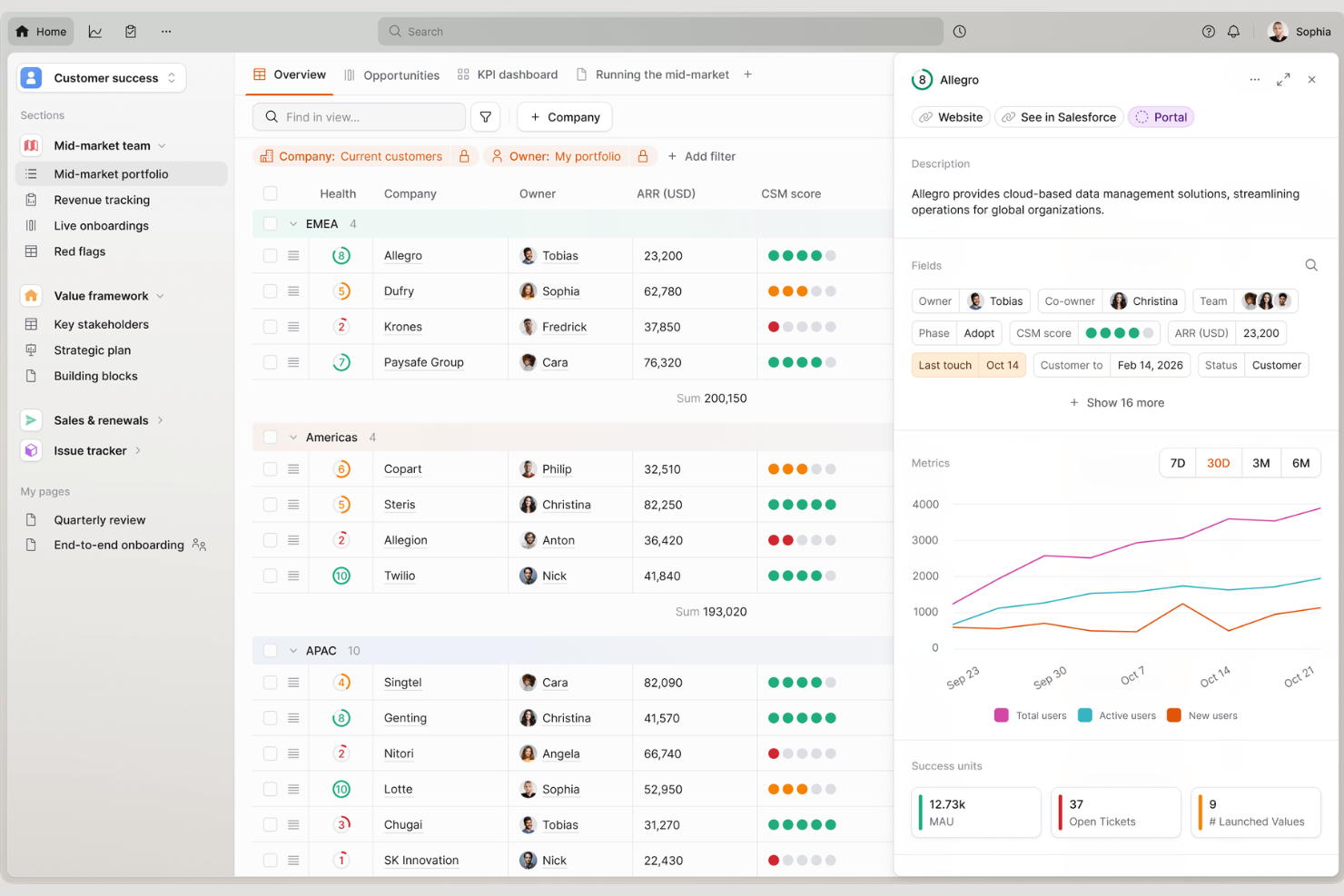
Planhat is a customer platform designed for teams that need to manage complex account relationships and data across the customer lifecycle. It’s especially relevant for customer success, account management, and revenue operations teams in SaaS and B2B organizations. If your business needs to unify customer data, track engagement, and coordinate account activities, Planhat offers a flexible workspace to support those needs.
Who Is Planhat Best For?
Planhat is a strong choice for customer success and account management teams in SaaS and B2B companies that need to centralize and customize customer data.
Why I Picked Planhat
What drew me to Planhat for key account management is its flexible approach to customer data modeling. The platform lets you define custom objects, fields, and relationships, so you can mirror your unique account structures and processes without being boxed in by rigid templates.
I find this especially valuable for organizations with complex or evolving customer journeys, where standard CRM fields just don’t capture the full picture. Planhat’s ability to centralize diverse data sources and visualize account hierarchies makes it a strong fit for teams that need to adapt their workflows as their business grows.
Planhat Key Features
Some other features in Planhat that support key account management include:
- Playbook automation: Build and trigger automated workflows for onboarding, renewals, and other account milestones.
- Health scoring: Configure custom health scores using multiple data sources to monitor account risk and engagement.
- Collaboration hub: Centralize conversations, notes, and tasks for each account to keep teams aligned.
- Revenue tracking: Track recurring revenue, expansions, and churn at the account level for accurate forecasting.
Planhat Integrations
Integrations include Salesforce, HubSpot, Pipedrive, Zendesk, Intercom, Slack, Microsoft Teams, Mixpanel, Snowflake, and Google Drive.
Pros and Cons
Pros:
- Playbook automation for lifecycle management
- Health scoring uses multiple customer data sources
- Custom objects support complex account structures
Cons:
- No built-in forecasting for account growth
- Limited in-app reporting customization options

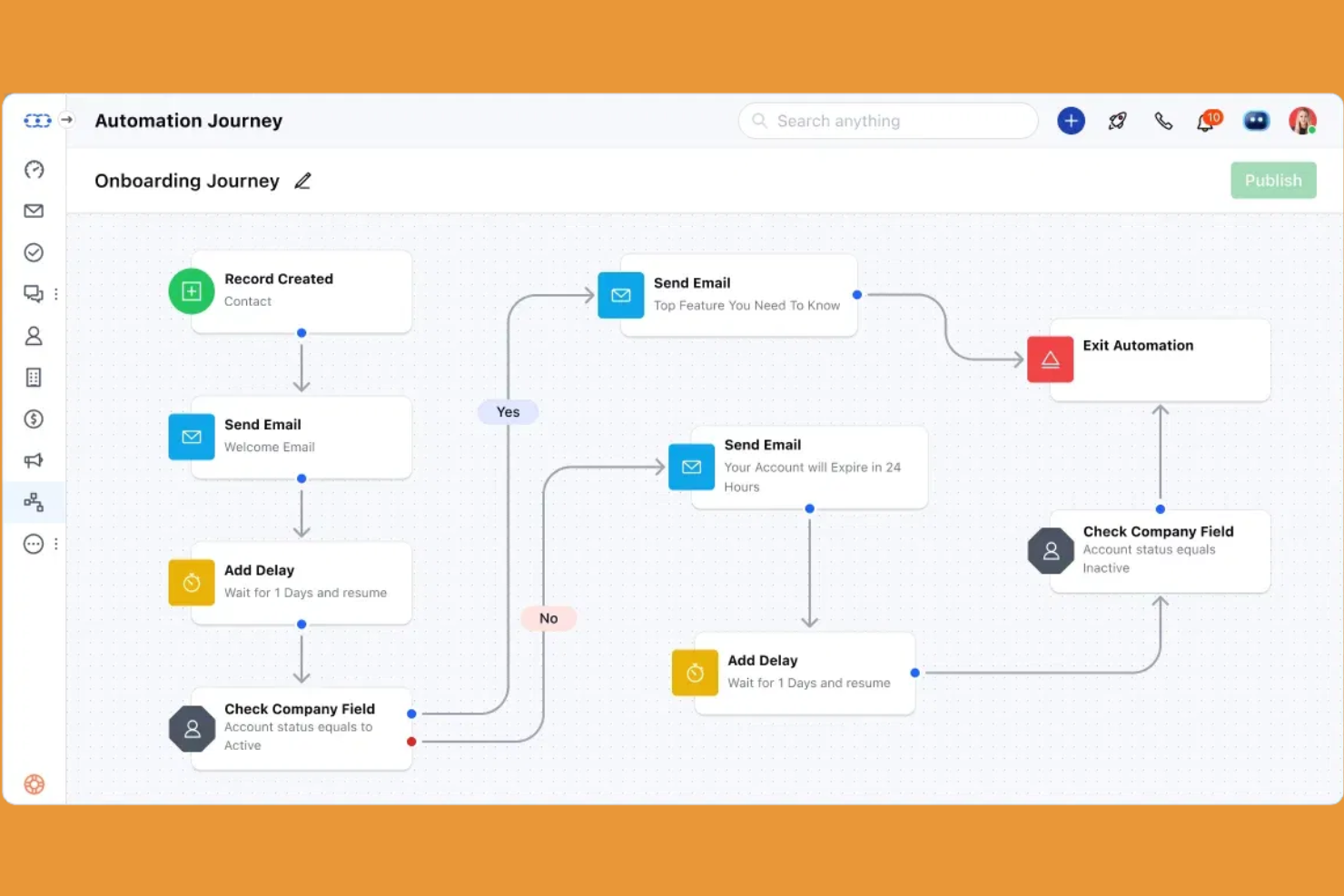
Salesmate is a CRM platform designed for sales teams and account managers who want to automate complex workflows and manage client relationships in one place. It appeals to businesses looking for a unified system that combines communication, deal tracking, and task management. If your team needs to streamline account activities and keep every interaction organized, Salesmate offers a focused solution.
Who Is Salesmate Best For?
Salesmate is a strong fit for small to mid-sized sales teams that need to automate workflows and manage client communications within a single platform.
Why I Picked Salesmate
What stands out about Salesmate for key account management is its built-in calling and workflow automation, which help teams manage complex client relationships without switching between tools. I picked Salesmate because it lets you automate repetitive sales tasks, trigger follow-ups, and set up multi-step workflows that keep account activities moving forward.
The integrated calling feature means you can log calls, record conversations, and track call outcomes directly within the CRM. For teams that need to coordinate ongoing communication and automate routine processes, Salesmate brings these capabilities together in a single platform.
Salesmate Key Features
Some other features in Salesmate that support account management include:
- Deal pipeline management: Visualize, organize, and track deals through customizable pipeline stages for better oversight of key accounts.
- Shared team inbox: Centralize all client emails and messages so your team can collaborate on account communications.
- Sales activity tracking: Monitor meetings, tasks, and touchpoints for each account to ensure nothing falls through the cracks.
- Built-in sales sequences: Automate personalized email and task sequences to nurture key accounts over time.
Salesmate Integrations
Integrations include Google Workspace, Microsoft 365, Slack, DocuSign, HubSpot, ActiveCampaign, BigCommerce, Brevo, RingCentral, and Looker Studio.
Pros and Cons
Pros:
- Visual deal pipelines for tracking key accounts
- Automated workflows for multi-step account processes
- Built-in calling with call recording and logging
Cons:
- Limited advanced reporting for account analytics
- No territory management for account assignments

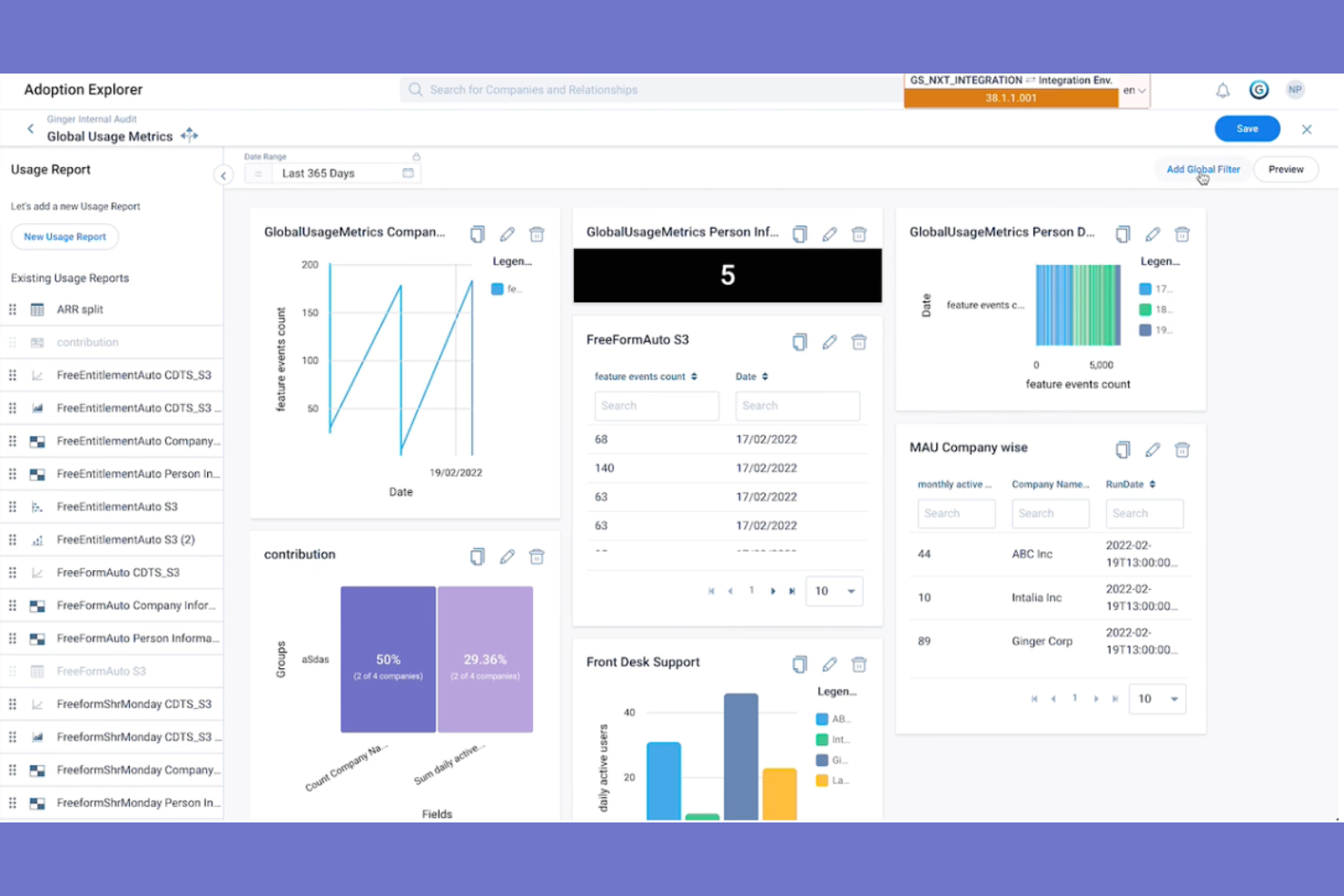
Gainsight is a customer success platform designed for teams that need deep visibility into account health and engagement. It’s especially relevant for B2B organizations managing complex client portfolios and recurring revenue growth. If your business needs to proactively identify risks and drive retention, Gainsight offers tools to help you monitor, analyze, and act on key account signals.
Who Is Gainsight Best For?
Gainsight is a strong fit for mid-sized to large B2B companies with dedicated customer success or account management teams.
Why I Picked Gainsight
What makes Gainsight a strong choice for key account management is its advanced health scoring and risk alert capabilities. I picked Gainsight because it lets you build custom health scorecards that combine product usage, support activity, and relationship metrics, so you can spot at-risk accounts before issues escalate.
The platform’s automated risk alerts notify your team when key indicators change, helping you prioritize outreach and intervention. For organizations that need to proactively manage renewals and prevent churn, these features provide the visibility and early warning signals that are essential.
Gainsight Key Features
Some other features in Gainsight that support key account management include:
- Success plan templates: Create and manage structured account plans with predefined objectives and milestones.
- Timeline activity tracking: Log and view all customer interactions and touchpoints in a centralized timeline.
- Playbook automation: Trigger standardized workflows for common account scenarios, such as onboarding or escalation.
- Survey and feedback tools: Collect and analyze customer feedback directly within the platform to inform account strategies.
Gainsight Integrations
Integrations include Salesforce, HubSpot, Zendesk, Microsoft Dynamics 365, Slack, Snowflake, Jira, Marketo, Google Workspace, and SAP Sales Cloud.
Pros and Cons
Pros:
- Centralized timeline for all account activities
- Automated risk alerts for proactive outreach
- Customizable health scorecards for each account
Cons:
- Advanced automation requires higher-tier plans
- Reporting options can be limiting for analytics
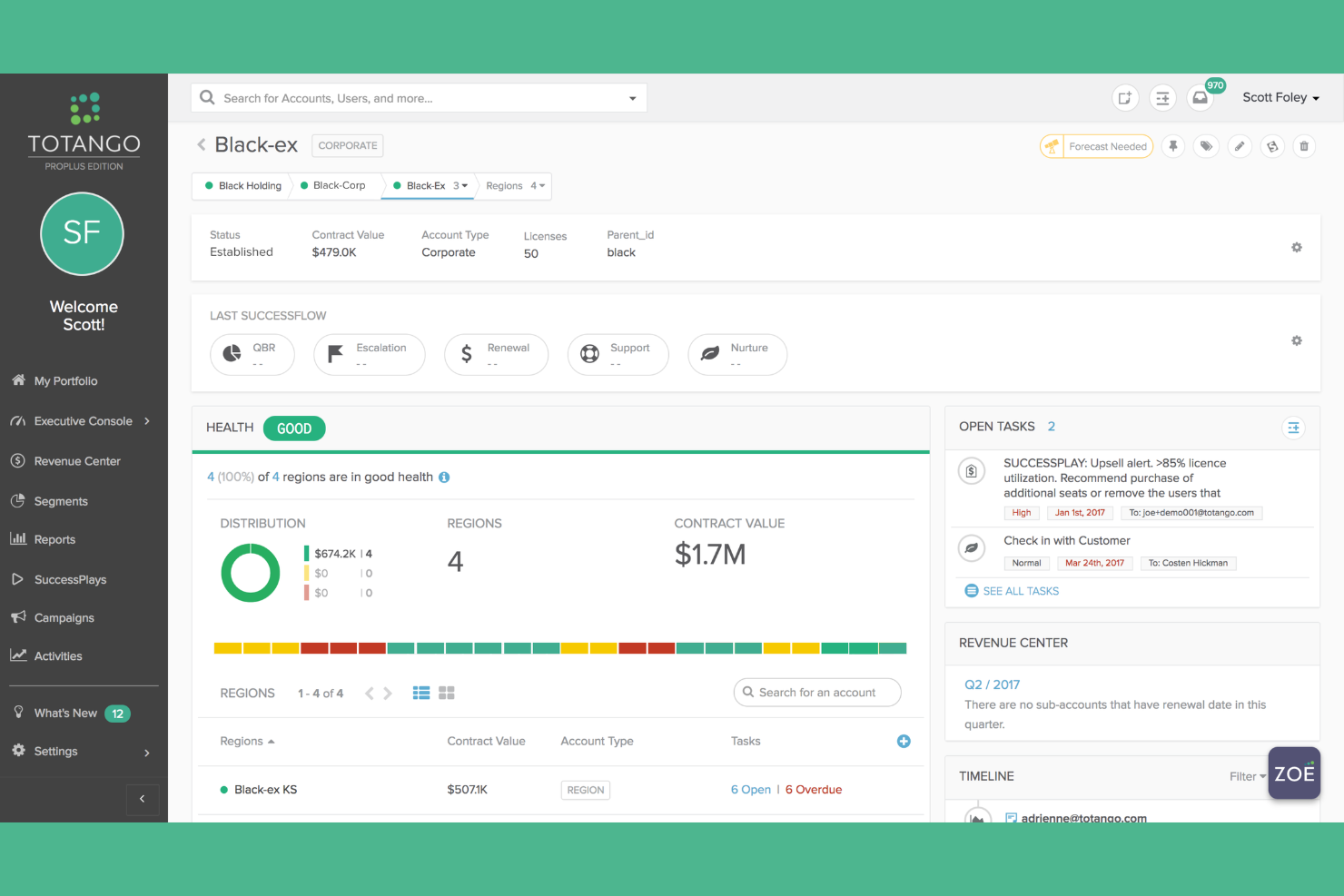
Totango is a customer success platform designed for teams managing complex client relationships and renewals. It appeals to organizations that want to build, track, and optimize personalized account journeys at scale. If your business needs flexible tools to coordinate customer engagement and retention activities, Totango offers a modular approach that adapts to different account strategies.
Who Is Totango Best For?
Totango is a good fit for customer success teams at mid-sized to large B2B companies that manage ongoing client relationships and renewals.
Why I Picked Totango
What stands out about Totango for key account management is its modular approach to building customer success journeys. I picked Totango because its SuccessBLOCs let you design and deploy targeted workflows for different account segments, making it easy to tailor engagement strategies as accounts evolve.
The platform also provides journey mapping and health scoring tools, so you can monitor progress and intervene at the right moments. For teams managing complex, multi-stage relationships, these modular capabilities help ensure every account receives the right level of attention and support.
Totango Key Features
In addition to its modular journey design, Totango offers several other features that support key account management:
- Account segmentation: Group accounts by industry, size, or lifecycle stage to tailor engagement and reporting.
- Automated task assignment: Assign follow-up actions to team members based on account triggers or milestones.
- Custom dashboards: Build visual dashboards to track account health, activity, and outcomes in real time.
- Integration marketplace: Connect with CRM, support, and communication tools directly from Totango’s platform.
Totango Integrations
Integrations include Salesforce, Zendesk, HubSpot, Microsoft Outlook, Gmail, Intercom, Jira Software, Mixpanel, Zoho, and Zuora.
Pros and Cons
Pros:
- Built-in playbooks for renewal and expansion
- Real-time account health scoring and alerts
- Modular SuccessBLOCs for tailored account workflows
Cons:
- No built-in phone dialer or SMS features
- Limited reporting customization for complex needs
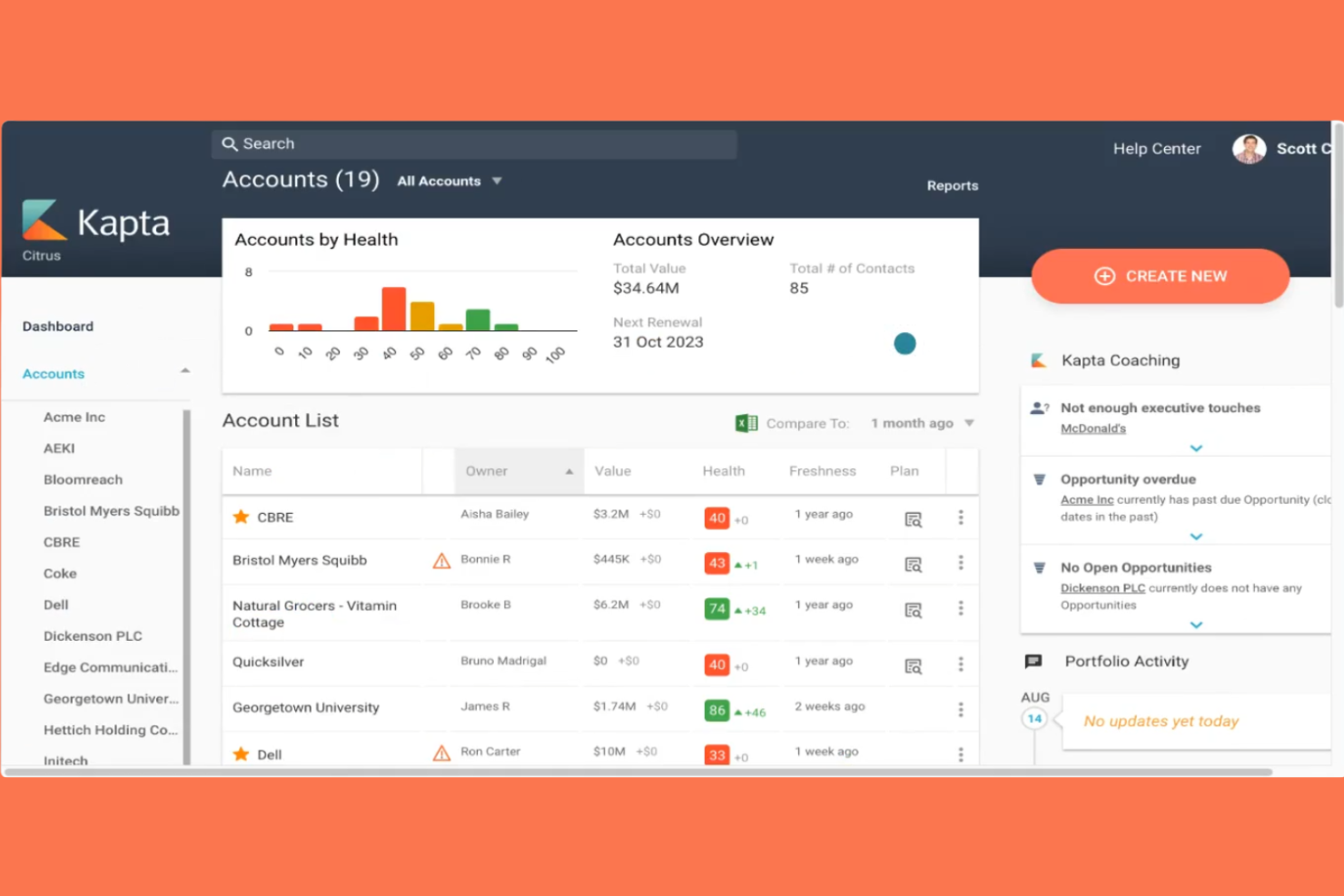
Kapta is a key account management platform designed for teams that want to bring more structure and visibility to their client relationships. It’s especially useful for organizations that need to formalize account planning and track progress on strategic initiatives. If your business manages complex client portfolios and values transparency in account health, Kapta offers tools to help you stay organized and proactive.
Who Is Kapta Best For?
Kapta is a strong fit for mid-sized to large B2B organizations with dedicated account management teams seeking structured, customizable account planning tools.
Why I Picked Kapta
What drew me to Kapta is how it lets teams build and customize account planning templates to fit their own processes. This flexibility means you can standardize your approach across accounts while still tailoring plans to each client’s needs. I see real value in features like editable templates for account reviews and action plans, which help teams document goals, strategies, and progress in a consistent way. For organizations that want to move beyond static spreadsheets and create repeatable, collaborative account planning workflows, Kapta stands out as a practical solution.
Kapta Key Features
In addition to customizable account planning templates, Kapta offers several other features that support key account management:
- Voice of customer surveys: Collect structured feedback from clients directly within the platform to inform account strategies.
- Account health scoring: Monitor account status using configurable metrics and visual dashboards.
- Task and action tracking: Assign, track, and manage tasks related to account plans and client commitments.
- Relationship mapping: Visualize key stakeholders and organizational hierarchies within each client account.
Kapta Integrations
Integrations include Salesforce, HubSpot, Microsoft Dynamics 365, Microsoft Teams, Zoho, Slack, Mailchimp, and ConnectWise.
Pros and Cons
Pros:
- Supports structured action and task tracking
- Account health dashboards with configurable metrics
- Visual relationship mapping for client stakeholders
- Built-in voice of customer survey tools
- Customizable templates for account planning workflows
Cons:
- Onboarding process can be time-consuming
- No dedicated mobile app available
- Fewer native integrations than some competitors
- Limited pre-built reporting and analytics options
- Pricing is not transparent on the website
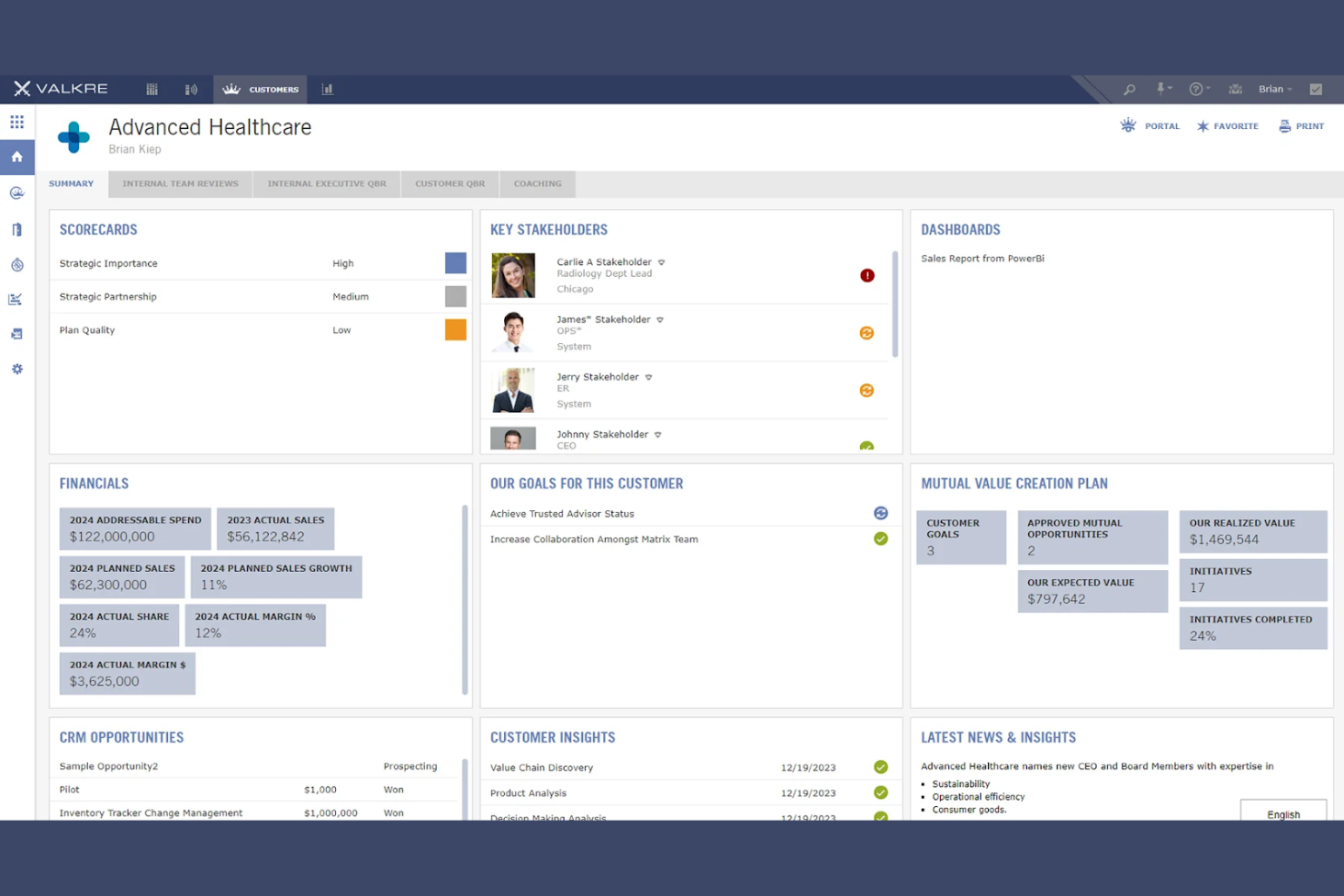
Valkre offers a specialized platform for teams focused on building stronger, more collaborative relationships with their key accounts. It’s designed for B2B organizations that want to engage customers in ongoing value discussions and joint planning. The tool helps account managers and customer success teams capture, organize, and act on customer feedback and shared initiatives.
Who Is Valkre Best For?
Valkre is a strong fit for B2B account management and customer success teams in mid-sized to large enterprises that prioritize collaborative customer engagement.
Why I Picked Valkre
I picked Valkre because it’s built specifically for teams that want to co-create value with their customers, not just manage accounts. The platform lets you structure collaborative workflows where both your team and your clients can contribute ideas, feedback, and action items in real time. I appreciate how Valkre supports joint planning and transparent progress tracking, which helps keep everyone aligned on shared goals. For organizations that see account management as an ongoing partnership, these collaborative features make Valkre a strong choice.
Valkre Key Features
Some other features in Valkre that support key account management include:
- Customer feedback capture: Collect and organize customer input directly within the platform for easy reference and follow-up.
- Account health dashboards: Visualize account status, engagement, and progress toward shared objectives in real time.
- Document management: Store, share, and collaborate on key account documents and deliverables in a centralized location.
- Role-based permissions: Control access to sensitive account information and workflows based on user roles and responsibilities.
Valkre Integrations
Integrations include Salesforce, Microsoft Dynamics 365, Power BI, Oracle, Tableau, Snowflake, Asana, SAP, Azure, and HubSpot.
Pros and Cons
Pros:
- Supports structured value co-creation workflows
- Offers customizable account health dashboards
- Captures and organizes customer feedback
Cons:
- Onboarding process can be time-consuming
- Limited pre-built reporting templates
Salesforce is a cloud-based CRM platform built for organizations that need to manage complex customer relationships at scale. It appeals to enterprises and growing businesses that want deep customization, advanced automation, and a unified view of every account. If your team needs a flexible system to centralize account data and coordinate sales activities, Salesforce offers a wide range of tools to support those needs.
Who Is Salesforce Best For?
Salesforce is a strong choice for large or scaling sales organizations that need advanced customization and analytics for managing key accounts.
Why I Picked Salesforce
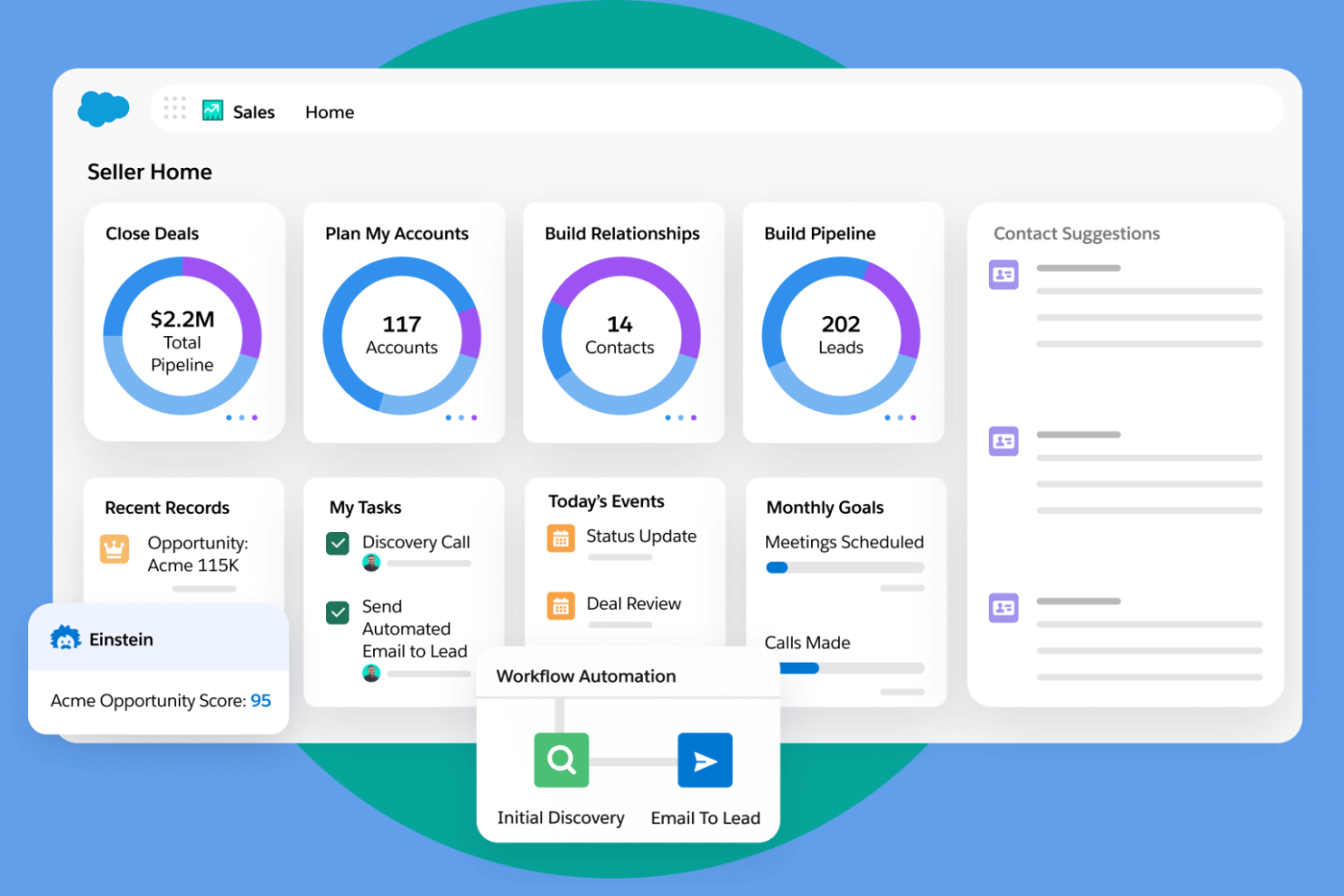
What makes Salesforce a strong fit for key account management is its advanced AI-driven sales insights, which help teams identify opportunities and risks across complex accounts. I picked Salesforce because its Einstein AI features surface predictive analytics, next-step recommendations, and account health scores directly within the CRM. These AI-driven insights let account managers prioritize their outreach and tailor engagement strategies based on real-time data. For organizations managing high-value accounts, this level of intelligence supports more proactive and informed decision-making.
Salesforce Key Features
Some other Salesforce features that support key account management include:
- Customizable account hierarchies: Organize and visualize complex relationships between parent and subsidiary accounts for better oversight.
- Automated workflow rules: Set up triggers and actions to automate repetitive tasks and standardize account processes.
- Collaboration tools (Chatter): Enable real-time communication and file sharing within account records for team-based account management.
- Document management: Store, access, and share contracts, proposals, and other key documents directly within account profiles.
Salesforce Integrations
Integrations include Slack, Jira, LinkedIn, QuickBooks, DocuSign, Mailchimp, Google Workspace, Dropbox, HubSpot, and SAP.
Pros and Cons
Pros:
- Built-in collaboration with Chatter for teams
- Highly customizable account and pipeline views
- AI-driven insights for account prioritization
Cons:
- Limited out-of-the-box industry templates
- Complex setup for advanced account workflows

Altify is a sales opportunity management platform designed for organizations handling complex, high-value deals. It’s especially relevant for enterprise sales teams that need structured processes to manage multiple stakeholders and long sales cycles. If your business requires deep account mapping and collaborative deal planning, Altify offers tools to help you organize and execute on strategic opportunities.
Who Is Altify Best For?
Altify is a strong fit for enterprise sales teams in B2B industries managing complex, multi-stakeholder opportunities.
Why I Picked Altify
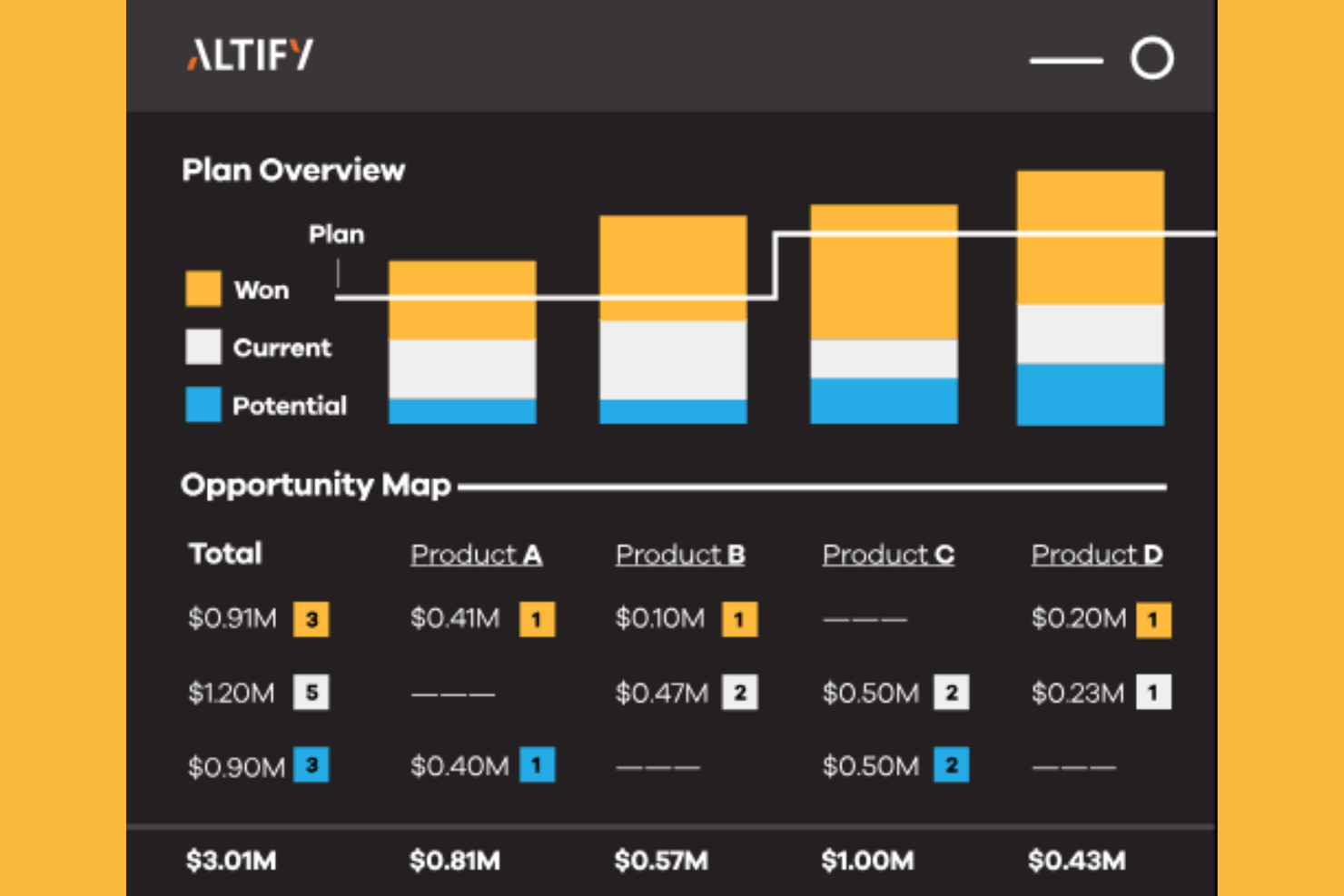
What sets Altify apart for key account management is its focus on opportunity management in complex sales environments. I picked Altify because it offers structured account planning and relationship mapping tools that help teams navigate multi-layered buying groups and long sales cycles.
The platform’s guided selling workflows and deal collaboration features make it easier to align internal teams and track progress on high-value opportunities. For organizations that need to manage intricate sales processes with multiple stakeholders, these capabilities provide the structure and visibility required to move deals forward.
Altify Key Features
Some other features in Altify that support key account management include:
- Account segmentation tools: Segment and prioritize accounts based on custom criteria to focus resources where they matter most.
- Sales methodology alignment: Embed your organization’s sales methodology directly into workflows for consistent execution.
- Pipeline visualization: View and manage opportunities across stages with interactive pipeline dashboards.
- Collaboration workspaces: Enable cross-functional teams to share insights, documents, and updates within dedicated account spaces.
Altify Integrations
Integrations include Salesforce, Microsoft Dynamics 365, SAP, Oracle, Slack, Docusign, Marketo, HubSpot, Tableau, and LinkedIn Sales Navigator.
Pros and Cons
Pros:
- Visual account and opportunity planning tools
- Built-in sales methodology guidance and templates
- Deep relationship mapping for complex sales cycles
Cons:
- No built-in forecasting beyond opportunity level
- Limited reporting customization for advanced analytics

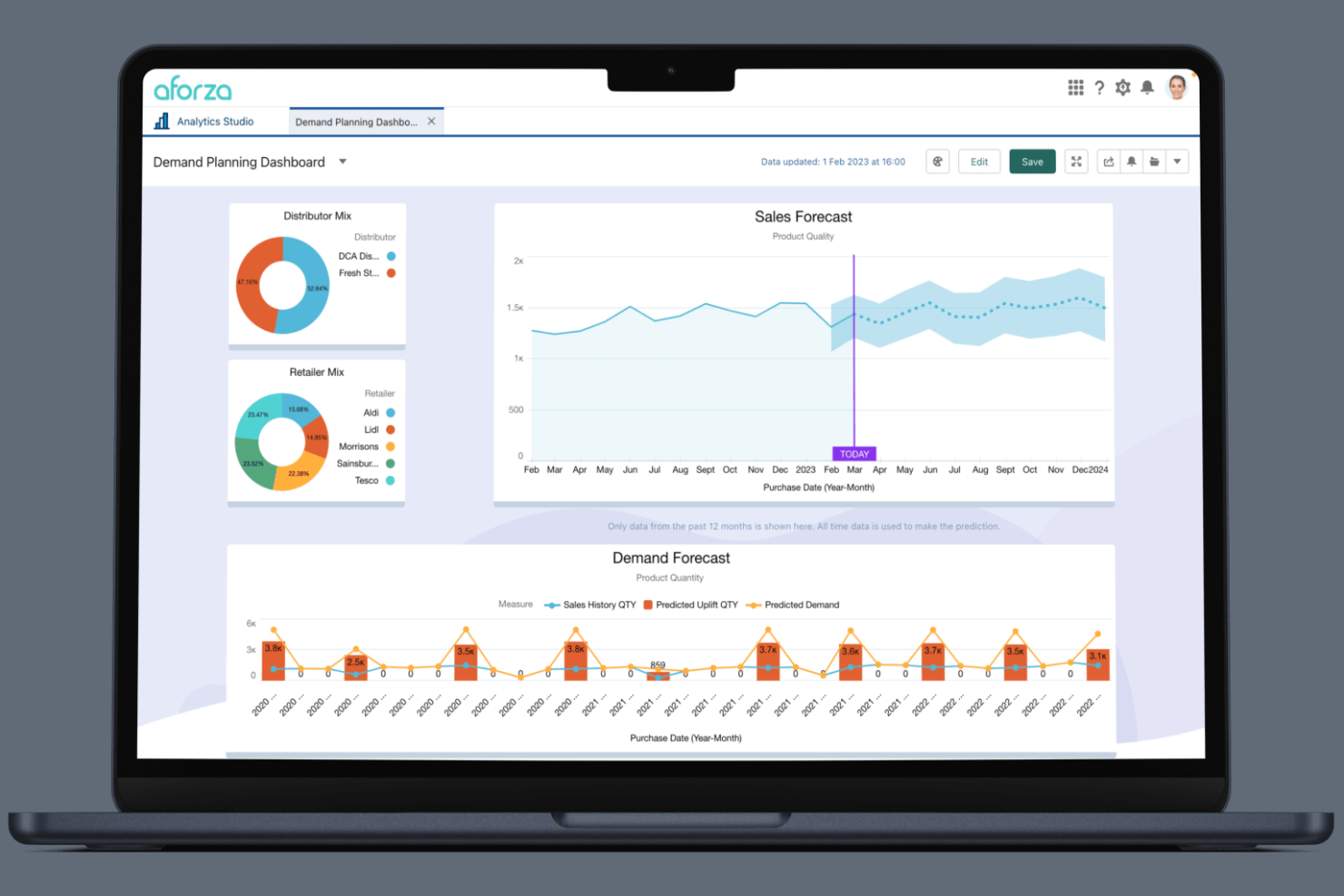
Aforza is a cloud-based platform designed for consumer goods companies managing complex field sales and account relationships. It’s built for teams that need to coordinate sales, trade promotions, and retail execution across distributed markets. If your business relies on real-time insights and mobile tools to manage key accounts in the field, Aforza brings together sales planning and execution in one place.
Who Is Aforza Best For?
Aforza is a strong fit for consumer goods companies with field sales teams that need integrated account management and retail execution tools.
Why I Picked Aforza
What stands out to me about Aforza is how it connects field sales activities directly with account management for consumer goods teams. The platform offers mobile tools that let reps capture store data, manage visits, and execute trade promotions while on the go. I see real value in its ability to sync field insights with account plans, so teams can quickly adapt strategies based on what’s happening in the market. For organizations that need to bridge the gap between field execution and account management, Aforza’s integration of sales, merchandising, and analytics makes it a strong choice.
Aforza Key Features
Some other features in Aforza that support key account management include:
- Account hierarchy management: Organize and visualize multi-level account structures for complex customer organizations.
- Customizable dashboards: Build tailored dashboards to track sales performance, account activity, and field execution metrics.
- Order management workflows: Enable field teams to create, modify, and submit orders directly from the platform.
- Retail audit tools: Equip users with mobile checklists and photo capture for in-store compliance and merchandising audits.
Aforza Integrations
Integrations include Salesforce, SAP, Microsoft Dynamics 365, Oracle, Google Workspace, Apple iOS, Android, Azure, AWS, and an open API for custom integrations.
Pros and Cons
Pros:
- Customizable dashboards for sales and account metrics
- Visual account hierarchy and territory mapping
- Built-in trade promotion management tools
Cons:
- Onboarding process can be lengthy for large teams
- Limited pre-built analytics and reporting options

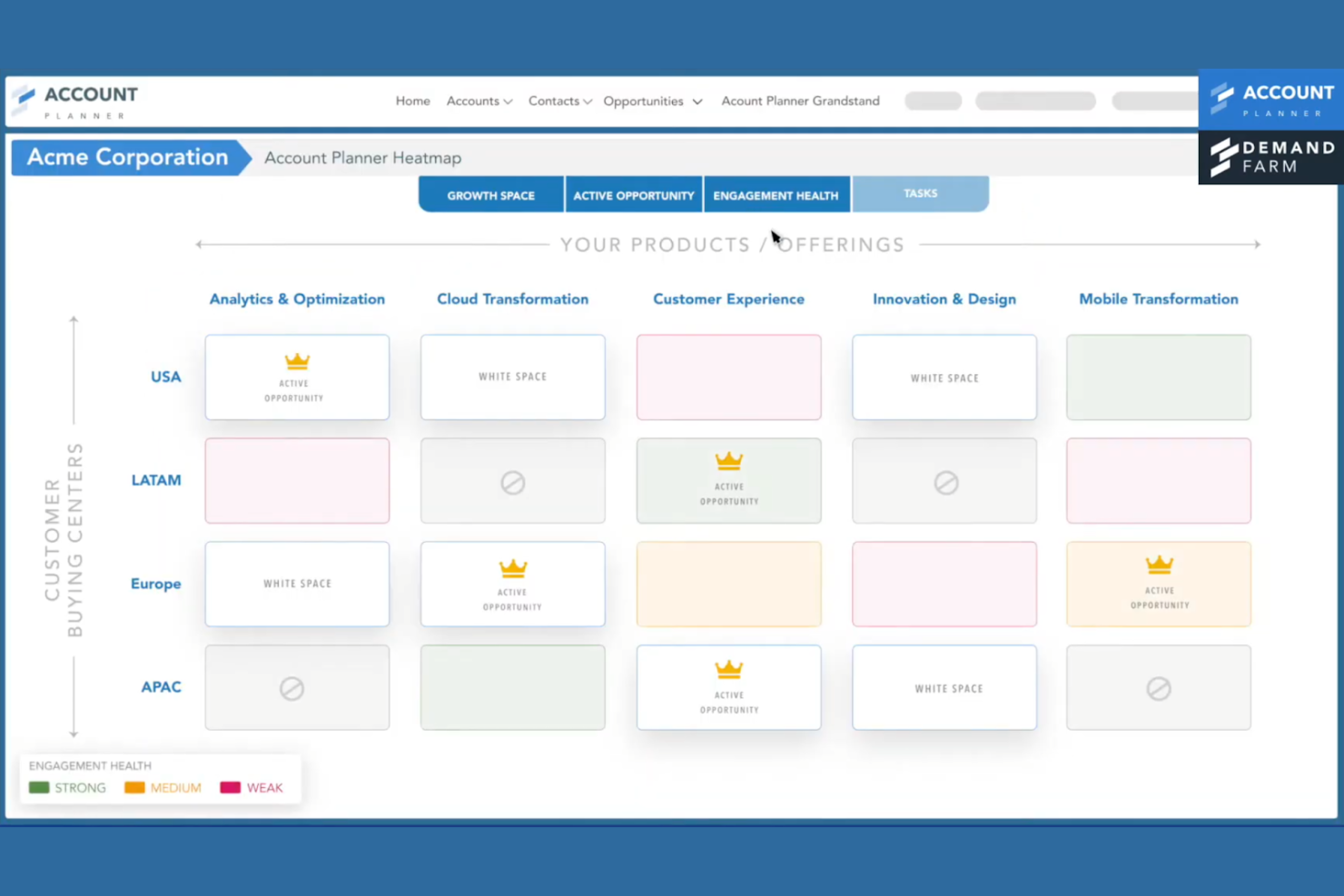
DemandFarm is designed for organizations managing complex, high-value client relationships across multiple stakeholders. This platform suits enterprise sales and account management teams that need to organize, analyze, and grow strategic accounts with existing customers. Its approach helps users gain deeper visibility into account structures and engagement patterns.
Who Is DemandFarm Best For?
DemandFarm is a good fit for large enterprise sales and account management teams handling complex, multi-stakeholder client relationships.
Why I Picked DemandFarm
I chose DemandFarm because its visual relationship mapping stands out for teams managing large, intricate accounts. The platform lets you build interactive org charts and relationship maps, making it easier to identify key stakeholders and influence paths within client organizations.
I appreciate how you can layer in account intelligence and track engagement directly on these maps, which helps prioritize outreach and spot gaps in coverage. For anyone focused on strategic account growth in complex enterprise environments, these visual tools offer a clear advantage.
DemandFarm Key Features
Some other features in DemandFarm that support key account management include:
- Account planning templates: Use structured templates to build and update strategic account plans directly within the platform.
- White space analysis: Identify untapped opportunities and potential areas for growth within existing accounts.
- Deal pursuit tracking: Monitor the progress of key deals and align team activities with account objectives.
- Salesforce integration: Sync account data and activities seamlessly with Salesforce to maintain a single source of truth.
DemandFarm Integrations
Integrations include Salesforce, HubSpot, Microsoft Dynamics, Microsoft Outlook, Gmail, Gong, Slack, and Microsoft Teams.
Pros and Cons
Pros:
- Relationship mapping tracks stakeholder engagement
- Account planning templates standardize strategy creation
- White space analysis highlights growth opportunities
Cons:
- Onboarding process can be time-intensive for teams
- Reporting customization options are somewhat restricted
Other Key Account Management Software
Here are some additional key account management software options that didn’t make it onto my shortlist, but are still worth checking out:


Key Account Management Software Selection Criteria
When selecting the best key account management software to include in this list, I considered common buyer needs and pain points like managing complex account hierarchies and ensuring consistent account engagement tracking. I also used the following framework to keep my evaluation structured and fair:
Core Functionality (25% of total score)
To be considered for inclusion in this list, each solution had to fulfill these common use cases:
- Manage and segment key accounts
- Track account activity and engagement
- Assign and monitor account tasks
- Store and organize account notes and documents
- Generate account-level reports
Additional Standout Features (25% of total score)
To help further narrow down the competition, I also looked for unique features, such as:
- Customizable account data modeling
- Automated playbooks for account workflows
- Built-in customer health scoring
- Visual account hierarchy mapping
- Native integrations with sales and support tools
Usability (10% of total score)
To get a sense of the usability of each system, I considered the following:
- Clean and intuitive user interface
- Logical navigation between account views
- Minimal clicks to complete common tasks
- Responsive design for different devices
- Customizable dashboards and layouts
Onboarding (10% of total score)
To evaluate the onboarding experience for each platform, I considered the following:
- Availability of step-by-step product tours
- Access to training videos and documentation
- Pre-built templates for quick setup
- In-app chat or chatbot support during onboarding
- Live webinars or onboarding sessions
Customer Support (10% of total score)
To assess each software provider’s customer support services, I considered the following:
- Multiple support channels available
- Fast response times to inquiries
- Access to a searchable help center
- Availability of dedicated account managers
- Community forums or user groups
Value For Money (10% of total score)
To evaluate the value for money of each platform, I considered the following:
- Transparent and scalable pricing plans
- Features included at each pricing tier
- No hidden fees or surprise charges
- Free trial or demo availability
- Discounts for annual or multi-user contracts
Customer Reviews (10% of total score)
To get a sense of overall customer satisfaction, I considered the following when reading customer reviews:
- Positive feedback on account management features
- Reports of reliable system performance
- Comments on ease of adoption and training
- User satisfaction with customer support
- Suggestions for product improvements
How to Choose Key Account Management Software
It’s easy to get bogged down in long feature lists and complex pricing structures. To help you stay focused as you work through your unique software selection process, here’s a checklist of factors to keep in mind:
| Factor | What to Consider |
|---|---|
| Scalability | Will the software handle your account volume and complexity as your business grows? Check for user, data, and workflow limits. |
| Integrations | Does it connect natively to your CRM, support, analytics, and communication tools? Confirm compatibility with your existing stack. |
| Customizability | Can you tailor account fields, workflows, and reporting to your processes? Avoid tools that force rigid templates or data models. |
| Ease of use | Will your team adopt it quickly? Look for clear navigation, logical workflows, and minimal training requirements. Test with real users if possible. |
| Implementation and onboarding | How long will the setup take, and what resources are required? Ask about migration support, training, and typical time to value for teams like yours. |
| Cost | Are pricing tiers transparent and predictable as you scale? Watch for hidden fees, per-user charges, or required add-ons. Compare total cost of ownership. |
| Security safeguards | Does the vendor offer role-based access, data encryption, and compliance with standards like SOC 2 or GDPR? Assess risk based on your data sensitivity. |
| Support availability | What support channels and response times are offered? Consider if you need 24/7 help, dedicated account managers, or self-service resources. |
What Is Key Account Management Software?
Key account management software is a digital platform designed to help businesses organize, track, and nurture relationships with their most important customers. These tools centralize account data, manage communications, and support collaboration across teams. By providing visibility into account activity and engagement, key account management software enables businesses to prioritize strategic accounts, coordinate follow-ups, and drive long-term customer value.
Features of Key Account Management Software
When selecting key account management software, keep an eye out for the following key features:
- Account segmentation: Group and categorize accounts based on criteria like revenue, industry, or engagement level to prioritize outreach and tailor strategies.
- Contact management: Store, update, and organize detailed contact information for all stakeholders within each account, making it easy to track relationships and communication history.
- Activity tracking: Log meetings, calls, emails, and other interactions to maintain a complete timeline of engagement for each account.
- Task and workflow management: Assign, schedule, and monitor tasks or follow-ups related to specific accounts, ensuring nothing falls through the cracks.
- Document storage: Upload, organize, and share proposals, contracts, and other key documents within each account’s profile for easy access and collaboration.
- Custom fields and data modeling: Add and configure fields to capture account-specific data that aligns with your business processes and reporting needs.
- Reporting and analytics: Generate account-level reports and dashboards to monitor performance, identify trends, and support data-driven decision-making.
- Collaboration tools: Enable team members to share notes, updates, and insights within account records, supporting coordinated account management.
- Integration capabilities: Connect with CRM, email, calendar, and other business systems to sync data and streamline workflows across platforms.
Common Key Account Management Software AI Features
Beyond the standard key account management software features listed above, many of these solutions are incorporating AI with features like:
- Predictive churn analysis: Uses AI algorithms to analyze account behavior and engagement patterns, identifying accounts at risk of churn so teams can intervene proactively.
- Automated sentiment analysis: Applies natural language processing to emails, meeting notes, and communications to gauge client sentiment and flag potential issues or opportunities.
- AI-driven opportunity scoring: Evaluates account data and historical trends to prioritize accounts with the highest likelihood of upsell, renewal, or expansion.
- Intelligent task recommendations: Suggests next best actions for account managers based on account activity, engagement signals, and historical outcomes.
- Automated data enrichment: Continuously updates and fills in missing account or contact details by sourcing information from external databases and public sources using AI.
Benefits of Key Account Management Software
Implementing key account management software provides several benefits for your team and your business. Here are a few you can look forward to:
- Centralized account information: All account data, contacts, and documents are stored in one place, making it easy for teams to access and update information.
- Improved account visibility: Real-time dashboards and reporting provide a clear view of account health, engagement, and activity history.
- Stronger team collaboration: Built-in collaboration tools and shared notes help teams coordinate outreach and stay aligned on account strategies.
- Proactive risk management: Features like health scoring and predictive analytics help identify at-risk accounts before issues escalate.
- Streamlined workflows: Automated task management and playbooks ensure consistent follow-up and reduce manual work for account managers.
- Customizable processes: Flexible data modeling and custom fields allow you to tailor the platform to your unique account structures and business needs.
- Better decision-making: Analytics and integration capabilities provide actionable insights, supporting data-driven strategies for account growth and retention.
Costs and Pricing of Key Account Management Software
Selecting key account management software requires an understanding of the various pricing models and plans available. Costs vary based on features, team size, add-ons, and more. The table below summarizes common plans, their average prices, and typical features included in key account management software solutions:
Plan Comparison Table for Key Account Management Software
| Plan Type | Average Price | Common Features |
|---|---|---|
| Free Plan | $0 | Basic account and contact management, limited activity tracking, and simple reporting. |
| Personal Plan | $10-$25/user/month | Account segmentation, task management, document storage, and email integration. |
| Business Plan | $30-$60/user/month | Advanced reporting, workflow automation, custom fields, integrations with CRM and support tools, and team collaboration. |
| Enterprise Plan | $70-$150/user/month | Custom data modeling, dedicated support, advanced security, API access, and compliance features. |
Key Account Management Software FAQs
Here are some answers to common questions about key account management software:
How is key account management software different from a standard CRM?
Key account management software focuses on managing strategic, high-value accounts with features for account segmentation, collaboration, and long-term planning. Standard CRM systems are broader, tracking all leads and customers, but may lack the depth needed for complex account relationships.
Can key account management software integrate with my existing CRM?
Yes, most key account management software solutions offer integrations with popular CRM platforms. This allows you to sync account data, contacts, and activities, reducing manual entry and keeping information consistent across systems.
What types of businesses benefit most from key account management software?
Businesses with complex sales cycles, large or strategic clients, or dedicated account management teams benefit most. Industries like B2B technology, manufacturing, and professional services often use these tools to manage long-term client relationships.
How long does it take to implement key account management software?
Implementation time varies by platform and business size. Many teams can get started within a few days using templates and onboarding resources, but full customization and data migration may take several weeks for larger organizations.
What security features should I look for in key account management software?
Look for role-based access controls, data encryption, audit logs, and compliance with standards like SOC 2 or GDPR. These features help protect sensitive account information and ensure your business meets regulatory requirements.