

10 Best Insurance CRM Software Reviewed in 2026

Best Insurance CRM Software Shortlist


Managing client relationships and streamlining operations in the insurance industry can be daunting, especially with the vast amount of data and complex regulatory requirements. However, finding the right software to help you manage these processes can sometimes feel equally as overwhelming.
As a revenue operations manager, I’ve seen firsthand how the best CRM software can transform these challenges into opportunities for growth. That’s why, using my experience in digital software, I tested and reviewed several of the top insurance CRM software solutions on the market.
By leveraging these tools, agencies can optimize their operations, boost productivity, and ultimately increase revenue. Whether you’re looking to upgrade your current system or implement a new one, this guide will help you make an informed decision that aligns with your business goals.
Why Trust Our Software Reviews
We’ve been testing and reviewing CRM software since 2022. As revenue operations experts ourselves, we know how critical and difficult it is to make the right decision when selecting software. We invest in deep research to help our audience make better software purchasing decisions.
We’ve tested more than 2,000 tools for different revenue operations use cases and written over 1,000 comprehensive software reviews. Learn how we stay transparent & our software review methodology.
Best Insurance CRM Software Summary
| Tool | Best For | Trial Info | Price | ||
|---|---|---|---|---|---|
| 1 | Best for AI-driven lead tracking | Free plan + 15-day free trial available | From $14/user/month (billed annually) | Website | |
| 2 | Best for low-code insurance software | Not available | Pricing upon request | Website | |
| 3 | Best for customizable insurance workflows | 15-day free trial available | From $12/user/month (billed annually) | Website | |
| 4 | Best for integrated financial services cloud | 30-day free trial | From $25/user/month (billed annually) | Website | |
| 5 | Best for centralized account management | 14-day free trial available | From $29/user/month (billed annually) | Website | |
| 6 | Best for comprehensive insurance CRM solutions | Not available | Pricing upon request | Website | |
| 7 | Best for advanced agency management | Not available | Pricing upon request | Website | |
| 8 | Best for all-in-one business management | Not available | Contact for pricing. | Website | |
| 9 | Best for health and life insurance agencies | Not available | Pricing upon request | Website | |
| 10 | Best for AI-powered distribution management | Free demo available | Pricing upon request | Website |
-

Zendesk
Visit WebsiteThis is an aggregated rating for this tool including ratings from Crozdesk users and ratings from other sites.4.3 -
Pipedrive CRM
Visit WebsiteThis is an aggregated rating for this tool including ratings from Crozdesk users and ratings from other sites.4.5 -
Creatio CRM
Visit WebsiteThis is an aggregated rating for this tool including ratings from Crozdesk users and ratings from other sites.4.7





Best Insurance CRM Software Reviews
This section provides an in-depth analysis and overview of each insurance CRM software. Below, I will review the pros and cons, their features, and their best use cases.

Zoho CRM is a customizable CRM platform with AI-assisted lead tracking, omnichannel communication, workflow automation, and module customization designed to support industries like insurance in managing their full customer and policy lifecycle.
Who Is Zoho CRM Best For?
Zoho CRM is a strong fit for mid-sized insurance agencies that need a customizable, scalable CRM without the enterprise price tag.
Why I Picked Zoho CRM
I picked Zoho CRM as one of the best because of how Zia, its built-in AI assistant, handles lead scoring for insurance pipelines. Zia analyzes behavioral signals and engagement history to rank incoming leads by conversion likelihood, so my team isn't manually sorting through cold prospects. I also rely on Zia's anomaly detection to flag sudden drops in pipeline activity before they impact close rates.
Zoho CRM Key Features
- Blueprint process automation: Design step-by-step workflows for claims handling, policy renewals, and approval stages to keep processes consistent.
- Custom module layouts: Build multi-page record layouts with conditional fields to track policy details, coverage types, and client documents.
- Omnichannel communication: Manage client interactions across email, phone, live chat, and WhatsApp from a single contact record.
- Sales forecasting: Set targets and track projected revenue by rep, team, or territory using historical pipeline data.
Pros and Cons
Pros:
- Mobile app to improve communication with customers
- Zia (AI) helps identify prospects your team can convert
- Great for hybrid and remote teams
Cons:
- Advanced features gated behind top-tier subscriptions
- Pricey compared to other tools
New Product Updates from Zoho CRM

Zoho CRM Adds Zia Email Summaries and ABM Updates
Zoho CRM adds Zia Email Summaries for AI-powered email insights and Account-Based Marketing enhancements for improved account targeting and engagement. These updates help teams understand customer interactions faster, manage segments, and optimize marketing workflows. For more information, visit Zoho CRM’s official site.
 .
.

Insly is a low-code insurance management platform built for insurers, MGAs, and brokers that covers policy administration, CRM, claims management, insurance accounting, and product distribution in a single system.
Who Is Insly Best For?
Insly is a strong fit for insurers, MGAs, and brokers who need to build and manage insurance products without heavy reliance on development teams.
Why I Picked Insly
I picked Insly as one of the best because its low-code product builder stands out among other insurance management platforms. You can define product structures, configure underwriting rules, and set up rating engines without writing code from scratch. I also like that Insly's document editor lets you build dynamic policy document templates that pull in policyholder data, premium details, and endorsements automatically, which reduces manual document handling for operations teams.
Insly Key Features
- Broker portal: Give brokers direct access to view and sell your insurance products from within their own policy administration system.
- Claims management: Handle end-to-end claims with eFNOL, fraud alarms, fast-track handling rules, reserving, and real-time claims analytics.
- Insurance accounting and reporting: Automate invoice generation from policy data, reconcile premiums, pay commissions, and run real-time reports on any data point in the system.
- AI automation layer (Nora): Automate repetitive administrative tasks across submissions, underwriting, and claims without rebuilding your existing workflows.
Pros and Cons
Pros:
- Easy quote and proposal generation
- Tools for policy lifecycle management
- Automated claims processing
Cons:
- Limited workflow customization
- Limited reporting flexibility


Vtiger is a CRM platform built for insurance agencies that covers lead capture and distribution, policy and claims management, automated premium reminders, customer portal access, and marketing campaign tools in one place.
Who Is Vtiger Best For?
Vtiger is a good fit for small to mid-sized insurance agencies that need a configurable CRM they can tailor to their specific sales and service workflows.
Why I Picked Vtiger
I've included Vtiger in my top picks because its Process Designer lets you build insurance workflows from scratch, mapping out every stage from lead intake to policy renewal without being locked into a preset structure. I especially like how you can create custom modules, fields, and page layouts, so things like claims stages, policy types, and premium schedules reflect your agency's actual process. Paired with automated trigger-based actions, like sending premium due reminders or reassigning leads by policy type, the workflows perform operational tasks.
Vtiger Key Features
- Customer portal: Give policyholders a self-service portal to view policy details, submit claims, and track case statuses.
- Lead distribution rules: Automatically route incoming leads to agents based on policy type, location, or other criteria.
- Email and SMS campaigns: Send targeted outreach to policyholders using segmented contact lists and scheduled messaging.
- Reports and dashboards: Track key metrics like claims approved, premiums collected, and pipeline value with configurable visual reports.
Pros and Cons
Pros:
- Pre-built policy management templates
- Dynamic workflows with conditional logic
- Custom insurance module creation
Cons:
- Limited pre-built integrations
- Limited search function

Best for integrated financial services cloud

Salesforce Financial Services Cloud is a CRM built specifically for financial services firms, offering insurance carriers, brokerages, and agencies tools for policy lifecycle management, claims processing, policyholder servicing, and AI-driven agent workflows.
Who Is Salesforce Financial Services Cloud Best For?
It's a strong fit for mid-to-enterprise insurance carriers, brokerages, and agencies that need a unified platform to manage both agent operations and policyholder relationships at scale.
Why I Picked Salesforce Financial Services Cloud
Salesforce Financial Services Cloud is one of the few CRMs that unifies sales, service, and data operations across the entire insurance value chain on a single platform. Its Digital Insurance add-on covers real-time digital quoting, end-to-end policy management, claims management, and group benefits management without requiring a separate system. I also like the prebuilt AI agents trained specifically on insurance workflows, including first notice of loss automation, so your team isn't starting from scratch with configuration.
Salesforce Financial Services Cloud Key Features
- Actionable relationship center: Visualizes relationships between policyholders, households, financial accounts, and referred contacts in a single interactive map.
- Insurance agent console: A preconfigured workspace that surfaces policyholder data, open cases, and policy details in one view for servicing teams.
- Broker and referral tracking: Logs and manages broker-of-record relationships, referral sources, and producer performance across your book of business.
- Compliance audit trail: Records every interaction, data change, and document touchpoint to support regulatory reporting and audit readiness.
Pros and Cons
Pros:
- Support for multinational operations
- Customizable dashboards for insurance operations
- AI-driven insights for cross-sell or up-sell opportunities
Cons:
- Potential performance issues if not properly optimized
- Steep learning curve and complex implementation


Insightly is a cloud-based CRM platform with pipeline management, workflow automation, contact and account management, project tracking, and AI-assisted tools built for fast-growing sales teams.
Who Is Insightly Best For?
Insightly is a strong fit for mid-sized insurance agencies that need a single platform to manage client relationships, policies, and sales pipelines across growing teams.
Why I Picked Insightly
I picked Insightly as one of the best because of how well it handles centralized account management for insurance teams. Every client interaction, policy detail, and communication history lives in a single record, so any agent on your team can search a contact and immediately get the full picture. I especially like the flexible record linking, which lets you map complex organizational relationships—like a commercial client with multiple policies across different business units—all without leaving the platform.
Insightly Key Features
- Workflow automation: Build automated trigger-based workflows to handle repetitive tasks like renewal reminders, follow-up sequences, and status changes.
- Pipeline management: Track leads and opportunities across multiple customizable pipelines with stage-by-stage visibility into your book of business.
- AI Copilot: Use built-in AI to summarize email threads, draft replies, and update records without switching between tools.
- Customizable dashboards: Build role-specific reporting dashboards that surface real-time data on sales activity, deal progress, and team performance.
Pros and Cons
Pros:
- Custom app and extension development
- Facilitates web-to-lead capture
- Custom relationship linking
Cons:
- Limited objects and field customization
- Limited contact and opportunity management


InsuraCRM is a purpose-built insurance CRM that centralizes policy, claims, customer, and agent data to manage the full insurance lifecycle, from lead capture and quote intake through policy servicing, FNOL, and renewals.
Who Is InsuraCRM Best For?
InsuraCRM is a strong fit for insurance carriers, brokers, and agencies that need a single platform to manage sales, policy administration, claims, and distribution.
Why I Picked InsuraCRM
InsuraCRM earns its spot on my shortlist because it's one of the few CRMs built to cover the entire insurance lifecycle in one platform rather than patching together separate tools. I particularly like the AI-powered lapse prediction and next-best-offer engine on the renewals side—these give retention teams a real signal to act on before a policy lapses. The pre-underwriting risk scoring and underwriting queue prioritization during quote intake also stand out, cutting down the back-and-forth that typically slows quote-to-bind cycles.
InsuraCRM Key Features
- Claims FNOL capture: Log first notice of loss directly in the CRM and track real-time claim status updates throughout the claims process.
- Commission and performance dashboards: Monitor agent productivity, sales targets, and commission payouts across your entire distribution network.
- 360° customer view: Access a unified profile showing a customer's policy history, claims, past interactions, and documents in one place.
- Omni-channel service desk: Handle customer inquiries across email, chat, and phone, with AI-powered chatbot support built in.
Pros and Cons
Pros:
- Policy renewal automation
- Comprehensive claims management system
- Pre-configured insurance modules
Cons:
- Steep learning curve for beginners
- Cost-intensive customization


Applied Epic is an insurance agency management system (AMS) that combines policy management, sales automation, accounting, market access and quoting, benefits management, and client service tools into a single browser-native platform.
Who Is Applied Epic Best For?
Applied Epic is best suited for independent insurance agencies and brokerages that need an end-to-end platform to manage both P&C and benefits lines of business.
Why I Picked Applied Epic
Applied Epic earns its spot on my shortlist because no other AMS packs this level of agency management depth into a single browser-native platform. I particularly like how sales automation, policy lifecycle management, and role-based reporting all live in one system—no switching between tools mid-workflow. The AI-powered Applied Recon feature is a standout detail: it automatically extracts and matches transactions from carrier statements, cutting out the manual reconciliation work that typically slows finance teams down.
Applied Epic Key Features
- Client self-service portal: Lets policyholders view policy documents, request certificates, and submit change requests without contacting the agency directly.
- Commercial lines quoting: Connects to markets and manages submissions, quotes, and bind requests from within the platform.
- Benefits management: Handles employee benefits alongside P&C lines in a single system, including enrollment and carrier connectivity.
- Applied Epic for Salesforce: Syncs your AMS data with Salesforce so sales and servicing teams work from a shared, real-time view of each account.
Pros and Cons
Pros:
- Cloud-based for real-time access to data
- Comprehensive document management and marketing automation
- Detailed client management
Cons:
- Resource-intensive and difficult data migration
- Required extensive training


Shape is an insurance CRM with a built-in sales pipeline, AI-powered lead scoring, automated multi-channel outreach via email, SMS, and phone, and a customer-facing point-of-sale portal—all tailored for P&C insurance agents and brokers.
Who Is Shape Best For?
Shape is a good fit for independent P&C insurance agents and small-to-mid-sized brokerages that need a dedicated CRM built around the insurance sales workflow.
Why I Picked Shape
Shape earns its spot as one of the best on my shortlist because it replaces the stack of tools most insurance agencies cobble together. I like that the built-in dialer, SMS automation, and customer-facing point-of-sale portal all live natively inside the CRM—agents handle communication, quoting, and document collection from one place. The QuickFire Connect feature automatically routes and alerts agents the moment a new lead arrives, so speed-to-contact stays tight without any manual handoffs.
Shape Key Features
- ShapeIQ lead scoring: Automatically scores and prioritizes leads so agents focus on the contacts most likely to convert.
- Shark tank redistribution: Automatically reassigns unworked leads to available agents so no lead goes untouched.
- Multi-policy contact records: Store multiple policies, vehicles, or properties under a single contact record.
- DNC compliance integration: Syncs with DNC.com to flag do-not-call numbers before outreach.
Pros and Cons
Pros:
- Comprehensive lead management system
- Unified CRM software, marketing, and business platform
- Personalized and targeted marketing campaigns
Cons:
- Learning curve for extensive features
- Limited reporting functionalities
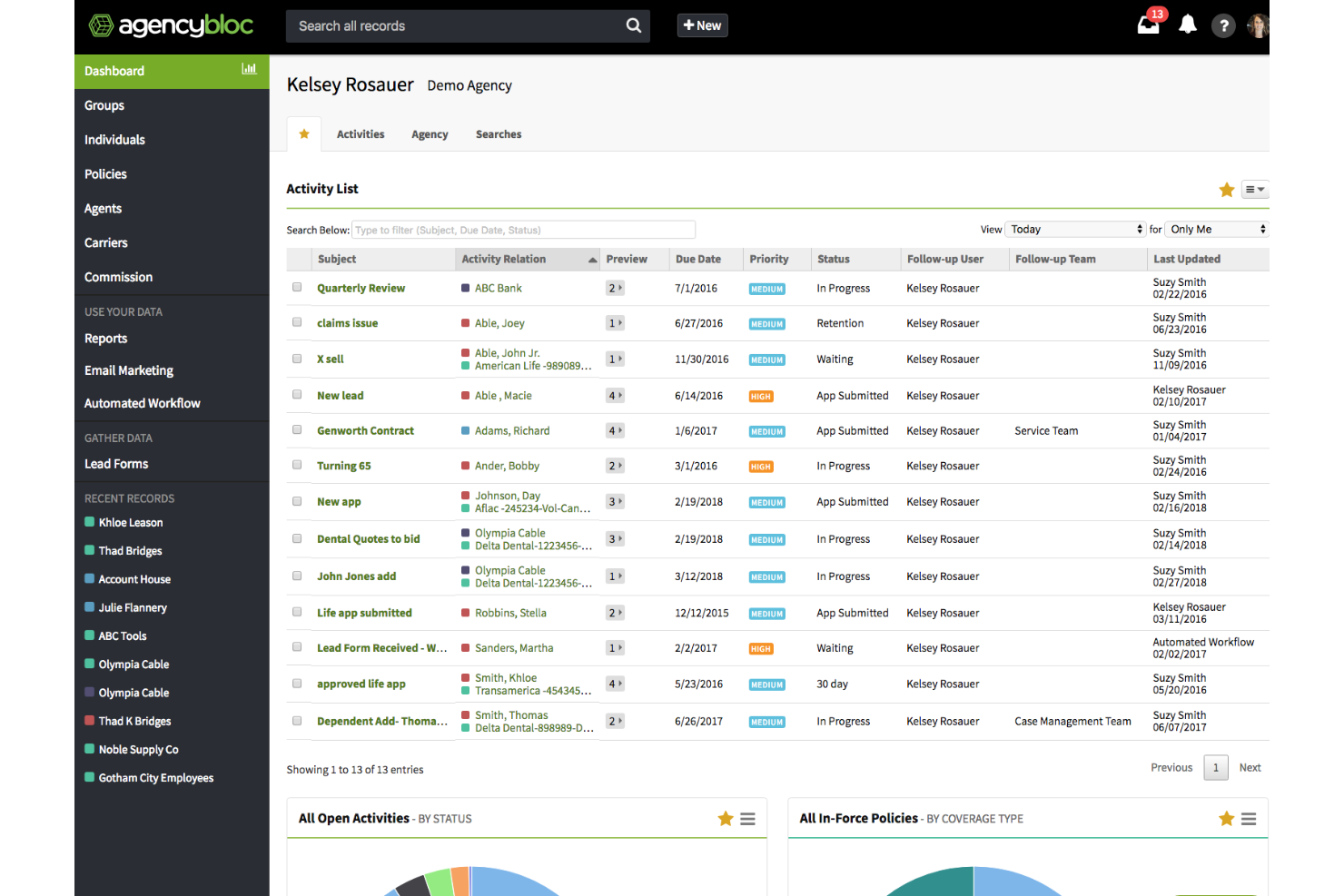
AgencyBloc is an insurance-specific agency management system and CRM built for health, life, and group benefits agencies, combining client and policy tracking, commissions processing, quoting and enrollment, and marketing tools in one platform.
Who Is AgencyBloc Best For?
AgencyBloc is a strong fit for independent health and life insurance agencies that manage individual, Medicare, and group benefits clients.
Why I Picked AgencyBloc
AgencyBloc earns its spot as one of the best on my shortlist because it's built exclusively for health and life insurance agencies, not retrofitted from a generic CRM. I particularly like Commissions+, which reconciles carrier statements against expected payouts and flags missed or short payments automatically. Its policy management also tracks individual, Medicare, and group benefits policies with renewal alerts built in.
AgencyBloc Key Features
- Workflow automation: Trigger task assignments, reminders, and follow-up actions based on client or policy activity.
- Email marketing (Engage+): Build and send targeted email campaigns segmented by client type, plan, or status.
- Lead management: Capture, assign, and track leads with automated routing rules and activity logging.
- Multi-carrier quoting (Quote+): Compare plans and generate proposals across multiple carriers for group and individual clients.
Pros and Cons
Pros:
- Integration with marketing tools for targeted campaigns
- Client interaction logging
- Comprehensive commission tracking module
Cons:
- Reports of occasional delays in important notifications
- Time-consuming data migration


Vymo is a mobile-first CRM and distribution management platform built for insurance carriers, MGAs, FMOs, and IMOs, with AI-driven tools for agent onboarding, sales engagement, lead management, and producer performance tracking.
Who Is Vymo Best For?
Vymo is a strong fit for large insurance enterprises managing distributed agent networks, particularly carriers and financial institutions that need visibility and control across high-volume field sales teams.
Why I Picked Vymo
Vymo is one of my top picks because I love how deeply its AI is embedded into the distribution management workflow—not just as a reporting layer, but as an active sales intelligence engine. Specifically, EngageIQ surfaces next-best-action recommendations directly in a producer's mobile app, so reps know exactly when to follow up on a pending renewal or policy lapse. On the onboarding side, OnboardIQ handles license management, appointments, and NIPR compliance in a single end-to-end workflow, which cuts the lag between recruiting a new agent and getting them to their first sale.
Vymo Key Features
- Producer book of business management: Track and manage each producer's full policy portfolio, including active policies, renewal dates, and lapse risks, from a single mobile interface.
- Just-in-time training: Deliver targeted training content to producers at the exact moment it's needed within their workflow, based on their current activity or performance gaps.
- Recruitment tracking: Monitor and manage the full producer recruitment pipeline, from initial prospecting through to contract execution and first sale.
- Real-time pipeline visibility for sales leaders: Give sales managers a live view of producer activity, KPIs, and goal progress across their entire distributed team.
Pros and Cons
Pros:
- Dynamic sales routing
- Behavior-based insights for personalized communication
- AI-powered lead prioritization
Cons:
- Heavy battery consumption for mobile app
- Occasional issues with OTP
Other Insurance CRM Software
Below is a list of additional insurance CRM software that I shortlisted. While they didn’t make the top 10, they’re still valuable and worth further research.
- FiveCRM
For streamlined data management
- Radius
For integrated VoIP and marketing automation
- Cloven
For Canadian life insurance agents
- Creatio CRM
For 360-degree customer views
- Copper
For G Suite integration
- monday.com
For team collaboration
- Maximizer
For comprehensive client management
- Odoo
For modular business apps
- Pipedrive
For visual sales pipelines
- Equisoft
For financial planning tools


Related CRM Reviews
If you still haven't found what you're looking for here, check out these tools closely related to all-in-one CRMs that we've tested and evaluated.
- CRM Software
- Sales Software
- Lead Management Software
- Business Intelligence Software
- Contract Management Software
- Revenue Management System
- CPQ Software
Insurance CRM Software Selection Criteria
The criteria for choosing an insurance CRM software should directly address buyer needs and common pain points, ensuring that the software serves its intended purpose effectively. As an expert who has personally tried and researched these tools, here are the requirements I use when evaluating software:
Core Functionality (25% of total score):
- Policy management
- Customer relationship management
- Claims processing
- Analytics and reporting
- Document management
Additional Standout Features (25% of total score):
- Integration with third-party applications
- AI-driven insights and automation
- Customizable dashboards and reports
- Mobile accessibility
- Advanced security features
Usability (10% of total score):
- Intuitive user interface
- Drag-and-drop functionality
- Customizable workflows
- Easy navigation
- Minimal learning curve
Onboarding (10% of total score):
- Availability of training videos
- Interactive product tours
- Chatbots for instant support
- Webinars and live training sessions
- Pre-built templates for quick setup
Customer Support (10% of total score):
- 24/7 customer support availability
- Multiple support channels (phone, email, chat)
- Dedicated account managers
- Comprehensive knowledge base
- Fast response times
Value for Price (10% of total score):
- Competitive pricing
- Flexible subscription plans
- Transparent pricing structure
- Free trial or demo availability
- Cost-benefit analysis
Customer Reviews (10% of total score):
- Overall satisfaction ratings
- Feedback on ease of use
- Comments on customer support quality
- Reviews on feature effectiveness
- Testimonials on ROI and business impact
How to Choose Insurance CRM Software
As you work through your unique software selection process, keep the following points in mind:
- Integration Capabilities: Ensure your chosen CRM software can integrate with your existing systems, such as policy management and claims processing software. This is important for maintaining a unified view of customer needs, interactions, and policy details.
- Customization Options: Look for an insurance CRM software that offers customization options that fit your business processes and workflows. Features such as customizable dashboards and reporting tools can help tailor the software to meet these needs, providing more relevant insights and a better user experience.
- Compliance and Security: The insurance industry is heavily regulated. As a result, your CRM software must comply with industry standards and regulations such as GDPR, HIPAA, and others. Additionally, make sure the software has strong security features to protect sensitive customer data.
- Customer Support and Training: Evaluate the customer support and training provided prior to purchasing a software. Ensure that onboarding and ongoing support are essential for maximizing the software's potential.
- Scalability: Choose a CRM solution that can grow with your business. As your customer base expands and your operations become more complex, the software should be able to handle increased data volume and user load, saving time and resources in the long run.
Trends for Insurance CRM Software
Here are some trends I’ve noticed for insurance CRM software, plus what they might mean for the future. I sourced countless product updates, press releases, and release logs to tease out the most important insights.
- AI-Powered Customer Insights: AI is being used to analyze customer data for deeper insights. This helps insurers personalize their services and improve customer satisfaction and retention.
- Integration with IoT Devices: CRM systems now integrate with IoT devices, allowing for real-time data collection. It enhances risk assessment and policy customization.
- Blockchain for Data Security: Blockchain technology is being adopted for secure data transactions. This ensures data integrity and transparency, which is vital for building customer trust.
- Advanced Analytics for Predictive Modeling: Advanced analytics are being used for predictive modeling, helping forecast customer behavior. It aids in better decision-making and risk management.
- Mobile-First CRM Solutions: Mobile-first CRM solutions are gaining traction. They offer flexibility and accessibility for agents on the go and improve efficiency and customer interaction.
These trends are not only enhancing customer experience but also improving operational efficiency and data-driven decision-making. Staying informed about these innovations will help insurance companies select CRM solutions that align with their strategic goals and customer service objectives.
What is Insurance CRM Software?
Insurance CRM software is designed to help insurance companies manage their customer relationships, sales processes, and policy administration. It’s often used to track client interactions, manage leads, and streamline policy management.
Components of insurance CRM software include contact management, lead tracking, policy management, and reporting tools. These features allow users to maintain detailed records of client interactions, monitor sales pipelines, manage policy renewals, and generate compliance reports.
Features of Insurance CRM Software
When choosing insurance CRM software, it's important to understand the key features that can help manage client relationships and streamline operations. Here are the most important features to look for.
- Contact Management: This feature organizes and stores client information for easy access and updates the client details.
- Policy Tracking: It allows you to monitor the status of insurance policies, ensuring that renewals and claims are managed efficiently.
- Lead Management: This feature helps track potential clients and manage the sales pipeline, improving the chances of converting leads into customers.
- Document Management: It provides a centralized location for storing and retrieving important documents, reducing the risk of losing important information.
- Task Automation: Automating routine tasks saves time and reduces the likelihood of human error, allowing you to focus on more strategic activities.
- Reporting and Analytics: This feature offers insights into sales performance and client behavior, helping you make informed business decisions.
- Integration Capabilities: The ability to integrate with other software systems ensures that data flows smoothly across different platforms, enhancing overall efficiency.
- Customer Support: Solid customer support features help address client issues promptly, improving customer satisfaction and retention.
- Mobile Access: Mobile access allows you to manage client relationships and access important information on the go, increasing flexibility and responsiveness.
- Compliance Management: This feature ensures that your operations adhere to industry regulations, reducing the risk of legal issues.
Choosing the right insurance CRM software with these features can significantly improve your ability to manage client relationships and streamline operations. By leveraging these capabilities, agencies can better manage client data, track interactions, and ultimately deliver more personalized and effective service.
Benefits of Insurance CRM Software
By leveraging CRM software, insurance agencies can streamline operations, improve customer satisfaction, and drive business growth. Below are some of the primary benefits you may experience while using an insurance CRM software.
- Enhanced Customer Service: Each CRM software provides a 360-degree view of the customer, allowing insurance agents to offer personalized service and anticipate client needs. This leads to greater customer satisfaction and retention.
- Increased Productivity: By automating repetitive tasks such as lead management, policy renewals, and claims processing, CRM software frees up time for insurance agents to focus on building relationships with clients and handling complex claims.
- Better Data Management: CRM systems centralize important client information, policy details, and claim history, making it easy for agents to access the data they need to assist their clients efficiently.
- Improved Communication: With a good insurance CRM, teams can facilitate communication with clients through various channels, such as email, text, or phone, ensuring that clients receive personalized messages tailored to their needs, such as renewal reminders or claims updates.
- Powerful Analytics: The right insurance CRM software will provide valuable insights into sales trends, customer behavior, and agent performance, helping insurance companies make data-driven decisions to optimize their operations and improve customer satisfaction.
Insurance CRM software offers numerous advantages that can significantly enhance the efficiency and effectiveness of insurance agencies. By adopting a CRM system, insurance companies can better manage customer relationships, streamline processes, and achieve greater business success.
Costs & Pricing of Insurance CRM Software
This section provides an estimate of average insurance CRM software plans and costs. The pricing varies based on the plan type and the features offered.
Plan Comparison Table for Insurance CRM Software
| Plan Type | Average Price | Common Features |
| Free Plan | $0 | Basic contact management, limited users, basic reporting, and email support |
| Personal Plan | $10 - $20 per user/month | Contact management, email integration, basic automation, and mobile access |
| Business Plan | $30 - $60 per user/month | Advanced automation, sales pipeline management, custom dashboards, and analytics |
| Enterprise Plan | $100 - $300 per user/month | AI-powered insights, advanced customization, multi-channel support, and compliance management |
Insurance CRM Software FAQs
Here are the answers to some frequently asked questions I’ve received about insurance CRM software.
How can I ensure data security and compliance with insurance CRM software?
Ensuring data security and compliance with insurance CRM software involves several key steps. Choose a CRM offering powerful security features such as encryption, secure access controls, and regular security audits. Many CRM systems are designed with compliance in mind, adhering to industry standards and regulations such as GDPR and HIPAA.
Additionally, it is crucial to regularly update the software to protect against vulnerabilities and to train staff on best practices for data security. Implementing multi-factor authentication and maintaining an audit trail of all data access and changes can enhance security and compliance.
What are the integration capabilities of insurance CRM software with other tools?
Insurance CRM software often has extensive integration capabilities to streamline operations and enhance functionality. These integrations allow for seamless data flow between different systems, reducing manual data entry and improving efficiency.
Additionally, many CRMs support API integrations, enabling custom connections with proprietary systems or other third-party tools essential for insurance operations.
How can CRM software improve the efficiency of insurance agents?
CRM software improves the efficiency of insurance agents by automating routine tasks, providing a centralized database for customer information, and facilitating better communication. Features like automated lead assignment, policy management, and follow-up reminders ensure that agents can focus on high-value activities rather than administrative tasks.
How does CRM software help in improving customer retention for insurance companies?
CRM software helps improve customer retention by providing tools to enhance customer service and engagement. Features like automated follow-ups, personalized communication, and comprehensive customer profiles enable agents to maintain regular contact with clients and address their needs promptly.
CRM systems can identify cross-selling and upselling opportunities, helping agents offer relevant products to existing customers, and increasing customer satisfaction and loyalty.
What are the challenges of implementing CRM systems in the insurance sector?
Implementing CRM systems in the insurance sector can present several challenges, including:
- Data Integration: Integrating the CRM with legacy systems can be complex and time-consuming.
- Customization Needs: Insurance companies often require custom features to meet their specific needs, which can increase implementation time and costs.
- Compliance and Security: Ensuring the CRM complies with industry regulations and secures sensitive customer data is critical.
- User Adoption: Training staff to use the new system and ensuring they adopt it can be challenging.
- Cost: The initial investment in CRM software, including licensing, customization, and training, can be significant.
How can CRM software assist in sales forecasting for insurance companies?
CRM software assists sales forecasting by providing detailed analytics and reporting tools that track sales performance and market trends. These insights help set realistic sales targets, allocate resources effectively, and develop strategic marketing campaigns. Additionally, CRM systems can track the progress of leads through the sales pipeline, providing real-time updates on potential sales opportunities.
What’s Next?
Want to take your RevOps game to the next level? Subscribe to The CRO Club newsletter.