
15 Best Inbound Call Tracking Software Reviewed in 2026

Best Inbound Call Tracking Software Shortlist
Here’s my shortlist of the best inbound call tracking software:


If you're in revenue operations, you know managing inbound calls can be a headache. Missed calls, tracking issues, and unclear data can cost you sales. That's where inbound call tracking software comes in. It helps you manage phone calls efficiently, ensuring you never miss a lead.
I've reviewed these tools independently, and I aim to give you an unbiased look at the best options on the market. These solutions can help your team develop better call management, gain customer experience insights, and find ways to boost sales performance.
In this article, you'll find my top picks for inbound call tracking software. I'll cover what makes each one unique, so you can find the best fit for your needs.
Why Trust Our Software Reviews
Best Inbound Call Tracking Software Summary
This comparison chart summarizes pricing details for my top inbound call tracking software selections to help you find the best one for your budget and business needs.
| Tool | Best For | Trial Info | Price | ||
|---|---|---|---|---|---|
| 1 | Best for AI-powered call management | 14-day free trial available | From $25/user/month (billed annually) | Website | |
| 2 | Best for lead management and marketing attribution | 14-day free trial + free demo available | From $45/month | Website | |
| 3 | Best for cloud-based contact center solutions | Free demo available | From $18/user/month | Website | |
| 4 | Best for integrated call tracking | Free demo available | From $65/month | Website | |
| 5 | Best for AI-powered conversation intelligence | Free demo | From $1000/month | Website | |
| 6 | Best for AI-powered integrated call analytics | Free demo available | From $85/user/month | Website | |
| 7 | Best for tracking and managing marketing leads | 14-day free trial | From $30/month (billed annually) | Website | |
| 8 | Best for scalable and clear call reporting | Free trial available | From $35/month | Website | |
| 9 | Best for call attribution and routing services | Free trial available | Pricing upon request | Website | |
| 10 | Best for affordable call tracking | Free trial available | From $49/month | Website |
-

Prisync
Visit WebsiteThis is an aggregated rating for this tool including ratings from Crozdesk users and ratings from other sites.4.7 -
Expedite Commerce
Visit Website -
QuickBooks Online
Visit WebsiteThis is an aggregated rating for this tool including ratings from Crozdesk users and ratings from other sites.4





Best Inbound Call Tracking Software Reviews
Below are my detailed summaries of the best inbound call tracking software that made it onto my shortlist. My reviews offer a detailed look at the key features, pros and cons, integrations, and ideal use cases of each tool to help you find the best one for you.


CloudTalk is a call management platform aimed at businesses looking to enhance their communication capabilities. It supports both inbound and outbound calls, offering tools to optimize customer interactions and sales performance.
Why I picked CloudTalk: This tool leverages AI to manage and analyze calls, making it ideal for businesses needing efficient call handling. Automatic call distribution is designed for calls to reach the right agents quickly. Real-time call monitoring allows supervisors to intervene when necessary, and its AI-driven analytics provide insights into call performance and customer behavior, helping your team make data-driven decisions.
Standout Features and Integrations:
Features include call queuing for managing high call volumes effectively and voicemail transcription, which converts messages into text to save your team time. The call tagging feature allows you to categorize calls for better organization and analysis.
Integrations include Salesforce, HubSpot, Pipedrive, Zendesk, Intercom, Freshdesk, Zoho CRM, Shopify, Microsoft Dynamics 365, and more.
Pros and Cons
Pros:
- Voicemail transcription
- Automatic call distribution
- AI-driven call analytics
Cons:
- Limited customer support
- May have a steep learning curve

CallRail is a call tracking and analytics platform designed for marketing teams and businesses that need detailed insights into lead generation and marketing efforts. It offers tools to track calls, analyze lead sources, and optimize marketing strategies for better ROI.
Why I picked CallRail: This tool delivers extensive lead intelligence and marketing attribution capabilities, offering detailed call analytics to elevate your understanding of lead quality and conversion rates. The keyword tracking feature helps identify which marketing efforts drive the most calls. With customizable call attribution, you can tailor insights to your specific marketing goals, while the white-label platform option lets you apply your own branding.
Standout Features and Integrations:
Features include call recording, which helps your team review call interactions. Form tracking captures lead information from online forms, providing a complete picture of customer interactions. Multi-touch attribution gives you insights into the customer journey across various touchpoints.
Integrations include Google Analytics, Salesforce, HubSpot, Marketo, Meta Ads Manager, WordPress, Slack, Zoho CRM, Zapier, Microsoft Ads, and more.
Pros and Cons
Pros:
- Multi-touch attribution insights
- Customizable call attribution
- Detailed call analytics
Cons:
- Limited customer support
- Complex reporting setup
Ozonetel is a cloud-based contact center solution tailored for businesses that require efficient inbound call tracking. It serves contact centers by providing tools to manage calls and analyze interactions, helping you determine how to improve customer service.
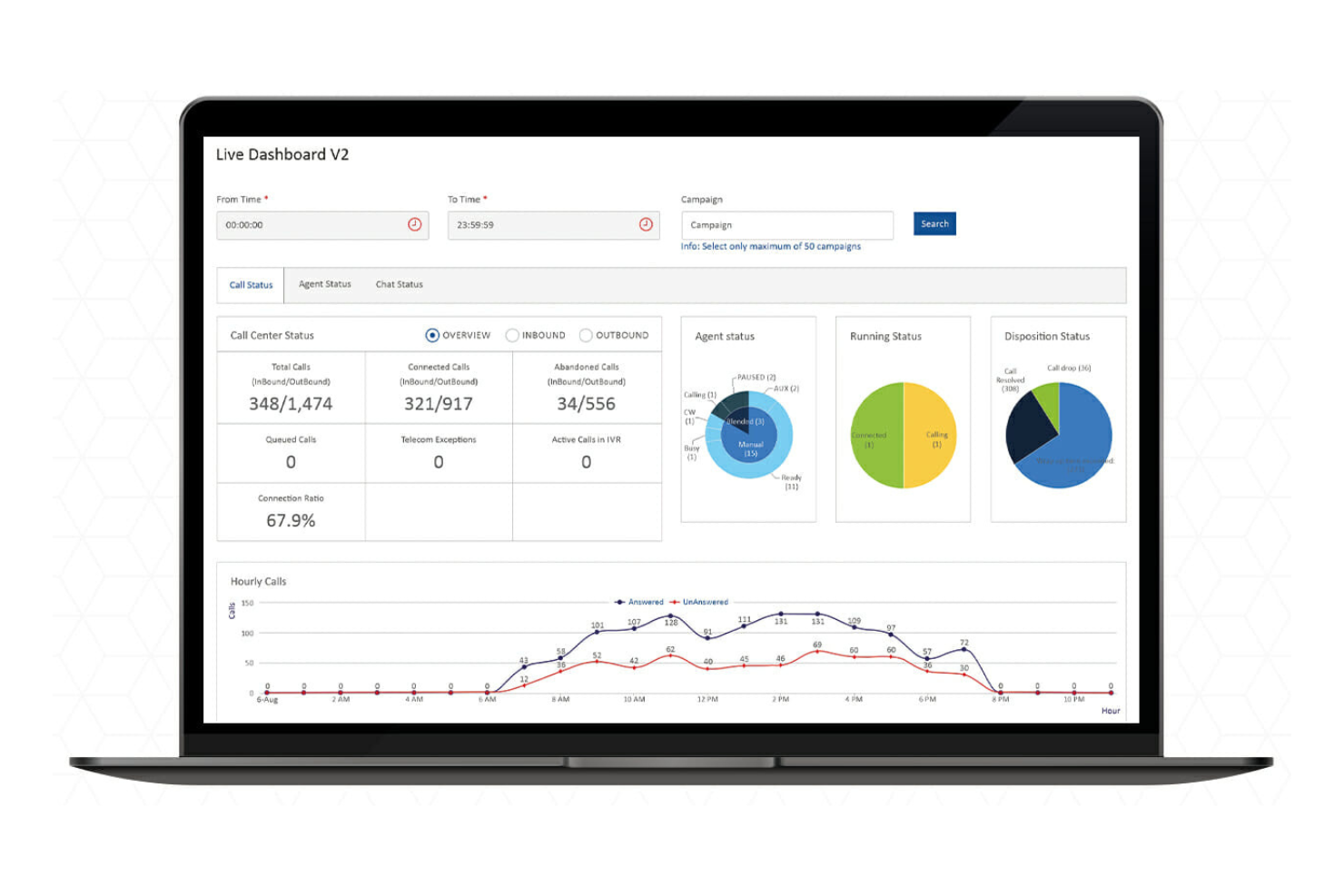
Why I picked Ozonetel: This tool offers cloud-based solutions that fit well with contact centers needing reliable inbound call tracking. It features automatic call distribution to ensure calls are routed to the right agents, and the call logging feature provides detailed records of interactions. Ozonetel's dynamic dashboards allow your team to monitor performance and make data-driven decisions.
Standout Features and Integrations:
Features include call scripting, which helps agents follow consistent guidelines during calls, and real-time monitoring to let supervisors oversee calls and provide immediate feedback. The call queuing feature manages high call volumes effectively, ensuring no customer is left waiting too long.
Integrations include Salesforce, Zoho CRM, Zendesk, Freshdesk, Slack, Microsoft Dynamics, Google Workspace, HubSpot, Shopify, WhatsApp, and more.
Pros and Cons
Pros:
- Real-time monitoring
- AI-driven automation options
- Omnichannel capabilities to support digital marketing
Cons:
- May have tech issues with high call volume
- Initial setup can be complex
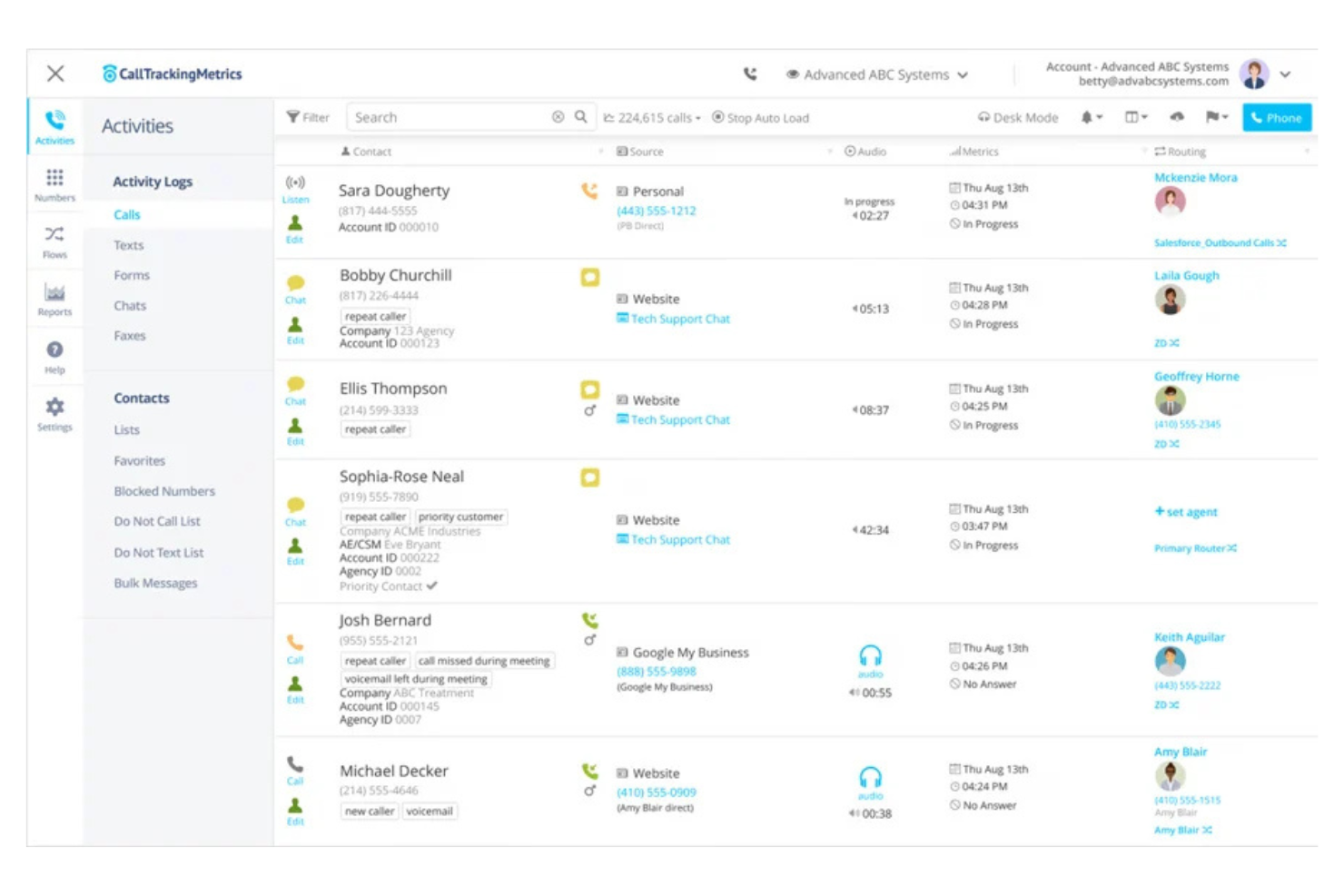
CallTrackingMetrics is a call tracking and business phone system designed for businesses looking to optimize their marketing efforts. It helps users track call sources and analyze conversation data to promote lead quality.
Why I picked CallTrackingMetrics: This tool integrates call tracking with business phone systems, making it ideal for comprehensive marketing analysis. It offers call recordings and call transcriptions to give you detailed insights into customer interactions, and AI-driven analysis helps your team make data-backed decisions quickly. The customizable reporting tools allow you to focus on key metrics that matter to your business.
Standout Features and Integrations:
Features include workflow automation to help you streamline repetitive tasks. Conversation intelligence provides insights into customer needs and preferences, and customizable reporting tools let you tailor insights to your business.
Integrations include Google Ads, Salesforce, HubSpot, Microsoft Dynamics 365, Marketo, Facebook, Zoho CRM, Shopify, WordPress, Slack, and more.
Pros and Cons
Pros:
- Workflow automation
- AI-driven conversation insights
- Detailed call analytics
Cons:
- Higher cost for small teams
- Limited customer support


Invoca is a call tracking platform designed for businesses that need advanced conversation intelligence and analytics. It helps marketers and sales teams analyze call data to support better customer interactions and optimize marketing strategies.
Why I picked Invoca: This tool uses AI to provide deep insights into customer conversations, making it a strong candidate for teams focused on data-driven decisions. It offers real-time call analytics to help you understand customer behavior and quick interactive voice response (or IVR) setup for efficient call routing. The conversation intelligence feature captures and analyzes spoken language to identify trends and follow-up opportunities, while customizable reporting lets you tailor insights to your specific business needs.
Standout Features and Integrations:
Features include detailed call attribution that links calls to your marketing efforts. Real-time alerts notify your team of important call events. The call scoring feature helps assess the quality of interactions and identify areas for improvement.
Integrations include Salesforce Sales Cloud, Google Ads, Google Analytics, Adobe Experience Cloud, Facebook, HubSpot, Snapchat, Microsoft Advertising, Pinterest, Slack, and more.
Pros and Cons
Pros:
- Detailed call attribution
- Customizable reporting options
- Advanced conversation intelligence
Cons:
- Complex setup process
- Pricing details are not transparent


Talkdesk is a contact center solution designed for businesses that need integrated call analytics. It assists contact centers by providing tools to manage calls and analyze interactions, helping businesses explore ways to improve customer service.
Why I picked Talkdesk: This tool is ideal for contact centers that require thorough call analytics integrated into their operations. It offers real-time monitoring through customizable dashboards, providing insights into performance metrics and agent productivity. Talkdesk's analytics features help you make data-driven decisions to develop customer interactions.
Standout Features and Integrations:
Features include advanced call routing aimed at directing calls to the right agents. Its real-time reporting and sentiment analysis features provide key insights into call center performance, and quality management tools allow you to assess agent interactions for quality assurance.
Integrations include Salesforce, Zendesk, Slack, Microsoft Teams, Google Contacts, HubSpot, Shopify, ServiceNow, Microsoft Dynamics, Zoom, and more.
Pros and Cons
Pros:
- Quality management tools
- Customizable dashboards
- Integrated call analytics
Cons:
- Call quality depends on network connection strength
- Limited collaboration features

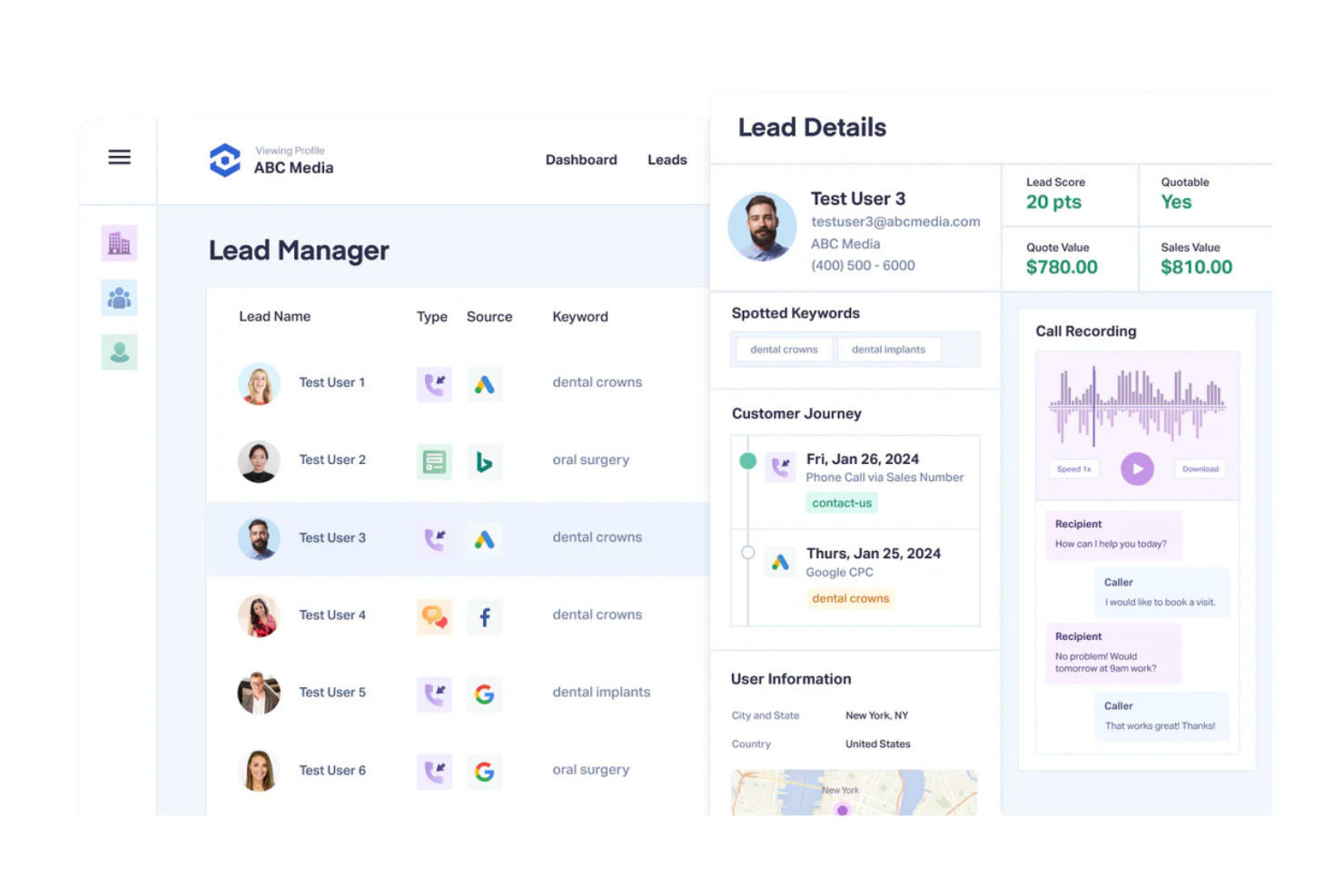
WhatConverts is a lead tracking software aimed at businesses seeking to capture and analyze all marketing leads, including inbound calls. It provides tools to track calls, forms, and transactions, offering a multifaceted view of marketing performance.
Why I picked WhatConverts: This tool presents a unified platform to track all marketing leads, offering detailed call tracking and lead management to help you capture every potential customer interaction. The reporting feature provides insights into lead quality and conversion rates. With customizable dashboards, you can tailor the system to your specific needs.
Standout Features and Integrations:
Features include customizable reports that give you insights into marketing performance. The AI-powered call tracking feature captures detailed information about each call, helping you assess lead quality, and lead management tools help you organize and prioritize leads effectively.
Integrations include Google Analytics, Salesforce, HubSpot, BigCommerce, Shopify, Facebook Ads, Google Ads, Bing Ads, Zapier, Weebly, and more.
Pros and Cons
Pros:
- Effective lead management
- AI-powered reporting insights
- Detailed lead tracking
Cons:
- Initial learning curve for new users
- Can be expensive for small companies

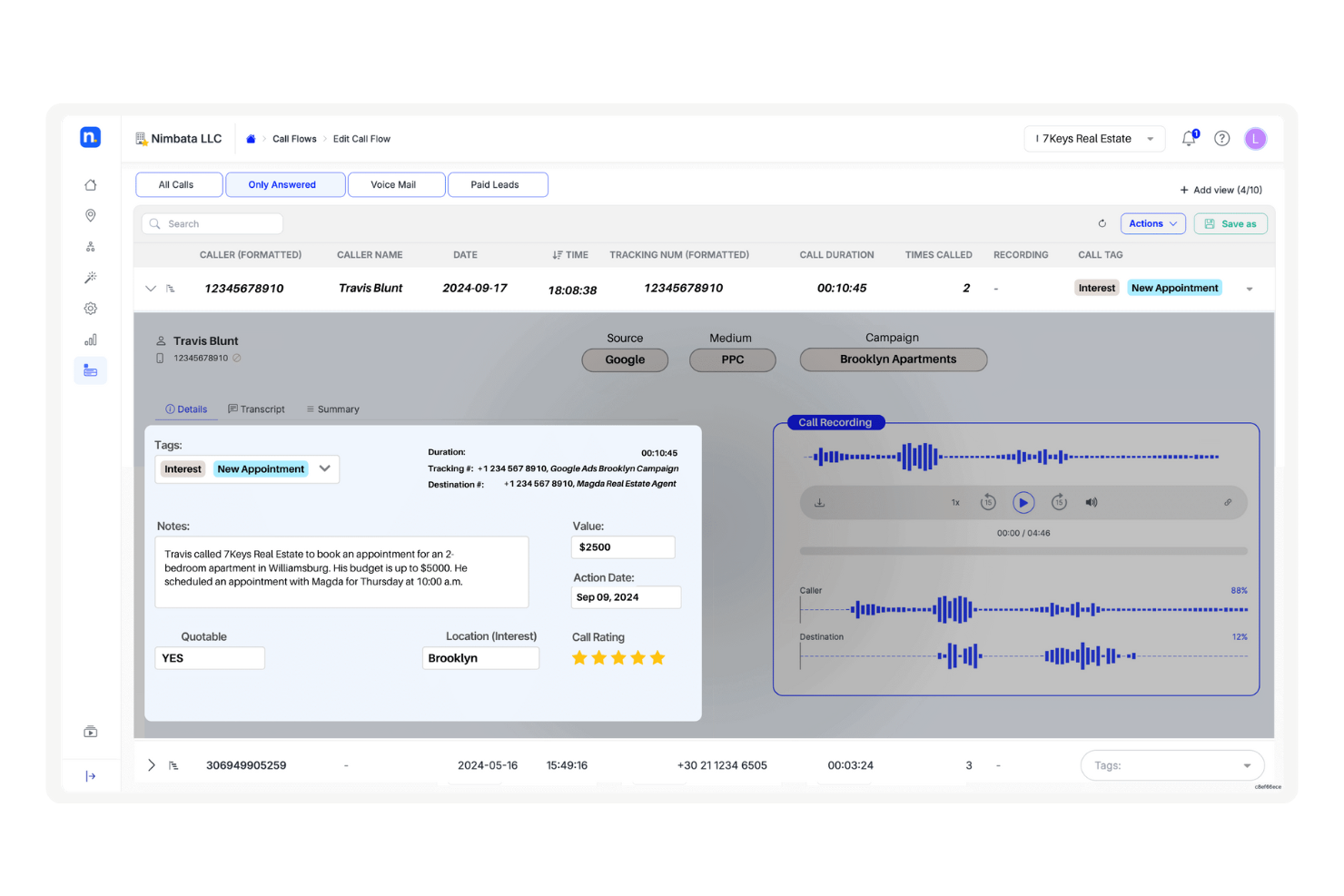
Nimbata is a call tracking software designed for marketing teams that require clear and simple call reporting. It focuses on tracking call sources, analyzing campaign effectiveness, and delivering insights to support marketing strategy development.
Why I picked Nimbata: Ideal for marketing teams and small businesses looking for clarity and simplicity, this tool offers straightforward call reporting and analytics. It provides detailed call tracking to help you understand which campaigns generate the most leads, and the customizable dashboards allow you to focus on the metrics that matter most to your team. Its user-friendly interface is built so that even those with minimal technical expertise can easily navigate and utilize the software.
Standout Features and Integrations:
Features include real-time call tracking for instant insights into campaign performance. Call recording allows your team to review interactions and develop effective communication strategies. The customizable dashboards let you tailor reports to fit your marketing needs.
Integrations include Google Analytics, Google Ads, HubSpot, Salesforce, Zapier, Slack, WordPress, Pipedrive, Facebook, Microsoft Dynamics, and more.
Pros and Cons
Pros:
- Minimal technical expertise needed
- User-friendly interface
- Straightforward call reporting
Cons:
- Basic analytics options
- Limited advanced features

Retreaver is a call tracking solution designed for businesses seeking customizable call attribution and routing. It allows users to track calls, analyze performance, and optimize customer interactions.
Why I picked Retreaver: This tool offers extensive customization options for call attribution and routing, so it's a solid option for tailored marketing strategies. It provides real-time call data, enabling your team to make informed decisions, and its dynamic number insertion (or DNI) feature ensures accurate tracking of marketing campaigns. With flexible routing options, you can direct calls based on specific criteria to help boost customer satisfaction.
Standout Features and Integrations:
Features include call whispering, which provides agents with information about the caller before they answer. Real-time reporting offers insights into call performance and marketing effectiveness, and dynamic number insertion helps you track the effectiveness of different marketing campaigns.
Integrations include Google Analytics, Salesforce, HubSpot, Zoho CRM, Facebook Ads, WordPress, Slack, Zapier, Zendesk, Shopify, and more.
Pros and Cons
Pros:
- Flexible call attribution
- Dynamic number insertion
- Highly customizable routing
Cons:
- May overwhelm smaller teams
- Steep learning curve

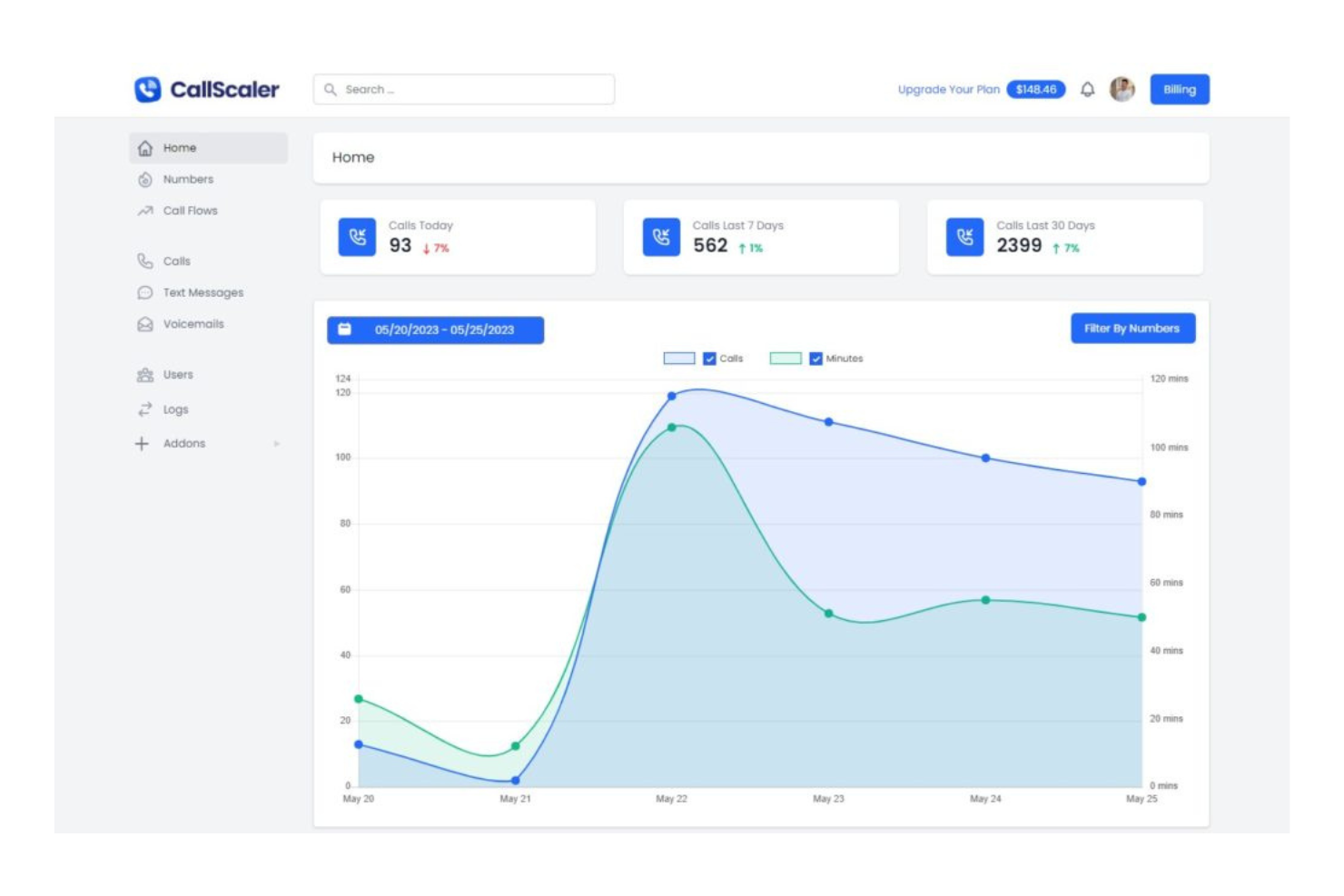
CallScaler is a cost-effective call tracking solution aimed at businesses and marketing agencies seeking efficient number management. It helps track inbound calls, manage phone numbers, and analyze call data to give you valuable information for improving marketing strategies.
Why I picked CallScaler: This tool provides affordable call tracking and number management, making it ideal for budget-conscious teams, charging $0.50 per number (lower than many other providers). It offers dynamic number insertion for accurate source tracking, and its call recording and AI call summaries capture call details efficiently. The platform's ease of use and customizable call flows help tailor the system to your business needs.
Standout Features and Integrations:
Features include call and SMS tracking numbers that allow easy management of multiple campaigns. AI call summaries provide concise overviews of each call, and the client portal feature lets you offer clients access to their call data.
Integrations include Zapier, Google Analytics, Salesforce, HubSpot, Zoho CRM, Facebook, WordPress, Slack, Twilio, Shopify, and more.
Pros and Cons
Pros:
- Dynamic number insertion
- AI-generated call summaries
- Affordable pricing model
Cons:
- Free plan includes additional usage fees
- Limited advanced analytics
Other Inbound Call Tracking Software
Here are some additional inbound call tracking software options that didn’t make it onto my shortlist, but are still worth checking out:
- Marchex
For actionable call analytics insights
- Call Criteria
For call analytics and quality assurance
- Salesforce
For CRM-integrated call tracking
- CallMiner
For deep conversation analytics
- Level AI
For contact center automation


Inbound Call Tracking Software Selection Criteria
When selecting the best inbound call tracking software to include in this list, I considered common buyer needs and pain points, such as tracking call sources and measuring marketing ROI. I also used the following framework to keep my evaluation structured and fair:
Core Functionality (25% of total score)
To be considered for inclusion in this list, each solution had to fulfill these common use cases:
- Track call sources
- Record call details
- Provide call analytics
- Integrate with CRM systems
- Offer real-time reporting
Additional Standout Features (25% of total score)
To help further narrow down the competition, I also looked for unique features, such as:
- AI-driven insights
- Customizable call routing
- Keyword spotting
- Multi-channel tracking
- Dynamic number insertion
Usability (10% of total score)
To get a sense of the usability of each system, I considered the following:
- Intuitive interface
- Easy navigation
- Minimal learning curve
- Clear design aesthetic
- Efficient workflow integration
Onboarding (10% of total score)
To evaluate the onboarding experience for each platform, I considered the following:
- Availability of training videos
- Interactive product tours
- Access to webinars
- Presence of chatbots
- Use of onboarding templates
Customer Support (10% of total score)
To assess each software provider's customer support services, I considered the following:
- 24/7 support availability
- Response time
- Access to live chat
- Quality of help documentation
- Availability of a dedicated account manager
Value for Money (10% of total score)
To evaluate the value for money of each platform, I considered the following:
- Competitive pricing
- Range of features offered
- Scalability of pricing plans
- Flexibility of contract terms
- Return on investment
Customer Reviews (10% of total score)
To get a sense of overall customer satisfaction, I considered the following when reading customer reviews:
- Overall satisfaction ratings
- Feedback on feature effectiveness
- Comments on ease of use
- Insights on customer support experience
- Opinions on pricing and value
How To Choose Inbound Call Tracking Software
It's easy to get bogged down in long feature lists and complex pricing structures. To help you stay focused as you work through your unique software selection process, here's a checklist of factors to keep in mind:
| Factor | What To Consider |
|---|---|
| Scalability | Can the software grow with your business? Consider if it can handle an increasing volume of calls without compromising performance. |
| Integrations | Does it connect with your existing tools like CRM or email marketing platforms? Check compatibility to ensure seamless data flow across systems. |
| Customizability | Can you tailor the solution to fit your unique workflows? Look for options to adjust settings and reports according to your business needs. |
| Ease of Use | How intuitive is the interface for your team? Test the system's usability to ensure it doesn't require extensive training or technical expertise. |
| Implementation and Onboarding | What's the setup process like? Evaluate the time and resources needed to implement and onboard, including any training or support provided. |
| Cost | Does the pricing align with your budget? Consider all costs, including hidden fees or charges for additional features, and compare with competitors. |
| Security Safeguards | How does the software protect your data? Check for encryption, access controls, and compliance with industry standards to safeguard sensitive information. |
| Support Availability | What support options are available? Ensure there's adequate help, like 24/7 support or dedicated account managers, to assist when issues arise. |
What Is Inbound Call Tracking Software?
Inbound call tracking software is a tool that helps businesses track and analyze incoming calls to understand marketing effectiveness and customer interactions. Marketing professionals, sales teams, and customer service reps generally use these tools to gain insights into customer behavior and improve engagement.
Call tracking, analytics, and integration capabilities help with measuring marketing ROI, optimizing campaigns, and ensuring efficient data flow. The overall value lies in its ability to enhance decision-making and boost customer satisfaction.
Features
When selecting inbound call tracking software, keep an eye out for the following key features:
- Call tracking: Monitors incoming calls to identify their source and helps assess marketing campaign effectiveness.
- Analytics: Provide data insights into call performance, customer behavior, and conversion rates for informed decision-making.
- Integration capabilities: Connect with existing tools such as CRM and email platforms to ensure efficient data flow across systems.
- Customizable reports: Allow tailoring of reports to focus on specific metrics that matter most to your business.
- Real-time monitoring: Enables tracking of ongoing call activities to ensure timely responses and efficient call handling.
- Call recording: Captures call details for quality assurance and performance evaluation.
- Dynamic number insertion: Replaces phone numbers on your website to track which marketing channels drive calls.
- Keyword spotting: Identifies important phrases during calls to gain insights into customer needs and preferences.
- Quality management tools: Assess and inform agent interactions to maintain high service standards.
Benefits
Implementing inbound call tracking software provides several benefits for your team and your business. Here are a few you can look forward to:
- Improved marketing ROI: By tracking call sources, you can identify which campaigns generate the most leads and allocate your budget more effectively.
- Enhanced customer insights: Analytics and call recording provide a deeper understanding of customer behavior and preferences, helping tailor your services to meet their needs.
- Better decision-making: Real-time monitoring and customizable reports offer data-driven insights, enabling your team to make informed decisions quickly.
- Increased efficiency: Integration capabilities ensure smooth data flow between systems, reducing manual data entry and saving time for your team.
- Higher service standards: Quality management tools and call scoring help maintain high-quality customer interactions and support agent performance improvements.
- Optimized call handling: Advanced call routing helps direct calls to the right agents, improving response times and customer satisfaction.
Costs and Pricing
Selecting inbound call tracking software requires an understanding of the various pricing models and plans available. Costs vary based on features, team size, add-ons, and more. The table below summarizes common plans, their average prices, and typical features included in inbound call tracking software solutions:
Plan Comparison Table for Inbound Call Tracking Software
| Plan Type | Average Price | Common Features |
|---|---|---|
| Free Plan | $0 | Basic call tracking, limited analytics, and standard reporting. |
| Personal Plan | $5-$25/user/month | Call tracking, call recording, basic analytics, and limited integrations. |
| Business Plan | $30-$60/user/month | Advanced analytics, call recording, custom reports, and CRM integrations. |
| Enterprise Plan | $70-$120/user/month | Full analytics suite, dynamic number insertion, AI insights, and premium support. |
Inbound Call Tracking Software FAQs
Here are some answers to common questions about inbound call tracking software:
How does inbound call tracking software work?
Inbound call tracking software works by assigning unique phone numbers to different marketing channels. When a customer calls, the software records the call source, time, and other details, allowing you to analyze which campaigns drive the most calls. This helps you optimize marketing efforts based on real data. By understanding where your calls come from, you can evaluate your business’s ad spend and allocate resources more effectively.
Can inbound call tracking software integrate with my existing tools?
Yes, most inbound call tracking software can integrate with tools such as CRMs, email platforms, and analytics software. Before purchasing, check if the software supports the integrations you need. Integration allows for a smooth flow of data across platforms, saving time and reducing manual entry errors. This connectivity helps maintain data consistency and enhances productivity.
Is inbound call tracking software secure?
Yes, inbound call tracking software is generally secure, but it’s essential to verify the security measures of each provider. Look for features such as data encryption, access controls, and compliance with industry standards. These measures help protect sensitive customer data and maintain trust. Always choose a provider that prioritizes security to safeguard your information.
Can I use inbound call tracking software for international calls?
Yes, many inbound call tracking solutions support international calls, but it’s vital to confirm this with the provider. Check if they offer international numbers and support multiple currencies. This feature is useful for businesses operating globally, allowing them to track calls from different regions and tailor marketing strategies accordingly.
What's Next:
If you're in the process of researching inbound call tracking software, connect with a SoftwareSelect advisor for free recommendations.
You fill out a form and have a quick chat where they get into the specifics of your needs. Then you'll get a shortlist of software to review. They'll even support you through the entire buying process, including price negotiations.