
17 Best Free Sales Tracking Software Reviewed in 2026

Best Free Sales Tracking Software Shortlist
Here’s my shortlist of the best free sales tracking software:


Navigating the world of sales can be tough, especially when your budget is tight. You need tools that help you track sales without adding to your expenses. Free sales tracking software can be a lifesaver for your team, offering essential features without the hefty price tag.
I’ve spent years testing and reviewing software, and I know what works to support Revenue Operations and customer relationship management. In this article, I’ll share my top picks for free sales tracking solutions that can help you overcome your sales challenges.
You’ll find unbiased, well-researched reviews that focus on what these tools offer for free. Whether you’re a solo entrepreneur or part of a growing team, there’s something here for you.
Why Trust Our Software Reviews
We’ve been testing and reviewing RevOps software since 2022. As RevOps leaders ourselves, we know how critical and difficult it is to make the right decision when selecting software.
We invest in deep research to help our audience make better software purchasing decisions. We’ve tested more than 2,000 tools for different RevOps use cases and written over 1,000 comprehensive software reviews. Learn how we stay transparent & our software review methodology.
Best Free Sales Tracking Software Summary
While all of the sales tracking software in my list have free offerings, they also have paid plans should you wish to upgrade.
| Tool | Best For | Trial Info | Price | ||
|---|---|---|---|---|---|
| 1 | Best for project management integration | Free plan + free demo + 7-day free trial available | From $9/user/month (billed annually) | Website | |
| 2 | Best for solo entrepreneurs | Free trial + free demo available | From $9.95/user/month | Website | |
| 3 | Best for all-in-one CRM | Free plan available | From $11.04/user/month (billed biennially) | Website | |
| 4 | Best for field sales teams | Free plan + free demo available | From $39/user/month | Website | |
| 5 | Best for unlimited users | Free plan + 15-day free trial + free demo available | From $49/month (billed annually) | Website | |
| 6 | Best for AI-driven insights | 21-day free trial + free demo available | From $9/user/month (billed annually) | Website | |
| 7 | Best for service-based businesses | Free demo available | From $244/month | Website | |
| 8 | Best for mid-sized companies | Not available | From $43/user/month (billed annually) | Website | |
| 9 | Best for beginners | 14-day free trial + free demo available | From $13/user/month (billed annually) | Website | |
| 10 | Best for pipeline management | 14-day free trial available | From $14/seat/month (billed annually) | Website |
-

Pipedrive CRM
Visit WebsiteThis is an aggregated rating for this tool including ratings from Crozdesk users and ratings from other sites.4.3 -
Creatio CRM
Visit WebsiteThis is an aggregated rating for this tool including ratings from Crozdesk users and ratings from other sites.4.7 -
monday CRM
Visit WebsiteThis is an aggregated rating for this tool including ratings from Crozdesk users and ratings from other sites.4.6





Best Free Sales Tracking Software Reviews
Below are my detailed summaries of the best free sales tracking software that made it onto my shortlist. My reviews offer a detailed look at the key features, pros & cons, integrations, and ideal use cases of each tool to help you find the best one for you. While some of these tools offer a completely free version, others offer a free trial period. I’ve added a note about what’s free in each of my reviews.

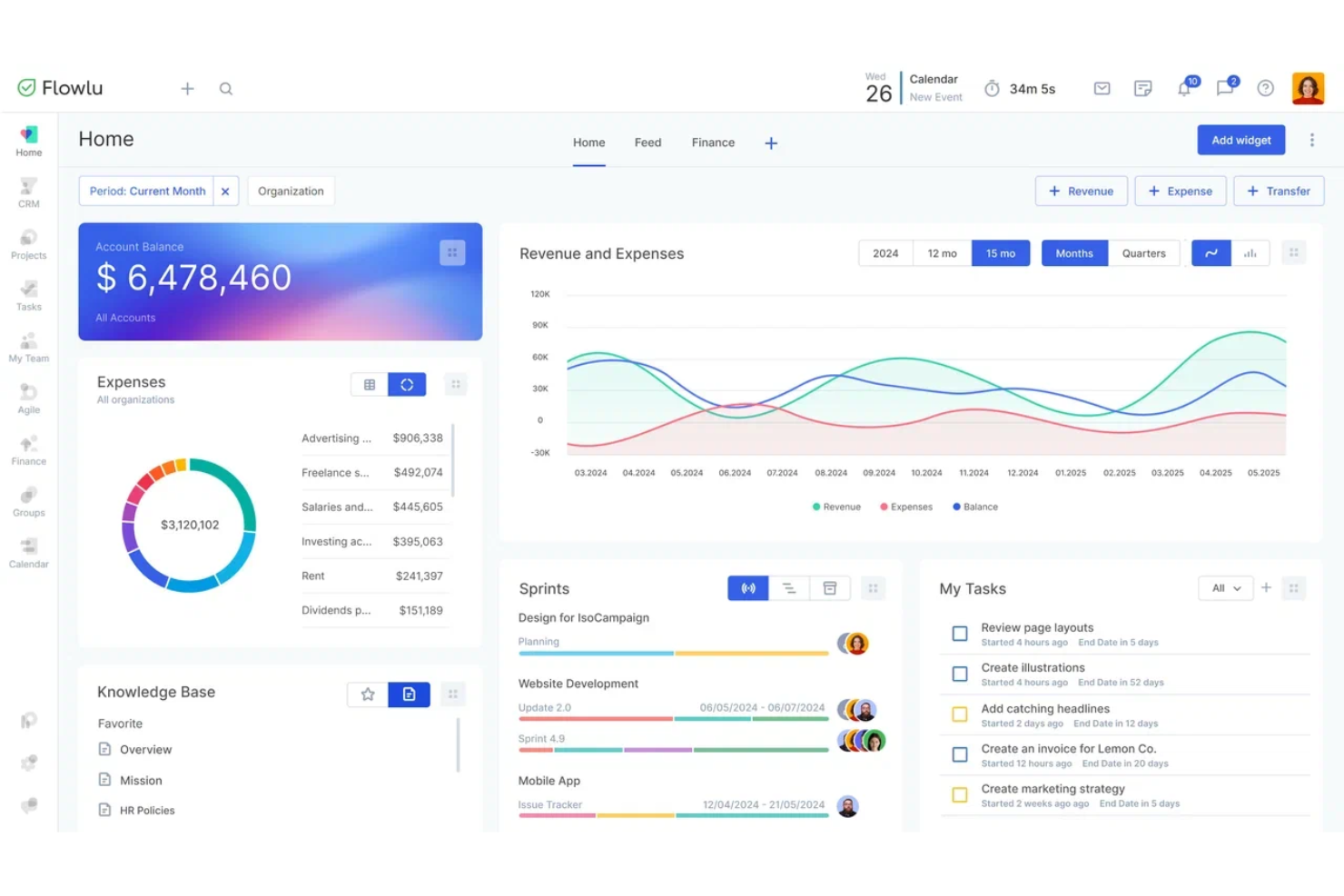
Flowlu is an all-in-one work management platform designed for small and medium businesses. It offers CRM, project management, task tracking, and invoicing, making it suitable for industries such as marketing, construction, and IT.
Why I picked Flowlu: Flowlu offers a free plan that includes project management integration, which sets it apart. You can manage tasks, projects, and client interactions efficiently. The free version provides access to CRM tools and task management features. This combination helps your team stay organized without additional costs.
Standout features & integrations:
Features include task management, CRM capabilities, and financial management tools. You can also utilize project templates to kickstart your projects quickly. The platform offers visualization options such as Kanban boards and Gantt charts for better project tracking.
Integrations include Google Calendar, Google Drive, Dropbox, Slack, Trello, Zapier, Office 365, QuickBooks, Mailchimp, Stripe, and more.
What’s free? Flowlu offers a free-forever plan with essential features, but it limits the number of users and does not have customization options.
Pros and Cons
Pros:
- Workflow automation available
- Helpful workflow templates
- Tracks work and deals
Cons:
- Mobile app does not include all functions
- Tight free limits
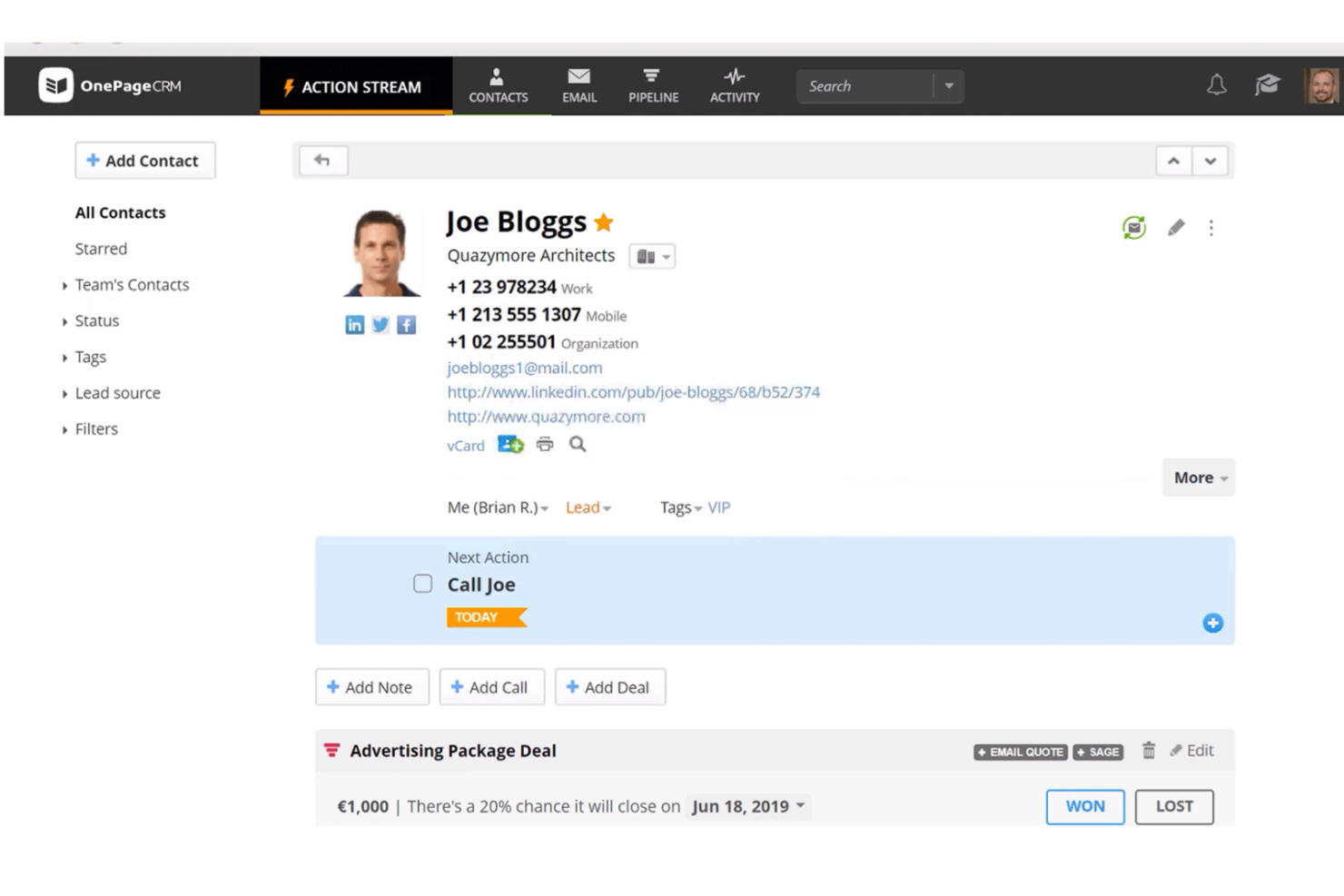
OnePageCRM is a simple, action-focused CRM designed primarily for solo entrepreneurs and small teams. It helps you manage contacts, track sales, and stay organized with its straightforward interface.
Why I picked OnePageCRM: OnePageCRM offers a free trial that is ideal for solo entrepreneurs seeking simplicity. It includes features such as contact management and task automation, which help you stay on top of your sales activities. The action-focused approach ensures you always know the next step to take. This makes it a great option for individuals looking to manage sales without complexity.
Standout features & integrations:
Features include a unique Next Action sales method that keeps you focused on immediate tasks. You can set reminders and notifications and automate follow-ups to ensure no lead is forgotten. The platform also provides sales reporting to help you track progress over time.
Integrations include Mailchimp, Xero, QuickBooks, Google Contacts, Outlook, Dropbox, Zapier, Evernote, FaceTime, Google Calendar, and more.
What’s free? OnePageCRM offers a limited-time free trial, providing access to all features without restrictions during the trial period.
Pros and Cons
Pros:
- Trial allows full testing
- Simple solo workflow
- Clear next-step method
Cons:
- Limited custom options
- No free plan after trial
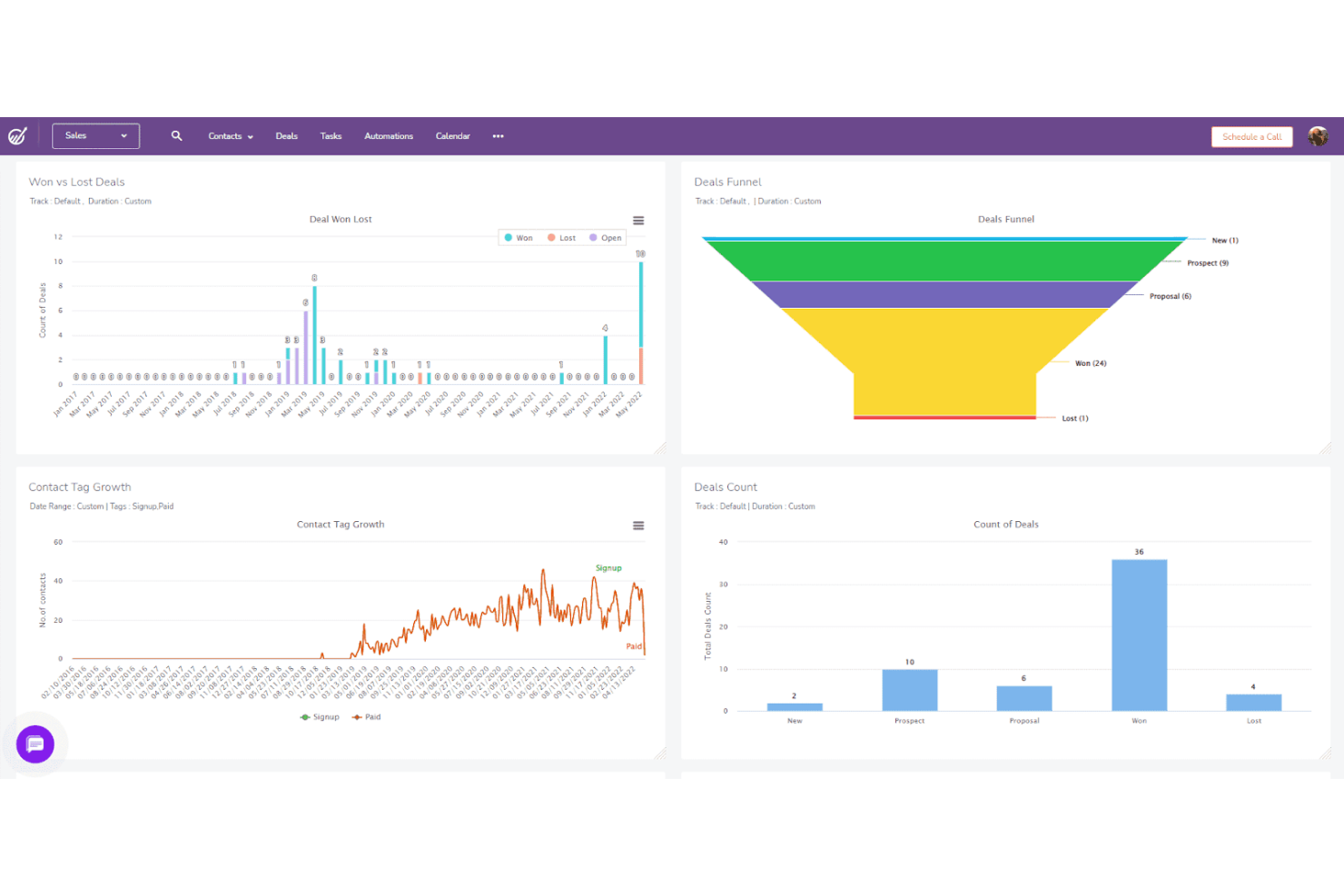
EngageBay is an all-in-one CRM platform geared towards small to medium-sized businesses. It combines marketing, sales, and customer support tools into a single platform, helping you manage customer relationships and organize operations.
Why I picked EngageBay: EngageBay offers a free plan that effectively supports all-in-one CRM needs for small businesses. You can access contact management, email marketing, and helpdesk tools without spending a dime. The free version also includes lead scoring and landing page creation features, making it a strong choice for businesses looking to consolidate their sales and marketing efforts in one place.
Standout features & integrations:
Features include marketing automation, which helps you nurture leads and improve conversion rates, as well as form builders to capture leads directly from your website. The CRM also provides a task management feature to keep your team organized and productive.
Integrations include Mailchimp, Zapier, Shopify, Stripe, QuickBooks, Xero, Google Contacts, Outlook, Salesforce, Twilio, and more.
What’s free? EngageBay offers a free-forever plan with essential CRM features for up to 15 users, though it limits some advanced tools and storage.
Pros and Cons
Pros:
- Generous free user count
- Lead scoring is built in
- Covers sales and marketing
Cons:
- Limited customization
- Steep learning curve

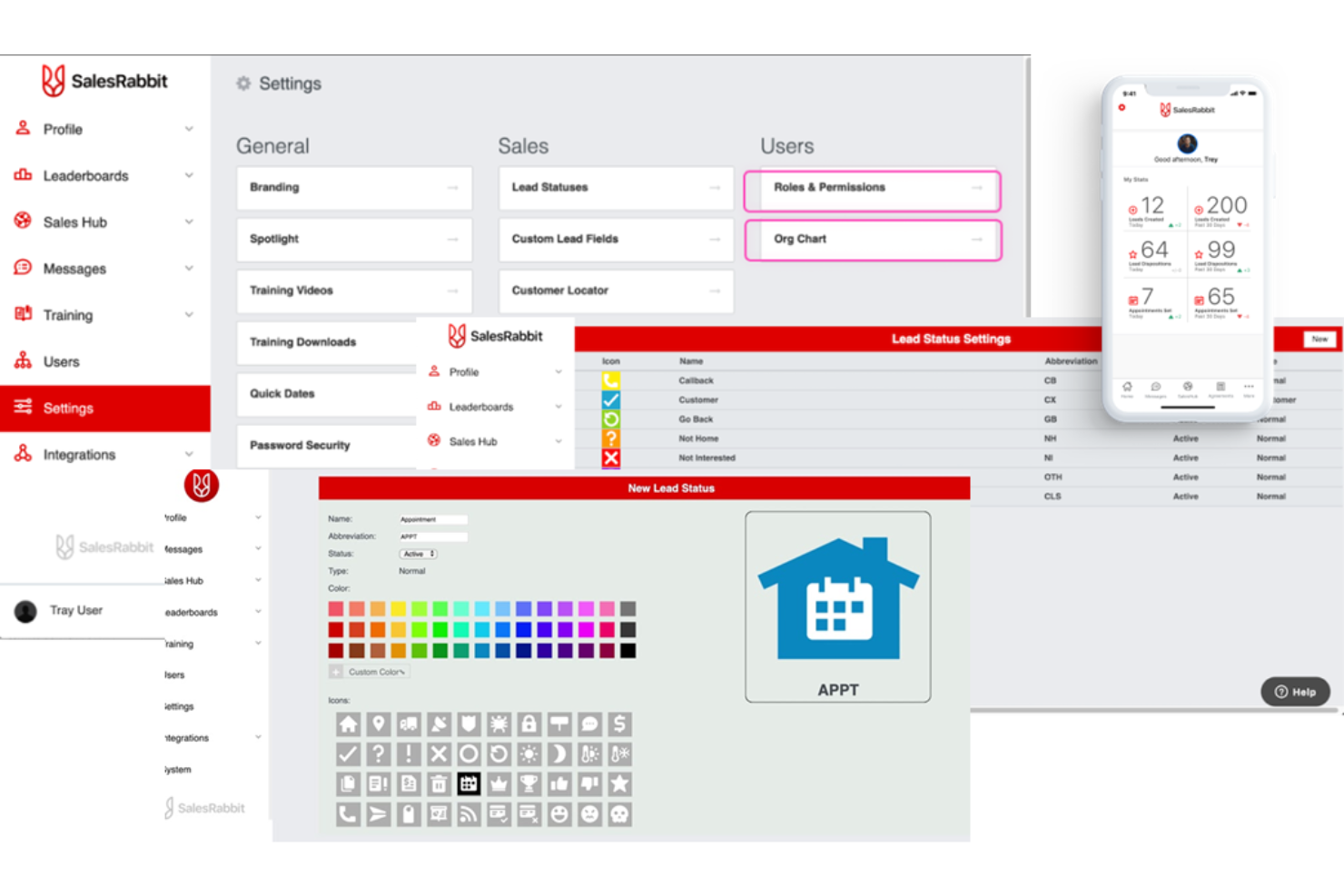
SalesRabbit is a field sales management platform designed for industries such as roofing, solar, and telecommunications. It helps your team with lead generation, territory mapping, and digital contracts, making it ideal for field sales operations.
Why I picked SalesRabbit: SalesRabbit’s free offering is the SalesRabbit Lite app, which is perfect for individual users without a team. You can access essential functionalities, including canvassing tools and appointment scheduling software. This makes it a strong choice for field sales teams looking for cost-effective solutions.
Standout features & integrations:
Features include real-time data access, custom lead forms, and user-friendly dashboards. You can prioritize leads and log interactions efficiently with its canvassing tools.
Integrations include Salesforce, Zapier, Google Workspace, Docusign, Slack, HubSpot, Microsoft Teams, Mailchimp, Dropbox, and more.
What’s free? SalesRabbit offers a free-forever plan with the SalesRabbit Lite app, suitable for individual users, but it limits some advanced features.
Pros and Cons
Pros:
- Tracks rep activity easily
- Strong territory mapping
- Built for field reps
Cons:
- Slow with big datasets
- Not for office teams
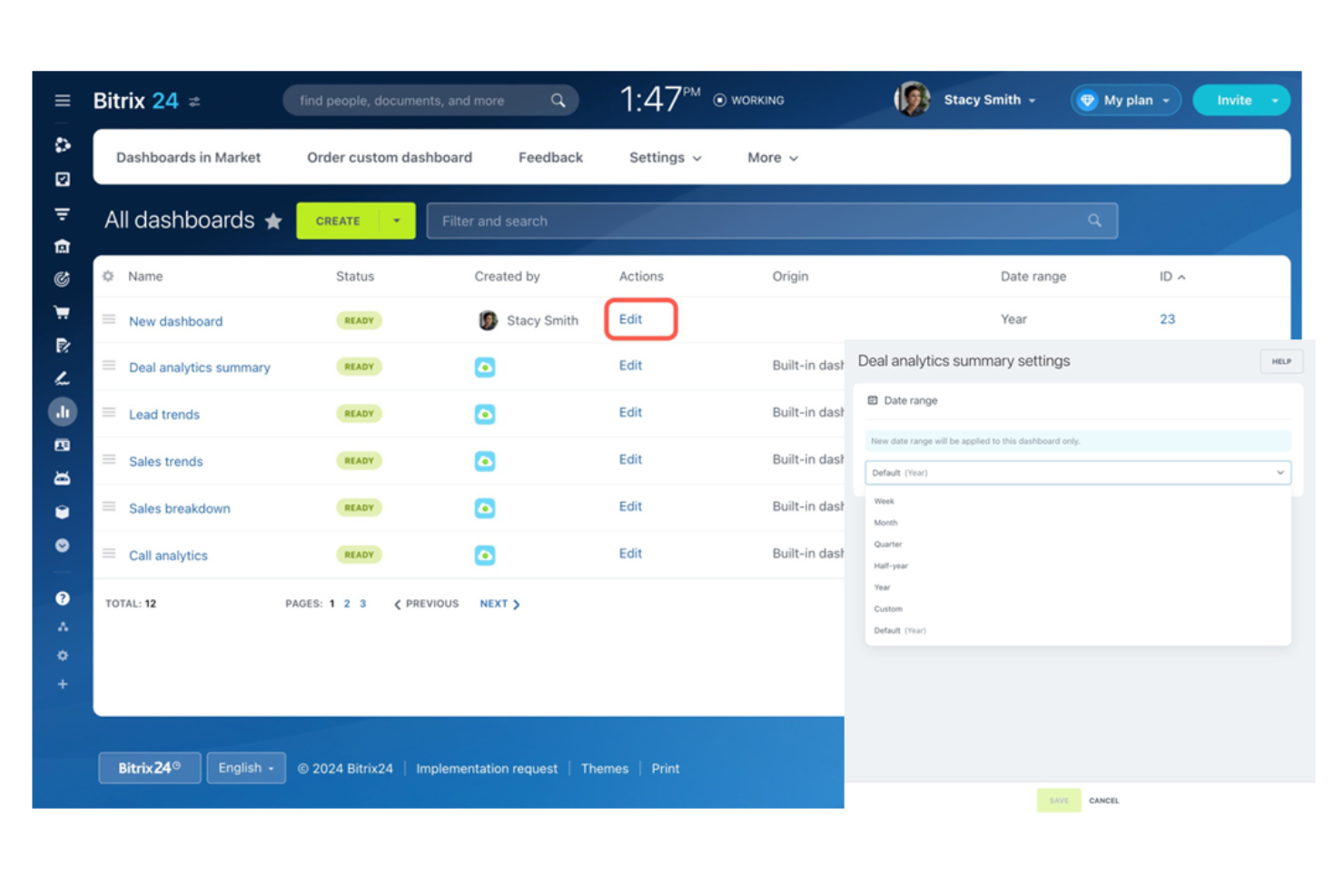
Bitrix24 is a comprehensive online workspace designed for small to large enterprises. It offers CRM, task management, collaboration, and HR tools, providing a solid option for businesses looking to centralize operations.
Why I picked Bitrix24: The free plan supports unlimited users, which is rare among free sales tracking tools. You can manage sales, tasks, and projects without worrying about user limits. The free version includes CRM capabilities, project management tools, and team communication features. This is beneficial for businesses looking to engage large teams without incurring additional costs.
Standout features & integrations:
Features include project management tools such as Kanban and Gantt charts, which help you organize tasks effectively. The platform supports team communication through chat messaging and video calls. You can also manage sales pipelines and automate workflows for efficiency.
Integrations include Mailchimp, Slack, Dropbox, Google Drive, OneDrive, Xero, QuickBooks, Shopify, Salesforce, Zoom, and more.
What’s free? Bitrix24 offers a free-forever plan with unlimited users, but it limits some advanced features and storage space.
Pros and Cons
Pros:
- Basic CRM included in free plan
- Broad team workspace
- Unlimited free users
Cons:
- Limited free automation
- Small free storage

Freshsales is a CRM software tailored for sales teams in small to medium-sized businesses. It offers tools for lead management, email tracking, and communication, helping you keep your sales process organized and efficient.
Why I picked Freshsales: Freshsales provides a free plan that includes access to contact management and email templates. The free version also offers Kanban views, as well as built-in phone and live chat features.
Standout features & integrations:
Features in the free plan include Kanban visuals and email templates. Pay plans let you automate repetitive tasks to save time and focus on selling. The platform also includes in-depth reporting tools to help you analyze sales performance.
Integrations include Google Contacts, Outlook Contacts, Zapier, Mailchimp, HubSpot, QuickBooks, Slack, Stripe, Shopify, Docusign, and more.
What’s free? Freshsales offers a free-forever plan with essential CRM features, but it limits the number of users and advanced functionalities.
Pros and Cons
Pros:
- Free plan allows for up to three users
- Insightful free metrics
- Clear visuals
Cons:
- Limited free tools
- Free user limits

Thryv is a comprehensive marketing and sales platform designed for small service-based businesses. It offers CRM, scheduling, invoicing, and reputation management tools, making it ideal for industries such as health and wellness, home services, and legal services.
Why I picked Thryv: Thryv provides free tools such as an online presence scan and invoice template builder, which are beneficial for service-based businesses. These features help you manage customer interactions and administrative tasks. The platform’s focus on local listings and reputation management supports businesses aiming to build their visibility. This makes it particularly useful for small businesses seeking to grow their local presence without extra costs.
Standout features & integrations:
Features include a pricing calculator to help evaluate the prices you charge and social media management tools to engage with your audience. The platform also supports reputation management to help maintain your business’s image.
Integrations include QuickBooks, Yelp, Facebook, Google Business Profile, Instagram, WordPress, Mailchimp, Stripe, Square, PayPal, and more.
What’s free? Thryv offers free tools such as an online presence scan and invoice template builder, but the main platform requires a paid plan.
Pros and Cons
Pros:
- Library of free job-tracking templates
- Fits service workflows
- Useful presence scan
Cons:
- Limited free analytics
- Sales tools are mostly locked behind paid tiers

Workbooks is a CRM platform tailored for mid-sized companies, offering tools for sales, marketing, and customer service. It helps you manage customer data, track sales activities, and improve client interactions.
Why I picked Workbooks: Workbooks offers a free trial suited for mid-sized companies needing comprehensive CRM capabilities. You can manage customer relationships and sales processes efficiently. Features such as contact management and sales tracking make it ideal for businesses that want to support their sales operations.
Standout features & integrations:
Features include customizable analytics dashboards that provide insights into business performance. You can use marketing automation tools to help organize campaigns and increase engagement. The platform also offers advanced reporting tools to assist in analyzing sales data and making informed decisions.
Integrations include SharePoint, Outlook, Mailchimp, Sage, Xero, QuickBooks, Zapier, Gmail, Docusign, Eventbrite, and more.
What’s free? Workbooks offers a 30-day free trial, allowing access to all features without restrictions during the trial period.
Pros and Cons
Pros:
- Combined sales-marketing approach
- Clear reporting tools
- Strong mid-size structure
Cons:
- Too complicated for simple flows
- Setup takes time

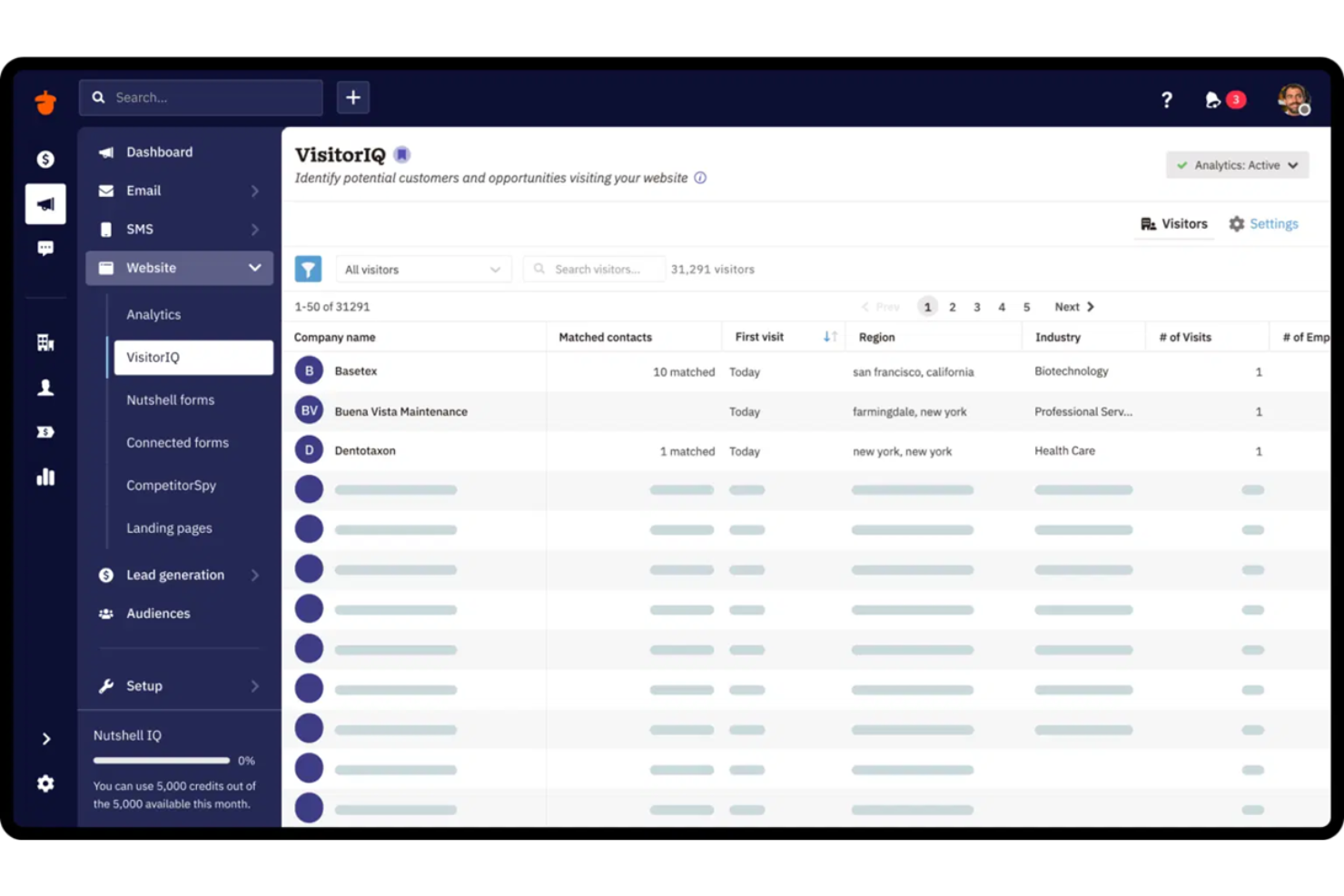
Nutshell is a user-friendly CRM platform designed for small businesses and sales teams. It offers tools for managing contacts, tracking sales pipelines, and automating sales processes, making it ideal for beginners in CRM.
Why I picked Nutshell: Nutshell provides a free trial that suits beginners who need an intuitive CRM solution. It includes features such as contact management and pipeline management to simplify sales processes. With email marketing tools to help you reach more customers, Nutshell is a great option for those new to CRM, providing essential software without complexity.
Standout features & integrations:
Features include customizable sales pipelines that let you tailor stages to your specific sales process. You can use reporting tools to gain insights into sales performance and make informed decisions. The platform also offers team collaboration features to support communication and productivity.
Integrations include Google Workspace, Microsoft Office 365, Mailchimp, QuickBooks Online, Slack, Outlook, Zapier, Constant Contact, Intercom, Unbounce, and more.
What’s free? Nutshell offers a 14-day free trial with access to all features, but it requires a paid plan after the trial period.
Pros and Cons
Pros:
- Full-feature trial access
- Simple deal tracking
- Several price tiers
Cons:
- Basic customization only
- No free forever plan
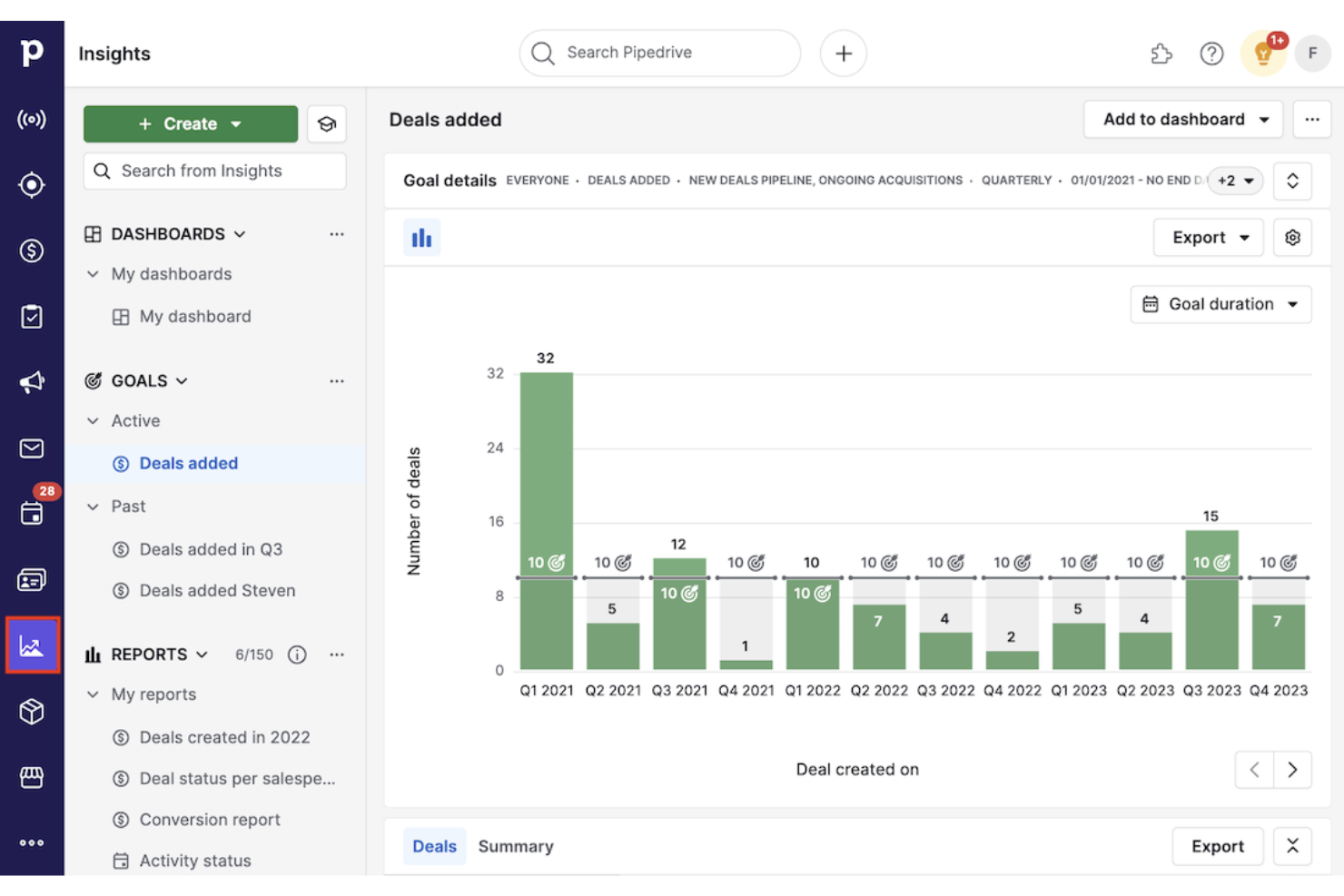
Pipedrive is a sales-focused CRM designed for sales teams and businesses of all sizes. It helps you manage leads, track sales pipelines, and optimize sales processes to close deals more efficiently.
Why I picked Pipedrive: Pipedrive is perfect for those who need strong pipeline management tools. You can visualize and manage your sales processes with customizable pipelines, and the free trial includes activity reminders and goal tracking to keep your team on track. This platform is practical for teams that want to improve their sales efficiency.
Standout features & integrations:
Features include sales forecasting tools that help you predict future revenue and plan accordingly, and you can automate routine tasks to save time and focus on selling. The platform also provides detailed sales reporting to help you understand your performance and make informed decisions.
Integrations include Google Workspace, Microsoft Teams, Mailchimp, Zapier, Slack, Trello, Asana, QuickBooks, Xero, Docusign, and more.
What’s free? Pipedrive offers a limited-time free trial, giving access to all features without restrictions during the trial period.
Pros and Cons
Pros:
- Strong deal visibility
- Full trial access
- Clear pipeline control
Cons:
- Limited features for analysis and automation
- Limited trial timeframe
Other Free Sales Tracking Software
Here are some additional sales tracking software options that also offer free plans or trials. While these tools didn’t make it onto my shortlist, they’re still worth checking out:
- Streak
For Gmail-based CRM
- Brevo
For email marketing integration
- EspoCRM
For open-source customization
- Capsule
For simple contact management
- monday.com
For AI-powered visual project tracking
- Salesforce
For scalable sales CRM solutions
- Snov.io
For email verification tools


Free Sales Tracking Software Selection Criteria
When selecting the best free sales tracking software to include in this list, I considered common buyer needs and pain points, such as budget constraints and the need for core functionalities without cost. I also used the following framework to keep my evaluation structured and fair:
Core Functionality (25% of total score)
To be considered for inclusion in this list, each solution had to fulfill these common use cases:
- Manage contact information
- Track sales leads
- Monitor sales pipelines
- Generate sales reports
- Schedule follow-up activities
Additional Standout Features (25% of total score)
To help further narrow down the competition, I also looked for unique features, such as:
- Customizable dashboards
- AI-driven insights
- Integration with third-party tools
- Mobile app availability
- Automation capabilities
Usability (10% of total score)
To get a sense of the usability of each system, I considered the following:
- Intuitive interface design
- Easy navigation
- Minimal learning curve
- Clear labeling and instructions
- Responsive performance
Onboarding (10% of total score)
To evaluate the onboarding experience for each platform, I considered the following:
- Availability of training videos
- Interactive product tours
- Access to templates
- Support through chatbots
- Webinars for new users
Customer Support (10% of total score)
To assess each software provider’s customer support services, I considered the following:
- Availability of live chat support
- Response time to inquiries
- Access to a knowledge base
- Availability of email support
- Community forums for user interaction
Value For Money (10% of total score)
To evaluate the value for money of each platform, I considered the following:
- Competitive pricing against the features offered
- Access to essential features in the free plan
- Flexibility in pricing tiers
- Discounts for annual billing
- Transparency in pricing structure
Customer Reviews (10% of total score)
To get a sense of overall customer satisfaction, I considered the following when reading customer reviews:
- Consistency in positive feedback
- Commonly mentioned strengths
- Reported issues or weaknesses
- User recommendations
- Overall rating and sentiment
How To Choose Free Sales Tracking Software
Complex feature lists and pricing structures can make it hard to figure out what you’re really getting from a free sales tracking software. To help you stay focused as you work through your software selection process, here are some factors to keep in mind:
| Factor | What To Consider |
|---|---|
| Free Offer Scope | Look into what’s included in the free plan. Does it cover essential features like contact management and sales tracking, or are key tools locked? |
| Scalability | Consider if the software can grow with your business. Will it support more users or additional features as your team expands? |
| Integrations | Check if the software integrates with tools you already use, like email platforms or accounting software. This can save time and reduce friction. |
| Ease of Use | Assess the user interface. Is it intuitive for your team, or does it require extensive training? A simple design can improve adoption rates. |
| Customization | Determine if the software allows for customization to fit your unique sales process. Can you tailor pipelines or reports to meet your needs? |
| Support Options | Evaluate the availability of customer support. Does the vendor offer live chat, email support, or a knowledge base to assist you when needed? |
| Mobile Access | Ensure the software provides a mobile app. This is helpful for teams that need to access data on the go or work remotely. |
| Data Security | Look into the security measures in place. Are your sales data and customer information protected with encryption and regular backups? |
What Is Free Sales Tracking Software?
Sales tracking software is designed to help businesses manage and monitor their sales processes. Typically, free offerings include limited-feature plans or time-restricted trials. These tools are often used by sales professionals, small business owners, and entrepreneurs looking to improve sales efficiency without extra costs. They provide value by organizing contacts, tracking sales activities, and offering insights into sales performance. Features such as contact management, sales pipeline tracking, and reporting capabilities help with managing customer relationships, improving sales strategies, and making data-driven decisions.
Features of Free Sales Tracking Software
Let’s go over the features commonly found in sales tracking software, and which ones are usually included in free vs. paid plans.
Typically Free Sales Tracking Software Features
- Contact management: Helps organize and store customer information, making it easier to track interactions and follow-ups.
- Sales pipeline tracking: Allows you to visualize the stages of your sales process and manage deals effectively.
- Task automation: Automates repetitive tasks such as follow-up emails, saving time and reducing manual effort.
- Email marketing tools: Enable sending marketing emails to leads and customers, aiding in engagement and conversion.
- Basic reporting: Provides simple reports on sales activities and performance, helping you make informed decisions.
Typically Paid Sales Tracking Software Features
- Advanced analytics: Offer deep insights into sales data, helping you identify trends and optimize strategies.
- Customizable dashboards: Allow you to tailor the interface to fit your specific needs, improving usability and focus.
- AI-driven insights: Provide predictive analytics and recommendations, supporting decision-making.
- Integration with third-party tools: Connects with other software, streamlining workflows and data sharing across platforms.
- Marketing automation: Automates complex marketing campaigns, increasing efficiency and effectiveness.
Benefits of Free Sales Tracking Software
Implementing free sales tracking software provides several benefits for your team and your business. Here are a few you can look forward to:
- Cost savings: Access essential sales tracking tools without spending money, which is ideal for small businesses and startups.
- Improved organization: Features such as contact management help keep your sales data organized and accessible.
- Enhanced efficiency: Task automation business tools help reduce manual work, allowing your team to focus on more important activities.
- Better sales insights: Basic reporting gives you a clear view of sales performance, aiding in decision-making.
- Increased engagement: Email marketing tools help maintain communication with leads and customers, encouraging engagement.
- User-friendly access: Simplified interfaces in free versions make it easy for teams to adopt and use the software effectively.
- Scalability: Start with a free plan and upgrade as your business grows, ensuring you always have the right tools at hand for your business needs.
Costs and Pricing of Free Sales Tracking Software
I realize you came to this article looking for the best sales tracking software options that are available for free. However, since free plans only offer limited features, there’s a good chance you’ll need to scale your plan up in the future.
The table below summarizes common plans, their average prices, and typical features included in sales tracking software solutions:
Plan Comparison Table for Sales Tracking Software
| Plan Type | Average Price | Common Features |
|---|---|---|
| Free Plan | $0 | Contact management, basic reporting, email marketing tools, and task automation. |
| Personal Plan | $5-$25/user/month | Enhanced reporting, additional storage, more customization options, and priority support. |
| Business Plan | $30-$75/user/month | Advanced analytics, integration with third-party tools, advanced automation features, and mobile access. |
| Enterprise Plan | $80-$150/user/month | Customizable dashboards, AI-driven insights, dedicated account management, and full API access. |
Free Sales Tracking Software FAQs
Here are some answers to common questions about free sales tracking software:
How do you know if free sales tracking software is enough for your team?
Most teams can get by with a free CRM plan if they only need basic contact management, pipeline views, and simple reporting. You’ll know it’s enough when you can track your daily work without switching tools or using spreadsheets on the side. If you often hit user limits, storage caps, or missing features, that’s a sign you’re outgrowing it. Pay attention to how often you need workarounds. If you’re patching gaps every week, you’ll likely need a paid tier soon.
When should you upgrade from free sales tracking software?
Upgrade when the limits start slowing down your team—such as missing automation, not enough users, or restricted integrations. If your sales reps can’t keep up with growing deal volume or need deeper insights, it’s time to move up. Another sign is when you rely on too many outside tools to fill the gaps. A paid plan usually makes sense once you’re spending more time fixing problems than actually selling.
What integrations matter most when choosing free sales tracking software?
The most useful integrations connect the tool to your email, calendar, and marketing system so you don’t have to copy data by hand. You’ll also want to check whether it pairs well with accounting tools if you send quotes or invoices, or whether it offers sales automation tools. Your team should focus on the apps they already use daily. If the free plan blocks the integrations you rely on, it’ll feel limiting fast.
Can your team switch from one free sales tracking software to another easily?
Switching is easy if the tool lets you export your contacts, deals, and notes in common formats such as CSV. The challenge comes with things including custom fields and task histories, which don’t always transfer cleanly. You should test a small export and import before committing. If the migration looks messy, it may be worth picking a tool with stronger import options from the start.
How important is mobile access when using free sales tracking software?
Mobile access matters a lot if your team works outside the office or needs to update deals on the spot. A good mobile app lets you add notes, check tasks, and follow up quickly without waiting to get back to your laptop. If the free plan doesn’t include mobile tools, you’ll likely forget updates or create data gaps. Choose one that keeps your team connected wherever they are.
What should you check in a free plan’s user limits before choosing a tool?
Look at how many users you can add today and how many you expect in the next year. Some tools only allow one or two users on a free plan, which can block collaboration later. You also want to check whether extra users lose access to certain features. If you expect your team to grow, choose a tool that doesn’t impose limitations when you add people.
What’s Next:
If you’re in the process of researching free sales tracking software, connect with a SoftwareSelect advisor for free recommendations.
You fill out a form and have a quick chat where they get into the specifics of your needs. Then you’ll get a shortlist of software to review. They’ll even support you through the entire buying process, including price negotiations.