
14 Best Easy Quoting Software Reviewed in 2026

10 Best Easy Quoting Software Shortlist
Here's my pick of the 10 best software from the 14 tools reviewed.


I’ve spent time testing and reviewing a wide range of quoting solutions to understand which ones genuinely simplify the process and which ones fall short. My goal is to give you a clear, unbiased view of the tools that help teams create accurate quotes faster, reduce manual back-and-forth, and avoid costly errors.
In this article, I’ll walk you through my top picks, breaking down their key features along with practical pros and cons based on real use. You’ll see how each tool fits different workflows, team sizes, and quoting needs, so you can confidently choose the option that works best for your business. Let’s take a closer look at what can make quoting simpler and more efficient.
Why Trust Our Software Reviews
Best Easy Quoting Software Summary
This comparison chart summarizes pricing details for my top easy quoting software selections to help you find the best one for your budget and business needs.
| Tool | Best For | Trial Info | Price | ||
|---|---|---|---|---|---|
| 1 | Best for MSP customers | Free demo available | From $149/month (billed annually) | Website | |
| 2 | Best for cloud services | Free trial + free demo available | From $45.83/month (billed annually) | Website | |
| 3 | Best for document automation | 14-day free trial + free plan + free demo available | From $19/user/month (billed annually) | Website | |
| 4 | Best for IT services | 14-day free trial | Price upon request | Website | |
| 5 | Best for free and customizable quotes | Free plan + free demo available | From $155/month (billed annually) | Website | |
| 6 | Best for centralized contract management | 14-day free trial + free plan + free demo available | From $17/user/month (billed annually) | Website | |
| 7 | Best for simple online acceptance | 21-day free trial available | From $28/month | Website | |
| 8 | Best for international use | 14-day free trial available | From $29/month | Website | |
| 9 | Best for complex manufacturing | Free demo available | Pricing upon request | Website | |
| 10 | Best for revenue workflow | Free demo available | From $66/user/month (billed annually) | Website |
-

Prisync
Visit WebsiteThis is an aggregated rating for this tool including ratings from Crozdesk users and ratings from other sites.4.7 -
Expedite Commerce
Visit Website -
QuickBooks Online
Visit WebsiteThis is an aggregated rating for this tool including ratings from Crozdesk users and ratings from other sites.4





Best Easy Quoting Software Reviews
Below are my detailed summaries of the best easy quoting software that made it onto my shortlist. My reviews offer a detailed look at the key features, pros & cons, integrations, and ideal use cases of each tool to help you find the best one for you.
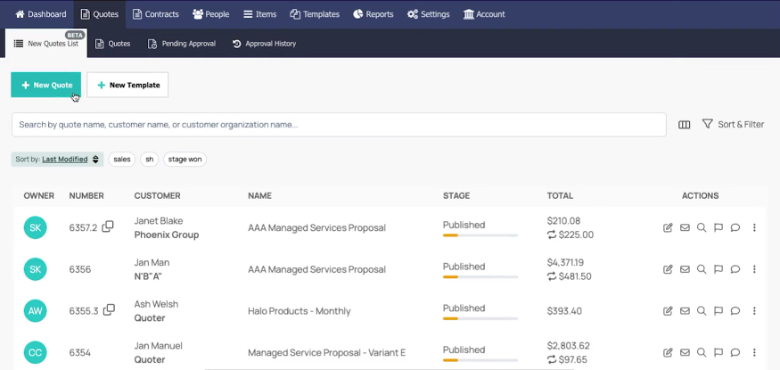
Quoter is a quoting software designed for managed service providers (MSPs)that focus on improving customer satisfaction and driving revenue growth. It offers tools for creating quotes, managing customer relationships, and enhancing operational efficiency.
Why I picked Quoter: It's tailored for MSPs, providing features such as e-signatures to simplify document signing and a product configurator for service customization. Customer relationship management (CRM) and professional services automation (PSA) integrations give you a complete view of customer interactions. Automated follow-up emails ensure timely communication, and loyalty discounts reward your best clients. These features help you maintain strong client relationships and optimize your quoting process.
Standout features & integrations:
Features include a product configurator that lets clients tailor services, offering greater personalization options. E-signatures simplify document signing, speeding up transactions. Automated follow-up emails keep your communication timely and relevant.
Integrations include HubSpot, Salesforce, QuickBooks, Xero, Zoho CRM, Mailchimp, and Stripe.
Pros and Cons
Pros:
- CRM integrations available
- Product customization options
- Tailored for MSPs
Cons:
- Occasional integration hiccups
- Learning curve for new users

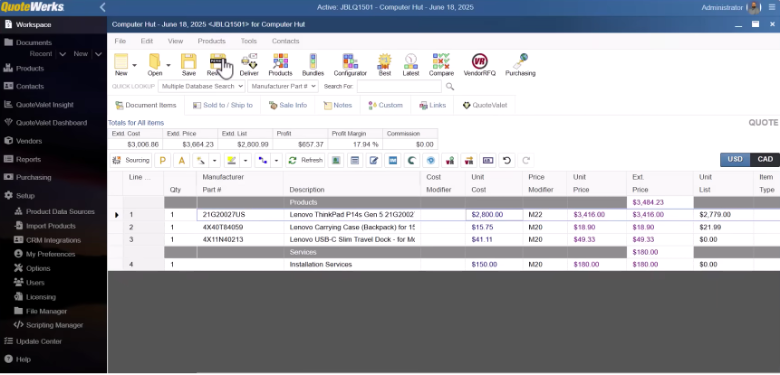
QuoteWerks is a sales quoting and proposal software that gives you a dedicated place to build and manage quotes instead of juggling Word and Excel files. It connects to your existing CRM and accounting tools so you can pull in contact and product data you already have while you work. You can create, send, and track quotes and proposals from one workspace instead of bouncing between systems.
Why I picked QuoteWerks: With QuoteWerks Web, your team can put quotes together in a browser without worrying about installs or devices, supporting quicker response from wherever you’re working. You can use templates and layout controls to add your logo, branding, and standard documents, so every quote looks consistent and on-brand.
Standout features & integrations:
Features include a guided quoting flow that takes you from retrieving customer details to building and reviewing each quote, so your team follows the same basic steps every time. Your reps can group items into bundles, reuse templates, and hide internal-only lines, which keeps more complex quotes from feeling overwhelming. You also get centralized quote storage with filters by date, company, sales rep, and more, making it easier for you to find and reuse past work instead of starting from scratch.
Integrations include QuickBooks, Salesforce, HubSpot, Zoho CRM, Microsoft Dynamics 365, ConnectWise, Autotask, Act!, and FedEx.
Pros and Cons
Pros:
- Central quote storage helps your team reuse
- SQL backend supports larger, growing sales data
- Hybrid desktop and web-based options suit teams
Cons:
- Initial configuration may take focused implementation time
- Multiple editions and modules can confuse setup
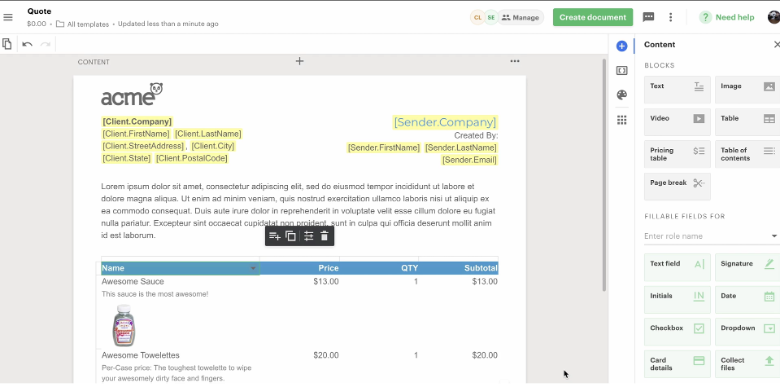
PandaDoc is a document management software aimed at sales teams and businesses looking to automate their document workflows. It helps your team create, manage, and sign documents efficiently, designed to improve productivity and close deals faster.
Why I picked PandaDoc: It excels in document automation, offering features such as customizable templates and a drag-and-drop editor for ease of use. The software supports e-signatures, making the signing process quick and secure. Analytics provide insights into document performance so you can understand client interactions. PandaDoc also offers content library storage, ensuring your team has access to frequently used documents.
Standout features & integrations:
Features include a drag-and-drop editor that simplifies the document creation process. You can use analytics to track document performance and gain insights into client engagement. The content library allows you to store and manage frequently used documents.
Integrations include Salesforce, HubSpot, Pipedrive, Zoho CRM, Slack, QuickBooks, Stripe, PayPal, Google Drive, and Dropbox.
Pros and Cons
Pros:
- Accessible content library
- Easy drag-and-drop editor
- Efficient document automation
Cons:
- Learning curve for new users
- Limited offline functionality

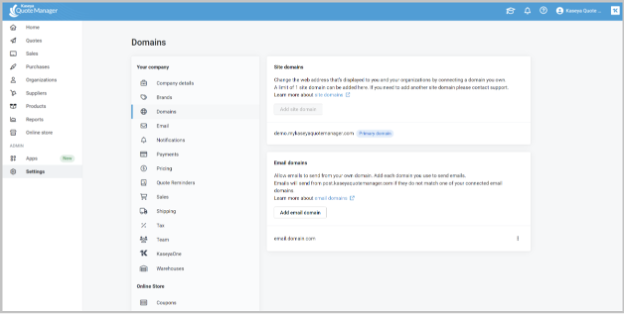
Kaseya Quote Manager is a cloud-based software designed for MSPs to improve quoting, selling, and procurement processes for IT hardware and services. It enhances operational efficiency and customer satisfaction by providing tools for accurate quote creation and automated procurement.
Why I picked Kaseya Quote Manager: It's designed specifically for MSPs, offering a drag-and-drop editor that simplifies quote creation. Automated purchasing features can help reduce manual errors and save time, while the branded e-commerce storefront allows clients to browse and purchase hardware. Integrating with accounting software such as QuickBooks and Xero enhances its functionality, making it a solid solution for MSPs.
Standout features & integrations:
Features include a user-friendly drag-and-drop editor for creating quotes quickly. Automated purchasing minimizes errors and streamlines your procurement process. The platform also offers a branded e-commerce storefront, allowing clients to browse and purchase IT hardware easily.
Integrations include QuickBooks, Xero, Autotask, and ConnectWise.
Pros and Cons
Pros:
- Branded e-commerce storefront
- Automated purchasing reduces errors
- Tailored for MSPs
Cons:
- Requires internet for full functionality
- Learning curve for new users


Refrens is a quoting software designed for businesses of all sizes, offering free and customizable quoting solutions. It helps your team create professional quotes, track client interactions, and convert quotes into invoices effortlessly.
Why I picked Refrens: It provides free and customizable quotes, making it accessible for any budget. You can generate quotes quickly and share them via email or WhatsApp. Customizable templates allow you to maintain a professional image, and the software supports multiple businesses and team members from a single account. Refrens also ensures data security with cloud storage and role-based access, enhancing your business operations.
Standout features & integrations:
Features include quick quote generation, which helps you save time on manual tasks. The customizable templates let you maintain consistent branding across all your documents. You can also convert approved quotes into invoices with a single click, streamlining your workflow.
Integrations include QuickBooks, Slack, Google Drive, WhatsApp, PayPal, Razorpay, Instamojo, Stripe, Zoho CRM, and Xero.
Pros and Cons
Pros:
- Easy invoice conversion
- Quick quote generation
- Free customizable quotes
Cons:
- Limited third-party integrations
- No offline access

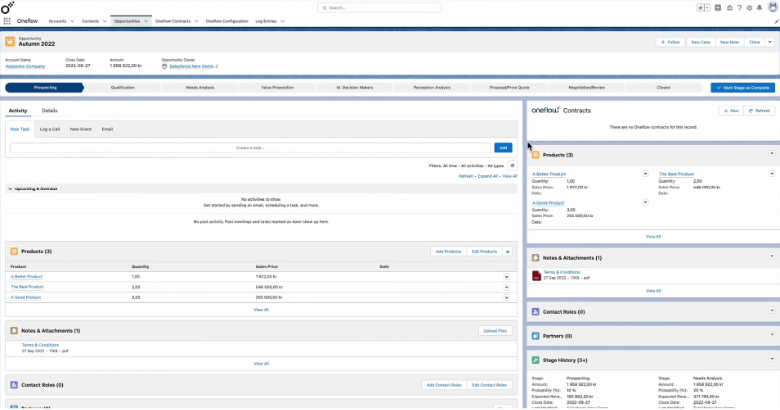
Oneflow is a digital contract management platform that lets you create, send, sign, and manage proposals, quotes, and agreements. It’s built for teams across departments like sales, HR, procurement, and operations that want their contract work handled in a single location, from drafting to post-signing.
Why I picked Oneflow: If you want contract and quote flows that keep moving without a lot of back-and-forth, Oneflow offers you dynamic, HTML-based contracts that you and your counterparties can edit live instead of swapping static PDFs. Your team can comment, chat, and negotiate in real time, so everyone works in the same version rather than juggling separate files.
Standout features & integrations:
Features include interactive product tables that let customers pick which products they want, set quantities, and see totals update automatically, including one-time and recurring prices and visible discounts. Your team also gets a contract calendar and smart repository, so renewals, key dates, and active agreements sit in one place instead of scattered across folders or spreadsheets. Webforms as a service, tracking and notifications, and contract metadata help you capture data at the source and follow each quote through its life cycle without extra manual updates.
Integrations include Salesforce, HubSpot, Microsoft Dynamics 365, Pipedrive, Teamtailor, HiBob, Jobylon, Slack, Google Workspace, and Zapier.
Pros and Cons
Pros:
- Track each candidate’s progress across multiple forms
- Your team sees the same contract timeline
- Send contracts on a laptop or phone anywhere
Cons:
- Form builder can’t create advanced layouts yet
- Limited folders when your team scales contracts

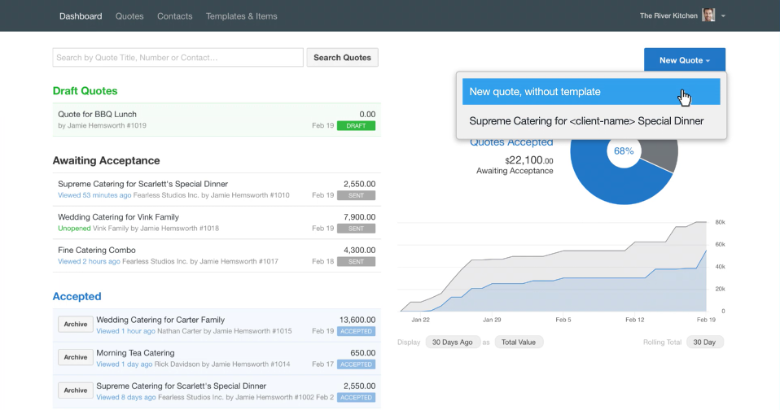
Quotient is a quoting software designed for small- to medium-sized businesses that need to create professional quotes quickly. It helps your team manage quotes and customer interactions through features such as online acceptance and automated follow-ups.
Why I picked Quotient: It features simple online acceptance, allowing customers to approve quotes anytime. Automated follow-ups ensure you don't miss out on potential deals, and customers can ask questions directly on quotes. Quotient also includes optional and multiple-choice items, giving you flexibility in your offerings. The system notifies you when a customer opens a quote, keeping you informed about engagement.
Standout features & integrations:
Features include a price item library for quick access to frequently used products, templates that speed up the quoting process, and the ability to gather feedback and reviews after a job is done. You can also capture leads online and send them directly into the system, ensuring a smooth workflow.
Integrations include Xero, QuickBooks, Mailchimp, Zapier, Capsule CRM, Insightly, Highrise, and Webhooks.
Pros and Cons
Pros:
- Flexible quote options
- Automated follow-ups
- Easy online acceptance
Cons:
- Limited offline functionality
- Limited customization options
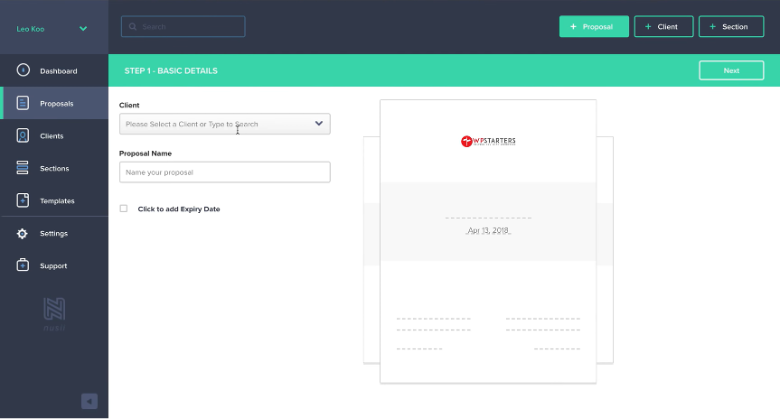
Nusii is a proposal software mainly for freelancers and agencies, allowing you to create professional proposals quickly. It focuses on proposal creation, tracking, and management, making it easier for your team to handle client interactions effectively.
Why I picked Nusii: It offers international use, which means you can cater to clients across different regions. Customizable branding lets you maintain a professional image, while proposal notifications keep you updated on client engagement. Reusable content speeds up the proposal process, allowing you to focus more on client relationships. Nusii also provides a simple interface, reducing the time you will need to spend on administrative tasks.
Standout features & integrations:
Features include customizable branding that keeps your proposals looking professional. Proposal notifications help you track client engagement effortlessly. Reusable content allows you to create proposals faster, saving valuable time.
Integrations include HubSpot, Stripe, Slack, Highrise, Pabbly, Basecamp, Pipedrive, Less Annoying CRM, Integrately, Typeform, and Trello.
Pros and Cons
Pros:
- Simple user interface
- Quick proposal setup
- Easy international use
Cons:
- Basic design options
- Limited advanced features

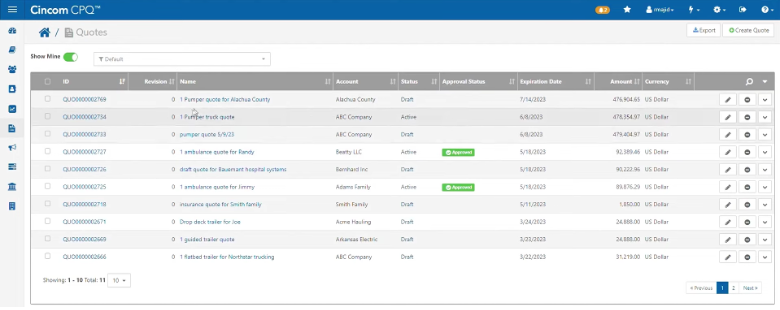
Cincom CPQ is a configure-price-quote (CPQ) software for companies that sell complex, configurable products and services. It helps your sales team, partners, and even customers set up offerings, calculate prices, and generate accurate quotes and proposals in one place.
Why I picked Cincom CPQ: If your business builds intricate equipment or bundled services, Cincom CPQ lets your team handle detailed configurations while still getting quotes out quickly. Its guided selling solution walks reps and customers through each step with prompts and rules, which helps you avoid errors and having to rework complex deals.
Standout features & integrations:
Features include tools that help your team sell visually and confidently. Visual configuration lets customers and reps see how a product changes, which makes complex choices easier to understand. You can also surface guided selections and live data in quotes for services, so your team can keep technical details and pricing aligned while building offers.
Integrations include Salesforce, Microsoft Dynamics 365, Oracle, and SAP.
Pros and Cons
Pros:
- Helps you cut configuration errors and rework
- Reduces your reliance on engineering for quotes
- Lets your team capture complex product rules
Cons:
- May require strong product knowledge to design models
- Initial setup may be complex
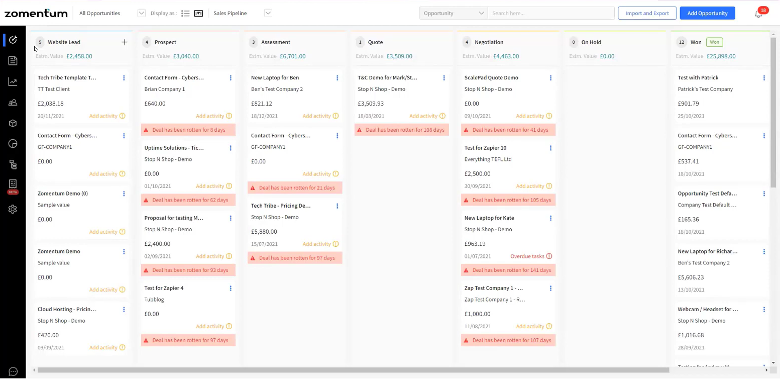
Zomentum is an AI-powered revenue platform that brings proposals, quotes, contracts, and payments into one place so your team does not have to juggle different tools. It gives service-focused businesses a workspace to design sales documents, track activity, and keep revenue workflows moving from proposal to payment.
Why I picked Zomentum: You can build detailed proposals and quotes in minutes using ready-to-use templates, an AI editor, and drag-and-drop elements instead of starting every document from scratch. Real-time pricing and product feeds from distributors help you keep quotes accurate without manual price checks.
Standout features & integrations:
Features include AI-powered workflows that remind you about renewals, approvals, and follow-ups so quotes and contracts don’t stall. You can watch revenue, renewal risks, and upsell opportunities in dashboards and reports that show what’s moving and what’s stuck. Custom automations and reporting rules let your team design processes that match how you already sell instead of forcing you into a rigid flow.
Integrations include Autotask, ConnectWise, Syncro, HaloPSA, Kaseya BMS, RepairShopr, Ingram Micro, Tech Data, Xero, and QuickBooks.
Pros and Cons
Pros:
- Can see each deal stage clearly
- Can send quotes live during client meetings
- Can standardize quotes with shared default margins
Cons:
- May require training for advanced quoting workflows
- May need fine-tuning of quote templates
Other Easy Quoting Software
Here are some additional easy quoting software options that didn’t make it onto my shortlist but are still worth checking out:
- QuoteCloud
For industry-specific solutions
- Scoro
For all-in-one business management
- Conga
For scalable, automated quote management
- DealHub
For unified quote-to-cash process automation


Easy Quoting Software Selection Criteria
When selecting the best easy quoting software to include in this list, I considered common buyer needs and pain points such as accuracy in pricing and ease of use. I also used the following framework to keep my evaluation structured and fair:
Core Functionality (25% of total score)
To be considered for inclusion in this list, each solution had to fulfill these common use cases:
- Create professional quotes
- Manage quote approvals
- Track quote status
- Convert quotes to invoices
- Offer customizable quote templates
Additional Standout Features (25% of total score)
To help further narrow down the competition, I also looked for unique features, such as:
- Advanced analytics and reporting
- Multi-currency support
- Mobile app availability
- Integration with CRM systems
- Automated follow-ups
Usability (10% of total score)
To get a sense of the usability of each system, I considered the following:
- Intuitive user interface
- Simple navigation
- Quick learning curve
- Customizable dashboards
- Clear and concise layout
Onboarding (10% of total score)
To evaluate the onboarding experience for each platform, I considered the following:
- Availability of training videos
- Interactive product tours
- Access to templates
- Supportive chatbots
- Webinars for new users
Customer Support (10% of total score)
To assess each software provider’s customer support services, I considered the following:
- 24/7 support availability
- Response time to inquiries
- Access to live chat
- Availability of a knowledge base
- Personalized support options
Value For Money (10% of total score)
To evaluate the value for money of each platform, I considered the following:
- Competitive pricing
- Features included in base plans
- Discounts for annual billing
- Scalability of pricing plans
- Trial or demo availability
Customer Reviews (10% of total score)
To get a sense of overall customer satisfaction, I considered the following when reading customer reviews:
- Overall satisfaction ratings
- Commonly mentioned pros and cons
- Frequency of updates and improvements
- Customer loyalty and retention
- User feedback on support quality
How to Choose Easy Quoting Software
It’s easy to get bogged down in long feature lists and complex pricing structures. To help you stay focused as you work through your unique software selection process, here’s a checklist of factors to keep in mind:
| Factor | What to Consider |
| Scalability | Will the tool grow with your business? Check if it supports more users, larger data volumes, and additional features as your needs expand. |
| Integrations | Does it work with your existing systems? Verify compatibility with your CRM, accounting software, and other tools to avoid manual data entry and improve workflows. |
| Customizability | Can you tailor it to fit your processes? Look for options to adjust templates, workflows, and user permissions to match your specific requirements. |
| Ease of Use | Is it straightforward for your team? Assess the interface and user feedback. A steep learning curve can slow down adoption and reduce productivity. |
| Implementation and Onboarding | How quickly can you get started? Consider the time and resources needed for setup. Look for tools with clear guides, support, and training materials. |
| Cost | Does it fit your budget? Compare pricing models and total cost of ownership. Watch out for hidden fees or limitations in lower-tier plans. |
| Security Safeguards | Is your data protected? Ensure the tool has encryption, access controls, and compliance with data regulations to keep your information safe. |
| Support Availability | Can you get help when needed? Check for 24/7 support, response times, and available channels like chat or phone to resolve issues promptly. |
What Is Easy Quoting Software?
Easy quoting software is a tool that helps businesses create, manage, and send quotes efficiently. Sales professionals, account managers, and small business owners typically use these tools to save time and improve accuracy in their quoting processes. Templates, automated calculations, and e-signature capabilities help with reducing errors, speeding up approvals, and supporting customer communication. These tools provide overall value by making the quoting process faster and more reliable.
Features
When selecting easy quoting software, keep an eye out for the following key features:
- Pre-designed templates: Help you create professional quotes quickly and maintain consistency across all documents.
- Automated calculations: Compute totals, taxes, and discounts to reduce errors and save time on manual calculations.
- E-signature capabilities: Allow clients to sign quotes electronically, speeding up the approval process and reducing paperwork.
- Integration support: Connect with CRM, accounting, and other systems to streamline data flow and improve workflow efficiency.
- Customizability: Lets you tailor templates, workflows, and permissions to fit your specific business needs and processes.
- Analytics and reporting: Provide insights into quote performance and customer interactions for informed business decision-making.
- Multi-currency support: Handle quotes in different currencies to cater to international clients and expand your market reach.
- Role-based access: Control who can view, edit, or approve quotes to enhance security and compliance.
- Mobile access: Enable you to create and manage quotes on the go using mobile devices, ensuring flexibility and responsiveness.
- Content library: Store frequently used documents and resources for easy access and quick quote creation.
Benefits
Implementing easy quoting software provides several benefits for your team and your business. Here are a few you can look forward to:
- Time savings: Automated calculations and templates allow your team to focus on more important tasks.
- Improved accuracy: Automated features reduce manual errors in quotes, ensuring clients receive correct and consistent information.
- Faster approvals: E-signature capabilities simplify the signing process, helping you close deals faster and improve cash flow.
- Better insights: Analytics and reporting provide data on quote performance, enabling informed decision-making and strategy adjustments.
- Increased flexibility: Mobile access and multi-currency support allow you to cater to clients globally and manage quotes from anywhere.
- Enhanced security: Role-based access ensures that only authorized personnel can view or edit quotes, protecting sensitive information.
- Consistent branding: Customizable templates maintain your brand's professional image across all client communications.
Costs & Pricing
Selecting easy quoting software requires an understanding of the various pricing models and plans available. Costs vary based on features, team size, add-ons, and more. The table below summarizes common plans, their average prices, and typical features included in easy quoting software solutions:
Plan Comparison Table for Easy Quoting Software
| Plan Type | Average Price | Common Features |
| Free Plan | $0 | Basic quote creation, limited templates, and email support. |
| Personal Plan | $15-$150/user/month | Customizable templates, e-signature capabilities, and mobile access. |
| Business Plan | $15-$429/user/month | Advanced analytics, integration support, and role-based access. |
| Enterprise Plan | $30-$569/user/month | Multi-currency support, dedicated account manager, and extensive customization options. |
Quoting Software FAQs
Here are some answers to common questions about simple and easy-to-use quoting software:
What is quoting software?
Quoting software helps you create, send, and track sales quotes without juggling spreadsheets. It usually offers templates, automatic price and tax calculations, e-signatures, and simple status tracking. That means you move from request to acceptance in a few clicks, with less manual work and fewer errors for your team.
Who should use basic quoting software?
Easy quoting software suits sales reps, account managers, agencies, MSPs, IT resellers, and RevOps teams that send frequent quotes and care about data quality. If you’re copying old quotes, recalculating totals manually, chasing approvals in email, or losing track of what’s sent, you may want to try quoting tools to see how they could improve your process.
How is simple quoting software different from full CPQ tools?
Full CPQ tools handle deep configuration logic, approvals, and layered pricing for complex products, especially in manufacturing. Easy quoting software is faster to implement, cheaper, and focused on templates, pricing tables, and e-signatures. If you don’t need engineering-heavy configuration, easy quoting software may be a better fit.
What features should I prioritize when looking for easy-to-use quoting software?
Prioritize solid templates and a content library, automated calculations, and e-sign or online acceptance capabilities as well as clear status tracking and strong CRM and accounting integrations. After that, you may also want to consider extras such as analytics, multi-currency support, mobile accessibility, and approval workflows if they support your quoting process.
How does quoting software improve sales performance?
It is designed to speed up response times with templates and content libraries, reduce human errors with centralized pricing, and make your brand look sharper with consistent layouts. E-sign capabilities can shorten approval cycles, while analytics can reveal which quotes, pricing structures, and offers are performing best. Over time, your conversion rates may increase and administrative drag may decrease.
What’s Next:
If you're in the process of researching easy quoting software, connect with a SoftwareSelect advisor for free recommendations.
You fill out a form and have a quick chat where they get into the specifics of your needs. Then you'll get a shortlist of software to review. They'll even support you through the entire buying process, including price negotiations.