

10 Best CRM Software for Startups Reviewed in 2026

Best CRM Software for Startups Shortlist


Choosing the right CRM software for your startup can be tough with so many options available. You need a solution that can effectively manage customer relationships while also helping you boost productivity and increase revenue, but it’s challenging knowing where to start.
Drawing from my experience with various CRM tools, I tested and reviewed some of the top software on the market. From there, I compiled my results into in-depth reviews to help teams find their ideal solution. Regardless of your industry, I’m confident that you’ll locate your next software from the list provided below.
Why Trust Our Software Reviews
We’ve been testing and reviewing CRM software since 2022. As revenue operations experts ourselves, we know how critical and difficult it is to make the right decision when selecting software.
We invest in deep research to help our audience make better software purchasing decisions. We’ve tested more than 2,000 tools for different revenue operations use cases and written over 1,000 comprehensive software reviews. Learn how we stay transparent & our software review methodology.
Best CRM Software for Startups Summary
| Tool | Best For | Trial Info | Price | ||
|---|---|---|---|---|---|
| 1 | Best for B2B teams | 30-day free trial + free demo available | From $29/user/month (billed annually) | Website | |
| 2 | Best flexible CRM setup | 14-day free trial | From $29/user/month (billed annually) | Website | |
| 3 | Best for integrated B2B order management | Free 60-day trial available | Pricing upon request | Website | |
| 4 | Best for comprehensive marketing automation | Free plan + free demo available | From $11.04/user/month (billed biennially) | Website | |
| 5 | Best for all-in-one project management | Free plan + free demo available | From $7/user/month (billed annually) | Website | |
| 6 | Best for sales pipeline management | Free demo + 14-day free trial available | From $14/user/month (billed annually) | Website | |
| 7 | Best for CRM within Gmail | 14-day free trial + free demo available | From $49/user/month (billed annually) | Website | |
| 8 | Best for AI-powered lead conversion | Free demo available | Pricing upon request | Website | |
| 9 | Best for unified customer experience management | Free demo available | From $15/user/month (billed annually) | Website | |
| 10 | Best for an affordable all-in-one CRM | Free plan available | From $8.99/user/month (billed annually) | Website |
-

Zendesk
Visit WebsiteThis is an aggregated rating for this tool including ratings from Crozdesk users and ratings from other sites.4.3 -
Pipedrive CRM
Visit WebsiteThis is an aggregated rating for this tool including ratings from Crozdesk users and ratings from other sites.4.5 -
Creatio CRM
Visit WebsiteThis is an aggregated rating for this tool including ratings from Crozdesk users and ratings from other sites.4.7



Best CRM Software for Startups Reviews
Here are my in-depth analyses of various CRM software for startups. Each analysis includes the pros and cons of the tools, their features, and their best use cases.

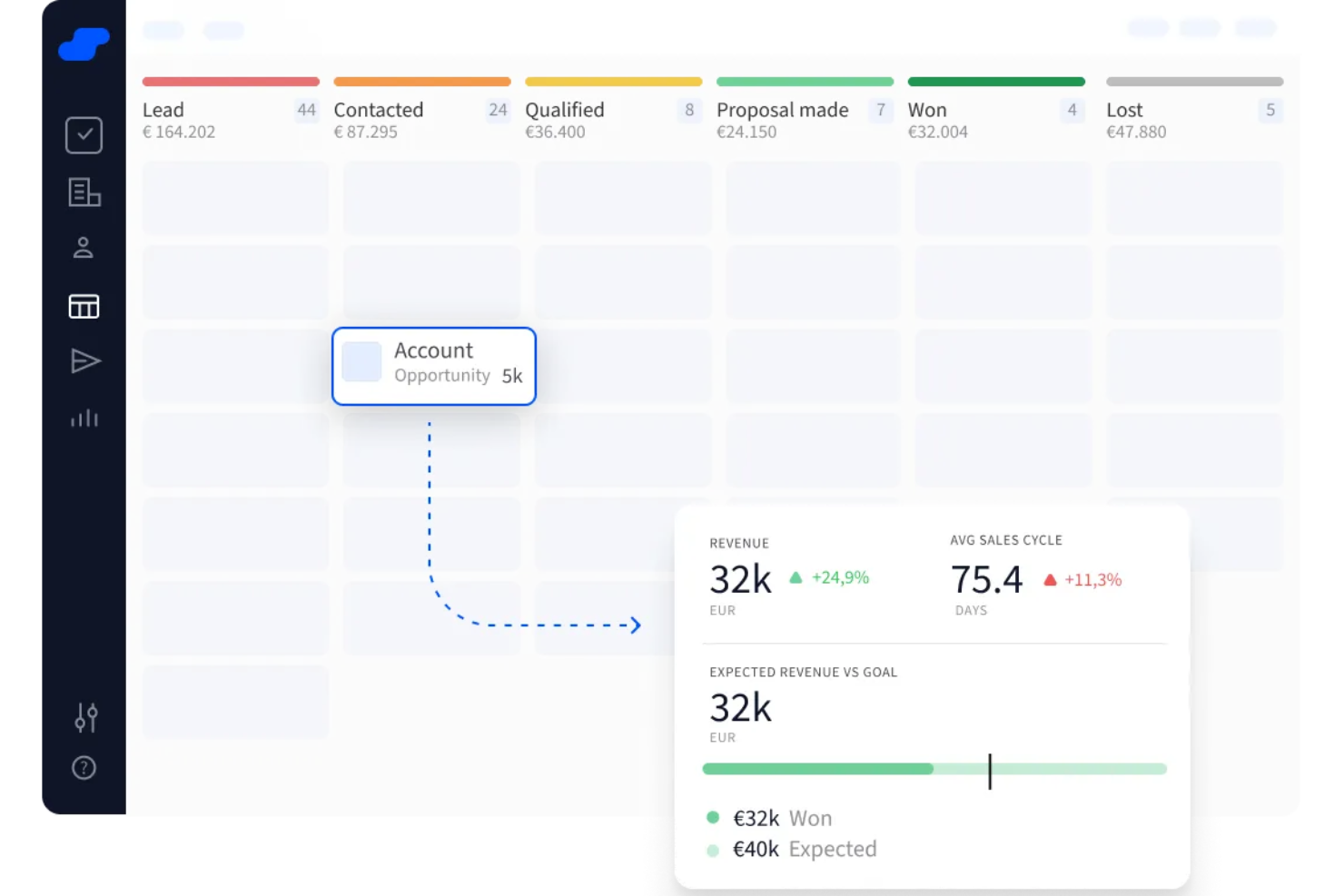
Salesflare is an automated CRM built for B2B sales teams that combines pipeline management, contact enrichment, email tracking, and follow-up automation in a single platform.
Who Is Salesflare Best For?
Salesflare is a strong fit for small B2B startups and growing sales teams that want a CRM that fills itself in without heavy manual data entry.
Why I Picked Salesflare
I've included Salesflare in my top picks because it's built around how B2B sales actually works: multiple contacts per account, relationship tracking across a team, and automatic data capture from emails and LinkedIn. I like that it pulls contact and company info in automatically, so my team isn't manually logging every interaction. The LinkedIn sidebar is especially useful for B2B prospecting, letting you add leads directly from a profile without switching tabs.
Salesflare Key Features
- Visual drag-and-drop pipeline: Manage deals across a Kanban-style board, moving opportunities between stages with a single drag.
- Built-in email tracking: Get real-time notifications when a prospect opens your email or clicks a link, without any third-party add-on.
- Automated email sequences: Set up multi-step outreach campaigns that send automatically based on triggers or time delays.
- Revenue forecasting dashboard: Track projected revenue, team performance, and deal velocity from a single reporting view.
Pros and Cons
Pros:
- Contact timelines show full communication history
- Follow-up reminders reduce lead drop-off
- Automatically fills contact data from emails
Cons:
- Limited options for bulk editing records
- Lacks highly tailored workflows for complex teams
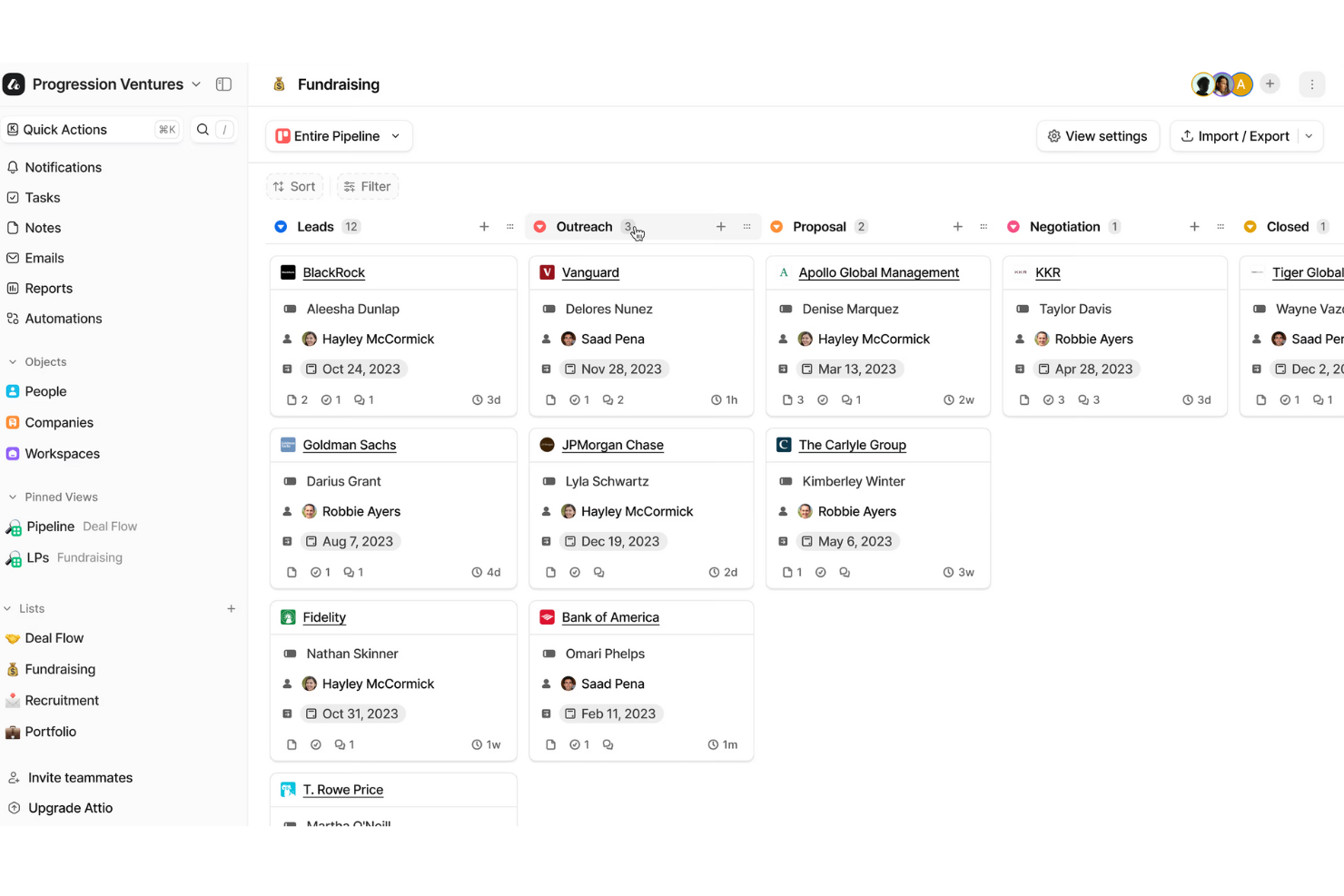
Attio is an AI-native CRM built around a fully customizable data model, with pipeline management, workflow automation, AI agents, sequencing, and real-time reporting all in one platform.
Who Is Attio Best For?
Attio is a strong fit for early-stage and scaling startups that need a CRM they can fully mold to their own data model and go-to-market motion.
Why I Picked Attio
I include Attio on my shortlist because no other CRM gives startups this level of control over how their data is structured. I love that you can define custom objects and attributes from scratch, whether your team follows a product-led approach, a sales-led approach, or a mix, the CRM reflects your actual workflow. The drag-and-drop pipeline builder and configurable record layouts mean I'm not forcing my process into a rigid template someone else designed.
Attio Key Features
- AI agents: Automate multi-step tasks like lead research, record updates, and follow-up actions directly within the CRM.
- Sequences: Build and send personalized email sequences to leads and contacts without leaving the platform.
- Workflow automation: Trigger automated actions based on record changes, deal stage movements, or custom attribute updates.
- Automatic data enrichment: Attio pulls in company and contact data automatically to keep records current without manual input.
Pros and Cons
Pros:
- AI tools support prospecting and routing
- Strong automation for repetitive workflows
- Highly customizable data model for startups
Cons:
- No built-in phone calling feature
- Limited offline access or functionality
New Product Updates from Attio

Attio Adds Workflow Access Requests and Plain Integration
Attio adds workflow access requests and a new Plain integration to improve collaboration and customer context sharing. This update helps teams manage workflow permissions and keep customer data synced across tools. For more information, visit Attio’s official site.
 .
.
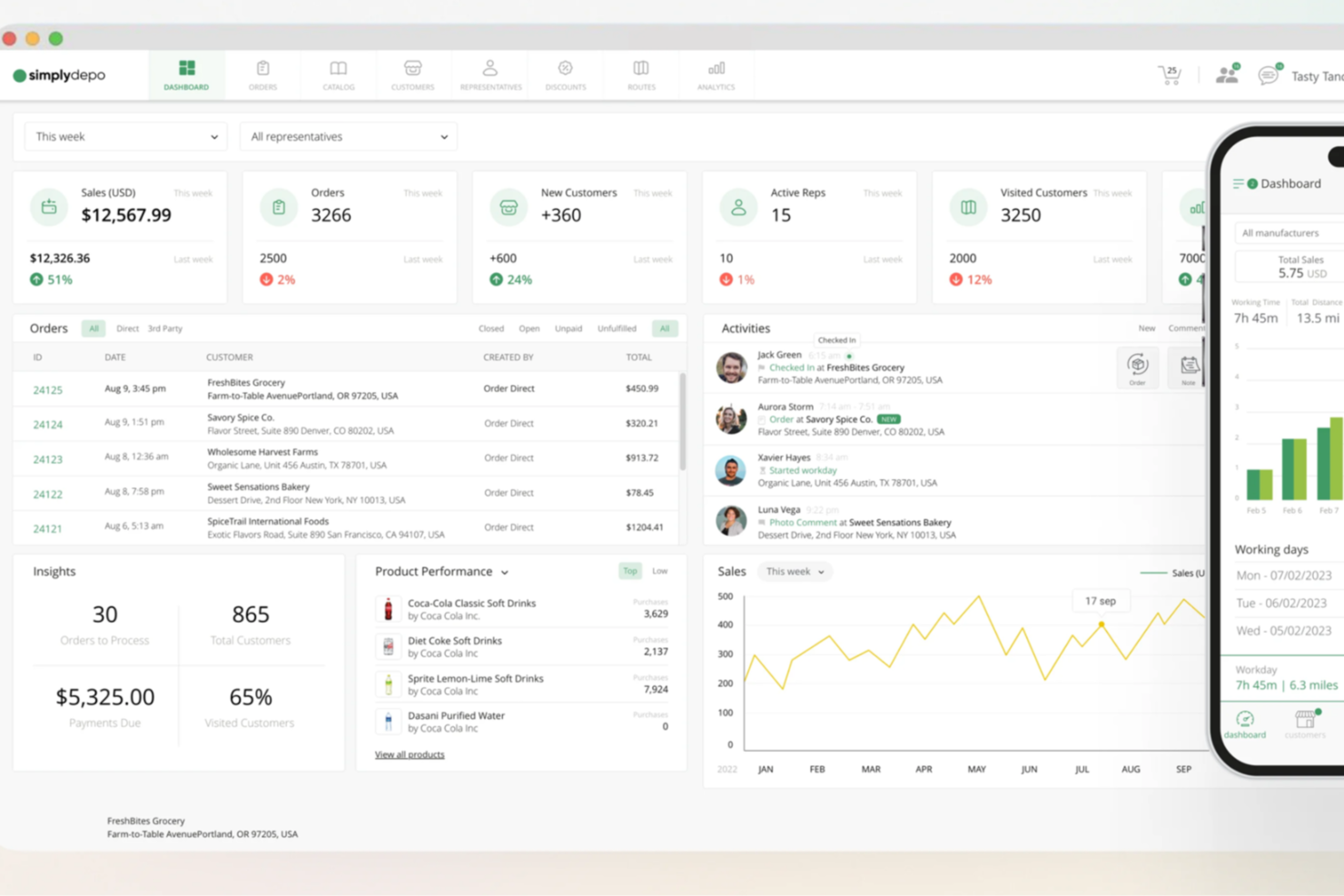
SimplyDepo is a mobile-first field sales and distribution platform built for CPG brands and distributors, combining account CRM, B2B order management, route planning, and retail execution in one system.
Who Is SimplyDepo Best For?
SimplyDepo is a good fit for CPG brands, wholesale distributors, and DSD operators that rely on field sales teams to manage accounts and place orders on the go.
Why I Picked SimplyDepo
I picked SimplyDepo because its B2B order management is built into the same platform where reps manage accounts and routes. When a field rep visits a store, they can review that account's full order history and place a new order without switching tools or manually re-entering data. I also like the B2B Order Portal, which lets wholesale buyers place reorders online, cutting down on rep-assisted order entry and manual errors.
SimplyDepo Key Features
- Route planning: Build and optimize daily visit routes for field reps based on account locations and priorities.
- Visit activity logging: Record in-store visit notes, photos, and completed tasks directly within each account's profile.
- Merchandising task management: Assign and track in-store execution tasks like shelf audits, surveys, and planogram checks.
- Sales performance reporting: Access dashboards that track rep activity, sales volume, and account coverage across your territory.
Pros and Cons
Pros:
- Route planning and territory mapping
- Integrated CRM for account tracking
- Built-in B2B order management system
Cons:
- No transparent API documentation
- Limited advanced reporting customization
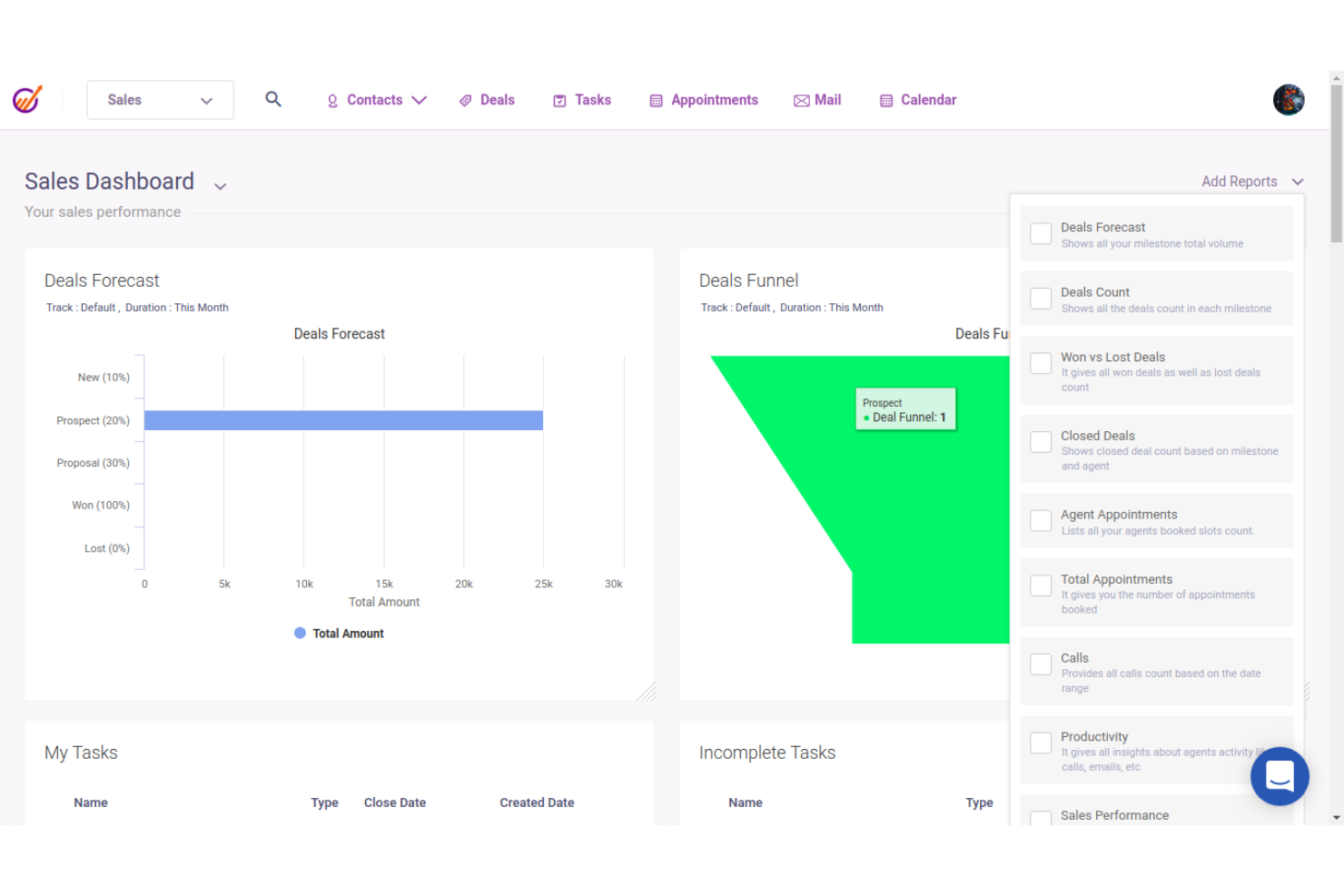
EngageBay is an all-in-one CRM platform for startups and small businesses that combines sales pipeline management, contact management, marketing automation, and a built-in helpdesk and live chat in a single suite.
Who Is EngageBay Best For?
EngageBay is well-suited for early-stage startups and small teams that need a full sales, marketing, and support stack without managing multiple separate tools.
Why I Picked EngageBay
I've included EngageBay in my top picks because its marketing automation goes well beyond simple email triggers. I particularly like the visual workflow builder, where you can chain actions and Yes/No conditions to score a lead when they visit a key page, then drop them into a drip campaign once they hit a threshold. Contact segmentation feeds into those workflows, so you don't have to curate lists manually each time a campaign runs.
EngageBay Key Features
- Deal pipeline management: Track deals across customizable pipeline stages with drag-and-drop cards and deal-level activity logging.
- Appointment scheduling: Let prospects book meetings directly through a hosted scheduling page that syncs with your calendar.
- Landing page builder: Build and publish lead capture pages using a drag-and-drop editor with pre-built templates.
- Built-in helpdesk: Manage customer support tickets from a shared inbox with ticket assignment, status tracking, and canned responses.
Pros and Cons
Pros:
- Extensive integrations
- Reporting and analytics
- Comprehensive feature set
Cons:
- Customization limits
- Learning curve for new users
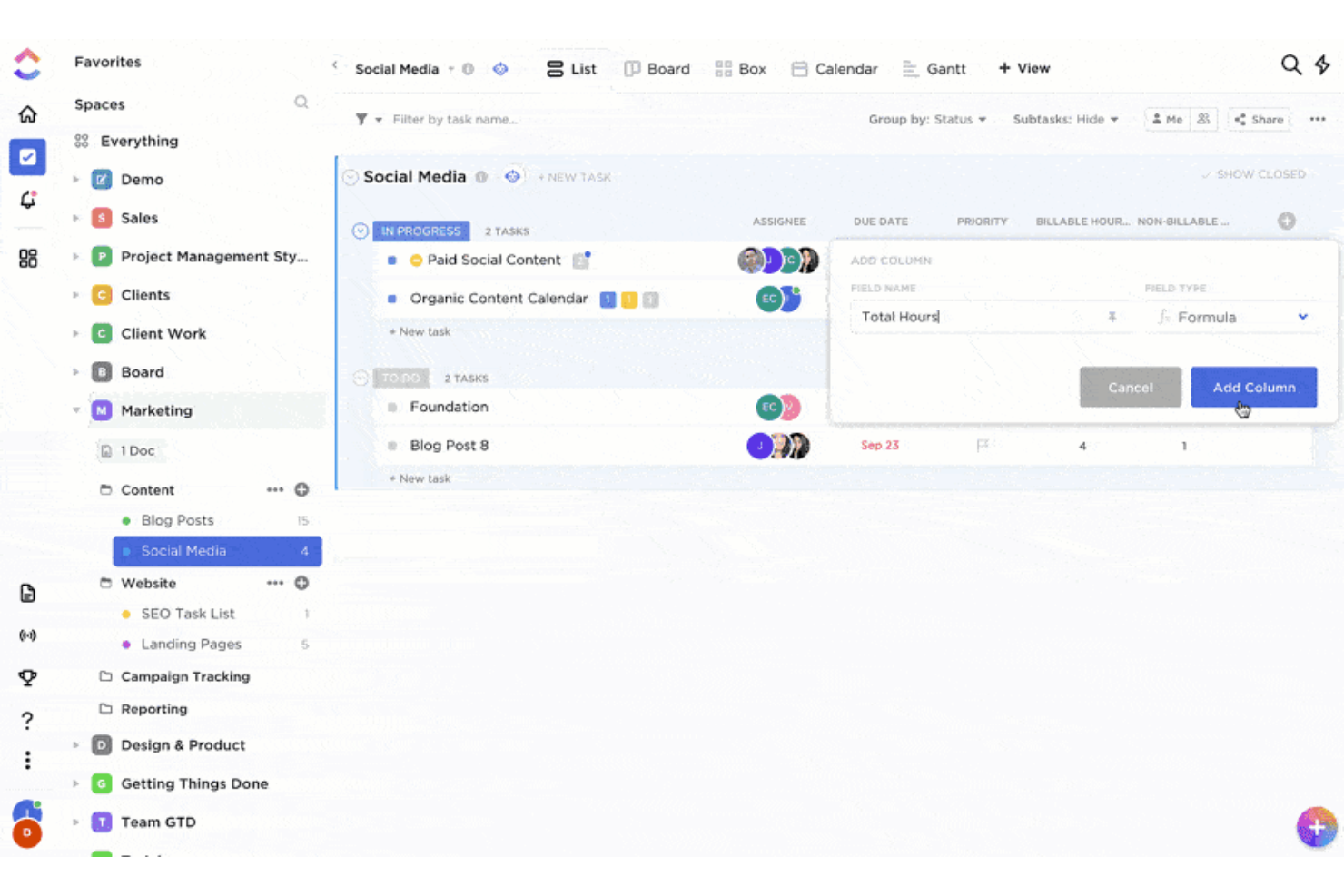
ClickUp is a work management platform that brings together tasks, docs, goals, chat, and project tracking in one workspace, with CRM-style features like custom fields, pipeline views, and automations available through templates and flexible configuration.
Who Is ClickUp Best For?
ClickUp is a good fit for early-stage startups that need a single workspace to manage projects, tasks, and basic customer tracking without juggling multiple tools.
Why I Picked ClickUp
I've included ClickUp in my top picks because startups rarely have the budget or bandwidth to run separate tools for project work and customer tracking. ClickUp's CRM template gives you a ready-built pipeline with deal stages, contact records, and custom fields right out of the box. I also like that you can attach tasks directly to deals, so when a prospect converts, the onboarding work lives in the same place as the relationship.
ClickUp Key Features
- Automation builder: Set trigger-based rules that automatically reassign tasks, update deal statuses, or send notifications when conditions are met.
- ClickUp dashboards: Build visual reporting views that pull in deal counts, task progress, and activity metrics across your pipeline.
- Email in ClickUp: Send and receive emails directly within a task, keeping all client communication tied to the relevant record.
- Multiple views: Switch between list, board, and calendar views to see your pipeline, workload, or follow-up schedule in one click.
Pros and Cons
Pros:
- Real-time collaboration
- Customizable templates
- Comprehensive feature set
Cons:
- Mobile app limitations
- Steep learning curve

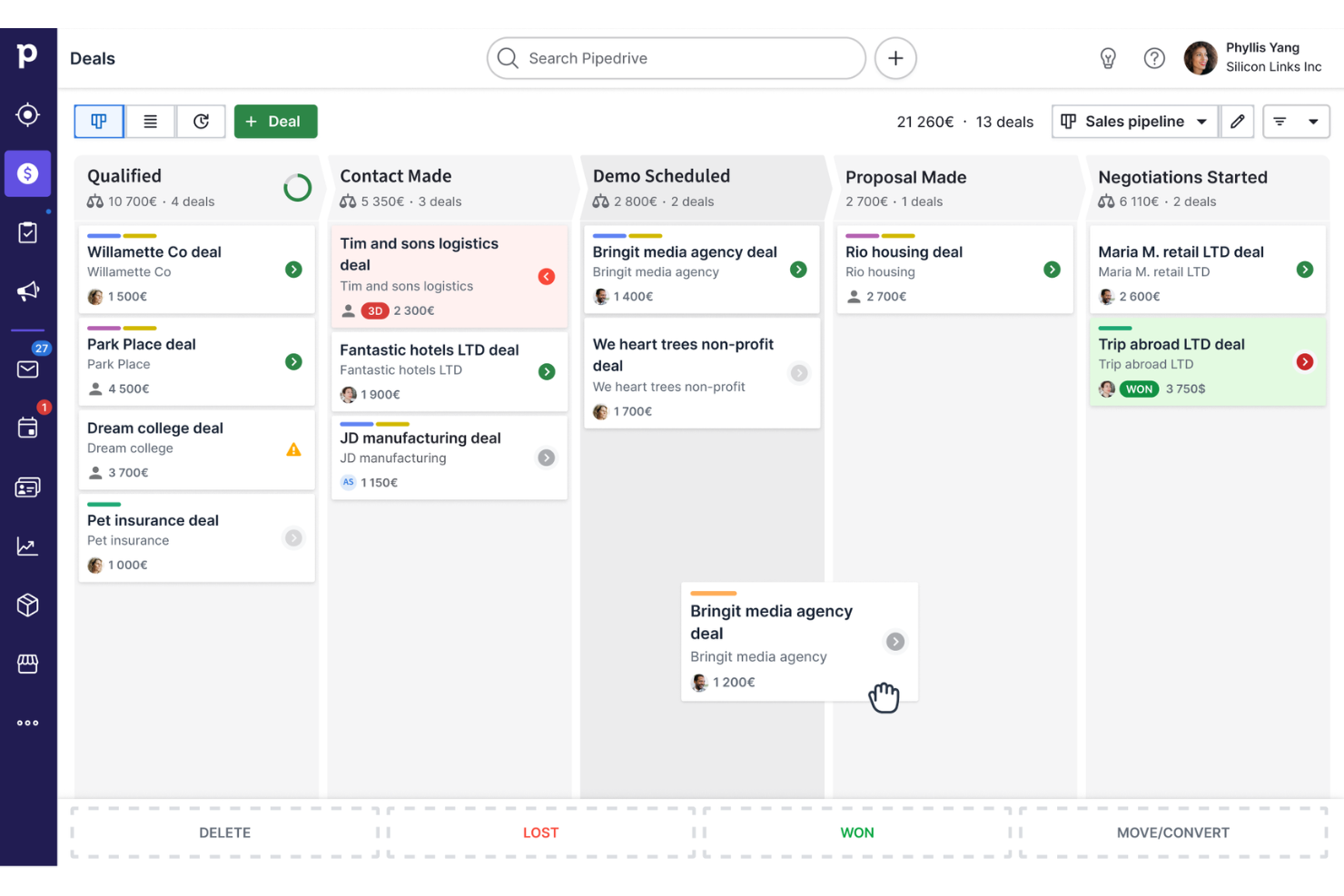
Pipedrive is a sales CRM built around visual pipeline management, with tools for deal tracking, workflow automation, email and communication tracking, and sales reporting.
Who Is Pipedrive CRM Best For?
Pipedrive is a strong fit for small sales teams and early-stage startups that need a simple, deal-focused CRM without a steep learning curve.
Why I Picked Pipedrive CRM
Pipedrive earns its spot as one of the best on my shortlist because its visual pipeline is genuinely one of the clearest ways I've seen deal stages laid out. I can drag deals between stages, set rotting alerts when a deal hasn't moved in a set number of days, and get an instant read on where revenue is stalling. I also like the custom pipeline builder, which lets my team map stages to our actual sales process rather than working around a rigid default structure.
Pipedrive CRM Key Features
- Workflow automation: Set triggers and actions to automatically move deals, send follow-up emails, or assign tasks when specific conditions are met.
- Two-way email sync: Connect your inbox directly to Pipedrive and get live notifications when contacts open or click your emails.
- Insights and reporting: Build custom dashboards to track pipeline metrics, team goals, and sales performance with real-time data.
- Lead generation chatbot: Automatically engage website visitors 24/7 to capture and qualify leads without manual outreach.
Pros and Cons
Pros:
- Drag-and-drop pipelines
- Customizable sales stages
- Automation of repetitive tasks
Cons:
- Lacks marketing automation beyond emails
- Accessing advanced features may incur additional costs
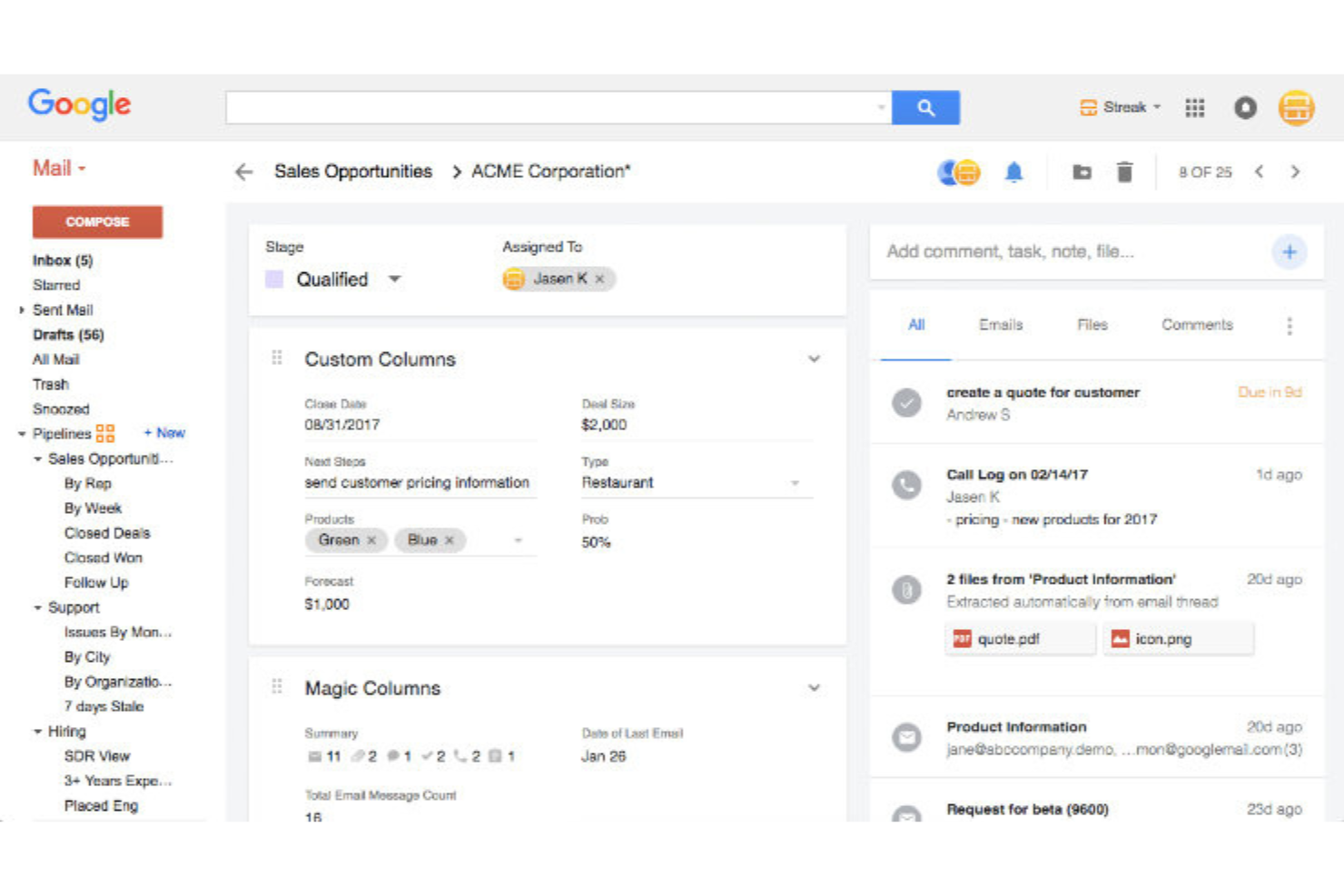
Streak is a Gmail-native CRM for startups that combines pipeline management, contact tracking, email outreach, and AI-powered data entry directly inside your Gmail inbox.
Who Is Streak Best For?
Streak is a great fit for early-stage startups and small teams that already run their business out of Google Workspace and want a CRM without leaving Gmail.
Why I Picked Streak
Streak earns its spot on my shortlist because it's the only CRM I've used that lives entirely inside Gmail—no tab-switching, no data migration, no separate login. I like how pipelines show up directly in the Gmail sidebar, so my team can move deals forward, log notes, and schedule follow-ups without ever leaving their inbox. The mail merge tool with built-in email tracking is something I use constantly; you can see exactly who opened a message and trigger a follow-up sequence from the same thread.
Streak Key Features
- AI deal summaries: Streak uses AI to generate summaries of deals and answer questions about your pipeline data directly inside Gmail.
- Contact enrichment: Streak automatically pulls in publicly available data to fill out contact records, reducing manual data entry for your team.
- Shared contact database: Your whole team accesses a unified contact list, so everyone sees the same interaction history and context.
- Automation builder: Set up rules to auto-assign leads, create tasks, or update pipeline stages based on triggers you define.
Pros and Cons
Pros:
- E-mail tracking and automation
- Customizable pipeline
- Smooth Gmail integration
Cons:
- Mobile app limitations
- Dependency to Gmail

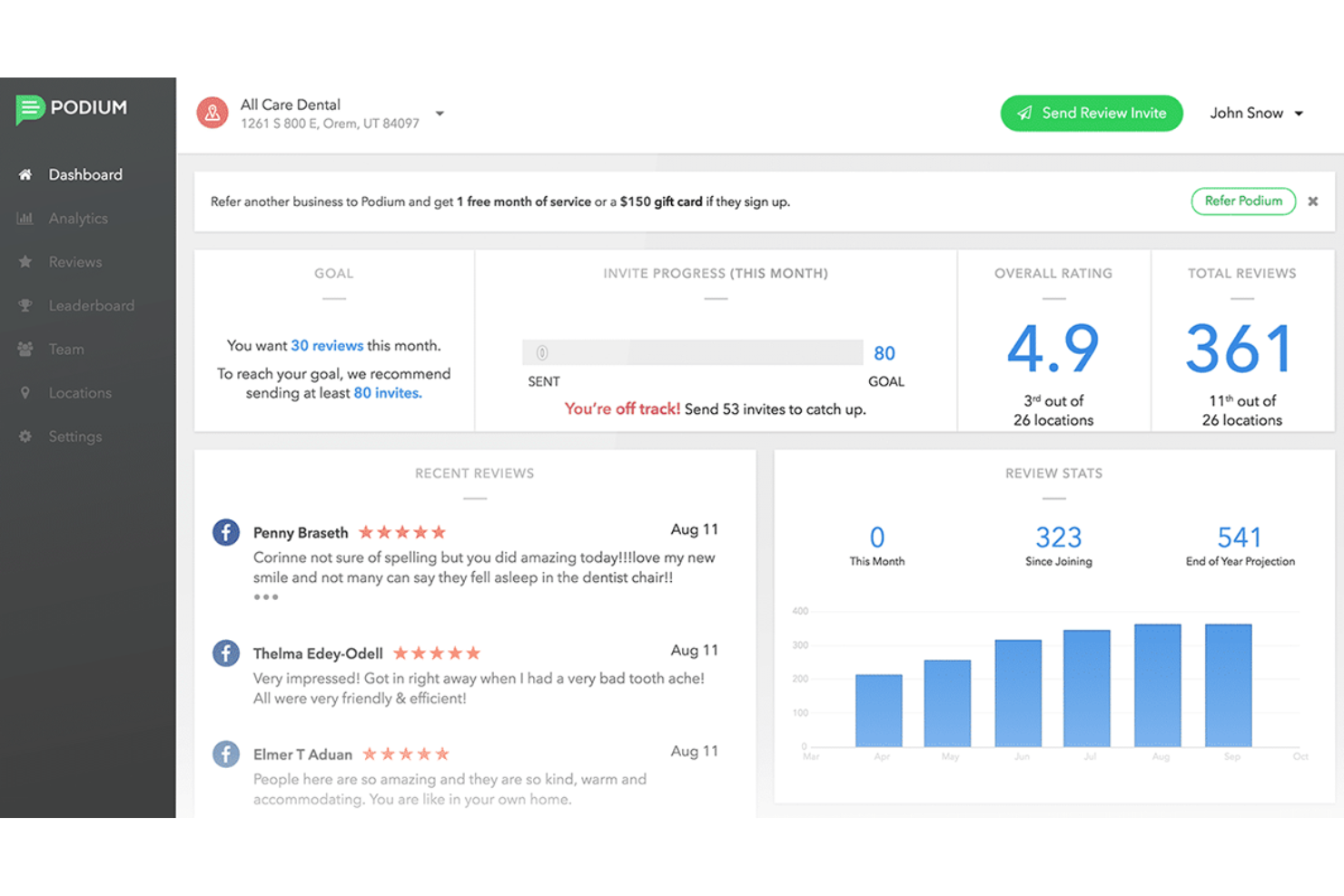
Podium is a lead conversion and customer communication platform that brings together AI-driven lead response, a unified inbox, review management, text marketing, and payment processing in one place.
Who Is Podium Best For?
Podium is a strong fit for local and service-based businesses—like automotive, home services, or healthcare—that rely on high-volume inbound leads and customer messaging.
Why I Picked Podium
I've included Podium in my top picks because its AI Employee feature does something most CRMs can't: it responds to inbound leads instantly, around the clock, via text. When a lead comes in through the website chat or a missed call, the AI follows up within seconds, qualifies the lead, and can book an appointment without any human involvement. Lead conversations from Google, Facebook, and webchat all land in one inbox, preventing missed messages.
Podium Key Features
- Review request automation: Automatically sends review requests to customers via text after a transaction or appointment is completed.
- Text marketing campaigns: Build and send SMS campaigns to segmented contact lists, with AI-generated message suggestions.
- Podium Payments: Collect payments directly through a text message link, without redirecting customers to a separate platform.
- Podium Phones: A built-in VoIP phone system that logs calls and ties conversations back to the customer contact record.
Pros and Cons
Pros:
- Automated responses
- Multi-channel communication
- AI-driven lead conversion
Cons:
- Limited customization
- Moderate learning curve
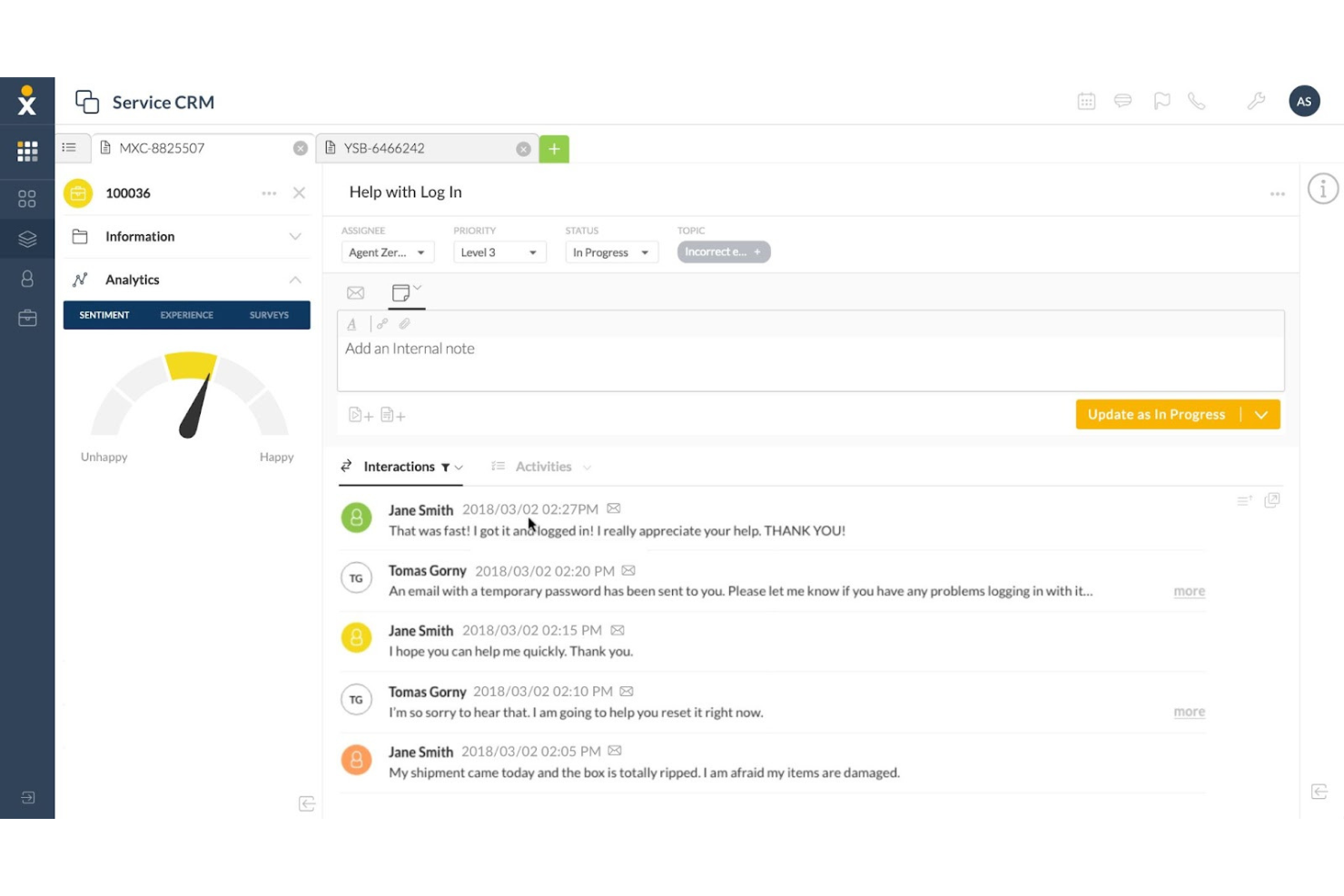
Nextiva is a unified communications and customer experience platform that brings voice, video, live chat, email, social, and AI-powered customer interaction tools together in one place.
Who Is Nextiva Best For?
Nextiva is a good fit for startups and small-to-mid-sized businesses that need to manage customer conversations across phone, chat, email, and social from a single platform.
Why I Picked Nextiva
I've included Nextiva in my top picks because its unified customer experience platform stands out by consolidating customer-facing channels earlier than most startups do. I particularly like the unified customer profiles, which surface a contact's full interaction history across calls, chat, email, and social in a single view. Real-time sentiment analysis: XBert AI detects customer mood mid-conversation, so your team can step in before a situation escalates. For a startup trying to manage customer relationships without a large team, that kind of visibility matters.
Nextiva Key Features
- Multi-channel unified inbox: Voice, SMS, email, social, and live chat all flow into a single inbox so your team handles every customer conversation from one place.
- Journey orchestration: Map and automate end-to-end customer engagement workflows across channels without manually managing each touchpoint.
- AI receptionist: Handles incoming calls around the clock, answering questions and routing conversations without requiring a human agent on standby.
- Customer analytics and reporting: Tracks interaction data across channels with dashboards that surface conversation trends, resolution rates, and satisfaction scores.
Pros and Cons
Pros:
- Real-time analytics
- AI-powered features
- Unified platform
Cons:
- Complex setup
- Limited customization options


Agile CRM is an all-in-one CRM platform that combines contact management, sales pipeline tracking, marketing automation, and customer support tools in a single system.
Who Is Agile CRM Best For?
Agile CRM is a good fit for early-stage startups and small businesses that need sales, marketing, and support tools without managing multiple separate platforms.
Why I Picked Agile CRM
Agile CRM earns its spot on my shortlist because it covers sales, marketing, and support in one platform without the cost of stitching together separate tools. I particularly like that even the free plan includes lead scoring and email campaigns—features most CRMs lock behind paid tiers. The built-in marketing automation lets my team set up drip sequences and web engagement triggers without a separate tool like Mailchimp or HubSpot.
Agile CRM Key Features
- Deal pipeline management: Drag-and-drop deal tracking lets you move opportunities across custom stages and set milestones for each deal.
- Appointment scheduling: A built-in scheduler lets contacts book meetings directly from a shared calendar link, synced to your availability.
- Helpdesk ticketing: Create, assign, and track support tickets with labels, groups, and canned responses to manage customer issues.
- Two-way email sync: Connect your Gmail or Outlook inbox to log sent and received emails directly against contact records automatically.
Pros and Cons
Pros:
- Easy to use
- Comprehensive feature set
- Extensive integrations list
Cons:
- Occasional performance issues
- Limited customization options
Other CRM Software for Startups
Below is a list of additional CRM software for startups that I shortlisted. While they didn’t make the top 10, they’re still valuable and worth further research.
- Salesforce Financial Services Cloud
For AI-driven customer engagement
- Bitrix24
For free online workspace
- Close
For sales automation tools
- Insightly
For B2B customer experiences
- Creatio CRM
For no-code process automation
- SugarCRM
For intelligent account management
- monday.com
For customizable workflows
- Outreach
For sales engagement
- WalkMe
For user onboarding
- Zoho CRM
For small business features
- Nutshell
For sales automation
- Zendesk
For customer support
- Ashby
For recruiting analytics
- Keeper
For secure data management
- HubSpot CRM
For marketing integration


Related CRM Reviews
If you still haven't found what you're looking for here, check out these tools closely related to all-in-one CRMs that we've tested and evaluated.
- CRM Software
- Sales Software
- Lead Management Software
- Business Intelligence Software
- Contract Management Software
- Revenue Management System
- CPQ Software
CRM Software for Startups Selection Criteria
The criteria for choosing CRM software for startups should directly address buyer needs and common pain points, ensuring that the software serves its intended purpose effectively. As an expert who has personally tried and researched these tools, here are the requirements I use when evaluating software:
Core Functionality (25% of total weighting score):
- Contact management
- Sales pipeline management
- Task management
- Email integration
- Reporting and analytics
Additional Features (25% of total weighting score):
- AI-driven insights for sales forecasting
- Customizable dashboards
- Mobile app functionality
- Integration with third-party tools like Slack or Zoom
- Advanced automation capabilities
Usability (10% of total weighting score):
- Intuitive user interface
- Drag-and-drop functionality for task management
- Customizable workflows
- Clean and modern design
- Easy navigation
Onboarding (10% of total weighting score):
- Availability of training videos
- Interactive product tours
- Pre-built templates
- Chatbots for instant help
- Webinars for in-depth training
Customer Support (10% of total weighting score):
- 24/7 support availability
- Multiple support channels (chat, email, phone)
- Dedicated account managers
- Comprehensive knowledge base
- Fast response times
Value For Money (10% of total weighting score):
- Competitive pricing
- Flexible subscription plans
- Transparent pricing structure
- Free trial availability
- Discounts for startups
Customer Reviews (10% of total weighting score):
- Overall satisfaction ratings
- Feedback on ease of use
- Comments on customer support quality
- Reviews on feature effectiveness
- User testimonials on ROI
How to Choose a CRM Software for Startups
As you work through your own unique software selection process, keep the following points in mind:
- Ease of Use: Startups often have limited resources and time to train employees on complex systems. A simple CRM that is intuitive and easy to navigate can save time and reduce frustration.
- Affordability: Budget constraints are a common pain point for startups. As such, it’s important to find a CRM that offers a good balance between cost and features. Many CRMs offer flexible pricing options and discounts for qualifying startups, making it easier to manage costs while still accessing essential features.
- Scalability: As your startup grows, your CRM needs will evolve. Choosing a customer database software that can scale with your business ensures that you won’t outgrow the software.
- Integration Capabilities: Startups often use a variety of tools and software to manage different aspects of their business processes. A CRM that integrates seamlessly with your existing tools can streamline operations and improve efficiency.
- Automation Features: Automating repetitive tasks can free up valuable time for your team to focus on more strategic activities.
Trends for CRM Software for Startups
Here are some trends I’ve noticed for CRM software for startups, plus what they might mean for the future. I sourced countless product updates, press releases, and release logs to tease out the most important insights.
- AI-Powered Customer Insights: Startups can now predict customer behavior with greater accuracy using AI. This helps in crafting personalized marketing strategies to build more revenue.
- Integration with Social Media Platforms: CRM systems are integrating with social media, which allows startups to manage customer interactions across multiple channels. This enhances customer engagement and brand presence.
- Mobile-First CRM Solutions: Mobile-first CRM solutions are on the rise, helping startups manage customer relationships on the go. This flexibility is vital for teams that are always on the move.
- Automation of Routine Tasks: Automation is reducing the burden of routine tasks, allowing startups to focus more on strategic activities. Ultimately, this leads to increased productivity and efficiency.
- Enhanced Data Security Measures: Data security is becoming a top priority, with CRM software now including advanced security features. This is vital for protecting sensitive customer information.
What is CRM Software for Startups?
CRM software for startups is an all-in-one tool that simplifies managing business operations like sales, marketing, and customer service. Startup founders, sales teams, marketing departments, and customer service representatives use it to streamline processes, improve customer relationships, and drive business growth.
Features of CRM Software for Startups
When selecting CRM software for startups, it's essential to identify features that best support your business' growth and customer management needs. Below are the key features to look for when shopping for CRM software for startups.
- Contact Management: Gathers and organizes detailed information about prospects and customers, facilitating better relationship building and customer retention.
- Lead Management: Tracks and manages potential customers throughout the sales funnel, prioritizing leads to focus sales efforts on the most promising opportunities.
- Workflow Automation: Increases productivity by automating repetitive tasks such as follow-up emails and task assignments based on triggers or events.
- Marketing Automation: Provides insights for personalized messaging, automating tasks like email campaigns and social media posts to save time and improve marketing efficiency.
- Customization: Allows startups to tailor the CRM to their specific needs with custom fields, dashboard elements, and reports.
- Third-Party Integrations: Integrates with email, accounting, and marketing tools to eliminate manual data entry and improve workflow efficiency.
- Customer Service and Support: Enhances customer service by providing a comprehensive view of customer interactions, helping to track and resolve issues efficiently.
- Mobile Accessibility: Enables access to customer data and CRM features on the go, which is essential for startups with remote teams or those managing customer relationships outside the office.
- Analytics and Reporting: Provides valuable insights into sales performance and customer behavior, aiding data-driven decision-making and tracking key performance indicators.
- Sales Forecasting: Predicts future sales based on current data, allowing startups to plan marketing strategies and allocate resources more effectively, reducing business risks.
Benefits of CRM Software for Startups
When choosing CRM software for startups, it's important to consider the different benefits associated with your chosen software. Here are some of the primary benefits you may experience while using a CRM software for startups:
- Improved Customer Service: CRM software centralizes all customer information, making it easily accessible to anyone in the company. This ensures employees have all the necessary details about a customer at their fingertips, enabling them to provide a better customer experience and boost satisfaction.
- Increased Sales: By streamlining the sales process, building a sales pipeline, and automating key tasks, CRM software can help increase sales and productivity. It provides a step-by-step sales process that employees can rely on and easily tweak as needed.
- Better Customer Retention: CRM systems help startups retain customers by providing sentiment analysis, automated ticketing, customer support automation, and user behavior tracking. This allows businesses to quickly address customer issues and encourage repeat business.
- Detailed Analytics: CRM software typically includes built-in analytic capabilities that contextualize data, breaking it down into actionable items and easily understood metrics. This helps businesses judge the success of marketing campaigns and optimize them accordingly.
- Higher Productivity and Efficiency: By automating menial tasks like drip campaigns, CRM software frees up employees' time to focus on more critical work. It also ensures that no tasks slip through the cracks, improving overall productivity and efficiency.
Leveraging CRM software for startups is invaluable, providing the tools and capabilities needed to manage customer relationships effectively, streamline operations, and drive growth. By utilizing CRM systems, startups can enhance their customer service, increase sales, retain customers, gain valuable insights through detailed analytics, and improve overall productivity and efficiency.
Costs & Pricing of CRM Software for Startups
CRM software for startups can significantly enhance customer relationship management, but costs vary based on features and organization size. The table below summarizes common pricing plans, their average costs, and typical features.
Plan Comparison Table for CRM Software for Startups
| Plan Type | Average Price | Common Features |
| Free Plan | $0 | Basic contact management, limited users, basic reporting, and email tracking |
| Personal Plan | $10 - $30/user/month | Enhanced contact management, email integration, basic automation, and mobile access |
| Business Plan | $60 - $100/user/month | Advanced automation, sales forecasting, multiple pipelines, and custom dashboards |
| Enterprise Plan | $150 - $300+/user/month | AI-powered insights, extensive customization, advanced analytics, and premium support |
Each pricing tier for CRM software for startups caters to different organization sizes, budgets, and specific needs. When choosing your CRM software, evaluate the features of each plan to ensure they align with your business requirements.
CRM Software for Startups FAQs
Here are some of the commonly asked questions about CRM software for startups:
How can CRM software help in scaling my startup?
CRM software can help scale your startup by automating routine tasks, providing insights into customer behavior, and improving communication within your team. It allows you to manage a growing customer base more efficiently, track sales performance, and identify opportunities for upselling and cross-selling. Additionally, CRM software can help maintain a high level of customer service as your business grows.
What are the common pitfalls to avoid when implementing CRM software in a startup?
Common pitfalls include choosing a CRM that is too complex or too simple for your needs, not involving key stakeholders in the selection process, and failing to provide adequate training for your team. It’s also important to avoid underestimating the time and resources needed for a successful implementation. Ensure you have a clear plan and set realistic expectations for the rollout.
How do I ensure my team adopts the new CRM software?
To ensure your team adopts the new CRM software, involve them in the selection process and provide comprehensive training. Highlight the benefits of the CRM and how it will make their jobs easier. Encourage feedback and be open to making adjustments based on their input. Regularly monitor usage and address any issues promptly to keep the team engaged.
How do I measure the success of my CRM implementation?
Measure the success of your CRM implementation by tracking key performance indicators (KPIs) such as user adoption rates, customer satisfaction scores, sales performance, and the efficiency of your sales and marketing processes. Regularly review these metrics to assess whether the CRM is meeting your business objectives and identify areas for improvement.
What should I do if my CRM software is not meeting my startup's needs?
If your CRM software is not meeting your startup’s needs, first identify the specific issues and determine if they can be resolved through additional training, customization, or integration with other tools. If the problems persist, consider evaluating other CRM options that might be a better fit. For instance, if you commonly deal with business customers, you might find B2B CRM software better aligned to your needs.
It’s important to choose a CRM that can grow with your business and adapt to changing needs.
What are the best practices for ensuring high adoption rates of CRM software within our team?
To ensure high adoption rates of CRM software within your team, involve them in the selection process, provide comprehensive training, and highlight the benefits. Encourage feedback and address issues promptly, while regularly monitoring usage to identify areas needing additional support. Recognize and reward active users to boost morale and encourage wider adoption.
What’s Next?
Want to take your RevOps game to the next level? Subscribe to The CRO Club newsletter.