
13 Best Competitive Intelligence Tools Picked for 2026

Competitive Intelligence Tools Shortlist
Here’s my shortlist of competitive intelligence platforms:


Competitive intelligence tools help your team gather, analyze, and act on information about competitors, markets, and industry trends. If you’re searching for ways to track rival strategies, benchmark performance, or spot emerging threats, the right platform can make a measurable difference.
This list will help you compare leading options for 2026, so you can choose tools that fit your data sources, workflows, and reporting needs—without wasting time on platforms that don’t deliver.
Why Trust Our Software Reviews
Best Competitive Intelligence Tools Summary
This comparison chart summarizes pricing details for my top competitive intelligence tools selections to help you find the best one for your budget and business needs.
| Tool | Best For | Trial Info | Price | ||
|---|---|---|---|---|---|
| 1 | Best for automated web page change alerts | Free plan + free demo available | From $50/month | Website | |
| 2 | Best for uncovering paid search strategies | Free demo available | From $29/month (billed annually) | Website | |
| 3 | Best for backlink profile analysis | Free trial + free demo available | From $129/month | Website | |
| 4 | Best for content performance benchmarking | 7-day free trial | From $159/user/month (billed annually) | Website | |
| 5 | Best for analyzing website traffic sources | Free trial + free demo available | Pricing upon request | Website | |
| 6 | Best for custom news and update feeds | 7-day free trial + free demo available | Pricing upon request | Website | |
| 7 | Best for monitoring competitor sales enablement | Free demo available | Pricing upon request | Website | |
| 8 | Best for AI-powered market document search | Free demo available | Pricing upon request | Website | |
| 9 | Best for centralizing battlecard insights | Free demo available | Pricing upon request | Website | |
| 10 | Best for tracking digital marketing rivals | Free trial + free demo available | From $199/month (billed annually) | Website |
-

Prisync
Visit WebsiteThis is an aggregated rating for this tool including ratings from Crozdesk users and ratings from other sites.4.7 -
Expedite Commerce
Visit Website -
QuickBooks Online
Visit WebsiteThis is an aggregated rating for this tool including ratings from Crozdesk users and ratings from other sites.4





Competitive Intelligence Tools Reviews
Below are my detailed summaries of the competitive intelligence tools that made it onto my shortlist. My reviews offer a detailed look at the features, best use cases, and integrations of each platform to help you find the best one for your team.

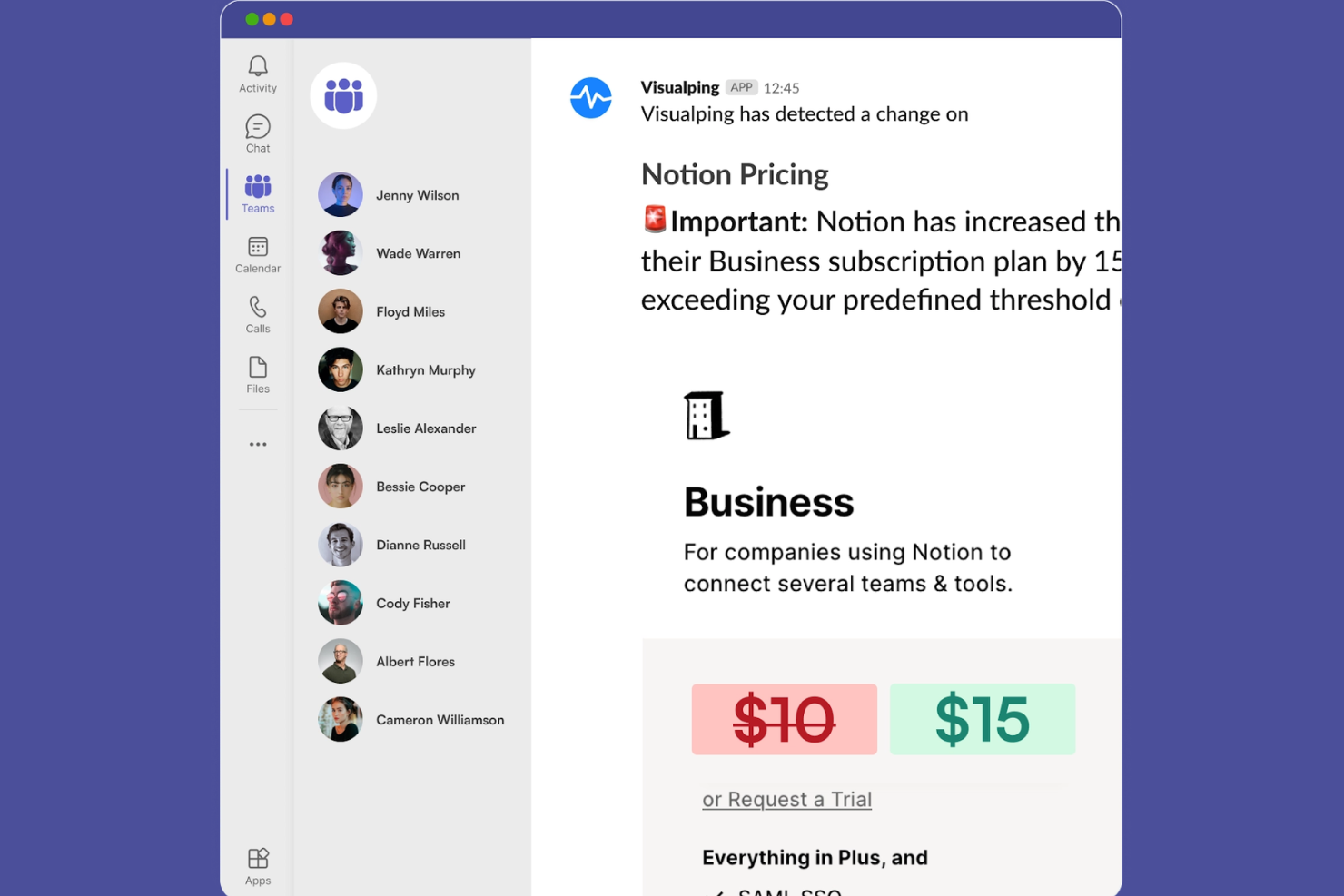
Visualping offers automated web page monitoring for teams that need real-time alerts on competitor or industry changes. It’s especially useful for competitive intelligence professionals, market researchers, and analysts who track updates across multiple sites. With customizable detection settings, Visualping helps you catch even subtle changes that could impact your strategy.
Why I Picked Visualping
For teams that need to know the moment a competitor updates their website, Visualping’s automated web page change alerts are a clear fit. I picked Visualping because it lets you set custom monitoring intervals and sensitivity levels, so you can track everything from minor text edits to major layout changes.
The tool sends instant notifications when changes are detected, helping you respond quickly to new information. Visualping also keeps a visual and text-based history of changes, making it easy to review what’s changed over time.
Visualping Key Features
Some other features in Visualping help expand its usefulness for competitive intelligence teams:
- Bulk Monitoring: Lets you track changes across hundreds of URLs at once.
- Team Management Dashboard: Provides centralized controls for managing multiple users and monitoring assignments.
- Change Reports: Generates downloadable reports summarizing detected changes over time.
- Email and Slack Notifications: Send alerts directly to your inbox or Slack channels for immediate visibility.
Visualping Integrations
Integrations include Slack, Microsoft Teams, Google Sheets, Webhooks, API, and the Visualping Chrome Extension.
Pros and Cons
Pros:
- Offers granular change detection sensitivity
- Supports bulk monitoring for multiple URLs
- Detects visual and text-based web changes
Cons:
- Lacks automated screenshot comparison summaries
- No built-in competitor analysis dashboard
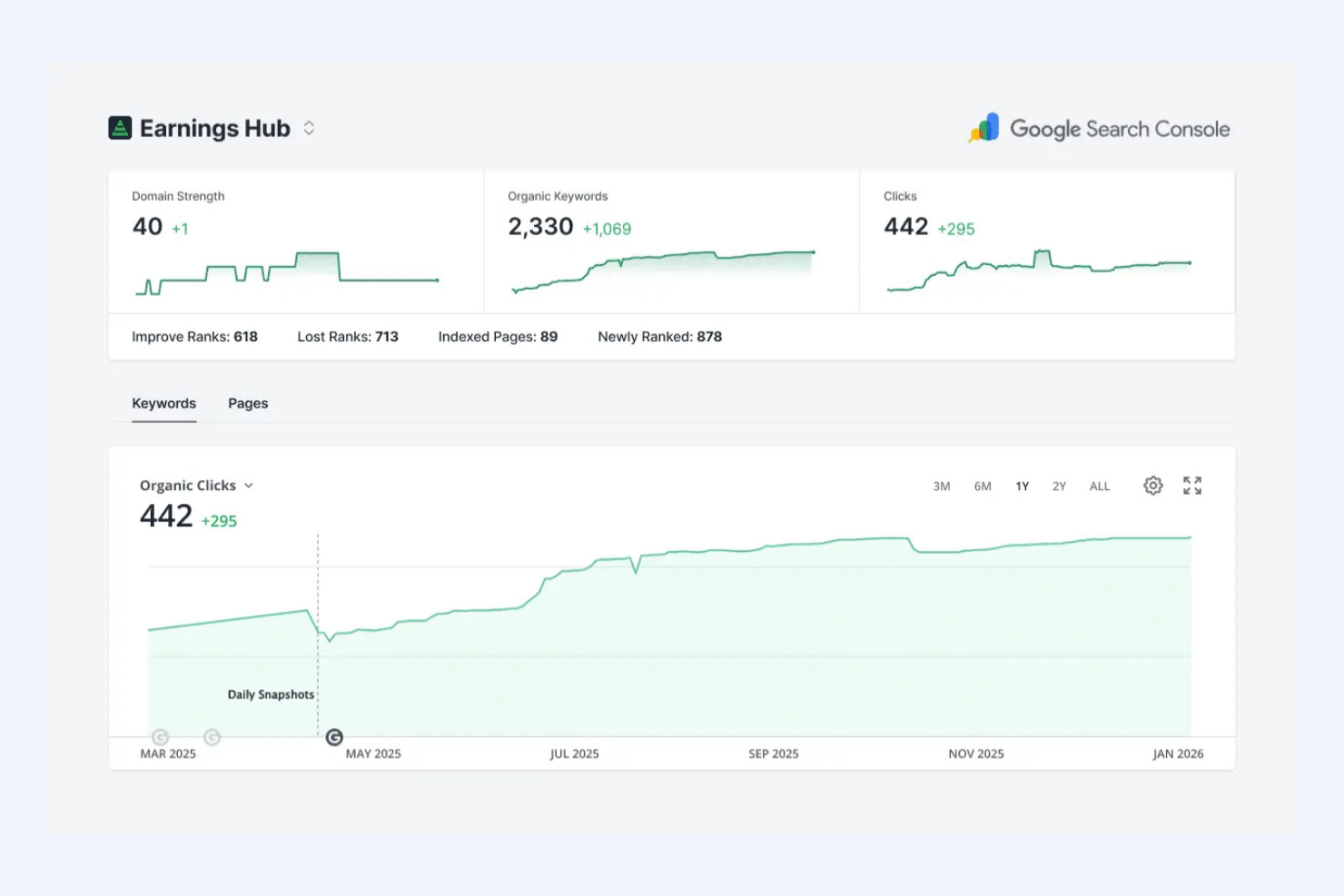
SpyFu gives marketing and paid search teams a window into competitors’ Google Ads strategies. With detailed insights into keywords, ad copy, and spend history, it’s especially useful for agencies and businesses looking to optimize their own paid campaigns. If you need to reverse-engineer what’s working in your competitors’ paid search, SpyFu offers targeted data you won’t find in most other tools.
Why I Picked SpyFu
When you need to uncover exactly how competitors approach paid search, SpyFu stands out for its depth of Google Ads data. I picked SpyFu because it lets you see every keyword a competitor has bought, along with their ad copy and historical spend patterns.
The tool’s ad history feature helps you track changes in strategy over time, making it easier to spot trends and pivots. For anyone focused on paid search intelligence, SpyFu’s granular view into competitor campaigns is hard to match.
SpyFu Key Features
Some other features that make SpyFu valuable for competitive intelligence work include:
- Domain Comparison: Compares multiple domains side by side for keyword and ad overlap.
- Backlink Builder: Identifies backlink opportunities based on competitor link profiles.
- SERP Analysis: Breaks down search engine results pages for any keyword or domain.
- Custom Reporting: Lets you create and export branded reports with competitor data.
SpyFu Integrations
Integrations include Google Ads, Google Analytics, HubSpot, Salesforce, WordPress, Marketo, Microsoft Excel, Data Studio, Slack, and Google Sheets.
Pros and Cons
Pros:
- Domain comparison highlights keyword overlap
- Ad copy archive reveals competitor messaging
- Unlimited historical data for paid keywords
Cons:
- No automated competitor change alerts
- Limited international PPC data coverage

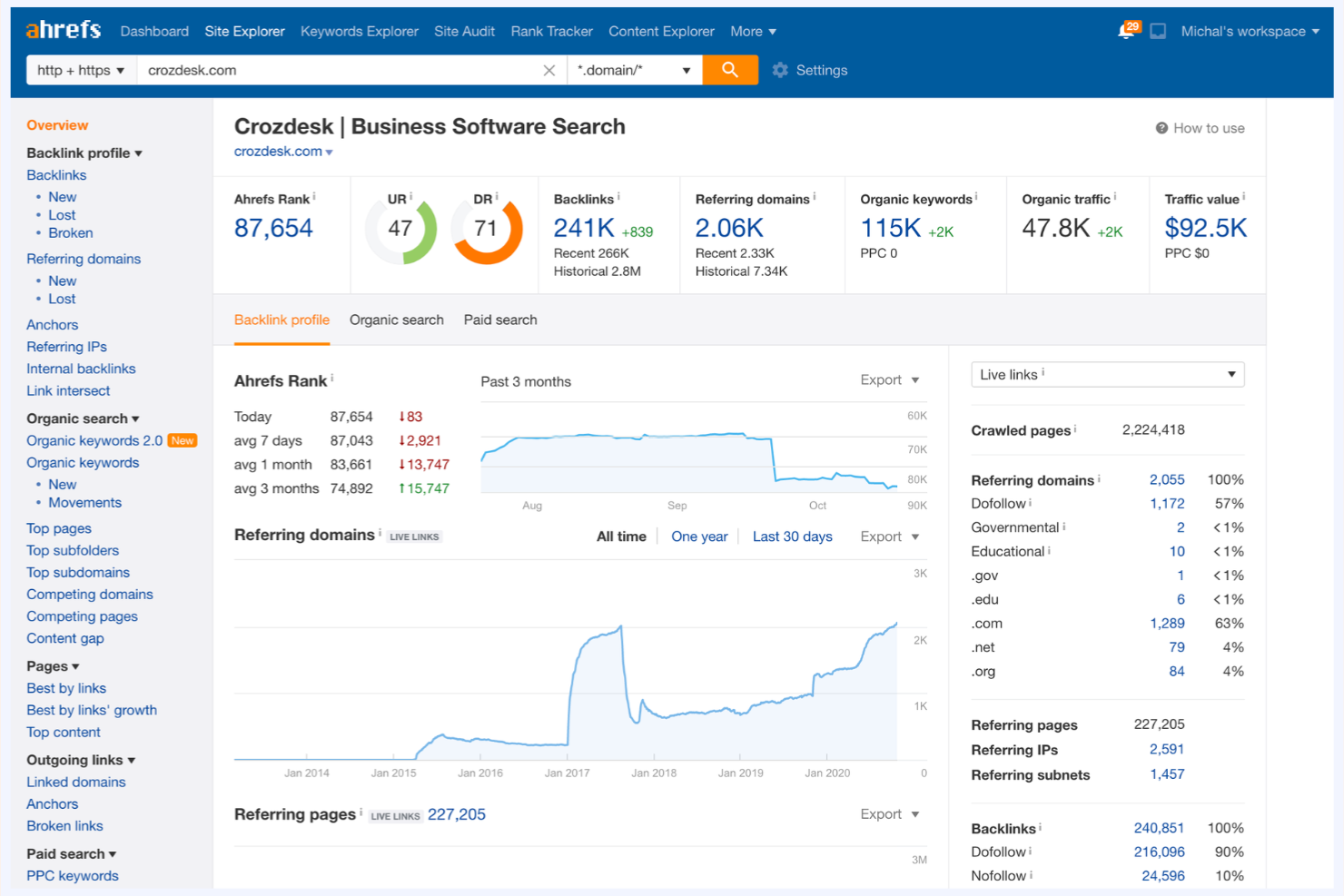
Ahrefs is a favorite among SEO professionals and digital marketers who need deep visibility into backlink profiles. Its extensive link database and competitive comparison tools help you uncover where competitors are earning authority and identify new partnership opportunities. For teams focused on search visibility and domain authority, Ahrefs offers a level of backlink intelligence that’s hard to match.
Why I Picked Ahrefs
For teams that need to analyze backlink strategies in detail, Ahrefs offers some of the most granular link data available. I picked Ahrefs because its Site Explorer tool lets you break down any domain’s backlink profile, including referring domains, anchor text, and link growth over time.
The platform’s competitive comparison features also make it easy to benchmark your site’s authority against others in your space. If you’re focused on tracking how competitors build and maintain their search visibility, Ahrefs gives you the depth and transparency you need.
Ahrefs Key Features
Some other features that make Ahrefs useful for competitive intelligence work include:
- Content Explorer: Lets you search and analyze top-performing content by topic or keyword.
- Rank Tracker: Monitors keyword rankings for your site and competitors over time.
- Site Audit: Scans websites for technical SEO issues and optimization opportunities.
- Keyword Explorer: Provides keyword ideas, search volume, and difficulty metrics for multiple search engines.
Ahrefs Integrations
Integrations include Google Analytics, Google Search Console, Slack, Google Sheets, Data Studio, Microsoft Excel, Trello, Asana, Monday.com, and Zapier.
Pros and Cons
Pros:
- SERP analysis includes featured snippet tracking
- Organic keyword data covers multiple countries
- Historical backlink data tracks competitor changes
Cons:
- No built-in competitor ad spend analysis
- No social media monitoring features included

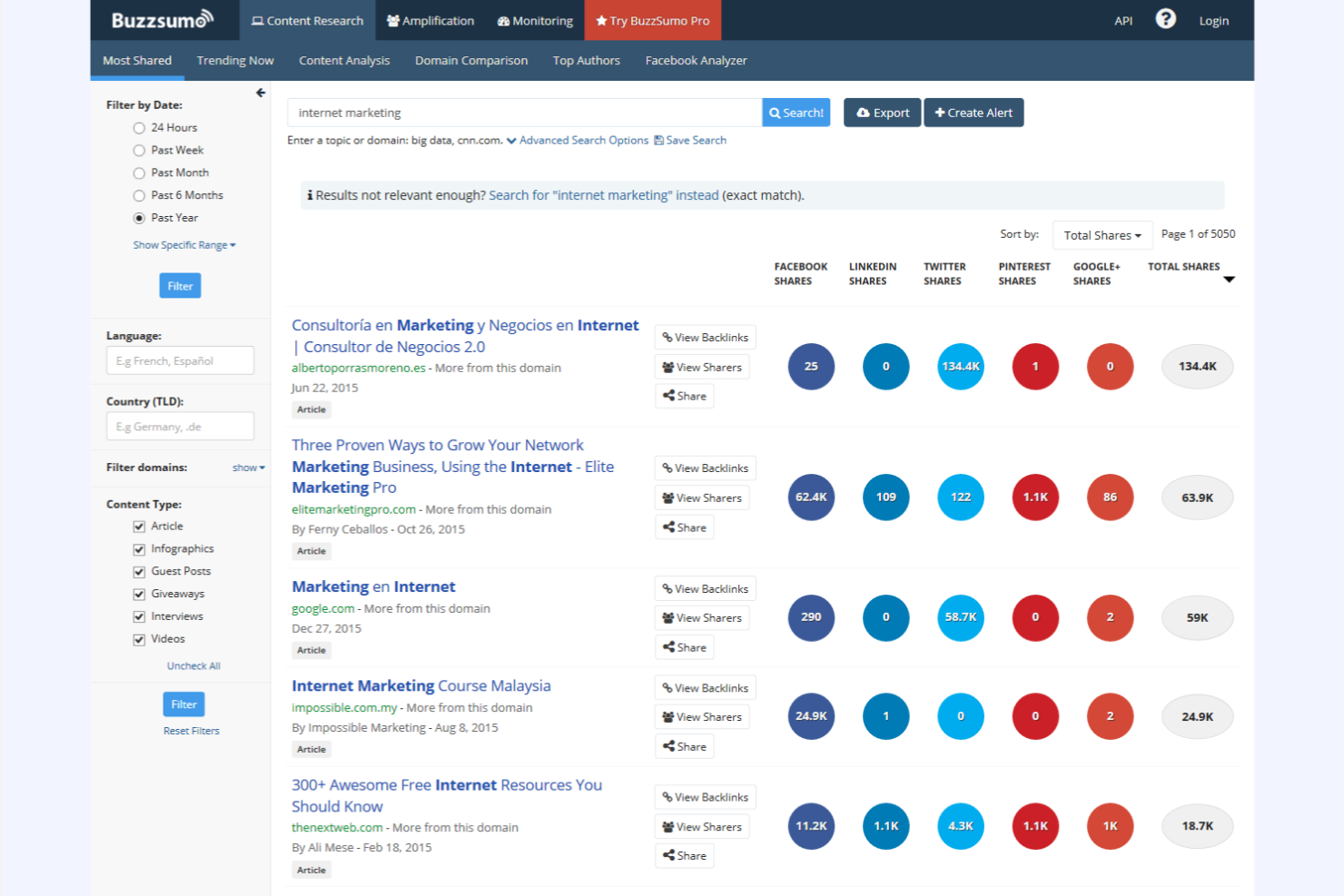
BuzzSumo specializes in benchmarking content performance across social and web channels, making it a go-to for marketing and content strategy teams. It’s especially useful for professionals who need to track what topics, formats, and competitors are gaining traction online. With its focus on surfacing high-performing content and influencer insights, BuzzSumo helps you identify trends and gaps in your competitive landscape.
Why I Picked BuzzSumo
When you need to benchmark your content’s performance against competitors, BuzzSumo stands out for its depth of analytics and discovery tools. I picked BuzzSumo because it lets you analyze which articles, topics, and formats are resonating most across social and web platforms.
Its content analysis and trending score features help you quickly spot what’s gaining traction in your industry. For competitive intelligence teams focused on content strategy, these insights make it much easier to identify gaps and opportunities in your market.
BuzzSumo Key Features
Some other features that make BuzzSumo valuable for competitive intelligence work include:
- Backlink Analysis: Lets you see which sites are linking to your competitors’ content.
- Influencer Identification: Helps you find key influencers by topic or domain.
- Content Alerts: Notifies you when new content matches your chosen keywords or competitors.
- Question Analyzer: Surfaces the most-asked questions on forums and Q&A sites for deeper audience insights.
BuzzSumo Integrations
Integrations include Slack, Buffer, Hootsuite, HubSpot, Trello, Google Analytics, WordPress, Mailchimp, Facebook, and Twitter.
Pros and Cons
Pros:
- Influencer search filters by topic and reach
- Trending content feature updates in real time
- Social share data covers multiple platforms
Cons:
- No built-in sentiment analysis for content
- No direct integration with Google Analytics

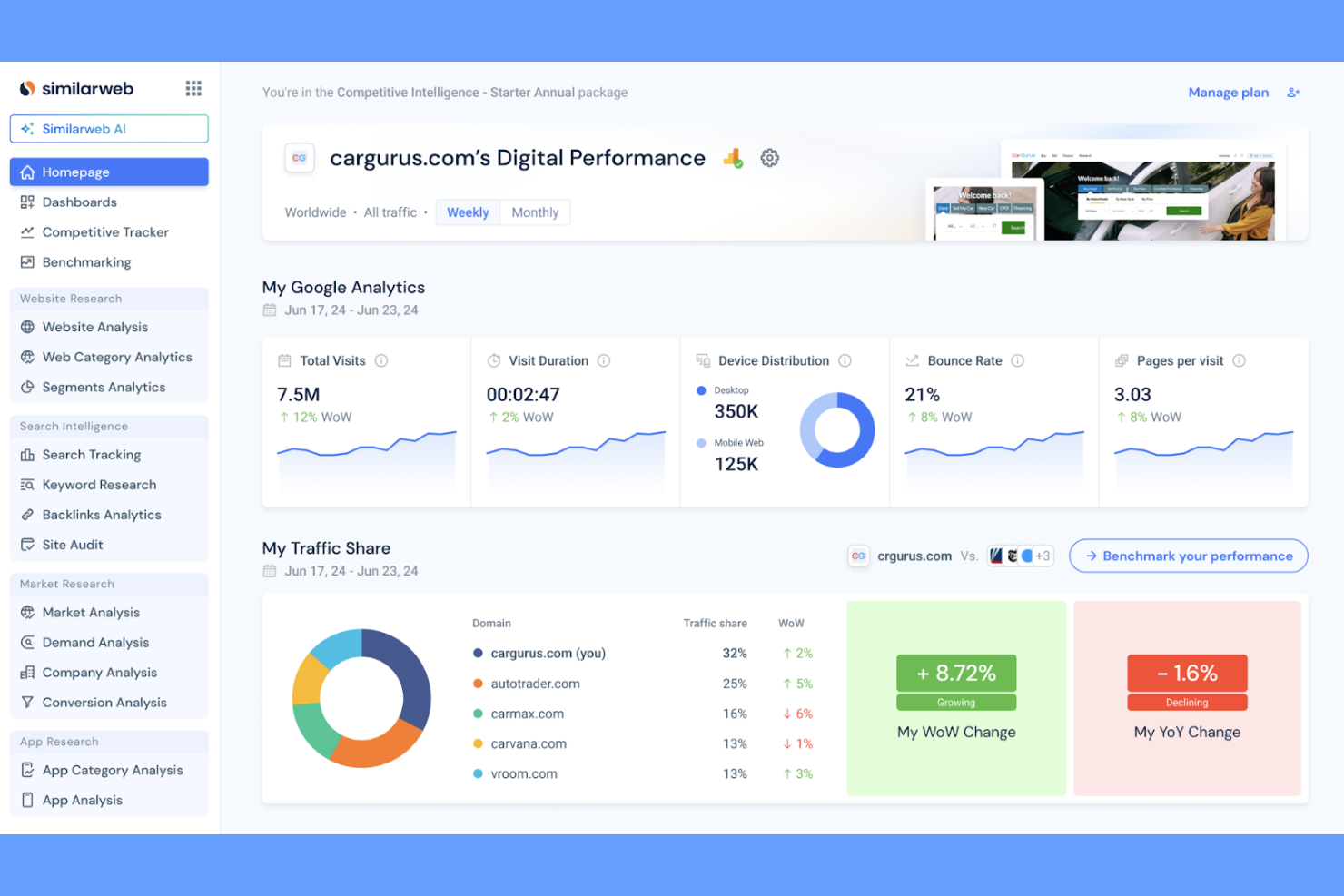
For teams focused on understanding where website traffic comes from, Similarweb offers detailed digital traffic analytics. Marketing, revenue operations, and analytics professionals use it to break down referral sources, audience geography, and engagement patterns for any site. Its unique strength is the ability to benchmark your own web presence against competitors and spot new competitive insights.
Why I Picked Similarweb
What sets Similarweb apart is its ability to break down website traffic sources with impressive granularity. For competitive intelligence, I picked Similarweb because it lets you see exactly where your competitors’ visitors are coming from—whether that’s direct, referral, search, social, or paid channels.
The platform also provides detailed audience insights, including geographic distribution and engagement metrics, so you can benchmark your own site’s performance. This level of visibility helps you identify new acquisition channels and understand shifts in digital market share.
Similarweb Key Features
I also found several other features in Similarweb that support competitive intelligence work:
- Industry Analysis: Compare performance metrics across entire industries to spot trends and shifts in market share.
- App Intelligence: Track downloads, usage, and engagement for mobile apps across app stores.
- Audience Overlap Tool: Identify shared audiences between your site and competitors to inform partnership or targeting strategies.
- Keyword Gap Analysis: Discover keywords that drive traffic to competitors but not to your own site.
Similarweb Integrations
Integrations include Google Analytics, Salesforce, HubSpot, Google Ads, Tableau, Microsoft Power BI, Facebook Ads, LinkedIn Ads, Marketo, and Adobe Analytics.
Pros and Cons
Pros:
- Supplies global and country-level traffic estimates
- Provides mobile app analytics alongside web data
- Offers audience overlap and benchmarking tools
Cons:
- Lacks real-time traffic monitoring features
- Data granularity limited for low-traffic sites

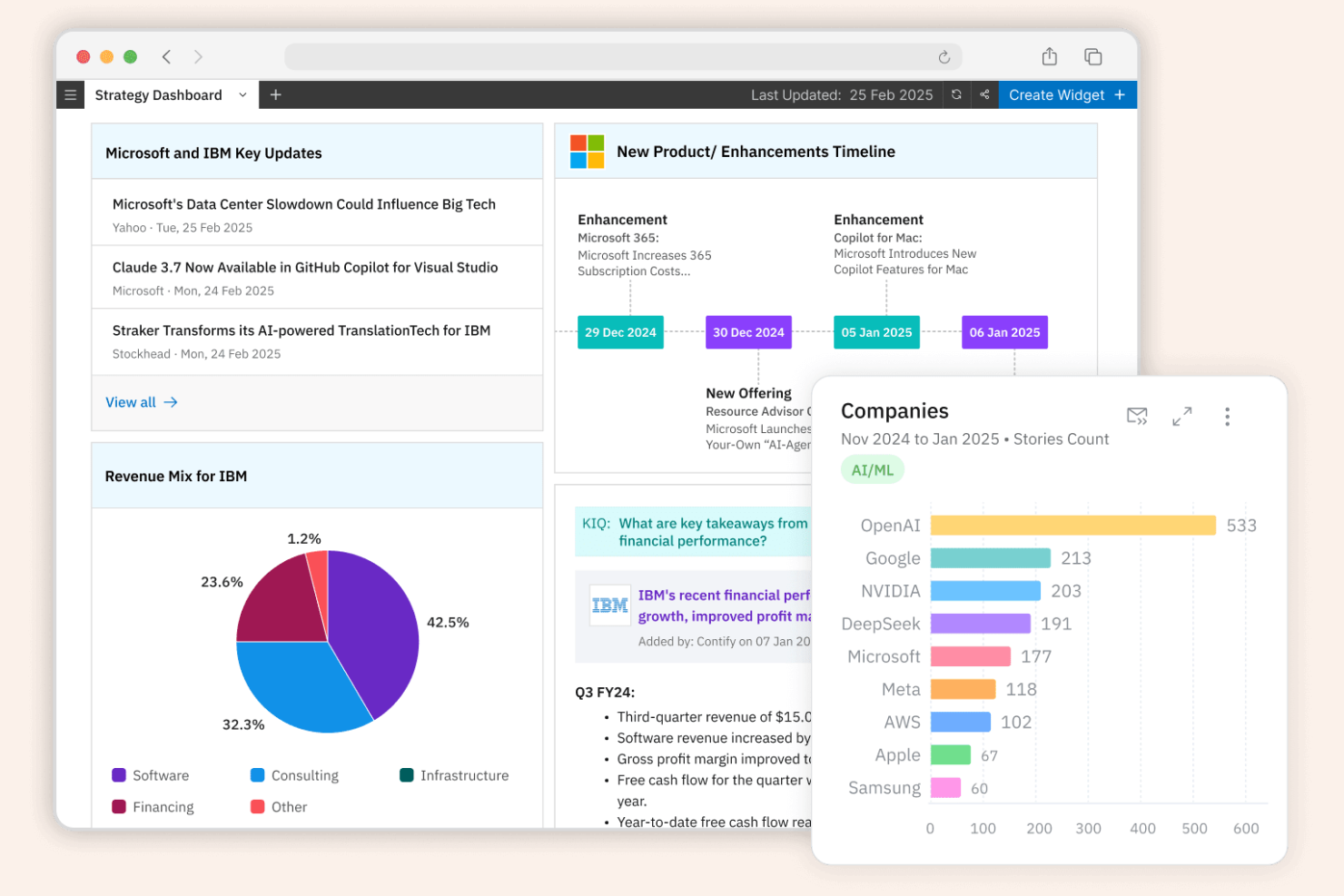
Contify offers a customizable platform for building news and update feeds tailored to your market and competitors. It’s a strong fit for market intelligence teams, product managers, and analysts who need to track specific companies, industries, or topics in real time. With its granular filtering and aggregation from diverse sources, Contify helps you cut through noise and focus on the updates that matter most for competitive intelligence.
Why I Picked Contify
For teams that need highly tailored news and update feeds, Contify offers a level of customization that’s hard to match. I picked Contify because it lets you define exactly which companies, industries, or topics you want to monitor, and then curates feeds from thousands of sources. Its taxonomy-based filtering and smart tagging features help you organize and prioritize updates, so you’re not overwhelmed by irrelevant information.
This makes Contify a strong choice for competitive intelligence professionals who want to focus on the most actionable news and signals.
Contify Key Features
In addition to its custom feed capabilities, Contify offers several other features that support competitive intelligence work:
- Automated Newsletter Builder: Lets you create and distribute curated intelligence newsletters to stakeholders.
- Mobile Access: Provides a mobile app for tracking updates on the go.
- Integration With Internal Data Sources: Allows you to combine external news with your own internal reports and documents.
- Custom Dashboards: Enables you to visualize and track key trends and competitor activities in one place.
Contify Integrations
Integrations include Slack, Microsoft Teams, Salesforce, HubSpot, Highspot, Seismic, Showpad, Power BI, Gong, and Snowflake.
Pros and Cons
Pros:
- Mobile app enables real-time monitoring anywhere
- Automated newsletters distribute intelligence to teams
- Custom taxonomy supports granular topic tracking
Cons:
- Export options are restricted to certain formats
- Limited language support for non-English content

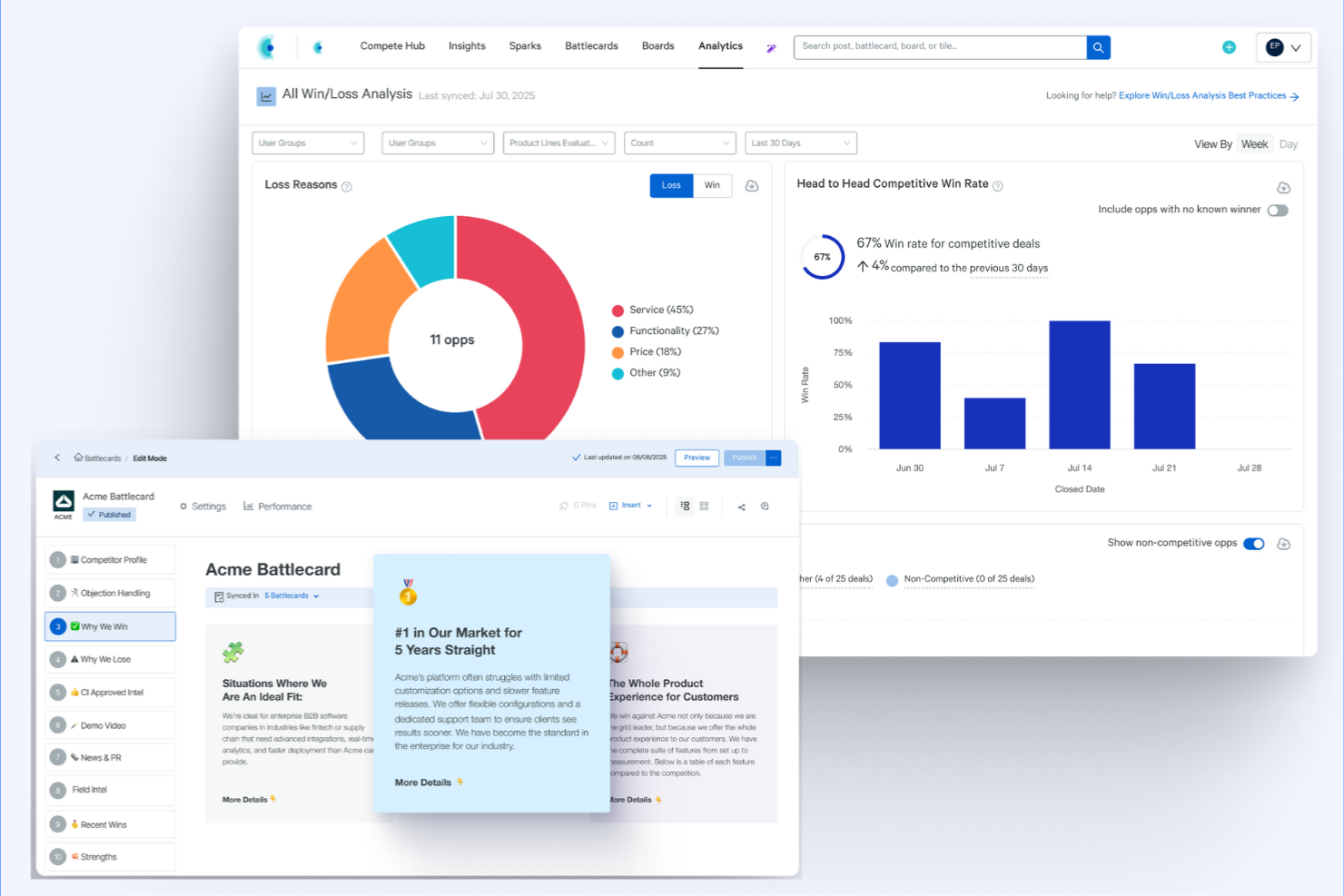
Crayon specializes in tracking and analyzing competitor sales enablement activities across digital channels. Sales, marketing, and revenue operations teams use it to monitor competitor collateral, messaging, and product updates in real time. Its focus on surfacing actionable insights from competitor sales content helps teams adjust their own strategies and stay ahead in fast-moving markets.
Why I Picked Crayon
Crayon stands out for its focus on monitoring competitor sales enablement materials and tactics. I picked Crayon because it tracks competitor battlecards, pitch decks, product updates, and messaging changes across public and semi-private channels.
The platform’s automated alerts and visual timelines make it easy to spot shifts in competitor positioning and sales strategies. For teams that need to keep their sales enablement resources current and competitive, Crayon offers targeted intelligence that’s hard to find elsewhere.
Crayon Key Features
Some other features in Crayon also support competitive intelligence work:
- Automated Web Tracking: Continuously scans competitor websites for new content, changes, and updates.
- Social Media Monitoring: Captures competitor activity and messaging across major social platforms.
- Customizable Dashboards: Lets users organize and visualize intelligence data in ways that fit their workflow.
- Collaboration Tools: Enables teams to share findings, annotate insights, and assign follow-up actions within the platform.
Crayon Integrations
Integrations include Salesforce, HubSpot, FreshSales, Microsoft Teams, Slack, Yammer, ClickUp, Confluence, Highspot, and Gong.
Pros and Cons
Pros:
- Offers visual timelines of competitor activity
- Sends real-time alerts for competitor changes
- Tracks competitor sales collateral and battlecards
Cons:
- Some other integrations require additional setup steps
- Lacks direct integration with Google Analytics

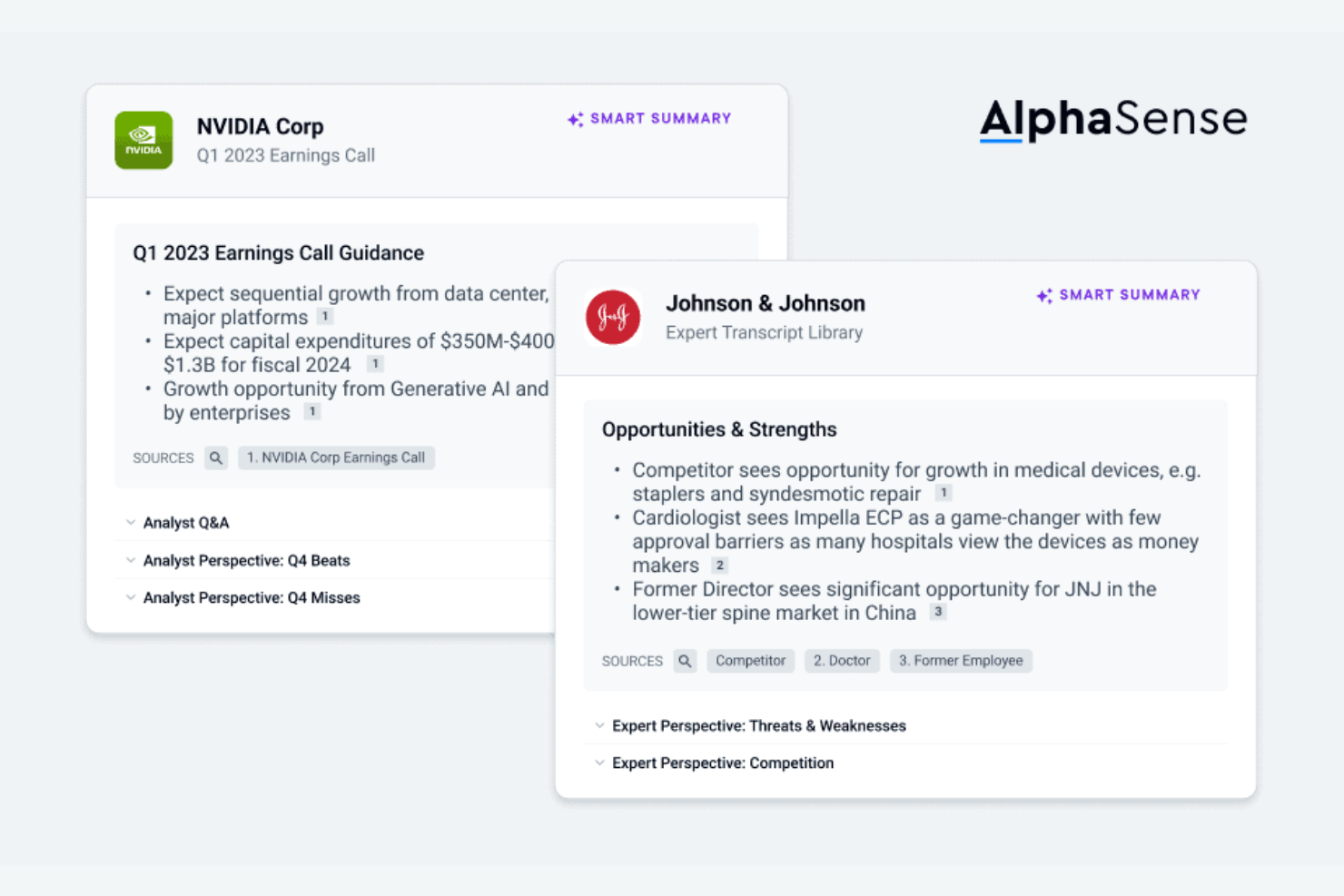
AlphaSense uses AI to help research teams and analysts search, filter, and extract insights from a vast universe of market documents. It’s designed for professionals in finance, consulting, and corporate strategy who need to surface relevant information from earnings calls, filings, news, and research reports. With its advanced semantic search and document summarization, AlphaSense helps you quickly pinpoint trends and signals that matter for competitive intelligence.
Why I Picked AlphaSense
When you need to search through thousands of market documents for competitive signals, AlphaSense’s AI-powered search stands out. I picked AlphaSense because its semantic search engine understands context and intent, helping you surface relevant insights from earnings calls, filings, and analyst reports.
The platform’s AI-driven summarization and sentiment analysis features make it easier to extract key points and trends without reading every document in full. For competitive intelligence teams, this means you can quickly identify market shifts and competitor moves that might otherwise go unnoticed.
AlphaSense Key Features
Some other features in AlphaSense help round out its capabilities for research and intelligence teams:
- Custom Alerts: Notifies you when new documents match your saved search criteria.
- Collaboration Tools: Let teams annotate, share, and comment on documents within the platform.
- Document Tagging: Allows you to organize and categorize documents for easier retrieval.
- Export Options: Supports exporting search results and document excerpts to PDF, Excel, and other formats.
AlphaSense Integrations
Integrations include Slack, Microsoft Teams, Salesforce, Bloomberg Terminal, FactSet, Refinitiv Eikon, Capital IQ, S&P Global, LinkedIn, and Google Workspace.
Pros and Cons
Pros:
- Alerts notify users of new competitive filings
- Semantic filters refine results by topic or company
- AI search surfaces relevant market documents fast
Cons:
- Limited native integrations with external platforms
- No public pricing or self-serve signup
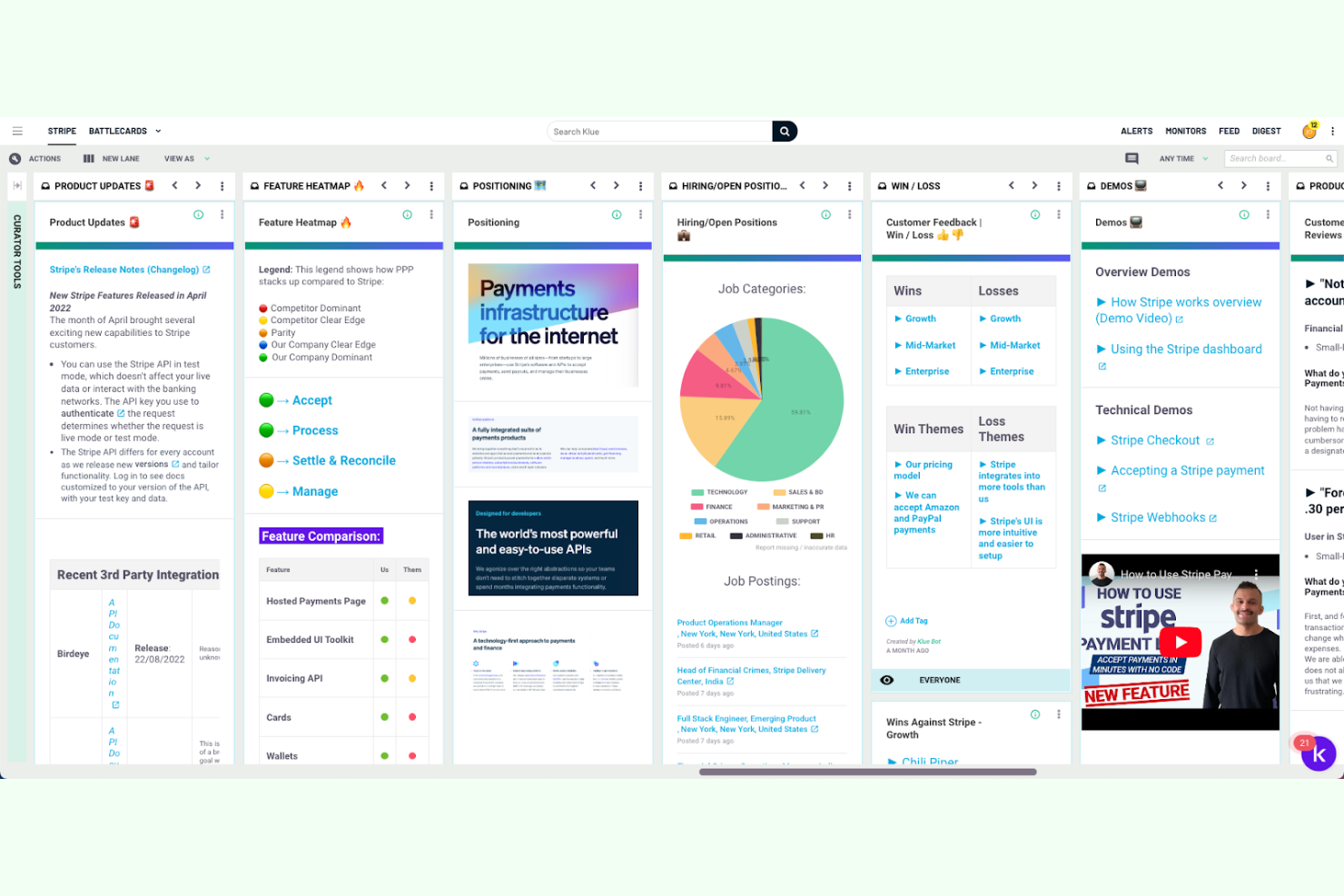
Klue is designed for revenue teams that need to centralize and update competitive battlecards in one place. It appeals to sales enablement, product marketing, and competitive intelligence professionals who want to keep insights current and accessible. By focusing on collaborative battlecard management, Klue helps teams deliver timely, actionable intelligence directly to the field.
Why I Picked Klue
Centralizing battlecard insights is where Klue really shines for competitive intelligence teams. I picked Klue because it lets you collect, organize, and update battlecards from multiple sources in a single, accessible hub.
The platform’s collaboration features allow sales and marketing teams to contribute insights and feedback directly on each battlecard. Klue also tracks usage and engagement, so you can see which insights are resonating with your team and adjust content as needed.
Klue Key Features
Some other features in Klue help round out its competitive intelligence capabilities:
- Automated Competitor Tracking: Monitors competitor websites, news, and digital footprints for updates.
- Content Curation Tools: Allows users to collect and organize intelligence from multiple sources.
- Integration with CRM Platforms: Connects directly with Salesforce and HubSpot to deliver insights where teams work.
- Permission-Based Access Controls: Lets admins manage who can view, edit, or contribute to specific content.
Klue Integrations
Integrations include Salesforce, HubSpot, Microsoft Dynamics, Slack, Microsoft Teams, Gong, Highspot, Seismic, Showpad, and SharePoint.
Pros and Cons
Pros:
- Supports granular permission controls for content
- Tracks engagement with shared competitive content
- Centralizes battlecards for multiple teams
Cons:
- Lacks built-in sentiment analysis for competitor news
- No public API documentation for custom workflows

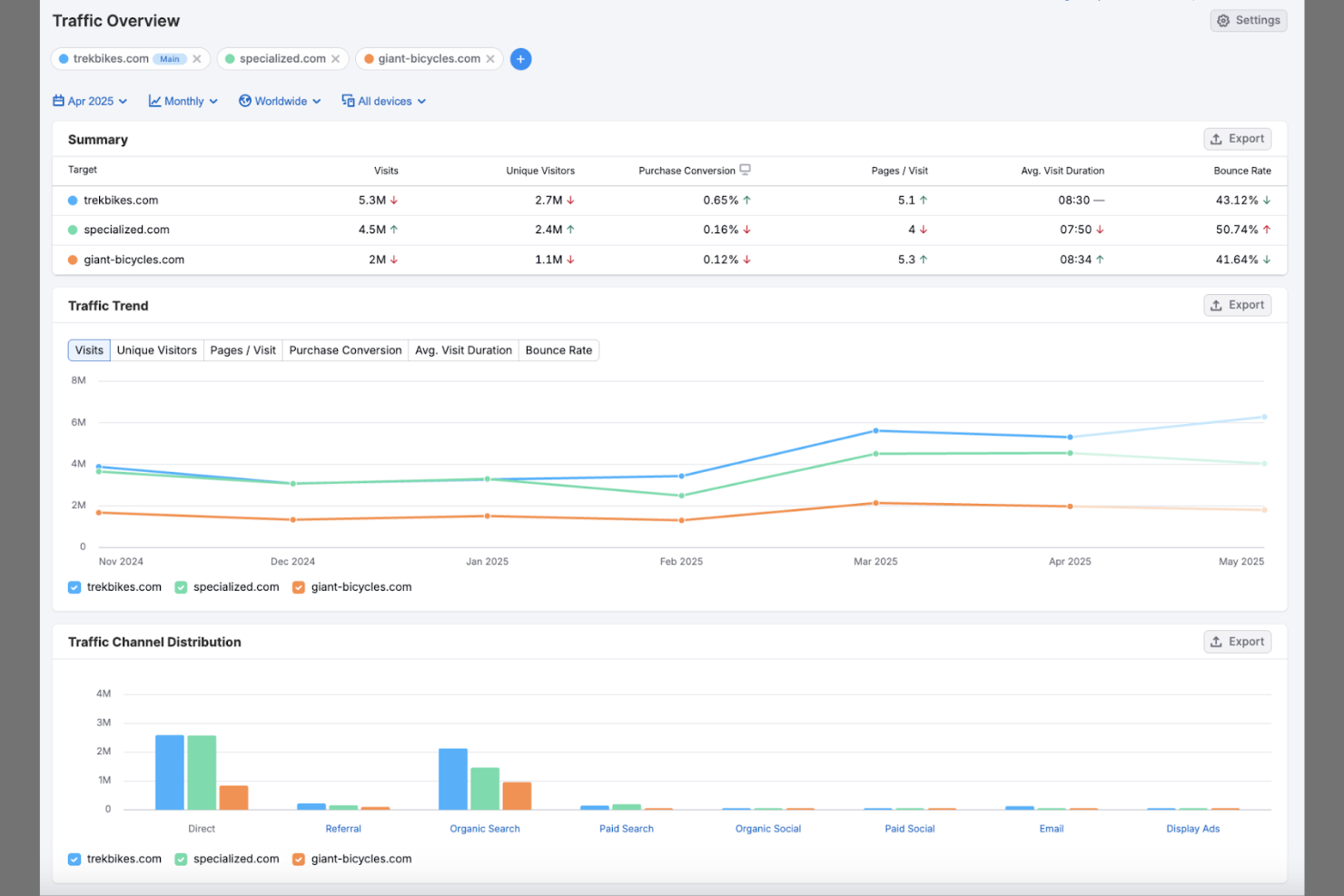
If your team needs to track digital marketing competitors across search, social, and paid channels, Semrush offers a focused competitive analysis solution. Marketing and revenue operations professionals use it to uncover rival keyword strategies, ad campaigns, and backlink profiles. The platform stands out for its depth of digital marketing data and competitive benchmarking features.
Why I Picked Semrush
I chose Semrush because it gives you a detailed view of your digital marketing competitors’ strategies. The platform’s competitor analysis tools let you track rival keyword rankings, ad copy, and paid search activity in real time. I like how you can benchmark your own site’s performance against others in your industry, making it easier to spot gaps and opportunities. Semrush’s backlink analytics also help you understand where competitors are earning authority and how you can adjust your own link-building efforts.
Semrush Key Features
Some other features in Semrush that support competitive intelligence work include:
- Traffic Analytics: Analyze estimated traffic volumes and engagement metrics for any website to benchmark performance.
- Market Explorer: Map out your competitive landscape and discover new market players and audience segments.
- Social Media Tracker: Monitor competitors’ social media activity and compare their engagement across platforms.
- Content Analyzer: Evaluate the performance of your competitors’ content and identify top-performing topics and formats.
Semrush Integrations
Integrations include Google Analytics, Google Search Console, HubSpot, Facebook Ads, LinkedIn Ads, CallRail, Ahrefs, All in One SEO (AIOSEO), monday.com, and Pagecloud.
Pros and Cons
Pros:
- Provides historical data for trend spotting
- Offers detailed backlink and domain analysis
- Tracks competitor keywords across multiple channels
Cons:
- Data accuracy can vary by region
- Paid plans restrict access to some reports
Other Competitive Intelligence Tools
Here are some additional competitive intelligence tools options that didn’t make it onto my shortlist, but are still worth checking out:
- Meltwater
For global media monitoring coverage
- Kompyte
For automated competitor workflow tracking
- Feedly Market Intelligence
For AI-driven industry trend detection


Competitive Intelligence Tools Selection Criteria
When selecting the best competitive intelligence tools to include in this list, I considered common buyer needs and pain points like tracking competitor digital marketing activity and identifying emerging threats or opportunities. I also used the following framework to keep my evaluation structured and fair:
Core Functionality (25% of total score)
To be considered for inclusion in this list, each solution had to fulfill these common use cases:
- Monitor competitor website changes
- Track paid and organic keyword rankings
- Analyze competitor backlink profiles
- Access historical competitor data
- Generate competitor comparison reports
Additional Standout Features (25% of total score)
To help further narrow down the competition, I also looked for unique features, such as:
- Automated competitor change alerts
- AI-driven trend detection
- Social media ad intelligence
- Customizable dashboards and reporting
- Integration with business intelligence tools
Usability (10% of total score)
To get a sense of the usability of each system, I considered the following:
- Clean and intuitive user interface
- Logical navigation and menu structure
- Fast data loading and response times
- Clear data visualizations and charts
- Minimal clicks to access core features
Onboarding (10% of total score)
To evaluate the onboarding experience for each platform, I considered the following:
- Step-by-step product tours or walkthroughs
- Availability of training videos and documentation
- Pre-built templates for common workflows
- Access to onboarding webinars or live sessions
- In-app chatbots or help widgets for quick answers
Customer Support (10% of total score)
To assess each software provider’s customer support services, I considered the following:
- Live chat or phone support availability
- Fast response times to inquiries
- Access to a searchable knowledge base
- Dedicated account managers for enterprise plans
- Community forums or user groups
Value For Money (10% of total score)
To evaluate the value for money of each platform, I considered the following:
- Transparent and flexible pricing tiers
- Features included at each pricing level
- Free trial or demo availability
- No hidden fees or surprise charges
- Discounts for annual or multi-user plans
Customer Reviews (10% of total score)
To get a sense of overall customer satisfaction, I considered the following when reading customer reviews:
- Consistent praise for core features
- Reported issues with data accuracy or coverage
- Feedback on customer support experiences
- Comments on ease of use and onboarding
- Value for money compared to alternatives
How to Choose Competitive Intelligence Tools
It’s easy to get bogged down in long feature lists and complex pricing structures. To help you stay focused as you work through your unique software selection process, here’s a checklist of factors to keep in mind:
| Factor | What to Consider |
|---|---|
| Scalability | Will the tool handle more users, data sources, or tracked competitors as your business grows? |
| Integrations | Does the tool connect natively to your CRM, analytics, or reporting platforms without workarounds? |
| Customizability | Can you tailor dashboards, alerts, and reports to your team’s specific workflows and KPIs? |
| Ease of use | Will your team adopt the tool quickly, or will training and support be a constant requirement? |
| Implementation and onboarding | How long will it take to get up and running, and what resources or expertise will you need internally? |
| Cost | Are pricing tiers clear, and do they align with your usage patterns and budget constraints? |
| Security safeguards | Does the vendor offer data encryption, user access controls, and compliance with your industry’s standards? |
| Support availability | Can you reach support during your business hours, and are SLAs or dedicated contacts available? |
What Are Competitive Intelligence Tools?
Competitive intelligence tools are CI platforms that help sales teams, marketing teams, and product leaders collect, analyze, and act on competitor intelligence. These tools support large-scale data collection across websites, ads, press releases, and other public sources, turning raw information into market insights. Many modern CI tools use artificial intelligence to surface patterns, detect emerging trends, and improve user experience through smarter recommendations. By centralizing insights, they help teams make data-driven decisions and strengthen go-to-market execution.
Features
When selecting competitive intelligence tools, keep an eye out for the following key features:
- Competitor website monitoring: Tracks changes to competitor websites, such as new product launches, pricing updates, or messaging shifts, and alerts your team to these updates.
- Keyword tracking: Monitors which keywords competitors rank for in organic and paid search, helping you identify gaps and opportunities in your own strategy.
- Ad copy analysis: Collects and archives competitor ad creatives and messaging, allowing you to review their paid campaigns and spot trends over time.
- Backlink analysis: Examines the sources and quality of backlinks pointing to competitor domains, helping you uncover link-building opportunities and assess authority.
- SERP analysis: Breaks down search engine results pages for target keywords, showing where competitors appear and how rankings shift over time.
- Domain comparison: Lets you compare multiple competitor domains side by side for traffic, keyword overlap, and other digital metrics.
- Custom reporting: Enables you to build, schedule, and export reports tailored to your team’s needs, supporting regular updates and executive briefings.
- Historical data access: Provides archives of competitor activity, such as past keyword rankings or ad campaigns, to help you analyze long-term trends and shifts.
- Backlink opportunity identification: Highlights potential sites for your own outreach based on competitor link profiles and industry relevance.
Benefits
Implementing competitive intelligence tools provides several benefits for your team and your business. Here are a few you can look forward to:
- Faster competitor monitoring: Automated website and ad tracking keeps your team updated on competitor moves without manual research.
- Improved strategic planning: Access to historical data and domain comparisons helps you make informed decisions about your marketing and sales strategies.
- Better opportunity identification: Backlink and keyword analysis reveal gaps in your own approach and highlight areas for growth.
- More effective reporting: Custom reporting features make it easy to share actionable insights with stakeholders and leadership.
- Enhanced cross-team alignment: Centralized data supports collaboration between marketing, sales, and product teams by providing a single source of truth.
- Proactive risk management: Real-time alerts and SERP analysis help you spot emerging threats or shifts in the competitive landscape early.
- Resource optimization: By focusing on the most impactful competitor activities, your team can prioritize efforts and allocate resources more efficiently.
Costs and Pricing
Selecting competitive intelligence tools requires an understanding of the various pricing models and plans available. Costs vary based on features, team size, add-ons, and more. The table below summarizes common plans, their average prices, and typical features included in competitive intelligence tools solutions:
Plan Comparison Table for Competitive Intelligence Tools
| Plan Type | Average Price | Common Features |
|---|---|---|
| Free Plan | $0 | Limited keyword tracking, basic competitor monitoring, restricted historical data, and simple reports. |
| Personal Plan | $30-$70/user/month | Expanded keyword and domain tracking, ad copy analysis, basic backlink data, and exportable reports. |
| Business Plan | $100-$300/user/month | Multi-user access, advanced competitor analysis, custom reporting, historical data access, and integrations. |
| Enterprise Plan | $500-$2000+/month | Unlimited tracking, API access, dedicated support, advanced security, onboarding assistance, and custom SLAs. |
Competitive Intelligence Tools FAQs
Here are some answers to common questions about competitive intelligence tools:
How do competitive intelligence tools gather data?
Competitive intelligence tools gather data by crawling public websites, monitoring search engine results, tracking ad placements, and analyzing backlink profiles. Some tools also aggregate information from news sources and social media. This approach helps teams stay updated on competitor activities without manual research.
Can competitive intelligence tools integrate with CRM or analytics platforms?
Yes, many competitive intelligence tools offer integrations with CRM and analytics platforms. These integrations let you sync competitor insights with your sales, marketing, or reporting workflows, making it easier to act on findings and share data across teams.
What types of businesses benefit most from competitive intelligence tools?
Businesses in highly competitive markets, such as SaaS, ecommerce, and digital marketing, benefit most from competitive intelligence tools. These tools are especially valuable for teams focused on digital strategy, market positioning, and proactive response to competitor moves.
How often is competitor data updated in these tools?
Most competitive intelligence tools update competitor data daily or weekly, depending on the feature and data source. Some platforms offer real-time or near real-time alerts for website changes or ad launches, while others refresh keyword and backlink data on a set schedule.
Are there privacy or legal concerns with using competitive intelligence tools?
No, as long as you use tools that collect only publicly available data, there are generally no privacy or legal concerns. However, it’s important to ensure your team follows ethical guidelines and avoids scraping or accessing restricted or confidential information.
What’s Next:
If you're in the process of researching competitive intelligence tools, connect with a SoftwareSelect advisor for free recommendations.
You fill out a form and have a quick chat where they get into the specifics of your needs. Then you'll get a shortlist of software to review. They'll even support you through the entire buying process, including price negotiations.