
20 Best Cloud-Based Contract Management Software Reviewed in 2026

17 Best Cloud-Based Contract Management Software Shortlist
Here's my pick of the 17 best software from the 20 tools reviewed.


Managing contracts can be difficult for any team, especially when you're juggling multiple agreements and deadlines. You need a solution that helps you stay organized, reduces errors, and keeps everyone on the same page.
In my experience, cloud-based contract management software can be a lifesaver. It offers an efficient way to manage contracts, ensuring you never miss a renewal or key term.
Throughout this article, I’ll share my unbiased reviews of the best software solutions in this space. You’ll find insights into features, usability, and what makes each tool unique. My goal is to help you find the right tool for your team’s needs so that you can focus on what truly matters.
Why Trust Our Software Reviews
Best Cloud-Based Contract Management Software Summary
This comparison chart summarizes the pricing details for my top cloud-based contract management software selections to help you find the best one for your budget and business needs.
| Tool | Best For | Trial Info | Price | ||
|---|---|---|---|---|---|
| 1 | Best for fast-growing teams | Free demo available | Pricing upon request | Website | |
| 2 | Best for customization | Free trial available | Pricing upon request | Website | |
| 3 | Best for cost optimization | Free demo available | From $20,000/year | Website | |
| 4 | Best for easy searching | Free demo available | From $299/user/month | Website | |
| 5 | Best for enterprise compliance | Free demo available | Pricing upon request | Website | |
| 6 | Best for procurement integration | Free demo available | Pricing upon request | Website | |
| 7 | Best for small businesses | Free demo available | From $399/5 users/month (billed annually) | Website | |
| 8 | Best for spend management | Free demo available | Pricing upon request | Website | |
| 9 | Best for workflow automation | Not available | Pricing upon request | Website | |
| 10 | Best for electronic signatures | Free demo available | From $10/month (billed annually) | Website |
-

Prisync
Visit WebsiteThis is an aggregated rating for this tool including ratings from Crozdesk users and ratings from other sites.4.7 -
Expedite Commerce
Visit Website -
QuickBooks Online
Visit WebsiteThis is an aggregated rating for this tool including ratings from Crozdesk users and ratings from other sites.4





Best Cloud-Based Contract Management Software Review
Below are my detailed summaries of the best cloud-based contract management software that made it onto my shortlist. My reviews offer a detailed look at the key features, pros and cons, integrations, and ideal use cases of each tool to help you find the best one for you.
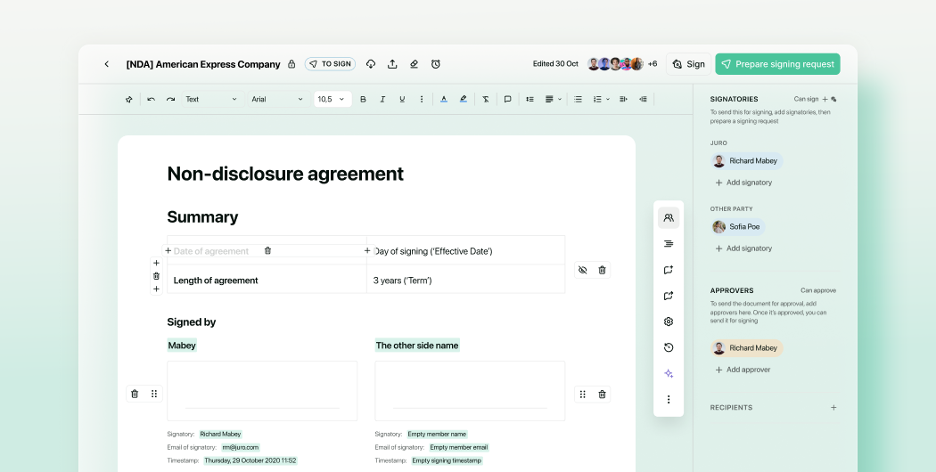
Juro is a contract automation platform designed to support fast-growing teams across various industries. It simplifies contract creation, negotiation, and management, enabling teams to handle contracts efficiently as they scale.
Why I picked Juro: Juro is tailored for fast-growing teams because it offers plans that scale with your contract volume. Its intuitive design allows teams to collaborate and automate repetitive tasks, saving time and reducing errors. Juro's flexible templates help maintain consistency across contracts, which is vital for scaling businesses. The platform also provides insights into contract performance, helping your team make data-driven decisions.
Standout features & integrations:
Features include customizable dashboards that provide a clear overview of your contract pipeline. Juro offers in-browser editing, allowing your team to work on contracts without switching applications. The platform's audit trails ensure transparency and accountability for every contract action.
Integrations include Salesforce, Slack, Google Drive, HubSpot, Greenhouse, Zapier, and Microsoft Word.
Pros and Cons
Pros:
- In-browser editing
- Flexible contract templates
- Real-time collaboration
Cons:
- Requires an internet connection
- Some integrations cost extra
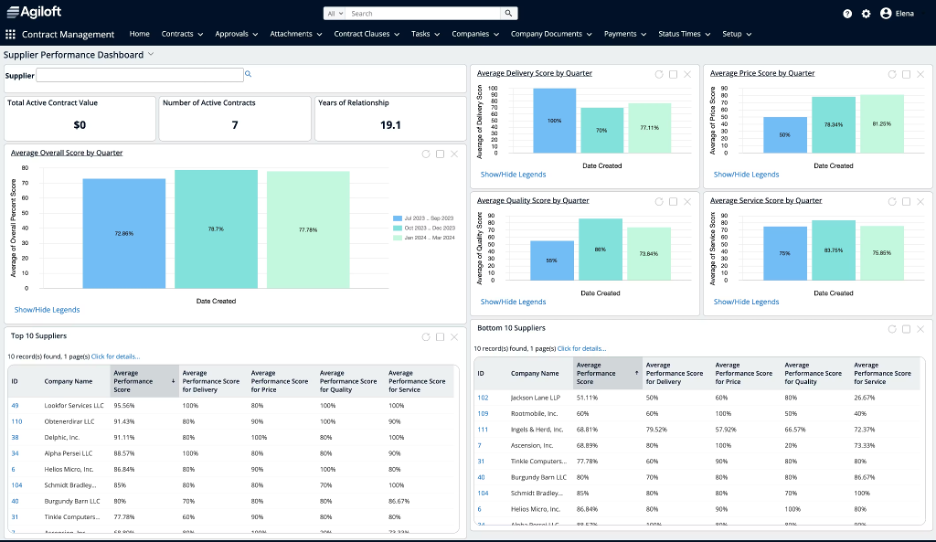
Agiloft is a contract lifecycle management platform designed for businesses that need highly customizable solutions. It serves industries such as healthcare, technology, and finance, offering tools for contract creation, approval, and compliance.
Why I picked Agiloft: Agiloft is known for its customization capabilities, allowing you to tailor workflows to fit your team's unique processes. The platform's no-code interface lets you adjust settings without technical expertise. Agiloft offers flexible templates, making it easy to create contracts that align with your business needs. Its reporting tools provide insights into contract performance, helping you make informed decisions.
Standout features & integrations:
Features include a drag-and-drop interface that simplifies customization for non-technical users. Agiloft provides flexible approval workflows that adapt to your business rules. The platform's audit trails ensure transparency and accountability for all contract actions.
Integrations include Salesforce, Microsoft Dynamics 365, Docusign, Adobe Acrobat Sign, Google Translate, and Microsoft Word.
Pros and Cons
Pros:
- Detailed audit trails
- No-code interface for easy setup
- Highly customizable workflows
Cons:
- May require dedicated admin support
- Initial setup may be complex

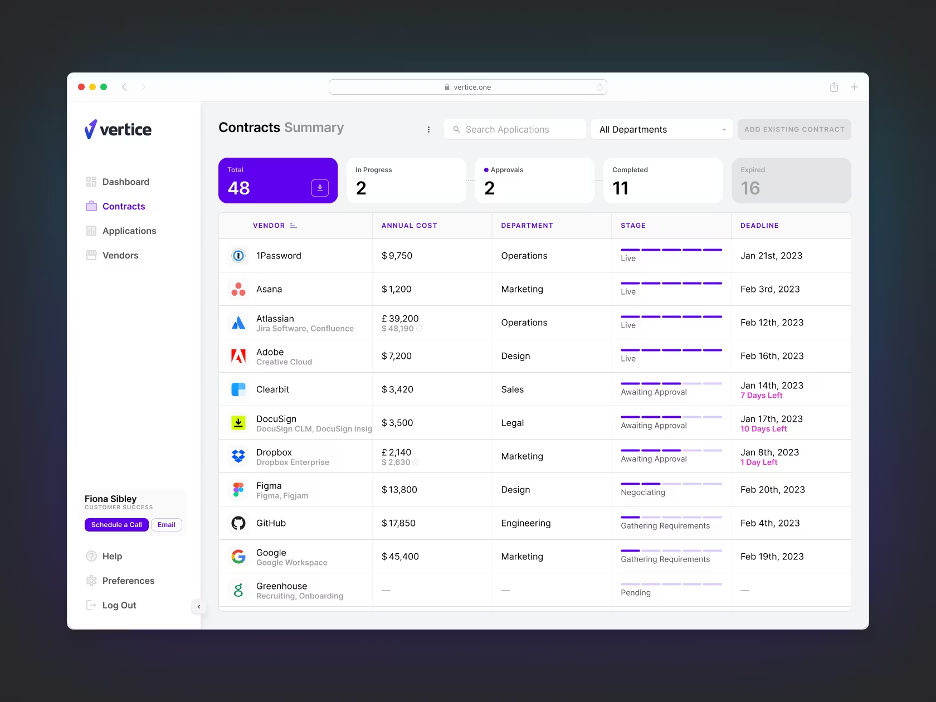
Vertice is a software solution designed for finance teams and procurement specialists focused on cost optimization and vendor management. It aims to simplify the process of managing software contracts and expenses, ensuring businesses get the best value.
Why I picked Vertice: Vertice excels at cost optimization by offering detailed spending analytics that help your team identify savings opportunities. The platform provides benchmarking data, allowing you to compare your software spending against industry standards. Vertice's centralized dashboard makes it easy to track and manage all your software contracts. Automated renewal alerts ensure you never miss a deadline.
Standout features & integrations:
Features include an analytics engine that provides insights into your software spending patterns. Vertice offers customizable reports that help you make budgeting decisions. The platform's intuitive interface allows you to manage contracts and renewals efficiently.
Integrations include Slack, Google Workspace, Microsoft 365, QuickBooks, NetSuite, and SAP.
Pros and Cons
Pros:
- Customizable reporting
- Benchmarking against industry standards
- Detailed spending analytics
Cons:
- Requires ongoing data input
- Initial setup may be complex

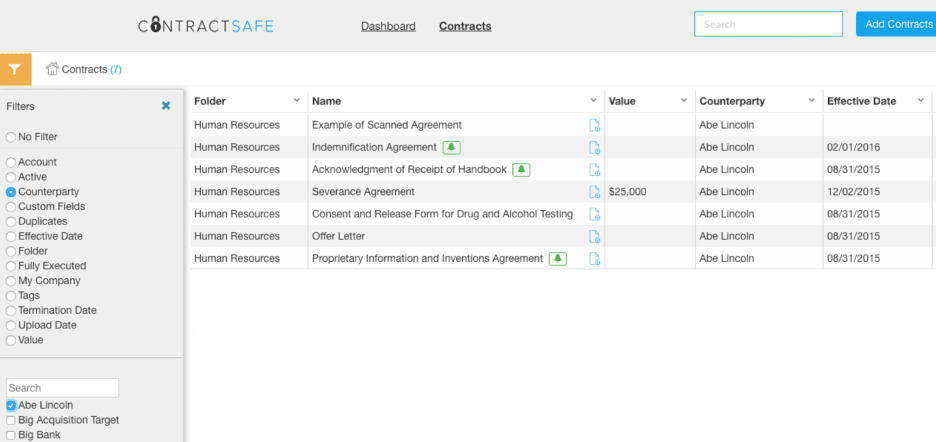
ContractSafe is a contract management software designed for businesses that need to efficiently store and find contracts. It is particularly useful for legal and administrative teams who require quick access to contract information.
Why I picked ContractSafe: ContractSafe is known for its easy searching capabilities, making it simple to find contracts using keywords and filters. The platform offers optical character recognition (OCR) technology that turns scanned documents into searchable text. You can tag contracts with custom labels to help improve organization and retrieval. ContractSafe also provides automatic reminders for important dates, ensuring your team stays on top of renewals and expirations.
Standout features & integrations:
Features include secure cloud storage, which keeps your contracts safe and accessible from anywhere. The platform's permission settings allow you to control who can view or edit documents. ContractSafe also offers a simple drag-and-drop interface for uploading contracts quickly.
Integrations include Salesforce, Docusign, and Okta.
Pros and Cons
Pros:
- Custom tagging options
- Includes OCR for scanned documents
- Easy keyword search
Cons:
- No mobile app available
- Limited advanced features
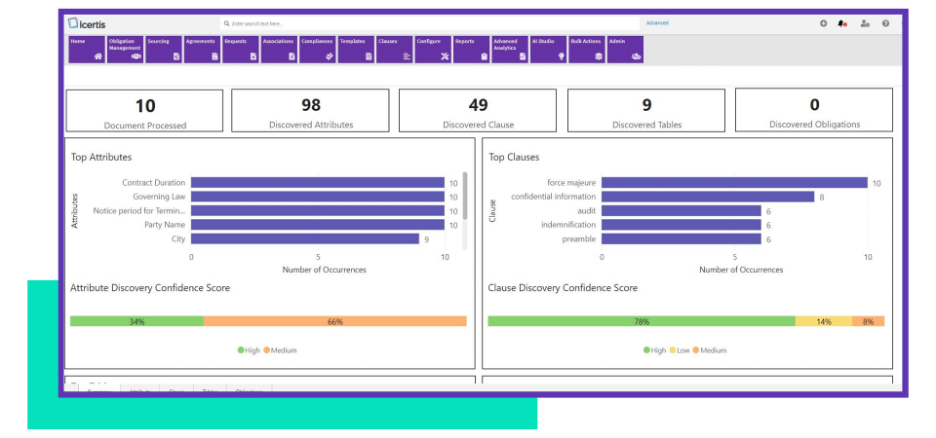
Icertis is a contract lifecycle management software aimed at large enterprises looking to ensure compliance and governance. It helps manage contracts across their lifecycle, focusing on compliance, risk management, and operational efficiency.
Why I picked Icertis: Icertis is designed for enterprise compliance with features that support governance and risk management. It offers advanced compliance tracking, which is essential for large organizations managing multiple regulations. The platform's contract intelligence capabilities help your team make informed decisions. Icertis also provides contract risk scoring, giving you insights into potential compliance issues before they arise.
Standout features & integrations:
Features include a detailed audit trail that tracks every change made to a contract, ensuring accountability. Icertis offers automated contract authoring, which speeds up the creation process. The platform also provides custom dashboards that allow you to monitor contract performance at a glance.
Integrations include Microsoft Office, Salesforce, SAP, Workday, Docusign, and Adobe Acrobat Sign.
Pros and Cons
Pros:
- Detailed risk scoring
- Automated contract authoring
- Advanced compliance tracking
Cons:
- Steep learning curve
- Complex initial setup
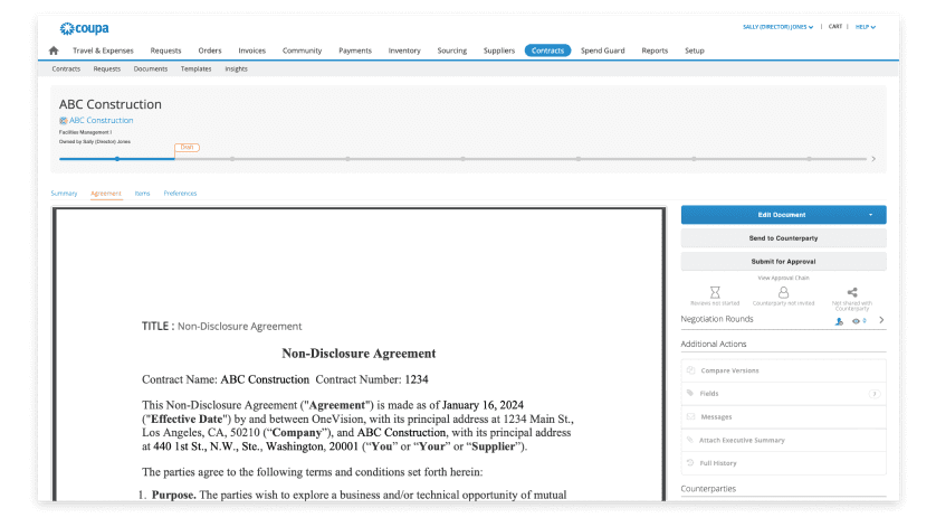
Coupa is a cloud-based spend management platform designed for enterprises looking to optimize their procurement processes. It serves industries such as retail, manufacturing, and finance, providing tools for procurement, invoicing, and expense management.
Why I picked Coupa: Coupa excels in procurement integration by offering a unified platform that connects procurement with invoicing and expenses. Its real-time spend visibility helps your team make purchasing decisions. Coupa's automated workflows simplify the approval process, reducing bottlenecks. The platform's intuitive interface ensures quick adoption by your team.
Standout features & integrations:
Features include advanced spend analytics that provide insights into your organization's purchasing patterns. Coupa offers customizable approval workflows that adapt to your business rules. The platform's supplier management tools help you maintain strong vendor relationships.
Integrations include SAP, Oracle, Microsoft Dynamics 365, and QuickBooks.
Pros and Cons
Pros:
- Automated approval workflows
- Unified platform for procurement
- Real-time spend visibility
Cons:
- May need dedicated admin support
- Initial setup may be complex

Concord is a cloud-based contract management platform for businesses and startups of all sizes. It focuses on contract negotiation, collaboration, creation, and e-signatures, making it ideal for teams looking to simplify their contract processes.
Why I picked Concord: Concord is a good choice for small businesses because its entry-level plan offers unlimited e-signatures and contracts. This is also beneficial for teams with high-volume needs. Concord’s collaborative features allow multiple users to work on contracts simultaneously, and the platform's intuitive interface makes it easy for teams to adopt without extensive training. Concord also offers real-time editing, enabling your team to make quick adjustments and decisions.
Standout features & integrations:
Features include automated approval workflows that help you maintain control over contract processes. Concord offers audit trails that provide transparency and accountability for every contract action. The platform also allows for version control, ensuring you always have access to the most current contract version.
Integrations include Salesforce, Google Drive, Dropbox, Box, Zapier, and Microsoft Word.
Pros and Cons
Pros:
- Offers transparent audit trails
- Real-time collaboration
- Unlimited e-signatures
Cons:
- Basic reporting features
- Limited customization options on the entry-level plan

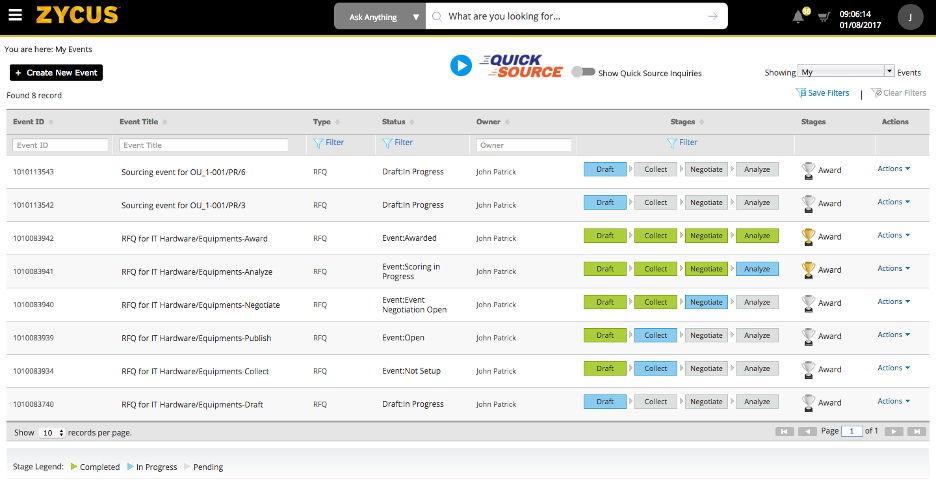
Zycus is a spend management software designed for procurement and finance teams seeking to optimize their purchasing processes. It offers tools for procurement, invoicing, and spend analysis, helping users simplify their financial operations.
Why I picked Zycus: Zycus is ideal for spend management due to its analytics that help your team identify cost-saving opportunities. The platform's procurement tools facilitate efficient purchasing decisions by providing real-time insights into spending patterns. Zycus offers a centralized dashboard that allows you to manage all your procurement activities in one place. Its automated workflows reduce manual processes, helping improve overall efficiency.
Standout features & integrations:
Features include a spend analysis tool that categorizes and analyzes your organization's expenditures. Zycus offers supplier management features that help you maintain strong vendor relationships. The platform's contract management module ensures compliance and reduces risk.
Integrations include SAP, Oracle, Microsoft Dynamics, Salesforce, NetSuite, JD Edwards, Infor, Ariba, IBM, and Coupa.
Pros and Cons
Pros:
- Strong supplier management
- Efficient procurement tools
- Thorough spend analysis
Cons:
- May need dedicated admin support
- Complex initial setup

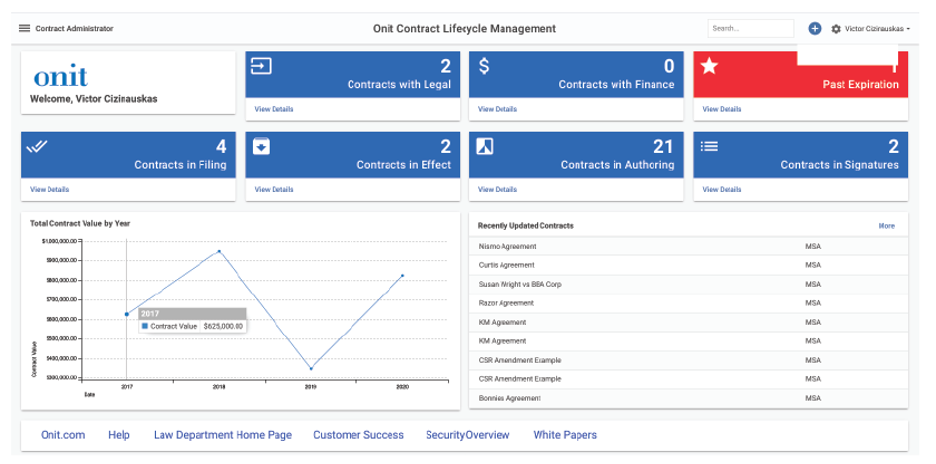
Onit is an all-in-one contract management solution designed for legal and compliance teams seeking to automate workflows. It helps manage contracts from initiation to execution, helping ensure efficiency and compliance across business processes.
Why I picked Onit: Onit excels in workflow automation, allowing your team to customize and automate complex contract management processes. Its intuitive workflow builder lets you tailor approval paths to fit your organization's needs. The platform's reporting tools offer insights into contract performance and compliance status. Onit's flexibility ensures that your team can adapt workflows as your business evolves.
Standout features & integrations:
Features include a user-friendly dashboard that provides a full view of contract activities. Onit offers automated notifications that keep your team informed of contract milestones and deadlines. The platform's document management system ensures secure storage and easy retrieval of contract documents.
Integrations include Salesforce, Google Workspace, Microsoft 365, and Slack.
Pros and Cons
Pros:
- Flexible to adapt to changes
- Detailed reporting tools
- Intuitive, end-to-end workflow builder
Cons:
- May need dedicated admin support
- Initial setup may be complex

Docusign CLM is a contract lifecycle management tool that caters to businesses seeking efficient electronic signature solutions. It is widely used by legal, sales, and procurement teams to manage contracts from creation to execution.
Why I picked Docusign CLM: Docusign CLM is unmatched in its eSign capabilities, which are important for fast and secure contract execution. The platform provides automated workflows that simplify contract routing and approvals. Its document generation feature enables your team to create consistent and accurate contracts. Additionally, Docusign CLM offers extensive compliance support, ensuring your contracts meet regulatory requirements.
Standout features & integrations:
Features include advanced reporting tools that offer insights into contract performance and bottlenecks. Docusign CLM's clause library helps you maintain consistency across contracts. The platform's audit trails provide a transparent record of all contract activities.
Integrations include Salesforce, Microsoft Dynamics 365, Oracle, Google Workspace, and Slack.
Pros and Cons
Pros:
- Extensive compliance support
- Automated contract routing
- Fast and secure electronic signatures
Cons:
- Limited number of contracts allowed per year
- Limited advanced features

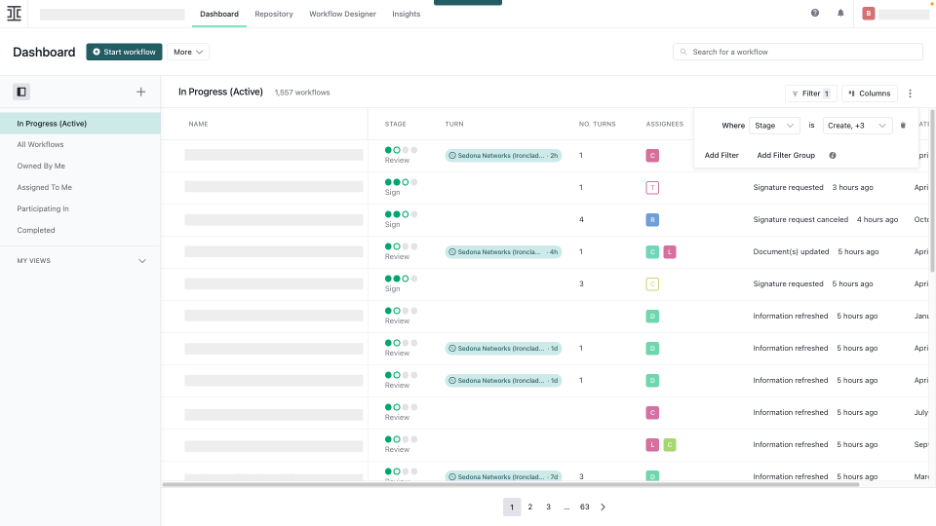
Ironclad is a contract lifecycle management (CLM) software designed for legal teams and enterprises. It handles contract creation, review, signing, storage, analysis, and fulfillment, making it ideal for managing legal workflows efficiently.
Why I picked Ironclad: It caters to legal teams by providing an AI assistant for contract reviews, which speeds up the review process and reduces errors. The platform offers customizable workflows that align with legal processes, helping ensure compliance and efficiency. Ironclad's user-friendly interface makes it accessible to both legal and non-legal members of your team. Its ability to integrate with popular tools allows collaboration and data sharing across departments.
Standout features & integrations:
Features include automated contract creation, which saves time and reduces manual entry errors. The platform's search functionality helps you find and manage contracts. Ironclad also provides analytics to track contract performance and identify bottlenecks.
Integrations include Salesforce, Docusign, Adobe Acrobat Sign, Slack, Google Drive, Microsoft Word, Box, and Dropbox.
Pros and Cons
Pros:
- Strong community support
- Customizable legal workflows
- Includes AI-driven contract analysis
Cons:
- Occasional feature updates
- Limited offline access

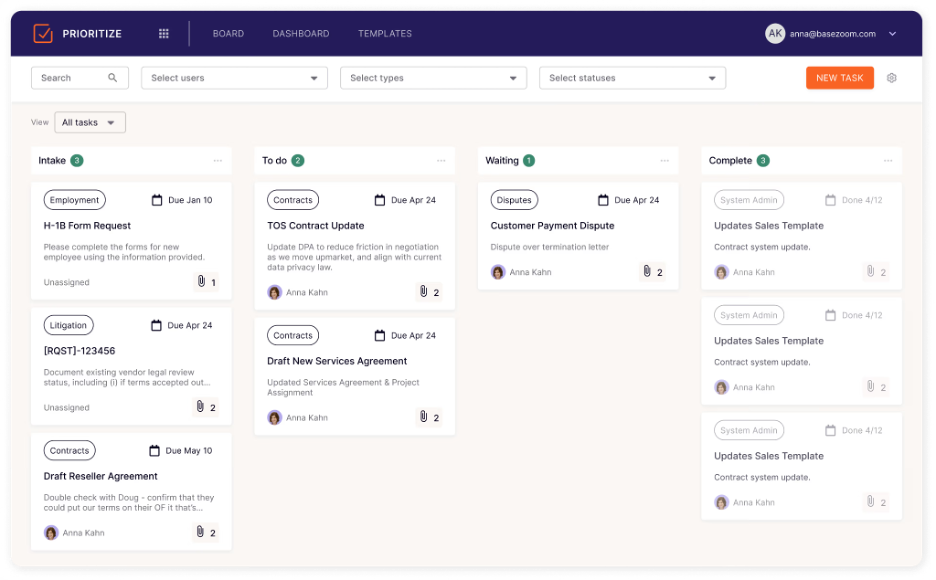
LinkSquares is a contract management platform tailored for legal and finance teams seeking enhanced contract analytics. It focuses on contract review, management, and analysis, helping users gain insights into their processes.
Why I picked LinkSquares: LinkSquares excels in contract analytics by providing detailed information on contract terms and obligations. Its search functionality allows your team to find specific clauses quickly, helping reduce the time spent on manual reviews. The platform's reporting tools offer visibility into contract performance and risk assessment. Additionally, LinkSquares' intuitive interface ensures that your team can fluently navigate and utilize its features.
Standout features & integrations:
Features include a centralized contract repository that offers accessibility and organization. LinkSquares offers customizable dashboards that provide a visual overview of your contracts' status. The platform's automated alerts notify you of important contract milestones and deadlines.
Integrations include Salesforce, Docusign, Adobe Acrobat Sign, Google Drive, Microsoft Word, Slack, Box, and Dropbox.
Pros and Cons
Pros:
- Customizable reporting tools
- Powerful search functionality
- Detailed contract analytics
Cons:
- Needs dedicated setup support
- Limited offline capabilities

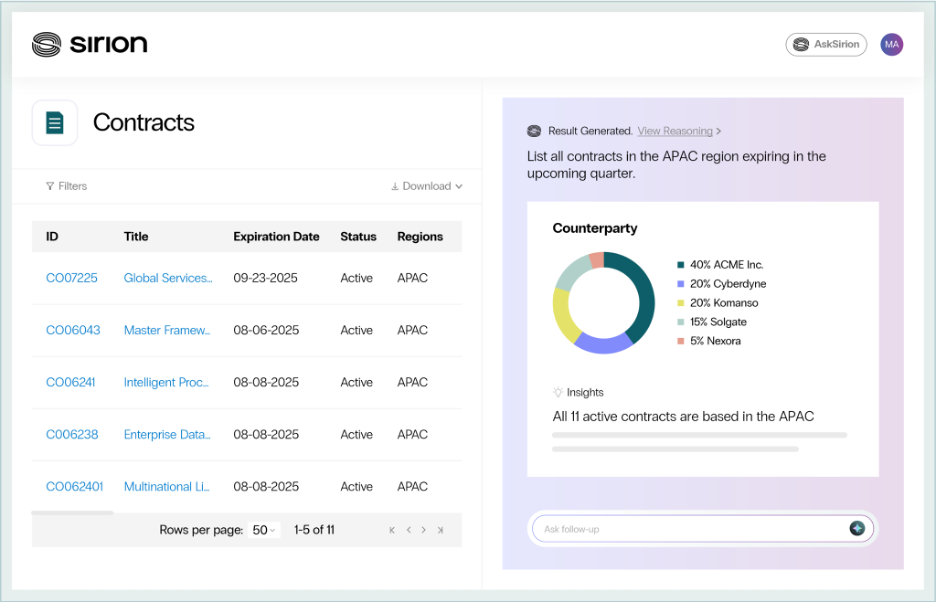
Sirion is a contract management system designed for enterprises seeking to leverage AI-driven insights for better contract governance and performance. It serves industries such as finance, healthcare, and technology, focusing on contract lifecycle management and compliance.
Why I picked Sirion: Sirion offers AI-powered insights that help your team manage contracts more effectively by identifying risks and opportunities. Its analytics tools provide a full view of contract performance, enabling data-driven decisions. Sirion's automated compliance monitoring ensures that your contracts adhere to regulatory requirements. The platform also offers a user-friendly interface that simplifies contract management for teams of all sizes.
Standout features & integrations:
Features include advanced analytics that track key performance indicators for your contracts. Sirion provides automated alerts for compliance breaches, helping you address issues promptly. The platform's contract authoring tools enable you to create accurate contracts quickly.
Integrations include Salesforce, Microsoft Dynamics 365, SAP, Oracle, Docusign, Adobe Acrobat Sign, Microsoft Word, and Slack.
Pros and Cons
Pros:
- Automated compliance monitoring
- Detailed performance analytics
- AI-driven risk identification
Cons:
- May need dedicated admin support
- Initial setup may be complex

Conga is a contract management and document automation tool that caters primarily to Salesforce users. It supports sales, legal, and operations teams by automating contract creation, negotiation, and management processes.
Why I picked Conga: Conga is ideal for Salesforce users due to its integration with the CRM platform, supporting efficiency and data consistency. The software allows you to automate document generation directly within Salesforce. Conga's customizable templates ensure that contracts and documents align with your branding and compliance standards. Additionally, its workflow automation capabilities help simplify approval processes across departments.
Standout features & integrations:
Features include a document generation engine that automates the creation of complex documents. Conga provides a workflow designer that lets you customize approval processes to fit your team's needs. The platform's reporting tools offer insights into contract performance and bottlenecks.
Integrations include Salesforce, Microsoft Dynamics 365, SAP, Google Workspace, Microsoft Word, Docusign, Adobe Acrobat Sign, and Box.
Pros and Cons
Pros:
- Automated workflow designer
- Customizable document templates
- Salesforce integration
Cons:
- Some integrations may require custom solutions
- Initial setup may be complex
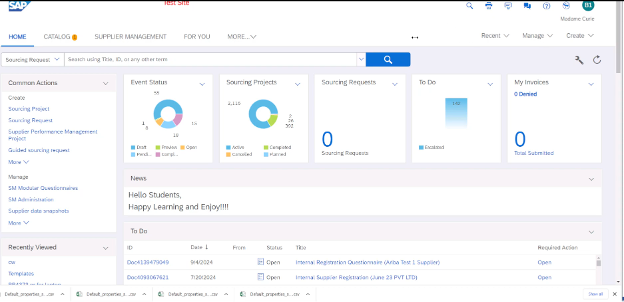
SAP Ariba Contracts is a contract management solution designed for enterprises managing global supply chains. It supports procurement, compliance, and supplier management, offering tools to simplify contract processes and ensure global consistency.
Why I picked SAP Ariba Contracts: SAP Ariba Contracts is ideal for global supply chains due to its detailed contract repository and global compliance features. The platform allows your team to manage contracts across multiple regions, ensuring adherence to local regulations. Automated workflows facilitate efficient contract approvals and negotiations. Its analytics tools provide insights into supplier performance, helping you optimize your supply chain operations.
Standout features & integrations:
Features include a centralized contract repository that offers visibility and control over global agreements. SAP Ariba Contracts offers customizable templates that ensure consistency across contracts. The platform's reporting tools provide insights into the contract lifecycle and supplier performance.
Integrations include SAP ERP, Oracle, Microsoft Dynamics 365, Salesforce, QuickBooks, Google Drive, Microsoft Word, Docusign, and Adobe Acrobat Sign.
Pros and Cons
Pros:
- Efficient automated workflows
- Centralized contract repository
- Thorough global compliance features
Cons:
- Steep learning curve
- Complex initial setup

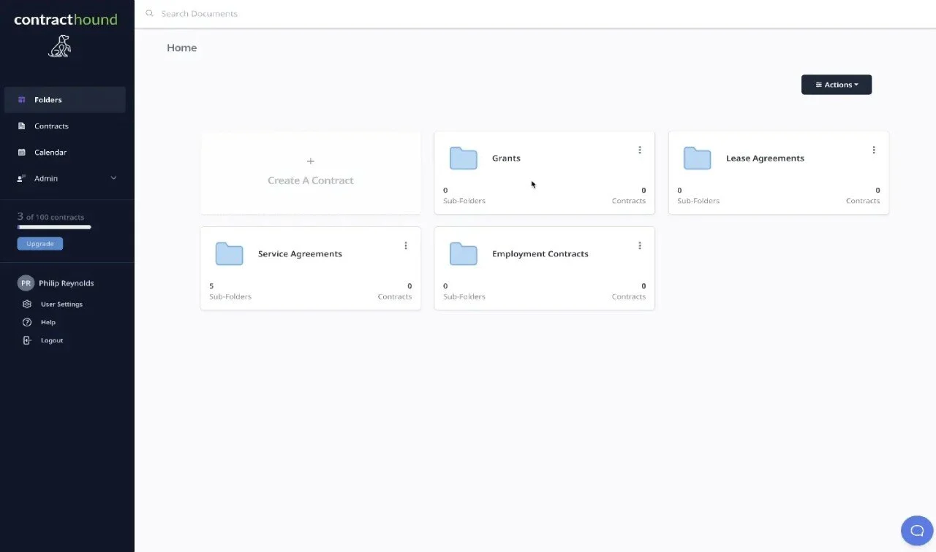
Contract Hound is a contract management solution tailored for small businesses and nonprofits. It focuses on managing contract deadlines, storage, and accessibility, helping organizations keep track of important contract milestones.
Why I picked Contract Hound: Contract Hound is ideal for nonprofits because of its simplicity and focus on deadline management. It offers easy setup and navigation, making it accessible for teams with limited technical expertise. Automated reminders ensure you never miss a contract renewal or expiration. Its user-friendly interface allows you to organize contracts, making it a practical choice for organizations with limited resources.
Standout features & integrations:
Features include a collaboration system for your contracts, helping you stay on top of progress and updates. You can archive important contracts for easy access and retrieval. The platform's full audit history allows you to find contracts and see every logged action.
Integrations include Docusign.
Pros and Cons
Pros:
- Easy contract organization
- Automated deadline reminders
- Simple and intuitive design
Cons:
- May not suit large enterprises
- Limited advanced features

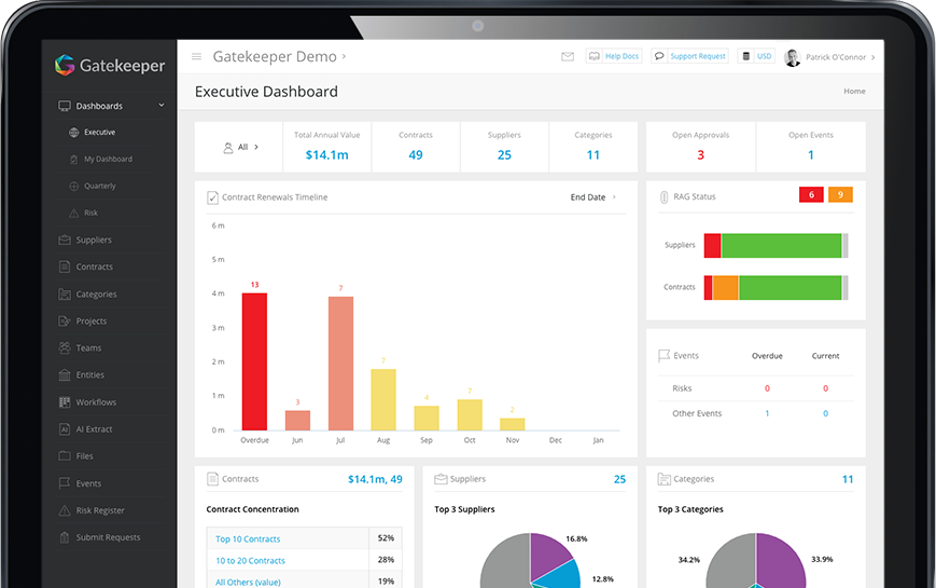
Gatekeeper is a contract and third-party risk management platform designed for finance, procurement, and legal teams. It facilitates vendor compliance, contract management, and spend management by offering tools that simplify these business functions.
Why I picked Gatekeeper: Gatekeeper excels in vendor management. It features AI-powered automation that simplifies compliance checks and onboarding, allowing you to complete both processes up to 90% faster. The platform provides custom workflows that help your team manage vendor performance and identify savings opportunities. You can automate contract creation and renewals, which could reduce the time and costs involved. Gatekeeper can integrate with over 1,700 applications, ensuring data synchronization across systems.
Standout features & integrations:
Features include AI-driven contract summaries, clause suggestions, and collaborative redlining. The platform also offers tools for spend management to help you identify savings opportunities and improve vendor performance. Custom workflows can help you automate and simplify contract processes.
Integrations include Salesforce, Slack, Microsoft Teams, Google Drive, SAP, Oracle, NetSuite, and Workday.
Pros and Cons
Pros:
- No-code integrations
- Fast vendor onboarding
- AI-driven contract management
Cons:
- Requires regular updates
- Limited offline capabilities
Other Cloud-Based Contract Management Software
Here are some additional cloud-based contract management software options that didn’t make it onto my shortlist but are still worth checking out:
- PandaDoc
For document automation
- HyperStart CLM
For startup scalability
- Contracts 365
For Microsoft 365 users


Cloud-Based Contract Management Software Selection Criteria
When selecting the best cloud-based contract management software for this list, I considered common buyer needs and pain points, such as ease of integration and data security. I also used the following framework to keep my evaluation structured and fair:
Core Functionality (25% of total score)
To be considered for inclusion on this list, each solution had to fulfill these common use cases:
- Contract creation and editing
- Document storage and organization
- E-signature capability
- Compliance tracking
- Renewal alerts and notifications
Additional Standout Features (25% of total score)
To help further narrow down the competition, I also looked for unique features, such as:
- Customizable reporting
- AI-powered contract analysis
- Advanced search functionality
- Multi-language support
- Integration with ERP systems
Usability (10% of total score)
To get a sense of the usability of each system, I considered whether the tool has:
- An intuitive user interface
- Easy navigation
- A minimal learning curve
- A responsive design
- A clear visual layout
Onboarding (10% of total score)
To evaluate the onboarding experience for each platform, I considered the following:
- Availability of training videos
- Interactive product tours
- Access to templates
- Live webinars for guidance
- Supportive chatbots
Customer Support (10% of total score)
To assess each software provider’s customer support services, I considered whether the tool provides:
- 24/7 support availability
- Multi-channel contact options
- Fast response times
- Knowledgeable support staff
- A help center
Value For Money (10% of total score)
To evaluate the value for money of each platform, I considered the following:
- Competitive pricing
- Flexible subscription plans
- Transparent pricing
- Discounts for annual billing
- Features-to-price ratio
Customer Reviews (10% of total score)
To get a sense of overall customer satisfaction, I considered the following when reading customer reviews:
- User satisfaction ratings
- Feedback on customer service
- Comments on ease of use
- Reports on feature reliability
- Comparison to competitor products
How to Choose Cloud-Based Contract Management Software
It’s easy to get bogged down in long feature lists and complex pricing structures. To help you stay focused as you work through your unique CLM software selection process, here’s a checklist of factors to keep in mind:
| Factor | What to Consider |
| Scalability | Is the software able to grow with your business? Consider if it can handle an increase in users or contracts without a drop in performance. |
| Integrations | Does it connect to your existing tools? Look for integration with your CRM, ERP, and other essential systems to avoid data silos. |
| Customizability | Can the software be tailored to your workflows? Evaluate the ability to modify templates, dashboards, and processes to match your team's specific needs. |
| Ease of use | Is the interface user-friendly? Assess whether your team can quickly learn the system without extensive training. A cluttered design can slow down adoption. |
| Implementation and onboarding | How smooth is the setup process? Check if the vendor provides resources, such as training videos and live support, to help your team transition smoothly. |
| Cost | Does the pricing fit your budget? Compare the cost against the features offered and consider any hidden fees or long-term commitments. |
| Security safeguards | Are your contracts secure? Ensure the software complies with industry standards and offers encryption, access controls, and regular security updates to protect your data. |
| Compliance requirements | Does it meet your regulatory needs? Verify if the software complies with relevant laws and industry regulations specific to your sector. |
What Is Cloud-Based Contract Management Software?
Cloud-based contract management software is a tool that helps businesses create, store, and manage contracts online. Legal, procurement, and sales professionals commonly use these tools to improve efficiency and reduce errors in contract handling. Automated workflows, e-signatures, and compliance tracking help with organizing contracts and meeting regulatory needs. Overall, these tools simplify contract management, saving time and reducing risk.
Features
When selecting cloud-based contract management software, keep an eye out for the following key features:
- Automated workflows: Simplify contract approvals and processes by automating repetitive tasks, saving time and reducing manual errors.
- E-signature capability: Facilitates secure and quick online contract signing, making it easier for parties to execute agreements without in-person meetings.
- Compliance tracking: Ensures that contracts adhere to industry regulations and standards, helping businesses avoid legal pitfalls.
- Centralized repository: Stores all contracts in one accessible location, improving organization and making retrieval easy and efficient.
- Customizable templates: Create consistent, branded contracts by using templates that can be tailored to specific business needs.
- Advanced search functionality: Quickly locates specific contracts or clauses using keyword search, reducing time spent on manual reviews.
- Reporting tools: Generate insights into contract performance and bottlenecks, helping teams make informed decisions.
- Integration capabilities: Connect with existing software, such as CRM and ERP systems, to ensure data flows smoothly across platforms.
- Security safeguards: Protect sensitive contract information with encryption and access controls to ensure data security.
- Alerts and notifications: Keep your team informed on important contract dates and deadlines to prevent missed renewals or expirations.
Benefits
Implementing cloud-based contract management software provides several benefits for your team and your business. Here are a few you can look forward to:
- Increased efficiency: Automate workflows and reduce manual tasks to allow your team to focus on more strategic activities.
- Enhanced compliance: Track and manage compliance with industry standards, minimizing the risk of legal issues.
- Improved accessibility: Store all contracts in a centralized repository, making it easy for your team to access and retrieve documents from anywhere.
- Cost savings: Reduce the need for paper and physical storage, cutting down on expenses associated with traditional contract management.
- Better collaboration: Use e-signature and document sharing features to facilitate collaboration among team members and external parties.
- Data-driven insights: Leverage reporting tools to gain insights into contract performance, helping you make informed business decisions.
- Security assurance: Protect sensitive information with strong security measures, ensuring your contracts remain confidential and safe.
Costs & Pricing
Selecting cloud-based contract management software requires an understanding of the various pricing models and plans available. Costs vary based on features, team size, add-ons, and more. The table below summarizes common plans, their average prices, and typical features included in cloud-based contract management software solutions:
Plan Comparison Table for Cloud-Based Contract Management Software
| Plan Type | Average Price | Common Features |
| Free Plan | $0/user/month | Basic contract storage, limited e-signature capabilities, and basic search. |
| Personal Plan | $5-$25/user/month | Single-user access, basic templates, e-signatures, and document storage. |
| Business Plan | $30-$60/user/month | Multi-user access, advanced templates, workflow automation, and compliance tracking. |
| Enterprise Plan | $75-$150/user/month | Custom integrations, advanced reporting, dedicated support, and enhanced security. |
Cloud-Based Contract Management Software FAQs
Here are some answers to common questions about cloud-based contract management software:
How do you know if a cloud contract tool fits your existing workflows?
You’ll want to check whether the tool supports the way your team already works. Look at how it handles approvals, version control, and negotiations. If your team spends too much time adjusting to the software, it may slow your business down. A good fit will let you use your current workflows with only minor changes.
How secure are contracts stored in a cloud platform?
Most vendors use encryption, access controls, and audit logs to keep your data safe. You should still review each vendor’s security practices to make sure they meet your company’s standards. Ask your potential vendor about data residency, access monitoring, and how they handle incidents. Your security team should confirm that the vendor’s setup aligns with your internal policies.
Can cloud contract tools handle complex approval paths?
Many tools support multi-step approvals, conditional routing, and role-based access. If your team deals with long cycles or multiple departments, check how flexible these settings are. You should test whether you can set up exceptions or one-off routes without IT support so that your team can manage approvals without creating extra work.
How well do these platforms integrate with other business systems?
Most cloud tools connect with CRMs, ERPs, e-signature apps, and storage platforms. You’ll want to confirm whether the integrations your team relies on work out of the box or require a custom setup. Testing a live workflow will show you how data moves from system to system. Strong integrations reduce double entry and keep contract data consistent.
What should you consider when migrating existing contracts into a cloud platform?
Start by checking how the tool handles bulk imports and metadata tagging. Your team may need to clean or reorganize older files before the move. Look for features that let you extract key terms or auto-tag documents to avoid manual work. A detailed migration plan can help you avoid losing track of important agreements.
How do cloud contract tools support audit readiness?
These tools typically keep detailed logs of edits, approvals, and access. You can pull reports that show who touched a contract and when. This makes it easier for your team to respond to audits and helps you avoid digging through email threads. Clear records can save you time and reduce the chance of missing something important.
What’s Next:
If you're in the process of researching cloud-based contract management software, connect with a SoftwareSelect advisor for free recommendations.
You fill out a form and have a quick chat where they get into the specifics of your needs. Then you'll get a shortlist of software to review. They'll even support you through the entire buying process, including price negotiations.