
21 Best Board Governance Software In 2026

10 Best Board Governance Software Shortlist
Here's my pick of the 10 best software from the 21 tools reviewed.


With so many different board governance software available, figuring out which is right for you is tough. You know you want to facilitate efficient management of board-related activities within your organization but need to figure out which tool is best. I've got you! In this post I'll help make your choice easy, sharing my personal experiences using dozens of different board governance tools with various boards and businesses, with my picks of the best board governance software.
Why Trust Our Software Reviews
Best Board Governance Software Summary
This comparison chart summarizes pricing details for my top board governance software selections to help you find the best one for your budget and business needs.
| Tool | Best For | Trial Info | Price | ||
|---|---|---|---|---|---|
| 1 | Best for automatic meeting summaries | Free demo available | Pricing upon request | Website | |
| 2 | Best for board intelligence with sophisticated analytics | Free trial available | Pricing upon request | Website | |
| 3 | Best for creating detailed meeting agendas and notes | 14-day free trial | From $49/month | Website | |
| 4 | Best for ESG tools that address risk, compliance, and audits | Free demo available | Pricing upon request | Website | |
| 5 | Best for advanced agenda building and document repository too | 30-day free trial | From $150/month/board | Website | |
| 6 | Best for recruiting and onboarding new members to the board | Free demo available | Pricing upon request | Website | |
| 7 | Best for built-in AI assistant and guides | Free trial available | From $85 USD/user/month | Website | |
| 8 | Best for automatic video meeting transcription | 21-day free trial available | Pricing upon request | Website | |
| 9 | Best for centralizing and sharing documents securely | 30 days free trial | Pricing upon request | Website | |
| 10 | Best for Board and C-level Executives at European organizations | Free demo available | From $39/user/month | Website |
-

Prisync
Visit WebsiteThis is an aggregated rating for this tool including ratings from Crozdesk users and ratings from other sites.4.7 -
Expedite Commerce
Visit Website -
QuickBooks Online
Visit WebsiteThis is an aggregated rating for this tool including ratings from Crozdesk users and ratings from other sites.4





Best Board Governance Software Reviews
Below are my detailed summaries of the best board governance software that made it onto my shortlist. My reviews offer a detailed look at the key features, pros & cons, integrations, and ideal use cases of each tool to help you find the best one for you.

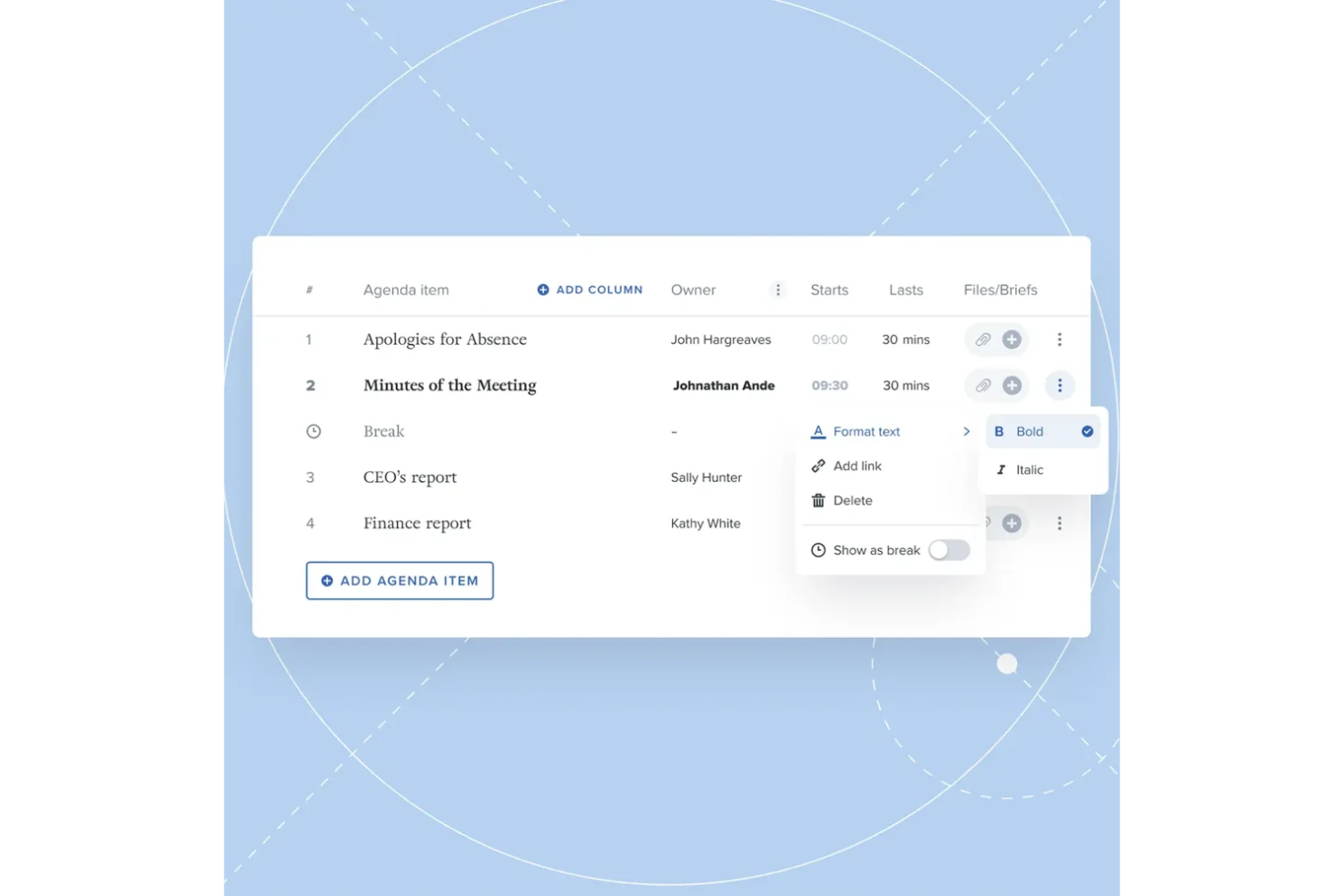
Board Intelligence helps boards transform their governance processes with AI-powered reporting, analytics, and performance evaluation tools. It combines a secure board portal with intelligent automation to make meetings more focused, documents more insightful, and decision-making more data-driven.
Why I picked Board Intelligence: I picked Board Intelligence because it applies AI to the parts of governance that often drain time and focus. You can use its AI-driven minute writing to generate meeting summaries automatically, while the Insight Driver tool highlights where board reports may be missing key context. I also like its evaluation frameworks, which give you a structured way to measure and improve board performance over time.
Board Intelligence standout features and integrations:
Standout features include AI board reporting tools that turn complex information into clear insights, automated minute writing that saves hours of manual editing, and board evaluation frameworks that help track strategic alignment and performance. Its agenda planning and secure collaboration portal ensure every meeting runs efficiently.
Integrations include Microsoft Office, Google Workspace, Zoom, Microsoft Teams, Slack, Dropbox, DocuSign, Salesforce, SAP, Oracle, Workday, and Box.
Pros and Cons
Pros:
- Secure digital document collaboration portal
- Comprehensive board performance evaluation tools
- AI-driven automated minute writing
Cons:
- Learning curve for new users
- Limited visibility of integration specifics

This business intelligence platform was specifically built to support digital board meetings and remote governance operations. With an aim to streamline analytics tracking and unify communications, your board members have access to the data they need to make more informed decisions.
Why I picked OnBoard: The intelligence tools from this platform, including the Board Assessment feature, really make it stand out. With an assessment, you can set a better foundation for the future of the board, ensuring your team is developing the right priorities that strengthen performance and best practices.
OnBoard Standout Features and Integrations
Standout features include diversity reporting that allows you to report, chart, and plan updates, as well as intelligent search to quickly find the documents, meetings, contracts, and message histories you need.
Integrations include ADP, Google Drive, Govenda, Microsoft 365, Word, Excel, Outlook, PowerPoint, and Zoom Meetings.
Pros and Cons
Pros:
- Ideal for the first digital transition
- Intuitive meeting creation and navigation
- Easy to learn and use
Cons:
- Clunky minute builder tool
- Editing a meeting doesn’t show the changes


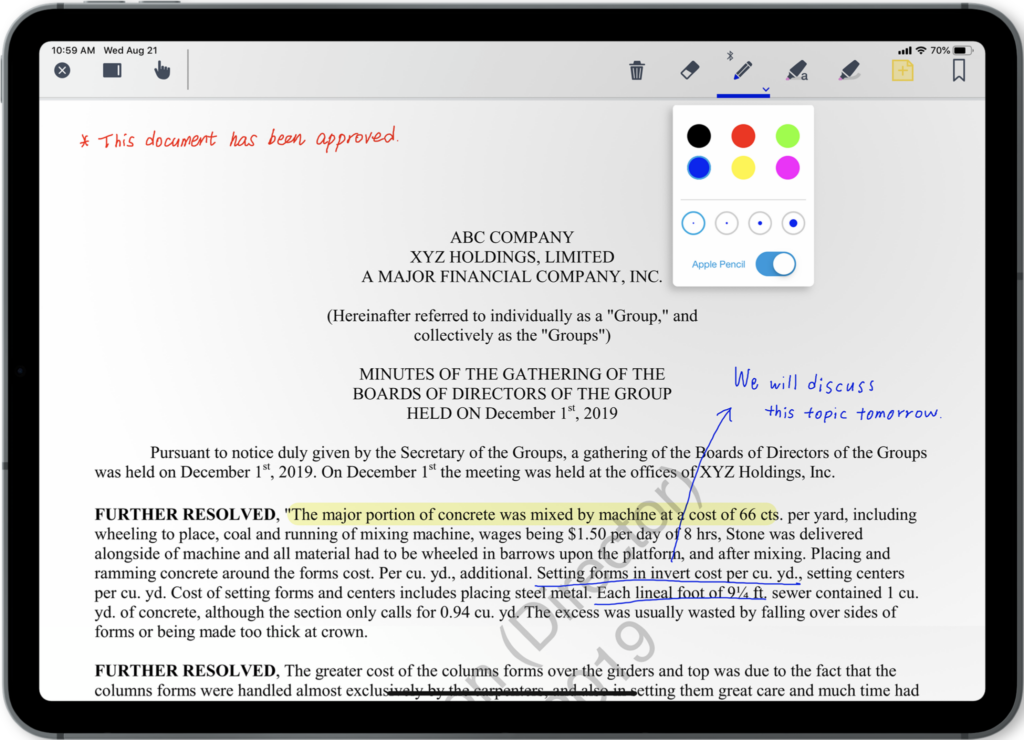
This board meeting and governance software helps board members simplify and streamline communication to reduce administrative friction. Whether you’re in-person or virtual, you get lots of advanced tools that streamline manual tasks, like agenda creation, taking meeting minutes, and opening related reference documents.
Why I picked Boardable: The agenda-building and meeting organization features are the two tools that really stood out to me. You can plan out every part of the meeting, assign key people, and include time limits to ensure meetings stay on track. You can also access the Meeting Page, which aggregates all relevant board documents, polls, and notes in one place.
Boardable Standout Features and Integrations
Standout features include board pack creation to consolidate all board materials, virtual polling and voting, and a task manager for individuals and teams to follow-up on meetings and track to-do lists.
Integrations include Apple iCalendar, Dropbox, Gmail, Google Calendar, Google Drive, LinkedIn, Microsoft Teams, OneDrive, Yahoo Calendar, and Zoom Meetings.
Pros and Cons
Pros:
- Create, save, and edit templates
- Automated notifications from the get-go
- Free forever plans for new boards
Cons:
- Has a bit of a learning curve
- Limited mobile app functionality
Best for ESG tools that address risk, compliance, and audits
Designed to help directors, leaders, and third parties collaborate and track data across the entire organization, Diligent ESG helps you make more informed decisions to meet your business goals. You can use this board governance platform to manage board, leadership, and committee meetings, communicate securely, automate workflows, and personalize dashboards.
Why I picked Diligent ESG: This tool made my list because it’s built for enterprises that need in-depth risk analytics for audits and compliance. The ESG (environmental, social, and governance) features enterprise risk management that takes a proactive approach to assessing risk, providing solutions, and allowing you to curate your risk and control libraries.
Diligent ESG Standout Features and Integrations
Standout features include board meeting management tools with an agenda builder and meeting minutes recorder and FedRamp certified audit solutions for continuous monitoring.
Integrations include Microsoft Teams, Messenger, Okta, and SecurityScorecard.
Pros and Cons
Pros:
- Highly customizable plans and features
- Compliance and auditing focused tools
- Very easy to use after training
Cons:
- Building books is not as intuitive
- Has a bit of a learning curve

Best for advanced agenda building and document repository too

This board governance software places its focus on streamlining administrative processes, including creating board packs, setting agendas, taking meeting minutes, and assigning tasks. With its agenda builder tool, you enjoy access to pre-loaded templates or develop your own templates using drag-and-drop building blocks and clone them for future meetings.
Why I picked BoardPro: This platform made my list because its advanced agenda tools allow you to do more than simply build your agenda. It also embeds documents from your board pack automatically once the agenda is published. Open documents in the Board Pack view and make digital notes with in-app annotation tools, as well as assign automated reminders to documents so you can track notes, action items, and decisions.
BoardPro Standout Features and Integrations
Standout features include automated notifications that send action items to their owners once a board pack is published and document storage of meeting minutes and notes in chronological order for simplified search functionality.
Integrations are not available at this time.
Pros and Cons
Pros:
- Intuitive and clean user interface
- Very easy to learn and use
- Tools make following up on actions easy
Cons:
- Limited integrations with no plans to expand
- Lots of features so can feel overwhelming at first


As a comprehensive board meeting software and Diligent board brand, BoardEffect delivers agile board management that’s optimized to meet the needs of nonprofits, community healthcare, and higher education. With their annual meeting process tools, you enjoy access to new member orientation tools, like policy handbooks.
Why I picked BoardEffect: The reason this platform made my list was its new member orientation tools. Whether it’s a policy handbook that holds all strategic plans, procedures, and policies or data storage of all the documents related to a new position, BoardEffect provides collaborative workspaces and document management that streamline the onboarding process.
BoardEffect Standout Features and Integrations
Standout features include ad hoc group creation and disassembly with permissions controls and unlimited paperless document storage with no limitation on file size or volume.
Integrations include Go-To Meeting, Google Drive, Okta, Tableau, and Zoom Meetings. BoardEffect has recently introduced a single sign-on integration panel.
Pros and Cons
Pros:
- Mobile app for work on-the-go
- Simple and intuitive navigation
- Outstanding ease of use
Cons:
- No sharing of images directly in messaging
- Clunky approval process workflow

Ansarada is designed to provide you with AI-powered board governance software that has virtual data rooms, deal-making tools, and next-level Q&A automation. With purpose-built, digitized, and customizable checklists and workflows, this tool is ideal for financial organizations. Enjoy end-to-end deal management that enables boards to run smoothly.
Why I picked Ansarada: What really caught my eye about this platform is the way you can take advantage of unique board features, including taking notes alongside any documents and comparing them side-by-side, as well as creating and publishing binders with the Binder Create Wizard that highlights and guides you through the entire process.
Ansarada Standout Features and Integrations
Standout features include powerful security features with GDPR compliance and ISO27001 certifications and Virtual Data Rooms that centralizes all deal activity.
Integrations include Box, DropBox Business, Google Drive, and OneDrive. Ansarada also offers custom API integrations.
Pros and Cons
Pros:
- Robust customer support services
- Basic interface with only the tools you need
- Simple and user-friendly
Cons:
- Pricing is a little higher than average
- Limited native integrations available


With this board governance platform, Convene strives to provide executives with the digital toolbox they need to share documents, connect through video conferencing, and collaborate in real-time. You can use document collaboration tools to edit and annotate documents during a virtual meeting and enjoy enhanced security features with AES-256 encryption and a remote wipe functionality.
Why I picked Convene: One of the features that stood out to me about this platform was the automated video transcription and recording. Any time your board hosts a meeting with Convene, it will automatically generate post-meeting recording and transcription that ensures anyone can revisit and catch up after the meeting is over.
Convene Standout Features and Integrations
Standout features include an agenda builder and meeting publisher to organize meetings more easily and live meeting tools to ensure everyone is on the same page, like the Virtual Laser Pointer and Page Synchronization.
Integrations include Blissfully, Box, Dropbox Business, Google Meet, Microsoft 365, Microsoft Teams, OneDrive, Skype, WebEx, and Zoom.
Pros and Cons
Pros:
- Straightforward access to corporate documents
- Smooth and intuitive interface
- Support teams provide training
Cons:
- Higher-cost platform than many others
- Initial learning curve is a little intense
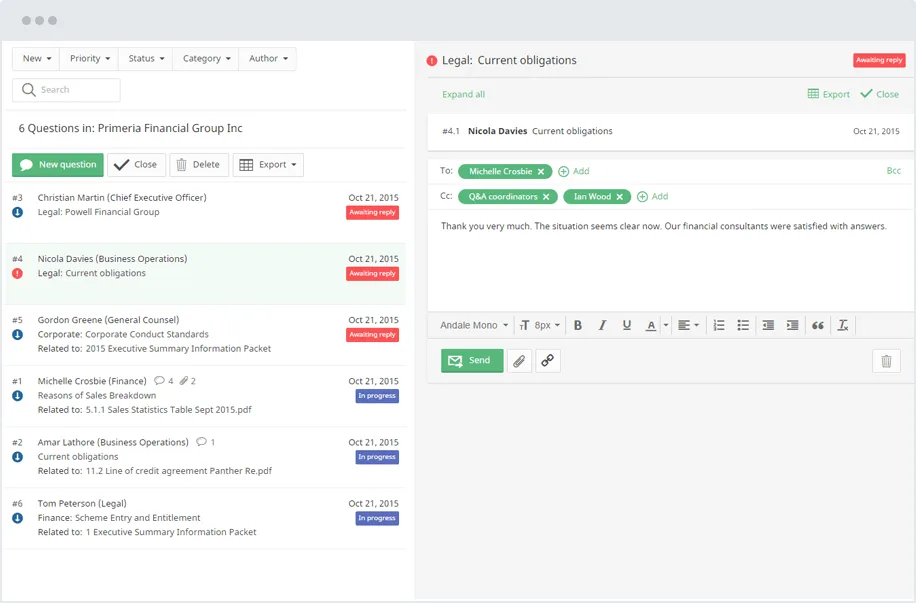
This is one of the best board management software platforms because it’s a cloud-based solution that facilitates all forms of digital communication, from exchanging documents prior to meetings to tracking updates on key activities. With access to all corporate documentation both offline and online, you enjoy two-way communication between board members at all times.
Why I picked iDeals Virtual Boardroom: The reason I added this platform to my final list was because of its security features. This system has military-grade security that ensures compliance with HIPAA, GDPR, SOC1 and 2 standards, and ISO/IEC 27001:2013. You can also use dynamic watermarks on documents to prevent unauthorized distribution.
iDeals Virtual Boardroom Standout Features and Integrations
Standout features include drag-and-drop upload functionality and bulk upload capabilities, automatic index numbering to organize your documents, and OCR system for full text search.
Integrations include Active Directory, AuthAnvil, Bitium, Centrify, JumpCloud, MiniOrange, Okta, OneLogin, Ping Identity, and RSA.
Pros and Cons
Pros:
- Flexible and competitive pricing options
- Comes with a helper app
- One of the most intuitive systems
Cons:
- Folder names can get very long
- Limited customization for reporting


This board governance software is a leading European meeting management solution that was specifically designed for formal board and executive leadership needs. This platform comes with a web application, as well as native mobile apps for Windows, iOS, and Android that enable you to prep for meetings online and offline.
Why I picked Sherpany: One thing that caught my eye about this board management solution is the Presenter Mode feature. Using this tool you can deliver visuals during a virtual conference, presenting engaging and interesting accompaniments to your presentation. Annotate, circle, and highlight various things on your screen for all to see.
Sherpany Standout Features and Integrations
Standout features include a pre-filled minutes template that’s based on the meeting agenda and Digital Circular Resolution to streamline digital voting and electronic signatures.
Integrations include Box, Dropbox, Google Meet, Google Workspaces, Microsoft Outlook, and Microsoft Teams.
Pros and Cons
Pros:
- Simple and easy to use
- Visually appealing design
- Easy to retrieve historical documents
Cons:
- Limited internal messaging system
- Patches and enhancements aren’t automated
Other Board Governance Software
Here are some additional board governance software options that didn’t make it onto my shortlist, but are still worth checking out:
- Boardspan
For bespoke advisory that delivers governance and guidance
- eMeetings
As a completely paperless board meeting solution
- BoardPaq
For use with mobile devices, including Android and iPhone
- Govenda
For artificial intelligence-driven administration efficiency
- BoardSpot
Platform for custom, branded non-profit board portals and accessibility
- eScribe
For running meetings in the public sector for citizen engagement
- BoardDocs
Software for public school board meeting management and recording
- ContractZen
Governance software for compliance and audit readiness
- DiliTrust Governance Suite
For streamlining meeting procedures
- GOVRN
For Business Intelligence insights with real-time metrics
- BoardMaps
For maintaining and speeding decision-making processes


Board Governance Software Selection Criteria
When selecting the best board governance software to include in this list, I considered common buyer needs and pain points like data security and user-friendly interfaces. I also used the following framework to keep my evaluation structured and fair:
Core Functionality (25% of total score)
To be considered for inclusion in this list, each solution had to fulfill these common use cases:
- Manage board meetings
- Distribute board materials
- Facilitate secure communication
- Track compliance tasks
- Provide document storage
Additional Standout Features (25% of total score)
To help further narrow down the competition, I also looked for unique features, such as:
- Real-time collaboration tools
- Integration with external calendars
- Customizable dashboards
- Advanced security protocols
- AI-powered analytics
Usability (10% of total score)
To get a sense of the usability of each system, I considered the following:
- Intuitive navigation
- Clean interface design
- Easy access to features
- Minimal learning curve
- Responsiveness across devices
Onboarding (10% of total score)
To evaluate the onboarding experience for each platform, I considered the following:
- Availability of training videos
- Interactive product tours
- Access to templates
- Supportive chatbots
- Regular webinars
Customer Support (10% of total score)
To assess each software provider’s customer support services, I considered the following:
- 24/7 support availability
- Multichannel support options
- Responsiveness to inquiries
- Quality of support resources
- Access to a dedicated account manager
Value For Money (10% of total score)
To evaluate the value for money of each platform, I considered the following:
- Competitive pricing
- Flexible subscription plans
- Transparent pricing structure
- Access to premium features
- Free trial availability
Customer Reviews (10% of total score)
To get a sense of overall customer satisfaction, I considered the following when reading customer reviews:
- Overall satisfaction ratings
- Feedback on feature usefulness
- Comments on ease of use
- Reports on customer support experiences
- Insights into integration capabilities
How to Choose Board Governance Software
It’s easy to get bogged down in long feature lists and complex pricing structures. To help you stay focused as you work through your unique software selection process, here’s a checklist of factors to keep in mind:
| Factor | What to Consider |
|---|---|
| Scalability | Will the software grow with your organization? Consider if it supports adding more users or expanding features without a major cost increase. |
| Integrations | Does it work with your existing tools? Check if it connects with your email, calendar, and file storage systems to avoid manual data entry. |
| Customizability | Can you tailor it to fit your workflows? Look for options to customize dashboards, reports, and user permissions to suit your team's needs. |
| Ease of use | Is it user-friendly for all team members? Ensure the interface is intuitive and requires minimal training for quick adoption by your board members. |
| Implementation and onboarding | How long will it take to get up and running? Consider if the vendor provides training resources and support to facilitate a smooth transition. |
| Cost | Does it fit your budget? Compare pricing plans, including any hidden fees or charges for additional features, to find a cost-effective solution. |
| Security safeguards | Are your data protected? Verify if the software complies with industry standards for data encryption and user authentication to safeguard sensitive information. |
| Compliance requirements | Does it meet regulatory needs? Ensure the software supports compliance with relevant laws and regulations your organization must adhere to. |
What Is Board Governance Software?
Board governance software is a digital platform used by organizations to manage and facilitate the operations of their board of directors. It encompasses tools for organizing board meetings, managing documents, ensuring compliance with governance standards, and facilitating communication among board members. This software provides a centralized system for all activities and information related to board governance.
Features
When selecting board governance software, keep an eye out for the following key features:
- Meeting management: Organizes and schedules board meetings, ensuring all participants are informed and prepared.
- Document sharing: Allows secure distribution of board materials and documents, facilitating easy access for all members.
- Secure communication: Provides encrypted messaging options to maintain confidentiality in board discussions.
- Compliance tracking: Helps monitor and ensure adherence to regulatory requirements and organizational policies.
- Customizable dashboards: Offers tailored views and reports to meet specific board member needs and preferences.
- Integration capabilities: Connects with existing tools like email and calendars to streamline workflows and data entry.
- User permissions: Controls access levels for different users, ensuring sensitive information is only available to authorized individuals.
- Real-time collaboration: Enables board members to work together on documents and decisions simultaneously, improving efficiency.
- Training resources: Provides tutorials and support to facilitate easy adoption and onboarding for all users.
- Analytics and reporting: Offers insights into board activities and performance, helping to inform strategic decisions.
Benefits
Implementing board governance software provides several benefits for your team and your business. Here are a few you can look forward to:
- Improved decision-making: Access to organized documents and analytics helps board members make informed choices.
- Enhanced collaboration: Real-time collaboration features allow board members to work together efficiently, regardless of location.
- Increased security: Secure communication and document sharing protect sensitive information from unauthorized access.
- Regulatory compliance: Compliance tracking ensures adherence to industry regulations and organizational policies.
- Time savings: Automated meeting scheduling and document distribution reduce the time spent on administrative tasks.
- Customizable insights: Tailored dashboards and reports provide board members with the specific information they need.
- Ease of use: Intuitive interfaces and training resources support quick adoption and effective use by all team members.
Costs & Pricing
Selecting board governance software requires an understanding of the various pricing models and plans available. Costs vary based on features, team size, add-ons, and more. The table below summarizes common plans, their average prices, and typical features included in board governance software solutions:
Plan Comparison Table for Board Governance Software
| Plan Type | Average Price | Common Features |
|---|---|---|
| Free Plan | $0 | Basic meeting management, document storage, and limited user access. |
| Personal Plan | $10-$30/user/month | Meeting scheduling, document sharing, secure messaging, and basic analytics. |
| Business Plan | $50-$100/user/month | Advanced collaboration tools, compliance tracking, custom dashboards, and support. |
| Enterprise Plan | $150-$300/user/month | Full suite of features, including integrations, enhanced security, and dedicated support. |
Board Governance Software FAQs
Here are some answers to common questions about board governance software:
How do I know if my organization needs board governance software?
If your organization struggles with managing board meetings, document distribution, or secure communications, you likely need board governance software. Look for signs like difficulty in coordinating schedules, compliance issues, or data security concerns. Evaluate your current processes and see if software could simplify tasks and improve efficiency.
What should you check for security and compliance?
Pick software with encryption, role-based access, and audit logs. Make sure it follows your region’s data laws like GDPR or HIPAA. These keep your board data safe and compliant.
How can you make sure the software fits your existing systems?
Confirm it integrates with tools you already use—like Outlook, Google Workspace, or SharePoint. Smooth integration saves time and prevents duplicate work.
Should you choose cloud-based or on-premise software?
Cloud-based tools are easier to access and update but depend on internet connectivity. On-premise systems give more control but need IT management. Choose based on your board’s size, budget, and security policy.
What’s Next:
If you're in the process of researching board governance software, connect with a SoftwareSelect advisor for free recommendations.
You fill out a form and have a quick chat where they get into the specifics of your needs. Then you'll get a shortlist of software to review. They'll even support you through the entire buying process, including price negotiations.