

AI sales tools are software platforms that use artificial intelligence to automate, analyze, and optimize sales processes across your revenue teams. If you’re searching for the best AI sales tools, you’re likely aiming to improve pipeline visibility, reduce manual tasks, and help your team focus on high-value selling activities. Many tools include predictive lead scoring, AI copilots for SDRs, and features that help identify qualified leads—so your team can act faster and close more deals. With so many options available, it’s tough to know which tools actually deliver reliable data, actionable insights, and real workflow improvements. This guide will help you quickly compare top AI sales tools, understand their core features, and choose solutions that fit your sales operations and growth goals.
Why Trust Our Software Recommendations
6,700+
Reviews
20
Industry experts
16+
Evaluation factors
14
Years
Our reviews reflect our independent judgment—not a sales pitch. Learn how we stay transparent.
For this guide, we evaluated tools using hands-on testing and independent research, scoring tools using our selection criteria.
Our reviews reflect our human editorial judgment, not a sales pitch.
AI Sales Tools Comparison Table
This comparison table summarizes pricing details for my top AI sales tools selections:
| Tool | Best For | Trial Info | Price | ||
|---|---|---|---|---|---|
| 1 | Best for field sales and territory management | Not available | Pricing upon request | Website | |
| 2 | Best for no-code agentic CRM workflows | Free demo available | From $40/user/month (billed annually) | Website | |
| 3 | Best for AI-powered voice agents | 14-day free trial | From $25/user/month (billed annually) | Website | |
| 4 | Best for sales conversation insights | Free demo available | Pricing upon request | Website | |
| 5 | Best for AI sales prospecting and enrichment | Free demo available | Pricing upon request | Website | |
| 6 | Best for digital sales rooms and tracking | 14-day free trial | From $25/user/month | Website | |
| 7 | Best for sales intelligence and contact data | Free trial available | Pricing upon request | Website | |
| 8 | Best for sales enablement and content management | Free demo available | Pricing upon request | Website | |
| 9 | Best for AI meeting transcription | Free plan + free demo available | From $10/user/month (billed annually) | Website | |
| 10 | Best for automated lead qualification | Free plan + free demo available | From $29/month | Website |


AI Sales Tools Reviews
Below are my detailed summaries of the best AI sales tools that made it onto my shortlist. My reviews offer a detailed look at the features, capabilities, and integrations of each platform to help you find the best one for you.
 Best for field sales and territory management
- Not available
- Pricing upon request
Visit WebsiteCustomer Rating:4.3/5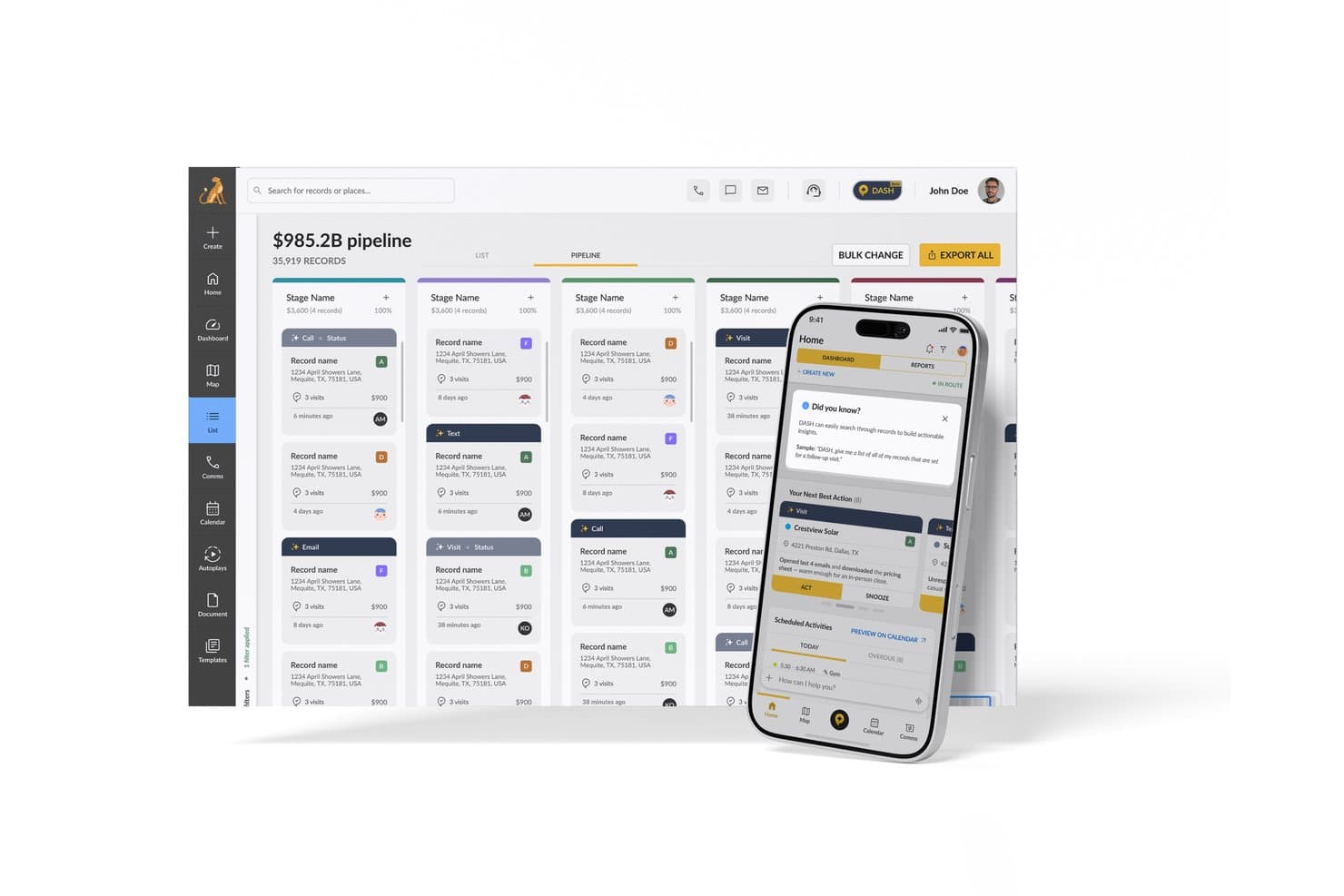
SPOTIO offers an AI-powered Next Best Action feature on its mobile app alongside a pipeline management dashboard for sales teams. SPOTIO is an AI-powered field sales platform that combines territory mapping, route optimization, lead management, and predictive next-best-action recommendations for outside sales teams.
Who Is SPOTIO Best For?
SPOTIO is a strong fit for outside sales teams in verticals like solar, roofing, telecom, and home services that rely on door-to-door or territory-based selling.
Why I Picked SPOTIO
SPOTIO earns its spot on my shortlist because no other tool in this category combines field sales territory management and AI-driven prioritization as tightly. I particularly like how the NBA (Next Best Action) engine scores every record with predictive Value Scores, refreshed intraday, so reps always know which door to knock on next. The DASH AI Co-Pilot is impressive too, letting reps capture visit notes by voice or photo on the spot, without stopping to type between appointments.
SPOTIO Key Features
- Mobile CRM with offline mode: Reps access records, capture activities, and update deals without an internet connection.
- Location-verified activity tracking: All visits and tasks are logged with GPS data to ensure field activities are accurately tracked.
- Territory management controls: Managers define, assign, and edit territories using custom geographic boundaries and layered permissions.
- Sales pipeline analytics dashboard: Users see real-time field sales metrics, rep performance trends, and conversion tracking in one interface.
SPOTIO Integrations
SPOTIO offers native integrations with Salesforce, Microsoft Dynamics 365, HubSpot, and more. An API is also available for custom integrations.
Pros and Cons
Pros:
- Voice-based note capture speeds up field workflows
- GPS-verified visit logging keeps field data accurate
- Intraday AI lead scoring for field reps
Cons:
- Limited conversation intelligence for inside sales teams
- AI features skew heavily toward field sales
Learn more about SPOTIO: Best for no-code agentic CRM workflows
- Free demo available
- From $40/user/month (billed annually)
Visit WebsiteCustomer Rating:4.7/5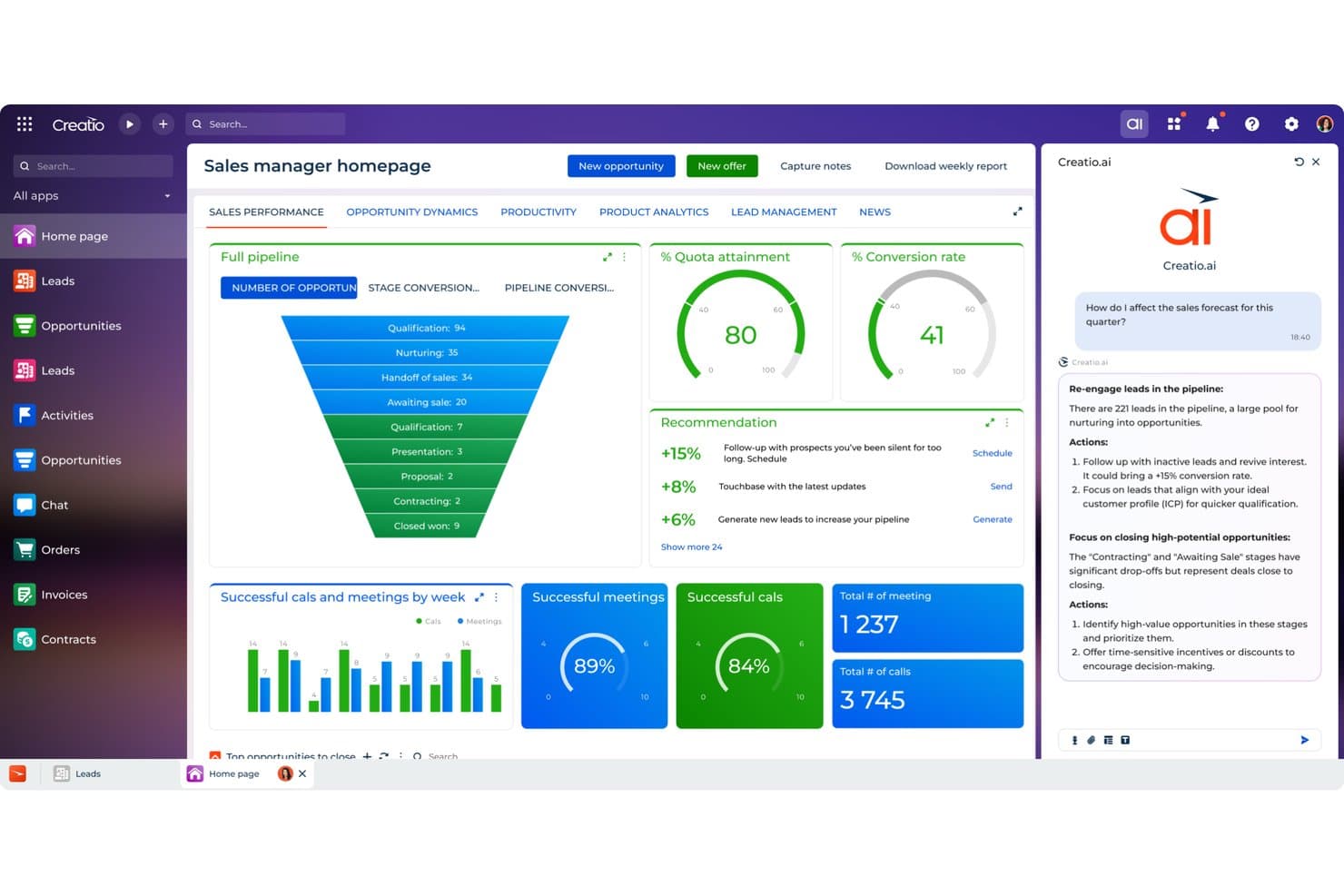
Creatio CRM uses AI to recommend sales actions and boost forecasts. Creatio CRM is a no-code CRM and workflow platform that combines AI agents, predictive lead and opportunity scoring, pipeline forecasting, automated CRM enrichment, and generative AI assistance across the full sales cycle.
Who Is Creatio CRM Best For?
Creatio CRM is a strong fit for sales operations teams and CROs who want to replace their CRM entirely with a no-code platform that runs autonomous AI agents across forecasting, enrichment, and pipeline management.
Why I Picked Creatio CRM
I've included Creatio CRM in my top picks because it's one of the few platforms built around autonomous AI agents rather than bolted-on AI features. The account research agent auto-fills records and maps stakeholders in seconds, and the forecast and pipeline agent flags stalled deals, summarizes risks, and runs automated weekly forecast reviews for CROs. What I really like is that you can build and extend these agents without writing a single line of code.
Creatio CRM Key Features
- Predictive lead and opportunity scoring: ML-based scoring ranks leads and opportunities on a 1–100 scale, weighing customer data, service history, and past sales.
- Territory management agent: Automatically balances territories and surfaces untapped accounts to help reps and ops teams find whitespace.
- Quote generation agent: Suggests product bundles and pricing based on deal context, then drafts proposals without manual input.
- No-code custom model building: Lets you create scoring, lookup, and numeric prediction models directly in the platform without writing any code.
Creatio CRM Integrations
Creatio CRM has documented integrations with Microsoft Teams, Outlook, Zoom, OpenAI, email, and calendars. It also supports APIs, Marketplace integrations, and Zapier.
Pros and Cons
Pros:
- Territory agents surface untapped accounts
- No-code models adapt scoring workflows
- Autonomous agents cover forecasting and enrichment
Cons:
- Reporting gaps limit RevOps visibility
- Conversation intelligence lacks sentiment and objections
Learn more about Creatio CRM: Best for AI-powered voice agents
- 14-day free trial
- From $25/user/month (billed annually)
Visit WebsiteCustomer Rating:4.4/5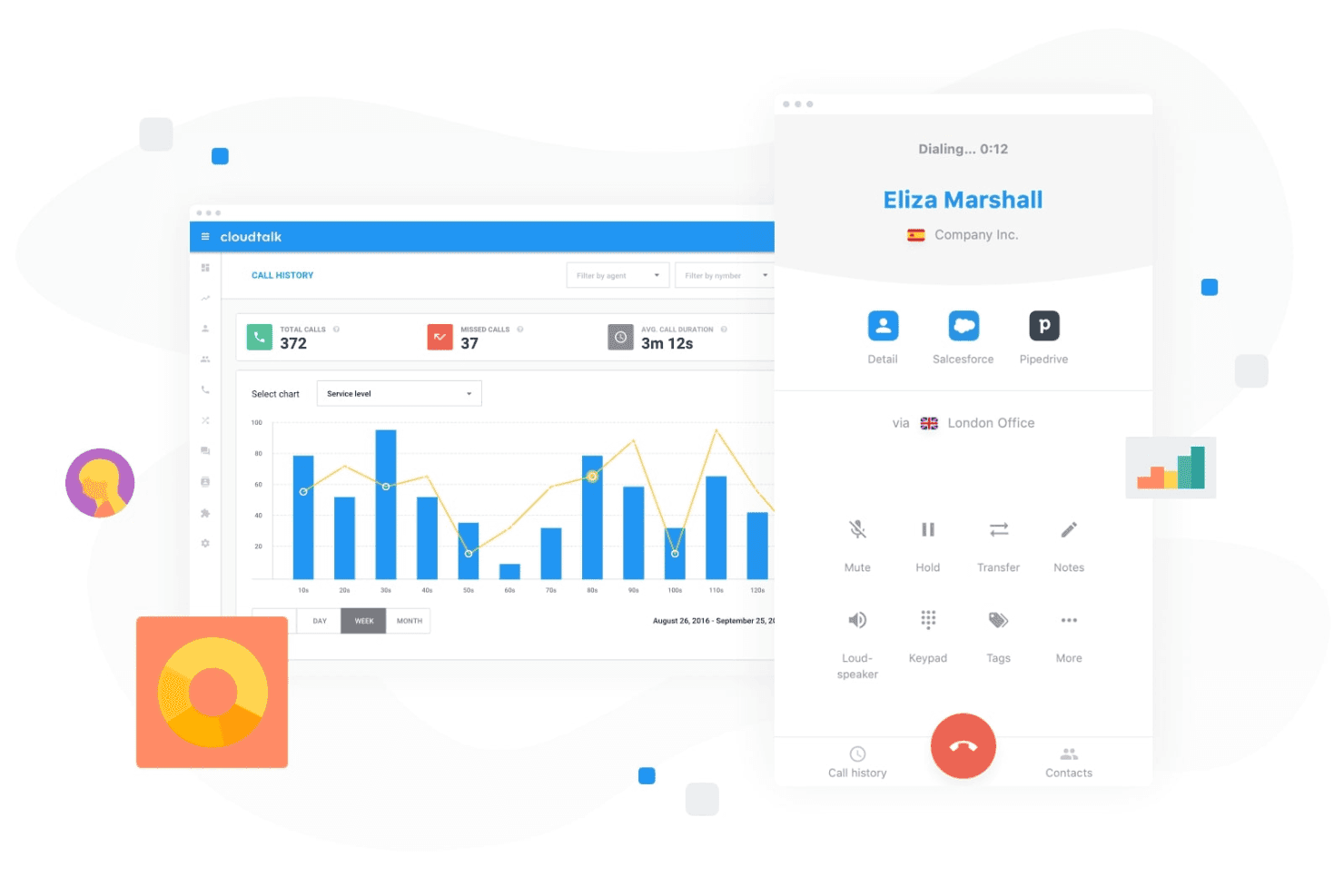
CloudTalk lets teams manage customer calls while tracking call activity and performance from a centralized dashboard. CloudTalk is an AI-powered calling platform that combines AI voice agents, conversation intelligence, and sales dialers with deep CRM integrations for sales and support teams.
Who Is CloudTalk Best For?
CloudTalk is a strong fit for SMB sales teams that run high call volumes and need AI-assisted calling built into their phone system.
Why I Picked CloudTalk
CloudTalk earns its spot on my shortlist because its AI Voice Agents handle routine outbound calls, like trial signup qualification and appointment scheduling, without a rep ever picking up the phone. I like that the AI Receptionist runs 24/7 in 60+ languages, covering after-hours gaps automatically. The Parallel Dialer, which dials up to 10 lines simultaneously and auto-drops voicemails, keeps live reps focused on actual conversations.
CloudTalk Key Features
- AI conversation intelligence: Automatically generates call summaries, transcripts, sentiment analysis, and talk/listen ratios.
- Smart sales dialer: Combines preview, power, and parallel dialing modes to streamline outbound calling efforts.
- Workflow automation: Automates call routing, IVRs, after-hours coverage, and repetitive communication tasks.
- Bi-directional CRM sync: Native integrations with Salesforce, HubSpot, and Pipedrive keep call records and notes synced automatically.
CloudTalk Integrations
CloudTalk offers native integrations with Salesforce, HubSpot, Pipedrive, Zendesk, Zoho CRM, Freshdesk, Intercom, and Slack. An API is available for custom integrations.
Pros and Cons
Pros:
- Real-time sentiment analysis flags coaching opportunities
- Parallel dialer dramatically increases daily call volume
- AI voice agents automate routine outbound calls
Cons:
- AI features limited to voice channel only
- No native pipeline or deal scoring
Learn more about CloudTalk: 4Best for sales conversation insights
Gong
- Free demo available
- Pricing upon request
Visit WebsiteCustomer Rating:4.7/5
Gong analyzes sales calls and emails to surface deal insights with AI. Gong uses AI to analyze sales conversations and deliver actionable insights for revenue teams. It’s designed for sales leaders and reps who want to understand deal risks, coach teams, and improve win rates using real customer interactions. If you need visibility into what’s actually happening in your pipeline, Gong helps you turn call data into strategic guidance.
Who Is Gong Best For?
Gong is a strong fit for mid-sized to enterprise sales teams that want AI-driven insights from customer conversations to improve coaching and deal execution.
Why I Picked Gong
I chose Gong for this list because its AI-driven revenue intelligence and conversation analytics set it apart from other sales tools. Gong automatically records and analyzes sales calls, emails, and meetings to surface deal risks and coaching opportunities that are easy to miss manually. I find its conversation analytics especially valuable for identifying patterns in winning deals and highlighting where reps may need support. For teams looking to use AI to turn real customer interactions into actionable insights, Gong delivers a focused and practical solution.
Gong Key Features
Some other features in Gong that are especially useful for sales teams include:
- Deal boards: Visualize and track the status of every deal in your pipeline with customizable boards.
- Smart trackers: Automatically monitor keywords, topics, and competitor mentions across all sales conversations.
- Call transcription: Generate searchable, AI-powered transcripts for every recorded call and meeting.
- Integration with CRM systems: Sync call data and insights directly with Salesforce, HubSpot, and other leading CRMs.
Gong Integrations
Integrations include Slack, HubSpot CRM, Chili Piper, Gainsight, G2, AWS, Snowflake, ZoomInfo, Zapier, Vidyard, Salesforce, Zoom, Rippling, and more.
Pros and Cons
Pros:
- Tracks competitor mentions in real time
- Conversation intelligence highlights coaching opportunities
- AI analyzes calls for deal risk signals
Cons:
- Can generate too many notifications for users
- Requires call recording consent for compliance
Learn more about Gong: Best for AI sales prospecting and enrichment
- Free demo available
- Pricing upon request
Visit WebsiteCustomer Rating:4.6/5
Cognism enriches leads with AI and compliant prospecting data. Cognism offers AI-driven prospecting for sales teams that need accurate, compliant contact data. It’s a strong fit for B2B organizations looking to automate lead generation and enrich their CRM with up-to-date information. If your team struggles with manual research or outdated lists, Cognism addresses these challenges with automated data sourcing, enrichment, and features like an AI assistant, buyer intent signals, and support for targeted outreach, such as cold email campaigns.
Who Is Cognism Best For?
Cognism is a good fit for B2B sales teams in regulated industries that require accurate, compliant contact data for outbound prospecting.
Why I Picked Cognism
I picked Cognism for this list because its AI-powered sales prospecting and lead enrichment capabilities address a core challenge for revenue teams: finding accurate, compliant contact data at scale. The platform uses AI to automatically source, verify, and enrich leads, reducing the time your team spends on manual research. I also appreciate that Cognism prioritizes data compliance, which is especially important for teams operating in regions with strict privacy regulations. Its enrichment features help keep your CRM data fresh, so your outreach efforts are always based on the most current information available.
Cognism Key Features
Some other features in Cognism that stand out for sales teams include:
- Chrome extension: Capture and enrich leads directly from LinkedIn and company websites without leaving your browser.
- Do-not-call and compliance screening: Automatically flags contacts against global do-not-call lists and compliance requirements.
- Intent data integration: Surfaces leads showing buying signals by integrating intent data into your prospecting workflow.
- Automated list building: Create targeted lead lists using advanced filters for industry, company size, location, and more.
Cognism Integrations
Integrations include Salesforce, HubSpot, Outreach, Salesloft, Microsoft Dynamics 365, Pipedrive, Bullhorn, Zapier, and more.
Pros and Cons
Pros:
- Intent data highlights prospects ready to buy
- Built-in compliance checks for GDPR and CCPA
- Accurate B2B contact data for global markets
Cons:
- No native email sequencing or outreach tools
- Occasional gaps in smaller market data coverage
Learn more about Cognism: Best for digital sales rooms and tracking
- 14-day free trial
- From $25/user/month
Visit WebsiteCustomer Rating:4.6/5
Tracks sales performance, deals, hit rates, and top reps metrics. Sales teams looking to modernize their deal management often turn to GetAccept. The platform combines digital sales rooms, document tracking, and e-signature in one workspace, making it especially useful for B2B sales cycles with multiple stakeholders. It’s a strong choice for teams that want to personalize buyer experiences and keep deals moving with real-time engagement insights.
Who Is GetAccept Best For?
GetAccept is well-suited for B2B sales teams at mid-sized companies that manage complex deals involving multiple stakeholders and documents.
Why I Picked GetAccept
What drew me to GetAccept is its focus on creating a digital sales room that brings together document tracking and e-signature in one place. For teams managing complex B2B deals, I find the ability to track buyer engagement with sales documents in real time especially valuable. The platform’s integrated e-signature simplifies closing, while its digital workspace helps sales reps personalize the buying experience and keep all stakeholders aligned. These features make GetAccept a strong fit for anyone searching for an AI sales tool that supports high-touch, multi-step deal cycles.
GetAccept Key Features
Some other features that make GetAccept useful for sales teams include:
- Automated reminders: Send scheduled notifications to prospects and internal team members to keep deals moving forward.
- Video messaging: Lets sales reps record and embed personalized videos directly into sales documents for a more engaging buyer experience.
- Contract templates: Provides customizable templates for frequently used agreements, reducing manual document creation time.
- Deal analytics dashboard: Offers real-time insights into document views, time spent, and stakeholder engagement across all active deals.
GetAccept Integrations
Integrations include Salesforce, HubSpot, Microsoft Dynamics, Pipedrive, SuperOffice, Lime CRM, UpSales, Gong, Slack, and more.
Pros and Cons
Pros:
- Automated reminders to reduce deal delays
- Built-in video messaging for personalized outreach
- Real-time document tracking for sales engagement
Cons:
- Occasional delays in document delivery notifications
- Limited AI-driven forecasting features
Learn more about GetAccept: Best for sales intelligence and contact data
- Free trial available
- Pricing upon request
Visit WebsiteCustomer Rating:4.4/5
ZoomInfo offers an AI sales tool with email automation and prospect engagement features. Sales teams looking for accurate B2B contact and company data often turn to ZoomInfo. The platform is designed for professionals who need to identify, research, and connect with decision-makers quickly. Its data-driven approach helps users build targeted prospect lists and improve outreach precision.
Who Is ZoomInfo Best For?
ZoomInfo is a strong fit for B2B sales and marketing teams at mid-sized to large enterprises that need accurate contact and company data for targeted outreach.
Why I Picked ZoomInfo
What sets ZoomInfo apart for me is its depth and accuracy of B2B contact and company data, which is essential for targeted sales outreach. The platform’s AI-driven search and filtering tools help users quickly identify the right decision-makers within specific industries or companies. I also value its real-time data enrichment, which keeps prospect information up to date and actionable for sales teams. For anyone searching for an AI sales tool that prioritizes data quality and precision targeting, ZoomInfo is a strong contender.
ZoomInfo Key Features
Some other features that make ZoomInfo valuable for sales teams include:
- Intent data tracking: Surfaces companies actively researching topics relevant to your solution so you can prioritize outreach.
- Automated workflows: Lets you trigger actions like list building, alerts, or CRM updates based on data changes or prospect activity.
- Engagement tracking: Monitors email opens, clicks, and responses to help you gauge prospect interest and refine messaging.
- Chrome extension: Allows users to access contact and company data directly from LinkedIn or company websites without leaving their browser.
ZoomInfo Integrations
Integrations include Salesforce, HubSpot, Microsoft Dynamics 365, Snowflake, Gmail, Zoom, Aircall, and more.
Pros and Cons
Pros:
- Real-time data enrichment for CRM records
- AI-powered intent data for prospecting
- Extensive B2B contact and company database
Cons:
- Limited support for international markets
- Occasional outdated or inaccurate contact data
Learn more about ZoomInfo: Best for sales enablement and content management
- Free demo available
- Pricing upon request
Visit WebsiteCustomer Rating:4.6/5
Highspot tracks content usage and sales engagement analytics. Sales enablement teams looking to unify content, training, and analytics often turn to Highspot. The platform is designed for organizations that want to equip their sales reps with the right materials and guidance at every stage of the buyer journey. Highspot stands out for its focus on surfacing relevant content and actionable insights directly within sellers’ workflows.
Who Is Highspot Best For?
Highspot is a strong fit for mid-sized to large sales and enablement teams in B2B industries that need centralized content management and guided selling.
Why I Picked Highspot
What stands out to me about Highspot is its focus on AI-powered sales enablement that brings content management and guided selling together. I picked Highspot because it uses AI to recommend the most relevant sales content and playbooks to reps based on deal stage and buyer engagement. The platform’s guided selling features help teams deliver consistent messaging and training, while analytics provide visibility into what content actually drives results. For anyone searching for an AI sales tool that connects enablement, content, and actionable insights, Highspot offers a unified approach.
Highspot Key Features
Some other features that make Highspot valuable for sales enablement teams include:
- Pitch tracking: Tracks when prospects open, view, and engage with shared sales content.
- Content governance: Lets admins control content access, versioning, and compliance across distributed teams.
- Training and onboarding modules: Provides built-in tools for delivering sales training, onboarding, and certification programs.
- CRM integration: Connects with platforms like Salesforce and Microsoft Dynamics to sync sales activities and content usage data.
Highspot Integrations
Integrations include Salesforce, Microsoft Dynamics 365, Microsoft Teams, Outlook, SharePoint, Slack, Google Workspace, Gmail, Salesloft, and more.
Pros and Cons
Pros:
- In-depth pitch engagement analytics available
- Guided selling playbooks for consistent messaging
- AI recommends content based on deal stage
Cons:
- Lacks native predictive forecasting features
- Limited workflow automation compared to peers
Learn more about Highspot: Best for AI meeting transcription
- Free plan + free demo available
- From $10/user/month (billed annually)
Visit WebsiteCustomer Rating:4.3/5
Fireflies.ai analyzes meeting conversations and tracks team performance metrics. Sales teams looking to capture, transcribe, and analyze calls may find Fireflies.ai especially useful. The platform uses AI to automate meeting notes and surface key insights from sales conversations. It’s a strong fit for revenue operations professionals who want searchable records and actionable data from every customer interaction.
Who Is Fireflies.ai Best For?
Fireflies.ai is a strong choice for sales and revenue teams that need automated call transcription and searchable meeting records.
Why I Picked Fireflies.ai
I picked Fireflies.ai because its AI meeting assistant directly addresses the challenge of capturing and organizing sales call data. The tool automatically records, transcribes, and summarizes sales meetings, making it easy to revisit key moments and action items. I also appreciate how Fireflies.ai lets you search across transcripts and highlight important topics, which helps sales teams quickly surface insights from their conversations. For anyone looking to automate sales call documentation and analysis, Fireflies.ai’s focus on accurate, searchable transcription stands out.
Fireflies.ai Key Features
Some other features that make Fireflies.ai valuable for sales teams include:
- AI-powered topic detection: Automatically identifies and tags key topics discussed during sales calls for easier review.
- Collaboration tools: Lets team members add comments, reactions, and highlights directly within call transcripts.
- CRM auto-logging: Syncs call notes and summaries to connected CRM platforms without manual entry.
- Custom vocabulary: Allows users to add industry-specific terms to improve transcription accuracy.
Fireflies.ai Integrations
Integrations include Salesforce, HubSpot, Slack, Google Meet, Microsoft Teams, Zoom, Dropbox, and more.
Pros and Cons
Pros:
- Automatic CRM note syncing after calls
- Searchable meeting records for quick reference
- Accurate AI transcription for sales calls
Cons:
- Custom vocabulary setup can be time-consuming
- No real-time coaching during live calls
Learn more about Fireflies.ai: 10Best for automated lead qualification
Origami
- Free plan + free demo available
- From $29/month
Visit WebsiteCustomer Rating:4.2/5
Origami finds and scores leads with verified contact data for outreach. Origami offers an AI-powered sales agent designed to automate outbound prospecting for B2B teams. It’s a strong fit for sales professionals and revenue operations leaders who want to scale outreach without expanding headcount. By handling research, messaging, and follow-up, Origami helps teams focus on higher-value sales activities.
Who Is Origami Best For?
Origami is well-suited for B2B sales teams at growth-stage companies that want to automate and scale outbound prospecting.
Why I Picked Origami
What sets Origami apart for me is its focus on delivering an AI-powered sales agent that fully automates outbound prospecting. The platform handles everything from researching leads to crafting personalized outreach messages and following up, which is especially valuable for teams looking to scale without adding headcount. I like that Origami’s AI can adapt messaging based on prospect responses, making outreach feel more human and relevant. For anyone searching for an AI sales tool that goes beyond simple automation and actually manages the outbound process end-to-end, Origami is a strong contender.
Origami Key Features
Some other features that make Origami useful for sales teams include:
- Automated lead sourcing: The platform identifies and imports new leads based on your target criteria.
- Multi-channel outreach sequencing: Origami supports outreach across email, LinkedIn, and other channels in coordinated sequences.
- Conversation tracking dashboard: Users can monitor all ongoing prospect conversations and engagement in one place.
- Team collaboration tools: Multiple team members can share notes, assign leads, and coordinate outreach within the platform.
Origami Integrations
Native integrations are not currently listed.
Pros and Cons
Pros:
- AI-driven data collection and research
- Multi-channel outreach from one platform
- Fast lead list generation and enrichment
Cons:
- No built-in phone dialer functionality
- Some features are still maturing or in beta
Learn more about Origami:
Other AI Sales Tools
Here are some additional AI sales tools options that didn’t make it onto my shortlist, but are still worth checking out:
- 11OverloopBest for multichannel sales outreach
- 12PitchMonsterBest for AI-driven sales roleplays
- 13Persana AIBest for AI sales research and insights
- 14Agentforce SalesBest for AI-driven sales automation
- 15HeyReachBest for LinkedIn outreach automation
- 16SmartReach AIBest for AI email outreach
- 17OutreachBest for AI-driven sales engagement
- 18MindTickleBest for sales coaching and enablement
- 19monday CRMBest for customizable sales workflows
- 20CreatioBest for low-code sales automation
- 21HubSpot Sales HubBest for AI-powered sales productivity
- 22CloudApperBest for customizable AI sales automation
- 23FreshsalesBest for AI-driven sales CRM
- 24Microsoft Dynamics 365 SalesBest for enterprise sales automation
- 25Pipedrive Best for visual sales pipeline insights
- 26CrystalBest for personality-based sales insights
- 27ForecastioBest for AI sales forecasting insights
- 28Revenue GridBest for guided selling and revenue insights
How I Evaluate AI Sales Tools
Every tool here needs AI that actually changes how deals move and forecasts land—not just a label slapped onto legacy features. I evaluate in two layers: the core functionality a tool needs to make the list, and the differentiating factors that set vendors apart.
Core Functionality (Table Stakes For This List)
When I'm selecting tools for my list, I rank each one on a scale from 0 (does not offer the functionality) to 5 (excels in this area) for each core functionality listed below. Then, I calculate the tool's total score into a percentage. Each tool needs to achieve a minimum total score of 65% to be considered for inclusion.
- AI Lead & Opportunity Scoring: I look for ML-driven scoring that goes beyond static rules—tools should surface why a deal or lead scored the way it did, like flagging stalled engagement or missing stakeholders.
- Conversation Intelligence: Each tool should analyze calls and emails using NLP, pulling out signals like competitor mentions, objections, and sentiment shifts that reps can act on.
- AI Forecasting & Pipeline Analytics: I evaluate whether the tool generates its own forecast predictions and flags deal risks, rather than just rolling up rep-submitted numbers in a dashboard.
- Automated Activity Capture & CRM Enrichment: Tools should log emails, meetings, and contacts to the CRM without rep effort, and I check whether enrichment fills gaps like job titles or org charts.
- Generative AI Assistance: I look at how the tool uses GenAI in context—drafting follow-up emails after a recorded call, summarizing deal status, or personalizing outreach based on CRM data.
- Next-Best-Action Recommendations: The tool should prescribe specific actions tied to deal context, like recommending a multi-thread play when only one contact is engaged on a late-stage opportunity.
Once I have a list of tools that meet this criteria, I consider what sets each platform apart.
Differentiating Factors (What Sets Vendors Apart)
Here's how I compare and contrast different vendors:
Standout Features
Buyer intent signals are a big differentiator—I look for tools that layer third-party intent data into scoring models so reps focus on accounts actively researching solutions. AI sales coaching also stands out when it benchmarks reps against top performers and recommends specific improvements. I pay close attention to autonomous AI agents that handle multi-step tasks like prospect research and meeting prep without manual triggers.
Beyond Features
CRM integration depth matters a lot—I check whether a tool offers native, bi-directional sync with platforms like Salesforce or HubSpot, since broken sync creates pipeline blind spots fast. AI accuracy and explainability also weigh heavily; I look for vendors that show why a forecast or score landed where it did. Time-to-value is another key factor. Tools with pre-built models and dedicated onboarding get teams to insights in weeks, not quarters.
How to Choose AI Sales Tools
It’s easy to get bogged down in long feature lists and complex pricing structures. To help you stay focused as you work through your unique software selection process, here’s a checklist of factors to keep in mind:
| Factor | What to Consider |
|---|---|
| FactorScalability | What to ConsiderWill the tool support your team as you grow? Check user limits, data caps, and pricing jumps for larger teams or volumes. |
| FactorIntegrations | What to ConsiderDoes the tool connect natively with your CRM, email, and communication platforms? Confirm compatibility with your existing stack. |
| FactorCustomizability | What to ConsiderCan you tailor workflows, scoring models, or dashboards to your sales process? Avoid rigid tools that force you to adapt your process. |
| FactorEase of use | What to ConsiderHow quickly can reps and managers learn the system? Look for clear navigation, minimal training requirements, and user feedback on adoption. |
| FactorImplementation and onboarding | What to ConsiderWhat resources are needed to get up and running? Assess migration support, training materials, and the typical time to value for similar teams. |
| FactorCost | What to ConsiderAre all costs transparent, including add-ons and usage-based fees? Compare the total cost of ownership, not just sticker price. |
| FactorSecurity safeguards | What to ConsiderDoes the tool meet your data security standards? Ask about encryption, access controls, and compliance with regulations like GDPR. |
| FactorSupport availability | What to ConsiderWhat support channels are offered, and during what hours? Consider if you need 24/7 help or dedicated account management for your team. |
What Are AI Sales Tools?
AI sales tools are software platforms that use artificial intelligence to automate, optimize, and analyze sales processes. These tools help salespeople prioritize leads, recommend next steps, personalize outreach, and gain insights from data. With advanced AI features like AI agents and AI-generated recommendations or AI content, teams can improve customer engagement, increase conversion rates, and improve forecast accuracy. By leveraging automation, these tools help teams accomplish more in less time, making them especially valuable for startups and growing businesses building their tech stack. Many platforms offer all-in-one capabilities that support better decision-making with high-quality insights throughout the entire sales cycle.
Features of AI Sales Tools
When selecting AI sales tools, keep an eye out for the following key features:
- Lead scoring: Uses AI algorithms to evaluate and rank leads based on their likelihood to convert, helping sales teams focus on the most promising opportunities.
- Predictive forecasting: Analyzes historical sales data and current pipeline activity to project future sales outcomes and identify potential risks or gaps.
- Automated outreach: Sends personalized emails, messages, or follow-ups to prospects at optimal times, reducing manual effort and increasing engagement rates.
- Conversation intelligence: Records, transcribes, and analyzes sales calls or meetings to surface insights, highlight key topics, and suggest improvements for reps.
- Content recommendations: Suggests relevant sales collateral, case studies, or presentations based on deal stage, buyer persona, or previous interactions.
- Next-best action guidance: Provides real-time prompts or suggestions for reps on what steps to take next in the sales process, based on AI analysis of deal progress.
- Pipeline analytics: Offers dashboards and reports that visualize deal stages, win rates, and bottlenecks, enabling better pipeline management and forecasting.
- CRM integration: Connects directly with your existing CRM to sync data, track activities, and ensure a unified view of customer interactions.
- Sales activity tracking: Monitors emails, calls, meetings, and other touchpoints to give a complete picture of rep productivity and buyer engagement.
- Training and coaching modules: Delivers AI-driven training content, onboarding paths, and performance feedback to help reps improve skills and ramp up faster.
Benefits of AI Sales Tools
Implementing AI sales tools provides several benefits for your team and your business. Here are a few you can look forward to:
- Improved lead prioritization: AI-driven lead scoring helps your team focus on prospects most likely to convert, increasing win rates and sales efficiency.
- Faster sales cycles: Automated outreach and next-best action guidance from an AI sales assistant can reduce manual tasks and keep deals moving forward without unnecessary delays.
- More accurate forecasting: Predictive analytics and pipeline insights enable better revenue planning and help identify risks before they impact results.
- Personalized buyer engagement: Content recommendations and conversation intelligence allow reps to tailor their approach to each prospect, improving engagement and trust.
- Improved coaching and onboarding: AI-powered training modules and performance feedback accelerate ramp-up time for new reps and support ongoing skill development.
- Unified data and workflows: CRM integration and sales activity tracking ensure all sales data is centralized, making it easier to manage and analyze team performance.
- Greater visibility for leadership: Real-time dashboards and analytics provide leaders with actionable insights into pipeline health, rep productivity, and overall sales effectiveness.
Costs and Pricing of AI Sales Tools
Selecting AI sales tools requires an understanding of the various pricing models and plans available. Costs vary based on features, team size, add-ons, and more. The table below summarizes common plans, their average prices, and typical features included in AI sales tools solutions:
Plan Comparison Table for AI Sales Tools
| Plan Type | Average Price | Common Features |
|---|---|---|
| Plan TypeFree Plan | Average Price$0 | Common FeaturesBasic lead tracking, limited AI recommendations, email integration, and simple reporting. |
| Plan TypePersonal Plan | Average Price$15-$40/user/month | Common FeaturesLead scoring, automated outreach, CRM integration, activity tracking, and basic analytics. |
| Plan TypeBusiness Plan | Average Price$40-$90/user/month | Common FeaturesPredictive forecasting, advanced analytics, content recommendations, workflow automation, and team collaboration. |
| Plan TypeEnterprise Plan | Average Price$90-$150/user/month | Common FeaturesCustom integrations, conversation intelligence, advanced security, dedicated support, and compliance features. |
AI Sales Tools FAQs
Here are some answers to common questions about AI sales tools:
How do AI sales tools improve sales team productivity?
AI sales tools automate repetitive tasks like lead scoring, follow-ups, and data entry. This frees up reps to focus on building relationships and closing deals, while also surfacing insights that help them prioritize their efforts more effectively.
Can AI sales tools integrate with my existing CRM?
Yes, most AI sales tools offer native integrations with popular CRMs. Before choosing a tool, confirm it supports your CRM and check if the integration syncs data in real time or requires manual updates.
What data security considerations should I keep in mind?
Look for tools that offer encryption, access controls, and compliance with standards like GDPR. Ask vendors about their data storage practices and how they handle sensitive customer information to ensure your data stays protected.
How long does it take to implement an AI sales tool?
Implementation time varies by tool and team size. Many platforms offer onboarding resources like product tours and templates, but complex setups or custom integrations may take several weeks. Plan for training and data migration as part of your rollout.
Are AI sales tools suitable for small businesses?
Yes, many AI sales tools offer plans and features designed for small teams. Look for solutions with flexible pricing, easy setup, and minimal IT requirements to ensure a good fit for your business size and resources.