

10 Best AI Sales Assistant Software Reviewed in 2026

Best AI Sales Assistant Software Shortlist


When it comes to revenue operations, you face constant pressure to improve sales efficiency, facilitate sales enablement, and support customer engagement. AI sales assistant software can help. These AI sales tools automate tasks, provide insights, and enhance communication.
I've tested and reviewed various software independently to bring you the best sales performance options available. I understand the challenges you face and the need for reliable solutions.
In this listicle, you'll find unbiased reviews of top AI sales assistants. I'll cover their features, strengths, and how they can benefit your salespeople. Let's explore how these tools can make a real difference in your operations.
Why Trust Our Software Reviews
We’ve been testing and reviewing RevOps software since 2022. As RevOps leaders ourselves, we know how critical and difficult it is to make the right decision when selecting software.
We invest in deep research to help our audience make better software purchasing decisions. We’ve tested more than 2,000 tools for different RevOps use cases and written over 1,000 comprehensive software reviews. Learn how we stay transparent & our software review methodology.
AI Sales Assistant Software Comparison Table
This comparison table summarizes pricing details for my top AI sales assistant software selections:
| Tool | Best For | Trial Info | Price | ||
|---|---|---|---|---|---|
| 1 | Best for integrated B2B contact enrichment | 14-day free trial | From $49/user/month (billed annually) | Website | |
| 2 | Best for dynamic sales playbooks | Free demo available | Pricing upon request | Website | |
| 3 | Best for AI conversation intelligence | 14-day free trial + free demo available | From $25/user/month (billed annually) | Website | |
| 4 | Best for email outreach | Free trial available | From $37.6/month | Website | |
| 5 | Best for meeting insights | 14-day free trial + free plan + free demo available | From $30/user/month (billed annually) | Website | |
| 6 | Best for meeting notes automation | 14-day free trial + free demo available | From $19/user/month (billed annually) | Website | |
| 7 | Best for conversational marketing | Free demo available | Pricing upon request | Website | |
| 8 | Best for sales pipeline management | 14-day free trial | From $14/user/month (billed annually) | Website | |
| 9 | Best for revenue intelligence | Free demo available | Pricing upon request | Website | |
| 10 | Best for relationship management | Free plan + 14-day free trial + free demo available | From $167/month (billed annually) | Website |

Best AI Sales Assistant Software Review
Below are my detailed summaries of the best AI sales assistant software that made it onto my shortlist. My reviews offer a detailed look at the key features, pros & cons, integrations, and ideal use cases of each tool to help you find the best one for you.

Best for integrated B2B contact enrichment
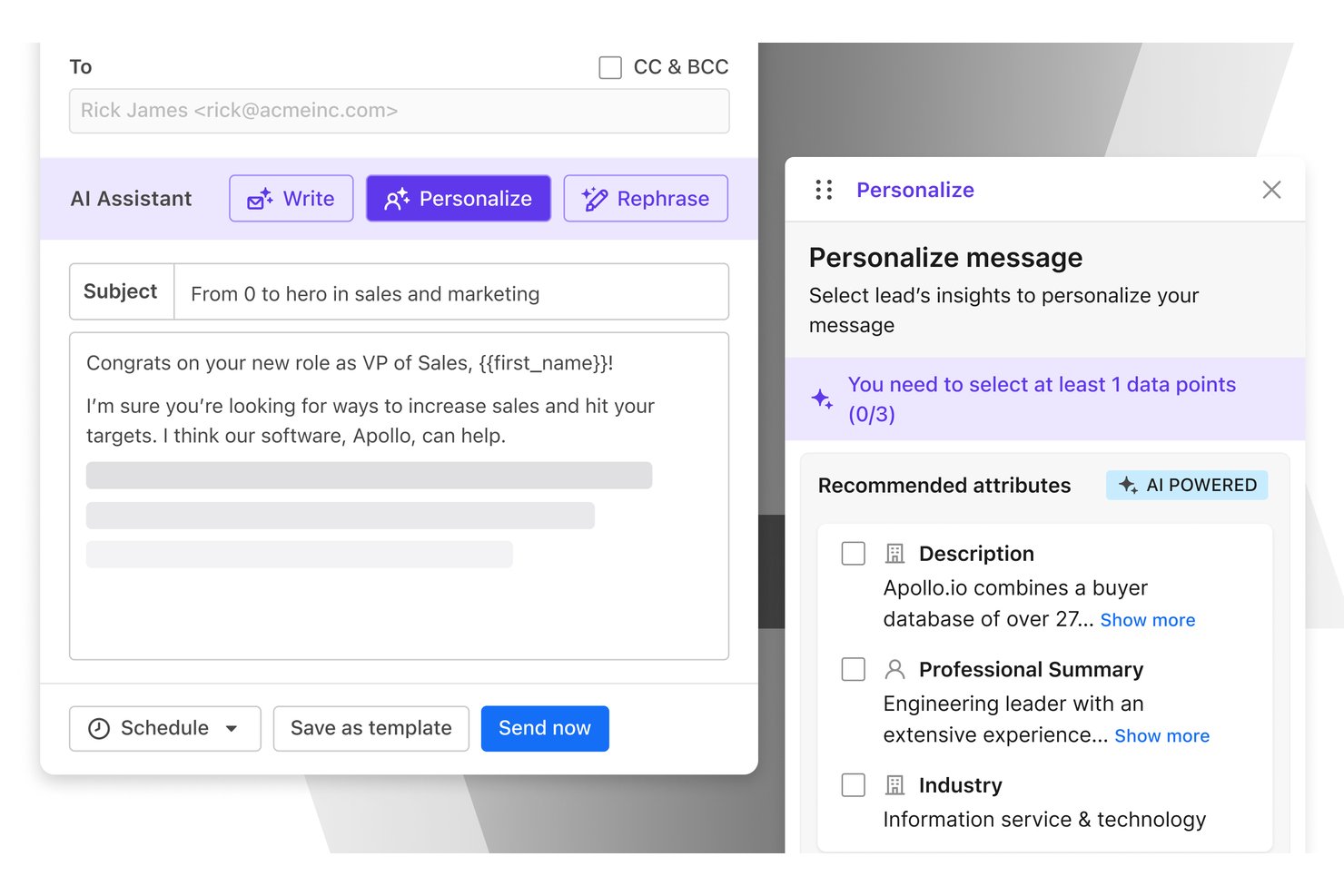
Apollo.io is an AI-powered sales intelligence and engagement platform that combines a 275M+ B2B contact database with outbound sequencing, meeting intelligence, prospect enrichment, and automated CRM sync.
Who Is Apollo.io Best For?
Apollo.io is a strong fit for SDR teams and sales-led startups that need prospecting, outreach, and contact data in a single platform.
Why I Picked Apollo.io
Apollo.io earns its spot on my shortlist because the contact enrichment is built directly into the outreach engine, not bolted on as an afterthought. I like that I can use the Chrome extension to pull verified contact data from a LinkedIn profile and drop that person straight into an AI-drafted email sequence without leaving my browser. The AI Research Power-ups then layer in account-level context, so the outreach my team sends is grounded in real prospect signals rather than generic templates.
Apollo.io Key Features
- AI-powered meeting intelligence: Records, transcribes, and summarizes sales calls with AI-generated notes and action items.
- Multi-channel sequence builder: Lets users design outbound campaigns combining email, phone, and LinkedIn steps in one workflow.
- Bi-directional CRM sync: Automatically logs calls, emails, and contact updates to Salesforce, HubSpot, Pipedrive, and Zoho.
- Chrome extension for live prospecting: Adds verified contact data and enrichment directly from LinkedIn, Gmail, and company websites.
Apollo.io Integrations
Apollo.io offers native integrations with Salesforce, HubSpot, Pipedrive, Zoho, Gmail, Outlook, LinkedIn, Slack, Gong, Chorus, Aircall, and Dialpad. Zapier and API access are also available for custom integrations.
Pros and Cons
Pros:
- Chrome extension enriches prospects without tab switching
- AI sequences personalize outreach from enriched data
- Massive verified B2B contact database built in
Cons:
- Conversation intelligence lags behind dedicated call tools
- Contact data accuracy varies for niche markets

Best for dynamic sales playbooks
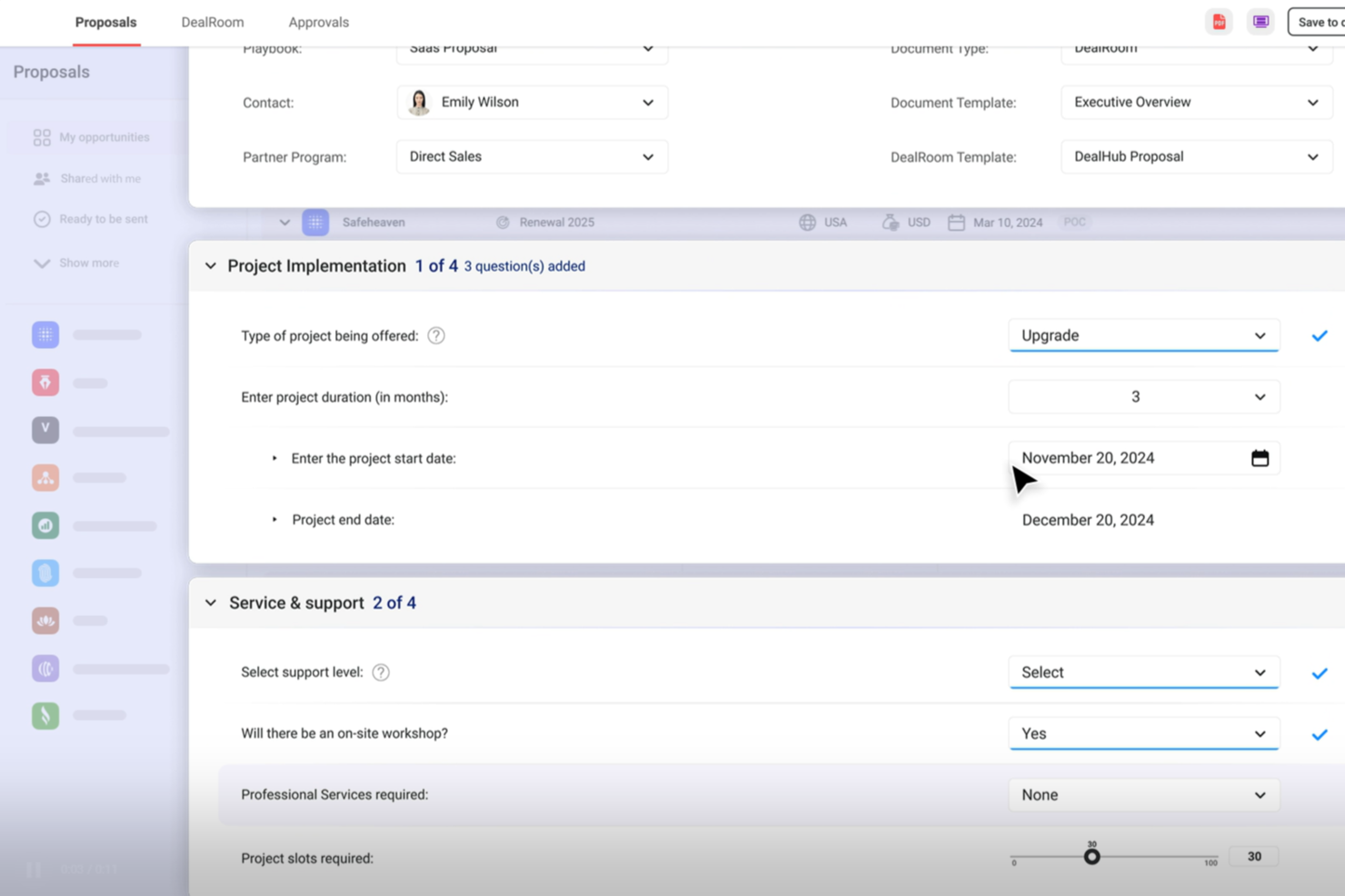
DealHub AI is a quote-to-revenue platform that uses AI to guide sales reps through deal configuration, pricing decisions, contract management, and engaging buyers throughout complex B2B sales cycles.
Who Is DealHub AI Best For?
DealHub AI suits B2B sales teams at mid-market and enterprise companies managing complex, multi-stakeholder deal cycles.
Why I Picked DealHub AI
I picked DealHub AI as one of the best because its guided quote configuration is where the dynamic playbook angle really comes to life. When a rep is building a quote, the platform walks them through product selection using smart filters and structured bundles, so every configuration stays on-script with your pricing logic. On top of that, configurable bundles and dynamic discounts are tied directly to automated approval workflows, meaning the playbook doesn't just guide reps, it also enforces the right deal structure at every step.
DealHub AI Key Features
- DealRoom: A digital sales room where buyers and reps interact with proposals, share documents, and track deal activity in one shared space.
- AI pricing optimization: Provides data-backed pricing recommendations based on deal attributes, historical data, and configured pricing rules.
- Subscription and renewal management: Tracks recurring contracts, renewal dates, and mid-cycle changes like upgrades or seat expansions.
- AI Decision Intelligence: A conversational interface where reps can query deal data, surface risks, and get pipeline insights using natural language prompts.
DealHub AI Integrations
DealHub AI integrates with Salesforce, Microsoft Dynamics, HubSpot, and SugarCRM, as well as Stripe and Avalara for billing and tax compliance.
Pros and Cons
Pros:
- Can be configured without custom code
- Supports line-item-level approval workflows
- Unified CPQ, CLM, and billing platform
Cons:
- Slow loading with large deal volumes
- Limited reporting on quoting trends
New Product Updates from DealHub AI

DealHub AI Expands Bundle Attribute Automation
DealHub AI introduces Assignment Rules for child proposal attributes and numeric aggregation for bundles. These updates give admins more control over bundle attribute automation and configuration. For more information, visit DealHub’s official site.
 .
.
Best for AI conversation intelligence
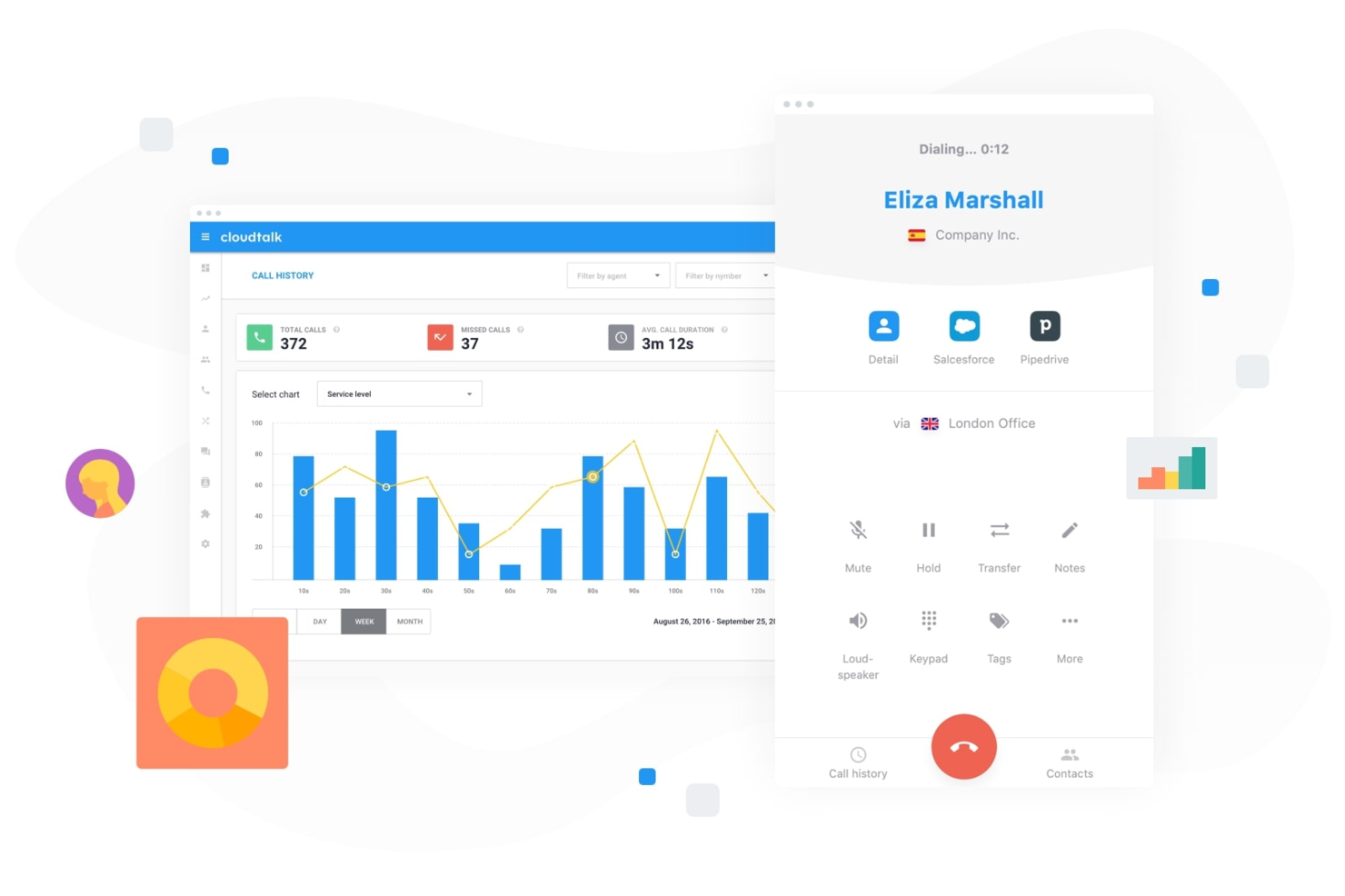
CloudTalk is designed for businesses aiming to enhance their sales and customer support through AI-driven solutions. By integrating AI Voice Agents and Conversation Intelligence, it addresses the need for efficient customer interaction and insightful analytics, making it a valuable tool for sales teams looking to optimize their outreach and customer engagement strategies.
Why I Picked CloudTalk
I picked CloudTalk for its standout AI Conversation Intelligence and AI Voice Agents, which directly address the needs of sales teams looking for advanced analytics and automated support. The AI Conversation Intelligence provides automatic call summaries and sentiment analysis, enabling teams to gain insights into customer interactions. Additionally, the AI Voice Agents offer 24/7 support, handling routine inquiries and freeing up sales representatives to focus on more complex tasks, making CloudTalk an ideal choice for those seeking to enhance sales efficiency.
CloudTalk Key Features
In addition to its core AI functionalities, I also found several other features that enhance its appeal as an AI sales assistant software:
- Call Management: Offers custom call routing, IVR, and call recording to streamline communication processes.
- Real-Time Monitoring: Provides live call analytics and performance tracking for effective team management.
- Global Number Management: Supports local numbers in over 160 countries, enhancing international sales capabilities.
- SPAM Protection: Safeguards caller ID to maintain communication reach and reliability.
CloudTalk Integrations
Integrations include Salesforce, HubSpot, Zoho, Zendesk, Pipedrive, Intercom, Freshdesk, Slack, Aircall, and Microsoft Teams.
Pros and Cons
Pros:
- AI-powered conversation intelligence tools
- Multiple outbound dialer modes
- Extensive CRM integration options
Cons:
- Parallel dialer stability issues
- International number availability can be inconsistent
Best for email outreach

Instantly is an AI-powered email outreach platform designed to help sales teams automate and optimize their email campaigns. It primarily serves businesses looking to increase their email deliverability and open rates through AI-driven insights.
Why I picked Instantly: Instantly excels in email outreach by using AI to optimize send times and personalize content. Its AI features analyze recipient behavior to improve open rates and engagement. The platform's ability to automate follow-ups and track email performance differentiates it from other solutions. These capabilities make Instantly the best choice for teams focused on effective email outreach.
Standout features & integrations:
Features include automated follow-ups, AI-driven send time optimization, and real-time analytics. Instantly helps your team increase email deliverability and engagement. It also provides tools to A/B test email content and strategies.
Integrations include HubSpot, Salesforce, Slack, Outlook, Gmail, Google Sheets, Pipedrive, and Zapier.
Pros and Cons
Pros:
- Real-time engagement analytics
- Automated follow-up sequences
- AI-driven email optimization
Cons:
- 100M+ lead database is an add-on
- Experimentation is required to achieve high deliverability and reply rates

Sybill
Best for meeting insights
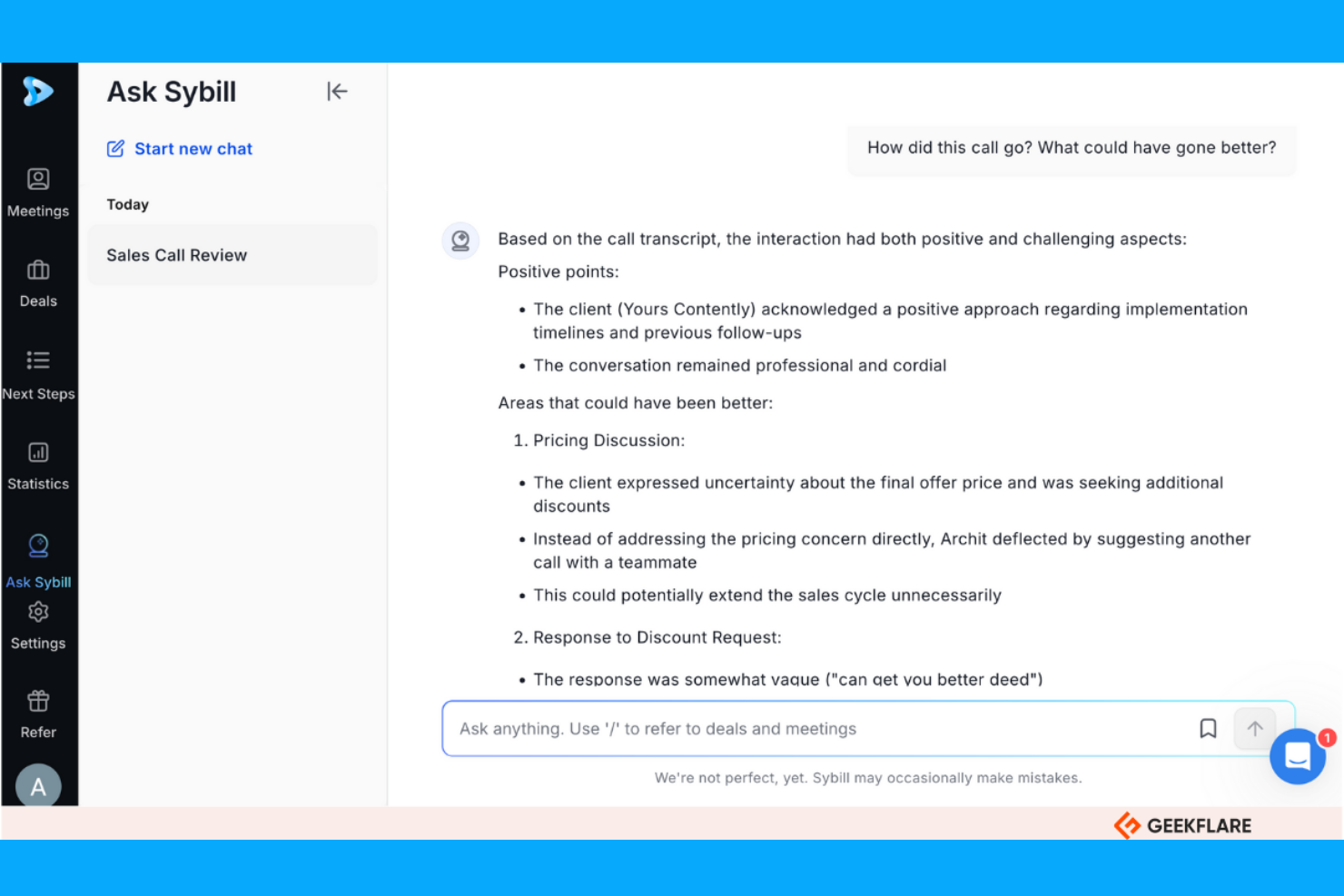
Sybill is an AI-powered platform designed to provide insights from meetings, helping sales teams improve their communication strategies. It primarily serves sales professionals by analyzing conversations to extract actionable insights and enhance client relationships.
Why I picked Sybill: Sybill's AI capabilities focus on delivering detailed meeting insights, making it perfect for teams looking to refine their communication. Its AI analyzes tone, sentiment, and key moments in conversations, offering a deeper understanding of client interactions. This helps your team capture important details and improve follow-up actions. Sybill's ability to provide real-time feedback during meetings sets it apart from other solutions.
Standout features & integrations:
Features include real-time feedback, sentiment analysis, and conversation highlights. Sybill helps your team identify key discussion points and assess client engagement. It also offers tools to record and review meetings for continuous improvement.
Integrations include Salesforce, HubSpot, Slack, Zoom, Microsoft Teams, Google Meet, Webex, Pipedrive, and Outlook.
Pros and Cons
Pros:
- Deal history analysis provides deal health and risks insights
- ‘Magic Summaries’ feature provides sales-specific summaries
- In-depth conversation analysis
Cons:
- Requires training for optimal use
- Reliance on video feeds for some metrics

Avoma
Best for meeting notes automation

Avoma is an AI-powered meeting assistant designed to help teams automate note-taking and improve meeting productivity. It primarily serves sales, customer success, and product teams by transcribing meetings and providing actionable insights.
Why I picked Avoma: Avoma's AI capabilities focus on automating meeting notes and extracting key insights, making it invaluable for teams looking to enhance meeting efficiency. Its AI transcribes conversations and highlights important topics, ensuring your team captures everything discussed. The platform also provides sentiment analysis to gauge participant engagement. These features align with Avoma's USP of being best for meeting notes automation.
Standout features & integrations:
Features include real-time transcription, sentiment analysis, and topic tracking. Avoma helps your team capture every detail of meetings without manual effort. It also offers tools to review and share meeting summaries for improved collaboration.
Integrations include Salesforce, HubSpot, Slack, Zoom, Microsoft Teams, Google Meet, Zoho CRM, and Pipedrive.
Pros and Cons
Pros:
- Searchable meeting recordings and shareable snippets
- Provides sentiment analysis
- AI-generated time-stamped meeting summaries and notes
Cons:
- Reports of slow processing and sync delays
- Limited customization for specific user cases
Drift
Best for conversational marketing
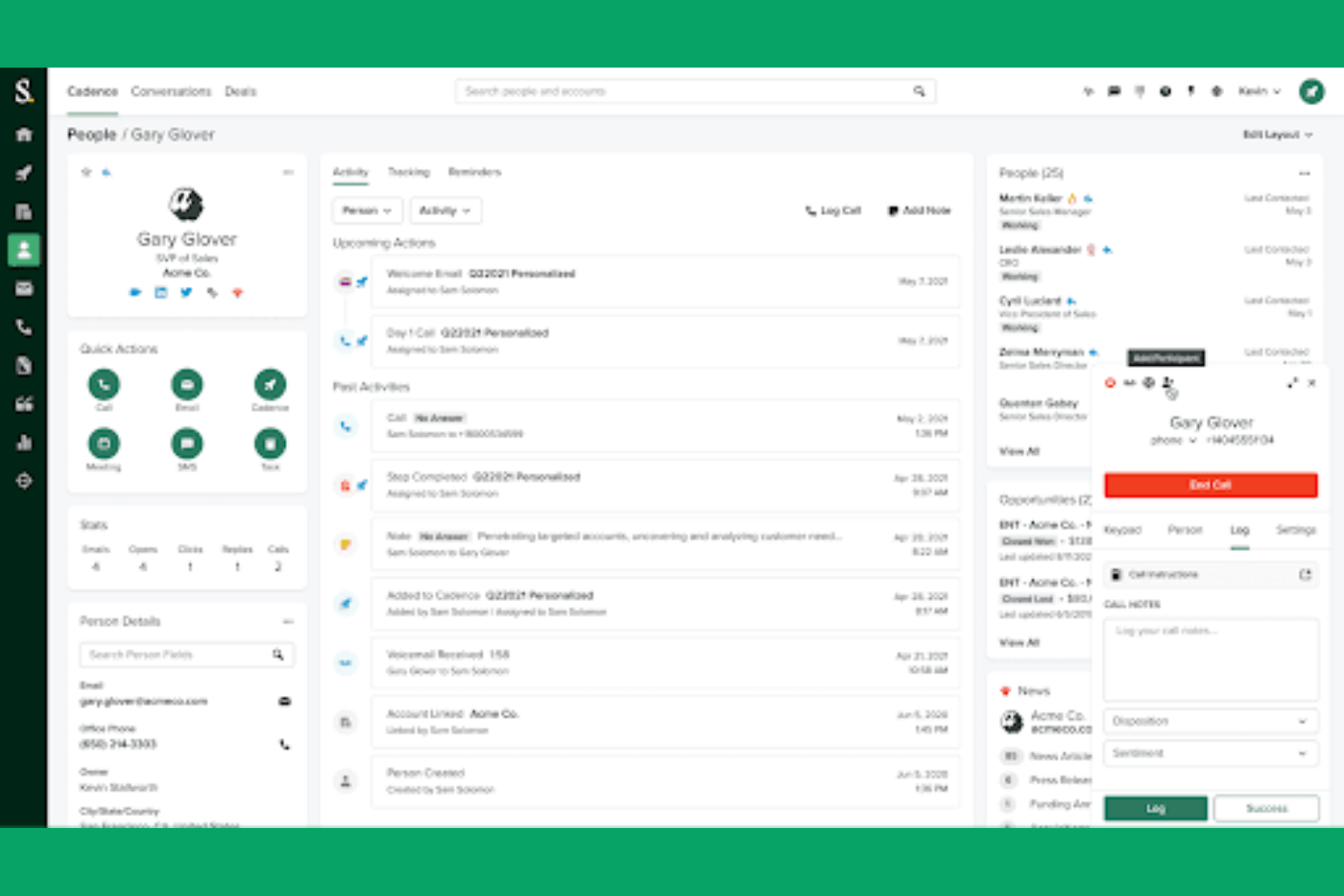
Drift is a conversational marketing platform designed for businesses to engage with website visitors in real-time using chatbots and live chat. It primarily serves sales and marketing teams by facilitating personalized customer interactions and enhancing lead conversion through AI-driven chat features.
Why I picked Drift: Drift excels in conversational marketing by using AI to create personalized chat experiences. Its AI chatbots engage visitors, qualify leads, and route them to your sales team. The platform's ability to automate responses and integrate with CRM systems ensures lead management. Drift's focus on real-time customer interaction aligns perfectly with its USP in conversational marketing.
Standout features & integrations:
Features include real-time chat, lead qualification, and automated meeting scheduling. Drift helps your team capture leads directly from conversations and engage visitors instantly. It also offers analytics to track chat performance and improve engagement strategies.
Integrations include Salesforce, HubSpot, Marketo, Slack, Google Analytics, Zendesk, Intercom, and Microsoft Dynamics 365.
Pros and Cons
Pros:
- Automates meeting scheduling
- Mobile app for iOS and Android
- Real-time visitor engagement via AI-powered chatbots
Cons:
- Limited advanced features without upgrades
- Potential for customer frustration if handoffs from bots to human reps are slow

Best for sales pipeline management
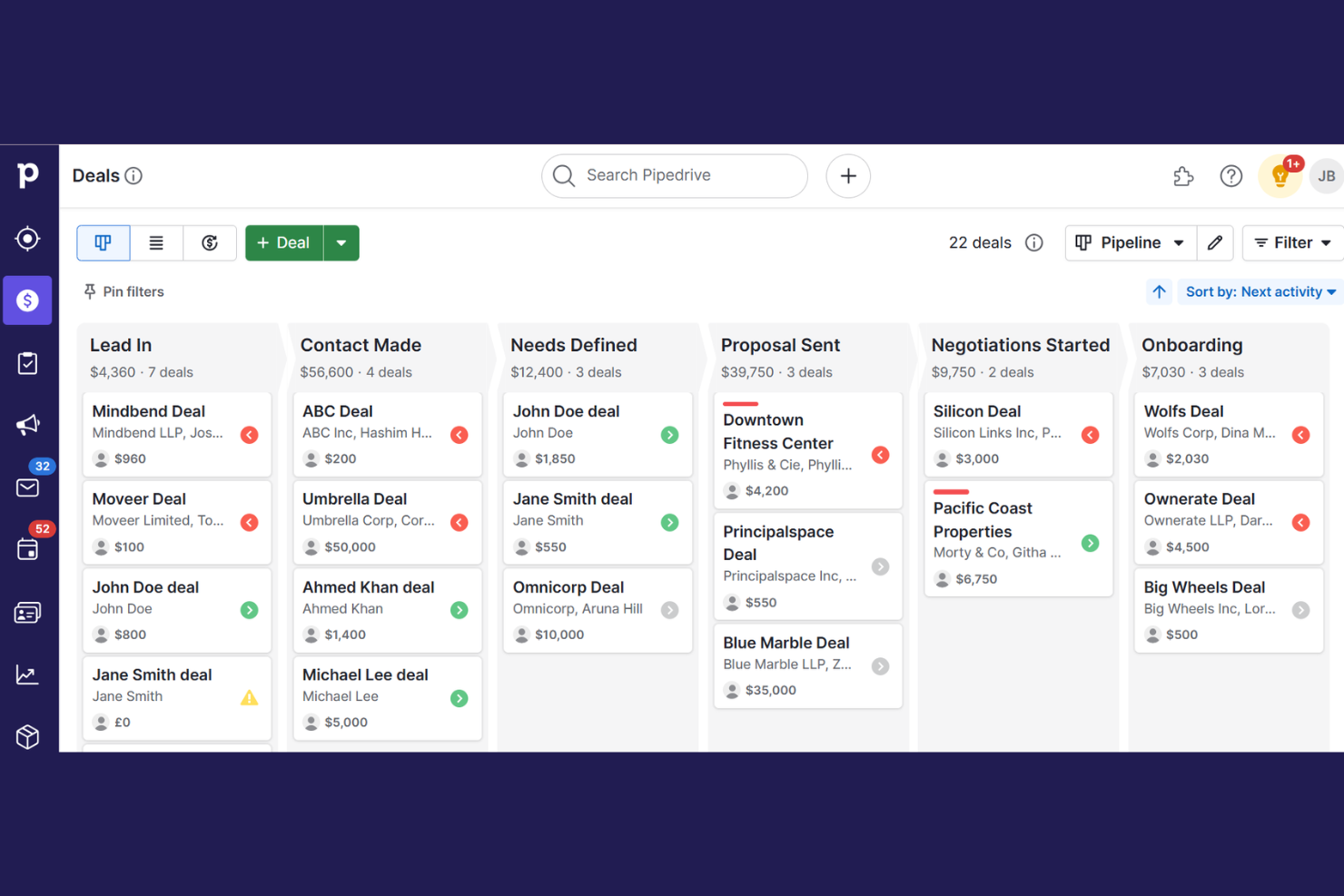
Pipedrive is a customer relationship management (CRM) tool designed for sales teams to manage leads and sales processes. It aids in tracking deals, organizing contacts, and automating repetitive tasks, all while offering AI-powered insights to optimize sales strategies.
Why I picked Pipedrive: Pipedrive excels in managing sales pipelines with its intuitive interface and AI-driven insights. Its AI assistant helps you prioritize leads and provides recommendations to close deals. This tool offers visual sales pipelines that keep your team organized and focused on what matters most. Pipedrive's ability to automate tasks and simplify processes makes it the best for sales pipeline management.
Standout features & integrations:
Features include customizable pipelines, sales reporting, and goal tracking. Pipedrive helps your team manage contacts and track communication history. It also offers mobile access to keep your sales process moving wherever you are.
Integrations include Mailchimp, Slack, Trello, Asana, Google Meet, Outlook, QuickBooks, Xero, and Zapier.
Pros and Cons
Pros:
- 500+ integrations to boost workflows
- AI sales assistant AISA
- Built-in AI to improve deal close times
Cons:
- Support limitations on lower plan tiers
- ‘Campaigns’ add-on for email marketing lacks depth

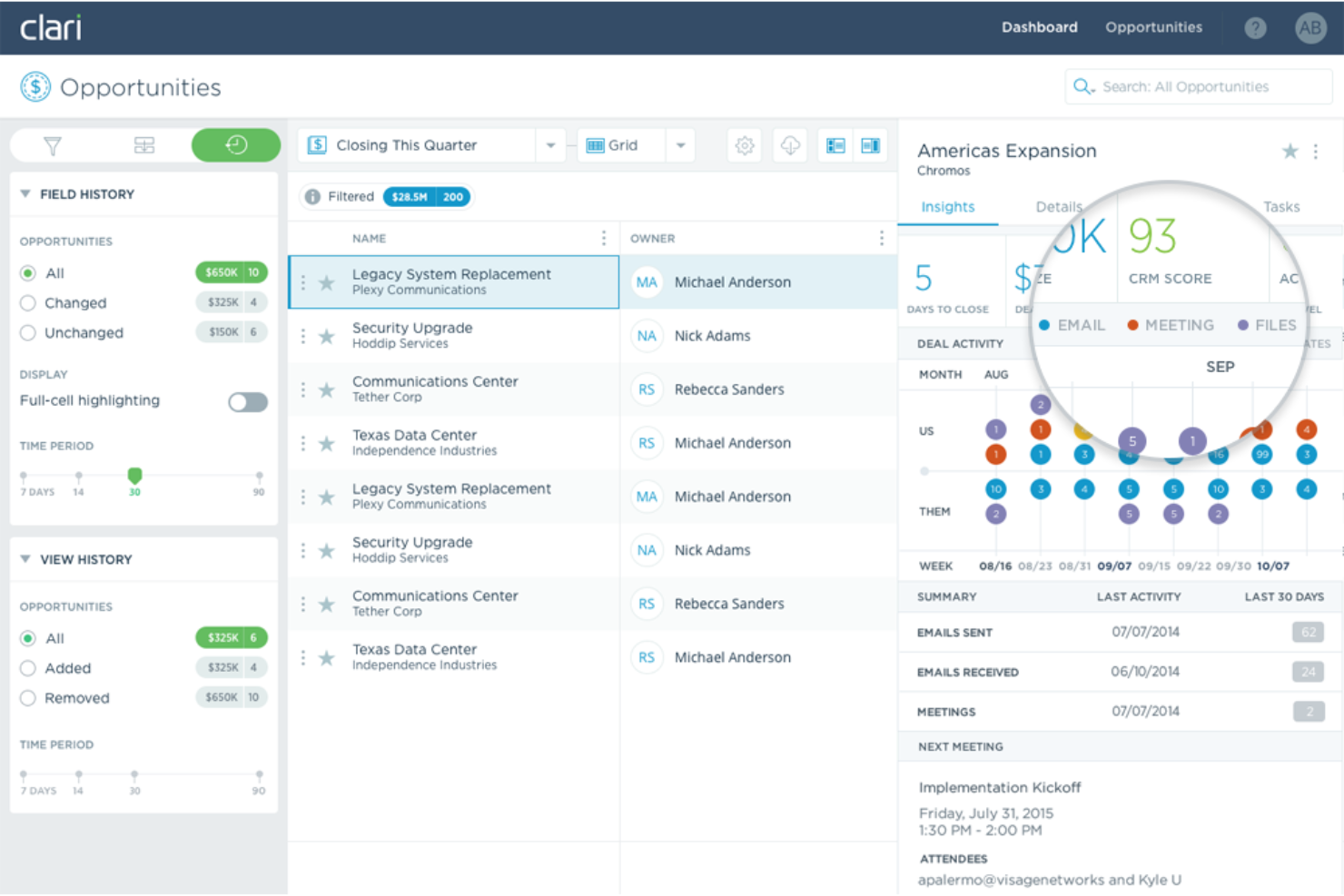
Clari is an AI-driven platform designed for enterprise revenue orchestration, enhancing sales productivity and forecasting accuracy. It serves sales, marketing, and finance teams across various industries like technology and healthcare.
Why I picked Clari: Clari's AI capabilities focus on revenue intelligence, using AI-driven insights to guide sellers and improve forecasting. Revenue AI Agents and real-time data capture differentiate it from other tools, offering precise opportunity management and sales engagement. These features align with Clari's USP of being the best for revenue intelligence. The platform's capacity to manage over $5 trillion in revenue for clients showcases its scalability and effectiveness.
Standout features & integrations:
Features include real-time data capture, opportunity management, and conversation intelligence. Clari's AI guides your team with insights for improved forecasting. It also offers sales engagement tools to enhance productivity.
Integrations include Salesforce, Microsoft Exchange, Outlook, HubSpot, Zoom, Google Workspace, HubSpot, LinkedIn, Microsoft Teams, Slack, Google Sheets, and Marketo.
Pros and Cons
Pros:
- Sales engagement tools for prospecting and sales execution
- AI provides accurate sales forecasts to mitigate deal risks
- Real-time data capture and unification of sales activity data
Cons:
- Dependency on CRM hygiene
- Implementation often involves professional services that can incur additional costs
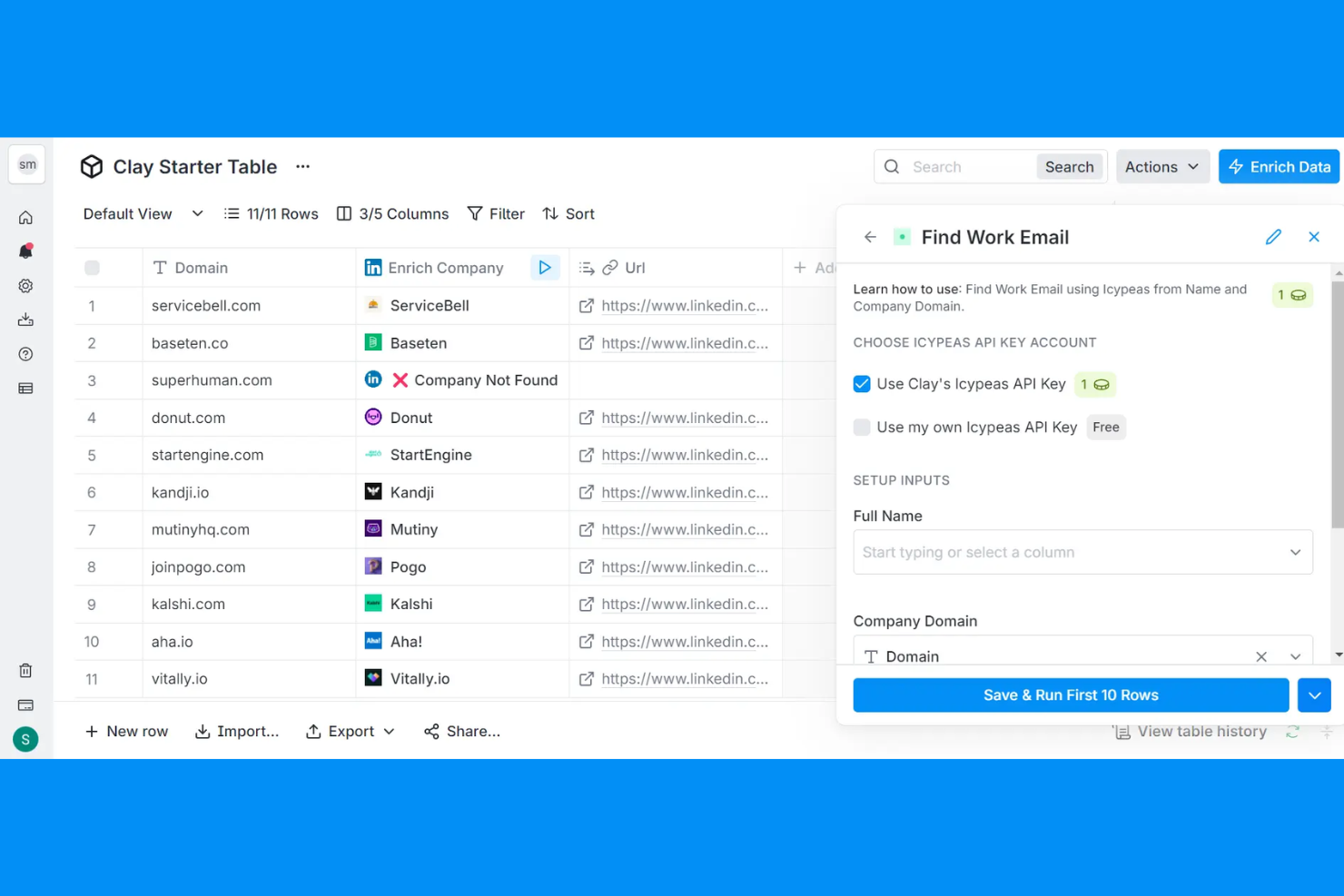
Clay is an AI-driven platform designed to enhance relationship management by leveraging data to improve go-to-market strategies. It primarily serves sales and marketing teams seeking to enrich leads and automate outreach.
Why I picked Clay: Clay's AI capabilities focus on relationship management through data integration and personalized communication. The platform's AI tools, like Claygent and Sequencer, automate research and email outreach, helping your team maintain strong connections with prospects. Signals and Audiences provide real-time insights into job changes and social mentions, keeping your team informed. These features make Clay ideal for managing and nurturing relationships.
Standout features & integrations:
Features include dynamic workflows, AI-powered lead enrichment, and intent signals. Clay helps your team automate repetitive tasks and personalize outreach. It also supports account-based marketing strategies to enhance your go-to-market efforts.
Integrations include Salesforce, HubSpot, LinkedIn, Microsoft Dynamics 365, Google Sheets, Slack, and Outlook.
Pros and Cons
Pros:
- Real-time contact enrichment
- Automates lead enrichment
- Unified contact data in a centralized location
Cons:
- Data accuracy varies by source
- No free trial for all features
Other AI Sales Assistant Software
Here are some additional AI sales assistant software options that didn’t make it onto my shortlist, but are still worth checking out:
- Artisan
For prospecting efficiency
- UserGems
For contact insights
- SalesCloser AI
For deal closures
- CoPilot AI
For lead generation
- Loopio
For RFP automation
- Saleshandy
For email tracking
- Outreach
For sales engagement
- Dialpad
For voice intelligence
- Cognism
For B2B lead generation
- Gong
For sales call analysis
- Salesforce
For CRM integration
- Reply.io
For multichannel sequences
- Apollo.io
For prospecting and outreach


How I Evaluate AI Sales Assistant Software
AI sales assistant software is what a RevOps team turns to when reps aren't logging calls and managers can't tell which deals are actually moving. When I evaluate tools in this space, I first establish what every pick must do to qualify, then look at what actually separates one solution from another.
Core Functionality (Table Stakes for This List)
For AI sales assistant software, the core functionality I test and evaluate is:
- Conversation capture: I check whether the tool records and transcribes calls across Zoom, Teams, and Google Meet with accurate speaker separation.
- CRM sync: Automatic logging of call notes, contacts, and activity data back to Salesforce or HubSpot without reps touching a single field.
- AI summaries: I evaluate whether post-meeting summaries capture actual decisions, objections, and next steps rather than generic recaps.
- Deal intelligence: The tool should flag at-risk deals based on engagement signals, like a champion going silent or pricing never being discussed.
- Coaching insights: I look for talk-to-listen ratios, question frequency, and methodology adherence scoring that managers can act on.
- Follow-up generation: Drafted follow-up emails and action items pulled directly from conversation context, not boilerplate templates.
- Multi-channel coverage: Sales happens across calls, email, and chat. I evaluate whether the tool tracks buyer engagement across all of them.
A tool has to deliver most of these capabilities to earn a spot on the list. From there, I consider what sets each tool apart.
Standout Features (What Separates the Picks)
Other impressive features I look for include real-time sales guidance capabilities that actively assist reps during live conversations, such as surfacing objection-handling recommendations, competitor battle cards, discovery prompts, or next-best actions based on deal context. Sales methodology alignment also stands out, especially when tools can track and coach to frameworks like MEDDIC or Challenger within the workflow. I also consider how vendors handle data privacy and recording consent, since enterprise IT almost always asks about compliance, regional storage, and redaction of sensitive info.
What I Weigh Beyond Features
Pricing model matters here because per-seat costs at $100+/user/month add up fast across a 50-rep org. I evaluate whether a tool fits the buyer's team size and maturity—a five-person startup has very different needs than an enterprise with global sales pods. Tech stack fit is another big factor; I check how deeply a tool connects to existing dialers, sequencers like Outreach or SalesLoft, and BI platforms where RevOps teams build reporting. I also consider onboarding support, since adoption is where most AI sales assistant rollouts stall.
How to Choose AI Sales Assistant Software
It’s easy to get bogged down in long feature lists and complex pricing structures. To help you stay focused as you work through your unique software selection process, here’s a checklist of factors to keep in mind:
| Factor | What to Consider |
|---|---|
| Scalability | Can the software grow with your business? Check if it supports additional users and features as your needs expand. Avoid solutions that may limit future growth. |
| Integrations | Does it connect with your existing tools? Ensure compatibility with your CRM, email, and other key systems to avoid data silos and workflow disruption. |
| Customizability | Can you tailor it to your processes? Look for flexible settings that let you adjust workflows, dashboards, and reports to fit your team's unique needs. |
| Ease of use | Is it user-friendly for your team? Assess the learning curve and whether the interface is intuitive enough for quick adoption without extensive training. |
| Implementation and onboarding | How smooth is the setup process? Consider the time and resources needed to get started, including any available support or training materials to aid your transition. |
| Cost | Does it fit your budget? Compare the price to your budget and expected ROI. Be wary of hidden fees or costs that could arise as you scale or add features. |
| Security safeguards | Are your data protected? Verify if the software complies with industry standards like encryption and access controls to keep sensitive information safe. |
| Support availability | Will you get help when needed? Check for 24/7 support options, response times, and the availability of dedicated account managers to assist with any issues. |
What Is AI Sales Assistant Software?
AI sales assistant software is a tool that uses artificial intelligence to automate and enhance various aspects of the sales workflow. Sales professionals, including sales reps and sales leaders, generally use these automation tools to boost efficiency and improve customer interactions within the sales cycle. Features like lead scoring, predictive analytics, and automated communications help with identifying high-value prospects, forecasting sales, and engaging customers. Overall, these tools provide significant value by saving time and improving the accuracy of sales efforts.
Features
When selecting AI sales assistant software, keep an eye out for the following key features:
- Lead scoring: Uses AI to evaluate and prioritize leads based on their likelihood to convert, helping your team focus on high-value prospects.
- Predictive analytics: Analyze historical sales data to forecast future sales trends, aiding in strategic decision-making and planning.
- Automated communications: Automate routine sales emails and messages, ensuring timely and consistent engagement with leads and customers.
- Sentiment analysis: Assesses the tone and emotion in customer interactions to provide insights into client satisfaction and engagement.
- Real-time transcription: Transcribes meetings and calls instantly, allowing for accurate record-keeping, call summaries, and easy reference.
- Conversation insights: Analyze sales call recordings to identify successful tactics and areas for improvement, enhancing team performance.
- Smart scheduling: Automates meeting scheduling based on availability, reducing back-and-forth communication and saving time.
- Customizable dashboards: Offer tailored views and reports, enabling users to focus on the most relevant metrics and data.
- AI-driven recommendations: Provide actionable suggestions for next steps in the sales process, optimizing strategies and outcomes.
Benefits
Implementing AI sales assistant software provides several benefits for your team and your business. Here are a few you can look forward to:
- Increased efficiency: Automates routine tasks like email follow-ups, email sequences, and meeting scheduling, freeing up time for your team to focus on closing deals.
- Improved accuracy: Uses predictive analytics within AI-powered tools to forecast sales trends, helping you make informed decisions and reduce guesswork.
- Enhanced customer engagement: Provides personalized communication through AI-driven insights, ensuring more meaningful interactions with clients through data enrichment.
- Better lead prioritization: Utilizes lead scoring to identify high-value prospects, enabling your team to concentrate efforts where they matter most.
- Deeper insights: Offer conversation analysis and sentiment tracking, giving you a better understanding of customer needs and areas for improvement.
- Faster onboarding: Simplifies the integration of new team members with automated training resources and intuitive interfaces.
- Cost savings: Reduce the need for manual labor in data entry and analysis, lowering operational costs and increasing profitability.
Costs & Pricing
Selecting AI sales assistant software requires an understanding of the various pricing models and plans available. Costs vary based on features, team size, add-ons, and more. The table below summarizes common plans, their average prices, and typical features included in AI sales assistant software solutions:
Plan Comparison Table for AI Sales Assistant Software
| Plan Type | Average Price | Common Features |
|---|---|---|
| Free Plan | $0 | Basic lead tracking, limited email automation, and simple reporting. |
| Personal Plan | $15-$99 | Advanced personalized email automation, AI insights, real-time coaching, and customizable dashboards. |
| Business Plan | $100-$350+ | Full CRM integration, predictive analytics, and multi-channel communication. |
| Enterprise Plan | $400-$2,500+ | Custom AI models, dedicated support, and advanced security features. |
AI Sales Assistant Software FAQs
Here are some answers to common questions about AI sales assistant software:
Can AI sales assistants help with data privacy compliance?
Yes, AI sales assistants can help with data privacy compliance. Many tools offer features that align with GDPR, CCPA, and other regulations. It’s essential to review the software’s privacy policies and data handling practices to ensure they meet your company’s requirements. Look for features like data encryption, user consent management, and audit logs. These tools can assist your team in maintaining compliance while managing customer data.
How do I measure ROI with AI sales assistant software?
To measure ROI, start by setting clear objectives like increased lead conversion or reduced response time. Track key performance indicators (KPIs) such as sales growth, time saved, and customer satisfaction. Use the software’s analytics to gather data and compare it to your goals. Regularly review these metrics to assess the software’s impact on your sales process. Calculating ROI helps you understand the tool’s value and informs future investment decisions.
How do AI sales assistants help simplify sales reporting for RevOps teams?
AI sales assistants can automate data entry, follow-up emails, and reporting, so you get real-time insights without manual work. They pull sales activities, deal statuses, and outcomes into easy-to-read dashboards. This makes it easier for RevOps teams to monitor pipeline health, compare rep performance, and identify bottlenecks faster.
Can AI sales assistants analyze sales call data for coaching and improvement?
Yes, most AI sales assistants can review sales call transcripts and surface key trends. These tools flag important moments, provide sentiment analysis, and highlight where reps can improve. RevOps teams use this feedback to guide targeted coaching and help teams close more deals.
How quickly can RevOps teams expect to see impact from AI sales assistant tools?
You may notice initial improvements within a few weeks, depending on how quickly your team adopts the tool. Early wins often show up as cleaner data, faster pipeline reviews, and increased follow-up rates. More significant changes in deal velocity or conversion rates may take a few months to fully realize.
What’s Next:
If you're in the process of researching AI sales assistant software, connect with a SoftwareSelect advisor for free recommendations.
You fill out a form and have a quick chat where they get into the specifics of your needs. Then you'll get a shortlist of software to review. They'll even support you through the entire buying process, including price negotiations.