
21 Best AI Sales Forecasting Software Reviewed in 2026

Best AI Sales Forecasting Software Shortlist
Here’s my shortlist of the best AI sales forecasting software:


Sales forecasting isn’t easy when customer behavior and market conditions keep shifting. Even the best teams can struggle to make confident decisions when they’re relying on guesswork or outdated data. AI-powered forecasting tools help you spot patterns, flag risks, and plan with more certainty.
I’ve tested a range of platforms that do this well, and in this article, I’ll break down the ones worth your attention, along with what they do best. If you’re looking to improve your forecasting process, these tools can give your team a clearer path forward.
Why Trust Our Software Reviews
We’ve been testing and reviewing RevOps software since 2022. As RevOps leaders ourselves, we know how critical and difficult it is to make the right decision when selecting software.
We invest in deep research to help our audience make better software purchasing decisions. We’ve tested more than 2,000 tools for different RevOps use cases and written over 1,000 comprehensive software reviews. Learn how we stay transparent & our software review methodology.
Best AI Sales Forecasting Software Summary
This comparison chart summarizes pricing details for my top AI sales forecasting software selections to help you find the best one for your budget and business needs.
| Tool | Best For | Trial Info | Price | ||
|---|---|---|---|---|---|
| 1 | Best with custom API connections | Free plan available | From $49/month (billed annually) | Website | |
| 2 | Best for analytics integration | Free demo available | Pricing upon request | Website | |
| 3 | Best for proactive recommendations | Free demo available | From $1,500/user/year | Website | |
| 4 | Best for large enterprises | Free demo available | Pricing upon request | Website | |
| 5 | Best for easy deal tracking | 14-day free trial | From $12/user/month (billed annually) | Website | |
| 6 | Best for AI-driven insights | Free demo available | Pricing upon request | Website | |
| 7 | Best for real-time data and deal-risk prediction | Free trial available | Pricing upon request | Website | |
| 8 | Best for process automation | 14-day free trial available | From $25/user/month | Website | |
| 9 | Best for team collaboration | Free demo available | Pricing upon request | Website | |
| 10 | Best for scenario planning | Free trial available | Pricing upon request | Website |

-

Pipedrive CRM
Visit WebsiteThis is an aggregated rating for this tool including ratings from Crozdesk users and ratings from other sites.4.3 -
Creatio CRM
Visit WebsiteThis is an aggregated rating for this tool including ratings from Crozdesk users and ratings from other sites.4.7 -
monday CRM
Visit WebsiteThis is an aggregated rating for this tool including ratings from Crozdesk users and ratings from other sites.4.6



Best AI Sales Forecasting Software Review
Below are my detailed summaries of the best AI sales forecasting software that made it onto my shortlist. My reviews offer a detailed look at the key features, pros & cons, integrations, and ideal use cases of each tool to help you find the best one for you.

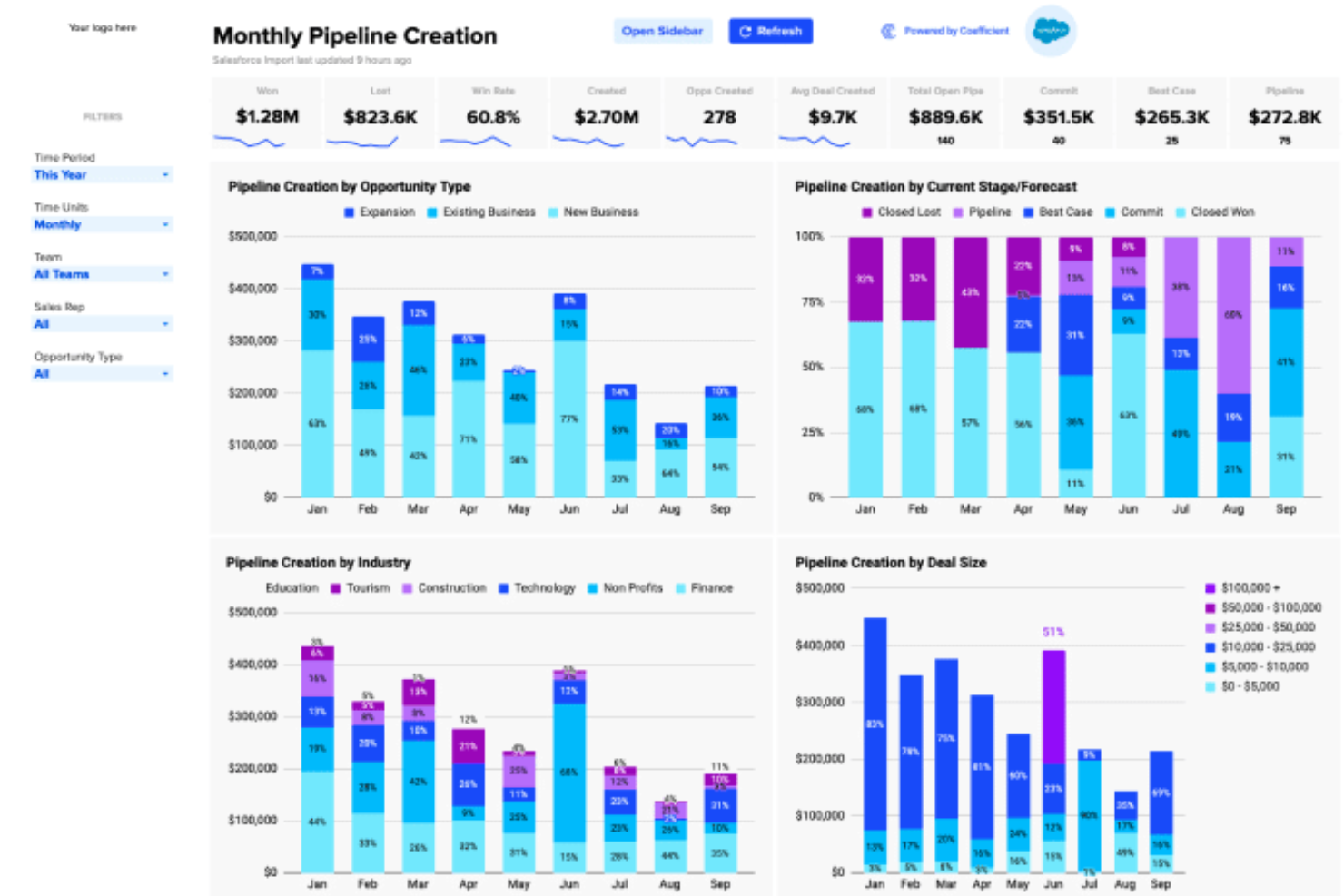
Coefficient offers a dynamic solution for those seeking AI-driven sales forecasting software, particularly appealing to professionals in finance, marketing, and revenue operations. It empowers teams by integrating with tools like Google Sheets, Excel, and Salesforce, allowing them to transform raw data into actionable insights.
By automating data tasks and facilitating the creation of custom dashboards, Coefficient addresses the challenge of manual data management, helping businesses make informed decisions with ease.
Why I Picked Coefficient
I picked Coefficient for its ability to simplify complex data processes through its integration capabilities and AI tools. The platform stands out with its Import Agent, which connects spreadsheets to over 100 data sources, making it invaluable for comprehensive sales forecasting.
Furthermore, its Google Sheets Assistant and SQL Query Builder offer robust tools for data analysis and modeling, providing users with the means to generate precise sales forecasts. These features make Coefficient a compelling choice for teams looking to support their forecasting accuracy and efficiency.
Coefficient Key Features
In addition to its standout features, Coefficient offers several other functionalities that enhance its utility in sales forecasting:
- Browser Agent: This feature allows your team to scrape live data from websites, ensuring you always have the most current information at your fingertips.
- API Agent: Build custom connectors to integrate data from unique sources, enabling a tailored approach to data management.
- Automated Alerts: Set up notifications via Slack or email to stay informed about critical changes in your data, helping you respond swiftly to market dynamics.
- Interactive Dashboards: Create visual representations of your sales data, making it easier for your team to interpret and act on insights.
Coefficient Integrations
Integrations include Google Sheets, Excel, Salesforce, QuickBooks, Snowflake, and various CRM, marketing, finance, and BI tools. Coefficient also allows for building custom connectors and scraping data from websites.
Pros and Cons
Pros:
- AI tools for data cleaning can help improve data accuracy
- Automated reporting can significantly reduce manual workload
- Web scraping capabilities offer additional data insights
Cons:
- Advanced features may require additional training for full utilization
- Limited customization options for advanced users' specific needs

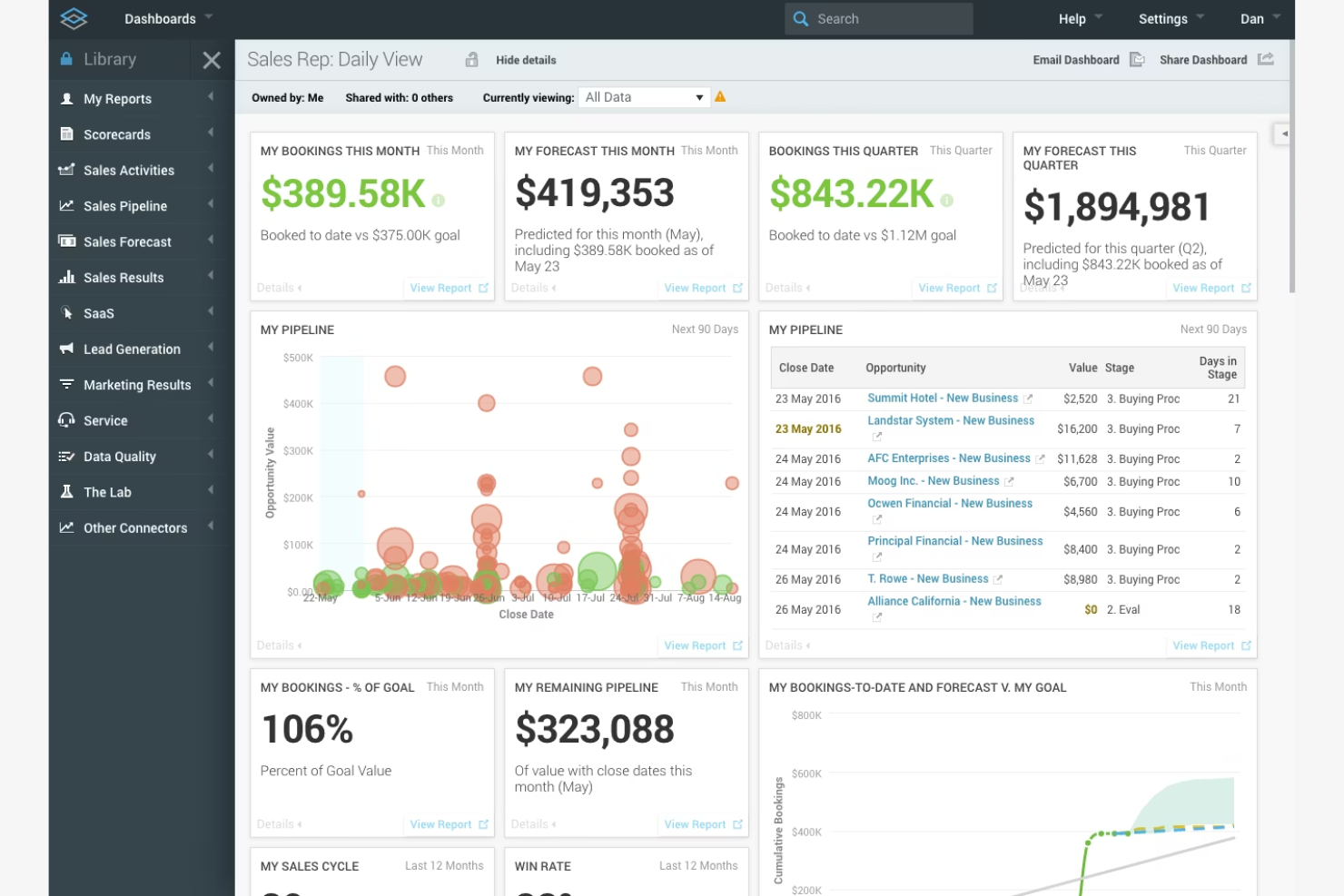
InsightSquared elevates revenue planning with data science-driven forecasting and enterprise-level data analytics dashboards. It offers advanced AI capabilities to deliver complete analytics and insights that help optimize sales strategies and improve decision-making.
Why I picked InsightSquared: Its strong focus on analytics integration makes it ideal for teams that rely heavily on data-driven insights. It merges unstructured data and CRM inputs to provide multi-model predictive analytics and trend tracking. The platform's integration capabilities ensure that data flows across systems, enhancing the accuracy of forecasts. InsightSquared's ability to integrate analytics directly into sales processes is also a great feature for analytics integration.
Standout Features & Integrations:
Features include customizable dashboards that let you tailor reports to your team's needs. The platform offers pipeline management tools to help you track deal progress and identify bottlenecks. You can also set performance metrics to monitor team achievements and align them with business objectives.
Integrations include Salesforce, HubSpot, Slack, Marketo, Zendesk, Microsoft Dynamics, QuickBooks, Gmail, Outlook, and Google Analytics.
Pros and Cons
Pros:
- Customizable dashboards for tailored insights
- Historical time series performance tracking
- Advanced analytics for data-driven decisions
Cons:
- Pricing details are not transparent
- Complexity may require training


Spiro automatically captures interactions and applies neural networks to detect hidden opportunities or stalled deals, reducing manual entry errors. Its AI capabilities focus on automating data entry and providing actionable insights to improve sales efficiency and effectiveness.
Why I picked Spiro: It excels at offering proactive recommendations that help your team make informed decisions. AI features like automated contact logging and opportunity tracking reduce manual data entry, freeing up your team's time. Its ability to suggest future outcomes and recommended actions creates near-real-time data mining of customer touchpoints.
Standout Features & Integrations:
Features include automated data entry, which saves time and reduces errors. You can use email integration to track communications and ensure nothing falls through the cracks. The platform's reporting tools provide valuable insights into sales performance and trends.
Integrations include Salesforce, Slack, Microsoft Teams, Gmail, Outlook, HubSpot, Zendesk, QuickBooks, Xero, and Mailchimp.
Pros and Cons
Pros:
- AI insights for opportunity tracking
- Automated data entry reduces manual workload
- Proactive recommendations for sales improvement
Cons:
- Learning curve for new users
- Higher price point than competitors
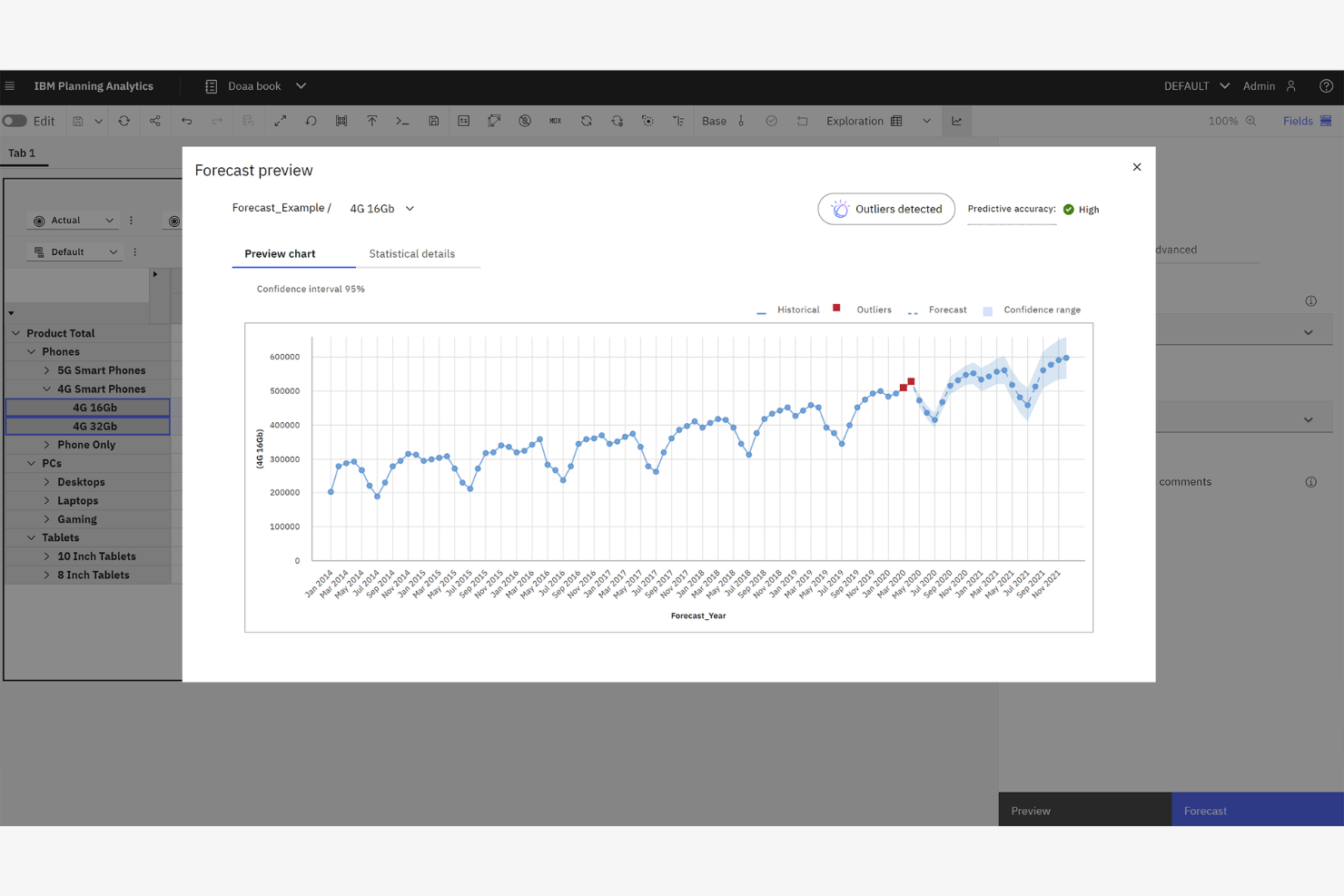
IBM Planning Analytics uses generative AI and advanced statistical models to automate financial planning and operational forecasting at scale. It uses AI to automate complex planning tasks and deliver insights that help streamline decision-making processes.
Why I picked IBM Planning Analytics: Its focus on serving large enterprises makes it perfect for organizations with vast data sets. AI features like predictive forecasting and automated data analysis help your team manage and interpret large volumes of information efficiently. Its big data handling and data science layering support extremely detailed revenue and inventory planning, including predictive maintenance, inventory management, and supply demand forecasting.
Standout Features & Integrations:
Features include customizable planning templates that adapt to your business needs. You can use real-time data integration to ensure accuracy in your forecasts. The platform also offers scenario analysis tools, allowing you to explore various business outcomes and adjust strategies accordingly.
Integrations include SAP, Oracle, Salesforce, Microsoft Excel, Workday, NetSuite, QuickBooks, Google Analytics, Tableau, and IBM Cognos.
Pros and Cons
Pros:
- Scenario modeling for strategic planning
- Predictive analytics for informed decision-making
- Scalable for large enterprise use
Cons:
- Complex setup and slow configurations
- May require extensive training

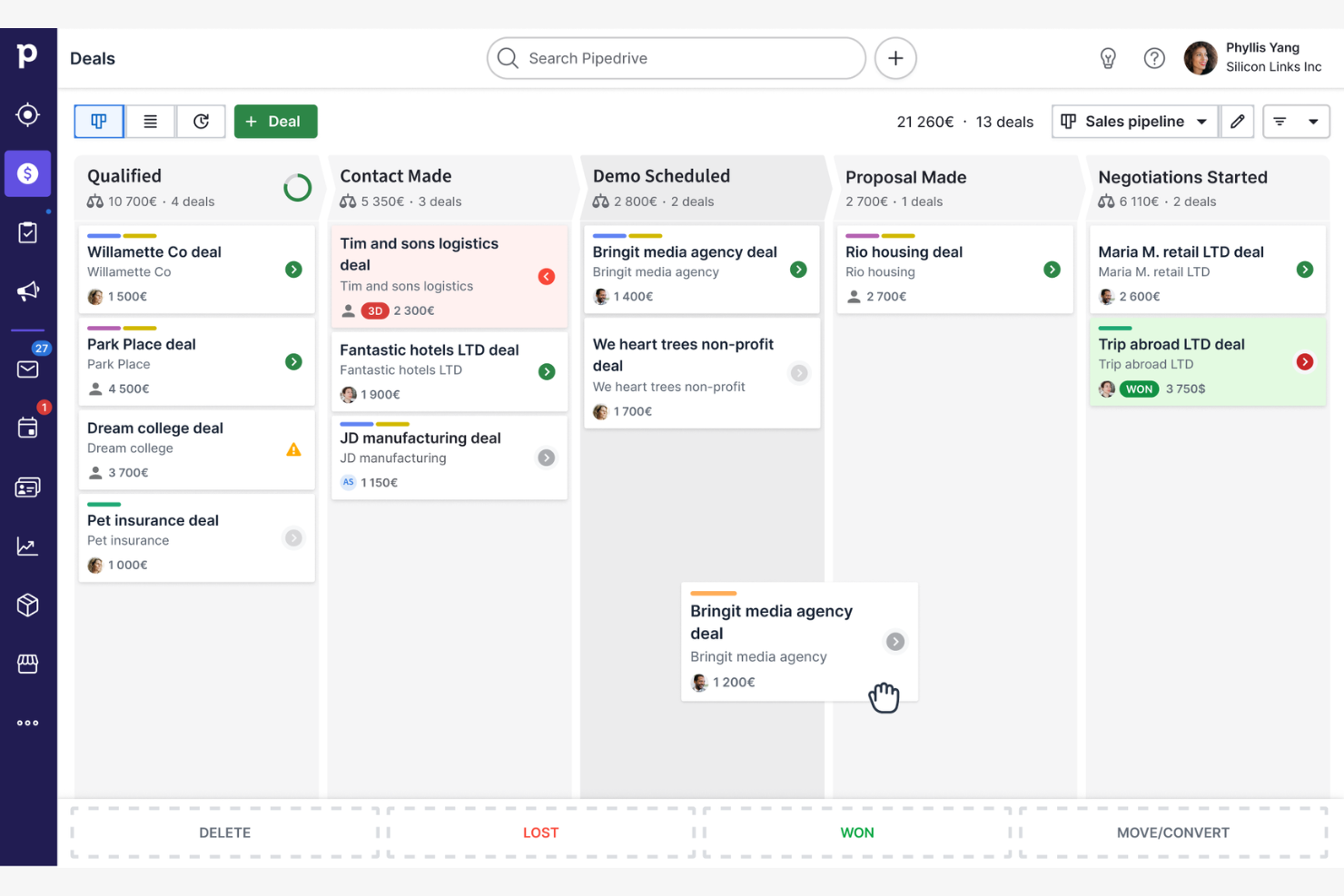
Pipedrive is a sales management tool designed for sales teams looking for simple deal tracking and pipeline management. It offers AI capabilities that help automate repetitive tasks and provide insights to improve sales processes.
Why I picked Pipedrive: Its intuitive interface makes it easy for your team to track deals without a steep learning curve. AI-driven features like smart contact data and deal rotting alerts ensure you focus on the right opportunities. It simplifies forecasting while still improving data-driven pipeline management without overwhelming SMBs.
Standout Features & Integrations:
Features include customizable pipelines that let you adapt the tool to fit your sales process. You can automate follow-up emails to keep leads engaged and use activity reminders to stay on top of tasks. The reporting tools provide insights into sales performance, helping your team make informed decisions.
Integrations include Slack, Google Workspace, Microsoft Teams, Mailchimp, Zapier, Trello, Asana, Xero, HubSpot, and QuickBooks.
Pros and Cons
Pros:
- Easy-to-view data visualization dashboard
- Smart nudges to prevent revenue churn
- Automated data collection for deal updates
Cons:
- Basic reporting features compared to competitors
- Limited customization for complex processes


Aviso uses machine learning models to provide revenue risk scoring, pipeline inspection, and future outcomes projections for enterprise sellers. It provides predictive insights and analytics to improve decision-making and sales outcomes through its advanced AI capabilities.
Why I picked Aviso: It focuses on delivering AI-driven insights that empower your team to make informed decisions. Features like predictive forecasting and deal guidance help you anticipate market changes and adjust strategies accordingly. Its deep learning approach constantly re-trains forecasts, so accuracy improves as more raw data is fed into the system.
Standout Features & Integrations:
Features include advanced analytics that give you a detailed view of sales performance. You can set up custom dashboards to monitor key metrics and use scenario planning to explore potential outcomes. The platform's machine learning algorithms continuously refine forecasts, improving accuracy over time.
Integrations include Salesforce, Microsoft Dynamics, SAP, Oracle, Slack, Gmail, Outlook, LinkedIn, Marketo, and HubSpot.
Pros and Cons
Pros:
- Custom dashboards for monitoring metrics
- Predictive forecasting improves sales planning
- AI-driven insights for strategic decision-making
Cons:
- Reporting lacks depth for analytics
- Interface slows down basic tasks

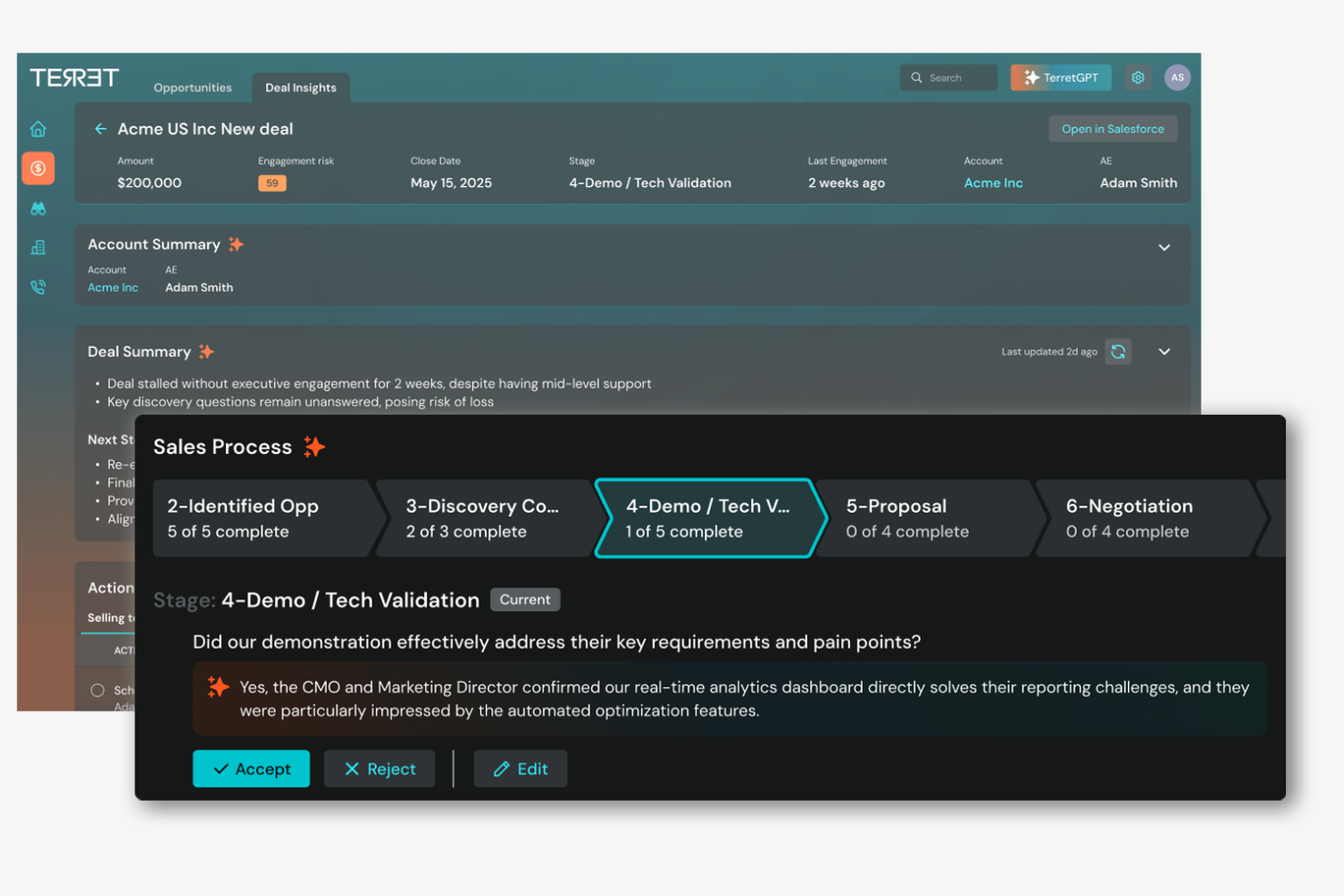
Terret delivers frontline and leadership insights using neural networks, statistical models, and event-based data mining to reduce forecast variance. It leverages AI to deliver predictive insights and analytics, helping teams refine their sales strategies and achieve better outcomes.
Why I picked Terret: Its emphasis on forecast accuracy makes it indispensable for teams needing precise sales predictions. AI-driven features like pipeline inspection and risk assessment help you identify potential issues before they impact results. The platform's predictive analytics provide a clear view of future sales trends, allowing for proactive adjustments. Terret is ideal for teams seeking to improve forecast reliability through advanced AI insights.
Standout Features & Integrations:
Features include real-time sales tracking, which keeps your team informed of every deal's status. You can use the platform's collaboration tools to improve team communication and align on goals. The customizable dashboards provide insights into key performance indicators, helping you track and improve sales effectiveness.
Integrations include Salesforce, Microsoft Dynamics, Slack, Gmail, Outlook, Google Calendar, HubSpot, Marketo, Zendesk, and LinkedIn.
Pros and Cons
Pros:
- Customizable dashboards for performance tracking
- Deal-specific risk alerts for retention targeting
- Forecast health scoring using AI models
Cons:
- Hard-to-navigate panels for beginners
- Costly setup requiring expertise


CRM Creatio is a customer relationship management platform tailored for businesses seeking to automate their sales and marketing processes. It leverages AI to improve customer engagement and streamline operations, making it a go-to for those prioritizing process automation.
Why I picked CRM Creatio: Its strong focus on automating workflows makes it ideal for teams looking to reduce manual tasks. AI functionalities like intelligent scoring and predictive analytics help your team prioritize leads and forecast sales effectively. The low-code interface empowers you to customize processes without extensive technical knowledge. This flexibility in automating and managing workflows aligns perfectly with its USP in process automation.
Standout Features & Integrations:
Features include customizable dashboards that let you tailor the system to your needs. You can create automated workflows that trigger based on specific conditions, reducing repetitive tasks. The platform also offers advanced reporting tools that provide insights into customer interactions and sales metrics.
Integrations include Microsoft Outlook, Gmail, Mailchimp, QuickBooks, Zapier, Docusign, LinkedIn, Facebook, Slack, and Twilio.
Pros and Cons
Pros:
- Flexible UI for big data integrations
- Automated data collection and hand-offs
- AI-driven predictive analytics for opportunity scoring
Cons:
- Limited third-party integration options
- Feature overload complicates workflows
New Product Updates from Creatio CRM

Creatio CRM Expands AI Across Marketing and Collaboration
Creatio CRM introduces AI-assisted landing page generation, template-based email generation, RAG-enabled knowledge governance, a Microsoft Teams personal tab, and AI meeting summaries. These updates help teams create content faster and streamline AI-powered workflows. For more information, visit Creatio’s official site.
 .
.
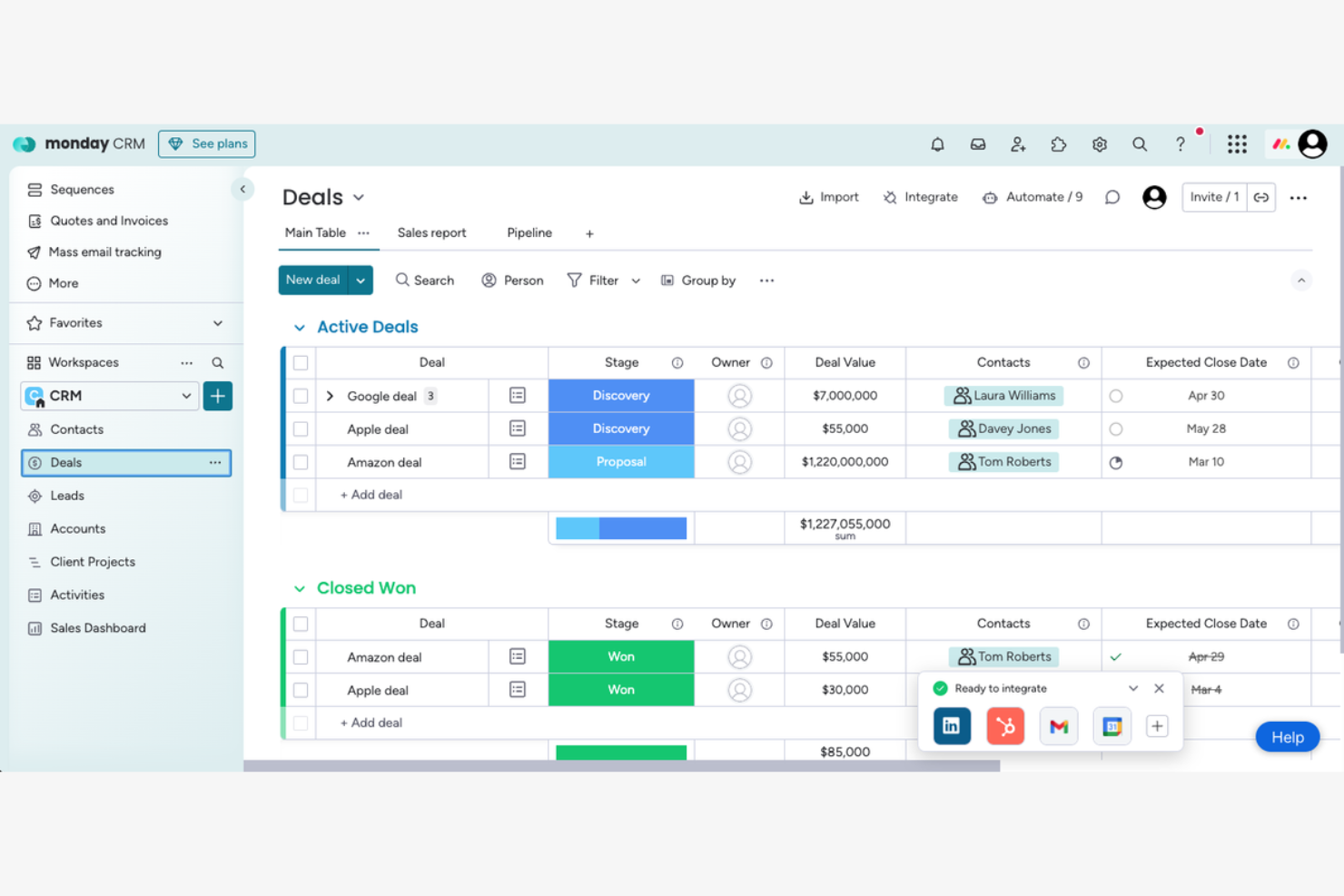
CRM gives teams a shared view of pipeline health and revenue forecasting driven by data analytics and automated reminders to reduce manual errors. It provides AI capabilities to automate workflows and improve team communication, making it ideal for collaborative environments.
Why I picked monday CRM: Its focus on team collaboration makes it a standout choice for businesses that rely on strong internal communication. AI features like automated task assignments and predictive analytics help your team stay on track and make informed decisions. Great for alignment; data is consolidated into board-style views with data visualization to help teams understand future events at a glance.
Standout Features & Integrations:
Features include customizable dashboards that let you tailor the interface to your team's needs. You can set up automated reminders to keep everyone on schedule and use time tracking to monitor productivity. The platform's reporting tools give you insights into sales performance and team efficiency.
Integrations include Slack, Microsoft Teams, Zoom, Google Calendar, Trello, Dropbox, Shopify, HubSpot, Zendesk, and Jira.
Pros and Cons
Pros:
- Automated task assignments improve efficiency
- Visual dashboards simplify task management
- Customizable workflows for different teams
Cons:
- Limited advanced reporting features
- Complex and slow configurations
New Product Updates from monday CRM

monday CRM Introduces Activity Tracker Widget
monday CRM introduces an Activity Tracker widget for real-time visibility into activities. This update helps users monitor performance and prioritize work more effectively. For more information, visit monday CRM's official site.
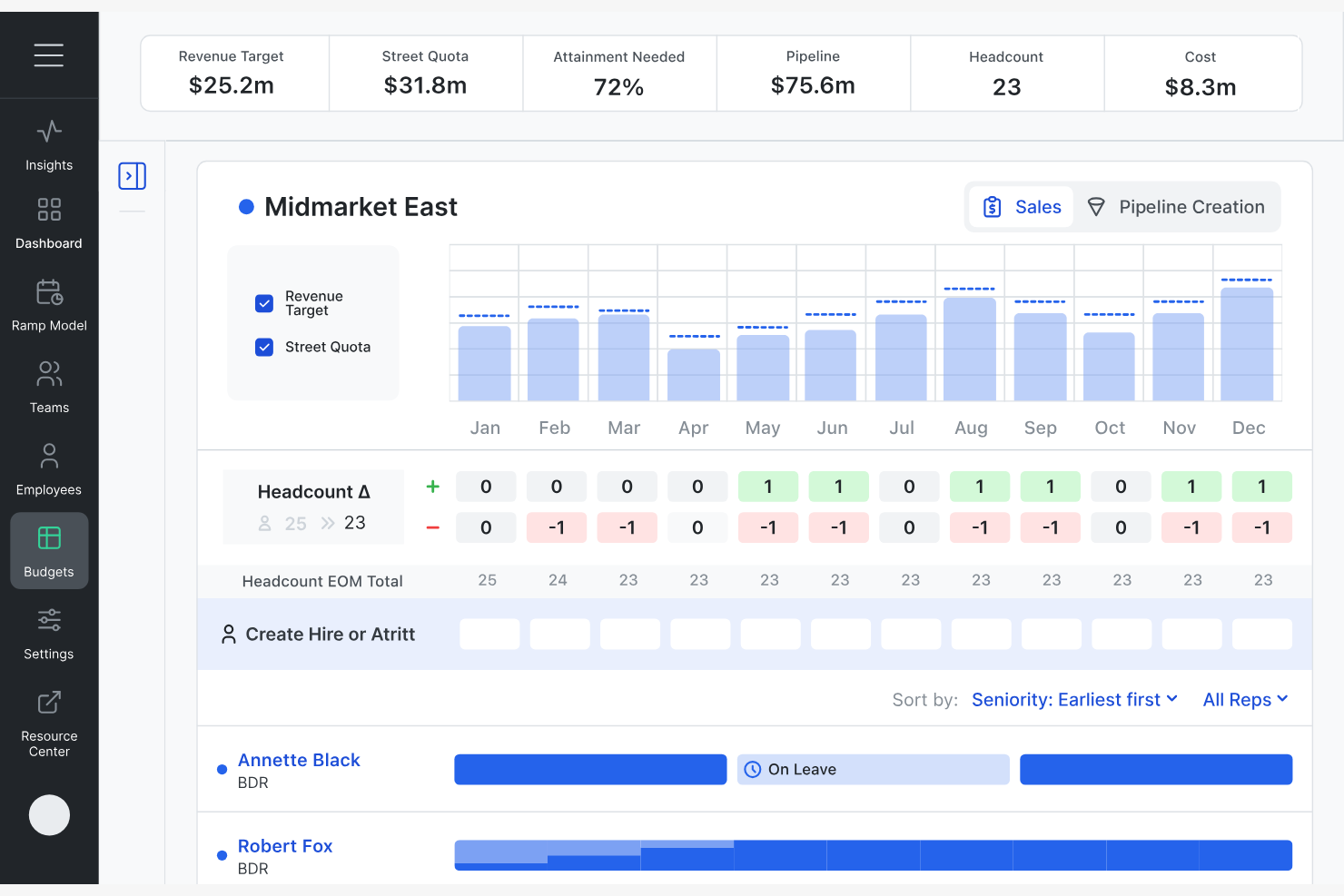
RevCast is an AI-driven revenue forecasting and planning platform ideal for finance and sales teams. It supports multiple forecasting simulations using statistical models and neural networks to explore changing future outcomes in revenue planning.
Why I picked RevCast: Its time series forecasting helps revenue and finance leaders analyze potential future events tied to hiring, budgets, and sales cycles. Its scenario modelling capabilities make it a standout for teams needing detailed forecasting. The platform's integrated playbook supports real-time data analysis, facilitating collaboration among stakeholders. RevCast's focus on enhancing decision-making through AI-driven insights aligns with its strength in scenario planning.
Standout Features & Integrations:
Features include real-time insights that keep your team updated on performance metrics. Scenario modeling allows you to explore different business outcomes and plan accordingly. The platform also offers performance management tools to track and analyze sales and revenue data.
Integrations include Salesforce, Microsoft Dynamics, NetSuite, QuickBooks, Xero, HubSpot, Marketo, SAP, Oracle, and Google Analytics.
Pros and Cons
Pros:
- Integrated playbook for data analysis
- Scenario modeling for strategic planning
- Real-time insights for quick decision-making
Cons:
- May require training for full utilization
- Missing features reduce collaborative usability
Other AI Sales Forecasting Software
Here are some additional AI sales forecasting software options that didn’t make it onto my shortlist, but are still worth checking out:
- Pipeliner
For visual sales pipelines
- Salesflare
For small business automation
- Outreach
For sales engagement tracking
- Salesloft
For sales team collaboration
- EngageBay
For all-in-one marketing suite
- EspoCRM
For open-source flexibility
- Salesmate
For integrated communication tools
- LeadLander
For website visitor tracking
- People.ai
For AI-driven sales coaching
- Kluster
For revenue intelligence
- Venu
For virtual event engagement
- Finmark
For financial modeling simplicity


AI Sales Forecasting Software Selection Criteria
When selecting the best AI sales forecasting software to include in this list, I considered common buyer needs and pain points like accuracy in predictions and ease of integration. I also used the following framework to keep my evaluation structured and fair:
Core Functionality (25% of total score)
To be considered for inclusion in this list, each solution had to fulfill these common use cases:
- Generate accurate sales forecasts
- Analyze historical sales data
- Automate data entry and reporting
- Provide real-time insights and alerts
- Integrate with CRM systems
Additional Standout Features (25% of total score)
To help further narrow down the competition, I also looked for unique features, such as:
- Predictive analytics with AI
- Customizable forecasting models
- Scenario planning capabilities
- Machine learning-driven insights
- Automated trend analysis
Usability (10% of total score)
To get a sense of the usability of each system, I considered the following:
- Intuitive user interface
- Easy navigation and accessibility
- Minimal learning curve
- Customizable dashboards
- Consistent and reliable performance
Onboarding (10% of total score)
To evaluate the onboarding experience for each platform, I considered the following:
- Availability of training videos
- Interactive product tours
- Access to webinars and workshops
- All-inclusive templates for setup
- 24/7 chatbot assistance
Customer Support (10% of total score)
To assess each software provider’s customer support services, I considered the following:
- 24/7 customer support availability
- Multiple support channels (email, chat, phone)
- Responsiveness and resolution time
- Access to a dedicated account manager
- Availability of online support resources
Value For Money (10% of total score)
To evaluate the value for money of each platform, I considered the following:
- Competitive pricing compared to features offered
- Flexible pricing plans
- Discounts for annual billing
- Transparent pricing structures
- Return on investment potential
Customer Reviews (10% of total score)
To get a sense of overall customer satisfaction, I considered the following when reading customer reviews:
- Overall satisfaction ratings
- Feedback on ease of use
- Comments on customer support experience
- Reports on software reliability and performance
- Testimonials on the impact on sales forecasting accuracy
How to Choose AI Sales Forecasting Software
It’s easy to get bogged down in long feature lists and complex pricing structures. To help you stay focused as you work through your unique software selection process, here’s a checklist of factors to keep in mind:
| Factor | What to Consider |
|---|---|
| Scalability | Can the software grow with your team? Check if it handles increased data and users without performance dips. |
| Integrations | Does it work with your existing tools? Look for native integrations to save time and avoid data silos. |
| Customizability | Can you tailor it to fit your workflows? See if the software allows for personalized dashboards and reports. |
| Ease of Use | Is it user-friendly for everyone on your team? Test the interface to ensure it suits all skill levels. |
| Implementation and Onboarding | How long does it take to get up and running? Consider the training and resources available for a smooth start. |
| Cost | Does it fit your budget? Compare pricing plans and watch for hidden fees or costs that could add up over time. |
| Security Safeguards | Are your data and user information protected? Check for encryption, access controls, and compliance with standards like GDPR. |
| Support Availability | What kind of help can you expect? Look for 24/7 support options and check user reviews for responsiveness. |
What Is AI Sales Forecasting Software?
AI sales forecasting software is a tool that uses artificial intelligence to predict future sales based on historical data and market trends. Sales managers, analysts, and revenue operations teams typically use these tools to improve accuracy in sales predictions and make informed decisions.
Automated data analysis, predictive modeling, and real-time insights help with identifying trends and assessing risks. These tools provide significant value by enhancing decision-making and optimizing sales strategies.
Features
When selecting AI sales forecasting software, keep an eye out for the following key features:
- Predictive analytics: Uses historical data and AI to forecast future sales, helping teams anticipate trends and make data-driven decisions.
- Real-time insights: Provides up-to-the-minute data analysis to monitor sales performance and adjust strategies promptly.
- Automated data entry: Reduces manual input by automatically capturing and organizing sales data, saving time and reducing errors.
- Scenario modeling: Allows users to simulate different sales scenarios to evaluate potential outcomes and plan strategies accordingly.
- AI-driven alerts: Notifies teams of potential risks and opportunities, enabling proactive management of sales pipelines.
- Customizable dashboards: Lets users tailor their interface to display relevant metrics and insights for quick access to important information.
- Integration capabilities: Connects with existing CRM and other business tools to ensure a smooth data flow across platforms.
- Machine learning algorithms: Continuously improve forecast accuracy by learning from new data and adjusting predictions dynamically.
- Risk assessment tools: Evaluate potential sales risks and provide recommendations for mitigating them, enhancing decision-making.
- Collaboration tools: Facilitate team communication and coordination, ensuring everyone is aligned on sales strategies and goals.
Benefits
Implementing AI sales forecasting software provides several benefits for your team and your business. Here are a few you can look forward to:
- Improved accuracy: AI-driven predictive analytics improve forecast precision, helping you make better decisions based on reliable data.
- Time savings: Automated data entry and real-time insights reduce the time spent on manual tasks, allowing your team to focus on strategic activities.
- Proactive decision-making: AI-driven alerts and risk assessments enable your team to address potential issues before they impact sales outcomes.
- Improved collaboration: Collaboration tools facilitate communication and alignment across your team, ensuring everyone is on the same page.
- Customizable insights: Tailored dashboards provide personalized views of key metrics, helping users access the information most relevant to their roles.
- Adaptability: Machine learning algorithms improve over time, adapting to new data and refining forecasts to match changing market conditions.
- Scenario planning: Scenario modeling allows you to explore different sales strategies, helping you prepare for various potential outcomes.
Costs & Pricing
Selecting AI sales forecasting software requires an understanding of the various pricing models and plans available. Costs vary based on features, team size, add-ons, and more. The table below summarizes common plans, their average prices, and typical features included in AI sales forecasting software solutions:
Plan Comparison Table for AI Sales Forecasting Software
| Plan Type | Average Price | Common Features |
|---|---|---|
| Free Plan | $0 | Basic forecasting, limited data storage, and community support. |
| Personal Plan | $30-$800/user/month | Advanced analytics, email integration, and basic reporting. |
| Business Plan | $50-$2500/user/month | Predictive modeling, CRM integration, and customizable dashboards. |
| Enterprise Plan | $80-$5000/user/month | AI-driven insights, scenario planning, dedicated support, and full data integration capabilities. |
AI Sales Forecasting Software FAQs
Here are some answers to common questions about AI sales forecasting software:
How does AI improve forecast accuracy?
AI improves forecast accuracy by analyzing large datasets and identifying patterns that humans might miss. It uses machine learning algorithms to continuously refine predictions based on new data. For example, AI can detect seasonal trends or market shifts, helping your team adjust strategies proactively. This means you get more reliable forecasts and can plan with greater confidence.
Can AI sales forecasting software integrate with my existing CRM?
Yes, most AI sales forecasting software can integrate with popular CRM systems. Integration allows for seamless data flow between platforms, ensuring your forecasts are based on the most current information. Check for native integrations with your CRM to simplify setup and avoid manual data entry. This integration helps maintain data consistency and improves overall efficiency.
What should I consider when evaluating a vendor's support services?
Consider the availability and responsiveness of the vendor’s support team. Look for options like 24/7 support, multiple contact channels, and dedicated account managers. Evaluate user reviews to gauge the quality of support. A vendor offering full-scope support resources, such as FAQs, tutorials, and webinars, can greatly improve your experience and ease the adoption process.
What level of support is available after purchasing AI sales forecasting software?
Most AI sales forecasting software providers offer onboarding assistance, training sessions, and continued customer support. Depending on the vendor, this may include access to a dedicated account manager, live chat, email support, or a help center with tutorials and documentation. Make sure the support options align with your team’s needs, especially during setup and adoption.
Are there any security concerns with AI sales forecasting software?
Yes, security is a vital consideration. Ensure the software complies with data protection regulations like GDPR. Look for features like data encryption and access controls to protect sensitive information. Evaluate the vendor’s security certifications and history of data breaches. Prioritizing security safeguards helps protect your business and maintain customer trust.
What’s Next:
If you're in the process of researching AI sales forecasting software, connect with a SoftwareSelect advisor for free recommendations.
You fill out a form and have a quick chat where they get into the specifics of your needs. Then you'll get a shortlist of software to review. They'll even support you through the entire buying process, including price negotiations.