

O Zoho CRM é uma ferramenta que ajuda as empresas a gerir as relações com os clientes, acompanhar as vendas e automatizar os fluxos de trabalho, proporcionando uma solução completa para as equipas de vendas e marketing.
No entanto, alguns utilizadores podem procurar alternativas devido à falta de personalização ou à sua interface pouco intuitiva. Eis as minhas sugestões das melhores alternativas ao Zoho CRM para quem está a analisar as opções de software de CRM.
O que é o Zoho CRM?
O Zoho CRM é um software de gestão das relações com os clientes concebido para ajudar as empresas a gerir as suas atividades de vendas, marketing e apoio ao cliente. É habitualmente utilizado por equipas de vendas, profissionais de marketing e representantes do serviço de apoio ao cliente para acompanhar interações, automatizar fluxos de trabalho e analisar dados dos clientes.
Why Trust Our Software Recommendations
6,700+
Reviews
20
Industry experts
16+
Evaluation factors
14
Years
Our reviews reflect our independent judgment—not a sales pitch. Learn how we stay transparent.
For this guide, we evaluated tools using hands-on testing and independent research, scoring tools using our selection criteria.
Our reviews reflect our human editorial judgment, not a sales pitch.
Tabela de comparação: alternativas ao Zoho CRM
| Tool | Best For | Trial Info | Price | ||
|---|---|---|---|---|---|
| 1 | Best for automatic pipeline updates | 30-day free trial + free demo available | From $39/user/month | Website | |
| 2 | Best for small businesses needing simplicity | 30-day free trial available | From $15/user/month | Website | |
| 3 | Best for project management with integrated CRM | Free plan + 7-day free trial + free demo available | From $12/user/month | Website | |
| 4 | Best for AI-driven lead scoring and CRM functionality | 21-day free trial | From $9/user/month (billed annually) | Website | |
| 5 | Best for easy setup and user-friendly interface | Free plan + 14-day free trial available | From $22/user/month | Website | |
| 6 | Best for sales teams using Zendesk Support | Free demo available | From $19/month | Website | |
| 7 | Best for all-in-one business management | Free plan + 15-day cloud trial + 30-day On-Premise trial + free demo available | From $69/month | Website | |
| 8 | Best for visual sales pipeline management | 14-day free trial available | From $14/user/month (billed annually) | Website | |
| 9 | Best for guided Zoho CRM migration | 14-day free trial + free demo available | From $13/user/month | Website | |
| 10 | Best for Google Workspace integration | 14-day free trial + demo available | From $29/user/month | Website |


Melhores alternativas ao Zoho CRM
Nesta análise, apresentarei uma análise aprofundada de várias alternativas ao Zoho CRM. Abordarei as vantagens e desvantagens, as funcionalidades e os casos de utilização mais adequados de cada uma.
 Best for automatic pipeline updates
- 30-day free trial + free demo available
- From $39/user/month
Visit WebsiteCustomer Rating:4.7/5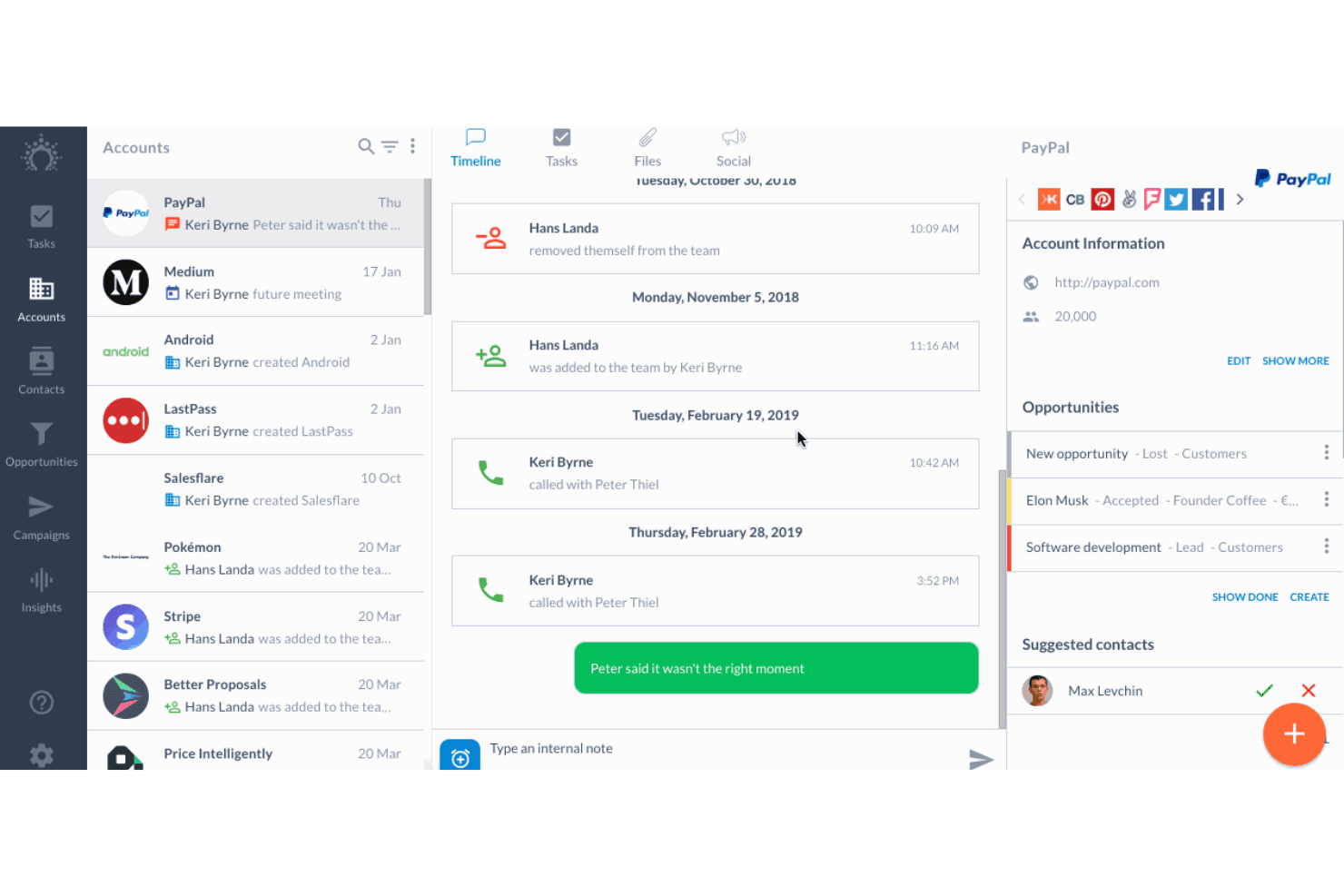
Salesflare tracks account activity and opportunities in one timeline view. Salesflare is a B2B-focused CRM built for small sales teams that want to spend less time on data entry and more time selling, automatically logging emails, meetings, and contacts in the background.
Who Is Salesflare Best For?
Salesflare suits small B2B sales teams that want their CRM to handle data capture automatically, so reps can focus on selling rather than logging.
Why I Picked Salesflare
I picked Salesflare because it removes the biggest friction point in pipeline maintenance: manual data entry. Where Zoho CRM relies on reps to log activity themselves, Salesflare captures emails, meetings, and contact details automatically in the background, so your pipeline stays current without anyone having to update it. I especially like the relationship intelligence layer, which shows which teammates know a contact and tracks interaction frequency, so you always know exactly where a relationship stands before your next outreach.
Salesflare Key Features
- Multi-pipeline management: Create unlimited pipelines organized by region, product, or business segment, each with customizable stages.
- Email and link tracking: Monitor email opens and link clicks for messages sent directly from Gmail or Outlook, including team IP exclusion to filter internal activity.
- Lead finder and email finder: Search for leads by industry, geography, or role from within the CRM, then look up verified business email addresses without leaving the platform.
- AI-powered timeline summaries: Built-in AI summarizes customer timelines, suggests next steps, and answers questions about individual accounts.
Salesflare Integrations
Salesflare lists 11,305 available apps, including native integrations with Google Workspace, Microsoft 365, LinkedIn, ChatGPT, and Claude. It offers a REST API for custom integrations and connects with Zoho CRM through Make and Zapier.
Pros and Cons
Pros:
- Separate pipelines fit distinct sales motions
- Relationship timelines reveal teammate connections
- Email activity stays logged without rep entry
Cons:
- Email workflows aren't built for newsletters
- Reporting offers less depth than Zoho
Learn more about Salesflare: Best for small businesses needing simplicity
- 30-day free trial available
- From $15/user/month
Visit WebsiteCustomer Rating:4.9/5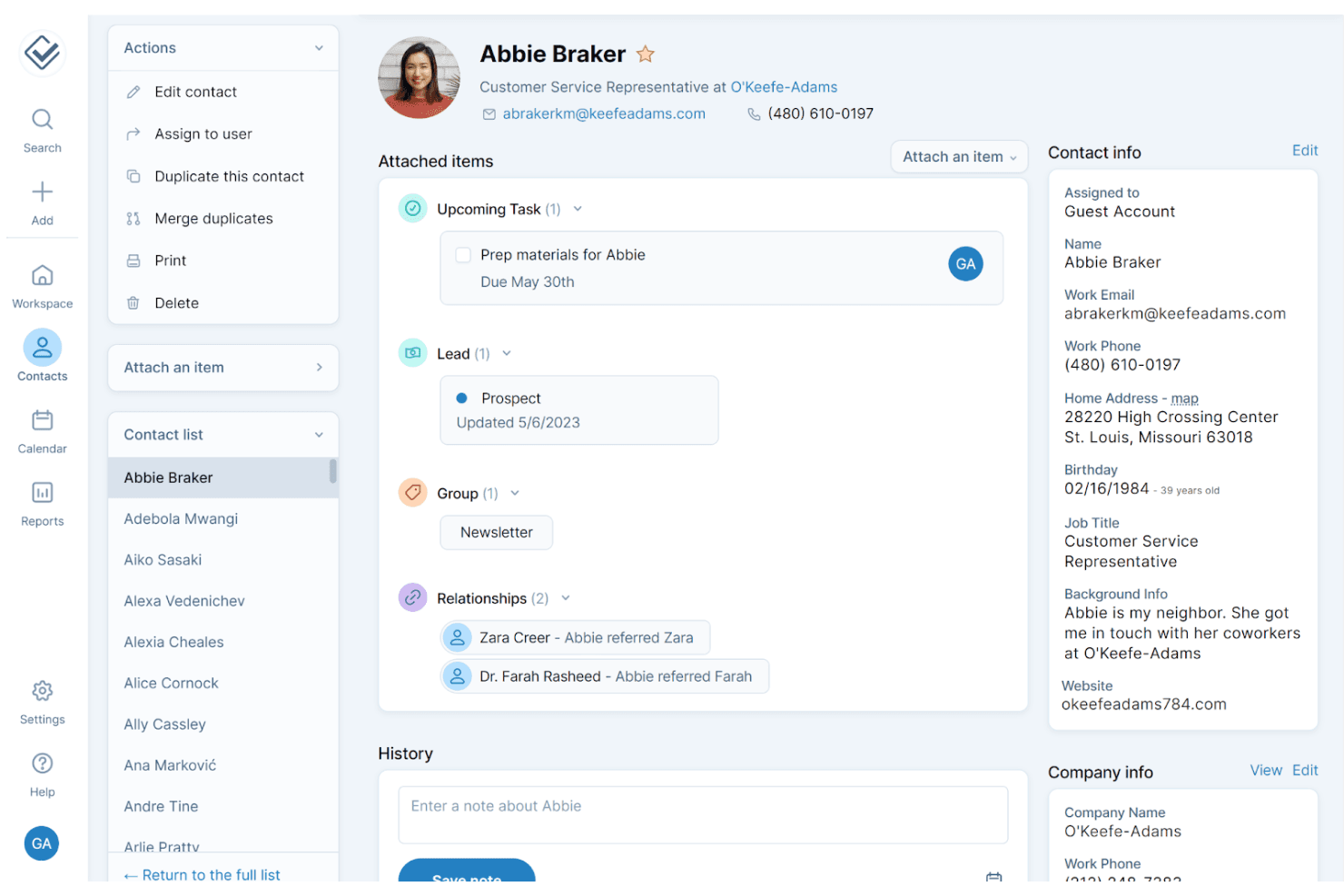
Less Annoying CRM centralizes contact details, tasks, and relationships. Less Annoying CRM is a contact and pipeline management tool built specifically for small businesses that want to track leads, organize client information, and manage follow-ups without the complexity of a feature-heavy CRM.
Who Is Less Annoying CRM Best For?
Less Annoying CRM is a strong fit for small business owners and lean sales teams who want straightforward contact and pipeline tracking without the learning curve of a larger CRM platform.
Why I Picked Less Annoying CRM
I picked Less Annoying CRM because it strips contact and pipeline management down to exactly what a small business actually needs. I love that every contact record consolidates notes, tasks, emails, and upcoming events in one view, so my team never has to dig across tabs to understand where a relationship stands. Multiple customizable pipelines let us track different sales processes side by side, and the board view makes it easy to drag deals between stages without any configuration overhead.
Less Annoying CRM Key Features
- Email logging: Automatically records email communications from Google, Microsoft, or IMAP accounts directly to contact records.
- Shared team calendars: Lets team members view, create, assign, and manage events across the whole team in one calendar.
- Activity reports: Tracks and exports team activity over a selected period to a spreadsheet or PDF.
- Zapier integration: Connects Less Annoying CRM to thousands of third-party apps to automate data handoffs between tools.
Less Annoying CRM Integrations
Native integrations include Google Contacts, Google Calendar, and Outlook Calendar. Less Annoying CRM also connects with Mailchimp, offers an API for custom integrations, and supports integrations via Zapier.
Pros and Cons
Pros:
- Reviewers praise responsive, personal support
- Multiple pipelines support distinct sales processes
- Contact records unify notes, tasks, and activity
Cons:
- Reporting lacks forecasting and advanced analytics
- Automation lacks branching workflow logic
Learn more about Less Annoying CRM: Best for project management with integrated CRM
- Free plan + 7-day free trial + free demo available
- From $12/user/month
Visit WebsiteCustomer Rating:4.8/5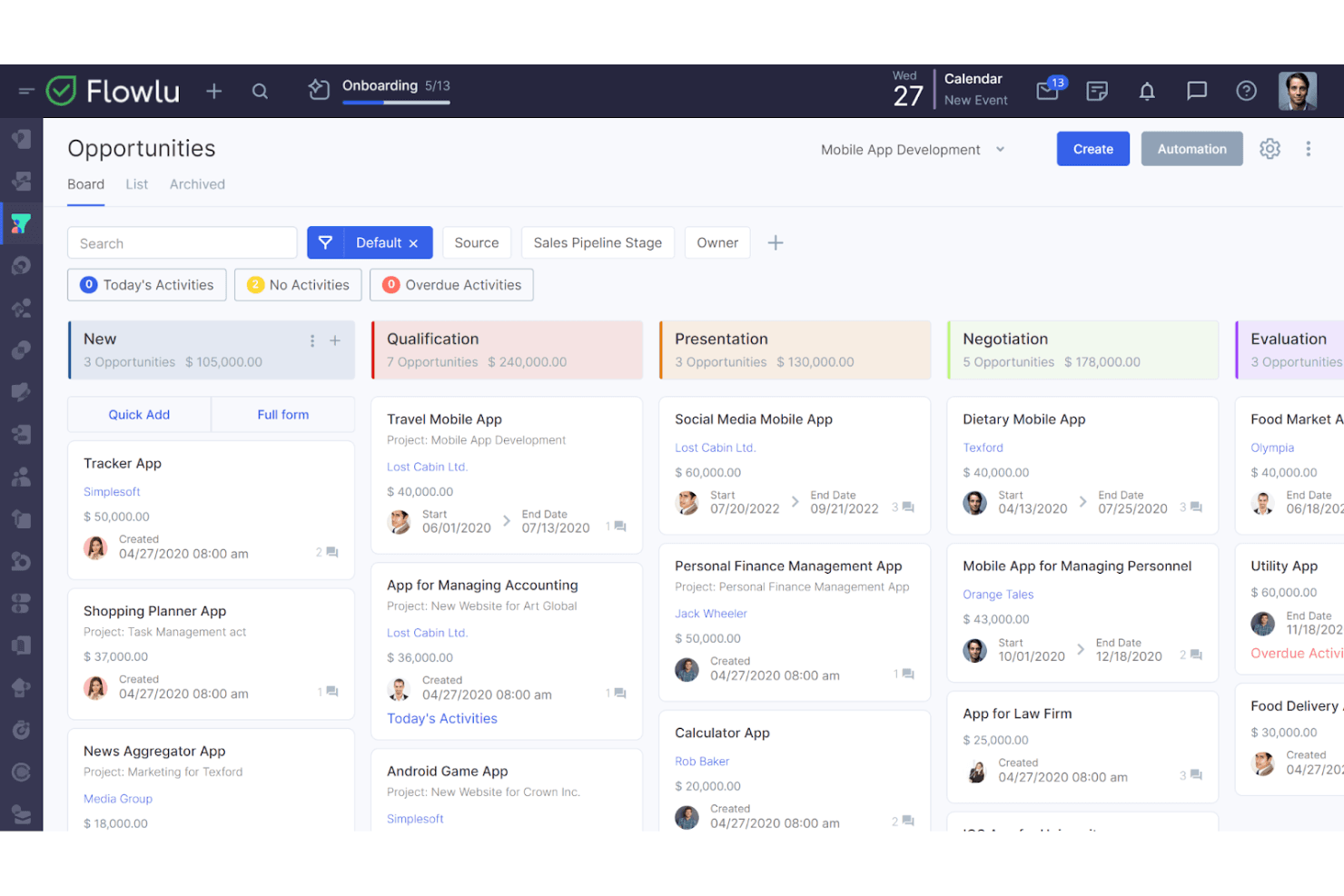
Flowlu organizes sales opportunities across pipeline stages on a kanban board. Flowlu is an all-in-one business platform that bundles CRM, project management, invoicing, and team collaboration into a single workspace—making it a strong fit for small businesses and service teams that want to manage clients and projects without juggling multiple tools.
Who Is Flowlu Best For?
Flowlu is a strong fit for small business owners and service teams that need to manage client relationships and project delivery in one place.
Why I Picked Flowlu
I picked Flowlu because it's one of the few CRM alternatives that natively connects deal management with full project delivery in the same record. When an opportunity closes, I can trigger a project to spin up automatically, with tasks, assignees, and milestones already mapped. I also appreciate that client portals let customers track progress and billing without needing a separate tool, keeping the post-sale experience tied directly to the CRM pipeline.
Flowlu Key Features
- Multiple sales pipelines: Create and manage any number of sales pipelines with customizable stages, Kanban views, and role-based access controls per pipeline.
- CRM automation rules: Set up unlimited no-code automation rules triggered by stage changes, including automatic task assignment, notifications, and project creation on won deals.
- Custom fields and record layouts: Add unlimited custom fields and lists to CRM, project, and task records, and adjust record page layouts to match your workflow.
- Lead capture forms: Embed web forms to capture leads directly into CRM pipelines as new contacts and opportunities.
Flowlu Integrations
Flowlu offers native integrations with Gmail, Microsoft Outlook, Mailchimp, Google Calendar, Twilio, WhatsApp, and Slack. It also supports REST API, webhooks, OAuth 2.0, and connections through Make.com and other marketplace providers.
Pros and Cons
Pros:
- Custom pipelines support distinct sales motions
- Client portals keep delivery visible after sale
- Connects won deals directly to projects
Cons:
- Call tracking depends on external providers
- CRM reporting offers limited analysis depth
Learn more about Flowlu: Best for AI-driven lead scoring and CRM functionality
- 21-day free trial
- From $9/user/month (billed annually)
Visit WebsiteCustomer Rating:4.6/5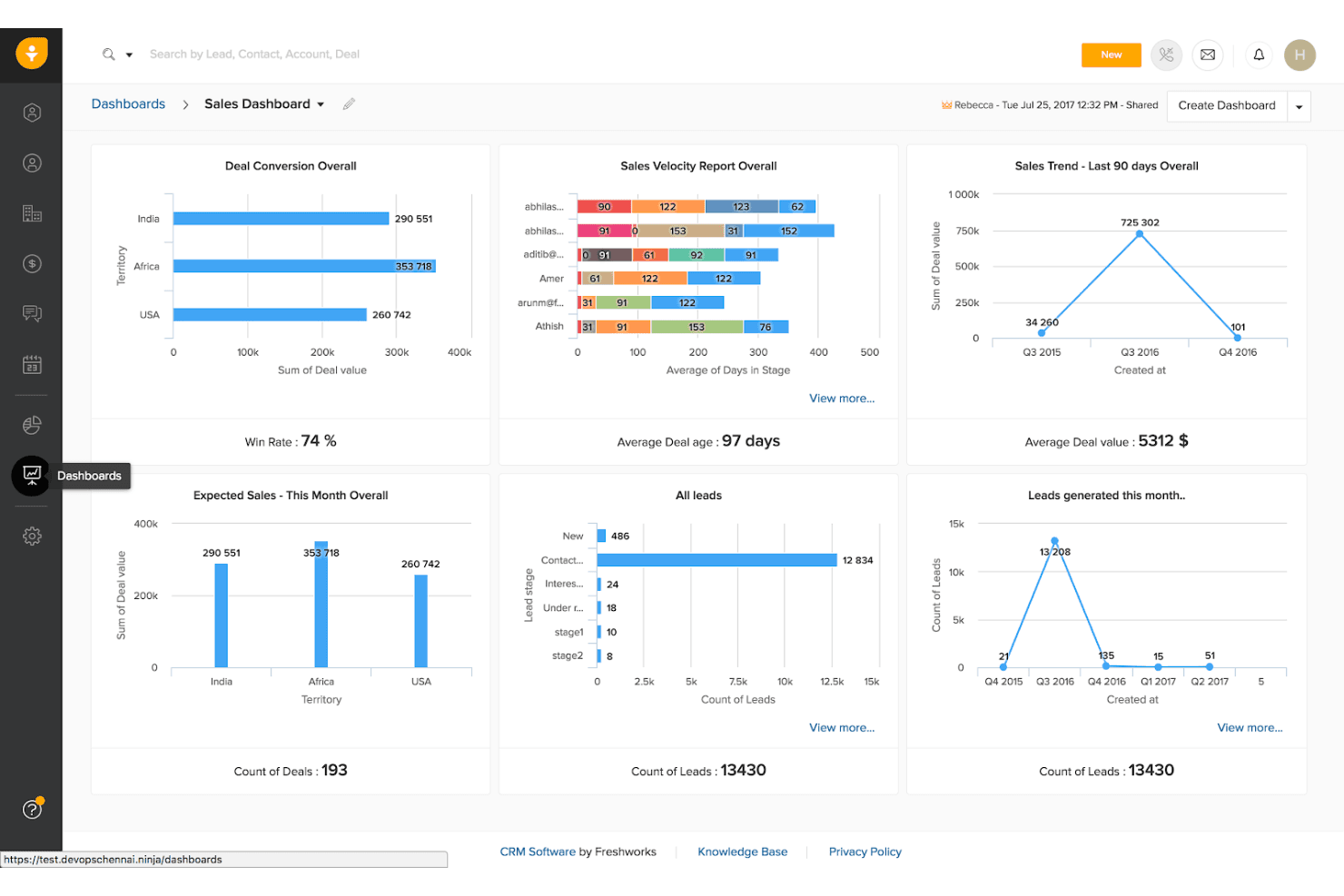
Freshsales displays sales metrics and lead data on a unified dashboard. Freshsales is an AI-powered CRM from Freshworks that suits small and mid-sized sales teams looking to manage pipelines, automate follow-ups, and engage leads across email, phone, chat, and WhatsApp from a single platform.
Who Is Freshsales Best For?
Freshsales fits small and mid-sized sales teams that want AI-powered lead scoring and built-in calling, email, and chat without piecing together separate tools.
Why I Picked Freshsales
I've included Freshsales in my top picks because Freddy AI's lead and deal scoring is genuinely useful for sales teams drowning in pipeline noise. It analyzes behavioral patterns and interaction history to rank contacts and flag deal risk signals, so reps focus on the right opportunities without manually sifting through records. The built-in calling, email, and WhatsApp engagement all feed into a centralized activity timeline, keeping every touchpoint visible in one place.
Freshsales Key Features
- Sales sequences: Automate multi-step follow-up emails and appointment reminders for prospects across a defined outreach cadence.
- Territory management: Assign and organize sales reps and deals across defined geographic or segment-based territories.
- CPQ add-on: Generate quotes, contracts, and documents from product catalog templates directly within deal and contact records.
- Custom fields and modules: Add custom fields on all paid plans, with Enterprise unlocking fully custom modules for tailored record structures.
Freshsales Integrations
Freshsales offers marketplace integrations with Freshdesk, Mailchimp, Apollo, Textgrid, and WhatsApp Shared Inbox and Campaigns. It also provides a REST API for custom integrations; Freshworks reports 1,200+ apps across its marketplace, platform-wide.
Pros and Cons
Pros:
- Customer activity stays together in timelines
- Automated follow-ups reduce repetitive outreach
- Visual pipelines clarify deal-stage movement
Cons:
- Workflow rules cap conditions and actions
- Tailored reports can require spreadsheet exports
Learn more about Freshsales: Best for easy setup and user-friendly interface
- Free plan + 14-day free trial available
- From $22/user/month
Visit WebsiteCustomer Rating:4.7/5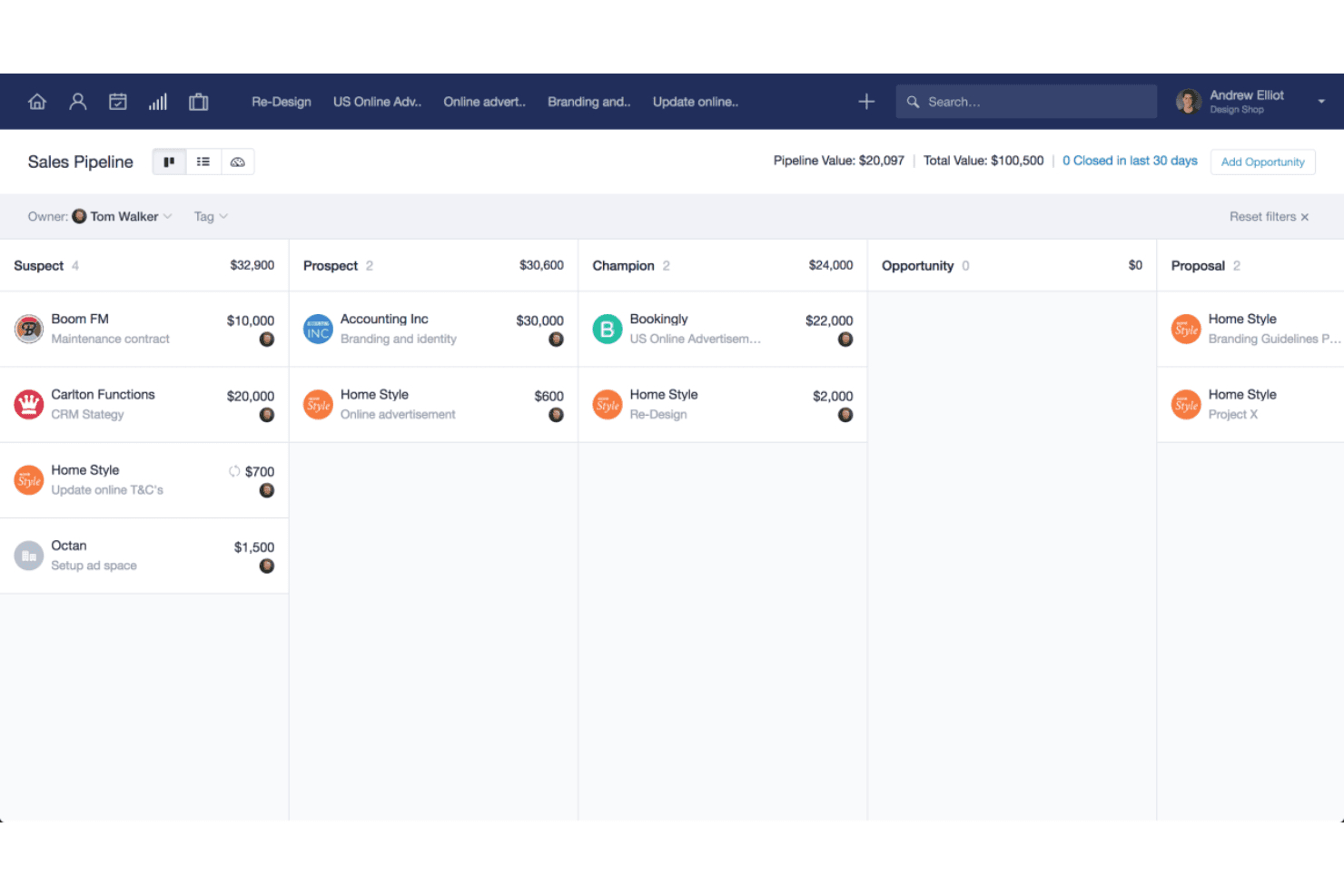
Capsule CRM organizes deals visually across pipeline stages. Capsule CRM is a straightforward contact and pipeline management tool built for small businesses and growing sales teams who want to get up and running fast without the configuration complexity that comes with more feature-heavy CRM platforms.
Who Is Capsule CRM Best For?
Capsule CRM is a strong fit for small sales teams and business owners who need a clean, low-friction CRM they can set up and start using the same day.
Why I Picked Capsule CRM
I picked Capsule CRM as one of the best because it's genuinely one of the fastest CRMs to get running from scratch. I appreciate how the AI Pipeline Generator lets you describe your sales process and get a working pipeline built for you immediately, skipping the manual stage setup that slows teams down. The in-app onboarding requires no external help, and the visual Kanban pipeline with linked contacts, notes, and tasks is ready to use from day one.
Capsule CRM Key Features
- Workflow automation: Configure multi-step automated actions for opportunities and projects when records reach a set stage or milestone.
- Advanced reporting dashboards: Track pipeline value, conversion rates, forecasts and team activity across filterable, exportable dashboards.
- Custom fields and DataTags: Add custom fields to records and group them under DataTags so they appear only on relevant opportunities.
- Import2 migration support: Import data from 25+ CRMs, including Zoho, using a guided migration tool that runs a sample before full transfer.
Capsule CRM Integrations
Capsule CRM offers 100+ marketplace integrations, including Gmail, Microsoft Outlook, Google Calendar, Mailchimp, QuickBooks Online, Xero, Zendesk, Shopify, and Import2. It also provides a REST API and REST hooks for custom connections, plus Zapier.
Pros and Cons
Pros:
- Repeatable task reminders help prevent missed follow-ups
- Deal pipelines connect contacts with next steps
- Zoho migration supports staged data review
Cons:
- Advanced nurture campaigns require another marketing tool
- Complex renewals can require separate automation rules
Learn more about Capsule CRM: Best for sales teams using Zendesk Support
- Free demo available
- From $19/month
Visit WebsiteCustomer Rating:4.4/5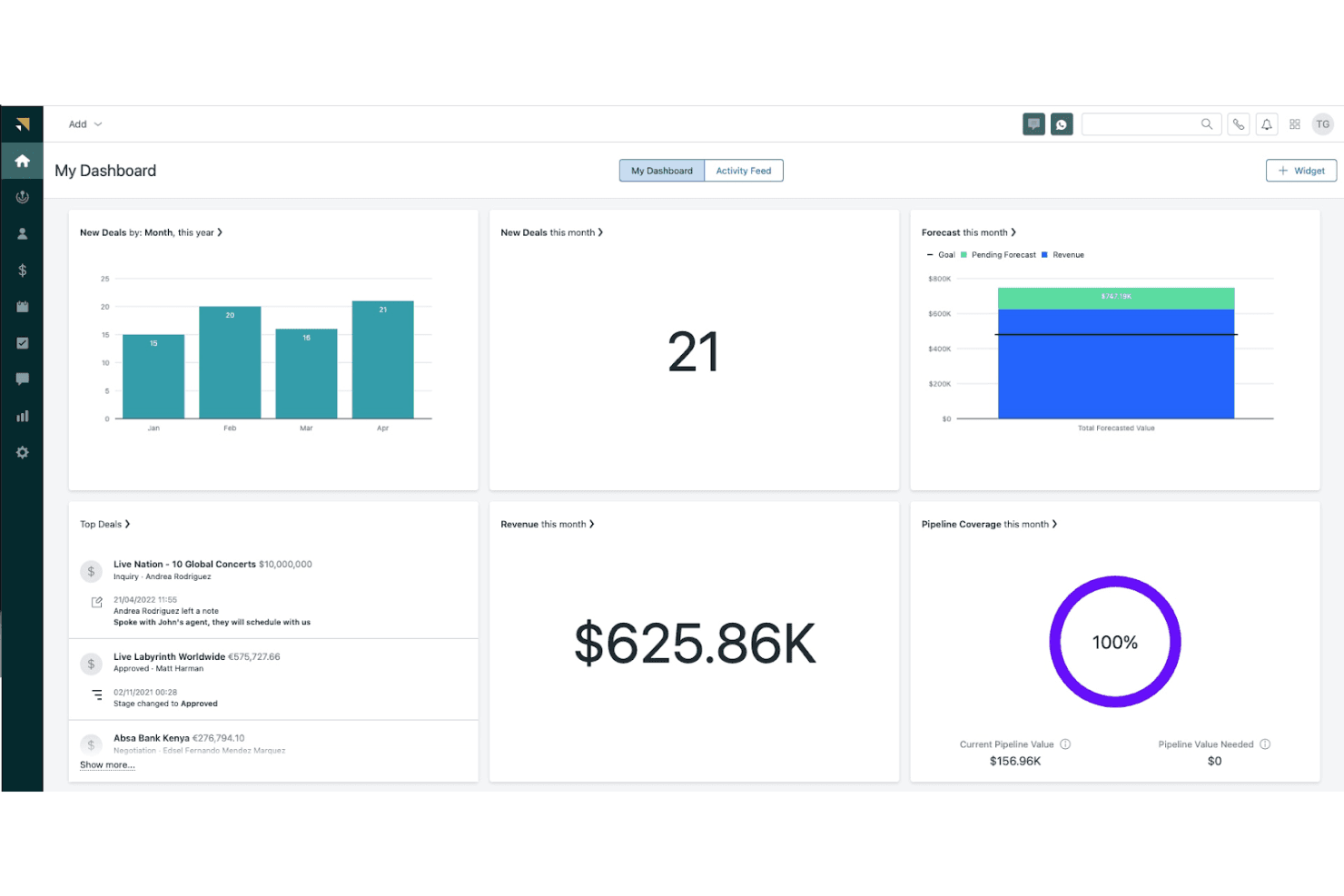
Zendesk Sell offers a streamlined interface and powerful customization focused on sales efficiency. Zendesk Sell is a sales CRM built for teams that need clear pipeline visibility, activity tracking, and forecasting tools to manage deals and hit revenue targets.
Who Is Zendesk Sell Best For?
Zendesk Sell suits sales operations teams that already use Zendesk Support and want shared customer context across sales and service without switching ecosystems.
Why I Picked Zendesk Sell
I picked Zendesk Sell because pipeline visibility is where it genuinely earns its place: the forecasting tools let you analyze deal progression stage by stage and spot bottlenecks before they cost you revenue. I also appreciate the pipeline analysis paired with custom dashboards, where you can drop in up to 10 widgets to track deal volume, activity metrics, and loss reasons in one view. That kind of consolidated visibility is exactly what sales ops teams need to run accurate forecasts and tighten up their revenue planning.
Zendesk Sell Key Features
- Sales engagement sequences: Automate lead follow-up with email and task sequences that trigger based on prospect behavior.
- Task Player: Work through a queued list of sales activities—calls, emails, follow-ups—in a single uninterrupted workflow session.
- Sales prospecting database: Filter and build prospect lists from a database of more than 44 million businesses and 350 million prospect records.
- Zendesk Support integration: Share customer context between sales and support teams by connecting Sell directly to Zendesk Support.
Zendesk Sell Integrations
Zendesk Sell has a native Zendesk Support integration and documented integrations with Google, Zendesk Chat, and MailChimp. It also supports REST, Sync, Firehose, and Search APIs for custom integrations, plus Zapier on its three highest plans.
Pros and Cons
Pros:
- Task Player queues calls, emails, and follow-ups
- Ten-widget dashboards consolidate activity and loss metrics
- Forecasting pinpoints bottlenecks across deal stages
Cons:
- Exports omit emails, calls, and activity history
- Sell retires August 31, 2027, threatening continuity
Learn more about Zendesk Sell: Best for all-in-one business management
- Free plan + 15-day cloud trial + 30-day On-Premise trial + free demo available
- From $69/month
Visit WebsiteCustomer Rating:4.2/5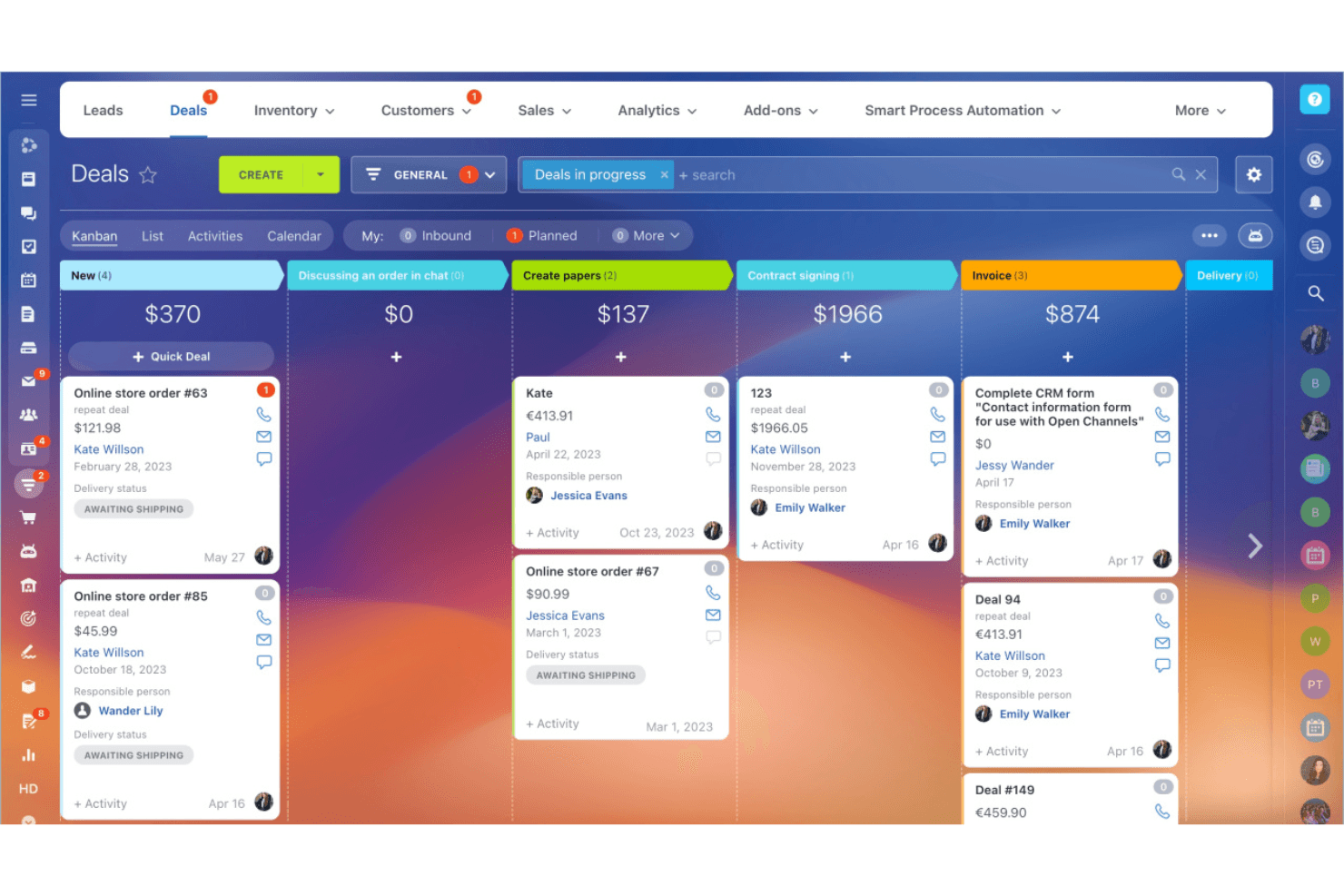
Bitrix24 organizes sales deals across pipeline stages in a Kanban view. Bitrix24 is an all-in-one workspace that bundles CRM, project management, team collaboration, and marketing tools into a single flat-rate platform—making it a strong fit for small to mid-sized businesses that want to consolidate their sales and operations stack.
Who Is Bitrix24 Best For?
Bitrix24 is a strong fit for small to mid-sized businesses that want CRM, project management, and team collaboration in one flat-rate platform.
Why I Picked Bitrix24
I picked Bitrix24 as one of the best Zoho CRM alternatives because it replaces an entire stack of tools with one flat-rate platform. Where Zoho CRM focuses narrowly on sales, Bitrix24 layers in project management, team chat, website building, and HR tools alongside its CRM pipelines. I particularly like that you can build separate Kanban pipelines per department with their own stage configurations and permission sets, and then coordinate those deals directly with tasks, shared calendars, and built-in contact center channels like WhatsApp and live chat.
Bitrix24 Key Features
- Role-based CRM permissions: Assign access rights by item type, action, and deal stage, scoped to individual users, departments, or teams.
- Contact Center: Unify inbound and outbound communications from web chat, email, telephony, and messaging apps into a single CRM inbox.
- Workflow automation with parallel branching: Build multi-path automations that run branches simultaneously, wait for user events, and iterate over record values.
- Zoho CRM migration app: Import leads, contacts, accounts, deals, tasks, events, calls, and quotes directly from Zoho CRM into Bitrix24.
Bitrix24 Integrations
Bitrix24 documents integrations with Gmail, Outlook, WhatsApp, Facebook Messenger, Microsoft 365, Microsoft Exchange, and Microsoft SharePoint. Its Marketplace adds apps such as Zapier, QuickBooks, FreshBooks, RingCentral, and 3CX, while REST and PHP framework APIs support custom integrations.
Pros and Cons
Pros:
- CRM records centralize multichannel customer conversations
- Parallel workflow branches coordinate cross-team processes
- Department-specific pipelines support stage-level access
Cons:
- Zoho migration cannot pause or roll back
- Dense menus complicate initial CRM setup
Learn more about Bitrix24: Best for visual sales pipeline management
- 14-day free trial available
- From $14/user/month (billed annually)
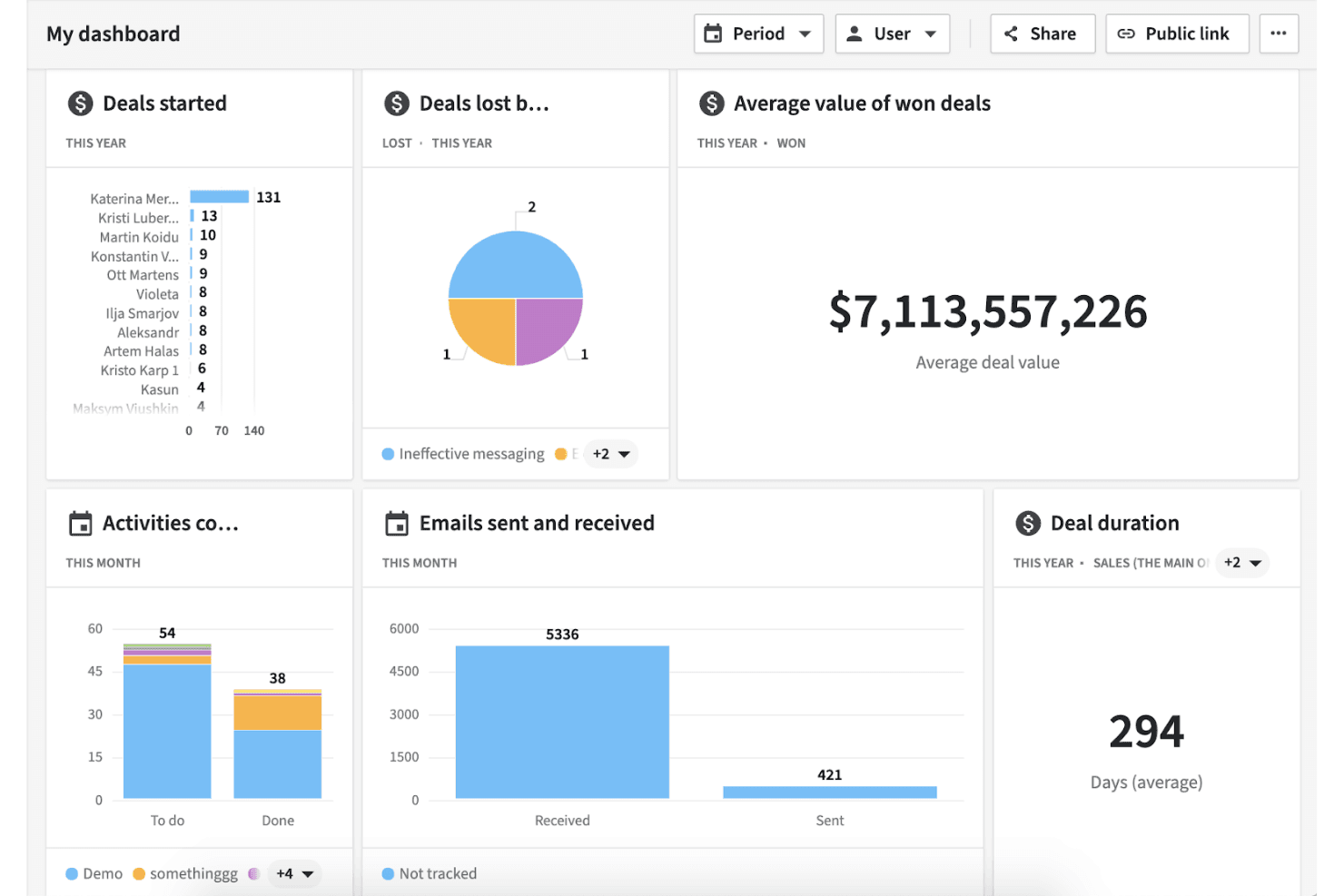
Pipedrive CRM displays sales metrics and activity data in one dashboard. Pipedrive is a sales-focused CRM built for small and mid-sized teams that need a cleaner way to manage deals, automate follow-ups, and keep their pipeline moving without the complexity of a broader business suite.
Who Is Pipedrive Best For?
Pipedrive is a strong fit for sales-focused small and mid-sized teams that want clear pipeline visibility without the overhead of a broader business suite.
Why I Picked Pipedrive CRM
I picked Pipedrive as one of the best Zoho CRM alternatives because its Kanban-style pipeline is genuinely built around how sales teams think. I love that you can customize every stage to match your actual sales cycle, then drag deals forward as they progress while win probability and expected close dates update on the same card. The multi-step automation with if/else branching logic means my team can build follow-up sequences that react to real deal conditions, not just fixed timers.
Pipedrive CRM Key Features
- AI Sales Assistant: Predicts which deals are likely to be won or lost and surfaces recommended leads to pursue.
- Revenue forecasting: Projects earnings from both recurring subscriptions and one-off deals using pipeline data.
- Import2 migration tool: Lets global admins migrate Zoho CRM data into Pipedrive, including pipelines, custom fields, and field mappings.
- Role-based permissions and visibility controls: Lets admins set group- and individual-level access rules to control what data each user can see and act on.
Pipedrive Integrations
Pipedrive offers 500+ marketplace integrations, plus native connections with Microsoft Teams, Google Meet, Asana, QuickBooks, Zendesk, and DocuSign. It also supports API, webhooks, and Zapier for custom connectivity.
Pros and Cons
Pros:
- Zoho migration maps pipelines and custom fields
- Automated follow-ups keep opportunities moving
- Visual deal stages clarify sales progress
Cons:
- Complex reporting offers limited analytical depth
- Marketing tools require a separate add-on
Learn more about Pipedrive CRM: Best for guided Zoho CRM migration
- 14-day free trial + free demo available
- From $13/user/month
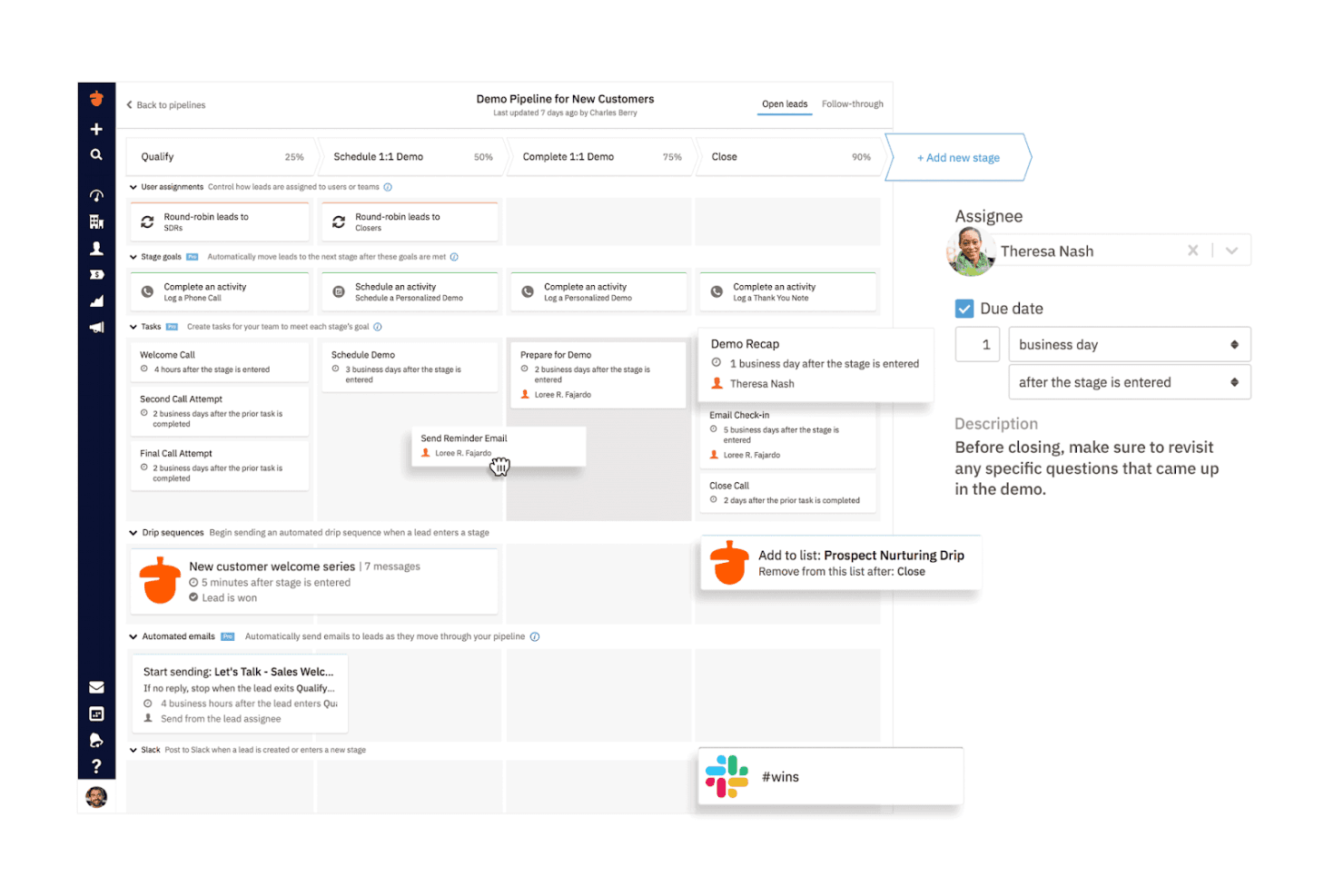
Nutshell automates lead assignments, tasks, and emails across pipeline stages. Nutshell is a CRM built for small and midsize sales teams that want pipeline management, email and SMS marketing, and customer engagement tools in one place—without the setup complexity or feature sprawl that can come with larger platforms.
Who Is Nutshell Best For?
Nutshell is a strong fit for small and midsize sales teams that want pipeline management, email marketing, and customer engagement tools in a single platform without heavy configuration.
Why I Picked Nutshell
I picked Nutshell as one of the best because it genuinely combines pipeline management with native email and SMS marketing in a single CRM, so your sales and marketing teams are always working from the same data. I especially like how Nutshell Marketing lets you build trigger-based campaigns tied directly to pipeline activity, and how closed chat conversations from Nutshell's AI chatbot automatically surface on contact timelines, keeping every touchpoint visible without switching tools.
Nutshell Key Features
- Pipeline templates: Build new pipelines from pre-built templates that include stage goals, tasks, drip sequences, custom fields, and lead outcomes.
- Lead assignment rules: Automatically route leads to the right rep using criteria like territory, product, value, industry, or round-robin distribution.
- White-glove data migration: Submit a CSV or Excel file and Nutshell's team maps your data, creates fields, checks for duplicates, and imports it within 24–48 business hours.
- AI call and meeting summaries: Automatically generate summaries from call and meeting transcripts and surface them as notes directly on customer timelines.
Nutshell Integrations
Nutshell lists 5,000+ integrations, including Gmail and Google Calendar, Microsoft 365, Mailchimp, Aircall, CallRail, Dialpad, Kixie, DocuSign, and Intercom. Its REST and JSON-RPC APIs are available to all customers for custom integrations.
Pros and Cons
Pros:
- Pipeline views help surface stalled deals
- Free Zoho migration preview covers contacts and deals
- Native email and SMS campaigns share CRM data
Cons:
- Custom fields cannot filter custom reports
- Automation lacks documented branching and conditional steps
Learn more about Nutshell: 10Best for Google Workspace integration
Copper
- 14-day free trial + demo available
- From $29/user/month
Visit WebsiteCustomer Rating:4.5/5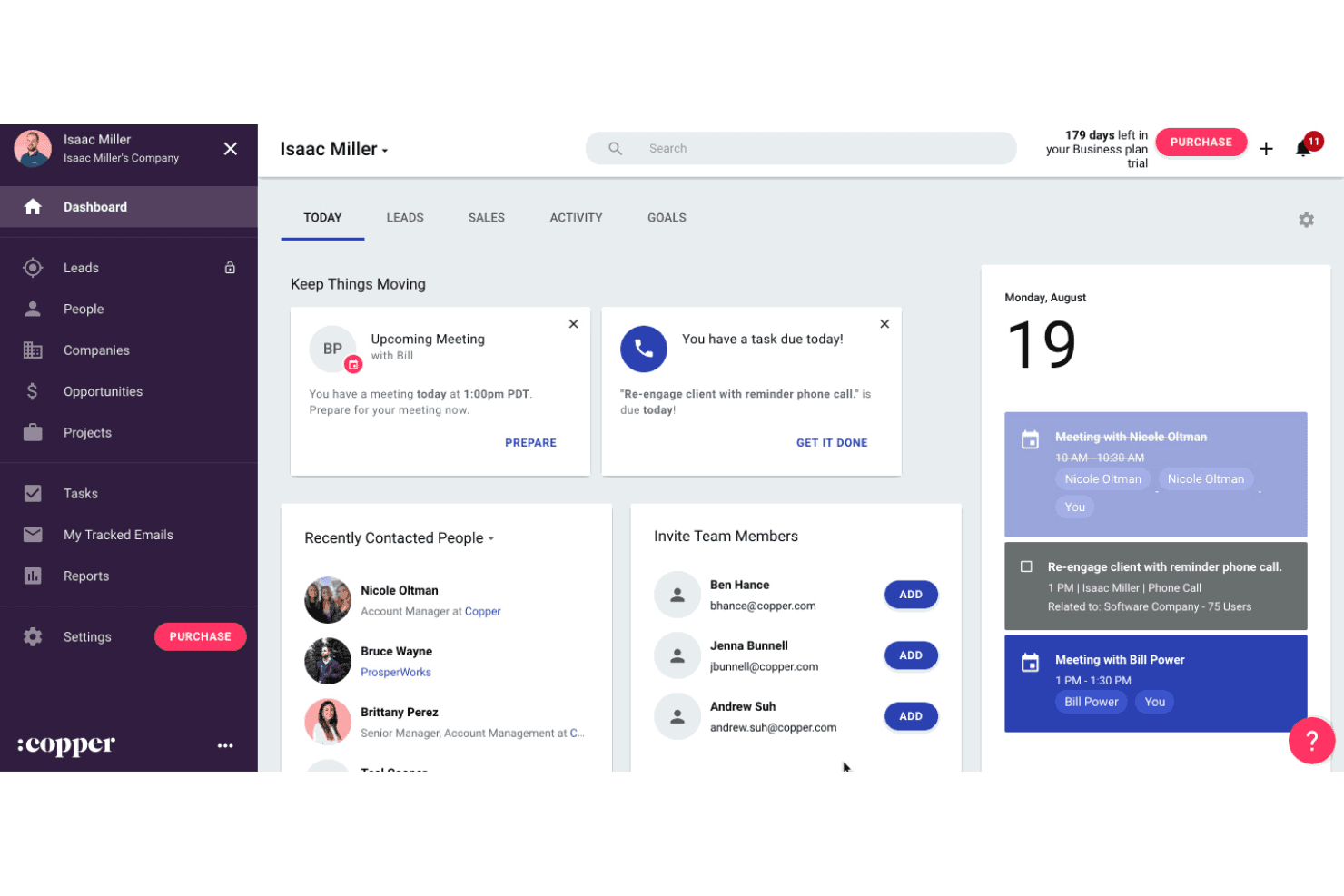
Copper's dashboard keeps daily tasks, meetings, and contacts organized. Copper is a CRM built for small-to-mid-sized service businesses—agencies, consultancies, and professional services teams—that want to manage contacts, deals, and client communications without leaving their existing Google tools.
Who Is Copper Best For?
Copper is a strong fit for small-to-mid-sized service businesses—agencies, consultancies, and professional services teams—that run their work inside Google Workspace.
Why I Picked Copper
I picked Copper as one of the best Zoho CRM alternatives because it's built entirely around Google Workspace in a way no other CRM matches. Contacts, deals, and email threads sync directly inside Gmail, and Google Calendar events appear on related records automatically. I especially like that workflows can trigger pipeline-stage emails without ever leaving the Google ecosystem, which is something Zoho's deeper setup can't replicate with the same immediacy.
Copper Key Features
- Multi-condition workflow automation: Build rules using AND, OR, or custom logic with parentheses across leads, contacts, companies, opportunities, projects, and tasks.
- Contact enrichment and suggestions: Automatically enriches contact profiles with company and social data and surfaces suggested contacts to add to your CRM.
- Customizable pipeline-stage email triggers: Trigger automated emails when an opportunity moves to a new pipeline stage, without leaving the Google ecosystem.
- Custom fields with multiple field types: Create text, dropdown, date, checkbox, currency, multi-select, and connect fields to tailor records to your team's specific process.
Copper Integrations
Copper offers native integrations with Gmail, Google Calendar, Google Drive, Google Sheets, Looker Studio, Mailchimp, DocuSign, QuickBooks, Slack, and Zendesk. It also provides a REST API and webhooks, plus Zapier.
Pros and Cons
Pros:
- Zoho migration preserves original record dates
- Client interaction history stays attached to records
- Visual pipelines keep deal follow-ups visible
Cons:
- Custom reports refresh only four times daily
- Workflow rules cannot trigger email sends
Learn more about Copper:
Outras alternativas ao Zoho CRM
Segue-se uma lista de alternativas adicionais ao Zoho CRM que selecionámos, mas que não chegaram à lista principal. Vale a pena conhecê-las.
- 11SugarAIBest for AI-driven sales automation
- 12ApptivoBest for affordability and versatility
- 13NetHuntBest for Gmail integration
- 14MRPeasyBest for manufacturing companies
- 15Agile CRMBest for marketing automation
- 16Microsoft Dynamics 365Best for enterprise-level customization
- 17monday CRMBest for team collaboration
- 18PartnerStackBest for partner relationship management
- 19Close CRMBest for sales teams focused on communication
- 20ThryvBest for local businesses
- 21InsightlyBest for project management integration
- 22folkBest for contact management and networking
Análises de software de CRM relacionadas
Se ainda não encontrou o que procura, consulte estas ferramentas intimamente relacionadas com software de CRM que testámos e avaliámos.
- Software de CRM
- Software de vendas
- Software de gestão de potenciais clientes
- Software de inteligência empresarial
- Software de gestão de contratos
- Sistema de gestão de receitas
- Software de CPQ
How I Evaluate Zoho CRM Alternatives
I evaluate on two layers: baseline CRM capabilities like pipeline tracking and automation, and differentiators like forecasting depth and integration ecosystem that set options apart.
Core Functionality (Table Stakes For This List)
When I'm selecting tools for my list, I rank each one on a scale from 0 (does not offer the functionality) to 5 (excels in this area) for each core functionality listed below. Then, I calculate the tool's total score into a percentage. Each tool needs to achieve a minimum total score of 75% to be considered for inclusion.
- Contact & Account Management: I look at how each platform handles account hierarchies, contact relationships, and segmentation—things like linking multiple stakeholders to a single deal record.
- Pipeline & Opportunity Tracking: Each tool gets evaluated on how well you can configure deal stages, manage multiple pipelines, and track opportunity progression across teams.
- Sales Workflow Automation: I check whether automations go beyond basic email reminders to support lead routing rules, stage-based triggers, and multi-step sequences with conditional logic.
- Reporting & Forecasting: Revenue visibility matters, so I evaluate dashboard flexibility, forecast modeling options, and whether RevOps teams can build reports without relying on BI tools.
- Native Integrations & API: The RevOps stack is broad, so I look at connector depth with tools like marketing platforms, billing systems, and iPaaS options, plus API documentation quality.
- Customization & Custom Objects: I evaluate whether you can build custom objects, modify record layouts, and tailor modules to match your revenue process instead of reshaping workflows around defaults.
Once I have a list of tools that meet this criteria, I consider what sets each platform apart.
Differentiating Factors (What Sets Vendors Apart)
Here's how I compare and contrast different vendors:
Standout Features
AI-powered lead scoring and deal risk analysis can save RevOps teams hours of manual prioritization each week. I also evaluate revenue intelligence capabilities—automatic activity capture and conversation tracking give pipeline reviews real data instead of rep self-reporting. Customer success modules matter here too. Renewal tracking and health scores extend the CRM past the closed-won stage, which is where I think RevOps teams get the most long-term value from a platform compared to lighter tools.
Beyond Features
Pricing model transparency matters when you're scaling a RevOps team—I check whether per-seat costs stay predictable as you add users and move between tiers. Implementation speed is another big factor. Migration tools for importing Zoho CRM data, guided onboarding, and access to certified partners all shorten time-to-value. I also look at ecosystem depth, especially support for iPaaS tools like Workato or Zapier. A CRM that connects well to your existing billing, marketing, and BI stack reduces the manual data work that slows RevOps teams down.
Por que procurar uma alternativa ao Zoho CRM
Poderá estar à procura de uma alternativa ao Zoho CRM pelas seguintes razões:
- Complexidade da interface do utilizador: A interface do Zoho CRM, sobrecarregada de funcionalidades, pode ser demasiado difícil de navegar, tornando as operações diárias mais lentas. Poderá estar à procura de uma alternativa com um design mais simples e fácil de utilizar, que torne os fluxos de trabalho um pouco mais intuitivos.
- Limitações de personalização: A personalização do Zoho CRM é insuficiente para as necessidades da sua empresa. Poderá estar à procura de um CRM que disponibilize os módulos e campos personalizados de que necessita e que seja uma escolha melhor.
- Problemas de integração: Compatibilidade limitada ou problemas com serviços de terceiros, causando interrupções frustrantes no seu fluxo de trabalho. A sua prioridade numa ferramenta de CRM são capacidades de integração robustas com o seu conjunto tecnológico existente.
- Apoio ao cliente: Necessita de um apoio ao cliente rápido e eficaz, teve uma má experiência ou o Zoho CRM simplesmente não está a corresponder às suas expectativas. Existem muitas opções com vários canais de apoio e avaliações excelentes.
- Questões relacionadas com o preço: O Zoho CRM poderá estar fora do seu orçamento, resultando num fraco retorno do investimento. Está à procura de uma alternativa mais económica, dentro do seu orçamento, que disponibilize todas as funcionalidades de que a sua empresa necessita (e elimine os extras de que não precisa.)
As alternativas ao Zoho CRM podem proporcionar uma experiência de utilização mais intuitiva, maior personalização, integrações mais simples, um melhor apoio ao cliente e preços mais competitivos. Estas funcionalidades podem alinhar-se melhor com as necessidades da sua empresa e melhorar a eficiência geral.
Principais funcionalidades das alternativas ao Zoho CRM
Estas são algumas das principais funcionalidades do Zoho CRM que o seu software alternativo deverá conseguir replicar ou melhorar para ser uma boa opção.
- Automação da força de vendas: A automatização de tarefas de vendas rotineiras, como a introdução de dados, os lembretes de acompanhamento e a atualização dos registos de clientes, ajuda as equipas de vendas a poupar tempo e a aumentar a eficiência, reduzindo o trabalho manual.
- Envolvimento multicanal: Uma funcionalidade de envolvimento multicanal estabelece a ligação com os clientes através de vários canais de comunicação, garantindo que as empresas conseguem chegar aos seus clientes através dos métodos que estes preferem.
- Assistente com tecnologia de IA: Um assistente de vendas com tecnologia de IA prevê potenciais clientes, tendências de vendas e sentimentos dos clientes, analisando dados históricos e interações atuais. Desta forma, ajuda as equipas a dar prioridade aos seus esforços relativamente aos potenciais clientes mais promissores e às futuras oportunidades de vendas.
- Personalização: As amplas opções de personalização permitem que as empresas adaptem a plataforma às suas necessidades. Isto permite aos utilizadores personalizar módulos, campos e esquemas de apresentação de modo a corresponderem aos seus fluxos de trabalho e processos empresariais.
- Automatização de fluxos de trabalho: A automatização dos fluxos de trabalho simplifica os processos empresariais ao automatizar tarefas repetitivas com base em condições predefinidas. Isto reduz o esforço manual e garante que os processos são executados de forma consistente e eficiente.
- Análise e relatórios: As ferramentas de análise e relatórios geram relatórios de atividade de vendas, relatórios do funil de vendas e previsões de receitas, ajudando as empresas a obter informações sobre as suas operações de vendas e a acompanhar o desempenho das vendas.
- Gestão de potenciais clientes: Uma funcionalidade de gestão de potenciais clientes distribui e classifica automaticamente os potenciais clientes para ajudar as equipas de vendas a dar prioridade aos acompanhamentos. Isto ajuda as equipas de vendas a concentrarem-se nos potenciais clientes mais promissores, aumentando as probabilidades de fechar negócios.
- Gestão de contactos: Um sistema de gestão de contactos fornece informações em tempo real sobre as interações com os clientes através de vários canais, disponibilizando uma visão abrangente do histórico e das preferências de cada cliente. Isto ajuda as equipas a criar relações mais fortes, compreendendo as necessidades dos seus clientes.
- Colaboração entre equipas: A funcionalidade de colaboração entre equipas inclui ferramentas como bibliotecas de documentos, calendários e mensagens em tempo real para facilitar uma colaboração eficaz entre equipas. Estas funcionalidades ajudam as equipas a manterem-se organizadas, a partilharem informações importantes e a comunicarem de forma eficiente.
- Segurança: A segurança rigorosa dos dados protege as informações dos utilizadores através de encriptação avançada, cópias de segurança regulares e controlos de acesso baseados em funções, protegendo-as contra acessos não autorizados e violações de segurança.