

Le 10 Migliori Soluzioni Software per l’Onboarding delle Vendite Recensite per il 2026

10 Migliori Software di Onboarding per le Vendite - Shortlist


Con così tanti software di onboarding per le vendite disponibili, capire quale sia quello giusto per te non è semplice. Vuoi fornire ai nuovi assunti le competenze e le conoscenze necessarie per i loro ruoli di vendita in modo efficace ed efficiente, ma devi individuare quale strumento sia il migliore. Ci penso io! In questo articolo ti aiuterò a semplificare la scelta, condividendo le mie esperienze personali grazie all'utilizzo di decine di diversi strumenti di onboarding durante l'inserimento di vari nuovi collaboratori, con le mie scelte dei migliori software di onboarding per le vendite.
Perché fidarsi dei nostri consigli sui software
Le nostre recensioni riflettono il nostro giudizio indipendente, non un discorso di vendita. Scopri come manteniamo la trasparenza.
Per questa guida, abbiamo valutato gli strumenti attraverso test pratici e ricerche indipendenti, assegnando un punteggio agli strumenti in base ai nostri criteri di selezione.
Le nostre recensioni riflettono il nostro giudizio editoriale umano, non un discorso di vendita.
Riepilogo dei Migliori Software di Onboarding per le Vendite
Questa tabella comparativa riassume i dettagli sui prezzi delle mie migliori scelte di software di onboarding per le vendite, per aiutarti a trovare quello più adatto al tuo budget e alle esigenze della tua azienda.
| Tool | Best For | Trial Info | Price | ||
|---|---|---|---|---|---|
| 1 | Ideale per roleplay potenziati dall'intelligenza artificiale | Prova gratuita disponibile | Prezzo su richiesta | Website | |
| 2 | Ideale per percorsi strutturati di formazione commerciale | Piano gratuito + demo gratuita disponibile | Da $119/mese (fatturato annualmente) | Website | |
| 3 | Ideale per un onboarding dei dipendenti efficiente | Prova gratuita di 14 giorni | Prezzi su richiesta | Website | |
| 4 | Ideale per l'automazione delle vendite personalizzabile | Prova gratuita disponibile | Da $12/utente/mese (fatturato annualmente) | Website | |
| 5 | Ideale per la personalizzazione no-code | Demo gratuita disponibile | Da $40/mese (5 utenti) | Website | |
| 6 | Ideale per l'automazione dell'eLearning aziendale | Prova gratuita di 30 giorni + demo gratuita disponibile | Da $3.97/utente/mese | Website | |
| 7 | Ideale per il coaching tramite roleplay con intelligenza artificiale | Prova gratuita disponibile | Da $239/mese (80 utenti) | Website | |
| 8 | Ideale per un'esperienza utente intuitiva | Demo gratuita + prova gratuita disponibile | Prezzo su richiesta | Website | |
| 9 | Miglior software di onboarding per le vendite per la documentazione delle SOP | Prova gratuita di 7 giorni disponibile | Da $10/utente/mese (minimo 10 licenze) | Website | |
| 10 | Il miglior software di onboarding per le vendite per il rinforzo | Prova gratuita di 30 giorni disponibile PRO | A partire da $8/utente/mese | Website |


Recensioni dei Migliori Software di Onboarding per le Vendite
Qui sotto trovi i miei riepiloghi dettagliati dei migliori software di onboarding che sono entrati nella mia shortlist. Le mie recensioni offrono uno sguardo approfondito sulle funzionalità principali, pro e contro, integrazioni e casi d’uso ideali di ciascuno strumento per aiutarti a trovare quello giusto per te.

Exec
Ideale per roleplay potenziati dall'intelligenza artificiale
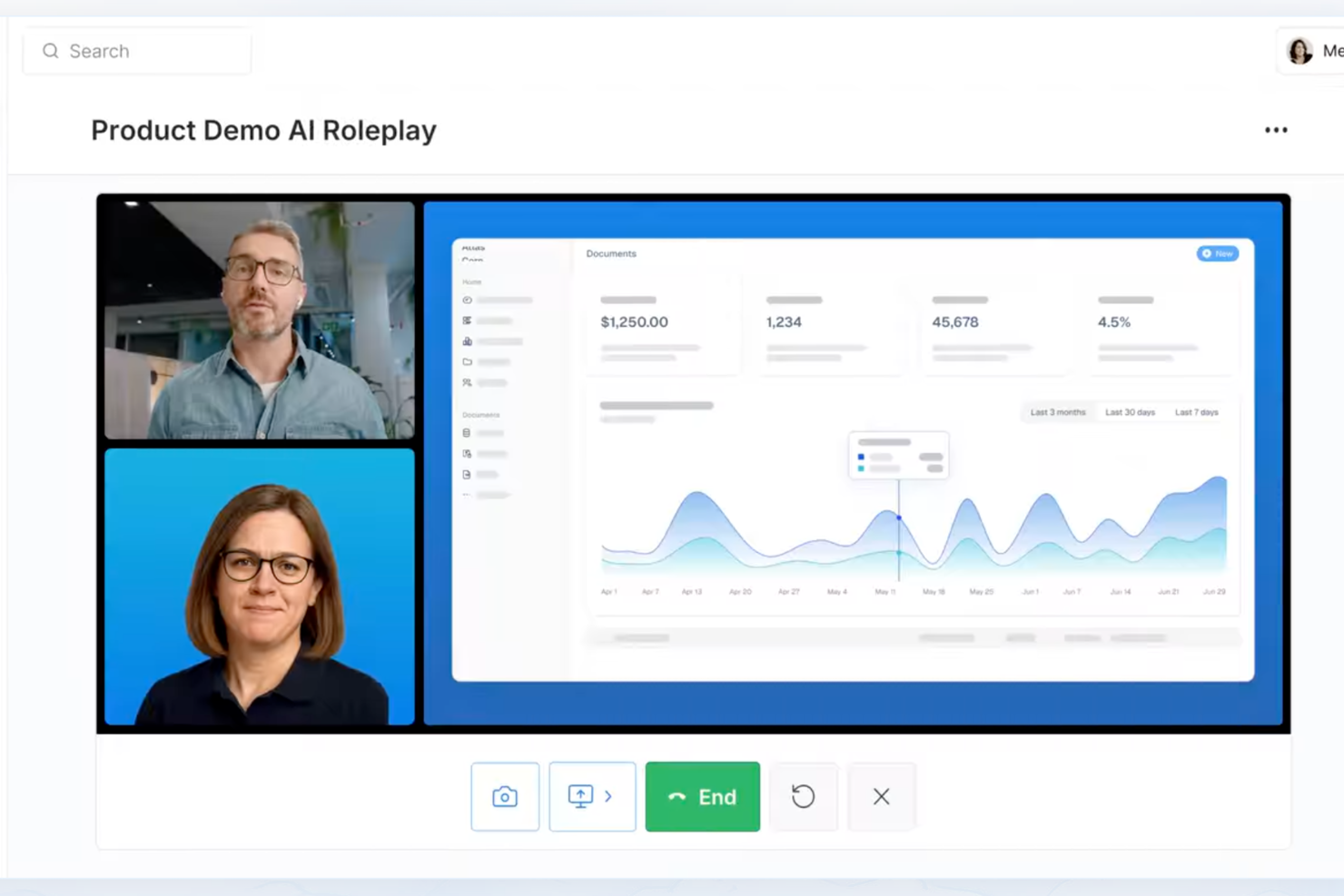
Per i team di vendita che necessitano di una soluzione di onboarding più solida, Exec offre una piattaforma costruita attorno a simulazioni guidate dall'IA e pratica personalizzata. Funziona bene per le aziende che puntano a migliorare le prestazioni nelle conversazioni di vendita ad alto rischio. Analizzando interazioni reali e monitorando i progressi misurabili, Exec aiuta a colmare il divario tra formazione ed esecuzione reale.
Perché ho scelto Exec
Ho scelto Exec per la sua attenzione ai roleplay potenziati dall'intelligenza artificiale che simulano vere conversazioni di vendita, offrendo al tuo team un luogo sicuro dove esercitarsi e affinare le proprie competenze. Include anche la valutazione delle chiamate, che individua aree specifiche di miglioramento. I percorsi di apprendimento personalizzabili ti permettono di adattare la formazione alle esigenze del tuo team, così ogni persona riceve esercitazioni pertinenti e mirate. Insieme, queste funzionalità supportano un onboarding di vendita legato a risultati di performance misurabili.
Caratteristiche principali di Exec
Oltre alle simulazioni guidate dall'IA, Exec offre diverse altre funzionalità che lo rendono uno strumento prezioso per l'onboarding dei venditori.
- Valutazione delle chiamate: Analizza le chiamate registrate per identificare le carenze di competenze e le opportunità di coaching, aiutandoti a indirizzare le aree che necessitano miglioramento.
- Percorsi di apprendimento personalizzabili: Permette di creare programmi di formazione su misura che si allineano agli obiettivi e alle sfide specifiche del tuo team.
- Analytics sui progressi: Fornisce dettagliate informazioni sullo sviluppo del tuo team, monitorando i progressi e il ROI per garantire l'efficacia della formazione.
- Alto tasso di completamento dei programmi: Exec vanta un tasso di completamento del 92%, a dimostrazione di un approccio formativo coinvolgente ed efficace.
Integrazioni Exec
Le integrazioni native al momento non sono elencate da Exec.
Pros and Cons
Pros:
- Simulazioni di vendita realistiche potenziate dall'IA
- Percorsi di onboarding personalizzabili
- Insights integrati sulla valutazione delle chiamate
Cons:
- La configurazione potrebbe richiedere l'intervento di un amministratore
- Nessuna integrazione nativa elencata pubblicamente

Ideale per percorsi strutturati di formazione commerciale
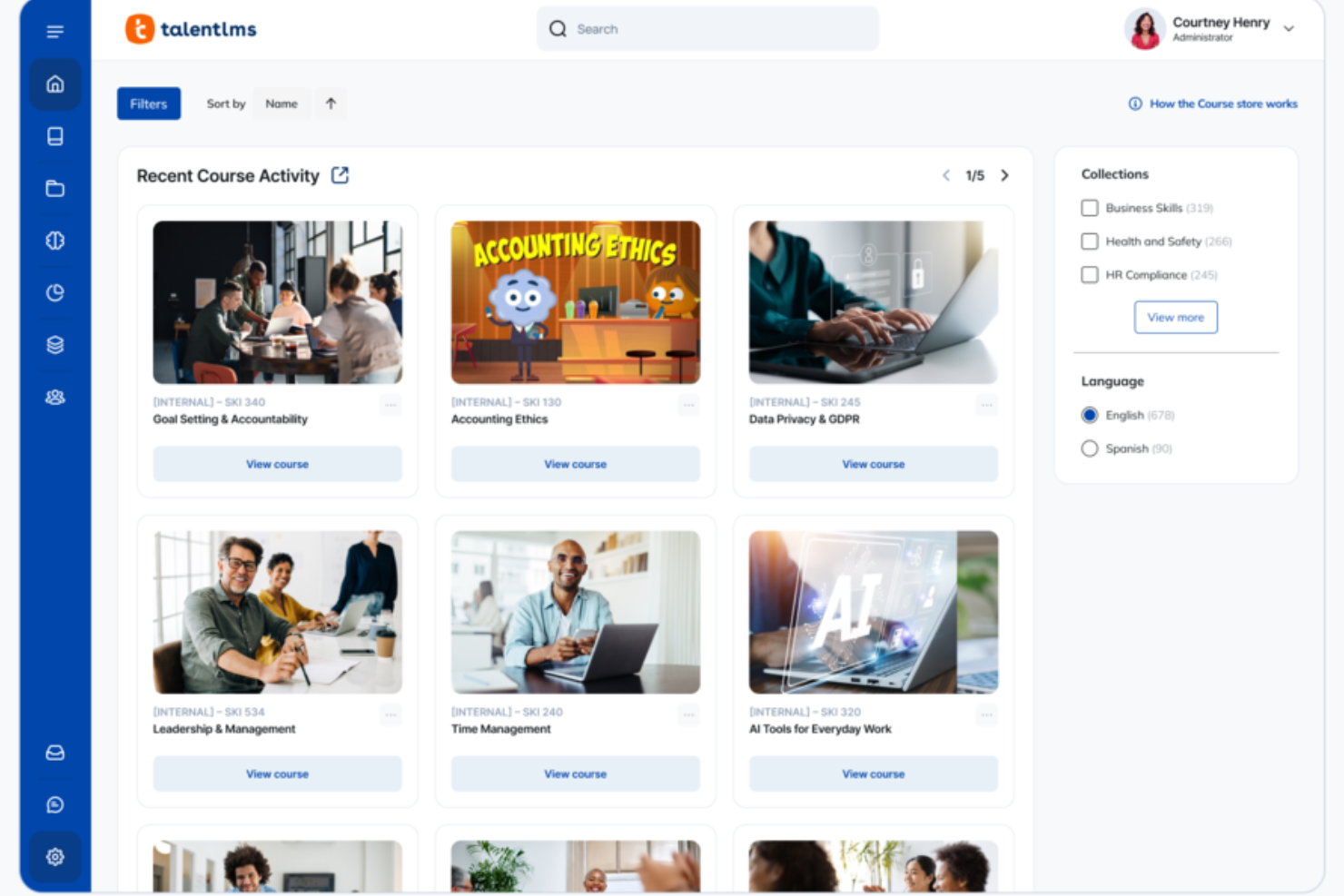
TalentLMS offre alla tua organizzazione commerciale un modo strutturato per inserire nuovi rappresentanti senza sovraccaricare loro o i tuoi responsabili vendite. Se il tuo obiettivo è costruire una conoscenza del prodotto coerente, flussi di lavoro ripetibili e tempistiche di inserimento prevedibili, la piattaforma ti aiuta a organizzare l'intero percorso di apprendimento in un unico posto.
Perché ho scelto TalentLMS
Ho scelto TalentLMS perché ti offre il controllo e la struttura necessari per offrire, su larga scala, un onboarding ripetibile e specifico per ruolo. I suoi gruppi di utenti, le filiali e i ruoli personalizzati ti permettono di confezionare percorsi di inserimento personalizzati per SDR, AE e team di CS senza duplicare il lavoro. Mi piace anche che consenta la creazione di programmi misti—combinando formazione sul prodotto, esercitazioni di vendita, contenuti SCORM e sessioni dal vivo—per adattarsi al meglio allo stile di apprendimento dei rappresentanti. E grazie alle regole di automazione e ai report in tempo reale, sai sempre chi è pronto a partire, chi ha bisogno di coaching e dove le tempistiche dell'onboarding stanno rallentando.
Caratteristiche principali di TalentLMS
Oltre agli strumenti strutturati per l'onboarding che ho menzionato, hai anche a disposizione diverse funzionalità che contribuiscono al buon andamento della formazione sulle vendite:
- TalentLibrary™: Accesso a oltre 1.000 corsi selezionati che puoi usare per arricchire i tuoi programmi di formazione vendite.
- Gamification: Introduce elementi come badge e punti per mantenere il team di vendita motivato e coinvolto durante la formazione.
- Creatore di contenuti AI: Genera in pochi minuti spiegazioni sui prodotti, scenari di vendita, moduli di onboarding e flashcard senza dipendere dalle risorse L&D.
- Strumenti di reportistica: Fornisce analisi dettagliate sui progressi e sul completamento della formazione, aiutandoti a monitorare l'efficacia dei tuoi sforzi di onboarding.
Integrazioni di TalentLMS
Le integrazioni includono Salesforce, Shopify, WordPress, Zoom, Microsoft Teams, GoTo, BigBlueButton, BambooHR, ADP Workforce Now e HubSpot.
Pros and Cons
Pros:
- La gamification incrementa il coinvolgimento dei team di vendita competitivi.
- Gruppi basati sul ruolo offrono formazione vendite personalizzata per segmento.
- Gli strumenti AI velocizzano la creazione di contenuti su prodotto e competenze di vendita.
Cons:
- File multimediali di grandi dimensioni possono richiedere soluzioni di hosting esterne.
- Gli strumenti per esercitazioni video e simulazioni di ruolo non sono integrati nativamente.
New Product Updates from TalentLMS
TalentLMS Adds Learning Paths, AI Video, and Learner Experience Updates
TalentLMS introduced updates across learning management, content creation, and learner experience, including Learning Paths for Groups, AI video generation in TalentCraft, video bookmarking, and expanded administration tools. For more information, visit TalentLMS’s official site.

SkyPrep
Ideale per un onboarding dei dipendenti efficiente
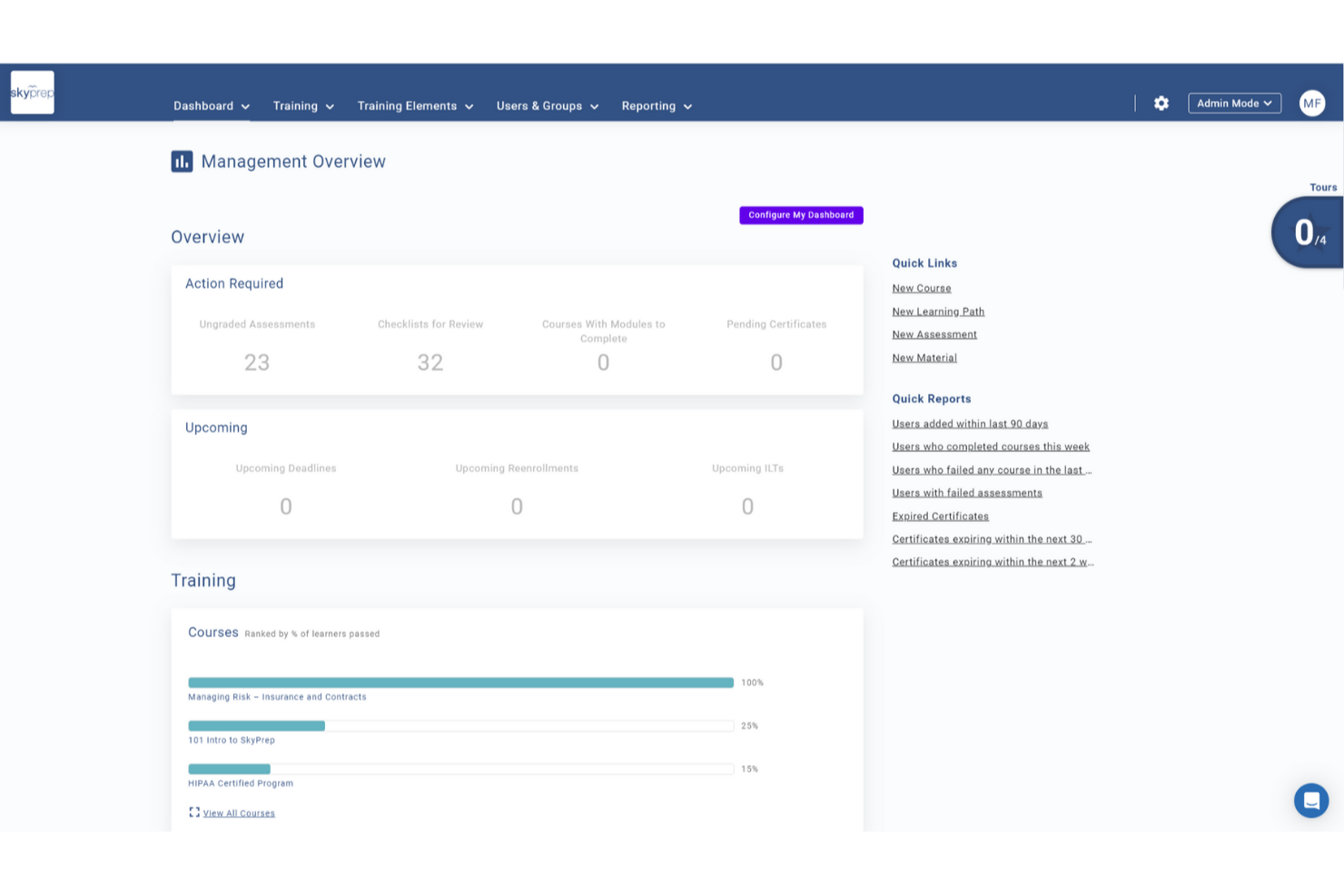
SkyPrep è un software di formazione online intuitivo e facile da usare, pluripremiato, che offre una varietà di funzionalità come coinvolgimento dei partecipanti, creazione di corsi, gestione degli utenti, reportistica e analisi, oltre alla personalizzazione. È particolarmente noto per la sua efficiente soluzione di onboarding dei dipendenti, che aiuta i nuovi assunti ad ambientarsi rapidamente e a essere produttivi fin dal primo giorno.
Perché ho scelto SkyPrep: Ho scelto SkyPrep perché offre un programma di formazione di onboarding altamente personalizzato ed efficiente, pensato per aiutare i nuovi dipendenti a comprendere rapidamente il proprio ruolo e la cultura aziendale. Ciò che distingue SkyPrep è la sua attenzione nel fornire una formazione mirata al ruolo in modo coinvolgente, fondamentale per dotare i nuovi assunti degli strumenti e delle conoscenze necessari per essere produttivi fin dall'inizio.
Caratteristiche principali e integrazioni di SkyPrep
Le funzionalità includono un intuitivo costruttore di corsi che consente agli utenti di creare contenuti formativi coinvolgenti senza bisogno di competenze tecniche. L'interfaccia drag-and-drop, il supporto multimediale e le valutazioni personalizzabili permettono alle organizzazioni di progettare corsi interattivi su misura per le proprie necessità.
Gli utenti possono anche beneficiare della partnership di SkyPrep con OpenSesame per l'accesso a migliaia di corsi preconfezionati su diversi settori e argomenti.
Le integrazioni includono Okta, SAML, onelogin, Stripe, PayPal, Shopify, ADP, Workday, Salesforce, HubSpot, Zoom, GoTo, Webex, G Suite, Office 365, Twilio, iorad, UKG e altro ancora.
Pros and Cons
Pros:
- Interfaccia intuitiva
- Automazioni dei flussi di lavoro personalizzabili
- Personalizzazione del branding
Cons:
- Funzionalità di reportistica avanzata limitate
- La struttura dei prezzi potrebbe non adattarsi a tutte le dimensioni organizzative

Ideale per l'automazione delle vendite personalizzabile
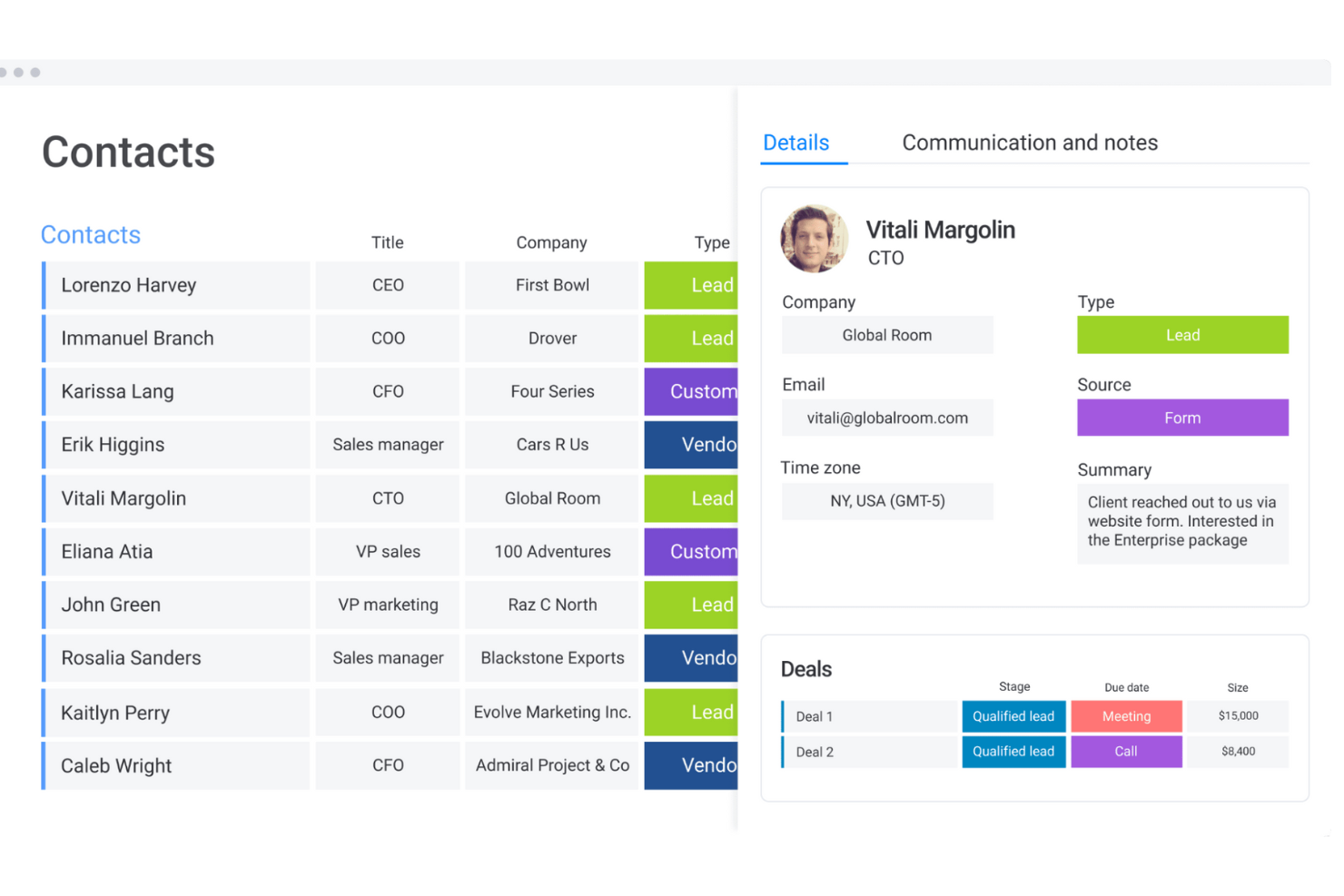
Monday sales CRM è uno strumento completamente personalizzabile che centralizza la comunicazione con i clienti, automatizza i processi di vendita e fornisce una panoramica completa di ogni trattativa. Il suo punto di forza distintivo è la capacità di adattarsi al ciclo di vendita specifico di ogni utente, rendendolo la scelta migliore per flussi di lavoro su misura.
Perché ho scelto Monday sales CRM: Monday.com si distingue come software di onboarding per le vendite grazie alla semplificazione dell'integrazione dei nuovi commerciali nel flusso di lavoro e nella cultura del team. Il suo design intuitivo e i modelli personalizzabili rendono facile per i nuovi arrivati comprendere il processo di vendita, monitorare i propri compiti e gestire le pipeline fin dal primo giorno. L'ambiente collaborativo della piattaforma incentiva l'interazione e l'apprendimento, permettendo ai membri più esperti del team di condividere rapidamente risorse e spunti.
Le funzionalità di automazione riducono la curva di apprendimento gestendo le attività di routine, consentendo ai nuovi assunti di concentrarsi da subito su attività più strategiche e sull'interazione con i clienti. Grazie alla possibilità di monitorare i progressi e le prestazioni, monday.com non solo facilita l'onboarding, ma accelera anche il tempo necessario perché i nuovi commerciali diventino membri produttivi del team, favorendo al tempo stesso senso di appartenenza e lavoro di squadra.
Funzionalità e integrazioni principali di Monday sales CRM
Funzionalità comprendono un ambiente altamente collaborativo che si estende oltre il team di vendita per includere marketing, assistenza clienti e sviluppo prodotto all'interno dello stesso workspace. Questa visibilità interfunzionale è rara nei CRM tradizionali che spesso suddividono le informazioni tra i dipartimenti. Abbattendo queste barriere, Monday.com favorisce un approccio più coeso alla gestione delle relazioni con i clienti.
Integrazioni includono app di project management come Slack, Google Drive, Gmail, Google Calendar, Jira, GitHub, Trello, Dropbox, Typeform e molte altre, accessibili tramite un piano a pagamento con Zapier.
Pros and Cons
Pros:
- Flussi di lavoro e dashboard altamente personalizzabili
- Nota per l'interfaccia intuitiva e visivamente attraente
- Consente la collaborazione interfunzionale
- Strumenti di automazione integrati
Cons:
- La vasta gamma di funzionalità può risultare opprimente per i nuovi utenti
- Il Sales CRM non prevede un piano gratuito
New Product Updates from monday CRM

monday CRM Adds Meta Conversions API Integration
monday CRM now lets you connect Meta Conversions API and sync lead status back to Meta, improving targeting and conversions via a new Meta integration automation recipe. For more information, visit monday CRM's official site.

Ideale per la personalizzazione no-code
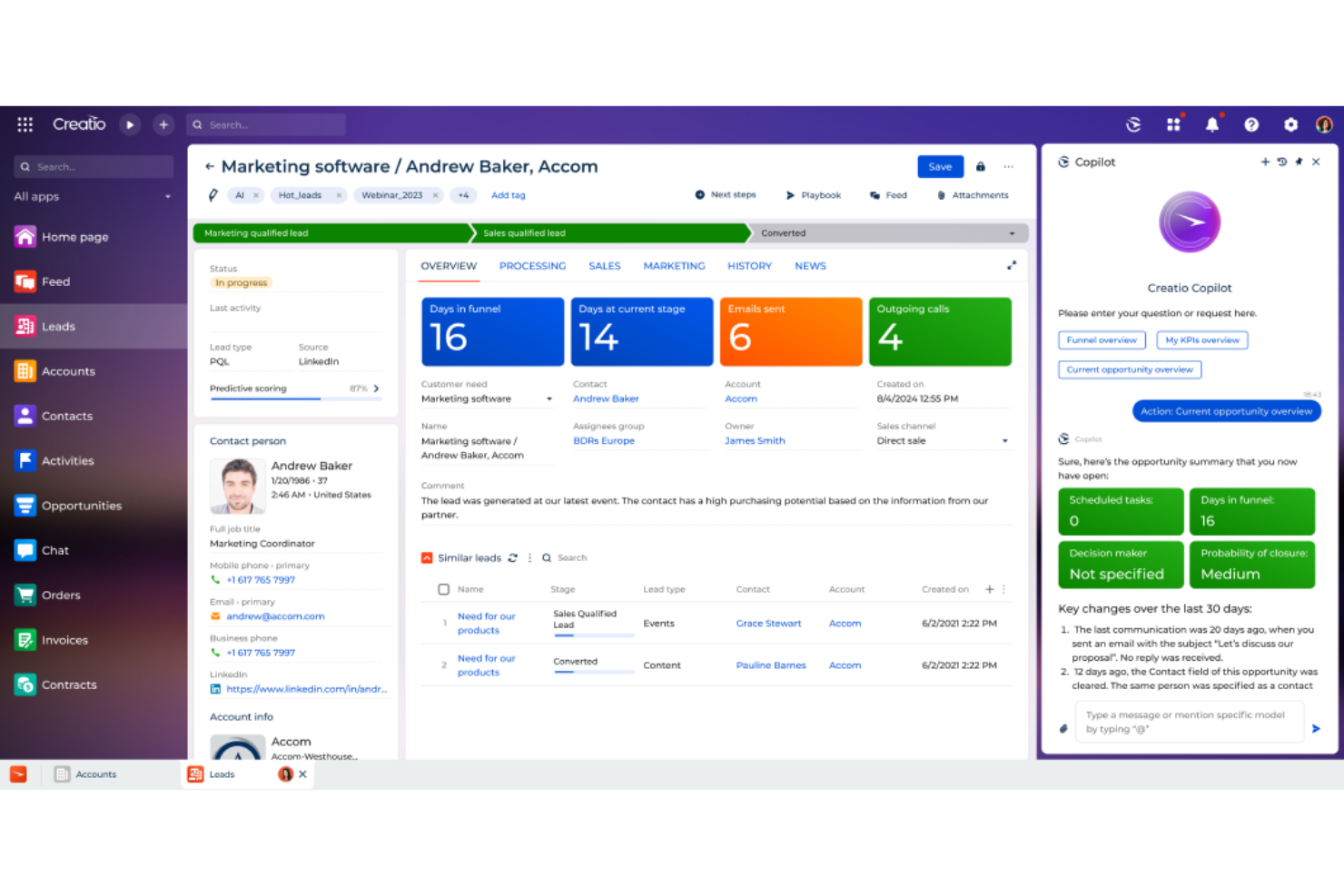
CRM Creatio è una piattaforma no-code progettata per automatizzare i processi di vendita di qualsiasi complessità. Offre una suite di strumenti per gestire le relazioni con i clienti, dalla generazione dei lead all'evasione degli ordini.
Perché ho scelto CRM Creatio: consente di creare processi di onboarding strutturati, guidando i nuovi assunti attraverso ogni fase e garantendo che acquisiscano le conoscenze e le competenze necessarie. Inoltre, gli strumenti di gestione di formazione e certificazione della piattaforma permettono di monitorare i progressi e valutare le competenze, facilitando la transizione dei nuovi membri del team.
Un altro motivo è la base di conoscenza completa della piattaforma. Questo archivio centralizzato offre un facile accesso a politiche aziendali, informazioni sui prodotti e strategie di vendita, fungendo da risorsa preziosa per i nuovi addetti alle vendite. Avere tutte le informazioni essenziali in un unico posto consente al team di aggiornarsi rapidamente e lavorare in modo efficace. Inoltre, poiché CRM Creatio è una piattaforma no-code, puoi personalizzare i flussi di lavoro secondo i tuoi specifici processi di onboarding.
Funzionalità di rilievo e integrazioni di CRM Creatio
Le funzionalità di rilievo includono customer 360, gestione dei lead e delle opportunità, previsione delle vendite, gestione degli ordini e dei contratti, automazione dei flussi di lavoro, gestione della pipeline, gestione delle campagne, gestione dei servizi, gestione dei contatti, gestione delle attività, reportistica e analisi, e strumenti di comunicazione.
Le integrazioni includono Accelo, Act!, ActiveCampaign, Acumatica, Adobe Analytics, Asana, Microsoft Exchange, Excel, Mailchimp, HubSpot Marketing Hub, Google Calendar e Tableau.
Pros and Cons
Pros:
- Supporta la crescita del business
- Piattaforma no-code
- Ampie opzioni di personalizzazione
Cons:
- La migrazione dei dati può essere complessa
- La personalizzazione può richiedere tempo

Ideale per l'automazione dell'eLearning aziendale

iSpring LMS è un sistema di gestione dell'apprendimento (LMS) che facilita la formazione aziendale offrendo una piattaforma per l'eLearning.
Perché ho scelto iSpring LMS: iSpring LMS offre una piattaforma in cui le aziende possono creare programmi di onboarding efficaci e assegnarli automaticamente ai nuovi rappresentanti commerciali. Questo permette un processo di apprendimento più rapido, garantendo che i nuovi arrivati comprendano meglio i propri ruoli e responsabilità.
La piattaforma include corsi interattivi, simulazioni di ruolo e quiz progettati per sviluppare le competenze comunicative di vendita. Consente inoltre di valutare i punti di forza e debolezza del team attraverso report dettagliati. Lo strumento è utilizzato in diversi settori per migliorare la crescita e la performance delle squadre di vendita, offrendo accesso 24/7 ai contenuti formativi e risorse di supporto come software per la formazione online e opzioni di microlearning.
Funzionalità distintive e integrazioni di iSpring LMS
Funzionalità distintive includono un toolkit di authoring per l’eLearning, formazione sulla conformità, soluzioni specifiche per settore e caso, e un sistema di gestione dell’apprendimento che comprende la gestione degli utenti, l’organizzazione dei contenuti e l’automazione di attività di routine come l’iscrizione.
Integrazioni includono Microsoft Teams, Zoom, Salesforce, Shopify, BambooHR, Outlook Calendar, ProctorEdu, PowerBI, OrangeHRM e Bitrix24.
Pros and Cons
Pros:
- Include app native iOS e Android per l'accesso offline
- Offre una funzione di auto-registrazione per gli utenti
- Interfaccia facile da usare
Cons:
- Manca di elementi di gamification
- Alcuni problemi con l'importazione dei dati
New Product Updates from iSpring LMS

iSpring LMS Adds Multiple Observations to OJT Sessions
iSpring LMS now lets managers log multiple observations within one OJT session, grouping visits and auto-generating summary stats like averages, criterion results, and comparisons. For more information, visit iSpring LMS's official site.
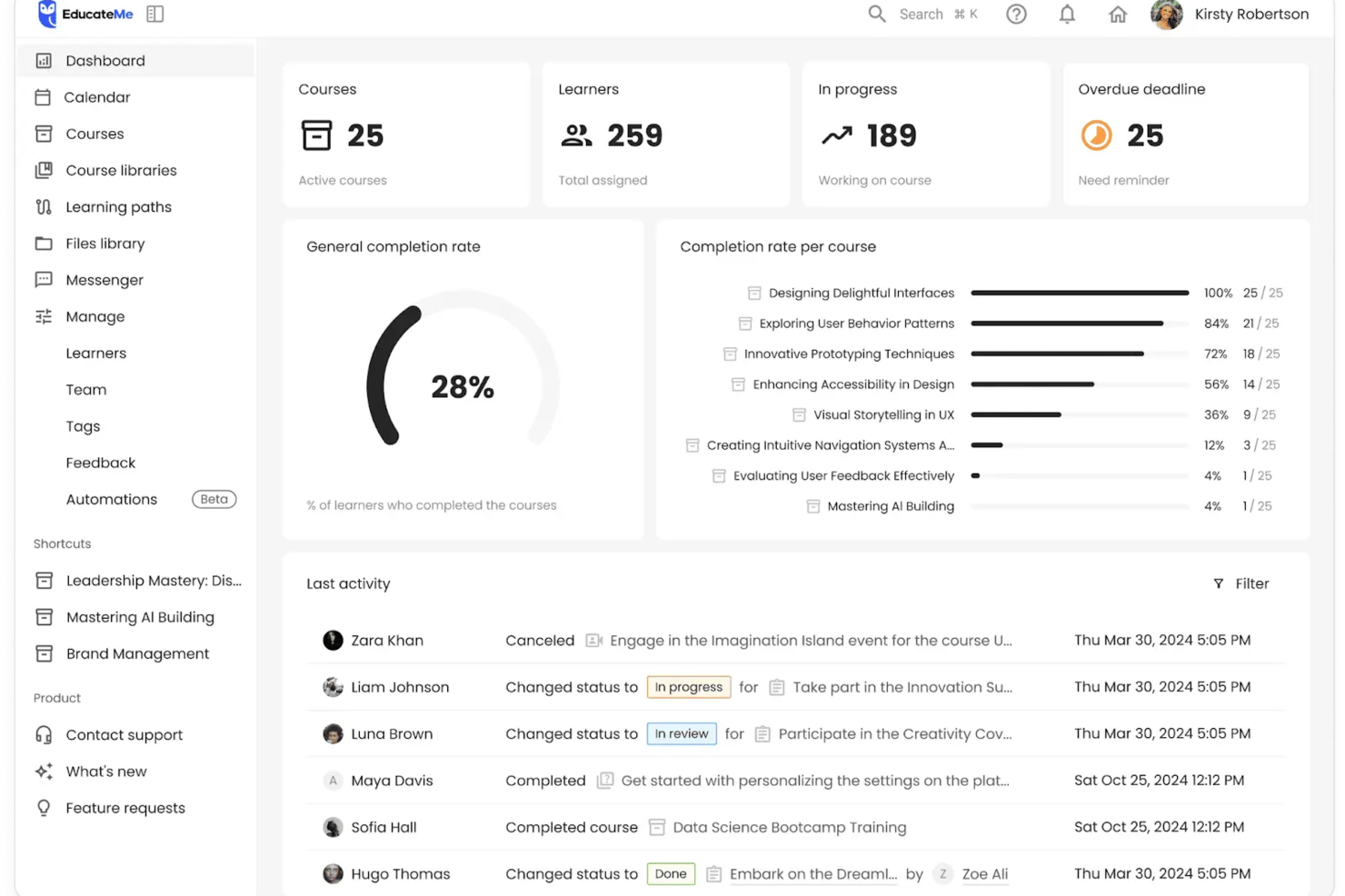
Per chi cerca una soluzione per semplificare l'onboarding delle vendite, EducateMe LMS rappresenta un'opzione interessante. Progettato per aziende e agenzie di formazione, offre funzionalità specializzate come il coaching tramite roleplay con intelligenza artificiale e analisi in tempo reale per affrontare le sfide di un onboarding efficace. Questa piattaforma non solo migliora l'esperienza di apprendimento, ma semplifica anche il processo di onboarding, rendendola una scelta allettante per le aziende che desiderano ottimizzare la formazione delle loro squadre di vendita.
Perché ho scelto EducateMe LMS
Ho scelto EducateMe LMS per il suo approccio unico all'onboarding delle vendite, in particolare grazie al suo coaching tramite roleplay basato su intelligenza artificiale. Questa funzionalità consente al tuo team di simulare scenari di vendita reali, offrendo esercitazione e feedback preziosi. Inoltre, l'analisi in tempo reale della piattaforma fornisce informazioni sull'avanzamento di ogni discente, permettendoti di personalizzare la formazione in base alle esigenze individuali. Queste capacità si allineano perfettamente con l'obiettivo di creare un'esperienza di onboarding dinamica e reattiva per la forza vendita.
Caratteristiche principali di EducateMe LMS
Oltre al coaching tramite roleplay con intelligenza artificiale e alle analisi, EducateMe LMS offre diverse altre funzionalità che migliorano l'onboarding delle vendite.
- Strumenti per la creazione di contenuti: Permettono di progettare materiali formativi personalizzati in base alle esigenze del tuo team di vendita.
- Ambiente di apprendimento collaborativo: Facilita l'apprendimento di gruppo e la condivisione delle conoscenze, favorendo una cultura di miglioramento continuo.
- Soluzioni white-label: Consentono di personalizzare con il branding i materiali formativi, garantendo un aspetto coerente e professionale.
- Attività interattive: Coinvolgi il tuo team con quiz e simulazioni che rafforzano l'apprendimento e la memorizzazione.
Integrazioni EducateMe LMS
Le integrazioni includono strumenti popolari come Slack, Zoom, Salesforce, Microsoft Teams, Google Workspace, HubSpot, Mailchimp, Shopify, WordPress e Trello.
Pros and Cons
Pros:
- Le simulazioni tramite roleplay con intelligenza artificiale supportano lo sviluppo pratico delle competenze di vendita
- Le analisi in tempo reale monitorano i progressi dell'onboarding e colmano eventuali lacune
- Percorsi formativi personalizzabili allineano la formazione ai ruoli di vendita
Cons:
- Il prezzo può risultare elevato per alcuni
- La configurazione avanzata può richiedere tempo iniziale

Absorb
Ideale per un'esperienza utente intuitiva
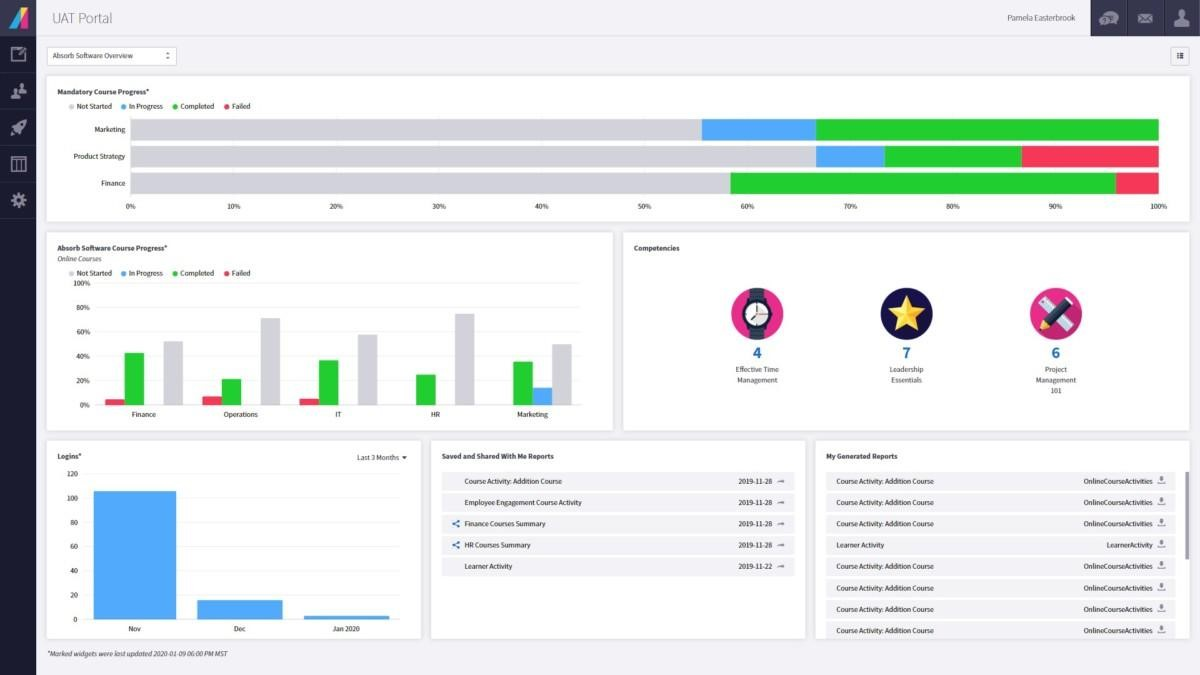
Absorb è un sistema di gestione dell'apprendimento completo che offre una gamma di funzionalità e prodotti per fornire eLearning di grande impatto, migliorare l'esperienza degli utenti e analizzare approfonditamente i dati degli studenti. Con un'attenzione particolare al coinvolgimento dei partecipanti, all'amministrazione intelligente e a una varietà di librerie di contenuti, Absorb garantisce un'esperienza intuitiva, rendendolo la scelta ideale per le organizzazioni che desiderano mettere al centro le esigenze e il coinvolgimento degli utenti.
Perché ho scelto Absorb: Ho selezionato Absorb dopo un attento confronto delle sue funzionalità avanzate e degli scenari d'uso rispetto ad altre soluzioni. La sua suite completa di strumenti, che include amministrazione intelligente, coinvolgimento degli utenti e reportistica e analisi approfondite, lo rende un candidato valido nell'ambito dell'onboarding per le vendite.
Funzionalità e integrazioni principali di Absorb
Funzionalità comprendono creazione di contenuti, gestione utenti, raccomandazioni basate su intelligenza artificiale, eCommerce, analisi, formazione guidata da istruttore e monitoraggio delle performance.
Integrazioni disponibili nativamente con diverse applicazioni, tra cui BambooHR, Ceridian Dayforce, Cisco Webex, Namely, Oracle Peoplesoft, Salesforce, Workday e Zoom.
Pros and Cons
Pros:
- Supporto clienti reattivo
- Ottime opzioni di personalizzazione e localizzazione
- Apprendimento offline e online
Cons:
- Il sistema richiede un certo periodo di apprendimento
- I filtri di ricerca non sono molto specifici
New Product Updates from Absorb

Absorb Adds Department-Level Message Branding
Absorb adds Department Message Branding for custom email branding, contact details, and sender identity by department. This gives multi-tenant portals more control over brand-specific communications. For more information, visit Absorb’s official site.
 .
.
Trainual
Miglior software di onboarding per le vendite per la documentazione delle SOP
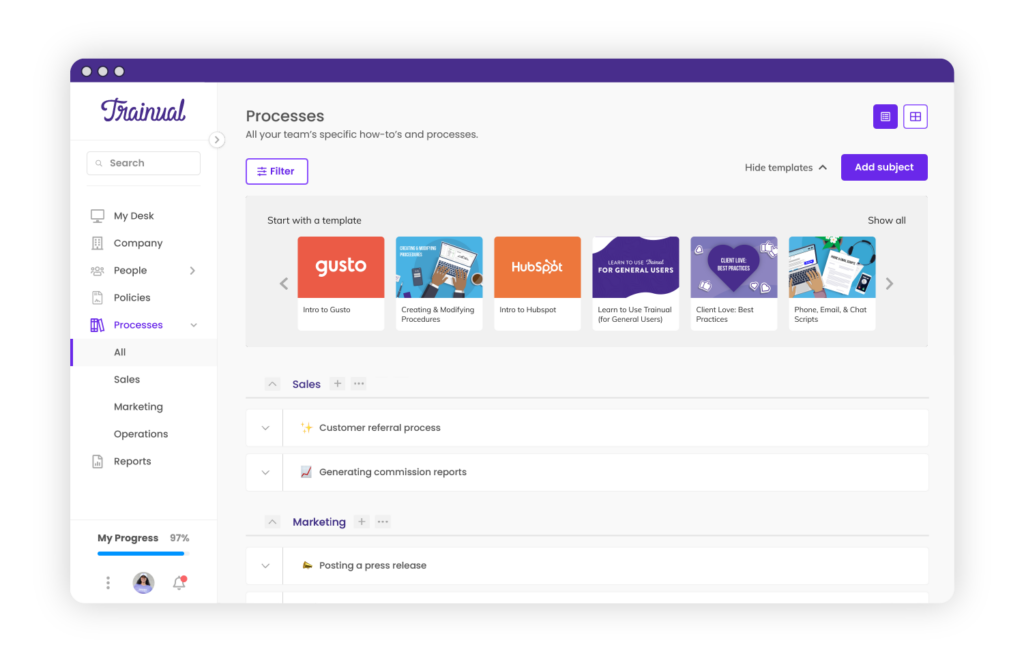
Trainual è un software basato su cloud che aiuta le aziende a creare manuali di formazione per nuovi o attuali dipendenti, clienti, collaboratori, stagisti e volontari. Inoltre, aiuta le aziende a organizzare il caos dell'onboarding e della formazione.
Perché ho scelto Trainual: Ho scelto Trainual per la sua funzionalità di documentazione delle SOP (Standard Operating Procedures). Le SOP svolgono un ruolo cruciale nell'inserimento dei nuovi assunti poiché forniscono indicazioni sui processi e le aspettative dell'organizzazione.
Le funzionalità AI integrate di Trainual possono aiutarti a creare contenuti per le SOP. Puoi anche incorporare PDF, GIF, video e altri formati. Inoltre, offre una piattaforma centralizzata per archiviare tutte le SOP in un unico posto facilmente accessibile ai venditori. I contenuti possono essere organizzati in raccolte in base a dipartimenti, team, sedi o qualsiasi altra categoria, rendendo più facile per le persone trovare ciò di cui hanno bisogno rapidamente.
Funzionalità distintive e integrazioni di Trainual:
Funzionalità distintive includono la funzione di stima intelligente dei tempi che permette agli utenti di visualizzare il tempo stimato richiesto per una specifica sessione di formazione.
Le integrazioni includono Loom, Quickbooks Payroll, Slack, Justworks, Paylocity, Zenefits, Namely, TriNet, Square Payroll e Paycom. Puoi anche ottenere ulteriori integrazioni tramite Zapier e API.
Pros and Cons
Pros:
- Dashboard semplice e intuitiva
- Offre un'enorme varietà di modelli
- Guide e walkthrough per l'utente integrati
Cons:
- Posti utente limitati
- Integrazioni native limitate

360Learning
Il miglior software di onboarding per le vendite per il rinforzo
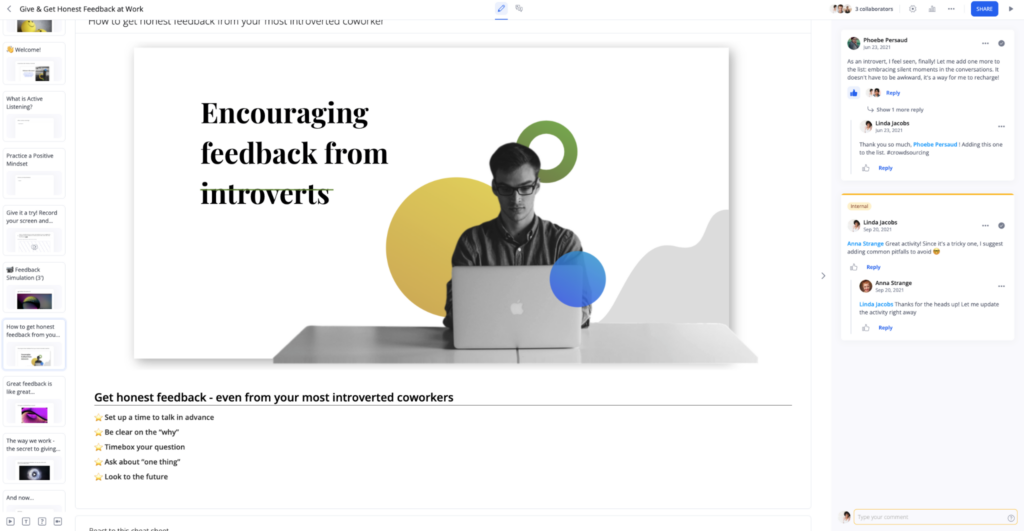
360Learning è un sistema di gestione dell'apprendimento (LMS) e una piattaforma di apprendimento collaborativo. È progettato per aiutare le organizzazioni a creare e fornire corsi di formazione online ai propri dipendenti o apprendisti.
Perché ho scelto 360Learning: Mi è piaciuta la funzione di tracciamento dei progressi di 360Learning che aiuta i responsabili delle vendite ad inserire nuovi rappresentanti fornendo informazioni in tempo reale sui progressi, il coinvolgimento e la soddisfazione degli utenti, consentendo ai manager di monitorare l'avanzamento del team, inviare promemoria di formazione ed effettuare modifiche necessarie per migliorare la qualità complessiva dei corsi.
Inoltre, le funzionalità analitiche e di monitoraggio LMS complete di 360Learning forniscono ai manager tutti i dati necessari per valutare e ottimizzare il proprio programma di apprendimento.
Caratteristiche distintive e integrazioni di 360Learning
Caratteristiche distintive includono funzioni di formazione per l'abilitazione alle vendite che permettono al team di esercitarsi con presentazioni, demo e ricevere coaching a distanza — tutto su un'unica piattaforma.
Le integrazioni includono OpenSesame, Coursera, Udemy Business, HiBob, Cornerstone, Google Drive, Genially, Loom, Zoom e Salesforce. Sono inoltre disponibili integrazioni aggiuntive tramite API.
Pros and Cons
Pros:
- Facile da usare e da navigare
- Include una prova gratuita di 30 giorni
- Si integra con Zoom
Cons:
- Opzioni di personalizzazione limitate
- Gli strumenti di analisi possono risultare confusi
Altri Software di Onboarding per le Vendite
Ecco alcune altre opzioni di software di onboarding per le vendite che non sono entrate nella mia shortlist ma che vale comunque la pena considerare:
- Guidde
Ideale per creare guide di onboarding con l'IA
- MindTickle
Il miglior software di onboarding per la forza vendita per la formazione rinforzata
- SmartWinnr
Il miglior software di onboarding delle vendite per il rafforzamento
- Allego
Il miglior software di onboarding delle vendite per team remoti
- Lessonly by Seismic
Il miglior software di onboarding per le vendite rivolto alle grandi aziende
- WorkRamp
Il miglior software di onboarding per le vendite per valutazioni
- Second Nature AI
Il miglior software di onboarding per le vendite per un onboarding potenziato dall'IA
- SalesHood
Miglior software di onboarding per le vendite basato sull'apprendimento per ruolo
- Wonderway
Il miglior software di onboarding per le vendite per migliorare il tempo di inserimento
- Gradual
Il miglior software di onboarding per le vendite per piccoli team
- Continu
Il miglior software di onboarding per le vendite per facilità d’uso
- PitchMonster
Il migliore con scenari di vendita AI personalizzabili


Come Valuto i Software di Onboarding per le Vendite
La mia valutazione si suddivide in due livelli: le capacità di base che ogni strumento qualificato deve avere, come percorsi strutturati per i rappresentanti e monitoraggio della fase di inserimento, e i fattori che distinguono le soluzioni migliori.
Funzionalità di Base (Requisiti Minimi per Questa Lista)
Quando seleziono gli strumenti per la mia lista, ne valuto ciascuno su una scala da 0 (non offre la funzionalità) a 5 (eccelle in quest’area) per ogni funzionalità di base elencata di seguito. Successivamente, calcolo il punteggio totale dello strumento in percentuale. Ogni strumento deve raggiungere un punteggio totale minimo del 65% per essere preso in considerazione.
- Percorsi di Onboarding Strutturati: Verifico se una piattaforma supporta percorsi di apprendimento sequenziali e specifici per il ruolo—ad esempio, percorsi separati per gli SDR rispetto agli AE aziendali con traguardi distinti.
- Gestione di Contenuti & Playbook: È importante una libreria centralizzata che ospiti schede di battaglia, script per le chiamate e presentazioni di prodotto, insieme al controllo delle versioni e i permessi sui contenuti.
- Valutazioni delle Competenze & Certificazioni: Cerco formati a quiz, flussi di lavoro di certificazione e capacità dei manager di approvare che confermino che un rappresentante sia pronto prima che inizi a trattare affari reali.
- Strumenti di Pratica & Role-Play: Che si tratti di presentazioni video valutate dai manager o simulazioni AI, valuto come i rappresentanti possano esercitarsi in chiamate di scoperta e gestione delle obiezioni.
- Monitoraggio dei Progressi & Analisi: I dashboard dovrebbero evidenziare i tassi di completamento a livello di rappresentante, i punteggi di competenza e le tempistiche di inserimento che i responsabili RevOps possono collegare alla prontezza della pipeline.
- Integrazione con CRM & Stack di Vendita: Valuto come ciascuno strumento si colleghi a CRM come Salesforce o HubSpot e a piattaforme di sales engagement per allineare i dati di onboarding con l’attività reale dei rappresentanti.
Quando ho una lista di strumenti che soddisfano questi criteri, considero ciò che distingue ogni piattaforma.
Fattori Differenzianti (Cosa Distingue i Fornitori)
Ecco come confronto e metto a confronto i diversi fornitori:
Caratteristiche Distintive
Le simulazioni di role-play alimentate da AI sono un grande elemento distintivo. Cerco piattaforme dove i nuovi rappresentanti possano esercitarsi nella gestione delle obiezioni contro personaggi AI del lato acquirente e ricevere feedback valutato prima di gestire affari reali. I flussi di coaching per i manager contano anche: i migliori strumenti offrono ai manager di prima linea template strutturati per incontri 1:1 e schede di valutazione della prontezza legate ai progressi nell’onboarding di ciascun rappresentante. Valuto inoltre l’apprendimento just-in-time, che offre micro-formazioni integrate in strumenti come Salesforce o Slack proprio nel momento in cui il rappresentante ne ha bisogno durante le prime settimane.
Oltre le Caratteristiche
La compatibilità con il tech stack per le vendite è una delle prime cose che valuto. Una piattaforma ha bisogno di integrazioni native con il tuo CRM, strumenti di conversation intelligence e HRIS per automatizzare la creazione degli utenti e collegare i dati di onboarding ai risultati reali della pipeline. Anche la scalabilità è importante: verifico se uno strumento può supportare percorsi di onboarding distinti per SDR, AE e partner di canale in più regioni. I tempi di implementazione sono anch’essi decisivi. Cerco fornitori che offrano template di onboarding preimpostati in modo che il tuo primo gruppo possa essere avviato in settimane invece che in mesi.
Come Scegliere un Software di Onboarding per le Vendite
È facile perdersi in lunghe liste di funzionalità e strutture di prezzo complesse. Per aiutarti a restare concentrato durante il tuo particolare processo di selezione del software, ecco un elenco di fattori da tenere a mente:
| Fattore | Cosa valutare |
|---|---|
| Scalabilità | Il software crescerà insieme al tuo team? Valuta se può gestire più utenti o funzionalità man mano che la tua forza vendita si espande. |
| Integrazioni | Funziona bene con il tuo CRM attuale e altri strumenti? Controlla la compatibilità per evitare interruzioni nei tuoi flussi di lavoro. |
| Personalizzazione | È possibile adattarlo ai tuoi processi? Cerca soluzioni che permettano personalizzazioni senza necessità di grandi conoscenze tecniche. |
| Facilità d'uso | Quanto è intuitiva l'interfaccia? Un design user-friendly riduce i tempi di formazione e aumenta i tassi di adozione da parte dei nuovi membri del team. |
| Implementazione e onboarding | Quanto tempo serve per essere operativi? Considera il tempo e le risorse necessarie al tuo team per una transizione senza intoppi. |
| Costo | I piani tariffari sono chiari e in linea col tuo budget? Fai attenzione a eventuali costi nascosti che potrebbero aumentare nel tempo. |
| Tutela della sicurezza | Protegge i tuoi dati? Assicurati che sia conforme agli standard di settore e offra solide funzionalità di sicurezza per mantenere le tue informazioni al sicuro. |
| Disponibilità del supporto | Che tipo di supporto offre il fornitore? Considera disponibilità e tempi di risposta, soprattutto se operi a livello globale o 24/7. |
Tendenze nei Software di Onboarding per le Vendite per 2026
I software per l’onboarding delle vendite stanno evolvendo rapidamente, guidati dalla crescente necessità di esperienze di onboarding snelle, efficienti e personalizzate, in linea con strategie più ampie di gestione delle operazioni di ricavo. Mentre le organizzazioni si impegnano per massimizzare il potenziale delle proprie vendite in un contesto competitivo, il ruolo degli strumenti innovativi di onboarding è diventato più cruciale che mai, riflettendo una tendenza chiara verso soluzioni più integrate, adattive e focalizzate sull’utente.
Integrazione e compatibilità dell’ecosistema:
- Funzionalità di integrazione avanzate, che garantiscono la connettività senza soluzione di continuità con sistemi CRM già esistenti, strumenti di vendita e piattaforme di produttività, facilitando un processo di onboarding unificato ed efficiente attraverso diversi ecosistemi software.
- L’ascesa di piattaforme che offrono ampio supporto API, consentendo integrazioni personalizzate e permettendo alle organizzazioni di adattare le esperienze di onboarding ai propri flussi di lavoro operativi e stack tecnologici specifici.
Coinvolgimento e interattività:
- Crescente adozione di elementi di gamification e componenti interattivi all'interno dei software per l’onboarding per aumentare il coinvolgimento, la motivazione e la partecipazione, rendendo il processo di apprendimento più piacevole ed efficace.
- Implementazione di moduli di realtà virtuale e aumentata per esperienze formative immersive, aiutando i nuovi assunti a comprendere concetti e scenari di vendita complessi in modo più interattivo e memorabile.
Approfondimenti e analisi basati sui dati:
- Funzionalità analitiche avanzate sempre più diffuse, che offrono approfondimenti più approfonditi sull’efficacia dell’onboarding, sul progresso individuale e sulle aree che necessitano di attenzione, consentendo miglioramenti guidati dai dati ai programmi di formazione.
- Meccanismi di feedback in tempo reale che forniscono orientamento e supporto immediati ai nuovi assunti, facilitando un’esperienza di onboarding più reattiva e adattiva.
Funzionalità in diminuzione:
- Riduzione dell’enfasi sui contenuti "taglia unica", spostandosi da moduli di formazione generici verso risorse più personalizzate e specifiche per il ruolo.
- Diminuzione delle piattaforme di onboarding standalone, poiché l’integrazione e la compatibilità dell’ecosistema diventano sempre più cruciali, con le aziende che prediligono soluzioni che offrano una maggiore utilità e integrazione fluida dei flussi di lavoro.
Per i responsabili delle operazioni di ricavo, comprendere queste tendenze e selezionare il software che vi si allinea è fondamentale per costruire un team di vendita ad alte prestazioni capace di prosperare nell’attuale ambiente di mercato dinamico grazie alle giuste soluzioni software per le vendite.
Cos’è un software per l’onboarding delle vendite?
Il software per l’onboarding delle vendite è uno strumento che ti aiuta a formare, guidare e accelerare l’inserimento di nuovi rappresentanti di vendita. I responsabili delle vendite, i formatori e i team HR lo utilizzano per organizzare la formazione, monitorare i progressi e assicurarsi che i nuovi assunti acquisiscano subito le competenze fondamentali. Offri lezioni interattive e test integrati che sostituiscono scartoffie confusionarie o coaching sparso, così i nuovi venditori sanno cosa fare dal primo giorno. Molte organizzazioni affiancano questi strumenti a complete piattaforme di formazione per le vendite per creare un vero e proprio ecosistema di apprendimento.
Caratteristiche
Quando si sceglie un software per l’onboarding delle vendite, presta attenzione alle seguenti caratteristiche chiave:
- Moduli formativi: Offrono contenuti strutturati per formare i nuovi venditori su prodotti, processi e policy aziendali.
- Monitoraggio dei progressi: Consente di seguire il percorso di apprendimento dei nuovi assunti e individuare le aree in cui potrebbero aver bisogno di ulteriore supporto.
- Integrazione CRM: Si collega facilmente ai sistemi di gestione delle relazioni con i clienti già in uso per garantire coerenza dei dati ed efficienza nei flussi di lavoro.
- Personalizzazione: Permette agli utenti di adattare la piattaforma alle esigenze aziendali e ai processi formativi specifici senza necessità di competenze tecniche.
- Analisi e reportistica: Offre una visione sull’efficacia dell’onboarding e sulle aree di miglioramento tramite report dettagliati e analisi dei dati.
- Accesso mobile: Permette ai partecipanti di consultare i materiali formativi anche in mobilità, supportando ambienti di apprendimento flessibili.
- Gamification: Coinvolge gli utenti con elementi interattivi come quiz e classifiche per motivare ed arricchire l’esperienza di apprendimento.
- Tour interattivi del prodotto: Offre walkthrough guidati di funzionalità e strumenti per aiutare i nuovi utenti a familiarizzare rapidamente con la piattaforma.
- Misure di sicurezza: Garantisce la protezione dei dati e la conformità agli standard di settore per mantenere la fiducia e la sicurezza degli utenti.
- Supporto multilingue: Risponde alle esigenze di team eterogenei grazie a contenuti in più lingue, migliorando accessibilità e inclusione.
Vantaggi
L’implementazione di un software per l’onboarding delle vendite insieme a completi strumenti di sales enablement offre numerosi vantaggi per il tuo team e la tua azienda. Eccone alcuni a cui puoi aspirare:
- Tempo di inserimento più rapido: Riduci il tempo necessario affinché i nuovi assunti diventino produttivi grazie a moduli di formazione strutturati e tour interattivi del prodotto.
- Formazione coerente: Assicura che tutti i nuovi commerciali ricevano la stessa formazione di alta qualità tramite contenuti standardizzati e monitoraggio dei progressi.
- Migliore fidelizzazione: Mantieni gli assunti coinvolti e motivati tramite gamification e percorsi di apprendimento personalizzati, riducendo il tasso di turnover.
- Analisi guidate dai dati: Utilizza analisi e reportistica per valutare l’efficacia della formazione e prendere decisioni informate sui miglioramenti.
- Maggiore flessibilità: Supporta diverse preferenze di apprendimento grazie all’accesso da mobile e al supporto multilingue, consentendo la formazione ovunque e in qualsiasi momento.
- Collaborazione migliorata: Favorisci una migliore integrazione e comunicazione del team tramite l’integrazione CRM e risorse formative condivise.
Costi e Prezzi
La scelta del software per l’onboarding delle vendite richiede la comprensione dei vari modelli di prezzo e piani disponibili. I costi variano in base a funzionalità, dimensioni del team, componenti aggiuntivi e altro ancora. La tabella qui sotto riassume i piani comuni, i prezzi medi e le caratteristiche tipiche incluse nelle soluzioni di onboarding per le vendite:
Tabella di Confronto dei Piani per il Software di Onboarding delle Vendite
| Tipo di Piano | Prezzo Medio | Caratteristiche Comuni |
|---|---|---|
| Piano Gratuito | $0 | Moduli formativi di base, accesso utenti limitato e reportistica standard. |
| Piano Personale | $5-$25/user/month | Contenuti personalizzabili, tracciamento dei progressi e supporto email. |
| Piano Business | $30-$60/user/month | Integrazione CRM, analisi avanzate e funzionalità di gamification. |
| Piano Enterprise | $70-$100/user/month | Account manager dedicato, supporto multilingue e opzioni di completa personalizzazione. |
FAQ sul Software di Onboarding per le Vendite
Ecco alcune risposte alle domande più comuni sul software per l’onboarding delle vendite:
Quanto tempo serve per implementare un software di onboarding per le vendite?
Il tempo necessario per implementare un software di onboarding per le vendite varia. Può andare da pochi giorni a diverse settimane, a seconda della complessità dei sistemi esistenti e delle funzionalità del software. Per velocizzare il processo, preparati raccogliendo tutta la documentazione e i materiali di formazione necessari in anticipo. Assicurati che il tuo team sia pronto a utilizzare il nuovo sistema e pianifica il tempo per eventuali sessioni di formazione necessarie. Collaborare con un fornitore che offre un forte supporto può anche facilitare una transizione fluida.
Il software di onboarding per le vendite può integrarsi con altri strumenti?
Sì, la maggior parte dei software di onboarding per le vendite può integrarsi con altri strumenti come sistemi CRM, piattaforme di posta elettronica e software di analisi. L’integrazione garantisce che i dati fluiscano senza interruzioni tra i sistemi, riducendo inserimenti manuali ed errori. Prima dell’acquisto, verifica che il software supporti gli strumenti già utilizzati dal tuo team. Questo aiuterà a mantenere i flussi di lavoro esistenti e a incrementare il valore del software. Cerca piattaforme che offrano API o integrazioni già pronte per semplificare il processo.
Il software di onboarding per le vendite è adatto ai team da remoto?
Sì, il software di onboarding per le vendite è ideale per i team da remoto. Fornisce moduli di formazione online e risorse accessibili da qualsiasi luogo, favorendo coerenza e coinvolgimento in sedi diverse. Per massimizzare l’efficacia, scegli software con accesso da mobile e funzionalità interattive. Questi elementi mantengono coinvolti i lavoratori remoti e li aiutano ad apprendere con i propri tempi. Verifica che il software includa anche strumenti di comunicazione per facilitare la collaborazione e il feedback.
Come posso misurare il successo del software di onboarding per le vendite?
Misura il successo monitorando metriche come il tempo necessario per diventare produttivi, il tasso di completamento dei moduli di formazione e i miglioramenti delle prestazioni commerciali. Raccogli i feedback dei nuovi assunti per comprendere la loro esperienza e identificare aree di miglioramento. Utilizza le funzionalità di analisi e reportistica del software per ottenere informazioni su come funziona il processo di onboarding. Rivedi regolarmente queste metriche per adattare il tuo approccio e assicurati che il software continui a soddisfare le esigenze del tuo team.
Cosa succede dopo:
Se stai cercando un software di onboarding per le vendite, contatta gratuitamente un consulente SoftwareSelect per dei consigli personalizzati.
Compili un modulo e fai una breve chiacchierata dove approfondiscono le tue esigenze specifiche. Poi riceverai una lista ristretta di software da valutare. Ti supporteranno anche durante tutto il processo di acquisto, incluse le trattative sul prezzo.