

I 15 migliori software CRM gratuiti recensiti per il 2026

10 Elenco dei migliori CRM gratuiti


Con così tanti software CRM gratuiti diversi disponibili, capire quale sia quello giusto per te può essere difficile. Sai di voler gestire in modo conveniente le interazioni con i clienti, i dati e le relazioni, ma devi capire quale strumento sia il migliore. Ci penso io! In questo articolo ti aiuterò a rendere semplice la tua scelta, condividendo le mie esperienze personali nell'utilizzo di decine di strumenti CRM gratuiti diversi con una varietà di team e progetti, con la mia selezione dei migliori software CRM gratuiti.
Perché fidarsi dei nostri consigli sui software
Le nostre recensioni riflettono il nostro giudizio indipendente, non un discorso di vendita. Scopri come manteniamo la trasparenza.
Per questa guida, abbiamo valutato gli strumenti attraverso test pratici e ricerche indipendenti, assegnando un punteggio agli strumenti in base ai nostri criteri di selezione.
Le nostre recensioni riflettono il nostro giudizio editoriale umano, non un discorso di vendita.
Tabella comparativa dei software CRM gratuiti
| Tool | Best For | Trial Info | Price | ||
|---|---|---|---|---|---|
| 1 | Ideale per aziende con una strategia di crescita guidata dalle vendite | Piano gratuito disponibile | A partire da $10/utente/mese, fatturazione annuale | Website | |
| 2 | Ideale per strutture CRM personalizzate | Prova gratuita di 14 giorni | Da $29/utente/mese (fatturato annualmente) | Website | |
| 3 | Ideale per il tracciamento delle vendite B2B | Prova gratuita di 30 giorni + demo gratuita disponibile | Da $29/utente/mese (fatturato annualmente) | Website | |
| 4 | Ideale per facilità d'uso | Prova gratuita di 14 giorni + piano gratuito disponibile | Da $18/utente/mese (fatturato annualmente) | Website | |
| 5 | Il miglior CRM con assistente bot integrato | Prova gratuita di 15 giorni disponibile | Da $20/utente/mese | Website | |
| 6 | Miglior CRM gratuito e software collaborativo cross-team | Piano gratuito disponibile | A partire da $9/utente/mese | Website | |
| 7 | Ideale per piccole imprese con operazioni leggere di customer success | Piano gratuito e demo gratuita disponibili | Da $14.99/utente/mese | Website | |
| 8 | Ideale per pipeline di vendita personalizzabili | Demo gratuita + prova gratuita di 14 giorni disponibile | Da $14/utente/mese (fatturazione annuale) | Website | |
| 9 | Il miglior CRM gratuito da integrare con Google Workspace | Piano gratuito disponibile | Da $19/utente/mese | Website | |
| 10 | Il miglior CRM gratuito per piccole aziende B2B | Piano gratuito e prova gratuita disponibili | Da $18.21/utente/mese | Website |


Recensioni dei migliori software CRM gratuiti
Queste panoramiche dettagliate ti daranno un’idea più chiara di come ciascun software CRM gratuito si distingua dalla concorrenza. Ho incluso le funzionalità e le integrazioni più importanti, le informazioni sui prezzi e uno screenshot dell’interfaccia utente per darti un’idea di ciascun prodotto.

Ideale per aziende con una strategia di crescita guidata dalle vendite

monday offre un CRM per le vendite con gestione dei contatti e della pipeline, automazione dei processi e strumenti per l'onboarding dei clienti dedicati ai team commerciali.
Perché ho scelto monday Sales CRM: Questo software dispone di funzionalità per la gestione delle trattative e l'automazione dei flussi di lavoro da cui possono trarre vantaggio team di vendita, account manager e titolari d'azienda. Gli utenti possono impostare fasi personalizzate delle trattative per monitorare la propria pipeline, assegnare automaticamente i lead ai venditori e visualizzare nel tempo le interazioni con i contatti. Previsioni di vendita e notifiche sulle attività dei contatti aiutano i rappresentanti a pianificare in anticipo e a rispondere alle esigenze immediate.
Per le aziende in cui il team commerciale è al centro delle operazioni di generazione dei ricavi, questa può essere una scelta eccellente. Il software include funzionalità utilizzabili anche dai team marketing e dell'assistenza clienti, ma in generale si rivolge principalmente ai team di vendita. È inoltre possibile creare dashboard personalizzabili per misurare KPI di vendita e altri indicatori di performance.
Funzionalità e integrazioni principali di monday Sales CRM
Funzionalità comprendono gestione delle attività, tracciamento delle email, modelli per email, automazione dei flussi, creatore di pipeline personalizzate, notifiche, previsione delle vendite, obiettivi di team e dashboard di reportistica.
Integrazioni includono Airtable, Canva, DocuSign Easyform, Figma, Hootsuite, Jira, JustCall, Miro, PandaDoc, Tableau, Toggl, Twilio e Zoho.
Pros and Cons
Pros:
- Le aziende che già usano altri prodotti monday restano nell'ecosistema
- Grande base di conoscenze e canale YouTube per l'assistenza
- Installazione rapida e interfaccia amichevole
Cons:
- Chi cerca una soluzione molto completa potrebbe non trovare tutte le funzionalità di cui ha bisogno
- L'assistenza clienti non è facilmente raggiungibile telefonicamente
New Product Updates from monday CRM

monday CRM Adds Meta Conversions API Integration
monday CRM now lets you connect Meta Conversions API and sync lead status back to Meta, improving targeting and conversions via a new Meta integration automation recipe. For more information, visit monday CRM's official site.

Attio
Ideale per strutture CRM personalizzate
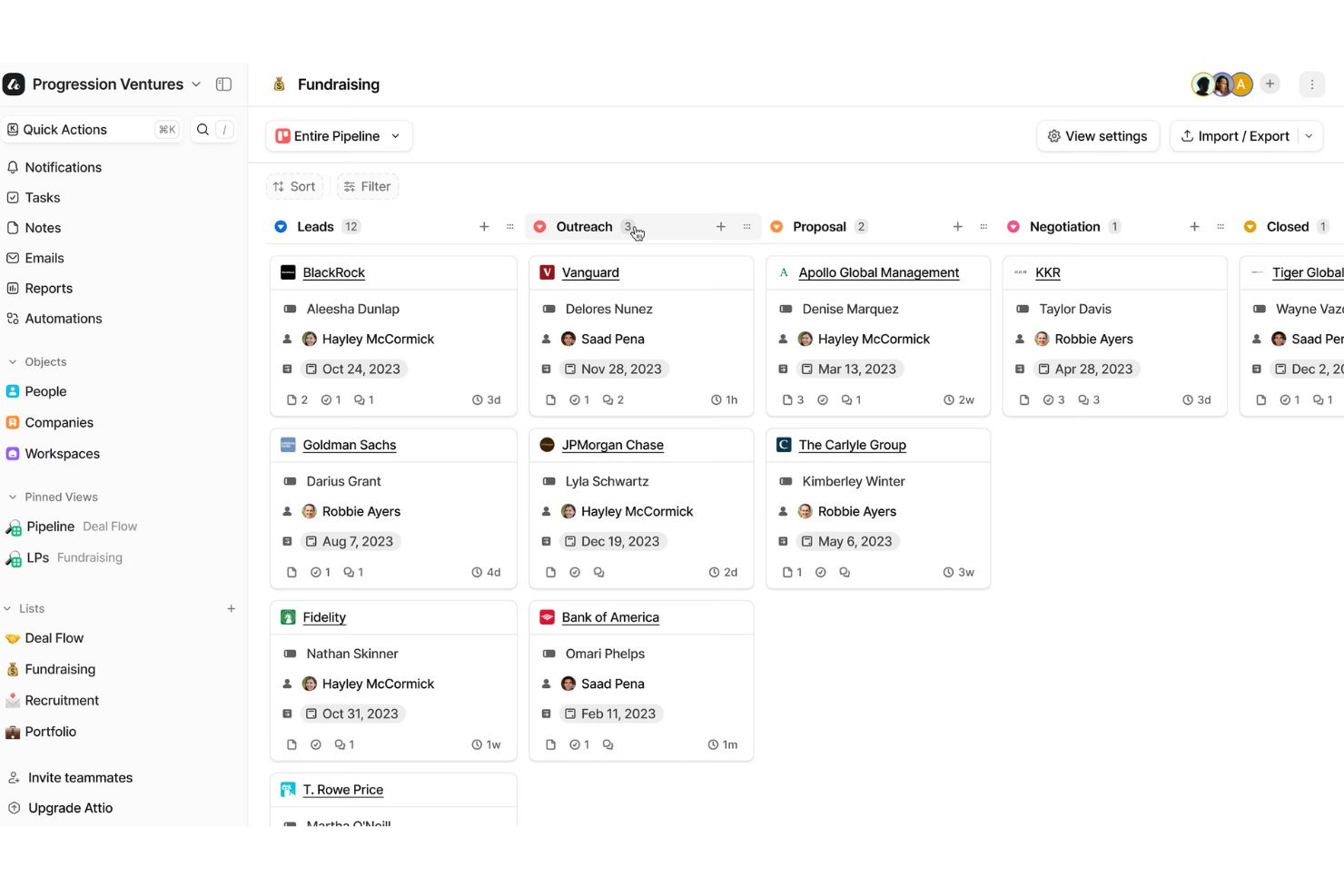
Attio è una piattaforma CRM flessibile creata per aiutare i team a gestire le relazioni con i clienti in modo che rispecchi perfettamente il funzionamento effettivo della loro azienda. Centralizza persone, aziende e trattative in un unico sistema connesso.
Perché ho scelto Attio: Ho scelto Attio per il suo modello dati adattabile. Puoi progettare record che vanno oltre le classiche persone e aziende—come partnership, fatture o progetti—così il tuo CRM riflette esattamente ciò di cui la tua azienda ha bisogno. Questa flessibilità rende più facile mantenere tutte le informazioni su clienti e business in un unico posto.
Un altro motivo è il motore di automazione. Grazie a questo, puoi impostare regole per l’assegnazione dei lead, riattivare opportunità calde o fredde e creare sequenze che fanno avanzare i potenziali clienti nella pipeline senza interventi manuali. Per i team in crescita, questo significa meno tempo speso in attività ripetitive e più tempo dedicato ai clienti.
Funzionalità e integrazioni principali di Attio:
Le funzionalità comprendono reportistica che ti permette di creare dashboard personalizzate per tracciare la pipeline e misurare la performance in tempo reale. Attio offre anche supporto tramite intelligenza artificiale per attività come la ricerca di prospect, identificazione degli stakeholder e valutazione delle trattative, aiutandoti a stabilire le priorità su cui concentrare l’energia del team.
Le integrazioni includono Vercel, DigitalOcean, GitHub, Stripe, Figma, Intercom, Segment, Notion, Slack, Loom, Retool e Customer.io.
Pros and Cons
Pros:
- Modello dati flessibile adatto a qualsiasi azienda
- L’IA aiuta a identificare lead e stakeholder
- Ottime opzioni per il monitoraggio della pipeline
Cons:
- Mancano funzionalità integrate di chiamata
- L’uso offline è limitato
New Product Updates from Attio

Attio Improves Ask Attio With Suggested Actions and Consistent Chat
Attio adds suggested next actions, example prompts, a consistent chat panel, aligned shortcuts, and a minimize option to Ask Attio. These updates make the AI assistant easier to use across different pages. For more information, visit Attio’s official site.
 .
.
Ideale per il tracciamento delle vendite B2B
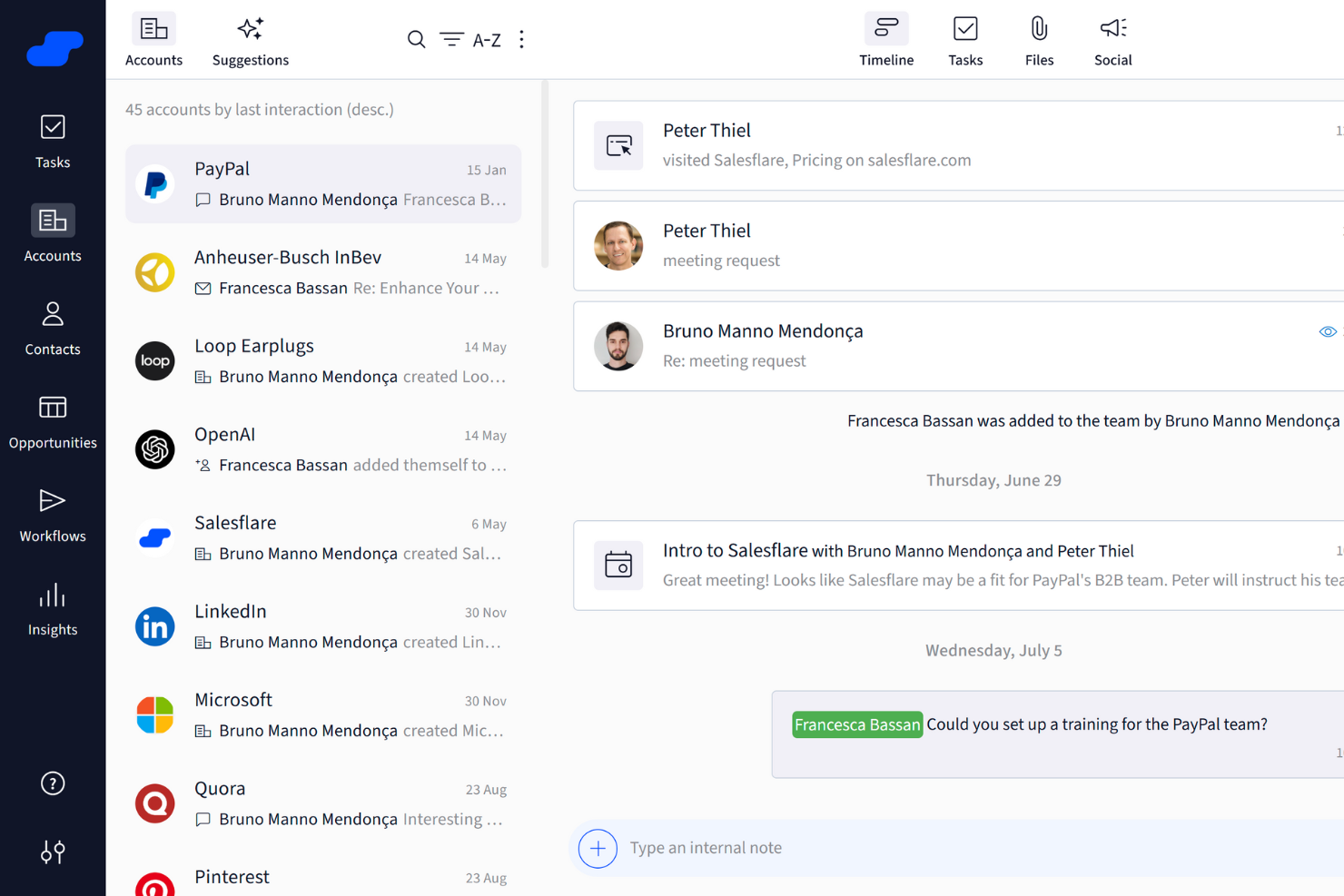
Salesflare è uno strumento CRM focalizzato sul miglioramento dei processi di vendita grazie a funzionalità come il tracciamento delle vendite e dashboard personalizzabili.
Perché ho scelto Salesflare: Salesflare offre notevoli capacità di sales intelligence, tra cui intelligenza relazionale, arricchimento dei dati e suggerimenti basati sull'IA. Queste funzionalità ti aiutano ad avere una comprensione più approfondita dei tuoi potenziali clienti e clienti attuali, permettendo al tuo team di prendere decisioni più informate. Inoltre, gli strumenti di sales engagement, come le sequenze di email e i modelli, sono ottimi per mantenere una comunicazione coerente ed efficace.
Salesflare offre anche supporto avanzato per la generazione di lead tramite l'integrazione con LinkedIn, un lead finder e un'estensione per Chrome. Questo rende più semplice trovare e connetterti con potenziali lead direttamente dal tuo browser web.
Caratteristiche distintive e integrazioni di Salesflare
Caratteristiche includono pipeline di vendita visive, inserimento automatico dei dati, promemoria automatici, dashboard personalizzabili, strumenti di arricchimento dei dati, modelli di email e opzioni di tracciamento email e web.
Le integrazioni includono Google, Microsoft, LinkedIn, QuickBooks Online, Slack, Typeform, Facebook Lead Ads, Google Contacts, Better Proposals, Emailable, Leadinfo e StoryChief.
Pros and Cons
Pros:
- Capacità di integrazione con piattaforme popolari come Gmail e LinkedIn
- Inserimento automatico dei dati per risparmiare tempo
- Pipeline di vendita visive per aiutare a monitorare e gestire i processi di vendita
Cons:
- Potrebbe non essere adatto alle grandi aziende
- Nessuna gestione dei contratti integrata
Capsule
Ideale per facilità d'uso
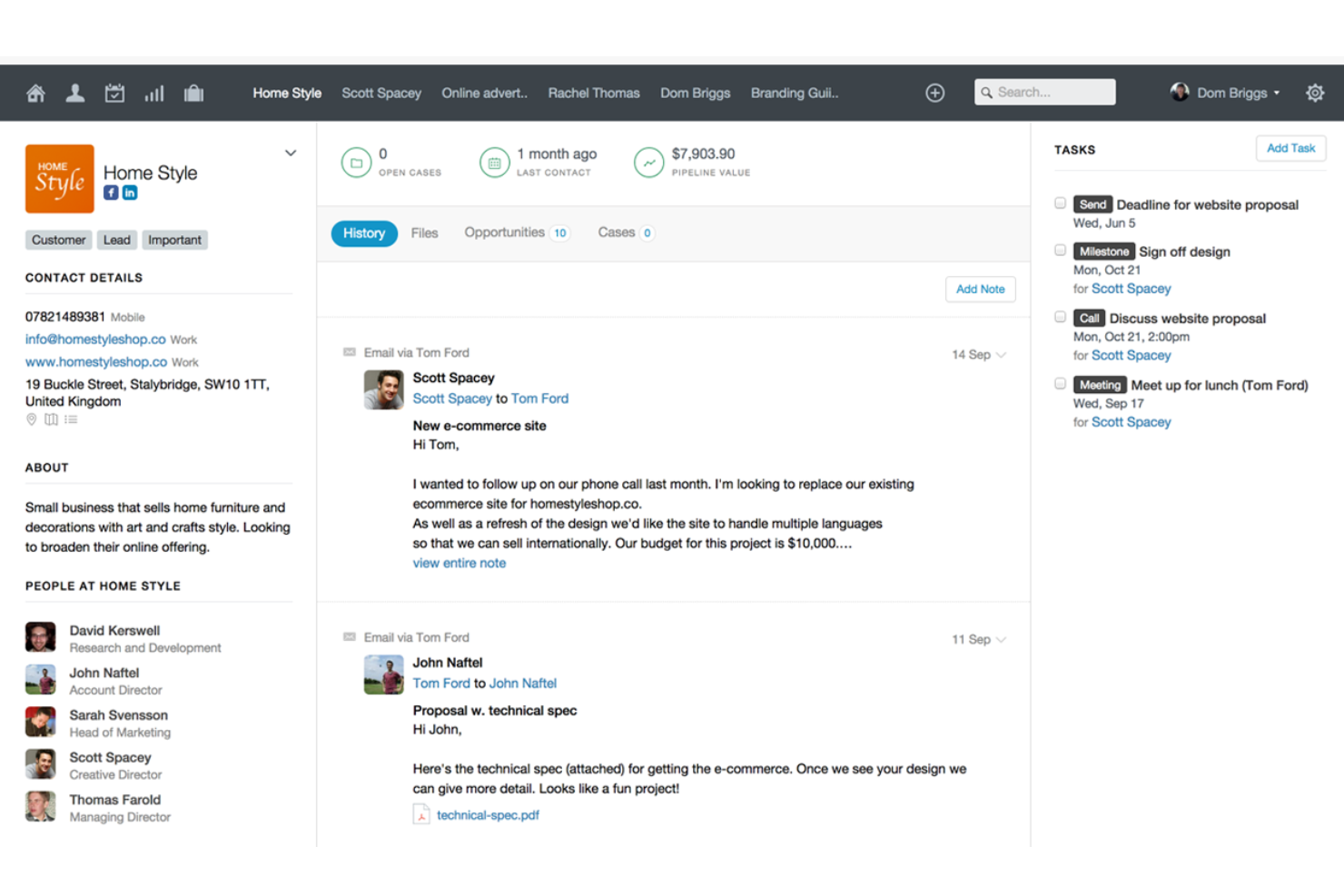
Capsule CRM offre un approccio semplificato alla gestione delle relazioni con i clienti, integrandosi facilmente con vari strumenti per aumentare la produttività. Cosa è gratuito: 2 utenti e 250 contatti.
Perché ho scelto Capsule CRM: Come software CRM gratuito, Capsule CRM si distingue offrendo un'interfaccia semplice e intuitiva, rendendolo accessibile alle piccole e medie imprese. Garantisce funzionalità essenziali come la gestione dei contatti, il monitoraggio delle attività e la visualizzazione della pipeline di vendita, consentendo alle aziende di iniziare senza un grande investimento in tecnologia CRM.
Ciò che rende unico Capsule CRM è il suo sistema di gestione delle attività integrato, che collega perfettamente le attività con opportunità di vendita, contatti e casi. Questa integrazione permette agli utenti di gestire follow-up, scadenze e principali tappe dei progetti direttamente nel contesto delle loro attività CRM. Il sistema di gestione delle attività supporta la categorizzazione, la definizione delle priorità e la pianificazione, facilitando la collaborazione del team e permettendo di restare al passo con tutte le attività legate ai clienti.
Caratteristiche e integrazioni di spicco di Capsule CRM
Le funzionalità includono gestione dei contatti, pipeline di vendita, gestione di attività e progetti, opzioni di personalizzazione, funzionalità di integrazione, interfaccia intuitiva, accesso mobile, strumenti di reportistica, elementi per la collaborazione in team, controlli di sicurezza e privacy.
Le integrazioni comprendono Google Workspace (Gmail, Docs, Calendar), Microsoft Office 365, Mailchimp, Xero, QuickBooks, Slack, FreshBooks e molte altre tramite Zapier.
Pros and Cons
Pros:
- Intuitivo e facile da usare
- Calendario e gestione attività integrati
- Invio e ricezione email direttamente in Capsule CRM
Cons:
- Non è possibile trascinare e rilasciare etichette o campi dei dati
- Sarebbero utili più integrazioni con il digital marketing
New Product Updates from Capsule

Capsule Adds AI Meeting Prep for External Calls
Capsule introduced AI Meeting Prep with relationship summaries, color-coded signals, and CRM context for upcoming external calls. This helps users review key contact details and prepare for meetings without searching through records manually. For more information, visit Capsule’s official site.
 .
.
Zoho CRM
Il miglior CRM con assistente bot integrato
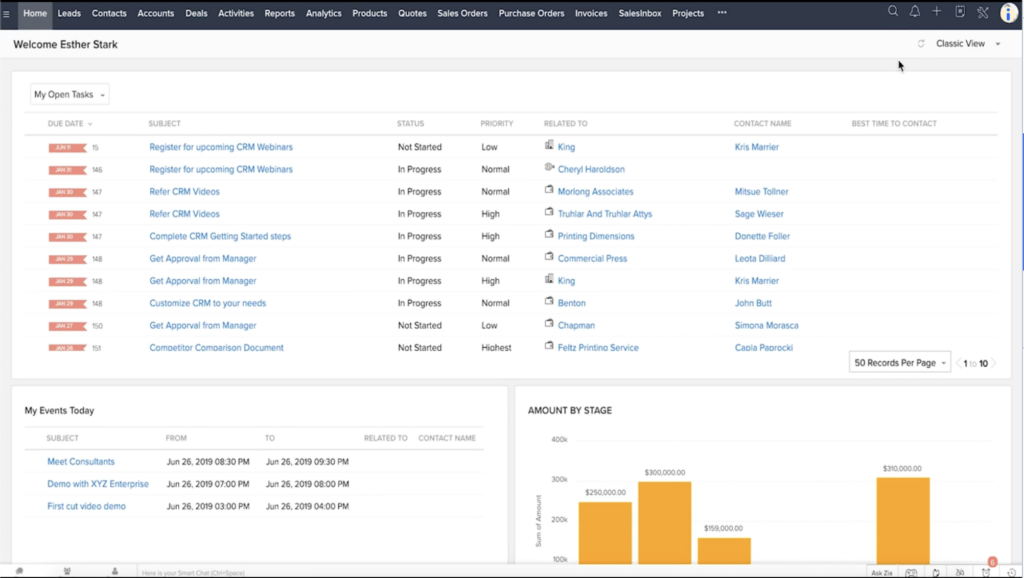
Zoho CRM offre funzionalità per aiutare gli utenti a costruire solide relazioni con i clienti, ottimizzare i flussi di lavoro e gestire e misurare le operazioni aziendali. È disponibile una prova gratuita di 15 giorni per ogni livello di abbonamento.
Perché ho scelto Zoho CRM: Questo software aiuta i team di revenue operations a creare eccellenti esperienze utente grazie al coordinamento omnicanale e alla personalizzazione basata sui dati. Gli utenti possono anche costruire flussi di lavoro automatizzati e creare assegnazioni, escalation e validazioni all'interno della piattaforma. Il software offre grafici personalizzabili e varie opzioni di visualizzazione dei dati per analizzare e monitorare i dati e le metriche.
La vera caratteristica distintiva dello strumento è la sua intelligenza artificiale integrata, soprannominata 'Zia'. Zia funge da assistente conversazionale, fornendo agli utenti approfondimenti analitici e predittivi in tempo reale. Questo strumento analizza anche le email dei clienti per rilevare menzioni della concorrenza e l'analisi del sentiment, offrendo ai commerciali e al supporto clienti informazioni utili per gestire le conversazioni con i clienti.
Caratteristiche e integrazioni distintive di Zoho CRM
Funzionalità includono un assistente AI, flussi di lavoro automatizzati, segmentazione, attribuzione, gestione omnicanale, layout di pagina personalizzati, report e grafici, previsione delle vendite e un'app mobile.
Integrazioni includono Dataddo, DropBox, Eventbrite, Google Workspace, Microsoft 365, PandaDoc, PostgreSQL, QuickBooks, Qwilr, Slack, Stripe, Twilio, WhatsApp e Zoom. Ulteriori integrazioni sono disponibili tramite Zapier.
Pros and Cons
Pros:
- Il bot alimentato da AI ‘Zia’ fornisce approfondimenti e notifiche in tempo reale
- Gli utenti possono accedere gratuitamente alla piena funzionalità di qualsiasi fascia di prezzo per 15 giorni
- Un marketplace con oltre 800 integrazioni facilita il collegamento della tua infrastruttura tecnologica
Cons:
- Gli utenti dovranno sottoscrivere un piano a pagamento per continuare a usare il software dopo la prova
- Alcuni termini presenti nel prodotto non sono standardizzati, il che può risultare confuso
New Product Updates from Zoho CRM

Zoho CRM Adds Reusable Canvas Templates for Forms
Zoho CRM now supports Canvas templates in the Forms view, so you can design a form layout once and reuse it across records for a consistent, faster experience. For more information, visit Zoho CRM's official site.
 .
.
ClickUp
Miglior CRM gratuito e software collaborativo cross-team
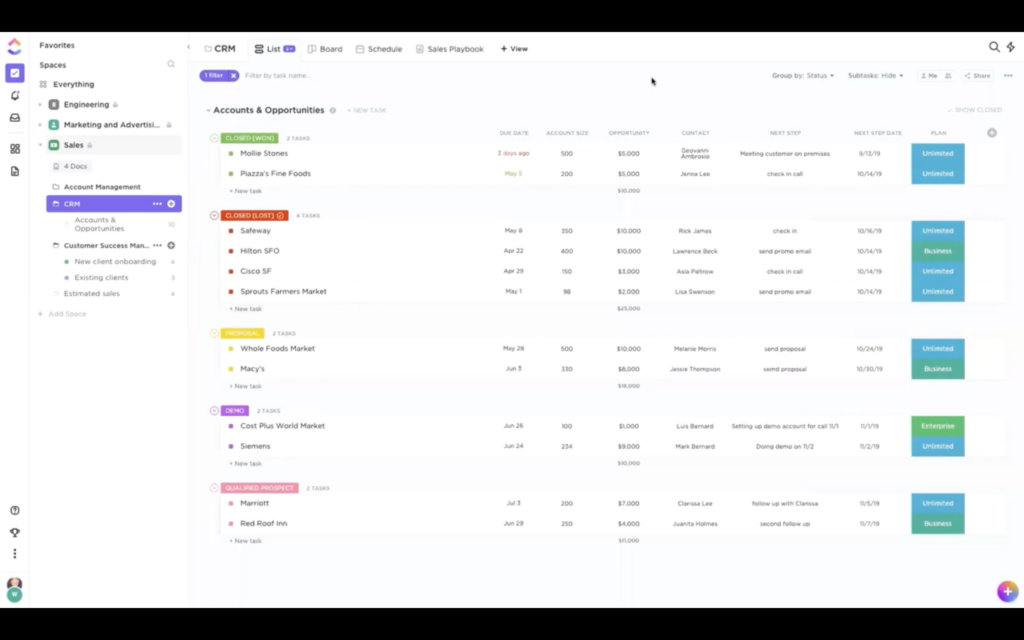
Autodefinito come 'un'app per sostituirle tutte', ClickUp è un software polivalente che include strumenti per CRM, gestione progetti, risorse umane, IT e finanza.
Perché ho scelto ClickUp: I team di revenue operations possono restare allineati con i team di prodotto e design utilizzando questo software per le loro esigenze di CRM. I rappresentanti di vendita possono gestire i potenziali clienti e gli account, automatizzare i processi di vendita e ottenere report in tempo reale dalla piattaforma. I marketer possono collaborare sugli asset, gestire campagne e pianificare calendari di contenuti.
Il software offre anche funzionalità specifiche per i team di prodotto, ingegneria, design, finanza, HR e IT, riunendo tutti i reparti nella stessa piattaforma. Ciò significa che ogni team è connesso e condivide uno spazio di lavoro. Lo strumento di gestione progetti consente agli utenti di visualizzare e pianificare i progetti, collaborare e monitorare i progressi fra team e reparti.
Funzionalità e integrazioni distintive di ClickUp
Le funzionalità includono pipeline e visualizzazioni elenco flessibili, oltre 50 widget dashboard, onboarding dei clienti, flussi di lavoro automatizzati, tracciamento degli ordini e modelli preimpostati.
Le integrazioni includono Chrome, Clockify, Dropbox, Evernote, Figma, Harvest, HubSpot, Intercom, Outlook, Salesforce, Slack, Timely, Toggl Track, Zendesk e Zoom. Sono disponibili integrazioni native aggiuntive e Zapier sblocca ancora più integrazioni.
Pros and Cons
Pros:
- Gestione progetti e reportistica nello stesso sistema del CRM
- Favorisce l’allineamento aziendale riunendo tutti i team in un’unica piattaforma
- Piattaforma altamente personalizzabile, adattabile alle esigenze di qualsiasi azienda
Cons:
- Piattaforma ricca di funzionalità, ma può essere difficile da navigare
- La soluzione CRM non può essere utilizzata separatamente dal resto del software
New Product Updates from ClickUp
ClickUp Adds Meetings Hub, Super Agent Templates, and ZoomInfo Integration
ClickUp adds a searchable Meetings Hub, new ways to clone and template Super Agents, and a ZoomInfo integration through the App Center. These updates improve meeting retrieval, agent reuse, and access to sales intelligence. For more information, visit ClickUp’s official site.
Ideale per piccole imprese con operazioni leggere di customer success
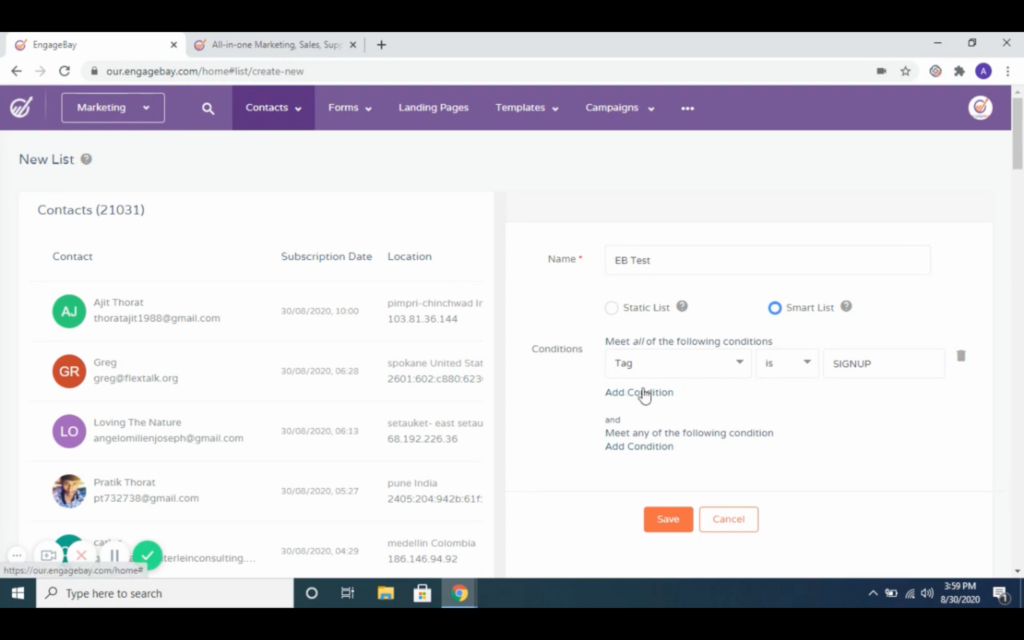
EngageBay offre una suite CRM gratuita e all-in-one per le piccole imprese con inserimento automatico dei dati, marketing mirato e funzionalità di automazione dei flussi di lavoro.
Perché ho scelto EngageBay: La versione freemium di questo software offre molte delle stesse funzionalità di un account a pagamento, anche se con alcune limitazioni. Gli utenti possono gestire e segmentare i contatti, creare sequenze di email, costruire e testare landing page e gestire un help desk attraverso la piattaforma. In generale, copre le principali esigenze che i team di vendita e marketing richiedono da un CRM, con le maggiori limitazioni concentrate nelle funzionalità di assistenza clienti.
Questo software è un’ottima opzione per le piccole imprese che non necessitano di un'operazione di supporto clienti completa. Praticamente tutti gli strumenti di marketing sono disponibili nel piano gratuito, ma gli utenti sono limitati a 250 contatti, 1000 email con branding e 500MB di spazio di archiviazione. Per le vendite, rispetto al piano successivo, ciò che manca sono solo i minuti di chiamata e le milestones personalizzate sulle trattative.
Funzionalità e integrazioni di spicco di EngageBay
Le funzionalità includono invio e sequenze di email, moduli, landing page, chat dal vivo, suite social, dashboard di reportistica, annunci Facebook, pianificazione appuntamenti e punteggio predittivo dei lead.
Le integrazioni includono Asana, BigCommerce, DocuSign, Google Meet, JotForm, LinkedIn, Outlook, QuickBooks, Shopify, Stripe, Trello, Twilio, Xero, Zapier e Zoom.
Pros and Cons
Pros:
- Praticamente tutti gli strumenti di marketing del piano superiore sono accessibili nella versione gratuita
- Le landing page A/B aiutano gli utenti a eseguire test
- Tutte le integrazioni sono accessibili nella versione gratuita
Cons:
- Le funzionalità di supporto clienti sono limitate rispetto a un piano a pagamento
- Gli utenti della versione freemium possono accedere solo al supporto email e chat di EngageBay

Ideale per pipeline di vendita personalizzabili
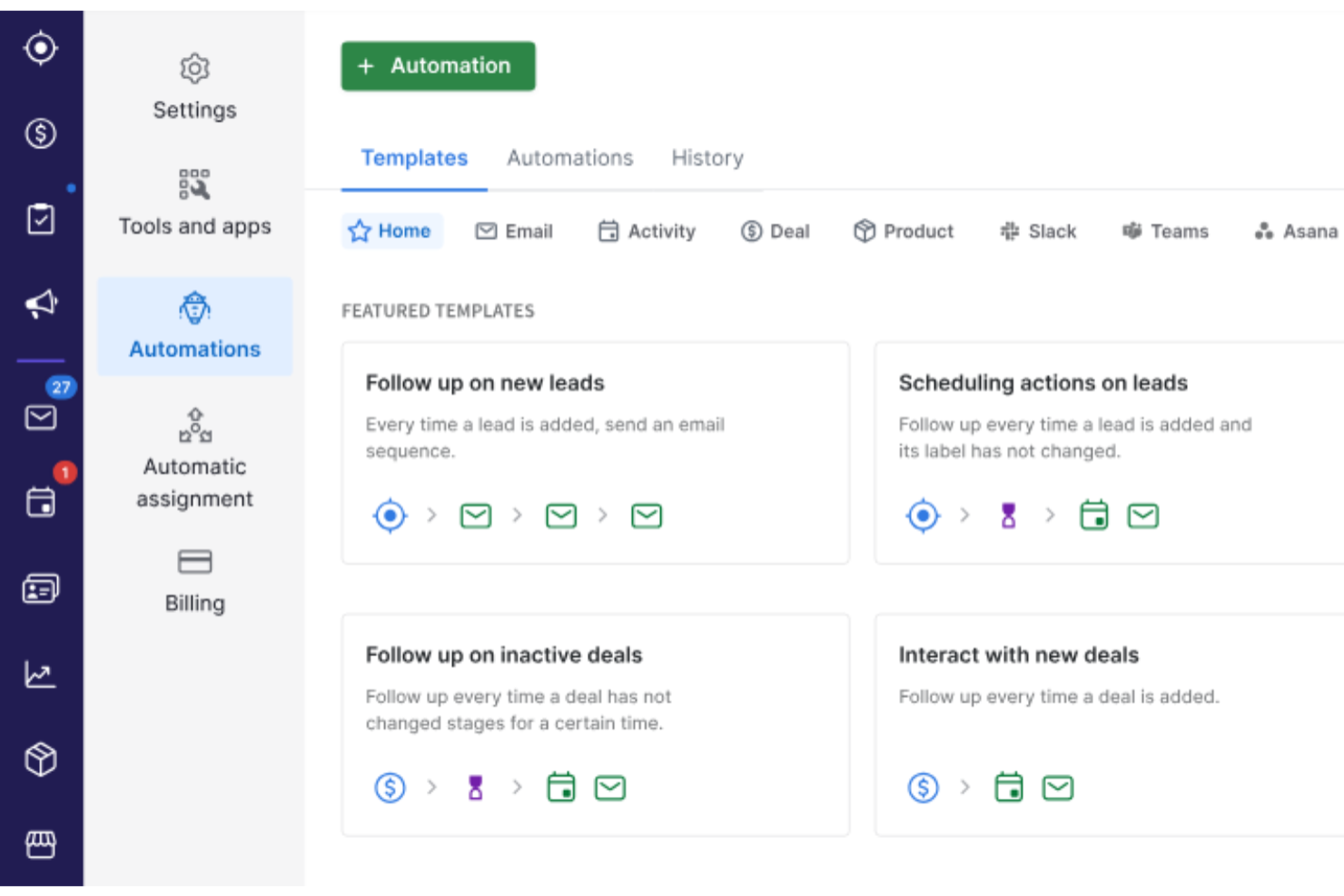
Perché ho scelto Pipedrive CRM: Pipedrive eccelle nell'adattarsi a flussi di lavoro di vendita unici grazie a pipeline personalizzabili e automazioni integrate che riducono il carico amministrativo. Le sue funzionalità di intelligenza artificiale migliorano le previsioni e i processi decisionali analizzando l'avanzamento delle trattative e l'attività del team.
Permette inoltre la gestione dell'outreach e del follow-up delle email all'interno del sistema, supportata da reportistica completa e accessibilità mobile—ideale per i team che necessitano sia visibilità che flessibilità nella gestione delle relazioni con i clienti.
Caratteristiche e integrazioni distintive di Pipedrive CRM
Funzionalità includono pipeline di vendita su misura, approfondimenti tramite IA, strumenti di marketing integrati, coordinazione dei compiti, gestione delle fatture, analisi in tempo reale e strumenti di comunicazione interna.
Integrazioni includono Zapier, Pandadoc, Leadfeeder, Kixie, Automate.io, Slack, QuickBooks, Trello, Zoom, Gmail, Microsoft Teams, Facebook Messenger, JustCall, Mailchimp, Stripe, Asana e Google Meet.
Pros and Cons
Pros:
- Pipeline altamente personalizzabili
- Automazione dei compiti e funzioni di assistenza tramite IA
- Piattaforma facile da usare
Cons:
- Alcune funzionalità IA sono limitate ai piani di fascia superiore
- Può richiedere tempo imparare a personalizzare la piattaforma
Streak
Il miglior CRM gratuito da integrare con Google Workspace
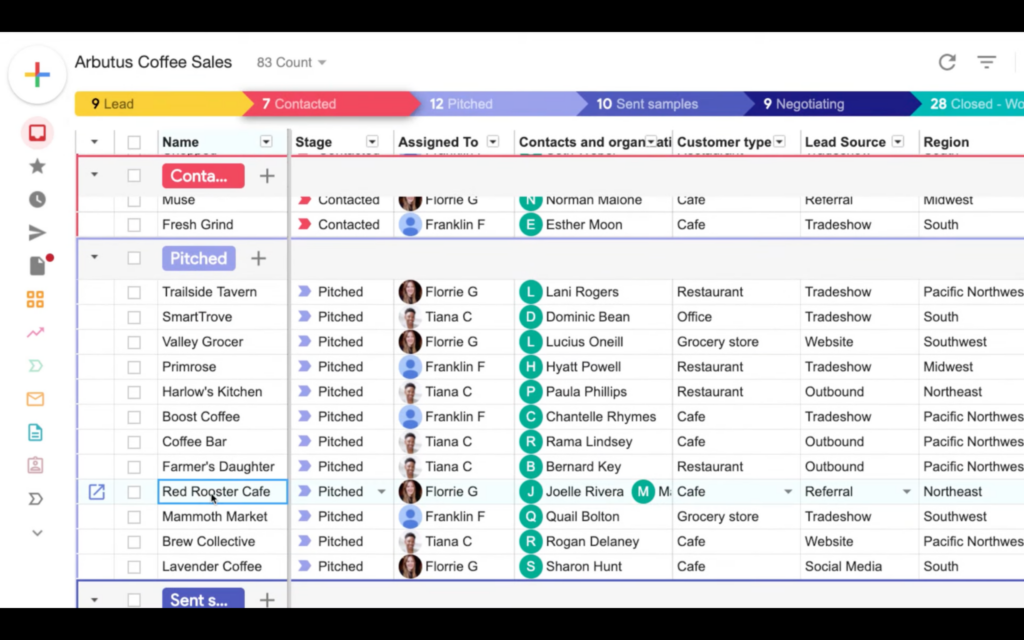
Streak è un'estensione di Chrome per CRM, che porta tutte le sue funzionalità direttamente negli strumenti di Google Workspace (Gmail, Google Calendar, Google Sheets e Google Drive).
Perché ho scelto Streak: Saltare continuamente tra diverse applicazioni spesso ostacola la produttività, quindi la possibilità di collegare un CRM direttamente agli strumenti di lavoro più utilizzati può risultare molto interessante. Gli utenti possono creare viste personalizzate dei pipeline, tracciare e visualizzare tutte le interazioni con i contatti e accedere ai dati dei contatti direttamente da Gmail. Il software offre anche funzionalità di importazione ed esportazione dei dati e di personalizzazione dei flussi di lavoro.
Per le aziende che vogliono potenziare gli strumenti che già utilizzano invece di migrare verso un nuovo ambiente, questa può essere una scelta eccellente. In particolare, i professionisti del settore del venture capital possono beneficiare delle funzionalità di organizzazione dei documenti e di accesso ai dati sugli investimenti offerte dallo strumento. Allo stesso modo, chi lavora nel settore immobiliare può tenere traccia della cronologia dei clienti e gestire informazioni su trattative e commissioni tramite la piattaforma.
Caratteristiche e integrazioni di rilievo di Streak
Le funzionalità includono tracciamento delle email, campi personalizzati, test A/B, visualizzazioni personalizzate del pipeline, cronologia dei contatti, input intelligenti, registrazione automatica delle telefonate e un'app mobile.
Le integrazioni includono Google Workspace: Gmail, Google Drive, Google Sheets, Google Calendar, Google Docs, Google Meet, ecc. È possibile collegare anche Zapier, per ulteriori integrazioni con un account a pagamento.
Pros and Cons
Pros:
- Riduce il cambio tra app grazie all'integrazione diretta in Google Workspace
- Le funzionalità semplici rendono facile sia l'utilizzo che beneficiare di tutte le opzioni
- Il tracciamento delle email fornisce dettagli come l'apertura delle email
Cons:
- Menù delle funzionalità ridotto; alcuni utenti potrebbero desiderare di più
- Manca di una 'base operativa' per gli utenti perché è un'estensione di Chrome
Il miglior CRM gratuito per piccole aziende B2B
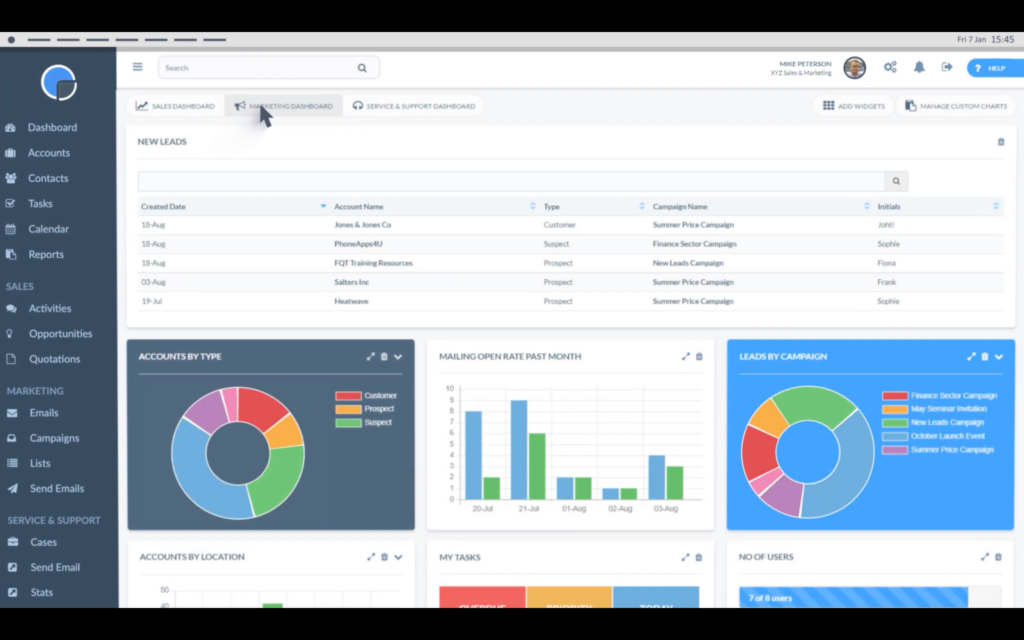
Really Simple Systems è un software CRM progettato specificamente per le piccole aziende B2B, pensato per essere semplice e facile da usare.
Perché ho scelto Really Simple Systems: Gli utenti possono costruire e gestire relazioni, collaborare e comprendere i propri KPI grazie alle funzionalità offerte da questo software. I team di vendita possono gestire i loro contatti e pipeline, creare preventivi di vendita e pianificare attività, eventi e calendari. I marketer possono utilizzare lo strumento per gestire le campagne, automatizzare email e marketing, creare liste segmentate e costruire moduli web. I team di assistenza clienti hanno accesso a funzionalità di gestione dei casi e reportistica, oltre che ad accordi sul livello di servizio.
La semplicità è al centro della piattaforma e la filosofia dell’azienda è rendere più semplici e accessibili applicazioni complesse. Il loro obiettivo è fornire tutto ciò di cui le piccole aziende hanno bisogno per vendite e marketing senza complessità inutili.
Caratteristiche e integrazioni principali di Really Simple Systems
Caratteristiche includono gestione dei contatti, gestione del pipeline, automazione dei flussi di lavoro, moduli web, reportistica e previsioni, creazione di elenchi e segmentazione, gestione delle campagne e accordi sul livello di servizio.
Integrazioni includono Google Sheets, Leadinfo, Microsoft Azure, Onelogin, QuickBooks, Sage Business Cloud, Xero e Zapier, che offre ulteriori integrazioni.
Pros and Cons
Pros:
- Interfaccia utente semplice che rende il software facile da usare
- Numerosi video tutorial gratuiti disponibili tramite il loro canale YouTube
- Team di assistenza clienti reattivo e competente
Cons:
- Le aziende B2C potrebbero trovare alcune funzionalità non rilevanti e altre mancanti
- Potrebbe non essere adatto a grandi aziende
Altri software CRM gratuiti
Non hai trovato nell’elenco un’opzione adatta alle tue esigenze? Ecco alcuni altri software CRM gratuiti che puoi prendere in considerazione:
- Agile CRM
Il miglior software gratuito per database clienti per piccole imprese
- Bitrix24
Miglior CRM e workspace con prezzi a tariffa fissa
- eWay-CRM
Miglior CRM gratuito da integrare con Outlook
- Freshsales
Ideale per costruire una soluzione CRM modulare
- SimplyDepo
Ideale per il monitoraggio in tempo reale


Recensioni correlate sui software CRM gratuiti
Se non hai ancora trovato quello che cerchi, dai un'occhiata a questi strumenti strettamente correlati ai software CRM gratuiti che abbiamo testato e valutato.
- Software per le vendite
- Software per la gestione dei lead
- Software di business intelligence
- Software per la gestione dei contratti
- Sistema di gestione dei ricavi
- Software CPQ
- Miglior software CRM
Come Valuto il Software CRM Gratuito
Per prima cosa, definisco cosa si intende per gratuito. Il CRM è un'infrastruttura continua—stai monitorando trattative, registrando chiamate e gestendo il pipeline ogni giorno—quindi il fornitore deve offrire un piano gratuito permanente, non solo una prova. Da lì, valuto la soluzione su due livelli: la funzionalità base che ogni strumento deve offrire e gli elementi differenzianti che lo rendono ideale per i team RevOps.
Funzionalità Principali (Requisiti Fondamentali per Questa Lista)
Oltre ai requisiti dell’offerta gratuita, utilizzo anche un sistema di punteggio per selezionare gli strumenti da includere. Ecco come funziona:
Valuto ciascuno su una scala da 0 (non offre la funzionalità) a 5 (eccelle in questa area) per ogni funzionalità chiave elencata qui sotto. Poi calcolo il punteggio totale dello strumento come percentuale. Ogni strumento deve raggiungere un punteggio totale minimo del 65% per essere preso in considerazione.
- Gestione Contatti & Account: Esamino come ogni piano gratuito gestisce l’archiviazione dei record, i campi personalizzati e la segmentazione—ad esempio, l’etichettatura dei contatti in base alla fase del ciclo di vita o la classificazione degli account per regione.
- Monitoraggio Pipeline & Trattative: Ogni strumento dovrebbe permetterti di creare e personalizzare le fasi della pipeline, spostare le trattative tra di esse tramite drag&drop e visualizzarle in modalità kanban senza dover effettuare l’upgrade.
- Registrazione Attività & Compiti: Controllo se i commerciali possono registrare chiamate, email e note direttamente su ogni record. Strumenti come HubSpot e Zoho CRM gestiscono questa funzione in modo diverso, quindi confronto la profondità della registrazione.
- Reportistica & Dashboard: Anche in un piano gratuito, mi aspetto almeno alcuni report integrati che coprano il valore della pipeline, la velocità delle trattative o il volume delle attività, in modo che il team RevOps possa realmente utilizzarli.
- Integrazioni Native: Valuto con quali strumenti di posta elettronica, calendario e marketing il CRM può connettersi già nel piano gratuito—oltre a verificare la disponibilità di API aperte o accesso a Zapier senza costi aggiuntivi.
- Automazione dei Workflow: Automazioni basilari come l’assegnazione automatica dei lead in base alla provenienza o la generazione di un compito quando una trattativa cambia fase devono essere disponibili prima di raggiungere una barriera a pagamento.
Una volta individuati gli strumenti che rispettano i criteri, considero cosa distingue effettivamente ogni piattaforma.
Fattori Differenzianti (Cosa Distingue i Fornitori)
Ecco come confronto le varie soluzioni:
Funzionalità di Spicco
Il numero di utenti compresi gratuitamente è molto rilevante. Un team RevOps di anche solo tre o quattro persone può raggiungere subito il limite dei posti, quindi verifico quanti utenti sono previsti dal piano gratuito. La sincronizzazione email bidirezionale integrata è un altro elemento distintivo importante—quando i messaggi Gmail o Outlook dei commerciali vengono registrati automaticamente nelle schede contatto, si risparmiano ore di inserimento manuale e si mantiene storico attività affidabile. Cerco anche moduli nativi per la raccolta lead che il team marketing può integrare nel sito, così che i nuovi contatti entrino direttamente nel pipeline senza strumenti di terze parti.
Oltre le Funzionalità
Pongo molta attenzione ai limiti sui dati e record di ogni piano gratuito. Alcuni CRM risultano limitati a poche centinaia di contatti, il che non basta per una pipeline in crescita. È altrettanto importante il percorso di upgrade—valuto se i livelli a pagamento sono trasparenti e ragionevoli, oppure se il fornitore riserva funzioni chiave RevOps solo a piani enterprise. La portabilità dei dati conta molto: verifico che sia possibile esportare liberamente contatti e cronologia trattative, così che il team non sia vincolato se decide di cambiare piattaforma in futuro.
Come scegliere un software CRM gratuito
Con così tante soluzioni software CRM gratuite diverse disponibili, può essere difficile decidere quale strumento sia più adatto alle tue esigenze.
Mentre crei l'elenco dei candidati, provi e selezioni un software CRM gratuito, considera quanto segue:
- Quale problema stai cercando di risolvere - Inizia identificando la lacuna nelle funzionalità del software CRM gratuito che stai cercando di colmare, per chiarire le caratteristiche e le funzionalità che lo strumento deve fornire.
- Chi dovrà utilizzarlo - Per valutare costi e requisiti, considera chi utilizzerà il software e di quante licenze avrai bisogno. Dovrai valutare se l'accesso sarà necessario solo ai responsabili delle operazioni relative ai ricavi o all'intera organizzazione. Una volta chiarito questo aspetto, vale la pena considerare se stai dando priorità alla facilità d'uso per tutti o alla velocità per gli utenti esperti del software CRM gratuito.
- Con quali altri strumenti deve funzionare - Chiarisci quali strumenti stai sostituendo, quali rimarranno e con quali dovrai integrarti, come software di contabilità, CRM o gestione delle risorse umane. Dovrai decidere se gli strumenti dovranno integrarsi tra loro o se puoi sostituire più strumenti con un unico software CRM gratuito e consolidato.
- Quali risultati sono importanti - Considera il risultato che il software deve produrre per essere considerato un successo. Rifletti sulle capacità che vuoi ottenere o sugli aspetti che vuoi migliorare e su come misurerai il successo. Ad esempio, un risultato potrebbe essere la capacità di ottenere una maggiore visibilità sulle prestazioni. Potresti confrontare le funzionalità dei software CRM gratuiti fino allo sfinimento, ma se non stai pensando ai risultati che vuoi ottenere, potresti sprecare molto tempo prezioso.
- Come funzionerebbe all'interno della tua organizzazione - Considera la scelta del software insieme ai tuoi flussi di lavoro e alla metodologia di erogazione. Valuta cosa funziona bene e quali aree stanno causando problemi che devono essere affrontati. Ricorda che ogni azienda è diversa: non dare per scontato che, solo perché uno strumento è popolare, funzionerà anche nella tua organizzazione.
Tendenze del software CRM gratuito per il 2026
Poiché le aziende fanno sempre più affidamento sui CRM per semplificare i processi e favorire le relazioni con i clienti, gli sviluppatori stanno innovando per offrire soluzioni più solide e ricche di funzionalità senza il relativo prezzo. Ecco una panoramica delle tendenze attuali basata sugli ultimi aggiornamenti del software, sui comunicati stampa e sui registri delle versioni:
Automazione e integrazione avanzate:
- Automazione più approfondita: Le piattaforme CRM gratuite stanno ampliando le proprie funzionalità di automazione per coprire processi più complessi e articolati in più fasi, riducendo il carico di lavoro manuale e aumentando l'efficienza.
- Integrazione più ampia: Si sta puntando a offrire un'integrazione più estesa con strumenti di terze parti, consentendo alle piccole aziende di creare un ecosistema tecnologico più interconnesso senza costi aggiuntivi.
Analisi avanzata dei dati e intelligenza artificiale:
- Analisi predittiva: I CRM gratuiti stanno iniziando a integrare funzionalità di analisi predittiva, offrendo alle piccole aziende una visione anticipata dei comportamenti dei clienti e delle tendenze delle vendite.
- Assistenza dell'intelligenza artificiale: L'integrazione dell'intelligenza artificiale per fornire informazioni utili, automatizzare l'inserimento dei dati e offrire una valutazione predittiva dei lead sta diventando sempre più comune, anche nelle versioni gratuite.
Accessibilità da dispositivi mobili e operazioni basate sul cloud:
- Ottimizzazione per dispositivi mobili: Riconoscendo la necessità di accedere ai dati anche in mobilità, i CRM gratuiti stanno migliorando le proprie app mobili per offrire funzionalità complete che rispecchiano quelle delle versioni desktop.
- Sviluppi del cloud: Sfruttare la tecnologia cloud per garantire che i dati siano accessibili, sicuri e sottoposti a backup costante è una tendenza fondamentale, che supporta le operazioni agili delle moderne piccole aziende.
Funzionalità per la community e la collaborazione:
- Strumenti collaborativi: Le funzionalità che facilitano la collaborazione tra i membri del team, come i contatti condivisi e i registri delle interazioni, stanno ricevendo maggiore attenzione per migliorare la sinergia del team.
- Supporto della community: La formazione di community attive di utenti attorno alle piattaforme CRM gratuite offre risorse preziose per scambiarsi suggerimenti, risolvere problemi e condividere le migliori pratiche.
Quando valuti l'adozione o il passaggio a soluzioni CRM, queste tendenze sottolineano l'importanza di scegliere un software che non solo risponda alle tue esigenze attuali, ma che sia anche pronto a crescere insieme alla tua azienda, sfruttando gli ultimi progressi tecnologici per migliorare le relazioni con i clienti e l'efficienza operativa.
Che cos'è un software CRM gratuito?
Il software CRM gratuito (gestione delle relazioni con i clienti) è uno strumento che aiuta le aziende a gestire le interazioni con i clienti, i dati e le relazioni senza costi. Queste soluzioni software offrono generalmente le funzionalità di base necessarie per una gestione efficace dei clienti, tra cui l'archiviazione dei contatti, il monitoraggio dei lead, la pianificazione delle attività e la gestione della pipeline di vendita. Sono pensate per le piccole aziende o le startup che necessitano delle funzionalità CRM essenziali senza l'onere finanziario dei software a pagamento.
I vantaggi dei software CRM gratuiti includono una migliore organizzazione e una maggiore efficienza nella gestione delle relazioni con i clienti. Aiutano le aziende a monitorare le interazioni con i clienti e i processi di vendita, favorendo un servizio clienti migliore e potenzialmente un aumento delle vendite. Gli strumenti CRM gratuiti consentono inoltre di ridurre i costi per le piccole imprese o le startup che potrebbero non disporre del budget necessario per soluzioni CRM a pagamento più complete. Centralizzando le informazioni sui clienti, facilitano l'accesso ai dati e una comunicazione più fluida con i clienti. Sebbene possano presentare delle limitazioni rispetto alle alternative a pagamento, questi strumenti offrono comunque funzionalità preziose alle aziende che desiderano gestire le relazioni con i clienti in modo più efficace.
Funzionalità dei software CRM gratuiti
I software CRM gratuiti possono semplificare le interazioni con i clienti, il monitoraggio delle vendite e i processi di marketing, fornendo informazioni preziose che guidano le decisioni strategiche. Ecco le funzionalità più importanti da cercare nei software CRM gratuiti per gestire efficacemente le operazioni relative ai ricavi:
- Gestione dei contatti: centralizza tutti i dati dei clienti.
- Garantisce che ogni membro della squadra possa accedere a profili completi dei clienti, migliorando la comunicazione personalizzata e il servizio clienti.
- Gestione dei potenziali clienti: monitora i potenziali clienti lungo l'imbuto di vendita.
- Facilita il monitoraggio e la coltivazione efficaci dei potenziali clienti, aumentando il tasso di conversione e influendo positivamente sui ricavi.
- Monitoraggio delle trattative: monitora l'avanzamento delle opportunità di vendita.
- Fornisce visibilità sul flusso delle vendite, aiutando a prevedere i ricavi e a concentrare gli sforzi sulle trattative più promettenti.
- Monitoraggio di attività e compiti: organizza e pianifica le attività successive e le attività operative.
- Mantiene la squadra allineata sui passaggi successivi, garantendo un coinvolgimento costante di potenziali clienti e clienti per favorire le vendite.
- Integrazione della posta elettronica: si collega ai sistemi di posta elettronica per una comunicazione fluida.
- Consente di monitorare efficacemente le interazioni con i clienti e garantisce che tutte le comunicazioni vengano registrate e siano accessibili per consultazioni future.
- Rapporti e analisi: offre informazioni sulle attività e sulle prestazioni di vendita.
- Consente di prendere decisioni basate sui dati identificando le tendenze, misurando i progressi rispetto agli obiettivi e individuando le aree di miglioramento.
- Accesso da dispositivi mobili: fornisce accesso alle funzioni CRM sui dispositivi mobili.
- Garantisce che i membri della squadra possano aggiornare e consultare le informazioni essenziali mentre lavorano sul campo, mantenendo produttività e reattività.
- Personalizzazione: consente di adattare il software alle esigenze specifiche dell'azienda.
- Migliora usabilità e pertinenza consentendo alle aziende di modificare campi, flussi di lavoro e rapporti in base ai propri processi operativi.
- Interfaccia intuitiva: garantisce facilità d'uso e requisiti minimi di formazione.
- Accelera l'adozione e massimizza l'utilità del CRM, garantendo che la squadra possa concentrarsi sull'utilizzo del software per aumentare i ricavi invece di imparare a usarlo.
- Funzionalità di integrazione: si collega ad altri strumenti e piattaforme aziendali.
- Migliora l'efficienza e offre una visione più completa delle interazioni con i clienti e delle operazioni aziendali collegandosi ad altri software essenziali.
Nella scelta di un software CRM gratuito, è fondamentale optare per una soluzione che offra funzionalità complete a supporto delle operazioni relative ai ricavi, favorendo le relazioni con i clienti e consentendo la crescita. Il CRM giusto può fornire una base per processi semplificati, un maggiore coinvolgimento dei clienti e una pianificazione strategica informata, elementi fondamentali per migliorare i risultati in termini di ricavi dell'azienda.
Vantaggi dei software CRM gratuiti
Integrando un sistema CRM, le aziende possono centralizzare i dati dei clienti, semplificare i processi di vendita e sviluppare relazioni più solide con i propri clienti: tutti fattori fondamentali per la crescita dei ricavi. Ecco cinque vantaggi principali dell'implementazione di un software CRM gratuito:
- Efficienza dei costi: Riduce al minimo i costi operativi.
- Adottando un software CRM gratuito, le aziende possono usufruire delle funzionalità fondamentali della gestione delle relazioni con i clienti senza l'onere finanziario, potendo così destinare le risorse ad altri ambiti.
- Maggiore conoscenza dei clienti: Offre una visione completa delle interazioni con i clienti.
- I dati centralizzati consentono alle aziende di comprendere meglio le esigenze, le preferenze e i comportamenti dei propri clienti, favorendo interazioni personalizzate e una maggiore soddisfazione dei clienti.
- Miglioramento dei processi di vendita: Semplifica la gestione dei lead e delle trattative.
- Il software CRM gratuito aiuta a organizzare e monitorare le opportunità di vendita, consentendo alle aziende di coltivare i lead in modo più efficace e concludere le trattative più rapidamente, aumentando così i ricavi.
- Collaborazione e accessibilità: Facilita la collaborazione del team e l'accesso ai dati.
- Centralizzando le informazioni sui clienti, il software garantisce che tutti i membri del team abbiano accesso a dati aggiornati, favorendo la collaborazione e consentendo interazioni con i clienti più coordinate ed efficienti.
- Processo decisionale basato sui dati: Offre strumenti di analisi e reportistica di base.
- Grazie agli approfondimenti ottenuti dalle funzionalità di reportistica del CRM, le aziende possono prendere decisioni informate riguardo alle proprie strategie di vendita e alle pratiche di interazione con i clienti, favorendo attività generatrici di ricavi più mirate ed efficaci.
Costi e prezzi del software CRM gratuito
Esplorare le opzioni di software CRM è un passaggio fondamentale per le aziende che mirano a ottimizzare la gestione delle relazioni con i clienti senza effettuare investimenti significativi. Il software CRM gratuito può rappresentare un ottimo punto di partenza, offrendo funzionalità essenziali che soddisfano le esigenze fondamentali della gestione delle interazioni con i clienti e dei processi di vendita. Ecco una panoramica delle opzioni di piano tipiche che si possono incontrare quando si prende in considerazione un software CRM gratuito:
Tabella di confronto dei piani per il software CRM gratuito
| Tipo di piano | Prezzo medio | Funzionalità comunemente incluse |
|---|---|---|
| Base | $0 - $15 per utente/mese | Gestione dei contatti, monitoraggio delle trattative, gestione delle attività, reportistica di base |
| Avanzato | $15 - $45 per utente/mese | Funzionalità CRM più estese, integrazioni migliorate, analisi avanzate |
| Premium | $45+ per utente/mese | Suite completa di funzionalità, personalizzazione avanzata, assistenza premium |
| Opzione gratuita | $0 | Funzionalità limitate, gestione dei contatti di base, monitoraggio dei lead, collaborazione tra utenti |
Quando si seleziona un piano CRM, è importante valutare quali funzionalità siano in linea con le esigenze specifiche e gli obiettivi di crescita della propria azienda. Sebbene il software CRM gratuito possa offrire un valore significativo, comprendere i limiti e il potenziale di scalabilità di ciascun piano garantisce di prendere una decisione informata, in grado di sostenere il successo a lungo termine dell'azienda.
Domande frequenti sul software CRM gratuito
Se non sei ancora sicuro di cosa cerchi in un software CRM gratuito o di come questi strumenti possano essere utili al tuo team, ho risposto ad alcune domande comuni per aiutarti.
Quali altri software per le operazioni dovrei usare?
Al giorno d’oggi, i team fanno affidamento sul proprio insieme di tecnologie per lavorare in modo più efficace. Ecco alcuni altri software per le operazioni che potresti prendere in considerazione di aggiungere al tuo insieme di tecnologie:
- Sistema di gestione dei contenuti: Software che consente al tuo team di creare, modificare e pubblicare contenuti brandizzati in modo collaborativo e organizzato.
- Software di intelligence aziendale: Software che facilita l’analisi approfondita dei dati per ottenere una comprensione più dettagliata delle prestazioni della tua azienda.
- Software di gestione dei progetti: Uno strumento che puoi utilizzare per pianificare i progetti, assegnare attività, gestire i carichi di lavoro, risolvere i colli di bottiglia e monitorare la produttività del team.
È possibile esportare facilmente i dati da queste piattaforme gratuite?
Sì, la maggior parte delle piattaforme CRM gratuite consente di esportare facilmente i dati in formati comuni come CSV o Excel. Questa funzionalità permette alle aziende di eseguire analisi esterne o trasferire dati tra sistemi senza ostacoli significativi.
In che modo il software CRM gratuito gestisce la sicurezza dei dati?
Il software CRM gratuito include generalmente misure di sicurezza dei dati di base, come la crittografia dei dati e protocolli di accesso sicuri. Tuttavia, il livello di sicurezza può variare significativamente tra i diversi fornitori, rendendo essenziale per le aziende esaminare attentamente le funzionalità di sicurezza per assicurarsi che soddisfino gli standard di conformità e protezione dei dati.
Esistono costi nascosti associati al CRM gratuito?
Sebbene il software CRM gratuito fornisca le funzionalità principali senza costi, potrebbero esserci costi nascosti legati a componenti aggiuntivi, utenti aggiuntivi, funzionalità avanzate o servizi di assistenza. È fondamentale che le aziende comprendano la struttura dei prezzi per eventuali aggiornamenti o estensioni, così da evitare spese impreviste.
Qual è la differenza tra il CRM e il software di gestione del database clienti?
Sebbene entrambi gli strumenti aiutino a gestire le informazioni sui clienti, hanno scopi diversi all’interno delle operazioni aziendali. Ecco un confronto:
- Software di gestione delle relazioni con i clienti (CRM): Una piattaforma che ti aiuta a monitorare i potenziali clienti di vendita, gestire le interazioni con i clienti, automatizzare i flussi di lavoro e generare report. È pensata per i team di vendita, marketing e successo del cliente che desiderano sviluppare le relazioni e migliorare l’esperienza dei clienti.
- Software di gestione del database clienti: Uno strumento più semplice, focalizzato sulla memorizzazione e sull’organizzazione dei dati di contatto dei clienti, dei registri delle comunicazioni e della cronologia degli acquisti. Viene generalmente utilizzato come soluzione leggera per gestire i record dei clienti senza funzionalità avanzate di automazione o analisi.