

Las herramientas de ventas con IA son plataformas de software que utilizan inteligencia artificial para automatizar, analizar y optimizar los procesos de ventas en todos tus equipos de ingresos. Si estás buscando las mejores herramientas de ventas con IA, probablemente quieras mejorar la visibilidad del embudo de ventas, reducir las tareas manuales y ayudar a tu equipo a centrarse en actividades de venta de alto valor. Muchas herramientas incluyen puntuación predictiva de clientes potenciales, copilotos de IA para SDR y funciones que ayudan a identificar clientes potenciales cualificados, para que tu equipo pueda actuar más rápido y cerrar más acuerdos. Con tantas opciones disponibles, es difícil saber qué herramientas ofrecen realmente datos fiables, información práctica y mejoras reales en los flujos de trabajo. Esta guía te ayudará a comparar rápidamente las principales herramientas de ventas con IA, comprender sus funciones principales y elegir soluciones que se adapten a tus operaciones de ventas y objetivos de crecimiento.
Por qué confiar en nuestras recomendaciones de software
6,700+
Reviews
20
Industry experts
16+
Evaluation factors
14
Years
Nuestras reseñas reflejan nuestro criterio independiente, no un discurso de ventas. Descubra cómo mantenemos la transparencia.
Para esta guía, evaluamos las herramientas mediante pruebas prácticas e investigación independiente, puntuando las herramientas según nuestros criterios de selección.
Nuestras reseñas reflejan nuestro criterio editorial humano, no un discurso de ventas.
Tabla comparativa de herramientas de ventas con IA
Esta tabla comparativa resume los detalles de precios de mi selección de las mejores herramientas de ventas con IA:
| Tool | Best For | Trial Info | Price | ||
|---|---|---|---|---|---|
| 1 | Mejor para ventas de campo y gestión territorial | Demo gratuita disponible | Precio bajo solicitud | Website | |
| 2 | Ideal para flujos de trabajo de CRM basados en agentes y sin código | Prueba gratuita de 14 días | Desde $40/usuario/mes (facturado anualmente) | Website | |
| 3 | Ideal para agentes de voz impulsados por IA | Prueba gratuita de 14 días + demostración gratuita disponible | Desde $25/usuario/mes (facturado anualmente) | Website | |
| 4 | Ideal para obtener información de conversaciones de ventas | Demo gratuita disponible | Precios bajo petición | Website | |
| 5 | Mejor para prospección y enriquecimiento de ventas por IA | Demostración gratuita disponible | Precio a consultar | Website | |
| 6 | Ideal para salas de ventas digitales y seguimiento | Prueba gratuita + demo gratis disponible | Desde $25/usuario/mes | Website | |
| 7 | Ideal para inteligencia de ventas y datos de contacto | Prueba gratuita disponible | Precio bajo solicitud | Website | |
| 8 | Mejor para habilitación de ventas y gestión de contenido | Demo gratuita disponible | Precio a consultar | Website | |
| 9 | Mejor para transcripción de reuniones con IA | Plan gratuito + demo gratuita disponible | Desde $10/asiento/mes (facturado anualmente) | Website | |
| 10 | Ideal para la calificación automatizada de clientes potenciales | Plan gratuito + demostración gratuita disponible | Desde $29/mes | Website |


Reseñas de herramientas de ventas con IA
A continuación encontrarás mis resúmenes detallados de las mejores herramientas de ventas con IA que llegaron a mi lista. Mis reseñas ofrecen un análisis detallado de las funciones, capacidades e integraciones de cada plataforma para ayudarte a encontrar la mejor opción para ti.
 Mejor para ventas de campo y gestión territorial
- Demo gratuita disponible
- Precio bajo solicitud
Visit WebsiteCustomer Rating:4.3/5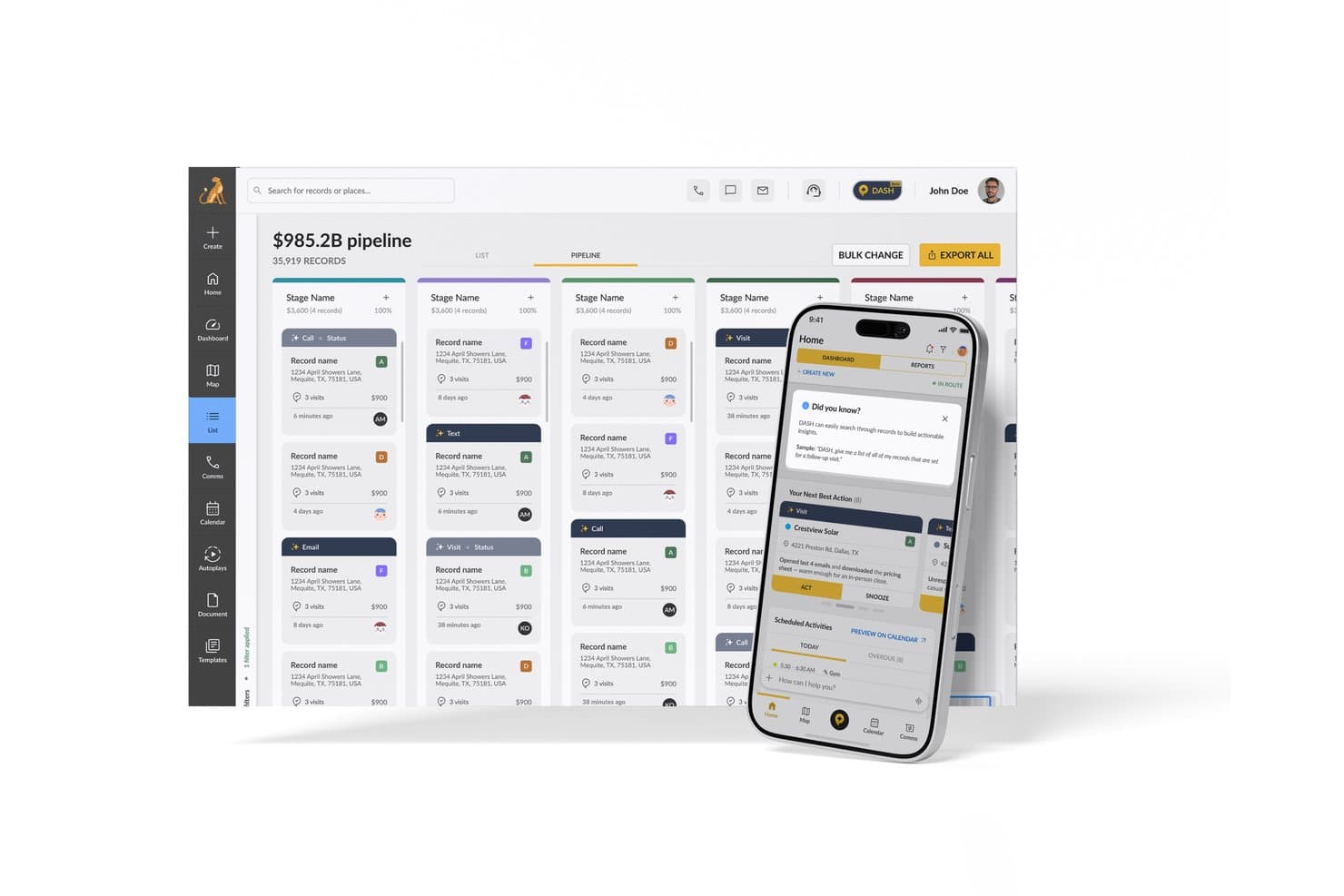
SPOTIO ofrece una función de Siguiente Mejor Acción impulsada por IA en su aplicación móvil junto con un panel de gestión del pipeline para equipos de ventas. SPOTIO es una plataforma de ventas de campo impulsada por IA que combina la asignación de territorios, la optimización de rutas, la gestión de leads y recomendaciones predictivas de la siguiente mejor acción para equipos de ventas externas.
¿Para quién es mejor SPOTIO?
SPOTIO es ideal para equipos de ventas externas en sectores como energía solar, techos, telecomunicaciones y servicios para el hogar que dependen de ventas puerta a puerta o basadas en territorios.
Por qué elegí SPOTIO
SPOTIO se gana su lugar en mi lista porque ninguna otra herramienta en esta categoría combina la gestión de territorios de ventas de campo y la priorización impulsada por IA de manera tan integrada. Me gusta especialmente cómo el motor NBA (Next Best Action) puntúa cada registro con valores predictivos actualizados varias veces al día, para que los representantes siempre sepan a qué puerta deben tocar a continuación. El DASH AI Co-Pilot también es impresionante, permitiendo que los representantes capturen notas de la visita por voz o foto en el momento, sin tener que parar a escribir entre citas.
Características clave de SPOTIO
- CRM móvil con modo sin conexión: Los representantes acceden a registros, capturan actividades y actualizan tratos sin conexión a internet.
- Seguimiento de actividades con verificación de ubicación: Todas las visitas y tareas se registran con datos GPS para garantizar un seguimiento preciso de las actividades en campo.
- Controles de gestión de territorios: Los gerentes definen, asignan y editan territorios usando límites geográficos personalizados y permisos por capas.
- Panel de análisis del pipeline de ventas: Los usuarios ven métricas de ventas en campo en tiempo real, tendencias de rendimiento de representantes y seguimiento de conversiones en una sola interfaz.
Integraciones de SPOTIO
SPOTIO ofrece integraciones nativas con Salesforce, Microsoft Dynamics 365, HubSpot y más. También hay una API disponible para integraciones personalizadas.
Pros and Cons
Pros:
- Puntuación de leads con IA intradía para representantes de campo
- El registro de visitas verificado por GPS mantiene la precisión de los datos en campo
- La captura de notas por voz agiliza los flujos de trabajo de campo
Cons:
- Las funciones de IA se orientan principalmente hacia ventas de campo
- Capacidades limitadas de inteligencia conversacional para equipos de ventas internas
Learn more about SPOTIO: Ideal para flujos de trabajo de CRM basados en agentes y sin código
- Prueba gratuita de 14 días
- Desde $40/usuario/mes (facturado anualmente)
Visit WebsiteCustomer Rating:4.7/5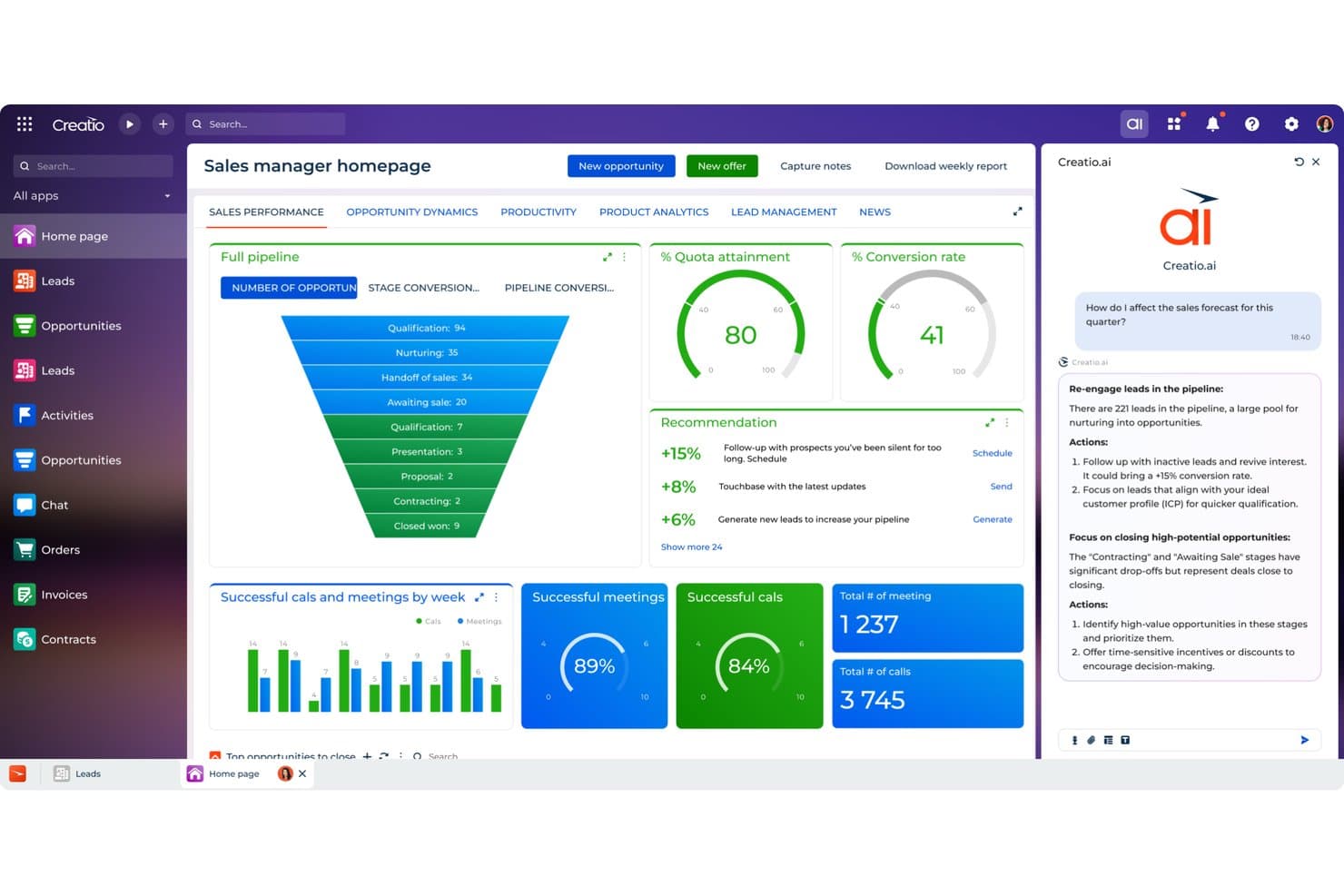
Creatio CRM utiliza IA para recomendar acciones de ventas y mejorar las previsiones. Creatio CRM es un CRM sin código y una plataforma de flujos de trabajo que combina agentes de IA, puntuación predictiva de clientes potenciales y oportunidades, previsión de la cartera, enriquecimiento automatizado del CRM y asistencia de IA generativa durante todo el ciclo de ventas.
¿Para quién es más adecuado Creatio CRM?
Creatio CRM es una opción excelente para los equipos de operaciones de ventas y los CRO que desean sustituir completamente su CRM por una plataforma sin código que ejecute agentes de IA autónomos para la previsión, el enriquecimiento y la gestión de la cartera.
Por qué elegí Creatio CRM
He incluido Creatio CRM entre mis principales opciones porque es una de las pocas plataformas diseñadas en torno a agentes de IA autónomos, en lugar de incorporar funciones de IA añadidas posteriormente. El agente de investigación de cuentas completa automáticamente los registros y traza el mapa de las partes interesadas en cuestión de segundos, mientras que el agente de previsión y cartera identifica las operaciones estancadas, resume los riesgos y realiza revisiones semanales automatizadas de las previsiones para los CRO. Lo que más me gusta es que puedes crear y ampliar estos agentes sin escribir una sola línea de código.
Funciones principales de Creatio CRM
- Puntuación predictiva de clientes potenciales y oportunidades: La puntuación basada en aprendizaje automático clasifica los clientes potenciales y las oportunidades en una escala del 1 al 100, teniendo en cuenta los datos de los clientes, el historial de servicio y las ventas anteriores.
- Agente de gestión territorial: Equilibra automáticamente los territorios y muestra cuentas sin explotar para ayudar a los representantes y a los equipos de operaciones a encontrar oportunidades sin cubrir.
- Agente de generación de presupuestos: Sugiere paquetes de productos y precios según el contexto de la operación y, después, redacta propuestas sin intervención manual.
- Creación de modelos personalizados sin código: Permite crear modelos de puntuación, búsqueda y predicción numérica directamente en la plataforma sin escribir código.
Integraciones de Creatio CRM
Creatio CRM cuenta con integraciones documentadas con Microsoft Teams, Outlook, Zoom, OpenAI, el correo electrónico y los calendarios. También admite API, integraciones del mercado de aplicaciones y Zapier.
Pros and Cons
Pros:
- Los agentes autónomos cubren la previsión y el enriquecimiento
- Los modelos sin código adaptan los flujos de trabajo de puntuación
- Los agentes territoriales muestran cuentas sin explotar
Cons:
- La inteligencia conversacional carece de análisis de sentimientos y objeciones
- Las carencias en los informes limitan la visibilidad de RevOps
Learn more about Creatio CRM: Ideal para agentes de voz impulsados por IA
- Prueba gratuita de 14 días + demostración gratuita disponible
- Desde $25/usuario/mes (facturado anualmente)
Visit WebsiteCustomer Rating:4.4/5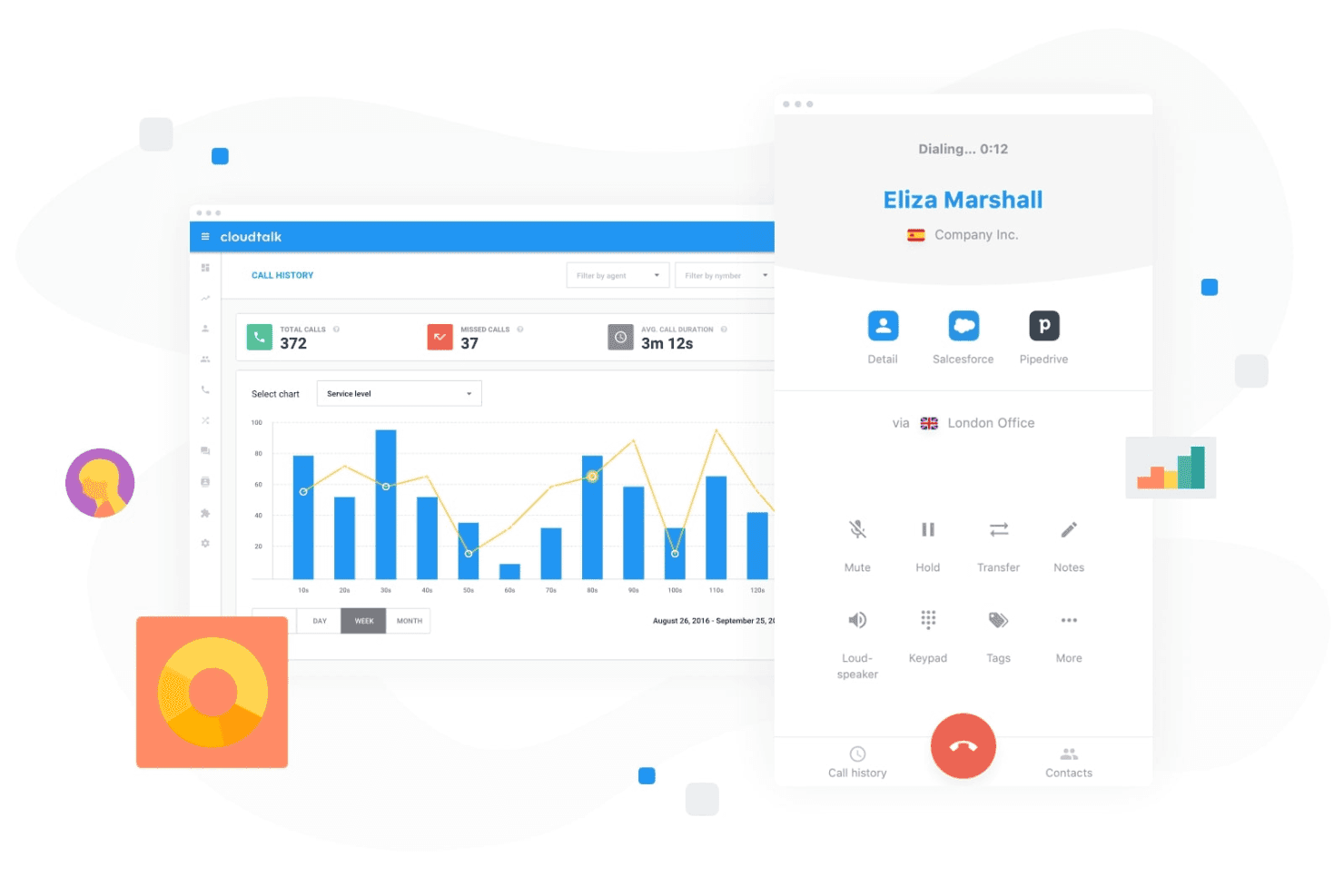
CloudTalk permite a los equipos gestionar las llamadas de los clientes mientras realizan un seguimiento de la actividad y el rendimiento de las llamadas desde un panel centralizado. CloudTalk es una plataforma de llamadas impulsada por IA que combina agentes de voz de IA, inteligencia conversacional y marcadores de ventas con integraciones profundas de CRM para equipos de ventas y soporte.
¿Para quién es más adecuado CloudTalk?
CloudTalk es una excelente opción para equipos de ventas de pequeñas y medianas empresas que gestionan grandes volúmenes de llamadas y necesitan llamadas asistidas por IA integradas en su sistema telefónico.
Por qué elegí CloudTalk
CloudTalk se gana un lugar en mi lista de opciones porque sus agentes de voz de IA gestionan llamadas salientes rutinarias, como la cualificación de registros de prueba y la programación de citas, sin que ningún representante tenga que levantar el teléfono. Me gusta que la recepcionista de IA funcione las 24 horas del día, los 7 días de la semana, en más de 60 idiomas, cubriendo automáticamente las franjas fuera del horario laboral. El marcador paralelo, que marca hasta 10 líneas simultáneamente y descarta automáticamente los mensajes de voz, permite que los representantes estén centrados en conversaciones reales.
Características principales de CloudTalk
- Inteligencia conversacional de IA: Genera automáticamente resúmenes de llamadas, transcripciones, análisis de sentimientos y proporciones de tiempo de conversación y escucha.
- Marcador de ventas inteligente: Combina los modos de marcación de vista previa, avanzada y paralela para agilizar las llamadas salientes.
- Automatización de flujos de trabajo: Automatiza el enrutamiento de llamadas, las respuestas de voz interactivas, la cobertura fuera del horario laboral y las tareas repetitivas de comunicación.
- Sincronización bidireccional con el CRM: Las integraciones nativas con Salesforce, HubSpot y Pipedrive mantienen sincronizados automáticamente los registros y las notas de las llamadas.
Integraciones de CloudTalk
CloudTalk ofrece integraciones nativas con Salesforce, HubSpot, Pipedrive, Zendesk, Zoho CRM, Freshdesk, Intercom y Slack. También dispone de una API para integraciones personalizadas.
Pros and Cons
Pros:
- Los agentes de voz de IA automatizan las llamadas salientes rutinarias
- El marcador paralelo aumenta considerablemente el volumen diario de llamadas
- El análisis de sentimientos en tiempo real detecta oportunidades de formación
Cons:
- No ofrece gestión nativa de embudos ni puntuación de oportunidades
- Las funciones de IA están limitadas únicamente al canal de voz
Learn more about CloudTalk: 4Ideal para obtener información de conversaciones de ventas
Gong
- Demo gratuita disponible
- Precios bajo petición
Visit WebsiteCustomer Rating:4.7/5
Gong analiza llamadas y correos electrónicos de ventas para ofrecer información sobre acuerdos mediante IA. Gong utiliza inteligencia artificial para analizar conversaciones de ventas y ofrecer información accionable para los equipos de ingresos. Está diseñado para líderes y representantes de ventas que desean comprender los riesgos de los acuerdos, entrenar a los equipos y mejorar las tasas de cierre utilizando interacciones reales con clientes. Si necesitas visibilidad sobre lo que realmente sucede en tu pipeline, Gong te ayuda a convertir los datos de llamadas en orientación estratégica.
¿Para Quién es Mejor Gong?
Gong es ideal para equipos de ventas medianos y grandes que desean obtener información basada en IA de las conversaciones con clientes para mejorar la capacitación y la ejecución de acuerdos.
Por Qué Elegí Gong
Elegí Gong para esta lista porque su inteligencia de ingresos impulsada por IA y sus análisis de conversaciones lo diferencian de otras herramientas de ventas. Gong graba y analiza automáticamente llamadas de ventas, correos electrónicos y reuniones para identificar riesgos en acuerdos y oportunidades de coaching que serían fáciles de pasar por alto manualmente. Considero que su análisis de conversaciones es especialmente valioso para identificar patrones en los acuerdos ganadores y resaltar dónde los representantes pueden necesitar apoyo. Para los equipos que buscan utilizar IA y transformar interacciones reales con los clientes en información útil, Gong ofrece una solución práctica y enfocada.
Características Clave de Gong
Otras funciones en Gong que resultan especialmente útiles para los equipos de ventas incluyen:
- Tableros de acuerdos: Visualiza y sigue el estado de cada acuerdo en tu pipeline con tableros personalizables.
- Seguimiento inteligente: Monitorea automáticamente palabras clave, temas y menciones de competidores en todas las conversaciones de ventas.
- Transcripción de llamadas: Genera transcripciones buscables, impulsadas por IA, de cada llamada y reunión grabada.
- Integración con sistemas CRM: Sincroniza los datos de llamadas y la información directamente con Salesforce, HubSpot y otros CRMs líderes.
Integraciones de Gong
Las integraciones incluyen Slack, HubSpot CRM, Chili Piper, Gainsight, G2, AWS, Snowflake, ZoomInfo, Zapier, Vidyard, Salesforce, Zoom, Rippling y más.
Pros and Cons
Pros:
- La IA analiza las llamadas para detectar señales de riesgo en los acuerdos
- La inteligencia de conversación destaca oportunidades de capacitación
- Rastrea menciones de competidores en tiempo real
Cons:
- Requiere consentimiento de grabación de llamadas para cumplir con regulaciones
- Puede generar demasiadas notificaciones para los usuarios
Learn more about Gong: Mejor para prospección y enriquecimiento de ventas por IA
- Demostración gratuita disponible
- Precio a consultar
Visit WebsiteCustomer Rating:4.6/5
Cognism enriquece los leads con IA y datos de prospección conformes a normativas. Cognism ofrece prospección impulsada por IA para equipos de ventas que necesitan datos de contacto precisos y conformes a las normativas. Es una opción sólida para organizaciones B2B que buscan automatizar la generación de leads y enriquecer su CRM con información actualizada. Si tu equipo tiene dificultades con la investigación manual o listas desactualizadas, Cognism resuelve estos retos con obtención de datos automatizada, enriquecimiento y funciones como un asistente de IA, señales de intención de compra y soporte para alcance segmentado, como campañas de correo frío.
¿Para quién es mejor Cognism?
Cognism es ideal para equipos de ventas B2B en industrias reguladas que requieren datos de contacto precisos y conformes a la normativa para la prospección saliente.
Por qué elegí Cognism
Elegí Cognism para esta lista porque sus capacidades de prospección y enriquecimiento de leads impulsadas por IA abordan un reto esencial para los equipos de ingresos: encontrar datos de contacto precisos y conformes a gran escala. La plataforma utiliza IA para obtener, verificar y enriquecer leads de forma automática, reduciendo el tiempo que tu equipo dedica a la investigación manual. También valoro que Cognism priorice el cumplimiento de datos, lo cual es especialmente importante para equipos que operan en regiones con regulaciones de privacidad estrictas. Sus funciones de enriquecimiento ayudan a mantener actualizados los datos de tu CRM, para que tus esfuerzos de alcance se basen siempre en la información más actual disponible.
Características clave de Cognism
Otras funciones que destacan en Cognism para equipos de ventas incluyen:
- Extensión de Chrome: captura y enriquece leads directamente desde LinkedIn y sitios web de empresas sin salir de tu navegador.
- Filtrado de listas de 'no llamar' y cumplimiento: señala automáticamente los contactos en las listas mundiales de 'no llamar' y según los requisitos de cumplimiento.
- Integración de datos de intención: muestra leads que demuestran señales de compra al integrar datos de intención en tu proceso de prospección.
- Creación automática de listas: crea listas de leads segmentadas utilizando filtros avanzados por industria, tamaño de empresa, ubicación y más.
Integraciones de Cognism
Las integraciones incluyen Salesforce, HubSpot, Outreach, Salesloft, Microsoft Dynamics 365, Pipedrive, Bullhorn, Zapier y más.
Pros and Cons
Pros:
- Datos de contacto B2B precisos para mercados globales
- Verificaciones de cumplimiento integradas para GDPR y CCPA
- Los datos de intención resaltan prospectos listos para comprar
Cons:
- Ocasionales lagunas en la cobertura de datos de mercados pequeños
- No incluye herramientas nativas de secuencia de correo o alcance
Learn more about Cognism: Ideal para salas de ventas digitales y seguimiento
- Prueba gratuita + demo gratis disponible
- Desde $25/usuario/mes
Visit WebsiteCustomer Rating:4.6/5
Rastrea el rendimiento de ventas, acuerdos, tasas de éxito y métricas de los mejores representantes. Los equipos de ventas que buscan modernizar la gestión de sus acuerdos suelen recurrir a GetAccept. La plataforma combina salas de ventas digitales, seguimiento de documentos y firma electrónica en un solo espacio de trabajo, lo que la hace especialmente útil para ciclos de venta B2B con múltiples partes interesadas. Es una opción sólida para equipos que quieren personalizar la experiencia del comprador y mantener los acuerdos avanzando con información sobre el compromiso en tiempo real.
¿Para quién es mejor GetAccept?
GetAccept es ideal para equipos de ventas B2B en empresas medianas que gestionan acuerdos complejos con múltiples partes interesadas y documentos.
Por qué elegí GetAccept
Lo que me atrajo de GetAccept es su enfoque en crear una sala de ventas digital que reúne el seguimiento de documentos y la firma electrónica en un solo lugar. Para los equipos que gestionan acuerdos B2B complejos, considero especialmente valiosa la capacidad de rastrear el compromiso del comprador con los documentos de ventas en tiempo real. La firma electrónica integrada de la plataforma simplifica el cierre, mientras que su espacio de trabajo digital ayuda a los representantes de ventas a personalizar la experiencia de compra y mantener a todos los interesados alineados. Estas características convierten a GetAccept en una excelente opción para quienes buscan una herramienta de ventas con IA que apoye ciclos de acuerdos de múltiples etapas y alto nivel de interacción.
Funciones clave de GetAccept
Otras funciones que hacen útil a GetAccept para los equipos de ventas incluyen:
- Recordatorios automatizados: Envía notificaciones programadas a los prospectos y miembros internos del equipo para avanzar los acuerdos.
- Mensajería por video: Permite a los representantes de ventas grabar e incrustar videos personalizados directamente en los documentos de ventas para una experiencia de compra más atractiva.
- Plantillas de contratos: Ofrece plantillas personalizables para acuerdos frecuentes, lo que reduce el tiempo dedicado a la creación manual de documentos.
- Panel de análisis de acuerdos: Ofrece información en tiempo real sobre vistas de documentos, tiempo invertido y participación de las partes interesadas en todos los acuerdos activos.
Integraciones de GetAccept
Las integraciones incluyen Salesforce, HubSpot, Microsoft Dynamics, Pipedrive, SuperOffice, Lime CRM, UpSales, Gong, Slack y más.
Pros and Cons
Pros:
- Seguimiento de documentos en tiempo real para compromiso de ventas
- Mensajería por video integrada para alcance personalizado
- Recordatorios automatizados para reducir demoras en acuerdos
Cons:
- Funciones limitadas de previsión impulsadas por IA
- Ocasionales retrasos en las notificaciones de entrega de documentos
Learn more about GetAccept: Ideal para inteligencia de ventas y datos de contacto
- Prueba gratuita disponible
- Precio bajo solicitud
Visit WebsiteCustomer Rating:4.4/5
ZoomInfo ofrece una herramienta de ventas con IA con automatización de emails y funciones de engagement con prospectos. Los equipos de ventas que buscan datos precisos de contactos y empresas B2B a menudo recurren a ZoomInfo. La plataforma está diseñada para profesionales que necesitan identificar, investigar y conectar rápidamente con los responsables de la toma de decisiones. Su enfoque basado en datos ayuda a los usuarios a crear listas de prospectos objetivo y mejorar la precisión en el alcance.
¿Para quién es mejor ZoomInfo?
ZoomInfo es ideal para equipos de ventas y marketing B2B en empresas medianas y grandes que necesitan datos precisos de contactos y empresas para un alcance dirigido.
Por qué elegí ZoomInfo
Lo que distingue a ZoomInfo para mí es la profundidad y precisión de sus datos de contactos y empresas B2B, esenciales para un alcance de ventas dirigido. Las herramientas de búsqueda y filtrado impulsadas por IA de la plataforma ayudan a los usuarios a identificar rápidamente a los responsables clave dentro de industrias o empresas específicas. También valoro su enriquecimiento de datos en tiempo real, que mantiene la información de prospectos actualizada y accionable para los equipos de ventas. Para quienes buscan una herramienta de ventas con IA que priorice la calidad de los datos y la segmentación precisa, ZoomInfo es un fuerte contendiente.
Funciones clave de ZoomInfo
Algunas otras funciones que hacen valioso a ZoomInfo para los equipos de ventas incluyen:
- Seguimiento de datos de intención: Identifica empresas que están investigando activamente temas relevantes para tu solución, de manera que puedas priorizar el alcance.
- Flujos de trabajo automatizados: Permite activar acciones como creación de listas, alertas o actualizaciones en CRM según cambios en los datos o actividad de los prospectos.
- Seguimiento del engagement: Monitorea aperturas de emails, clics y respuestas para ayudarte a medir el interés de los prospectos y ajustar el mensaje.
- Extensión para Chrome: Permite a los usuarios acceder a datos de contactos y empresas directamente desde LinkedIn o sitios web de empresas sin salir de su navegador.
Integraciones de ZoomInfo
Las integraciones incluyen Salesforce, HubSpot, Microsoft Dynamics 365, Snowflake, Gmail, Zoom, Aircall y más.
Pros and Cons
Pros:
- Base de datos amplia de contactos y empresas B2B
- Datos de intención impulsados por IA para prospección
- Enriquecimiento de datos en tiempo real para registros CRM
Cons:
- Datos de contacto ocasionalmente desactualizados o inexactos
- Soporte limitado para mercados internacionales
Learn more about ZoomInfo: Mejor para habilitación de ventas y gestión de contenido
- Demo gratuita disponible
- Precio a consultar
Visit WebsiteCustomer Rating:4.6/5
Highspot rastrea el uso de contenido y análisis de compromiso de ventas. Los equipos de habilitación de ventas que buscan unificar contenido, formación y análisis a menudo recurren a Highspot. La plataforma está diseñada para organizaciones que desean equipar a sus representantes de ventas con los materiales y la orientación adecuados en cada etapa del recorrido del comprador. Highspot destaca por su enfoque en mostrar contenido relevante y perspectivas accionables directamente dentro de los flujos de trabajo de los vendedores.
¿Para quién es mejor Highspot?
Highspot es ideal para equipos de ventas y habilitación medianos y grandes en industrias B2B que necesitan gestión centralizada de contenido y ventas guiadas.
Por qué elegí Highspot
Lo que más me llama la atención de Highspot es su enfoque en la habilitación de ventas con tecnología de IA que integra la gestión de contenido y la venta guiada. Elegí Highspot porque utiliza IA para recomendar el contenido de ventas y los guiones más relevantes a los representantes según la etapa del trato y la interacción del comprador. Las funciones de venta guiada de la plataforma ayudan a los equipos a ofrecer mensajes y formación consistentes, mientras que los análisis proporcionan visibilidad sobre qué contenido realmente genera resultados. Para quienes buscan una herramienta de ventas con IA que conecte habilitación, contenido y perspectivas accionables, Highspot ofrece un enfoque unificado.
Características clave de Highspot
Otras características que hacen a Highspot valioso para los equipos de habilitación de ventas incluyen:
- Seguimiento de propuestas: Rastrea cuándo los prospectos abren, ven e interactúan con el contenido de ventas compartido.
- Gobernanza de contenido: Permite a los administradores controlar el acceso al contenido, las versiones y el cumplimiento en equipos distribuidos.
- Módulos de formación e incorporación: Proporciona herramientas incorporadas para impartir formación en ventas, procesos de incorporación y programas de certificación.
- Integración con CRM: Se conecta con plataformas como Salesforce y Microsoft Dynamics para sincronizar actividades de ventas y datos de uso de contenido.
Integraciones de Highspot
Las integraciones incluyen Salesforce, Microsoft Dynamics 365, Microsoft Teams, Outlook, SharePoint, Slack, Google Workspace, Gmail, Salesloft y más.
Pros and Cons
Pros:
- La IA recomienda contenido según la etapa del trato
- Guías de venta para mensajes coherentes
- Análisis detallados del compromiso con las propuestas disponibles
Cons:
- Automatización de flujo de trabajo limitada en comparación con sus pares
- Carece de funciones nativas de previsión predictiva
Learn more about Highspot: Mejor para transcripción de reuniones con IA
- Plan gratuito + demo gratuita disponible
- Desde $10/asiento/mes (facturado anualmente)
Visit WebsiteCustomer Rating:4.3/5
Fireflies.ai analiza las conversaciones de reuniones y rastrea métricas de desempeño del equipo. Los equipos de ventas que buscan capturar, transcribir y analizar llamadas pueden encontrar Fireflies.ai especialmente útil. La plataforma utiliza IA para automatizar las notas de reuniones y resaltar las ideas clave de las conversaciones de ventas. Es una opción muy adecuada para profesionales de operaciones de ingresos que desean registros consultables y datos accionables de cada interacción con el cliente.
¿Para quién es mejor Fireflies.ai?
Fireflies.ai es una excelente elección para equipos de ventas y de ingresos que necesitan transcripción automática de llamadas y registros de reuniones consultables.
Por qué elegí Fireflies.ai
Elegí Fireflies.ai porque su asistente de reuniones con IA aborda directamente el desafío de capturar y organizar datos de llamadas de ventas. La herramienta graba, transcribe y resume automáticamente las reuniones de ventas, facilitando la revisión de momentos clave y de tareas pendientes. También aprecio cómo Fireflies.ai permite buscar en las transcripciones y resaltar temas importantes, lo que ayuda a los equipos de ventas a identificar rápidamente ideas de sus conversaciones. Para quienes buscan automatizar la documentación y el análisis de llamadas de ventas, el enfoque de Fireflies.ai en la transcripción precisa y consultable destaca notablemente.
Características clave de Fireflies.ai
Otras funciones que hacen que Fireflies.ai sea valioso para los equipos de ventas incluyen:
- Detección de temas impulsada por IA: Identifica y etiqueta automáticamente temas clave discutidos durante las llamadas de ventas para facilitar la revisión.
- Herramientas de colaboración: Permite que los miembros del equipo añadan comentarios, reacciones y resalten información directamente en las transcripciones de llamadas.
- Registro automático en CRM: Sincroniza notas y resúmenes de llamadas con plataformas CRM conectadas sin necesidad de ingresar datos manualmente.
- Vocabulario personalizado: Permite a los usuarios agregar términos específicos de la industria para mejorar la precisión de la transcripción.
Integraciones de Fireflies.ai
Las integraciones incluyen Salesforce, HubSpot, Slack, Google Meet, Microsoft Teams, Zoom, Dropbox y más.
Pros and Cons
Pros:
- Transcripción precisa por IA para llamadas de ventas
- Registros de reuniones consultables para referencia rápida
- Sincronización automática de notas en CRM después de las llamadas
Cons:
- Sin asesoría en tiempo real durante llamadas en vivo
- La configuración de vocabulario personalizado puede llevar tiempo
Learn more about Fireflies.ai: 10Ideal para la calificación automatizada de clientes potenciales
Origami
- Plan gratuito + demostración gratuita disponible
- Desde $29/mes
Visit WebsiteCustomer Rating:4.2/5
Origami encuentra y puntúa clientes potenciales con datos de contacto verificados para el contacto comercial. Origami ofrece un agente de ventas impulsado por IA diseñado para automatizar la prospección saliente para equipos B2B. Es una opción ideal para profesionales de ventas y líderes de operaciones de ingresos que desean ampliar el alcance sin aumentar la plantilla. Al encargarse de la investigación, la mensajería y el seguimiento, Origami ayuda a los equipos a centrarse en actividades de ventas de mayor valor.
¿Para quién es más adecuado Origami?
Origami es adecuado para equipos de ventas B2B de empresas en fase de crecimiento que desean automatizar y ampliar la prospección saliente.
Por qué elegí Origami
Lo que distingue a Origami para mí es su enfoque en ofrecer un agente de ventas impulsado por IA que automatiza por completo la prospección saliente. La plataforma se encarga de todo, desde investigar clientes potenciales hasta redactar mensajes de contacto personalizados y realizar el seguimiento, lo que resulta especialmente valioso para los equipos que buscan crecer sin aumentar la plantilla. Me gusta que la IA de Origami pueda adaptar los mensajes en función de las respuestas de los clientes potenciales, haciendo que el contacto resulte más humano y relevante. Para cualquiera que busque una herramienta de ventas basada en IA que vaya más allá de la automatización básica y gestione realmente el proceso saliente de principio a fin, Origami es una opción sólida.
Características principales de Origami
Otras características que hacen que Origami sea útil para los equipos de ventas incluyen:
- Obtención automatizada de clientes potenciales: La plataforma identifica e importa nuevos clientes potenciales en función de tus criterios objetivo.
- Secuencias de contacto multicanal: Origami permite contactar a través del correo electrónico, LinkedIn y otros canales mediante secuencias coordinadas.
- Panel de seguimiento de conversaciones: Los usuarios pueden supervisar en un solo lugar todas las conversaciones activas con clientes potenciales y su interacción.
- Herramientas de colaboración en equipo: Varios miembros del equipo pueden compartir notas, asignar clientes potenciales y coordinar el contacto dentro de la plataforma.
Integraciones de Origami
Actualmente no se indican integraciones nativas.
Pros and Cons
Pros:
- Generación y enriquecimiento rápidos de listas de clientes potenciales
- Contacto multicanal desde una sola plataforma
- Recopilación e investigación de datos impulsadas por IA
Cons:
- Algunas funciones aún están madurando o se encuentran en fase beta
- No incluye funcionalidad de marcador telefónico
Learn more about Origami:
Otras herramientas de ventas con IA
Estas son algunas opciones adicionales de herramientas de ventas con IA que no llegaron a mi lista, pero que aún merece la pena consultar:
- 11OverloopMejor para contacto de ventas multicanal
- 12PitchMonsterIdeal para simulaciones de ventas impulsadas por IA
- 13Persana AIEl mejor para investigación de ventas e insights con IA
- 14Agentforce SalesIdeal para automatización de ventas impulsada por IA
- 15HeyReachIdeal para automatización de prospección en LinkedIn
- 16SmartReach AIMejor para envío de correos con IA
- 17BenchmarkONEIdeal para la gestión de relaciones con clientes y la automatización en pequeñas empresas
Cómo evalúo las herramientas de ventas con IA
Cada herramienta aquí debe tener IA que realmente cambie cómo avanzan los acuerdos y se concretan las previsiones—no solo una etiqueta añadida a funcionalidades heredadas. Evalúo en dos capas: la funcionalidad base necesaria para entrar en la lista, y los factores diferenciadores que distinguen a los proveedores.
Funcionalidad básica (requisitos mínimos para esta lista)
Al seleccionar herramientas para mi lista, califico cada una en una escala de 0 (no ofrece la funcionalidad) a 5 (sobresale en este aspecto) para cada funcionalidad básica mencionada a continuación. Después, calculo la puntuación total de la herramienta en porcentaje. Cada herramienta necesita lograr una puntuación total mínima del 65% para ser considerada.
- Puntuación de prospectos y oportunidades con IA: Busco puntuaciones impulsadas por machine learning que vayan más allá de reglas estáticas—las herramientas deben mostrar por qué un acuerdo o prospecto obtuvo esa puntuación, por ejemplo, señalando estancamiento en el compromiso o la falta de responsables clave.
- Inteligencia conversacional: Cada herramienta debe analizar llamadas y correos usando PLN, extrayendo señales como menciones de competidores, objeciones y cambios de sentimiento en los que los representantes puedan actuar.
- Predicción de ventas y análisis de pipeline con IA: Evalúo si la herramienta genera sus propias previsiones y señala riesgos en acuerdos, en lugar de solo mostrar en un panel los datos aportados por los representantes.
- Captura automatizada de actividad y enriquecimiento del CRM: Las herramientas deben registrar correos, reuniones y contactos en el CRM sin necesidad de acción por parte del representante, y reviso si el enriquecimiento cubre vacíos como cargos o organigramas.
- Asistencia generativa con IA: Analizo cómo la herramienta utiliza IA generativa en contexto—redactando correos de seguimiento tras una llamada grabada, resumiendo el estado de un acuerdo o personalizando el contacto según los datos del CRM.
- Recomendaciones de próxima mejor acción: La herramienta debe prescribir acciones concretas ligadas al contexto del acuerdo, como recomendar una estrategia de múltiples contactos cuando solo una persona participa en una oportunidad avanzada.
Una vez que tengo una lista de herramientas que cumplen estos criterios, considero qué diferencia a cada plataforma.
Factores diferenciadores (qué distingue a los proveedores)
Así comparo y contrasto diferentes proveedores:
Características destacadas
Las señales de intención de compra son una gran diferencia—busco herramientas que integren datos de intención de terceros en sus modelos de puntuación para que los representantes se enfoquen en cuentas activamente investigando soluciones. El coaching de ventas con IA también destaca cuando compara a los representantes con los mejores y recomienda mejoras específicas. Presto atención especial a los agentes autónomos de IA que ejecutan tareas de varios pasos, como investigación de prospectos y preparación de reuniones, sin disparadores manuales.
Más allá de las funciones
La profundidad de la integración con el CRM es crucial—verifico si una herramienta ofrece sincronización nativa y bidireccional con plataformas como Salesforce o HubSpot, ya que una sincronización defectuosa genera rápidamente falta de visibilidad en el pipeline. También pesan mucho la precisión y la explicabilidad de la IA; busco proveedores que muestren por qué una previsión o puntuación llegó a ese resultado. El tiempo hasta obtener valor es otro factor clave. Las herramientas con modelos preconfigurados y una incorporación guiada permiten que los equipos obtengan información en semanas, no en trimestres.
Cómo elegir herramientas de ventas con IA
Es fácil perderse entre largas listas de funciones y estructuras de precios complejas. Para ayudarte a mantener la concentración mientras avanzas en tu proceso único de selección de software, aquí tienes una lista de factores que debes tener en cuenta:
| Factor | Qué debes considerar |
|---|---|
| FactorEscalabilidad | Qué debes considerar¿La herramienta será compatible con tu equipo a medida que crezca? Comprueba los límites de usuarios, los límites de datos y los saltos de precio para equipos o volúmenes mayores. |
| FactorIntegraciones | Qué debes considerar¿La herramienta se conecta de forma nativa con tu CRM, correo electrónico y plataformas de comunicación? Confirma la compatibilidad con tu conjunto de herramientas actual. |
| FactorPersonalización | Qué debes considerar¿Puedes adaptar los flujos de trabajo, los modelos de puntuación o los paneles a tu proceso de ventas? Evita las herramientas rígidas que te obligan a adaptar tu proceso. |
| FactorFacilidad de uso | Qué debes considerar¿Con qué rapidez pueden aprender el sistema los representantes y responsables? Busca una navegación clara, requisitos mínimos de formación y opiniones de los usuarios sobre la adopción. |
| FactorImplementación y puesta en marcha | Qué debes considerar¿Qué recursos se necesitan para empezar a trabajar? Evalúa la asistencia para la migración, los materiales de formación y el tiempo habitual para obtener resultados en equipos similares. |
| FactorCoste | Qué debes considerar¿Son transparentes todos los costes, incluidos los complementos y las tarifas basadas en el uso? Compara el coste total de propiedad, no solo el precio inicial. |
| FactorMedidas de seguridad | Qué debes considerar¿La herramienta cumple tus estándares de seguridad de datos? Pregunta por el cifrado, los controles de acceso y el cumplimiento de normativas como el RGPD. |
| FactorDisponibilidad del soporte | Qué debes considerar¿Qué canales de soporte se ofrecen y en qué horarios? Considera si necesitas asistencia las 24 horas del día, los 7 días de la semana, o una gestión de cuenta específica para tu equipo. |
¿Qué son las herramientas de ventas con IA?
Las herramientas de ventas con IA son plataformas de software que utilizan inteligencia artificial para automatizar, optimizar y analizar los procesos de ventas. Estas herramientas ayudan a los vendedores a priorizar clientes potenciales, recomendar los siguientes pasos, personalizar el contacto y obtener información a partir de los datos. Con funciones avanzadas de IA, como agentes de IA y recomendaciones o contenido generado por IA, los equipos pueden mejorar la interacción con los clientes, aumentar las tasas de conversión y mejorar la precisión de las previsiones. Al aprovechar la automatización, estas herramientas ayudan a los equipos a lograr más en menos tiempo, lo que las hace especialmente valiosas para las empresas emergentes y los negocios en crecimiento que están creando su conjunto de tecnologías. Muchas plataformas ofrecen funciones integrales que favorecen una mejor toma de decisiones mediante información de alta calidad durante todo el ciclo de ventas.
Funciones de las herramientas de ventas con IA
Al seleccionar herramientas de ventas con IA, presta atención a las siguientes funciones clave:
- Clasificación de clientes potenciales: Utiliza algoritmos de IA para evaluar y clasificar a los clientes potenciales según su probabilidad de conversión, ayudando a los equipos de ventas a centrarse en las oportunidades más prometedoras.
- Previsiones predictivas: Analiza los datos históricos de ventas y la actividad actual del embudo para proyectar los resultados futuros de ventas e identificar posibles riesgos o deficiencias.
- Contacto automatizado: Envía correos electrónicos, mensajes o seguimientos personalizados a los clientes potenciales en los momentos óptimos, reduciendo el esfuerzo manual y aumentando las tasas de interacción.
- Inteligencia de conversaciones: Graba, transcribe y analiza llamadas o reuniones de ventas para revelar información, destacar temas clave y sugerir mejoras para los representantes.
- Recomendaciones de contenido: Sugiere materiales de ventas, casos prácticos o presentaciones relevantes según la etapa de la negociación, el perfil del comprador o las interacciones anteriores.
- Orientación sobre la siguiente mejor acción: Proporciona indicaciones o sugerencias en tiempo real a los representantes sobre los siguientes pasos que deben dar en el proceso de ventas, basándose en el análisis de IA del progreso de la negociación.
- Análisis del embudo: Ofrece paneles e informes que visualizan las etapas de las negociaciones, las tasas de éxito y los cuellos de botella, permitiendo una mejor gestión y previsión del embudo.
- Integración con el CRM: Se conecta directamente con tu CRM existente para sincronizar datos, hacer un seguimiento de las actividades y garantizar una visión unificada de las interacciones con los clientes.
- Seguimiento de la actividad de ventas: Supervisa correos electrónicos, llamadas, reuniones y otros puntos de contacto para ofrecer una visión completa de la productividad de los representantes y la interacción de los compradores.
- Módulos de formación y capacitación: Ofrece contenido de formación basado en IA, itinerarios de incorporación y comentarios sobre el rendimiento para ayudar a los representantes a mejorar sus habilidades y alcanzar su máximo rendimiento más rápido.
Beneficios de las herramientas de ventas con IA
La implementación de herramientas de ventas con IA proporciona varios beneficios para tu equipo y tu negocio. Estos son algunos de los que puedes esperar:
- Mejor priorización de clientes potenciales: La clasificación de clientes potenciales basada en IA ayuda a tu equipo a centrarse en los clientes potenciales con mayor probabilidad de conversión, aumentando las tasas de éxito y la eficiencia de las ventas.
- Ciclos de ventas más rápidos: El contacto automatizado y la orientación sobre la siguiente mejor acción de un asistente de ventas con IA pueden reducir las tareas manuales y mantener las negociaciones en marcha sin retrasos innecesarios.
- Previsiones más precisas: El análisis predictivo y la información del embudo permiten una mejor planificación de los ingresos y ayudan a identificar los riesgos antes de que afecten a los resultados.
- Interacción personalizada con los compradores: Las recomendaciones de contenido y la inteligencia de conversaciones permiten a los representantes adaptar su enfoque a cada cliente potencial, mejorando la interacción y la confianza.
- Mejor capacitación e incorporación: Los módulos de formación basados en IA y los comentarios sobre el rendimiento aceleran el tiempo de adaptación de los nuevos representantes y favorecen el desarrollo continuo de sus habilidades.
- Datos y flujos de trabajo unificados: La integración con el CRM y el seguimiento de la actividad de ventas garantizan que todos los datos de ventas estén centralizados, lo que facilita la gestión y el análisis del rendimiento del equipo.
- Mayor visibilidad para la dirección: Los paneles y análisis en tiempo real proporcionan a los líderes información práctica sobre la salud del embudo, la productividad de los representantes y la eficacia general de las ventas.
Costes y precios de las herramientas de ventas con IA
La selección de herramientas de ventas con IA requiere comprender los distintos modelos de precios y planes disponibles. Los costes varían según las funciones, el tamaño del equipo, los complementos y otros factores. La siguiente tabla resume los planes habituales, sus precios medios y las funciones que suelen incluir las soluciones de herramientas de ventas con IA:
Tabla comparativa de planes para herramientas de ventas con IA
| Tipo de plan | Precio promedio | Características comunes |
|---|---|---|
| Tipo de planPlan gratuito | Precio promedio$0 | Características comunesSeguimiento básico de prospectos, recomendaciones limitadas de AI, integración de correo electrónico e informes sencillos. |
| Tipo de planPlan personal | Precio promedio$15-$40/usuario/mes | Características comunesPuntuación de prospectos, contacto automatizado, integración con CRM, seguimiento de actividades y análisis básicos. |
| Tipo de planPlan empresarial | Precio promedio$40-$90/usuario/mes | Características comunesPrevisiones predictivas, análisis avanzados, recomendaciones de contenido, automatización de flujos de trabajo y colaboración en equipo. |
| Tipo de planPlan empresarial avanzado | Precio promedio$90-$150/usuario/mes | Características comunesIntegraciones personalizadas, inteligencia de conversaciones, seguridad avanzada, asistencia exclusiva y funciones de cumplimiento normativo. |
Preguntas frecuentes sobre herramientas de ventas con AI
Estas son algunas respuestas a preguntas comunes sobre las herramientas de ventas con AI:
¿Cómo mejoran las herramientas de ventas con AI la productividad del equipo de ventas?
Las herramientas de ventas con AI automatizan tareas repetitivas como la puntuación de prospectos, los seguimientos y la introducción de datos. Esto permite que los representantes se concentren en establecer relaciones y cerrar acuerdos, al tiempo que les proporciona información útil para priorizar sus esfuerzos de forma más eficaz.
¿Pueden las herramientas de ventas con AI integrarse con mi CRM actual?
Sí, la mayoría de las herramientas de ventas con AI ofrecen integraciones nativas con CRM populares. Antes de elegir una herramienta, confirma que sea compatible con tu CRM y comprueba si la integración sincroniza los datos en tiempo real o requiere actualizaciones manuales.
¿Qué aspectos de seguridad de los datos debería tener en cuenta?
Busca herramientas que ofrezcan cifrado, controles de acceso y cumplimiento de estándares como el GDPR. Pregunta a los proveedores sobre sus prácticas de almacenamiento de datos y cómo gestionan la información confidencial de los clientes para garantizar que tus datos permanezcan protegidos.
¿Cuánto tiempo se tarda en implementar una herramienta de ventas con AI?
El tiempo de implementación varía según la herramienta y el tamaño del equipo. Muchas plataformas ofrecen recursos de incorporación, como recorridos del producto y plantillas, pero las configuraciones complejas o las integraciones personalizadas pueden tardar varias semanas. Incluye la capacitación y la migración de datos como parte de tu implementación.
¿Son adecuadas las herramientas de ventas con AI para pequeñas empresas?
Sí, muchas herramientas de ventas con AI ofrecen planes y funciones diseñados para equipos pequeños. Busca soluciones con precios flexibles, configuración sencilla y requisitos mínimos de TI para garantizar que se adapten bien al tamaño y los recursos de tu empresa.