

Los 15 mejores programas CRM gratuitos analizados para 2026

10 Selección de los mejores CRM gratuitos


Con tantas opciones diferentes de software CRM gratuito disponibles, es difícil determinar cuál es la adecuada para ti. Sabes que quieres gestionar las interacciones, los datos y las relaciones con los clientes de forma asequible, pero necesitas averiguar qué herramienta es la mejor. ¡Estoy aquí para ayudarte! En esta publicación te ayudaré a tomar una decisión fácilmente, compartiendo mis experiencias personales utilizando docenas de herramientas CRM gratuitas diferentes con una variedad de equipos y proyectos, junto con mis selecciones del mejor software CRM gratuito.
Por qué confiar en nuestras recomendaciones de software
Nuestras reseñas reflejan nuestro criterio independiente, no un discurso de ventas. Descubra cómo mantenemos la transparencia.
Para esta guía, evaluamos las herramientas mediante pruebas prácticas e investigación independiente, puntuando las herramientas según nuestros criterios de selección.
Nuestras reseñas reflejan nuestro criterio editorial humano, no un discurso de ventas.
Tabla comparativa de software CRM gratuito
| Tool | Best For | Trial Info | Price | ||
|---|---|---|---|---|---|
| 1 | Mejor para empresas con una estrategia de crecimiento liderada por ventas | Plan gratuito disponible | Desde $10/usuario/mes, facturado anualmente | Website | |
| 2 | Ideal para estructuras CRM personalizadas | Prueba gratuita de 14 días | Desde $29/usuario/mes (facturado anualmente) | Website | |
| 3 | Ideal para el seguimiento de ventas B2B | Prueba gratuita de 30 días + demo gratuita disponible | Desde $29/usuario/mes (facturado anualmente) | Website | |
| 4 | Mejor por su facilidad de uso | Prueba gratuita de 14 días + plan gratuito disponible | Desde $18/usuario/mes (facturado anualmente) | Website | |
| 5 | Mejor CRM con asistente bot incorporado | Prueba gratuita de 15 días disponible | Desde $20/usuario/mes | Website | |
| 6 | Mejor CRM gratuito y software de colaboración entre equipos | Plan gratuito disponible | Desde $9/usuario/mes | Website | |
| 7 | Ideal para pequeñas empresas con operaciones ligeras de éxito del cliente | Plan gratuito y demo gratis disponible | Desde $14.99/usuario/mes | Website | |
| 8 | La mejor opción para pipelines de ventas personalizables | Demostración gratuita + prueba gratis de 14 días disponible | Desde $14/usuario/mes (facturado anualmente) | Website | |
| 9 | Mejor CRM gratuito para integrar con Google Workspace | Plan gratuito disponible | Desde $19/usuario/mes | Website | |
| 10 | Mejor software CRM gratuito para pequeñas empresas B2B | Plan gratuito y prueba gratuita disponible | Desde $18.21/usuario/mes | Website |


Reseñas del mejor software CRM gratuito
Estas descripciones detalladas te darán una idea más clara de cómo destaca cada software CRM gratuito frente a sus competidores. He incluido las funciones e integraciones más destacadas, información sobre precios y una captura de pantalla de la interfaz de usuario para que te hagas una idea de cada producto.

Mejor para empresas con una estrategia de crecimiento liderada por ventas
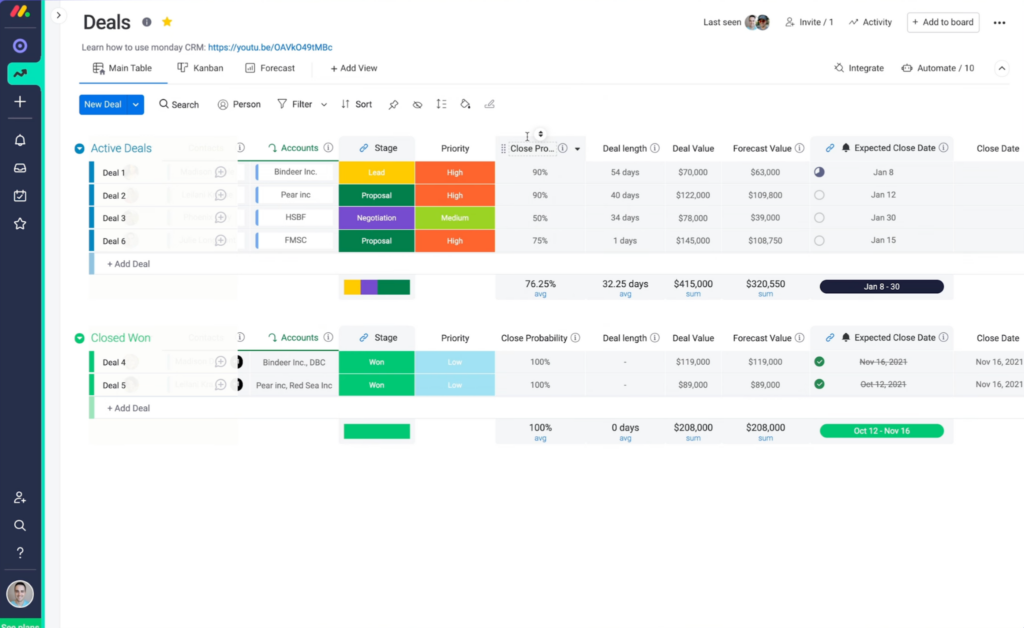
monday ofrece un CRM de ventas con gestión de contactos y pipeline, automatización de procesos y herramientas de incorporación de clientes para equipos de ventas.
Por qué elegí monday Sales CRM: Este software cuenta con funciones de gestión de acuerdos y automatización de flujos de trabajo de las que pueden beneficiarse los equipos de ventas, gerentes de cuentas y dueños de negocios. Los usuarios pueden configurar etapas de venta personalizadas para rastrear su pipeline, asignar leads automáticamente a los representantes de ventas y ver las interacciones con los contactos a lo largo del tiempo. Las previsiones de ventas y las notificaciones de actividad de contactos ayudan a los reps de ventas a planificar con anticipación y responder a necesidades inmediatas.
Para las empresas donde el equipo de ventas está al frente de las operaciones de ingresos, esta puede ser una excelente opción. El software sí tiene funciones que pueden usar los equipos de marketing y los representantes de servicio al cliente, pero en general está dirigido principalmente a los equipos de ventas. También se pueden crear paneles personalizables para medir los KPI de ventas y otros indicadores de rendimiento.
Características y conexiones destacadas de monday Sales CRM
Características incluyen gestión de actividades, seguimiento de correos electrónicos, plantillas de correo electrónico, automatización de flujos de trabajo, generador de pipeline personalizado, notificaciones, previsión de ventas, objetivos de equipo y paneles de informes.
Conexiones incluyen Airtable, Canva, DocuSign Easyform, Figma, Hootsuite, Jira, JustCall, Miro, PandaDoc, Tableau, Toggl, Twilio y Zoho.
Pros and Cons
Pros:
- Las empresas que utilizan otros productos de monday pueden permanecer en el ecosistema
- Amplia base de conocimientos y canal de YouTube para soporte
- Configuración rápida e interfaz amigable para el usuario
Cons:
- Quienes buscan una solución robusta pueden no encontrar todas las funciones que necesitan
- El soporte al cliente no está fácilmente disponible por teléfono
New Product Updates from monday CRM

monday CRM Adds Meta Conversions API Integration
monday CRM now lets you connect Meta Conversions API and sync lead status back to Meta, improving targeting and conversions via a new Meta integration automation recipe. For more information, visit monday CRM's official site.

Attio
Ideal para estructuras CRM personalizadas
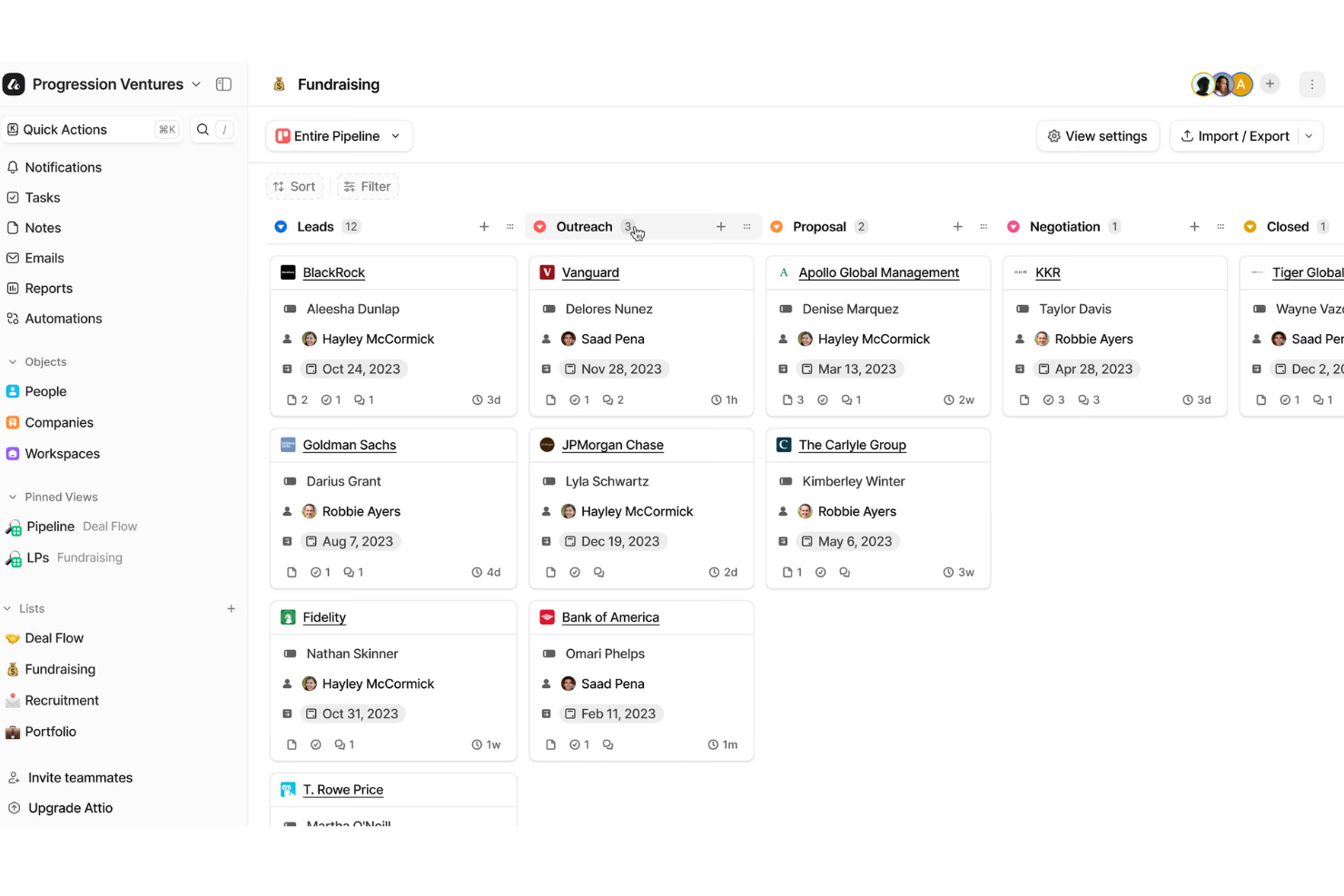
Attio es una plataforma CRM flexible diseñada para ayudar a los equipos a gestionar sus relaciones con los clientes de una manera que refleje cómo funciona realmente su negocio. Centraliza personas, empresas y oportunidades en un solo sistema conectado.
Por qué elegí Attio: Elegí Attio por su modelo de datos adaptable. Puedes diseñar registros que van más allá de las personas y empresas habituales—como asociaciones, facturas o proyectos—para que tu CRM refleje exactamente lo que necesita tu negocio. Esta flexibilidad facilita mantener todo el contexto de clientes y negocios en un solo lugar.
Otra razón es el motor de automatización. Con él, puedes establecer reglas para la transferencia de oportunidades, volver a involucrar oportunidades tibias o frías y crear secuencias que mantengan a los prospectos avanzando en tu embudo sin esfuerzo manual. Para equipos en crecimiento, esto significa menos tiempo gestionando tareas repetitivas y más tiempo centrados en los clientes.
Funciones y integraciones destacadas de Attio:
Las funciones incluyen informes que te permiten crear paneles personalizados para seguir tu embudo y medir el rendimiento en tiempo real. Attio también ofrece soporte impulsado por inteligencia artificial para tareas como prospección, identificación de interesados y puntuación de oportunidades, lo que te ayuda a priorizar en qué enfocar la energía de tu equipo.
Las integraciones incluyen Vercel, DigitalOcean, GitHub, Stripe, Figma, Intercom, Segment, Notion, Slack, Loom, Retool y Customer.io.
Pros and Cons
Pros:
- Modelo de datos flexible que se adapta a cualquier negocio
- La IA ayuda a identificar leads y partes interesadas
- Opciones sólidas de seguimiento de embudos
Cons:
- Carece de funciones de llamadas integradas
- Uso fuera de línea limitado
New Product Updates from Attio

Attio Improves Ask Attio With Suggested Actions and Consistent Chat
Attio adds suggested next actions, example prompts, a consistent chat panel, aligned shortcuts, and a minimize option to Ask Attio. These updates make the AI assistant easier to use across different pages. For more information, visit Attio’s official site.
 .
.
Ideal para el seguimiento de ventas B2B
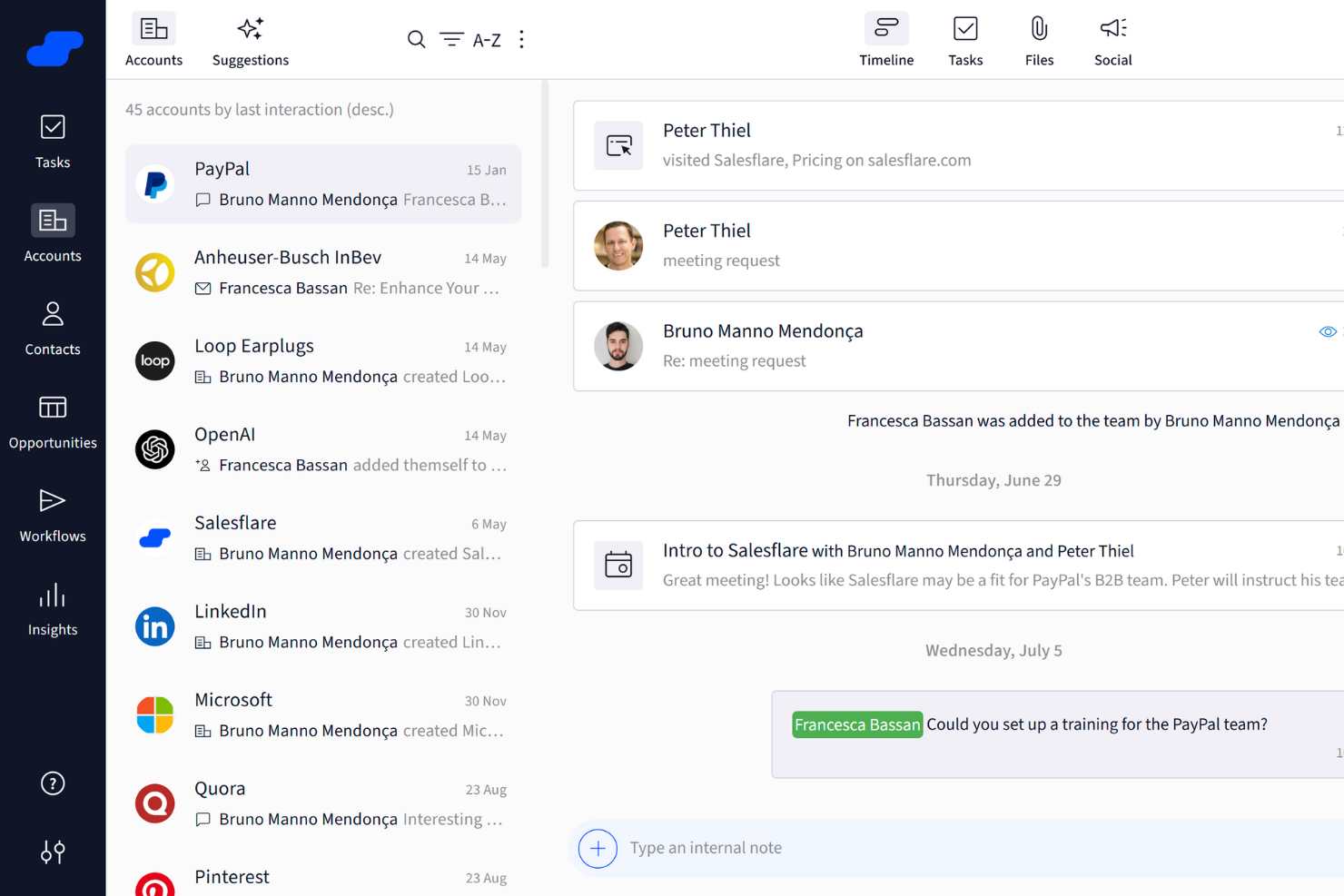
Salesflare es una herramienta CRM enfocada en mejorar los procesos de ventas a través de funciones como el seguimiento de ventas y paneles de control personalizables.
Por qué elegí Salesflare: Salesflare ofrece impresionantes capacidades de inteligencia de ventas, que incluyen inteligencia relacional, enriquecimiento de datos y sugerencias de IA. Estas funciones te ayudan a obtener una comprensión más profunda de tus prospectos y clientes, permitiendo que tu equipo tome decisiones mejor fundamentadas. Además, las herramientas de engagement comercial, como las secuencias de correo electrónico y las plantillas, son excelentes para mantener una comunicación constante y eficaz.
Salesflare también proporciona soporte avanzado para la generación de leads mediante integración con LinkedIn, un buscador de leads y una extensión para Chrome. Esto facilita encontrar y conectar con potenciales clientes directamente desde tu navegador web.
Características destacadas e integraciones de Salesflare
Las características incluyen flujos de ventas visuales, ingreso automatizado de datos, recordatorios automáticos, paneles personalizables, herramientas de enriquecimiento de datos, plantillas de correo electrónico y opciones de seguimiento de correo electrónico y web.
Las integraciones incluyen Google, Microsoft, LinkedIn, QuickBooks Online, Slack, Typeform, Facebook Lead Ads, Google Contacts, Better Proposals, Emailable, Leadinfo y StoryChief.
Pros and Cons
Pros:
- Capacidad de integración con plataformas populares como Gmail y LinkedIn
- Ingreso automático de datos para ahorrar tiempo
- Flujos de ventas visuales para ayudar a rastrear y gestionar los procesos de ventas
Cons:
- Puede no ser adecuado para grandes empresas
- Sin gestión de contratos incorporada
Capsule
Mejor por su facilidad de uso
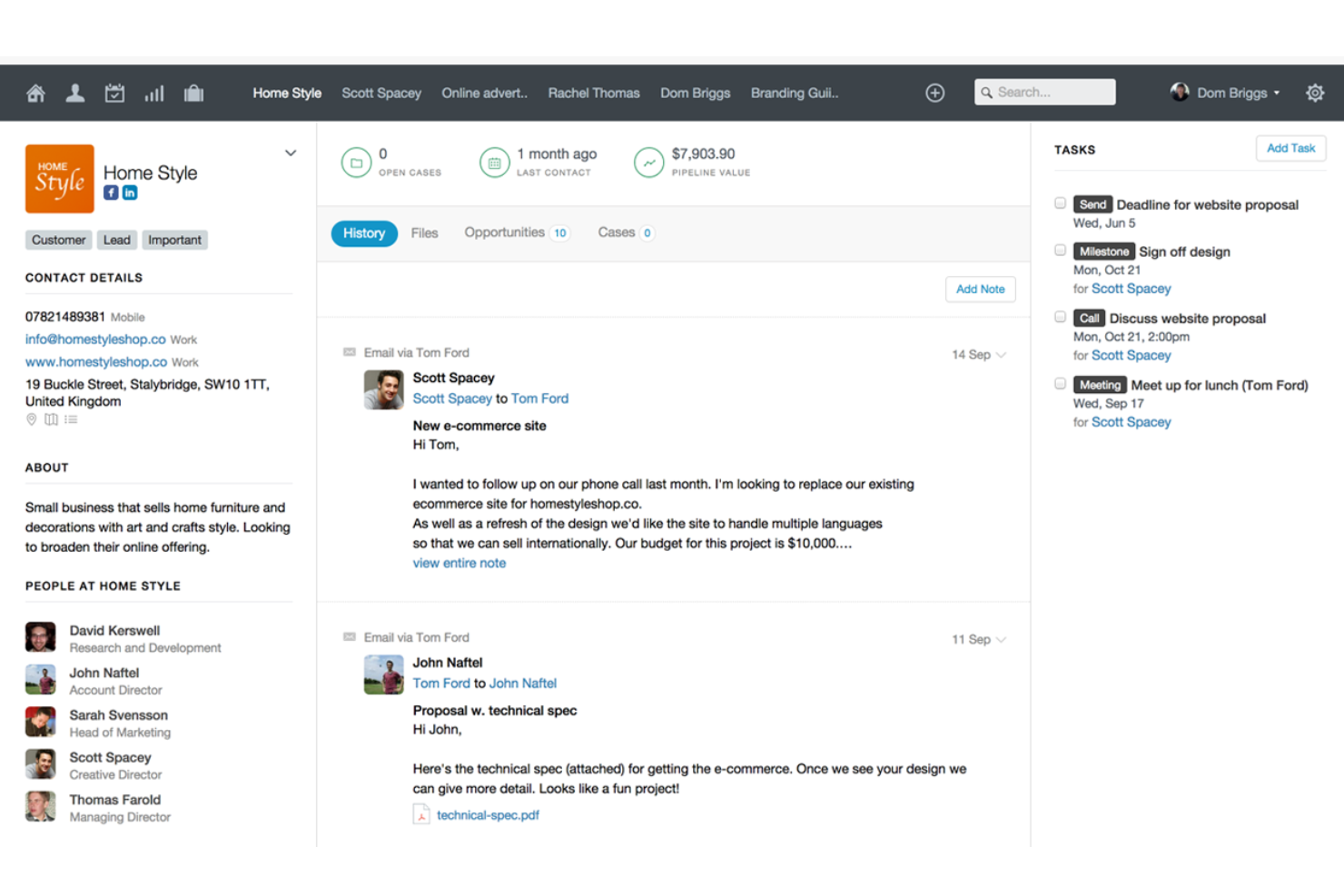
Capsule CRM ofrece un enfoque simplificado para la gestión de relaciones con los clientes, integrándose fácilmente con varias herramientas para mejorar la productividad. Qué es gratis: 2 usuarios y 250 contactos.
Por qué elegí Capsule CRM: Como software CRM gratuito, Capsule CRM destaca por proporcionar una interfaz sencilla e intuitiva, lo que lo hace accesible para pequeñas y medianas empresas. Ofrece funciones esenciales como gestión de contactos, seguimiento de tareas y visualización del embudo de ventas, lo que permite a las empresas empezar sin una gran inversión en tecnología CRM.
Lo que hace único a Capsule CRM es su sistema integrado de gestión de tareas que conecta perfectamente las tareas con las oportunidades de venta, contactos y casos. Esta integración permite a los usuarios gestionar seguimientos, fechas límite y los hitos de los proyectos directamente en el contexto de sus actividades de CRM. El sistema de gestión de tareas admite la categorización, priorización y programación, facilitando la colaboración del equipo y ayudando a mantener el control de todas las actividades relacionadas con los clientes.
Funciones y conexiones destacadas de Capsule CRM
Funciones incluyen gestión de contactos, embudo de ventas, gestión de tareas y proyectos, opciones de personalización, capacidades de integración, una interfaz fácil de usar, acceso móvil, herramientas de informes, funciones de colaboración en equipo, controles de seguridad y privacidad.
Integraciones incluyen Google Workspace (Gmail, Docs, Calendar), Microsoft Office 365, Mailchimp, Xero, QuickBooks, Slack, FreshBooks y más mediante Zapier.
Pros and Cons
Pros:
- Intuitivo y fácil de usar
- Gestión de tareas integrada con el calendario
- Envía y recibe correos electrónicos directamente en Capsule CRM
Cons:
- No se pueden arrastrar y soltar etiquetas o campos de datos
- Se agradecerían más integraciones de marketing digital
New Product Updates from Capsule

Capsule Adds AI Meeting Prep for External Calls
Capsule introduced AI Meeting Prep with relationship summaries, color-coded signals, and CRM context for upcoming external calls. This helps users review key contact details and prepare for meetings without searching through records manually. For more information, visit Capsule’s official site.
 .
.
Zoho CRM
Mejor CRM con asistente bot incorporado
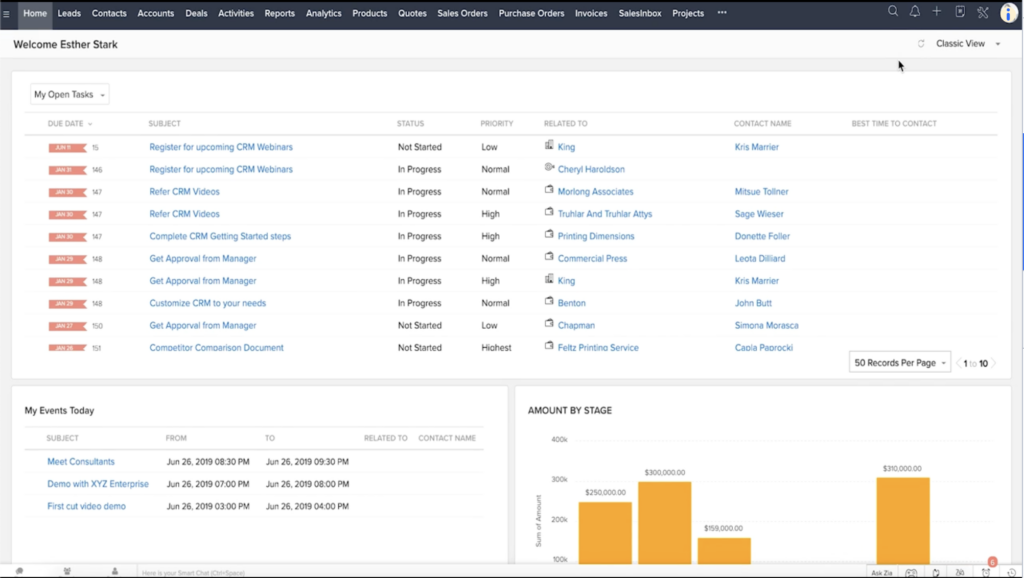
Zoho CRM tiene funciones para ayudar a los usuarios a construir relaciones sólidas con los clientes, optimizar sus flujos de trabajo y gestionar y medir sus operaciones comerciales. Todos los niveles de planes ofrecen una prueba gratuita de 15 días.
Por qué elegí Zoho CRM: Este software ayuda a los equipos de operaciones de ingresos a crear excelentes experiencias de usuario mediante la coordinación omnicanal y la personalización basada en datos. Los usuarios también pueden crear flujos de trabajo automatizados y generar asignaciones, escalados y validaciones dentro de la plataforma. El software cuenta con gráficos personalizables y una variedad de opciones de visualización de datos para analizar información y hacer seguimiento de métricas.
La característica destacada de la herramienta es su IA integrada, apodada ‘Zia’. Zia actúa como un asistente conversacional, brindando a los usuarios información analítica y predictiva en tiempo real. Esta herramienta también escanea correos electrónicos de clientes para detectar menciones de competidores y analizar el sentimiento, proporcionando a los representantes de ventas y al personal de soporte información útil para interactuar en las conversaciones con los clientes.
Funciones e integraciones destacadas de Zoho CRM
Las funciones incluyen un bot con IA, flujos de trabajo automatizados, segmentación, atribución, gestión omnicanal, diseños de página personalizados, informes y gráficos, pronósticos de ventas y una aplicación móvil.
Las integraciones incluyen Dataddo, DropBox, Eventbrite, Google Workspace, Microsoft 365, PandaDoc, PostgreSQL, QuickBooks, Qwilr, Slack, Stripe, Twilio, WhatsApp y Zoom. Hay aún más integraciones disponibles mediante Zapier.
Pros and Cons
Pros:
- El bot con IA ‘Zia’ brinda a los usuarios información y notificaciones en tiempo real
- Los usuarios pueden acceder a la funcionalidad completa de cualquier nivel de precios gratis durante 15 días
- Un mercado con más de 800 integraciones facilita conectar tu stack tecnológico
Cons:
- Los usuarios necesitarán un plan de pago para seguir usando el software después de la prueba
- Algunos términos en el producto no están estandarizados, lo que puede resultar confuso
New Product Updates from Zoho CRM

Zoho CRM Adds Reusable Canvas Templates for Forms
Zoho CRM now supports Canvas templates in the Forms view, so you can design a form layout once and reuse it across records for a consistent, faster experience. For more information, visit Zoho CRM's official site.
 .
.
ClickUp
Mejor CRM gratuito y software de colaboración entre equipos
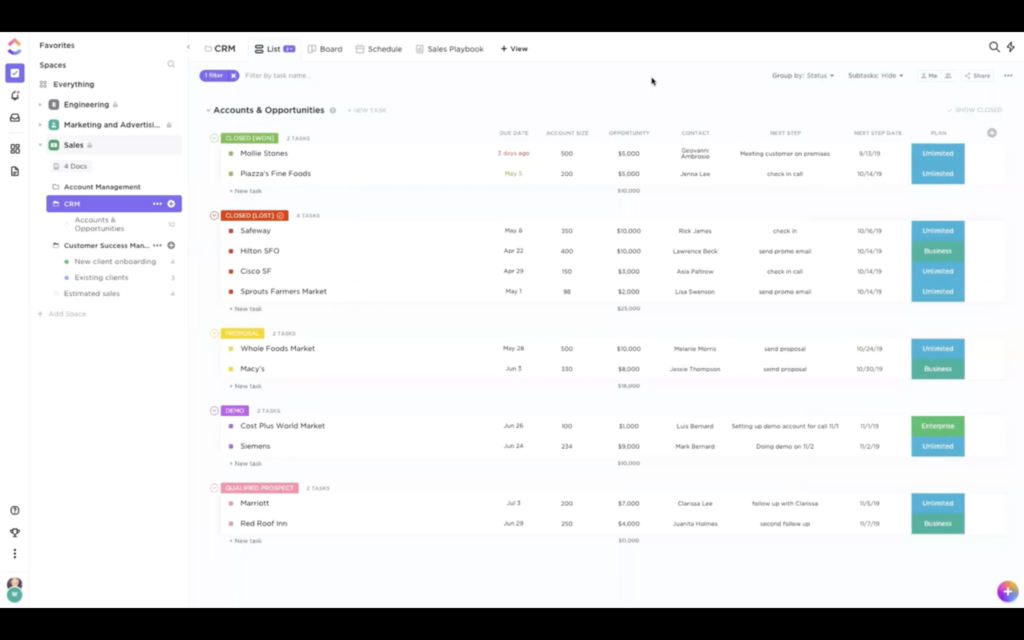
Autodenominado como ‘una aplicación para reemplazarlas todas’, ClickUp es un software de amplio espectro que incluye herramientas de CRM, gestión de proyectos, así como de RRHH, TI y finanzas.
Por qué elegí ClickUp: Los equipos de operaciones de ingresos pueden mantenerse alineados con los equipos de producto y diseño usando este software para sus necesidades de CRM. Los representantes de ventas pueden gestionar cuentas de prospectos y clientes, automatizar procesos comerciales y obtener informes en tiempo real en la plataforma. Los equipos de marketing pueden colaborar en activos, gestionar campañas y planificar calendarios de contenido.
El software también tiene funciones específicas para los equipos de producto, ingeniería, diseño, finanzas, RRHH y TI, reuniendo a todos los departamentos en la misma plataforma. Esto significa que cada equipo está conectado y comparte un espacio de trabajo. La herramienta de gestión de proyectos permite a los usuarios visualizar y planificar proyectos, colaborar y hacer el seguimiento del progreso entre equipos y departamentos.
Funciones destacadas e integraciones de ClickUp
Las funciones incluyen vistas de canalización y listas flexibles, más de 50 widgets de panel de control, incorporación de clientes, flujos de trabajo automatizados, seguimiento de pedidos y plantillas.
Las integraciones incluyen Chrome, Clockify, Dropbox, Evernote, Figma, Harvest, HubSpot, Intercom, Outlook, Salesforce, Slack, Timely, Toggl Track, Zendesk y Zoom. Hay integraciones nativas adicionales disponibles, y Zapier desbloquea aún más integraciones.
Pros and Cons
Pros:
- La gestión de proyectos y los informes están en el mismo sistema que el CRM
- Facilita la alineación en toda la empresa al reunir a todos los equipos en una sola plataforma
- La plataforma es altamente personalizable y puede adaptarse prácticamente a las necesidades de cualquier empresa
Cons:
- La plataforma es muy completa en funciones, pero puede ser difícil de navegar
- La solución CRM no se puede usar de forma independiente al resto del software
New Product Updates from ClickUp
ClickUp Adds Meetings Hub, Super Agent Templates, and ZoomInfo Integration
ClickUp adds a searchable Meetings Hub, new ways to clone and template Super Agents, and a ZoomInfo integration through the App Center. These updates improve meeting retrieval, agent reuse, and access to sales intelligence. For more information, visit ClickUp’s official site.
Ideal para pequeñas empresas con operaciones ligeras de éxito del cliente
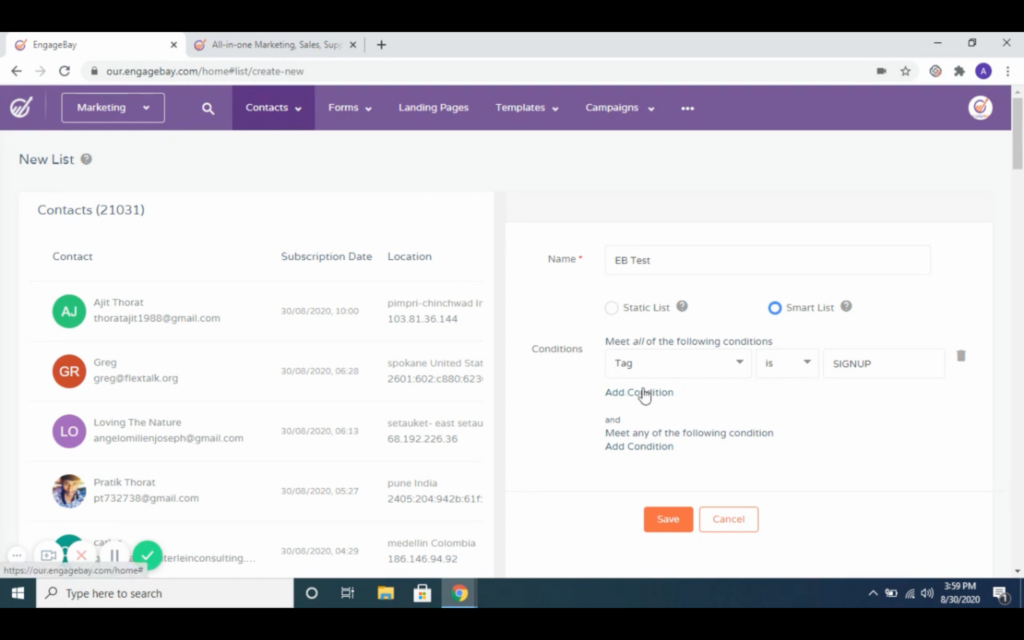
EngageBay ofrece una suite CRM gratuita y todo en uno para pequeñas empresas, con entrada automática de datos, marketing segmentado y funciones de automatización de flujos de trabajo.
Por qué elegí EngageBay: La versión gratuita de este software ofrece muchas de las mismas funciones de una cuenta de pago, solo que con algunas limitaciones. Los usuarios pueden gestionar y segmentar contactos, crear secuencias de correos electrónicos, diseñar y probar páginas de destino, y gestionar una mesa de ayuda desde la plataforma. En general, cubre lo básico que tus equipos de ventas y marketing necesitan de un CRM, siendo las mayores limitaciones las funciones de atención al cliente.
Este software es una gran opción para pequeñas empresas que no requieren una operación de soporte al cliente robusta. Prácticamente todas las herramientas de marketing están disponibles en el plan gratuito, pero los usuarios están limitados a 250 contactos, 1000 correos electrónicos con marca y 500 MB de almacenamiento. En el área de ventas, lo único que se pierde respecto al siguiente nivel de plan son los minutos para llamadas y etapas personalizadas de los acuerdos.
Funciones y conexiones destacadas de EngageBay
Funciones incluyen envío y secuencias de correos electrónicos, formularios, páginas de destino, chat en vivo, conjunto de herramientas sociales, panel de reportes, anuncios en Facebook, programación de citas y puntuación predictiva de prospectos.
Conexiones incluyen Asana, BigCommerce, DocuSign, Google Meet, JotForm, LinkedIn, Outlook, QuickBooks, Shopify, Stripe, Trello, Twilio, Xero, Zapier y Zoom.
Pros and Cons
Pros:
- Prácticamente todas las herramientas de marketing del siguiente nivel de plan están accesibles en la versión gratuita
- Las páginas de destino A/B ayudan a los usuarios a realizar pruebas
- Todas las integraciones están disponibles en la versión gratuita
Cons:
- Las funciones de soporte al cliente son limitadas en comparación con el plan de pago
- Los usuarios gratuitos solo pueden acceder a soporte por correo electrónico y chat de EngageBay

La mejor opción para pipelines de ventas personalizables
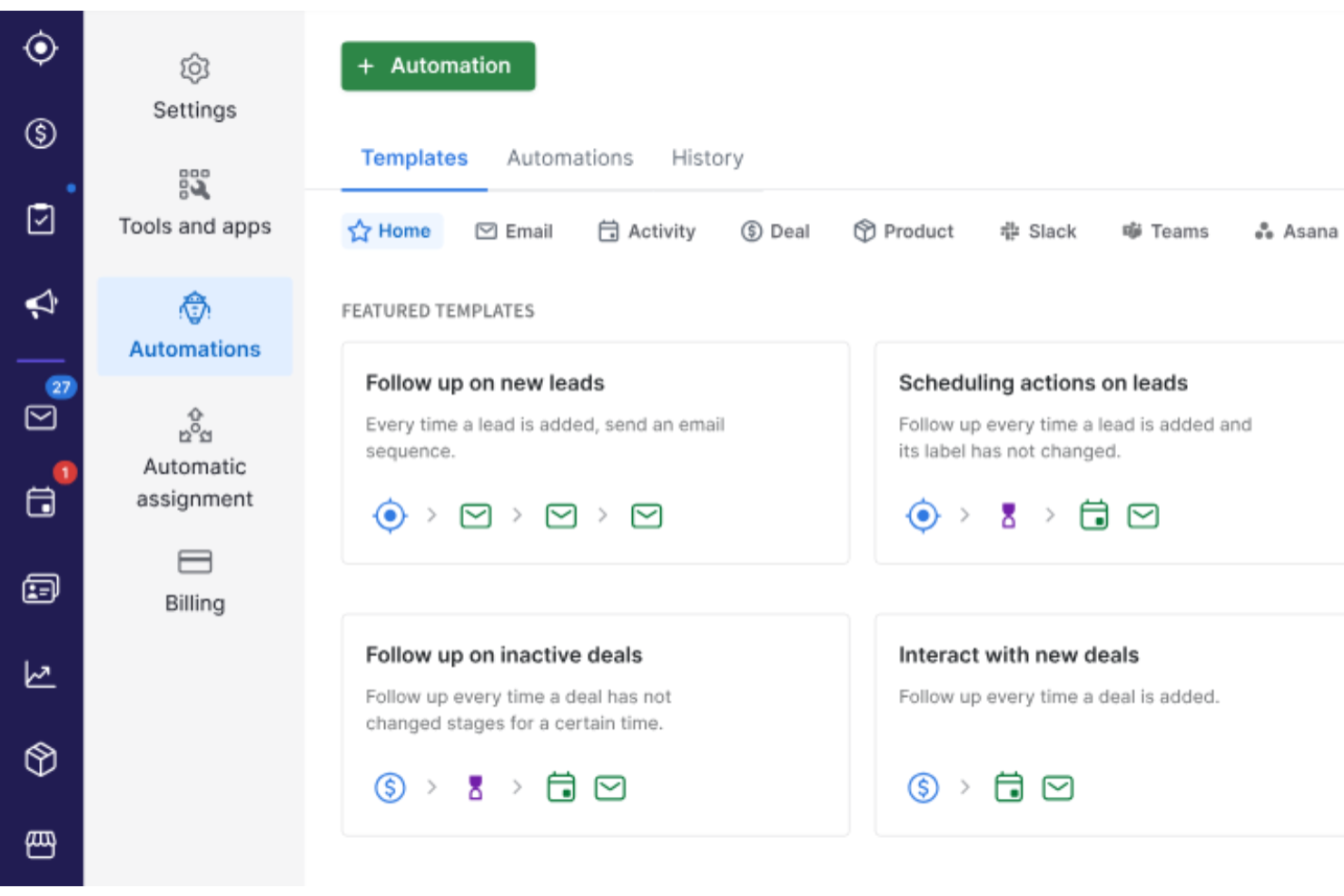
Por qué elegí Pipedrive CRM: Pipedrive destaca por adaptarse a flujos de trabajo de ventas únicos gracias a sus pipelines personalizables y automatización incorporada que reduce la carga administrativa. Sus funciones de IA mejoran la previsión y la toma de decisiones al analizar el progreso de los acuerdos y la actividad del equipo.
También permite la prospección y el seguimiento de correos electrónicos dentro del sistema, respaldado por informes completos y accesibilidad móvil; ideal para equipos que necesitan tanto visibilidad como flexibilidad en la gestión de relaciones con clientes.
Funciones y conexiones destacadas de Pipedrive CRM
Funciones incluyen pipelines de ventas personalizados, análisis por IA, herramientas de marketing integradas, coordinación de tareas, manejo de facturas, análisis en tiempo real y herramientas de comunicación interna.
Conexiones incluyen Zapier, Pandadoc, Leadfeeder, Kixie, Automate.io, Slack, QuickBooks, Trello, Zoom, Gmail, Microsoft Teams, Facebook Messenger, JustCall, Mailchimp, Stripe, Asana y Google Meet.
Pros and Cons
Pros:
- Pipelines altamente personalizables
- Funciones de automatización de tareas y asistencia por IA
- Plataforma fácil de usar
Cons:
- Algunas funciones de IA están limitadas a planes de nivel superior
- Puede tomar tiempo aprender a personalizar la plataforma
Streak
Mejor CRM gratuito para integrar con Google Workspace
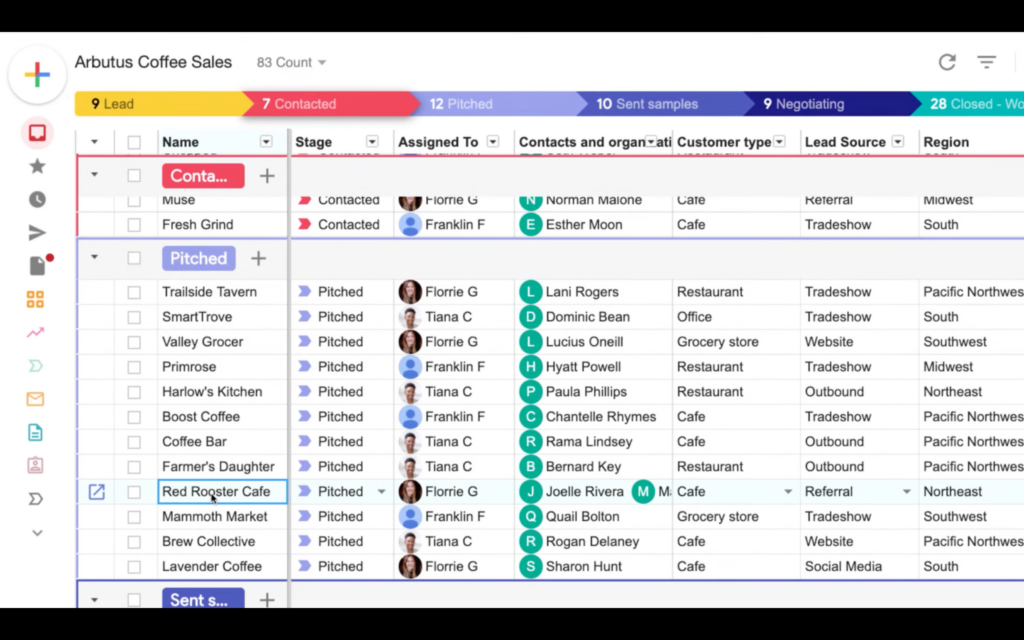
Streak es una extensión de Chrome para CRM que lleva todas sus funcionalidades directamente a las herramientas de Google Workspace (Gmail, Google Calendar, Google Sheets y Google Drive).
Por qué elegí Streak: Cambiar de una aplicación a otra suele ser el enemigo persistente de la productividad, así que tener la posibilidad de conectar un CRM directamente con tus herramientas de trabajo más usadas puede ser atractivo. Los usuarios pueden crear vistas personalizadas de canalizaciones, rastrear y ver todas las interacciones con contactos y acceder a los datos de los contactos directamente desde Gmail. El software también permite importar y exportar datos y ofrece funciones de personalización del flujo de trabajo.
Para las empresas que quieren potenciar las herramientas que ya utilizan en lugar de migrar a un entorno totalmente nuevo, esta puede ser una excelente opción. En particular, los profesionales del sector del capital de riesgo pueden beneficiarse de la organización de documentos y el acceso a los datos de las inversiones que ofrece la herramienta. Asimismo, aquellos del sector inmobiliario pueden realizar el seguimiento del historial de sus clientes y gestionar información sobre acuerdos y comisiones con la plataforma.
Funciones y integraciones destacadas de Streak
Las funciones incluyen seguimiento de correos electrónicos, campos personalizados, pruebas A/B, vistas personalizadas de canalizaciones, líneas de tiempo de contactos, entradas inteligentes, registro automático de llamadas y una aplicación móvil.
Las integraciones incluyen Google Workspace: Gmail, Google Drive, Google Sheets, Google Calendar, Google Docs, Google Meet, etc. También se puede conectar Zapier para integraciones adicionales con una cuenta de pago.
Pros and Cons
Pros:
- Reduce el cambio de aplicación al integrarse directamente con Google Workspace
- Funciones sencillas que facilitan el uso y permiten aprovechar todas las prestaciones
- El seguimiento de correos electrónicos brinda detalles como cuándo se abren los correos
Cons:
- Menor variedad de funciones; algunos usuarios pueden buscar más opciones
- Carece de una 'base central' para los usuarios porque es una extensión de Chrome
Mejor software CRM gratuito para pequeñas empresas B2B

Really Simple Systems es un software CRM creado específicamente para pequeñas empresas B2B, diseñado para ser sencillo y fácil de usar.
Por qué elegí Really Simple Systems: Los usuarios pueden construir y gestionar relaciones, colaborar y entender sus KPIs con las funciones que ofrece este software. Los equipos de ventas pueden administrar sus contactos y pipeline, crear presupuestos de ventas y planificar tareas, eventos y calendarios. Los equipos de marketing pueden usar la herramienta para gestionar sus campañas, automatizar sus correos electrónicos y marketing, crear listas segmentadas y construir formularios web. Los equipos de atención al cliente tienen acceso a la gestión de casos y funciones de informes, así como acuerdos de nivel de servicio.
La simplicidad es el núcleo de la plataforma, y la filosofía de la empresa es hacer que las aplicaciones complejas sean más fáciles y asequibles. Su objetivo es proporcionar todo lo que las pequeñas empresas necesitan para sus ventas y marketing sin complejidad innecesaria.
Características e integraciones destacadas de Really Simple Systems
Características incluyen gestión de contactos, gestión de pipeline, automatización de flujos de trabajo, formularios web, informes y previsiones, listas y segmentación, gestión de campañas y acuerdos de nivel de servicio.
Integraciones incluyen Google Sheets, Leadinfo, Microsoft Azure, Onelogin, QuickBooks, Sage Business Cloud, Xero y Zapier, que ofrece integraciones adicionales.
Pros and Cons
Pros:
- La interfaz de usuario simple hace que el software sea fácil de usar
- Muchos videos tutoriales gratis disponibles en su canal de YouTube
- Equipo de soporte al cliente receptivo y conocedor
Cons:
- Las empresas B2C pueden encontrar que no todas las funciones son relevantes, y otras faltan
- Puede que no se adapte a grandes empresas
Otro software CRM gratuito
¿No has encontrado una opción que se adapte a tus necesidades en la lista? Aquí tienes otras opciones de software CRM gratuito que puedes consultar:
- Agile CRM
Mejor software gratuito de base de datos de clientes para pequeñas empresas
- Bitrix24
Mejor CRM y espacio de trabajo con precio fijo
- eWay-CRM
Mejor CRM gratuito para integrar con Outlook
- Freshsales
Ideal para desarrollar una solución CRM modular
- SimplyDepo
Mejor con seguimiento en tiempo real


Reseñas relacionadas de software CRM gratuito
Si todavía no has encontrado aquí lo que buscas, consulta estas herramientas estrechamente relacionadas con el software CRM gratuito que hemos probado y evaluado.
- Software de ventas
- Software de gestión de clientes potenciales
- Software de inteligencia empresarial
- Software de gestión de contratos
- Sistema de gestión de ingresos
- Software de CPQ
- Mejor software CRM
Wie ich kostenlose CRM-Software bewerte
Zuerst definiere ich, was als kostenlos gilt. CRM ist eine dauerhafte Infrastruktur – Sie verfolgen Deals, protokollieren Anrufe und verwalten täglich die Pipeline – daher müssen Anbieter einen dauerhaft kostenlosen Tarif anbieten und nicht nur eine Testphase. Darauf aufbauend bewerte ich anhand von zwei Ebenen: den Grundfunktionen, die jedes Tool unbedingt erfüllen muss, und den Unterscheidungsmerkmalen, die eine Lösung besonders attraktiv für RevOps-Teams machen.
Kernfunktionen (Grundvoraussetzungen für diese Liste)
Neben meinen Anforderungen an das kostenlose Angebot verwende ich ein Punktesystem, um Tools für meine Liste auszuwählen. So funktioniert es:
Jedes Tool wird auf einer Skala von 0 (Funktion wird nicht angeboten) bis 5 (herausragend in diesem Bereich) für jede der unten aufgeführten Kernfunktionen bewertet. Dann rechne ich die Gesamtpunktzahl des Tools in einen Prozentsatz um. Jedes Tool muss mindestens eine Gesamtpunktzahl von 65% erreichen, um berücksichtigt zu werden.
- Kontakt- & Kontenverwaltung: Ich prüfe, wie jeder kostenlose Tarif die Datenspeicherung, benutzerdefinierte Felder und Segmentierungen handhabt – etwa das Taggen von Kontakten nach Lebenszyklusphase oder das Gruppieren von Firmen nach Region.
- Pipeline- & Deal-Tracking: Jedes Tool sollte es ermöglichen, Pipeline-Phasen zu erstellen und anzupassen, Deals dazwischen per Drag & Drop zu verschieben und sie in einer Kanban-Ansicht darzustellen, ohne dass ein Upgrade nötig ist.
- Aktivitäts- & Aufgabenprotokollierung: Ich untersuche, ob Vertriebsmitarbeitende Anrufe, E-Mails und Notizen direkt am Datensatz protokollieren können. Tools wie HubSpot und Zoho CRM gehen hierbei unterschiedlich vor, daher vergleiche ich die Tiefe der Protokollierung.
- Berichte & Dashboards: Selbst im kostenlosen Tarif erwarte ich zumindest ein paar integrierte Berichte zum Pipeline-Wert, Deal-Tempo oder Aktivitätsvolumen, die RevOps tatsächlich nutzen kann.
- Native Integrationen: Ich bewerte, welche E-Mail-, Kalender- und Marketingtools mit dem kostenlosen Tarif verbunden werden können – und ob es eine kostenlose offene API oder Zapier-Anbindung gibt.
- Workflow-Automatisierung: Grundlegende Automationen wie das automatische Zuweisen von Leads nach Quelle oder das Auslösen einer Aufgabe beim Wechsel einer Deal-Phase sollen verfügbar sein, bevor man auf einen kostenpflichtigen Tarif umsteigen muss.
Wenn ich eine Liste von Tools habe, die die Kriterien erfüllen, prüfe ich, was jede Plattform besonders auszeichnet.
Unterscheidungsmerkmale (Was die Anbieter voneinander abhebt)
So vergleiche ich verschiedene Anbieter:
Besondere Funktionen
Die Anzahl der kostenlosen Nutzerplätze ist hier besonders wichtig. Ein RevOps-Team mit drei oder vier Personen erreicht schnell die Höchstgrenze, deshalb prüfe ich, wie viele Nutzerplätze in jedem kostenlosen Tarif enthalten sind. Auch eine eingebaute bidirektionale E-Mail-Synchronisierung ist ein großer Unterschied – wenn Gmail- oder Outlook-Unterhaltungen von Mitarbeitenden automatisch zum Kontakt gespeichert werden, spart das viel manuelle Arbeit und macht den Aktivitätsverlauf verlässlicher. Ich suche auch nach nativen Formularen zur Lead-Erfassung, die das Marketingteam direkt auf der Website einbetten kann; neue Leads landen dann ohne Drittanbieter-Tool direkt in der Pipeline.
Mehr als nur Funktionen
Ich achte sehr auf Daten- und Speicherlimits der kostenlosen Angebote. Einige CRMs beschränken sich auf ein paar hundert Kontakte, was für eine wachsende Pipeline sehr schnell zu wenig ist. Genauso wichtig ist der Upgrade-Pfad – ich bewerte, ob die kostenpflichtigen Tarife transparent und angemessen gestaltet sind oder ob ein Anbieter wichtige RevOps-Funktionen hinter Enterprise-Preisen versteckt. Auch Datenportabilität ist relevant: Ich prüfe, ob Sie Kontakte und Deal-Historie frei exportieren können, sodass Ihr Team nicht feststeckt, falls Sie auf eine andere Plattform wechseln müssen.
Cómo elegir un software CRM gratuito
Con tantas soluciones diferentes de software CRM gratuito disponibles, puede ser difícil decidir qué herramienta se adapta mejor a tus necesidades.
Mientras elaboras una lista de opciones, pruebas y seleccionas un software CRM gratuito, ten en cuenta lo siguiente:
- Qué problema intentas resolver - Empieza por identificar la carencia de funcionalidades del software CRM gratuito que intentas cubrir para aclarar las características y funciones que debe ofrecer la herramienta.
- Quién necesitará utilizarlo - Para evaluar el coste y los requisitos, considera quién utilizará el software y cuántas licencias necesitarás. Tendrás que evaluar si solo necesitarán acceso los responsables de las operaciones de ingresos o toda la organización. Cuando esto esté claro, conviene considerar si estás priorizando la facilidad de uso para todos o la rapidez para los usuarios avanzados de tu software CRM gratuito.
- Con qué otras herramientas debe funcionar - Aclara qué herramientas estás sustituyendo, cuáles se mantienen y con qué herramientas tendrás que integrarlo, como software de contabilidad, CRM o recursos humanos. Tendrás que decidir si las herramientas deberán integrarse entre sí o si puedes sustituir varias herramientas por un único software CRM gratuito y consolidado.
- Qué resultados son importantes - Considera el resultado que debe ofrecer el software para que se considere un éxito. Piensa en qué capacidad quieres obtener o qué quieres mejorar, y en cómo medirás el éxito. Por ejemplo, un resultado podría ser la capacidad de obtener una mayor visibilidad del rendimiento. Podrías comparar las funciones del software CRM gratuito hasta el agotamiento, pero si no estás pensando en los resultados que quieres impulsar, podrías estar desperdiciando mucho tiempo valioso.
- Cómo funcionaría dentro de tu organización - Considera la selección del software junto con tus flujos de trabajo y metodología de prestación. Evalúa qué funciona bien y qué áreas están causando problemas que deben abordarse. Recuerda que cada empresa es diferente; no des por hecho que una herramienta funcionará en tu organización solo porque es popular.
Tendencias del software CRM gratuito para 2026
A medida que las empresas dependen cada vez más del CRM para agilizar sus procesos y fomentar las relaciones con los clientes, los desarrolladores están innovando para ofrecer soluciones más sólidas y completas sin el coste asociado. Este es un resumen de las tendencias actuales basado en las últimas actualizaciones de software, comunicados de prensa y registros de versiones:
Automatización e integración mejoradas:
- Automatización más avanzada: Las plataformas CRM gratuitas están ampliando sus capacidades de automatización para abarcar procesos más complejos y de varios pasos, reduciendo la carga de trabajo manual y aumentando la eficiencia.
- Integración más amplia: Se está impulsando una integración más amplia con herramientas de terceros, lo que permite a las pequeñas empresas crear un ecosistema tecnológico más interconectado sin costes adicionales.
Análisis de datos avanzado e IA:
- Análisis predictivo: Los CRM gratuitos están empezando a incorporar funciones de análisis predictivo, lo que proporciona a las pequeñas empresas una visión anticipada del comportamiento de los clientes y de las tendencias de ventas.
- Asistencia mediante IA: La integración de la IA para ofrecer información útil, automatizar la introducción de datos y proporcionar una clasificación predictiva de clientes potenciales es cada vez más habitual, incluso en las versiones gratuitas.
Accesibilidad móvil y operaciones basadas en la nube:
- Optimización para dispositivos móviles: Al reconocer la necesidad de acceder al sistema desde cualquier lugar, los CRM gratuitos están mejorando sus aplicaciones móviles para ofrecer una funcionalidad completa que refleja la de las versiones de escritorio.
- Avances en la nube: Aprovechar la tecnología en la nube para garantizar que los datos sean accesibles, seguros y se respalden de forma constante es una tendencia clave que respalda las operaciones ágiles de las pequeñas empresas modernas.
Funciones comunitarias y colaborativas:
- Herramientas colaborativas: Se está dando prioridad a las funciones que facilitan la colaboración entre los miembros del equipo, como los contactos compartidos y los registros de interacciones, para mejorar la coordinación del equipo.
- Soporte de la comunidad: El desarrollo de comunidades activas de usuarios en torno a las plataformas CRM gratuitas proporciona recursos inestimables para intercambiar consejos, resolver problemas y compartir buenas prácticas.
Al plantearte adoptar o cambiar de solución CRM, estas tendencias subrayan la importancia de seleccionar un software que no solo responda a tus necesidades actuales, sino que también esté preparado para crecer con tu empresa, aprovechando los últimos avances tecnológicos para mejorar las relaciones con tus clientes y la eficiencia operativa.
¿Qué es el software CRM gratuito?
El software CRM (gestión de relaciones con los clientes) gratuito es una herramienta que ayuda a las empresas a gestionar las interacciones, los datos y las relaciones con los clientes sin coste alguno. Estas soluciones de software suelen ofrecer las funciones básicas necesarias para una gestión eficaz de los clientes, como el almacenamiento de contactos, el seguimiento de clientes potenciales, la programación de tareas y la gestión del embudo de ventas. Están orientadas a pequeñas empresas o empresas emergentes que necesitan funciones esenciales de CRM sin la carga económica del software de pago.
Los beneficios del software CRM gratuito incluyen una mejor organización y eficiencia en la gestión de las relaciones con los clientes. Ayudan a las empresas a realizar un seguimiento de las interacciones con los clientes y de los procesos de ventas, lo que se traduce en un mejor servicio al cliente y, potencialmente, en un aumento de las ventas. Las herramientas CRM gratuitas también permiten ahorrar costes a las pequeñas empresas o startups que quizá no dispongan del presupuesto necesario para soluciones CRM de pago más completas. Al centralizar la información de los clientes, facilitan un acceso más sencillo a los datos y una comunicación más fluida con los clientes. Aunque estas herramientas pueden tener limitaciones en comparación con sus equivalentes de pago, siguen ofreciendo capacidades valiosas para las empresas que buscan gestionar sus relaciones con los clientes de forma más eficaz.
Características del software CRM gratuito
El software CRM gratuito puede agilizar las interacciones con los clientes, el seguimiento de las ventas y los procesos de marketing, proporcionando información valiosa que impulsa las decisiones estratégicas. Estas son las características más importantes que debes buscar en un software CRM gratuito para gestionar eficazmente las operaciones de ingresos:
- Gestión de contactos: Centraliza todos los datos de los clientes.
- Garantiza que cada miembro del equipo pueda acceder a perfiles completos de los clientes, mejorando la comunicación personalizada y el servicio al cliente.
- Gestión de clientes potenciales: Realiza un seguimiento de los clientes potenciales a lo largo del embudo de ventas.
- Facilita la supervisión y el desarrollo eficaces de los clientes potenciales, aumentando la tasa de conversión e impactando positivamente en los ingresos.
- Seguimiento de acuerdos: Supervisa el progreso de las oportunidades de ventas.
- Proporciona visibilidad sobre el embudo de ventas, ayudando a prever los ingresos y a priorizar los esfuerzos en los acuerdos más prometedores.
- Seguimiento de tareas y actividades: Organiza y programa seguimientos y tareas.
- Mantiene al equipo alineado con los próximos pasos, garantizando una interacción constante con los clientes potenciales y los clientes para impulsar las ventas.
- Integración con el correo electrónico: Se conecta con sistemas de correo electrónico para lograr una comunicación fluida.
- Permite realizar un seguimiento eficaz de las interacciones con los clientes y garantiza que todas las comunicaciones queden registradas y sean accesibles para futuras consultas.
- Informes y análisis: Ofrece información sobre las actividades y el rendimiento de las ventas.
- Permite tomar decisiones basadas en datos mediante la identificación de tendencias, la medición del progreso con respecto a los objetivos y el descubrimiento de áreas de mejora.
- Acceso móvil: Proporciona acceso a las funciones del CRM desde dispositivos móviles.
- Garantiza que los miembros del equipo puedan actualizar y consultar información esencial mientras están fuera de la oficina, manteniendo la productividad y la capacidad de respuesta.
- Personalización: Permite adaptar el software a las necesidades específicas de la empresa.
- Mejora la facilidad de uso y la relevancia al permitir que las empresas modifiquen campos, flujos de trabajo e informes para adaptarlos a sus procesos operativos.
- Interfaz fácil de usar: Garantiza la facilidad de uso y la necesidad de una formación mínima.
- Acelera la adopción y maximiza la utilidad del CRM, garantizando que el equipo pueda centrarse en utilizar el software para impulsar los ingresos en lugar de aprender a navegar por él.
- Capacidades de integración: Se conecta con otras herramientas y plataformas empresariales.
- Mejora la eficiencia y proporciona una visión más completa de las interacciones con los clientes y de las operaciones empresariales al conectarse con otro software esencial.
Al seleccionar un software CRM gratuito, es fundamental elegir una solución que ofrezca funciones completas para respaldar las operaciones de ingresos, fomentar las relaciones con los clientes y permitir el crecimiento. El CRM adecuado puede proporcionar una base para agilizar los procesos, mejorar la interacción con los clientes y realizar una planificación estratégica fundamentada, factores clave para mejorar los resultados de ingresos de tu empresa.
Beneficios del software CRM gratuito
Al integrar un sistema CRM, las empresas pueden centralizar los datos de sus clientes, agilizar sus procesos de ventas y cultivar relaciones más sólidas con sus clientes, factores fundamentales para el crecimiento de los ingresos. Estos son cinco beneficios principales de implementar un software CRM gratuito:
- Eficiencia de costes: Minimiza los costes operativos.
- Al adoptar un software CRM gratuito, las empresas pueden disfrutar de las funcionalidades principales de la gestión de las relaciones con los clientes sin la carga financiera, lo que les permite asignar recursos a otras áreas.
- Mayor conocimiento de los clientes: Proporciona una visión integral de las interacciones con los clientes.
- Los datos centralizados permiten a las empresas comprender mejor las necesidades, preferencias y comportamientos de sus clientes, facilitando una interacción personalizada y una mayor satisfacción del cliente.
- Mejora de los procesos de ventas: Optimiza la gestión de clientes potenciales y oportunidades.
- El software CRM gratuito ayuda a organizar y realizar un seguimiento de las oportunidades de venta, lo que permite a las empresas desarrollar los clientes potenciales de forma más eficaz y cerrar acuerdos con mayor rapidez, aumentando así los ingresos.
- Colaboración y accesibilidad: Facilita la colaboración del equipo y el acceso a los datos.
- Al centralizar la información de los clientes, el software garantiza que todos los miembros del equipo tengan acceso a datos actualizados, fomentando la colaboración y permitiendo una interacción con los clientes más coordinada y eficiente.
- Toma de decisiones basada en datos: Ofrece herramientas básicas de análisis y generación de informes.
- Con la información obtenida de las funciones de generación de informes del CRM, las empresas pueden tomar decisiones fundamentadas sobre sus estrategias de ventas y sus prácticas de interacción con los clientes, impulsando operaciones de generación de ingresos más específicas y eficaces.
Costes y precios del software CRM gratuito
Explorar las opciones de software CRM es un paso fundamental para las empresas que buscan optimizar la gestión de las relaciones con los clientes sin realizar una inversión significativa. El software CRM gratuito puede ser un excelente punto de partida, ya que ofrece funciones esenciales que responden a las necesidades fundamentales de la gestión de las interacciones con los clientes y los procesos de ventas. A continuación, se presenta una descripción general de las opciones de planes habituales que pueden encontrarse al considerar un software CRM gratuito:
Tabla comparativa de planes de software CRM gratuito
| Tipo de plan | Precio medio | Funciones habituales incluidas |
|---|---|---|
| Básico | $0 - $15 por usuario/mes | Gestión de contactos, seguimiento de oportunidades, gestión de tareas, generación de informes básicos |
| Avanzado | $15 - $45 por usuario/mes | Funciones de CRM más completas, integraciones mejoradas, análisis avanzados |
| Premium | $45+ por usuario/mes | Conjunto completo de funciones, personalización avanzada, asistencia premium |
| Opción gratuita | $0 | Funciones limitadas, gestión básica de contactos, seguimiento de clientes potenciales, colaboración de usuarios |
Al seleccionar un plan de CRM, es importante evaluar qué funciones se ajustan a las necesidades específicas y a las ambiciones de crecimiento de su empresa. Aunque el software CRM gratuito puede ofrecer un valor considerable, comprender las limitaciones y las posibilidades de ampliación de cada plan garantiza que tome una decisión fundamentada que respalde el éxito a largo plazo de su empresa.
Preguntas frecuentes sobre el software CRM gratuito
Si todavía no tienes claro qué buscas en un software CRM gratuito o cómo estas herramientas pueden beneficiar a tu equipo, he respondido a algunas preguntas habituales para ayudarte.
¿Qué otro software de operaciones debería utilizar?
Hoy en día, los equipos dependen de su conjunto de herramientas tecnológicas para trabajar de forma más eficaz. Aquí tienes otros programas de operaciones que quizá quieras considerar añadir a tu conjunto de herramientas:
- Sistema de gestión de contenidos: Software que permite a tu equipo crear, editar y publicar contenido de marca de forma colaborativa y organizada.
- Software de inteligencia empresarial: Software que facilita el análisis exhaustivo de datos para obtener una comprensión más precisa del rendimiento de tu empresa.
- Software de gestión de proyectos: Una herramienta que puedes utilizar para planificar proyectos, asignar tareas, gestionar cargas de trabajo, resolver cuellos de botella y realizar un seguimiento de la productividad del equipo.
¿Puedes exportar fácilmente los datos de estas plataformas gratuitas?
Sí, la mayoría de las plataformas CRM gratuitas permiten exportar datos fácilmente a formatos habituales como CSV o Excel. Esta función permite a las empresas realizar análisis externos o transferir datos entre sistemas sin obstáculos importantes.
¿Cómo gestiona el software CRM gratuito la seguridad de los datos?
El software CRM gratuito suele incluir medidas básicas de seguridad de datos, como el cifrado de datos y protocolos de acceso seguro. Sin embargo, el nivel de seguridad puede variar considerablemente entre proveedores, por lo que es esencial que las empresas revisen detenidamente las funciones de seguridad para asegurarse de que cumplen los estándares de conformidad y protección de datos.
¿Hay costes ocultos asociados al CRM gratuito?
Aunque el software CRM gratuito ofrece funcionalidades básicas sin coste, puede haber costes ocultos relacionados con complementos, usuarios adicionales, funciones avanzadas o servicios de asistencia. Es fundamental que las empresas comprendan la estructura de precios de cualquier actualización o extensión para evitar gastos inesperados.
¿Cuál es la diferencia entre el CRM y el software de gestión de bases de datos de clientes?
Aunque ambas herramientas ayudan a gestionar la información de los clientes, cumplen funciones diferentes dentro de las operaciones de tu empresa. Estas son sus diferencias:
- Software de gestión de relaciones con los clientes (CRM): Una plataforma que te ayuda a realizar un seguimiento de los clientes potenciales, gestionar las interacciones con los clientes, automatizar flujos de trabajo y generar informes. Está diseñada para equipos de ventas, marketing y éxito del cliente que buscan desarrollar relaciones y mejorar la experiencia del cliente.
- Software de gestión de bases de datos de clientes: Una herramienta más sencilla centrada en almacenar y organizar los datos de contacto de los clientes, los registros de comunicación y el historial de compras. Normalmente se utiliza como una solución ligera para gestionar registros de clientes sin funciones avanzadas de automatización o análisis.