

10 beste Softwarelösungen für Verkaufsprovisionen für kleine Unternehmen im Test 2026

Die beste Vertriebsprovisionssoftware für kleine Unternehmen – Auswahl


Die Verwaltung von Vertriebsprovisionen kann für jedes kleine Unternehmen eine Herausforderung sein. Den Überblick darüber zu behalten, wer in verschiedenen Tabellen wie viel verdient, kann schnell verwirrend und zeitaufwendig werden. Vertriebsprovisionssoftware vereinfacht diese Aufgaben, verbessert die Genauigkeit und spart Zeit.
Ich habe einige Zeit damit verbracht, die verfügbaren Optionen genauer zu prüfen, und kenne die Herausforderungen, vor denen Sie stehen. Meiner Erfahrung nach kann die richtige Software Zeit sparen und Fehler reduzieren, sodass sich Ihr Team auf das konzentrieren kann, was es am besten kann: verkaufen.
In diesem Artikel stelle ich meine Favoriten unter den Vertriebsprovisionssoftwares für kleine Unternehmen vor. Sie finden Lösungen, die zu Ihren Anforderungen passen und Ihnen helfen, Ihre Prozesse zu verbessern. Sehen wir uns die Optionen an, die für Ihr Unternehmen einen echten Unterschied machen könnten.
Warum Sie unseren Software-Empfehlungen vertrauen können
Unsere Bewertungen spiegeln unser unabhängiges Urteilsvermögen wider – keine Verkaufsstrategie. Erfahren Sie, wie wir transparent bleiben.
Für diesen Leitfaden haben wir Tools mithilfe von praktischen Tests und unabhängiger Recherche bewertet und dabei unsere Bewertungskriterien angewendet.
Unsere Bewertungen spiegeln unser menschliches redaktionelles Urteilsvermögen wider, keine Verkaufsstrategie.
Die beste Vertriebsprovisionssoftware für kleine Unternehmen – Zusammenfassung
Diese Vergleichstabelle fasst die Preisdetails meiner bevorzugten Vertriebsprovisionssoftwares für kleine Unternehmen zusammen und hilft Ihnen dabei, die beste Option für Ihr Budget und Ihre geschäftlichen Anforderungen zu finden.
| Tool | Best For | Trial Info | Price | ||
|---|---|---|---|---|---|
| 1 | Best for AI-driven commissions and analytics | Free demo available | Pricing upon request | Website | |
| 2 | Best for easy, cloud-based plan management | Free plan available | From $35/user/month | Website | |
| 3 | Best for flexible sales comp calculations | Free demo available | From $17/user/month | Website | |
| 4 | Best for accurate payouts and scalable comp plans | Free demo available | Pricing upon request | Website | |
| 5 | Best for flexible commission management | Free demo available | Pricing upon request | Website | |
| 6 | Best for automated, real-time commission tracking | Free demo available | From $75/user/month (billed annually) | Website | |
| 7 | Best for insurance agency commission management | Free demo available | From $85/user/month (billed annually) | Website | |
| 8 | Best for commission automation and compliance | Free demo available | Pricing upon request | Website | |
| 9 | Best for custom commissions and payout automation | Free trial + free demo available | From $31/user/year | Website | |
| 10 | Best for upgrading to incentive comp platforms | Free demo available | Pricing upon request | Website |
Bewertungen der besten Vertriebsprovisionssoftware für kleine Unternehmen
Nachfolgend finden Sie meine ausführlichen Zusammenfassungen der besten Vertriebsprovisionssoftwares für kleine Unternehmen, die es in meine Auswahl geschafft haben. In meinen Bewertungen erhalten Sie einen detaillierten Einblick in die wichtigsten Funktionen, Vor- und Nachteile, Integrationen und idealen Einsatzbereiche jedes Tools, damit Sie die beste Lösung für sich finden.

Forma.ai
Best for AI-driven commissions and analytics
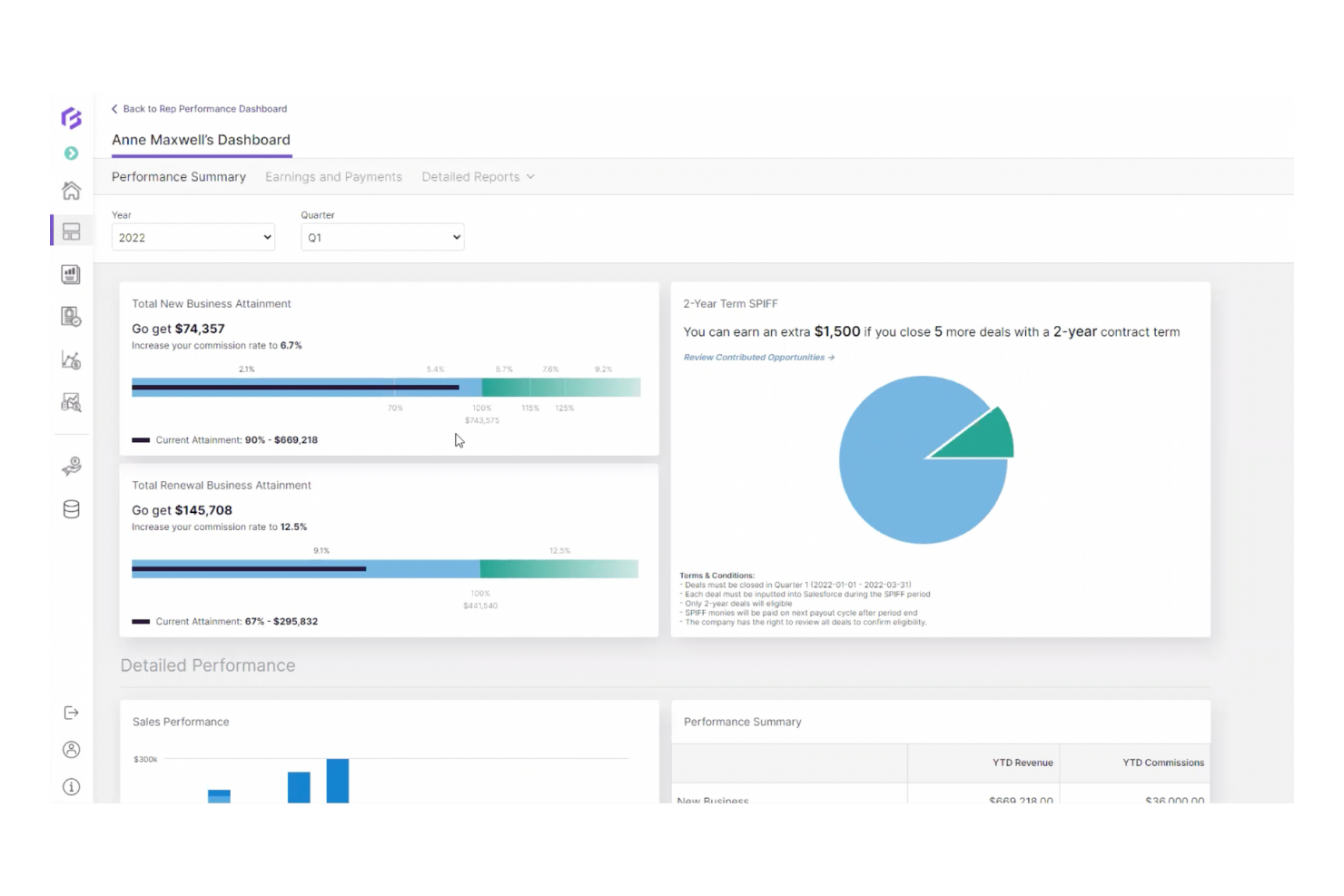
Forma.ai is a sales commission platform that helps sales teams by automating commission calculations and providing insights through advanced analytics.
Why I picked Forma.ai: This tool excels in using AI to automate commission processes and deliver analytics. It allows your team to manage complex compensation plans efficiently. Forma.ai provides real-time insights into sales performance, helping your team make data-driven decisions. Its AI capabilities maintain accuracy and flexibility in managing compensation structures.
Standout features and integrations:
Features include dynamic reporting that offers real-time analytics on sales performance. The platform supports advanced forecasting, allowing you to predict and plan compensation strategies. It also features adaptive compensation models catering to evolving business needs.
Integrations are not publicly listed.
Pros and Cons
Pros:
- Adaptive to business needs
- Advanced analytics capabilities
- AI-driven automation
Cons:
- Limited admin autonomy
- Rigid reporting views

Best for easy, cloud-based plan management
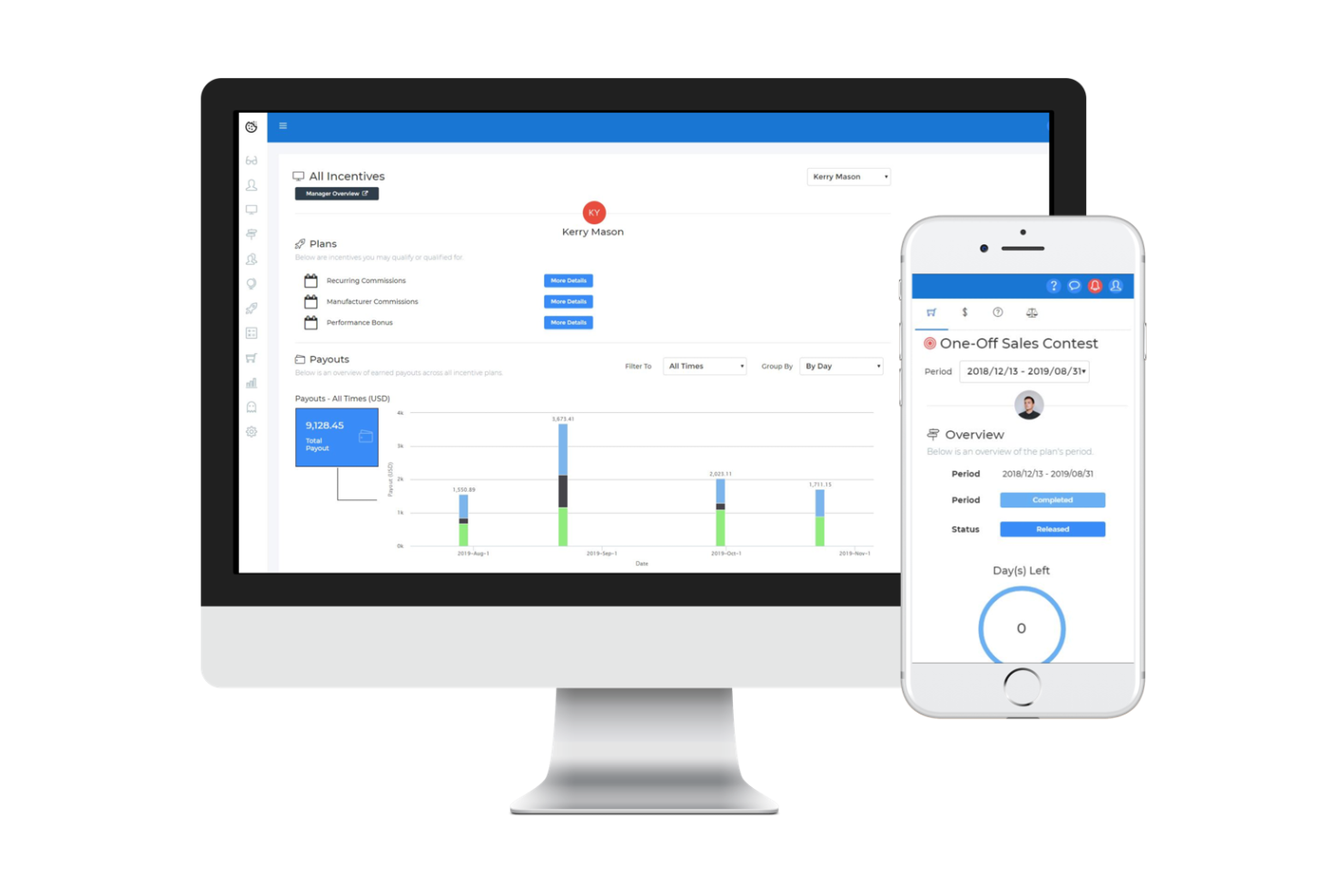
Sales Cookie is a cloud-based sales commission management software tailored for small to medium-sized businesses. It automates the management of sales commissions and provides personalized dashboards for sales representatives to track goals and payouts.
Why I picked Sales Cookie: This tool excels in offering easy cloud-based plan management for small businesses. It allows your team to create complex sales incentive plans without the hassle of manual spreadsheets. The software provides accurate, timely commission calculations that improve efficiency. Its integration capabilities with various business systems make it versatile and user-friendly for your salespeople.
Standout features and integrations:
Features include easy setup, extensive reporting capabilities, and personalized dashboards for each sales representative. The software supports the creation of complex incentive compensation management (ICM) plans, providing accurate and timely commission payouts. This helps your team stay motivated and focused on achieving their sales goals.
Integrations include Salesforce, QuickBooks, Microsoft Dynamics, HubSpot, Tableau, Zapier, and more.
Pros and Cons
Pros:
- Complex sales incentive plan support
- Accurate commission calculations
- Easy cloud-based setup and personalized dashboards
Cons:
- Advanced customization of dashboards and reports may require additional support
- Occasional reporting glitches can affect real-time visibility into commissions

Best for flexible sales comp calculations
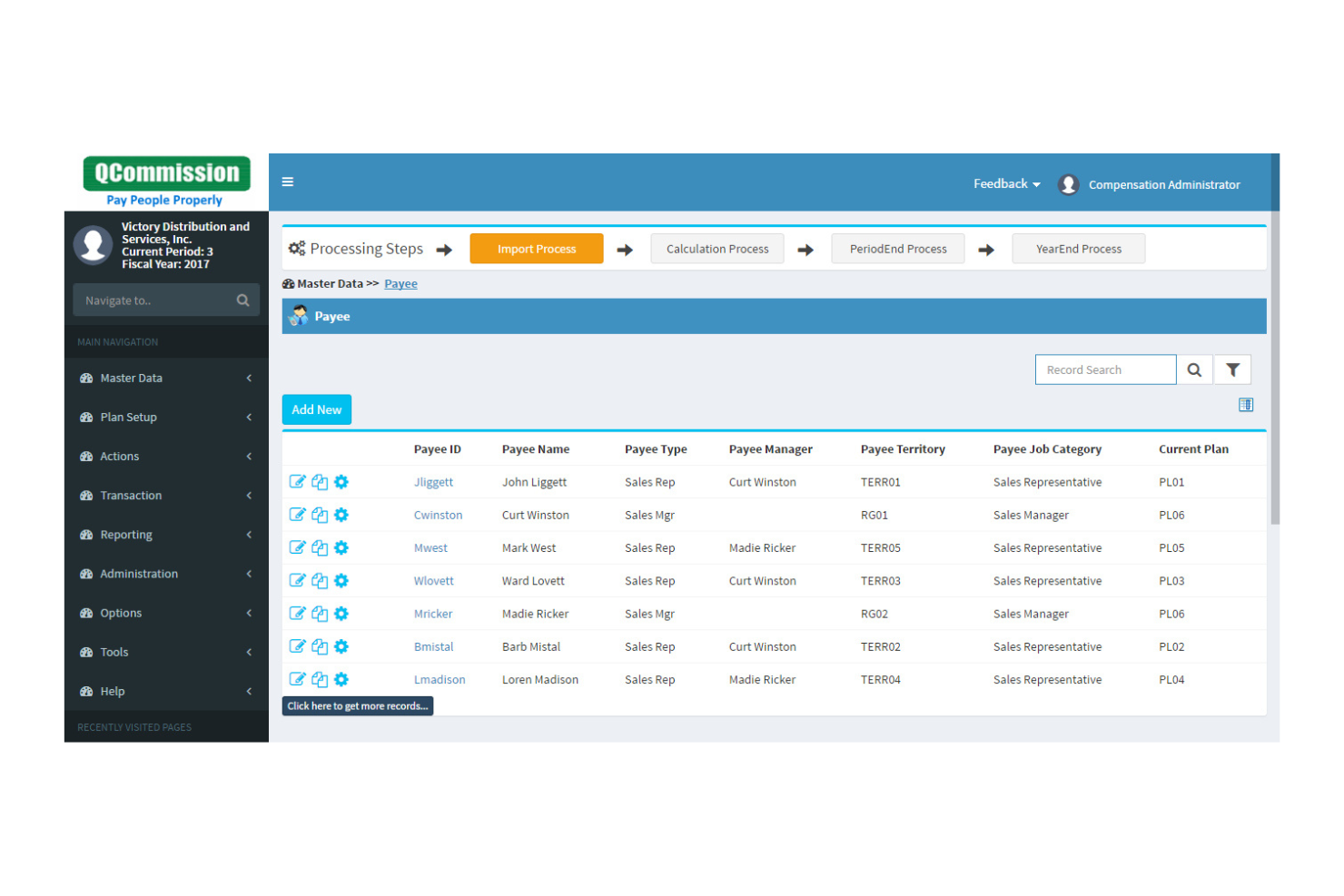
QCommission is a sales compensation software designed for businesses that require flexibility and precision in calculating commissions. It serves sales teams by automating the commission calculation process and providing detailed metrics and reporting.
Why I picked QCommission: This tool is perfect for companies needing flexible and professional sales compensation calculations. It allows you to customize commission plans to fit specific business needs. QCommission's detailed reporting features provide transparency and commission payment accuracy. Its ability to handle complex commission structures makes it a versatile choice for various business environments.
Standout features and integrations:
Features include the ability to handle multiple commission structures, catering to diverse business requirements. The software provides detailed reports, offering insights into commission calculations and payouts. It also supports integration with various business systems, increasing its versatility.
Integrations include Salesforce, QuickBooks, Microsoft Business Central 365, Oracle Fusion, Sage Intacct, NetSuite, HubSpot, and more.
Pros and Cons
Pros:
- Support for complex structures
- Detailed reporting capabilities
- Customizable commission plans
Cons:
- Occasional software updates may require downtime
- Making changes to commission structures may be complex

Best for accurate payouts and scalable comp plans
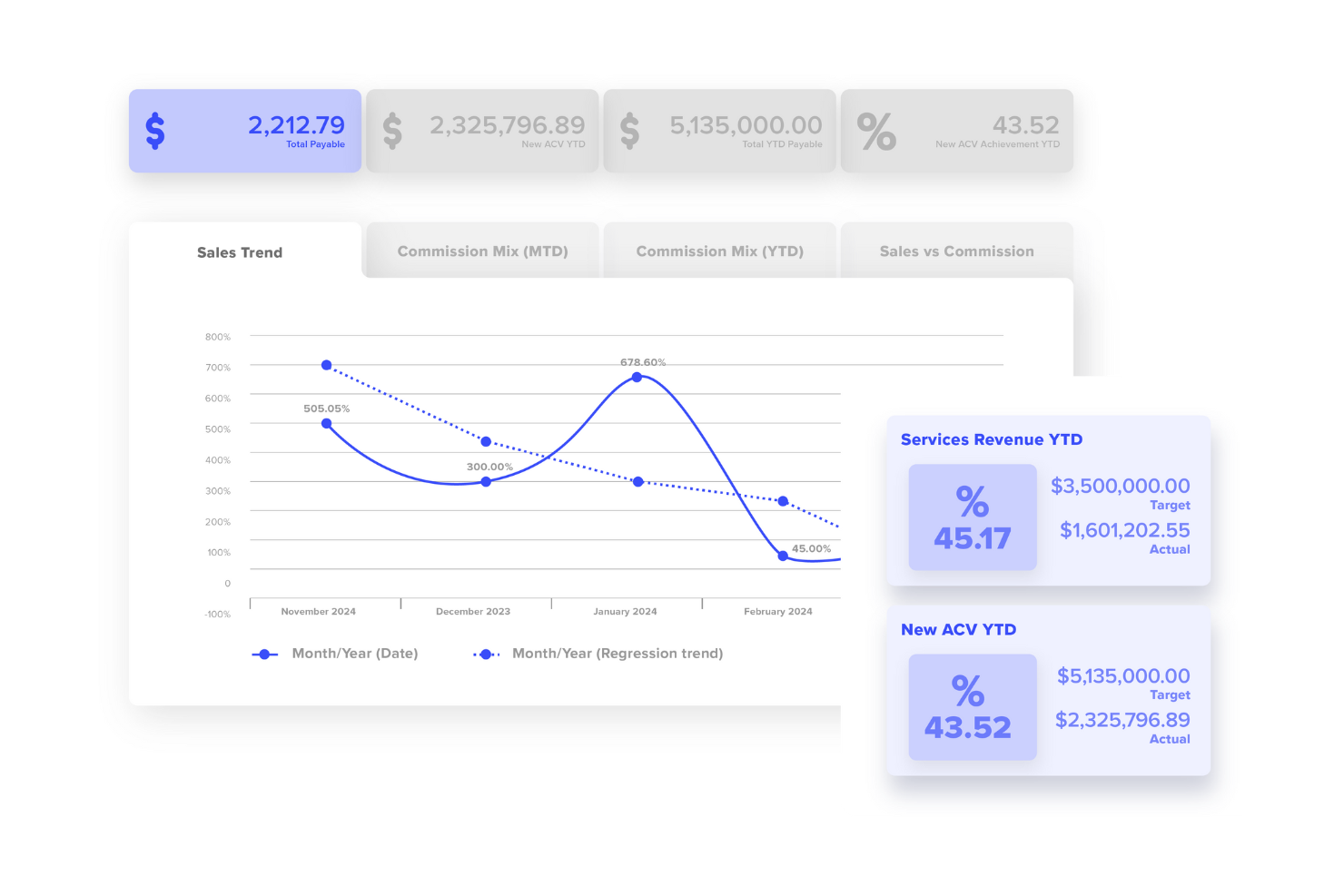
Performio is a compensation management software designed for businesses needing precise payout calculations and scalable compensation plan automation. It serves sales teams by automating commission calculations and providing transparent metrics and reporting.
Why I picked Performio: This tool is ideal for businesses that require accurate commission payouts and scalable compensation plan automation. It offers detailed reporting features for transparency in commission calculations. Performio's automation capabilities allow you to manage complex compensation plans efficiently. Its focus on accuracy and scalability makes it a reliable choice for growing businesses.
Standout features and integrations:
Features include reporting tools that offer insights into commission calculations. The software supports automated workflows, reducing manual calculation errors and saving time. It also provides scalability, allowing you to expand your compensation plans as your business grows.
Integrations include Salesforce, NetSuite, SAP, Microsoft Dynamics, Workday, QuickBooks, BambooHR, and more.
Pros and Cons
Pros:
- Support for complex workflows
- Scalable compensation plans
- Accurate commission calculations
Cons:
- Integrations may require configuration
- Technical expertise required

Best for flexible commission management
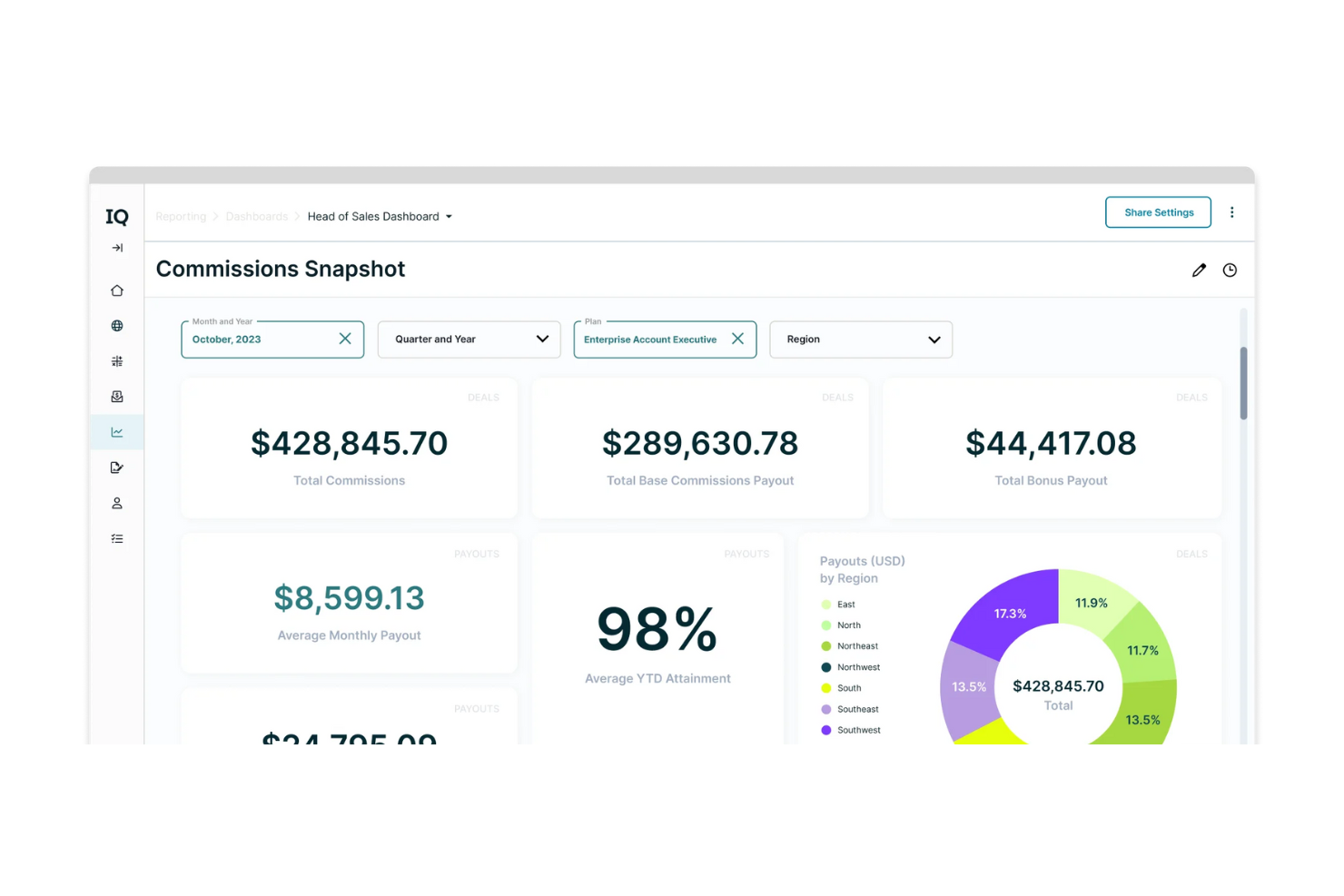
CaptivateIQ is a commission management platform designed for businesses seeking flexibility and detailed business insights. It helps sales teams manage commission plans, track earnings, and gain actionable insights into performance.
Why I picked CaptivateIQ: This tool offers unmatched flexibility in commission management, allowing your team to adapt plans as needed. It provides detailed insights into sales performance, helping you make informed decisions. CaptivateIQ's intuitive interface makes it easy to create and adjust complex sales compensation plans. Its ability to deliver real-time data lets your team stay informed and motivated.
Standout features and integrations:
Features include customizable commission plans that adapt to your business needs. The platform provides real-time analytics, offering insights into sales performance and trends. It also supports multiple currencies, catering to businesses with global operations.
Integrations include Salesforce, NetSuite, QuickBooks, Workday, BambooHR, Microsoft Dynamics, and more.
Pros and Cons
Pros:
- Detailed analytics
- Supports multiple currencies
- Real-time performance insights
Cons:
- Occasional data sync issues
- Initial setup requires technical knowledge

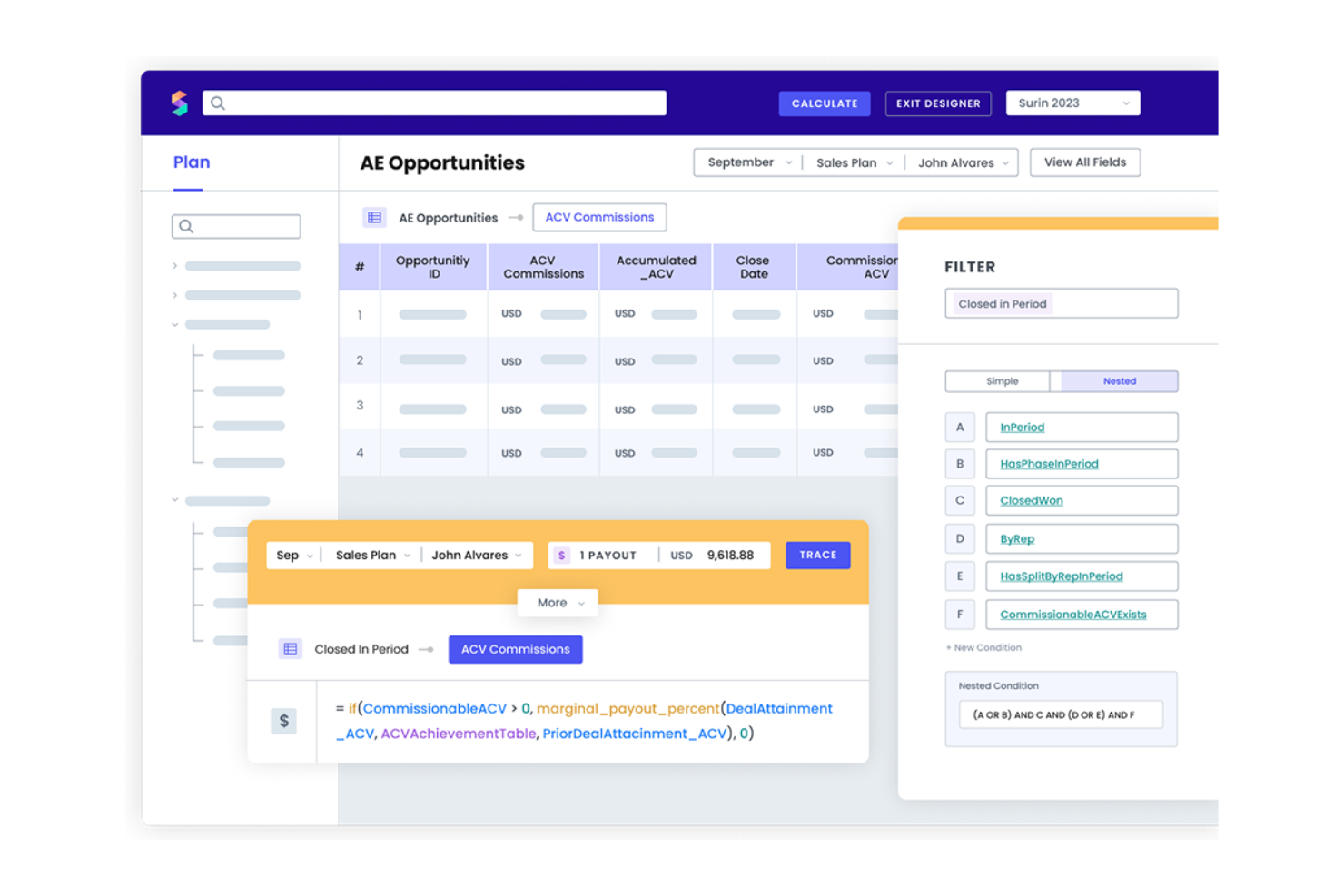
Spiff is a cloud-based sales commission software designed for small to medium-sized businesses. It automates commission management and provides real-time insights, making it ideal for sales and finance teams seeking efficiency and accuracy.
Why I picked Spiff: This tool is perfect for SMBs needing automated commission calculations and real-time data insights, which help reduce errors and improve transparency. Spiff's user-friendly interface helps your team access their commission statements and potential earnings. The software's ability to integrate with Salesforce further improves its functionality, making it a standout choice for businesses seeking efficient commission management.
Standout features and integrations:
Features include automated commission calculations, real-time visibility of commission statements, and advanced reporting capabilities. The software also provides a detailed audit trail and allows for bulk management of users and teams. These features make it easy for your team to track performance and manage complex commission structures.
Integrations include Salesforce, Workday, Microsoft 365, Sage, and more.
Pros and Cons
Pros:
- Supports complex commission structures
- User-friendly interface
- Real-time sales commission data
Cons:
- May experience performance issues with large datasets
- Limited customization options

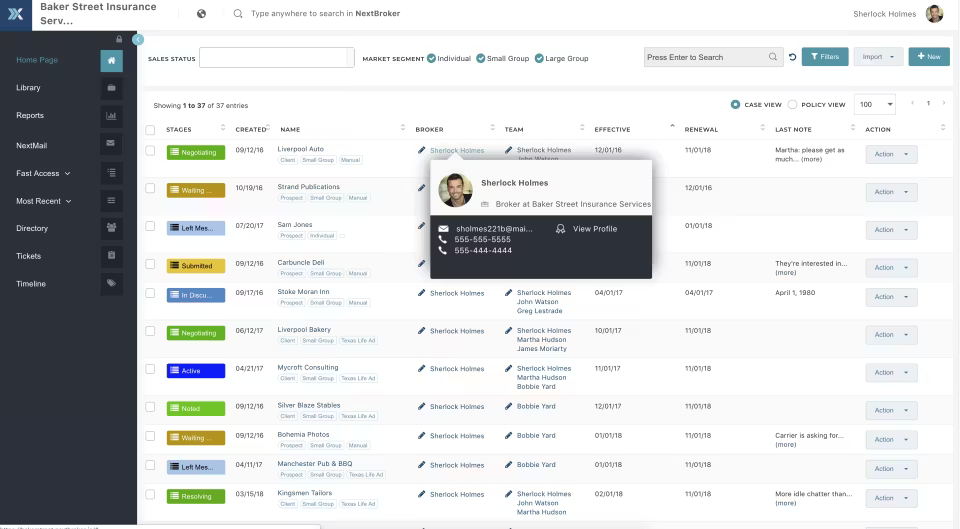
NextAgency is a commission management software specifically designed for insurance agencies. It helps these agencies manage their commission processes effectively, offering tools to improve and automate compensation tracking.
Why I picked NextAgency: This tool is designed for insurance agencies needing efficient commission management. It offers customizable tracking features and tools to simplify managing and monitoring commissions. NextAgency’s focus on the insurance sector makes it a specialized solution for agencies.
Standout features and integrations:
Features include customizable commission tracking that adapts to your agency's specific needs. The platform offers automation tools to support commission calculations and reporting. It also provides detailed analytics to help you understand and optimize your compensation processes.
Integrations include PerfectQuote, Zapier, NextAgency, and more.
Pros and Cons
Pros:
- Automation tools
- Specialized for insurance agencies
- Customizable tracking options
Cons:
- Limited customization and reporting options
- Occasional glitches in related modules

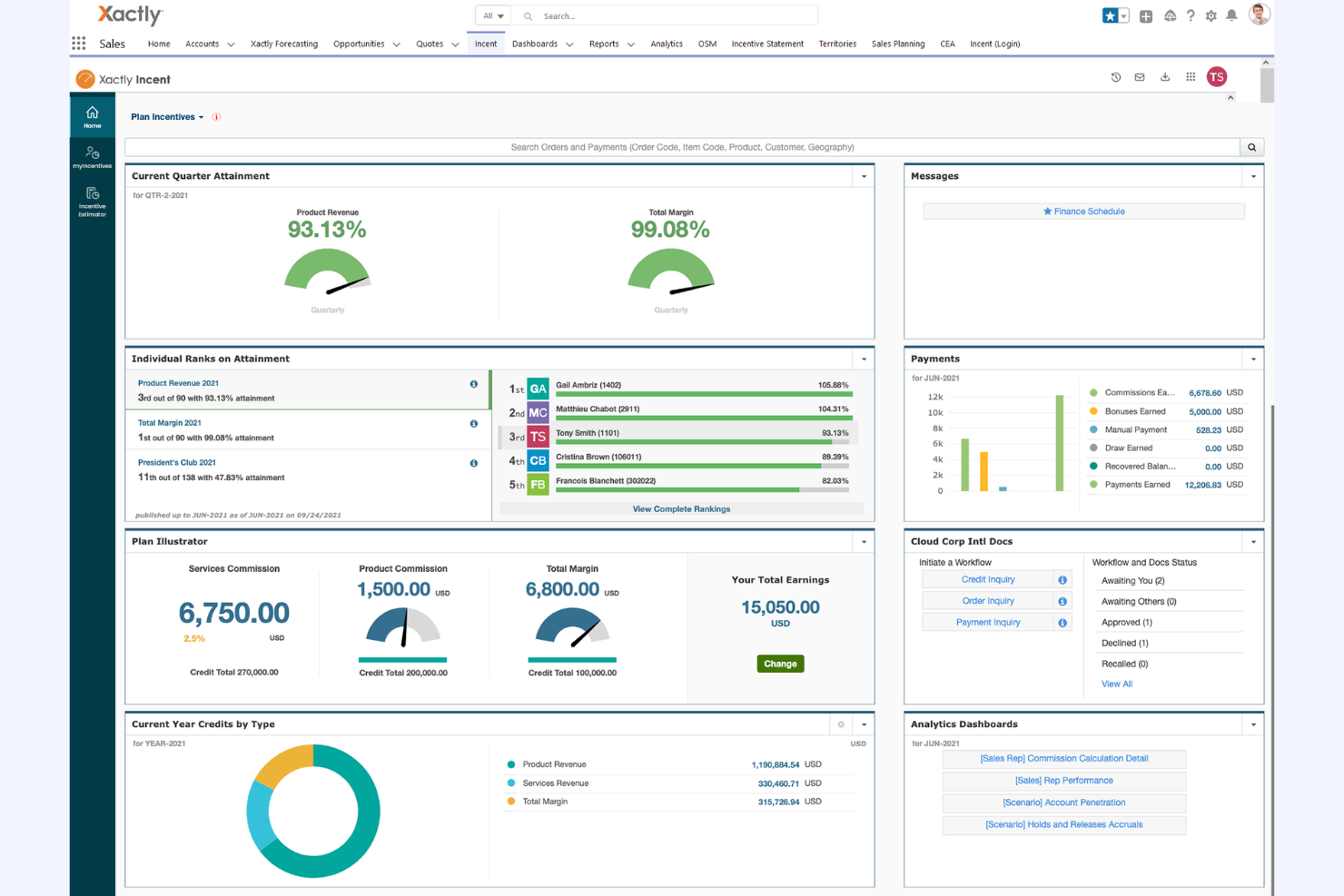
Xactly Incent is a commission management software designed for businesses that require automation and compliance in their compensation processes. It helps sales teams manage complex commission structures and maintain compliance with industry standards.
Why I picked Xactly Incent: This tool provides enterprise-level commission automation and compliance. It manages complex compensation plans with advanced features and offers real-time data and analytics for informed decision-making.
Standout features and integrations:
Features include reporting tools for commission calculations and payouts, automated workflows to reduce manual errors, and compliance management to meet industry standards.
Integrations include Salesforce, Oracle, SAP, Microsoft Dynamics, NetSuite, Workday, and more.
Pros and Cons
Pros:
- Supports operations of all sizes
- Strong compliance management
- Handles complex compensation structures
Cons:
- Reporting limitations
- non‑intuitive interface

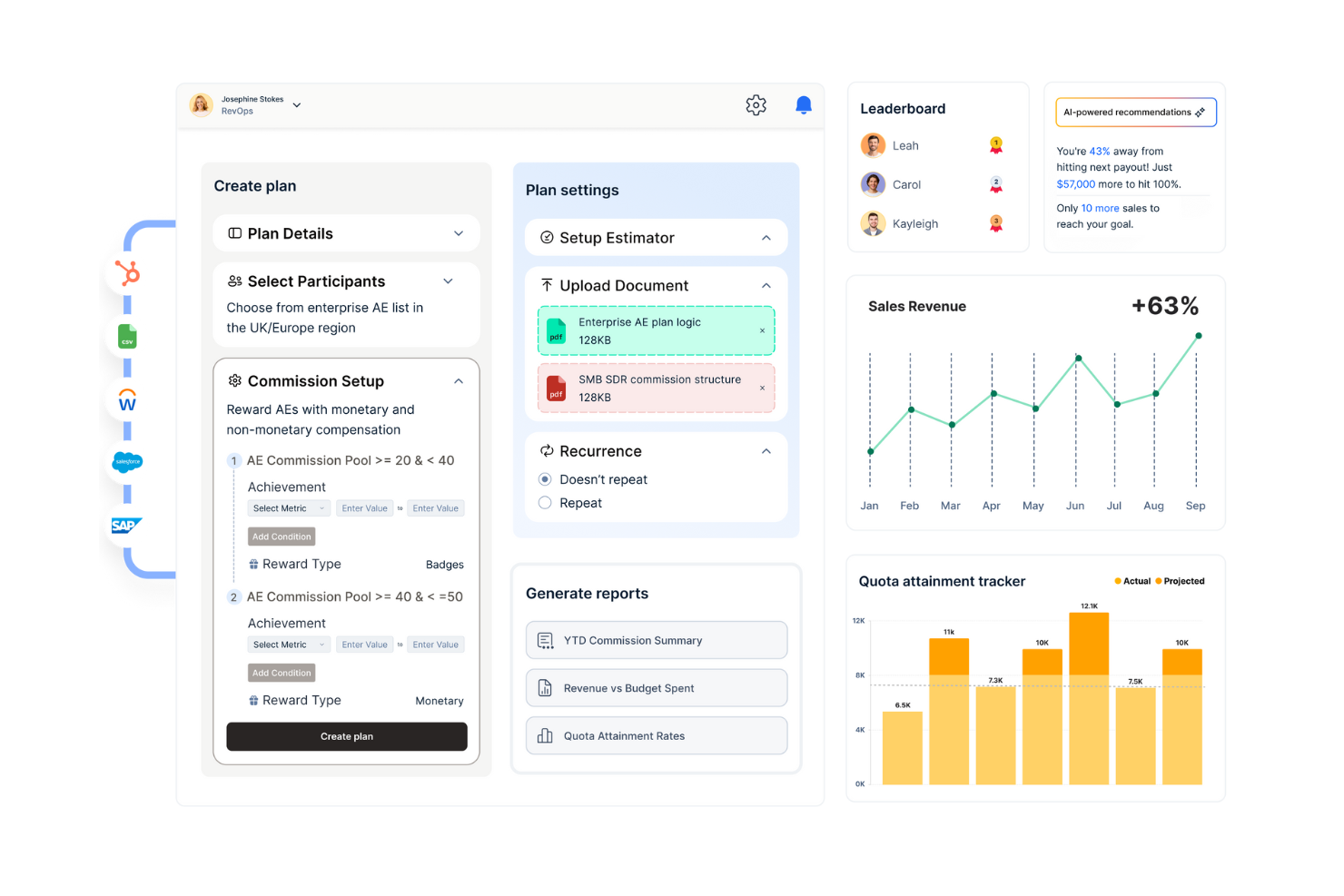
Qobra is a commission management platform designed for businesses looking for customizable commission plans and automated payout processes. It serves sales teams by simplifying the management of complex compensation structures and supporting timely payouts.
Why I picked Qobra: This tool offers customizable commission plans for different business needs. It automates payouts to reduce errors and save time. Qobra provides real-time visibility into sales performance and a user-friendly interface for adjusting commission structures.
Standout features and integrations:
Features include a flexible commission plan designer that allows you to tailor plans to your business needs. The platform offers real-time analytics to track sales performance and payout processes. It also supports automated workflows, helping your team manage compensation efficiently.
Integrations include Salesforce, HubSpot, Microsoft Dynamics, Xero, Sage, and more.
Pros and Cons
Pros:
- Easy to adjust plans
- Automated payout processes
- Customizable plan options
Cons:
- No mobile app
- Limited customization for complex commission plans

Everstage
Best for upgrading to incentive comp platforms
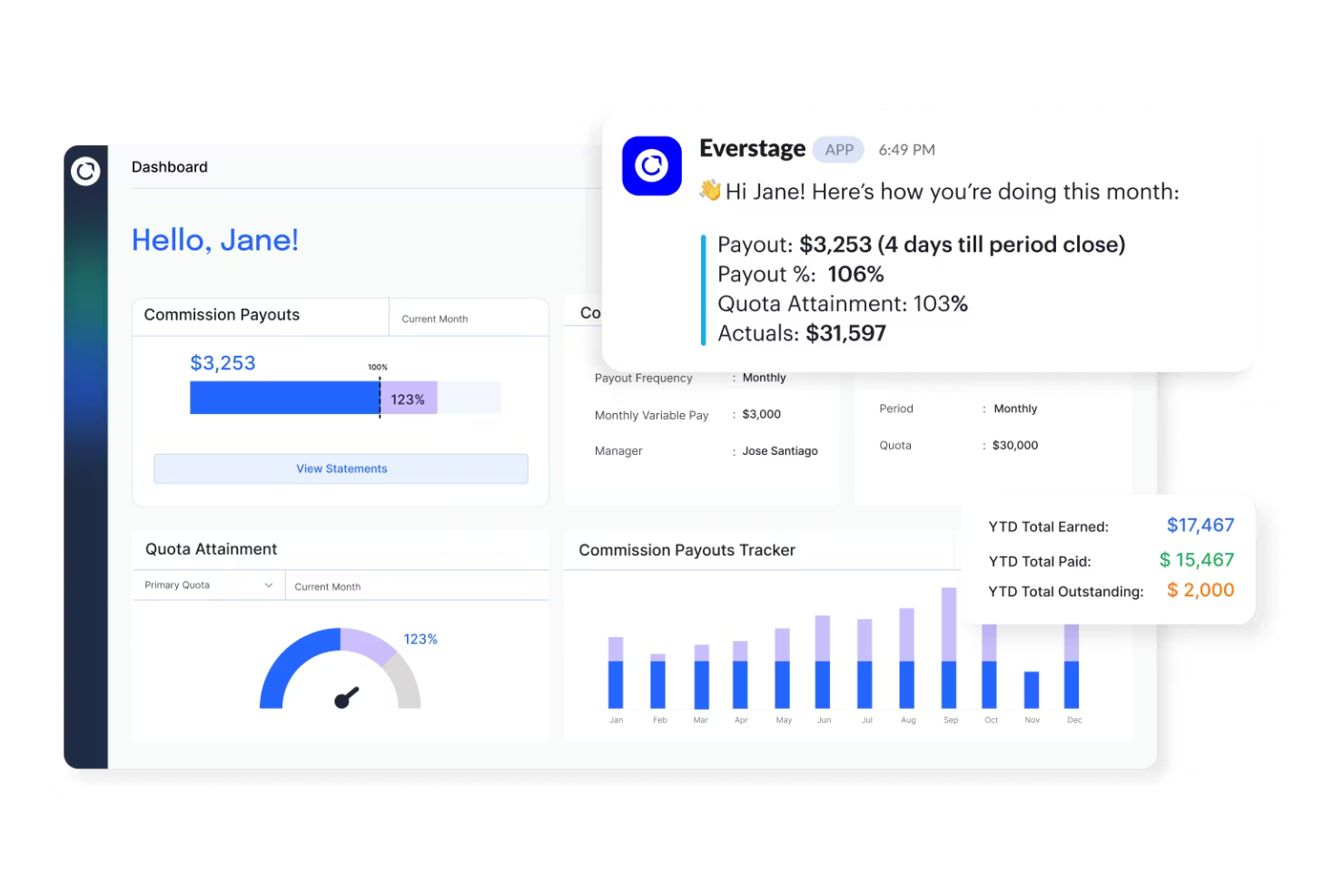
Everstage is a sales incentive compensation platform designed for small to medium-sized businesses looking to improve their commission tracking and management processes. It supports sales teams by automating compensation calculations and providing detailed performance insights.
Why I picked Everstage: This tool is ideal for SMBs transitioning to an end-to-end incentive compensation platform. It offers features that simplify the process of managing complex compensation plans. Everstage provides real-time tracking and analytics to help your team stay informed and motivated. Its user-friendly design provides a smooth transition for businesses upgrading from manual or basic systems.
Standout features and integrations:
Features include real-time analytics that offer detailed insights into sales performance. The platform supports customizable compensation plans, allowing you to tailor them to your business needs. It also provides automated workflows, reducing errors associated with manual calculations and data entry to save time.
Integrations include Salesforce, HubSpot, Slack, QuickBooks, Xero, Microsoft Dynamics, NetSuite, and more.
Pros and Cons
Pros:
- Automated workflows
- Customizable compensation plans
- Easy setup for SMBs
Cons:
- Delayed data syncing
- Mobile functionality gaps
Weitere Vertriebsprovisionssoftware für kleine Unternehmen
Hier finden Sie weitere Vertriebsprovisionssoftwares für kleine Unternehmen, die es nicht in meine Auswahl geschafft haben, aber dennoch einen Blick wert sind:


How I Evaluate Sales Commission Software for Small Business
I split every evaluation into two layers: baseline requirements a tool must meet—like automated calculations and rep statements—and differentiators like forecasting, integrations, and SMB pricing.
Core Functionality (Table Stakes For This List)
When I'm selecting tools for my list, I rank each one on a scale from 0 (does not offer the functionality) to 5 (excels in this area) for each core functionality listed below. Then, I calculate the tool's total score into a percentage. Each tool needs to achieve a minimum total score of 65% to be considered for inclusion.
- Automated Commission Calculations: I check whether a tool can pull closed-won deals and compute payouts on its own, handling things like ramped rates and multi-rep splits without manual formulas.
- Flexible Plan Design: Each tool should let you build tiered plans, accelerators, SPIFFs, and split credits through a no-code builder rather than requiring a developer or support ticket.
- Rep-Facing Dashboards & Statements: Reps should be able to log in and see exactly how a specific deal contributed to their payout, with real-time quota attainment and earnings breakdowns.
- CRM & Payroll Integrations: I look for native connectors to the CRMs and payroll tools small teams actually use, like HubSpot, Salesforce, QuickBooks, and Gusto, plus API or Zapier access.
- Dispute & Approval Workflows: The platform should support in-app dispute submissions and multi-step payout approvals so finance and sales managers aren't chasing corrections over email.
- Audit Trail & ASC 606 Reporting: Every calculation change and approval action should be logged, and I evaluate whether the tool generates reports that support ASC 606 compliance out of the box.
Once I have a list of tools that meet this criteria, I consider what sets each platform apart.
Differentiating Factors (What Sets Vendors Apart)
Here's how I compare and contrast different vendors:
Standout Features
Commission forecasting is a big differentiator. I look for tools that let managers and reps model earnings against live pipeline data before a quarter closes. Clawback and draw handling also matters for small teams onboarding new reps with guaranteed minimums or recovering commissions on churned deals mid-cycle. Gamification features like leaderboards and contests can further separate one tool from another by giving sales leaders a built-in way to motivate reps beyond their payout statements.
Beyond Features
Pricing transparency is one of the first things I evaluate. Small teams need per-payee pricing that won't force them into enterprise tiers as they add a few reps each quarter. Implementation speed matters just as much—I look for platforms that offer plan templates and guided setup so a five-person sales team can go live in days, not months. I also consider scalability, specifically whether a tool can grow from a handful of reps to a mid-market operation without requiring a full replatforming.
So wählen Sie Vertriebsprovisionssoftware für kleine Unternehmen aus
Es ist leicht, sich in langen Funktionslisten und komplexen Preisstrukturen zu verlieren. Damit Sie bei der Bearbeitung Ihres individuellen Softwareauswahlprozesses den Überblick behalten, finden Sie hier eine Checkliste mit Faktoren, die Sie berücksichtigen sollten:
| Faktor | Was zu beachten ist |
|---|---|
| Skalierbarkeit | Kann die Software mit Ihrem Unternehmen wachsen? Bedenken Sie, ob sie bei wachsendem Bedarf mehr Benutzer, größere Datensätze oder zusätzliche Funktionen verarbeiten kann. |
| Integrationen | Lässt sie sich in Ihre bestehenden Systeme wie CRM-, Buchhaltungs- oder HR-Software integrieren? Prüfen Sie, ob native Integrationen vorhanden sind, um kostspielige und komplexe individuelle Lösungen zu vermeiden. |
| Anpassbarkeit | Können Sie die Software an Ihre spezifischen Provisionsstrukturen und Arbeitsabläufe anpassen? Vergewissern Sie sich, dass sie Flexibilität ermöglicht, ohne umfangreiche technische Kenntnisse vorauszusetzen. |
| Benutzerfreundlichkeit | Ist die Benutzeroberfläche intuitiv und für Ihr Team leicht zu bedienen? Bewerten Sie die Lernkurve und prüfen Sie, ob für den Einstieg umfangreiche Schulungen oder Unterstützung erforderlich sind. |
| Implementierung und Einarbeitung | Welche Ressourcen werden für den Einstieg benötigt? Berücksichtigen Sie den Zeitaufwand, die Schulungen und die Unterstützung, die zur Implementierung der Software und für einen reibungslosen Start Ihres Teams erforderlich sind. |
| Kosten | Passt die Preisgestaltung zu Ihrem Budget? Berücksichtigen Sie neben dem Grundpreis auch zusätzliche Kosten wie Einrichtungsgebühren, Support oder erforderliche Zusatzmodule. |
| Sicherheitsvorkehrungen | Wie schützt die Software Ihre Daten? Prüfen Sie die Einhaltung von Standards wie der DSGVO oder SOC 2 und vergewissern Sie sich, dass Sicherheitsmaßnahmen zum Schutz Ihrer Daten vorhanden sind. |
Was ist Provisionssoftware für kleine Unternehmen?
Provisionssoftware für kleine Unternehmen ist ein Tool, das den Prozess der Berechnung und Auszahlung von Verkaufsprovisionen automatisiert und verwaltet. Vertriebsleiter, Finanzteams und HR-Fachkräfte verwenden diese Tools typischerweise, um genaue und pünktliche Auszahlungen zu gewährleisten und so die Stimmung und Produktivität des Teams zu steigern.
Automatisierte Berechnungen, Echtzeit-Tracking und anpassbare Berichtsfunktionen helfen bei der Verwaltung komplexer Provisionsstrukturen und sorgen für Transparenz. Insgesamt vereinfachen diese Tools die Provisionsverwaltung, sparen Zeit und reduzieren Fehler.
Funktionen
Achten Sie bei der Auswahl von Provisionssoftware für kleine Unternehmen auf die folgenden wichtigen Funktionen:
- Automatisierte Berechnungen: Berechnet Provisionen automatisch anhand vordefinierter Regeln, reduziert manuelle Fehler und spart Zeit.
- Echtzeit-Tracking: Liefert aktuelle Einblicke in die Vertriebsleistung und Provisionserträge und hilft Teams, informiert und motiviert zu bleiben.
- Anpassbare Berichte: Ermöglicht Benutzern, auf spezifische Geschäftsanforderungen zugeschnittene Berichte zu erstellen, die Einblicke in Vertriebs- und Vergütungstrends bieten.
- Integrationsmöglichkeiten: Verbindet sich mit anderen Geschäftssystemen wie CRM- und Buchhaltungssoftware, um die Datenkonsistenz zu gewährleisten und Abläufe zu vereinfachen.
- Skalierbarkeit: Unterstützt das Wachstum, indem bei der Expansion eines Unternehmens mehr Benutzer und größere Datensätze verarbeitet werden können.
- Sicherheitsvorkehrungen: Schützt sensible Daten durch wirksame Sicherheitsmaßnahmen und die Einhaltung von Branchenstandards wie DSGVO und SOC 2.
- Benutzerfreundliche Oberfläche: Bietet ein intuitives Design, das die Navigation vereinfacht und die Lernkurve für neue Benutzer verkürzt.
- Automatisierung von Arbeitsabläufen: Beschleunigt Prozesse durch die Automatisierung wiederkehrender Aufgaben und schafft Zeit für strategischere Tätigkeiten.
- Unterstützung mehrerer Währungen: Verarbeitet Transaktionen in verschiedenen Währungen, was für Unternehmen mit Aktivitäten in mehreren Regionen nützlich ist.
- Szenariomodellierung: Ermöglicht Benutzern, potenzielle Ergebnisse zu prognostizieren und Vergütungsstrategien effektiv zu planen.
Vorteile
Die Einführung von Provisionssoftware bietet Ihrem Team und Ihrem kleinen Unternehmen mehrere Vorteile. Hier sind einige, auf die Sie sich freuen können:
- Genauigkeit: Automatisierte Berechnungen sorgen für präzise Provisionsauszahlungen und reduzieren manuelle Fehler.
- Effizienz: Die Automatisierung von Arbeitsabläufen spart Zeit, indem sie wiederkehrende Aufgaben übernimmt und Ihrem Team ermöglicht, sich auf strategische Arbeit zu konzentrieren.
- Motivation: Echtzeit-Tracking hält Ihr Team über seine Leistung auf dem Laufenden und steigert Stimmung und Produktivität.
- Transparenz: Anpassbare Berichte bieten klare Einblicke in Provisionsstrukturen und Erträge und fördern Vertrauen und Verständnis.
- Skalierbarkeit: Die Möglichkeit, mit Ihrem Unternehmen zu wachsen und bei Bedarf mehr Benutzer und größere Datensätze zu unterstützen.
- Sicherheit: Sicherheitsmaßnahmen nach Branchenstandard und die Einhaltung von Vorschriften schützen sensible Finanz- und personenbezogene Daten.
- Flexibilität: Anpassbare Funktionen und Integrationsmöglichkeiten ermöglichen es der Software, sich an Ihre spezifischen Geschäftsanforderungen anzupassen.
Kosten und Preise
Die Auswahl einer Software für Verkaufsprovisionen für kleine Unternehmen erfordert ein Verständnis der verschiedenen verfügbaren Preismodelle und Tarife. Die Kosten variieren je nach Funktionen, Teamgröße, Erweiterungen und weiteren Faktoren. Die folgende Tabelle fasst gängige Tarife, ihre Durchschnittspreise und typische enthaltene Funktionen von Lösungen für Software für Verkaufsprovisionen für kleine Unternehmen zusammen:
Vergleichstabelle der Tarife für Software für Verkaufsprovisionen für kleine Unternehmen
| Tarifart | Durchschnittspreis | Übliche Funktionen |
|---|---|---|
| Kostenloser Tarif | $0 | Grundlegende Provisionsverfolgung, eingeschränkte Berichte und wichtige Integrationen. |
| Persönlicher Tarif | $5-$25/Nutzer/Monat | Echtzeitverfolgung, anpassbare Übersichten und E-Mail-Support. |
| Geschäftstarif | $30-$60/Nutzer/Monat | Erweiterte Berichte, Arbeitsablaufautomatisierung und priorisierter Kundensupport. |
| Unternehmenstarif | $70-$100/Nutzer/Monat | Umfassende Anpassungsmöglichkeiten, persönlicher Kundenbetreuer und Unterstützung mehrerer Währungen. |
Häufig gestellte Fragen zu Software für Verkaufsprovisionen für kleine Unternehmen
Hier finden Sie Antworten auf häufige Fragen zu Software für Verkaufsprovisionen für kleine Unternehmen:
Kann sich Software für Verkaufsprovisionen für kleine Unternehmen an einzigartige Provisionspläne anpassen, die sich im Laufe des Jahres ändern?
Kleine Teams haben häufig sich weiterentwickelnde Ziele, saisonale Zielvorgaben und Quoten oder Anreizpläne. Die meisten Tools ermöglichen Anpassungen, ohne dass die gesamte Struktur neu erstellt werden muss. In der Regel können Sie Sätze, Stufen oder Regeln nach Bedarf aktualisieren. Entscheidend ist die Wahl eines Systems, das Sie nicht an eine einzige starre Konfiguration bindet.
Kann Software für Verkaufsprovisionen in meine bestehenden Systeme integriert werden?
Ja, die meisten Softwares für Verkaufsprovisionen bieten Integrationen mit gängigen Systemen wie CRM- oder Buchhaltungssystemen. Überprüfen Sie die Integrationsmöglichkeiten der Software auf der Website des Anbieters. Die Kompatibilität mit Ihren bestehenden Tools verbessert die Konsistenz der Verkaufsdaten und vereinfacht Ihren Arbeitsablauf, wodurch die Software für Ihr Unternehmen wertvoller wird.
Wie sicher ist Software für Verkaufsprovisionen?
Softwareanbieter setzen in der Regel umfassende Sicherheitsmaßnahmen ein, um Ihre Daten zu schützen. Achten Sie auf die Einhaltung von Standards wie beispielsweise GDPR oder SOC 2 und erkundigen Sie sich nach den Verschlüsselungsmethoden. Wählen Sie immer einen Anbieter mit einer klaren Sicherheitsrichtlinie und ziehen Sie die Durchführung eines Sicherheitsaudits in Betracht, wenn Sie Bedenken hinsichtlich des Datenschutzes haben.
Ist der Wechsel von meinem aktuellen System zu einer neuen Software schwierig?
Ein Wechsel kann herausfordernd sein, aber viele Anbieter bieten Unterstützung, um den Übergang zu erleichtern. Achten Sie auf Software mit umfassenden Ressourcen für die Einführung, wie Schulungsvideos, Produkttouren und Kundensupportteams. Eine sorgfältige Planung Ihrer Migration und die Nutzung der verfügbaren Ressourcen können Unterbrechungen minimieren und Ihrem Team helfen, sich schnell anzupassen.