

How to Use CRM Software: 7 Essential Steps for Success and Growth

Learning customer relationship management (CRM) software is one of those things that looks straightforward until you're knee-deep in a messy data migration or wondering why your sales team stopped logging customer interactions after week two. Getting real value from a CRM takes more than just turning it on.
This guide walks you through every step—from setting goals and configuring your system to training your team and optimizing performance over time. Whether you're implementing a CRM for the first time or trying to fix an adoption problem, you'll leave with a clear, practical path forward.
Selecting the Best CRM Software
Keep these criteria in mind as you evaluate your customer relationship management software options, to ensure you pick the right CRM for your specific needs:

- Contact and pipeline management: Look for a CRM platform that lets you customize deal stages, contact fields, and pipeline views to match how your sales process actually works—not a generic template.
- Native integration depth: Check whether the CRM solution connects directly to your core business tools, like email, project management tools, and marketing automation software, rather than relying on third-party connectors that add cost and complexity.
- Automation capabilities: Prioritize platforms that let you trigger actions—like task creation, email sequences, or deal stage changes—based on customer behavior or data conditions without requiring developer support.
- Reporting and forecasting tools: Your CRM should surface pipeline health, deal velocity, and revenue forecasts in a way that's usable for both reps and leadership without heavy manual exports.
- Role-based permissions and access controls: Make sure the platform lets you restrict data access and feature visibility by team, role, or territory to protect sensitive customer data and keep each user's view relevant.
Step-by-Step Guide to Using CRM Software
Getting real value from a CRM system comes down to setting it up intentionally, training your team, and regularly tuning how you use it. Here’s how I make sure every CRM strategy actually delivers:
1. Set Clear Goals and Define Success Metrics
Before you touch a single CRM setting, decide what you actually want the system to do for you. In my experience, teams that skip this step end up with a tool that's technically set up but strategically useless. Are you trying to shorten your sales cycle? Reduce churn? Improve lead management? Pick two or three measurable outcomes—like a 20% improvement in pipeline visibility or a 15% reduction in deal close time—and build everything else around them.
Use this table to separate the goal-setting approaches that work from the ones that waste your time:
| Do This | Not This |
|---|---|
| Tie CRM goals to revenue outcomes (e.g., increase win rate by 10%) | Set vague goals like "use the CRM more" |
| Assign a metric and owner to each goal | Leave goals undefined across the whole team |
| Use your CRM's built-in reporting to track baseline numbers first | Set targets before you have benchmark data |
| Revisit goals quarterly as pipeline and team needs shift | Treat your initial goals as permanent |
| Align CRM goals across your GTM teams (sales, marketing, and customer success) | Let each team define success independently |
2. Customize and Configure the System to Your Workflow
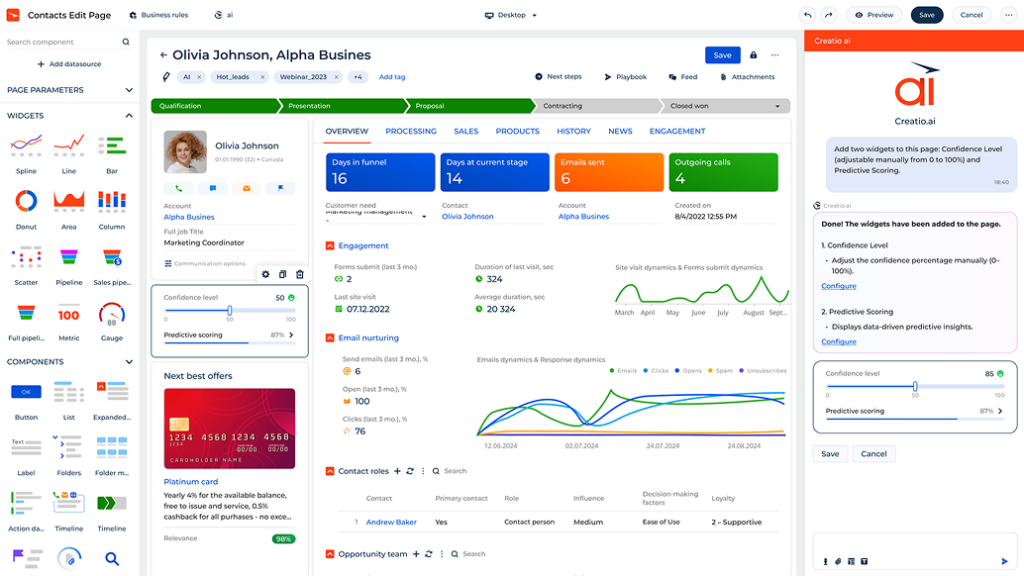
Out of the box, most CRMs are built around a generic sales process that probably doesn't match your actual customer journey. I always start by mapping the team's actual workflow before touching any settings—then configure deal stages, custom fields, and contact properties to reflect that reality. If your team sells through multiple channels, for example, you'll want separate pipelines for each. Getting this right early prevents a lot of painful retrofitting later.
Here's the configuration checklist I work through when setting up a new CRM instance to match my business processes:
- Deal stages: Map your pipeline stages to the actual steps your team takes—not the default labels. In HubSpot CRM, for example, renaming stages like "Appointment Scheduled" to something like "Demo Booked" makes adoption much easier.
- Custom fields: Add fields that capture customer data your team actually uses, like contract value, product line, or customer segment. Delete or hide anything irrelevant to reduce noise.
- Contact and company properties: Set required fields at key pipeline stages so reps can't advance a deal without logging the information you need for forecasting.
- Multiple pipelines: If your team handles different products, regions, or sales motions, build a separate pipeline for each. Salesforce and HubSpot both support this well.
- User roles and views: Configure each user's default view to surface only the records and fields relevant to their role—what salespeople need to see daily is very different from what a manager needs.
- Notification settings: Turn off default notifications that don't drive action and set up targeted alerts—like when a deal has been stagnant for more than seven days.
3. Migrate and Clean Existing Customer Data
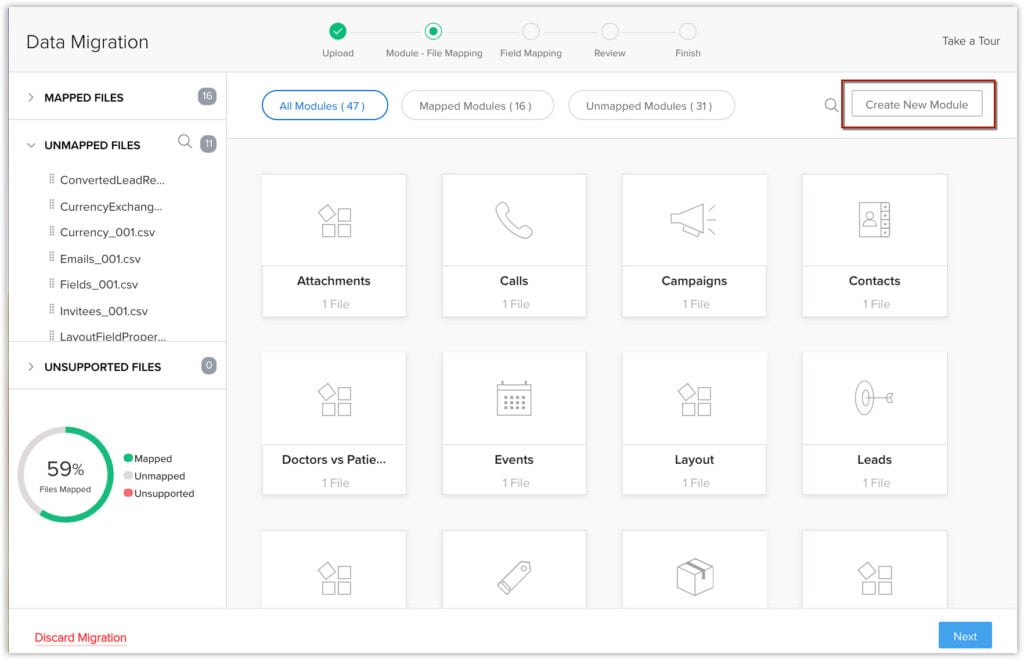
Bad data in a new CRM tool is one of the fastest ways to kill adoption. Before importing anything, I audit the source data—usually a spreadsheet or legacy CRM export—and remove duplicates, standardize formatting, and fill in critical missing fields. If you're migrating from Salesforce to HubSpot, for example, field mapping alone can take days if your data isn't clean first. Treat the migration as an opportunity to start with a trustworthy foundation, not just a copy-paste job.
Follow these steps to move your data without dragging old problems into your new system:
- Audit your source data: Export everything from your current system and review it for duplicates, missing values, and inconsistent formatting before you do anything else.
- Standardize key fields: Normalize data like phone numbers, company names, and job titles to a consistent format—this prevents duplicate records from slipping through during import.
- Define your field mapping: Match every field in your source data to the correct field in your new CRM. In HubSpot, the import tool walks you through this, but it's worth building a mapping spreadsheet first.
- Prioritize active records: Don't migrate everything. Focus on contacts and deals that are active or closed within the last 12-24 months—older records add clutter without adding value.
- Run a test import: Import a small sample batch first and verify that records land correctly before committing to a full migration.
- Set up deduplication rules: Most CRMs, including Salesforce and Zoho CRM, have native deduplication tools—configure these before your full import so the system catches conflicts automatically.
- Validate post-import: After migrating, spot-check a random sample of records against your source data to confirm no customer information was lost or misaligned during the transfer.
4. Integrate With Existing Tools and Platforms
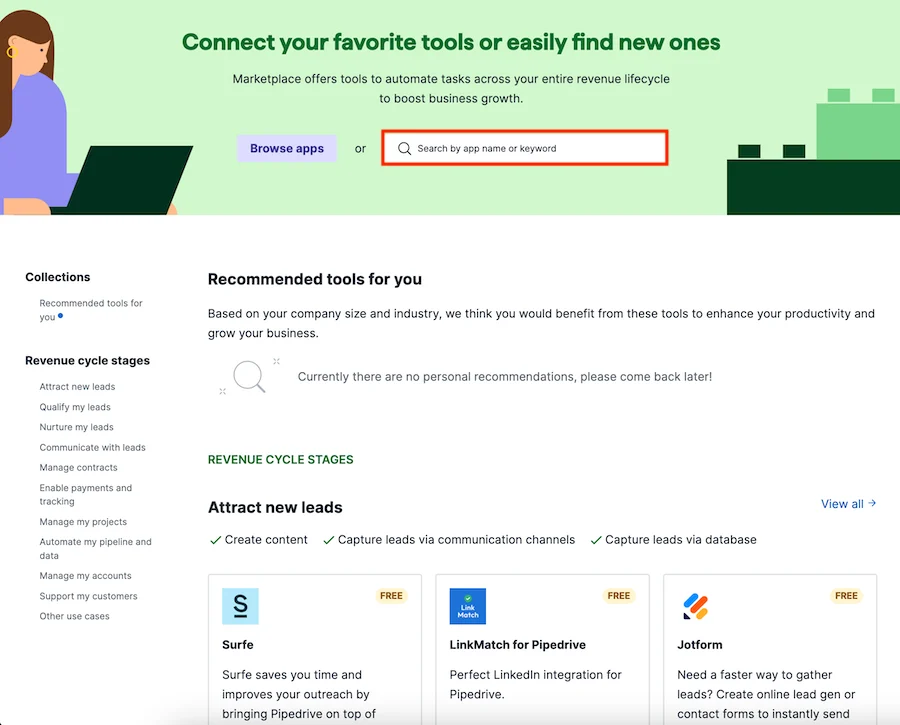
A CRM sitting in isolation is just a contact database. The real value comes when it's connected to the other SaaS tools your team already uses daily. I prioritize integrations that eliminate manual data entry first—like syncing your email, calendar, and marketing automation platform. Connecting HubSpot to Google Workspace, for example, means every email and meeting is logged automatically. That gives you a complete activity history without asking reps to do extra work.
These are the integrations I prioritize first, and why each one matters:
- Email and calendar sync: Connect your CRM to Gmail or Outlook so every sent email and scheduled meeting logs automatically. This is the single highest-impact integration for keeping activity data accurate.
- Marketing automation: Link your CRM to platforms like Marketo or HubSpot Marketing Hub so leads flow directly into the pipeline with engagement history attached—no manual handoffs between marketing and sales.
- Customer success tools: Integrate with platforms like Gainsight or Totango to surface health scores and renewal data inside the CRM, giving your account management team full context without switching tools.
- Communication platforms: Connect Slack or Microsoft Teams so reps get deal alerts and task notifications where they're already working, rather than having to check the CRM separately.
- ERP and billing systems: Sync with tools like NetSuite or QuickBooks to pull contract values and payment status into CRM records, so your sales and finance teams are always working from the same numbers.
- Data enrichment tools: Use enrichment platforms like Clearbit or ZoomInfo to automatically fill in missing contact and company data, keeping records complete without manual research.
- Native marketplace first: Before building any custom integration, check your CRM's native app marketplace. Salesforce AppExchange and HubSpot App Marketplace both have hundreds of pre-built connectors that are faster and easier to maintain.
5. Train Your Team With Role-Based Onboarding
CRM implementation without proper training is a recipe for poor adoption. What works best is tailoring onboarding to how each role actually uses the system, and making sure everyone knows how to use the CRM features that are most useful to them. I've seen teams where everyone gets the same training session and half the room checks out immediately—because none of it applies to their daily work. Role-specific training and tutorials drive faster adoption and fewer bad habits.
Use this breakdown to structure onboarding around what each role actually needs:
| Role | Core CRM Tasks to Train On | Key Reports or Views |
|---|---|---|
| Salespeople | Logging calls and emails, updating deal stages, creating contacts | Personal pipeline view, activity log, task queue |
| Sales managers | Reviewing pipeline health, forecasting, coaching on stuck deals | Team pipeline report, forecast summary, deal velocity |
| Marketing team | Managing lead sources, reviewing contact lifecycle stages, syncing marketing campaigns | Lead source report, campaign attribution, contact conversion rates |
| Customer support | Managing support tickets, logging customer interactions, updating case statuses, escalating issues | Open cases queue, resolution time report, customer interaction history |
| Customer success | Updating account health, logging renewal conversations, tracking open issues | Account health dashboard, renewal pipeline, escalation log |
| RevOps/admin | Managing integrations, maintaining data quality, configuring workflows | Data hygiene report, workflow activity log, system audit trail |
6. Set Up Automation for Repetitive Tasks
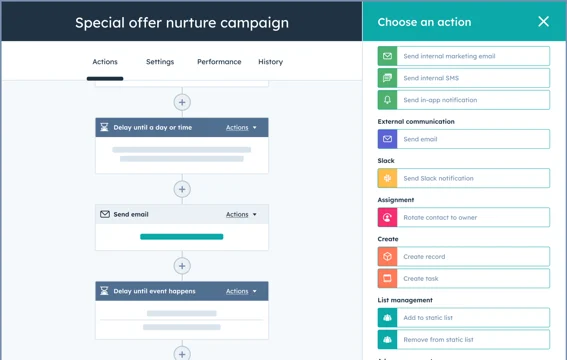
Automation is where the benefits of CRM software start to reveal themselves, and your team starts saving real time. The goal isn't to automate everything at once—it's to identify the manual steps that happen the same way every time and remove the human from that loop. I start with task creation and lead routing, since those tend to have the highest volume. In Salesforce, for example, you can auto-assign leads based on territory rules the moment a new record is created, with no rep intervention needed.
These are the automations I set up first in any new CRM instance:
- Lead assignment: Route new leads to the right rep automatically based on territory, company size, or industry. This is usually the first automation I build because manual assignment creates delays and inconsistency.
- Follow-up task creation: Trigger a follow-up task automatically when a deal moves to a new stage. In HubSpot, you can configure this in the workflow builder so reps always have a next step queued without thinking about it.
- Deal stage progression alerts: Notify a manager automatically when a deal has been sitting in the same stage for more than a set number of days. This surfaces stalled deals before they fall off the radar entirely.
- Contact lifecycle updates: Update a contact's lifecycle stage automatically when they take a qualifying action—like filling out a demo request form or reaching a lead score threshold in Marketo.
- Renewal reminders: Set automated tasks or alerts to fire 90, 60, and 30 days before a contract renewal date. Customer success teams often manage this manually, which leads to missed renewals.
- Data enrichment triggers: Use tools like Clearbit to automatically enrich a new contact record the moment it's created, so reps aren't researching basic company information by hand.
- Don't over-automate early: I've seen teams build dozens of workflows before they understand how reps actually use the CRM. Start with three to five high-impact automations, validate they're working, then expand from there.
7. Monitor Performance Dashboards and Optimize Regularly
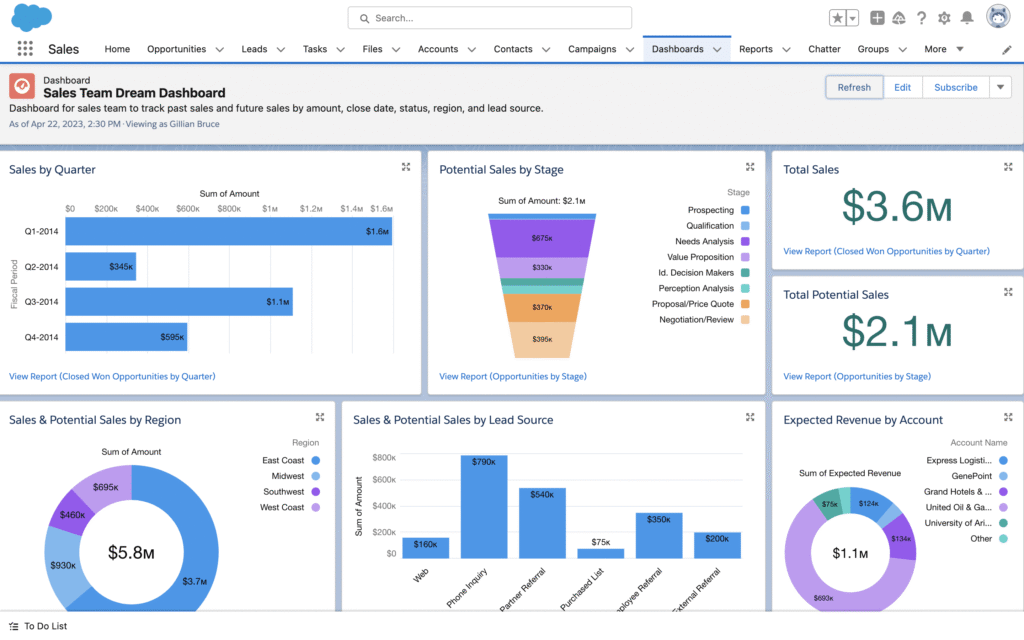
A CRM configured once and never revisited drifts out of alignment with how your business actually operates. I treat dashboards as a feedback loop—they surface where the process is breaking down, not just how the numbers look. If your win rate drops in a specific stage, that's a signal to investigate, not just note. Building role-specific dashboards means every team sees the metrics that directly reflect their performance and priorities.
Keep these best practices in mind when building and maintaining your CRM dashboards:
- Start with a small set of core metrics: Don't build a dashboard with 20 widgets on day one. I start with five to seven metrics that directly reflect pipeline health—like open deals by stage, average deal size, and days in stage.
- Build role-specific views: A rep's dashboard should show their personal pipeline and activity metrics, a manager's should show team-wide performance, and your RevOps lead should have an operational CRM overview.
- Review dashboards on a set cadence: Schedule a weekly pipeline review and a monthly performance review using your CRM data. Ad hoc reviews are easy to skip—putting them on the calendar makes them a habit.
- Use stage conversion rates to find drop-off points: If deals are consistently stalling between two specific stages, that's a process problem worth diagnosing. I look at conversion rates by stage every month as a baseline check.
- Audit your dashboards quarterly: As your business evolves, some metrics become irrelevant and new ones matter more. I set a quarterly reminder to review every dashboard and remove anything the team has stopped acting on.
- Connect CRM data to your BI tool: For deeper analysis, pipe CRM data into a tool like Tableau or Looker. Native CRM reporting works well for operational views, but cross-functional revenue analysis usually needs a dedicated BI layer.
- Don't report on data you can't trust: If your CRM has data quality issues, fix them before building dashboards. Reporting on incomplete or inconsistent data leads to bad decisions faster than having no dashboard at all.
Common Challenges of Using CRM Software (and How to Address Them)
Even well-configured CRMs run into predictable problems—most of which come down to adoption, data quality, or misalignment between how the system is set up and how teams actually work:
| Problem | Solution |
|---|---|
| Reps not logging activity | Automate activity capture through email and calendar sync so logging happens in the background, removing the manual step entirely. |
| Duplicate contact records | Run a deduplication tool like Dedupely or HubSpot's built-in merge tool on a monthly cadence, and set validation rules to flag duplicates at the point of entry. |
| Pipeline stages out of sync with sales process | Audit your deal stages against your actual sales motion and remove or rename any stage that doesn't reflect a real buyer action or decision point. |
| Reports leadership won't trust | Trace the data quality issue causing the inaccuracy, fix it at the source, and document the logic behind each report so stakeholders understand exactly what they're looking at. |
| CRM adoption dropping after launch | Identify the two or three workflows reps find most frustrating and redesign them—adoption problems are almost always usability problems in disguise. |
| Integrations breaking silently | Set up automated alerts in your integration monitoring tool, or use a platform like Zapier or Make with built-in error notifications so broken syncs surface immediately. |
| Field clutter slowing data entry | Audit every field on your core objects and archive anything that hasn't been populated in the last 90 days—fewer fields means faster entry and cleaner data. |
Advanced Uses and Maximizing ROI From CRM Software
Once your foundational CRM setup is solid, the real leverage comes from using the system to drive strategic decisions—not just track activity:
- Revenue forecasting with AI-assisted scoring: Tools like Salesforce Einstein and HubSpot's AI forecasting layer analyze historical deal data to predict close likelihood. I've found CRM AI features to be most valuable during quarterly planning, where gut-feel forecasts get replaced with probability-weighted pipeline numbers leadership can actually rely on.
- Multi-touch attribution modeling: Connect your CRM to your marketing automation platform to track every touchpoint a contact had before becoming a closed deal. This tells you which campaigns are actually driving revenue, not just generating leads, so you can shift budget accordingly.
- Customer health scoring for proactive retention: Build a health score model inside your CRM or customer success platform by combining product usage data, support ticket volume, and purchase history. When a score drops below a threshold, trigger an automatic alert to the account manager before the customer reaches out to cancel.
- Cohort analysis for revenue trends: Segment closed-won deals by quarter, industry, or deal size and track how those cohorts perform over time. I use this to identify which customer segments have the highest lifetime value and feed that back into the ICP definition.
- Territory and capacity planning: Use CRM pipeline data to model how many deals each rep can realistically carry at full capacity, then use that to inform hiring decisions and territory design before you hit a bottleneck.
- Cross-sell and upsell trigger automation: Set up workflows that flag expansion opportunities based on product usage thresholds or contract milestones. In Gainsight, for example, you can trigger a customer success playbook automatically when a customer hits a usage ceiling on their current plan.
Ready to Take the Next Step With CRM?
Get practical insights on budgeting and comparing options—check out this in-depth guide to CRM pricing, models, and ROI factors to make the smartest investment for your revenue team.

