

Bu kadar çok farklı teklif yönetimi yazılımı varken hangisinin sizin için doğru olduğunu belirlemek zordur. İş teklifleri oluşturma ve gönderme sürecini otomatikleştirmek ve yönetmek istediğinizi biliyorsunuz, ancak hangi aracın en iyi olduğunu belirlemeniz gerekiyor. Size yardımcı olacağım! Bu yazıda, farklı ekipler ve hesaplarla düzinelerce farklı teklif yönetimi aracını kullanırken edindiğim kişisel deneyimleri paylaşarak en iyi teklif yönetimi yazılımı seçimlerimi sunacak ve seçiminizi kolaylaştıracağım.
Why Trust Our Software Recommendations
6,700+
Reviews
20
Industry experts
16+
Evaluation factors
14
Years
Our reviews reflect our independent judgment—not a sales pitch. Learn how we stay transparent.
For this guide, we evaluated tools using hands-on testing and independent research, scoring tools using our selection criteria.
Our reviews reflect our human editorial judgment, not a sales pitch.
Teklif Yönetimi Yazılımları Karşılaştırma Tablosu
Bu karşılaştırma tablosu, en iyi teklif yönetimi yazılımı seçimlerimin fiyatlandırma ayrıntılarını özetlemektedir:
Sorted by: Default
| Tool | Starting Price | Website | |
|---|---|---|---|
Best for AI-driven proposal drafting | 5.0 out of 5 | Pricing upon request Free demo available | Website |
Best for proposal progress tracking | 4.6 out of 5 | Pricing upon request Free demo available | Website |
Best for CPQ & CRM integration | 4.8 out of 5 | $39/user/month Free demo available | Website |
Best for AI-driven RFP response automation | 5.0 out of 5 | $899/month 30-day money-back guarantee | Website |
Best for dynamic pricing and bundles | 4.7 out of 5 | Pricing upon request Free demo available | Website |
Best for customizable proposal templates | 4.6 out of 5 | $8/month Free trial available | Website |
Best for turning proposals into signable order forms | 4.9 out of 5 | $350/month Free plan + free demo available | Website |
Best for collaboration | 4.7 out of 5 | $19/user/month 14-day free trial | Website |
Best for proposal design | 4.6 out of 5 | $19/user/month 14-day free trial + free demo available | Website |
Best for web-based proposals | 4.5 out of 5 | $49/user/month 14-day free trial + free demo available | Website |


En İyi Teklif Yönetimi Yazılımları İncelemeleri
Daha fazla anlaşma kapatmanıza yardımcı olacak mevcut teklif yönetimi yazılımlarının kısa özetlerini burada bulabilirsiniz.
 Best for AI-driven proposal drafting
- Free demo available
- Pricing upon request
Visit WebsiteCustomer Rating:5/5
Inventive AI offers an intuitive interface for generating RFP responses efficiently. Inventive AI is an AI-powered proposal management platform that helps businesses create accurate, compliant, and compelling responses to Requests for Proposals (RFPs), Requests for Information (RFIs), and security questionnaires. It leverages automation and intelligent knowledge management to speed up proposal creation and improve win rates.
Why I Picked Inventive AI: I picked Inventive AI because of its ability to generate automated, compliant first drafts of proposals, saving significant time while allowing teams to focus on crafting persuasive and competitive responses. Its AI agents offer tailored guidance to help clarify requirements, identify competitive advantages, and refine proposal strategy.
I also found its centralized knowledge hub particularly useful. By storing approved responses and historical RFP data in one place, it ensures everyone works with the latest and most accurate information. The built-in collaboration tools make it easier to assign tasks, manage permissions, and keep the entire proposal process aligned.
Inventive AI Standout Features and Integrations
Features include an AI content manager that flags outdated or conflicting content to ensure proposals remain accurate and relevant, an AI agents hub that provides competitive insights and brainstorming assistance, and compliance tracking tools that show the origin of generated responses and identify inconsistencies for improved transparency and accuracy.
Integrations include: Jira, Notion, Confluence, Google Drive, Slack, Salesforce, HubSpot, SharePoint, Microsoft Teams, Trello, Asana, and Monday.com.
Pros and Cons
Pros:
- AI-powered suggestions improve draft quality
- Centralizes RFP knowledge for better team collaboration
- Automates response generation, improving proposal turnaround times
Cons:
- No free trial; demo-only access
- AI effectiveness depends on data quality
Learn more about Inventive AI: Best for proposal progress tracking
- Free demo available
- Pricing upon request
Visit WebsiteCustomer Rating:4.6/5
Add company details, such as logos, colors, and digital assets, to keep proposals on brand. HoneyBook helps businesses understand the status of every proposal they send so they can effectively follow up with potential customers. It enables revenue teams to know every proposal stage so they can confidently move to the next stage of the sales cycle or move on to the next deal.
Why I picked HoneyBook: The platform provides everything you need to create the right proposals and send them to potential customers. But the reason I added HoneyBook to this list is its ability to track your proposals’ progress until they’re accepted or rejected. You can track potential customers throughout your sales cycle and see where they are in your proposal pipeline.
HoneyBook Standout Features and Integrations
Features include ways to collect payments from customers after agreeing to your proposals. HoneyBook can handle payments, so you don’t have to hassle anyone for money. You can simply use the platform’s integrated payment feature and immediately start collecting payments.
Integrations include connections to over 60 third-party platforms to increase productivity, such as Basecamp, ClickUp, Freshbooks, Google Analytics, HubSpot CRM, Mailchimp, Salesforce, Stripe, Twilio, Wrike, and other software options. If you have a paid Zapier account, you can create custom integrations with your current systems.
Pros and Cons
Pros:
- Very low pricing.
- Easy to use.
- Simple navigation.
Cons:
- Not many customization capabilities.
- Only provides simple automation.
Learn more about Loopio: Best for CPQ & CRM integration
- Free demo available
- From $39/user/month
Visit WebsiteCustomer Rating:4.8/5
With iQuoteXpress, users can track the status of proposals, measure sales performance, and generate reports to analyze business activities. iQuoteXpress is a sales proposal automation solution designed to assist businesses in managing their quote and proposal processes.
Why I picked iQuoteXpress: This Configure, Price, Quote (CPQ) tool allows users to configure products or services, set pricing, and generate quotes. This feature supports complex pricing structures and discounting rules, enabling sales teams to create accurate and consistent quotes and proposals.
Moreover, iQuoteXpress can also integrate with Customer Relationship Management (CRM) systems, allowing for the synchronization of data between the CPQ tool and the CRM, facilitating the management of customer interactions and data.
iQuoteXpress Standout Features and Integrations
Features include proposal templates, product and pricing configuration, contact management, proposal tracking, and reporting, and integrations with eCommerce platforms.
Integrations include DocuSign, HubSpot CRM, Zoho CRM, QuickBooks Online Advanced, Zoho Books, and Salesforce Sales Cloud.
Pros and Cons
Pros:
- Allows full customization of proposal documents
- Outstanding customer service
- User-friendly interface
Cons:
- Steep initial learning curve
- Limitations in creating custom configuration tools
Learn more about iQuoteXpress: Best for AI-driven RFP response automation
- 30-day money-back guarantee
- From $899/month (billed annually)
Visit WebsiteCustomer Rating:5/5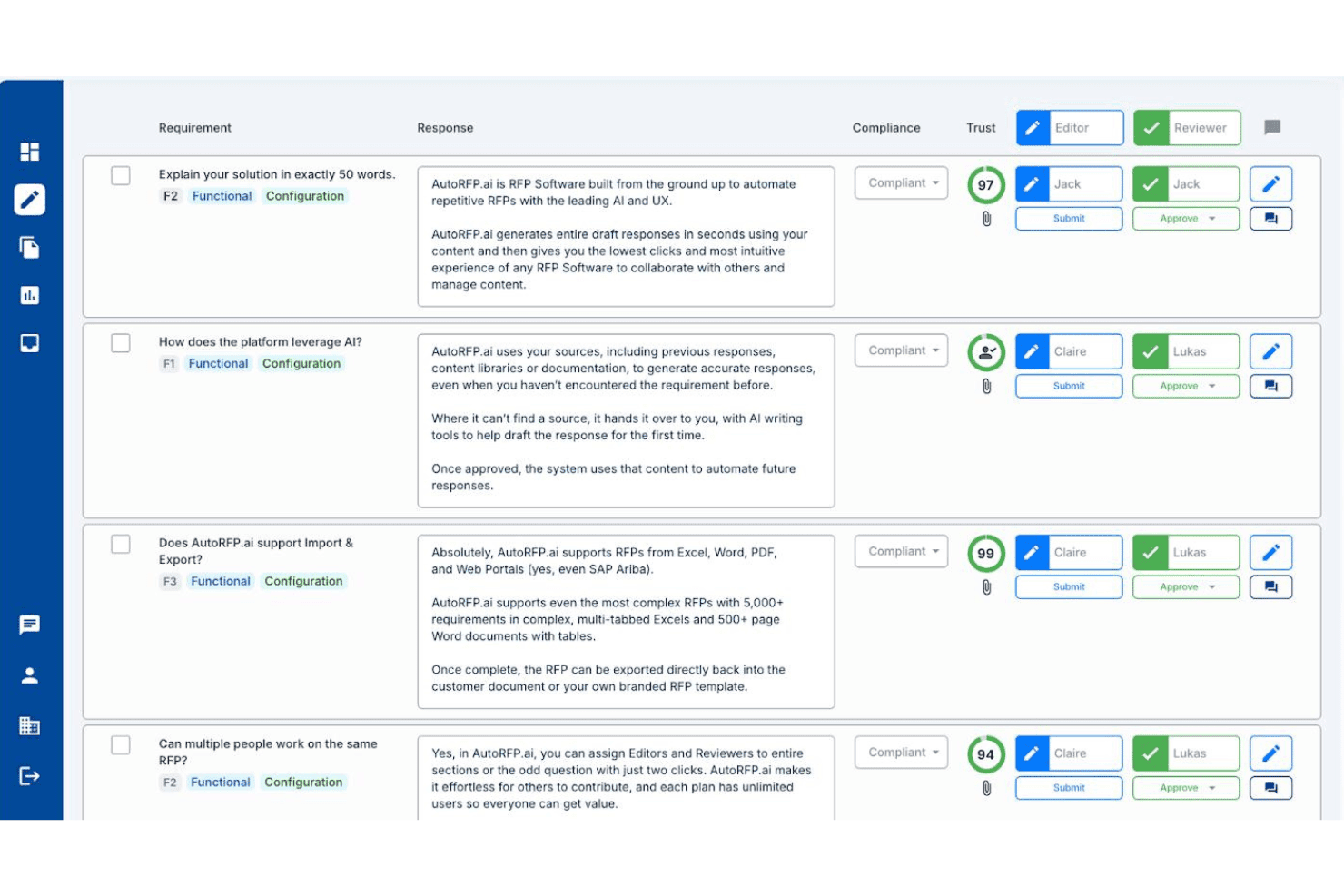
AutoRFP.ai lets teams assign editors and reviewers to RFP responses with AI trust scores. AutoRFP.ai is an AI-native RFP response platform that automates the drafting, review, and submission of RFPs, DDQs, security questionnaires, and tenders using a self-building knowledge base, multi-step approval workflows, and deep CRM and content source integrations.
Who Is AutoRFP.ai Best For?
AutoRFP.ai is built for bid managers and proposal teams handling high volumes of inbound RFPs, DDQs, and security questionnaires who need to cut response time without hiring more staff.
Why I Picked AutoRFP.ai
AutoRFP.ai earns its spot on my shortlist because it's built specifically for AI-driven RFP response automation in a way that generic proposal tools simply aren't. I'm particularly drawn to its self-building knowledge base, which ingests past responses and auto-updates without anyone manually curating a content library. The Trust Scores on every AI-generated draft are what really set it apart: each answer shows a confidence percentage and an exact source citation, so reviewers know precisely what they're approving rather than guessing at AI output.
AutoRFP.ai Key Features
- Self-building knowledge base: Automatically ingests and tags approved responses from 15+ connected sources, including SharePoint, Confluence, and Google Drive, without manual curation.
- Multi-step approval workflows: Routes responses through sequential reviewer and editor assignments by section or question, with a full audit trail on every action.
- Browser extension for procurement portals: Lets users respond directly inside SAP Ariba, Workday Strategic Sourcing, Coupa, and Jaggaer without switching between platforms.
- Go/no-go analysis: Scans incoming RFPs and generates a structured bid/no-bid recommendation automatically before your team commits any time to a response.
AutoRFP.ai Integrations
AutoRFP.ai lists 18+ integrations, including native Salesforce sync and connections to HubSpot, Microsoft Dynamics 365, DealCloud, SharePoint, Confluence, Google Drive, Highspot, Seismic, Slack, and Microsoft Teams. It also offers an open API and webhooks for custom integrations.
Pros and Cons
Pros:
- Unlimited team collaboration on every project
- Produces high-confidence draft responses quickly
- AI auto-builds and updates content library
Cons:
- Not designed for outbound sales proposals
- No built-in pricing or quoting engine
Learn more about AutoRFP.ai: Best for dynamic pricing and bundles
- Free demo available
- Pricing upon request
Visit WebsiteCustomer Rating:4.7/5
DealHub AI lets you manage, track, and update sales proposals from a centralized dashboard. DealHub AI is a cloud-based quote-to-revenue platform that helps sales teams manage the entire deal process—from proposal to signature—in one unified workspace.
Why I picked DealHub AI: It combines proposal generation, pricing logic, approvals, and contract workflows so teams can move faster and stay aligned. With built-in CPQ, reps can create accurate quotes using guided configuration, smart pricing rules, and dynamic bundles—no spreadsheets required. Adaptive pricing and usage-based models are supported out of the box, helping teams respond to change with confidence. Proposal content also stays consistent and compliant thanks to approval workflows and brand controls, making it easy for reps to deliver professional, tailored proposals at scale.
DealHub AI Standout Features and Integrations
Features include contract lifecycle management (CLM), covering everything from contract creation to negotiation and approval. Teams can collaborate in real time using the integrated Digital DealRoom, which centralizes buyer and internal communication, tracks engagement, and keeps deals on course.
Integrations include Salesforce, Microsoft Dynamics 365, HubSpot, Freshworks, DocuSign, Gong, and Slack.
Pros and Cons
Pros:
- Built-in CPQ features
- Accurate pricing through predefined rules
- Digital DealRoom enhances collaboration with customers
Cons:
- Learning curve for new users
- API integration is a paid add-on
Learn more about DealHub AI: Best for customizable proposal templates
- Free trial available
- From $8/month (billed annually)
Visit WebsiteCustomer Rating:4.6/5
SignNow provides an organized document management interface, allowing users to upload, sign, send, and track proposals and contracts efficiently. SignNow is an electronic signature solution that helps businesses sign, send, and manage documents securely on any device. It offers features like document templates, team collaboration, and mobile applications to enhance your document workflows.
Why I picked SignNow: You can create reusable templates for your most-used documents, ensuring consistency and saving time when preparing proposals. Additionally, SignNow allows you to add fillable fields to your documents, such as text boxes, checkboxes, and radio buttons, making it easy for recipients to complete and sign proposals accurately. Another valuable feature is SignNow's team collaboration capabilities. You can create teams within the platform to securely collaborate on documents and templates, ensuring that all team members are on the same page during the proposal creation process.
SignNow Standout Features and Integrations
Features include document editing, bulk sending, signing links, kiosk mode, in-person signing, document history tracking, role-based signing, conditional fields, data validation, attachment requests, custom branding, and audit trails.
Integrations include Microsoft 365, Google Workspace, Salesforce, NetSuite, SharePoint, Dynamics, Gmail, Excel, and Autodesk.
Pros and Cons
Pros:
- Unlimited users on all plans
- Good audit trail and document history features
- Mobile app available
Cons:
- Can be difficult to update documents once uploaded
- May not be ideal for large-scale operations
Learn more about SignNow: 7Best for turning proposals into signable order forms
Dock
- Free plan + free demo available
- From $350/month (billed annually)
Visit WebsiteCustomer Rating:4.9/5
Dock lets you create proposals and price quotes from standardized templates for a more consistent customer-facing experience. Dock is a platform designed to help sales teams improve their processes, from lead capture to onboarding and more. It offers a centralized space for collaboration and client-facing documents, like proposals, quotes, and contracts.
Why I picked Dock: Dock's proposal management system is easy to use with pre-built templates. These templates include everything from proposals and price quotes to order forms, contracts, and other important documents. The platform also helps standardize sales processes by allowing teams to easily turn proposals or quotes into signable order forms. Furthermore, Dock offers order form tracking features that provide insight into document statuses, whether they're viewed, signed, or still require approval.
Dock Standout Features and Integrations
Features include digital sales rooms, customizable client portals, buyer signals, engagement analytics, dynamic action plans for onboarding, custom branding, secure digital signatures, and numerous templates for different sales functions.
Integrations include HubSpot, Salesforce, Slack, Zoom, Airtable, Pandadoc, Typeform, and more.
Pros and Cons
Pros:
- Digital sales rooms with personalized client portals
- Document status visibility
- Many templates to help create consistent experiences
Cons:
- Order form features are an additional add-on
- HubSpot and Salesforce integration limited to higher-tier plans
Learn more about Dock:

Pre-designed templates include proposals, contracts, quotes, online brochures, and statements of work. Better Proposals helps revenue teams get paid faster and maintain a high-quality product through its collaboration capabilities.
Why I picked Better Proposals: Collaboration is essential when working with proposals, so I added Better Proposals to this article because of its teamwork capabilities. With Better Proposals, you can get the entire team on the same page thanks to its tools that simplify the proposal process. These tools include pipeline visibility that allows everyone to see what the rest of the team is working on at any moment and improve efficiency.
Better Proposals Standout Features and Integrations
Features include tools to help your teams convert more deals and increase the number of paying clients. For example, Better Proposals provides artificial intelligence and automatic recommendations to identify what’s working in your industry.
Integrations include native integrations, such as ActiveCampaign, Asana, Freshsales, HubSpot CRM, Insightly, PayPal, Pipedrive, Salesforce, Stripe, Zoho, and other software options. If you have a paid Zapier account, you can create custom integrations with thousands of apps to automate your processes.
Pros and Cons
Pros:
- Creates professional proposals.
- Excellent customer support.
- Simplifies sales processes.
Cons:
- Can’t print proposals.
- Has some bugs.
Learn more about Better Proposals: Best for proposal design
- 14-day free trial + free demo available
- From $19/user/month (billed annually)
Visit WebsiteCustomer Rating:4.6/5
Add different sections to proposals through the drag-and-drop interface. Proposify provides extensive proposal design capabilities that allow revenue teams to customize every part and element of a proposal. The vendor also offers design and training services to help companies create eye-catching designs.
Why I picked Proposify: The platform is a proposal creation software that will help you simplify and enhance the process. Proposify provides an editor that provides hands-on proposal creation capabilities without having you rely on word processing tools. It uses a drag-and-drop interface that allows you to add and edit multiple sections on your proposal.
Proposify Standout Features and Integrations
Features are available from Proposify that will help you throughout the proposal process, including analytics and metrics that provide insights into your documents’ performance that help you better understand your sales process. You can also use the data to optimize sales documents by enhancing future proposals based on formats and layouts that worked for you in the past.
Integrations include native connections to platforms such as Basecamp, Freshbooks, HubSpot, Intercom, Olark, Pipedrive, QuickBooks, Salesforce, Stripe, Zoho, and other software options. You can also use a paid Zapier account to create integrations to third-party applications such as ActiveCampaign, Asana, Copper, Highrise, Mailchimp, Microsoft Teams, monday.com, Salesflare, Slack, Zendesk Sell, and other software options.
Pros and Cons
Pros:
- Customizable templates.
- Provides instant proposal data.
- Clean-looking proposals.
Cons:
- Occasional loading errors.
- Not user-friendly.
Learn more about Proposify: 10Best for web-based proposals
Qwilr
- 14-day free trial + free demo available
- From $49/user/month
Visit WebsiteCustomer Rating:4.5/5
Create stunning documents from the template library without relying on a programmer. Qwilr modernizes proposal processes by helping teams create interactive, web-based proposals.
Why I picked Qwilr: I went in a different direction when adding Qwilr to this list because the platform doesn’t create amazing PDF proposals. What Qwilr does is design proposals as interactive, mobile-responsive web pages. You can use various elements such as interactive pricing tables, multimedia files, brand colors, and other creative sections that act as one interactive web-based proposal.
Qwilr Standout Features and Integrations
Features include one-click automation that allows you to simplify proposal generation via templates. This will help your teams increase sales process speeds and move deals out the door without the need for creating personalized proposals by hand.
Integrations are available from Qwilr, such as HubSpot, Pipedrive, QuickBooks, Salesforce, Slack, Stripe, and Zoho CRM. You can also use a paid Zapier account to create custom integrations.
Pros and Cons
Pros:
- Easy to use.
- Allows users to easily reuse content.
- Creates consistent proposals.
Cons:
- Interface is clunky.
- API access is only in the highest tier.
Learn more about Qwilr:
Diğer Teklif Yönetimi Yazılımları
İncelemeye değer olduğunu düşündüğüm diğer seçeneklerden bazıları şunlardır:
- 11ConcordBest all-in-one proposal lifecycle management tool
- 12QuoteWerksBest for proposal view tracking
- 13OmbudBest for response management
- 14ProposableBest for collecting e-signatures
- 15GuruBest for AI-driven proposal creation
- 16PandaDocBest for proposal templates
- 17ProsperoBest for small businesses
- 18RFPIOBest for proposal content suggestions
- 19HoneyBookBest for automating requests for proposal answers
- 20DocSendBest for securely sharing proposals.
- 21IgnitionBest for billing and payment collection through proposals.
- 22GetAcceptBest for digital sales rooms.
- 23RELAYTOBest for interactive proposals.
- 24QorusDocsBest for fast proposal creation.
- 25FastSpring Interactive QuotesBest for real-time proposal analytics.
- 26Zomentum GrowBest for SaaS companies.
İlgili Teklif Yönetimi Yazılımı İncelemeleri
Aradığınızı hâlâ bulamadıysanız, test edip değerlendirdiğimiz ve teklif yönetimi yazılımıyla yakından ilişkili olan bu araçlara göz atın.
- CRM Yazılımı
- Satış Yazılımı
- Potansiyel Müşteri Yönetimi Yazılımı
- İş Zekâsı Yazılımı
- Sözleşme Yönetimi Yazılımı
- Gelir Yönetim Sistemi
How I Evaluate Proposal Management Software
I split my evaluation into baseline qualifiers—CRM-synced quoting, e-signature, and proposal tracking—and differentiators that reveal which tools are the right fit for RevOps teams.
Core Functionality (Table Stakes For This List)
When I'm selecting tools for my list, I rank each one on a scale from 0 (does not offer the functionality) to 5 (excels in this area) for each core functionality listed below. Then, I calculate the tool's total score into a percentage. Each tool needs to achieve a minimum total score of 65% to be considered for inclusion.
- Template & Content Library: I check whether reps can assemble proposals from pre-approved content blocks and branded templates rather than copying from old docs or starting from scratch every time.
- CRM Integration: Each tool's ability to pull contact, opportunity, and product data directly from CRMs like Salesforce or HubSpot—and sync proposal status back—is a key part of my evaluation.
- E-Signature & Approvals: I look for built-in e-signature alongside internal approval routing, so a deal desk analyst can enforce discount thresholds before a proposal ever reaches the buyer.
- Pricing & Quoting Engine: The tool should let reps configure product bundles, apply tiered pricing, and generate accurate totals inside the proposal without relying on a separate spreadsheet.
- Proposal Analytics & Tracking: I evaluate whether the platform shows section-level engagement data—like which pages a buyer spent the most time on—so sales and RevOps teams can prioritize follow-up.
- Collaboration & Redlining: Multi-user editing, commenting, and version control matter here, especially when legal, finance, and sales all need to weigh in before a proposal goes out.
Once I have a list of tools that meet this criteria, I consider what sets each platform apart.
Differentiating Factors (What Sets Vendors Apart)
Here's how I compare and contrast different vendors:
Standout Features
Conditional content rules are a big differentiator—I look for tools that automatically swap pricing, terms, or sections based on deal attributes like region or product line. Revenue intelligence dashboards also carry weight. When a platform aggregates win rates by template or tracks proposal velocity, RevOps leaders get data they can feed directly into pipeline forecasts. Guided selling workflows round this out by walking reps through structured questionnaires that assemble compliant proposals, reducing errors before deals ever hit the approval queue.
Beyond Features
Tech stack connectivity is one of the first things I evaluate. A proposal tool that syncs with your CPQ, billing, and ERP systems keeps the quote-to-cash workflow intact across teams. Pricing model matters just as much—I check whether per-seat or per-send pricing makes sense for your team's volume and growth trajectory. Security and compliance round out my evaluation. Tools handling sensitive deal data should carry SOC 2 Type II certification and support SSO/SAML, especially when finance and legal stakeholders are reviewing proposals alongside sales.
Teklif Yönetimi Yazılımı Nasıl Seçilir?
Bu kadar çok farklı teklif yönetimi yazılımı çözümü mevcutken, hangi aracın ihtiyaçlarınıza en uygun olacağı konusunda karar vermek zor olabilir.
Teklif yönetimi yazılımlarını kısa listeye alırken, denerken ve seçerken aşağıdakileri göz önünde bulundurun:
- Hangi sorunu çözmeye çalışıyorsunuz - İhtiyacınız olan özellikleri ve işlevleri netleştirmek için, doldurmaya çalıştığınız teklif yönetimi yazılımı özellik boşluğunu belirleyerek başlayın.
- Kimlerin kullanması gerekecek - Maliyeti ve gereksinimleri değerlendirmek için yazılımı kimlerin kullanacağını ve kaç lisansa ihtiyaç duyacağınızı göz önünde bulundurun. Erişime yalnızca gelir operasyonları liderlerinin mi yoksa tüm kuruluşun mu ihtiyaç duyacağını değerlendirmeniz gerekir. Bu netleştiğinde, herkes için kullanım kolaylığına mı yoksa teklif yönetimi yazılımını yoğun kullananlar için hıza mı öncelik verdiğinizi düşünmeye değer.
- Hangi diğer araçlarla birlikte çalışması gerekiyor - Hangi araçları değiştirdiğinizi, hangi araçları kullanmaya devam edeceğinizi ve muhasebe, CRM veya İK yazılımı gibi hangi araçlarla entegre olmanız gerektiğini netleştirin. Araçların birbiriyle entegre edilmesi gerekip gerekmediğine veya birden çok aracı tek bir birleşik teklif yazılımı ile değiştirip değiştiremeyeceğinize karar vermeniz gerekir.
- Hangi sonuçlar önemli - Başarılı sayılabilmesi için yazılımın sunması gereken sonucu göz önünde bulundurun. Hangi yeteneği kazanmak veya neyi geliştirmek istediğinizi ve başarıyı nasıl ölçeceğinizi düşünün. Örneğin, bir sonuç performans hakkında daha fazla görünürlük elde etme becerisi olabilir. Teklif yönetimi yazılımı özelliklerini gözünüz kararana kadar karşılaştırabilirsiniz; ancak elde etmek istediğiniz sonuçları düşünmüyorsanız, çok değerli zamanınızı boşa harcıyor olabilirsiniz.
- Kuruluşunuz içinde nasıl çalışacağı - Yazılım seçimini iş akışlarınız ve teslimat metodolojinizle birlikte değerlendirin. Nelerin iyi çalıştığını ve ele alınması gereken sorunlara yol açan alanları değerlendirin. Her işletmenin farklı olduğunu unutmayın — bir aracın popüler olması, kuruluşunuzda işe yarayacağı anlamına gelmez.
2026 İçin Teklif Yönetimi Yazılımındaki Eğilimler
Önde gelen teklif yönetimi yazılımı araçlarının en son ürün güncellemelerini, basın bültenlerini ve sürüm günlüklerini analiz ederek, gelir operasyonları yönetiminde teknolojinin gelişen yapısını yansıtan temel eğilimleri belirleyebiliriz:
- Gelişmiş Entegrasyon Yetenekleri:
- Özellikle CRM sistemleri olmak üzere daha geniş bir platform yelpazesiyle sorunsuz entegrasyona odaklanmanın artması, gelir operasyonlarında daha birbirine bağlı bir teknoloji yığınına doğru bir eğilime işaret ediyor.
- Yapay Zekâ Destekli Otomasyon ve Kişiselleştirme:
- Otomatik teklif oluşturma ve özelleştirme için yapay zekâ kullanımında önemli ilerlemeler görülüyor. Bu durum, kullanıcı ihtiyaçlarına ve müşteri verilerine uyum sağlayan daha akıllı ve duyarlı sistemlere doğru bir eğilimi gösteriyor.
- Gelişmiş Analiz ve Raporlama:
- Teklif etkileşimi ve performansı hakkında daha derin içgörüler sağlayan gelişmiş analiz özellikleri, gelir operasyonlarında veriye dayalı karar alma araçlarına yönelik talebi vurguluyor.
- Etkileşimli ve İş Birliğine Dayalı Özellikler:
- Teklif süreci içinde ekip çalışmasını ve müşteri etkileşimini destekleyen yeni işlevler, etkileyici teklifler hazırlamada iş birliğinin önemini yansıtıyor.
Bu eğilimler, günümüzün gelir operasyonları liderlerinin gelişmiş ihtiyaçlarını karşılayan, teklif yönetimi yazılımında daha entegre, akıllı ve kullanıcı odaklı çözümlere doğru net bir geçiş olduğunu gösteriyor.
Teklif Yönetimi Yazılımı Nedir?
Teklif yönetimi yazılımı, işletmelerin ticari teklifler oluşturmak, yönetmek ve takip etmek için kullandığı bir araçtır. Özelleştirilebilir şablonlar, içerik kitaplıkları, iş birliği araçları ve takip analizleri gibi özelliklerle teklif oluşturma sürecini kolaylaştırır. Yazılım, teklifle ilgili belgelerin düzenlenmesini kolaylaştırır ve verimli bir iş akışı için çeşitli işletme sistemleriyle entegre olur.
Teklif yönetimi yazılımının faydaları arasında teklif oluşturma ve gönderme süreçlerinde artan verimlilik bulunur. Tekliflerin kalitesini ve tutarlılığını artırarak yeni işler kazanma olasılığını yükseltir. Yazılım, ekip üyeleri arasındaki iş birliğini geliştirerek tekliflerin kapsamlı ve iyi koordine edilmiş olmasını sağlar. Ayrıca müşterilerin tekliflerle nasıl etkileşim kurduğuna ilişkin değerli içgörüler sunarak zamanında takip yapılmasına ve gelecekteki teklifler için bilinçli kararlar alınmasına yardımcı olur.
Teklif Yönetimi Yazılımının Özellikleri
Doğru teklif yönetimi yazılımını seçmek, gelir operasyonlarını kolaylaştırmak için hayati önem taşır. Aranması gereken temel özellikler şunlardır:
- CRM Sistemleriyle Entegrasyon: Sorunsuz veri akışı sağlar ve özel tekliflerin oluşturulması için kritik olan müşteri bilgilerini merkezileştirir.
- Özelleştirilebilir Şablonlar: Marka tutarlılığını ve verimliliği kolaylaştırarak fırsatlara hızlı yanıt verilmesini sağlar.
- İş Birliği Araçları: Ekip üyelerinin etkili bir şekilde birlikte çalışmasını sağlayarak teklif kalitesini ve hızını artırır.
- İş Akışı Otomasyonu: Teklif sürecini kolaylaştırır, manuel görevleri azaltır ve onay döngülerini hızlandırır.
- İçerik Kitaplığı: Onaylanmış içeriğe hızlı erişim sağlayarak teklif doğruluğunu ve tutarlılığını artırır.
- Elektronik İmza Yeteneği: Güvenli ve yasal çevrim içi imzalarla anlaşmaların daha hızlı tamamlanmasını sağlar.
- Analiz ve Raporlama: Teklif performansına ilişkin içgörüler sunarak stratejik kararları ve optimizasyonları yönlendirir.
- Mobil Erişim: Ekip üyelerinin her yerden çalışabilmesini sağlayarak üretkenliği ve yanıt verme hızını artırır.
- Güvenlik Özellikleri: Hassas bilgileri koruyarak müşteri güvenini ve uyumluluğu sürdürür.
- Ölçeklenebilirlik: İşletmenin büyümesine uyum sağlayarak gelişen gelir operasyonu ihtiyaçlarını destekler.
Bu özelliklere sahip bir platform seçmek, gelir ekibinizin verimliliğini, yanıt verme hızını ve iş kazanma başarısını önemli ölçüde artırabilir.
Teklif Yönetimi Yazılımının Faydaları
Teklif yönetimi yazılımı, tekliflerin oluşturulmasını, sunulmasını ve izlenmesini kolaylaştırarak kullanıcılar ve kuruluşlar için önemli faydalar sunar. Aşağıda, bu araçların sağladığı ve kullanıcılar ile kuruluşlar açısından değerini ortaya koyan beş temel fayda yer almaktadır:
- Artan Verimlilik: Rutin görevleri otomatikleştirerek zamandan tasarruf sağlar ve hataları azaltır.
- Ekipler daha kısa sürede daha fazla teklif hazırlayarak iş kazanma şanslarını artırabilir.
- Gelişmiş İş Birliği: Teklif belgeleri üzerinde ekip çalışmasını kolaylaştırır.
- Katkı sağlayanlar kolayca birlikte çalışarak tekliflerin kalitesini ve tutarlılığını artırabilir.
- Daha İyi Takip: Teklif durumuna ilişkin gerçek zamanlı içgörüler sunar.
- Kullanıcılar inceleme sürecini görünür şekilde takip ederek stratejileri ve takip çalışmalarını geliştirebilir.
- Tutarlılık ve Uyumluluk: Tüm tekliflerin şirket markasına ve yasal standartlara uygun olmasını sağlar.
- Kuruluşlar profesyonel bir imajı korur ve uyumluluk risklerini azaltır.
- Veriye Dayalı İçgörüler: Teklif performansına ilişkin analizler sunar.
- Liderler, gelecekteki teklifleri ve stratejileri geliştirmek için bilinçli kararlar alabilir.
Teklif Yönetimi Yazılımı Maliyetleri ve Fiyatlandırması
Bir teklif yönetimi yazılımı planı seçerken kuruluşunuzun ihtiyaçlarına uygun özellik ve fiyatlandırma düzeylerini anlamak önemlidir. Karşılaşabileceğiniz yaygın plan seçeneklerinin dökümü aşağıda verilmiştir:
Teklif Yönetimi Yazılımı İçin Plan Karşılaştırma Tablosu
| Plan Türü | Ortalama Fiyat | Yaygın Özellikler |
|---|---|---|
| Plan TürüTemel | Ortalama Fiyat$15 - $30/kullanıcı/ay | Yaygın ÖzelliklerŞablonlara erişim, temel özelleştirme, analizler |
| Plan TürüProfesyonel | Ortalama Fiyat$50 - $75/kullanıcı/ay | Yaygın ÖzelliklerGelişmiş entegrasyonlar, gelişmiş iş birliği araçları, daha fazla şablon çeşitliliği |
| Plan TürüKurumsal | Ortalama FiyatÖzel fiyatlandırma | Yaygın ÖzelliklerTüm özelliklere erişim, gelişmiş analizler, özel destek |
| Plan TürüÜcretsiz | Ortalama Fiyat$0 | Yaygın ÖzelliklerSınırlı şablonlar, temel özellikler, çoğunlukla kullanım sınırlarıyla |
Her plan, farklı işletme büyüklüklerine ve ihtiyaçlarına göre uyarlanmış çeşitli özellikler sunar. Kuruluşunuzun gereksinimlerini değerlendirmek, teklif yönetimi süreçlerinizi geliştirmek için en uygun maliyetli ve faydalı seçeneği belirlemenize yardımcı olur.
Teklif Yönetimi Yazılımı Hakkında Sık Sorulan Sorular
Gördüğünüz gibi, teklif yönetimi yazılımı daha fazla anlaşma kapatmanıza yardımcı olabilir. Ancak bu araçların kuruluşunuz için uygun olduğundan emin olmak için başka sorularınız da olabilir. Yeni teklif yönetimi araçlarını araştırırken insanların sıkça sorduğu sorulardan bazıları şunlardır.
Teklif yönetimi yazılımı ile teklif talebi yazılımı arasında fark var mı?
Evet, teklif yönetimi yazılımı ile teklif talebi (RFP) yazılımı arasında fark vardır; ancak bu terimler genellikle birbirinin yerine kullanılır. Teklif yönetimi yazılımı, kuruluşların genellikle RFP’lere yanıt olarak gönderdikleri teklifleri oluşturmasına, takip etmesine ve yönetmesine yardımcı olmak için tasarlanmıştır. Öte yandan RFP yazılımı çoğunlukla, özellikle belirli bir hizmet veya beceri için nitelikli kişilerden teklif isteyen şirketlerde, gelen teklifleri sunma ve yönetme sürecine odaklanır. Bazı platformlar her iki işlevi de bir araya getirir; ancak bir aracın daha çok teklif sunanlara mı yoksa yanıtlayanlara mı yönelik olduğunu anlamak faydalıdır.
Teklif yönetimi yazılımını kimler kullanır?
Düzenli olarak teklif gönderen veya teklif taleplerine yanıt veren herkes teklif yönetimi yazılımını kullanabilir. Buna muhasebe ajanslarından kullanıcı deneyimi (UX) tasarımına kadar her sektör dahildir. Ayrıca satış liderliği ekipleri, müşteri başarısı ekiplerine teklif iş akışını ve anlaşma onay sürecini açıklamak için satış teklifi platformlarını kullanır.
Teklif yönetimi yazılımı satış verileriyle nasıl entegre olur?
En iyi teklif yazılımları; bağlamsal içgörüler sunmak, teklif sürecini kolaylaştırmak ve içeriğin müşteri etkileşimleri ile geçmişiyle uyumlu olmasını sağlamak için genellikle satış verileriyle entegre olur. Bu entegrasyon, belirli satış senaryolarına ve müşteri ihtiyaçlarına dayalı olarak daha doğru ve kişiselleştirilmiş teklifler hazırlanmasına olanak tanır.
Teklif yönetimi araçları multimedya içeriğini destekleyebilir mi?
Evet, birçok teklif yönetimi aracı multimedya içeriğini destekleyerek kullanıcıların daha ilgi çekici ve dinamik teklifler oluşturmasını sağlar. Bu özellik; videoların, görsellerin ve etkileşimli öğelerin eklenmesine olanak tanıyarak teklifin etkililiğini ve çekiciliğini artırır.
Teklif yönetimi yazılımı sürüm kontrolünü ve belge geçmişini nasıl yönetir?
Teklif yönetimi yazılımı genellikle güçlü sürüm kontrolü ve belge geçmişi özellikleri içerir. Bu özellikler ekiplerin değişiklikleri takip etmesine, önceki sürümlere dönmesine ve kritik çalışmaları kaybetmeden etkili bir şekilde iş birliği yapmasına olanak tanır. Böylece teklif geliştirme süreci boyunca şeffaflık ve doğruluk sağlanır.
Ek RevOps Yazılımları
Kuruluşlar hedeflerine ulaşmak için genellikle ekiplerinin kullanacağı birden fazla yazılım türü uygular. İşte değerlendirebileceğiniz diğer RevOps yazılımı türlerinden bazıları: