

10 Best Sales Tracking Tools for Small Business In 2026

Best Sales Tracking Software for Small Business Shortlist


Sales tracking software for a small business is a valuable asset for any company. With the right software, teams can improve sales efficiency and enhance customer relationship management. But finding the right sales tracking software for a small business can be a challenge, especially with so many options available.
Using my experience with revenue operations software, I tested and compared several of the top sales tracking software for small businesses available. From there, I compiled my results into detailed reviews to help you find the best software for your needs.
Why Trust Our Software Reviews
We’ve been testing and reviewing RevOps software since 2022. As RevOps leaders ourselves, we know how critical and difficult it is to make the right decision when selecting software.
We invest in deep research to help our audience make better software purchasing decisions. We’ve tested more than 2,000 tools for different RevOps use cases and written over 1,000 comprehensive software reviews. Learn how we stay transparent & our software review methodology.
Best Sales Tracking Software for Small Business Summary
This comparison chart summarizes pricing details for my top sales tracking software for small business selections to help you find the best one for your budget and business needs.
| Tool | Best For | Trial Info | Price | ||
|---|---|---|---|---|---|
| 1 | Best with built-in workflow automation | Free plan available | From $49/user/month (billed annually) | Website | |
| 2 | Best for visual deal pipelines | 30-day free trial + free demo available | From $29/user/month (billed annually) | Website | |
| 3 | Best for inside sales | 14-day free trial | From $35/user/month (billed annually) | Website | |
| 4 | Best for education sector | Free demo available | Pricing upon request | Website | |
| 5 | Best for growing sales teams | 7-day free trial | From $250/month | Website | |
| 6 | Best for automated emails | 14-day free trial | From $49/user/month (billed annually) | Website | |
| 7 | Best for small teams | 15-day free trial | From $19.99/month per 1,000 contacts | Website | |
| 8 | Best for scalability | 30-day free trial | From $25/user/month | Website | |
| 9 | Best for UK businesses | Free trial available | From £44/user/month | Website | |
| 10 | Best for sales outreach | Free plan available | From $49/user/month (billed annually) | Website |


Best Sales Tracking Software for Small Business Reviews
Below are my detailed summaries of the best sales tracking software for small businesses that made it onto my shortlist. My reviews offer a detailed look at the key features, pros & cons, integrations, and ideal use cases of each tool to help you find the best one for you.

Best with built-in workflow automation
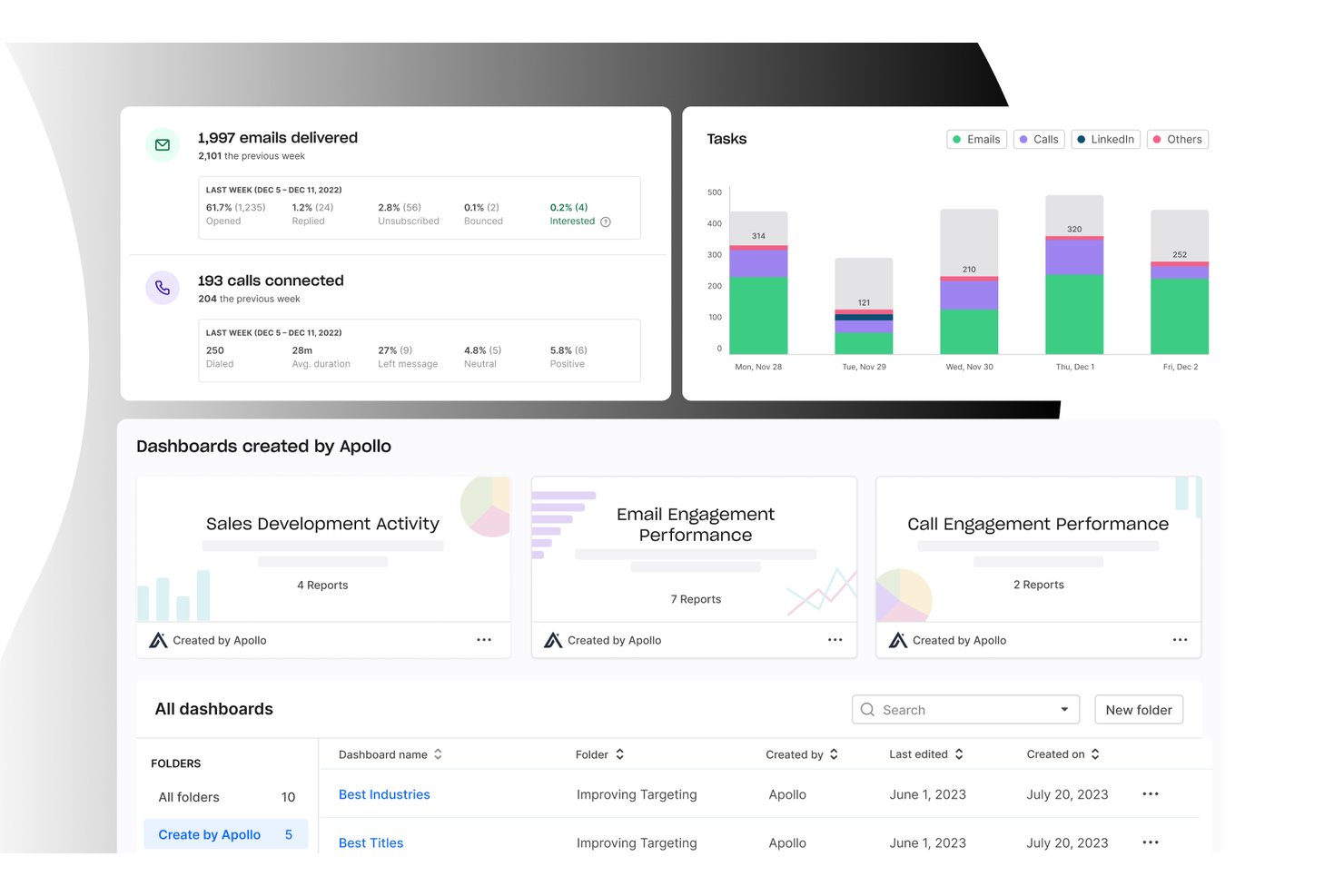
Apollo.io is an all-in-one B2B sales platform that combines a 265M+ contact database, deal pipeline management, multichannel outreach, and sales activity tracking in a single workspace.
Who Is Apollo.io Best For?
Apollo.io suits small sales teams and SDR-led organizations that run outbound prospecting and want to manage their entire pipeline without juggling multiple tools.
Why I Picked Apollo.io
Apollo.io earns its spot on my shortlist because of its multi-branch workflow engine, which lets me build conditional-logic automations that trigger on deal stage changes, email opens, or contact behavior. I can set manual approval gates before contacts enter a sequence, keeping outreach intentional rather than fully hands-off. What I especially like is that every triggered workflow action auto-logs directly to the contact's activity timeline, so nothing gets missed without any manual entry required.
Apollo.io Key Features
- Deal management board: Organize opportunities using a visual pipeline with drag-and-drop stages for tracking progress.
- Contact data enrichment: Instantly enrich lead and company profiles from Apollo’s global B2B database.
- Sales analytics dashboard: View key sales metrics on customizable dashboards to monitor team and individual performance.
- Chrome extension for prospecting: Access Apollo’s contact database and add prospects directly from LinkedIn and company websites.
Apollo.io Integrations
Apollo.io offers native integrations with Salesforce, HubSpot, Gmail, Outlook, LinkedIn, and Slack. It also connects with Zapier and provides an API for custom integrations.
Pros and Cons
Pros:
- Pipeline and prospecting managed in one place
- 265M+ contacts enrich deal records automatically
- Built-in sequence automation saves manual outreach steps
Cons:
- Contact data can be outdated occasionally
- CRM depth trails dedicated sales platforms

Best for visual deal pipelines

Salesflare is a CRM built to help you track your sales and leads. It works by bringing in your emails, meetings, and contact info automatically to keep everything up to date. You stay organized and on top of follow‑ups without having to manually enter data.
Why I picked Salesflare: I picked Salesflare because it gives you a drag‑and‑drop visual pipeline that lets you move your leads through stages clearly and visually—and you see where each deal sits at a glance. It also sets proactive reminders to follow up, reply to emails, or add notes so you don’t let things slip through the cracks. This kind of automatic nudge means you can stay responsive without doing extra mental work.
Standout features & integrations:
Features include live notifications and a central notification center that keep you updated the moment something happens. Plus, you can set up saved segments: combinations of advanced filters that you can reuse, making it easier to work with different lead lists without resetting everything.
Integrations include Google Workspace, Intercom, MailChimp, QuickBooks Online, Slack, Stripe, Shopify, and Calendly.
Pros and Cons
Pros:
- Contact timelines show full communication history
- Follow-up reminders reduce lead drop-off
- Automatically fills contact data from emails
Cons:
- Email workflow builder can feel cluttered
- No built-in calling or dialer tools
Best for inside sales
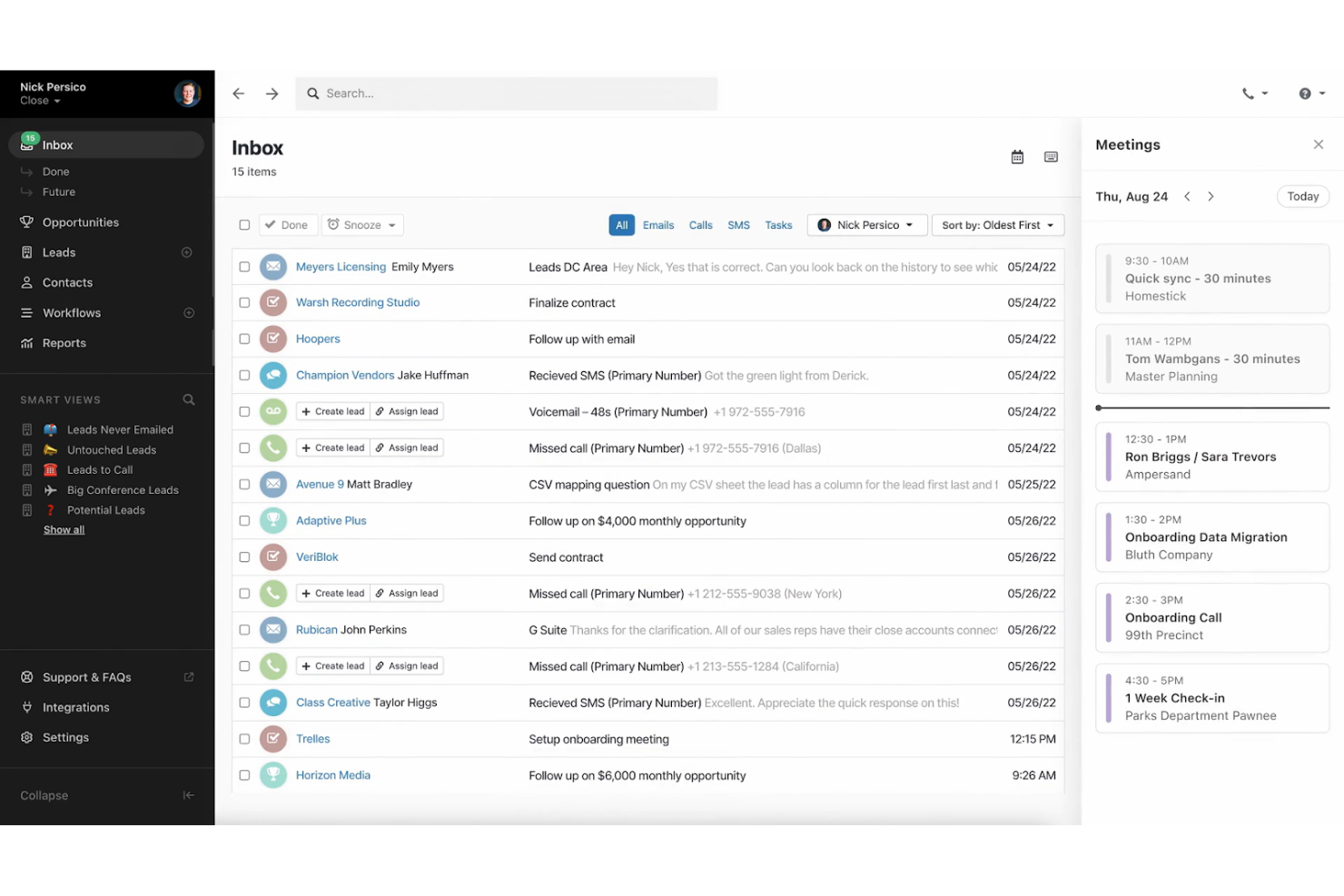
Close CRM offers advanced calling, email, and SMS features, allowing sales to engage with prospects efficiently. Its automatic task reminders, real-time reporting, and multi-channel communication streamline outreach efforts, making it an excellent tool for building relationships and closing deals.
Why I picked Close CRM: Close CRM is for inside sales teams, offering features that enhance communication and sales tracking. Its built-in calling and email functionalities keep all interactions in one place and its lead management tools help you organize and prioritize prospects efficiently. With its real-time reporting, your team can stay on top of sales activities and make informed decisions.
Standout features & integrations:
Features include a multichannel inbox that unifies communication, automated email sequences, and powerful pipeline management for tracking deals and opportunities. It also offers a robust reporting dashboard to analyze sales activities, track team performance, and help optimize workflows.
Integrations include Zapier, Slack, Gmail, Outlook, HubSpot, Pipedrive, Asana, Trello, LinkedIn, and Google Calendar.
Pros and Cons
Pros:
- Responsive customer support and onboarding
- Detailed sales tracking and reporting features
- Multi-channel communication support
Cons:
- Limited CRM customization options
- No advanced deal forecasting

Meritto
Best for education sector
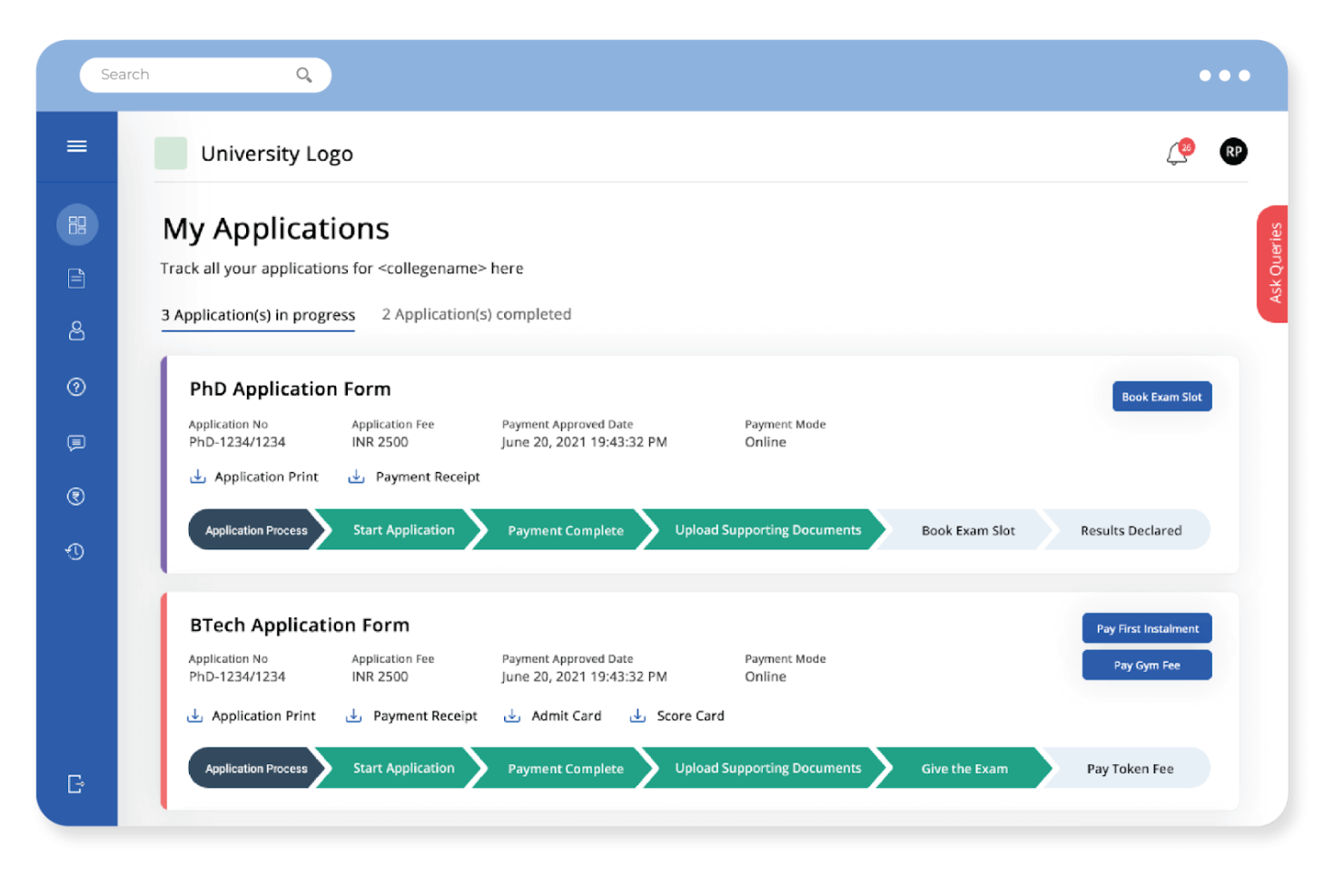
Meritto is a specialized CRM platform that offers student enrollment and admissions for educational institutions. It handles student inquiries, improves conversion rates, and integrates with popular education management systems.
Why I picked Meritto: Meritto excels in the education sector with its student admissions management and application tracking. It offers tools for managing the entire admissions pipeline, from lead generation and assignment to follow-up and reporting, all within one platform. It also provides in-depth insights into student behavior to help you refine outreach strategies and maximize conversion rates throughout the admissions process.
Standout features & integrations:
Features include application tracking, lead management, and customizable workflows. Your team can automate admissions processes to save time. The platform's analytics offer insights to optimize recruitment strategies.
Integrations include Google Analytics, Facebook, WhatsApp, Mailchimp, Salesforce, HubSpot, Zoho CRM, Microsoft Dynamics, LinkedIn, and PayPal.
Pros and Cons
Pros:
- Responsive customer support with tailored training options
- Offers real-time analytics for data-driven decisions
- Comprehensive lead tracking across recruitment stages
Cons:
- Customization options are limited for specific needs
- Limited multi-pipeline tracking options

Best for growing sales teams
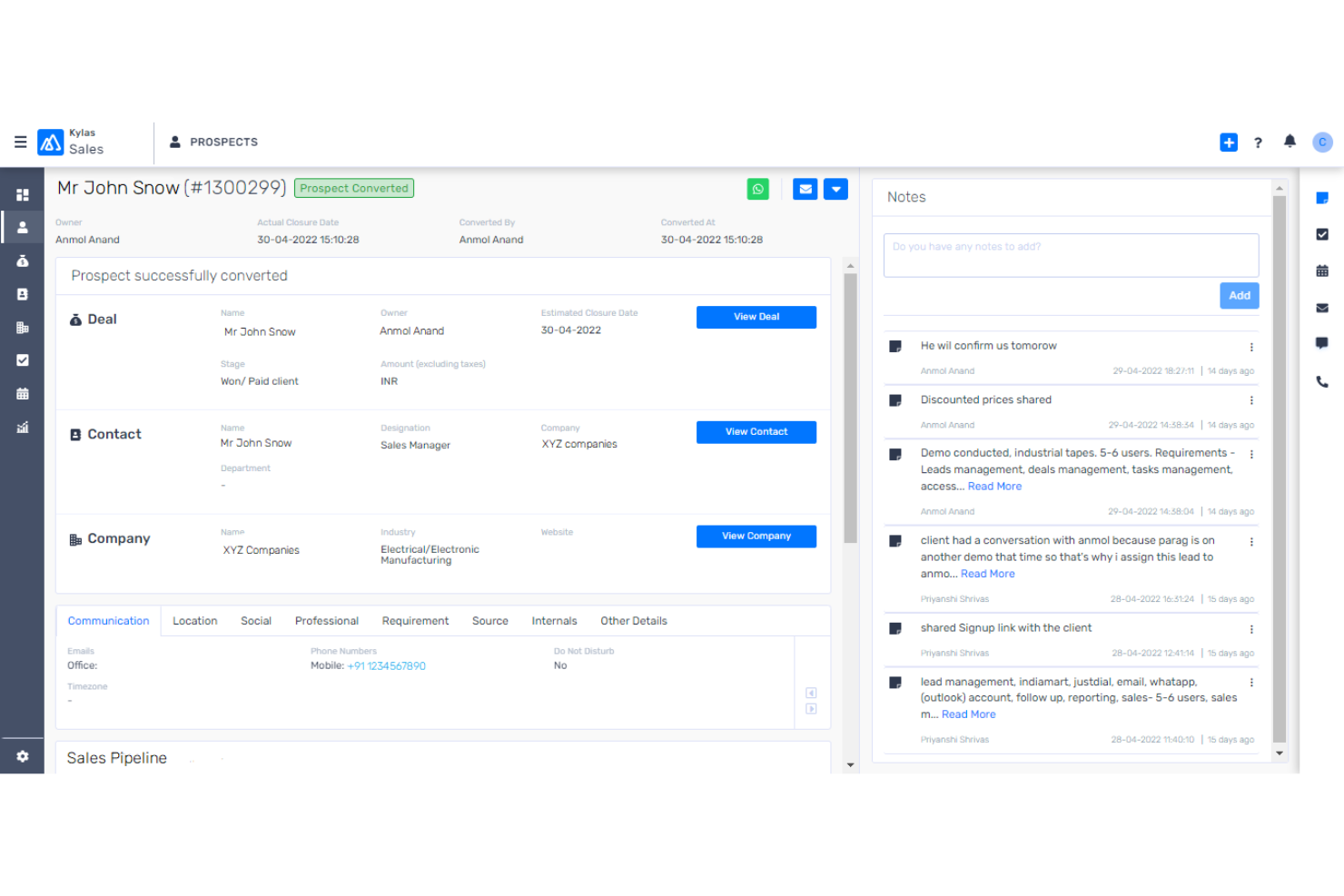
Kylas Sales CRM is an easy-to-use platform with no-code customization for managing sales processes, lead tracking, and enhancing team collaboration. It helps growing sales teams improve productivity through lead management, pipeline tracking, and in-depth reporting.
Why I picked Kylas Sales CRM: Kylas Sales CRM supports your sales reps with its scalable sales management capabilities. It provides comprehensive lead tracking, sales pipeline management, and collaboration features. Its deal tracking and task automation help keep sales efforts organized, and the built-in reporting and activity tracking ensures you can monitor your team’s progress.
Standout features & integrations:
Features include customizable lead and deal management, comprehensive reporting, and team collaboration tools. The platform’s workflow automation and pipeline visualization allow your team to monitor and track sales progress, while the mobile app provides on-the-go access for remote sales activities.
Integrations include WhatsApp, Facebook, Google Workspace, Outlook, QuickBooks, Slack, Xero, Mailchimp, Zapier, and Twilio.
Pros and Cons
Pros:
- Strong customer support and onboarding
- Highly customizable workflows and pipelines
- Efficient lead tracking from multiple sources
Cons:
- Certain advanced features require setup support
- Limited customization in reporting options


Best for small teams
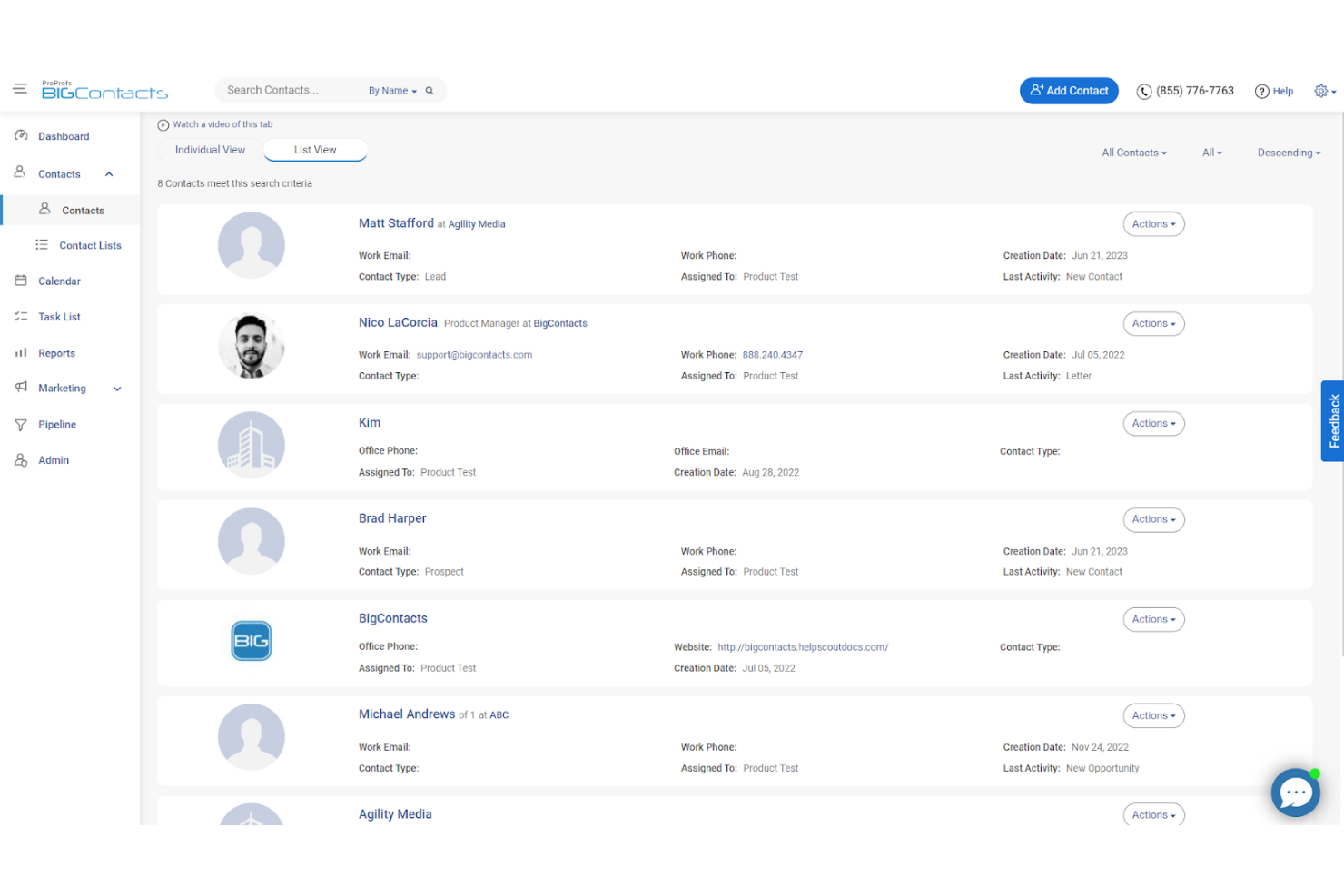
BIGContacts is a simple, easy-to-use software that streamlines contact management by organizing customer information, tracking sales pipelines, and automating tasks and reminders for small businesses.
Why I picked BIGContacts: This tool provides contact organization, sales pipeline tracking, and task management, which are crucial for small teams to maintain customer relationships. It also offers customizable workflows and automated email marketing for efficiently managing contacts and reporting tools for analyzing sales performance.
Standout features & integrations:
Features include automated follow-up reminders, making it easier for team members to stay organized and follow up with sales prospects. You can also customize fields and reports to match your business needs, and real-time insights help your team stay on top of sales performance and tasks.
Integrations include Google Contacts, Outlook, QuickBooks, Mailchimp, Zapier, Gmail, Calendar, and Google Drive.
Pros and Cons
Pros:
- Provides visual dashboards without complex setup
- Effective pipeline visualization with drag-and-drop
- Supports extensive sales forecasting customization
Cons:
- Limited flexibility for merging similar contacts
- Complex to filter reports by detailed fields
Best for scalability
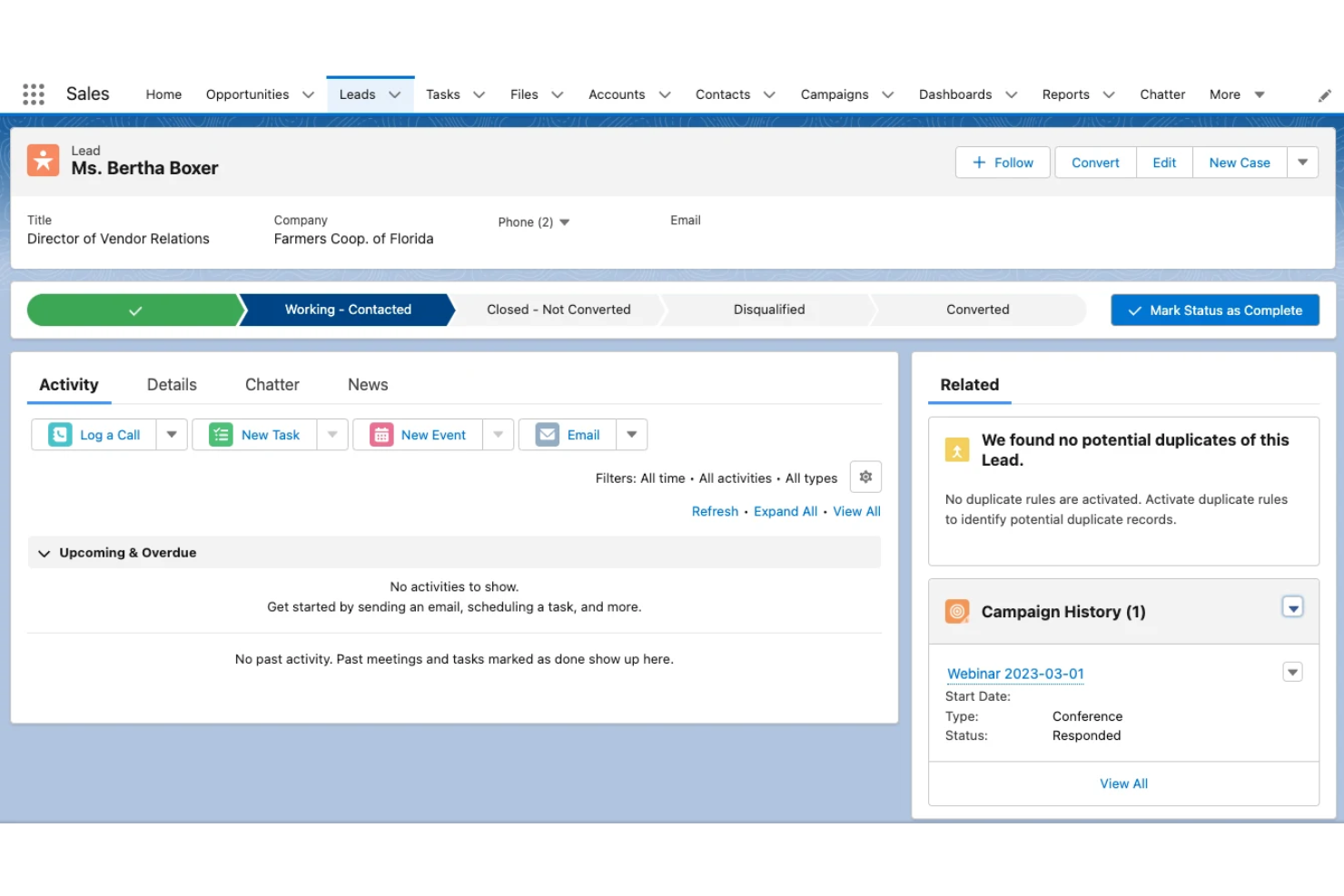
Salesforce’s scalability is why businesses of all sizes use it widely. It serves a diverse user base, offering powerful features like lead management, sales automation, and detailed reporting to streamline important business processes and manage complex sales pipelines.
Why I picked Salesforce: Salesforce is known for its scalability, making it suitable for growing businesses. It provides extensive customization options that allow your team to tailor the system to specific needs. The platform's comprehensive reporting and analytics tools help you gain insights into sales performance and customer interactions. With its powerful support and training resources, Salesforce ensures your team can effectively leverage its capabilities as your business scales.
Standout features & integrations:
Features include customizable dashboards, in-depth analytics, and comprehensive reporting. Your team can tailor workflows to fit specific business processes. The platform supports sales forecasting and pipeline management to drive growth.
Integrations include Mailchimp, QuickBooks, Slack, Dropbox, Google Workspace, LinkedIn, Microsoft Teams, HubSpot, Zoom, and Stripe.
Pros and Cons
Pros:
- Built-in automation for workflows
- Advanced sales forecasting tools
- Customizable for any business size and industry
Cons:
- Somewhat cumbersome setup process
- Complex sales pipeline customization

OpenCRM
Best for UK businesses
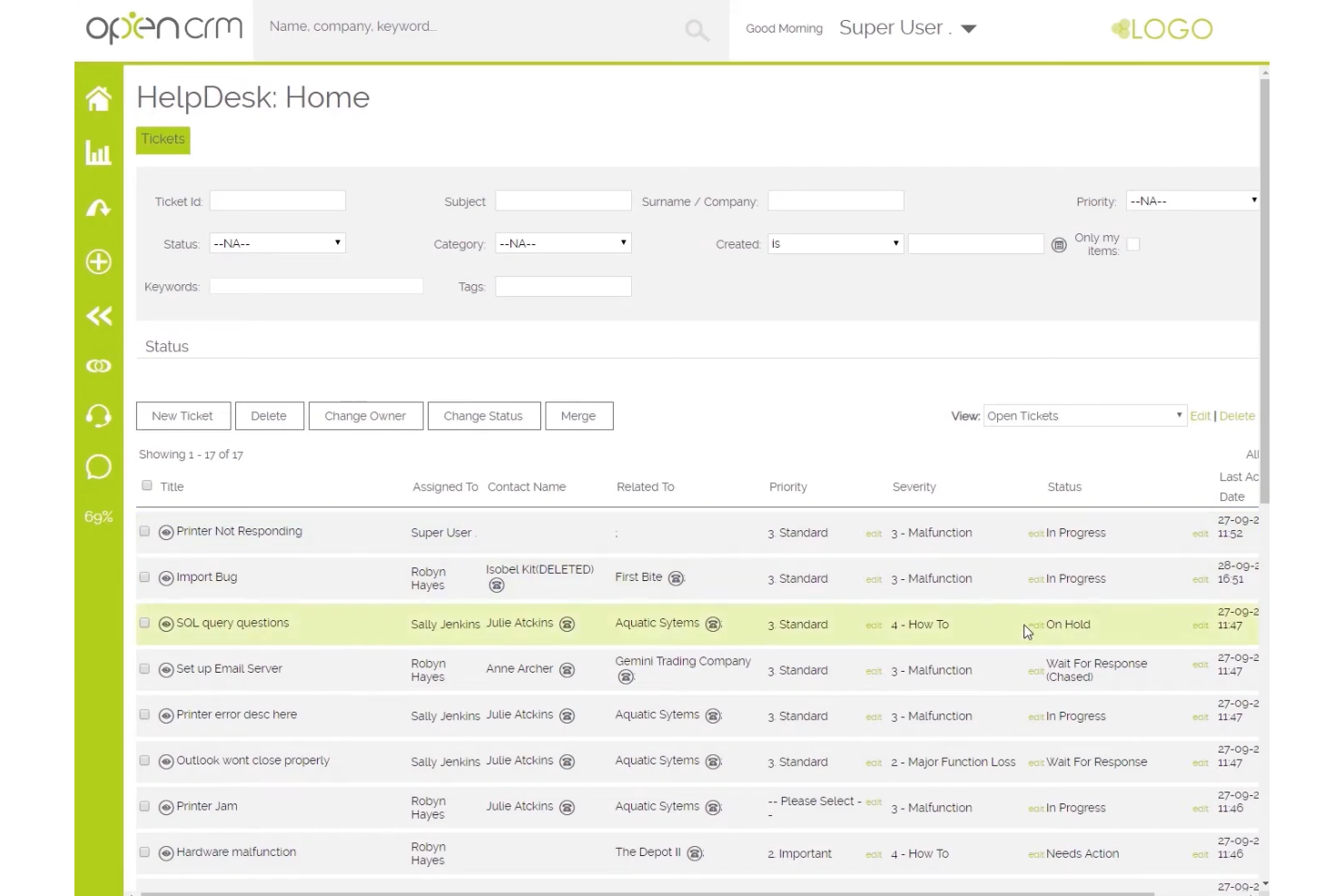
OpenCRM is a feature-rich CRM that provides sales tracking, customer service, and project management functionalities for small and medium-sized businesses. Its flexible customization options allow users to tailor the platform to their needs and track KPIs.
Why I picked OpenCRM: OpenCRM provides localized support and services to meet the needs of UK businesses. It offers customizable sales pipelines, project management features, and comprehensive contact management crucial for UK-based enterprises. Additionally, it includes invoicing and expense management for businesses to manage their financial transactions and customer payments within the CRM.
Standout features & integrations:
Features include a centralized system to manage customer support, project tasks, and sales data, making it easier for teams to stay organized and efficient. You can also generate insightful reports to track your team's performance.
Integrations include Xero, Mailchimp, QuickBooks, Google Workspace, Outlook, Sage, Twilio, Dropbox, LinkedIn, and GoCardless.
Pros and Cons
Pros:
- Centralized system for customer support and sales data
- Supports detailed tracking of client interactions
- Highly customizable for specific workflows
Cons:
- Somewhat clunky mobile interface
- Limited automation features


Apollo focuses on enhancing sales outreach, providing features like contact management, lead generation, and email sequencing for engaging prospects and managing sales pipelines. It optimizes outreach strategies to help close deals faster.
Why I picked Apollo: Apollo enhances sales outreach with its comprehensive lead generation and automation features. It allows your team to build targeted lead lists and automate outreach campaigns effectively. The platform's analytics provide insights into sales performance, helping you refine your strategies. Its ability to integrate outreach with lead management supports its focus on sales expansion.
Standout features & integrations:
Features include an extensive B2B contact database, customizable outreach sequences, and AI-powered insights to help prioritize high-intent leads. Its advanced filtering also allows users to segment leads by various criteria, like job title, company size, location, and industry.
Integrations include Salesforce, HubSpot, LinkedIn, Gmail, Outlook, Slack, Zapier, Google Workspace, Zoom, and Microsoft Teams.
Pros and Cons
Pros:
- AI-assisted lead scoring and prioritization
- Automated workflows for efficient multi-channel outreach
- Advanced filters for precise targeting and segmentation
Cons:
- Additional costs for accessing direct phone numbers
- Some data inaccuracies in contact information
Other Sales Tracking Software for Small Business
Here are some additional sales tracking software for small business options that didn’t make it onto my shortlist, but are still worth checking out:
- Glue Up
For event management
- EngageBay CRM
For startups
- Coefficient
For seamless integrations
- Pipedrive
For visual sales pipelines
- Bigin by Zoho CRM
For custom pipelines
- Less Annoying CRM
For solo entrepreneurs
- Insightly
For project management
- Zendesk Sell
For customer support teams
- Zoho CRM
For multi-channel support
- Bitrix24
For team collaboration


How I Evaluate Sales Tracking Software for Small Business
I evaluate every tool across two layers: the baseline functionality a small sales team needs to manage a pipeline, and the differentiators that make one option a better fit than another.
Core Functionality (Table Stakes For This List)
When I'm selecting tools for my list, I rank each one on a scale from 0 (does not offer the functionality) to 5 (excels in this area) for each core functionality listed below. Then, I calculate the tool's total score into a percentage. Each tool needs to achieve a minimum total score of 65% to be considered for inclusion.
- Pipeline Management: I look for customizable deal stages, drag-and-drop boards, and multi-pipeline support so a five-person sales team can track deals from first touch to close.
- Contact & Deal Tracking: Every tool I evaluate should tie contacts, companies, and deals together with a clear history of interactions rather than siloed, disconnected records.
- Sales Activity Logging: I check whether calls, emails, and meetings are logged to the right deal automatically or if reps have to manually enter every touchpoint at end of day.
- Sales Reporting & Dashboards: Dashboards should surface metrics like win rate, average deal cycle, and revenue by source without requiring a small business owner to build reports from scratch.
- Revenue Forecasting: I evaluate how each tool handles weighted pipeline forecasts and whether a sales lead can compare projected revenue against quota across reps or time periods.
- SMB-Friendly Pricing & Scalability: Pricing tiers, contract flexibility, and self-serve onboarding all matter here—a growing team of ten should be able to get started without enterprise-level commitments.
Once I have a list of tools that meet this criteria, I consider what sets each platform apart.
Differentiating Factors (What Sets Vendors Apart)
Here's how I compare and contrast different vendors:
Standout Features
No-code workflow automation is a big differentiator. I look for tools that let a small team auto-assign leads, trigger follow-up tasks on stage changes, and send templated emails without a dedicated admin. Email and calendar sync matters just as much, since reps who juggle selling and account management need every conversation logged to the right deal automatically. I also consider mobile app quality, especially for SMB owners or field reps who update deals between client visits rather than at a desk.
Beyond Features
Integration coverage is one of the first things I check. A small business running QuickBooks for invoicing and Mailchimp for campaigns needs its sales tracker to sync data across both without manual exports. Pricing transparency also carries real weight—I evaluate whether a vendor's entry tier includes enough functionality for a growing team or gates key features behind expensive upgrades. Time-to-value rounds out my evaluation. Tools with guided setup wizards, pre-built templates, and import utilities let a small team go live in days instead of weeks.
How To Choose Sales Tracking Software for Small Business
It’s easy to get bogged down in long feature lists and complex pricing structures. To help you stay focused as you work through your unique software selection process, here’s a checklist of factors to keep in mind:
| Factor | What to Consider |
| Scalability | Will the software grow with your business needs? |
| Integrations | Does it connect with your existing tools and systems? |
| Customizability | Can you tailor the software to fit your processes? |
| Ease of Use | Is the software intuitive for your team to use? |
| Budget | Does it fit within your financial constraints? |
| Security Safeguards | Are your data and customer information protected? |
| Support | Is customer support available when you need it? |
| Reporting | Does it offer the insights your team requires? |
Trends In Sales Tracking Software for Small Business
In my research, I sourced countless product updates, press releases, and release logs from different sales tracking software for small business vendors. Here are some of the emerging trends I’m keeping an eye on:
- AI-driven insights: AI is becoming a staple in sales tracking tools, providing data-driven insights that help small businesses make better decisions. These insights can identify patterns in sales data and suggest strategies to boost performance.
- Voice recognition capabilities: Voice technology is making its way into sales tracking software, allowing users to input data and retrieve information through voice commands. This hands-free approach can increase messaging efficiency, especially for on-the-go sales teams, and streamline data entry.
- Enhanced data visualization: Tools are increasingly offering advanced visualization options to help users make sense of complex data. Interactive dashboards and customizable charts provide clearer insights into sales performance.
What Is Sales Tracking Software for Small Business?
Sales tracking software for small businesses helps manage and monitor sales activities and customer interactions. Sales professionals, small business owners, and marketing teams use these tools to increase sales efficiency and improve customer relationships.
Lead tracking, pipeline management, and reporting features help with organizing sales processes and gaining insights into performance. Overall, these tools provide valuable support in boosting sales productivity and enhancing customer engagement.
Features of Sales Tracking Software for Small Business
When selecting sales tracking software for small business, keep an eye out for the following key features:
- Real-time analytics: Provides instant insights into sales data, enabling teams to make quick, data-driven decisions.
- Lead tracking: Organizes and monitors the status of leads through the sales funnel, ensuring no opportunities are missed during the sales cycle.
- Sales forecasting: Uses historical and current data to project future sales, helping teams set realistic goals and manage resources.
- Pipeline management: Offers a visual representation of the sales pipeline, allowing teams to track and prioritize deals effectively.
- Customizable reporting: Allows users to create tailored reports to analyze specific metrics, providing insights aligned with business needs.
- Contact management: Centralizes customer and prospect information, making it easy for sales teams to maintain accurate, up-to-date records.
- Goal setting and tracking: Enables setting sales targets and monitoring progress, keeping teams motivated and accountable.
- Task automation: Automates repetitive sales tasks, freeing up time for sales teams to focus on high-value activities.
- Mobile access: Provides on-the-go access to sales data and sends notifications, helping reps stay productive when working remotely or in the field.
- Integration capabilities: Ensures seamless data flow by integrating with CRM, email, and other business tools, enhancing overall efficiency.
Benefits of Sales Tracking Software for Small Business
Implementing sales tracking software for a small business provides several benefits for your team and your business. Here are a few you can look forward to:
- Improved efficiency: Automation features like automated emails and voice recognition save time and reduce manual efforts.
- Better decision-making: AI-driven insights and data visualization provide predictive analytics to guide your sales strategies.
- Enhanced customer relationships: Lead tracking and pipeline management ensure timely follow-ups and better customer interactions.
- Increased sales visibility: Customizable dashboards and reporting give you a clear view of sales activities and performance.
- Data security: Strong privacy and security measures protect your business and customer data.
Costs and Pricing of Sales Tracking Software for Small Business
Selecting sales tracking software for a small business requires an understanding of the various pricing models and plans available. Costs vary based on features, team size, add-ons, and more. The table below summarizes common plans, their average prices, and typical features included in sales tracking software for small business solutions:
Plan Comparison Table for Sales Tracking Software for Small Business
| Plan Type | Average Price | Common Features |
| Free Plan | $0/user/ month | Basic lead tracking, limited pipeline management, and email support. |
| Personal Plan | $5-$25/user/month | Lead tracking, basic reporting, email integration, and limited customization. |
| Business Plan | $30-$60/ user/month | Advanced reporting, customizable dashboards, sales automation, and enhanced security. |
| Enterprise Plan | $70-$120/ user/month | Full customization, AI-driven insights, dedicated support, and advanced security. |
Sales Tracking Software for Small Business FAQs
Here are some answers to common questions about sales tracking software for small businesses:
How do small businesses track sales?
Small businesses track sales using CRM software, which helps manage customer relationships and sales pipelines. Some use spreadsheets, but transitioning to a CRM system offers more benefits. It provides a structured way to monitor leads, customer interactions, and sales performance. This approach ensures businesses efficiently manage their sales process and make informed decisions.
How do you keep track of the sales process?
To track sales, set clear goals and define your sales pipeline. A CRM system helps visualize each stage from lead to customer. It allows you to customize workflows and track each step, ensuring no missed opportunities. Regularly reviewing this data refine strategies and improve overall sales performance.
What type of software do salespeople use to track sales?
Salespeople often use CRM software to track sales. These systems offer tools for managing leads, automating tasks, and analyzing sales data. CRM software helps teams focus more on selling and less on administrative tasks, enhancing efficiency and ensuring a more organized sales process.
How do you keep track of sales accounts?
Tracking sales accounts involves using a CRM to organize and visualize customer data. You can set up a sales pipeline to follow each account’s progress through the sales process. This includes setting KPIs, nurturing leads, and reviewing sales data regularly. This method maintains a clear overview of all sales activities and customer interactions.
How can sales tracking software improve team performance?
Sales tracking software improves team performance by providing insights into sales activities and outcomes. It helps identify successful strategies and areas needing improvement. With features like automated reporting and analytics, teams can make data-driven decisions. This leads to a more focused approach to meeting sales targets and enhancing productivity.
Why is lead nurturing important in sales tracking?
Lead nurturing is crucial as it builds relationships with potential customers over time. Sales tracking software enables you to monitor interactions and tailor communication based on customer behavior. This approach increases lead conversion and ensures prospects receive the right information at the right time, moving them closer to a purchase decision.
What’s Next?
Want to take your RevOps game to the next level? Subscribe to The CRO Club newsletter for expert advice, software reviews, and other resources to help you deliver predictable growth at scale.