

With so many different Salesforce alternatives available, figuring out which is right for you is tough. You know you want an alternative to Salesforce that helps you streamline business processes, improve customer relationships, and drive sales growth but need to figure out which tool is best. I've got you! In this post I'll help make your choice easy, sharing my personal experiences using dozens of different Salesforce alternatives with various teams and projects, with my picks of the best Salesforce alternatives.
Why Trust Our Software Recommendations
6,700+
Reviews
20
Industry experts
16+
Evaluation factors
14
Years
Our reviews reflect our independent judgment—not a sales pitch. Learn how we stay transparent.
For this guide, we evaluated tools using hands-on testing and independent research, scoring tools using our selection criteria.
Our reviews reflect our human editorial judgment, not a sales pitch.
Salesforce Alternatives Comparison Table
| Tool | Best For | Trial Info | Price | ||
|---|---|---|---|---|---|
| 1 | Best for organizing prospect data | 30-day free trial | From $39/user/month | Website | |
| 2 | Best for customizable no-code sales tools | Free demo available | From $40/user/month (billed annually) | Website | |
| 3 | Best for flexible CRM workflows and pipelines | Free plan available | From $35/user/month (billed annually) | Website | |
| 4 | Best for customizable sales automation | Free trial available | From $8/seat/month (billed annually) | Website | |
| 5 | Best for team organization and quick CRM adoption | Free plan available; 14-day free trial | From $18/user/month (billed annually) | Website | |
| 6 | Best for predictive intelligence | Free plan available | Pricing upon request | Website | |
| 7 | Best for collaboration in large organizations | Free trial available | From $65/user/month (billed annually) | Website | |
| 8 | Best for project management | Free plan available | From $7/user/month (billed annually) | Website | |
| 9 | Best for beginners | 14-day free trial | From $100/user/month | Website | |
| 10 | Best for visual pipeline management | 14-day free trial | From $14/user/month (billed annually) | Website |


Best Salesforce Alternative Reviews
I’ve documented my research below and compiled some of the best platforms to consider as you begin to migrate to (or set up) a new CRM.
While it would be impossible to cover every single CRM available, I have tried to focus on the core Salesforce alternatives that can meet the needs of almost any business and use case.
 Best for organizing prospect data
- 30-day free trial
- From $39/user/month
Visit WebsiteCustomer Rating:4.7/5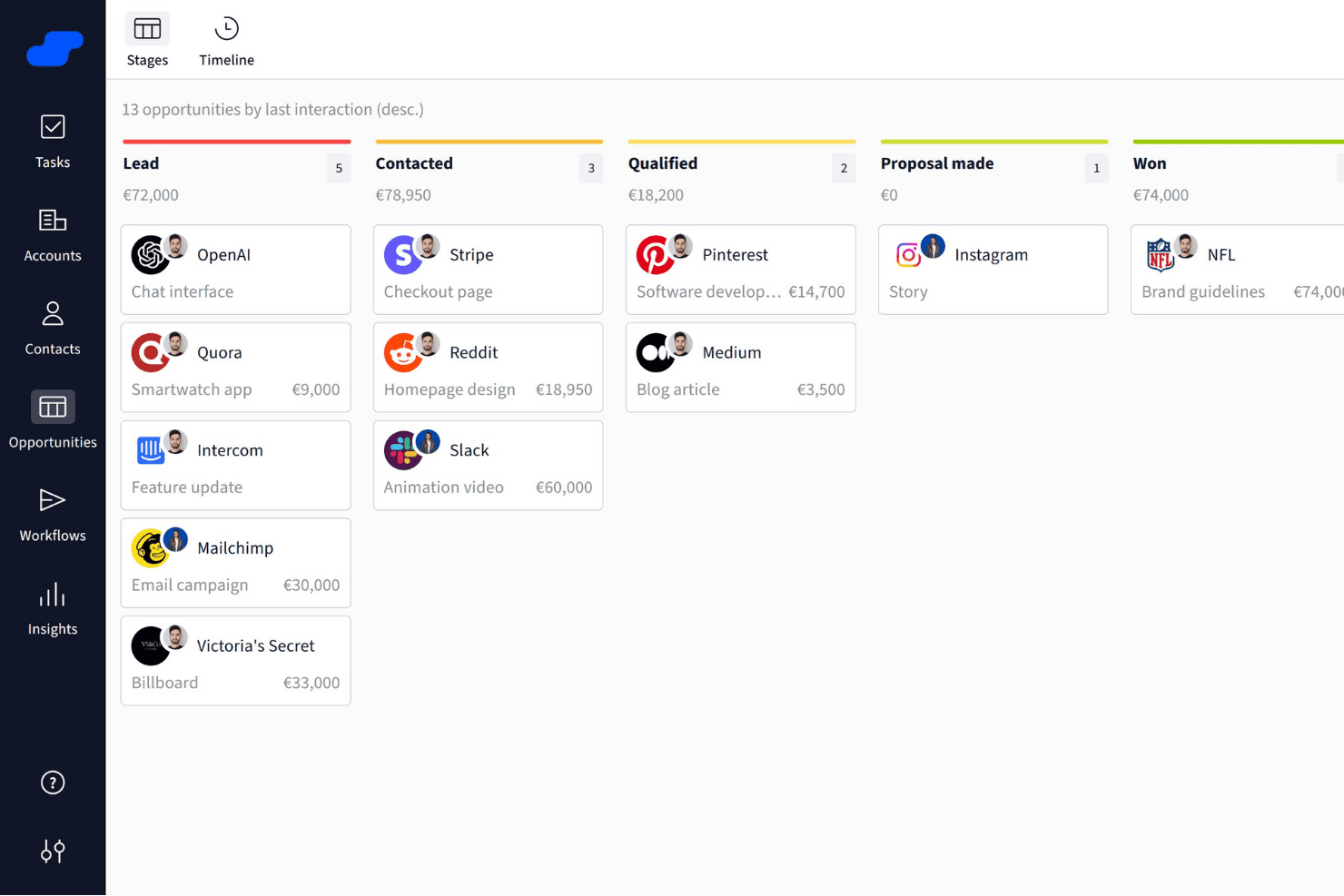
Salesflare organizes sales opportunities into visual pipeline stages. Salesflare is a B2B CRM that automatically captures contact and activity data from your email and calendar, and organizes it across visual pipelines, customizable fields, and AI-assisted follow-up tools.
Who Is Salesflare Best For?
Salesflare is a strong fit for small B2B sales teams that want a CRM to organize prospect data without spending time on manual data entry or admin setup.
Why I Picked Salesflare
I picked Salesflare as one of the best because of how it handles prospect data organization without demanding manual input from your team. It automatically pulls contact details from email signatures and captures activity from your inbox and calendar, so account records stay current without anyone having to update them. I especially like the relationship intelligence feature, which shows who on your team already has a connection at a target account and how strong that relationship is.
Salesflare Key Features
- Email and calendar data capture: Salesflare automatically pulls contact details, emails, and meetings from your connected inbox and calendar into CRM records.
- Multi-step email sequences: You can build automated, personalized follow-up email flows that continue until a contact replies or meets a configured exit condition.
- Lead scoring: Salesflare scores leads based on live interaction patterns and triggers notifications when the timing looks right to reach out.
- Custom fields for accounts, contacts, and opportunities: You can create fields across multiple types—dropdown, date, linked records, tags, and more—to structure your data the way your team works.
Salesflare Integrations
Salesflare offers native integrations with LinkedIn, Gmail, Outlook, Google Calendar, Microsoft 365, Zoho Mail, and Microsoft Exchange. Its directory lists 11,304 apps across native and Make connections, and it provides a REST API plus Zapier.
Pros and Cons
Pros:
- Flexible pipelines support distinct sales motions
- Relationship maps reveal warm account connections
- Automatic capture reduces stale prospect records
Cons:
- CRM migration needs manual spreadsheet cleanup
- Reporting depth trails broader CRM suites
Learn more about Salesflare: Best for customizable no-code sales tools
- Free demo available
- From $40/user/month (billed annually)
Visit WebsiteCustomer Rating:4.7/5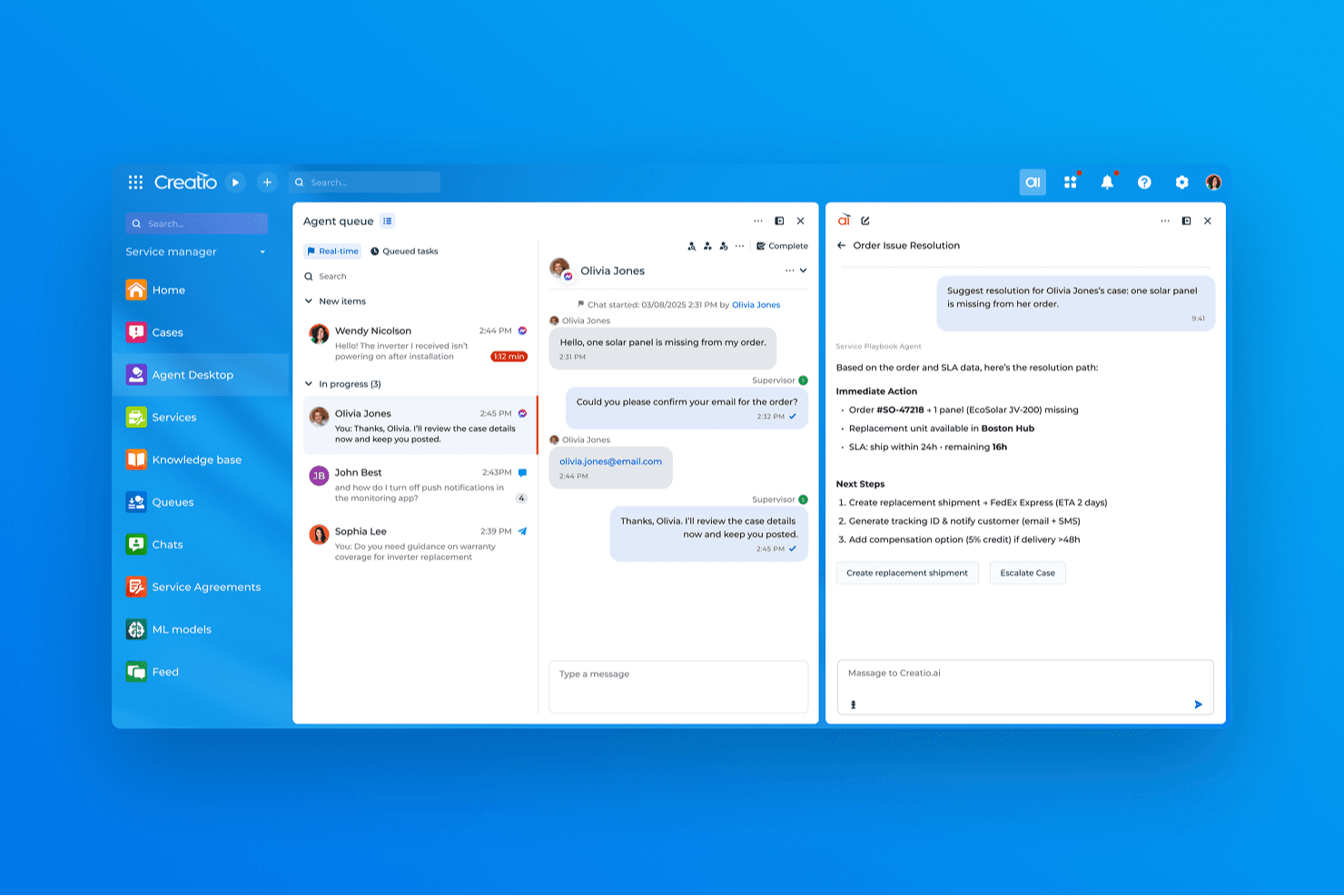
Creatio CRM uses AI to suggest real-time resolutions for customer service cases. Creatio AI CRM is a no-code CRM and workflow automation platform that covers sales, marketing, and service with tools for lead and opportunity management, process design, customizable pipelines, and a unified customer data view.
Who Is Creatio CRM Best For?
Creatio CRM is a strong fit for small and midsize businesses that want to build and adapt their own CRM workflows without leaning on developers for every change.
Why I Picked Creatio CRM
I picked Creatio CRM as one of the best because its no-code process designer lets you build and modify CRM workflows, pipeline stages, and automation rules without filing a ticket to your dev team. I especially like the BPMN-based process builder: you can set up multi-step sequences that trigger on record changes, schedules, or system signals, then adjust them as your sales motion evolves. The Freedom UI tools let you reshape objects, fields, and page layouts just as quickly.
Creatio CRM Key Features
- Unified customer data view: Displays real-time customer interactions across products and channels in a single record.
- BPMN-enabled process designer: Lets you build multi-step automated processes triggered by record changes, schedules, or system signals without writing code.
- AI agent builder: Provides prebuilt CRM agents and no-code tools to create custom agents that automate tasks like account research and quote generation.
- Marketplace add-ons: Offers 400+ connectors and templates—including Zapier, PandaDoc, and Power BI—to extend platform functionality.
Creatio CRM Integrations
Creatio offers native integrations with Google Calendar and Microsoft Exchange, plus 400+ Marketplace applications and add-ons, including Microsoft Power BI Desktop, PandaDoc, Apollo.io, and Zapier. Its REST, OData, SOAP, OAuth, and web-service APIs support custom integrations.
Pros and Cons
Pros:
- Shared customer records unite sales, marketing, and service
- BPMN automations connect sales and service steps
- No-code workflows adapt as sales processes change
Cons:
- No dedicated Salesforce migration path is documented
- Feature breadth can overwhelm new users
Learn more about Creatio CRM: Best for flexible CRM workflows and pipelines
- Free plan available
- From $35/user/month (billed annually)
Visit WebsiteCustomer Rating:4.5/5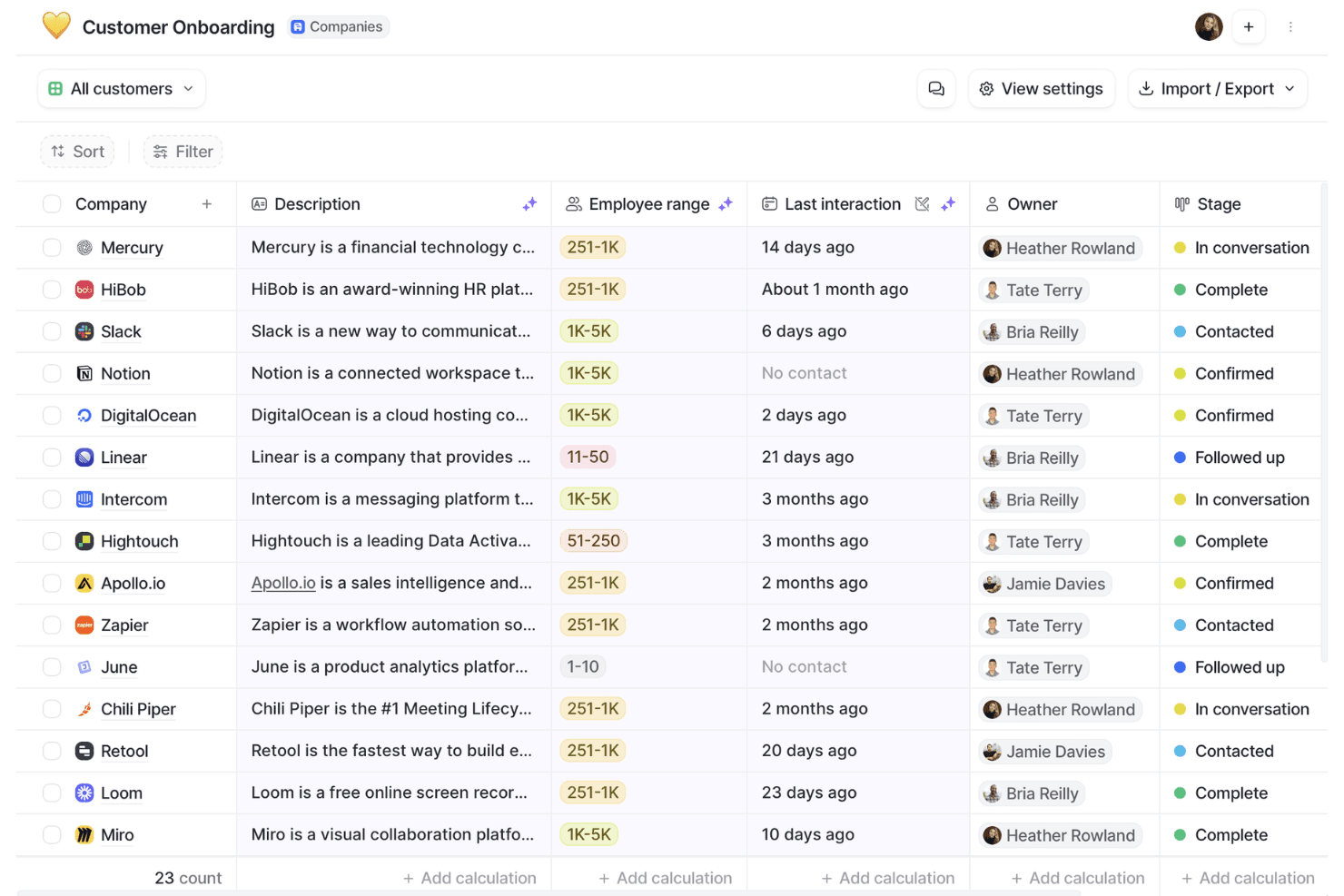
Attio organizes customer onboarding pipelines with stages and owner tracking. Attio is a CRM platform built around a flexible, object-based data model that supports contact management, deal pipelines, workflow automation, email and calendar sync, and reporting.
Who Is Attio Best For?
Attio is a strong fit for early-stage and scaling B2B teams—particularly founders, sales ops managers, and CRM admins—who want to build a CRM around their own data model rather than conform to a rigid, out-of-the-box structure.
Why I Picked Attio
I picked Attio as one of the best because its object-based data model genuinely changes how you build a CRM, letting you define custom objects, relationships, and attributes around your actual business rather than forcing your process into a preset structure. I love that you can link People, Companies, and Deals to custom objects with one-to-many or many-to-many relationships, then build multi-step, branching workflows that trigger across those records automatically.
Attio Key Features
- Ask Attio: A natural-language AI interface that lets you search, summarize, and take actions across your CRM records directly from the workspace.
- Call Intelligence: Automatically records, transcribes, and summarizes calls, then attaches the results to the relevant CRM records.
- Communication intelligence: Surfaces relationship data derived from synced email and calendar activity, including first and last interactions and connection strength scores.
- CSV import with field mapping: Lets you map, preview, and validate data before importing records, with real-time progress tracking and error visibility.
Attio Integrations
Attio offers native integrations with Gmail, Outlook, Google Calendar, Slack, Mailchimp, Segment, Stripe, Google Sheets, Notion, and Typeform. It also supports marketplace integrations, Zapier, REST API, webhooks, an App SDK, MCP, and SQL queries for custom connectivity.
Pros and Cons
Pros:
- Reviewers praise clear pipeline tracking
- Branching workflows reduce routine deal upkeep
- Custom objects fit nonstandard sales processes
Cons:
- Custom data models require upfront design
- Forecasting and cross-object reporting remain limited
Learn more about Attio: Best for customizable sales automation
- Free trial available
- From $8/seat/month (billed annually)
Visit WebsiteCustomer Rating:4.6/5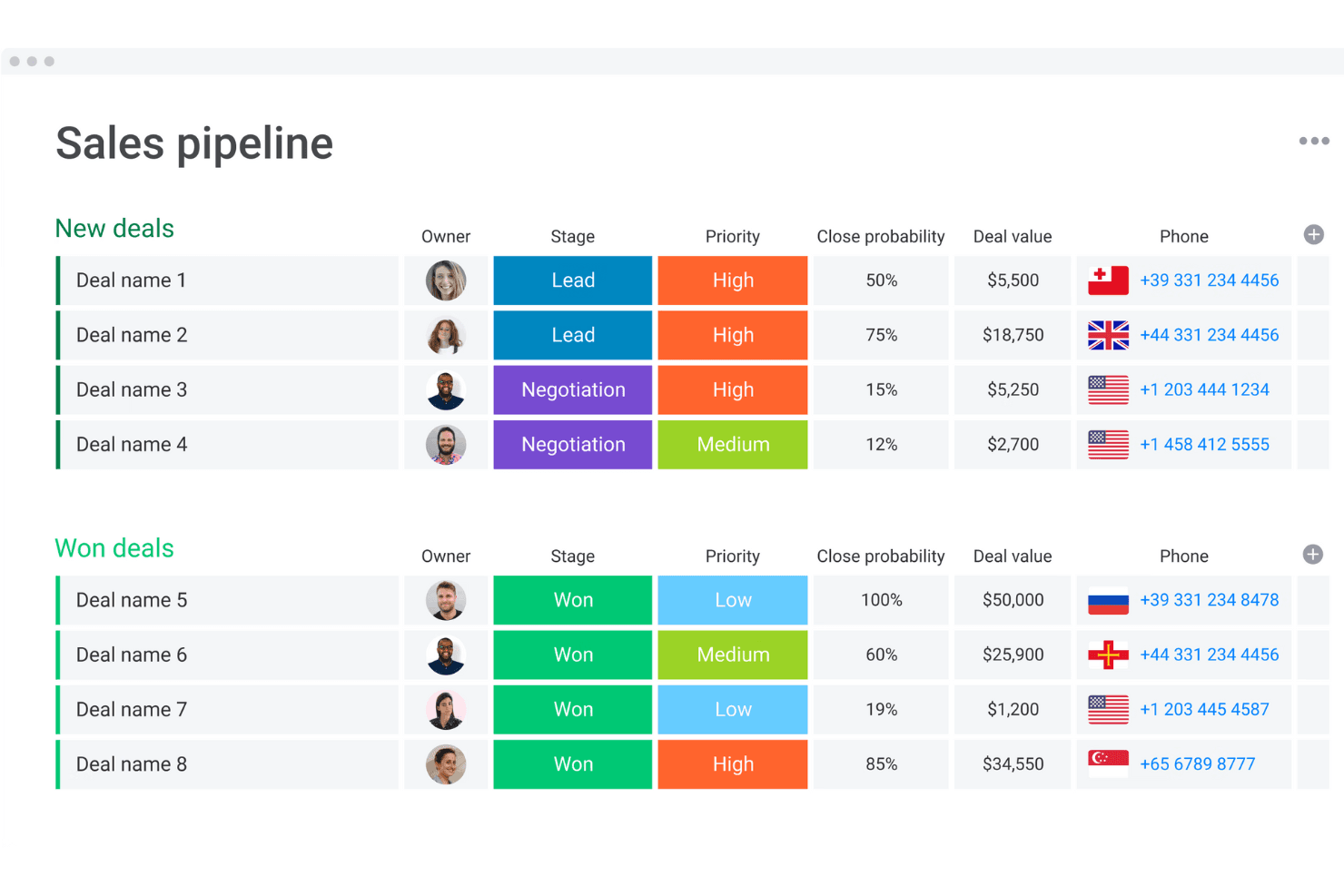
monday CRM organizes deals by stage, priority, and value in one view. monday CRM is a no-code sales CRM built on monday.com's work management platform that combines pipeline management, workflow automation, AI-powered deal insights, and built-in communication tracking across the full sales cycle.
Who Is monday CRM Best For?
monday CRM is a strong fit for small to mid-sized sales teams that want to build and automate their sales processes without waiting on developers or dedicated admins.
Why I Picked monday CRM
I picked monday CRM as one of the best because its no-code workflow builder lets sales teams build and automate complex, multi-branch sales processes without touching a line of code. I love that the Pipeline Health Agent actively analyzes stage distribution, deal velocity, and pipeline gaps, then drafts rep nudges for manager review. That kind of built-in automation intelligence is what makes it a credible Salesforce alternative for teams that want customizable sales motion without the admin overhead.
monday CRM Key Features
- Lead sourcing agent: An AI agent that finds, enriches, and scores leads against your target profile on a daily basis.
- Smart Call: A mobile CRM feature that records, transcribes, and summarizes customer calls, then logs them directly to the deal record.
- Quotes and invoices: Generate quotes, send invoices, and collect signatures directly from within a deal record.
- AI Notetaker: Joins Zoom, Microsoft Teams, or Google Meet calls to transcribe meetings, identify speakers, and generate action items synced to contact timelines.
monday CRM Integrations
monday CRM lists 200+ integrations, including Salesforce, Slack, Microsoft Teams, Zoom, Gmail, LinkedIn, Meta Ads, QuickBooks, Stripe, and DocuSign. It also offers a GraphQL API, SDK, and open API for custom connections.
Pros and Cons
Pros:
- Shared dashboards improve pipeline visibility
- Automated reminders reduce manual follow-up
- Custom pipelines adapt to distinct sales motions
Cons:
- Flexible setup can overwhelm smaller teams
- Forecasting depth trails enterprise CRM systems
 Best for team organization and quick CRM adoption
- Free plan available; 14-day free trial
- From $18/user/month (billed annually)
Visit WebsiteCustomer Rating:4.7/5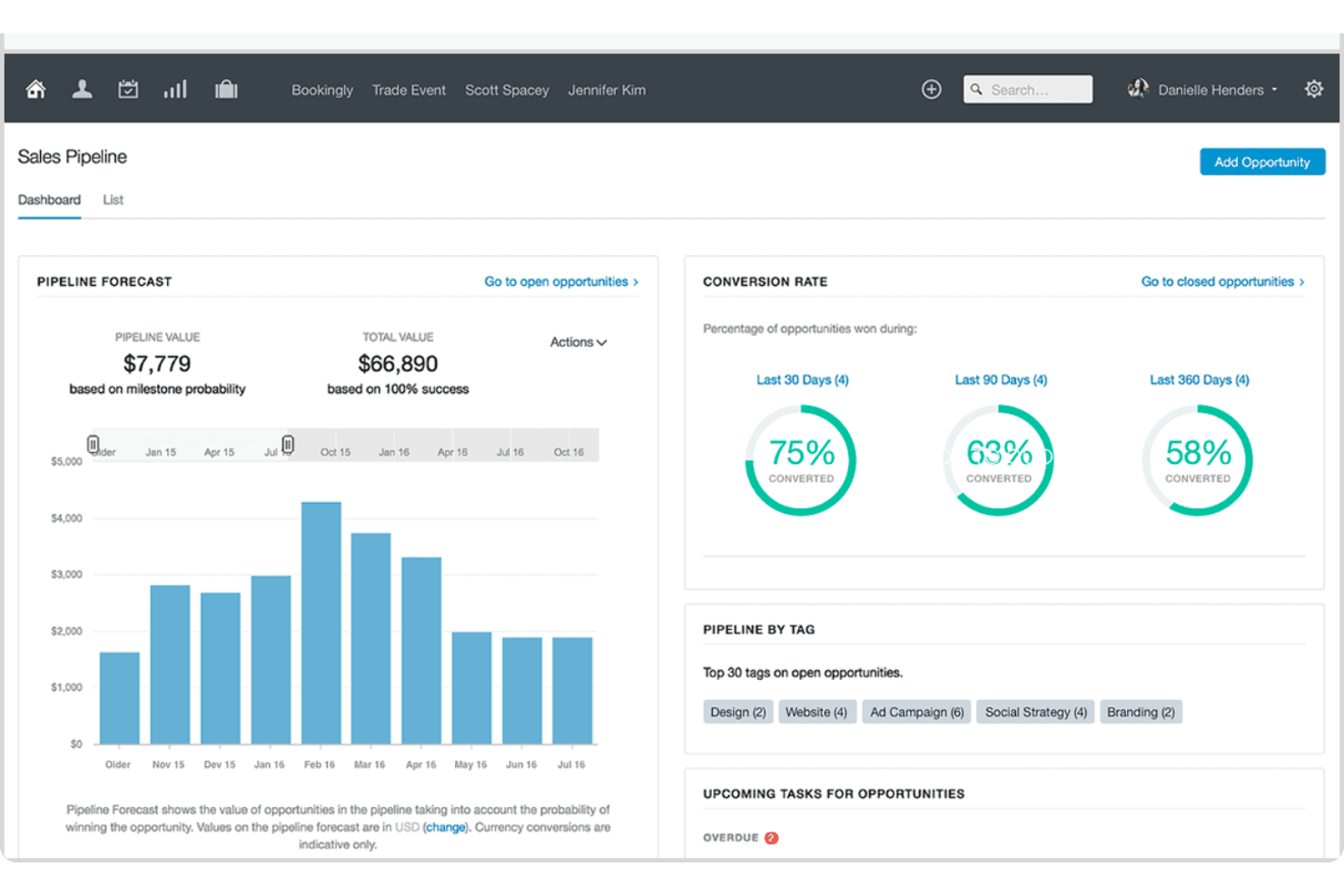
Capsule visualizes sales pipeline forecasts and conversion rates in one dashboard. Capsule CRM is a contact and pipeline management platform that brings together sales opportunities, contact records, task tracking, project management, and email tools in a single, lightweight CRM.
Who Is Capsule Best For?
Capsule is a strong fit for small business owners and growing teams who want a clean, low-friction CRM they can start using without a lengthy setup or dedicated admin.
Why I Picked Capsule
I've included Capsule in my top picks because it's the CRM I'd hand to a team that needs to get up and running fast, without a drawn-out configuration project. Its Tracks feature lets you build reusable, sequential task lists for repeatable processes like onboarding or handoffs, so deals move forward without anyone manually managing the queue. The AI Pipeline Generator can scaffold an entire pipeline from a plain-language description of your sales process, which means setup that used to take days takes minutes.
Capsule Key Features
- Workflow automation: Trigger actions automatically when an opportunity hits a milestone or changes status, including assigning team members, sending emails, or creating linked projects.
- Multiple sales pipelines: Set up separate pipelines for different products, markets, or sales processes, each with its own configurable stages.
- Contact DataTags: Apply tags that prompt for related custom-field values, letting your team capture structured context on contacts without free-text guesswork.
- Reporting dashboards: Access prebuilt dashboards for pipeline, conversion, tasks, and projects, with filters for user, team, tag, and custom fields.
Capsule Integrations
Capsule lists 100+ marketplace integrations on its homepage and 60+ in its pricing FAQ, including Gmail, Google Calendar, Microsoft Outlook, Mailchimp, Transpond, Xero, QuickBooks Online, and Zapier. It also offers a REST API and REST Hooks for custom integrations.
Pros and Cons
Pros:
- Contacts, deals, tasks, and projects stay connected
- Import previews help catch mapping errors
- Quick adoption without extensive training
Cons:
- No custom objects or record types
- Dashboard analysis offers limited drill-down
Learn more about Capsule: Best for predictive intelligence
- Free plan available
- Pricing upon request
Visit WebsiteCustomer Rating:4.2/5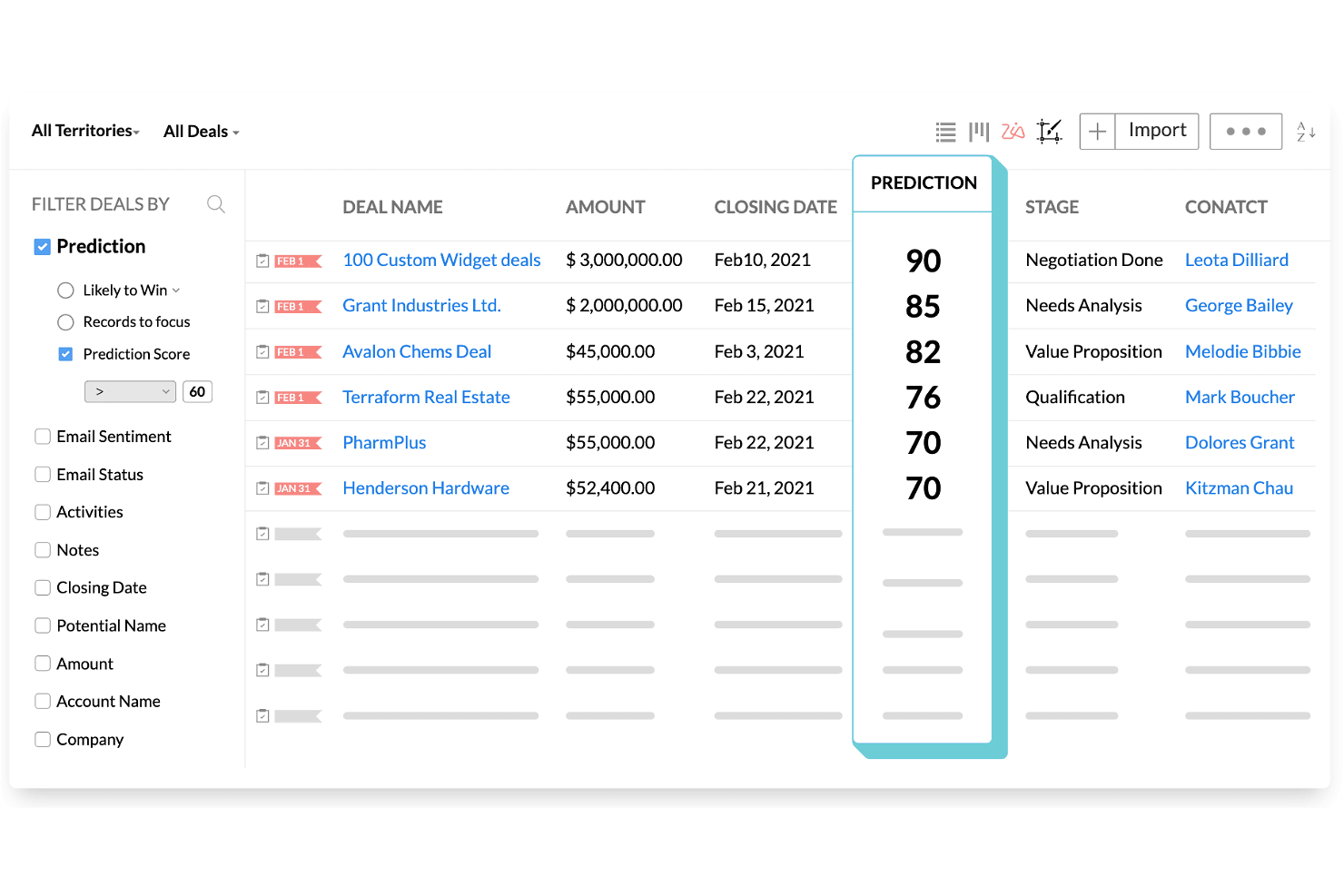
Zoho CRM ranks deals by AI prediction scores to prioritize sales efforts. Zoho CRM is a sales and marketing platform that combines pipeline management, workflow automation, AI-powered forecasting via its Zia engine, built-in CPQ, and multi-channel customer engagement across email, phone, social, SMS, and WhatsApp.
Who Is Zoho CRM Best For?
Zoho CRM is a strong fit for sales operations managers and small-to-midsize teams that need AI-driven forecasting and pipeline visibility without Salesforce's price tag.
Why I Picked Zoho CRM
I've included Zoho CRM in my top picks because its Zia AI engine does something I haven't seen matched at this price point: it actively forecasts revenue, flags anomalies in pipeline targets, and scores individual deals by close likelihood so you can act before a quarter slips. I also like that Zia surfaces the optimal time and channel to contact each prospect, cutting the guesswork out of outreach cadences. For teams migrating off Salesforce, the dedicated migration wizard maps CSV exports directly to Zoho modules and fields, with a post-import accuracy check built in.
Zoho CRM Key Features
- Blueprint process management: Define structured, step-by-step sales processes that guide reps through required actions before moving a deal to the next stage.
- Multi-channel customer engagement: Reach contacts through email, phone, SMS, WhatsApp, and social media from a single platform without switching tools.
- Canvas no-code layout editor: Redesign CRM module layouts, pages, and fields visually without writing any code.
- Territory management: Organize accounts and deals by geographic or business-defined territories to align sales coverage across teams.
Zoho CRM Integrations
Zoho CRM lists 1,100+ ready-to-use app integrations, including Gmail, Outlook, Slack, Zoom, Microsoft Teams, Google Ads, and QuickBooks. Its REST API supports custom integrations.
Pros and Cons
Pros:
- Blueprint standardizes stage-by-stage sales execution
- Salesforce migration includes field mapping and validation
- Zia forecasts revenue and flags pipeline anomalies
Cons:
- Advanced workflows require careful administrator configuration
- Interface menus can overwhelm new users
 Best for collaboration in large organizations
- Free trial available
- From $65/user/month (billed annually)
Visit WebsiteCustomer Rating:4.6/5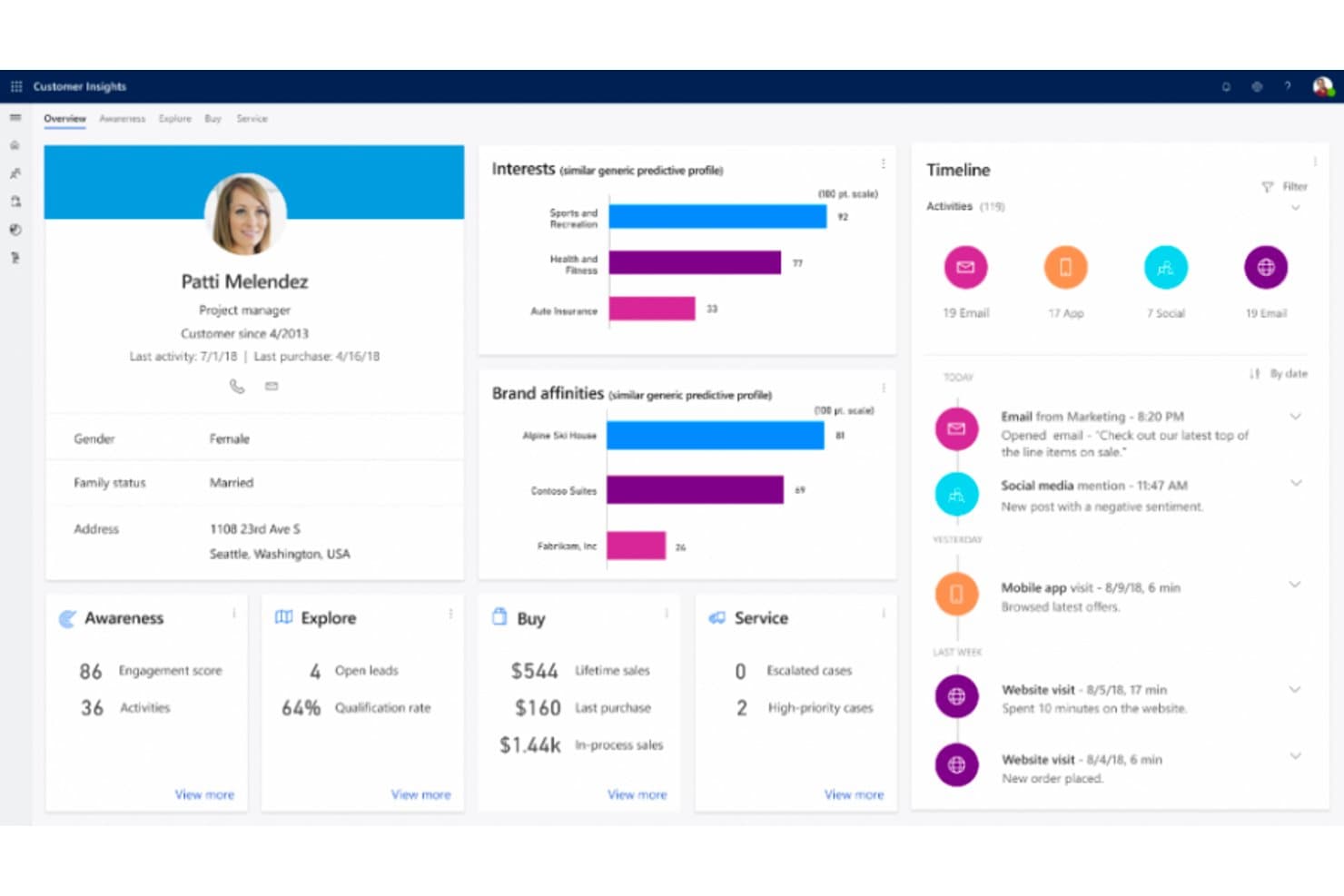
Microsoft Dynamics 365 unifies customer data into a single 360-degree profile view. Microsoft Dynamics 365 Sales is a CRM platform built by Microsoft that covers lead and opportunity management, sales process automation, forecasting, AI-powered deal insights, and conversation intelligence, with deep native integration across the Microsoft 365 ecosystem.
Who Is Microsoft Dynamics 365 Best For?
Dynamics 365 Sales is a strong fit for large organizations already running on Microsoft 365, where deep native integration across Teams, Outlook, and Power BI drives real collaboration across sales teams.
Why I Picked Microsoft Dynamics 365
Microsoft Dynamics 365 Sales earns its spot on my shortlist because large sales organizations running on Microsoft 365 get a level of native collaboration that's genuinely hard to replicate elsewhere. I'm talking about shared deal rooms in Teams, Copilot-generated opportunity summaries surfaced directly in Outlook, and conversation intelligence that flags competitor mentions and coaching moments from recorded calls. The Sales Qualification Agent can autonomously research and prioritize incoming leads, which takes real volume off your team's plate.
Microsoft Dynamics 365 Key Features
- Predictive lead scoring: AI models trained on historical outcomes rank and prioritize incoming leads so sellers focus on the highest-value opportunities first.
- Assignment rules with round-robin routing: Automatically distributes new leads and opportunities to sellers, teams, or queues based on configurable conditions.
- Quote-to-invoice transaction management: Tracks deals from draft quote through accepted order to issued invoice, with data carried forward from the opportunity record.
- Power BI analytics integration: Connects Dynamics 365 Sales data to Power BI for advanced reporting and custom dashboard creation beyond the native reporting layer.
Microsoft Dynamics 365 Integrations
Microsoft Dynamics 365 offers native integrations across the Microsoft ecosystem, including Microsoft 365, Outlook, Teams, and Power BI. It also supports marketplace integrations such as DocuSign for Dynamics and custom connections through the Dataverse Web API.
Pros and Cons
Pros:
- Opportunity-to-invoice tracking preserves deal context
- Automated lead routing reduces manual triage
- Forecasts connect pipeline activity to revenue
Cons:
- File-based migration lacks Salesforce-specific tooling
- Advanced configuration can require technical help
Learn more about Microsoft Dynamics 365: Best for project management
- Free plan available
- From $7/user/month (billed annually)
Visit WebsiteCustomer Rating:4.6/5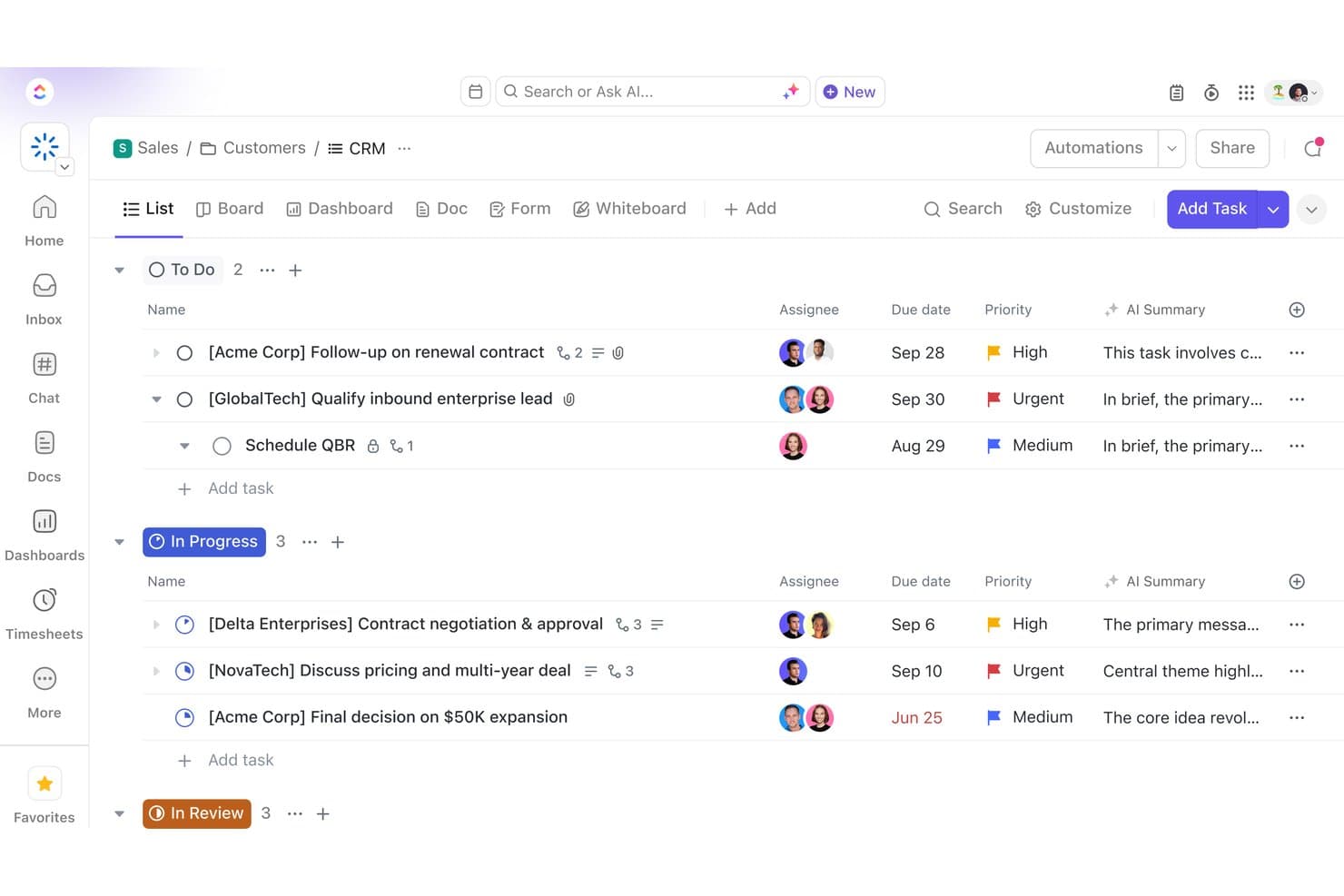
ClickUp organizes sales deals by status in a CRM list view. ClickUp is a work management platform that centralizes tasks, projects, docs, and team communication, with customizable pipelines, automation, and dashboards that can be adapted for light CRM and deal tracking.
Who Is ClickUp Best For?
ClickUp suits teams that already manage work in the platform and want to layer in lightweight deal tracking without adopting a separate CRM tool.
Why I Picked ClickUp
I've included ClickUp in my top picks because it's the only tool on this list built primarily for project management that can double as a lightweight deal-tracking layer. Teams already running work in ClickUp can build out custom pipeline stages using task types and Custom Fields like deal size, stage, and close date, without spinning up a separate tool. The HubSpot integration also lets you sync live deal and contact data directly into your ClickUp Workspace, keeping project tasks and sales context in one place.
ClickUp Key Features
- Custom Fields: Add deal size, close date, contact type, and other structured data fields directly to tasks to mirror a basic CRM record layout.
- AI Notetaker: Automatically transcribes and summarizes Zoom, Google Meet, and Microsoft Teams meetings, generating action items as ClickUp tasks.
- Workflow automations: Trigger status changes, task assignments, and notifications based on defined conditions to reduce manual pipeline updates.
- Dashboard cards: Build reporting views with charts, tables, and workload data, filterable by owner, status, date, or custom field.
ClickUp Integrations
ClickUp offers 50+ native integrations, including HubSpot, Salesforce, Slack, Microsoft Teams, Google Drive, Outlook, Google Calendar, and Zoom. It also supports Zapier, a public API, webhooks, MCP, and OAuth for custom integrations.
Pros and Cons
Pros:
- Custom fields adapt lightweight sales workflows
- Dashboards help monitor pipeline targets
- Connects deal tracking with delivery work
Cons:
- Salesforce migration needs task-based workarounds
- Contacts lack durable account relationships
Learn more about ClickUp:
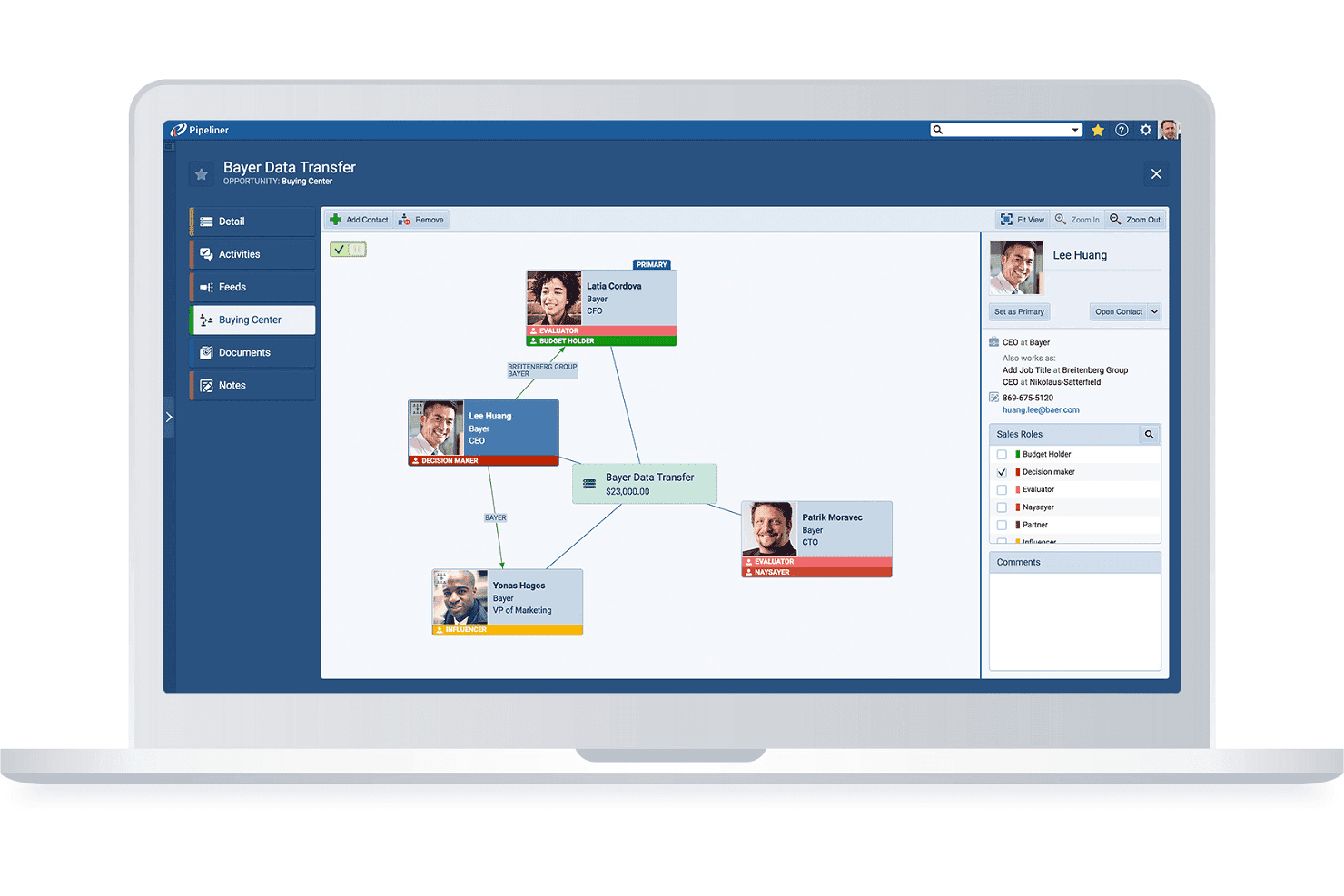
Pipeliner maps stakeholder roles and relationships within a deal's buying center. Coevera is a visual-pipeline B2B CRM that combines deal and account management, no-code workflow automation, AI-assisted sales insights, and a 200+ app integration marketplace.
Who Is Coevera Best For?
Coevera suits B2B sales teams moving away from Salesforce who want a visually intuitive CRM they can configure and manage without relying on developers or dedicated admins.
Why I Picked Coevera
Coevera earns its spot on my shortlist because it's genuinely one of the least intimidating CRMs to pick up if you're switching away from Salesforce for the first time. I love how the visual pipeline lets you drag opportunities through custom stages and flip between Kanban, bubble, chart, and map views without touching a single setting file. The no-code Automatizer builder means you can set up conditional, multi-step workflows, like auto-assigning follow-up tasks when a deal hits a specific stage, without writing a line of code or calling a developer.
Coevera Key Features
- Voyager AI sales intelligence: Get AI-generated opportunity summaries, call summaries, and email drafts directly within your CRM records.
- Import2 migration app: Migrate data from Salesforce, Microsoft Dynamics, Zoho, and other CRMs point-and-click, without building CSV files.
- Account relationship mapping: Visualize org charts, buying-center structures, and multi-stakeholder relationships across enterprise accounts.
- Automatizer workflow builder: Create multi-step, conditional automations using a visual trigger-and-action interface that requires no coding.
Coevera Integrations
Coevera lists 232 marketplace apps, with native integrations including Microsoft 365, Google Workspace, HubSpot, Zoom, and Power BI. It supports REST, GraphQL, webhooks, and MCP APIs for custom integrations.
Pros and Cons
Pros:
- Built-in reports surface pipeline movement
- Configurable fields match distinct sales workflows
- Visual pipelines clarify deal progress
Cons:
- Annual contracts limit seat reductions and refunds
- Small teams report costly, difficult implementations
Learn more about Coevera: Best for visual pipeline management
- 14-day free trial
- From $14/user/month (billed annually)
Visit WebsiteCustomer Rating:4.5/5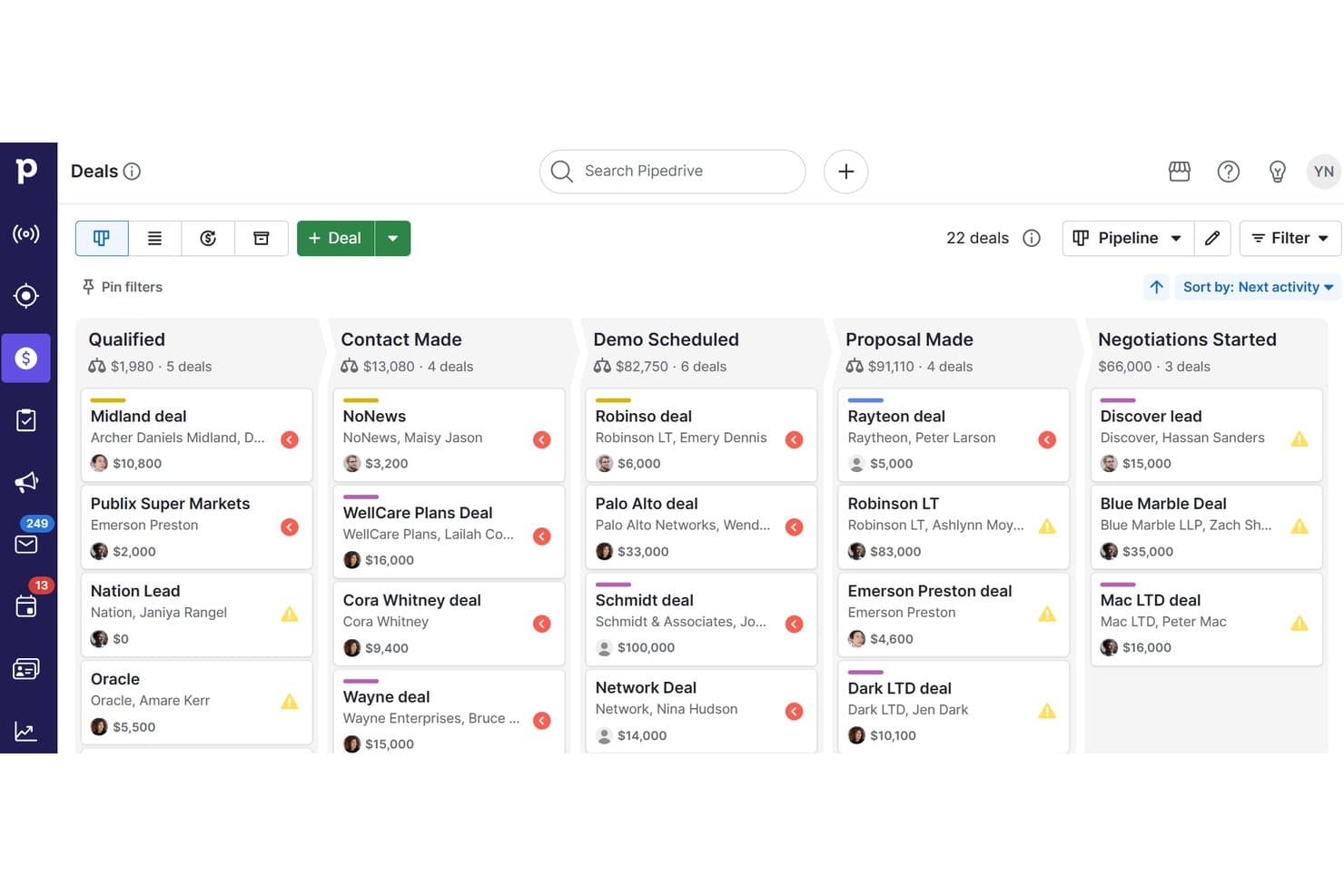
Pipedrive CRM organizes deals across pipeline stages visually. Pipedrive CRM is a sales-focused CRM platform that combines visual pipeline management, contact and lead tracking, workflow automation, email sync, campaign tools, and AI-powered reporting in one system.
Who Is Pipedrive CRM Best For?
Pipedrive CRM is a strong fit for small to mid-sized sales teams that want a visual, intuitive way to manage deals without the complexity of enterprise CRM platforms.
Why I Picked Pipedrive CRM
I picked Pipedrive CRM as one of the best because its visual pipeline management genuinely simplifies how sales teams track deals without the configuration overhead Salesforce demands. I love how colored deal cards flag at-risk opportunities before they go cold, and how pipeline stages can be customized per team without any technical expertise. Pipedrive's Nova AI also adds pre-call briefs and meeting transcripts across all plans, so reps stay prepared without switching tools.
Pipedrive CRM Key Features
- Nova meeting intelligence: Generates pre-call briefs from deal history, records and transcribes calls, and prepares CRM-ready recaps across all plans.
- Email nurturing sequences: Builds automated, personalized email and follow-up sequences to move leads through the pipeline without manual effort.
- Import2 CRM migration: Migrates data from Salesforce, HubSpot, Zoho CRM, Microsoft Dynamics and other systems, with field mapping, deduplication and history transfer.
- Workflow trigger-action automation: Configures event-based triggers and actions to automate repetitive tasks like contact updates, follow-up creation and email sending.
Pipedrive CRM Integrations
Pipedrive CRM offers native integrations with Microsoft Teams, Google Meet, WhatsApp Business, QuickBooks, DocuSign, and Gmail, plus marketplace integrations with PandaDoc, JustCall, Surfe, and Zapier. Its open API and webhooks support custom integrations.
Pros and Cons
Pros:
- Salesforce migration includes field mapping and history
- Automated reminders reduce missed follow-ups
- Visual deal cards flag at-risk opportunities
Cons:
- Shared ownership and territory workflows remain limited
- Reporting dashboards constrain detailed analysis
Learn more about Pipedrive CRM:
Other Salesforce Alternatives
There are so many more CRMs on the market that didn’t make the top 10, but that can still be valuable tools. The following Salesforce alternatives are worth checking out to see if they fit your needs:
- 11Zendesk SellBest for service-driven organizations
- 12FreshsalesBest for automated outreach
- 13SugarAIBest for complex sales organizations
- 14CopperBest for companies using G Suite
- 15AcceloBest for service-based businesses
- 16InsightlyBest for early-stage startups
- 17ScoroBest for medium-sized businesses
Related Reviews
If you still haven't found what you're looking for here, check out these tools that we've tested and evaluated.
- CRM Software
- Sales Software
- Lead Management Software
- Business Intelligence Software
- Contract Management Software
- Revenue Management System
How I Evaluate Salesforce Alternatives
I split my evaluation into two layers: the baseline CRM capabilities a RevOps team needs to track pipeline and forecast revenue, and the differentiators that determine whether a platform truly fits.
Core Functionality (Table Stakes For This List)
When I'm selecting tools for my list, I rank each one on a scale from 0 (does not offer the functionality) to 5 (excels in this area) for each core functionality listed below. Then, I calculate the tool's total score into a percentage. Each tool needs to achieve a minimum total score of 75% to be considered for inclusion.
- Contact & Account Management: I check whether contacts, accounts, and deals are linked with full activity history, not siloed in separate lists with no relationship context.
- Pipeline & Opportunity Tracking: Each tool should let you build multiple pipelines with custom stages, so your inbound and outbound motions aren't forced into one view.
- Sales Workflow Automation: I evaluate whether the platform can auto-route leads by territory, trigger follow-up tasks on stage changes, and run multi-step sequences.
- Reporting & Forecasting: Dashboards need to support custom metrics like weighted pipeline by rep or segment, not just pre-built charts you can't modify.
- Native & Third-Party Integrations: I look at how well the CRM connects with tools like HubSpot Marketing Hub, Marketo, Intercom, or Stripe via native connectors and open API.
- Custom Objects & Data Models: Your RevOps team should be able to create custom objects and fields that mirror your revenue process without developer support.
Once I have a list of tools that meet this criteria, I consider what sets each platform apart.
Differentiating Factors (What Sets Vendors Apart)
Here's how I compare and contrast different vendors:
Standout Features
AI-powered deal scoring is a big differentiator. I look at whether a platform can flag at-risk deals and suggest next steps without relying on a third-party tool. Revenue intelligence features like automatic call logging and activity capture also matter, since they reduce the data entry burden that tanks CRM adoption. Beyond insights, I evaluate whether the CRM includes native sales engagement sequences. When reps can run multi-channel outreach directly from the pipeline view, you cut out a standalone tool and keep all activity data in one place.
Beyond Features
Total cost of ownership is one of the first things I evaluate. Many Salesforce alternatives include automation and reporting at their base tier, while Salesforce gates them behind add-ons. Time to value matters just as much. I look at whether a RevOps team can self-implement the platform in weeks rather than months, without hiring certified consultants. Segment fit also plays a role. A 15-person sales team and a 500-rep enterprise org have very different needs, so I consider whether the platform scales to match the buyer's actual stage of growth.
Why Look For a Salesforce Alternative?
Salesforce is a renowned customer relationship management (CRM) software that offers an array of tools for sales management, customer service, marketing automation, and analytics. Its comprehensive suite is designed to cater to a wide range of business needs, facilitating the management of customer interactions and streamlining various business processes. However, despite its extensive capabilities, some users might seek alternatives to Salesforce. This could be due to factors like its pricing, which might be prohibitive for smaller businesses or startups. Additionally, the complexity and vastness of Salesforce's features can be overwhelming for some users, particularly those with simpler needs or limited technical expertise. The one-size-fits-all approach of Salesforce may not align with the specific requirements of certain businesses, especially those looking for more industry-specific functionalities.
Alternative software to Salesforce can present several advantages. Many alternatives offer more cost-effective solutions with flexible pricing plans, making them accessible to a broader range of businesses, especially smaller ones or those just starting. These alternatives often provide a more user-friendly experience with a simpler interface and more straightforward functionalities, ideal for businesses that prioritize ease of use and quick implementation. Customization is another significant advantage, as some Salesforce alternatives are more adaptable to the specific needs and workflows of different industries, offering tailored solutions that better align with particular business models. And smaller or more niche CRM platforms might offer more personalized customer support, ensuring that businesses receive dedicated assistance tailored to their unique challenges. These benefits make Salesforce alternatives an attractive option for companies seeking CRM solutions that align more closely with their budget, complexity requirements, and specific business needs.
How to Choose Salesforce Alternatives
With so many different Salesforce alternatives available, it can be challenging to make decisions on what tool is going to be the best fit for your needs.
As you're shortlisting, trialing, and selecting Salesforce alternatives, consider the following:
- What problem are you trying to solve - Start by identifying the Salesforce feature gap you're trying to fill to clarify the features and functionality the tool needs to provide.
- Who will need to use it - To evaluate cost and requirements, consider who'll be using the software and how many licenses you'll need. You'll need to evaluate if it'll just be the revenue operation leaders or the whole organization that will require access. When that's clear, it's worth considering if you're prioritizing ease of use for all or speed for your Salesforce alternative power users.
- What other tools it needs to work with - Clarify what tools you're replacing, what tools are staying, and the tools you'll need to integrate with, such as accounting, CRM, or HR software. You'll need to decide if the tools will need to integrate together or if you can replace multiple tools with one consolidated Salesforce alternative.
- What outcomes are important - Consider the result that the software needs to deliver to be considered a success. Consider what capability you want to gain or what you want to improve, and how you will be measuring success. For example, an outcome could be the ability to get greater visibility into performance. You could compare Salesforce alternative features until you’re blue in the face but if you aren’t thinking about the outcomes you want to drive, you could be wasting a lot of valuable time.
- How it would work within your organization - Consider the software selection alongside your workflows and delivery methodology. Evaluate what's working well and the areas that are causing issues that need to be addressed. Remember every business is different — don’t assume that because a tool is popular that it'll work in your organization.
Trends in Salesforce Alternatives
Salesforce alternatives are innovating aggressively to carve out their market share by offering unique functionalities, addressing specific pain points, and delivering value to businesses seeking CRM capabilities beyond what Salesforce offers. Here's an overview of the current trends based on recent software updates, press releases, and release logs:
Emerging Trends in Salesforce Alternatives:
- Increased Emphasis on AI and Machine Learning:
- Many Salesforce alternatives are integrating AI to provide predictive analytics, intelligent automation, and enhanced decision-making capabilities, aligning with businesses' needs to leverage data for strategic advantage.
- Enhanced Integration Capabilities:
- With the growing need for interconnected business tools, Salesforce alternatives are expanding their integration ecosystems, facilitating seamless workflows across various applications and platforms.
Novel and Unusual Functionalities:
- Blockchain Integration:
- Some Salesforce alternatives are exploring blockchain technology to offer transparent, secure, and decentralized data management, a novel approach in the CRM space.
- IoT Connectivity:
- Integrating IoT data into CRM systems, these alternatives allow businesses to leverage real-time data from connected devices, enhancing customer insights and operational efficiency.
Most In-Demand Features:
- Comprehensive Analytics and Reporting:
- Businesses are seeking advanced analytics and reporting tools within their CRMs to gain deeper insights into their sales pipelines, customer behaviors, and market trends.
- Mobile Accessibility:
- As workforces become more mobile, demand for robust mobile CRM applications continues to grow, enabling sales teams to access vital information and perform tasks on the go.
Declining Features:
- Overly Complex Customization:
- There is a shift away from overly complex customization options that require significant IT involvement, as businesses prefer more straightforward, user-friendly customization.
- Isolated Systems:
- Standalone CRM solutions that do not integrate well with other business systems are becoming less popular as businesses seek more integrated, holistic software ecosystems.
Salesforce alternatives empower businesses with the insights, efficiency, and flexibility they need to excel in managing their revenue operations. As you consider these alternatives, focus on how their evolving capabilities align with your strategic needs, ensuring your chosen solution drives value and supports your business objectives.
Features of Salesforce Alternatives
When seeking Salesforce alternatives to manage revenue operations, it's crucial to identify features that align with your business needs, enhance your team's efficiency, and offer insights to drive your sales processes. Each CRM system comes with its set of functionalities, but certain key features are essential to support revenue operations effectively. Here are the most important features to look for:
- Comprehensive Contact Management: Centralizes all customer information.
- Enables a unified view of customer interactions, improving relationship management and personalization of sales efforts.
- Robust Sales Pipeline Management: Visualizes stages of the sales process.
- Helps teams monitor progress, identify bottlenecks, and focus on deals that are most likely to close, directly impacting revenue.
- Detailed Analytics and Reporting: Delivers actionable insights.
- Provides data-driven guidance for strategic decisions, helping optimize sales strategies and revenue outcomes.
- Effective Lead Management: Streamlines lead capture and nurturing.
- Ensures potential customers are efficiently engaged and advanced through the sales funnel, increasing conversion rates.
- Task and Activity Tracking: Organizes follow-ups and responsibilities.
- Keeps sales teams accountable and ensures timely actions on opportunities, contributing to revenue generation.
- Email Integration and Tracking: Centralizes communication.
- Allows for seamless interaction with prospects and customers while keeping a log of all communications for future reference.
- Customization and Scalability: Adapts to business growth and changes.
- Ensures the CRM can evolve with your business, supporting new processes and expanding sales teams without losing effectiveness.
- User-Friendly Interface: Promotes adoption and reduces training time.
- A straightforward and intuitive interface ensures that team members can efficiently utilize the CRM to its full potential.
- Mobile Access: Facilitates on-the-go usage.
- Provides sales teams with the ability to access crucial information and perform tasks from anywhere, enhancing productivity and responsiveness.
- Integration Capabilities: Connects with other business tools.
- Allows for a more streamlined workflow by integrating with various applications, ensuring data consistency and reducing manual data entry.
In selecting a Salesforce alternative for managing revenue operations, focus on solutions that offer these critical features to support your sales processes comprehensively. These functionalities not only facilitate more strategic and informed decision-making but also enhance the day-to-day efficiency and effectiveness of your sales teams, ultimately driving better revenue results.
Benefits of Salesforce Alternatives
Exploring Salesforce alternatives can offer distinct advantages, especially for businesses with unique needs or budget constraints. These alternatives often provide essential CRM functionalities tailored to different industry requirements, business sizes, or specific user preferences, enhancing the overall efficiency and effectiveness of revenue operations. Here are five primary benefits of considering Salesforce alternatives:
- Cost-Effectiveness: Reduces operational expenses.
- By choosing a more affordable CRM solution, businesses can allocate their resources to other areas, optimizing overall investment and reducing costs.
- Customization and Flexibility: Tailors to specific business needs.
- Salesforce alternatives often offer greater flexibility in customization, allowing businesses to adapt the CRM to their unique processes and workflows, enhancing operational efficiency.
- Simplified User Experience: Enhances ease of use.
- Alternatives may provide more intuitive interfaces and streamlined functionalities, reducing the learning curve and increasing user adoption rates.
- Niche Features: Addresses specific industry requirements.
- Some Salesforce alternatives focus on particular sectors or business sizes, offering specialized features that are more relevant and beneficial for those specific audiences.
- Personalized Customer Support: Offers dedicated assistance.
- Smaller CRM providers can sometimes afford to provide more personalized support, ensuring that users receive timely and effective help, maximizing the software's value for the organization.
Costs & Pricing for Salesforce Alternatives
Exploring Salesforce alternatives provides an array of CRM solutions catering to different business needs and budgets. These alternatives often present diverse pricing structures and plans, each designed to suit various organizational sizes, industries, and operational complexities. Here's a general overview of the typical plan options and their pricing for Salesforce alternatives:
Plan Comparison Table For Salesforce Alternatives
| Plan Type | Average Price | Common Features Included |
|---|---|---|
| Plan TypeBasic | Average Price$0 - $25/ user/month | Common Features IncludedContact management, task tracking, basic reporting, lead management |
| Plan TypeIntermediate | Average Price$25 - $65/ user/month | Common Features IncludedSales forecasting, custom reports, advanced integrations, automation features |
| Plan TypeAdvanced | Average Price$65+/ user/month | Common Features IncludedAI capabilities, advanced analytics, increased customization, premium support |
| Plan TypeFree Option | Average Price$0 | Common Features IncludedLimited contacts, basic features, community support |
When evaluating Salesforce alternatives, consider your business's specific needs, the scale of your operations, and the potential for growth. Opting for a plan that aligns with your current requirements while offering room for expansion is crucial. Ensure the chosen CRM not only fits your budget but also provides the necessary features to drive your business's revenue operations effectively.
Salesforce Alternatives Frequently Asked Questions
Still thinking about Salesforce alternatives? Here are some of the common questions people are asking before making the jump.