

Let’s be real—sorting through sales and marketing tools that promise to do it all is no small task. One promises better lead tracking, the other swears it’ll skyrocket your campaign ROI. Meanwhile, you’re stuck trying to juggle it all—managing leads, running campaigns, and keeping an eye on revenue. Sound familiar? The right tool could save you hours, but the wrong one might just add to the chaos. So, how do you decide which one will actually solve your headaches?
That's where I come in. I've spent the time setting up, wrestling, and testing enough software to know what’s worth your time (and what’s not).
In this article, I’ll break down the top software solutions for tackling your sales and marketing challenges. Think clear insights, best use cases, and pricing comparisons to help you make the right call. Here are my top picks for the best sales and marketing software solutions.
Why Trust Our Software Recommendations
6,700+
Reviews
20
Industry experts
16+
Evaluation factors
14
Years
Our reviews reflect our independent judgment—not a sales pitch. Learn how we stay transparent.
For this guide, we evaluated tools using hands-on testing and independent research, scoring tools using our selection criteria.
Our reviews reflect our human editorial judgment, not a sales pitch.
Sales And Marketing Software Comparison Table
This comparison table summarizes pricing details for my top sales and marketing software selections:
| Tool | Best For | Trial Info | Price | ||
|---|---|---|---|---|---|
| 1 | Best for real-time B2B data enrichment | Free plan + 14-day free trial + free demo available | From $49/user/month (billed annually) | Website | |
| 2 | Best for AI-driven sales outreach | 14-day free trial | From $25/user/month (billed annually) | Website | |
| 3 | Best for small business affordability | Free plan + free demo available | From $13.79/user/month (billed annually) | Website | |
| 4 | Best for go-to-market strategies | Free demo available | Pricing upon request | Website | |
| 5 | Best for automating customer journeys | 14-day free trial | From $199/month | Website | |
| 6 | Best for email marketing automation | 14-day free trial + free demo available | From $15/month (billed annually) | Website | |
| 7 | Best for event marketing tools | 14-day free trial + free demo available | From $12/month | Website | |
| 8 | Best for project management integration | 14-day free trial | From $29/user/month (billed annually) | Website | |
| 9 | Best for large enterprise teams | 30-day free trial | From $25/user/month | Website | |
| 10 | Best for advanced analytics | Free demo available | Pricing upon request | Website |


Best Sales and Marketing Software Reviews
Below are my detailed summaries of the best marketing and sales tools that made it onto my shortlist. My reviews offer a detailed look at the key features, pros & cons, integrations, and ideal use cases of each tool to help you find the best one for you.
 Best for real-time B2B data enrichment
- Free plan + 14-day free trial + free demo available
- From $49/user/month (billed annually)
Visit WebsiteCustomer Rating:4.5/5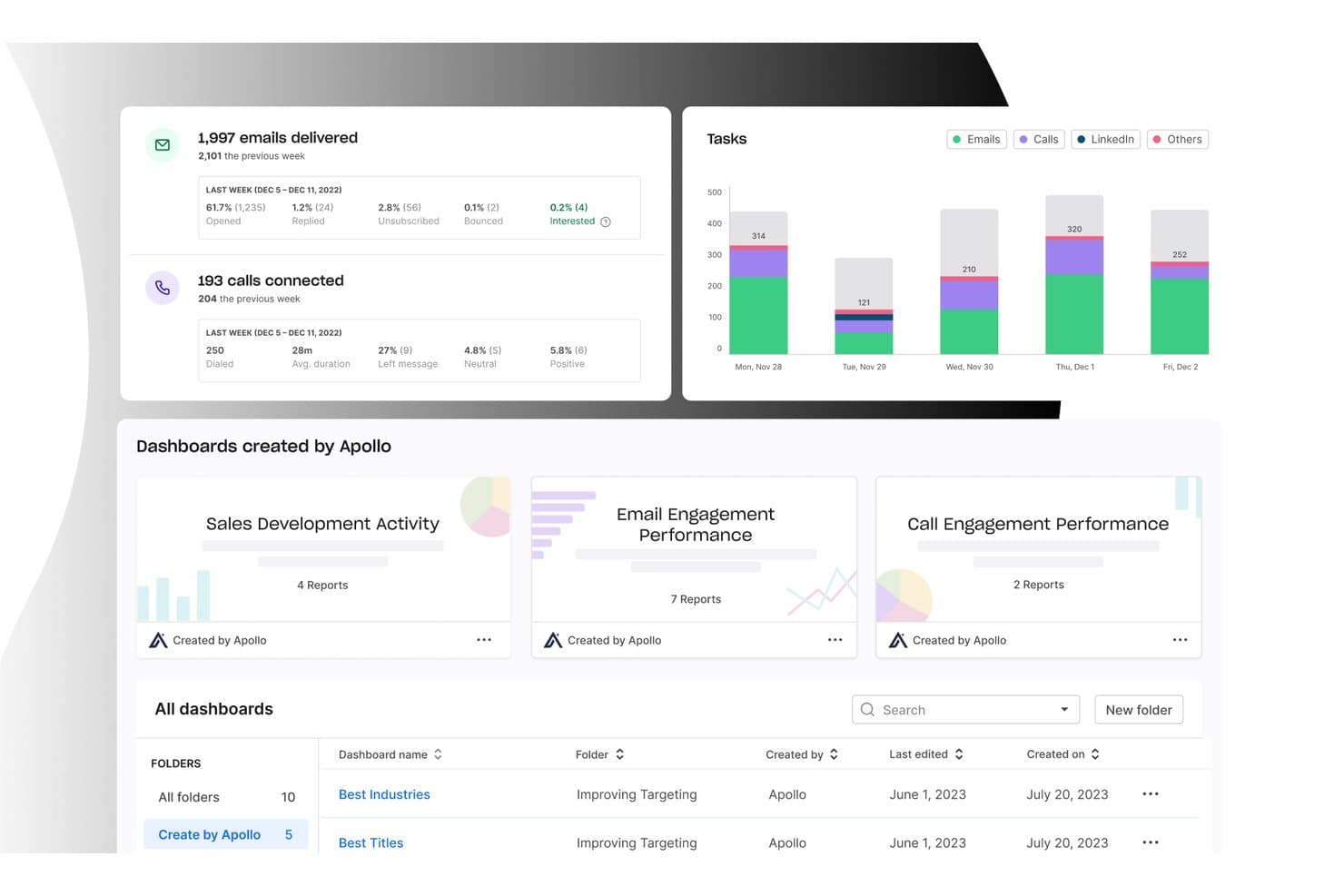
Apollo.io offers a detailed analytics dashboard displaying email delivery stats, call connection metrics, task breakdowns by channel, and pre-built sales and marketing performance dashboards. Apollo.io is an AI-powered sales platform that combines a 265M+ contact B2B database with sales engagement sequencing, data enrichment, lead routing, and a built-in dialer.
Who Is Apollo.io Best For?
Apollo.io suits small-to-mid-sized sales teams and SDR-heavy organizations that run high-volume outbound prospecting from a single platform.
Why I Picked Apollo.io
Apollo.io earns its spot on my shortlist because its waterfall enrichment pulls from multiple data providers in sequence, filling gaps that a single-source tool would miss. I like that enrichment runs on a schedule, so my CRM contact records update automatically without manual exports or CSV uploads. The AI Research feature lets me define custom fields, like whether a company uses a specific technology, and Apollo populates them across thousands of records at once.
Apollo.io Key Features
- Bi-directional CRM sync: Keep contacts and activity updated between Apollo, Salesforce, and HubSpot with field mapping and auto-sync.
- Multi-channel sales sequences: Automate outreach using email, calls, LinkedIn tasks, and manual steps in custom workflows.
- Deal and pipeline management: Track deals, stages, and progress with customizable pipeline dashboards and opportunity records.
- Account-based prospecting tools: Build dynamic account lists, identify buying committees, and organize outbound by account.
Apollo.io Integrations
Apollo.io offers native integrations with Salesforce, HubSpot, Outreach, Airtable, Amplitude, Asana, and Gmail, and provides an API for custom integrations.
Pros and Cons
Pros:
- AI scoring surfaces in-market accounts automatically
- Dialer, sequencing, and enrichment in one platform
- Large, continuously refreshed B2B contact database
Cons:
- Email sending limits frustrate high-volume teams
- Data accuracy drops for non-US contacts
Learn more about Apollo.io: Best for AI-driven sales outreach
- 14-day free trial
- From $25/user/month (billed annually)
Visit WebsiteCustomer Rating:4.4/5
CloudTalk dashboard displaying real-time call metrics and performance analytics for sales teams. For businesses seeking to elevate their sales and marketing efforts, CloudTalk offers a sophisticated cloud call center solution that stands out by enhancing communication and operational efficiency. Tailored for industries that rely on robust customer interactions, CloudTalk is ideal for teams looking to overcome challenges related to call management and customer engagement. With features designed to streamline processes and improve customer experiences, it addresses the needs of organizations aiming to optimize their sales and marketing workflows.
Why I Picked CloudTalk
I picked CloudTalk because of its AI-driven tools that significantly enhance sales outreach and customer engagement. The platform's AI Dialer not only automates dialing but also incorporates voicemail drop and answering machine detection, which helps your team maximize productive call time. Furthermore, its AI Conversation Intelligence provides automatic call summaries and sentiment analysis, enabling your team to gain insights and improve interactions with clients. These features address the core needs of sales and marketing teams by providing actionable data and enhancing communication capabilities.
CloudTalk Key Features
In addition to its AI-driven functionalities, I also found CloudTalk offers several other valuable features:
- Local Numbers: Provides access to local numbers in over 160 countries, allowing your business to maintain a local presence globally.
- Real-Time Monitoring: Enables live call listening and performance analytics, giving you the tools to monitor and improve your team's effectiveness.
- Customizable Call Routing: Allows you to tailor call flows to suit your specific business needs, ensuring that calls are directed to the right agents.
- WhatsApp Messaging: Supports communication through WhatsApp, expanding your team's ability to engage with customers on their preferred platform.
CloudTalk Integrations
Integrations include HubSpot, Salesforce, Zoho, Freshdesk, Pipedrive, Zendesk, Microsoft Dynamics 365, Intercom, Slack, and Shopify.
Pros and Cons
Pros:
- AI-powered conversation intelligence tools
- Multiple outbound dialer modes
- Extensive CRM integration options
Cons:
- Parallel dialer stability issues
- International number availability can be inconsistent
Learn more about CloudTalk: Best for small business affordability
- Free plan + free demo available
- From $13.79/user/month (billed annually)
Visit WebsiteCustomer Rating:4.7/5
EngageBay simplifies customer management, marketing automation, and sales. EngageBay is an all-in-one marketing, sales, and service platform targeting small businesses. It helps manage customer interactions, automate marketing campaigns, and streamline sales processes.
Why I picked EngageBay: It's ideal for small businesses due to its affordability and comprehensive feature set. EngageBay combines CRM, marketing automation, and helpdesk tools in one package, providing excellent value. You can automate your marketing campaigns with ease, saving time and effort. The platform's capability to manage customer interactions makes it a practical choice for small teams.
Standout features & integrations:
Features include a landing page builder that lets you create and customize pages without coding. The CRM component offers contact management and deal tracking to keep your sales organized. Its marketing automation tools allow you to nurture leads through email sequences.
Integrations include Mailchimp, Zapier, Xero, Shopify, QuickBooks, Stripe, Twilio, Mandrill, SendGrid, and Docusign.
Pros and Cons
Pros:
- Affordable for small businesses
- Effective deal tracking
- Customizable landing pages
Cons:
- Steeper learning curve for new users
- Limited advanced features
Learn more about EngageBay: Best for go-to-market strategies
- Free demo available
- Pricing upon request
Visit WebsiteCustomer Rating:4.7/5
HockeyStack’s Odin AI dashboard visualizing full-funnel performance and sales-qualified leads by channel. For businesses aiming to refine their sales and marketing strategies, HockeyStack offers a unique blend of AI-driven insights and analytics designed to enhance go-to-market efforts. Whether you're a sales professional seeking to resurrect closed deals or a marketer focused on optimizing budgets, HockeyStack provides the tools you need to improve customer acquisition and retention. Its seamless integration with various sales and marketing software makes it an appealing choice for teams looking to unify their data and drive actionable insights.
Why I Picked HockeyStack
I picked HockeyStack because it provides a distinctive approach to sales and marketing challenges by offering AI-driven analytics that cater specifically to improving go-to-market strategies. With features like customizable attribution reporting and buyer journey tracking, you can gain comprehensive insights into customer interactions, empowering your team to make informed decisions. Additionally, account scoring helps prioritize efforts on the most promising leads, ensuring your resources are directed where they can have the most impact.
HockeyStack Key Features
In addition to its standout analytics capabilities, I also found several other features that enhance its utility for sales and marketing teams.
- Full-Funnel Visibility: This feature provides a comprehensive view of the entire customer journey, allowing your team to identify and address potential bottlenecks in the sales process.
- Deal Resurrection: Helps your sales team revisit and potentially recover lost deals by analyzing past interactions and suggesting actionable steps.
- Marketing Budget Optimization: Offers insights into budget allocation to maximize return on investment and improve campaign performance.
- Next Best Step Generators: Provides actionable recommendations for progressing open deals, ensuring your sales pipeline remains active and productive.
HockeyStack Integrations
Integrations include Salesforce, HubSpot, Marketo, Google Analytics, Slack, Microsoft Teams, Intercom, Drift, Pendo, and Zendesk.
Pros and Cons
Pros:
- Unifies marketing, product, and sales data
- Customizable attribution reporting across buyer journeys
- AI-driven insights support go-to-market decision-making
Cons:
- Advanced features may require onboarding time
- Pricing not publicly available
Learn more about HockeyStack: Best for automating customer journeys
- 14-day free trial
- From $199/month
Visit WebsiteCustomer Rating:4.5/5
Ortto automates customer engagement, personalizes journeys, and integrates data. Ortto is a marketing automation tool designed for businesses looking to automate customer engagement. Its main user base includes marketers and sales teams focused on creating personalized customer journeys. The platform excels at integrating customer data and automating marketing processes.
Why I picked Ortto: Ortto specializes in automating customer journeys with features like personalized messaging and notifications. Its customer data platform enables you to integrate and segment customer data efficiently. AI-powered tools assist in creating optimized messages and emails. The platform's analytics provide insights to visualize data, supporting marketers in decision-making.
Standout features & integrations:
Features include customer data integration, personalized messaging, and AI-driven email creation. Ortto's analytics help visualize customer data, making it easier to understand trends and behaviors. The platform supports no-code integrations, enhancing its usability across various applications.
Integrations include Shopify, Salesforce, HubSpot, Mailchimp, Zapier, Google Analytics, Slack, WordPress, Zendesk, and Intercom.
Pros and Cons
Pros:
- Strong customer support
- Scales well with growth
- Easy to set up
Cons:
- Integration with existing tech stack can be tricky
- Limited customization options
Learn more about Ortto: Best for email marketing automation
- 14-day free trial + free demo available
- From $15/month (billed annually)
Visit WebsiteCustomer Rating:4.4/5
ActiveCampaign supports email marketing, automation, and customer tracking. ActiveCampaign is an email marketing and automation sales software platform designed for small to medium businesses. It helps your team manage email campaigns, track customer interactions, and automate various marketing tasks.
Why I picked ActiveCampaign: It excels in email marketing automation, making it ideal for businesses that rely heavily on email engagement. Its automation workflows allow you to send targeted messages based on customer behavior. You can create personalized campaigns without coding skills. The platform's segmentation features help tailor communications to specific audience segments, enhancing your email marketing efforts.
Standout features & integrations:
Features include a visual automation builder, which simplifies creating complex workflows. Its CRM capabilities let you manage customer relationships right alongside your marketing efforts. The email design tools make it easy to create professional-looking emails without any design experience.
Integrations include Shopify, Salesforce, WordPress, Zapier, WooCommerce, Facebook, Stripe, PayPal, Google Analytics, and Eventbrite.
Pros and Cons
Pros:
- Advanced email tracking
- Effective customer segmentation
- Flexible automation workflows
Cons:
- Requires time to master features
- Can be overwhelming at first
Learn more about ActiveCampaign: Best for event marketing tools
- 14-day free trial + free demo available
- From $12/month
Visit WebsiteCustomer Rating:4.2/5
ConstantContact is an email platform for managing campaigns and event marketing. ConstantContact is an email marketing platform primarily used by small businesses and nonprofits. It offers tools to create and manage email campaigns and event marketing.
Why I picked ConstantContact: It's ideal for businesses focused on event marketing. The tool provides features to create and promote events, track registrations, and manage attendees. You can easily design custom emails with its drag-and-drop editor. The reporting features give insights into campaign performance, helping you refine your strategies.
Standout features & integrations:
Features include a drag-and-drop email editor for easy customization. The event management tools let you create, promote, and track events. You also get access to social media posting and monitoring from within the platform.
Integrations include Shopify, WooCommerce, Eventbrite, Facebook, Salesforce, WordPress, QuickBooks, Zapier, Google Analytics, and Outlook.
Pros and Cons
Pros:
- Social media tools included
- Easy email customization
- Strong focus on event marketing
Cons:
- Can be pricey at scale
- Limited advanced features
Learn more about Constant Contact: Best for project management integration
- 14-day free trial
- From $29/user/month (billed annually)
Visit WebsiteCustomer Rating:4.1/5
Insightly integrates CRM, sales tracking, and project management into one platform for SMBs. Insightly is a CRM and project management tool designed for small and mid-sized businesses. It helps teams manage customer relationships, track sales, and oversee projects from start to finish.
Why I picked Insightly: It combines CRM with project management, making it ideal for businesses needing both functionalities in one platform. You can track sales opportunities and manage detailed project timelines effectively. The tool provides deep reporting features to analyze business performance. Its pipeline management helps prioritize tasks and improve workflow efficiency.
Standout features & integrations:
Features include a customizable dashboard that allows your team to focus on important metrics. The workflow automation tool helps automate repetitive tasks, saving you time. Insightly also offers email templates to streamline communication with clients.
Integrations include QuickBooks, Mailchimp, Microsoft Outlook, Google Workspace, Slack, Dropbox, Evernote, Xero, Zapier, and PieSync.
Pros and Cons
Pros:
- Workflow automation capabilities
- Detailed project timelines
- Combines CRM and project management
Cons:
- Steep learning curve initially
- Requires technical setup
 Best for large enterprise teams
- 30-day free trial
- From $25/user/month
Visit WebsiteCustomer Rating:4.4/5
Salesforce is a CRM tool for managing relationships, automating tasks, and analytics. Salesforce is a comprehensive CRM and marketing tool designed for large enterprises. It helps salespeople manage customer relationships, automate marketing tasks, and analyze data for better forecasting.
Why I picked Salesforce: Its vast suite of tools caters to large enterprise teams, offering unparalleled scalability and customization. Salesforce provides detailed customer insights, enabling you to tailor marketing strategies effectively. You can automate complex workflows, reducing manual tasks and increasing efficiency. Its extensive analytics offer deep insights into customer behavior, making it ideal for large teams looking for more ways to close deals.
Standout features & integrations:
Features include advanced reporting tools, customizable dashboards, and AI-driven insights. Salesforce's marketing automation capabilities allow you to create personalized journeys for customers. The platform's collaboration tools support teams to work together.
Integrations include Slack, Tableau, Mailchimp, Marketo, LinkedIn, Zoom, Google Workspace, QuickBooks, Docusign, and Dropbox.
Pros and Cons
Pros:
- Frequent updates and improvements
- Scales with large data sets
- Highly customizable workflows
Cons:
- Can be overwhelming for small teams
- Steep learning curve
Learn more about Salesforce : Best for advanced analytics
- Free demo available
- Pricing upon request
Visit WebsiteCustomer Rating:4.1/5
Adobe Marketo Engage is a platform for B2B marketers to manage leads and analytics. Adobe Marketo Engage is a marketing automation platform designed for large enterprises and B2B marketers. It helps manage customer engagement, lead nurturing, and analytics for effective marketing strategies.
Why I picked Adobe Marketo Engage: It's tailored for those needing advanced analytics to drive marketing decisions. The platform offers detailed reporting and insights to optimize your campaigns. Its lead nurturing capabilities allow for personalized customer journeys. You can analyze customer behavior deeply to refine your marketing strategies continuously.
Standout features & integrations:
Features include a powerful email marketing tool that helps you deliver personalized campaigns. The platform's lead management system ensures that you can score and prioritize leads effectively. You also have access to a robust event marketing tool to manage webinars and in-person events.
Integrations include Salesforce, Microsoft Dynamics 365, LinkedIn, Facebook, Zoom, GoToWebinar, Slack, Eventbrite, Optimizely, and ON24.
Pros and Cons
Pros:
- Scales well with enterprise needs
- Detailed analytics and reporting
- Extensive lead management options
Cons:
- Requires technical expertise
- Steep learning curve
Learn more about Adobe Marketo Engage:
Other Sales and Marketing Software
Here are some additional sales and marketing software options that didn’t make it onto my shortlist, but are still worth checking out:
- 11BrevoBest for multi-channel messaging
- 12NutshellBest for ease of use
- 13PitchMonsterBest for accelerating new rep onboarding
- 14Bitrix24Best for team collaboration features
- 15FreshsalesBest for AI-driven sales insights
- 16SugarAIBest for customization options
- 17Zoho CampaignsBest for email marketing analytics
- 18Zoho CRMBest for multichannel communication
- 19Close CRMBest for inside sales teams
- 20HubSpot Sales HubBest for inbound sales teams
How I Evaluate Sales and Marketing Software
I split my evaluation into baseline requirements—like CRM sync, lead scoring, and pipeline reporting—and differentiators that set one platform apart from another.
Core Functionality (Table Stakes For This List)
When I'm selecting tools for my list, I rank each one on a scale from 0 (does not offer the functionality) to 5 (excels in this area) for each core functionality listed below. Then, I calculate the tool's total score into a percentage. Each tool needs to achieve a minimum total score of 75% to be considered for inclusion.
- CRM Integration & Data Sync: I check whether the platform syncs contacts, accounts, and opportunities bi-directionally with major CRMs or functions as one natively.
- Lead Management & Scoring: How leads are captured, scored, and routed matters—I look for configurable rules that reflect real MQL-to-SQL handoff workflows.
- Campaign & Outreach Automation: Multi-channel automation with behavioral triggers is key, like enrolling a prospect in a sales sequence after they attend a webinar.
- Pipeline & Revenue Analytics: I evaluate whether dashboards cover conversion rates, stage velocity, and forecasting rather than just surface-level activity counts.
- Segmentation & Audience Targeting: Dynamic lists that update based on firmographic and engagement data help teams target the right accounts at the right time.
- Sales & Marketing Alignment Tools: Shared workflows, unified account views, or coordinated plays between teams show whether the platform bridges the GTM gap.
Once I have a list of tools that meet the criteria, I consider what sets each platform apart.
Differentiating Factors (What Sets Vendors Apart)
Here's how I compare and contrast different vendors:
Standout Features
I look for AI-powered insights that go beyond dashboards—deal risk alerts, next-best-action recommendations, and conversation intelligence that flags buyer sentiment shifts. Intent and enrichment data is another differentiator; platforms that surface which accounts are actively researching your category help teams prioritize outreach. Account-based orchestration also matters when it coordinates plays across teams, like triggering a rep task when a target account crosses an engagement threshold.
Beyond Features
Integration ecosystem is one of the first things I evaluate. A sales and marketing platform that can't connect to your CRM, data warehouse, or BI tools creates the exact silos RevOps teams are hired to eliminate. Scalability matters too—I check whether the platform supports multi-brand setups, complex team hierarchies, and high-volume data as your GTM org grows. Pricing transparency rounds out my evaluation; I look at how costs scale with contacts, seats, or usage tiers so there are no surprises at renewal.
How to Choose Sales and Marketing Software
It’s easy to get bogged down in long feature lists and complex pricing structures. To help you stay focused as you work through your unique software selection process, here’s a checklist of factors to keep in mind:
| Factor | What to Consider |
| Scalability | Ensure the software can grow with your business. Look for tools that can handle increased data and users without performance issues. |
| Integrations | Check if it integrates with your existing tools like CRM, email, and analytics platforms for smooth data flow and efficiency. |
| Customizability | Look for software that lets you tailor features to fit your business processes. Custom dashboards and reports are a plus. |
| Ease of Use | Choose a user-friendly interface that your team can adopt quickly without extensive training. |
| Budget | Consider both upfront costs and ongoing expenses. Make sure the software fits your budget without cutting essential features. |
| Security Safeguards | Prioritize tools with strong data protection measures, especially if you handle sensitive customer information. |
Trends In Sales and Marketing Software
In my research, I sourced countless product updates, press releases, and release logs from different sales and marketing software vendors. Here are some of the emerging trends I’m keeping an eye on:
- AI-driven personalization: More tools are using AI to tailor marketing messages based on user behavior. This makes campaigns more effective by reaching the right audience with the right message.
- Voice search optimization: As voice-activated devices become common, optimizing content for voice search has become a more common tactic. This trend helps businesses capture leads from voice queries. Some CRM systems are beginning to incorporate features that support voice data entry and retrieval.
- Data privacy enhancements: With stricter regulations worldwide, vendors are improving data privacy features. This ensures compliance and builds trust with users. Many companies are now providing secure data handling options and transparent privacy policies.
- Unified customer profiles: Combining data from different channels into a single profile is gaining traction. This trend helps businesses get a holistic view of customer interactions. Vendors like HubSpot are working on creating more integrated profiles to enhance user experience.
- Video marketing integration: As video content becomes more popular, incorporating video into marketing strategies is key. Sales and marketing software are adding video creation and management features.
What Is Sales and Marketing Software?
Sales and marketing software is a set of tools that help businesses manage customer relationships, marketing campaigns, and sales processes. These tools are generally used by sales teams, marketers, and customer service professionals to increase efficiency and improve customer interactions. Features like lead management, email marketing, and analytics support building customer relationships and executing effective campaigns. Overall, these tools help businesses grow by optimizing sales and marketing efforts.
Features of Sales and Marketing Software
When selecting sales and marketing software, keep an eye out for the following key features:
- Lead management: Tracks and organizes potential customers to ensure timely and effective follow-up actions, whilst supporting efficient lead generation and nurturing those top-quality leads.
- Email marketing: Automates sending personalized emails to engage with customers at various stages of the sales funnel, enhancing the overall customer experience.
- Analytics and reporting: Provides data insights using advanced analytics tools to monitor sales and marketing activities, ensuring informed decision-making and optimization of the sales cycle.
- CRM integration: Connects well with CRM software to maintain a centralized and unified customer database, simplifying workflows and data access.
- Project management: Helps manage tasks and timelines to execute marketing campaigns smoothly, ensuring alignment with broader team objectives.
- Multi-channel communication: Enables interaction with customers across various platforms to enhance engagement throughout the sales funnel.
- Customizable dashboards: Allows users to tailor their interface to focus on the most relevant metrics and data, improving visibility and usability.
- Workflow automation: Streamlines processes using automation software, reducing manual tasks and boosting team productivity with effective sales automation.
- Event management tools: Supports planning and execution for both webinars and in-person gatherings, improving campaign reach and coordination.
- Collaboration features: Facilitates team communication and coordination, ensuring all stakeholders are aligned for greater efficiency and better results.
Benefits of Sales and Marketing Software
Implementing sales and marketing software provides several benefits for your team and your business. Here are a few you can look forward to:
- Improved customer engagement: Multi-channel communication features help reach customers where they are, fostering better relationships.
- Increased efficiency: Workflow automation reduces manual tasks, freeing up time for more strategic efforts.
- Better decision-making: Analytics and reporting provide insights to guide marketing strategies and sales efforts.
- Enhanced collaboration: Team collaboration tools keep everyone aligned and working toward common goals.
- Personalized marketing: Email marketing and lead management allow for tailored communication, increasing conversion rates.
- Streamlined processes: CRM integration ensures customer data is organized and accessible, improving overall operations.
- Effective event planning: Event management tools simplify organizing and executing marketing events, both online and offline.
Costs and Pricing of Sales and Marketing Software
Selecting sales and marketing software requires an understanding of the various pricing models and plans available. Costs vary based on features, team size, add-ons, and more. The table below summarizes common plans, their average prices, and typical features included in sales and marketing software solutions:
Plan Comparison Table for Sales and Marketing Software
| Plan Type | Average Price | Common Features |
|---|---|---|
| Plan TypeFree Plan | Average Price$0 | Common FeaturesBasic email marketing, limited CRM, and basic analytics. |
| Plan TypePersonal Plan | Average Price$10-$30/user/month | Common FeaturesEmail automation, contact management, and basic reporting. |
| Plan TypeBusiness Plan | Average Price$50-$100/user/month | Common FeaturesMulti-channel communication, advanced reporting, and project management. |
| Plan TypeEnterprise Plan | Average Price$100-$300/user/month | Common FeaturesCustomizable dashboards, workflow automation, and dedicated support. |
Sales and Marketing Software FAQs
Here are some answers to common questions about sales and marketing software:
What does a sales and marketing SLA require sales to do?
A sales and marketing SLA, or service-level agreement, requires your sales team to follow specific guidelines set by marketing. Typically, this means contacting leads generated by marketing within a certain timeframe. It may also require closing a set number of deals from those leads. This ensures alignment between your sales and marketing teams, optimizing the lead conversion process.
Which system is used to support sales and marketing activities?
Customer Relationship Management (CRM) systems are commonly used to support sales and marketing activities. These systems manage business interactions and the sales pipeline for current and future customers. CRMs help your team keep track of customer data and interactions, ensuring a more personalized and efficient sales process.
How do sales and marketing systems drive earnings growth?
Sales and marketing systems drive earnings growth by creating a repeatable process for reaching, engaging, and enrolling clients. These systems are designed to produce specific outcomes that align with your business objectives. By maintaining financial and operational constraints, they help your team increase revenue efficiently.
What are important considerations when choosing sales and marketing software?
When choosing sales and marketing software, consider factors like integration capabilities, ease of use, and scalability. Look for tools that align with your business processes and can grow with your team. Evaluate customer support and training resources to ensure a smooth transition and ongoing success.
How can sales and marketing software improve team collaboration?
Sales and marketing software can improve team collaboration by providing shared access to customer data and communication tools. Features like shared dashboards and task management promote transparency and accountability. This helps your team work together efficiently, ensuring consistent messaging and follow-ups.
What role does data privacy play in sales and marketing software?
Data privacy is crucial in sales and marketing software as it helps protect customer information and maintain trust. Compliance with regulations like GDPR ensures that your data handling practices are secure. This safeguards your business and reassures your customers that their information is safe.