

20 Best RevOps Automation Platforms in 2026

Best RevOps Automation Platforms Shortlist


RevOps automation platforms are specialized tools that connect, automate, and optimize sales, marketing, and customer success processes in one place. If you’re searching for the best RevOps automation platforms, you’re probably looking to align your revenue teams, improve data quality, and get clearer visibility into your pipeline.
With the right solution, you can cut back on manual tasks and make sure your systems truly work together—without hours spent on workarounds or tech headaches. In this guide, you’ll find the top platforms to consider this 2026, each with strengths and features that speak to the challenges of building a unified revenue engine.
Why Trust Our Software Recommendations
Our reviews reflect our independent judgment—not a sales pitch. Learn how we stay transparent.
For this guide, we evaluated tools using hands-on testing and independent research, scoring tools using our selection criteria.
Our reviews reflect our human editorial judgment, not a sales pitch.
Best RevOps Automation Platforms Summary
This comparison chart summarizes pricing details for my top RevOps automation platform selections to help you find the best one for your budget and business needs.
| Tool | Best For | Trial Info | Price | ||
|---|---|---|---|---|---|
| 1 | Best for GTM data sync across 300+ connectors | 30-day free trial | Pricing upon request | Website | |
| 2 | Best for integrating complex tech stacks | 14-day free trial and free plan available | From $19.99/month (billed annually) | Website | |
| 3 | Best for analyzing team interactions | Free demo available | Pricing upon request | Website | |
| 4 | Best for building code-less custom automations | Free plan available | From $100/month | Website | |
| 5 | Best for unifying marketing and sales | Free plan available | From $20/user/month | Website | |
| 6 | Best for enriching operations | Free trial available | Pricing upon request | Website | |
| 7 | Best for intent-driven prospecting | 14-day free trial + free plan available | From $49/user/month (billed annually) | Website | |
| 8 | Best for AI-driven revenue forecasting | Free demo available | Pricing upon request | Website | |
| 9 | Best for customizable go-to-market | Free plan + 14-day free trial + free demo available | From $167/month (billed annually) | Website | |
| 10 | Best for auto-capturing revenue activities | Free demo available | Pricing upon request | Website |

Best RevOps Automation Platforms Reviews
Below are my detailed summaries of the best RevOps automation platforms that made it onto my shortlist. My reviews offer a detailed look at the features, integrations, and best use cases of each platform to help you find the best one for you.

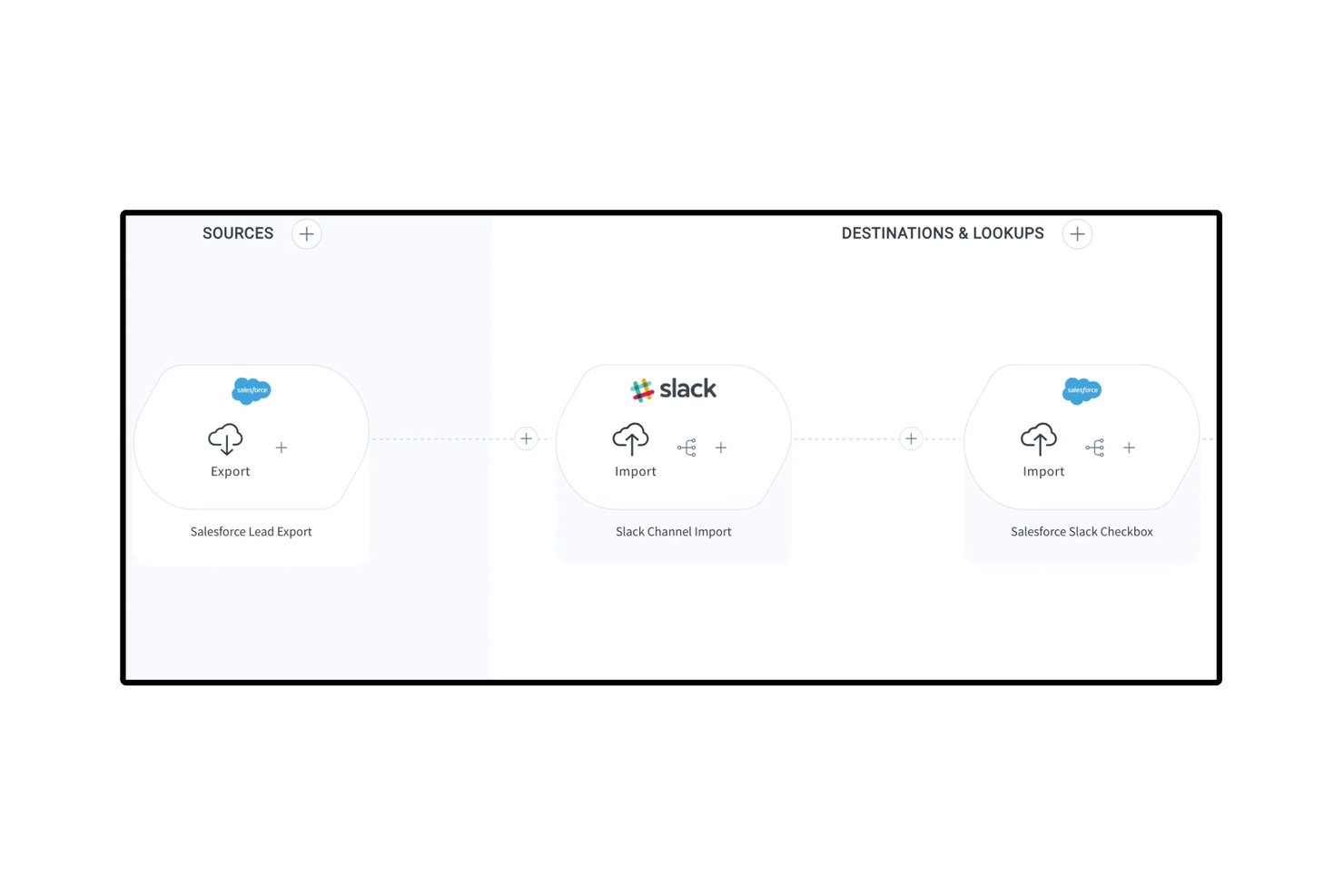
Celigo is an iPaaS and automation platform that connects your GTM stack through 1,000+ pre-built connectors, enabling bi-directional data sync, lead lifecycle automation, and quote-to-cash workflows across CRM, marketing automation, ERP, and billing systems.
Who Is Celigo Best For?
Celigo is a strong fit for RevOps and systems teams managing a broad, multi-tool GTM stack that needs reliable, bi-directional data sync across CRM, ERP, and billing systems.
Why I Picked Celigo
Celigo earns its spot on my shortlist because it's the best option I've found for syncing data across a sprawling GTM stack without building custom code for every connection. With 1,000+ pre-built, bi-directional connectors, I can link Salesforce, HubSpot, NetSuite, and Stripe in a single flow, keeping leads, accounts, and revenue data consistent across every system. I also rely on Celigo Ora, its embedded AI assistant, to build and troubleshoot those flows in plain language, which cuts setup time significantly. The AI error management layer auto-resolves roughly 96% of integration exceptions, so data pipelines don't quietly break between systems.
Celigo Key Features
- Quote-to-cash automation: Connects your CRM, ERP, and billing systems to automate the full quote, order, and invoicing process end to end.
- Visual low-code flow builder: A drag-and-drop interface for building multi-step, conditional integration workflows without writing custom code.
- Sandbox environment with environment promotion: Test and validate integration changes in a sandbox before promoting them to production, with full change tracking.
- Data warehouse sync: Native connectors to Snowflake, BigQuery, and Redshift move GTM data into your analytics environment for downstream reporting.
Celigo Integrations
Celigo offers 300+ pre-built connectors, including Salesforce, HubSpot, NetSuite, Stripe, Marketo, Snowflake, BigQuery, Zendesk, Gainsight, and Slack. It also supports custom connectivity through HTTP, FTP, JDBC, GraphQL, WebSockets, and APIs.
Pros and Cons
Pros:
- Connects 1,000+ GTM and back-office tools
- Visual builder supports low-code automation flows
- AI resolves most integration errors automatically
Cons:
- No built-in lead-to-account fuzzy matching
- No native revenue dashboards or forecasting
New Product Updates from Celigo
Celigo Adds API Group Assignment During API Setup
Celigo adds API group assignment during create, clone, and move actions. This reduces extra setup steps by letting teams organize APIs before the relative URI is defined. For more information, visit Celigo’s official site.
 .
.
Zapier
Best for integrating complex tech stacks

Zapier is a no-code automation platform that connects apps, triggers actions across systems, and moves data between tools through workflow-based automations called Zaps.
Who Is Zapier Best For?
Zapier is a strong fit for RevOps teams managing fragmented tech stacks who need to automate data flows between tools without relying on engineering resources.
Why I Picked Zapier
Zapier earns its spot on my shortlist because no other tool handles cross-system automation at this breadth without requiring a developer. I particularly like the Paths feature, which lets me build conditional logic so a single trigger can route data differently depending on field values in my CRM. Zapier Canvas also lets my team map out entire automation architectures visually before building them, which is a real asset when documenting complex revenue workflows.
Zapier Key Features
- Zapier Tables: A built-in database that stores, filters, and triggers automations based on record changes.
- Formatter: A native data transformation tool that cleans, reformats, and manipulates field values before passing them to connected apps.
- Zap history: A run log that records every automation attempt, its status, and the data processed at each step.
- AI Zap builder: A copilot that generates a Zap structure from a plain-language description of the automation you need.
Zapier Integrations
Zapier offers 9,000+ app integrations, including Salesforce, HubSpot, Marketo, ActiveCampaign, Salesloft, Slack, Google Sheets, Mailchimp, Airtable, and Calendly. Webhooks and an API are available for custom integrations.
Pros and Cons
Pros:
- Error notifications pinpoint exact failure steps
- Webhooks handle custom APIs without code
- Largest app catalog at 8,000+ connections
Cons:
- Multi-branch logic requires higher tiers
- Multi-step Zaps consume tasks per step

Gong
Best for analyzing team interactions
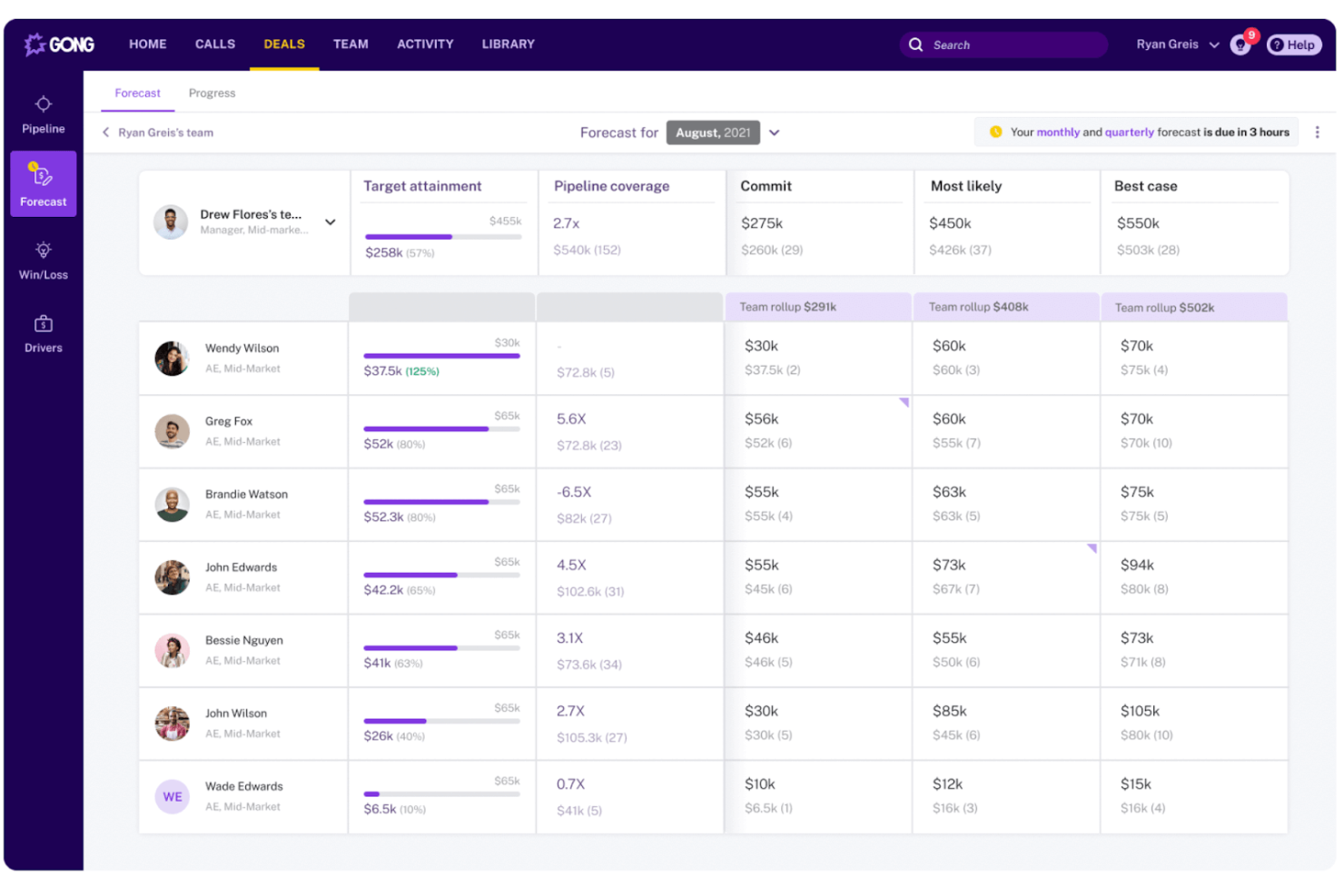
Gong is a revenue intelligence platform that captures and analyzes customer-facing interactions across calls, emails, and meetings to surface deal insights, pipeline signals, and rep coaching data for sales operations teams.
Who Is Gong Best For?
Gong is a strong fit for B2B sales organizations where RevOps teams need visibility into what's actually happening across rep conversations to manage the pipeline and forecast accurately.
Why I Picked Gong
Gong earns its spot on my shortlist because no other tool in this space analyzes team interactions at the depth it does. I rely on Gong's Revenue Graph to connect CRM data, call recordings, and email signals into a single picture of pipeline health. What I find most useful is how its AI flags execution risks inside live deals before they miss forecast, without me needing to manually review calls. It turns interaction data into actionable insights for your revenue engine.
Gong Key Features
- Engagement timeline: View every buyer touchpoint across calls, emails, and meetings in a single account-level activity log.
- Forecast roll-ups: Collect structured forecast submissions from reps and managers with AI-generated overlays for comparison.
- Topic trackers: Monitor specific keywords, competitor names, or objection themes across all recorded conversations at scale.
- Scorecard builder: Define rep evaluation criteria and score calls against them to standardize coaching across the team.
Gong Integrations
Integrations include Salesforce, HubSpot, Microsoft Dynamics 365, Zoom, Microsoft Teams, Google Meet, Slack, Outreach, Salesloft, Aircall, Dialpad, and RingCentral. Gong also offers APIs for CRM, calls, transcripts, users, and engagement data.
Pros and Cons
Pros:
- Topic tracking monitors competitor mentions at scale
- Conversation data enriches pipeline reporting
- AI flags at-risk deals automatically
Cons:
- Forecast tools require significant admin setup
- Limited value without high call volume

Workato
Best for building code-less custom automations
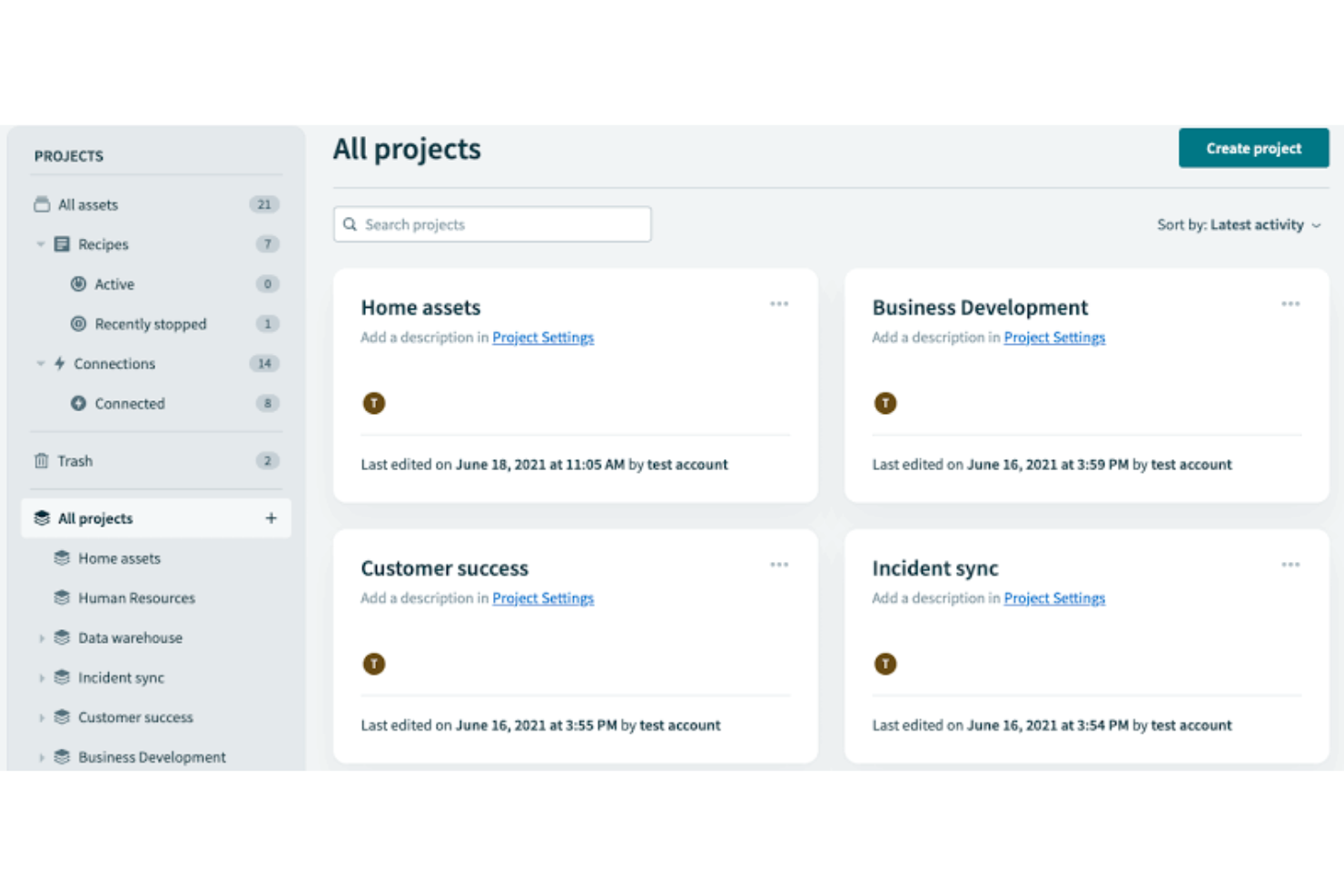
Built for enterprise-grade automation, Workato is a no-code integration platform that connects sales, marketing, and customer success systems through event-driven workflows, conditional logic, and a shared automation layer across the full revenue stack.
Who Is Workato Best For?
Workato is well-suited to RevOps operations managers and systems architects who own the automation layer across a complex, multi-tool go-to-market stack.
Why I Picked Workato
Workato earns its spot on my shortlist because it handles genuinely complex automation logic without requiring a developer. I rely on its formula editor to transform and map data between systems mid-workflow, like reformatting lead source values from Marketo before they write to Salesforce fields. I also like that Workato's AI-assisted recipe builder can generate automation logic from a plain-language description, which cuts the time it takes to go from a process idea to a live, running workflow.
Workato Key Features
- Pre-built recipe templates: A community library of automation templates lets you deploy common RevOps workflows without building from scratch.
- Real-time event triggers: Workato fires automations the moment a defined condition is met, like a deal stage change in Salesforce.
- WorkBot: A native chatbot for Slack and Microsoft Teams that lets team members trigger automations directly from their messaging app.
- Recipe lifecycle management: Built-in dev, test, and production environments let you validate automations before going live.
Workato Integrations
Workato offers 1,200+ pre-built connectors, including Salesforce, HubSpot, Marketo, NetSuite, Snowflake, Slack, Microsoft Teams, Workday, Jira, and Zuora. It also supports custom API connections through universal connectors and provides an API for custom integrations.
Pros and Cons
Pros:
- Enterprise-grade governance and audit controls
- Massive library of pre-built connectors
- No-code recipe builder for complex workflows
Cons:
- Task-based pricing scales up quickly
- Steep administrative learning curve
HubSpot
Best for unifying marketing and sales
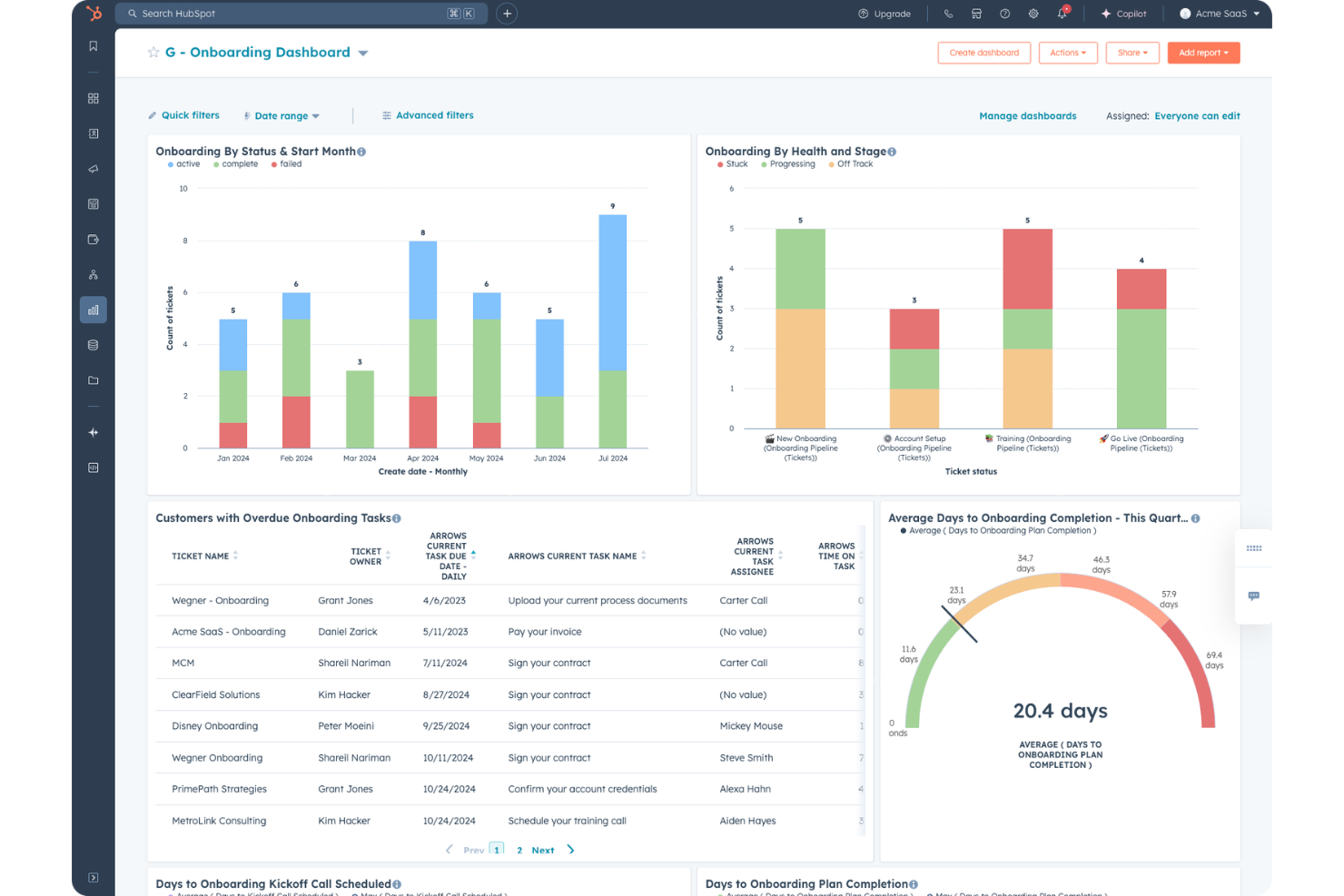
HubSpot is a CRM platform that brings together marketing, sales, and customer service tools with built-in automation, pipeline management, and reporting across the full customer journey.
Who Is HubSpot Best For?
HubSpot is a strong fit for small to mid-sized businesses that want a single platform to manage marketing, sales, and customer success teams without stitching together multiple tools.
Why I Picked HubSpot
HubSpot earns its spot on my shortlist because it's one of the few platforms where marketing and sales truly operate from the same data set, not synced copies of it. I like that marketing-qualified leads flow directly into sales sequences without any manual handoff, and that revenue attribution reporting connects campaign performance to closed deals in one view. HubSpot's shared contact timeline also means sales reps can see every marketing touchpoint before their first outreach, which cuts down on the usual back-and-forth between teams.
HubSpot Key Features
- Workflow automation: Build multi-step workflows triggered by CRM property changes, form submissions, or deal stage updates.
- Deal pipeline management: Create and customize multiple pipelines to track deals across different sales process or product lines
- Predictive lead scoring: AI-based scoring that ranks contacts by their likelihood to convert using behavioral and demographic signals.
- Custom report builder: Pull data across contacts, deals, companies, and activities into a single configurable report.
HubSpot Integrations
HubSpot's App Marketplace has over 2,000 apps, including marketplace integrations with Salesforce, Slack, Google Workspace, Microsoft 365, Zoom, Shopify, Snowflake, Gong, DocuSign, and Aircall. It also connects with Zapier, and an API is available for custom integrations.
Pros and Cons
Pros:
- Automation workflows trigger across multiple hubs
- Built-in revenue attribution reporting
- Shared CRM database across all revenue teams
Cons:
- Custom object limits on lower plans
- Advanced reporting locked behind higher tiers

ZoomInfo
Best for enriching operations

Built specifically for RevOps teams, ZoomInfo Operations covers CRM data enrichment, deduplication, lead routing, and account scoring across the full go-to-market stack.
Who Is ZoomInfo Best For?
ZoomInfo Operations is best suited to B2B sales and marketing operations teams that rely on large contact databases and need consistent, trustworthy data across multiple go-to-market systems.
Why I Picked ZoomInfo
ZoomInfo Operations earns its spot on my shortlist because of how it handles enrichment at scale. My team uses the automated enrichment triggers to update records the moment a data point changes, rather than waiting for scheduled batch runs. I also like the lead-to-account matching engine, which uses firmographic and behavioral signals to map contacts to the right accounts automatically.
ZoomInfo Key Features
- Intelligent lead routing: Routes inbound leads to the correct sales rep or queue using territory, account ownership, and firmographic rules.
- Account scoring: Scores accounts using fit and intent signals to help prioritize outreach across your pipeline.
- CRM data health reporting: Provides dashboards showing record completeness, decay rates, and enrichment coverage across your database.
- Deduplication rules engine: Detects and merges duplicate records using fuzzy matching logic across name, domain, and contact fields.
ZoomInfo Integrations
Integrations include Salesforce, HubSpot, Microsoft Dynamics 365, Marketo, Oracle Eloqua, Pardot, Outreach, Salesloft, Pipedrive, Bullhorn, Zoho CRM, DocuSign, and G2. ZoomInfo also supports data warehouse connections with Snowflake, Databricks, AWS, and Google Cloud. An API is available for custom integrations.
Pros and Cons
Pros:
- Best direct-dial mobile number coverage
- Org charts reveal decision-maker hierarchies
- No-code workflows with strong deduplication
Cons:
- Rigid auto-renewal and cancellation terms
- Stale records in the mid-market and SMB segments

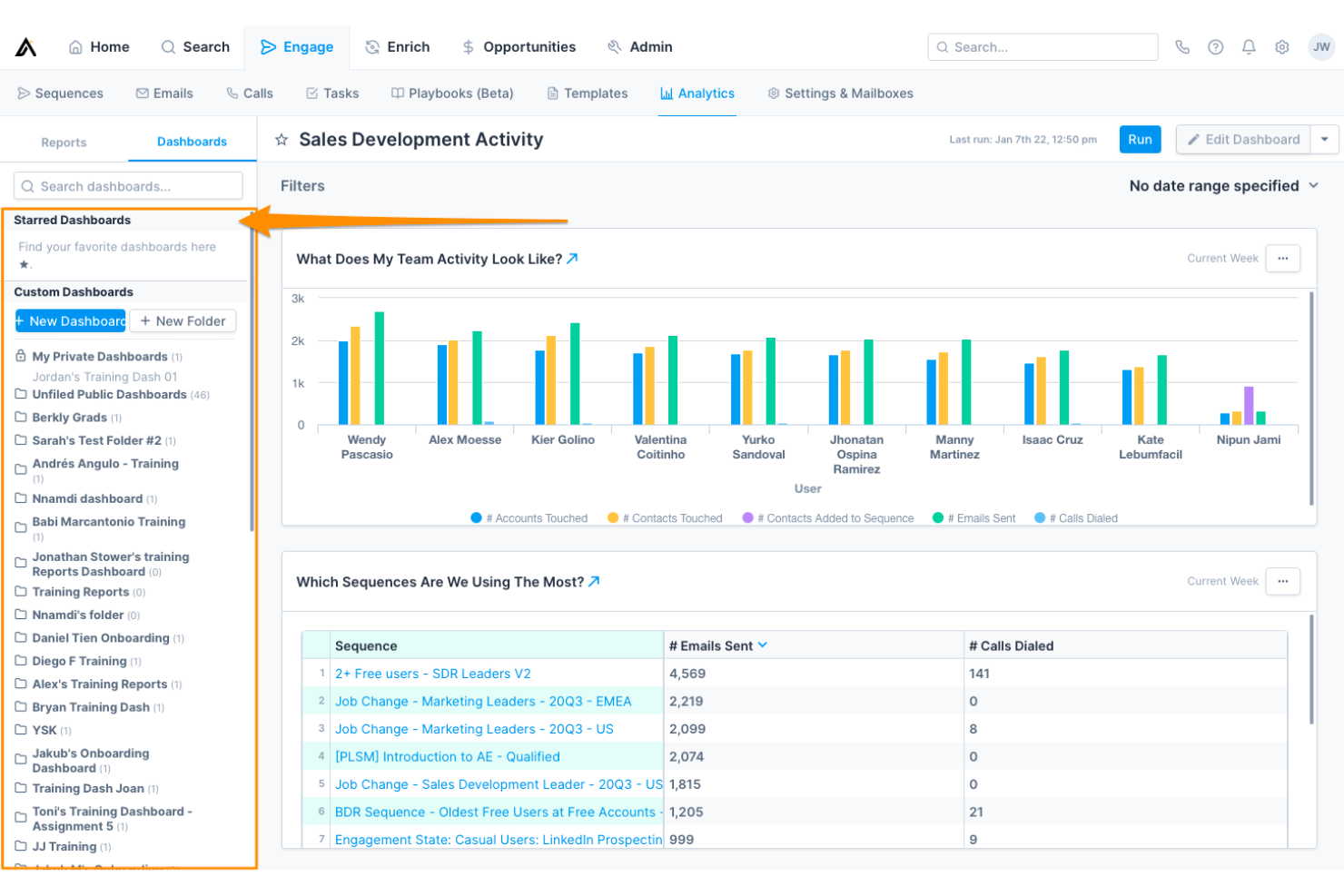
Built for go-to-market teams, Apollo.io brings together a B2B contact database, intent data, sales engagement, and pipeline analytics in one connected platform.
Who Is Apollo.io Best For?
Apollo.io suits RevOps and sales ops leaders who need to standardize prospecting data and outreach processes across a growing sales team.
Why I Picked Apollo.io
Apollo.io earns its spot on my shortlist because of how precisely it ties intent signals to prospecting action. I use Apollo's buying intent filters alongside job change alerts to time outreach around real trigger events, not arbitrary cadences. My team can then build automated sequences that only fire when an account crosses a signal threshold, keeping our pipeline focused on accounts most likely to convert now.
Apollo.io Key Features
- A/B testing for sequences: Test subject lines and message variants across active sequences to identify which version will drive revenue and replies.
- Territory assignment rules: Automatically assign new accounts to reps based on firmographic attributes like industry, company size, or region.
- Power dialer: Make back-to-back outbound follow-up calls from a prospect queue inside Apollo, with automatic CRM logging after each call.
- ICP scoring model: Score contacts and accounts against a custom ideal customer profile using firmographic and technographic filters.
Apollo.io Integrations
Integrations include Salesforce, HubSpot, Pipedrive, Zoho CRM, Gmail, Microsoft Outlook, Marketo, Chili Piper, Clay, and Census. Apollo also connects with 50+ tools through its integrations marketplace, and an API is available for custom integrations.
Pros and Cons
Pros:
- Sequences support A/B testing and conditional logic
- Job change alerts surface champion movements
- 65+ filters for building targeted prospect lists
Cons:
- Intent data accuracy is inconsistent
- Credit system pushes frequent plan upgrades


Clari is a revenue operations platform built to streamline AI-powered forecasting, pipeline inspection, CRM activity capture, and revenue analytics across sales, marketing, customer success, and finance.
Who Is Clari Best For?
Clari is a strong fit for mid-market to enterprise B2B companies with complex sales cycles that need tighter forecasting accuracy across multiple revenue teams.
Why I Picked Clari
I picked Clari as one of the best because its AI-driven forecasting rolls up across teams, product lines, geographies, and segments automatically, without anyone touching a spreadsheet. I like how Clari's activity autocapture maps emails, calls, and meetings to the right accounts and opportunities in the CRM, keeping pipeline data current without relying on rep input. That means my team gets forecast submissions that reflect reality, not what reps remember to log.
Clari Key Features
- Revenue cadence management: Run structured forecast calls and pipeline reviews using live CRM data pulled directly into Clari's meeting workflow.
- Deal inspection: Surface potential churn and at-risk deals based on engagement signals, stage progression, and activity gaps across the full pipeline.
- Conversation intelligence: Record, transcribe, and analyze sales calls to track talk patterns, competitor mentions, and coaching moments.
- Pipeline waterfall analysis: Visualize how the pipeline is created, converted, or lost across any time period or team segment.
Clari Integrations
Integrations include Salesforce, HubSpot, Slack, Microsoft Teams, Zoom, Google Workspace, Outreach, Salesloft, Gong, and Snowflake. An API is available for custom integrations and data ingestion.
Pros and Cons
Pros:
- Automatic activity capture reduces manual data entry and CRM updates
- Forecast accuracy improves 20–30% after adoption
- Time-series pipeline view tracks historical trends
Cons:
- Platform updates can reset custom views
- Premium pricing limits small business adoption
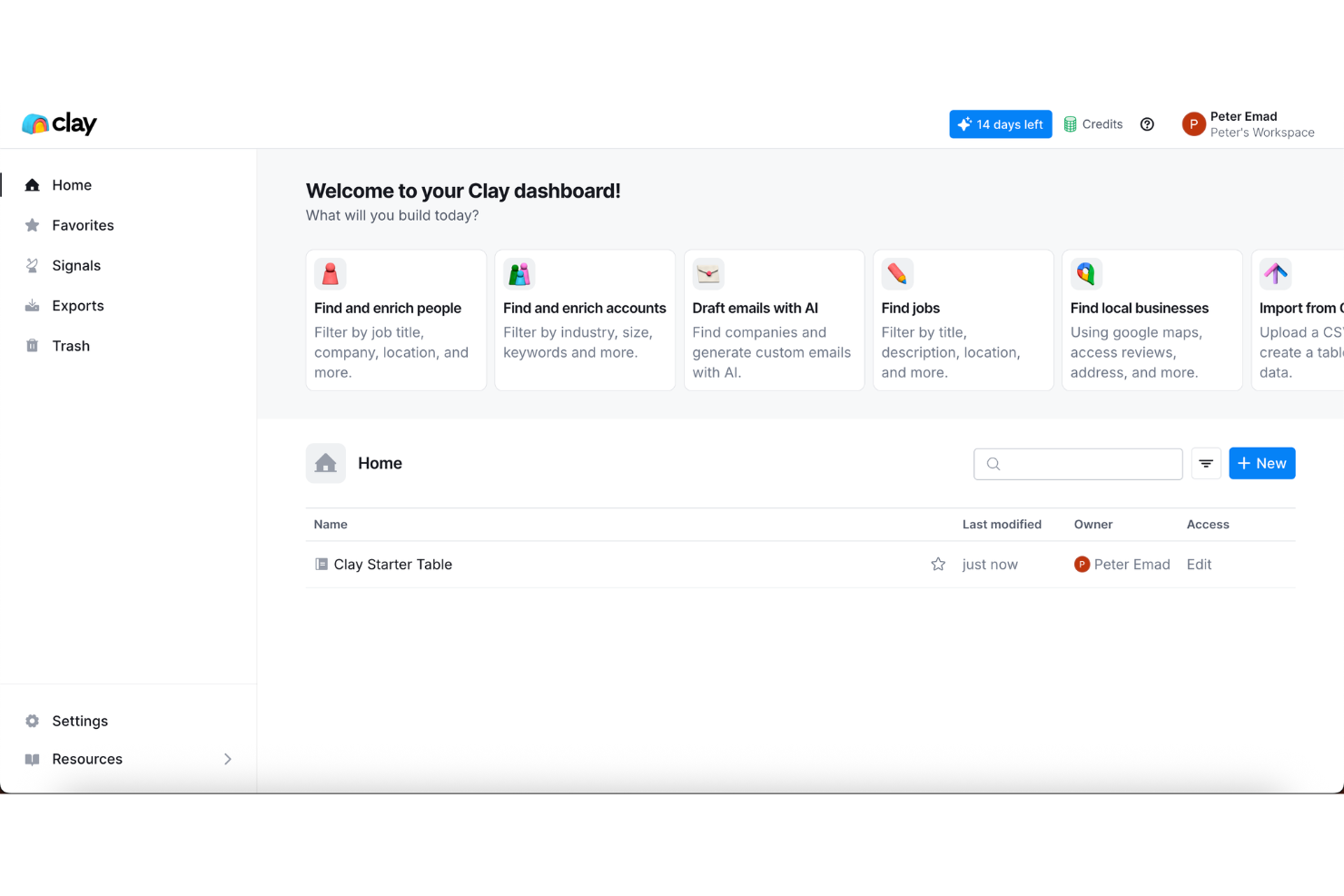
Clay is a GTM data enrichment and workflow automation platform that pulls from 100+ data providers to build custom prospecting tables, lead scoring models, and outbound sequences without writing code.
Who Is Clay Best For?
Clay is a strong fit for GTM engineers and RevOps teams at high-growth B2B companies who need to build custom, data-heavy outbound workflows without relying on engineering.
Why I Picked Clay
Clay earns its spot on my shortlist because no other tool in this space lets me build a fully custom GTM data layer the way it does. I use Clay's waterfall enrichment across 150+ data providers to fill contact and account fields that a single provider would miss. I can also layer in AI web research to pull signals my best reps would otherwise find manually, then route the enriched records directly into my CRM or trigger actions in downstream tools, all inside one workflow.
Clay Key Features
- No-code table builder: Build enrichment and outbound workflows in a spreadsheet-style interface without writing any code.
- Claygent: An AI agent that browses the web autonomously to research prospects and pull custom signals at scale.
- Personalized outreach copy generation: Use enriched data fields to auto-generate tailored messaging for each prospect directly inside Clay.
- Prospecting list builder: Source and build targeted lead lists from web data and filters inside the platform without a separate tool.
Clay Integrations
Integrations include Salesforce, HubSpot, Pipedrive, Outreach, Salesloft, Airtable, Google Sheets, and Snowflake. APIs and webhooks are available for custom integrations.
Pros and Cons
Pros:
- AI agent automates manual prospect research
- Unlimited seats on every paid plan
- Waterfall enrichment pulls from 150+ providers
Cons:
- Fast data burn exhausts credits
- Credit-based billing makes costs unpredictable

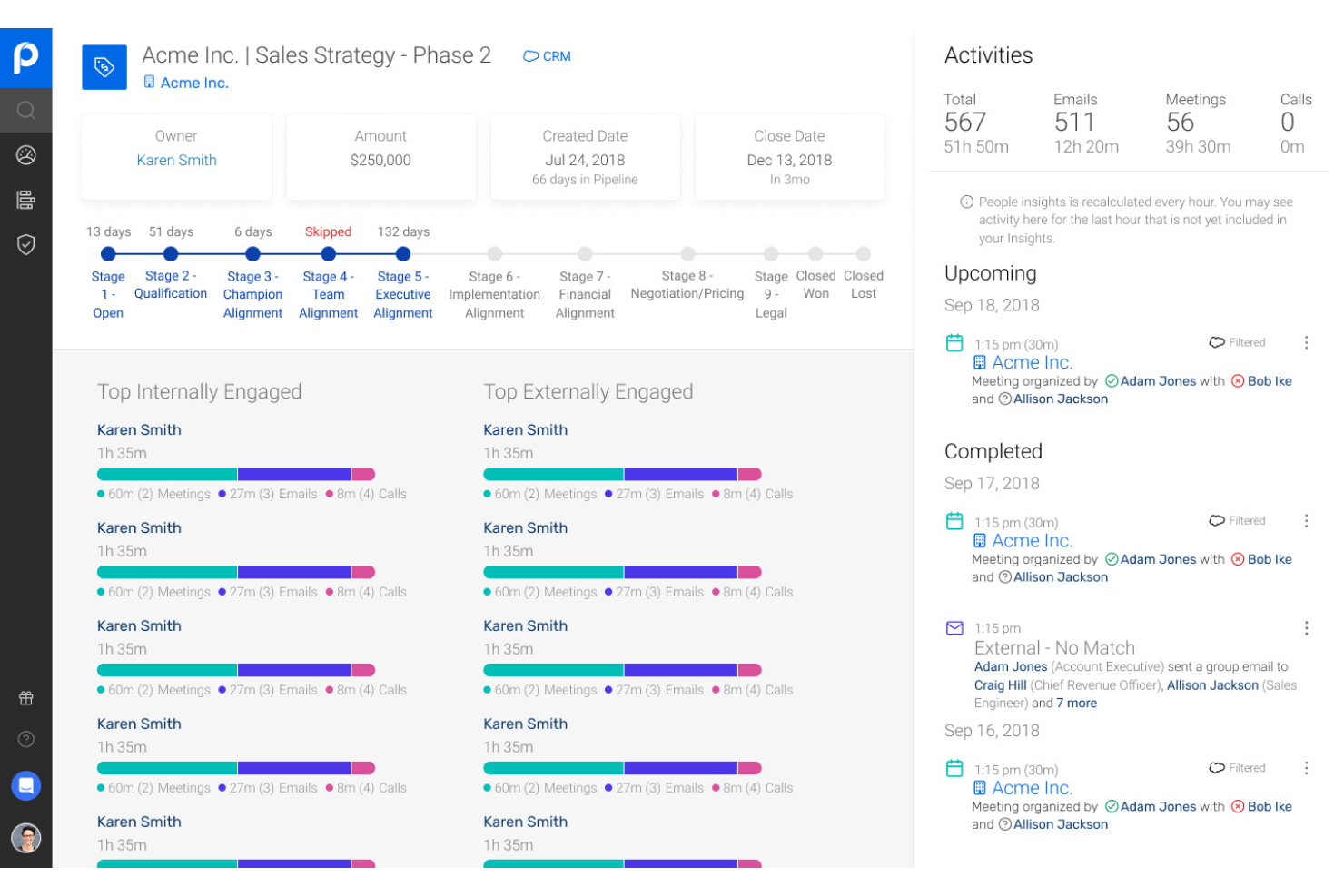
People.ai is an AI-driven revenue intelligence platform that automatically captures sales activity data, maps it to CRM records, and surfaces deal insights, forecast signals, and rep performance patterns across your go-to-market teams.
Who Is People.ai Best For?
People.ai is a strong fit for enterprise sales organizations that run large field teams and need reliable activity data without depending on manual CRM input.
Why I Picked People.ai
I picked People.ai as one of the best because it captures every email, call, and meeting automatically and maps that activity directly to the right account, opportunity, and contact in Salesforce, without requiring reps to log anything manually. What I find genuinely useful is the account engagement score, which shows exactly how much activity is happening across each deal and flags relationships going cold before they drop out of the forecast.
People.ai Key Features
- Pipeline health monitoring: Flags deals at risk of slipping based on actual engagement patterns across emails, calls, and meetings, before they miss a forecast call.
- Waterfall chart reporting: Visualizes exactly what moved in your forecast, including slipped deals, new pipeline, wins, and losses, for QBR and board-level reporting.
- Rep performance benchmarking: Identifies which activity patterns and engagement behaviors your top reps use so you can coach the rest of the team against a real standard.
- Multi-threading detection: Surfaces single-threaded deals and missing stakeholder coverage so you can act before a gap becomes a lost deal.
People.ai Integrations
Integrations include Salesforce, Microsoft Dynamics 365, Oracle, Gmail, Google Calendar, Outlook, Zoom, Slack, Webex, Snowflake, Tableau, Power BI, Outreach, Salesloft, and Clari. An API is available for custom integrations.
Pros and Cons
Pros:
- Relationship maps show stakeholder connections visually
- Detects competitor mentions in sales conversations
- Surfaces deal with visibility without manual CRM updates
Cons:
- Limited dashboard customization for individual reps
- Highly dependent on data cleanliness
Other RevOps Automation Platforms
Here are some additional RevOps automation platforms options that didn’t make it onto my shortlist, but are still worth checking out:
- LeanData
For automated lead routing
- Gainsight
For account health tracking
- 6sense
For AI-driven intent data integration
- Cognism
For GDPR-compliant contact data sourcing
- Default
For automated quota compliance
- Salesforce
For sales lifecycle management
- Fullcast
For territory planning automation
- DealHub
For guided selling configuration
- Forecastio
For predictive deal forecasting
- Warmly
For real-time buyer identification


RevOps Automation Platforms Selection Criteria
When selecting the best RevOps automation platforms to include in this list, I considered common buyer needs and pain points like connecting disjointed sales and marketing systems and reducing manual, repetitive data work. I also used the following framework to keep my evaluation structured and fair:
How I Evaluate RevOps Automation Platforms
I split my evaluation into two layers: baseline capabilities like lead routing and CRM data sync, and the differentiators that make one platform the right fit for a specific RevOps team.
Core Functionality (Table Stakes For This List)
When I'm selecting tools for my list, I rank each one on a scale from 0 (does not offer the functionality) to 5 (excels in this area) for each core functionality listed below. Then, I calculate the tool's total score into a percentage. Each tool needs to achieve a minimum total score of 75% to be considered for inclusion.
- Lead-to-Account Automation: I check whether a platform can match inbound leads to existing accounts and route them by territory, segment, or hierarchy—not just round-robin across a rep pool.
- Revenue Data Orchestration: The tool should sync data bi-directionally across CRM, MAP, billing, and warehouse systems so RevOps teams aren't reconciling pipeline numbers in spreadsheets.
- GTM Workflow Automation: I look for a no-code or low-code builder that handles real multi-step workflows—like triggering a CS handoff when a deal closes and updating the billing system simultaneously.
- Territory & Quota Management: Platforms that support dynamic territory carving and quota distribution tied to GTM planning cycles score higher than those limited to static list uploads.
- Data Hygiene & Enrichment: I evaluate how the platform handles deduplication, normalization, and enrichment—especially whether it can keep CRM records clean continuously rather than as a one-time batch job.
- Pipeline & Forecasting Analytics: Beyond basic dashboards, I look for deal inspection, forecast roll-ups, and the ability to flag at-risk deals based on pipeline activity signals.
Once I have a list of tools that meet this criteria, I consider what sets each platform apart.
Differentiating Factors (What Sets Vendors Apart)
Here's how I compare and contrast different vendors:
Standout Features
AI-powered insights are a major differentiator—I look for platforms that flag at-risk deals or recommend next-best actions based on activity patterns, not just static reports. Revenue attribution modeling also matters when teams need to trace marketing spend back to closed-won revenue across multiple touchpoints. Sandbox environments and version control round things out. Being able to test a new routing rule or workflow change without disrupting live GTM processes is something I always check for.
Beyond Features
Tech stack fit is one of the first things I evaluate. A platform's depth of integration with your primary CRM—whether that's Salesforce, HubSpot, or Dynamics—shapes how much value you'll actually get from it. Pricing model matters too, since per-user pricing scales very differently than per-workflow or usage-based models as your GTM team grows. I also check for SOC 2 Type II certification and role-based access controls, especially when RevOps teams handle sensitive pipeline and billing data across multiple departments.
How to Choose RevOps Automation Platforms
It’s easy to get bogged down in long feature lists and complex pricing structures. To help you stay focused as you work through your unique software selection process, here’s a checklist of factors to keep in mind:
| Factor | What to Consider |
| Scalability | Can the platform support your projected user and data volume growth over the next two to three years without major pricing jumps or system limitations? |
| Integrations | Will it connect natively with your existing tech stack—CRM, analytics, marketing, and finance tools—or will you need workarounds or manual syncs? |
| Customizability | Does the platform let you adapt workflows to match your team's unique processes, or are you locked into rigid templates or triggers? |
| Ease of use | Is the UI understandable for non-engineering users? Will your teams need extensive training to build or manage automations? |
| Implementation and onboarding | What kind of help is available to get up and running—dedicated onboarding support, migration tools, training materials, or template libraries? |
| Cost | Are there clear pricing tiers that match your needs today and as you scale? Watch for hidden costs with integrations, users, or automation task volume. |
| Security safeguards | Does the platform offer role-based permissions, audit trails, SSO, and data encryption? How does it handle sensitive revenue and customer information? |
| Support availability | How quickly and through what channels can you get help during implementation or downtime—chat, email, phone, or a dedicated account manager? |
What are RevOps Automation Platforms?
RevOps automation platforms are software solutions that provide end-to-end orchestration for revenue operations processes across sales, marketing, and customer success systems. These platforms help your team sync data, trigger workflows, and ensure process consistency. By reducing manual work and breaking down silos, RevOps automation platforms give you clearer pipeline visibility, better data quality, and a more predictable revenue engine.
Features
When selecting RevOps automation platforms, keep an eye out for the following key features:
- Workflow automation: Automate multi-step processes across sales, marketing, and customer success without manual intervention, ensuring consistent execution and reducing human error.
- Data integration: Connect and sync information across the customer lifecycle from CRMs, marketing automation platforms, financial systems, and support tools.
- Conditional triggers: Set up logic-based actions that fire workflows or alerts based on changes to data, pipeline movement, or interactions between systems.
- Role-based permissions: Control who can access, edit, or deploy different automations, ensuring only authorized users make changes to critical revenue processes.
- Audit trails: Track all automations, workflow changes, and user actions, providing transparency and supporting compliance or troubleshooting.
- Custom field mapping: Define and sync unique fields between systems, so your team isn’t limited to basic out-of-the-box data structures.
- API access: Expand platform functionality or build custom integrations, letting developers tailor the system to your team’s unique requirements.
- Batch processing: Move or update large volumes of records at once, which is helpful for data migrations, cleansing, or major process changes.
- Error handling and alerts: Automatically identify failed automations or syncs and notify users so issues can be resolved quickly before they impact revenue operations.
Common AI Features
Beyond the standard RevOps automation platform features listed above, many of these solutions are incorporating AI with features like:
- Predictive forecasting: Uses machine learning to analyze historical sales data and current pipeline trends, helping teams predict revenue outcomes and identify at-risk deals before they slip.
- Intent detection: Monitors signals from digital engagement data to identify accounts or leads that are most likely to convert, prioritize outreach, and spot hidden buying groups.
- Automated data enrichment: Continuously updates and completes contact or company records by sourcing and validating information from public and proprietary databases.
- Smart workflow recommendations: Suggests process tweaks or new automations based on usage patterns, performance metrics, and observed bottlenecks across your revenue engine.
- Anomaly detection: Scans pipeline activity and process data to flag irregularities, such as sudden drops in conversion rates or unexpected spikes in deal stage transitions, so teams can react quickly.
Benefits
Implementing RevOps automation platforms provides several benefits for your team and your business. Here are a few you can look forward to:
- Aligned revenue teams: Brings sales, marketing, and customer success teams into sync by automating workflows and data exchange.
- Greater pipeline visibility: Centralizes processes and real-time data so operations and leadership always know where deals and accounts stand.
- Consistent process execution: Minimizes manual tasks and errors with automated, rule-based workflows and field validations.
- Improved data quality: Cleans, maps, and enriches records across platforms for accurate, trustworthy reporting and forecasting.
- Faster issue resolution: Provides audit trails, error notifications, and automated alerts, so teams quickly spot and fix process breakdowns.
- Increased agility: Lets you update automations, build new workflows, and adapt processes without waiting on engineering or IT resources.
- Predictable revenue operations: Supports forecasting and risk identification with standardized automation and, where available, AI-powered analytics.
Costs and Pricing
Selecting RevOps automation platforms requires an understanding of the various pricing models and plans available. Costs vary based on features, team size, add-ons, and more. The table below summarizes common plans, their average prices, and typical features included in RevOps automation platforms:
Plan Comparison Table for RevOps Automation Platforms
| Plan Type | Average Price | Common Features |
| Free Plan | $0 | Limited workflow automation, basic integrations, restricted user seats, and community support. |
| Personal Plan | $20-$50/user/month | Individual automations, standard integrations, moderate storage, basic reporting, and email support. |
| Business Plan | $50-$120/user/month | Multi-step workflows, API access, advanced integrations, customizable dashboards, role-based permissions, and live chat support. |
| Enterprise Plan | $120-$250/user/month | Unlimited automations, dedicated onboarding, advanced security, audit trails, priority support, and SLA guarantees. |
RevOps Automation Platforms FAQs
Here are some answers to common questions about RevOps automation platforms:
Do RevOps automation platforms require technical expertise to set up?
No, most RevOps automation platforms are designed so business users can create workflows and manage integrations through no-code or low-code interfaces. You might want IT help for complex API setups or advanced customizations, but day-to-day process management is usually accessible to non-technical users.
Can RevOps automation platforms integrate with both CRM and marketing automation tools?
Yes, nearly all RevOps automation platforms offer pre-built integrations for popular CRMs and marketing automation tools. Check for native connectors that match your current systems so you can avoid delays or extra costs associated with custom development.
How do RevOps automation platforms improve data accuracy?
RevOps automation platforms sync, clean, and standardize data across your revenue tech stack, cutting down on duplicate records, manual entry mistakes, and outdated information. Automated updates and validation rules help keep your data trustworthy for reporting and decision-making.
Are RevOps automation platforms suitable for small teams?
Yes, many platforms offer flexible plans that scale down for small teams and startups. Start with core workflow automation and integrations, then add features as your team and complexity grow. Make sure initial pricing and contract terms don’t lock you into more than you need.
What should I consider when evaluating security in a RevOps automation platform?
Look for role-based permissions, audit logs, SSO options, data encryption, and compliance certifications relevant to your industry. Ask vendors about their breach notification process, data retention policies, and options for managing sensitive business and customer data.