

10 Best Manufacturing CRM Software Reviewed In 2026

Best Manufacturing CRM Software Shortlist


Manufacturing CRM software is important for manufacturing companies, helping teams boost production efficiency and strengthen customer experiences. However, choosing the right software can be challenging due to the wide range of available options.
Using my experience with revenue operations software, I tested and compared several of the top manufacturing CRM software available. From there, I compiled my results into detailed reviews to help you find the best software for your needs.
Why Trust Our Software Reviews
We’ve been testing and reviewing RevOps software since 2022. As RevOps leaders ourselves, we know how critical and difficult it is to make the right decision when selecting software.
We invest in deep research to help our audience make better software purchasing decisions. We’ve tested more than 2,000 tools for different RevOps use cases and written over 1,000 comprehensive software reviews. Learn how we stay transparent & our software review methodology.
Best Manufacturing CRM Software Summary
This comparison chart summarizes pricing details for my top manufacturing CRM software selections to help you find the best one for your budget and business needs.
| Tool | Best For | Trial Info | Price | ||
|---|---|---|---|---|---|
| 1 | Best for tracking customer orders | 30-day free trial | From $44.92/user/month (billed annually) | Website | |
| 2 | Best for distributor order management | Free 60-day trial available | Pricing upon request | Website | |
| 3 | Best for mobile accessibility | 15-day free trial available | From $23/user/month (billed annually) | Website | |
| 4 | Best for small to medium businesses | Free plan available | From $9/user/month (billed annually) | Website | |
| 5 | Best for simple CRM needs | Free plan available and 14-day free trial | From $18/user/month (billed annually) | Website | |
| 6 | Best for sales pipeline automation | Free demo + 14-day free trial available | From $14/user/month (billed annually) | Website | |
| 7 | Best for lead management | Free demo available | From $60/user/month | Website | |
| 8 | Best for pipeline management | Free 14-day trial + free demo available | From $25/user/month (billed annually) | Website | |
| 9 | Best for enterprise-level solutions | Free demo available | Pricing upon request | Website | |
| 10 | Best for user-friendly interface | Free trial available | From $29/user/month (billed annually) | Website |
-

Zendesk
Visit WebsiteThis rating combines scores from multiple user review sites to reflect overall customer sentiment about the product.4.3 -
Pipedrive CRM
Visit WebsiteThis rating combines scores from multiple user review sites to reflect overall customer sentiment about the product.4.5 -
Creatio CRM
Visit WebsiteThis rating combines scores from multiple user review sites to reflect overall customer sentiment about the product.4.7


Best Manufacturing CRM Software Reviews
Below are my detailed summaries of the best manufacturing CRM software that made it onto my shortlist. My reviews offer a detailed look at the key features, pros & cons, integrations, and ideal use cases of each tool to help you find the best one for you.
MRPeasy
Best for tracking customer orders

MRPeasy is a manufacturing ERP and MRP platform for small manufacturers that combines production planning, inventory management, procurement, and a built-in CRM module for managing customer orders, quotes, and shipments.
Who Is MRPeasy Best For?
MRPeasy is a good fit for small and mid-sized manufacturers who need a single system to manage both production operations and customer order workflows.
Why I Picked MRPeasy
I picked MRPeasy as one of the best because of how directly its CRM connects customer orders to the production floor. When a customer order gets confirmed, I can instantly raise manufacturing orders for items not yet in stock and purchase orders for any missing materials—all from the same screen. I also like the color-coded pipeline view, which makes it easy to see order status at a glance without digging through reports. That level of visibility across the order lifecycle, from quote to shipment, is what makes MRPeasy stand out for manufacturers.
MRPeasy Key Features
- Quote cost estimation: Calculate production costs and lead times automatically when building customer quotes.
- Shipment planning: Generate picking lists and waybills directly from confirmed customer orders.
- Sales reporting: View sales statistics and cost-of-goods-sold data broken down by customer or product.
- Customer and contact management: Store customer details, communication history, and related orders in a single customer record.
Pros and Cons
Pros:
- Allows businesses to optimize purchasing with automatic PO generation
- Provides a clear sales pipeline view for tracking orders
- Helps estimate production costs and lead times quickly
Cons:
- Mobile app functionality is less robust than the desktop version
- Initial setup can take time to configure properly
New Product Updates from MRPeasy
MRPeasy Adds Estimated Weight Calculation for Items
MRPeasy introduces an estimated weight calculation feature, enhancing efficiency. For more information, visit MRPeasy's official site.
 .
.
Best for distributor order management
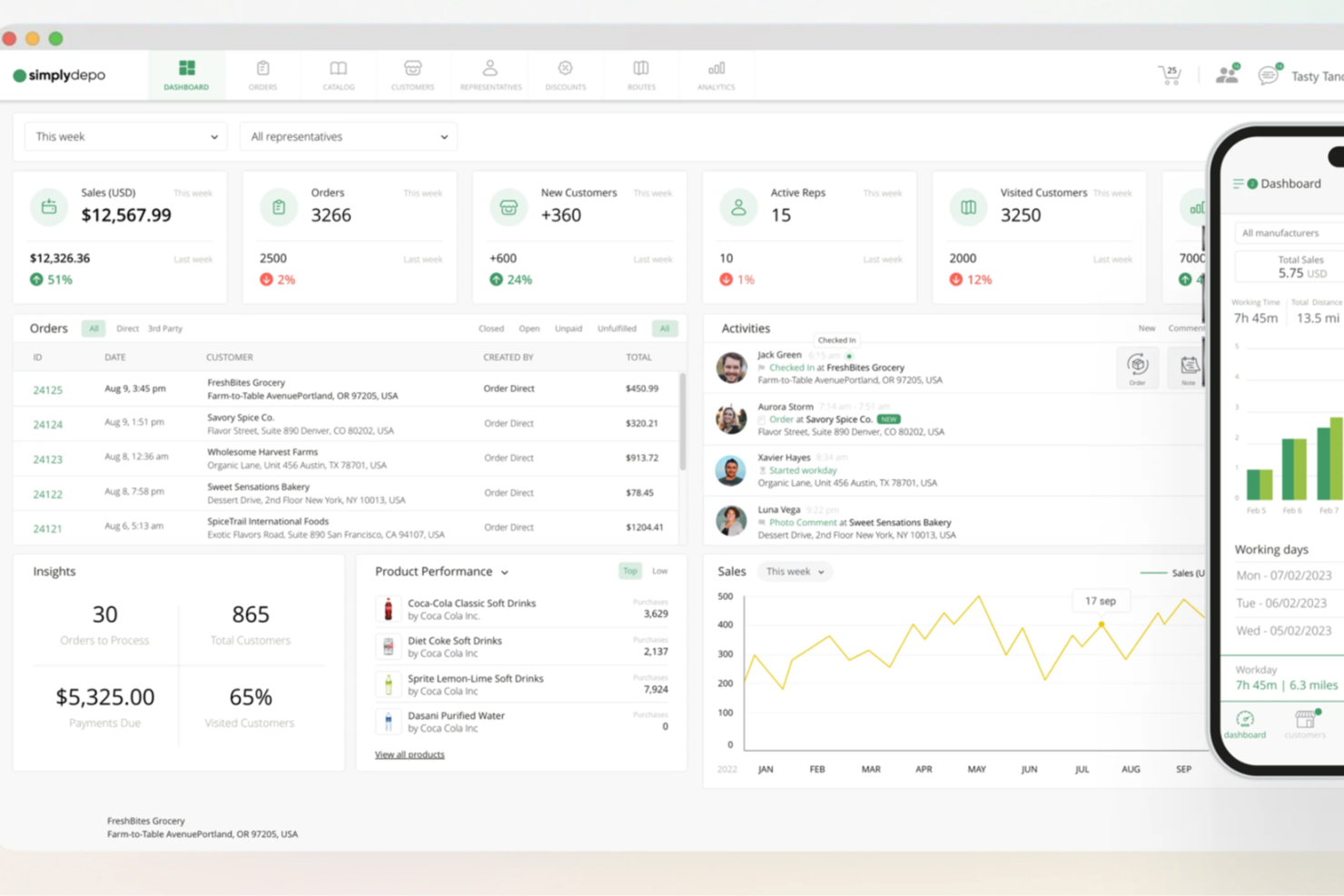
SimplyDepo is a field sales and distribution management platform for CPG brands and distributors that combines account CRM, B2B order management, route planning, and retail execution tracking in one mobile system.
Who Is SimplyDepo Best For?
SimplyDepo is a strong fit for CPG brands and distributors that rely on field sales teams to manage wholesale accounts and place orders on the go.
Why I Picked SimplyDepo
SimplyDepo earns its spot on my shortlist because its B2B order management is built specifically around how distributors work in the field. I like that field reps can capture orders directly at the store level, while product pricing and availability sync automatically to cut out manual entry errors. The B2B order portal also lets customers reorder online, which keeps order volume consistent without requiring rep intervention on every transaction.
SimplyDepo Key Features
- Route planning: Field reps can build and optimize daily visit routes to ensure account coverage stays consistent.
- Retail execution tracking: Reps can log in-store tasks, shelf conditions, and merchandising activity directly from the mobile app.
- Product catalog management: A digital catalog with product details, images, and pricing that reps access during customer visits.
- Sales rep performance reporting: Reporting on individual rep activity, visit frequency, and order history across all accounts in one dashboard.
Pros and Cons
Pros:
- Route planning and territory mapping
- Integrated CRM for account tracking
- Built-in B2B order management system
Cons:
- No transparent API documentation
- Limited advanced reporting customization

Best for mobile accessibility
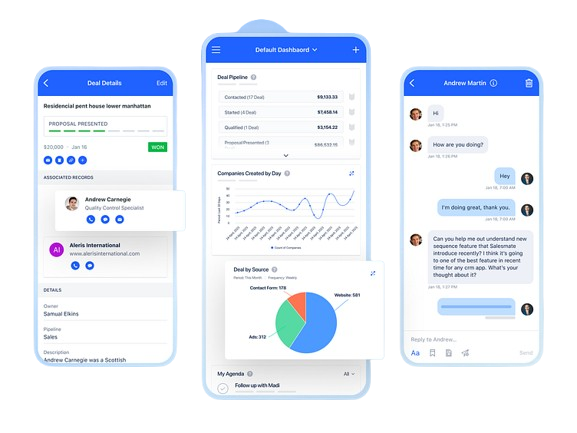
Salesmate is a CRM platform built for manufacturing teams that combines contact and distributor management, pipeline tracking, quote management, order cycle communication, built-in ticketing, and sales automation in one system.
Who Is Salesmate Best For?
Salesmate is a good fit for small to mid-sized manufacturing businesses that need a flexible CRM with built-in sales automation and distributor management.
Why I Picked Salesmate
Salesmate earns a spot on my shortlist because of how well its mobile app holds up for manufacturing sales reps who are constantly on the floor or visiting distributors. I love that you can access contact and deal records, drag deals through pipeline stages, log calls, and add notes all from your phone without any sync issues. The geolocation feature is a standout for field reps: locate nearby prospects, pull up their contact info, and plan your route before your next site visit. Product management is also accessible on mobile, so you can associate SKUs and product details to deals on the spot.
Salesmate Key Features
- Quote builder: Create customizable quotes with product line items, pricing, and digital approval directly from a deal record.
- Built-in ticketing: Log and manage client or production-related support tickets with priority levels and real-time status tracking.
- Sales automation: Set up automated follow-up sequences, task assignments, and order update notifications based on deal stage triggers.
- Revenue forecasting: Track pipeline value, quota attainment, and projected revenue with configurable dashboards and goal tracking.
Pros and Cons
Pros:
- Easy sales tracking
- Integrated calling feature
- Excellent mobile app
Cons:
- Basic reporting features
- Limited customization options
Best for small to medium businesses
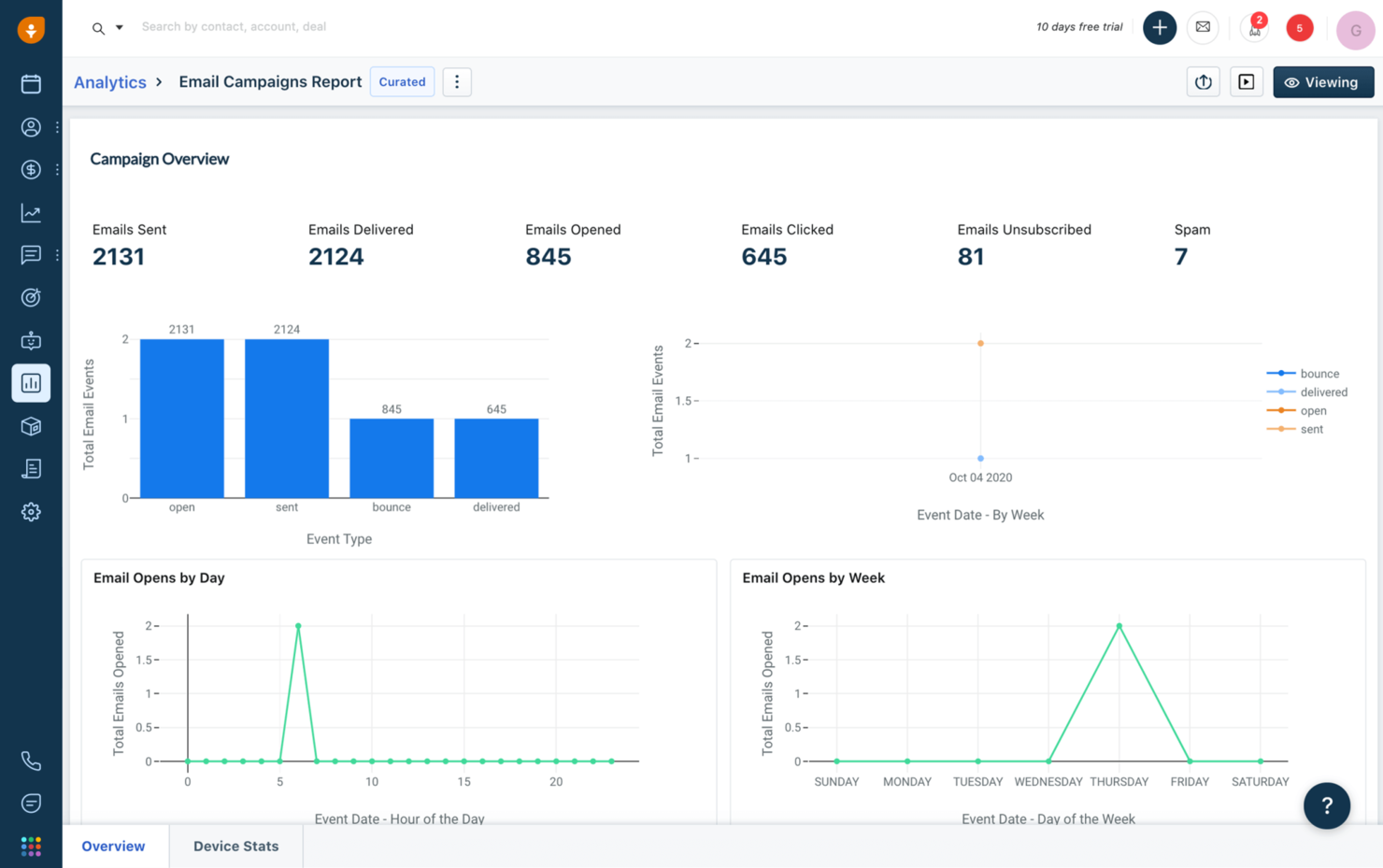
Freshsales is a cloud-based sales CRM with AI-driven lead scoring, multi-channel contact management, pipeline visualization, workflow automation, and customizable modules built for managing complex B2B sales cycles in the manufacturing space.
Who Is Freshsales Best For?
Freshsales is a strong fit for small to mid-sized manufacturing companies that need a straightforward CRM without the complexity or cost of enterprise-grade platforms.
Why I Picked Freshsales
I've included Freshsales in my top picks because it gives small manufacturing teams a sales CRM that doesn't require a dedicated admin to manage. The built-in product catalog lets reps attach SKUs, pricing tiers, and specifications directly to deals, which I find genuinely useful for quoting in manufacturing sales cycles. Freddy AI also flags at-risk deals and suggests next steps, so smaller teams without dedicated RevOps support can still maintain solid pipeline accuracy.
Freshsales Key Features
- Multi-pipeline management: Create and manage separate pipelines for direct sales, distributor channels, and OEM accounts simultaneously.
- Custom modules: Add manufacturing-specific data fields to records, such as order quantities, lead times, and product specifications.
- Sales sequences: Automate outreach cadences so reps follow up with distributors or prospects at defined intervals without manual tracking.
- Territory management: Assign leads and accounts to reps based on geographic region or account type using rule-based routing.
Pros and Cons
Pros:
- Visual sales pipeline
- Built-in communication tools
- Effective lead scoring
Cons:
- Basic reporting options
- Limited advanced features

Best for simple CRM needs
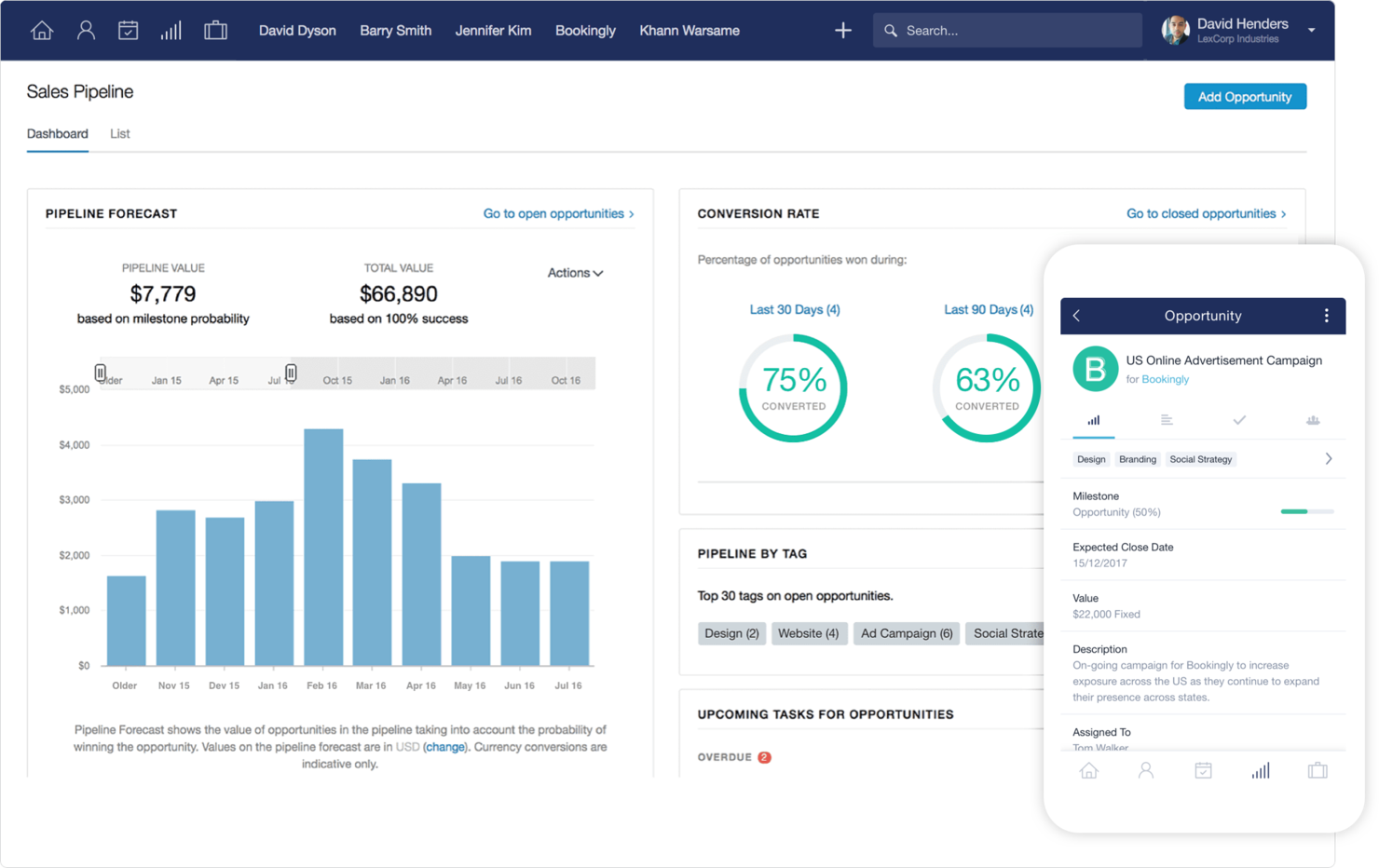
Capsule CRM is a small business CRM that combines contact management, visual sales pipeline tracking, task and calendar management, and project delivery tools in one platform.
Who Is Capsule CRM Best For?
Capsule CRM is a good fit for small manufacturing businesses that need a straightforward way to manage contacts, track deals, and coordinate follow-ups without complex configuration.
Why I Picked Capsule CRM
Capsule CRM is one of my top picks because I love how little setup it requires to get a working sales process running. For small manufacturing teams that don't have a dedicated RevOps function, that matters. I use Tracks to build out sequential task checklists tied to specific pipeline stages, so when a quote moves to "negotiation," the right follow-up tasks fire automatically. Custom milestones and custom fields also let me shape the pipeline around a manufacturing workflow without rebuilding anything from scratch.
Capsule CRM Key Features
- Projects: Link post-sale delivery work directly to CRM contacts and deals in a shared project view.
- Sales analytics: Track pipeline value, win rates, and forecast revenue across your active sales stages.
- Mobile app: Access contacts, tasks, and pipeline data from iOS or Android while visiting client or supplier sites.
- Tags and filtering: Categorize contacts and accounts with custom tags to segment by product line, region, or supplier type.
Pros and Cons
Pros:
- Quick setup process
- Suitable for small teams
- Simple contact management
Cons:
- Requires manual data entry
- Basic reporting capabilities

Best for sales pipeline automation
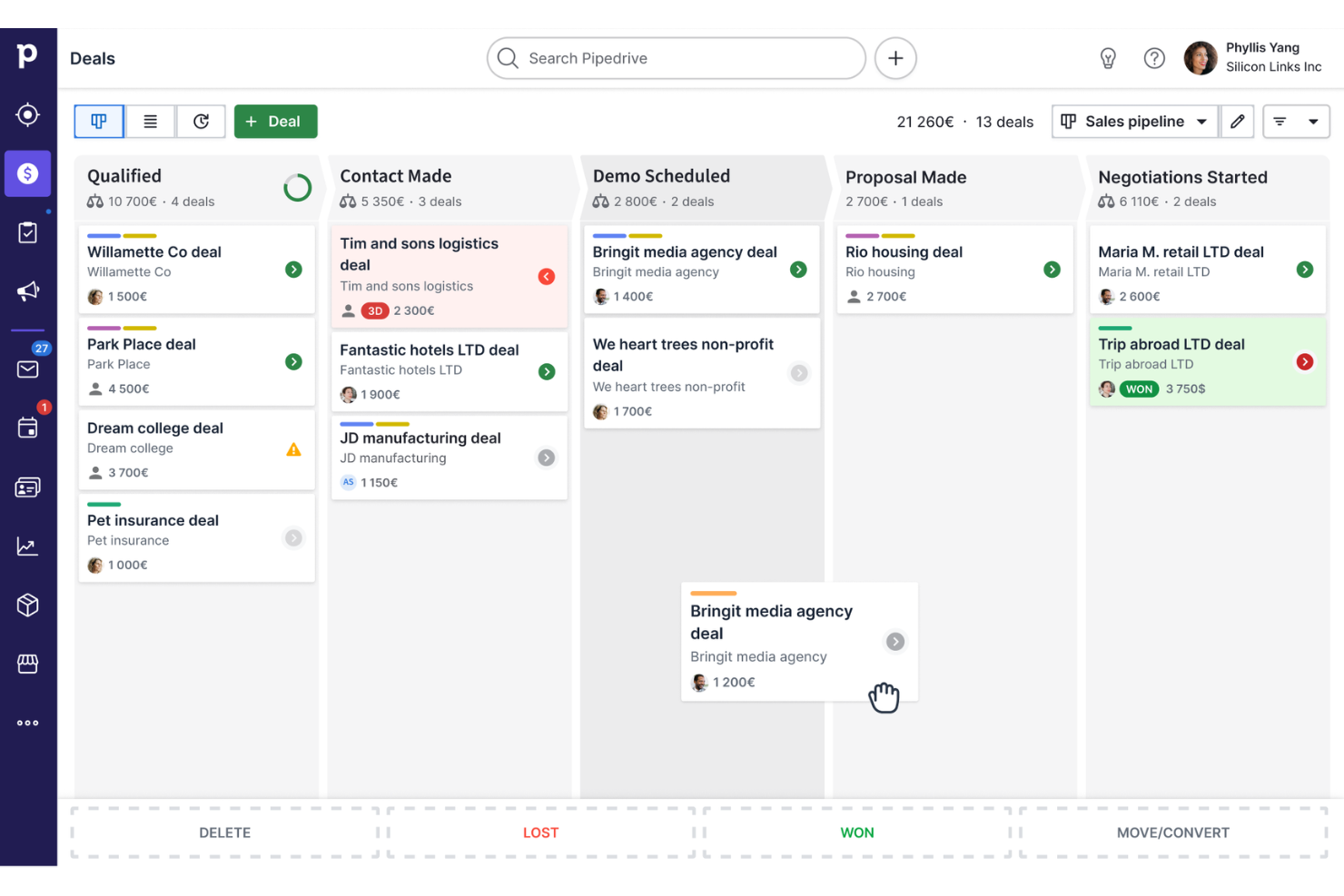
Pipedrive is a sales CRM built around visual pipeline management, deal tracking, workflow automation, and email and communication tracking for sales teams across industries including manufacturing.
Who Is Pipedrive CRM Best For?
Pipedrive is a strong fit for small to mid-sized manufacturing sales teams that need a structured, visual way to manage complex B2B sales cycles and multi-stakeholder deals.
Why I Picked Pipedrive CRM
Pipedrive earns its spot as one of the best on my shortlist because its pipeline automation is genuinely built around how sales reps work. I like that you can set automated triggers to move deals between stages based on specific actions, like a quote being sent or a site visit being logged, which maps well to manufacturing sales cycles. The "rotting deals" feature also flags stalled opportunities automatically, so nothing slips through during long B2B negotiation periods.
Pipedrive CRM Key Features
- Custom fields: Add manufacturer-specific data points to deal and contact records, such as SKU numbers, order volumes, or production lead times.
- Two-way email sync: Connect your inbox to Pipedrive so all client and distributor correspondence is logged directly against the relevant deal or contact.
- Sales reporting dashboards: Build visual reports tracking deal value, stage conversion rates, and rep activity across your entire pipeline.
- Document templates: Create reusable quote and proposal templates that auto-fill with contact and deal data pulled from your CRM records.
Pros and Cons
Pros:
- Automation of repetitive tasks
- Customizable sales stages
- Drag-and-drop pipelines
Cons:
- Accessing advanced features may incur additional costs
- Lacks native support for complex manufacturing needs

Best for lead management
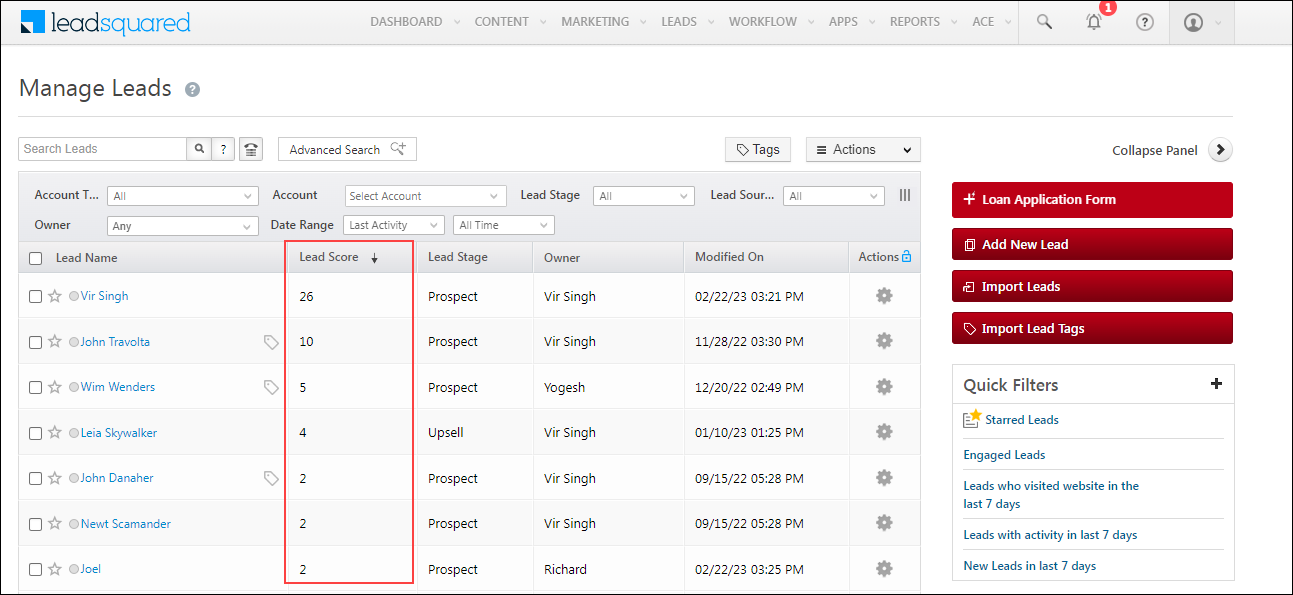
LeadSquared is a sales CRM built for high-velocity sales teams that covers lead capture, scoring, distribution, pipeline management, sales automation, and field sales tracking, with a dedicated manufacturing CRM for managing dealer, distributor, and influencer networks.
Who Is LeadSquared Best For?
LeadSquared is a strong fit for mid-to-large manufacturing companies managing multi-tier dealer and distributor sales networks with high lead volumes.
Why I Picked LeadSquared
I've included LeadSquared in my top picks because its lead management depth is genuinely hard to match in a manufacturing context. It consolidates lead capture from every channel—web forms, ads, referrals, WhatsApp—into a single pipeline with zero leakage, then automatically scores and routes each lead to the right rep based on territory, product line, or dealer type. I also like the automated lead distribution, which removes the manual work of assigning inquiries across large dealer and distributor networks.
LeadSquared Key Features
- Field sales tracking: Monitor field reps with GPS-based check-in/check-out and geo-fencing to track visits to dealer and distributor locations.
- Sales workflow automation: Build rule-based workflows that trigger follow-up tasks, emails, or reassignments based on deal stage or rep activity.
- Dealer and distributor portal: Give channel partners a dedicated portal to submit leads, track order status, and view their pipeline.
- Custom reports and dashboards: Build role-specific dashboards to track pipeline health, lead conversion rates, and rep performance across territories.
Pros and Cons
Pros:
- Detailed analytics
- Strong automation workflows
- Effective lead scoring
Cons:
- Limited offline features
- Complex setup process
Best for pipeline management
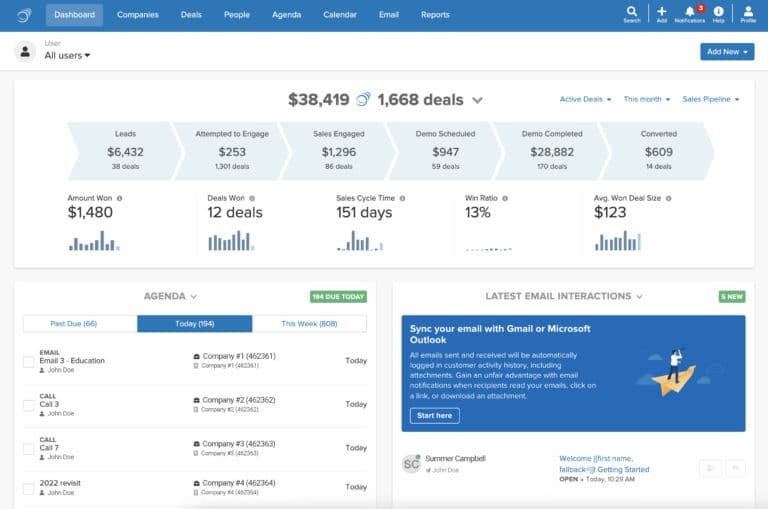
Pipeline CRM is a cloud-based sales CRM built for field-driven and B2B sales teams, with tools for sales pipeline management, lead tracking, contract management, email automation, and sales forecasting across industries like manufacturing and distribution.
Who Is Pipeline CRM Best For?
Pipeline CRM is a good fit for small to mid-sized B2B sales teams in manufacturing and distribution who need structured deal tracking across long, multi-touch sales cycles.
Why I Picked Pipeline CRM
Pipeline CRM earns its spot on my shortlist because of how well it handles multi-pipeline setups for manufacturing sales teams. I like that you can run separate pipelines for different product lines or customer segments at the same time, with up to 25 custom fields per deal to track things like material specs or lead times. The visual drag-and-drop board lets me move deals through custom stages that mirror a real manufacturing sales cycle.
Pipeline CRM Key Features
- Instant Docs: Generate quotes and proposals directly inside the CRM with fields for pricing, line items, and terms, without switching to a separate tool.
- Sales forecasting: View projected revenue by rep, deal stage, or time period using built-in forecast reports tied to live pipeline data.
- Email drip campaigns: Set up automated email sequences triggered by deal stage changes or inactivity to keep contacts engaged across long sales cycles.
- Activity tracking: Log calls, meetings, and tasks against individual deals and contacts to keep a full record of every customer touchpoint.
Pros and Cons
Pros:
- Efficient task management
- Detailed sales reporting
- Flexible pipeline customization
Cons:
- Basic mobile app functionality
- Limited advanced customization
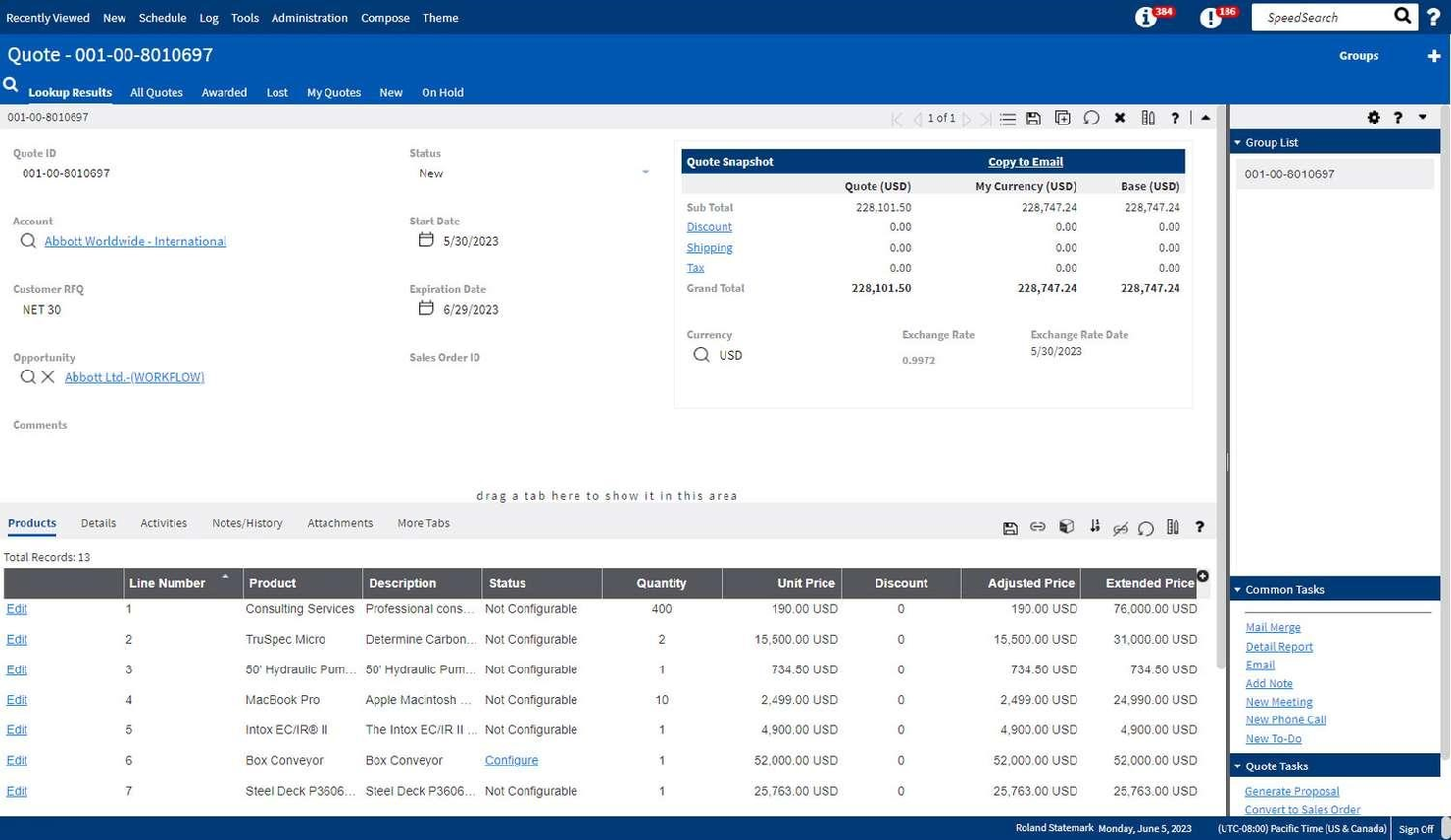
Infor CRM is a cloud-based CRM and ERP platform built for manufacturers, combining sales management, customer service, and industry-specific workflows with AI-driven analytics and tight integration across finance, procurement, and production operations.
Who Is Infor Best For?
Infor is a strong fit for large manufacturing organizations that need CRM functionality deeply integrated with ERP, supply chain, and production systems across multiple sites or business units.
Why I Picked Infor
Infor earns its spot as one of the best on my shortlist because no other CRM on this list is as deeply wired into enterprise manufacturing operations. I'm particularly impressed by how Infor CRM connects directly with CloudSuite Industrial, meaning my team can pull live order history, inventory data, and production schedules right into customer records without any manual syncing. The multi-site and multi-entity support is genuinely built for scale—I can manage accounts across dozens of facilities under one unified system.
Infor Key Features
- Xbar for Microsoft Outlook: Sync emails, contacts, and calendar events directly between Outlook and Infor CRM without leaving your inbox.
- Customer service and contract management: Log service cases, track warranties, and manage support contracts tied to specific customer accounts.
- Mobile CRM access: Update customer records, log calls, and view account data from a mobile device while on-site with customers.
- Opportunity and quote management: Track deals through configurable sales stages with quote creation built into the pipeline workflow.
Pros and Cons
Pros:
- Efficient supply chain management
- Advanced analytics capabilities
- Comprehensive enterprise solutions
Cons:
- Requires technical expertise
- Complex implementation process

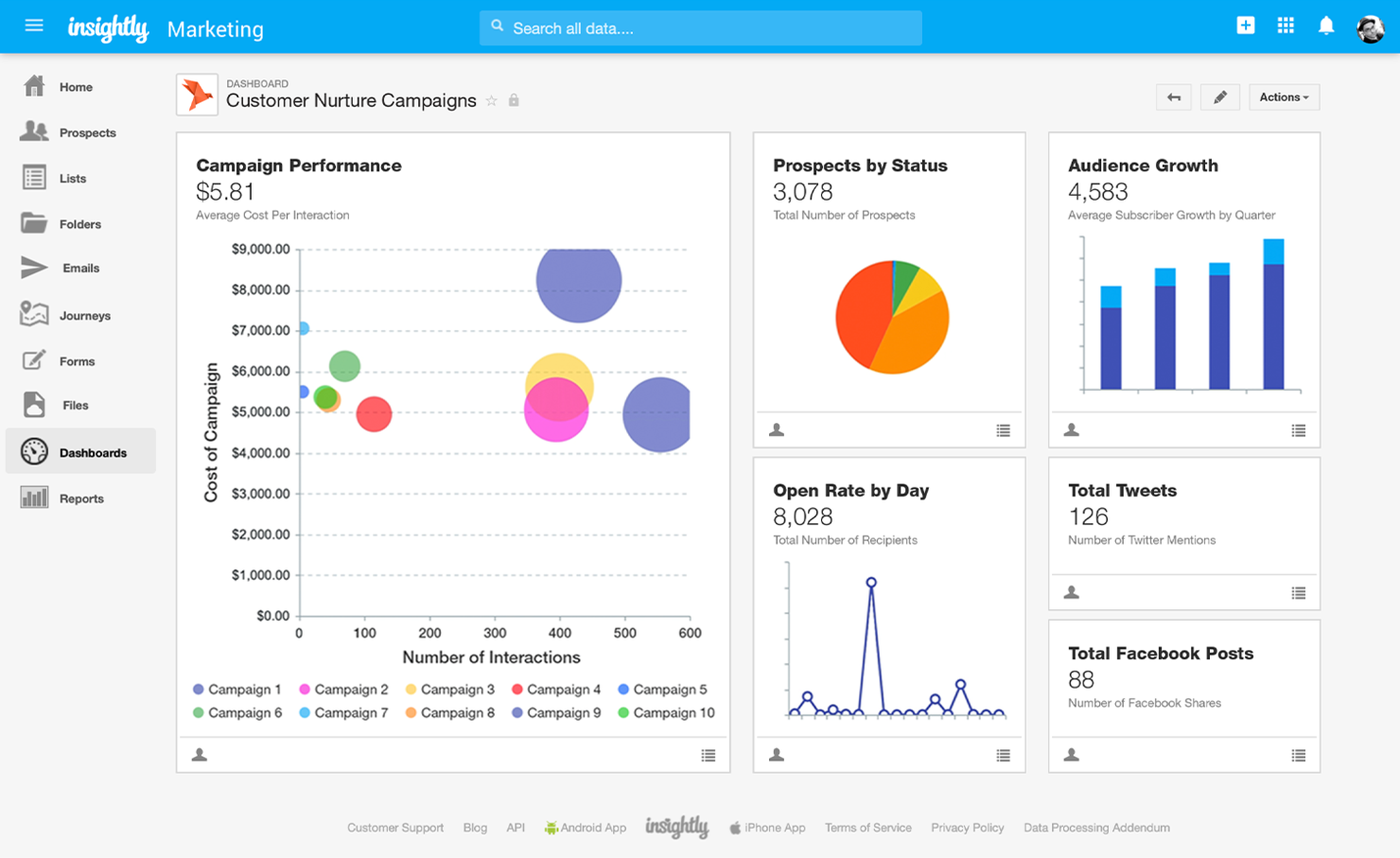
Insightly is a CRM platform for go-to-market teams that combines pipeline management, marketing automation, workflow automation, and support ticketing in a single system.
Who Is Insightly Best For?
Insightly suits small to mid-sized manufacturing businesses whose sales teams require a CRM they can learn and use with minimal training and without heavy IT support.
Why I Picked Insightly
I've included Insightly in my top picks because its interface genuinely removes the friction that slows down sales teams in manufacturing. I like the drag-and-drop opportunity pipeline, which lets reps move deals through stages without touching any settings. Insightly also lets you link contacts, organizations, opportunities, and projects into a single connected record, so your team sees the full account picture without digging through separate modules. That kind of visual clarity matters when you're managing long, multi-stakeholder sales cycles with distributors and OEM buyers.
Insightly Key Features
- Workflow automation: Build automated triggers that route leads, send follow-up tasks, or update records based on deal stage changes.
- Products, price books, and quotes: Build a product catalog with pricing tiers and generate quotes directly from an opportunity record.
- Project and task management: Convert a closed deal into a project with milestones and tasks to manage post-sale delivery.
- Performance dashboards and reporting: Build custom dashboards to track pipeline health, deal velocity, and team activity in real time.
Pros and Cons
Pros:
- Versatile project tracking
- Effective contact management
- Intuitive interface
Cons:
- Occasional performance lags
- Limited advanced features
Other Manufacturing CRM Software
Here are some additional manufacturing CRM software options that didn’t make it onto my shortlist, but are still worth checking out:
- Spotler CRM
For email marketing integration
- Creatio CRM
For process automation
- ClickUp
For project management integration
- Zendesk
For customer support teams
- SugarAI
For scalable solutions
- Zoho CRM
For customizable workflows
- Nutshell
For team collaboration
- monday CRM
For visual project tracking


How I Evaluate Manufacturing CRM Software
I evaluate manufacturing CRM tools in two layers: the baseline requirements—ERP integration, CPQ, and channel management—and the differentiators for specific manufacturing contexts.
Core Functionality (Table Stakes For This List)
When I'm selecting tools for my list, I rank each one on a scale from 0 (does not offer the functionality) to 5 (excels in this area) for each core functionality listed below. Then, I calculate the tool's total score into a percentage. Each tool needs to achieve a minimum total score of 65% to be considered for inclusion.
- ERP/MRP Integration: I check whether the CRM syncs bidirectionally with manufacturing ERPs like SAP, Epicor, or NetSuite so sales teams see live production and inventory data.
- Quote & CPQ Management: Configurable product quoting matters here—I look for tools that handle BOMs, custom pricing rules, and approval routing for complex manufactured goods.
- Channel & Dealer Management: Many manufacturers sell through distributors, so I evaluate deal registration, territory assignment, and partner portal capabilities within each platform.
- Manufacturing Pipeline Forecasting: Standard weighted pipelines aren't enough. I look for forecasting that factors in production lead times and long, multi-touch B2B sales cycles.
- Account & Contact Hierarchies: Multi-level account structures come up constantly—think OEMs with subsidiary plants and separate procurement teams. I check how each CRM handles those layers.
- Order & Inventory Visibility: Sales reps need real-time order status and stock levels inside the CRM record, so I evaluate how each tool surfaces that data without forcing users into the ERP.
Once I have a list of tools that meet this criteria, I consider what sets each platform apart.
Differentiating Factors (What Sets Vendors Apart)
Here's how I compare and contrast different vendors:
Standout Features
Equipment and installed-base tracking is a big differentiator. Linking serialized assets to customer accounts opens up aftermarket revenue from spare parts, consumables, and service contracts. I also evaluate AI demand signals that flag reorder patterns or churn risk based on historical order cadence. For manufacturers with high-volume B2B buyers, EDI support and self-service portals for RFQs and reorders can remove significant friction from the sales cycle.
Beyond Features
I pay close attention to manufacturing sub-vertical fit. A CRM built for discrete, make-to-order shops handles workflows very differently than one designed for process manufacturers. The integration ecosystem matters just as much—I check for prebuilt connectors to ERPs like Epicor or Infor and iPaaS compatibility with tools like Workato or Boomi. Compliance is another factor I weigh, especially for manufacturers subject to ITAR or CMMC requirements where role-based access and audit trails are table stakes.
How to Choose Manufacturing CRM Software
It’s easy to get bogged down in long feature lists and complex pricing structures. To help you stay focused as you work through your unique software selection process, here’s a checklist of factors to keep in mind:
| Factor | What to Consider? |
| Scalability | Will the software grow with your business needs? |
| Integrations | Does it connect with other tools your team uses daily? |
| Customizability | Can you tailor the software to fit your specific processes? |
| Ease of Use | Is the interface intuitive for your team members? |
| Budget | Does the price fit within your financial constraints? |
| Security Safeguards | Are there strong measures to protect your data? |
| Support | Is there reliable customer support when issues arise? |
| Reporting | Does it provide the insights and analytics that you need? |
Trends In Manufacturing CRM Software
In my research, I sourced countless product updates, press releases, and release logs from different manufacturing CRM software vendors. Here are some of the emerging trends I’m keeping an eye on:
- AI-Powered Insights: AI is being used to provide deeper insights into customer data, helping businesses predict trends and improve decision-making. Some vendors are incorporating AI to deliver predictive analytics and personalized recommendations.
- Cloud-Based Solutions: More vendors are moving their CRM systems to the cloud, allowing for greater flexibility and access to real-time data from anywhere. This trend is essential for businesses looking to reduce IT infrastructure costs while ensuring scalability.
- Enhanced Data Security: With increasing concerns about data breaches, CRM providers are focusing on improving data security measures. Features like encryption, two-factor authentication, and regular security updates are becoming standard.
- Sustainability Features: As environmental concerns grow, some CRM tools are adding features that help businesses track and report on sustainability metrics. This trend is particularly relevant for manufacturers looking to improve their eco-friendly practices.
- Industry-Specific Customization: Vendors are offering more tailored solutions that cater to specific manufacturing sectors. Custom modules and features designed for particular industries help businesses manage unique processes and requirements more effectively.
What Is Manufacturing CRM Software?
Manufacturing CRM software helps manufacturers manage customer relationships and sales cycles efficiently. It’s commonly used by sales managers, production planners, and customer service representatives to improve communication, streamline operations, and enhance customer satisfaction.
Features such as production scheduling, inventory management, and order management support better organization and faster responses to customer needs. These tools add value by optimizing processes and strengthening customer relationships.
Features of Manufacturing CRM Software
When selecting manufacturing CRM software, keep an eye out for the following key features:
- Production Scheduling: Helps manage and optimize production timelines to ensure efficient workflow and resource allocation.
- Inventory Management: Tracks stock levels and movements, aiding in maintaining optimal inventory and preventing shortages or overstock.
- Order Tracking: Provides real-time updates on order status, enabling better customer communication and satisfaction.
- Customizable Dashboards: Allows users to tailor the display of key metrics and reports to match their specific business needs.
- Lead Management: Organizes and prioritizes potential sales opportunities to enhance follow-up and conversion rates.
- Analytics and Reporting: Offers insights into sales and operational data, supporting informed decision-making.
- Supply Chain Management: Integrates supply chain processes to improve coordination and visibility across different stages.
- Automated Workflows: Streamlines repetitive tasks to save time and reduce the chance of human error in operations.
- Data Security: Ensures that customer and business data is protected through encryption and other security measures.
- Mobile Access: Provides the ability to manage sales and customer data from mobile devices, enhancing flexibility and accessibility.
Benefits of Manufacturing CRM Software
Implementing manufacturing CRM software provides several benefits for your team and your business. Here are a few you can look forward to:
- Improved Efficiency: Automated workflows reduce manual tasks, allowing your team to focus on high-priority activities.
- Enhanced Customer Satisfaction: Order tracking and lead management features ensure timely communication and better service delivery.
- Better Decision-Making: Analytics and reporting offer insights into business performance, helping you make informed choices.
- Optimized Inventory Levels: Inventory management keeps track of stock, preventing shortages and excesses that can affect operations.
- Increased Sales Opportunities: Lead management helps identify and prioritize potential customers, boosting sales conversions.
- Greater Flexibility: Mobile access lets your team manage tasks and data from anywhere, ensuring work continues smoothly.
- Secure Data Handling: Data security features protect sensitive information, providing peace of mind for your business and customers.
Costs & Pricing of Manufacturing CRM Software
Selecting manufacturing CRM software requires an understanding of the various pricing models and plans available. Costs vary based on features, team size, add-ons, and more. The table below summarizes common plans, their average prices, and typical features included in manufacturing CRM software solutions:
Plan Comparison Table for Manufacturing CRM Software
| Plan Type | Average Price | Common Features |
| Free Plan | $0/user/month | Basic contact management, limited reporting, and email support |
| Personal Plan | $5-$25/user/month | Enhanced contact management, basic analytics, and mobile access |
| Business Plan | $30-$60/user/month | Advanced analytics, custom dashboards, and automated workflows |
| Enterprise Plan | $70-$150/user/month | Full customization, priority support, and advanced security features |
Manufacturing CRM Software FAQs
Here are some answers to common questions about manufacturing CRM software:
What is the main drawback of implementing a CRM system?
One of the main drawbacks is a lack of commitment or resistance to change from within the company. If your team isn’t fully committed to using the CRM system, customer relationships can suffer, potentially leading to a loss in revenue. It’s essential to have everyone on board and view operations from the customer’s perspective to truly benefit from CRM implementation.
What are the issues and problems in implementing CRM?
Common issues include poor user adoption and integration challenges. Your CRM won’t be effective if your team doesn’t use it or if it doesn’t integrate well with existing systems. Outdated data, lack of user-friendliness, and limited customization can also pose problems. Address these issues early on to ensure a successful implementation.
How can CRM improve manufacturing processes?
CRM can improve manufacturing processes by providing a centralized platform for managing customer data and interactions. It helps your team forecast demand more accurately, improving inventory management and production scheduling. With better insights into customer needs, you can enhance production efficiency and customer satisfaction.
How does manufacturing CRM software help manage customer orders?
Manufacturing CRM software tracks customer orders throughout the production process, providing real-time updates to your team. It integrates order management with production schedules, ensuring timely deliveries and accurate communication with customers about their order status
What role does CRM software play in forecasting for manufacturing companies?
Manufacturing CRMs often include forecasting tools that analyze historical sales data and customer trends. This helps your team predict demand and adjust production schedules accordingly, ensuring you’re not overproducing or underproducing.
How can manufacturing CRM software help with after-sales service?
Manufacturing CRMs often include tools for managing customer service requests, warranty claims, and maintenance schedules. This ensures that your team can track and resolve after-sales issues efficiently, improving customer satisfaction and loyalty.
What’s Next?
Want to take your RevOps game to the next level? Subscribe to The CRO Club newsletter.