

10 Best Customer Lifecycle Management Software in 2026

Best Customer Lifecycle Management Software Shortlist


Customer lifecycle management software tracks, analyzes, and optimizes every stage of your customer journey, from first touch to loyal advocate. If your team is searching for ways to unify customer data, build better relationships, and take the guesswork out of retention, you’re in the right place. Your sales, marketing, and customer success teams need reliable tools to break down silos and keep growth on track.
In this guide, I’ll highlight the best customer lifecycle management platforms for 2026, so you can see which ones fit your revenue goals, process maturity, and business size.
Why Trust Our Software Reviews
We’ve been testing and reviewing RevOps software since 2022. As RevOps leaders ourselves, we know how critical and difficult it is to make the right decision when selecting software.
We invest in deep research to help our audience make better software purchasing decisions. We’ve tested more than 2,000 tools for different RevOps use cases and written over 1,000 comprehensive software reviews. Learn how we stay transparent & our software review methodology.
Best Customer Lifecycle Management Software Summary
This comparison chart summarizes pricing details for my top customer lifecycle management software selections to help you find the best one for your budget and business needs.
| Tool | Best For | Trial Info | Price | ||
|---|---|---|---|---|---|
| 1 | Best for large-scale workflow integration | 30-day free trial available | From $65/user/month (billed annually) | Website | |
| 2 | Best all-in-one tool for small businesses | Free plan + free demo available | From $11.04/user/month (billed biennially) | Website | |
| 3 | Best for combining CRM with customer insights | Free plan available | From $20/user/month | Website | |
| 4 | Best for multi-step customer funnel analysis | Free trial available | Pricing upon request | Website | |
| 5 | Best for proactive retention management | Free trial + free demo available | Pricing upon request | Website | |
| 6 | Best for account-based marketing automation | Free demo available | Pricing upon request | Website | |
| 7 | Best user journey automation for growing teams | 14-day free trial + free demo available | From $15/month (billed annually) | Website | |
| 8 | Best for cross-channel engagement | Free demo available | Pricing upon request | Website | |
| 9 | Best modular solution for specialized teams | Free demo available | Pricing upon request | Website | |
| 10 | Best for retail and e-commerce scaling | Free demo available | Pricing upon request | Website |
Best Customer Lifecycle Management Software Reviews
Below are my detailed summaries of the best customer lifecycle management software that made it onto my shortlist. My reviews offer a detailed look at the features, best use cases, and integrations of each platform to help you find the best one for you.
Best for large-scale workflow integration
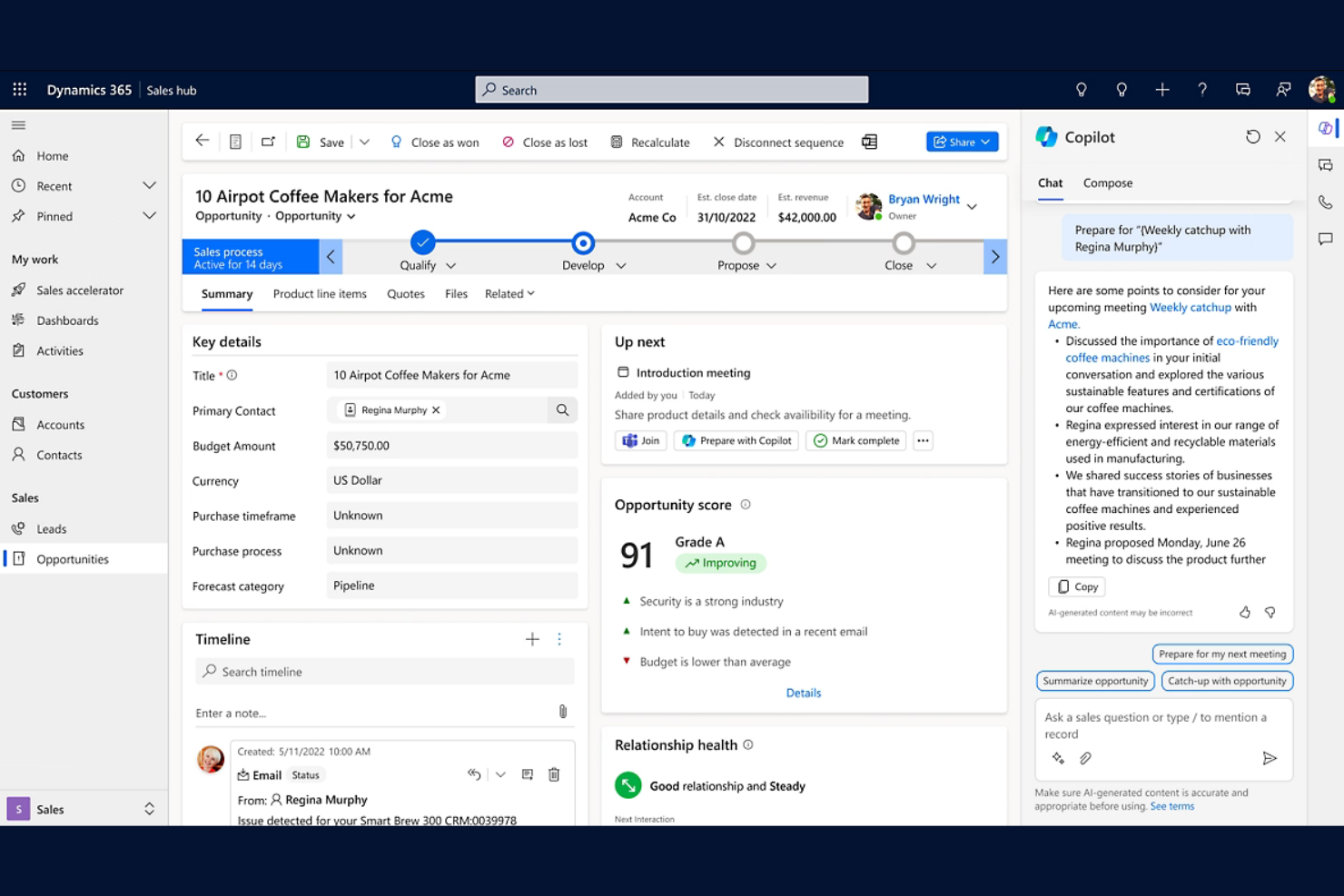
Microsoft Dynamics 365 is a suite of enterprise CRM and ERP applications that covers sales pipeline management, marketing automation, customer service, and field service across the full customer lifecycle.
Who Is Microsoft Dynamics 365 Best For?
Microsoft Dynamics 365 is a natural fit for large enterprises already running on the Microsoft ecosystem that need CRM and ERP functions connected under one platform.
Why I Picked Microsoft Dynamics 365
Microsoft Dynamics 365 earns its spot on my shortlist because of how it handles workflow automation at enterprise scale. I like that Power Automate is built directly into the platform, letting my team trigger cross-module workflows between Sales, Customer Service, and Marketing without leaving the environment. The shared Dataverse layer means customer data updates in one module instantly reflect across all others, so lifecycle handoffs between teams don't require manual syncing or duplicate data entry.
Microsoft Dynamics 365 Key Features
- Customer Insights: Builds unified customer profiles by combining transactional, behavioural, and demographic data from multiple sources.
- Copilot AI: Surfaces AI-generated summaries, follow-up suggestions, and meeting prep briefs directly within sales and service records.
- Customer journey orchestration: Designs and automates real-time, event-triggered customer journeys across email, SMS, and push channels.
- Predictive forecasting: Generates AI-driven sales forecasts at the rep, team, and territory level using pipeline and historical data.
Microsoft Dynamics 365 Integrations
Microsoft Dynamics 365 has native integrations across the Microsoft ecosystem, including Microsoft 365, Azure, Power BI, LinkedIn Sales Navigator, and Microsoft Teams. Thousands of additional apps are available through the Microsoft Marketplace (formerly AppSource), and the platform connects with Zapier and offers REST APIs for custom integrations.
Pros and Cons
Pros:
- Localized in 40+ regions and 41 languages
- Unified 360-degree customer data profiles
- Modular CRM suite scales by department
Cons:
- Complex multi-module configuration requirements
- Module-specific functionality limits cross-team use
Best all-in-one tool for small businesses
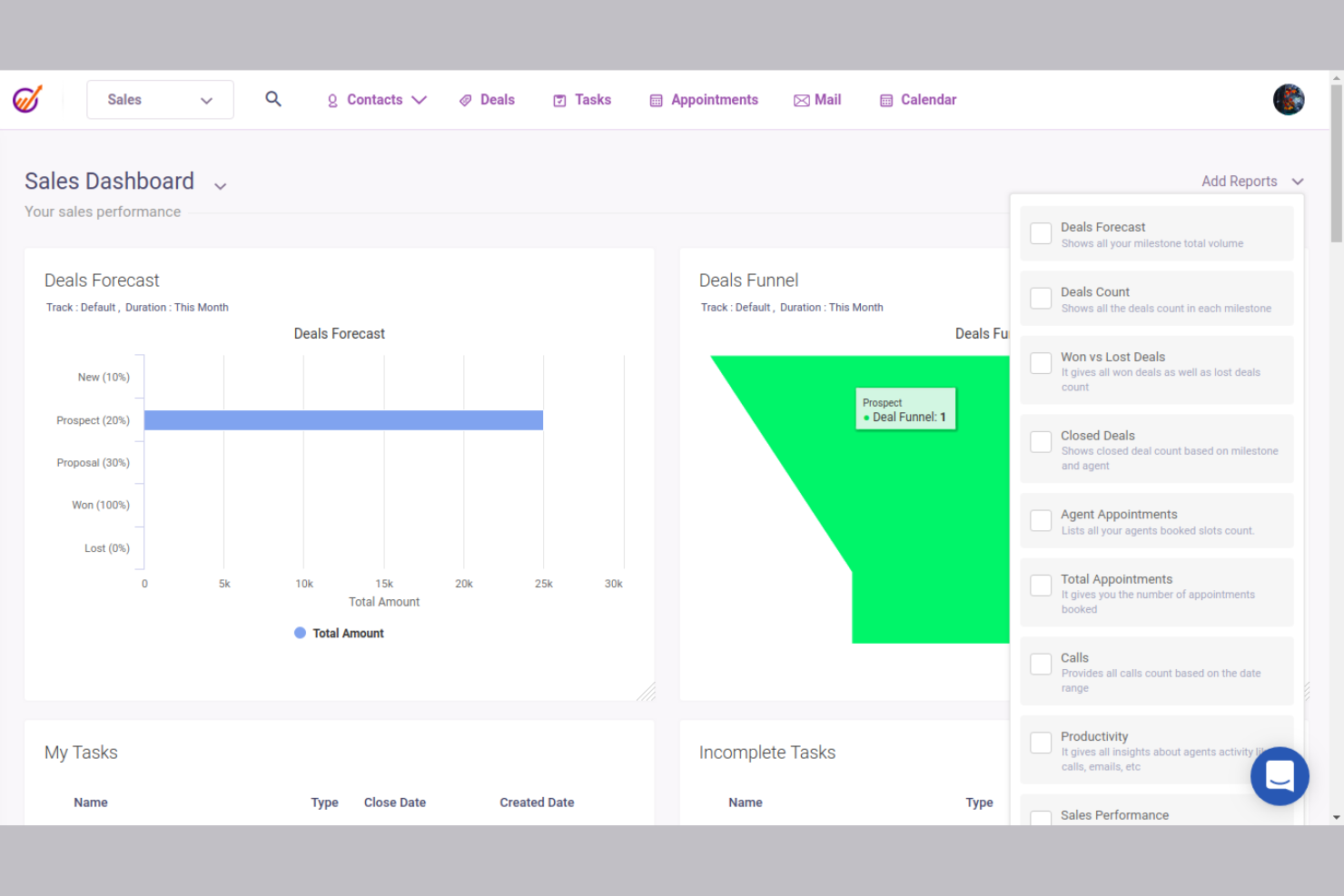
EngageBay is an all-in-one CRM platform that combines contact management, email marketing automation, sales pipeline tracking, and help desk ticketing across the full customer lifecycle in a single system.
Who Is EngageBay Best For?
EngageBay is a natural fit for small businesses that need marketing, sales, and support tools in one place without managing multiple subscriptions.
Why I Picked EngageBay
I picked EngageBay as one of the best because it covers the entire customer lifecycle without forcing you to stitch together separate tools. What stands out to me is how the marketing, sales, and service bays share a single contact record, so a lead that converts to a customer doesn't lose any history when it moves from a drip campaign into the deal pipeline. The built-in lead scoring and sales automation also mean my team can set up lifecycle triggers once, without a dedicated ops person maintaining them.
EngageBay Key Features
- Help desk ticketing: Manage customer support requests directly within EngageBay, keeping service interactions tied to the same contact record as marketing and sales activity.
- Landing page builder: Create and publish lead capture pages using a drag-and-drop editor without needing a separate tool.
- Contact segmentation: Filter and group contacts by behaviour, lifecycle stage, or custom fields to target specific audiences.
- Appointment scheduling: Let prospects and customers book meetings directly through a scheduling link that syncs with your calendar.
EngageBay Integrations
EngageBay offers roughly 50 native integrations, including Shopify, Xero, Stripe, LinkedIn, SendGrid, Mailgun, Mandrill, DocuSign, WooCommerce, and Amazon SES. It connects with Zapier and provides an API for custom integrations.
Pros and Cons
Pros:
- Built-in lead capture forms and pages
- Drag-and-drop automation with conditional logic
- Unified contact record across all bays
Cons:
- Delays when sending broadcasts or bulk actions
- Limited automation workflow testing
HubSpot
Best for combining CRM with customer insights
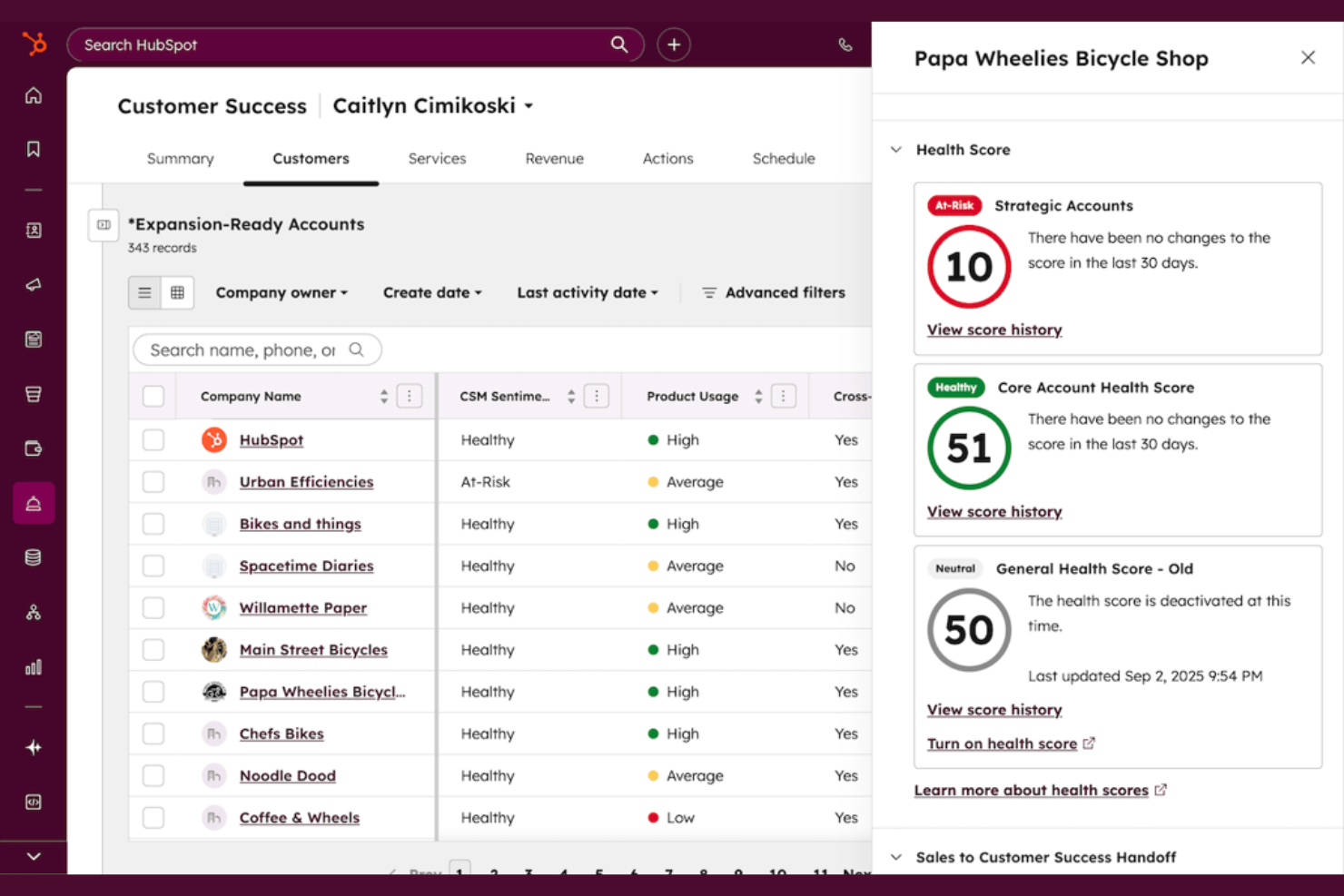
HubSpot is a customer success management platform built into its Service Hub that combines CRM data, product usage analytics, health scoring, and renewal tracking in one workspace.
Who Is HubSpot Best For?
HubSpot is a strong fit for mid-market B2B teams that want customer success workflows built directly into their existing CRM.
Why I Picked HubSpot
I picked HubSpot as one of the best because it's the only platform where your CRM data, product usage metrics, and customer health scores all live in the same workspace. I especially like the health score alerts, which flag at-risk accounts so my team can prioritize outreach before churn becomes a real issue. The 360-degree customer view pulls together support ticket history, adoption data, and renewal pipeline into a single account record, so nothing slips through the cracks.
HubSpot Key Features
- Renewal pipeline tracking: Monitor upcoming renewals and expansion opportunities directly within the customer success workspace.
- Pinned reports: Pin the most relevant reports to the workspace so your team sees key metrics the moment they log in.
- Automated workflows for outreach: Trigger outreach tasks automatically based on customer behaviour or account changes to reduce manual follow-up.
- Book of business management: Assign accounts to individual reps and give managers a clear view of each rep's portfolio health.
HubSpot Integrations
HubSpot offers over 1,900 ready-to-use integrations through its App Marketplace, including tools like Salesforce, Slack, Google Workspace, Microsoft 365, Stripe, Segment, and Intercom. An API is also available for custom integrations.
Pros and Cons
Pros:
- Feedback surveys track NPS, CSAT, and CES
- Built-in health scores with at-risk account views
- Shares customer data across sales and marketing
Cons:
- Limited flexibility for complex ticketing needs
- Best features locked behind higher-priced plans
Ortto
Best for multi-step customer funnel analysis
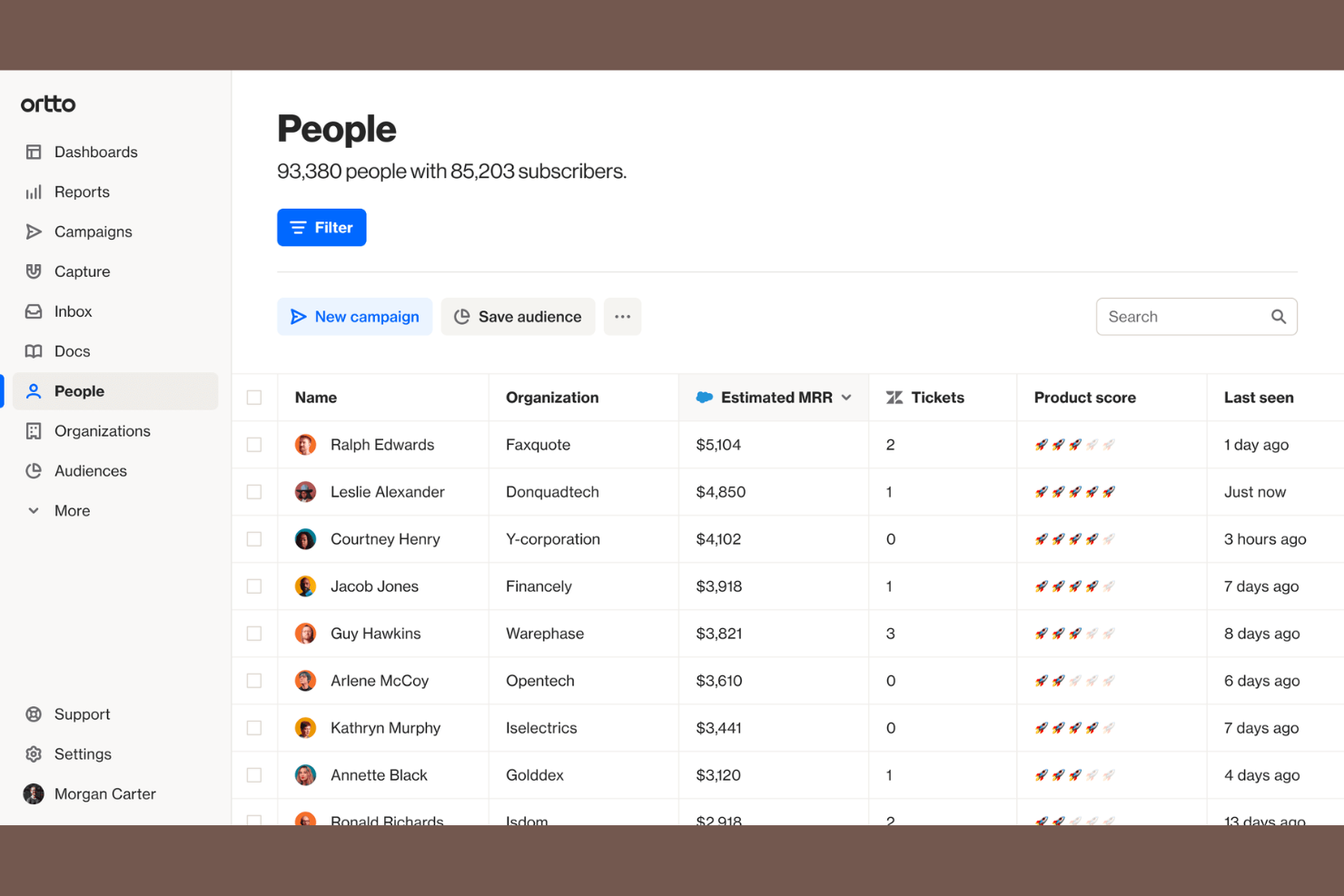
Ortto is a customer data platform that unifies customer data with built-in marketing automation and journey analytics, covering audience segmentation, multi-channel campaign execution, and funnel reporting in one tool.
Who Is Ortto Best For?
Ortto is a strong fit for growth and marketing teams at B2B SaaS companies that need lifecycle analytics tied directly to campaign execution.
Why I Picked Ortto
I've included Ortto in my top picks because of how tightly its funnel reporting connects to actual campaign execution. Most tools treat analytics and automation as separate workflows, but in Ortto, I can build a multi-step funnel using real CDP data, identify exactly where contacts are dropping off, and trigger a targeted journey from that same view without switching tools. The cohort analysis feature is particularly useful for tracking how specific audience segments convert over time across the full customer lifecycle.
Ortto Key Features
- Visual journey builder: Designs automated, multi-step customer journeys using a drag-and-drop canvas with conditional branching logic.
- Real-time audience segmentation: Builds dynamic segments based on live behavioural, demographic, and transactional data stored in the CDP.
- Multi-channel messaging: Sends campaigns across email, SMS, in-app, and push channels from a single campaign interface.
- Contact scoring: Assigns scores to contacts based on activity and engagement data to prioritize outreach at each lifecycle stage.
Ortto Integrations
Ortto offers 25+ native integrations, including Salesforce, HubSpot, Shopify, Stripe, Pipedrive, Chargebee, Zendesk, Intercom, Slack, and Twilio Segment. It connects with Zapier and provides an API for custom integrations.
Pros and Cons
Pros:
- Pre-built playbooks for lifecycle automation flows
- Geolocation-based data within funnel analytics
- Drag-and-drop journey builder with clear dashboards
Cons:
- Restricted third-party integration library
- Limited native CRM integrations beyond Salesforce

Best for proactive retention management
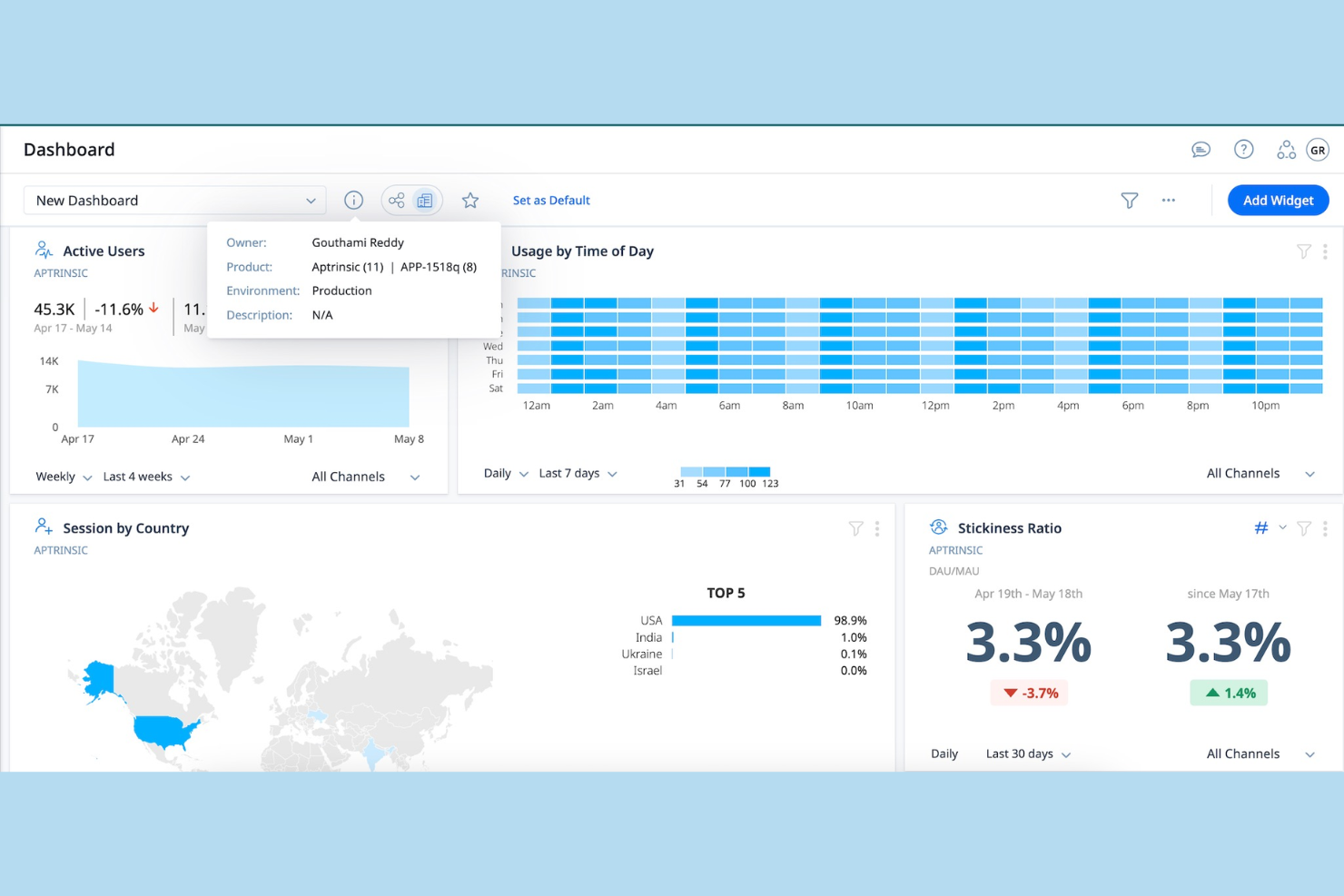
Gainsight is a customer success platform built around post-sale lifecycle management, combining customer health scoring, churn risk detection, success planning, and CS team workflow automation in one system.
Who Is Gainsight Best For?
Gainsight is a strong fit for enterprise B2B companies with dedicated customer success teams managing large, recurring-revenue customer bases.
Why I Picked Gainsight
Gainsight earns its spot on my shortlist because of how it handles churn risk before it becomes a real problem. I use the health scoring system to set rules across product usage, support ticket volume, and engagement signals, and Gainsight automatically flags accounts that are trending in the wrong direction. From there, I can trigger a playbook that assigns a follow-up task to the right CSM with the relevant account context already attached. That kind of automated, rules-based intervention at the account level is where Gainsight genuinely pulls ahead for proactive retention management.
Gainsight Key Features
- Customer 360 view: Pulls account data from connected systems into a single profile, showing contract details, product usage, support history, and relationship contacts in one place.
- Success plans: Creates shared, trackable goal plans between your CS team and the customer, with milestone ownership and status visibility for both sides.
- Journey orchestrator: Automates outbound communication sequences to customers based on lifecycle stage, health score changes, or product behaviour triggers.
- In-app surveys: Deploys NPS, CSAT, and custom surveys directly within your product to collect feedback at specific moments in the customer journey.
Gainsight Integrations
Gainsight offers over 100 apps, integrations, and service partners through its marketplace. Native connectors include Salesforce, HubSpot, Snowflake, Jira, Zendesk, Freshdesk, Intercom, Gong, ServiceNow, and Slack, along with data platforms like BigQuery, Segment, and Mixpanel. It connects with Zapier and provides an API for custom integrations.
Pros and Cons
Pros:
- AI-driven risk signals and next-best-action recommendations
- Timeline and Cockpit for centralized task tracking
- Customizable account health scores across data sources
Cons:
- Needs full-time database administrator support
- Extensive internal team training required
Best for account-based marketing automation

Adobe Marketo Engage is a B2B marketing automation platform that covers lead management, account-based marketing, email nurturing, behavioural tracking, and multi-touch revenue attribution across the full buyer lifecycle.
Who Is Adobe Marketo Engage Best For?
Adobe Marketo Engage is a strong fit for enterprise B2B marketing teams running complex, multi-channel campaigns across large buying committees and named accounts.
Why I Picked Adobe Marketo Engage
I've included Adobe Marketo Engage in my top picks because of how it handles account-level targeting at scale. Its ABM tools let you build account lists, score accounts separately from leads, and coordinate personalized campaigns across every contact in a buying committee simultaneously. I also like Marketo Measure, which maps multi-touch attribution across every campaign touchpoint to show exactly which programs influenced a deal, making it one of the few platforms where revenue attribution is a native capability, not an add-on.
Adobe Marketo Engage Key Features
- Engagement programs: Build multi-step nurture tracks that automatically advance contacts based on behaviour and engagement scores.
- Dynamic content: Swap out email and landing page content for different audience segments without building separate assets.
- Lead lifecycle management: Define and automate stage transitions from anonymous visitor through to sales-qualified lead.
- Sales Insight: Surface prioritized lead activity and engagement data directly inside Salesforce or Microsoft Dynamics for sales reps.
Adobe Marketo Engage Integrations
Integrations include Salesforce, Microsoft Dynamics, Veeva, Clearbit, ZoomInfo, Google, Facebook, LinkedIn, X, and Zoom.
Pros and Cons
Pros:
- Bi-directional CRM sync with Salesforce
- Granular behaviour and firmographic lead scoring
- Native multi-touch revenue attribution reporting
Cons:
- Caps on active segments and engagement programs
- Limited native mobile application functionality

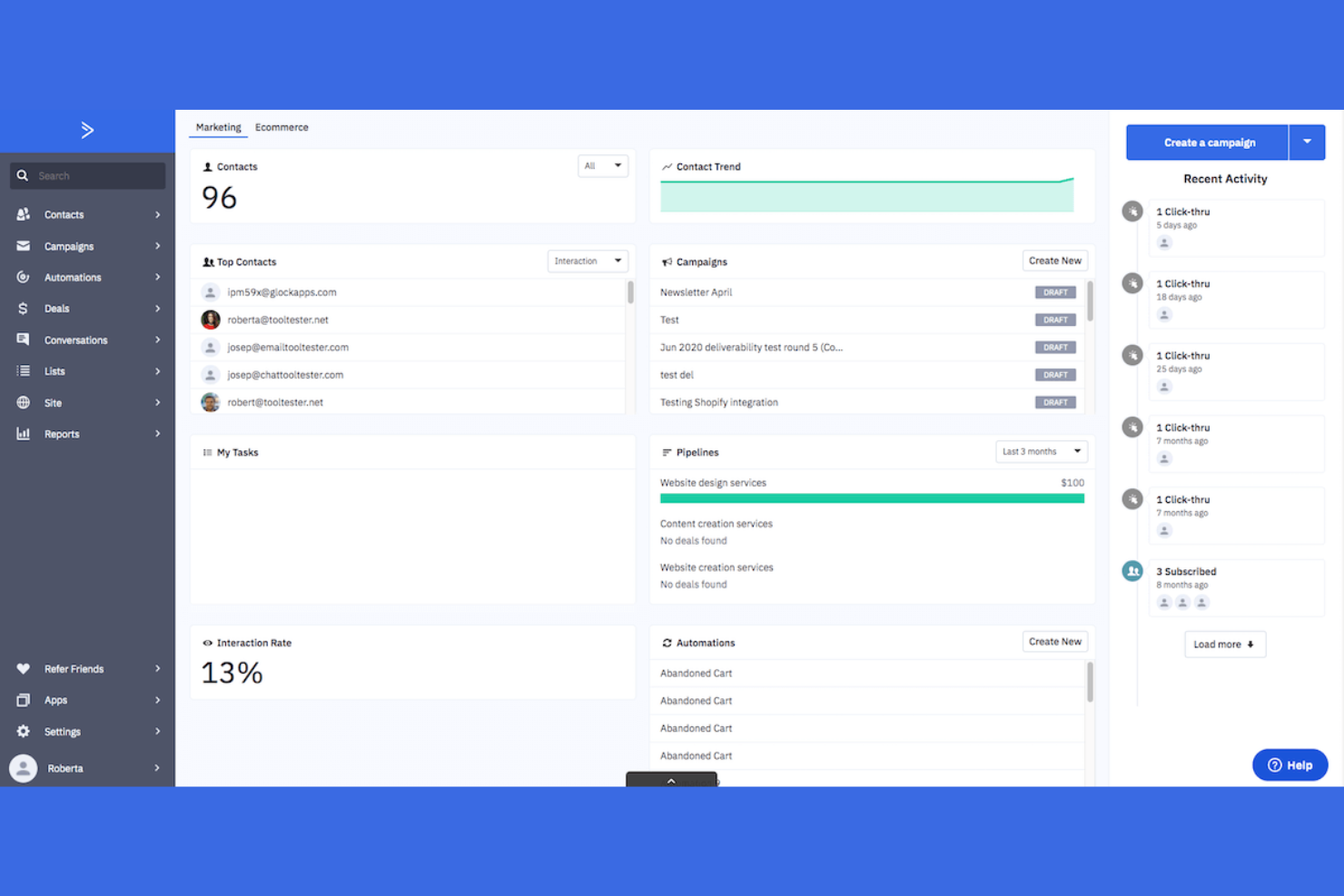
ActiveCampaign is a marketing automation and customer lifecycle management platform built around multi-channel journey automation, covering email, SMS, WhatsApp, and lead scoring across the full customer lifecycle.
Who Is ActiveCampaign Best For?
ActiveCampaign is a strong fit for growing B2C and ecommerce teams that need to automate multi-step customer journeys across email, SMS, and paid channels without a dedicated marketing ops team.
Why I Picked ActiveCampaign
ActiveCampaign earns its spot on my shortlist because of how far its automation builder goes beyond basic drip sequences. I can build branching journeys that split based on real-time behaviour, like whether a contact opened an email, visited a pricing page, or hit a lifecycle milestone, and each path triggers a completely different follow-up sequence. I also like the conditional content feature, which lets a single email render differently for each segment without having to build separate campaigns. The combination of behaviour-based branching and multi-channel triggers across email, SMS, and WhatsApp makes it one of the most flexible journey builders I've used for growing teams that don't have a dedicated ops resource.
ActiveCampaign Key Features
- Lead scoring: Assign and update scores automatically based on contact engagement, page visits, and purchase behaviour to surface high-intent leads.
- Site and event tracking: Monitor contact activity across your website and app to trigger automations based on specific page visits or actions.
- Deal pipeline management: Track sales opportunities through a visual CRM pipeline with automated task creation and stage-based triggers.
- Predictive sending: Use machine learning to deliver emails at the time each contact is most likely to open them.
ActiveCampaign Integrations
ActiveCampaign offers 1,000+ integrations through its app marketplace, including Salesforce, Shopify, WooCommerce, Slack, Zendesk, Microsoft Dynamics 365, Google Ads, Facebook, WordPress, and Calendly. It also connects with Zapier and provides an API for custom integrations.
Pros and Cons
Pros:
- Built-in CRM tracks deals alongside marketing workflows
- Behavioural segmentation based on site and purchase activity
- Branching automations trigger across email, SMS, and WhatsApp
Cons:
- Limited native field mapping customization
- Charges for unsubscribed and bounced contacts

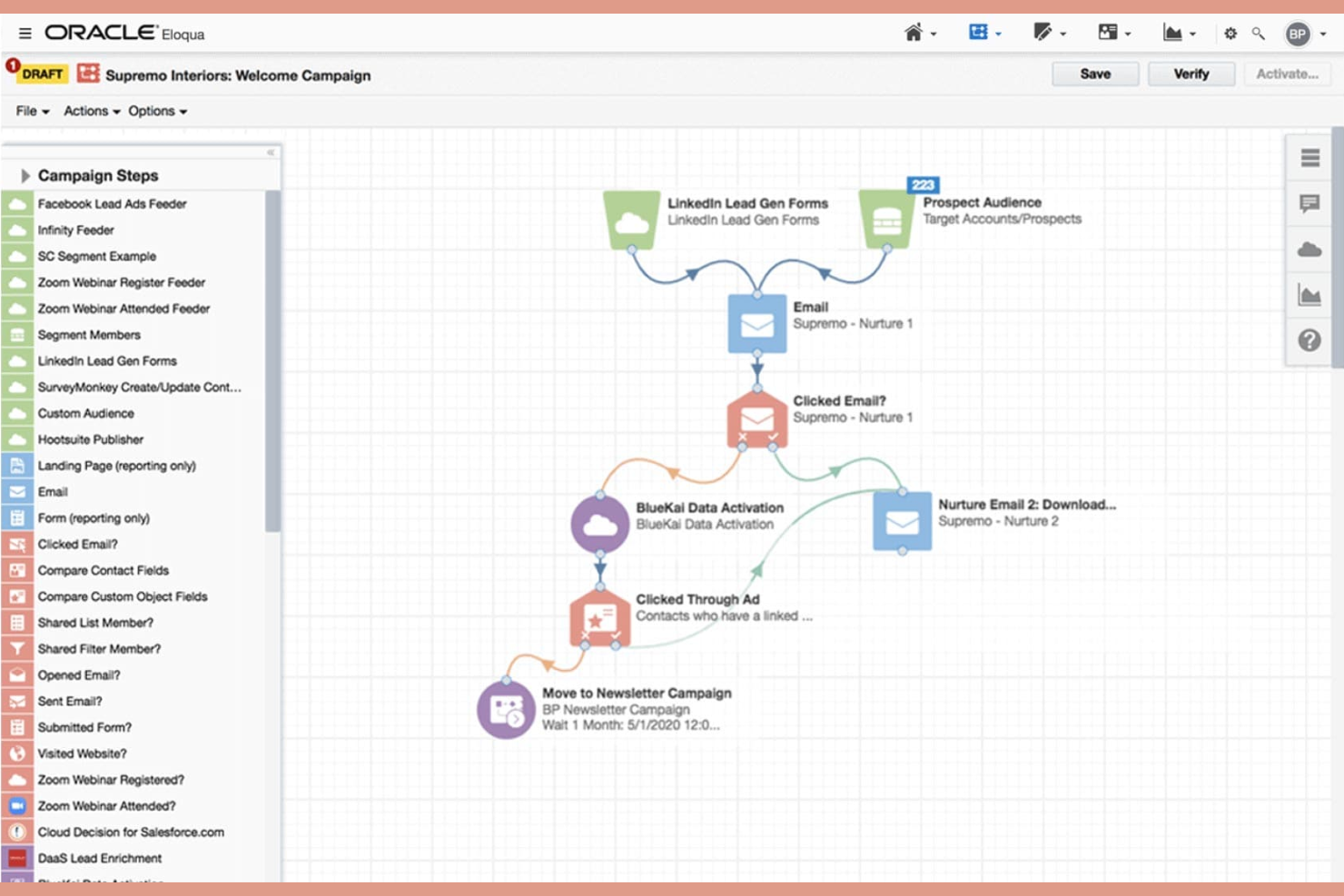
Oracle CX is a connected suite of marketing, sales, service, and commerce applications that manages the full customer lifecycle across B2B and B2C channels from a unified data platform.
Who Is Oracle CX Best For?
Oracle CX is built for enterprise organizations running complex, multi-channel go-to-market operations across both B2B and B2C segments.
Why I Picked Oracle CX
Oracle CX earns its spot on my shortlist because no other platform connects marketing, sales, service, and commerce on a single data layer the way it does. I'm particularly drawn to the Oracle Unity Customer Data Platform, which builds a real-time 360-degree customer profile that updates with every channel interaction. Pair that with cross-channel campaign orchestration across B2B and B2C, and my team can run personalized lifecycle journeys without stitching together separate data exports.
Oracle CX Key Features
- Configure, price, quote (CPQ): Generates accurate, rule-based quotes directly within the sales workflow.
- AI-guided selling: Surfaces next-best-action recommendations to reps during active deals.
- Subscription management: Handles renewals, upgrades, and billing changes for recurring revenue models.
- Field service management: Schedules and dispatches technicians using real-time job and location data.
Oracle CX Integrations
Oracle CX connects with third-party applications through Oracle Integration Cloud, which provides prebuilt adapters for Salesforce, SAP, Shopify, Snowflake, and Workday, among others. The Oracle Cloud Marketplace extends connectivity further with partner-built applications, and an API gateway is available for custom integrations.
Pros and Cons
Pros:
- Advanced multi-channel journey orchestration
- Unified data layer spans the full lifecycle
- AI-driven recommendations across sales and service
Cons:
- Lacks direct Active Directory login integration
- Implementation requires significant time and resources

Totango is a customer lifecycle management platform built around modular "SuccessBLOCs" that combine health scoring, automated playbooks, customer journey templates, and account profile management for post-sale CS teams.
Who Is Totango Best For?
Totango is a strong fit for mid-market to enterprise SaaS companies with distinct CS team segments like onboarding, renewal, and expansion that need separate, role-specific workflows.
Why I Picked Totango
I've included Totango in my top picks because of how its SuccessBLOCs model handles team specialization. Each SuccessBLOC is a self-contained module with its own customer segments, health metrics, and task workflows, so my onboarding team and renewal team aren't operating from the same view or the same rules. I can configure a separate SuccessBLOC for expansion plays with its own success criteria, without touching the logic built for new customer onboarding.
Totango Key Features
- Complete customer account profiles: Centralizes all customer data, account history, and touchpoints into a single real-time profile per account.
- Email campaigns: Send targeted email sequences to customer segments to support renewal, onboarding, or expansion goals at scale.
- Customer journey templates: Pre-built journey templates let you activate new CS strategies without building playbooks from scratch.
- Portfolio-level reporting: Tracks performance across your entire customer base by segment, product line, or team to surface revenue risk and growth opportunities.
Totango Integrations
Totango offers 40+ native connectors and integrations, including Salesforce, HubSpot, Zendesk, Jira, Snowflake, Slack, Intercom, Pendo, Segment, and Zuora. It also connects with Zapier, and an API is available for custom integrations.
Pros and Cons
Pros:
- In-app NPS surveys for real-time feedback
- Segment-level reporting across customer portfolios
- Pre-built SuccessBLOCs for faster CS rollouts
Cons:
- Health scores can misrepresent actual usage
- Limited mobile platform optimization
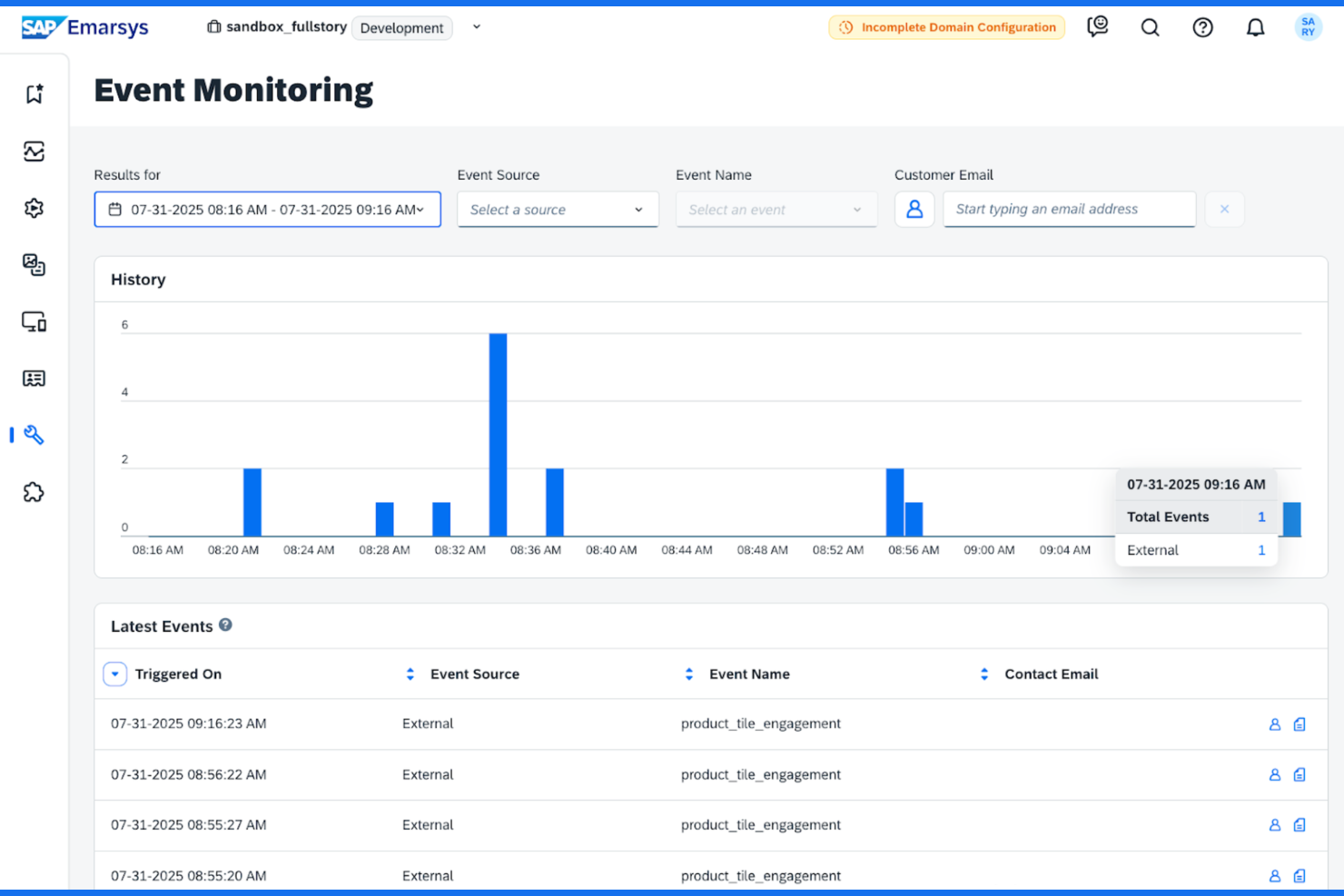
SAP Emarsys is an omnichannel customer engagement platform built for retail and e-commerce, combining AI-driven segmentation, lifecycle marketing automation, and personalization across email, mobile, web, and in-store channels.
Who Is SAP Emarsys Best For?
SAP Emarsys is a strong fit for mid-market to enterprise retail and e-commerce brands that need to manage high-volume customer lifecycle marketing across multiple channels and regions.
Why I Picked SAP Emarsys
I've included SAP Emarsys in my top picks because of how purpose-built it is for scaling retail and e-commerce lifecycle marketing. The pre-built tactics library stands out to me: it's a collection of ready-to-deploy, fully customizable lifecycle journeys covering use cases like cart abandonment, post-purchase review requests, and win-back campaigns. I also like that the native loyalty module is baked directly into the platform, so my team can run loyalty programs alongside segmentation and campaign execution without a separate tool.
SAP Emarsys Key Features
- AI product recommendations: Surfaces personalized product suggestions for individual contacts based on browsing and purchase behaviour.
- Revenue analytics dashboard: Tracks campaign-level and channel-level revenue attribution in a single reporting view.
- A/B and multivariate testing: Tests subject lines, content blocks, and send times across live campaigns to identify top-performing variants.
- Mobile push and in-app messaging: Delivers targeted messages directly through your branded mobile app based on lifecycle triggers.
SAP Emarsys Integrations
SAP Emarsys offers native integrations across the SAP ecosystem, including SAP S/4HANA, SAP Analytics Cloud, SAP Business Technology Platform, SAP Customer Data Platform, SAP Commerce Cloud, SAP Sales Cloud, and SAP Service Cloud. It also provides native plug-ins for Shopify, Adobe Commerce (Magento), and Salesforce B2C Commerce, along with a Google Analytics integration for importing web behaviour data. An open API framework is available for custom integrations.
Pros and Cons
Pros:
- Revenue attribution tied to lifecycle stages
- Unified customer view across all channels
- Pre-built lifecycle tactics for fast deployment
Cons:
- B2B data structures are not supported
- Requires manual data extraction
Other Customer Lifecycle Management Software
Here are some additional customer lifecycle management software options that didn’t make it onto my shortlist, but are still worth checking out:
- Customer.io
Behavioural messaging journeys
- ChurnZero
Usage tracking for SaaS retention
- Zoho CRM
For workflow customization flexibility
- Klaviyo
For e-commerce lifecycle automation
- Creatio
For low-code process automation
- Omnisend
For multichannel campaign orchestration
- Userpilot
For in-app onboarding flows
- Pipedrive
Pipeline visualization tools
- Salesforce
AI-driven opportunity management
- Braze
Real-time user segmentation


How I Evaluate Customer Lifecycle Management Software
I look at two layers: must-have capabilities like lifecycle stage tracking and churn health scores, and differentiators—like revenue forecasting and stack interoperability—that set the best tools apart.
Core Functionality (Table Stakes For This List)
When I'm selecting tools for my list, I rank each one on a scale from 0 (does not offer the functionality) to 5 (excels in this area) for each core functionality listed below. Then, I calculate the tool's total score into a percentage. Each tool needs to achieve a minimum total score of 65% to be considered for inclusion.
- Lifecycle Stage Tracking: I check whether the platform lets you define and customize stages like onboarding, adoption, renewal, and expansion—and whether transitions can be automated based on triggers.
- Unified Customer Data: Every tool I evaluate should consolidate CRM, billing, product usage, and support data into a single customer record rather than forcing your team to toggle between systems.
- Health Scoring & Churn Signals: I look for configurable scoring models that pull from multiple data inputs so your team can spot at-risk accounts before a renewal conversation, not during one.
- Lifecycle Workflow Automation: The platform should support trigger-based playbooks—like auto-assigning a re-engagement sequence when a health score drops below a set threshold.
- Revenue & Retention Analytics: I evaluate whether dashboards cover key RevOps metrics like NRR, GRR, churn rate, and expansion revenue with enough depth for cohort or segment-level analysis.
- GTM Tool Integrations: Tools earn higher marks when they offer native connections to CRM, marketing automation, CS platforms, and data warehouses your RevOps stack already relies on.
Once I have a list of tools that meet this criteria, I consider what sets each platform apart.
Differentiating Factors (What Sets Vendors Apart)
Here's how I compare and contrast different vendors:
Standout Features
Revenue forecasting tied to lifecycle stages is a big differentiator. I look for tools that connect renewal and expansion pipeline data directly to health scores so your CRO isn't relying on spreadsheet guesswork. AI-powered recommendations also matter here, especially when a platform suggests next-best-actions for CSMs based on usage patterns and risk signals. I evaluate digital-led CS capabilities too, since teams managing hundreds of long-tail accounts need scaled engagement tools like automated portals and tech-touch playbooks.
Beyond Features
RevOps tech stack interoperability is one of the first things I check. A tool that doesn't sync bi-directionally with your CRM and data warehouse creates more data silos than it solves. Implementation timelines matter just as much—I evaluate whether a vendor offers pre-built playbooks and onboarding support so your team isn't spending months configuring lifecycle stages from scratch. Pricing transparency is another factor I weigh, particularly whether the model scales predictably as your customer base grows rather than penalizing you for adding accounts.
How to Choose Customer Lifecycle Management Software
It’s easy to get bogged down in long feature lists and complex pricing structures. To help you stay focused as you work through your unique software selection process, here’s a checklist of factors to keep in mind:
| Factor | What to Consider |
|---|---|
| Scalability | Can the platform handle your current volume and projected growth in customers, data, and campaigns without service degradation or rising costs? |
| Integrations | Does the software offer direct, documented integrations with your CRM, ecommerce platform, analytics tools, and communication channels? |
| Customizability | Are you able to adjust workflows, segment definitions, and templates to fit your team’s strategies, regional variations, or evolving processes? |
| Ease of use | Will your non-technical stakeholders be able to build, launch, and analyze journeys without constant admin or IT involvement? |
| Implementation and onboarding | What onboarding resources, migration assistance, and training will you need to get live, and can the vendor support your timeline and requirements? |
| Cost | Have you mapped all usage-based fees, onboarding costs, necessary add-ons, and contract commitments compared to expected ROI? |
| Security safeguards | Does the platform support SSO, data encryption, access controls, and regular audits to meet your compliance and data privacy standards? |
| Support availability | Are reliable support channels—such as live chat, dedicated CSMs, or 24/7 emergency help—available in your time zone and language? |
What Is Customer Lifecycle Management Software?
Customer lifecycle management software helps you track, analyze, and automate interactions with customers across every stage of their journey, from initial contact to advocacy. It centralizes customer data, enables targeted communications, and supports the design of automated workflows and touchpoints to nurture prospects, drive engagement, increase retention, and maximize customer lifetime value.
Features of Customer Lifecycle Management Software
When selecting customer lifecycle management software, keep an eye out for the following key features:
- Contact segmentation: Organizes your customer database into specific groups based on behaviour, demographics, or lifecycle stage, allowing for targeted communications and campaigns.
- Journey mapping: Visualizes every stage of the customer journey so you can design and optimize multi-step engagement flows across channels.
- Campaign automation: Schedules emails, messages, and follow-ups based on trigger events or customer actions, reducing manual workload and ensuring timely outreach.
- Omnichannel communication: Centralizes messaging across email, SMS, push notifications, and social media, so you can coordinate and personalize touchpoints without tool switching.
- Customer data unification: Consolidates information from various sources—such as CRM, commerce, and support systems—into a single customer profile for a complete view.
- Lifecycle analytics: Tracks success metrics for each part of the customer journey, like conversion rates, churn, and retention, helping inform ongoing optimization.
- Personalized content delivery: Dynamically tailors website, email, and in-app experiences for each user based on profile data or recent behaviours.
- Task and workflow management: Lets you assign, monitor, and automate internal tasks associated with managing customer interactions, keeping teams aligned.
- Consent and preference management: Captures and manages customer communication preferences and compliance with privacy regulations.
Common Customer Lifecycle Management Software AI Features
Beyond the standard customer lifecycle management software features listed above, many of these solutions are incorporating AI with features like:
- Predictive churn analysis: Uses machine learning to identify customers who are likely to disengage or leave, allowing your team to prioritize retention efforts and proactively address churn risks.
- Next best action recommendations: Analyzes real-time customer behaviour and history to suggest the most effective follow-up or campaign step, helping teams optimize engagement for every individual.
- Lead and account scoring: Applies AI models to score leads and accounts based on their likelihood to convert or expand, letting your team focus on the most promising opportunities in your pipeline.
- Automated anomaly detection: Monitors data for unusual patterns in customer interactions or campaign results, flagging potential issues or unexpected opportunities without the need for manual tracking.
- Content optimization suggestions: Reviews campaign assets and customer outcomes to recommend subject lines, messaging styles, or timing that are most likely to resonate with each audience segment.
Benefits of Customer Lifecycle Management Software
Implementing customer lifecycle management software provides several benefits for your team and your business. Here are a few you can look forward to:
- Holistic customer visibility: A unified system brings together data from every interaction and channel, giving your team a complete view of each customer’s journey.
- Targeted engagement strategies: Features like contact segmentation and journey mapping allow you to deliver personalized experiences that increase relevance and response rates.
- Higher retention and loyalty: Automated lifecycle workflows help you engage at key moments, proactively reduce churn, and build lasting customer relationships.
- Improved operational efficiency: Automating campaigns, tasks, and communications cuts down on manual work and enables your team to focus on strategic activity.
- Actionable reporting and insights: Lifecycle analytics provide the visibility you need to measure performance, attribute revenue, and refine your approach.
- Adaptability at scale: Integration and customizability ensure the software grows with your business, supporting changing processes and expanding data needs.
- Risk and compliance support: Consent and preference management features help you stay aligned with evolving data privacy and communication regulations.
Costs and Pricing of Customer Lifecycle Management Software
Selecting customer lifecycle management software requires an understanding of the various pricing models and plans available. Costs vary based on features, team size, add-ons, and more. The table below summarizes common plans, their average prices, and typical features included in customer lifecycle management software solutions:
Plan Comparison Table for Customer Lifecycle Management Software
| Plan Type | Average Price | Common Features |
|---|---|---|
| Free Plan | $0 | Basic contact management, limited segmentation, simple campaign automation, and entry-level analytics. |
| Personal Plan | $10–$25/user/month | Enhanced segmentation, journey mapping, customer data unification, and email marketing capabilities. |
| Business Plan | $30–$70/user/month | Multichannel campaign orchestration, advanced automation workflows, lifecycle analytics, and integrations. |
| Enterprise Plan | $80–$200/user/month | Custom workflows, advanced security, reporting dashboards, dedicated support, and unlimited integrations. |
Customer Lifecycle Management Software FAQs
Here are some answers to common questions about customer lifecycle management software:
How does customer lifecycle management software support customer retention?
These platforms track customer behaviour, analyze engagement data, and automate targeted outreach at the right time. By surfacing churn risks and providing tools to respond with personalized marketing campaigns, they help turn first-time buyers into loyal customers and drive repeat purchases. This data-driven approach dramatically improves the overall customer experience.
Can customer lifecycle management software integrate with other business systems?
Yes, most solutions connect with CRM, marketing automation, support, and analytics systems. Integrations allow you to sync data, trigger workflows, and maintain a single source of truth across your tech stack with a minimal learning curve, whether you use a dedicated CLM tool or a broader lifecycle management solution.
What team roles typically use customer lifecycle management software?
Sales teams, marketing, customer success, and support all use these tools to view data, track stages, and coordinate engagement efforts. Teams often share success stories or review internal case studies during cross-departmental webinars to optimize their strategy. Admins and operations leads usually own setup and optimization.
How do you measure success with customer lifecycle management tools?
Track metrics like conversion rates between stages, customer retention, advocacy rates, and uplift in customer lifetime value. Built-in analytics dashboards help you visualize trends, identify opportunities to upsell or introduce cross-sells, and drill into what’s driving results.
Do these tools offer data privacy and compliance features?
Yes, many solutions provide features like consent capture, preference management, activity tracking, and tools to support GDPR or CCPA compliance. Always confirm specific capabilities match your regulatory needs.