
20 Best Auto Dialer Software Reviewed For 2026

20 Best Auto Dialer Software Shortlist
Here's my pick of the 20 best software from the 20 tools reviewed.


With so many different auto dialer software available, figuring out which is right for you is tough. You know you want to increase the efficiency of your outbound calling campaigns but need to figure out which tool is best. I've got you! In this post I'll help make your choice easy, sharing my personal experiences using dozens of different auto dialer tools with various teams and campaigns, with my picks of the best auto dialer software.
Why Trust Our Auto Dialer Software Reviews?
We’ve been testing and reviewing auto dialer software since 2022. As revenue operation leaders ourselves, we know how critical and difficult it is to make the right decision when selecting software.
We invest in deep research to help our audience make better software purchasing decisions. We’ve tested more than 2,000 tools for different RevOps use cases and written over 1,000 comprehensive software reviews. Learn how we stay transparent & our auto dialer software review methodology.
| Tool | Best For | Trial Info | Price | ||
|---|---|---|---|---|---|
| 1 | Best for predictive dialer support | Free demo available | From $15/user/month (billed annually) | Website | |
| 2 | Best for small and medium businesses with global sales teams | 14-day free trial available | From $25/user/month (billed annually) | Website | |
| 3 | Best for high-volume dialing with minimal connection delays | Free trial + free demo available | From $149/user/month | Website | |
| 4 | Best for combining human and automated calls | 14-day free trial | Pricing upon request | Website | |
| 5 | Best predictive dialer for proactive and personalized engagement | Free demo available | From $85/user/month | Website | |
| 6 | Best for predictive dialing | Free trial available | Contact for pricing | Website | |
| 7 | Best for customer-facing teams that need to work at scale | 14-day free trial + free demo available | From $29/user/month (billed annually) | Website | |
| 8 | Best for predictive dialing | Not available | Contact for pricing | Website | |
| 9 | Best for blended contact center offerings with all types of auto dialers | Free demo available | From $119/user/month | Website | |
| 10 | Best for cloud-native predictive dialing technology | Free demo available | From $199/user/month | Website | |
| 11 | Best for patented predictive dialing that eliminates long pauses before agent pickup | Free demo available | From $110/user/month | Website | |
| 12 | Best for mass messaging precision | Free trial available | Contact for pricing | Website | |
| 13 | Best for avoiding compliance errors on outbound and inbound calls | Free demo available | From $85/user/month (billed annually) | Website | |
| 14 | Best for CRM Integrations | Demo available | Contact for pricing | Website | |
| 15 | Best for blending personalized contact with AI and automation | Free trial available | Pricing upon request | Website | |
| 16 | Best for quick connect service | Not available | Pricing upon request | Website | |
| 17 | Best for AI-driven outbound calls | Not available | Contact for pricing | Website | |
| 18 | Best for an advanced and easy to use predictive dialer | Free demo available | Pricing upon request | Website | |
| 19 | Best for integrated real-time prospect engagement | Free trial available | Pricing upon request | Website | |
| 20 | Best for ticket management | Free 30-day trial available | From $9/agent/month (billed annually) | Website |
-

Prisync
Visit WebsiteThis is an aggregated rating for this tool including ratings from Crozdesk users and ratings from other sites.4.7 -
Expedite Commerce
Visit Website -
QuickBooks Online
Visit WebsiteThis is an aggregated rating for this tool including ratings from Crozdesk users and ratings from other sites.4





Best Auto Dialer Software Reviews
Here’s a brief description of each auto dialer software that showcases each vendor’s best use case, their noteworthy features, and some pros and cons. I’ve also included screenshots to give you a snapshot of their user interface too.


Squaretalk is recognized for its contact center software that provides a predictive dialer with a strong emphasis on support. The tool has garnered acclaim for its competitive pricing and a support team that is consistently available to offer solutions, which users have noted as a significant advantage, particularly for businesses seeking reliable predictive dialer support.
I selected Squaretalk as the auto dialer software after judging its merits based on user feedback that highlighted its competitive pricing and dedicated support team. Its distinction lies in the transformation of sophisticated and complex processes into clear and compatible software, tailored to specific business needs. I believe Squaretalk stands out as the best tool for predictive dialer support due to its user-friendly interface, cost-effectiveness, and comprehensive performance monitoring.
Squaretalk Standout Features and Integrations
Features include smart predictive dialer, SMS management, custom workflows, contact management, file transfer, lead management, contact sharing, call recording, tracking, disposition, and comparative reporting.
Integrations include Zendesk, Telegram, Freshdesk, Zoho, Hubspot, Salesforce, Mailchimp, and Microsoft Teams.
Pros and Cons
Pros:
- High security standards
- User-friendly and intuitive interface
- Extensive reporting and analytics features
Cons:
- No mobile app available
- Limited customization options
New Product Updates from Squaretalk
Squaretalk Partners With FinTech360
Squaretalk has partnered with FinTech360 for seamless click-to-call integration, enhancing CRM functionality. For more information, visit Squaretalk's official site.
 .
.
Best for small and medium businesses with global sales teams

As a user-centered phone system with advanced outbound calling support, CloudTalk has more than 70 features that are accessible over the browser, as well as desktop apps, including international numbers, automated call distribution, and interactive voice response.
With automation for outbound dialing, manual dialing becomes a thing of the past. The software allows users to compile their own database and filter target groups based on demographics and other relevant criteria. If a dialed number is unavailable, the power dialer will move on until it connects to a live person, routing them to an agent for the rest of the call.
The CloudTalk VoIP suite is designed to assist customer support and sales teams in startups and SMEs in ecommerce industries. Some of their most common verticals also include IT services, financial services, healthcare, and travel and hospitality.
CloudTalk Standout Features and Integrations
Features include international numbers, call recording, call statistics, multi-campaign dialing, call scripting, blacklisting, call monitoring, three-way calling, MMS, and inbound calls and messages.
Integrations include ActiveCampaign, Copper, HubSpot, Kommo CRM, Microsoft Dynamics 365, noCRM, Pipedrive, Salesforce, Zendesk Sell, and Zoho CRM. They offer helpdesk, ecommerce, sales automation, business intelligence, and CRM integrations.
Pros and Cons
Pros:
- Personalized onboarding and support
- Drag and drop editor
- Easy to use
Cons:
- Some auto-generated local numbers aren’t valid
- Missing some SMS functionality

Best for high-volume dialing with minimal connection delays
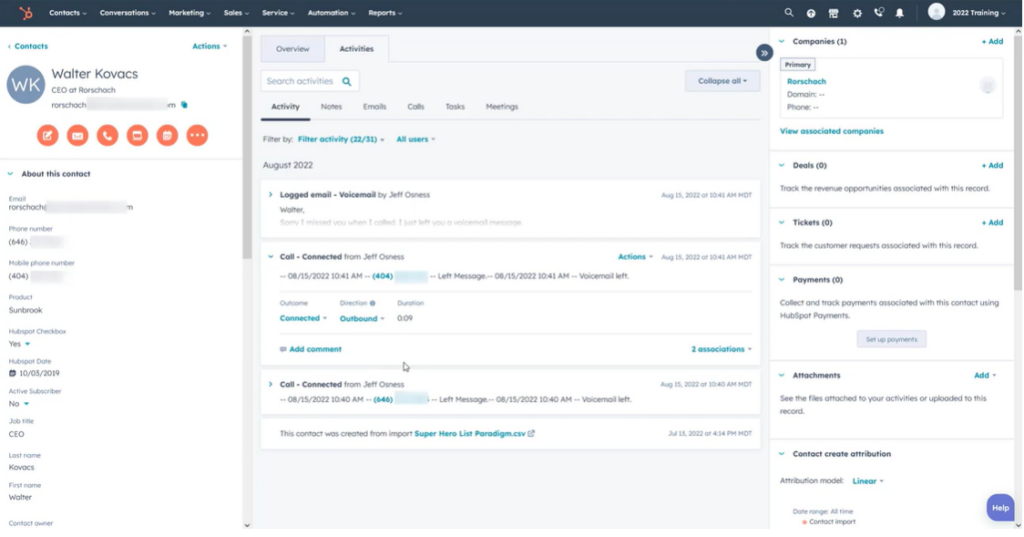
PhoneBurner is built for teams that rely heavily on outbound calling and need to reach more prospects in less time. Its power dialer eliminates the delays that typically lead to hangups or spam flags, helping agents maintain momentum and protect call reputation. The platform works especially well for teams with vetted call lists looking to scale conversations without sacrificing quality.
Why I Picked PhoneBurner
I picked PhoneBurner because it enables reps to dial 60–80 contacts per hour without the usual connection friction. You get real-time performance tracking so managers and agents can quickly identify opportunities for improvement. Workflow automation and lead distribution tools help ensure the right calls reach the right reps at the right time. It also supports remote dialing, allowing distributed teams to work from anywhere while keeping outbound efforts coordinated. While it’s not ideal for cold calling unverified lists, it excels when your team has strong lead sources.
PhoneBurner Key Features
- Branded caller ID: Improve answer rates with recognizable outbound IDs.
- Power dialer: Reach 60–80 contacts per hour with no connection lag.
- Cadence tools: Guide reps through consistent, structured outreach steps.
- Call deliverability: Reduce spam risks and maintain clean dialing reputations.
- Smart lead distribution: Route incoming leads to the right agents automatically.
PhoneBurner Integrations
Integrations include Airtable, DNC.com, HubSpot, Pipeline, Salesforce, SugarCRM, Zapier, Zoho CRM, and Zoom.
Pros and Cons
Pros:
- Quickest non-auto dialer available
- Easy to navigate
- Guided onboarding support
Cons:
- Need a quality call list
- No call list segmentation

Koncert is an AI-powered auto dialer platform that streamlines outbound calling and sales engagement for revenue teams. It supports multiple dialing modes—including AI Parallel, AI Flow, Agent-Assisted, and Click-to-Call—to help reps reach more prospects efficiently while maintaining compliance and personalization.
Why I picked Koncert: Koncert stands out for blending automation with human oversight. Its AI Parallel Dialer maximizes agent productivity by handling multiple calls simultaneously, while the Agent-Assisted Dialer keeps conversations authentic in high-volume campaigns. For CROs managing distributed teams, the Remote Salesfloor and real-time coaching tools make it easier to drive consistent performance without sacrificing connection quality.
Standout features & integrations:
Features include AI-driven dialers, multi-channel sequencing, conversation intelligence, real-time CRM data access, remote coaching, and automated caller ID management—all designed to improve connect rates and conversion outcomes.
Integrations include Salesforce, HubSpot, Microsoft Dynamics, Oracle, SAP, SugarCRM, Zoho CRM, Bullhorn, Velocify, and NetSuite.
Pros and Cons
Pros:
- Users report a strong return on investment, with increased appointment setting and conversion rates.
- The platform offers seamless CRM integration, ensuring real-time access to customer data during calls.
- Koncert’s AI-driven dialers significantly increase outbound calling efficiency, allowing sales teams to connect with more prospects in less time.
Cons:
- The learning curve for new users can be steep, requiring time to fully leverage all functionalities.
- Some users find navigating the multiple features complex, which may overwhelm less tech-savvy users.
Talkdesk
Best predictive dialer for proactive and personalized engagement

As a browser-based call center solution, Talkdesk delivers tools that help businesses around the world build stronger connections to improve the customer experience, including predictive dialing that can increase user outbound calls by up to 300%, contact list management, and automated event-triggered SMS notifications that anticipate customer needs.
Talkdesk is designed to improve agent productivity through intelligent pacing of outbound call volume, based on your agent capacity. The autodialer can also filter out any unproductive calls, like those that go to voicemail, busy signals, and no answers, so that sales teams can enjoy more efficiency and less time idling.
They can support businesses of all sizes and have targeted plans for a variety of industries, including transportation and hospitality, communications and media, financial services and insurance, and government and education.
Talkdesk Standout Features and Integrations
Features include IVR engagement, studio and routing, real-time dashboards, knowledge management, AI trainer, virtual agent, lead management, recorded messages, agent assist, and workspace designer.
Integrations include BigCommerce, Contactually, Dynamics 365, Freshdesk, Front, Google, HelpScout, Highrise, Intercom, and Zoho.
Pros and Cons
Pros:
- Create custom dashboards
- Very user friendly
- All-in-one telephony solution
Cons:
- High price for all-inclusive access
- Can’t get just the auto-dialer
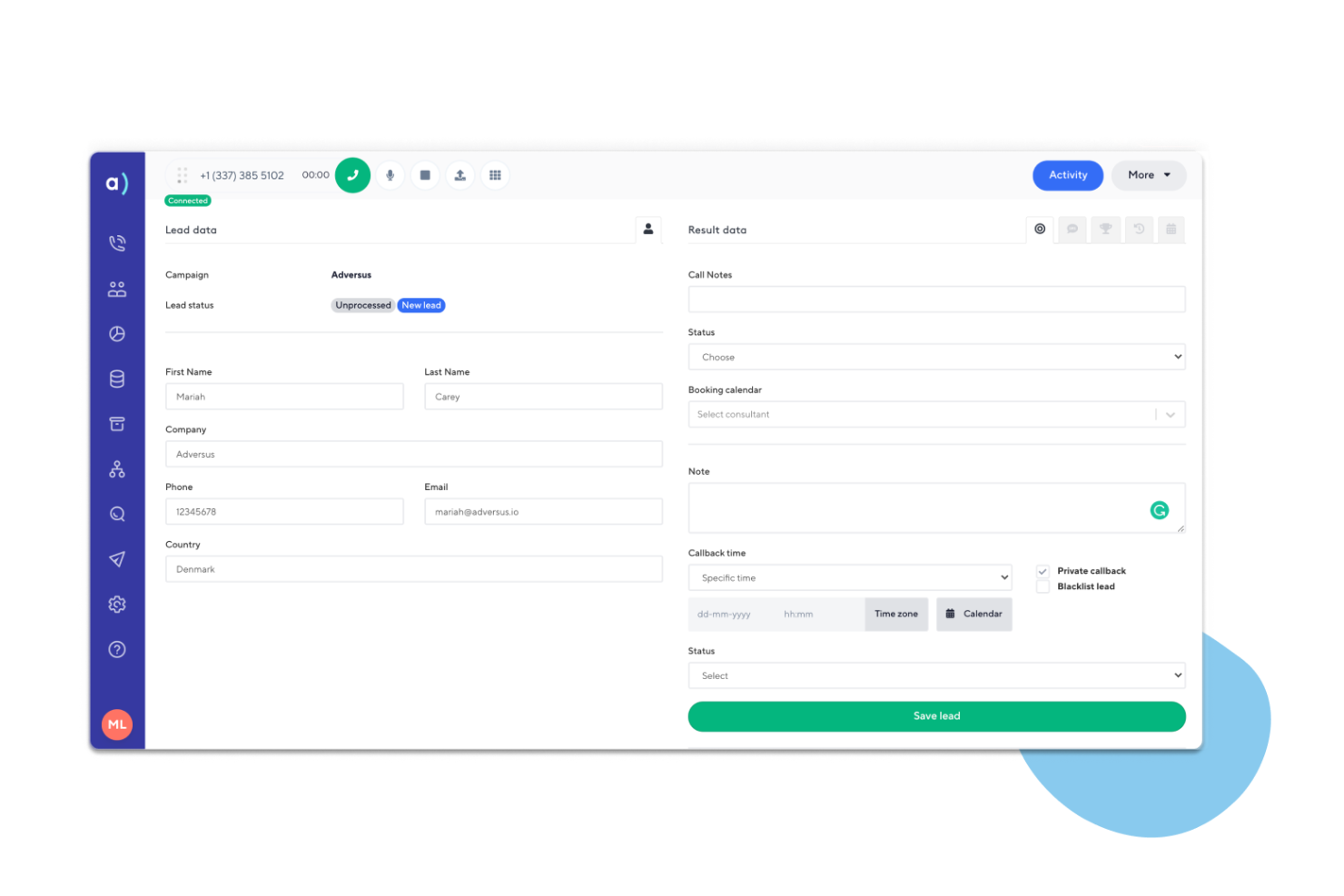
Adversus is a cloud-based auto dialer platform that streamlines outbound sales and communication through predictive, progressive, and manual dialing modes. It helps teams automate campaigns, track performance in real time, and manage appointments—all within a single interface built for efficiency and compliance.
Why I picked Adversus: Adversus excels in predictive dialing—automatically connecting agents only when a live person answers, minimizing idle time and boosting productivity. Its automated workflows, campaign management tools, and real-time analytics give sales leaders the visibility and control they need to scale outreach while maintaining call quality. For CROs or RevOps leaders, it’s a strong fit for managing large outbound teams focused on conversion efficiency.
Standout features & integrations:
Features include predictive and progressive dialing, automated workflows, campaign and lead management, call recording, appointment scheduling, and real-time tracking for team performance.
Integrations include Salesforce, HubSpot, Microsoft Dynamics 365, Google Calendar, Outlook, ActiveCampaign, LeadScoreApp, Plecto, and Zapier—enabling seamless alignment across your sales and marketing systems.
Pros and Cons
Pros:
- The software provides robust campaign management tools, allowing users to automate contact flows and maximize sales efforts.
- Users appreciate the automated workflow capabilities that streamline call processes and enhance productivity.
- Adversus offers a predictive dialing feature that significantly increases call connection rates, making it ideal for high-volume outbound calling.
Cons:
- Some users find the software to be on the pricey side, particularly for small businesses with limited budgets.
- The predictive dialing feature requires a minimum of eight agents to perform optimally, which may not suit smaller teams.

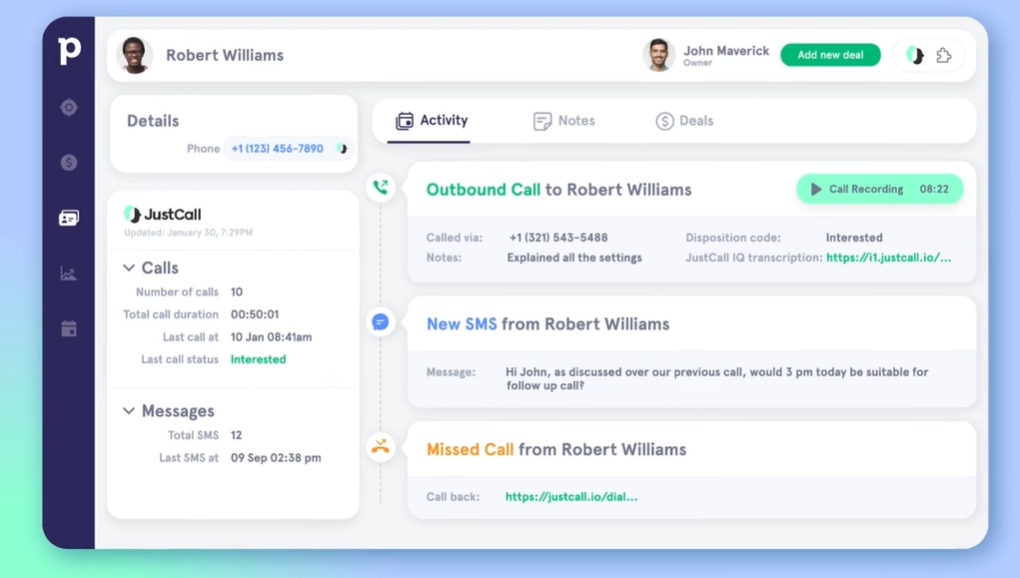
This tool for outbound call centers offers both an auto dialer and automated SMS features to empower sales teams with intelligent, cloud-based tools and functionality for limitless scalability and increased efficiency.
JustCall enhances workflow automation with bulk SMS and robust bots for outreach campaigns. Users can create and schedule SMS campaigns with just a few clicks and bots can respond to incoming messages. Once you have enough customer data, you can start auto dialer campaigns with more context to enhance agent responsiveness during phone calls.
This auto dialer and outbound call center platform is designed for small and medium-sized businesses across a variety of industries, including healthcare, financial services, education, real estate, and ecommerce.
JustCall Standout Features and Integrations
Features include appointment scheduler, call monitoring, virtual call center, office hours, predictive dialer, bulk SMS/MMS, call recording, international phone numbers in 70 countries, analytics, call queues, forward to phone, SMS bot, and caller ID.
Integrations include Copper, Dynamics, Freshdesk, HubSpot, Pipedrive, Salesforce, Slack, Zapier, Zendesk, and Zoho CRM.
Pros and Cons
Pros:
- User-friendly interface
- Very responsive customer support
- All-in-one call center
Cons:
- Some numbers require manual dialing
- No photo or link attachments in SMS


NobelBiz OMNI+ is a contact center software platform that streamlines outbound calling and omnichannel customer engagement for service-focused teams. It combines predictive, preview, and progressive dialing with intelligent routing and real-time supervision to help teams maximize agent productivity and improve call efficiency.
Why I picked NobelBiz OMNI+: I chose NobelBiz OMNI+ for its robust predictive dialing engine, which automates outbound calls and minimizes idle time by dialing multiple numbers simultaneously. This feature, paired with its automatic preview dialer and real-time monitoring tools, enables contact centers to boost engagement, maintain call quality, and operate with greater efficiency across high-volume outbound campaigns.
Standout features & integrations:
Features include automatic preview, predictive, and progressive dialers, automatic call distribution, real-time monitoring, customizable dashboards, and omnichannel support that unifies voice, SMS, email, and social media interactions.
Integrations include CRM and compliance systems, though native integrations are limited and may require custom development for full functionality.
Pros and Cons
Pros:
- Omnichannel support unifies voice, SMS, and social media channels for simplified management.
- Real-time monitoring allows supervisors to oversee interactions and provide immediate feedback.
- The predictive dialer automates outbound calls to reduce idle time and increase agent productivity.
Cons:
- Limited native integrations may require additional development to achieve full functionality.
- The initial setup process can be complex and time-consuming, requiring technical assistance.
Five9
Best for blended contact center offerings with all types of auto dialers
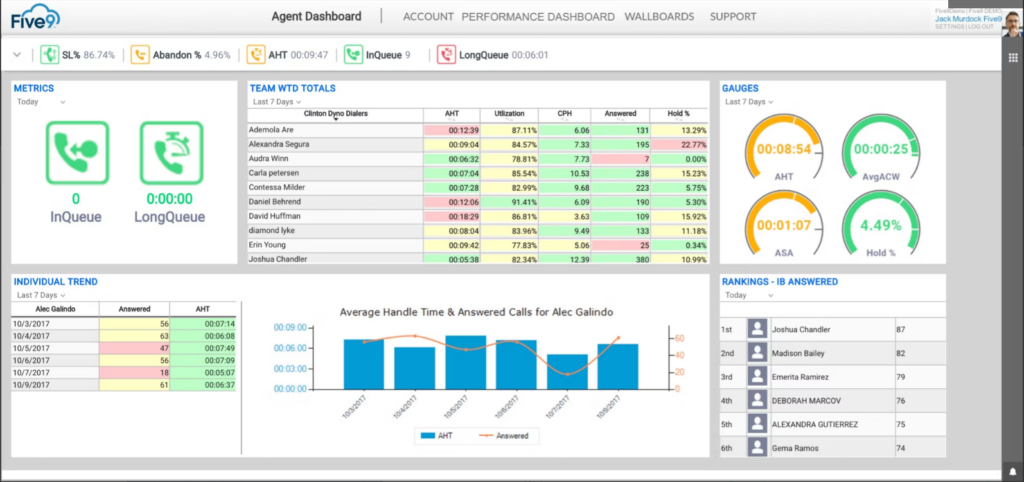
This contact and call center solution is a cloud-based system with omnichannel tools for both inbound and outbound call management.
Whether it’s cold calling or sales follow-ups, Five9 delivers higher agent efficiency through several types of auto dialers, including predictive, power, progressive, and preview options. Each type of calling option delivers targeted support to match your workflow, campaign, or business size.
Five9 offers business phone solutions by industry, company size, and role. Find phone services based on your industry, including Covid 19, healthcare, retail, financial services, higher education, or telemarketing. Or, address your needs by role, such as supervisor, agent, or business strategy. Five9 supports small, mid-market, and enterprise businesses.
Five9 Standout Features and Integrations
Features include agent desktop, global voice, supervisor desktop, engagement workflow, artificial intelligence, intelligent virtual agent, agent assist, workflow automation, reporting and analytics, and all dialer options.
Integrations include Microsoft, Microsoft Teams, Oracle, RingCentral, Salesforce, Zendesk, and Zoom Phone. Five9 also supports using APIs and SDKs.
Pros and Cons
Pros:
- Comprehensive online training
- Lots of report customization
- Straightforward user interface
Cons:
- Canned reports can be confusing
- Loading agent recordings is slow

ReadyMode, formerly Xencall, offers an enterprise-grade predictive dialer with a number of comprehensive features, including faster dialing speeds, a powerful CRM, and advanced inbound queue strategies.
In addition to predictive dialing, ReadyMode also offers a prioritization feature that ensures your agents and AI know who to call and when. With dialing lists and queues based on skill level and lead importance, following up on leads and closing on deals is a lot more organized and convenient.
ReadyMode supports organizations of all sizes, including single-operation freelancers and small startup companies. Some of the most common industries they service include healthcare and insurance, solar energy, call centers, and tourism. They also offer personalized training during onboarding and a comprehensive support team available at any time.
ReadyMode Standout Features and Integrations
Features include predictive dialer, lead management, CRM tools, reporting and insights, dynamic scripts, call recordings, compliance, security, dial list prioritization, speed configuration, and do not call lists.
Integrations include ActiveCampaign, ClickSend, Google Maps, HubSpot, Mailchimp, Salesforce, Sherpa, Zapier, Zillow, and Zoho. ReadyMode accepts integration suggestions and responds to requests within 3-5 days.
Pros and Cons
Pros:
- Great support team
- Very quick to set up
- Can request new integrations
Cons:
- Dated user interface
- Limited user visibility for managers
NICE CXone
Best for patented predictive dialing that eliminates long pauses before agent pickup

NICE CXone is an omnichannel CRM with auto dialer features that strive to streamline customer interactions from the first time they pick up the phone. With a predictive dialer and a series of related tools like automatic call distribution, interactive voice response, and interaction channel, users have all the features they need to connect agents with customers.
The NICE CXone Personal Connection feature is a patented predictive dialer designed to reduce hang-ups and generate more revenue. It allows for more outgoing calls every day that uses lead data to reach the right customers at the right time. The predictive auto dialer also comes with a voice recognition feature to eliminate long pauses before an available agent picks up the phone.
NICE CXone is a platform for businesses of all sizes with solutions for healthcare, business process outsourcers, financial services, government, retail, education, telecommunications, and collections. Users can shop by business goal with solutions that target specific needs, like customer loyalty, increased sales, agent retention, compliance adherence, and fraud prevention.
NICE CXone Standout Features and Integrations
Features include automatic callback, predictive dialing, progressive dialer, automatic call distribution (ACD), digital and voice channels, chat and messaging, do not call (DNC) compliance, and conferencing.
Integrations include Bullhorn, Microsoft Dynamics 365, Netsuite, Oracle, Salesforce, ServiceNow, Sugar CRM, RingCentral UC Tools, and Zendesk.
Pros and Cons
Pros:
- Customized reporting options
- No delay time between pick and connection
- Training and onboarding support team
Cons:
- Prebuilt reporting templates don’t offer enough data
- Limited forecasting for email and chat


One Call Now is an auto dialer and mass messaging platform that automates phone calls, texts, emails, and push notifications for organizations that need to communicate quickly and reliably with large audiences. It streamlines alerts and updates across multiple channels, helping teams reduce manual outreach and ensure timely delivery.
Why I picked One Call Now:
I chose One Call Now for its ability to handle large-scale, multi-channel messaging with minimal setup. The platform’s combination of automated calling, text, and email delivery—with real-time tracking—gives teams confidence that messages are received and acted on. Its intuitive interface and predictable pricing make it a fit for schools, property managers, and small to midsize businesses that need efficiency without complexity.
Standout features & integrations:
Features include automated phone calls, mass text and email messaging, text-to-speech conversion, real-time delivery tracking, and scheduling capabilities for future messages. The platform also supports targeted group messaging and unlimited message volumes, making it scalable for both urgent and routine communications.
Integrations are not currently listed, as One Call Now operates as a self-contained communication solution.
Pros and Cons
Pros:
- Simple interface requires no training, making setup and use easy for nontechnical teams.
- Real-time tracking allows users to monitor delivery and engagement status.
- Enables multi-channel mass messaging through calls, texts, emails, and push notifications.
Cons:
- Some users report occasional message delivery delays during high-volume periods.
- Limited integration options may restrict compatibility with other business systems.

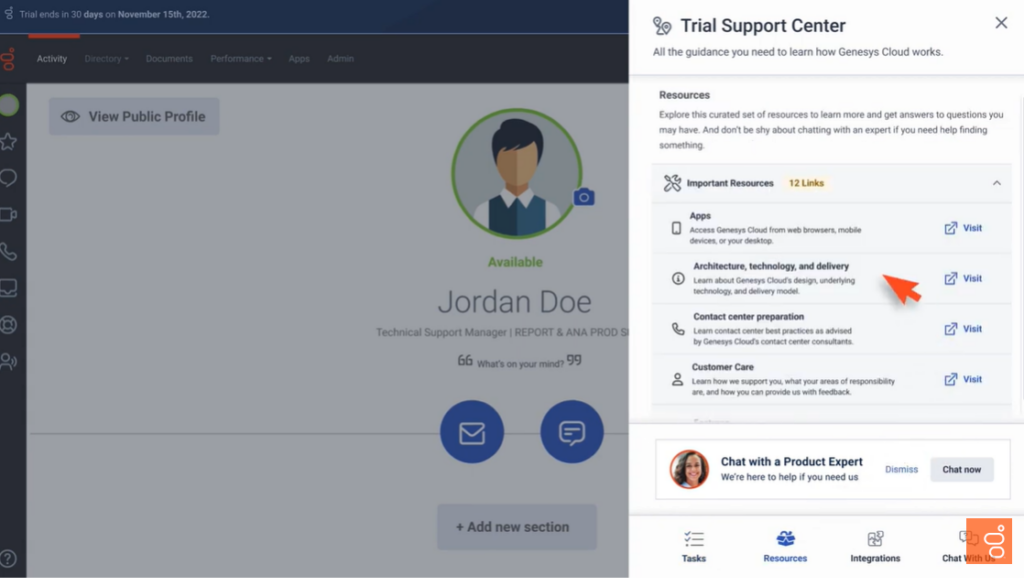
This contact center solution is a cloud-based platform that offers automated and self-service features to simplify digital and voice campaigns, compliance, and notifications.
With Genesys Cloud CX, users get a full-featured call center with streamlined compliance that evolves with regulations and business policies to ensure all certifications are up to date for any industry. Users can also utilize role-based admin tools to create, deploy, and audit campaigns for more oversight and control.
Genesys Cloud CX provides solutions for small, medium, and large businesses across various industries, including targeted solutions for retail, financial services, healthcare, and government. With several tiered plans, businesses can choose the options that work best for their needs.
Genesys Cloud CX Standout Features and Integrations
Features include outbound sales channels, inbound call support, cloud telephony, unified communications, automatic call distribution, workforce engagement management, AI and automation, interactive voice response, and self-service.
Integrations include Gong.io, Google Workspace, Jenkins, Livepro, Microsoft Azure, Nextiva, Salesforce Service Cloud, Shelf, Qualtrics CoreXM, and Zendesk Suite.
Pros and Cons
Pros:
- Easy to use
- Rare downtime for updates
- Extensive real-time insights
Cons:
- Not PCI compliant
- Slight latency in real-time displays

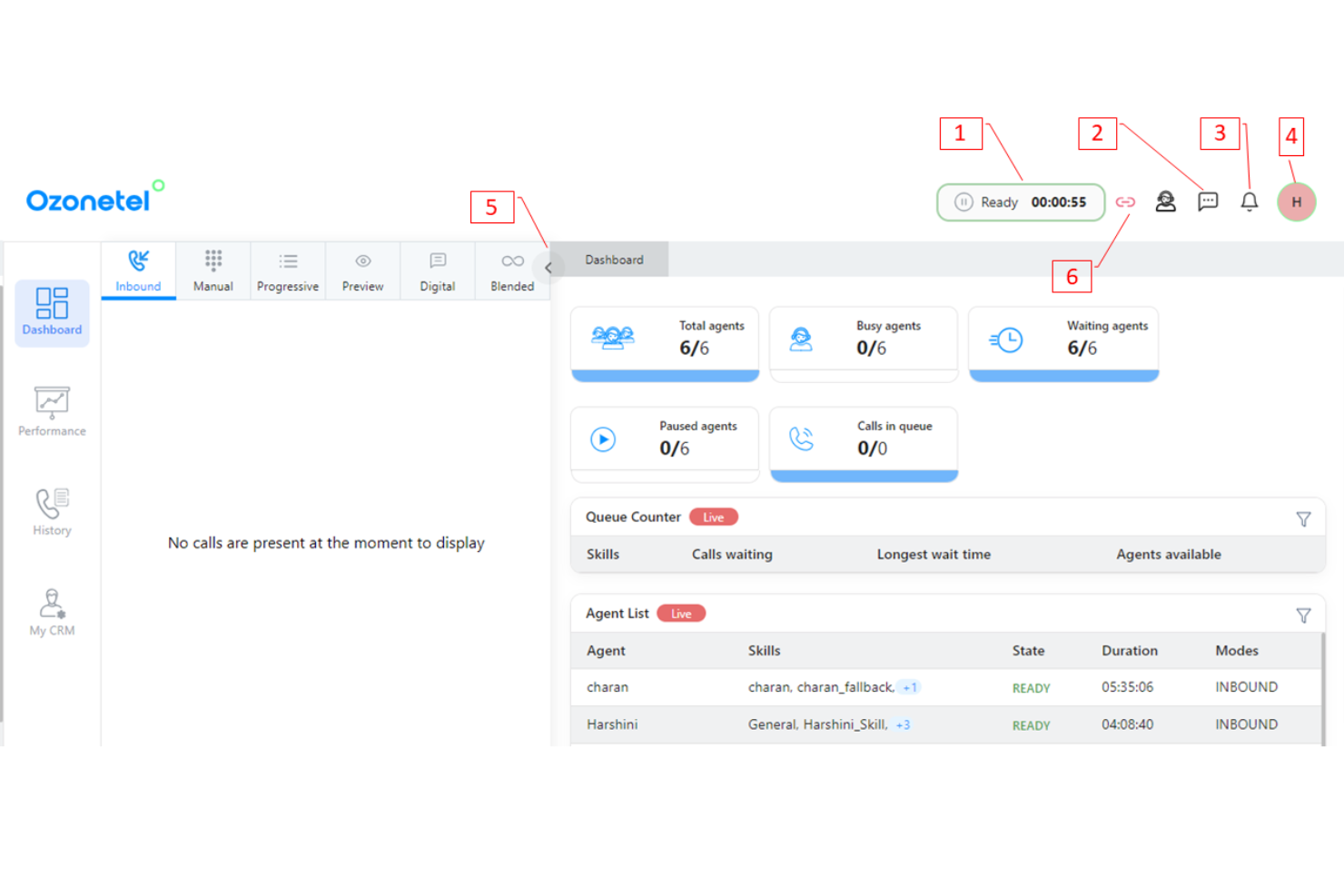
Ozonetel CloudAgent is an auto dialer platform that automates outbound calling and customer engagement for sales and support teams. It offers predictive, progressive, IVR, and preview dialer modes—each optimized for different campaign goals—helping teams connect with live customers faster and spend less time on manual dialing.
Why I picked Ozonetel CloudAgent: I chose Ozonetel CloudAgent for its predictive dialing intelligence, which maximizes agent productivity by connecting them only to answered calls. The platform’s skill-based routing and automatic call distribution ensure that customers are connected to the right agents quickly, reducing idle time and improving response quality. It’s an effective way to scale outbound campaigns without increasing headcount.
Standout features & integrations:
Features include automated IVR messages for personalized voice interactions, live call monitoring for real-time performance visibility, call recording for quality assurance and training, and CRM integrations for seamless workflow management.
Integrations include Salesforce, Zoho, Zendesk, Freshdesk, HubSpot, Pipedrive, Microsoft Dynamics, Shopify, Slack, and Google Workspace.
Pros and Cons
Pros:
- CRM integrations allow seamless data management and workflow efficiency.
- Skill-based routing ensures calls are directed to the most qualified agents, enhancing customer satisfaction.
- The predictive dialing feature increases agent productivity by connecting them only to live calls.
Cons:
- The user interface is considered outdated by some, creating a steeper learning curve for new users.
- Some users have reported limited integration capabilities with certain third-party applications.

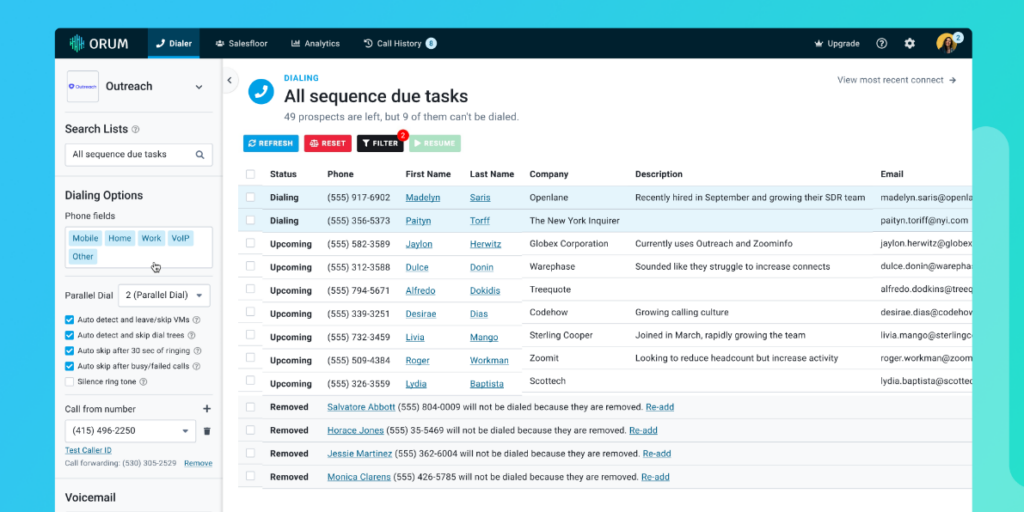
As a dialer solution, Orum focuses on helping businesses connect with their customers through AI automations and high quality audio.
One of Orum’s unique features is that you can control the dialing speed of the auto-dialer by calling a single number at a time or multiple numbers at the same time. Users have the freedom to control how quickly they want to get in touch with leads, customers, and clients. The auto dialer feature also has an answering machine detection function that allows users to jump in and leave a personalized voicemail instead of an automated message.
Orum provides a variety of solutions for businesses of nearly every size, including single-person operations and large organizations. They have tiered pricing that culminates in enterprise-grade services designed for either sales reps or managers.
Orum Standout Features and Integrations
Features include unlimited calls and dialing, voicemail drop, live call listen, call dispositions, reporting, collaboration tools for sales teams, and dialing modes. Modes include preview dialing, progressive dialing, and predictive dialer.
Integrations include Gong, HubSpot, Outreach, Salesforce, and SalesLoft. Orum primarily focuses on CRM integrations.
Pros and Cons
Pros:
- Customize and filter lead data
- Effortless user interface
- Extremely quick setup
Cons:
- Sometimes generates spam phone numbers
- No customer data during auto dialing

LiveVox is an auto dialer and contact center platform that streamlines outbound communications for customer-facing teams. It combines automated dialing, AI-driven insights, and omnichannel routing to help sales and service teams improve engagement efficiency and maintain compliance.
Why I picked LiveVox: LiveVox stands out for its ability to automate high-volume outreach without sacrificing personalization or compliance. Its Quick Connect feature instantly matches live answers with available agents, reducing wait times and improving call outcomes. With AI-assisted insights and strong compliance controls, it enables RevOps and sales leaders to scale outbound performance while maintaining customer experience standards.
Standout features & integrations:
Features include Quick Connect for faster agent connections, SmartReach for automated and blended communications, AI-driven analytics for agent performance, omnichannel routing for consistent customer engagement, and built-in compliance management tools.
Integrations include Salesforce, HubSpot, Zendesk, Adobe Experience Cloud, Microsoft Power Automate, ServiceNow, and SAP.
Pros and Cons
Pros:
- AI-driven insights help optimize agent performance and personalize customer interactions.
- Omnichannel routing supports consistent engagement across voice, email, SMS, and chat.
- Quick Connect automatically links live answers to available agents, minimizing customer wait times.
Cons:
- Advanced features may require additional training for new users.
- Integration with certain third-party tools can increase resource consumption.
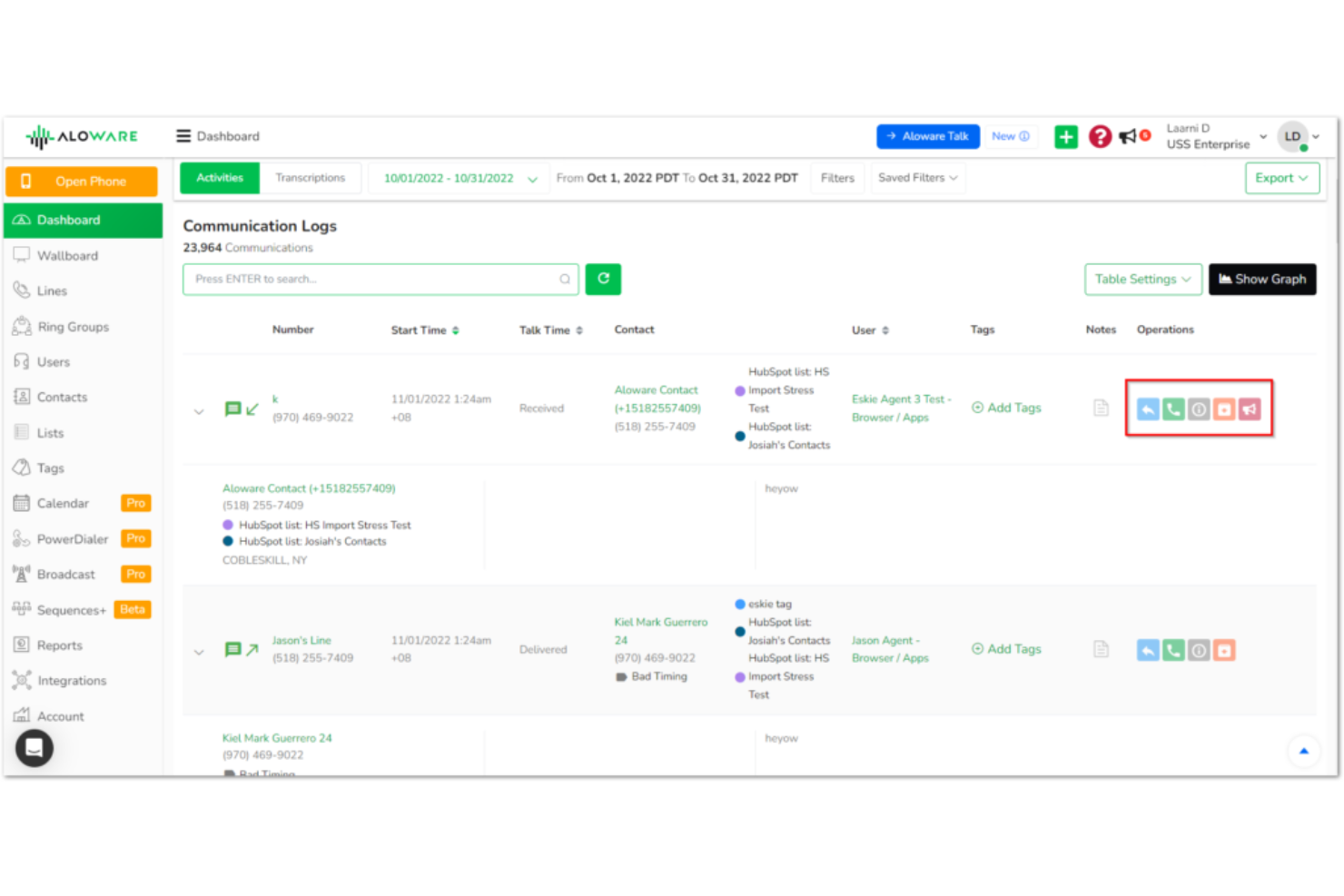
Aloware is an AI-powered auto dialer platform that streamlines outbound calling and customer engagement for sales teams and contact centers. It automates dialing, integrates with CRMs, and enables multichannel communication—helping teams boost connection rates, reduce manual work, and maintain compliance.
Why I picked Aloware: Aloware stands out for its combination of AI-driven automation and CRM connectivity, making it ideal for organizations managing high call volumes. Its AI voice agents handle repetitive interactions while its power dialer optimizes outreach with local presence dialing—meaning more productive reps and higher answer rates. For CROs and RevOps leaders, this translates directly into improved pipeline velocity and more consistent revenue activity.
Standout features & integrations:
Features include an AI voice agent for automated call handling, local presence dialing to increase pickup rates, and workflow automation with built-in analytics for tracking team performance. The platform also supports business SMS, voicemail drops, callback shortcuts, and real-time dashboards for live visibility into outreach efforts.
Integrations include HubSpot, Salesforce, Zoho, Pipedrive, and HighLevel, plus open API and Zapier support for custom workflows.
Pros and Cons
Pros:
- The local presence feature improves call answer rates by displaying local caller IDs.
- Users find its AI-driven features, such as voice agents, useful for automating repetitive tasks.
- Aloware integrates seamlessly with popular CRMs like HubSpot and Salesforce, enhancing workflow efficiency.
Cons:
- The pricing model can be perceived as less flexible for small businesses.
- Some users report experiencing technical glitches and system downtimes.


The predictive dialer tool from CallTools is built by business owners for business owners. With over 12 years of experience in call centers, CallTools claims they can boost productivity by 500% using predictive and preview dialers.
The standout feature for this predictive auto dialer is that it’s extremely quick to set up. Once you sign up, CallTools just requires that you upload your contacts and customize your settings before you start dialing. They offer businesses the chance to scale their enterprise in 24 hours with unlimited minutes and no commitment.
This platform supports sales and telemarketing, healthcare providers, solar energy companies, real estate, financial services, and collections. They also offer solutions for SMBs and enterprise organizations.
CallTools Standout Features and Integrations
Features include intelligent dialing algorithms, contact targeting, call suppression,call options, automated call transfers, voicemail recognition, preview dialer, CRM tools, SMS and email channels, ring timer, and abandoned call routing.
Integrations include ActiveProspect, Balto, BlackBook, Blue Ink Digital, boderdoo.com, ClickFunnels, DebtPayPro, Follow Up Boss, Forefront CRM, and Gmail. They also offer Zapier to power over 3,000 integrations.
Pros and Cons
Pros:
- Great customer support
- Intuitive user interface
- Very quick implementation
Cons:
- Webinar training isn’t comprehensive
- Cannot send Zoom call recordings to email
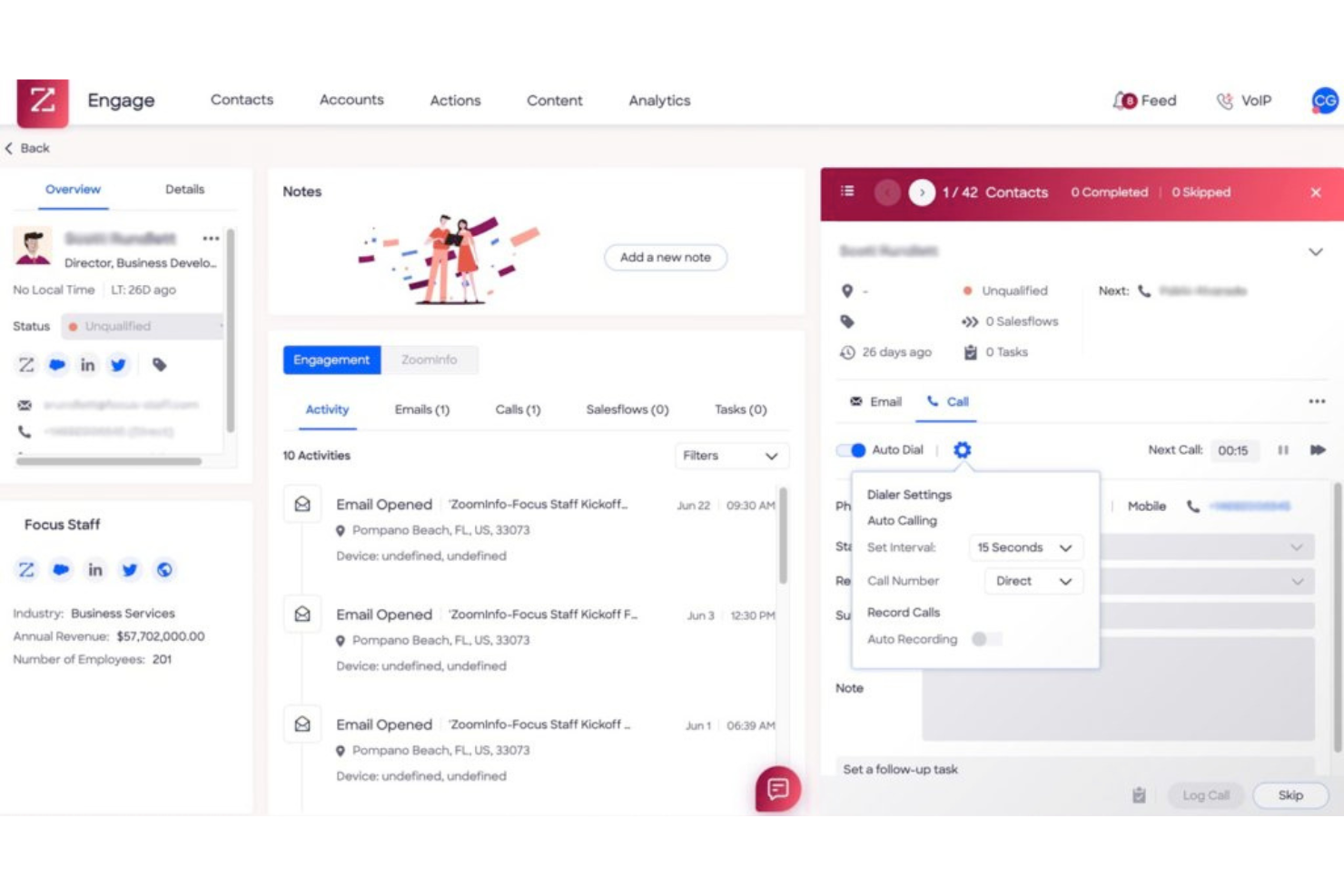
ZoomInfo SalesOS is a comprehensive sales engagement platform that automates outbound calling and streamlines sales workflows for revenue teams. It includes an advanced auto dialer supporting predictive, progressive/power, and preview modes—helping sales reps reach more prospects with less manual effort.
Why I picked ZoomInfo SalesOS: I picked ZoomInfo SalesOS for its deeply integrated auto-dialer that allows sales teams to manage calls, emails, and prospect engagement within one unified platform. The dialer’s real-time insights and seamless CRM syncing reduce administrative overhead, ensuring your reps focus on conversations that drive pipeline.
Standout features & integrations:
Features include an advanced auto dialer with predictive and preview modes, real-time prospect engagement insights, automated sales workflows, performance analytics, and CRM data synchronization. These tools help teams engage leads faster, improve conversion timing, and maintain complete visibility into call activity.
Integrations include Salesforce, HubSpot, Microsoft Dynamics, Outreach, Salesloft, Marketo, Pardot, Eloqua, LinkedIn, and Gmail.
Pros and Cons
Pros:
- The auto dialer feature reduces downtime between calls, allowing reps to connect with more leads in less time.
- Real-time prospect insights enable sales teams to engage with leads at the best possible moments.
- Seamless integration with major CRM systems ensures all contact data and call records are automatically synced.
Cons:
- Users report that contact data can sometimes be outdated or inaccurate, reducing outreach effectiveness.
- The auto dialer lacks the ability to contact multiple leads simultaneously, limiting flexibility.


LiveAgent is a multi-channel help desk platform that unifies customer communication across chat, email, phone, and social channels. It focuses on support efficiency—offering ticket management, live chat, and call center capabilities—rather than on outbound call automation like a dedicated auto dialer.
Why I picked LiveAgent: LiveAgent stands out for teams prioritizing customer engagement and service quality. Its unified inbox, real-time chat, and built-in CRM features streamline the entire support process, giving agents visibility across all customer interactions. For CROs or RevOps leaders, this means faster response times, higher customer satisfaction, and improved retention without juggling multiple systems.
Standout features & integrations:
Features include a full help desk and ticketing system, live chat, social media management, VoIP and IVR tools, AI chatbot automation, and gamification to motivate teams.
Integrations include Salesforce, HubSpot, Slack, Shopify, WordPress, and Zapier, among others—connecting LiveAgent seamlessly with your tech stack.
Pros and Cons
Pros:
- It provides omnichannel support, consolidating multiple communication methods into one interface.
- The platform supports good integration with various tools and platforms, allowing for a seamless workflow.
- LiveAgent offers a user-friendly interface that simplifies navigation for users.
Cons:
- The setup process can be complicated, leading to difficulties in full implementation.
- Some users report occasional technical glitches that can disrupt workflow.
Related Auto Dialer Software Reviews
If you still haven't found what you're looking for here, check out these tools closely related to auto dialer software that we've tested and evaluated.
- CRM Software
- Sales Software
- Lead Management Software
- Business Intelligence Software
- Contract Management Software
- Revenue Management System
Selection Criteria For Auto Dialer Software
Auto dialer software automates the dialing process, reducing idle time for agents and ensuring a higher connection rate with potential customers or leads. Implementing call tracking software alongside your auto dialer can provide valuable insights into which campaigns are generating the most qualified leads. Based on my experience and thorough research in using and evaluating these tools, here are the criteria I consider essential when choosing auto dialer software.
Core Auto Dialer Software Functionality: 25% of total weighting score
To be considered for inclusion on my list of the best auto dialer software, the solution had to support the ability to fulfill common use cases such as:
- Enhancing agent productivity by minimizing idle time
- Ensuring compliance with telecommunication regulations
- Providing detailed analytics to optimize calling strategies
- Facilitating effective list and campaign management
- Integrating seamlessly with existing CRM systems for holistic customer insights
Additional Standout Features: 25% of total weighting score
- Advanced AI Integration: Tools that leverage AI for smarter call routing, lead prioritization, or conversational analysis, providing a competitive edge.
- Omnichannel Communication: Capabilities that allow integration with other communication platforms, offering a unified approach to customer engagement.
- Enhanced Personalization: Features that enable dynamic call scripting and tailored customer interactions based on data insights.
- Predictive Dialing Algorithms: Sophisticated algorithms that optimize call timing based on agent availability and historical performance data.
- Scalability: The ability to easily scale usage up or down based on operational needs without significant cost implications or technical challenges.
Usability: 10% of total weighting score
- Intuitive User Interface: A clear and straightforward interface that minimizes training time and enhances user adoption.
- Customizability: Options to tailor the interface and functionalities to match specific business processes and preferences.
- Accessibility: Ensuring that the software is accessible on various devices, enhancing flexibility for users.
Onboarding: 10% of total weighting score
- Comprehensive Training Materials: Availability of in-depth resources to facilitate learning and effective software utilization.
- Interactive Support: Hands-on guidance through product tours or live training sessions to help users understand key features.
- Community Resources: Access to user communities or forums for sharing tips, best practices, and getting peer support.
Customer Support: 10% of total weighting score
- Responsive Support Team: Quick and reliable assistance for troubleshooting or guidance on software usage.
- Multi-channel Support: Offering various channels for support, including chat, email, and phone, to suit user preferences.
- Proactive Maintenance: Regular updates and proactive communication about any changes or improvements in the software.
Value For Money: 10% of total weighting score
- Transparent Pricing: Clear and straightforward pricing structures that align with the software's value proposition.
- Cost-Efficiency: Competitive pricing that matches the features offered, ensuring good investment returns.
- Flexible Plans: Availability of different pricing tiers to accommodate businesses of varying sizes and needs.
Customer Reviews: 10% of total weighting score
- Positive User Feedback: Strong user endorsements, reflecting satisfaction with the software's performance and impact.
- Reputation for Reliability: High ratings for software stability and dependability under different operational conditions.
- Success Stories: Case studies or testimonials that demonstrate tangible improvements in sales performance or operational efficiency.
When selecting auto dialer software, it's important to choose a solution that not only meets your immediate needs but also aligns with your long-term business strategies and growth objectives. The right software should enhance your calling operations, improve agent productivity, and provide valuable insights to refine your sales tactics.
How To Choose Auto Dialer Software
With so many different auto dialer software solutions available, it can be challenging to make decisions on what tool is going to be the best fit for your needs.
As you're shortlisting, trialing, and selecting auto dialer software, consider the following:
- What problem are you trying to solve - Start by identifying the auto dialer software feature gap you're trying to fill to clarify the features and functionality the tool needs to provide. Need help with cold calling instead? There's a list for that, too.
- Who will need to use it - To evaluate cost and requirements, consider who'll be using the software and how many licenses you'll need. You'll need to evaluate if it'll just be the revenue operation leaders or the whole organization that will require access. When that's clear, it's worth considering if you're prioritizing ease of use for all or speed for your auto dialer software power users. Some sales teams, for instance, opt for dedicated sales dialer software with similar capabilities.
- What other tools it needs to work with - Clarify what tools you're replacing, what tools are staying, and the tools you'll need to integrate with, such as accounting, CRM, or HR software. You'll need to decide if the tools will need to integrate together or if you can replace multiple tools with one consolidated auto dialer software.
- What outcomes are important - Consider the result that the software needs to deliver to be considered a success. Consider what capability you want to gain or what you want to improve, and how you will be measuring success. For example, an outcome could be the ability to get greater visibility into performance. You could compare auto dialer software features until you’re blue in the face but if you aren’t thinking about the outcomes you want to drive, you could be wasting a lot of valuable time.
- How it would work within your organization - Consider the software selection alongside your workflows and delivery methodology. Evaluate what's working well and the areas that are causing issues that need to be addressed. Remember every business is different — don’t assume that because a tool is popular that it'll work in your organization.
Trends In Auto Dialer Software For 2026
Auto dialer software continues to evolve, reflecting broader trends in technology and the increasing need for efficiency and personalization in revenue operations. These advancements are designed to address the growing demands of businesses looking to optimize their communication strategies and maximize outreach effectiveness. A review of recent product updates, press releases, and release logs reveals key trends and developments in the auto dialer software space.
Emerging Trends in Auto Dialer Software
Integration with Advanced Technologies:
- Artificial Intelligence and Machine Learning: Auto dialer solutions are increasingly incorporating AI and ML to enhance decision-making processes, personalize interactions, and optimize call schedules based on predictive analytics.
- Enhanced CRM Integrations: There is a significant push towards deeper integration with CRM systems, allowing for more targeted and informed calling campaigns based on comprehensive customer data and insights.
Most Rapidly Evolving Features
- Omnichannel Capabilities: Auto dialers are expanding to include SMS, email, and social media integrations, providing a unified approach to customer outreach across multiple channels.
- Real-time Analytics and Reporting: The capability to monitor and analyze calling activities in real time is rapidly advancing, offering businesses immediate insights to adjust strategies as needed.
Most Novel and Unusual Functionalities
- Conversational AI Integration: Some auto dialers are introducing conversational AI to simulate more natural interactions, improving customer engagement and experience during automated calls.
- Blockchain for Data Integrity: A few pioneering platforms are beginning to leverage blockchain technology to ensure the integrity and traceability of call records.
Most Important and In-Demand Features
- Predictive Dialing: The ability to intelligently predict the best times to call and prioritize leads based on likelihood of conversion remains a highly sought-after feature.
- User-Friendly Interfaces: Ease of use and intuitive design are crucial for ensuring widespread adoption and minimizing training requirements within organizations.
Declining Features
- Basic Dialing Modes: Simple, less sophisticated dialing modes (like preview dialing without any analytics) are becoming less popular as more advanced, intelligent systems gain preference.
- Limited Integration Capabilities: Auto dialers that lack the ability to integrate with other business tools are seeing reduced demand, as businesses prefer more interconnected software ecosystems.
These trends indicate a growing emphasis on harnessing advanced technologies to enhance outreach efficiency, ensure compliance, and deliver personalized customer experiences, all while maintaining a focus on data security and user accessibility. For revenue operation leaders, staying on top of these trends is crucial for selecting software that will drive success and adapt to future market dynamics.
What Is Auto Dialer Software?
Auto dialer software is a tool that automatically calls phone numbers from a predefined list. It is used in various settings like call centers and sales operations, where it connects the call to an agent once answered or plays a recorded message. This software varies from simple sequential dialing systems to more complex ones that use predictive algorithms for call scheduling.
The benefits of auto dialer software include increased efficiency in making calls and better time management for agents. It reduces the manual effort of dialing, leading to more calls being made in less time. This efficiency is crucial for telemarketing, customer service, and survey campaigns, where reaching a large volume of people quickly is essential. The software also provides data analytics, helping to optimize call strategies and improve overall campaign effectiveness.
Features Of Auto Dialer Software
When selecting auto dialer software, keep an eye out for the following key features:
- Automated calling: Automatically dials telephone numbers from a contact list, helping you reach more leads or customers in less time. This means you spend less time punching in numbers and more time actually talking to people.
- Call routing: Sends answered calls directly to available agents, so your team isn’t twiddling their thumbs between calls. This keeps productivity high and ensures prospects actually speak with someone.
- Real-time analytics: Provides live dashboards and reporting on call activity and performance metrics. You can spot patterns, adjust strategies on-the-fly, and make data-driven decisions to boost your results.
- CRM integration: Connects directly with your customer relationship management system. This lets you pull up call scripts, update contact records, or track outcomes automatically—all without toggling between a dozen tabs.
- Compliance tools: Includes automated features for adhering to regulations like TCPA, DNC lists, and local calling restrictions. You avoid hefty fines and frustrated prospects with built-in safety rails.
- Call recording and monitoring: Records calls for training and quality assurance purposes. You can replay conversations, coach your team, and ensure everyone’s delivering a consistently great experience.
- Customizable scripts: Lets you set up and share dynamic call scripts tailored to different campaigns or customer segments. This means your agents always know what to say, reducing awkward silences on calls.
- Voicemail drop: Automatically delivers a pre-recorded message if no one picks up, saving your team from having to say the same thing fifty times a day.
- Call scheduling: Allows you to set the best times for outreach based on prospect preferences or time zones, so you’re not interrupting dinner or calling at 6 a.m.
Common Auto Dialer Software AI Features
Beyond the standard auto dialer software features listed above, many of these solutions are incorporating AI with features like:
- Natural language processing (NLP): Allows the system to interpret and respond to conversational cues, providing real-time coaching or suggesting responses to agents during live calls.
- Predictive dialing: Uses AI to analyze call patterns and agent availability, adjusting dialing rates to maximize live conversations while minimizing downtime.
- Speech analytics: Leverages AI to transcribe and analyze calls in real time, identifying keywords, sentiment, and compliance issues without anyone listening manually.
- Lead scoring: Automatically evaluates and ranks leads based on previous interactions or data points, so your team can focus on the most promising prospects first.
- Smart call disposition: Uses AI to suggest or auto-fill call outcomes and next steps, helping you keep records accurate with less manual entry.
Benefits Of Auto Dialer Software
By automating the dialing process, auto dialer software allows organizations to optimize their outreach efforts, improve agent productivity, and ultimately drive better business results. Here are five primary benefits of implementing auto dialer software for users and organizations:
- Increased Call Volume: Facilitates a higher number of calls by automating the dialing process, significantly reducing the idle time between calls. This feature enables agents to connect with more potential customers, increasing the opportunities for sales and revenue growth.
- Enhanced Agent Productivity: Eliminates manual dialing and manages call queues, allowing agents to focus more on conversations and less on administrative tasks. Enhanced productivity leads to more meaningful interactions and potential conversions per agent.
- Improved Lead Conversion: Utilizes intelligent dialing algorithms and CRM integration to prioritize call lists, ensuring agents connect with the most promising leads first. This strategic approach can significantly improve conversion rates and optimize the sales funnel.
- Detailed Analytics and Reporting: Provides comprehensive insights into call outcomes, agent performance, and campaign effectiveness. With this data, managers can make informed decisions to refine strategies, improve training, and boost overall performance.
- Compliance and Risk Management: Ensures adherence to regulatory requirements, reducing the risk of violations and associated penalties. Compliance features protect the organization's reputation and financial standing by ensuring responsible dialing practices.
Costs & Pricing For Auto Dialer Software
Auto dialer software solutions typically offer a range of plans to accommodate different business sizes, needs, and budgets. Here's a breakdown of common plan options and their pricing:
Plan Comparison Table For Auto Dialer Software
| Plan Type | Average Price | Common Features Included |
|---|---|---|
| Basic | $20 - $50 per user/month | Automated dialing, basic reporting, call logging |
| Professional | $50 - $100 per user/month | CRM integration, advanced analytics, custom call scripts |
| Enterprise | $100 - $200+ per user/month | Priority support, advanced integration, compliance features |
| Free | $0 | Limited dialing features, basic reporting, usage caps |
When selecting an auto dialer software plan, consider not only the immediate needs of your calling campaigns but also potential future requirements as your organization grows. It's crucial to choose a plan that offers the right balance of features, scalability, and support to ensure the success of your outreach efforts and maximize your return on investment.
Auto Dialer Software Frequently Asked Questions
While this list has a plenty of information to teach you about auto dialers and the best CRMs for small businesses and large organizations, you might still have some questions. Check out this FAQ for some of the answers you need.
What are the types of auto dialer software?
Auto dialer software is an essential tool for various organizations, enhancing efficiency and effectiveness in reaching out to a large volume of contacts. Different types of auto dialer software cater to specific needs and operational scales, enabling businesses to select a solution that aligns with their objectives and processes. Here are the main types of auto dialer software:
- Preview Dialers: Allow agents to view information about the next call in the queue, giving them time to prepare before the software initiates the call. This type is particularly useful for calls that require personalized interaction or when detailed customer information is necessary to conduct the call effectively.
- Progressive Dialers: Automatically dial the next number on the list once an agent becomes available, reducing idle time between calls. Progressive dialers are more aggressive than preview dialers but still provide a brief buffer for agents between calls.
- Predictive Dialers: Utilize advanced algorithms to dial multiple numbers simultaneously, predicting when an agent will be available based on statistical data. Predictive dialers are designed to maximize agent efficiency by reducing wait times and are best suited for high-volume calling environments.
- Power Dialers: Dial one contact after another from a predetermined list at a pace set by the user or administrator. Power dialers ensure that agents spend more time talking to live prospects, as the system automatically moves to the next call as soon as the current one is finished or if it reaches a busy signal or voicemail.
- Voice Broadcast Dialers: Enable the broadcasting of pre-recorded messages to a large audience with the option for recipients to interact using their keypad. These dialers are ideal for announcements, promotions, reminders, or surveys and can significantly expand outreach capacity without requiring direct agent involvement.
- Smart Dialers: Incorporate advanced features like CRM integration, intelligent call routing, and data analytics. Smart dialers adapt their calling strategy based on real-time data and outcomes, providing a more nuanced approach to automated dialing and typically offering a more personalized customer experience.
By understanding the different types of auto dialer software, organizations can better assess which system aligns with their specific calling campaign goals, agent workflows, and customer engagement strategies, ensuring they choose a solution that maximizes both efficiency and effectiveness.
Who uses auto dialer software?
Auto dialer software is utilized by a variety of professionals across different industries to enhance productivity and efficiency in their calling campaigns. Here are some of the primary users of auto dialer software:
- Telemarketing Teams: These professionals use auto dialers to reach out to a large volume of potential customers quickly. Auto dialers help them maximize call volumes, reducing idle time and increasing the chances of generating leads or closing sales.
- Customer Service Departments: Auto dialer software helps customer service teams to proactively contact customers for feedback, updates, or follow-ups, ensuring high levels of customer satisfaction and engagement.
- Debt Collection Agencies: These agencies rely on auto dialers to increase their contact rates efficiently. The software helps them to manage large lists of debtors, ensuring timely and consistent outreach to improve debt recovery rates.
- Political Campaigns and Non-profits: Organizations running campaigns use auto dialers to broadcast messages, solicit donations, mobilize supporters, or conduct surveys. The software enables them to reach a broad audience quickly and effectively.
- Market Research Firms: Auto dialers aid these firms in conducting large-scale surveys and studies. They can gather valuable data efficiently by automating the process of contacting and interviewing participants.
- Emergency Notification Services: In critical situations, timely communication can be crucial. Emergency services use auto dialers to send out alerts or informational messages to residents in affected areas rapidly.
- Healthcare Providers: Medical facilities use auto dialers to send appointment reminders, health alerts, or public health information, improving patient engagement and care outcomes.
- Real Estate Agencies: Auto dialers assist real estate professionals in following up on leads, scheduling viewings, and promoting properties, enhancing their sales efforts.
- Educational Institutions: Schools and universities employ auto dialers to send out important announcements to students, parents, or staff, ensuring the information is disseminated quickly and widely.
- Human Resources Departments: Auto dialers can be used for internal communications within large organizations, helping HR teams to disseminate information to employees or conduct internal surveys efficiently.
By automating and streamlining the process of making calls, auto dialer software serves as a powerful tool for various professionals, enabling them to achieve their objectives more effectively while saving time and resources.
Why should I use auto dialer software?
Using auto dialer software offers a multitude of benefits that can significantly enhance the efficiency and effectiveness of your communication strategies, particularly for organizations that rely heavily on phone interactions. Here are key reasons to consider using auto dialer software:
- Increased Productivity: Auto dialer software automates the dialing process, allowing your team to make more calls in less time. By eliminating the need for manual dialing, your agents can focus more on the content of their conversations, increasing their overall productivity and the number of successful interactions.
- Enhanced Efficiency: The software ensures that calls are only made when agents are available, reducing idle time and ensuring that your team operates at peak efficiency. It can also detect busy signals, voicemails, and disconnected numbers, moving on to the next call without wasting time.
- Improved Lead Conversion: With features like prioritized call lists and strategic call scheduling based on lead scoring or other criteria, auto dialer software can help you reach your most promising leads at the optimal time, thereby improving your chances of conversion.
- Scalability: Whether you’re expanding your team or adjusting to seasonal fluctuations in call volume, auto dialer software can scale to meet your needs, providing the flexibility to manage your operations effectively, regardless of size.
- Detailed Analytics: Auto dialer software typically includes robust analytics and reporting features, allowing you to monitor key performance indicators such as call volumes, duration, outcomes, and agent performance. This data is invaluable for identifying trends, making informed decisions, and continuously optimizing your strategies.
- Compliance Management: Staying compliant with telemarketing laws and regulations is crucial, and auto dialer software can help by ensuring that calls are only made during permitted hours and that do-not-call lists are respected, reducing legal risks.
- Cost-Effectiveness: By automating the dialing process and improving the efficiency of your team, auto dialer software can help you reduce operational costs while potentially increasing revenue through more effective outreach and lead conversion.
- Enhanced Customer Experience: Timely and relevant phone interactions can significantly enhance customer satisfaction and loyalty. Auto dialer software enables you to maintain consistent communication and follow-up, contributing to a better overall customer experience.
Whether you’re looking to boost sales, improve customer service, or streamline your communication processes, auto dialer software offers a range of benefits that can help you achieve your objectives and drive your organization’s success.
Additional Revenue Operations Content
Conclusion
With all this information on the top auto dialer software options, you can find the right tool for your use case. And if you’re looking for even more digital and data-driven tools to enhance your business, The CRO Club can help. Subscribe to the newsletter for the most up-to-date insights or explore the blog for more reading material about managing clients and customers.